@syke1/mcp-server 1.3.6 → 1.3.7
This diff represents the content of publicly available package versions that have been released to one of the supported registries. The information contained in this diff is provided for informational purposes only and reflects changes between package versions as they appear in their respective public registries.
- package/README.md +90 -62
- package/package.json +1 -1
package/README.md
CHANGED
|
@@ -10,30 +10,39 @@ Works with **Claude Code**, **Cursor**, **Windsurf**, and any MCP-compatible AI
|
|
|
10
10
|
|
|
11
11
|
|
|
12
12
|
|
|
13
|
+
## How It Works
|
|
14
|
+
|
|
15
|
+
1. **On startup**, SYKE scans your source directory and builds a complete dependency graph using static import analysis.
|
|
16
|
+
2. **Your AI agent modifies files freely** — no interruptions during normal work.
|
|
17
|
+
3. **Before build/deploy**, the AI calls `gate_build` to check if all changes are safe.
|
|
18
|
+
4. **If dependencies break**, SYKE detects cascading failures and blocks the build with a `FAIL` verdict.
|
|
19
|
+
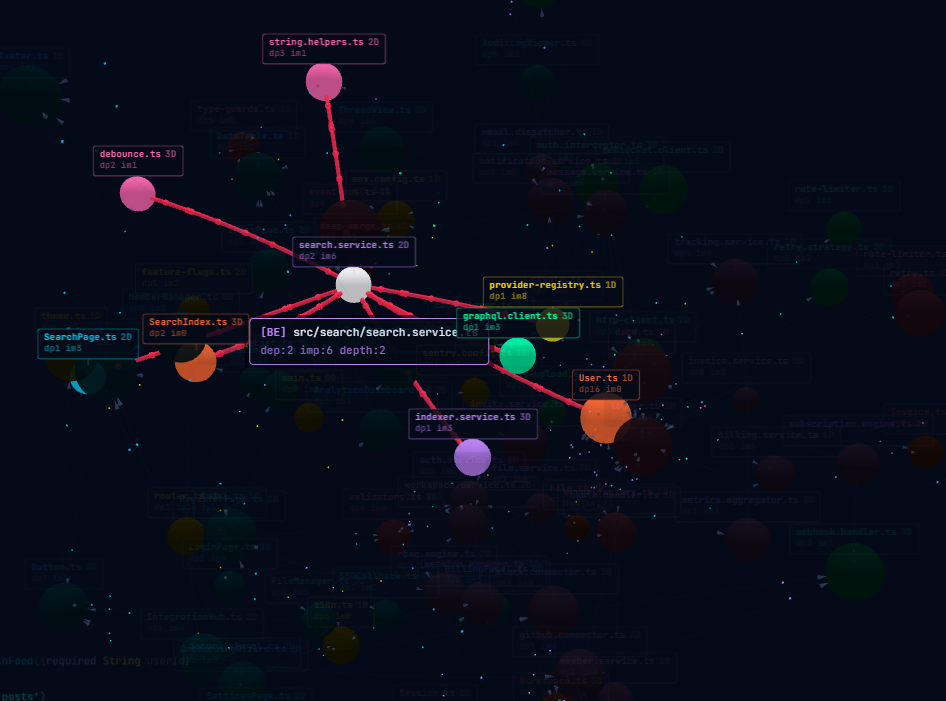
5. **The dashboard** shows a real-time visualization of your dependency graph with risk indicators.
|
|
20
|
+
|
|
21
|
+
> **SYKE is a safety net, not a gatekeeper.** It doesn't block your AI while working — it catches what your AI missed before you ship.
|
|
22
|
+
|
|
13
23
|
## Quick Start
|
|
14
24
|
|
|
15
|
-
### 1.
|
|
25
|
+
### 1. Create config file
|
|
16
26
|
|
|
17
|
-
|
|
27
|
+
Create `~/.syke/config.json`:
|
|
18
28
|
|
|
19
29
|
```json
|
|
20
30
|
{
|
|
21
|
-
"
|
|
22
|
-
|
|
23
|
-
"command": "npx",
|
|
24
|
-
"args": ["@syke1/mcp-server@latest"],
|
|
25
|
-
"env": {
|
|
26
|
-
"SYKE_LICENSE_KEY": "your-key-here",
|
|
27
|
-
"SYKE_WEB_PORT": "3333",
|
|
28
|
-
"GEMINI_KEY": "your-gemini-key",
|
|
29
|
-
"OPENAI_KEY": "your-openai-key",
|
|
30
|
-
"ANTHROPIC_KEY": "your-anthropic-key"
|
|
31
|
-
}
|
|
32
|
-
}
|
|
33
|
-
}
|
|
31
|
+
"licenseKey": "SYKE-XXXX-XXXX-XXXX-XXXX",
|
|
32
|
+
"geminiKey": "your-gemini-api-key"
|
|
34
33
|
}
|
|
35
34
|
```
|
|
36
35
|
|
|
36
|
+
> Get your license key at [syke.cloud/dashboard](https://syke.cloud/dashboard/). You only need ONE AI key. Supported: `geminiKey`, `openaiKey`, `anthropicKey`.
|
|
37
|
+
|
|
38
|
+
### 2. Register MCP server
|
|
39
|
+
|
|
40
|
+
**Claude Code:**
|
|
41
|
+
|
|
42
|
+
```bash
|
|
43
|
+
claude mcp add syke -- npx @syke1/mcp-server@latest
|
|
44
|
+
```
|
|
45
|
+
|
|
37
46
|
**Cursor** (`.cursor/mcp.json`):
|
|
38
47
|
|
|
39
48
|
```json
|
|
@@ -41,12 +50,7 @@ Works with **Claude Code**, **Cursor**, **Windsurf**, and any MCP-compatible AI
|
|
|
41
50
|
"mcpServers": {
|
|
42
51
|
"syke": {
|
|
43
52
|
"command": "npx",
|
|
44
|
-
"args": ["@syke1/mcp-server@latest"]
|
|
45
|
-
"env": {
|
|
46
|
-
"SYKE_LICENSE_KEY": "your-key-here",
|
|
47
|
-
"SYKE_WEB_PORT": "3333",
|
|
48
|
-
"GEMINI_KEY": "your-gemini-key"
|
|
49
|
-
}
|
|
53
|
+
"args": ["@syke1/mcp-server@latest"]
|
|
50
54
|
}
|
|
51
55
|
}
|
|
52
56
|
}
|
|
@@ -59,28 +63,27 @@ Works with **Claude Code**, **Cursor**, **Windsurf**, and any MCP-compatible AI
|
|
|
59
63
|
"mcpServers": {
|
|
60
64
|
"syke": {
|
|
61
65
|
"command": "npx",
|
|
62
|
-
"args": ["@syke1/mcp-server@latest"]
|
|
63
|
-
"env": {
|
|
64
|
-
"SYKE_LICENSE_KEY": "your-key-here",
|
|
65
|
-
"SYKE_WEB_PORT": "3333",
|
|
66
|
-
"GEMINI_KEY": "your-gemini-key"
|
|
67
|
-
}
|
|
66
|
+
"args": ["@syke1/mcp-server@latest"]
|
|
68
67
|
}
|
|
69
68
|
}
|
|
70
69
|
}
|
|
71
70
|
```
|
|
72
71
|
|
|
73
|
-
> **Note:** You only need ONE AI key. SYKE auto-selects: Gemini > OpenAI > Anthropic. Set `SYKE_AI_PROVIDER` to force a specific one.
|
|
74
|
-
|
|
75
72
|
> **Windows note:** If `npx` is not found, use the full path: `"command": "C:\\Program Files\\nodejs\\npx.cmd"`
|
|
76
73
|
|
|
77
|
-
###
|
|
74
|
+
### 3. Add build gate to your project
|
|
78
75
|
|
|
79
|
-
|
|
76
|
+
Add this line to your project's `CLAUDE.md` (or equivalent AI instruction file):
|
|
80
77
|
|
|
81
|
-
|
|
78
|
+
```
|
|
79
|
+
After completing code changes, always run the gate_build MCP tool before committing or deploying.
|
|
80
|
+
```
|
|
81
|
+
|
|
82
|
+
This ensures your AI agent automatically runs SYKE's safety check after every task — no manual prompting needed.
|
|
82
83
|
|
|
83
|
-
|
|
84
|
+
### 4. Restart your AI agent
|
|
85
|
+
|
|
86
|
+
SYKE auto-detects your project language and builds the dependency graph on startup. Open `http://localhost:3333` to see your live dashboard.
|
|
84
87
|
|
|
85
88
|
## Features
|
|
86
89
|
|
|
@@ -101,14 +104,14 @@ A web dashboard opens automatically at `http://localhost:3333` (configurable via
|
|
|
101
104
|
|
|
102
105
|
SYKE supports three AI providers for semantic analysis. Bring your own key:
|
|
103
106
|
|
|
104
|
-
| Provider | Model | Env Variable |
|
|
105
|
-
|
|
106
|
-
| Google Gemini | `gemini-2.5-flash` | `GEMINI_KEY` |
|
|
107
|
-
| OpenAI | `gpt-4o-mini` | `OPENAI_KEY` |
|
|
108
|
-
| Anthropic | `claude-sonnet-4-20250514` | `ANTHROPIC_KEY` |
|
|
107
|
+
| Provider | Model | Config Key | Env Variable |
|
|
108
|
+
|----------|-------|-----------|-------------|
|
|
109
|
+
| Google Gemini | `gemini-2.5-flash` | `geminiKey` | `GEMINI_KEY` |
|
|
110
|
+
| OpenAI | `gpt-4o-mini` | `openaiKey` | `OPENAI_KEY` |
|
|
111
|
+
| Anthropic | `claude-sonnet-4-20250514` | `anthropicKey` | `ANTHROPIC_KEY` |
|
|
109
112
|
|
|
110
113
|
**Auto-selection:** SYKE uses the first available key (Gemini > OpenAI > Anthropic).
|
|
111
|
-
**Force provider:** Set `
|
|
114
|
+
**Force provider:** Set `aiProvider` in config (or `SYKE_AI_PROVIDER` env var) to override.
|
|
112
115
|
|
|
113
116
|
### Language Support
|
|
114
117
|
|
|
@@ -116,10 +119,55 @@ Auto-detected, zero-config: **Dart/Flutter**, **TypeScript/JavaScript**, **Pytho
|
|
|
116
119
|
|
|
117
120
|
### Web Dashboard
|
|
118
121
|
|
|
119
|
-
Live dependency graph visualization at `localhost:3333`
|
|
120
|
-
- Interactive node graph (click any file to see its connections)
|
|
122
|
+
Live dependency graph visualization at `localhost:3333` with:
|
|
123
|
+
- Interactive 3D node graph (click any file to see its connections)
|
|
121
124
|
- Real-time cascade monitoring
|
|
122
125
|
- Risk level indicators
|
|
126
|
+
- Server offline detection with auto-reconnect
|
|
127
|
+
|
|
128
|
+
## Configuration
|
|
129
|
+
|
|
130
|
+
SYKE reads from `~/.syke/config.json` (primary) with environment variable overrides:
|
|
131
|
+
|
|
132
|
+
| Config Key | Env Variable | Description | Required |
|
|
133
|
+
|-----------|-------------|-------------|----------|
|
|
134
|
+
| `licenseKey` | `SYKE_LICENSE_KEY` | Pro license key from dashboard | No (Free tier works without) |
|
|
135
|
+
| `geminiKey` | `GEMINI_KEY` | Google Gemini API key for `ai_analyze` | No (any one AI key) |
|
|
136
|
+
| `openaiKey` | `OPENAI_KEY` | OpenAI API key for `ai_analyze` | No (any one AI key) |
|
|
137
|
+
| `anthropicKey` | `ANTHROPIC_KEY` | Anthropic API key for `ai_analyze` | No (any one AI key) |
|
|
138
|
+
| `aiProvider` | `SYKE_AI_PROVIDER` | Force AI provider: `gemini`, `openai`, or `anthropic` | No (auto-selects) |
|
|
139
|
+
| `port` | `SYKE_WEB_PORT` | Dashboard port (default: 3333) | No |
|
|
140
|
+
|
|
141
|
+
**Full config example** (`~/.syke/config.json`):
|
|
142
|
+
|
|
143
|
+
```json
|
|
144
|
+
{
|
|
145
|
+
"licenseKey": "SYKE-XXXX-XXXX-XXXX-XXXX",
|
|
146
|
+
"geminiKey": "AIza...",
|
|
147
|
+
"openaiKey": "",
|
|
148
|
+
"anthropicKey": "",
|
|
149
|
+
"port": 3333
|
|
150
|
+
}
|
|
151
|
+
```
|
|
152
|
+
|
|
153
|
+
## Recommended Workflow
|
|
154
|
+
|
|
155
|
+
```
|
|
156
|
+
You (developer) AI Agent SYKE
|
|
157
|
+
| | |
|
|
158
|
+
|-- "Add feature X" -->| |
|
|
159
|
+
| |-- modifies files |
|
|
160
|
+
| |-- modifies files |
|
|
161
|
+
| |-- modifies files |
|
|
162
|
+
| | |
|
|
163
|
+
| |-- gate_build --->|
|
|
164
|
+
| | |-- scans graph
|
|
165
|
+
| | |-- checks impact
|
|
166
|
+
| |<-- PASS/FAIL ----|
|
|
167
|
+
| | |
|
|
168
|
+
|<-- "Done. Safe to | |
|
|
169
|
+
| build." ----------| |
|
|
170
|
+
```
|
|
123
171
|
|
|
124
172
|
## Pricing
|
|
125
173
|
|
|
@@ -136,27 +184,7 @@ Live dependency graph visualization at `localhost:3333` (or your custom `SYKE_WE
|
|
|
136
184
|
- AI semantic analysis (BYOK — Gemini, OpenAI, or Claude)
|
|
137
185
|
- Priority support
|
|
138
186
|
|
|
139
|
-
|
|
140
|
-
|
|
141
|
-
## Configuration
|
|
142
|
-
|
|
143
|
-
| Environment Variable | Description | Required |
|
|
144
|
-
|---------------------|-------------|----------|
|
|
145
|
-
| `SYKE_LICENSE_KEY` | Pro license key from dashboard | No (Free tier works without) |
|
|
146
|
-
| `GEMINI_KEY` | Google Gemini API key for `ai_analyze` | No (any one AI key) |
|
|
147
|
-
| `OPENAI_KEY` | OpenAI API key for `ai_analyze` | No (any one AI key) |
|
|
148
|
-
| `ANTHROPIC_KEY` | Anthropic API key for `ai_analyze` | No (any one AI key) |
|
|
149
|
-
| `SYKE_AI_PROVIDER` | Force AI provider: `gemini`, `openai`, or `anthropic` | No (auto-selects) |
|
|
150
|
-
| `SYKE_WEB_PORT` | Dashboard port (default: 3333) | No |
|
|
151
|
-
| `SYKE_NO_BROWSER` | Set to `1` to disable auto-open browser | No |
|
|
152
|
-
| `SYKE_currentProjectRoot` | Override auto-detected project root | No |
|
|
153
|
-
|
|
154
|
-
## How It Works
|
|
155
|
-
|
|
156
|
-
1. **On startup**, SYKE scans your source directory and builds a complete dependency graph using static import analysis.
|
|
157
|
-
2. **When your AI modifies a file**, call `gate_build` to check if the change is safe before building.
|
|
158
|
-
3. **If dependencies break**, SYKE detects cascading failures and blocks the build with a `FAIL` verdict.
|
|
159
|
-
4. **The dashboard** shows a real-time visualization of your dependency graph with risk indicators.
|
|
187
|
+
Sign up at [syke.cloud](https://syke.cloud) — 3-day free trial included.
|
|
160
188
|
|
|
161
189
|
## License
|
|
162
190
|
|
package/package.json
CHANGED
|
@@ -1,6 +1,6 @@
|
|
|
1
1
|
{
|
|
2
2
|
"name": "@syke1/mcp-server",
|
|
3
|
-
"version": "1.3.
|
|
3
|
+
"version": "1.3.7",
|
|
4
4
|
"mcpName": "io.github.khalomsky/syke",
|
|
5
5
|
"description": "AI code impact analysis MCP server — dependency graphs, cascade detection, and a mandatory build gate for AI coding agents",
|
|
6
6
|
"main": "dist/index.js",
|