@sveltia/cms 0.44.0 → 0.45.1
This diff represents the content of publicly available package versions that have been released to one of the supported registries. The information contained in this diff is provided for informational purposes only and reflects changes between package versions as they appear in their respective public registries.
- package/README.md +25 -16
- package/dist/sveltia-cms.js +307 -3842
- package/dist/sveltia-cms.js.map +1 -1
- package/dist/sveltia-cms.mjs +304 -3839
- package/dist/sveltia-cms.mjs.map +1 -1
- package/package.json +7 -7
package/README.md
CHANGED
|
@@ -1,6 +1,8 @@
|
|
|
1
1
|
# Sveltia CMS
|
|
2
2
|
|
|
3
|
-
Sveltia CMS is a Git-based lightweight headless CMS under active development as a modern, quick replacement for Netlify CMS and Decap CMS. In some simple cases, migration is as easy as a single line of code change, although we are still working on improving compatibility.
|
|
3
|
+
Sveltia CMS is a Git-based lightweight headless CMS under active development as a modern, quick replacement for Netlify CMS and Decap CMS. In some simple cases, migration is as easy as a single line of code change, although we are still working on improving compatibility.
|
|
4
|
+
|
|
5
|
+
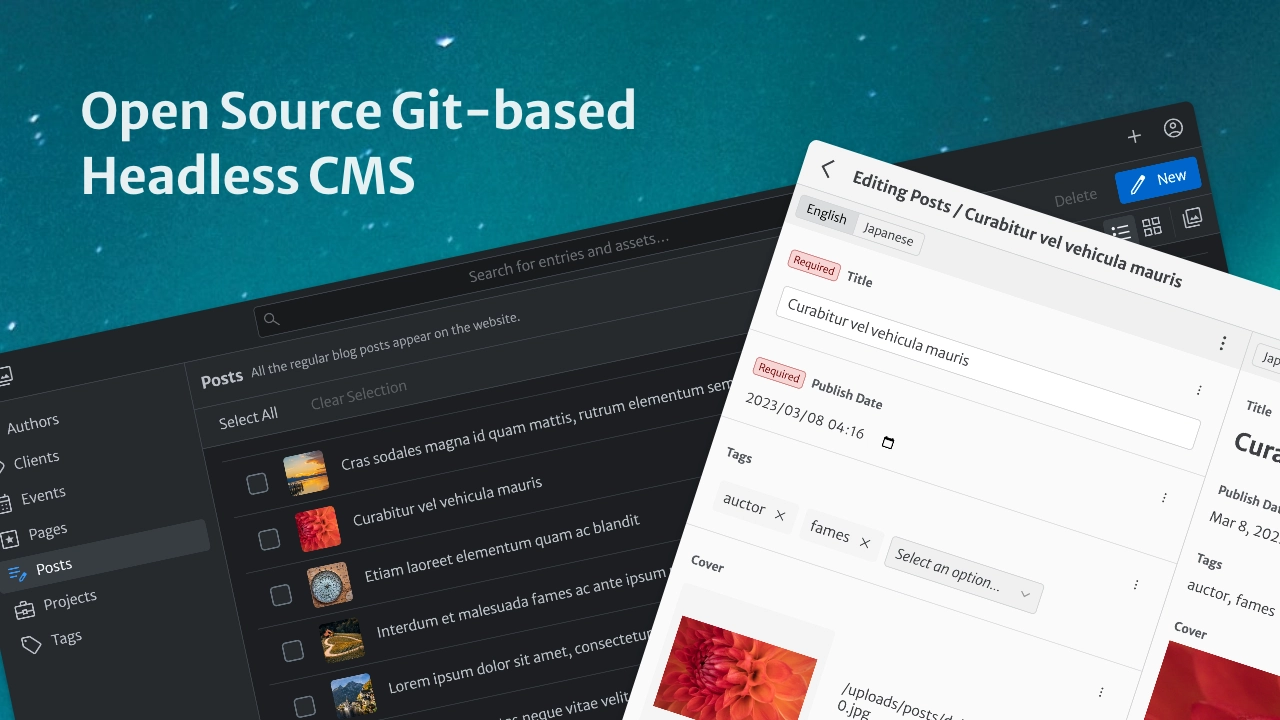
The free, open source alternative to Netlify/Decap CMS is now in public beta, turbocharged with great UX, performance, i18n support and many more enhancements.
|
|
4
6
|
|
|
5
7
|
<br>
|
|
6
8
|
|
|
@@ -58,6 +60,7 @@ Sveltia CMS is a Git-based lightweight headless CMS under active development as
|
|
|
58
60
|
- [Localizing entry slugs](#localizing-entry-slugs)
|
|
59
61
|
- [Disabling non-default locale content](#disabling-non-default-locale-content)
|
|
60
62
|
- [Using a random ID for an entry slug](#using-a-random-id-for-an-entry-slug)
|
|
63
|
+
- [Editing data files with a top-level list](#editing-data-files-with-a-top-level-list)
|
|
61
64
|
- [Disabling automatic deployments](#disabling-automatic-deployments)
|
|
62
65
|
- [Setting up Content Security Policy](#setting-up-content-security-policy)
|
|
63
66
|
- [Support \& feedback](#support--feedback)
|
|
@@ -85,7 +88,7 @@ Due to its unfortunate abandonment, Netlify CMS spawned 3 successors:
|
|
|
85
88
|
|
|
86
89
|
Sveltia CMS is the only project that doesn’t inherit the complexity, technical debt and miscellaneous bugs of Netlify CMS, which was launched back in 2015. We are confident that our decision to rebuild the application from scratch was the right one, as proven by the [hundreds of improvements](#differentiators) we have already made.
|
|
87
90
|
|
|
88
|
-
While Sveltia CMS is specifically designed to replace legacy Netlify CMS instances, it also aims to serve as a substitute for the other
|
|
91
|
+
While Sveltia CMS is specifically designed to replace legacy Netlify CMS instances, it also aims to serve as a substitute for the other Netlify CMS successors. We hope that, especially with the [robust i18n support](#better-i18n-support), our product will eventually become an attractive choice for anyone looking for a free headless CMS.
|
|
89
92
|
|
|
90
93
|
### Our goals
|
|
91
94
|
|
|
@@ -97,13 +100,13 @@ While Sveltia CMS is specifically designed to replace legacy Netlify CMS instanc
|
|
|
97
100
|
|
|
98
101
|
## Development status
|
|
99
102
|
|
|
100
|
-
Sveltia CMS is currently in **beta** and version 1.0 is expected to ship in **early 2025**, in time for the 10th anniversary of Netlify CMS. Check our [release notes](https://github.com/sveltia/sveltia-cms/releases) for updates. See also our [roadmap](#roadmap).
|
|
103
|
+
Sveltia CMS is currently in **beta** and version 1.0 is expected to ship in **early 2025**, in time for the 10th anniversary of Netlify CMS development. Check our [release notes](https://github.com/sveltia/sveltia-cms/releases) for updates. See also our [roadmap](#roadmap).
|
|
101
104
|
|
|
102
105
|
While we fix reported bugs as quickly as possible, usually within 24 hours, our overall progress may be slower than you think. The thing is, it’s not just a personal project of [@kyoshino](https://github.com/kyoshino), but also involves different kinds of activities that require considerable effort:
|
|
103
106
|
|
|
104
107
|
- Ensuring substantial [compatibility with Netlify/Decap CMS](#compatibility)
|
|
105
108
|
- Tackling as many [Netlify/Decap CMS issues](https://github.com/decaporg/decap-cms/issues) as possible
|
|
106
|
-
- So far, 135+ of them, or
|
|
109
|
+
- So far, 135+ of them, or 245+ including duplicates, have been effectively solved in Sveltia CMS
|
|
107
110
|
- Target: 150 issues by GA, 250 or all relevant and fixable issues in a future release
|
|
108
111
|
- Note: Issues include both feature requests and bug reports; we also track [their discussions](https://github.com/decaporg/decap-cms/discussions)
|
|
109
112
|
- [Let us know](https://github.com/sveltia/sveltia-cms/issues/new) if you have any specific issues you’d like to see solved!
|
|
@@ -197,7 +200,7 @@ We are working hard to create a **significantly better alternative to Netlify CM
|
|
|
197
200
|
|
|
198
201
|
### Better i18n support
|
|
199
202
|
|
|
200
|
-
Sveltia CMS has been built with a multilingual architecture from the very beginning. You can expect first-class internationalization (i18n) support, as it’s required by clients of maintainer [@kyoshino](https://github.com/kyoshino), who himself was a long-time Japanese localizer for Mozilla and currently lives in a [city](https://en.wikipedia.org/wiki/Toronto) where 150+ languages are spoken.
|
|
203
|
+
Sveltia CMS has been built with a multilingual architecture from the very beginning. You can expect first-class internationalization (i18n) support, as it’s required by clients of maintainer [@kyoshino](https://github.com/kyoshino), who himself was a long-time Japanese localizer for Mozilla and currently lives in a [multicultural city](https://en.wikipedia.org/wiki/Toronto) where 150+ languages are spoken.
|
|
201
204
|
|
|
202
205
|
- Configuration
|
|
203
206
|
- The [i18n limitations](https://decapcms.org/docs/i18n/#limitations) in Netlify/Decap CMS do not apply to Sveltia CMS:
|
|
@@ -293,10 +296,13 @@ Sveltia CMS has been built with a multilingual architecture from the very beginn
|
|
|
293
296
|
- DateTime
|
|
294
297
|
- A DateTime field doesn’t trigger a change in the content draft status when you’ve just started editing a new entry[^90].
|
|
295
298
|
- Hidden
|
|
299
|
+
- The `default` value supports the following template tags:
|
|
300
|
+
- `{{locale}}`: Replaced by the current locale code[^101].
|
|
301
|
+
- `{{datetime}}` Replaced by the current date/time in [ISO 8601 format](https://developer.mozilla.org/en-US/docs/Web/JavaScript/Reference/Global_Objects/Date#date_time_string_format)[^102].
|
|
302
|
+
- `{{uuid}}`, `{{uuid_short}}` and `{{uuid_shorter}}`: Replaced by a random UUID or its shorter version, just like the [slug template tags](#using-a-random-id-for-an-entry-slug)[^12].
|
|
296
303
|
- The `default` value is saved when you create a file collection item, not just a folder collection item[^78].
|
|
297
|
-
- The `default` value supports the `{{locale}}` and `{{datetime}}` template tags, which will be replaced by the locale code and the current date/time in [ISO 8601 format](https://developer.mozilla.org/en-US/docs/Web/JavaScript/Reference/Global_Objects/Date#date_time_string_format), respectively[^101][^102].
|
|
298
304
|
- List
|
|
299
|
-
- It’s possible to [edit data files with a top-level list](#editing-data-files-with-a-top-level-list)[^148].
|
|
305
|
+
- It’s possible to [edit data files with a top-level list](#editing-data-files-with-a-top-level-list) using the new `root` option[^148].
|
|
300
306
|
- The `min` and `max` options can be used separately. You don’t need to specify both to use either option[^145].
|
|
301
307
|
- The Add Item button appears at the bottom of the list when the `add_to_top` option is not `true`, so you don’t have to scroll up each time to add new items.
|
|
302
308
|
- Users can expand or collapse the entire list, while the Expand All and Collapse All buttons allow you to expand or collapse all items in the list at once.
|
|
@@ -526,17 +532,16 @@ If you get an “Authentication Aborted” error when trying to sign in to GitHu
|
|
|
526
532
|
|
|
527
533
|
### Working with a local Git repository
|
|
528
534
|
|
|
529
|
-
|
|
535
|
+
Sveltia CMS has simplified the local repository workflow by removing the need for additional configuration (the `local_backend` property) and a proxy server, thanks to the [File System Access API](https://developer.chrome.com/articles/file-system-access/) available in [some modern browsers](https://developer.mozilla.org/en-US/docs/web/api/window/showopenfilepicker#browser_compatibility).
|
|
530
536
|
|
|
531
|
-
Basically there are only two differences: you don’t need to run the proxy server, and you need to select your project folder in the browser instead. Here are the detailed steps:
|
|
537
|
+
Basically there are only two differences from Netlify/Decap CMS: you don’t need to run the proxy server, and you need to select your project folder in the browser instead. Here are the detailed steps:
|
|
532
538
|
|
|
533
539
|
1. Make sure you have configured the [GitHub](https://decapcms.org/docs/github-backend/) or [GitLab](https://decapcms.org/docs/gitlab-backend/) backend.
|
|
534
|
-
- Please note that the Git Gateway backend mentioned in the Netlify/Decap CMS [local Git repository document](https://decapcms.org/docs/working-with-a-local-git-repository/) is not supported in Sveltia CMS, so `name: git-gateway` won’t work. You’ll need either `name: github` or `name: gitlab` along with the `repo` definition. If you haven’t determined your repository name yet, just use a
|
|
535
|
-
- You can remove `local_backend` from your configuration, as it will be ignored by Sveltia CMS.
|
|
540
|
+
- Please note that the Git Gateway backend mentioned in the Netlify/Decap CMS [local Git repository document](https://decapcms.org/docs/working-with-a-local-git-repository/) is not supported in Sveltia CMS, so `name: git-gateway` won’t work. You’ll need either `name: github` or `name: gitlab` along with the `repo` definition. If you haven’t determined your repository name yet, just use a tentative name.
|
|
536
541
|
1. Launch the local development server for your frontend framework, typically with `npm run dev` or `pnpm dev`.
|
|
537
542
|
1. Open `http://localhost:[port]/admin/index.html` with Chrome or Edge.
|
|
538
543
|
- The port number varies by framework. Check the terminal output from the previous step.
|
|
539
|
-
- The `127.0.0.1`
|
|
544
|
+
- The `127.0.0.1` addresses can also be used instead of `localhost`.
|
|
540
545
|
- If your CMS instance is not located under `/admin/`, use the appropriate path.
|
|
541
546
|
- Other Chromium-based browsers may also work. Brave user? [See below](#enabling-local-development-in-brave).
|
|
542
547
|
1. Click “Work with Local Repository” and select the project’s root directory once prompted.
|
|
@@ -551,6 +556,8 @@ Keep in mind that, as with Netlify/Decap CMS, the local repository support in Sv
|
|
|
551
556
|
|
|
552
557
|
Also, at this point, you have to reload the CMS to see the latest content after retrieving remote updates. This manual work will hopefully be unnecessary once the proposed `FileSystemObserver` API, which is being [implemented in Chromium](https://issues.chromium.org/issues/40105284) behind a flag, becomes available.
|
|
553
558
|
|
|
559
|
+
If you have migrated from Netlify/Decap CMS and are happy with the local workflow of Sveltia CMS, you can remove the `local_backend` property from your configuration and uninstall the proxy server (`netlify-cms-proxy-server` or `decap-server`). If you have configured a custom port number with the `.env` file, you can remove it as well.
|
|
560
|
+
|
|
554
561
|
### Enabling local development in Brave
|
|
555
562
|
|
|
556
563
|
In the Brave browser, you must enable the File System Access API with an experiment flag to take advantage of local development.
|
|
@@ -731,7 +738,7 @@ It’s simple — just specify `{{uuid}}` (full UUID v4), `{{uuid_short}}` (last
|
|
|
731
738
|
|
|
732
739
|
### Editing data files with a top-level list
|
|
733
740
|
|
|
734
|
-
Sveltia CMS allows you to
|
|
741
|
+
Sveltia CMS allows you to edit and save a list at the top-level of a data file, without a field name. All you need to do is create a single List field with the new `root` option set to `true`. The configuration below reproduces a [Jekyll data file example](https://jekyllrb.com/docs/datafiles/#example-list-of-members):
|
|
735
742
|
|
|
736
743
|
```yaml
|
|
737
744
|
collections:
|
|
@@ -749,11 +756,13 @@ collections:
|
|
|
749
756
|
root: true # This does the trick
|
|
750
757
|
fields:
|
|
751
758
|
- name: name
|
|
752
|
-
label:
|
|
759
|
+
label: Name
|
|
753
760
|
- name: github
|
|
754
|
-
label: GitHub
|
|
761
|
+
label: GitHub account
|
|
755
762
|
```
|
|
756
763
|
|
|
764
|
+
Note: The `root` option is ignored if the collection or collection file contains multiple fields. You can still have subfields under the List field.
|
|
765
|
+
|
|
757
766
|
### Disabling automatic deployments
|
|
758
767
|
|
|
759
768
|
You may already have a CI/CD tool set up on your Git repository to automatically deploy changes to production. Occasionally, you make a lot of changes to your content to quickly reach the CI/CD provider’s (free) build limits, or you just don’t want to see builds triggered for every single small change.
|
|
@@ -1079,7 +1088,7 @@ This software is provided “as is” without any express or implied warranty. W
|
|
|
1079
1088
|
|
|
1080
1089
|
[^70]: Netlify/Decap CMS [#6482](https://github.com/decaporg/decap-cms/issues/6482)
|
|
1081
1090
|
|
|
1082
|
-
[^71]: Netlify/Decap CMS [#6999](https://github.com/decaporg/decap-cms/issues/6999), [#7000](https://github.com/decaporg/decap-cms/issues/7000), [#7001](https://github.com/decaporg/decap-cms/issues/7001), [#7152](https://github.com/decaporg/decap-cms/issues/7152), [#7220](https://github.com/decaporg/decap-cms/issues/7220), [#7283](https://github.com/decaporg/decap-cms/issues/7283)
|
|
1091
|
+
[^71]: Netlify/Decap CMS [#6999](https://github.com/decaporg/decap-cms/issues/6999), [#7000](https://github.com/decaporg/decap-cms/issues/7000), [#7001](https://github.com/decaporg/decap-cms/issues/7001), [#7152](https://github.com/decaporg/decap-cms/issues/7152), [#7220](https://github.com/decaporg/decap-cms/issues/7220), [#7283](https://github.com/decaporg/decap-cms/issues/7283), [#7316](https://github.com/decaporg/decap-cms/issues/7316)
|
|
1083
1092
|
|
|
1084
1093
|
[^72]: Netlify/Decap CMS [#7047](https://github.com/decaporg/decap-cms/issues/7047)
|
|
1085
1094
|
|