@sveltia/cms 0.42.2 → 0.44.0
This diff represents the content of publicly available package versions that have been released to one of the supported registries. The information contained in this diff is provided for informational purposes only and reflects changes between package versions as they appear in their respective public registries.
- package/README.md +77 -43
- package/dist/sveltia-cms.js +250 -250
- package/dist/sveltia-cms.js.map +1 -1
- package/dist/sveltia-cms.mjs +242 -242
- package/dist/sveltia-cms.mjs.map +1 -1
- package/package.json +4 -4
package/README.md
CHANGED
|
@@ -1,6 +1,6 @@
|
|
|
1
1
|
# Sveltia CMS
|
|
2
2
|
|
|
3
|
-
Sveltia CMS is a Git-based lightweight headless CMS under active development as a modern, quick replacement for Netlify CMS and Decap CMS. In some simple cases, migration is as easy as a single line of code change, although we are still working on improving compatibility. The free, open source alternative to Netlify/Decap CMS is now in public beta
|
|
3
|
+
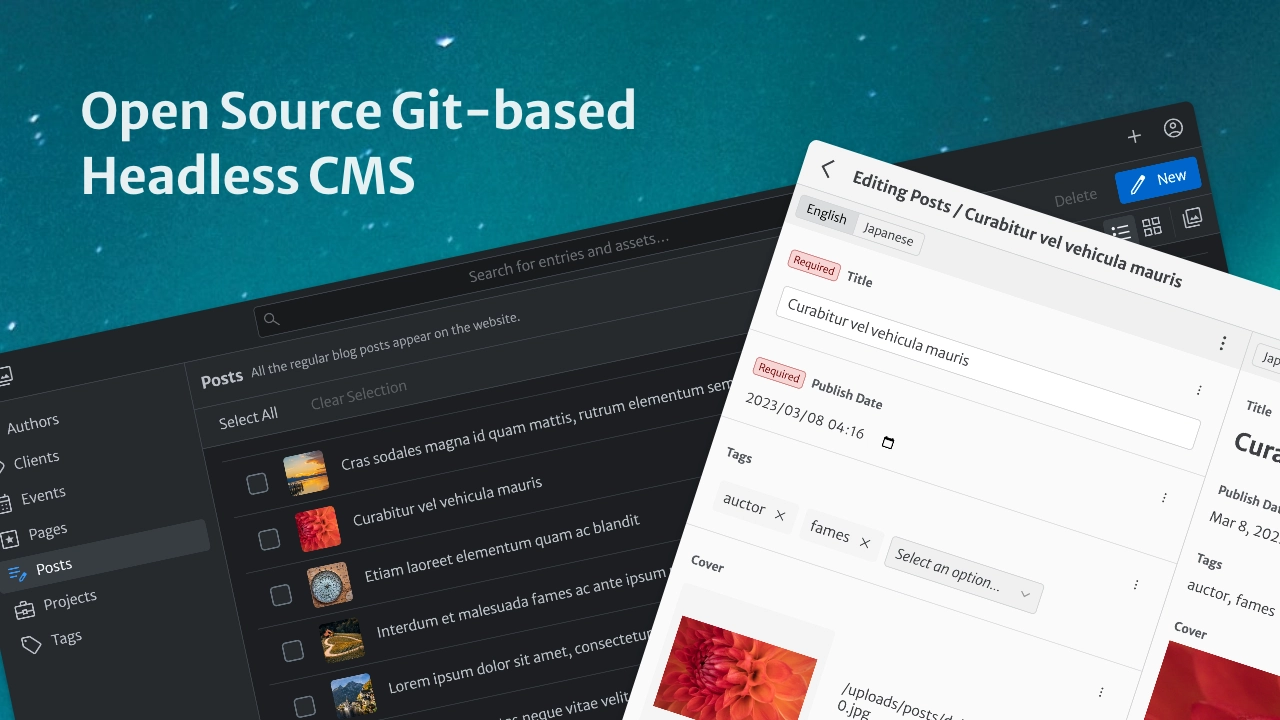
Sveltia CMS is a Git-based lightweight headless CMS under active development as a modern, quick replacement for Netlify CMS and Decap CMS. In some simple cases, migration is as easy as a single line of code change, although we are still working on improving compatibility. The free, open source alternative to Netlify/Decap CMS is now in public beta with great UX, performance, i18n support and many more enhancements.
|
|
4
4
|
|
|
5
5
|
<br>
|
|
6
6
|
|
|
@@ -123,7 +123,7 @@ We are working hard to create a **significantly better alternative to Netlify CM
|
|
|
123
123
|
- Offers a modern, intuitive user interface, including an immersive dark mode[^2], inspired in part by the Netlify CMS v3 prototype[^1].
|
|
124
124
|
- We develop [our own UI library](https://github.com/sveltia/sveltia-ui) to ensure optimal usability without compromising accessibility.
|
|
125
125
|
- Comes with touch device support, such as larger buttons for easier tapping. While the UI is not yet optimized for small screens, it should work well with large tablets like iPad Pro or Pixel Tablet. Mobile support and other optimizations such as swipe navigation are planned shortly after the 1.0 release.
|
|
126
|
-
- Made with Svelte, not React, means we can spend more time on UX rather than tedious state management. It also allows us to avoid common
|
|
126
|
+
- Made with Svelte, not React, means we can spend more time on UX rather than tedious state management. It also allows us to avoid common React application crashes[^113][^129]. Best of all, Svelte offers great performance.
|
|
127
127
|
- The in-app Help menu provides all links to useful resources, including release notes, feedback and support.
|
|
128
128
|
- Users can personalize the application with various settings, including appearance and language. Developer Mode can also be enabled.
|
|
129
129
|
- Never miss out on the latest features and bug fixes by being notified when an update to the CMS is available[^31]. Then update to the latest version with a single click[^66].
|
|
@@ -134,7 +134,7 @@ We are working hard to create a **significantly better alternative to Netlify CM
|
|
|
134
134
|
- Small footprint: The bundle size is less than 450 KB when minified and brotlied, which is much lighter than Netlify CMS (1.5 MB), Decap CMS (1.8 MB) and Static CMS (2.6 MB)[^57][^64], even though we haven’t implemented some features yet. That’s the power of Svelte + Vite.
|
|
135
135
|
- We have upgraded from Svelte 4 to [Svelte 5](https://svelte.dev/blog/svelte-5-is-alive) to further improve performance, including an even smaller bundle size. A full migration to the Runes reactivity API will follow.
|
|
136
136
|
- Sveltia CMS is free of technical debt and [virtual DOM overhead](https://svelte.dev/blog/virtual-dom-is-pure-overhead).
|
|
137
|
-
- Uses the GraphQL API for GitHub and GitLab to quickly fetch content at once, so that entries and assets can be listed and searched instantly[^32][^65]. It also avoids the slowness and potential API rate limit violations caused by hundreds of requests with Relation widgets[^14].
|
|
137
|
+
- Uses the GraphQL API for GitHub and GitLab to quickly fetch content at once, so that entries and assets can be listed and searched instantly[^32][^65], ignoring the `search` configuration option. It also avoids the slowness and potential API rate limit violations caused by hundreds of requests with Relation widgets[^14].
|
|
138
138
|
- Saving entries and assets to GitHub is also much faster thanks to the [GraphQL mutation](https://github.blog/changelog/2021-09-13-a-simpler-api-for-authoring-commits/).
|
|
139
139
|
- Sorting, filtering and grouping of entries is done instantly without reloading the entire content.
|
|
140
140
|
- Using caching and lazy loading techniques. A list of repository files is stored locally for faster startup and bandwidth savings.
|
|
@@ -143,8 +143,8 @@ We are working hard to create a **significantly better alternative to Netlify CM
|
|
|
143
143
|
|
|
144
144
|
### Better productivity
|
|
145
145
|
|
|
146
|
-
-
|
|
147
|
-
- In addition to a streamlined workflow, it offers
|
|
146
|
+
- Developers can [work with a local Git repository](#working-with-a-local-git-repository) without any extra configuration or proxy server[^26].
|
|
147
|
+
- In addition to a streamlined workflow, it offers improved performance by reading and writing files natively through the browser rather than using a slow, ad hoc REST API.
|
|
148
148
|
- It also avoids a number of issues, including the 30 MB file size limit[^51], an unknown error with `publish_mode`[^75], and an unused `logo_url`[^49].
|
|
149
149
|
- When you delete an entry or an asset file, the empty folder that contains it is also deleted, so you don’t have to delete it manually.
|
|
150
150
|
- Provides a smoother user experience in the Content Editor:
|
|
@@ -152,8 +152,8 @@ We are working hard to create a **significantly better alternative to Netlify CM
|
|
|
152
152
|
- Click once (the Save button) instead of twice (Publish > Publish now) to save an entry.
|
|
153
153
|
- The editor closes automatically when an entry is saved. This behaviour can be changed in the application settings.
|
|
154
154
|
- Uploading files can be done with drag and drop[^20].
|
|
155
|
-
-
|
|
156
|
-
-
|
|
155
|
+
- Users can upload multiple files at once to the Asset Library[^5].
|
|
156
|
+
- Users can delete multiple entries and assets at once.
|
|
157
157
|
- Some [keyboard shortcuts](#using-keyboard-shortcuts) are available for faster editing.
|
|
158
158
|
|
|
159
159
|
### Better accessibility
|
|
@@ -186,14 +186,14 @@ We are working hard to create a **significantly better alternative to Netlify CM
|
|
|
186
186
|
|
|
187
187
|
- Uses the GraphQL API where possible for better performance, as mentioned above. You don’t need to set the `use_graphql` option to enable it for GitHub and GitLab.
|
|
188
188
|
- The Git branch name is automatically set to the repository’s default branch (`main`, `master` or whatever) if not specified in the configuration file, preventing data loading errors due to a hardcoded fallback to `master`[^95][^27].
|
|
189
|
-
-
|
|
189
|
+
- Developers can [disable automatic deployments](#disabling-automatic-deployments) by default or on demand to save costs and resources associated with CI/CD and to publish multiple changes at once[^24].
|
|
190
190
|
- The GitLab backend support comes with background [service status](https://status.gitlab.com/) checking, just like GitHub.
|
|
191
191
|
- Service status checks are performed frequently and an incident notification is displayed prominently.
|
|
192
|
-
-
|
|
192
|
+
- Users can quickly open the source file of an entry or asset in your repository using View on GitHub (or GitLab) under the 3-dot menu.
|
|
193
193
|
- We provide [our own OAuth client](https://github.com/sveltia/sveltia-cms-auth) for GitHub and GitLab.
|
|
194
|
-
-
|
|
194
|
+
- Users won’t get a 404 Not Found error when you sign in to the GitLab backend[^115].
|
|
195
195
|
- Features the all-new local backend that boosts DX. See the [productivity section](#better-productivity) above.
|
|
196
|
-
-
|
|
196
|
+
- Developers can select the local and remote backends while working on a local server.
|
|
197
197
|
|
|
198
198
|
### Better i18n support
|
|
199
199
|
|
|
@@ -204,19 +204,19 @@ Sveltia CMS has been built with a multilingual architecture from the very beginn
|
|
|
204
204
|
- File collections support multiple files/folders i18n structures[^87]. To enable it, simply use the `{{locale}}` template tag in the `file` path option, e.g. `content/pages/about.{{locale}}.json` or `content/pages/{{locale}}/about.json`. For backward compatibility, the global `structure` option only applies to folder collections as before.
|
|
205
205
|
- The `i18n: duplicate` field configuration can be used for the List and Object widgets so that changes made with these widgets are duplicated between locales[^7][^68]. Subfields can use the `i18n` configuration normally.
|
|
206
206
|
- [Entry-relative media folders](https://decapcms.org/docs/collection-folder/#media-and-public-folder) can be used in conjunction with the `multiple_folders` i18n structure[^21].
|
|
207
|
-
-
|
|
208
|
-
-
|
|
209
|
-
-
|
|
207
|
+
- Developers can use the `{{locale}}` template tag in the [`preview_path`](https://decapcms.org/docs/configuration-options/#preview_path) collection option to provide site preview links for each language[^63].
|
|
208
|
+
- It’s possible to [use a random UUID for an entry slug](#using-a-random-id-for-an-entry-slug), which is a good option for locales that write in non-Latin characters.
|
|
209
|
+
- It’s possible to [localize entry slugs](#localizing-entry-slugs) while linking the localized files[^80], thanks to the support for Hugo’s `translationKey`[^81].
|
|
210
210
|
- When the `clean_accents` option is enabled for [entry slugs](https://decapcms.org/docs/configuration-options/#slug-type), certain characters, such as German umlauts, will be [transliterated](https://en.wikipedia.org/wiki/Transliteration)[^99].
|
|
211
|
-
-
|
|
211
|
+
- It’s possible to embed the locale code in an entry by using `widget: hidden` along with `default: '{{locale}}'`[^101].
|
|
212
212
|
- User interface
|
|
213
213
|
- Eliminates UI confusion: The preview pane can be displayed without toggling i18n in the Content Editor. Both panes are scrollable. There is no condition where both panes are edited in the same language at the same time.
|
|
214
|
-
-
|
|
214
|
+
- Users can easily switch between locales while editing by clicking a button instead of a dropdown list.
|
|
215
215
|
- Language labels appear in human-readable display names instead of ISO 639 language codes because it’s not easy for everyone to recognize `DE` as German, `NL` as Dutch, `ZH` as Chinese, and so on.
|
|
216
216
|
- Content editing
|
|
217
217
|
- [Integrates DeepL](#using-deepl-to-translate-entry-fields) to allow translation of text fields from another locale with one click. More translation services will be added in the future.
|
|
218
218
|
- The Content Editor supports [RTL scripts](https://en.wikipedia.org/wiki/Right-to-left_script) such as Arabic, Hebrew and Persian[^146].
|
|
219
|
-
-
|
|
219
|
+
- It’s possible to [disable non-default locale content](#disabling-non-default-locale-content)[^15].
|
|
220
220
|
- Boolean, DateTime, List and Number fields in the entry preview are displayed in a localized format.
|
|
221
221
|
- Boolean fields are updated in real time between locales like other widgets to avoid confusion[^35].
|
|
222
222
|
- Relation fields with i18n enabled won’t trigger a change in the content draft status when you start editing an existing entry[^84].
|
|
@@ -228,18 +228,20 @@ Sveltia CMS has been built with a multilingual architecture from the very beginn
|
|
|
228
228
|
### Better collections
|
|
229
229
|
|
|
230
230
|
- Configuration
|
|
231
|
-
-
|
|
232
|
-
|
|
233
|
-
|
|
234
|
-
|
|
235
|
-
-
|
|
231
|
+
- Provides some new options, including:
|
|
232
|
+
- `icon`: [Choose a custom icon for each collection](#using-a-custom-icon-for-a-collection)[^3].
|
|
233
|
+
- `divider`: [Add dividers to the collection list](#adding-dividers-to-the-collection-list).
|
|
234
|
+
- `thumbnail`: Specify the field name for a thumbnail displayed on the entry list[^130]. A nested field can be specified using dot notation, e.g. `images.0.src`. If undefined, the `name` of the first image field is used.
|
|
235
|
+
- Developers can use nested fields (dot notation) in the `path` option for a folder collection, e.g. `{{fields.state.name}}/{{slug}}`[^62].
|
|
236
|
+
- Developers can use Markdown in the `description` collection option[^79]. Bold, italic, strikethrough, code and links are allowed.
|
|
236
237
|
- Entry slugs
|
|
237
|
-
-
|
|
238
|
+
- It’s possible to [use a random UUID for an entry slug](#using-a-random-id-for-an-entry-slug).
|
|
238
239
|
- Slug generation is fail-safe: If a slug cannot be determined from entry content, part of a random UUID is used instead of throwing an error or filling in with arbitrary string field values[^133].
|
|
239
240
|
- Entry slug template tags support [filter transformations](https://decapcms.org/docs/summary-strings/) just like summary string template tags[^29].
|
|
240
241
|
- Single quotes (apostrophes) in a slug will be replaced with `sanitize_replacement` (default: hyphen) rather than being removed[^52].
|
|
241
|
-
-
|
|
242
|
+
- Developers can set the maximum number of characters for an entry slug with the new `slug_length` collection option to avoid deployment errors with Netlify or other platforms[^25].
|
|
242
243
|
- Setting the collection `path` doesn’t affect the entry slugs stored with the Relation widget[^137].
|
|
244
|
+
- Entry slugs are [localizable](#localizing-entry-slugs)[^80].
|
|
243
245
|
- Entry listing
|
|
244
246
|
- The collection list displays the number of items in each collection.
|
|
245
247
|
- A folder collection filter with a boolean value works as expected[^93].
|
|
@@ -249,7 +251,7 @@ Sveltia CMS has been built with a multilingual architecture from the very beginn
|
|
|
249
251
|
- Sorting entries by a DateTime field works as expected[^110].
|
|
250
252
|
- If you update an entry field that appears in the collection’s `summary`, such as `title`, the entry list displays an updated summary after you save the entry.
|
|
251
253
|
- If entries don’t have an Image field for thumbnails, the entry list will only be displayed in list view, because it doesn’t make sense to show grid view[^143].
|
|
252
|
-
- Assets stored in a [
|
|
254
|
+
- Assets stored in a [collection media folder](#using-a-custom-media-folder-for-a-collection) can be displayed next to the entries.
|
|
253
255
|
- The New Entry button won’t appear when a developer accidentally sets the `create: true` option on a file collection because it’s useless[^89].
|
|
254
256
|
- The Delete Entry button won’t appear when a developer accidentally sets the `delete: true` option on a file collection because the preconfigured files should not be deleted.
|
|
255
257
|
- A single file can be used for more than one item in a file collection[^127].
|
|
@@ -257,15 +259,15 @@ Sveltia CMS has been built with a multilingual architecture from the very beginn
|
|
|
257
259
|
### Better content editing
|
|
258
260
|
|
|
259
261
|
- Required fields, not optional fields, are marked for efficient data entry.
|
|
260
|
-
-
|
|
262
|
+
- Users can revert changes to all fields or a specific field.
|
|
261
263
|
- If you revert changes and there are no unsaved changes, the Save button is disabled as expected[^118].
|
|
262
|
-
-
|
|
264
|
+
- Developers can hide the preview of a specific field with `preview: false`[^126].
|
|
263
265
|
- Fields with validation errors are automatically expanded if they are part of nested, collapsed objects[^40].
|
|
264
266
|
- When you click on a field in the preview pane, the corresponding field in the edit pane is highlighted[^41]. It will be automatically expanded if collapsed.
|
|
265
267
|
- The preview pane displays all fields, including each label, making it easier to see which fields are populated.
|
|
266
268
|
- Provides better scroll synchronization between the panes when editing or previewing an entry[^92].
|
|
267
269
|
- The preview pane won’t cause a scrolling issue[^136].
|
|
268
|
-
-
|
|
270
|
+
- Developers can use a full regular expression, including flags, for the widget `pattern` option[^82]. For example, if you want to allow 280 characters or less in a multiline text field, you could write `/^.{0,280}$/s` (but you can now use the `maxlength` option instead.)
|
|
269
271
|
- A long validation error message is displayed in full, without being hidden behind the field label[^59].
|
|
270
272
|
- Any links to other entries will work as expected, with the Content Editor being updated for the other[^100].
|
|
271
273
|
- In the Boolean and Select widgets, you don’t have to update a value twice to re-enable the Save button after saving an entry[^139].
|
|
@@ -278,6 +280,7 @@ Sveltia CMS has been built with a multilingual architecture from the very beginn
|
|
|
278
280
|
- JSON/TOML/YAML data is saved with a new line at the end of the file to prevent unnecessary changes being made to the file[^11][^69].
|
|
279
281
|
- String values in YAML files can be quoted with the new `yaml_quote: true` option for a collection, mainly for framework compatibility[^9].
|
|
280
282
|
- YAML string folding (maximum line width) is disabled, mainly for framework compatibility[^119].
|
|
283
|
+
- DateTime field values in ISO 8601 format are stored in native date/time format instead of quoted strings when the data output is TOML[^147].
|
|
281
284
|
|
|
282
285
|
### Better widgets
|
|
283
286
|
|
|
@@ -293,20 +296,21 @@ Sveltia CMS has been built with a multilingual architecture from the very beginn
|
|
|
293
296
|
- The `default` value is saved when you create a file collection item, not just a folder collection item[^78].
|
|
294
297
|
- The `default` value supports the `{{locale}}` and `{{datetime}}` template tags, which will be replaced by the locale code and the current date/time in [ISO 8601 format](https://developer.mozilla.org/en-US/docs/Web/JavaScript/Reference/Global_Objects/Date#date_time_string_format), respectively[^101][^102].
|
|
295
298
|
- List
|
|
299
|
+
- It’s possible to [edit data files with a top-level list](#editing-data-files-with-a-top-level-list)[^148].
|
|
296
300
|
- The `min` and `max` options can be used separately. You don’t need to specify both to use either option[^145].
|
|
297
301
|
- The Add Item button appears at the bottom of the list when the `add_to_top` option is not `true`, so you don’t have to scroll up each time to add new items.
|
|
298
|
-
-
|
|
302
|
+
- Users can expand or collapse the entire list, while the Expand All and Collapse All buttons allow you to expand or collapse all items in the list at once.
|
|
299
303
|
- A required List field with no subfield or value is marked as invalid[^43].
|
|
300
304
|
- An optional List field with no subfield or value is saved as an empty array, rather than nothing[^44].
|
|
301
|
-
-
|
|
302
|
-
-
|
|
305
|
+
- Users can enter spaces in a simple text-based List field[^50].
|
|
306
|
+
- Users can preview variable types without having to register a preview template[^42].
|
|
303
307
|
- Markdown
|
|
304
308
|
- The rich text editor is built with the well-maintained [Lexical](https://lexical.dev/) framework, which solves various issues with a [Slate](https://github.com/ianstormtaylor/slate)-based editor in Netlify/Decap CMS, including fatal application crashes[^71][^72][^73][^111], lost formatting when pasting[^124], backslash injections[^53], dropdown visibility[^70], and text input difficulties with IME[^54].
|
|
305
|
-
-
|
|
309
|
+
- Developers can set the default editor mode by changing the order of the `modes` option[^58]. If you want to use the plain text editor by default, add `modes: [raw, rich_text]` to the field configuration.
|
|
306
310
|
- Line breaks are rendered as line breaks in the preview pane according to GitHub Flavored Markdown (GFM).
|
|
307
311
|
- Object
|
|
308
312
|
- Sveltia CMS offers two ways to have conditional fields in a collection[^30]:
|
|
309
|
-
-
|
|
313
|
+
- Developers can use [variable types](https://decapcms.org/docs/variable-type-widgets/) (the `types` option) with the Object widget just like the List widget.
|
|
310
314
|
- An optional Object field (`required: false`) can be manually added or removed with a checkbox[^88]. If unadded or removed, the required subfields won’t trigger validation errors[^16], and the field will be saved as `null`.
|
|
311
315
|
- Relation
|
|
312
316
|
- Field options are displayed with no additional API requests[^14]. The confusing `options_length` option, which defaults to 20, is therefore ignored[^76].
|
|
@@ -332,7 +336,7 @@ Sveltia CMS has been built with a multilingual architecture from the very beginn
|
|
|
332
336
|
- A new asset can be uploaded by dragging & dropping it into the dialog[^20].
|
|
333
337
|
- A URL can also be entered in the dialog.
|
|
334
338
|
- Integration with Pexels, Pixabay and Unsplash makes it easy to select and insert a free stock photo[^8]. More stock photo providers will be added in the future.
|
|
335
|
-
-
|
|
339
|
+
- Users can also simply drag and drop a file onto a File/Image field to attach it without having to open the Select File dialog.
|
|
336
340
|
- Large images automatically fit in the preview pane instead of being displayed at their original size, which can easily exceed the width of the pane.
|
|
337
341
|
- If the `public_folder` contains `{{slug}}` and you’ve edited a slug field (e.g. `title`) of a new entry after uploading an asset, the updated slug will be used in the saved asset path[^140]. Other dynamic template tags such as `{{filename}}` will also be populated as expected[^141].
|
|
338
342
|
- List and Object
|
|
@@ -359,21 +363,22 @@ Sveltia CMS has been built with a multilingual architecture from the very beginn
|
|
|
359
363
|
### Better asset management
|
|
360
364
|
|
|
361
365
|
- A completely new, full-fledged Asset Library, built separately from the image selection dialog, makes it easy to manage all of your files, including images, videos and documents[^96].
|
|
362
|
-
- Navigate between the global media folder and
|
|
366
|
+
- Navigate between the global media folder and collection media folders[^6].
|
|
363
367
|
- Preview image, audio, video, text and PDF files. Check your site’s [CSP](#setting-up-content-security-policy) if the preview doesn’t work.
|
|
364
368
|
- Copy the public URL[^74], file path, text data or image data of a selected asset to clipboard. The file path starts with `/` as expected[^48].
|
|
365
|
-
- Edit
|
|
366
|
-
- Rename
|
|
367
|
-
- Replace
|
|
369
|
+
- Edit plain text assets, including SVG images.
|
|
370
|
+
- Rename existing assets. If the asset is used in any entries, the File/Image fields will be automatically updated with a new file path.
|
|
371
|
+
- Replace existing assets.
|
|
368
372
|
- Download one or more selected assets at once.
|
|
369
373
|
- Delete one or more selected assets at once.
|
|
370
374
|
- Upload multiple assets at once, including files in nested folders, by browsing or dragging and dropping them into the library[^5].
|
|
371
375
|
- Sort or filter assets by name or file type.
|
|
372
376
|
- View asset details, including size, dimensions, commit author/date and a list of entries that use the selected asset.
|
|
373
377
|
- PDF documents are displayed with a thumbnail image in both the Asset Library and the Select File dialog, making it easier to find the file you’re looking for[^38].
|
|
374
|
-
- Assets stored in an entry-relative media folder are displayed in the Asset Library[^142].
|
|
378
|
+
- Assets stored in an entry-relative media folder are displayed in the Asset Library[^142].
|
|
379
|
+
- These entry-relative assets are automatically deleted when the associated entry is deleted because these are not available for other entries[^22]. When you’re [working with a local repository](#working-with-a-local-git-repository), the empty enclosing folder is also deleted.
|
|
375
380
|
- Hidden files (dot files) don’t appear in the Asset Library[^47].
|
|
376
|
-
-
|
|
381
|
+
- Users can add assets using the Quick Add button in the upper right corner of the application.
|
|
377
382
|
- Files are uploaded with their original names, without converting uppercase letters and spaces to lowercase letters and hyphens[^97].
|
|
378
383
|
- No fatal application crash when uploading assets[^112].
|
|
379
384
|
|
|
@@ -607,7 +612,7 @@ Rather, if you’d like to add all the media files for a collection in one singl
|
|
|
607
612
|
+ public_folder: /media/products
|
|
608
613
|
```
|
|
609
614
|
|
|
610
|
-
In Sveltia CMS, those
|
|
615
|
+
In Sveltia CMS, those collection media folders are displayed prominently for easier asset management. We recommend setting `media_folder` and `public_folder` for each collection if it contains one or more File/Image fields.
|
|
611
616
|
|
|
612
617
|
### Using keyboard shortcuts
|
|
613
618
|
|
|
@@ -679,7 +684,7 @@ With this configuration, an entry is saved with localized filenames, while the d
|
|
|
679
684
|
title: Mon voyage à New York
|
|
680
685
|
```
|
|
681
686
|
|
|
682
|
-
You can customize the property name and value for a different framework or i18n library by adding the `canonical_slug` option to your top-level or
|
|
687
|
+
You can customize the property name and value for a different framework or i18n library by adding the `canonical_slug` option to your top-level or collection-level `i18n` configuration. The example below is for [@astrolicious/i18n](https://github.com/astrolicious/i18n), which requires a locale prefix in the value ([discussion](https://github.com/sveltia/sveltia-cms/issues/137)):
|
|
683
688
|
|
|
684
689
|
```yaml
|
|
685
690
|
i18n:
|
|
@@ -698,7 +703,7 @@ i18n:
|
|
|
698
703
|
|
|
699
704
|
### Disabling non-default locale content
|
|
700
705
|
|
|
701
|
-
You can disable output of content in selected non-default locales by adding the `save_all_locales` property to the top-level or
|
|
706
|
+
You can disable output of content in selected non-default locales by adding the `save_all_locales` property to the top-level or collection-level `i18n` configuration. Then you’ll find “Disable (locale name)” in the three-dot menu in the top right corner of the Content Editor. This is useful if the translation isn’t ready yet, but you want to publish the default locale content first.
|
|
702
707
|
|
|
703
708
|
With the following configuration, you can disable the French and/or German translation while writing in English.
|
|
704
709
|
|
|
@@ -724,6 +729,31 @@ It’s simple — just specify `{{uuid}}` (full UUID v4), `{{uuid_short}}` (last
|
|
|
724
729
|
+ slug: '{{uuid_short}}'
|
|
725
730
|
```
|
|
726
731
|
|
|
732
|
+
### Editing data files with a top-level list
|
|
733
|
+
|
|
734
|
+
Sveltia CMS allows you to have a list at the top-level of a data file without a field name. It’s simple: create a single List field with the new `root` option. The configuration below reproduces the [Jekyll data file example](https://jekyllrb.com/docs/datafiles/#example-list-of-members):
|
|
735
|
+
|
|
736
|
+
```yaml
|
|
737
|
+
collections:
|
|
738
|
+
- name: data
|
|
739
|
+
label: Data Files
|
|
740
|
+
files:
|
|
741
|
+
- name: members
|
|
742
|
+
label: List of Members
|
|
743
|
+
file: _data/members.yml
|
|
744
|
+
fields:
|
|
745
|
+
- name: members
|
|
746
|
+
label: Members
|
|
747
|
+
label_singular: Member
|
|
748
|
+
widget: list
|
|
749
|
+
root: true # This does the trick
|
|
750
|
+
fields:
|
|
751
|
+
- name: name
|
|
752
|
+
label: name
|
|
753
|
+
- name: github
|
|
754
|
+
label: GitHub
|
|
755
|
+
```
|
|
756
|
+
|
|
727
757
|
### Disabling automatic deployments
|
|
728
758
|
|
|
729
759
|
You may already have a CI/CD tool set up on your Git repository to automatically deploy changes to production. Occasionally, you make a lot of changes to your content to quickly reach the CI/CD provider’s (free) build limits, or you just don’t want to see builds triggered for every single small change.
|
|
@@ -1200,3 +1230,7 @@ This software is provided “as is” without any express or implied warranty. W
|
|
|
1200
1230
|
[^145]: Netlify/Decap CMS [#4733](https://github.com/decaporg/decap-cms/issues/4733)
|
|
1201
1231
|
|
|
1202
1232
|
[^146]: Netlify/Decap CMS [#2524](https://github.com/decaporg/decap-cms/issues/2524)
|
|
1233
|
+
|
|
1234
|
+
[^147]: Netlify/Decap CMS [#3583](https://github.com/decaporg/decap-cms/issues/3583)
|
|
1235
|
+
|
|
1236
|
+
[^148]: Netlify/Decap CMS [#531](https://github.com/decaporg/decap-cms/issues/531)
|