@sveltia/cms 0.39.18 → 0.40.1
This diff represents the content of publicly available package versions that have been released to one of the supported registries. The information contained in this diff is provided for informational purposes only and reflects changes between package versions as they appear in their respective public registries.
- package/README.md +103 -53
- package/dist/sveltia-cms.js +464 -397
- package/dist/sveltia-cms.js.map +1 -1
- package/dist/sveltia-cms.mjs +429 -362
- package/dist/sveltia-cms.mjs.map +1 -1
- package/package.json +4 -4
package/README.md
CHANGED
|
@@ -12,6 +12,61 @@ Sveltia CMS is a Git-based lightweight headless CMS under active development as
|
|
|
12
12
|
|
|
13
13
|
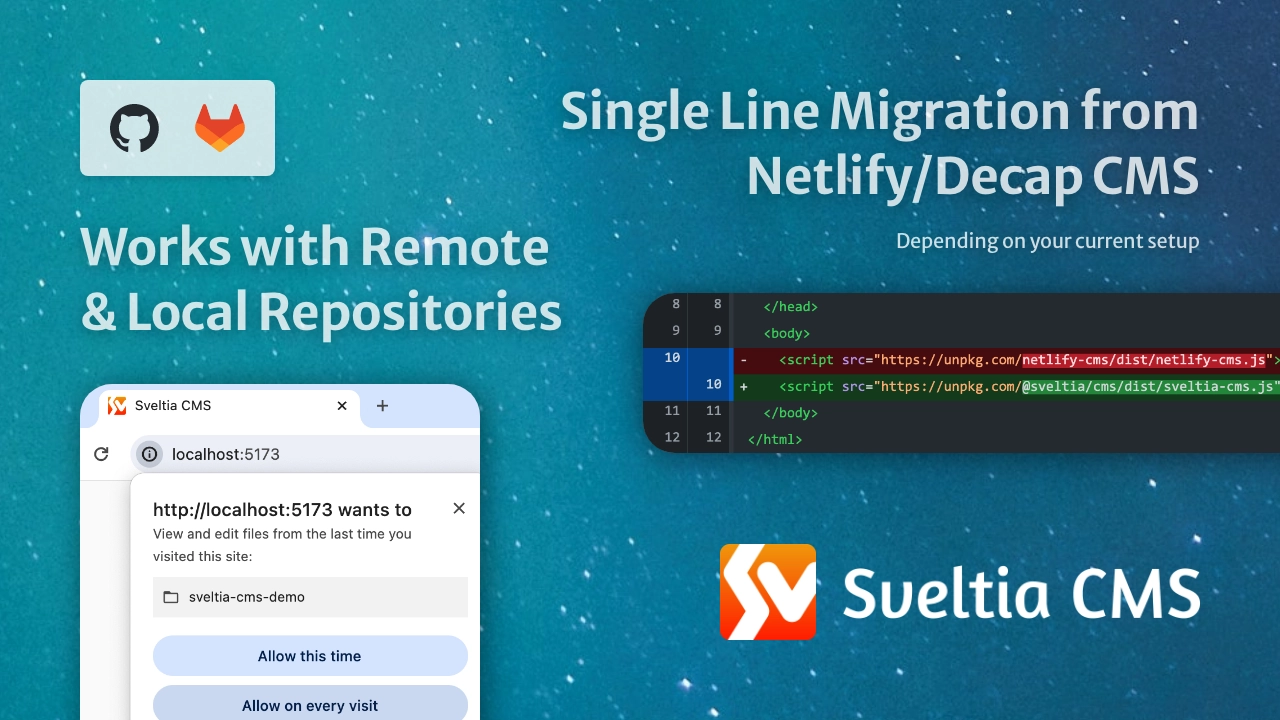<br>
|
|
14
14
|
|
|
15
|
+
## Table of contents
|
|
16
|
+
|
|
17
|
+
- [Motivation](#motivation)
|
|
18
|
+
- [Our advantage](#our-advantage)
|
|
19
|
+
- [Our goals](#our-goals)
|
|
20
|
+
- [Development status](#development-status)
|
|
21
|
+
- [Differentiators](#differentiators)
|
|
22
|
+
- [Better UX](#better-ux)
|
|
23
|
+
- [Better performance](#better-performance)
|
|
24
|
+
- [Better productivity](#better-productivity)
|
|
25
|
+
- [Better accessibility](#better-accessibility)
|
|
26
|
+
- [Better security](#better-security)
|
|
27
|
+
- [Better configuration](#better-configuration)
|
|
28
|
+
- [Better backend support](#better-backend-support)
|
|
29
|
+
- [Better i18n support](#better-i18n-support)
|
|
30
|
+
- [Better collections](#better-collections)
|
|
31
|
+
- [Better content editing](#better-content-editing)
|
|
32
|
+
- [Better data output](#better-data-output)
|
|
33
|
+
- [Better widgets](#better-widgets)
|
|
34
|
+
- [New widgets](#new-widgets)
|
|
35
|
+
- [Better asset management](#better-asset-management)
|
|
36
|
+
- [Compatibility](#compatibility)
|
|
37
|
+
- [Features not to be implemented](#features-not-to-be-implemented)
|
|
38
|
+
- [Current limitations](#current-limitations)
|
|
39
|
+
- [Getting started](#getting-started)
|
|
40
|
+
- [New users](#new-users)
|
|
41
|
+
- [Migration](#migration)
|
|
42
|
+
- [Migrating from Git Gateway backend](#migrating-from-git-gateway-backend)
|
|
43
|
+
- [Moving your site from Netlify to another hosting service](#moving-your-site-from-netlify-to-another-hosting-service)
|
|
44
|
+
- [Installing with npm](#installing-with-npm)
|
|
45
|
+
- [Updates](#updates)
|
|
46
|
+
- [Tips \& tricks](#tips--tricks)
|
|
47
|
+
- [Providing a JSON configuration file](#providing-a-json-configuration-file)
|
|
48
|
+
- [Working around authentication error](#working-around-authentication-error)
|
|
49
|
+
- [Working with a local Git repository](#working-with-a-local-git-repository)
|
|
50
|
+
- [Enabling local development in Brave](#enabling-local-development-in-brave)
|
|
51
|
+
- [Using a custom icon for a collection](#using-a-custom-icon-for-a-collection)
|
|
52
|
+
- [Adding dividers to the collection list](#adding-dividers-to-the-collection-list)
|
|
53
|
+
- [Using a custom media folder for a collection](#using-a-custom-media-folder-for-a-collection)
|
|
54
|
+
- [Using keyboard shortcuts](#using-keyboard-shortcuts)
|
|
55
|
+
- [Using DeepL to translate entry fields](#using-deepl-to-translate-entry-fields)
|
|
56
|
+
- [Localizing entry slugs](#localizing-entry-slugs)
|
|
57
|
+
- [Disabling non-default locale content](#disabling-non-default-locale-content)
|
|
58
|
+
- [Using a random ID for an entry slug](#using-a-random-id-for-an-entry-slug)
|
|
59
|
+
- [Disabling automatic deployments](#disabling-automatic-deployments)
|
|
60
|
+
- [Setting up Content Security Policy](#setting-up-content-security-policy)
|
|
61
|
+
- [Support \& feedback](#support--feedback)
|
|
62
|
+
- [Contributions](#contributions)
|
|
63
|
+
- [Roadmap](#roadmap)
|
|
64
|
+
- [Before the 1.0 release](#before-the-10-release)
|
|
65
|
+
- [After the 1.0 release](#after-the-10-release)
|
|
66
|
+
- [Related links](#related-links)
|
|
67
|
+
- [As seen on](#as-seen-on)
|
|
68
|
+
- [Disclaimer](#disclaimer)
|
|
69
|
+
|
|
15
70
|
## Motivation
|
|
16
71
|
|
|
17
72
|
Sveltia CMS was born in November 2022, when the progress of Netlify CMS was stalled for more than six months. [@kyoshino](https://github.com/kyoshino)’s clients wanted to replace their Netlify CMS instances without much effort, mainly to get better internationalization (i18n) support.
|
|
@@ -56,26 +111,19 @@ Sveltia CMS **version 1.0 is expected to ship by the end of 2024**. Check our [r
|
|
|
56
111
|
|
|
57
112
|
<br>
|
|
58
113
|
|
|
59
|
-
##
|
|
114
|
+
## Differentiators
|
|
60
115
|
|
|
61
116
|
We are working hard to create a **significantly better alternative to Netlify CMS and Decap CMS** by improving everything. Here’s what makes Sveltia CMS different. Look how serious we are!
|
|
62
117
|
|
|
63
|
-
### Compatible with Netlify/Decap CMS
|
|
64
|
-
|
|
65
|
-
- Ready to be used as a drop-in replacement for Netlify/Decap CMS _in some casual use case scenarios_ with a single line of code update.
|
|
66
|
-
- Your existing [configuration file](https://decapcms.org/docs/configuration-options/) can be reused as is.
|
|
67
|
-
- However, some features are still missing or will not be added, most notably Git Gateway and Netlify Identity. Look at the [compatibility info](#compatibility) below to see if you can migrate now or soon.
|
|
68
|
-
|
|
69
118
|
### Better UX
|
|
70
119
|
|
|
71
120
|
- Created and maintained by an [experienced UX engineer](https://github.com/kyoshino) who loves code, design and marketing. You can expect constant improvements to the user experience (UX) and developer experience (DX) across the platform.
|
|
72
121
|
- Offers a modern, intuitive user interface, including an immersive dark mode[^2], inspired in part by the Netlify CMS v3 prototype[^1].
|
|
73
122
|
- Comes with touch device support, such as larger buttons for easier tapping. While the UI is not yet optimized for small screens, it should work well with large tablets like iPad Pro or Pixel Tablet. Mobile support and other optimizations such as swipe navigation are planned after the 1.0 release.
|
|
74
123
|
- Made with Svelte, not React, means we can spend more time on UX rather than tedious state management. It also allows us to avoid common fatal application crashes[^113][^129]. Best of all, Svelte offers unmatched performance!
|
|
75
|
-
- The
|
|
124
|
+
- The Help menu provides all links to useful resources, including release notes, feedback and support.
|
|
76
125
|
- Users can customize the application with various settings.
|
|
77
126
|
- Never miss out on the latest features and bug fixes by being notified when an update to the CMS is available[^31]. Then update to the latest version with a single click[^66].
|
|
78
|
-
- The screenshots above are worth a thousand words, but read on to learn about many other improvements in detail.
|
|
79
127
|
|
|
80
128
|
### Better performance
|
|
81
129
|
|
|
@@ -100,6 +148,7 @@ We are working hard to create a **significantly better alternative to Netlify CM
|
|
|
100
148
|
- A local backup of an entry draft is automatically created without interruption by a confirmation dialog, which annoys users and can cause a page navigation problem if dismissed[^106]. The backup can then be reliably restored without unexpected overwriting[^85].
|
|
101
149
|
- Click once (the Save button) instead of twice (Publish > Publish now) to save an entry.
|
|
102
150
|
- The editor closes automatically when an entry is saved. This behaviour can be changed in Settings.
|
|
151
|
+
- Uploading files can be done with drag and drop[^20].
|
|
103
152
|
- You can upload multiple assets at once[^5].
|
|
104
153
|
- You can delete multiple entries and assets at once.
|
|
105
154
|
- Some [keyboard shortcuts](#using-keyboard-shortcuts) are available for faster editing.
|
|
@@ -112,7 +161,7 @@ We are working hard to create a **significantly better alternative to Netlify CM
|
|
|
112
161
|
- Ensures sufficient contrast between the foreground text and background colours.
|
|
113
162
|
- Enabled and disabled buttons can be clearly distinguished[^105].
|
|
114
163
|
- Links are underlined by default to make them easier to recognize. This behaviour can be changed in the Accessibility Settings if you prefer.
|
|
115
|
-
- Honours your operating system’s [reduced motion](https://developer.mozilla.org/en-US/docs/Web/CSS/@media/prefers-reduced-motion) and [reduced transparency](https://developer.mozilla.org/en-US/docs/Web/CSS/@media/prefers-reduced-transparency) settings.
|
|
164
|
+
- Honours your operating system’s [reduced motion](https://developer.mozilla.org/en-US/docs/Web/CSS/@media/prefers-reduced-motion) and [reduced transparency](https://developer.mozilla.org/en-US/docs/Web/CSS/@media/prefers-reduced-transparency) settings. Support for [high contrast mode](https://developer.mozilla.org/en-US/docs/Web/CSS/@media/prefers-contrast) will be added later.
|
|
116
165
|
- Browser console logs for developers are readable in either light or dark mode[^116].
|
|
117
166
|
- We’ll continue to test and improve the application to meet [WCAG 2.2](https://w3c.github.io/wcag/guidelines/22/).
|
|
118
167
|
|
|
@@ -270,6 +319,7 @@ Sveltia CMS has been built with a multilingual architecture from the very beginn
|
|
|
270
319
|
- A new asset can be uploaded by dragging & dropping it into the dialog[^20].
|
|
271
320
|
- A URL can also be entered in the dialog.
|
|
272
321
|
- Integration with Pexels, Pixabay and Unsplash makes it easy to select and insert a free stock photo[^8]. More stock photo providers will be added in the future.
|
|
322
|
+
- You can also simply drag and drop a file onto a File/Image field to attach it without having to open the Select File dialog.
|
|
273
323
|
- Large images automatically fit in the preview pane instead of being displayed at their original size, which can easily exceed the width of the pane.
|
|
274
324
|
- List and Object
|
|
275
325
|
- The `summary` is displayed correctly when it refers to a Relation field[^36] or a simple List field.
|
|
@@ -294,7 +344,7 @@ Sveltia CMS has been built with a multilingual architecture from the very beginn
|
|
|
294
344
|
|
|
295
345
|
### Better asset management
|
|
296
346
|
|
|
297
|
-
- A completely new Asset Library, built separately from the image selection dialog, makes it easy to manage all of your files, including images, videos and documents[^96].
|
|
347
|
+
- A completely new, full-fledged Asset Library, built separately from the image selection dialog, makes it easy to manage all of your files, including images, videos and documents[^96].
|
|
298
348
|
- Navigate between the global media folder and per-collection media folders[^6].
|
|
299
349
|
- Preview image, audio, video, text and PDF files. Check your site’s [CSP](#setting-up-content-security-policy) if the preview doesn’t work.
|
|
300
350
|
- Copy the public URL[^74], file path, text data or image data of a selected asset to clipboard. The file path starts with `/` as expected[^48].
|
|
@@ -315,7 +365,7 @@ Sveltia CMS has been built with a multilingual architecture from the very beginn
|
|
|
315
365
|
|
|
316
366
|
## Compatibility
|
|
317
367
|
|
|
318
|
-
We are trying to make Sveltia CMS compatible with Netlify/Decap CMS where possible, so that more users can seamlessly switch to our modern, powerful, high performance alternative. However, some features will be omitted due to deprecations and other factors.
|
|
368
|
+
We are trying to make Sveltia CMS compatible with Netlify/Decap CMS where possible, so that more users can seamlessly switch to our modern, powerful, high performance alternative. It’s ready to be used as a drop-in replacement for Netlify/Decap CMS _in some casual use case scenarios_ with a [single line of code update](#migration). However, some features will be omitted due to deprecations and other factors. Look at the compatibility info below to see if you can migrate now or soon.
|
|
319
369
|
|
|
320
370
|
### Features not to be implemented
|
|
321
371
|
|
|
@@ -352,31 +402,6 @@ These limitations are expected to be resolved before or shortly after GA:
|
|
|
352
402
|
|
|
353
403
|
Missing any other features? Let us know by [filing an issue](https://github.com/sveltia/sveltia-cms/issues/new).
|
|
354
404
|
|
|
355
|
-
## Roadmap
|
|
356
|
-
|
|
357
|
-
### Before the 1.0 release
|
|
358
|
-
|
|
359
|
-
- [Svelte 5](https://svelte.dev/blog/svelte-5-release-candidate) _runes_ migration
|
|
360
|
-
- Enhanced [compatibility with Netlify/Decap CMS](#compatibility)
|
|
361
|
-
- Certain compatibility with Static CMS, a now-discontinued community fork of Netlify CMS, specifically the [KeyValue widget](https://staticjscms.netlify.app/docs/widget-keyvalue)[^123]
|
|
362
|
-
- Localization with the new [Fluent](https://projectfluent.org)-powered sveltia-i18n library
|
|
363
|
-
- Accessibility audit
|
|
364
|
-
- Developer documentation (implementation guide)
|
|
365
|
-
- Marketing site
|
|
366
|
-
- Live demo site
|
|
367
|
-
- Official starter templates for the most popular frameworks, including SvelteKit and Next.js
|
|
368
|
-
- Broad automation test coverage (Vitest + Playwright)
|
|
369
|
-
|
|
370
|
-
### After the 1.0 release
|
|
371
|
-
|
|
372
|
-
- Tackling more Netlify/Decap CMS issues, especially the [top voted features](https://github.com/decaporg/decap-cms/issues?q=is%3Aissue+is%3Aopen+sort%3Areactions-%2B1-desc), including MDX support[^122], manual entry sorting[^125], roles[^23], mobile optimization[^18] and config editor[^10] — Some features are already implemented in Sveltia CMS
|
|
373
|
-
- Advanced digital asset management (DAM) features, including image editing and tagging[^114]
|
|
374
|
-
- AI integrations for image generation and content writing
|
|
375
|
-
- End-user documentation
|
|
376
|
-
- Contributor documentation
|
|
377
|
-
- Marketplace for custom widgets, etc.
|
|
378
|
-
- and so much more!
|
|
379
|
-
|
|
380
405
|
## Getting started
|
|
381
406
|
|
|
382
407
|
### New users
|
|
@@ -420,6 +445,20 @@ That’s it! You can open `https://[hostname]/admin/` as before to start editing
|
|
|
420
445
|
|
|
421
446
|
That said, we strongly recommend testing your new Sveltia CMS instance first on your local machine. [See below](#working-with-a-local-git-repository) for how.
|
|
422
447
|
|
|
448
|
+
#### Migrating from Git Gateway backend
|
|
449
|
+
|
|
450
|
+
Sveltia CMS does not support the Git Gateway backend due to performance limitations. If you don’t care about user management with Netlify Identity, you can use the [GitHub backend](https://decapcms.org/docs/github-backend/) or [GitLab backend](https://decapcms.org/docs/gitlab-backend/) instead. Make sure **you install an OAuth client** on GitHub or GitLab in addition to updating your configuration file. As noted in the document, Netlify is still able to facilitate the auth flow.
|
|
451
|
+
|
|
452
|
+
Once you have migrated from the Git Gateway and Netlify Identity combo, you can remove the Netlify Identity widget script tag from your HTML:
|
|
453
|
+
|
|
454
|
+
```diff
|
|
455
|
+
-<script src="https://identity.netlify.com/v1/netlify-identity-widget.js"></script>
|
|
456
|
+
```
|
|
457
|
+
|
|
458
|
+
#### Moving your site from Netlify to another hosting service
|
|
459
|
+
|
|
460
|
+
You can host your Sveltia CMS-managed site anywhere, such as [Cloudflare Pages](https://pages.cloudflare.com/) or [GitHub Pages](https://pages.github.com/). But moving away from Netlify means you can no longer sign in with GitHub or GitLab via Netlify. Instead, you can use [our own OAuth client](https://github.com/sveltia/sveltia-cms-auth), which can be easily deployed to Cloudflare Workers, or [any other 3rd party client](https://decapcms.org/docs/external-oauth-clients/) made for Netlify/Decap CMS.
|
|
461
|
+
|
|
423
462
|
### Installing with npm
|
|
424
463
|
|
|
425
464
|
For advanced users, we have also made the bundle available as an [npm package](https://www.npmjs.com/package/@sveltia/cms). You can install it by running `npm i @sveltia/cms` or `pnpm add @sveltia/cms` on your project. The [manual initialization](https://decapcms.org/docs/manual-initialization/) flow with the `init` method is the same as for Netlify/Decap CMS.
|
|
@@ -442,20 +481,6 @@ Sveltia CMS supports a configuration file written in the JSON format in addition
|
|
|
442
481
|
|
|
443
482
|
Alternatively, you can [manually initialize](https://decapcms.org/docs/manual-initialization/) the CMS with a JavaScript configuration object.
|
|
444
483
|
|
|
445
|
-
### Migrating from Git Gateway backend
|
|
446
|
-
|
|
447
|
-
Sveltia CMS does not support the Git Gateway backend due to performance limitations. If you don’t care about user management with Netlify Identity, you can use the [GitHub backend](https://decapcms.org/docs/github-backend/) or [GitLab backend](https://decapcms.org/docs/gitlab-backend/) instead. Make sure **you install an OAuth client** on GitHub or GitLab in addition to updating your configuration file. As noted in the document, Netlify is still able to facilitate the auth flow.
|
|
448
|
-
|
|
449
|
-
Once you have migrated from the Git Gateway and Netlify Identity combo, you can remove the Netlify Identity widget script tag from your HTML:
|
|
450
|
-
|
|
451
|
-
```diff
|
|
452
|
-
-<script src="https://identity.netlify.com/v1/netlify-identity-widget.js"></script>
|
|
453
|
-
```
|
|
454
|
-
|
|
455
|
-
### Moving your site from Netlify to another hosting service
|
|
456
|
-
|
|
457
|
-
You can host your Sveltia CMS-managed site anywhere, such as [Cloudflare Pages](https://pages.cloudflare.com/) or [GitHub Pages](https://pages.github.com/). But moving away from Netlify means you can no longer sign in with GitHub or GitLab via Netlify. Instead, you can use [our own OAuth client](https://github.com/sveltia/sveltia-cms-auth), which can be easily deployed to Cloudflare Workers, or [any other 3rd party client](https://decapcms.org/docs/external-oauth-clients/) made for Netlify/Decap CMS.
|
|
458
|
-
|
|
459
484
|
### Working around authentication error
|
|
460
485
|
|
|
461
486
|
If you get an “Authentication Aborted” error when trying to sign in to GitHub or GitLab using the authorization code flow, you may need to check your site’s [`Cross-Origin-Opener-Policy`](https://developer.mozilla.org/en-US/docs/Web/HTTP/Headers/Cross-Origin-Opener-Policy). The COOP header is not widely used, but it’s known to break the OAuth flow with a popup window. If that’s your case, changing `same-origin` to `same-origin-allow-popups` solves the problem. ([Discussion](https://github.com/sveltia/sveltia-cms/issues/131))
|
|
@@ -634,7 +659,7 @@ i18n:
|
|
|
634
659
|
|
|
635
660
|
### Disabling non-default locale content
|
|
636
661
|
|
|
637
|
-
You can
|
|
662
|
+
You can disable output of content in selected non-default locales by adding the `save_all_locales` property to the top-level or per-collection `i18n` configuration. Then you’ll find “Disable (locale name)” in the three-dot menu in the top right corner of the content editor. This is useful if the translation isn’t ready yet, but you want to publish the default locale content first.
|
|
638
663
|
|
|
639
664
|
With the following configuration, you can disable the French and/or German translation while writing in English.
|
|
640
665
|
|
|
@@ -807,6 +832,31 @@ Looking to build a website with Sveltia CMS? Maintainer [@kyoshino](https://gith
|
|
|
807
832
|
|
|
808
833
|
See [Contributing to Sveltia CMS](https://github.com/sveltia/sveltia-cms/blob/main/CONTRIBUTING.md).
|
|
809
834
|
|
|
835
|
+
## Roadmap
|
|
836
|
+
|
|
837
|
+
### Before the 1.0 release
|
|
838
|
+
|
|
839
|
+
- [Svelte 5](https://svelte.dev/blog/svelte-5-release-candidate) _runes_ migration
|
|
840
|
+
- Enhanced [compatibility with Netlify/Decap CMS](#compatibility)
|
|
841
|
+
- Certain compatibility with Static CMS, a now-discontinued community fork of Netlify CMS, specifically the [KeyValue widget](https://staticjscms.netlify.app/docs/widget-keyvalue)[^123]
|
|
842
|
+
- Localization with the new [Fluent](https://projectfluent.org)-powered sveltia-i18n library
|
|
843
|
+
- Accessibility audit
|
|
844
|
+
- Developer documentation (implementation guide)
|
|
845
|
+
- Marketing site
|
|
846
|
+
- Live demo site
|
|
847
|
+
- Official starter templates for the most popular frameworks, including SvelteKit and Next.js
|
|
848
|
+
- Broad automation test coverage (Vitest + Playwright)
|
|
849
|
+
|
|
850
|
+
### After the 1.0 release
|
|
851
|
+
|
|
852
|
+
- Tackling more Netlify/Decap CMS issues, especially the [top voted features](https://github.com/decaporg/decap-cms/issues?q=is%3Aissue+is%3Aopen+sort%3Areactions-%2B1-desc), including MDX support[^122], manual entry sorting[^125], roles[^23], mobile optimization[^18] and config editor[^10] — Some features are already implemented in Sveltia CMS
|
|
853
|
+
- Advanced digital asset management (DAM) features, including image editing and tagging[^114]
|
|
854
|
+
- AI integrations for image generation and content writing
|
|
855
|
+
- End-user documentation
|
|
856
|
+
- Contributor documentation
|
|
857
|
+
- Marketplace for custom widgets, etc.
|
|
858
|
+
- and so much more!
|
|
859
|
+
|
|
810
860
|
## Related links
|
|
811
861
|
|
|
812
862
|
- Introducing Sveltia CMS: a short technical presentation by [@kyoshino](https://github.com/kyoshino) during the _This Week in Svelte_ online meetup on March 31, 2023 — [recording](https://youtu.be/-YjLubiieYs?t=1660) & [slides](https://docs.google.com/presentation/d/1Wi4ty-1AwOp2-zy7LctmzCV4rrdYPfke9NGhO0DdRdM)
|
|
@@ -1044,7 +1094,7 @@ This software is provided “as is” without any express or implied warranty. W
|
|
|
1044
1094
|
|
|
1045
1095
|
[^112]: Netlify/Decap CMS [#5815](https://github.com/decaporg/decap-cms/issues/5815), [#6522](https://github.com/decaporg/decap-cms/issues/6522), [#6532](https://github.com/decaporg/decap-cms/issues/6532), [#6588](https://github.com/decaporg/decap-cms/issues/6588), [#6617](https://github.com/decaporg/decap-cms/issues/6617), [#6640](https://github.com/decaporg/decap-cms/issues/6640), [#6663](https://github.com/decaporg/decap-cms/issues/6663), [#6695](https://github.com/decaporg/decap-cms/issues/6695), [#6697](https://github.com/decaporg/decap-cms/issues/6697), [#6764](https://github.com/decaporg/decap-cms/issues/6764), [#6765](https://github.com/decaporg/decap-cms/issues/6765), [#6835](https://github.com/decaporg/decap-cms/issues/6835), [#6983](https://github.com/decaporg/decap-cms/issues/6983), [#7205](https://github.com/decaporg/decap-cms/issues/7205)
|
|
1046
1096
|
|
|
1047
|
-
[^113]: Netlify/Decap CMS [#5656](https://github.com/decaporg/decap-cms/issues/5656), [#5837](https://github.com/decaporg/decap-cms/issues/5837), [#5972](https://github.com/decaporg/decap-cms/issues/5972), [#6476](https://github.com/decaporg/decap-cms/issues/6476), [#6516](https://github.com/decaporg/decap-cms/issues/6516), [#6930](https://github.com/decaporg/decap-cms/issues/6930), [#6965](https://github.com/decaporg/decap-cms/issues/6965), [#7080](https://github.com/decaporg/decap-cms/issues/7080), [#7105](https://github.com/decaporg/decap-cms/issues/7105), [#7106](https://github.com/decaporg/decap-cms/issues/7106), [#7119](https://github.com/decaporg/decap-cms/issues/7119), [#7176](https://github.com/decaporg/decap-cms/issues/7176), [#7194](https://github.com/decaporg/decap-cms/issues/7194), [#7244](https://github.com/decaporg/decap-cms/issues/7244) — These `removeChild` crashes are common in React apps and seem to be caused by a [browser extension](https://github.com/facebook/react/issues/17256) or [Google Translate](https://github.com/facebook/react/issues/11538).
|
|
1097
|
+
[^113]: Netlify/Decap CMS [#5656](https://github.com/decaporg/decap-cms/issues/5656), [#5837](https://github.com/decaporg/decap-cms/issues/5837), [#5972](https://github.com/decaporg/decap-cms/issues/5972), [#6476](https://github.com/decaporg/decap-cms/issues/6476), [#6516](https://github.com/decaporg/decap-cms/issues/6516), [#6930](https://github.com/decaporg/decap-cms/issues/6930), [#6965](https://github.com/decaporg/decap-cms/issues/6965), [#7080](https://github.com/decaporg/decap-cms/issues/7080), [#7105](https://github.com/decaporg/decap-cms/issues/7105), [#7106](https://github.com/decaporg/decap-cms/issues/7106), [#7119](https://github.com/decaporg/decap-cms/issues/7119), [#7176](https://github.com/decaporg/decap-cms/issues/7176), [#7194](https://github.com/decaporg/decap-cms/issues/7194), [#7244](https://github.com/decaporg/decap-cms/issues/7244), [#7301](https://github.com/decaporg/decap-cms/issues/7301) — These `removeChild` crashes are common in React apps and seem to be caused by a [browser extension](https://github.com/facebook/react/issues/17256) or [Google Translate](https://github.com/facebook/react/issues/11538).
|
|
1048
1098
|
|
|
1049
1099
|
[^114]: Netlify/Decap CMS [#5029](https://github.com/decaporg/decap-cms/issues/5029), [#5048](https://github.com/decaporg/decap-cms/issues/5048)
|
|
1050
1100
|
|