@sugarat/easypicker2-client 2.4.1
This diff represents the content of publicly available package versions that have been released to one of the supported registries. The information contained in this diff is provided for informational purposes only and reflects changes between package versions as they appear in their respective public registries.
- package/.env +6 -0
- package/.env.production +3 -0
- package/.env.test +4 -0
- package/.eslintignore +0 -0
- package/.eslintrc.json +57 -0
- package/.github/workflows/main.yml +61 -0
- package/.prettierrc.js +9 -0
- package/LICENSE +21 -0
- package/README.md +86 -0
- package/auto-imports.d.ts +6 -0
- package/components.d.ts +56 -0
- package/docker/ep_backup/easypicker2.sql +214 -0
- package/docker/ep_backup/mongodb/easypicker2/action.bson +0 -0
- package/docker/ep_backup/mongodb/easypicker2/action.metadata.json +1 -0
- package/docker/ep_backup/mongodb/easypicker2/log.bson +0 -0
- package/docker/ep_backup/mongodb/easypicker2/log.metadata.json +1 -0
- package/docker/ep_backup/user-config.json +176 -0
- package/docs/.env +1 -0
- package/docs/.env.production +2 -0
- package/docs/.vitepress/config.ts +204 -0
- package/docs/.vitepress/theme/bg.png +0 -0
- package/docs/.vitepress/theme/index.scss +41 -0
- package/docs/.vitepress/theme/index.ts +5 -0
- package/docs/author.md +24 -0
- package/docs/auto-imports.d.ts +6 -0
- package/docs/components.d.ts +17 -0
- package/docs/deploy/design/api.md +3 -0
- package/docs/deploy/design/db.md +3 -0
- package/docs/deploy/design/index.md +3 -0
- package/docs/deploy/design/shell.md +9 -0
- package/docs/deploy/faq.md +86 -0
- package/docs/deploy/index.md +9 -0
- package/docs/deploy/local.md +275 -0
- package/docs/deploy/online-new.md +610 -0
- package/docs/deploy/online.md +683 -0
- package/docs/deploy/qiniu.md +183 -0
- package/docs/index.md +40 -0
- package/docs/introduction/about/code.md +26 -0
- package/docs/introduction/about/index.md +33 -0
- package/docs/introduction/feature/index.md +3 -0
- package/docs/plan/log.md +333 -0
- package/docs/plan/todo.md +127 -0
- package/docs/plan/wish.md +29 -0
- package/docs/praise/index.md +45 -0
- package/docs/public/favicon.ico +0 -0
- package/docs/public/logo.png +0 -0
- package/docs/public/robots.txt +2 -0
- package/docs/src/apis/ajax.ts +66 -0
- package/docs/src/apis/index.ts +1 -0
- package/docs/src/apis/modules/wish.ts +20 -0
- package/docs/src/components/Avatar.vue +60 -0
- package/docs/src/components/Home.vue +85 -0
- package/docs/src/components/Picture.vue +13 -0
- package/docs/src/components/Praise.vue +52 -0
- package/docs/src/components/WishBtn.vue +98 -0
- package/docs/src/components/WishPanel.vue +170 -0
- package/docs/src/components/callme/index.vue +72 -0
- package/docs/vite.config.ts +42 -0
- package/index.html +127 -0
- package/package.json +52 -0
- package/public/favicon.ico +0 -0
- package/public/logo.png +0 -0
- package/scripts/deploy/docs.mjs +24 -0
- package/scripts/deploy/prod.mjs +24 -0
- package/scripts/deploy/test.mjs +26 -0
- package/src/@types/ajax.d.ts +5 -0
- package/src/@types/api.d.ts +305 -0
- package/src/@types/lib.d.ts +26 -0
- package/src/@types/page.d.ts +18 -0
- package/src/App.vue +36 -0
- package/src/apis/ajax.ts +70 -0
- package/src/apis/index.ts +20 -0
- package/src/apis/modules/action.ts +17 -0
- package/src/apis/modules/category.ts +20 -0
- package/src/apis/modules/config.ts +19 -0
- package/src/apis/modules/file.ts +150 -0
- package/src/apis/modules/people.ts +81 -0
- package/src/apis/modules/public.ts +49 -0
- package/src/apis/modules/super/overview.ts +56 -0
- package/src/apis/modules/super/user.ts +62 -0
- package/src/apis/modules/task.ts +67 -0
- package/src/apis/modules/user.ts +56 -0
- package/src/apis/modules/wish.ts +31 -0
- package/src/assets/i/EasyPicker.png +0 -0
- package/src/assets/logo.png +0 -0
- package/src/assets/styles/app.css +69 -0
- package/src/components/HomeFooter/index.vue +134 -0
- package/src/components/HomeHeader/index.vue +156 -0
- package/src/components/InfosForm/index.vue +73 -0
- package/src/components/MessageList/index.vue +155 -0
- package/src/components/MessagePanel/index.vue +42 -0
- package/src/components/Praise/index.vue +102 -0
- package/src/components/QrCode.vue +44 -0
- package/src/components/linkDialog.vue +104 -0
- package/src/components/loginPanel.vue +92 -0
- package/src/constants/index.ts +83 -0
- package/src/env.d.ts +8 -0
- package/src/main.ts +19 -0
- package/src/pages/404/index.vue +59 -0
- package/src/pages/about/index.vue +152 -0
- package/src/pages/callme/index.vue +155 -0
- package/src/pages/dashboard/config/index.vue +264 -0
- package/src/pages/dashboard/files/index.vue +1152 -0
- package/src/pages/dashboard/index.vue +335 -0
- package/src/pages/dashboard/manage/config/index.vue +97 -0
- package/src/pages/dashboard/manage/index.vue +105 -0
- package/src/pages/dashboard/manage/overview/index.vue +488 -0
- package/src/pages/dashboard/manage/user/index.vue +679 -0
- package/src/pages/dashboard/manage/wish/index.vue +257 -0
- package/src/pages/dashboard/tasks/components/CategoryPanel.vue +208 -0
- package/src/pages/dashboard/tasks/components/CreateTask.vue +93 -0
- package/src/pages/dashboard/tasks/components/TaskInfo.vue +129 -0
- package/src/pages/dashboard/tasks/components/infoPanel/ddl.vue +96 -0
- package/src/pages/dashboard/tasks/components/infoPanel/file.vue +175 -0
- package/src/pages/dashboard/tasks/components/infoPanel/info.vue +477 -0
- package/src/pages/dashboard/tasks/components/infoPanel/people.vue +567 -0
- package/src/pages/dashboard/tasks/components/infoPanel/template.vue +146 -0
- package/src/pages/dashboard/tasks/components/infoPanel/tip.vue +55 -0
- package/src/pages/dashboard/tasks/components/infoPanel/tipInfo.vue +196 -0
- package/src/pages/dashboard/tasks/index.vue +302 -0
- package/src/pages/dashboard/tasks/public.ts +32 -0
- package/src/pages/disabled/index.vue +47 -0
- package/src/pages/feedback/index.vue +5 -0
- package/src/pages/home/index.vue +72 -0
- package/src/pages/login/index.vue +270 -0
- package/src/pages/register/index.vue +211 -0
- package/src/pages/reset/index.vue +186 -0
- package/src/pages/task/index.vue +897 -0
- package/src/pages/wish/index.vue +152 -0
- package/src/router/Interceptor/index.ts +112 -0
- package/src/router/index.ts +13 -0
- package/src/router/routes/index.ts +197 -0
- package/src/shims-vue.d.ts +6 -0
- package/src/store/index.ts +17 -0
- package/src/store/modules/category.ts +44 -0
- package/src/store/modules/public.ts +27 -0
- package/src/store/modules/task.ts +55 -0
- package/src/store/modules/user.ts +57 -0
- package/src/utils/elementUI.ts +8 -0
- package/src/utils/networkUtil.ts +236 -0
- package/src/utils/other.ts +25 -0
- package/src/utils/regExp.ts +11 -0
- package/src/utils/stringUtil.ts +242 -0
- package/tsconfig.json +24 -0
- package/vite.config.ts +55 -0
|
@@ -0,0 +1,275 @@
|
|
|
1
|
+
# 本地启动
|
|
2
|
+
## 1. 准备工作
|
|
3
|
+
### 安装Node
|
|
4
|
+
* [中文官网](https://nodejs.org/zh-cn/download/)
|
|
5
|
+
* [菜鸟教程:Node.js](https://www.runoob.com/nodejs/nodejs-install-setup.html)
|
|
6
|
+
|
|
7
|
+
参考上述文章自行在本地机器安装`Node.js`
|
|
8
|
+
|
|
9
|
+
测试是否正常安装,终端工具运行如下指令
|
|
10
|
+
```shell
|
|
11
|
+
node -v
|
|
12
|
+
```
|
|
13
|
+

|
|
14
|
+
|
|
15
|
+
建议安装大于等于`14.19`版本的
|
|
16
|
+
|
|
17
|
+
多版本管理可以使用 [nvm](https://github.com/nvm-sh/nvm)
|
|
18
|
+
|
|
19
|
+

|
|
20
|
+
|
|
21
|
+
### 切换镜像源
|
|
22
|
+
其中`npm`是随Node一起安装的包管理工具,通过切换到国内的镜像源,有助于加快安装速度
|
|
23
|
+
|
|
24
|
+
安装`nrm`(切换镜像源工具)
|
|
25
|
+
```shell
|
|
26
|
+
npm i -g nrm --registry=https://registry.npmmirror.com
|
|
27
|
+
```
|
|
28
|
+
|
|
29
|
+
查看可用源列表
|
|
30
|
+
```shell
|
|
31
|
+
nrm ls
|
|
32
|
+
```
|
|
33
|
+
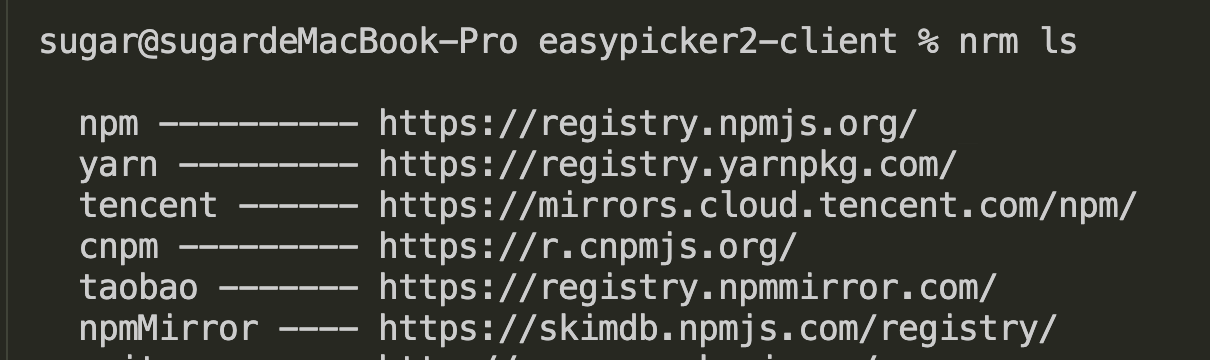
|
|
34
|
+
|
|
35
|
+
切换`淘宝源`
|
|
36
|
+
```shell
|
|
37
|
+
nrm use taobao
|
|
38
|
+
```
|
|
39
|
+
|
|
40
|
+
验证是否切换成功
|
|
41
|
+
```shell
|
|
42
|
+
npm config get registry
|
|
43
|
+
```
|
|
44
|
+
|
|
45
|
+
结果是上述淘宝源即可
|
|
46
|
+
|
|
47
|
+
### 安装PNPM
|
|
48
|
+
#### 方式1
|
|
49
|
+
使用 `npm` 安装
|
|
50
|
+
```shell
|
|
51
|
+
npm install -g pnpm
|
|
52
|
+
```
|
|
53
|
+
|
|
54
|
+
#### 其它方式
|
|
55
|
+
参看 [pnpm官方中文文档](https://pnpm.io/zh/installation)
|
|
56
|
+
|
|
57
|
+
#### 验证是否安装成功
|
|
58
|
+
```shell
|
|
59
|
+
pnpm -v
|
|
60
|
+
```
|
|
61
|
+
|
|
62
|
+
## 2. 获取客户端源码
|
|
63
|
+
GitHub如果没有梯子,下载&访问可能会很慢,Gitee是国内的一个代码托管平台,速度相对快
|
|
64
|
+
|
|
65
|
+
### 方式1:通过GIT
|
|
66
|
+
确保电脑安装有`Git`
|
|
67
|
+
* [廖雪峰:Git安装&使用教程](https://www.liaoxuefeng.com/wiki/896043488029600/896067074338496)
|
|
68
|
+
|
|
69
|
+
在终端工具适当的目录运行
|
|
70
|
+
```shell
|
|
71
|
+
# from GitHub
|
|
72
|
+
git clone https://github.com/ATQQ/easypicker2-client.git
|
|
73
|
+
|
|
74
|
+
# or from Gitee
|
|
75
|
+
git clone https://gitee.com/sugarjl/easypicker2-client.git
|
|
76
|
+
```
|
|
77
|
+
地址来源
|
|
78
|
+
* [GitHub](https://github.com/ATQQ/easypicker2-client): 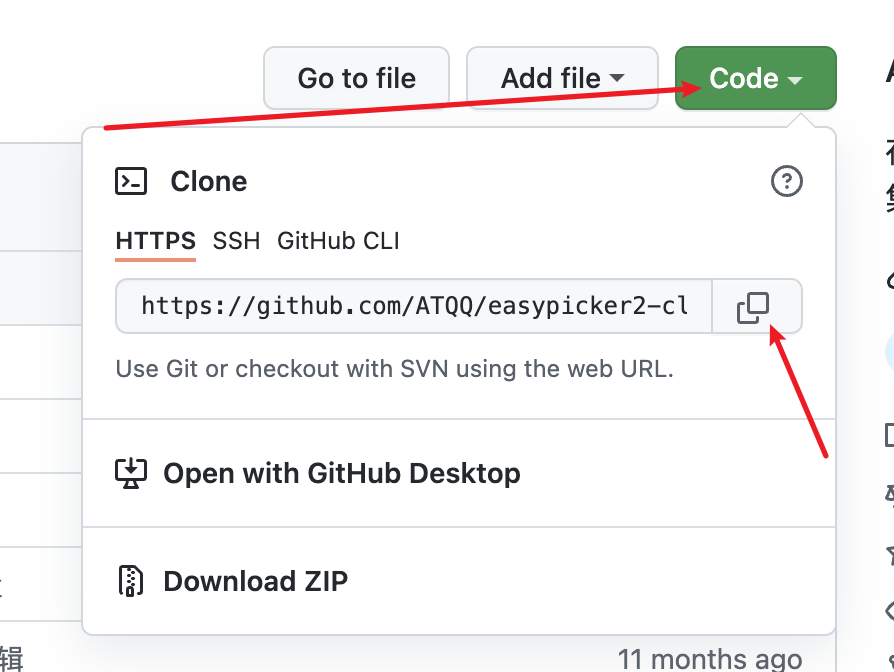
|
|
79
|
+
* [Gitee](https://gitee.com/sugarjl/easypicker2-client): 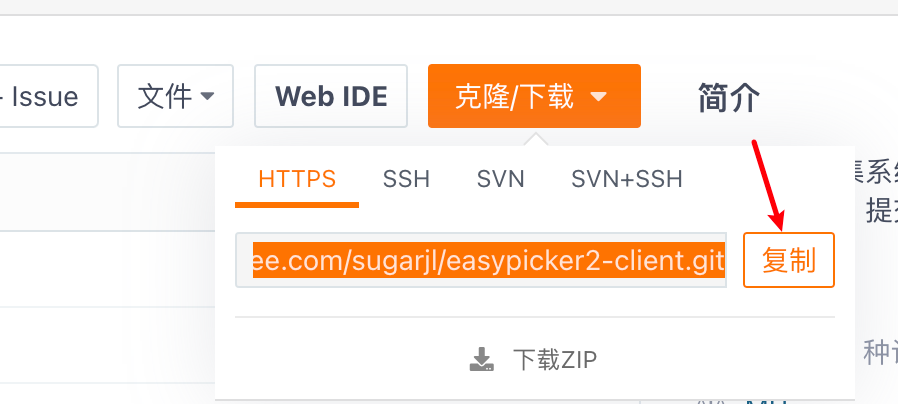
|
|
80
|
+
|
|
81
|
+
|
|
82
|
+
### 方式2:压缩包
|
|
83
|
+
|
|
84
|
+
* [GitHub](https://github.com/ATQQ/easypicker2-client): 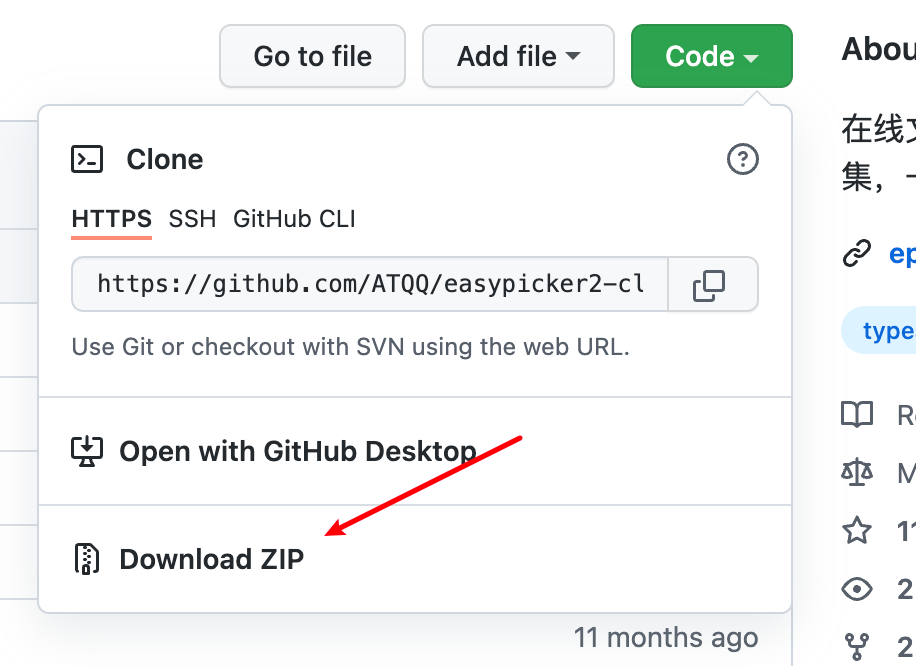
|
|
85
|
+
* [Gitee](https://gitee.com/sugarjl/easypicker2-client): 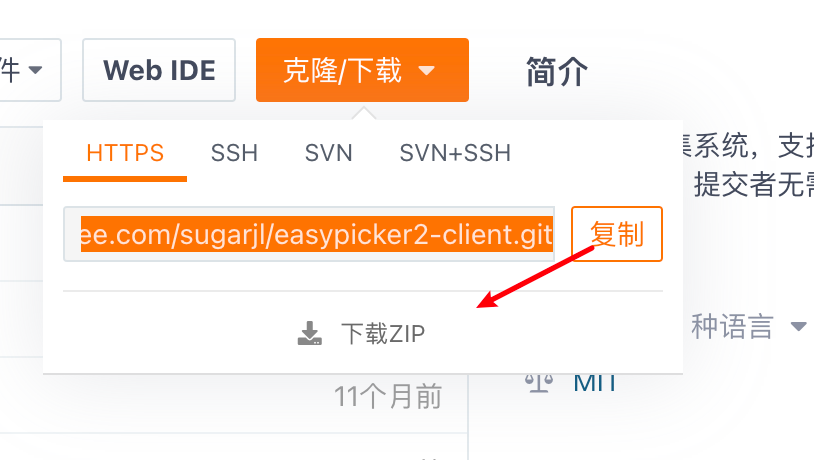
|
|
86
|
+
|
|
87
|
+
## 3. 启动客户端
|
|
88
|
+
|
|
89
|
+
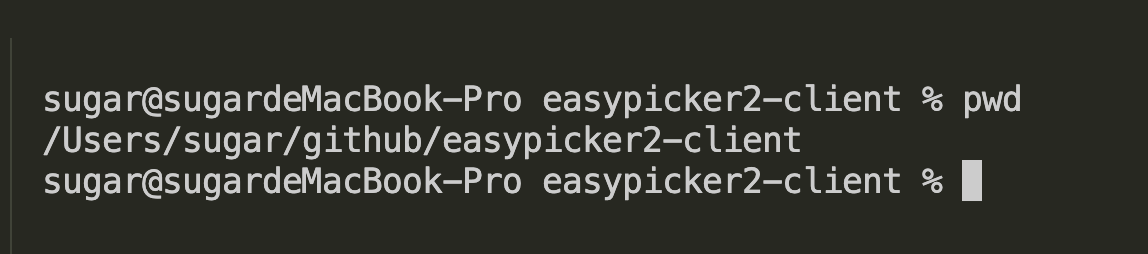
在终端工具中,使用`cd`指令定位到项目跟目录
|
|
90
|
+
|
|
91
|
+
使用`pwd`查看位置
|
|
92
|
+
|
|
93
|
+
|
|
94
|
+
|
|
95
|
+
### 安装依赖
|
|
96
|
+
```shell
|
|
97
|
+
pnpm install
|
|
98
|
+
```
|
|
99
|
+
|
|
100
|
+
### 本地启动 - 线上test服务
|
|
101
|
+
后端服务使用线上测试环境的 https://ep.dev.sugarat.top
|
|
102
|
+
|
|
103
|
+
#### 方式1 - 开发模式
|
|
104
|
+
```shell
|
|
105
|
+
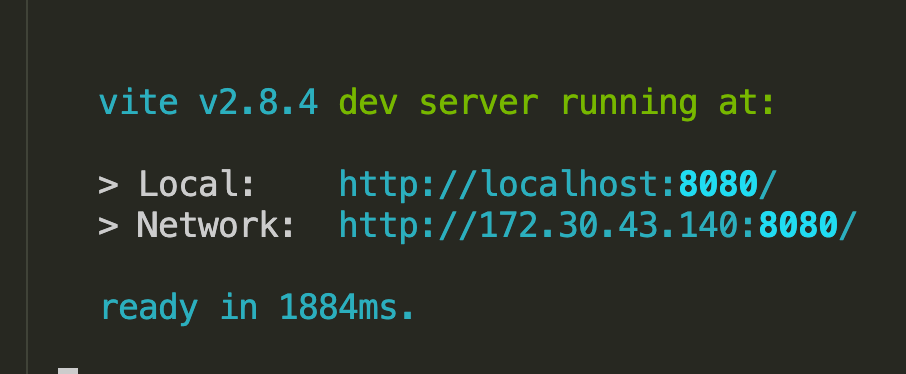
pnpm dev:test
|
|
106
|
+
```
|
|
107
|
+
|
|
108
|
+
|
|
109
|
+
|
|
110
|
+
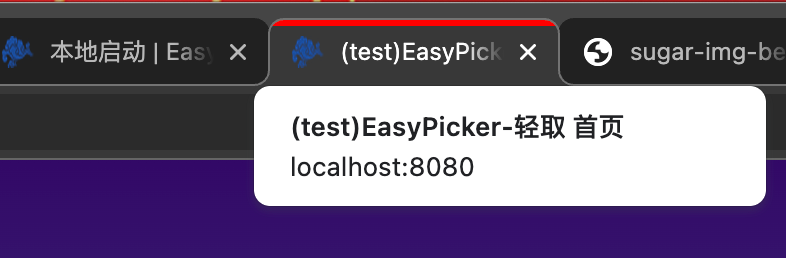
浏览器访问 `[http://localhost:8080/](http://localhost:8080/)`
|
|
111
|
+
|
|
112
|
+
|
|
113
|
+
|
|
114
|
+
#### 方式2 - 构建后产物
|
|
115
|
+
页面访问速度更快
|
|
116
|
+
|
|
117
|
+
产物构建
|
|
118
|
+
```shell
|
|
119
|
+
pnpm build:test
|
|
120
|
+
```
|
|
121
|
+
|
|
122
|
+
预览
|
|
123
|
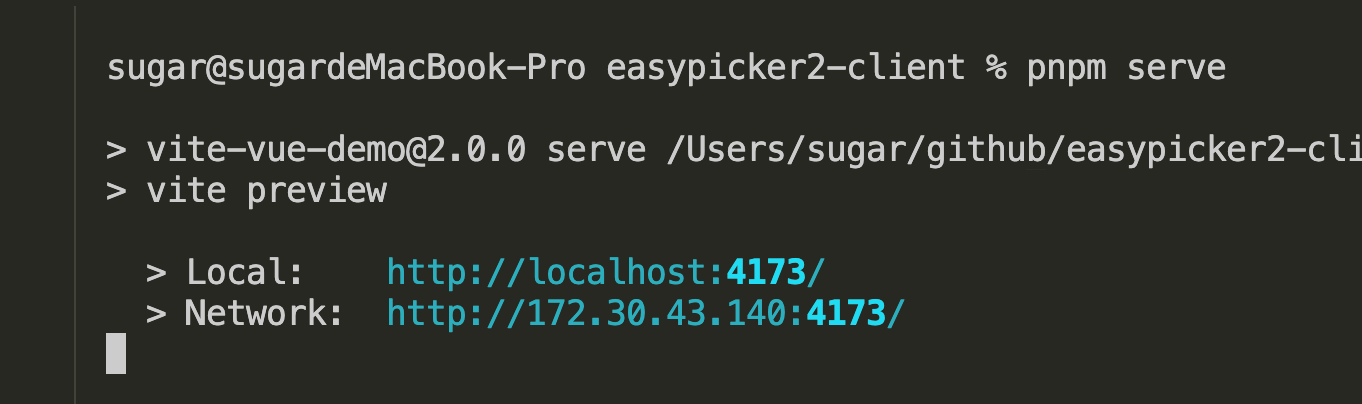
+
```shell
|
|
124
|
+
pnpm serve
|
|
125
|
+
```
|
|
126
|
+
|
|
127
|
+
|
|
128
|
+
|
|
129
|
+
浏览器访问终端给予的地址即可
|
|
130
|
+
|
|
131
|
+
### 本地启动 - 本地的后端服务
|
|
132
|
+
需要参照 4,5,6 同时启动本地的后端服务
|
|
133
|
+
|
|
134
|
+
后端服务使用本地的 `http://localhost:3000`
|
|
135
|
+
|
|
136
|
+
```shell
|
|
137
|
+
# 启动
|
|
138
|
+
pnpm dev
|
|
139
|
+
```
|
|
140
|
+
|
|
141
|
+
## 4. 获取服务端源码
|
|
142
|
+
### 方式1: 通过Git拉取
|
|
143
|
+
```shell
|
|
144
|
+
# from GitHub
|
|
145
|
+
git clone https://github.com/ATQQ/easypicker2-server.git
|
|
146
|
+
|
|
147
|
+
# or from Gitee
|
|
148
|
+
git clone https://gitee.com/sugarjl/easypicker2-server.git
|
|
149
|
+
```
|
|
150
|
+
### 方式2: 下载源码压缩包
|
|
151
|
+
* [GitHub](https://github.com/ATQQ/easypicker2-server)
|
|
152
|
+
* [Gitee](https://gitee.com/sugarjl/easypicker2-server)
|
|
153
|
+
|
|
154
|
+
参照客户端源码下载图示,找到下载位置
|
|
155
|
+
|
|
156
|
+
## 5. 启动后端服务
|
|
157
|
+
在终端工具中,使用`cd`指令定位到项目跟目录
|
|
158
|
+
|
|
159
|
+
### 安装依赖
|
|
160
|
+
```shell
|
|
161
|
+
pnpm install
|
|
162
|
+
```
|
|
163
|
+
### 构建产物
|
|
164
|
+
```shell
|
|
165
|
+
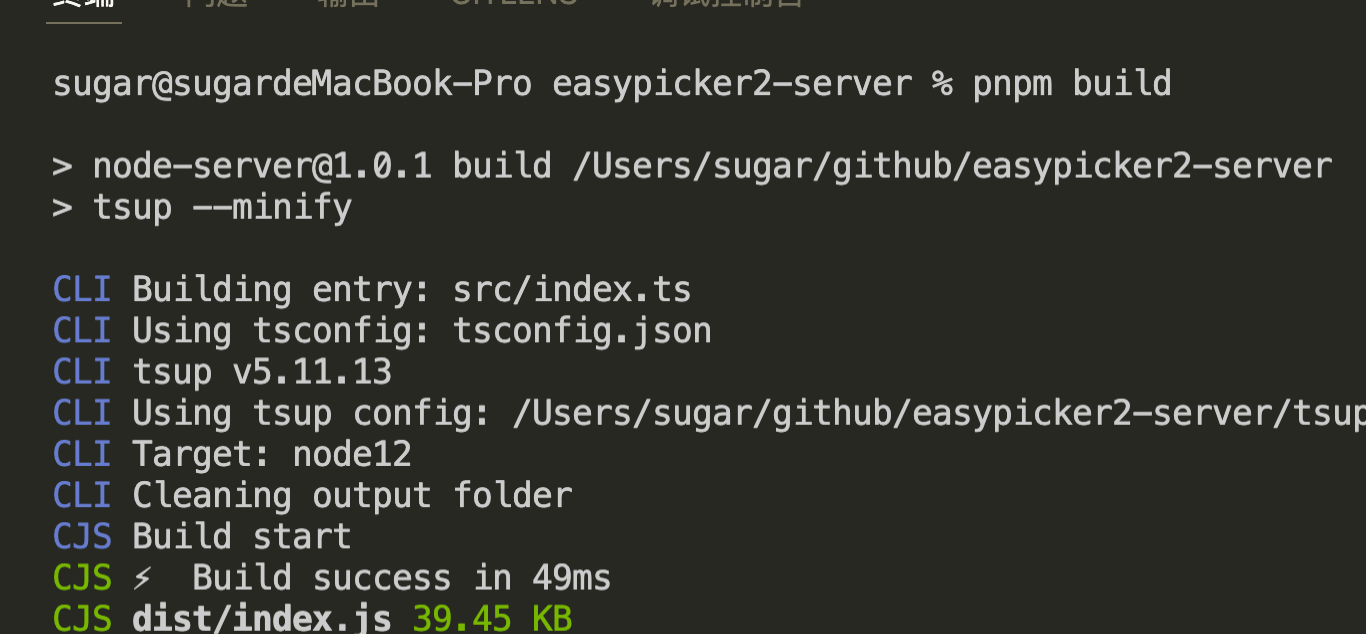
pnpm build
|
|
166
|
+
```
|
|
167
|
+
|
|
168
|
+
|
|
169
|
+
|
|
170
|
+
### 运行
|
|
171
|
+
```shell
|
|
172
|
+
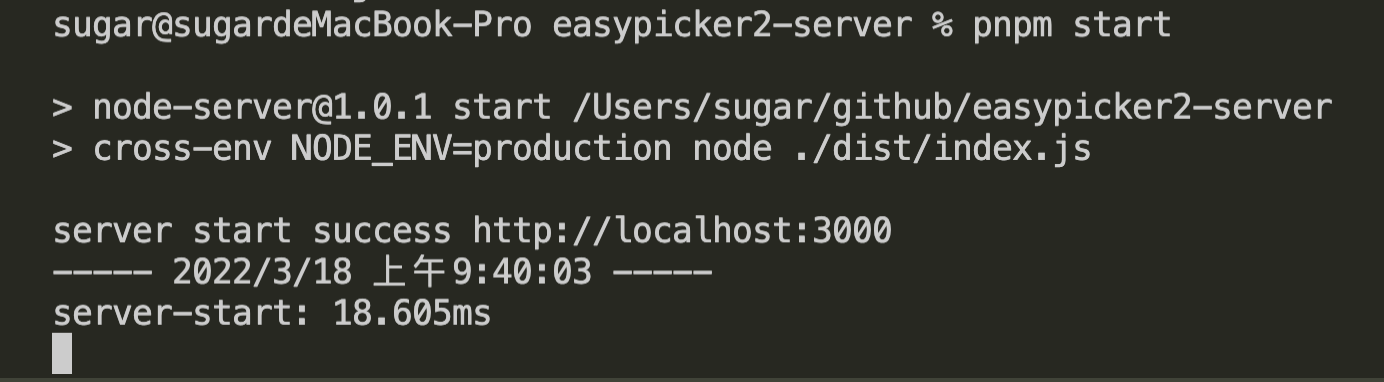
pnpm start
|
|
173
|
+
```
|
|
174
|
+
|
|
175
|
+
|
|
176
|
+
当然要让服务正常工作需要,在本地安装三个数据库,同时[创建七牛云账号](./qiniu.md)
|
|
177
|
+
|
|
178
|
+
请接着往下看
|
|
179
|
+
### 一些配置
|
|
180
|
+
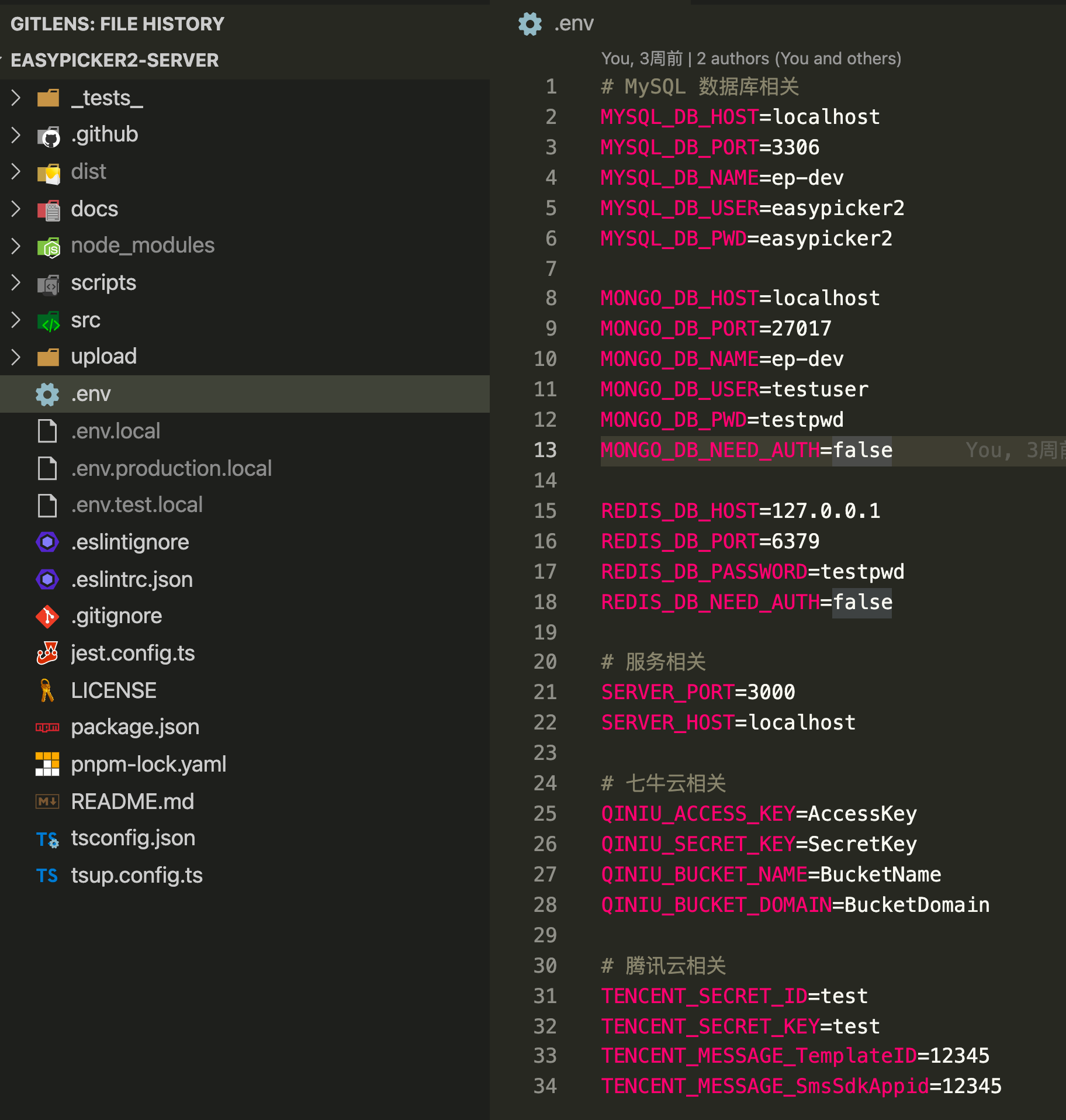
`数据库&云服务&本地服务`等相关的配置均放在了`.env`文件中,如下
|
|
181
|
+
|
|
182
|
+
|
|
183
|
+
|
|
184
|
+
每个变量的释义参看源码中的 [src/types/env.d.ts](https://github.com/ATQQ/easypicker2-server/blob/master/src/types/env.d.ts)
|
|
185
|
+
|
|
186
|
+
通常情况下只需要关心一下
|
|
187
|
+
* 服务相关
|
|
188
|
+
* SERVER_PORT: 服务启动的端口,默认3000,无特殊需求可以不修改
|
|
189
|
+
* MySql相关
|
|
190
|
+
* MYSQL_DB_NAME: 数据库名
|
|
191
|
+
* MYSQL_DB_USER: 账号
|
|
192
|
+
* MYSQL_DB_PWD: 密码
|
|
193
|
+
* 七牛云相关:OSS - 文件存储,上传/下载文件依赖其提供服务
|
|
194
|
+
* 腾讯云相关:短信服务,不接入短信不用配
|
|
195
|
+
|
|
196
|
+
## 6. 安装数据库
|
|
197
|
+
此部分参考[菜鸟教程](https://www.runoob.com/) 自行完成安装
|
|
198
|
+
|
|
199
|
+
`Redis`与`MongoDB`无需配置账户密码,服务端口等,保持默认行为即可
|
|
200
|
+
|
|
201
|
+
* [MySQL 教程](https://www.runoob.com/mysql/mysql-tutorial.html) - 存储用户数据
|
|
202
|
+
* 推荐使用5.x[(下载地址)](https://downloads.mysql.com/archives/community/)的版本,8.x的Node驱动存在问题
|
|
203
|
+
* [Redis 教程](https://www.runoob.com/redis/redis-tutorial.html) - 记录登录状态
|
|
204
|
+
* [MongoDB 教程](https://www.runoob.com/mongodb/mongodb-tutorial.html) - 记录运行日志
|
|
205
|
+
|
|
206
|
+
## 7. MySQL导入表结构数据
|
|
207
|
+
在简单[阅读教程](https://www.runoob.com/mysql/mysql-tutorial.html),并完成MySQL的安装之后
|
|
208
|
+
|
|
209
|
+
查看是否安装成功
|
|
210
|
+
```shell
|
|
211
|
+
mysql --version
|
|
212
|
+
```
|
|
213
|
+
|
|
214
|
+
### 初始化一个数据库
|
|
215
|
+
|
|
216
|
+
使用`root`账号登录
|
|
217
|
+
```shell
|
|
218
|
+
mysql -u root -p
|
|
219
|
+
```
|
|
220
|
+
回车后输入密码
|
|
221
|
+
|
|
222
|
+

|
|
223
|
+
|
|
224
|
+
查看当前已有数据库
|
|
225
|
+
```shell
|
|
226
|
+
show databases;
|
|
227
|
+
```
|
|
228
|
+
|
|
229
|
+
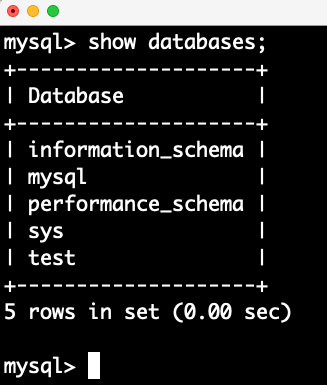
|
|
230
|
+
|
|
231
|
+
创建一个数据库
|
|
232
|
+
```shell
|
|
233
|
+
create database ep_local_test;
|
|
234
|
+
```
|
|
235
|
+
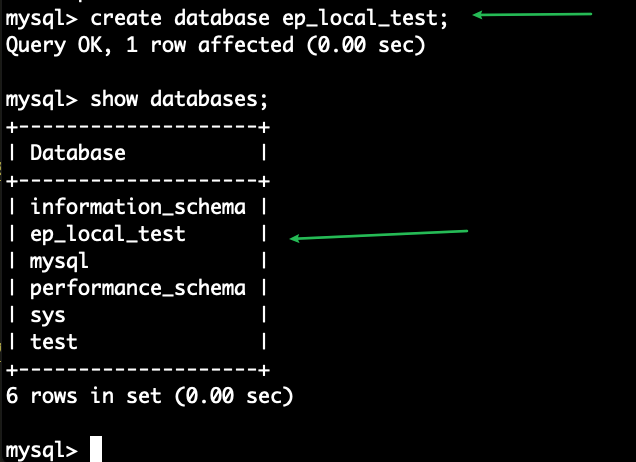
|
|
236
|
+
|
|
237
|
+
### 导入表结构数据
|
|
238
|
+
选择咱刚创建的数据库
|
|
239
|
+
```shell
|
|
240
|
+
use ep_local_test;
|
|
241
|
+
```
|
|
242
|
+
|
|
243
|
+
查看当前拥有的表
|
|
244
|
+
```shell
|
|
245
|
+
show tables;
|
|
246
|
+
```
|
|
247
|
+
|
|
248
|
+
导入所需的表 其中`sql文件位置`为本地的后端项目中`docs/sql/auto_create.sql`的绝对路径
|
|
249
|
+
|
|
250
|
+
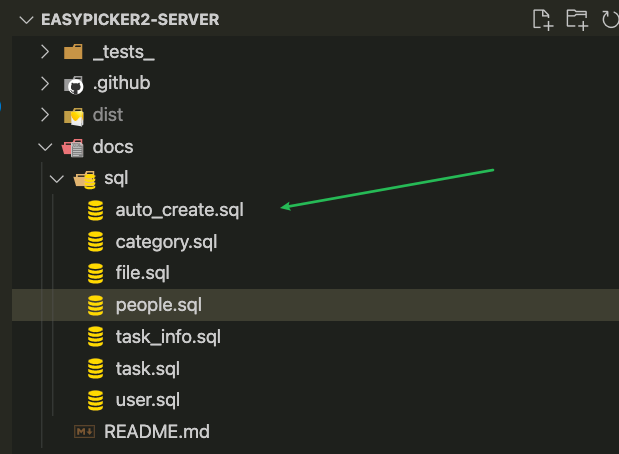
|
|
251
|
+
|
|
252
|
+
```shell
|
|
253
|
+
source sql文件位置
|
|
254
|
+
```
|
|
255
|
+

|
|
256
|
+
|
|
257
|
+
完成导入后再查看当前拥有的表
|
|
258
|
+
|
|
259
|
+
```shell
|
|
260
|
+
show tables;
|
|
261
|
+
```
|
|
262
|
+
|
|
263
|
+
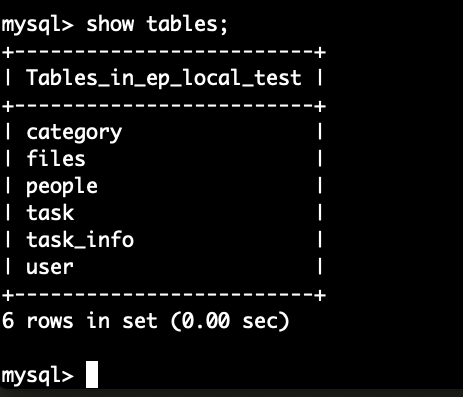
|
|
264
|
+
|
|
265
|
+
到此MySQL的本地准备工作准备完毕
|
|
266
|
+
|
|
267
|
+
接下来在服务端项目中`.env`环境变量中配置MySQL相关值即可
|
|
268
|
+
* MYSQL_DB_NAME=ep_local_test
|
|
269
|
+
* MYSQL_DB_USER=root
|
|
270
|
+
* MYSQL_DB_PWD=你的密码
|
|
271
|
+
|
|
272
|
+
|
|
273
|
+
有其它问题可以小群交流,方便可以加入及时交流沟通问题: 685446473
|
|
274
|
+
|
|
275
|
+

|