@sugarat/create-theme 0.0.3 → 0.0.5
This diff represents the content of publicly available package versions that have been released to one of the supported registries. The information contained in this diff is provided for informational purposes only and reflects changes between package versions as they appear in their respective public registries.
- package/CHANGELOG.md +12 -0
- package/dist/template/docs/about.md +56 -0
- package/dist/template/docs/index.md +8 -1
- package/dist/template/docs/sop/mermaid.md +71 -0
- package/dist/template/docs/sop/more.md +11 -0
- package/dist/template/docs/sop/quickStart.md +63 -5
- package/dist/template/docs/sop/style.md +88 -0
- package/dist/template/package.json +5 -5
- package/package.json +7 -1
- package/public/template/docs/about.md +56 -0
- package/public/template/docs/index.md +8 -1
- package/public/template/docs/sop/mermaid.md +71 -0
- package/public/template/docs/sop/more.md +11 -0
- package/public/template/docs/sop/quickStart.md +63 -5
- package/public/template/docs/sop/style.md +88 -0
- package/public/template/package.json +5 -5
package/CHANGELOG.md
CHANGED
|
@@ -8,3 +8,59 @@ sticky: 1
|
|
|
8
8
|
|
|
9
9
|
|
|
10
10
|
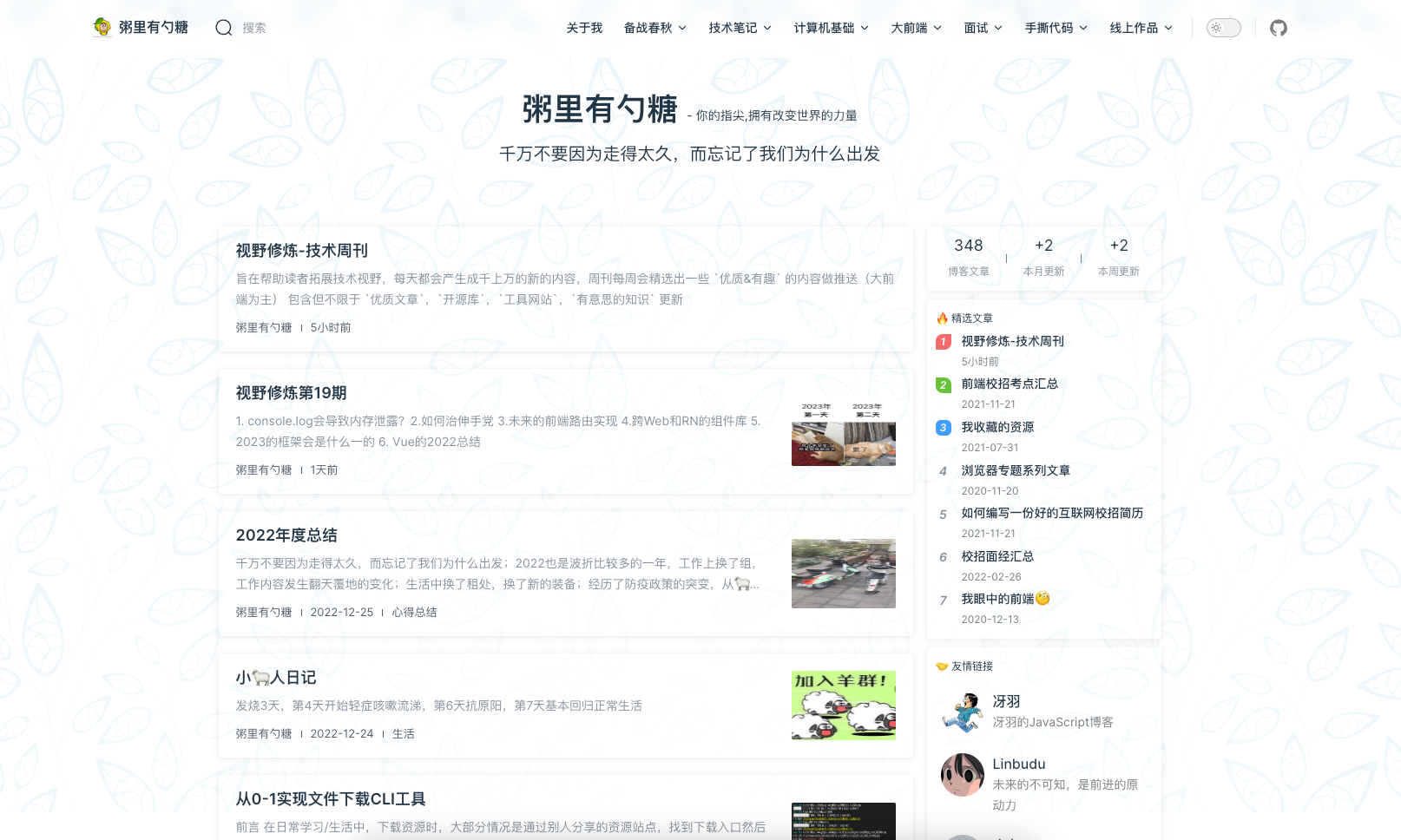
更多细节见 https://theme.sugarat.top
|
|
11
|
+
|
|
12
|
+
## 已支持功能
|
|
13
|
+
介绍一下主要的,非所有
|
|
14
|
+
|
|
15
|
+
* 博客首页
|
|
16
|
+
* 文章列表
|
|
17
|
+
* 精选文章
|
|
18
|
+
* 友链
|
|
19
|
+
* 标签分类
|
|
20
|
+
* 图片预览
|
|
21
|
+
* 搜索(基于[pagefind](https://github.com/cloudcannon/pagefind)支持离线全文搜索)
|
|
22
|
+
* [giscus](https://giscus.app/zh-CN)驱动的评论系统
|
|
23
|
+
* 推荐文章(类似文章目录)
|
|
24
|
+
* 阅读时间计算
|
|
25
|
+
* 全局的提示弹窗 (由 el-alert 驱动)
|
|
26
|
+
* 全局的公告弹窗,支持设置图片,文字,按钮
|
|
27
|
+
* 作品聚合页(为个人作品提供一个展示)
|
|
28
|
+
* tabs([vitepress-plugin-tabs](https://vitepress-plugins.sapphi.red/tabs/))
|
|
29
|
+
* 流程图([vitepress-plugin-mermaid](https://github.com/emersonbottero/vitepress-plugin-mermaid#readme))
|
|
30
|
+
|
|
31
|
+
## 规划中功能
|
|
32
|
+
* Valine 评论系统
|
|
33
|
+
* 文章合集(类似于聚合一个内容专题)
|
|
34
|
+
* 更多可定制的主题样式
|
|
35
|
+
* RSS
|
|
36
|
+
* 文章时间线页面支持
|
|
37
|
+
* 博客案例集合
|
|
38
|
+
* 背景图自动更换
|
|
39
|
+
* 首屏铺满slogan,参考reco
|
|
40
|
+
* 主题色统一
|
|
41
|
+
|
|
42
|
+
## 参考项目
|
|
43
|
+
或多或少借鉴&使用了如下的一下开源项目,博客,网站的能力或者UI样式
|
|
44
|
+
|
|
45
|
+
* [reco](https://vuepress-theme-reco.recoluan.com/)
|
|
46
|
+
* [掘金](https://juejin.cn/)
|
|
47
|
+
* [surmon](https://surmon.me/)
|
|
48
|
+
* [@vue/theme](https://github.com/vuejs/theme)
|
|
49
|
+
* [vitest](https://vitest.dev/)
|
|
50
|
+
* [element-plus](https://element-plus.gitee.io/zh-CN/)
|
|
51
|
+
* [charles7c.github.io](https://github.com/Charles7c/charles7c.github.io)
|
|
52
|
+
* [vitepress-blog-zaun](https://github.com/clark-cui/vitepress-blog-zaun)
|
|
53
|
+
|
|
54
|
+
## 主题相关资源
|
|
55
|
+
* 主题地址:https://theme.sugarat.top/
|
|
56
|
+
* 主题包:[@sugarat/theme](https://www.npmjs.com/package/@sugarat/theme)
|
|
57
|
+
* 项目地址:https://github.com/ATQQ/sugar-blog/tree/master/packages/theme
|
|
58
|
+
* 作者博客地址:https://sugarat.top
|
|
59
|
+
|
|
60
|
+
|
|
61
|
+
## 最后
|
|
62
|
+
如果你有建议的 功能&想法 欢迎 私信&评论区 交流
|
|
63
|
+
|
|
64
|
+
如果你觉得主题不错,欢迎分享与使用,可以在评论区留下你的网站地址
|
|
65
|
+
|
|
66
|
+
笔者后续会单独开个板块展示大家优秀的博客,感谢大家的支持
|
|
@@ -4,6 +4,13 @@ layout: home
|
|
|
4
4
|
blog:
|
|
5
5
|
name: '@sugarat/theme'
|
|
6
6
|
motto: 简约风的 Vitepress 博客主题
|
|
7
|
-
inspiring:
|
|
7
|
+
inspiring:
|
|
8
|
+
- 基于 Vitepress 定制的主题🎨
|
|
9
|
+
- 千万不要因为走得太久,而忘记了我们为什么出发
|
|
10
|
+
- 人生就像一场修行,你不可能一开始就修成正果
|
|
11
|
+
- 无论多么沉重的负担,也不要忘记微笑;无论多么漫长的路程,也不要忘记坚持
|
|
12
|
+
- 生活的真谛不在繁华,而在于淡泊
|
|
13
|
+
# 设置 inspiringTimeout 可以实现自动切换
|
|
14
|
+
inspiringTimeout: 3000
|
|
8
15
|
pageSize: 6
|
|
9
16
|
---
|
|
@@ -0,0 +1,71 @@
|
|
|
1
|
+
---
|
|
2
|
+
description: 通过解析类 Markdown 的文本语法来实现图表的创建和动态修改。
|
|
3
|
+
---
|
|
4
|
+
# Mermaid - 流程图
|
|
5
|
+
|
|
6
|
+
>通过解析类 Markdown 的文本语法来实现图表的创建和动态修改。
|
|
7
|
+
|
|
8
|
+
:::tip 一点说明
|
|
9
|
+
基于 [vitepress-plugin-mermaid](https://github.com/emersonbottero/vitepress-plugin-mermaid) 实现
|
|
10
|
+
:::
|
|
11
|
+
|
|
12
|
+
简单语法如下,详细流程图语法见 [Mermaid 中文文档](https://github.com/mermaid-js/mermaid/blob/develop/README.zh-CN.md)
|
|
13
|
+
|
|
14
|
+
<pre>
|
|
15
|
+
```mermaid
|
|
16
|
+
flowchart TD
|
|
17
|
+
Start --> Stop
|
|
18
|
+
```
|
|
19
|
+
</pre>
|
|
20
|
+
|
|
21
|
+
|
|
22
|
+
效果如下
|
|
23
|
+
|
|
24
|
+
```mermaid
|
|
25
|
+
flowchart TD
|
|
26
|
+
Start --> Stop
|
|
27
|
+
```
|
|
28
|
+
|
|
29
|
+
默认开启,可以通过`mermaid`进行进一步配置,或关闭
|
|
30
|
+
|
|
31
|
+
:::code-group
|
|
32
|
+
```ts [① 关闭]
|
|
33
|
+
const blogTheme = getThemeConfig({
|
|
34
|
+
mermaid: false
|
|
35
|
+
})
|
|
36
|
+
```
|
|
37
|
+
```ts [② 进一步配置]
|
|
38
|
+
const blogTheme = getThemeConfig({
|
|
39
|
+
mermaid: {
|
|
40
|
+
// refer https://mermaid.js.org/config/setup/modules/mermaidAPI.html#mermaidapi-configuration-defaults for options
|
|
41
|
+
}
|
|
42
|
+
})
|
|
43
|
+
```
|
|
44
|
+
:::
|
|
45
|
+
|
|
46
|
+
下面看一下官方其它案例
|
|
47
|
+
|
|
48
|
+
**时序图**
|
|
49
|
+
```mermaid
|
|
50
|
+
sequenceDiagram
|
|
51
|
+
Alice->>John: Hello John, how are you?
|
|
52
|
+
loop Healthcheck
|
|
53
|
+
John->>John: Fight against hypochondria
|
|
54
|
+
end
|
|
55
|
+
Note right of John: Rational thoughts!
|
|
56
|
+
John-->>Alice: Great!
|
|
57
|
+
John->>Bob: How about you?
|
|
58
|
+
Bob-->>John: Jolly good!
|
|
59
|
+
```
|
|
60
|
+
|
|
61
|
+
**甘特图**
|
|
62
|
+
```mermaid
|
|
63
|
+
gantt
|
|
64
|
+
section Section
|
|
65
|
+
Completed :done, des1, 2014-01-06,2014-01-08
|
|
66
|
+
Active :active, des2, 2014-01-07, 3d
|
|
67
|
+
Parallel 1 : des3, after des1, 1d
|
|
68
|
+
Parallel 2 : des4, after des1, 1d
|
|
69
|
+
Parallel 3 : des5, after des3, 1d
|
|
70
|
+
Parallel 4 : des6, after des4, 1d
|
|
71
|
+
```
|
|
@@ -0,0 +1,11 @@
|
|
|
1
|
+
---
|
|
2
|
+
top: 3
|
|
3
|
+
---
|
|
4
|
+
# 更多能力
|
|
5
|
+
|
|
6
|
+
主题还提供了许多开箱即用的能力,项见文档 https://theme.sugarat.top
|
|
7
|
+
|
|
8
|
+
* [主题配置:首页&文章](https://theme.sugarat.top/config/frontmatter.html) - 主题提供的一些 `frontmatter`
|
|
9
|
+
* [主题配置:全局](https://theme.sugarat.top/config/global.html) - 主题提供的额外能力
|
|
10
|
+
* [主题配置:样式](https://theme.sugarat.top/config/style.html) - 自定义博客样式介绍
|
|
11
|
+
* [主题配置:组件能力](https://theme.sugarat.top/config/component.html) - 自定义博客样式介绍
|
|
@@ -1,20 +1,56 @@
|
|
|
1
1
|
---
|
|
2
2
|
sticky: 999
|
|
3
3
|
description: 1分钟内完成自己的博客创建
|
|
4
|
+
descriptionHTML: '
|
|
5
|
+
<span style="color:var(--description-font-color);">1分钟内完成自己的博客创建</span>
|
|
6
|
+
<pre style="background-color: #292b30; padding: 15px; border-radius: 10px;" class="shiki material-theme-palenight"><code>
|
|
7
|
+
<span class="line"><span style="color:#FFCB6B;">npm</span><span style="color:#A6ACCD;"> </span><span style="color:#C3E88D;">create</span><span style="color:#A6ACCD;"> </span><span style="color:#C3E88D;">@sugarat/theme@latest</span></span>
|
|
8
|
+
</code>
|
|
9
|
+
</pre>'
|
|
4
10
|
tag:
|
|
5
11
|
- SOP
|
|
12
|
+
top: 1
|
|
13
|
+
sidebar: false
|
|
6
14
|
---
|
|
7
15
|
|
|
8
16
|
# 快速上手
|
|
9
17
|
1分钟内完成自己的博客创建
|
|
10
18
|
|
|
11
|
-
##
|
|
12
|
-
|
|
13
|
-
|
|
14
|
-
|
|
19
|
+
## 快速创建项目
|
|
20
|
+
使用 [@sugarat/create-theme](https://github.com/ATQQ/sugar-blog/tree/master/packages/create-theme) 快速创建模板项目
|
|
21
|
+
|
|
22
|
+
:::code-group
|
|
23
|
+
```sh [npm]
|
|
24
|
+
npm create @sugarat/theme@latest
|
|
15
25
|
```
|
|
26
|
+
```sh [yarn]
|
|
27
|
+
yarn create @sugarat/theme
|
|
28
|
+
```
|
|
29
|
+
```sh [pnpm]
|
|
30
|
+
pnpm create @sugarat/theme
|
|
31
|
+
```
|
|
32
|
+
:::
|
|
33
|
+
|
|
34
|
+
当然你也可以自定义项目名创建
|
|
35
|
+
:::code-group
|
|
36
|
+
```sh [npm]
|
|
37
|
+
npm create @sugarat/theme@latest my-first-blog
|
|
38
|
+
```
|
|
39
|
+
```sh [yarn]
|
|
40
|
+
yarn create @sugarat/theme my-first-blog
|
|
41
|
+
```
|
|
42
|
+
```sh [pnpm]
|
|
43
|
+
pnpm create @sugarat/theme my-first-blog
|
|
44
|
+
```
|
|
45
|
+
:::
|
|
46
|
+
|
|
47
|
+
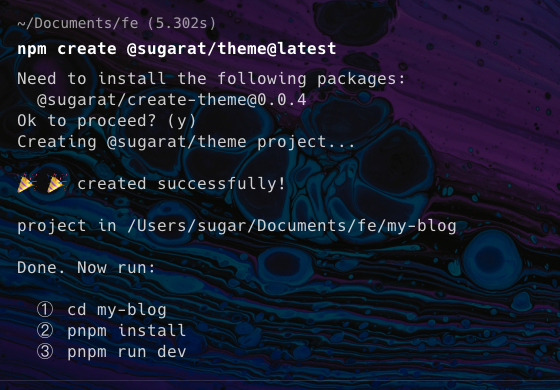
接下来按照 [操作指引](https://app.warp.dev/block/lZAFeRnRFgOcsRSUOU5ApV) 进行操作即可
|
|
48
|
+
|
|
49
|
+
|
|
50
|
+
|
|
51
|
+
① 切换到项目的目录
|
|
16
52
|
```sh
|
|
17
|
-
cd my-blog
|
|
53
|
+
cd my-blog
|
|
18
54
|
```
|
|
19
55
|
|
|
20
56
|
② 安装依赖
|
|
@@ -35,7 +71,29 @@ npm i -g pnpm
|
|
|
35
71
|
pnpm dev
|
|
36
72
|
```
|
|
37
73
|
|
|
74
|
+
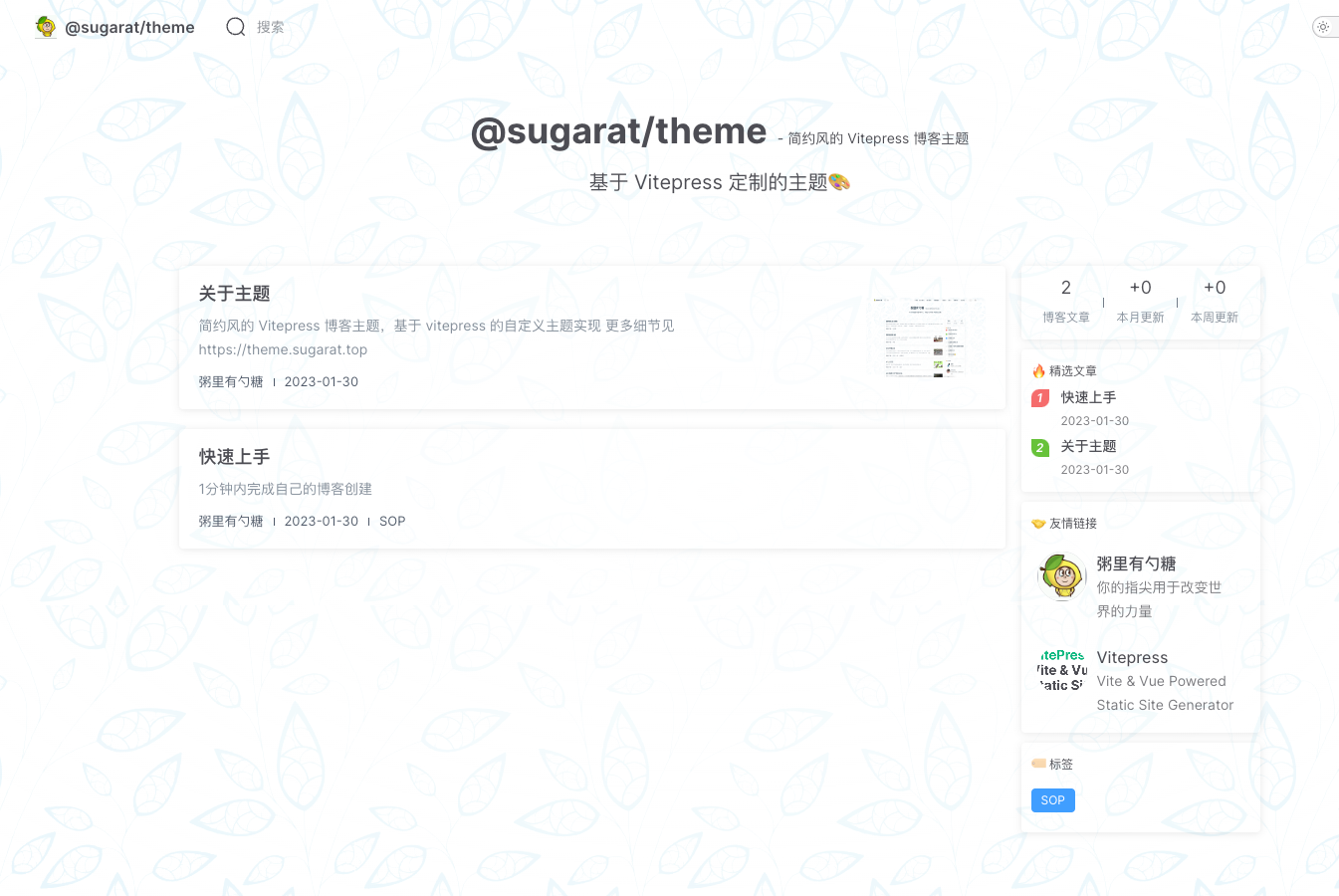
你就会得到一个这样的页面
|
|
75
|
+
|
|
76
|
+
|
|
77
|
+
|
|
38
78
|
④ 构建产物
|
|
39
79
|
```sh
|
|
40
80
|
pnpm build
|
|
41
81
|
```
|
|
82
|
+
|
|
83
|
+
⑤ 预览构建产物
|
|
84
|
+
```sh
|
|
85
|
+
pnpm serve
|
|
86
|
+
```
|
|
87
|
+
|
|
88
|
+
## 升级
|
|
89
|
+
|
|
90
|
+
如果主题更新了,升级主题,原项目只需执行如下指令即可
|
|
91
|
+
```sh
|
|
92
|
+
pnpm up @sugarat/theme
|
|
93
|
+
```
|
|
94
|
+
|
|
95
|
+
## 更多
|
|
96
|
+
* [主题配置:首页&文章](https://theme.sugarat.top/config/frontmatter.html) - 主题提供的一些 `frontmatter`
|
|
97
|
+
* [主题配置:全局](https://theme.sugarat.top/config/global.html) - 主题提供的额外能力
|
|
98
|
+
* [主题配置:样式](https://theme.sugarat.top/config/style.html) - 自定义博客样式介绍
|
|
99
|
+
* [主题配置:组件能力](https://theme.sugarat.top/config/component.html) - 自定义博客样式介绍
|
|
@@ -0,0 +1,88 @@
|
|
|
1
|
+
---
|
|
2
|
+
description: 介绍一下自定义主题的部分样式
|
|
3
|
+
title: 🔧 主题样式定制
|
|
4
|
+
readingTime: false
|
|
5
|
+
tag:
|
|
6
|
+
- 配置
|
|
7
|
+
recommend: 3
|
|
8
|
+
---
|
|
9
|
+
|
|
10
|
+
# 样式配置
|
|
11
|
+
样式自定义,参考[官方文档思路](https://vitepress.vuejs.org/guide/theme-introduction#customizing-css)
|
|
12
|
+
|
|
13
|
+
在 `.vitepress/theme/index.ts` 中引入自定义的样式文件,覆盖默认主题样式即可
|
|
14
|
+
|
|
15
|
+
例如:
|
|
16
|
+
|
|
17
|
+
博客模板里,提供了一个如下例子
|
|
18
|
+
|
|
19
|
+
```ts
|
|
20
|
+
// .vitepress/theme/index.ts [!code focus]
|
|
21
|
+
import BlogTheme from '@sugarat/theme'
|
|
22
|
+
// 自定义样式重载 // [!code focus]
|
|
23
|
+
import './style.scss' // [!code focus]
|
|
24
|
+
|
|
25
|
+
export default BlogTheme
|
|
26
|
+
```
|
|
27
|
+
|
|
28
|
+
里面有如下内容
|
|
29
|
+
```scss
|
|
30
|
+
.VPHome {
|
|
31
|
+
// 自定义首页背景图
|
|
32
|
+
&::before {
|
|
33
|
+
// 图片来源:https://zhuanlan.zhihu.com/p/54060187
|
|
34
|
+
background-image: url(./assets/bg.webp);
|
|
35
|
+
background-size: cover;
|
|
36
|
+
}
|
|
37
|
+
// 定义遮罩样式
|
|
38
|
+
background: radial-gradient(
|
|
39
|
+
ellipse,
|
|
40
|
+
rgba(var(--bg-gradient-home), 1) 0%,
|
|
41
|
+
rgba(var(--bg-gradient-home), 0) 150%
|
|
42
|
+
);
|
|
43
|
+
}
|
|
44
|
+
```
|
|
45
|
+
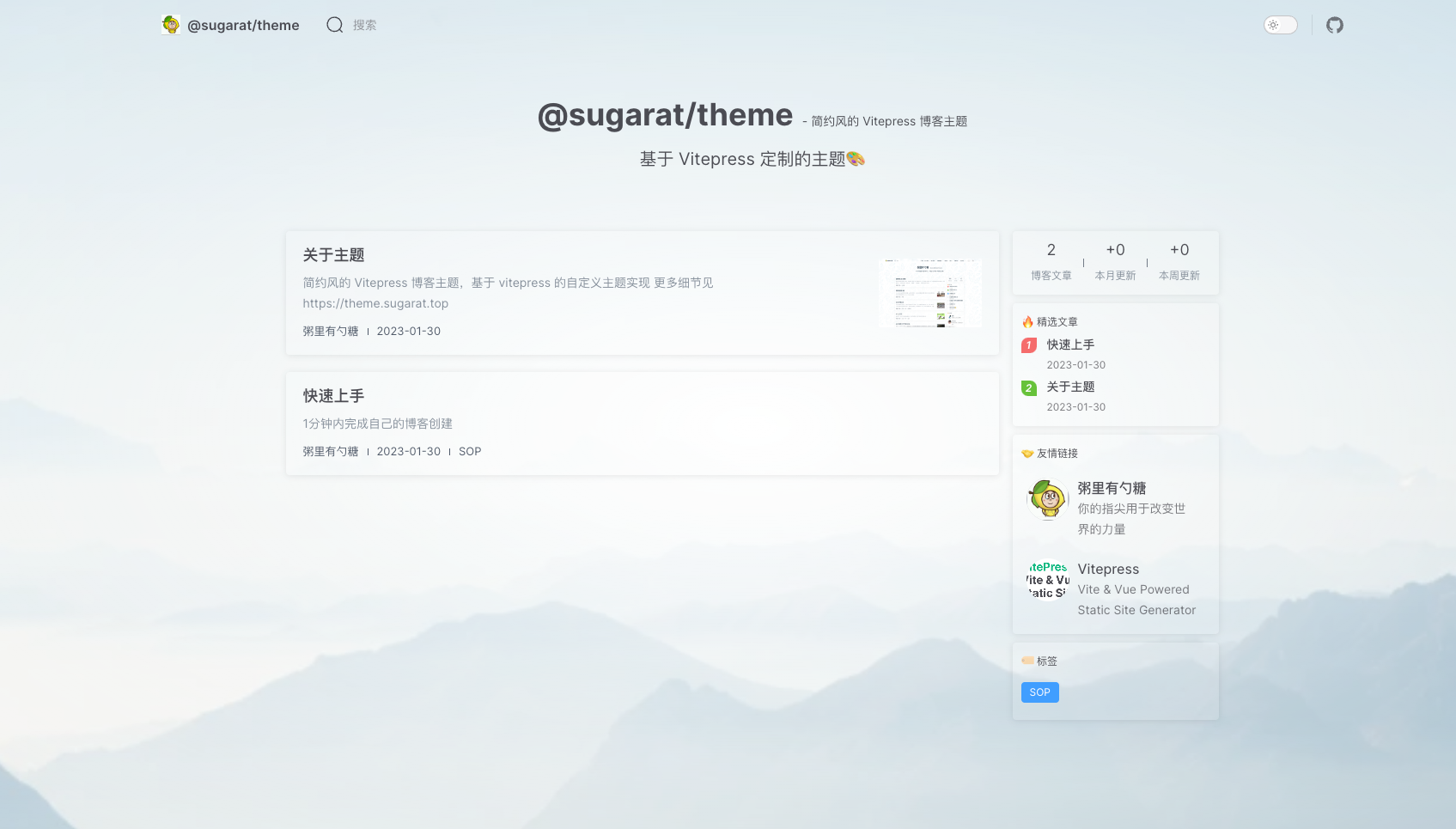
解除注释后,就能看到模板首页背景图发生了变化
|
|
46
|
+
|
|
47
|
+
|
|
48
|
+
|
|
49
|
+
## 首页背景
|
|
50
|
+
```scss
|
|
51
|
+
.VPHome {// [!code focus]
|
|
52
|
+
&::before {// [!code focus]
|
|
53
|
+
background-image: url(./assets/bg.webp); // [!code focus]
|
|
54
|
+
background-size: cover; // [!code focus]
|
|
55
|
+
} // [!code focus]
|
|
56
|
+
} // [!code focus]
|
|
57
|
+
|
|
58
|
+
.VPHome {
|
|
59
|
+
// 定义遮罩样式,控制图片展示的程度
|
|
60
|
+
background: radial-gradient(
|
|
61
|
+
ellipse,
|
|
62
|
+
rgba(var(--bg-gradient-home), 1) 0%,
|
|
63
|
+
rgba(var(--bg-gradient-home), 0) 150%
|
|
64
|
+
);
|
|
65
|
+
}
|
|
66
|
+
```
|
|
67
|
+
|
|
68
|
+
## 置顶样式
|
|
69
|
+
可以自行修改置顶icon的样式
|
|
70
|
+
```scss
|
|
71
|
+
.blog-item .pin.pin::before {
|
|
72
|
+
// 修改颜色
|
|
73
|
+
background-image: linear-gradient(red, red);
|
|
74
|
+
}
|
|
75
|
+
```
|
|
76
|
+

|
|
77
|
+
|
|
78
|
+
```scss
|
|
79
|
+
// 隐藏置顶的icon
|
|
80
|
+
.blog-item .pin.pin::before {
|
|
81
|
+
display: none;
|
|
82
|
+
}
|
|
83
|
+
```
|
|
84
|
+

|
|
85
|
+
|
|
86
|
+
|
|
87
|
+
## More
|
|
88
|
+
... wait a moment
|
|
@@ -9,13 +9,13 @@
|
|
|
9
9
|
},
|
|
10
10
|
"dependencies": {
|
|
11
11
|
"@element-plus/icons-vue": "^2.1.0",
|
|
12
|
-
"@sugarat/theme": "^0.1.
|
|
13
|
-
"element-plus": "^2.3.
|
|
14
|
-
"vue": "^3.
|
|
12
|
+
"@sugarat/theme": "^0.1.37",
|
|
13
|
+
"element-plus": "^2.3.8",
|
|
14
|
+
"vue": "^3.3.4"
|
|
15
15
|
},
|
|
16
16
|
"devDependencies": {
|
|
17
|
-
"sass": "^1.
|
|
18
|
-
"typescript": "^
|
|
17
|
+
"sass": "^1.64.1",
|
|
18
|
+
"typescript": "^5.1.6",
|
|
19
19
|
"vitepress": "1.0.0-beta.5"
|
|
20
20
|
},
|
|
21
21
|
"author": "粥里有勺糖",
|
package/package.json
CHANGED
|
@@ -1,9 +1,15 @@
|
|
|
1
1
|
{
|
|
2
2
|
"name": "@sugarat/create-theme",
|
|
3
|
-
"version": "0.0.
|
|
3
|
+
"version": "0.0.5",
|
|
4
|
+
"description": "简约风的 Vitepress 博客主题,sugarat vitepress blog theme",
|
|
4
5
|
"bin": {
|
|
5
6
|
"create-theme": "./dist/index.js"
|
|
6
7
|
},
|
|
8
|
+
"repository": {
|
|
9
|
+
"type": "git",
|
|
10
|
+
"url": "git+https://github.com/ATQQ/sugar-blog.git"
|
|
11
|
+
},
|
|
12
|
+
"homepage": "https://github.com/ATQQ/sugar-blog/tree/master/packages/create-theme",
|
|
7
13
|
"keywords": [
|
|
8
14
|
"blog",
|
|
9
15
|
"vitepress",
|
|
@@ -8,3 +8,59 @@ sticky: 1
|
|
|
8
8
|

|
|
9
9
|
|
|
10
10
|
更多细节见 https://theme.sugarat.top
|
|
11
|
+
|
|
12
|
+
## 已支持功能
|
|
13
|
+
介绍一下主要的,非所有
|
|
14
|
+
|
|
15
|
+
* 博客首页
|
|
16
|
+
* 文章列表
|
|
17
|
+
* 精选文章
|
|
18
|
+
* 友链
|
|
19
|
+
* 标签分类
|
|
20
|
+
* 图片预览
|
|
21
|
+
* 搜索(基于[pagefind](https://github.com/cloudcannon/pagefind)支持离线全文搜索)
|
|
22
|
+
* [giscus](https://giscus.app/zh-CN)驱动的评论系统
|
|
23
|
+
* 推荐文章(类似文章目录)
|
|
24
|
+
* 阅读时间计算
|
|
25
|
+
* 全局的提示弹窗 (由 el-alert 驱动)
|
|
26
|
+
* 全局的公告弹窗,支持设置图片,文字,按钮
|
|
27
|
+
* 作品聚合页(为个人作品提供一个展示)
|
|
28
|
+
* tabs([vitepress-plugin-tabs](https://vitepress-plugins.sapphi.red/tabs/))
|
|
29
|
+
* 流程图([vitepress-plugin-mermaid](https://github.com/emersonbottero/vitepress-plugin-mermaid#readme))
|
|
30
|
+
|
|
31
|
+
## 规划中功能
|
|
32
|
+
* Valine 评论系统
|
|
33
|
+
* 文章合集(类似于聚合一个内容专题)
|
|
34
|
+
* 更多可定制的主题样式
|
|
35
|
+
* RSS
|
|
36
|
+
* 文章时间线页面支持
|
|
37
|
+
* 博客案例集合
|
|
38
|
+
* 背景图自动更换
|
|
39
|
+
* 首屏铺满slogan,参考reco
|
|
40
|
+
* 主题色统一
|
|
41
|
+
|
|
42
|
+
## 参考项目
|
|
43
|
+
或多或少借鉴&使用了如下的一下开源项目,博客,网站的能力或者UI样式
|
|
44
|
+
|
|
45
|
+
* [reco](https://vuepress-theme-reco.recoluan.com/)
|
|
46
|
+
* [掘金](https://juejin.cn/)
|
|
47
|
+
* [surmon](https://surmon.me/)
|
|
48
|
+
* [@vue/theme](https://github.com/vuejs/theme)
|
|
49
|
+
* [vitest](https://vitest.dev/)
|
|
50
|
+
* [element-plus](https://element-plus.gitee.io/zh-CN/)
|
|
51
|
+
* [charles7c.github.io](https://github.com/Charles7c/charles7c.github.io)
|
|
52
|
+
* [vitepress-blog-zaun](https://github.com/clark-cui/vitepress-blog-zaun)
|
|
53
|
+
|
|
54
|
+
## 主题相关资源
|
|
55
|
+
* 主题地址:https://theme.sugarat.top/
|
|
56
|
+
* 主题包:[@sugarat/theme](https://www.npmjs.com/package/@sugarat/theme)
|
|
57
|
+
* 项目地址:https://github.com/ATQQ/sugar-blog/tree/master/packages/theme
|
|
58
|
+
* 作者博客地址:https://sugarat.top
|
|
59
|
+
|
|
60
|
+
|
|
61
|
+
## 最后
|
|
62
|
+
如果你有建议的 功能&想法 欢迎 私信&评论区 交流
|
|
63
|
+
|
|
64
|
+
如果你觉得主题不错,欢迎分享与使用,可以在评论区留下你的网站地址
|
|
65
|
+
|
|
66
|
+
笔者后续会单独开个板块展示大家优秀的博客,感谢大家的支持
|
|
@@ -4,6 +4,13 @@ layout: home
|
|
|
4
4
|
blog:
|
|
5
5
|
name: '@sugarat/theme'
|
|
6
6
|
motto: 简约风的 Vitepress 博客主题
|
|
7
|
-
inspiring:
|
|
7
|
+
inspiring:
|
|
8
|
+
- 基于 Vitepress 定制的主题🎨
|
|
9
|
+
- 千万不要因为走得太久,而忘记了我们为什么出发
|
|
10
|
+
- 人生就像一场修行,你不可能一开始就修成正果
|
|
11
|
+
- 无论多么沉重的负担,也不要忘记微笑;无论多么漫长的路程,也不要忘记坚持
|
|
12
|
+
- 生活的真谛不在繁华,而在于淡泊
|
|
13
|
+
# 设置 inspiringTimeout 可以实现自动切换
|
|
14
|
+
inspiringTimeout: 3000
|
|
8
15
|
pageSize: 6
|
|
9
16
|
---
|
|
@@ -0,0 +1,71 @@
|
|
|
1
|
+
---
|
|
2
|
+
description: 通过解析类 Markdown 的文本语法来实现图表的创建和动态修改。
|
|
3
|
+
---
|
|
4
|
+
# Mermaid - 流程图
|
|
5
|
+
|
|
6
|
+
>通过解析类 Markdown 的文本语法来实现图表的创建和动态修改。
|
|
7
|
+
|
|
8
|
+
:::tip 一点说明
|
|
9
|
+
基于 [vitepress-plugin-mermaid](https://github.com/emersonbottero/vitepress-plugin-mermaid) 实现
|
|
10
|
+
:::
|
|
11
|
+
|
|
12
|
+
简单语法如下,详细流程图语法见 [Mermaid 中文文档](https://github.com/mermaid-js/mermaid/blob/develop/README.zh-CN.md)
|
|
13
|
+
|
|
14
|
+
<pre>
|
|
15
|
+
```mermaid
|
|
16
|
+
flowchart TD
|
|
17
|
+
Start --> Stop
|
|
18
|
+
```
|
|
19
|
+
</pre>
|
|
20
|
+
|
|
21
|
+
|
|
22
|
+
效果如下
|
|
23
|
+
|
|
24
|
+
```mermaid
|
|
25
|
+
flowchart TD
|
|
26
|
+
Start --> Stop
|
|
27
|
+
```
|
|
28
|
+
|
|
29
|
+
默认开启,可以通过`mermaid`进行进一步配置,或关闭
|
|
30
|
+
|
|
31
|
+
:::code-group
|
|
32
|
+
```ts [① 关闭]
|
|
33
|
+
const blogTheme = getThemeConfig({
|
|
34
|
+
mermaid: false
|
|
35
|
+
})
|
|
36
|
+
```
|
|
37
|
+
```ts [② 进一步配置]
|
|
38
|
+
const blogTheme = getThemeConfig({
|
|
39
|
+
mermaid: {
|
|
40
|
+
// refer https://mermaid.js.org/config/setup/modules/mermaidAPI.html#mermaidapi-configuration-defaults for options
|
|
41
|
+
}
|
|
42
|
+
})
|
|
43
|
+
```
|
|
44
|
+
:::
|
|
45
|
+
|
|
46
|
+
下面看一下官方其它案例
|
|
47
|
+
|
|
48
|
+
**时序图**
|
|
49
|
+
```mermaid
|
|
50
|
+
sequenceDiagram
|
|
51
|
+
Alice->>John: Hello John, how are you?
|
|
52
|
+
loop Healthcheck
|
|
53
|
+
John->>John: Fight against hypochondria
|
|
54
|
+
end
|
|
55
|
+
Note right of John: Rational thoughts!
|
|
56
|
+
John-->>Alice: Great!
|
|
57
|
+
John->>Bob: How about you?
|
|
58
|
+
Bob-->>John: Jolly good!
|
|
59
|
+
```
|
|
60
|
+
|
|
61
|
+
**甘特图**
|
|
62
|
+
```mermaid
|
|
63
|
+
gantt
|
|
64
|
+
section Section
|
|
65
|
+
Completed :done, des1, 2014-01-06,2014-01-08
|
|
66
|
+
Active :active, des2, 2014-01-07, 3d
|
|
67
|
+
Parallel 1 : des3, after des1, 1d
|
|
68
|
+
Parallel 2 : des4, after des1, 1d
|
|
69
|
+
Parallel 3 : des5, after des3, 1d
|
|
70
|
+
Parallel 4 : des6, after des4, 1d
|
|
71
|
+
```
|
|
@@ -0,0 +1,11 @@
|
|
|
1
|
+
---
|
|
2
|
+
top: 3
|
|
3
|
+
---
|
|
4
|
+
# 更多能力
|
|
5
|
+
|
|
6
|
+
主题还提供了许多开箱即用的能力,项见文档 https://theme.sugarat.top
|
|
7
|
+
|
|
8
|
+
* [主题配置:首页&文章](https://theme.sugarat.top/config/frontmatter.html) - 主题提供的一些 `frontmatter`
|
|
9
|
+
* [主题配置:全局](https://theme.sugarat.top/config/global.html) - 主题提供的额外能力
|
|
10
|
+
* [主题配置:样式](https://theme.sugarat.top/config/style.html) - 自定义博客样式介绍
|
|
11
|
+
* [主题配置:组件能力](https://theme.sugarat.top/config/component.html) - 自定义博客样式介绍
|
|
@@ -1,20 +1,56 @@
|
|
|
1
1
|
---
|
|
2
2
|
sticky: 999
|
|
3
3
|
description: 1分钟内完成自己的博客创建
|
|
4
|
+
descriptionHTML: '
|
|
5
|
+
<span style="color:var(--description-font-color);">1分钟内完成自己的博客创建</span>
|
|
6
|
+
<pre style="background-color: #292b30; padding: 15px; border-radius: 10px;" class="shiki material-theme-palenight"><code>
|
|
7
|
+
<span class="line"><span style="color:#FFCB6B;">npm</span><span style="color:#A6ACCD;"> </span><span style="color:#C3E88D;">create</span><span style="color:#A6ACCD;"> </span><span style="color:#C3E88D;">@sugarat/theme@latest</span></span>
|
|
8
|
+
</code>
|
|
9
|
+
</pre>'
|
|
4
10
|
tag:
|
|
5
11
|
- SOP
|
|
12
|
+
top: 1
|
|
13
|
+
sidebar: false
|
|
6
14
|
---
|
|
7
15
|
|
|
8
16
|
# 快速上手
|
|
9
17
|
1分钟内完成自己的博客创建
|
|
10
18
|
|
|
11
|
-
##
|
|
12
|
-
|
|
13
|
-
|
|
14
|
-
|
|
19
|
+
## 快速创建项目
|
|
20
|
+
使用 [@sugarat/create-theme](https://github.com/ATQQ/sugar-blog/tree/master/packages/create-theme) 快速创建模板项目
|
|
21
|
+
|
|
22
|
+
:::code-group
|
|
23
|
+
```sh [npm]
|
|
24
|
+
npm create @sugarat/theme@latest
|
|
15
25
|
```
|
|
26
|
+
```sh [yarn]
|
|
27
|
+
yarn create @sugarat/theme
|
|
28
|
+
```
|
|
29
|
+
```sh [pnpm]
|
|
30
|
+
pnpm create @sugarat/theme
|
|
31
|
+
```
|
|
32
|
+
:::
|
|
33
|
+
|
|
34
|
+
当然你也可以自定义项目名创建
|
|
35
|
+
:::code-group
|
|
36
|
+
```sh [npm]
|
|
37
|
+
npm create @sugarat/theme@latest my-first-blog
|
|
38
|
+
```
|
|
39
|
+
```sh [yarn]
|
|
40
|
+
yarn create @sugarat/theme my-first-blog
|
|
41
|
+
```
|
|
42
|
+
```sh [pnpm]
|
|
43
|
+
pnpm create @sugarat/theme my-first-blog
|
|
44
|
+
```
|
|
45
|
+
:::
|
|
46
|
+
|
|
47
|
+
接下来按照 [操作指引](https://app.warp.dev/block/lZAFeRnRFgOcsRSUOU5ApV) 进行操作即可
|
|
48
|
+
|
|
49
|
+

|
|
50
|
+
|
|
51
|
+
① 切换到项目的目录
|
|
16
52
|
```sh
|
|
17
|
-
cd my-blog
|
|
53
|
+
cd my-blog
|
|
18
54
|
```
|
|
19
55
|
|
|
20
56
|
② 安装依赖
|
|
@@ -35,7 +71,29 @@ npm i -g pnpm
|
|
|
35
71
|
pnpm dev
|
|
36
72
|
```
|
|
37
73
|
|
|
74
|
+
你就会得到一个这样的页面
|
|
75
|
+
|
|
76
|
+

|
|
77
|
+
|
|
38
78
|
④ 构建产物
|
|
39
79
|
```sh
|
|
40
80
|
pnpm build
|
|
41
81
|
```
|
|
82
|
+
|
|
83
|
+
⑤ 预览构建产物
|
|
84
|
+
```sh
|
|
85
|
+
pnpm serve
|
|
86
|
+
```
|
|
87
|
+
|
|
88
|
+
## 升级
|
|
89
|
+
|
|
90
|
+
如果主题更新了,升级主题,原项目只需执行如下指令即可
|
|
91
|
+
```sh
|
|
92
|
+
pnpm up @sugarat/theme
|
|
93
|
+
```
|
|
94
|
+
|
|
95
|
+
## 更多
|
|
96
|
+
* [主题配置:首页&文章](https://theme.sugarat.top/config/frontmatter.html) - 主题提供的一些 `frontmatter`
|
|
97
|
+
* [主题配置:全局](https://theme.sugarat.top/config/global.html) - 主题提供的额外能力
|
|
98
|
+
* [主题配置:样式](https://theme.sugarat.top/config/style.html) - 自定义博客样式介绍
|
|
99
|
+
* [主题配置:组件能力](https://theme.sugarat.top/config/component.html) - 自定义博客样式介绍
|
|
@@ -0,0 +1,88 @@
|
|
|
1
|
+
---
|
|
2
|
+
description: 介绍一下自定义主题的部分样式
|
|
3
|
+
title: 🔧 主题样式定制
|
|
4
|
+
readingTime: false
|
|
5
|
+
tag:
|
|
6
|
+
- 配置
|
|
7
|
+
recommend: 3
|
|
8
|
+
---
|
|
9
|
+
|
|
10
|
+
# 样式配置
|
|
11
|
+
样式自定义,参考[官方文档思路](https://vitepress.vuejs.org/guide/theme-introduction#customizing-css)
|
|
12
|
+
|
|
13
|
+
在 `.vitepress/theme/index.ts` 中引入自定义的样式文件,覆盖默认主题样式即可
|
|
14
|
+
|
|
15
|
+
例如:
|
|
16
|
+
|
|
17
|
+
博客模板里,提供了一个如下例子
|
|
18
|
+
|
|
19
|
+
```ts
|
|
20
|
+
// .vitepress/theme/index.ts [!code focus]
|
|
21
|
+
import BlogTheme from '@sugarat/theme'
|
|
22
|
+
// 自定义样式重载 // [!code focus]
|
|
23
|
+
import './style.scss' // [!code focus]
|
|
24
|
+
|
|
25
|
+
export default BlogTheme
|
|
26
|
+
```
|
|
27
|
+
|
|
28
|
+
里面有如下内容
|
|
29
|
+
```scss
|
|
30
|
+
.VPHome {
|
|
31
|
+
// 自定义首页背景图
|
|
32
|
+
&::before {
|
|
33
|
+
// 图片来源:https://zhuanlan.zhihu.com/p/54060187
|
|
34
|
+
background-image: url(./assets/bg.webp);
|
|
35
|
+
background-size: cover;
|
|
36
|
+
}
|
|
37
|
+
// 定义遮罩样式
|
|
38
|
+
background: radial-gradient(
|
|
39
|
+
ellipse,
|
|
40
|
+
rgba(var(--bg-gradient-home), 1) 0%,
|
|
41
|
+
rgba(var(--bg-gradient-home), 0) 150%
|
|
42
|
+
);
|
|
43
|
+
}
|
|
44
|
+
```
|
|
45
|
+
解除注释后,就能看到模板首页背景图发生了变化
|
|
46
|
+
|
|
47
|
+

|
|
48
|
+
|
|
49
|
+
## 首页背景
|
|
50
|
+
```scss
|
|
51
|
+
.VPHome {// [!code focus]
|
|
52
|
+
&::before {// [!code focus]
|
|
53
|
+
background-image: url(./assets/bg.webp); // [!code focus]
|
|
54
|
+
background-size: cover; // [!code focus]
|
|
55
|
+
} // [!code focus]
|
|
56
|
+
} // [!code focus]
|
|
57
|
+
|
|
58
|
+
.VPHome {
|
|
59
|
+
// 定义遮罩样式,控制图片展示的程度
|
|
60
|
+
background: radial-gradient(
|
|
61
|
+
ellipse,
|
|
62
|
+
rgba(var(--bg-gradient-home), 1) 0%,
|
|
63
|
+
rgba(var(--bg-gradient-home), 0) 150%
|
|
64
|
+
);
|
|
65
|
+
}
|
|
66
|
+
```
|
|
67
|
+
|
|
68
|
+
## 置顶样式
|
|
69
|
+
可以自行修改置顶icon的样式
|
|
70
|
+
```scss
|
|
71
|
+
.blog-item .pin.pin::before {
|
|
72
|
+
// 修改颜色
|
|
73
|
+
background-image: linear-gradient(red, red);
|
|
74
|
+
}
|
|
75
|
+
```
|
|
76
|
+

|
|
77
|
+
|
|
78
|
+
```scss
|
|
79
|
+
// 隐藏置顶的icon
|
|
80
|
+
.blog-item .pin.pin::before {
|
|
81
|
+
display: none;
|
|
82
|
+
}
|
|
83
|
+
```
|
|
84
|
+

|
|
85
|
+
|
|
86
|
+
|
|
87
|
+
## More
|
|
88
|
+
... wait a moment
|
|
@@ -9,13 +9,13 @@
|
|
|
9
9
|
},
|
|
10
10
|
"dependencies": {
|
|
11
11
|
"@element-plus/icons-vue": "^2.1.0",
|
|
12
|
-
"@sugarat/theme": "^0.1.
|
|
13
|
-
"element-plus": "^2.3.
|
|
14
|
-
"vue": "^3.
|
|
12
|
+
"@sugarat/theme": "^0.1.37",
|
|
13
|
+
"element-plus": "^2.3.8",
|
|
14
|
+
"vue": "^3.3.4"
|
|
15
15
|
},
|
|
16
16
|
"devDependencies": {
|
|
17
|
-
"sass": "^1.
|
|
18
|
-
"typescript": "^
|
|
17
|
+
"sass": "^1.64.1",
|
|
18
|
+
"typescript": "^5.1.6",
|
|
19
19
|
"vitepress": "1.0.0-beta.5"
|
|
20
20
|
},
|
|
21
21
|
"author": "粥里有勺糖",
|