@stringsync/splates 0.0.0-stage → 0.0.46
This diff represents the content of publicly available package versions that have been released to one of the supported registries. The information contained in this diff is provided for informational purposes only and reflects changes between package versions as they appear in their respective public registries.
- package/LICENSE +21 -0
- package/README.md +420 -2
- package/artifact.d.ts +3 -0
- package/budget.d.ts +3 -0
- package/coordinator.d.ts +3 -0
- package/creds.d.ts +3 -0
- package/flags.d.ts +37 -0
- package/index.d.ts +2 -0
- package/index.js +1282 -0
- package/lane.d.ts +3 -0
- package/main.d.ts +6 -0
- package/package.json +35 -5
- package/projects.d.ts +3 -0
- package/queue.d.ts +3 -0
- package/setup.d.ts +20 -0
- package/slots.d.ts +3 -0
- package/splates.d.ts +10 -0
- package/todo.d.ts +3 -0
- package/tunnel.d.ts +3 -0
- package/worker.d.ts +3 -0
package/LICENSE
ADDED
|
@@ -0,0 +1,21 @@
|
|
|
1
|
+
MIT License
|
|
2
|
+
|
|
3
|
+
Copyright (c) 2026 stringsync LLC
|
|
4
|
+
|
|
5
|
+
Permission is hereby granted, free of charge, to any person obtaining a copy
|
|
6
|
+
of this software and associated documentation files (the "Software"), to deal
|
|
7
|
+
in the Software without restriction, including without limitation the rights
|
|
8
|
+
to use, copy, modify, merge, publish, distribute, sublicense, and/or sell
|
|
9
|
+
copies of the Software, and to permit persons to whom the Software is
|
|
10
|
+
furnished to do so, subject to the following conditions:
|
|
11
|
+
|
|
12
|
+
The above copyright notice and this permission notice shall be included in all
|
|
13
|
+
copies or substantial portions of the Software.
|
|
14
|
+
|
|
15
|
+
THE SOFTWARE IS PROVIDED "AS IS", WITHOUT WARRANTY OF ANY KIND, EXPRESS OR
|
|
16
|
+
IMPLIED, INCLUDING BUT NOT LIMITED TO THE WARRANTIES OF MERCHANTABILITY,
|
|
17
|
+
FITNESS FOR A PARTICULAR PURPOSE AND NONINFRINGEMENT. IN NO EVENT SHALL THE
|
|
18
|
+
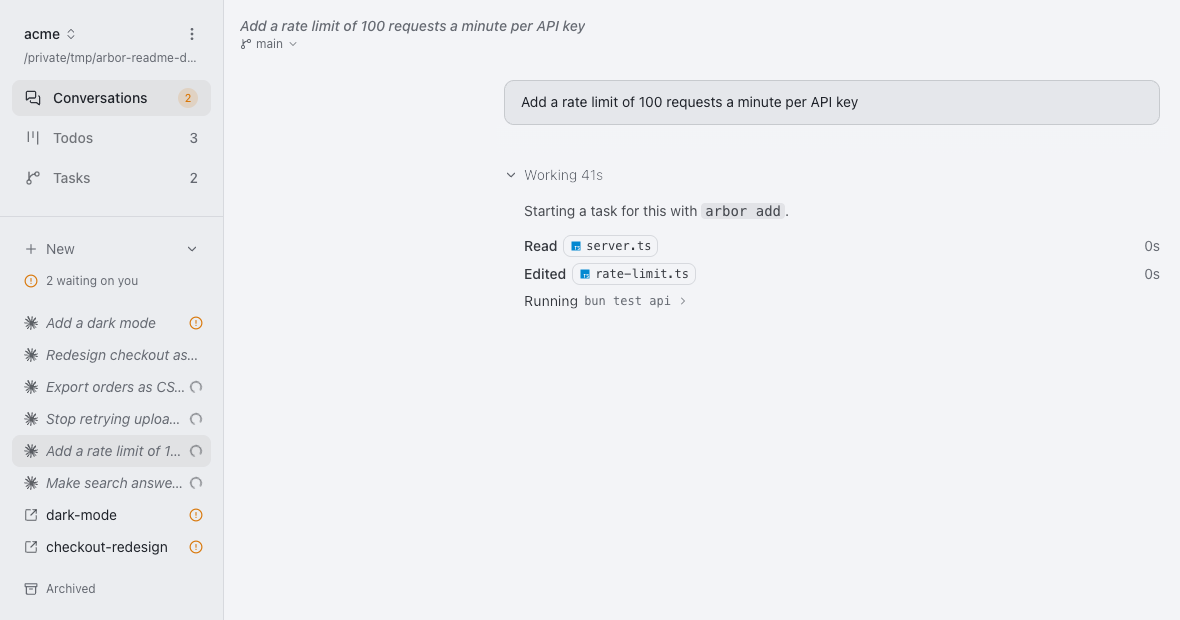
AUTHORS OR COPYRIGHT HOLDERS BE LIABLE FOR ANY CLAIM, DAMAGES OR OTHER
|
|
19
|
+
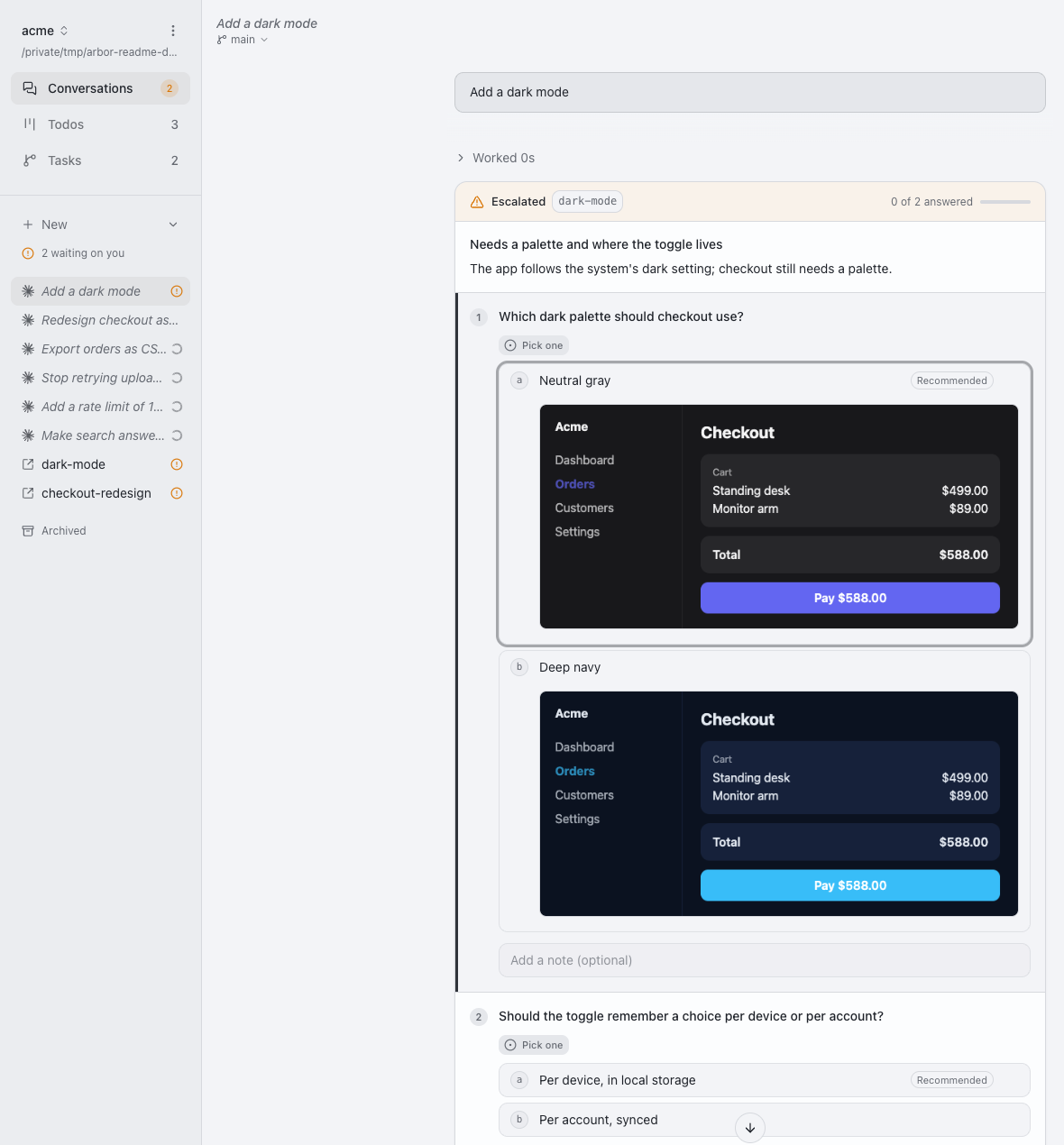
LIABILITY, WHETHER IN AN ACTION OF CONTRACT, TORT OR OTHERWISE, ARISING FROM,
|
|
20
|
+
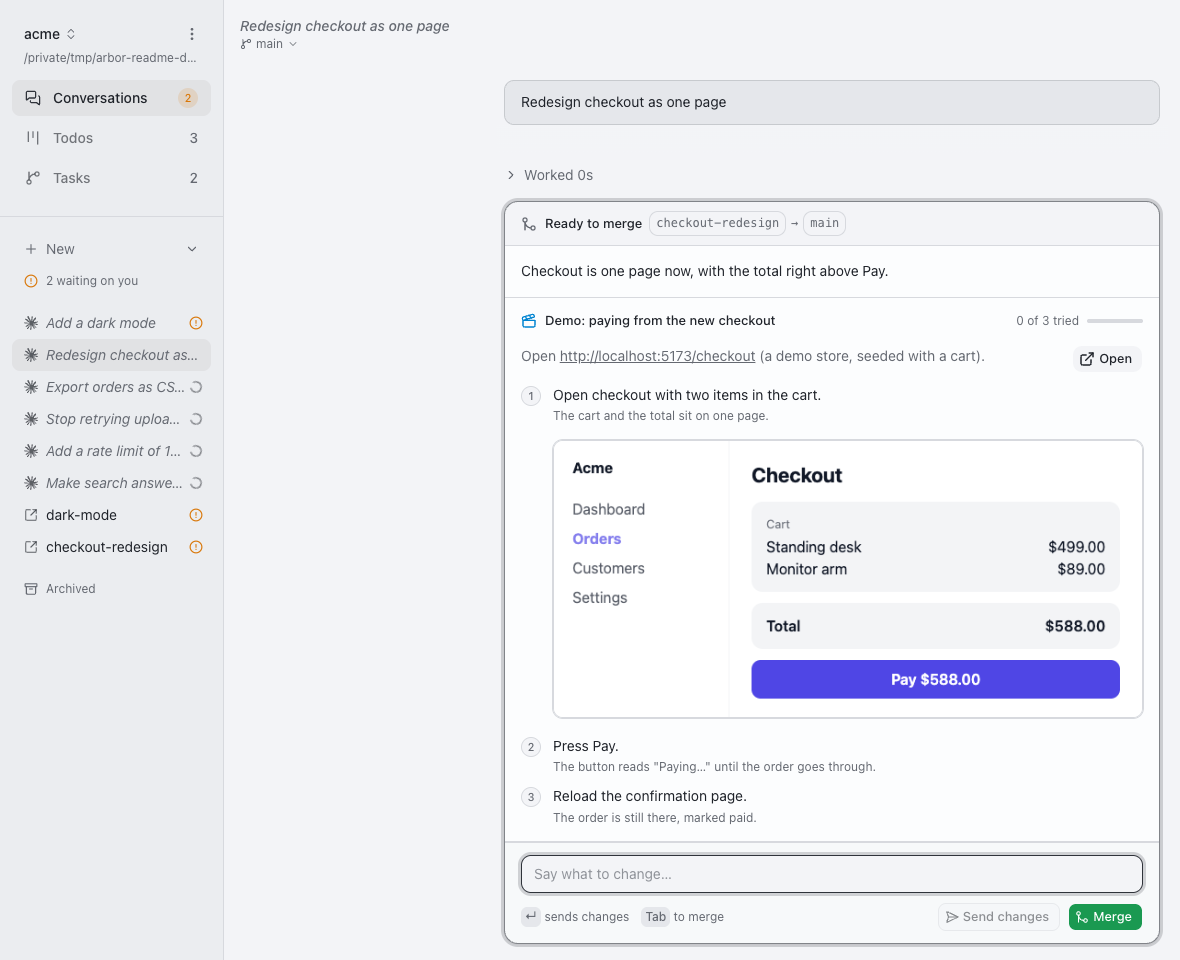
OUT OF OR IN CONNECTION WITH THE SOFTWARE OR THE USE OR OTHER DEALINGS IN THE
|
|
21
|
+
SOFTWARE.
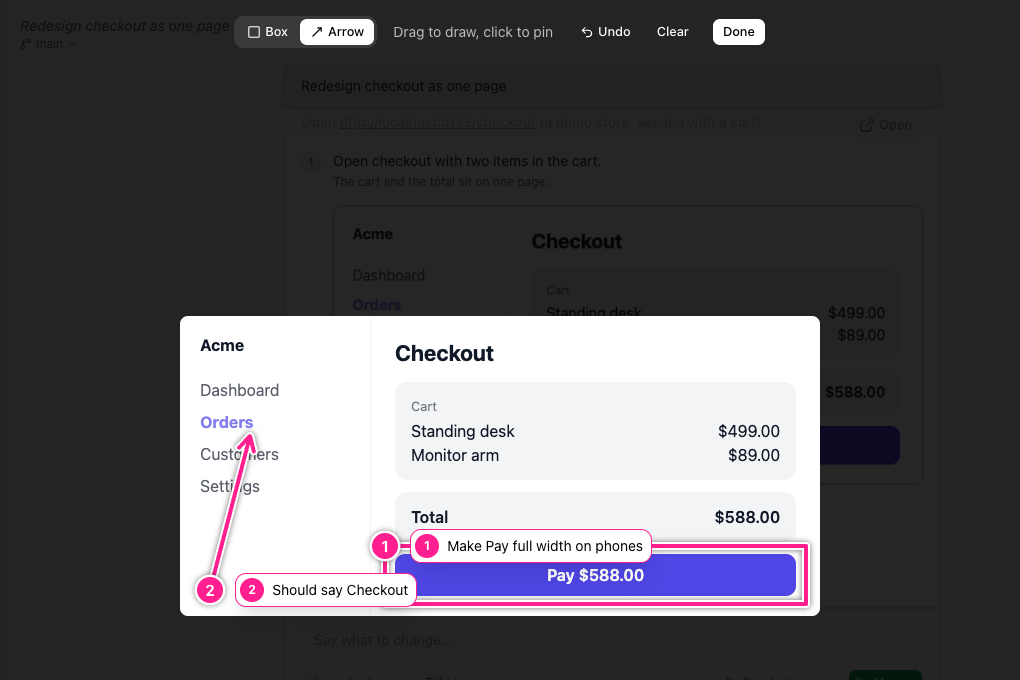
|
package/README.md
CHANGED
|
@@ -1,3 +1,421 @@
|
|
|
1
|
-
#
|
|
1
|
+
# Spinning Plates
|
|
2
2
|
|
|
3
|
-
|
|
3
|
+
[spinningplates.tech](https://spinningplates.tech) · command: `splates`
|
|
4
|
+
|
|
5
|
+
Run many coding agents on one repository at once. Each works in its own git
|
|
6
|
+
worktree and lands its change on `main` itself, without pull requests.
|
|
7
|
+
|
|
8
|
+
```bash
|
|
9
|
+
bunx @stringsync/splates init
|
|
10
|
+
```
|
|
11
|
+
|
|
12
|
+
Run it in your repository and commit what it writes: the splates skill, which it
|
|
13
|
+
installs with [`skills`](https://skills.sh) from this release's tag into
|
|
14
|
+
`.agents/skills` for Codex and most agents, linked from `.claude/skills` for
|
|
15
|
+
Claude Code, and `skills-lock.json`. `splates update` moves it to a newer release.
|
|
16
|
+
Without splates, `bunx skills add stringsync/splates#v<release> --skill splates`
|
|
17
|
+
installs the same skill. From then on, your agents start each change with
|
|
18
|
+
`splates add` and land it with `splates merge`.
|
|
19
|
+
|
|
20
|
+
Spinning Plates was arbor (`@webappwiz/arbor`). In a project that used it, run
|
|
21
|
+
`bunx @stringsync/splates update`: it installs the splates skill in place of arbor's and
|
|
22
|
+
renames `arbor.config.ts`. The next `splates server` moves
|
|
23
|
+
`~/.arbor` and each repository's `.git/arbor` to their new names, leaving links
|
|
24
|
+
behind. For one release, `arbor` still runs splates, and the `ARBOR_*`
|
|
25
|
+
variables, `ARBOR.md` and the `[ARBOR …]` directives are still read.
|
|
26
|
+
|
|
27
|
+
Contributions are welcome: see [Contributing](CONTRIBUTING.md).
|
|
28
|
+
|
|
29
|
+
## How it works
|
|
30
|
+
|
|
31
|
+
At its core, splates is a consistent way to coordinate worktrees. Each change is
|
|
32
|
+
a task with its own branch and worktree, and every agent moves tasks through
|
|
33
|
+
the same few commands, so agents never edit the same checkout and always know
|
|
34
|
+
what the others are doing. There is no daemon and no orchestrator: splates is a
|
|
35
|
+
CLI over git, and any agent in any terminal can use it. `splates --help` lists
|
|
36
|
+
every command. A bare `splates` prints help too; start the web page with
|
|
37
|
+
`splates server`. The `splates dev` namespace belongs only to this repository
|
|
38
|
+
and is absent from the published CLI.
|
|
39
|
+
|
|
40
|
+
**Merging.** `splates merge` rebases the task onto `main`, runs your checks
|
|
41
|
+
(`preMerge` in `splates.config.ts`) on the result, fast-forwards `main`, and
|
|
42
|
+
removes the worktree. A conflict or a failing check goes back to the agent that
|
|
43
|
+
made the change, which fixes it and merges again. A check that writes a JUnit
|
|
44
|
+
XML report to `$SPLATES_TEST_REPORT` (`bun test --reporter=junit
|
|
45
|
+
--reporter-outfile="$SPLATES_TEST_REPORT"`) gets a todo for each test slower
|
|
46
|
+
than 5 seconds.
|
|
47
|
+
|
|
48
|
+
**Heavy jobs.** Hooks (`postCheckout`, `postRewrite`, `preMerge`) run in one
|
|
49
|
+
of the machine's heavy-job slots, two by default (`SPLATES_HEAVY_JOBS` sets
|
|
50
|
+
how many), so several agents testing at once queue rather than run the
|
|
51
|
+
machine out of memory. `splates heavy -- <command>` runs anything else as
|
|
52
|
+
heavy, such as a test suite an agent runs mid-task, in a slot too.
|
|
53
|
+
|
|
54
|
+
**Pushing.** With `remote: "origin"` in `splates.config.ts`, each task's
|
|
55
|
+
branch goes to that remote as `splates/<task>`: after every commit an agent
|
|
56
|
+
makes under `splates server`, at `splates checkpoint`, escalation and handoff,
|
|
57
|
+
and it is deleted once the task merges or is removed. `splates checkpoint`
|
|
58
|
+
commits uncommitted work first, as a `WIP: checkpoint` commit squashed before
|
|
59
|
+
merging. A branch that tracks `SPLATES.md` is never pushed or merged. With the
|
|
60
|
+
GitHub App's id and private key kept as the creds `SPLATES_GITHUB_APP_ID` and
|
|
61
|
+
`SPLATES_GITHUB_APP_KEY`, pushes to github.com use an hour-long token the App
|
|
62
|
+
mints for that repository's contents alone; otherwise, the machine's own git
|
|
63
|
+
credentials. Without `remote`, nothing is pushed.
|
|
64
|
+
|
|
65
|
+
With `remote`, `main` is the remote's: `splates merge` fetches it, rebases
|
|
66
|
+
onto it, runs the checks, pushes the tested `splates/<task>`, and asks
|
|
67
|
+
`splates server`, the coordinator, to move `main` there. The coordinator alone
|
|
68
|
+
pushes `main`, with its machine's own git credentials, and only when the
|
|
69
|
+
remote's `main` is still the commit the checks ran on; then it fast-forwards
|
|
70
|
+
its own `main` checkout. A merge refuses while the local `main` holds commits
|
|
71
|
+
the remote lacks, until they are pushed. Protect `main` with a ruleset that
|
|
72
|
+
lets only the coordinator's identity update it, and every tag with one, so the
|
|
73
|
+
App's tokens, which workers push with, reach `splates/*` alone.
|
|
74
|
+
|
|
75
|
+
Setup's GitHub pushing area walks through it for the project it is opened
|
|
76
|
+
from (`splates setup` in its repository, or the page on that project), each
|
|
77
|
+
step checked against GitHub:
|
|
78
|
+
|
|
79
|
+
1. `github-app`: [make a GitHub App](https://github.com/settings/apps/new)
|
|
80
|
+
with Webhook off and Repository permissions **Contents: Read and write**
|
|
81
|
+
alone, and keep its App ID and a private key it generates as the device
|
|
82
|
+
creds above.
|
|
83
|
+
2. `github-install`: install it on the project's repository alone.
|
|
84
|
+
3. `github-ruleset`: in the repository's **Settings → Rules → Rulesets**,
|
|
85
|
+
two active rulesets that restrict creations, updates and deletions, with
|
|
86
|
+
only **Repository admin** allowed to bypass them, the role of the account
|
|
87
|
+
the coordinator pushes `main` with: a branch ruleset on **All branches**
|
|
88
|
+
but `splates/*`, and a tag ruleset on **All tags**, since the App's
|
|
89
|
+
Contents permission would let a token push or move a release tag. GitHub
|
|
90
|
+
has no token that pushes branches but not tags. Or, with your own `gh`
|
|
91
|
+
sign-in, once for each body:
|
|
92
|
+
|
|
93
|
+
```sh
|
|
94
|
+
gh api --method POST repos/<owner>/<repo>/rulesets --input - <<'JSON'
|
|
95
|
+
{"name":"splates","target":"branch","enforcement":"active",
|
|
96
|
+
"conditions":{"ref_name":{"include":["~ALL"],"exclude":["refs/heads/splates/*"]}},
|
|
97
|
+
"rules":[{"type":"creation"},{"type":"update"},{"type":"deletion"}],
|
|
98
|
+
"bypass_actors":[{"actor_id":5,"actor_type":"RepositoryRole","bypass_mode":"always"}]}
|
|
99
|
+
JSON
|
|
100
|
+
gh api --method POST repos/<owner>/<repo>/rulesets --input - <<'JSON'
|
|
101
|
+
{"name":"splates-tags","target":"tag","enforcement":"active",
|
|
102
|
+
"conditions":{"ref_name":{"include":["~ALL"],"exclude":[]}},
|
|
103
|
+
"rules":[{"type":"creation"},{"type":"update"},{"type":"deletion"}],
|
|
104
|
+
"bypass_actors":[{"actor_id":5,"actor_type":"RepositoryRole","bypass_mode":"always"}]}
|
|
105
|
+
JSON
|
|
106
|
+
```
|
|
107
|
+
|
|
108
|
+
4. `github-push`: add `remote: "origin"` to `splates.config.ts` and merge it.
|
|
109
|
+
|
|
110
|
+
**Escalating.** When an agent needs you (a decision, access, a review, or
|
|
111
|
+
merges that keep failing), it runs `splates escalate`: it stops, leaves its
|
|
112
|
+
worktree as it is, and writes down its questions. You answer, and it picks up
|
|
113
|
+
where it left off.
|
|
114
|
+
|
|
115
|
+
## The harness
|
|
116
|
+
|
|
117
|
+
`splates server` is an optional page for running agents and answering them, on
|
|
118
|
+
http://localhost:4269.
|
|
119
|
+
|
|
120
|
+
```bash
|
|
121
|
+
bunx @stringsync/splates server
|
|
122
|
+
```
|
|
123
|
+
|
|
124
|
+
Run it from anywhere: it serves every splates project on this machine. Its
|
|
125
|
+
project picker switches between them, and adds a repository by its path,
|
|
126
|
+
running `splates init` there and asking before it commits what that wrote.
|
|
127
|
+
|
|
128
|
+
### Parallel agents
|
|
129
|
+
|
|
130
|
+
Start as many conversations as you like, each in a task of its own.
|
|
131
|
+
|
|
132
|
+
|
|
133
|
+
|
|
134
|
+
### Questions and demos
|
|
135
|
+
|
|
136
|
+
Agents ask as they go instead of guessing. Each question comes with its
|
|
137
|
+
choices, the one the agent would pick, and a screenshot of each when there is
|
|
138
|
+
something to see. Answer in a click.
|
|
139
|
+
|
|
140
|
+
|
|
141
|
+
|
|
142
|
+
When work is ready, the agent hands you a demo: steps to try, what you should
|
|
143
|
+
see, and a checklist to tick off before you merge or ask for changes.
|
|
144
|
+
|
|
145
|
+
|
|
146
|
+
|
|
147
|
+
### Annotate any image
|
|
148
|
+
|
|
149
|
+
Mark up any image, one you upload or one an agent shows you. Draw a box or an
|
|
150
|
+
arrow, pin a note to each, and send it back.
|
|
151
|
+
|
|
152
|
+
|
|
153
|
+
|
|
154
|
+
### Remote access
|
|
155
|
+
|
|
156
|
+
To open the page from another machine, put it behind a Cloudflare tunnel and
|
|
157
|
+
Cloudflare Access, which decides who may enter. Set it up once per machine:
|
|
158
|
+
|
|
159
|
+
```bash
|
|
160
|
+
bunx @stringsync/splates tunnel setup splates.example.com --email me@example.com
|
|
161
|
+
bunx @stringsync/splates creds wait SPLATES_CLOUDFLARE_API_TOKEN
|
|
162
|
+
bunx @stringsync/splates tunnel setup splates.example.com --email me@example.com
|
|
163
|
+
bunx @stringsync/splates server
|
|
164
|
+
```
|
|
165
|
+
|
|
166
|
+
`tunnel setup` makes, through Cloudflare's API, a tunnel, the DNS record
|
|
167
|
+
routing the host to it, and an Access application letting in only those
|
|
168
|
+
emails, and saves them: the host, team and AUD tag in
|
|
169
|
+
`~/.splates/tunnel.json`, the tunnel's token in the system's secret store (the
|
|
170
|
+
Keychain on macOS). From then on a bare `splates server` runs the tunnel with
|
|
171
|
+
`cloudflared`, no `cloudflared login` needed. Run again, it changes only what
|
|
172
|
+
differs, such as the emails. The first run has no API token yet, so it
|
|
173
|
+
requests one on the Creds page of `splates server`, with how to make it; paste it
|
|
174
|
+
there, and run it again. An account with no Zero Trust organization gets one
|
|
175
|
+
with `--team <name>`, for `<name>.cloudflareaccess.com`. `splates tunnel status`
|
|
176
|
+
shows what is saved, and `splates tunnel remove` deletes it all again: the tunnels
|
|
177
|
+
of the machine and of every slot, their DNS records, the Access applications
|
|
178
|
+
and their policy, and the saved files and tunnel tokens. The API token stays.
|
|
179
|
+
|
|
180
|
+
To run several at once, as when trying changes to splates from a few worktrees,
|
|
181
|
+
give each its own slot:
|
|
182
|
+
|
|
183
|
+
```bash
|
|
184
|
+
bunx @stringsync/splates server --slot
|
|
185
|
+
```
|
|
186
|
+
|
|
187
|
+
`--slot` claims a short animal word for the checkout it runs in, as `fox`, and
|
|
188
|
+
serves it at `https://fox.<zone>`, on the zone `tunnel setup` used, behind the
|
|
189
|
+
same Access policy, so a phone opens each by name. A task's worktree keeps its
|
|
190
|
+
word until the task merges or is removed, which stops its server and gives the
|
|
191
|
+
word back; run again, `--slot` stops the tree's last server first. It refuses
|
|
192
|
+
a splates repository's main tree, which every agent shares. `splates slots list`
|
|
193
|
+
shows who holds each word, and `splates slots prune` frees those no tree owns any
|
|
194
|
+
more, stopping their servers. A word's tunnel and DNS record are made on its first
|
|
195
|
+
claim and kept, and one wildcard Access application covers every slot. A slot
|
|
196
|
+
keeps its own projects, roster and tunnel in `~/.splates/slots/<word>`, apart
|
|
197
|
+
from yours, and starts in a throwaway project there, unless that home
|
|
198
|
+
registers the project it is run in (`SPLATES_HOME=~/.splates/slots/fox splates
|
|
199
|
+
init`). The page shows the slot's emoji beside the project's name.
|
|
200
|
+
|
|
201
|
+
Or give the tunnel and the Access application by hand, over what is saved:
|
|
202
|
+
|
|
203
|
+
```bash
|
|
204
|
+
bunx @stringsync/splates server --tunnel splates.example.com \
|
|
205
|
+
--access-team my-team --access-aud <the application's AUD tag>
|
|
206
|
+
```
|
|
207
|
+
|
|
208
|
+
`--tunnel` runs `cloudflared tunnel run` against the page for as long as the
|
|
209
|
+
server lives (`--tunnel-name` picks the named tunnel, else cloudflared's own
|
|
210
|
+
config does), and is refused without both Access flags. Requests to that host
|
|
211
|
+
must carry a verified Access token; with one, conversations and terminals
|
|
212
|
+
work too.
|
|
213
|
+
|
|
214
|
+
To use another tunnel, give `splates.config.ts` a `tunnel`, any object that
|
|
215
|
+
implements `TunnelProvider`:
|
|
216
|
+
|
|
217
|
+
```ts
|
|
218
|
+
import type { ConfigFile } from "@stringsync/splates-server/config";
|
|
219
|
+
import type { TunnelProvider } from "@stringsync/splates-server/tunnel";
|
|
220
|
+
|
|
221
|
+
const myTunnel: TunnelProvider = {
|
|
222
|
+
// throw, saying what to do, unless the tunnel can run
|
|
223
|
+
async ready() {},
|
|
224
|
+
// carry route.host to route.url until the returned resource is disposed
|
|
225
|
+
run: ({ host, url, log }) => {
|
|
226
|
+
const child = Bun.spawn(["my-tunnel", "--host", host, "--to", url]);
|
|
227
|
+
return { disposeAsync: async () => void child.kill() };
|
|
228
|
+
},
|
|
229
|
+
};
|
|
230
|
+
|
|
231
|
+
export default { tunnel: myTunnel } satisfies ConfigFile;
|
|
232
|
+
```
|
|
233
|
+
|
|
234
|
+
`--tunnel <host>` then runs yours instead of cloudflared. Access is still
|
|
235
|
+
required, since splates verifies Cloudflare Access tokens whatever carries the
|
|
236
|
+
traffic, and `--tunnel-name` is refused beside a provider of your own. One
|
|
237
|
+
that is not ready, or fails to start, is logged and skipped: the page keeps
|
|
238
|
+
serving on this machine.
|
|
239
|
+
|
|
240
|
+
### Worker providers
|
|
241
|
+
|
|
242
|
+
To have splates make workers when agents queue for want of a slot, give
|
|
243
|
+
`splates.config.ts`, in the repo `splates server` starts in, a
|
|
244
|
+
`workerProvider`, any object that implements `WorkerProvider`:
|
|
245
|
+
|
|
246
|
+
```ts
|
|
247
|
+
import type { ConfigFile } from "@stringsync/splates-server/config";
|
|
248
|
+
import type { WorkerProvider } from "@stringsync/splates-server/workers";
|
|
249
|
+
|
|
250
|
+
const myCloud: WorkerProvider = {
|
|
251
|
+
// the machines it makes, with what each costs you per hour
|
|
252
|
+
types: async () => [
|
|
253
|
+
{ name: "small", platform: "linux", slots: 4, dollarsPerHour: 0.05 },
|
|
254
|
+
],
|
|
255
|
+
// build an image by running recipe.script as root on a fresh machine
|
|
256
|
+
snapshot: async (recipe) => ({ id: "img-1", version: recipe.version, builtAt: Date.now() }),
|
|
257
|
+
// boot spec.snapshot and run spec.boot on it, as the `splates` user
|
|
258
|
+
create: async (spec) => ({ id: spec.id, type: spec.type }),
|
|
259
|
+
destroy: async (id) => {},
|
|
260
|
+
// the machines it made that still exist
|
|
261
|
+
list: async () => [],
|
|
262
|
+
};
|
|
263
|
+
|
|
264
|
+
export default { workerProvider: myCloud } satisfies ConfigFile;
|
|
265
|
+
```
|
|
266
|
+
|
|
267
|
+
A made worker boots from a snapshot splates asks for when there is none, and
|
|
268
|
+
again when splates's version changes or the snapshot is a week old; it holds
|
|
269
|
+
bun, git, the browser and splates, and no credentials. Its boot command spends
|
|
270
|
+
a single-use join token, dialing the page at its tunnel host, so the server
|
|
271
|
+
needs a tunnel. Placement makes one only once agents other agents started are
|
|
272
|
+
queued, and only as far as the worker budget allows; none is kept warm.
|
|
273
|
+
`splates worker add --provider [--type <name>]` makes one by hand, past the
|
|
274
|
+
rate cap, and `splates worker remove` destroys its machine.
|
|
275
|
+
|
|
276
|
+
The worker budget is in dollars, at each type's list price, so every figure is
|
|
277
|
+
an estimate: a rate cap on what the made workers running at once cost an hour
|
|
278
|
+
($0.25/h by default), and limits on what they cost in a day ($5) and a month
|
|
279
|
+
($75), from the start of each in local time. Past the rate cap no worker is
|
|
280
|
+
made, and the queue says which limit holds it, as `rate cap $0.25/h reached`.
|
|
281
|
+
Once a day's or month's limit is spent, made workers take nothing new, their
|
|
282
|
+
agents are asked to stop at a checkpoint, and each is destroyed once its last
|
|
283
|
+
agent ends. Each limit warns at 80%, 90% and 100%, once in its window, by Web
|
|
284
|
+
Push and on the page's header. Agents' own API spend is not counted here.
|
|
285
|
+
|
|
286
|
+
```bash
|
|
287
|
+
bunx @stringsync/splates budget show
|
|
288
|
+
bunx @stringsync/splates budget set day 10 # or `default`
|
|
289
|
+
bunx @stringsync/splates budget raise hour 0.1 --for 1d
|
|
290
|
+
bunx @stringsync/splates budget end 1 # a raise, by its number
|
|
291
|
+
```
|
|
292
|
+
|
|
293
|
+
### Task ports
|
|
294
|
+
|
|
295
|
+
Any port a task's processes listen on, in its worktree or under its agent, is
|
|
296
|
+
found and forwarded as VS Code forwards ports, through the worker that runs
|
|
297
|
+
it. Save a wildcard base host for this machine to open each one anywhere,
|
|
298
|
+
behind the same Access application:
|
|
299
|
+
|
|
300
|
+
```bash
|
|
301
|
+
bunx @stringsync/splates server --ports-host ports.example.com
|
|
302
|
+
```
|
|
303
|
+
|
|
304
|
+
`https://<task>-<port>.ports.example.com` then reaches that task's server,
|
|
305
|
+
seen there as `localhost:<port>`, and only with a verified Access token;
|
|
306
|
+
routing `*.ports.example.com` to `splates server`, its DNS and TLS, are yours.
|
|
307
|
+
`--ports-host none` forgets the base. `splates ports [task]` lists each port
|
|
308
|
+
with its remote and local links, as the task's dialog on the page does.
|
|
309
|
+
|
|
310
|
+
### Stats
|
|
311
|
+
|
|
312
|
+
As each task merges or is removed, splates writes down how it went in
|
|
313
|
+
`~/.splates/outcomes.jsonl`: how many times it came to you with questions or for
|
|
314
|
+
a review, how many merges failed and why, how many of the agent's picks you
|
|
315
|
+
overturned or took with words added, how long it waited on you, why it was
|
|
316
|
+
removed, and the agent and model behind it. The Stats page sums it over the
|
|
317
|
+
last 6 hours, day, 3 days or 7 days, cut into bars of half an hour to six
|
|
318
|
+
hours, or over all time a bar a week, by model, project and system, so you can tell whether tasks are landing
|
|
319
|
+
with fewer questions as your prompts and setup change. Its Act on cards
|
|
320
|
+
compare each figure with the as long a span before, saying whether it got
|
|
321
|
+
better or worse, and say what to change when one stands out. Fixed rules over
|
|
322
|
+
the counts make those calls, not a model, so the same outcomes always read
|
|
323
|
+
the same.
|
|
324
|
+
|
|
325
|
+
### Optional OpenCode ACP agent
|
|
326
|
+
|
|
327
|
+
Open **Settings → Setup** and visit the optional OpenCode steps. Check this
|
|
328
|
+
machine, install if needed, and connect an existing Go/Go Plus account through
|
|
329
|
+
the native masked key prompt. The supported CLI exposes the V2 standalone login,
|
|
330
|
+
auth listing and metadata APIs; unsupported installations show update guidance.
|
|
331
|
+
No key belongs in chat, and splates never reads or exports native credential files.
|
|
332
|
+
|
|
333
|
+
Refresh the Go catalog, choose exact main and auxiliary models, review the
|
|
334
|
+
configuration, and confirm **Use balance** is off in Console before applying.
|
|
335
|
+
The save updates the running server's roster immediately. Claude/Codex entries,
|
|
336
|
+
custom fields, model descriptions and defaults are preserved.
|
|
337
|
+
|
|
338
|
+
The final **Check configuration** step rereads the saved recipe, including after
|
|
339
|
+
a server restart, and checks it for the current project's main directory. It
|
|
340
|
+
checks installation, stored authentication, ACP initialize, both model IDs and
|
|
341
|
+
effective agent configuration. It sends no prompt. Project OpenCode configuration
|
|
342
|
+
is disabled only for this launch recipe; global files remain untouched. New
|
|
343
|
+
custom or managed configuration that conflicts with the recipe requires repair.
|
|
344
|
+
|
|
345
|
+
**New OpenCode conversation** repeats that check, explicitly selects the saved
|
|
346
|
+
main model and opens an empty conversation in the displayed directory. Its first
|
|
347
|
+
message is your decision. Configuration readiness does not establish successful
|
|
348
|
+
inference, entitlement, quota or billing. Console confirmation is your assertion;
|
|
349
|
+
splates cannot verify or change that setting. Revisit/repair returns to the existing
|
|
350
|
+
steps. Disable removes only the wizard-owned roster entry for new conversations;
|
|
351
|
+
existing conversations and native authentication remain.
|
|
352
|
+
|
|
353
|
+
#### Advanced manual reference
|
|
354
|
+
|
|
355
|
+
Manual roster editing remains available for custom launches; use the supported
|
|
356
|
+
V2 recipe and inspection commands in [the setup contracts](../../designs/opencode-acp.md#374-readiness-and-completion).
|
|
357
|
+
A plain `opencode acp` entry or custom command does not establish wizard readiness.
|
|
358
|
+
Custom commands are never replaced or removed automatically. Avoid the older V1
|
|
359
|
+
`small_model`/provider recipe: it does not pin every V2 auxiliary/custom agent.
|
|
360
|
+
|
|
361
|
+
Splates requires the full, case-sensitive model ID returned in ACP settings for
|
|
362
|
+
OpenCode. Missing choices or a different confirmed provider/model stop the turn;
|
|
363
|
+
it never substitutes another provider. Refresh your editable catalog from
|
|
364
|
+
OpenCode's offered models when it changes. In Choosing agents and models,
|
|
365
|
+
choose OpenCode from New, then select the model in the composer (Settings on a
|
|
366
|
+
phone). Go choices show “OpenCode Go” and their full `opencode-go/...` ID; models
|
|
367
|
+
with the same display name remain distinct across providers. ACP config updates
|
|
368
|
+
replace the offered options. A removed selection is shown as unavailable until
|
|
369
|
+
you explicitly choose a replacement; it is never silently changed to the current
|
|
370
|
+
agent default. OpenCode choices do not change Claude/Codex saved settings.
|
|
371
|
+
Usage provenance and comparisons are tracked in #354.
|
|
372
|
+
|
|
373
|
+
OpenCode owns its native login and tools. Splates neither imports its credentials
|
|
374
|
+
nor exports OS-store secrets to it. Recovery uses advertised resume support, or
|
|
375
|
+
advertised load with history replay suppressed. An imported CLI session still
|
|
376
|
+
replays once. OpenCode recovery uses its original absolute directory; if that
|
|
377
|
+
directory is gone, restore it or explicitly start a new conversation. Unsupported
|
|
378
|
+
recovery reports an error. Without steering support, messages queue for the next
|
|
379
|
+
turn. Client file and terminal capabilities are not advertised.
|
|
380
|
+
|
|
381
|
+
Compatibility as of 2026-10-17: this integration is verified with synthetic ACP
|
|
382
|
+
fixtures, not a recorded OpenCode executable. `opencode` was absent from the
|
|
383
|
+
implementation environment's PATH, so no executable version or live login was
|
|
384
|
+
verified and no minimum supported version is claimed. Production acceptance
|
|
385
|
+
requires recording a version and sanitized handshake separately; no paid smoke
|
|
386
|
+
test was run. See [the experiment plan](../../designs/opencode-acp.md) for opt-in setup,
|
|
387
|
+
provider restrictions, and the separate paid-overflow control. Fixture checks
|
|
388
|
+
never establish account entitlement or remaining quota.
|
|
389
|
+
|
|
390
|
+
### OpenCode experiment usage
|
|
391
|
+
|
|
392
|
+
OpenCode's Usage popover shows the last dispatched requested/confirmed full model
|
|
393
|
+
IDs, measured first-text and elapsed latency, and parent-only per-turn ACP token
|
|
394
|
+
counts. Missing fields read **Unknown**, including optional cache counts. Reported
|
|
395
|
+
USD cost is a cumulative session observation, separate from unknown additional
|
|
396
|
+
charges; it is not a subscription invoice. Quota and mixed-model remaining
|
|
397
|
+
allowance stay unknown: consult OpenCode Console and keep **Use balance** disabled.
|
|
398
|
+
Legacy task cost/token aggregates exclude these differently scoped observations.
|
|
399
|
+
|
|
400
|
+
See [the manual comparison recipe](../../designs/opencode-acp.md#354-implementation-and-manual-comparison-record)
|
|
401
|
+
for identical baseline files, a results worksheet, provenance and the authorization
|
|
402
|
+
gate. Fixtures need no production login. Live executable compatibility remains
|
|
403
|
+
unverified and no real comparison was run. `splates dev fix --code-only` disables
|
|
404
|
+
both Scry model roles and avoids opening credential stores; model-dependent rules
|
|
405
|
+
are reported as unchecked. `splates dev test` runs the local fixture suites.
|
|
406
|
+
|
|
407
|
+
### OpenCode setup wizard (optional)
|
|
408
|
+
|
|
409
|
+
Open Settings → Set up splates → OpenCode to check installation, explicitly install
|
|
410
|
+
the official CLI with npm, and connect an existing Go/Go Plus account through
|
|
411
|
+
OpenCode's masked native key prompt. Return and choose Check again to inspect
|
|
412
|
+
native credential metadata and negotiate ACP without sending a model prompt.
|
|
413
|
+
Older native login interfaces show recovery instructions. No keys belong in an
|
|
414
|
+
agent conversation. The native controls currently require macOS or Linux.
|
|
415
|
+
|
|
416
|
+
Installation/connection is the first part of this wizard. Model selection and
|
|
417
|
+
configuration (#373), then final conversation readiness (#374), remain separate
|
|
418
|
+
lane steps. Until those land, this step does not add an agent roster entry. A
|
|
419
|
+
stored credential and ACP handshake do not verify subscription access, billing,
|
|
420
|
+
model availability or inference. See the [setup contract](../../designs/opencode-acp.md#372-setup-wizard-contract-lane-53-step-1)
|
|
421
|
+
for exact files and supported interfaces.
|
package/artifact.d.ts
ADDED
package/budget.d.ts
ADDED
package/coordinator.d.ts
ADDED
package/creds.d.ts
ADDED
package/flags.d.ts
ADDED
|
@@ -0,0 +1,37 @@
|
|
|
1
|
+
import { type AgentPick, Offered, type RosterAgent } from "@stringsync/splates-server/models";
|
|
2
|
+
import type { Repository } from "@stringsync/splates-server/records";
|
|
3
|
+
import type { SplatesDeps } from "@stringsync/splates-server/server";
|
|
4
|
+
import { SavedTunnel } from "@stringsync/splates-server/tunnel";
|
|
5
|
+
import { z } from "zod";
|
|
6
|
+
/** A place in the todo list, 1 at the top; absent leaves it to the command. */
|
|
7
|
+
export declare const position: z.ZodOptional<z.ZodCoercedNumber<unknown>>;
|
|
8
|
+
/**
|
|
9
|
+
* The agent `--agent`, `--model` and `--effort` name off the roster:
|
|
10
|
+
* undefined when none is given, null for `--agent none`.
|
|
11
|
+
*/
|
|
12
|
+
export declare function assigneeIn(deps: SplatesDeps, agent: string, model: string, effort: string): Promise<AgentPick | null | undefined>;
|
|
13
|
+
/**
|
|
14
|
+
* `agent` on `model` off `agents`, at the thinking level `effort` names
|
|
15
|
+
* among those it offers, each left out when empty.
|
|
16
|
+
*/
|
|
17
|
+
export declare function pickIn(deps: SplatesDeps, agents: RosterAgent[], agent: string, model: string, effort: string, data?: Record<string, unknown>): Promise<AgentPick>;
|
|
18
|
+
/**
|
|
19
|
+
* `{ effort }` for the thinking level `effort` names among those `agent`
|
|
20
|
+
* offered when last started, or nothing when it is empty.
|
|
21
|
+
*/
|
|
22
|
+
export declare function effortIn(deps: SplatesDeps, agent: string, effort: string, data?: Record<string, unknown>): Promise<{
|
|
23
|
+
effort?: string;
|
|
24
|
+
}>;
|
|
25
|
+
/** The settings each agent offered when last started, from any project. */
|
|
26
|
+
export declare function offeredOf({ ps, fs }: SplatesDeps): Offered;
|
|
27
|
+
/** The tunnel each slot's home may have saved, for every word of the pool. */
|
|
28
|
+
export declare function slotTunnelsOf({ ps, fs, secrets, }: SplatesDeps): SavedTunnel[];
|
|
29
|
+
/** `--lane 3`, `new` or `none` as a lane; absent leaves it to the command. */
|
|
30
|
+
export declare function laneIn(raw: string): number | "new" | null | undefined;
|
|
31
|
+
/** `--todo 3,5` as ids, refusing anything that is not one. */
|
|
32
|
+
export declare function todoIds(raw: string): number[];
|
|
33
|
+
/**
|
|
34
|
+
* Which task a command that takes no task name is about, so the journal can
|
|
35
|
+
* name it. `merge` and `escalate` read it off the current branch.
|
|
36
|
+
*/
|
|
37
|
+
export declare function here({ service, git, ps, project, }: SplatesDeps & Repository): Promise<string | null>;
|
package/index.d.ts
ADDED