@storybook/react-native 8.3.1-alpha.2 → 8.3.1-beta.1
This diff represents the content of publicly available package versions that have been released to one of the supported registries. The information contained in this diff is provided for informational purposes only and reflects changes between package versions as they appear in their respective public registries.
- package/dist/index.d.ts +0 -5
- package/metro/withStorybook.js +2 -1
- package/package.json +5 -4
- package/readme.md +66 -33
package/dist/index.d.ts
CHANGED
|
@@ -36,11 +36,6 @@ type Params = {
|
|
|
36
36
|
secured?: boolean;
|
|
37
37
|
initialSelection?: InitialSelection;
|
|
38
38
|
shouldPersistSelection?: boolean;
|
|
39
|
-
tabOpen?: number;
|
|
40
|
-
isUIHidden?: boolean;
|
|
41
|
-
isSplitPanelVisible?: boolean;
|
|
42
|
-
shouldDisableKeyboardAvoidingView?: boolean;
|
|
43
|
-
keyboardAvoidingViewVerticalOffset?: number;
|
|
44
39
|
theme: DeepPartial<Theme>;
|
|
45
40
|
storage?: Storage;
|
|
46
41
|
};
|
package/metro/withStorybook.js
CHANGED
|
@@ -3,7 +3,7 @@ const path = require('path');
|
|
|
3
3
|
const { generate } = require('../scripts/generate');
|
|
4
4
|
const { WebSocketServer } = require('ws');
|
|
5
5
|
|
|
6
|
-
module.exports = (config, { configPath, enabled, websockets }) => {
|
|
6
|
+
module.exports = (config, { configPath, enabled, websockets, useJs = false }) => {
|
|
7
7
|
if (!enabled) {
|
|
8
8
|
return config;
|
|
9
9
|
}
|
|
@@ -34,6 +34,7 @@ module.exports = (config, { configPath, enabled, websockets }) => {
|
|
|
34
34
|
|
|
35
35
|
generate({
|
|
36
36
|
configPath: configPath ?? path.resolve(process.cwd(), './.storybook'),
|
|
37
|
+
useJs,
|
|
37
38
|
});
|
|
38
39
|
|
|
39
40
|
return {
|
package/package.json
CHANGED
|
@@ -1,6 +1,6 @@
|
|
|
1
1
|
{
|
|
2
2
|
"name": "@storybook/react-native",
|
|
3
|
-
"version": "8.3.1-
|
|
3
|
+
"version": "8.3.1-beta.1",
|
|
4
4
|
"description": "A better way to develop React Native Components for your app",
|
|
5
5
|
"keywords": [
|
|
6
6
|
"react",
|
|
@@ -43,8 +43,8 @@
|
|
|
43
43
|
"@storybook/csf": "^0.1.1",
|
|
44
44
|
"@storybook/global": "^5.0.0",
|
|
45
45
|
"@storybook/react": "^8.3.1",
|
|
46
|
-
"@storybook/react-native-theming": "^8.3.1-
|
|
47
|
-
"@storybook/react-native-ui": "^8.3.1-
|
|
46
|
+
"@storybook/react-native-theming": "^8.3.1-beta.1",
|
|
47
|
+
"@storybook/react-native-ui": "^8.3.1-beta.1",
|
|
48
48
|
"chokidar": "^3.5.1",
|
|
49
49
|
"commander": "^8.2.0",
|
|
50
50
|
"dedent": "^1.5.1",
|
|
@@ -54,6 +54,7 @@
|
|
|
54
54
|
"react-native-swipe-gestures": "^1.0.5",
|
|
55
55
|
"react-native-url-polyfill": "^2.0.0",
|
|
56
56
|
"setimmediate": "^1.0.5",
|
|
57
|
+
"storybook": "^8.3.1",
|
|
57
58
|
"type-fest": "~2.19",
|
|
58
59
|
"util": "^0.12.4",
|
|
59
60
|
"ws": "^8.18.0"
|
|
@@ -81,5 +82,5 @@
|
|
|
81
82
|
"publishConfig": {
|
|
82
83
|
"access": "public"
|
|
83
84
|
},
|
|
84
|
-
"gitHead": "
|
|
85
|
+
"gitHead": "ec1fdf03a6769c4f476066d3fb7f7086cbf0cc4e"
|
|
85
86
|
}
|
package/readme.md
CHANGED
|
@@ -2,17 +2,15 @@
|
|
|
2
2
|
|
|
3
3
|
With Storybook for React Native you can design and develop individual React Native components without running your app.
|
|
4
4
|
|
|
5
|
-
This readme is for the
|
|
5
|
+
This readme is for the 8.3.1 version, you can find the 7.6 docs [here](https://github.com/storybookjs/react-native/tree/v7.6.20-stable).
|
|
6
6
|
|
|
7
|
-
If you are migrating from 6
|
|
7
|
+
If you are migrating from 7.6 to 8.3 you can find the migration guide [here](https://github.com/storybookjs/react-native/blob/next/MIGRATION.md#from-version-76x-to-83x)
|
|
8
8
|
|
|
9
9
|
For more information about storybook visit: [storybook.js.org](https://storybook.js.org)
|
|
10
10
|
|
|
11
|
-
> NOTE: `@storybook/react-native` requires atleast
|
|
11
|
+
> NOTE: `@storybook/react-native` requires atleast 8.3.1, if you install other storybook core packages they should be `^8.3.1` or newer.
|
|
12
12
|
|
|
13
|
-
|
|
14
|
-
|
|
15
|
-
|
|
13
|
+

|
|
16
14
|
|
|
17
15
|
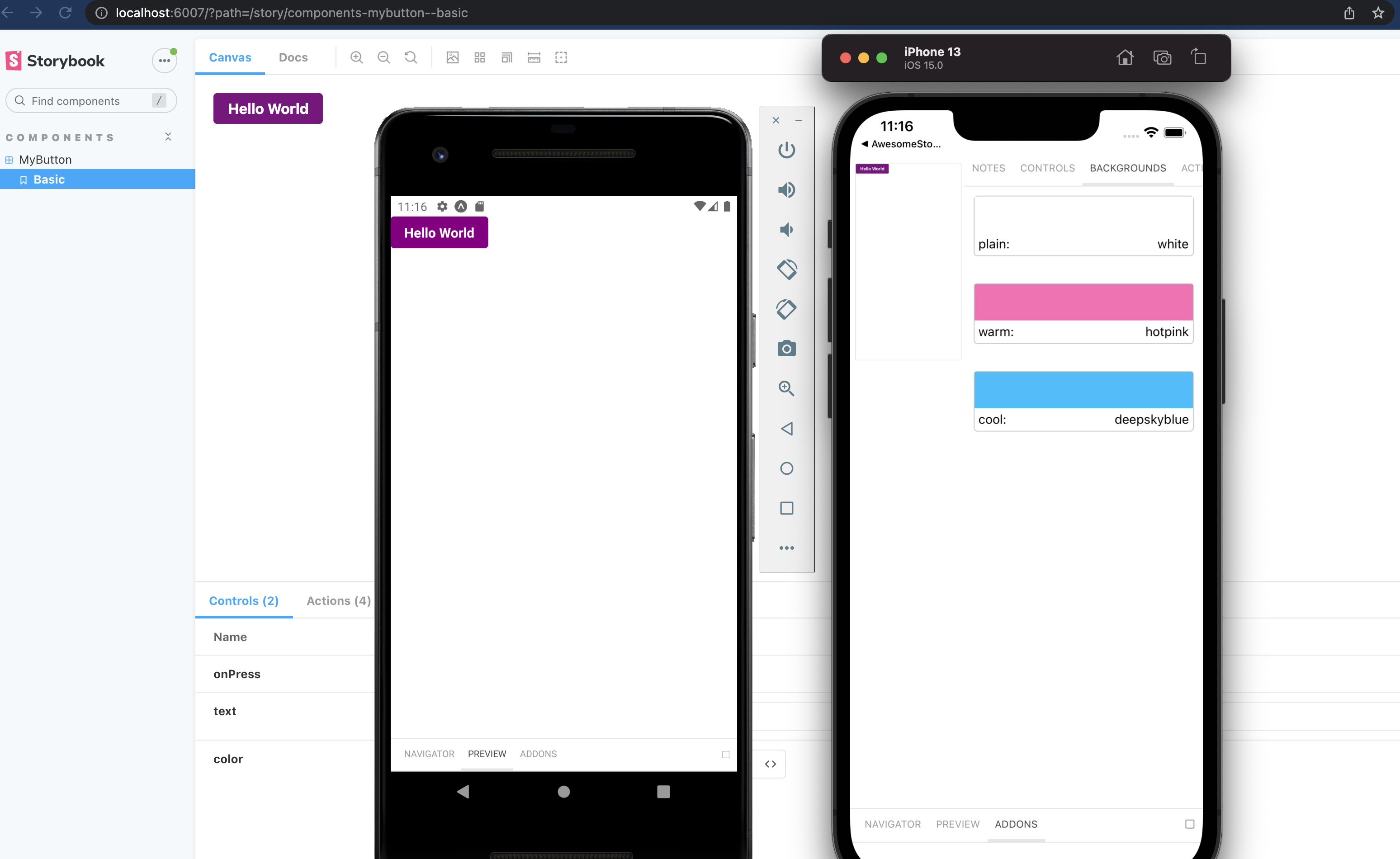
_Pictured is from the template mentioned in [getting started](#getting-started)_
|
|
18
16
|
|
|
@@ -59,6 +57,8 @@ The only thing left to do is return Storybook's UI in your app entry point (such
|
|
|
59
57
|
export { default } from './.storybook';
|
|
60
58
|
```
|
|
61
59
|
|
|
60
|
+
Then wrap your metro config with the withStorybook function as seen [below](#additional-steps-update-your-metro-config)
|
|
61
|
+
|
|
62
62
|
If you want to be able to swap easily between storybook and your app, have a look at this [blog post](https://dev.to/dannyhw/how-to-swap-between-react-native-storybook-and-your-app-p3o)
|
|
63
63
|
|
|
64
64
|
If you want to add everything yourself check out the the manual guide [here](https://github.com/storybookjs/react-native/blob/next/MANUAL_SETUP.md).
|
|
@@ -75,43 +75,66 @@ First create metro config file if you don't have it yet.
|
|
|
75
75
|
npx expo customize metro.config.js
|
|
76
76
|
```
|
|
77
77
|
|
|
78
|
-
Then
|
|
78
|
+
Then wrap your config in the withStorybook function as seen below.
|
|
79
79
|
|
|
80
80
|
```js
|
|
81
81
|
// metro.config.js
|
|
82
82
|
const path = require('path');
|
|
83
83
|
const { getDefaultConfig } = require('expo/metro-config');
|
|
84
|
-
|
|
85
|
-
const { generate } = require('@storybook/react-native/scripts/generate');
|
|
86
|
-
|
|
87
|
-
generate({
|
|
88
|
-
configPath: path.resolve(__dirname, './.storybook'),
|
|
89
|
-
});
|
|
84
|
+
const withStorybook = require('@storybook/react-native/metro/withStorybook');
|
|
90
85
|
|
|
91
86
|
/** @type {import('expo/metro-config').MetroConfig} */
|
|
92
87
|
const config = getDefaultConfig(__dirname);
|
|
93
88
|
|
|
94
|
-
|
|
89
|
+
module.exports = withStorybook(config, {
|
|
90
|
+
// Set to false to remove storybook specific options
|
|
91
|
+
// you can also use a env variable to set this
|
|
92
|
+
enabled: true,
|
|
93
|
+
// Path to your storybook config
|
|
94
|
+
configPath: path.resolve(__dirname, './.storybook'),
|
|
95
95
|
|
|
96
|
-
|
|
96
|
+
// Optional websockets configuration
|
|
97
|
+
// Starts a websocket server on the specified port and host on metro start
|
|
98
|
+
// websockets: {
|
|
99
|
+
// port: 7007,
|
|
100
|
+
// host: 'localhost',
|
|
101
|
+
// },
|
|
102
|
+
});
|
|
97
103
|
```
|
|
98
104
|
|
|
99
105
|
**React native**
|
|
100
106
|
|
|
101
107
|
```js
|
|
108
|
+
const { getDefaultConfig, mergeConfig } = require('@react-native/metro-config');
|
|
102
109
|
const path = require('path');
|
|
103
|
-
const
|
|
104
|
-
|
|
105
|
-
|
|
110
|
+
const withStorybook = require('@storybook/react-native/metro/withStorybook');
|
|
111
|
+
const defaultConfig = getDefaultConfig(__dirname);
|
|
112
|
+
|
|
113
|
+
/**
|
|
114
|
+
* Metro configuration
|
|
115
|
+
* https://reactnative.dev/docs/metro
|
|
116
|
+
*
|
|
117
|
+
* @type {import('metro-config').MetroConfig}
|
|
118
|
+
*/
|
|
119
|
+
const config = {};
|
|
120
|
+
// set your own config here 👆
|
|
121
|
+
|
|
122
|
+
const finalConfig = mergeConfig(defaultConfig, config);
|
|
123
|
+
|
|
124
|
+
module.exports = withStorybook(finalConfig, {
|
|
125
|
+
// Set to false to remove storybook specific options
|
|
126
|
+
// you can also use a env variable to set this
|
|
127
|
+
enabled: true,
|
|
128
|
+
// Path to your storybook config
|
|
106
129
|
configPath: path.resolve(__dirname, './.storybook'),
|
|
107
|
-
});
|
|
108
130
|
|
|
109
|
-
|
|
110
|
-
|
|
111
|
-
|
|
112
|
-
|
|
113
|
-
|
|
114
|
-
}
|
|
131
|
+
// Optional websockets configuration
|
|
132
|
+
// Starts a websocket server on the specified port and host on metro start
|
|
133
|
+
// websockets: {
|
|
134
|
+
// port: 7007,
|
|
135
|
+
// host: 'localhost',
|
|
136
|
+
// },
|
|
137
|
+
});
|
|
115
138
|
```
|
|
116
139
|
|
|
117
140
|
## Writing stories
|
|
@@ -271,19 +294,29 @@ You can pass these parameters to getStorybookUI call in your storybook entry poi
|
|
|
271
294
|
|
|
272
295
|
```
|
|
273
296
|
{
|
|
274
|
-
|
|
275
|
-
-- which tab should be open. -1 Sidebar, 0 Canvas, 1 Addons
|
|
276
|
-
initialSelection: string | Object (undefined)
|
|
297
|
+
initialSelection?: string | Object (undefined)
|
|
277
298
|
-- initialize storybook with a specific story. eg: `mybutton--largebutton` or `{ kind: 'MyButton', name: 'LargeButton' }`
|
|
278
|
-
|
|
279
|
-
-- Disable KeyboardAvoidingView wrapping Storybook's view
|
|
280
|
-
keyboardAvoidingViewVerticalOffset: Number (0)
|
|
281
|
-
-- With shouldDisableKeyboardAvoidingView=true, this will set the keyboardverticaloffset (https://facebook.github.io/react-native/docs/keyboardavoidingview#keyboardverticaloffset) value for KeyboardAvoidingView wrapping Storybook's view
|
|
282
|
-
storage: Object (undefined)
|
|
299
|
+
storage?: Object (undefined)
|
|
283
300
|
-- {getItem: (key: string) => Promise<string | null>;setItem: (key: string, value: string) => Promise<void>;}
|
|
284
301
|
-- Custom storage to be used instead of AsyncStorage
|
|
285
302
|
shouldPersistSelection: Boolean (true)
|
|
286
303
|
-- Stores last selected story in your devices storage.
|
|
304
|
+
onDeviceUI?: boolean;
|
|
305
|
+
-- show the ondevice ui
|
|
306
|
+
enableWebsockets?: boolean;
|
|
307
|
+
-- enable websockets for the storybook ui
|
|
308
|
+
query?: string;
|
|
309
|
+
-- query params for the websocket connection
|
|
310
|
+
host?: string;
|
|
311
|
+
-- host for the websocket connection
|
|
312
|
+
port?: number;
|
|
313
|
+
-- port for the websocket connection
|
|
314
|
+
secured?: boolean;
|
|
315
|
+
-- use secured websockets
|
|
316
|
+
shouldPersistSelection?: boolean;
|
|
317
|
+
-- store the last selected story in the device's storage
|
|
318
|
+
theme: Partial<Theme>;
|
|
319
|
+
-- theme for the storybook ui
|
|
287
320
|
}
|
|
288
321
|
```
|
|
289
322
|
|