@standhigher/react-email-editor 0.3.0 → 0.4.3
This diff represents the content of publicly available package versions that have been released to one of the supported registries. The information contained in this diff is provided for informational purposes only and reflects changes between package versions as they appear in their respective public registries.
- package/README.md +26 -132
- package/README.zh-CN.md +26 -132
- package/dist/index.d.ts +355 -37
- package/dist/index.js +573 -433
- package/dist/styles.css +41 -31
- package/docs/advanced-examples.md +265 -0
- package/docs/advanced-examples.zh-CN.md +265 -0
- package/docs/api.md +277 -0
- package/docs/api.zh-CN.md +277 -0
- package/docs/assets/architecture.svg +84 -0
- package/docs/assets/architecture.zh-CN.svg +84 -0
- package/docs/basic-examples.md +113 -0
- package/docs/basic-examples.zh-CN.md +113 -0
- package/docs/changelog.md +125 -0
- package/{CHANGELOG.md → docs/changelog.zh-CN.md} +62 -0
- package/docs/custom-blocks.md +27 -31
- package/docs/custom-blocks.zh-CN.md +26 -30
- package/docs/release.md +38 -0
- package/docs/release.zh-CN.md +38 -0
- package/package.json +20 -5
package/README.md
CHANGED
|
@@ -1,159 +1,53 @@
|
|
|
1
1
|
# @standhigher/react-email-editor
|
|
2
2
|
|
|
3
|
-
English | [简体中文](
|
|
3
|
+
English | [简体中文](https://github.com/standhigher/react-email-editor/blob/main/README.zh-CN.md)
|
|
4
4
|
|
|
5
|
-
|
|
5
|
+
Drag content onto a canvas, style your email, preview it, then save editable JSON or export email HTML.
|
|
6
6
|
|
|
7
|
-
##
|
|
7
|
+
## Modules and features
|
|
8
8
|
|
|
9
|
-
|
|
9
|
+
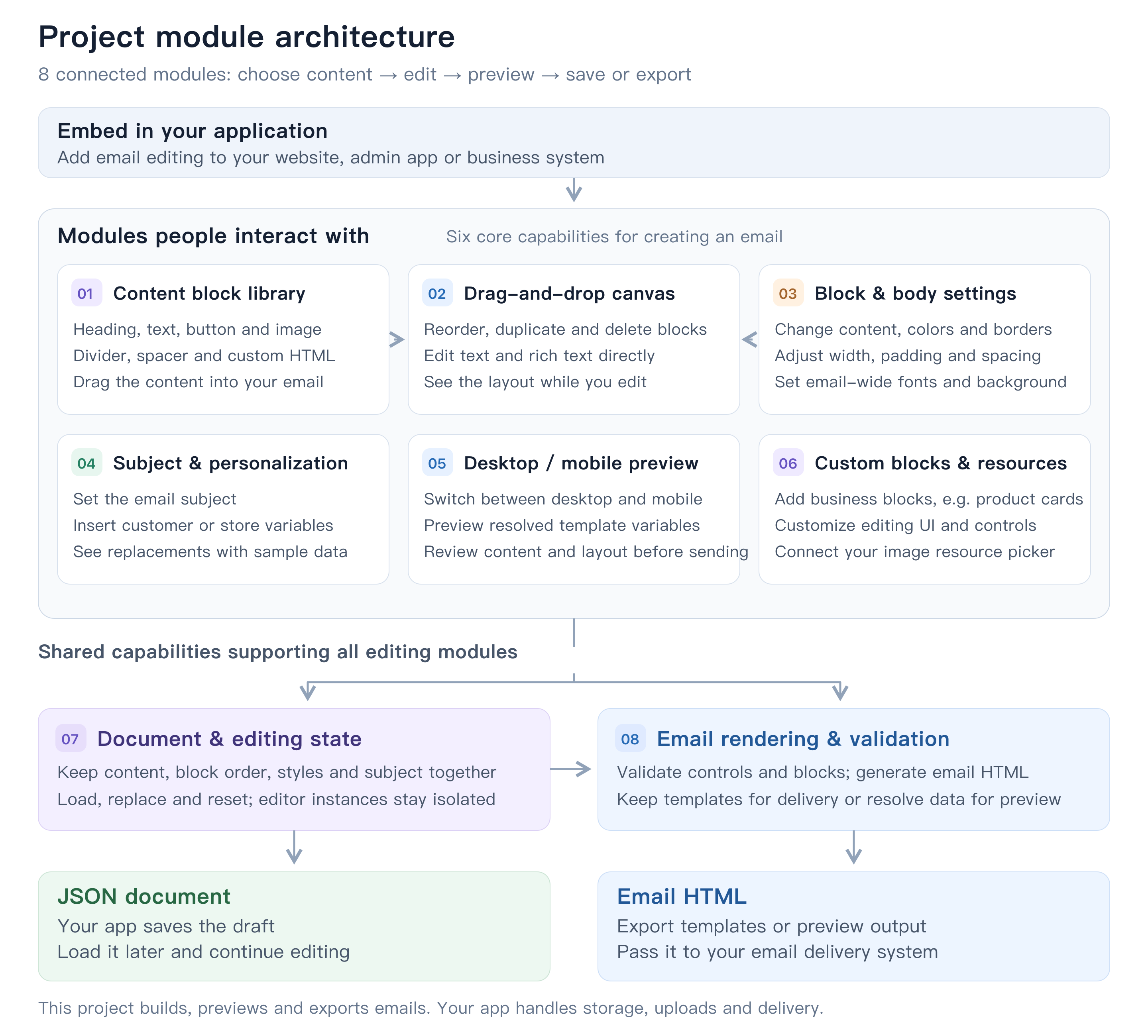
|
|
10
|
+
|
|
11
|
+
[Open full-size architecture diagram](https://cdn.jsdelivr.net/npm/@standhigher/react-email-editor@0.4.1/docs/assets/architecture.png) · [Editable SVG](https://cdn.jsdelivr.net/npm/@standhigher/react-email-editor@0.4.1/docs/assets/architecture.svg)
|
|
12
|
+
|
|
13
|
+
## Install and integrate
|
|
14
|
+
|
|
15
|
+
Requires React 18 and React DOM 18. Ships ESM and TypeScript declarations.
|
|
10
16
|
|
|
11
17
|
```bash
|
|
12
18
|
pnpm add @standhigher/react-email-editor
|
|
13
19
|
```
|
|
14
20
|
|
|
15
|
-
## Quick start
|
|
16
|
-
|
|
17
|
-
Import the stylesheet once in your application and use a ref to read the document and HTML. Your application handles persistence.
|
|
18
|
-
|
|
19
21
|
```tsx
|
|
20
|
-
import {
|
|
21
|
-
import {
|
|
22
|
-
BLOCK_TYPES,
|
|
23
|
-
EmailEditor,
|
|
24
|
-
createBlockNode,
|
|
25
|
-
createEmailDocument,
|
|
26
|
-
type EmailEditorHandle,
|
|
27
|
-
type Variable,
|
|
28
|
-
} from "@standhigher/react-email-editor";
|
|
22
|
+
import { EmailEditor, useEmailEditor } from "@standhigher/react-email-editor";
|
|
29
23
|
import "@standhigher/react-email-editor/styles.css";
|
|
30
24
|
|
|
31
|
-
const text = createBlockNode(BLOCK_TYPES.text);
|
|
32
|
-
if (text) text.controls.html = "<p>Hello, {{ store_name }}</p>";
|
|
33
|
-
const initialDocument = createEmailDocument(text ? [text] : []);
|
|
34
|
-
const variables: Variable[] = [
|
|
35
|
-
{ name: "{{ store_name }}", description: "Store name", value: "Example Store" },
|
|
36
|
-
];
|
|
37
|
-
|
|
38
25
|
export function EmailPage() {
|
|
39
|
-
const
|
|
40
|
-
|
|
41
|
-
function save() {
|
|
42
|
-
const data = editorRef.current?.getData();
|
|
43
|
-
if (!data) return;
|
|
44
|
-
// Persist data.document in your app; use data.html to export the template.
|
|
45
|
-
console.log(data);
|
|
46
|
-
}
|
|
47
|
-
|
|
48
|
-
return (
|
|
49
|
-
<>
|
|
50
|
-
<EmailEditor
|
|
51
|
-
ref={editorRef}
|
|
52
|
-
initialDocument={initialDocument}
|
|
53
|
-
variables={variables}
|
|
54
|
-
height={720}
|
|
55
|
-
/>
|
|
56
|
-
<button type="button" onClick={save}>Save</button>
|
|
57
|
-
</>
|
|
58
|
-
);
|
|
26
|
+
const editor = useEmailEditor();
|
|
27
|
+
return <EmailEditor editor={editor} height={720} />;
|
|
59
28
|
}
|
|
60
29
|
```
|
|
61
30
|
|
|
62
|
-
|
|
63
|
-
|
|
64
|
-
## Props
|
|
65
|
-
|
|
66
|
-
All props are optional.
|
|
67
|
-
|
|
68
|
-
| Prop | Type | Behavior |
|
|
69
|
-
| --- | --- | --- |
|
|
70
|
-
| `initialDocument` | `EmailDocument` | Read on first mount only. Remount with a new React `key` to switch documents. |
|
|
71
|
-
| `height` | `number \| string` | Defaults to `"100%"`; numbers are pixels. |
|
|
72
|
-
| `body` | `Partial<EmailBodySettings>` | Overrides email body layout, appearance, and default typography; later changes merge into the current document. Omitting a field does not restore its default. |
|
|
73
|
-
| `variables` | `Variable[]` | Variables for insertion and preview. Defaults to `[]`; Personalization controls are hidden when empty. |
|
|
74
|
-
| `config` | `EmailEditorConfig` | Registers plugins, resource adapters, and library order through `createEmailEditorConfig()`. |
|
|
75
|
-
| `onChange` | `(document: EmailDocument) => void` | Called on document changes, including external `body` updates that change document values. |
|
|
76
|
-
| `onBodyChange` | `(body: EmailBodySettings) => void` | Called for body style edits inside the editor, excluding external `body` updates. |
|
|
31
|
+
With Next.js App Router, add `"use client"` to the integration component and import CSS from an allowed global stylesheet entry. Your app implements persistence, resource uploads and email delivery.
|
|
77
32
|
|
|
78
|
-
|
|
33
|
+
## Run locally
|
|
79
34
|
|
|
80
|
-
|
|
81
|
-
|
|
82
|
-
- **General**: text color, link color, font family, font weight, and a link underline switch.
|
|
83
|
-
- **Content**: Background, content width, Padding (`contentPadding`), and block gap. **Advanced: Border** is collapsed by default and contains border color, width, and style. Background is the single background color of the email content container; the surrounding area is white. The container is always centered. Padding applies inside the content border and is the only body padding setting; `outerPadding` has been removed.
|
|
84
|
-
|
|
85
|
-
Text and links inherit BODY defaults unless explicitly formatted in the rich-text toolbar. Editing only a link URL or target preserves explicit link styles; resetting a link style restores BODY inheritance. Base font size (16px), line height (1.5), and paragraph/list spacing use internal defaults. HTML blocks preserve their source formatting; their wrapper inherits body typography without rewriting links or lists. BODY does not expose alignment or corner radius.
|
|
86
|
-
|
|
87
|
-
Built-in blocks: `heading`, `text`, `button`, `image`, `divider`, `spacer`, and `html`, available through `BLOCK_TYPES`.
|
|
88
|
-
|
|
89
|
-
## Save and export
|
|
90
|
-
|
|
91
|
-
| Ref method | Returns |
|
|
92
|
-
| --- | --- |
|
|
93
|
-
| `getData()` | `{ document, json, html, renderedHtml }` |
|
|
94
|
-
| `getDocument()` | An independent `EmailDocument` snapshot to persist and pass back as `initialDocument`. |
|
|
95
|
-
| `getJson()` | A formatted document JSON string. |
|
|
96
|
-
| `getHtml()` | A complete email HTML document preserving template expressions. |
|
|
97
|
-
| `getRenderedHtml()` | A complete email HTML document with templates resolved using preview data. |
|
|
98
|
-
|
|
99
|
-
Render a document without mounting the editor:
|
|
100
|
-
|
|
101
|
-
```ts
|
|
102
|
-
import { documentToHtml } from "@standhigher/react-email-editor";
|
|
103
|
-
|
|
104
|
-
const html = documentToHtml(initialDocument, undefined, { variables });
|
|
105
|
-
const previewHtml = documentToHtml(initialDocument, undefined, {
|
|
106
|
-
variables,
|
|
107
|
-
resolveHtmlTemplates: true,
|
|
108
|
-
});
|
|
109
|
-
```
|
|
110
|
-
|
|
111
|
-
A variable's `name` is inserted verbatim; `description` and preview `value` are optional. Export adds a missing dot only to tokens matching `variables[].name` exactly, preserving whitespace: `{{ store_name }}` → `{{ .store_name }}`. Other Go template expressions remain unchanged. Preview supports a subset of Go template syntax; data precedence is block `defaultData` > `templateData` (`documentToHtml` option) > `variables`.
|
|
112
|
-
|
|
113
|
-
The document format is under development. Only `version: 4` is accepted, with no automatic migration of older documents. Create data with `createEmailDocument()` and `createBlockNode()`. See [CHANGELOG](./CHANGELOG.md) for upgrade notes.
|
|
114
|
-
|
|
115
|
-
## Custom blocks
|
|
116
|
-
|
|
117
|
-
Declare controls and email output with `defineBlock()`, then register once:
|
|
118
|
-
|
|
119
|
-
```tsx
|
|
120
|
-
const coupon = defineBlock({
|
|
121
|
-
type: "my-app.coupon",
|
|
122
|
-
title: "Coupon",
|
|
123
|
-
controls: {
|
|
124
|
-
code: EmailControls.text({ label: "Code", defaultValue: "SAVE20" }),
|
|
125
|
-
},
|
|
126
|
-
renderEmail: ({ controls, email }) => email.html`<p>${controls.code}</p>`,
|
|
127
|
-
});
|
|
128
|
-
const config = createEmailEditorConfig({ plugins: [coupon] });
|
|
129
|
-
|
|
130
|
-
<EmailEditor config={config} />;
|
|
131
|
-
const block = config.createBlock("my-app.coupon");
|
|
132
|
-
const html = config.toHtml(createEmailDocument([block]));
|
|
133
|
-
```
|
|
134
|
-
|
|
135
|
-
Import `defineBlock`, `EmailControls`, and `createEmailEditorConfig` from the package. Control values are inferred; the inspector and canvas work automatically. Plugins support rich text, editable lists, image resource adapters, custom control components, and optional React `Inspector` / `Canvas` components. `EditableRichText` supports multiple editing regions, while `ControlEditor` reuses declared controls inside custom inspectors.
|
|
136
|
-
|
|
137
|
-
`config.validate(document)` returns `ValidationIssue[]` with block IDs and control paths for export preflight. Number ranges, options, URL/image protocols, list counts, and custom validation also apply to the inspector and email export. Custom Canvas/Inspector components can call `setControls(patch)` to update related controls in one document change and one `onChange` callback. Declaration metadata is copied and frozen, parsed controls are reused within each context, and `onChange` / `onBodyChange` receive independent data snapshots.
|
|
138
|
-
|
|
139
|
-
The editor and standalone export share one configuration. Use `builtins` to filter and order the library; replacing a built-in requires `override: true`. Declarations, runtime contexts, and persisted nodes all use `controls`. Documents use v4, with no old-data compatibility. The old `blocks`, `defaultFields`, `inlineEdit`, and `render()` integration is removed. See the [custom block API guide](./docs/custom-blocks.md) ([简体中文](./docs/custom-blocks.zh-CN.md)) and runnable `playground/plugins/` examples.
|
|
140
|
-
|
|
141
|
-
## Local development
|
|
142
|
-
|
|
143
|
-
Node.js 22.18+ and pnpm are recommended:
|
|
35
|
+
Use Node.js 24 LTS (`.nvmrc`; at least 22.18 for the complete test suite) and pnpm 10.16.1 (`packageManager`):
|
|
144
36
|
|
|
145
37
|
```bash
|
|
146
38
|
pnpm install --frozen-lockfile
|
|
147
39
|
pnpm dev
|
|
148
40
|
```
|
|
149
41
|
|
|
150
|
-
Open [http://localhost:5173](http://localhost:5173).
|
|
42
|
+
Open [http://localhost:5173](http://localhost:5173); reuse an existing server when available. See [development and local linking](https://github.com/standhigher/react-email-editor/blob/main/docs/api.md#development-and-local-linking) for build and validation commands.
|
|
151
43
|
|
|
152
|
-
|
|
153
|
-
|
|
154
|
-
|
|
155
|
-
|
|
156
|
-
|
|
157
|
-
|
|
44
|
+
## Documentation
|
|
45
|
+
|
|
46
|
+
- [API reference](https://github.com/standhigher/react-email-editor/blob/main/docs/api.md): every public export, parameter, default and type.
|
|
47
|
+
- [Basic examples](https://github.com/standhigher/react-email-editor/blob/main/docs/basic-examples.md): initial content, saving/loading, body styles, variables and preview.
|
|
48
|
+
- [Advanced examples](https://github.com/standhigher/react-email-editor/blob/main/docs/advanced-examples.md): validated saving, multiple instances, custom blocks, multiple editing regions, resource adapters and standalone export.
|
|
49
|
+
- [Custom block guide](https://github.com/standhigher/react-email-editor/blob/main/docs/custom-blocks.md): detailed controls, plugins and rendering helpers.
|
|
50
|
+
- [Release guide](https://github.com/standhigher/react-email-editor/blob/main/docs/release.md): package checks and manual npm publishing.
|
|
51
|
+
- [Changelog](https://github.com/standhigher/react-email-editor/blob/main/docs/changelog.md).
|
|
158
52
|
|
|
159
|
-
|
|
53
|
+
The document format is under development. Only `version: 4` is supported, without automatic migration of older documents.
|
package/README.zh-CN.md
CHANGED
|
@@ -1,159 +1,53 @@
|
|
|
1
1
|
# @standhigher/react-email-editor
|
|
2
2
|
|
|
3
|
-
[English](
|
|
3
|
+
[English](https://github.com/standhigher/react-email-editor/blob/main/README.md) | 简体中文
|
|
4
4
|
|
|
5
|
-
|
|
5
|
+
把内容拖进画布,调整邮件外观,预览后保存为可继续编辑的 JSON 或导出邮件 HTML。
|
|
6
6
|
|
|
7
|
-
##
|
|
7
|
+
## 模块架构图
|
|
8
8
|
|
|
9
|
-
|
|
9
|
+
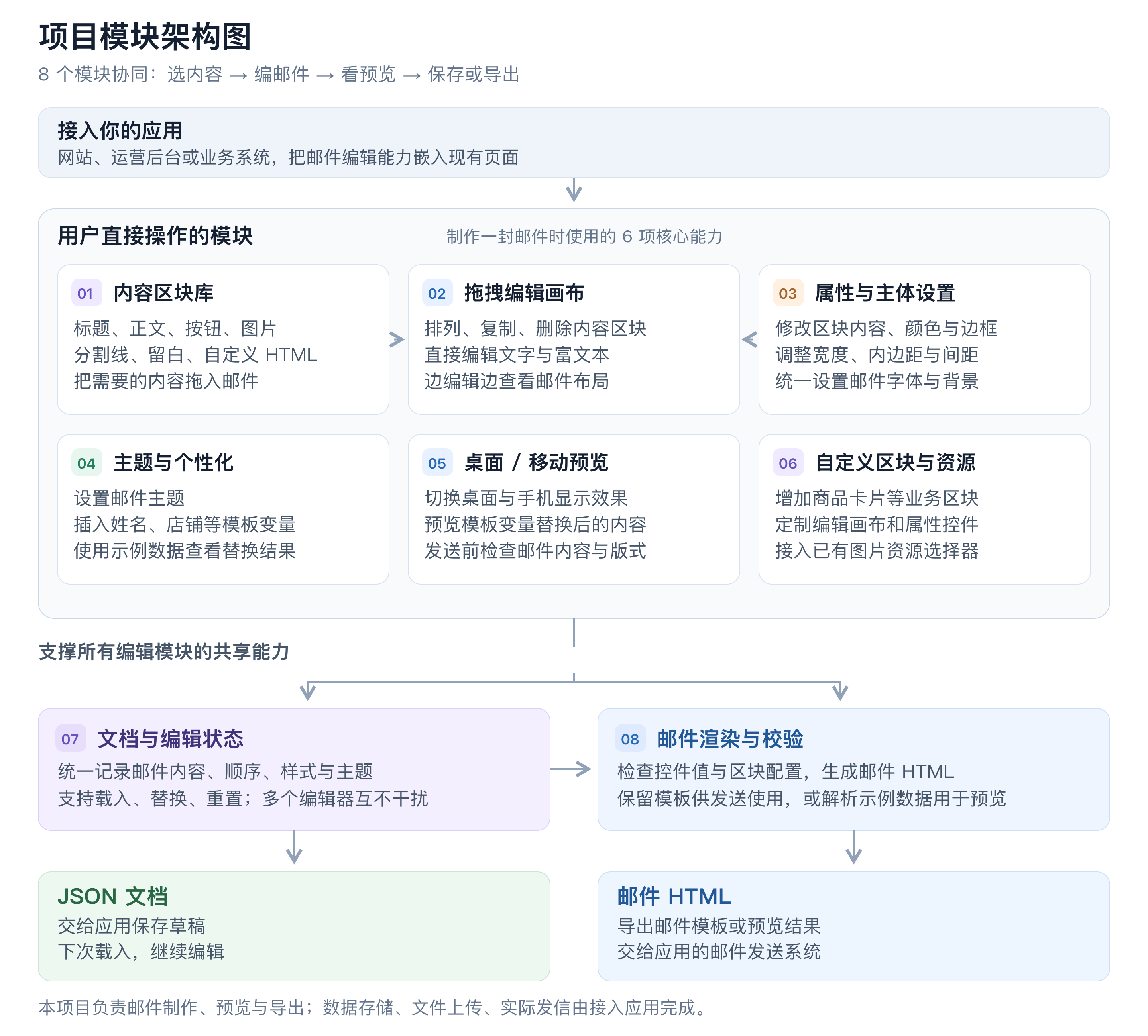
|
|
10
|
+
|
|
11
|
+
[查看高清架构图](https://cdn.jsdelivr.net/npm/@standhigher/react-email-editor@0.4.1/docs/assets/architecture.zh-CN.png) · [可编辑 SVG](https://cdn.jsdelivr.net/npm/@standhigher/react-email-editor@0.4.1/docs/assets/architecture.zh-CN.svg)
|
|
12
|
+
|
|
13
|
+
## 安装与最小接入
|
|
14
|
+
|
|
15
|
+
需要 React 18 和 React DOM 18;包提供 ESM 和 TypeScript 类型。
|
|
10
16
|
|
|
11
17
|
```bash
|
|
12
18
|
pnpm add @standhigher/react-email-editor
|
|
13
19
|
```
|
|
14
20
|
|
|
15
|
-
## 基本接入
|
|
16
|
-
|
|
17
|
-
在应用入口引入一次样式,通过 `ref` 读取文档和 HTML;保存逻辑由应用实现。
|
|
18
|
-
|
|
19
21
|
```tsx
|
|
20
|
-
import {
|
|
21
|
-
import {
|
|
22
|
-
BLOCK_TYPES,
|
|
23
|
-
EmailEditor,
|
|
24
|
-
createBlockNode,
|
|
25
|
-
createEmailDocument,
|
|
26
|
-
type EmailEditorHandle,
|
|
27
|
-
type Variable,
|
|
28
|
-
} from "@standhigher/react-email-editor";
|
|
22
|
+
import { EmailEditor, useEmailEditor } from "@standhigher/react-email-editor";
|
|
29
23
|
import "@standhigher/react-email-editor/styles.css";
|
|
30
24
|
|
|
31
|
-
const text = createBlockNode(BLOCK_TYPES.text);
|
|
32
|
-
if (text) text.controls.html = "<p>你好,{{ store_name }}</p>";
|
|
33
|
-
const initialDocument = createEmailDocument(text ? [text] : []);
|
|
34
|
-
const variables: Variable[] = [
|
|
35
|
-
{ name: "{{ store_name }}", description: "店铺名称", value: "示例店铺" },
|
|
36
|
-
];
|
|
37
|
-
|
|
38
25
|
export function EmailPage() {
|
|
39
|
-
const
|
|
40
|
-
|
|
41
|
-
function save() {
|
|
42
|
-
const data = editorRef.current?.getData();
|
|
43
|
-
if (!data) return;
|
|
44
|
-
// 将 data.document 保存到应用,data.html 用于邮件模板导出。
|
|
45
|
-
console.log(data);
|
|
46
|
-
}
|
|
47
|
-
|
|
48
|
-
return (
|
|
49
|
-
<>
|
|
50
|
-
<EmailEditor
|
|
51
|
-
ref={editorRef}
|
|
52
|
-
initialDocument={initialDocument}
|
|
53
|
-
variables={variables}
|
|
54
|
-
height={720}
|
|
55
|
-
/>
|
|
56
|
-
<button type="button" onClick={save}>保存</button>
|
|
57
|
-
</>
|
|
58
|
-
);
|
|
26
|
+
const editor = useEmailEditor();
|
|
27
|
+
return <EmailEditor editor={editor} height={720} />;
|
|
59
28
|
}
|
|
60
29
|
```
|
|
61
30
|
|
|
62
|
-
|
|
63
|
-
|
|
64
|
-
## 常用参数
|
|
65
|
-
|
|
66
|
-
所有 Props 均可选。
|
|
67
|
-
|
|
68
|
-
| 参数 | 类型 | 行为 |
|
|
69
|
-
| --- | --- | --- |
|
|
70
|
-
| `initialDocument` | `EmailDocument` | 仅首次挂载读取;切换文档时通过新的 React `key` 重新挂载。 |
|
|
71
|
-
| `height` | `number \| string` | 默认 `"100%"`;数字为 px。 |
|
|
72
|
-
| `body` | `Partial<EmailBodySettings>` | 覆盖邮件主体的布局、外观和默认排版,后续更新合并到当前文档;省略字段不会恢复默认值。 |
|
|
73
|
-
| `variables` | `Variable[]` | 插入和预览变量;默认 `[]`,为空时隐藏 Personalization 入口。 |
|
|
74
|
-
| `config` | `EmailEditorConfig` | 通过 `createEmailEditorConfig({ plugins })` 注册区块、资源适配器和区块库顺序。 |
|
|
75
|
-
| `onChange` | `(document: EmailDocument) => void` | 文档变化时触发,包括实际改变文档值的外部 `body` 更新。 |
|
|
76
|
-
| `onBodyChange` | `(body: EmailBodySettings) => void` | 编辑器内修改邮件主体配置时触发,外部 `body` 更新不触发。 |
|
|
31
|
+
Next.js App Router 的接入组件需声明 `"use client"`;样式在应用允许的全局样式入口引入。保存、上传资源与发送邮件由你的应用实现。
|
|
77
32
|
|
|
78
|
-
|
|
33
|
+
## 本地启动
|
|
79
34
|
|
|
80
|
-
|
|
81
|
-
|
|
82
|
-
- **General**:文字颜色、链接颜色、字体、字重和链接下划线开关。
|
|
83
|
-
- **Content**:Background、内容宽度、Padding(`contentPadding`)和区块间距。默认折叠的 **Advanced: Border** 包含边框颜色、宽度和样式。Background 是唯一的邮件主体内容容器背景色,外侧区域为白色,主体固定居中。Padding 作用于内容边框内部,是唯一的主体内边距配置;已移除 `outerPadding`。
|
|
84
|
-
|
|
85
|
-
文字和链接默认继承 BODY 配置,富文本工具栏中单独设置的格式优先。仅修改链接 URL 或打开方式会保留显式链接样式;重置链接样式后恢复继承 BODY。基础字号(16px)、行高(1.5)以及段落、列表间距使用内部默认值。HTML 区块保留源码格式,外层继承主体排版,不改写内部链接和列表。BODY 不提供对齐和圆角配置。
|
|
86
|
-
|
|
87
|
-
内置区块:`heading`、`text`、`button`、`image`、`divider`、`spacer`、`html`,均可通过 `BLOCK_TYPES` 引用。
|
|
88
|
-
|
|
89
|
-
## 保存与导出
|
|
90
|
-
|
|
91
|
-
| Ref 方法 | 返回值 |
|
|
92
|
-
| --- | --- |
|
|
93
|
-
| `getData()` | `{ document, json, html, renderedHtml }` |
|
|
94
|
-
| `getDocument()` | 独立的 `EmailDocument` 快照,可存储后传回 `initialDocument`。 |
|
|
95
|
-
| `getJson()` | 格式化的文档 JSON 字符串。 |
|
|
96
|
-
| `getHtml()` | 保留模板表达式的完整邮件 HTML。 |
|
|
97
|
-
| `getRenderedHtml()` | 使用预览数据解析模板后的完整邮件 HTML。 |
|
|
98
|
-
|
|
99
|
-
不挂载编辑器时,也可直接渲染文档:
|
|
100
|
-
|
|
101
|
-
```ts
|
|
102
|
-
import { documentToHtml } from "@standhigher/react-email-editor";
|
|
103
|
-
|
|
104
|
-
const html = documentToHtml(initialDocument, undefined, { variables });
|
|
105
|
-
const previewHtml = documentToHtml(initialDocument, undefined, {
|
|
106
|
-
variables,
|
|
107
|
-
resolveHtmlTemplates: true,
|
|
108
|
-
});
|
|
109
|
-
```
|
|
110
|
-
|
|
111
|
-
变量的 `name` 原样插入,`description` 和预览值 `value` 可选。导出时仅对与 `variables[].name` 原文精确匹配的 token 补点并保留空格,如 `{{ store_name }}` → `{{ .store_name }}`;其他 Go template 表达式保持原样。预览支持部分 Go template 语法,数据优先级为区块 `defaultData` > `templateData`(`documentToHtml` 选项)> `variables`。
|
|
112
|
-
|
|
113
|
-
当前文档格式仍处于开发阶段,仅接受 `version: 4`,不自动迁移旧文档。使用 `createEmailDocument()` 和 `createBlockNode()` 创建数据。升级差异见 [CHANGELOG](./CHANGELOG.md)。
|
|
114
|
-
|
|
115
|
-
## 自定义区块
|
|
116
|
-
|
|
117
|
-
使用 `defineBlock()` 声明控件及 `renderEmail()`,通过 `createEmailEditorConfig()` 注册:
|
|
118
|
-
|
|
119
|
-
```tsx
|
|
120
|
-
const coupon = defineBlock({
|
|
121
|
-
type: "my-app.coupon",
|
|
122
|
-
title: "优惠券",
|
|
123
|
-
controls: {
|
|
124
|
-
code: EmailControls.text({ label: "优惠码", defaultValue: "SAVE20" }),
|
|
125
|
-
},
|
|
126
|
-
renderEmail: ({ controls, email }) => email.html`<p>${controls.code}</p>`,
|
|
127
|
-
});
|
|
128
|
-
const config = createEmailEditorConfig({ plugins: [coupon] });
|
|
129
|
-
|
|
130
|
-
<EmailEditor config={config} />;
|
|
131
|
-
const block = config.createBlock("my-app.coupon");
|
|
132
|
-
const html = config.toHtml(createEmailDocument([block]));
|
|
133
|
-
```
|
|
134
|
-
|
|
135
|
-
从包入口导入 `defineBlock`、`EmailControls`、`createEmailEditorConfig`。控件值自动推导,默认生成检查器和画布,支持富文本、列表、图片资源适配器、自定义控件组件及 React `Inspector` / `Canvas`。`EditableRichText` 支持多区域编辑,`ControlEditor` 可在自定义检查器复用声明的控件。
|
|
136
|
-
|
|
137
|
-
`config.validate(document)` 返回带区块 ID 和控件路径的 `ValidationIssue[]`,用于导出前预检;数字范围、选项、URL/图片协议、列表数量和业务校验也用于检查器及邮件导出。自定义 Canvas/Inspector 可用 `setControls(patch)` 一次更新多个关联控件值并触发一次 `onChange`。声明元数据采用隔离冻结快照,控件值解析结果在每次上下文中复用,`onChange` / `onBodyChange` 返回独立数据快照。
|
|
138
|
-
|
|
139
|
-
编辑器与独立导出共用配置;`builtins` 可筛选和排序内置区块,覆盖内置区块必须显式声明 `override: true`。声明、运行时和持久化节点统一使用 `controls`;邮件文档为 v4,不兼容旧数据,不保留旧 `blocks`、`defaultFields`、`inlineEdit` 或 `render()` 接入方式。完整接入、类型、渲染工具和异常规则见[自定义区块 API 文档](./docs/custom-blocks.zh-CN.md)([English](./docs/custom-blocks.md)),可运行示例见 `playground/plugins/`。
|
|
140
|
-
|
|
141
|
-
## 本地开发
|
|
142
|
-
|
|
143
|
-
建议 Node.js 22.18+,使用 pnpm:
|
|
35
|
+
推荐 Node.js 24 LTS(`.nvmrc`;完整测试最低需要 22.18)和 pnpm 10.16.1(`packageManager`):
|
|
144
36
|
|
|
145
37
|
```bash
|
|
146
38
|
pnpm install --frozen-lockfile
|
|
147
39
|
pnpm dev
|
|
148
40
|
```
|
|
149
41
|
|
|
150
|
-
打开 [http://localhost:5173](http://localhost:5173)
|
|
42
|
+
打开 [http://localhost:5173](http://localhost:5173),已有服务时优先复用。构建与校验命令见 [API 文档的开发说明](https://github.com/standhigher/react-email-editor/blob/main/docs/api.zh-CN.md#开发与本地联调)。
|
|
151
43
|
|
|
152
|
-
|
|
153
|
-
|
|
154
|
-
|
|
155
|
-
|
|
156
|
-
|
|
157
|
-
|
|
44
|
+
## 文档
|
|
45
|
+
|
|
46
|
+
- [API 参考](https://github.com/standhigher/react-email-editor/blob/main/docs/api.zh-CN.md):所有公共导出、参数、默认值与类型。
|
|
47
|
+
- [基础场景](https://github.com/standhigher/react-email-editor/blob/main/docs/basic-examples.zh-CN.md):初始内容、保存恢复、主体样式、变量及预览。
|
|
48
|
+
- [复杂场景](https://github.com/standhigher/react-email-editor/blob/main/docs/advanced-examples.zh-CN.md):校验后保存、多实例、自定义区块、多区域编辑、资源适配与独立导出。
|
|
49
|
+
- [自定义区块指南](https://github.com/standhigher/react-email-editor/blob/main/docs/custom-blocks.zh-CN.md):控件、插件和渲染工具的完整说明。
|
|
50
|
+
- [发布指南](https://github.com/standhigher/react-email-editor/blob/main/docs/release.zh-CN.md):发布包校验与本地手动发布。
|
|
51
|
+
- [更新记录](https://github.com/standhigher/react-email-editor/blob/main/docs/changelog.zh-CN.md)。
|
|
158
52
|
|
|
159
|
-
|
|
53
|
+
文档格式仍处于开发阶段,当前只支持 `version: 4`,不自动迁移旧版文档。
|