@spotify/backstage-plugin-soundcheck 0.12.2 → 0.12.3
This diff represents the content of publicly available package versions that have been released to one of the supported registries. The information contained in this diff is provided for informational purposes only and reflects changes between package versions as they appear in their respective public registries.
- package/CHANGELOG.md +29 -0
- package/README.md +2 -510
- package/alpha/package.json +1 -1
- package/dist/alpha.esm.js +1 -1
- package/dist/esm/Card-e2275abd.esm.js +2 -0
- package/dist/esm/CertificationSidebar-bfe066d3.esm.js +2 -0
- package/dist/esm/EmptyState-a3a6154f.esm.js +2 -0
- package/dist/esm/EntitySoundcheckContent-fae7d534.esm.js +2 -0
- package/dist/esm/OverviewPageContent-9845035d.esm.js +2 -0
- package/dist/esm/{RefetchingIndicator-b4961e02.esm.js → RefetchingIndicator-8312818a.esm.js} +2 -2
- package/dist/esm/index-8da96e46.esm.js +2 -0
- package/dist/esm/index-a862b329.esm.js +2 -0
- package/dist/esm/{index-f4bdaf5c.esm.js → index-e2ac1874.esm.js} +2 -2
- package/dist/esm/routes-06f9616b.esm.js +611 -0
- package/dist/index.d.ts +1 -0
- package/dist/index.esm.js +1 -1
- package/package.json +20 -18
- package/dist/esm/Card-2862fdca.esm.js +0 -2
- package/dist/esm/CertificationSidebar-5e4230a7.esm.js +0 -2
- package/dist/esm/EmptyState-6a402254.esm.js +0 -2
- package/dist/esm/EntitySoundcheckContent-bc7bdbe2.esm.js +0 -2
- package/dist/esm/OverviewPageContent-d5467d2c.esm.js +0 -2
- package/dist/esm/index-5610fc82.esm.js +0 -2
- package/dist/esm/index-99d39b7d.esm.js +0 -2
- package/dist/esm/routes-93cd1496.esm.js +0 -599
package/CHANGELOG.md
CHANGED
|
@@ -1,5 +1,34 @@
|
|
|
1
1
|
# @spotify/backstage-plugin-soundcheck
|
|
2
2
|
|
|
3
|
+
## 0.12.3
|
|
4
|
+
|
|
5
|
+
### Patch Changes
|
|
6
|
+
|
|
7
|
+
- Minor tweaks to margins/padding to make things more visually distinct.
|
|
8
|
+
- Improved the performance of the Track Insights page.
|
|
9
|
+
- Fixes the campaign link on the card view of the Tech Health Campaigns page.
|
|
10
|
+
- Add support for different track types in the overview card.
|
|
11
|
+
- Added a "Systems" filter to the Track Insights page.
|
|
12
|
+
- Fixed overview page route history. Browser controls (such as the forward and back buttons) now navigate the overview page correctly.
|
|
13
|
+
- Fixed an issue with level progress bars on the Track page that caused them to only ever show 0 or 100%
|
|
14
|
+
- Exported the RouteRef for the '/tracks/:trackId/checks/:checkId' route
|
|
15
|
+
- Added a preview of the entities that will be affected by filter selections when creating checks, tracks, and campaigns.
|
|
16
|
+
- Resolved an issue related to the caching of certain frontend queries.
|
|
17
|
+
- Adjusted the "Filter by owner" options of the checks, tracks, and campaigns pages to show display names rather than identifiers.
|
|
18
|
+
- Added a type filter for track insights page
|
|
19
|
+
- Resolved an issue with the display of badges on the overview card.
|
|
20
|
+
- Modified the track insights page so that the owner filter options display names instead of identifiers.
|
|
21
|
+
- Minor update to the tracks GraphQL API allowing filtering tracks by type.
|
|
22
|
+
- Fixed the results table width on the Soundcheck Overview page.
|
|
23
|
+
- Adjusted the filters for track insights to only show the relevant options in the filter dropdowns.
|
|
24
|
+
- Adjusted "Filter by owner" options to show all owners at all times for the checks, tracks, and campaigns pages.
|
|
25
|
+
- Added logic to hide the lifecycle filter on track insights page if there are less than 2 options.
|
|
26
|
+
- Added support for filtering Track Insights by owner and lifecycle.
|
|
27
|
+
- Updated backstage dependencies to `v1.24.0`
|
|
28
|
+
- Updated dependencies
|
|
29
|
+
- `@spotify/backstage-plugin-core` to `^0.7.0`
|
|
30
|
+
- `@spotify/backstage-plugin-soundcheck-common` to `^0.13.0`
|
|
31
|
+
|
|
3
32
|
## 0.12.2
|
|
4
33
|
|
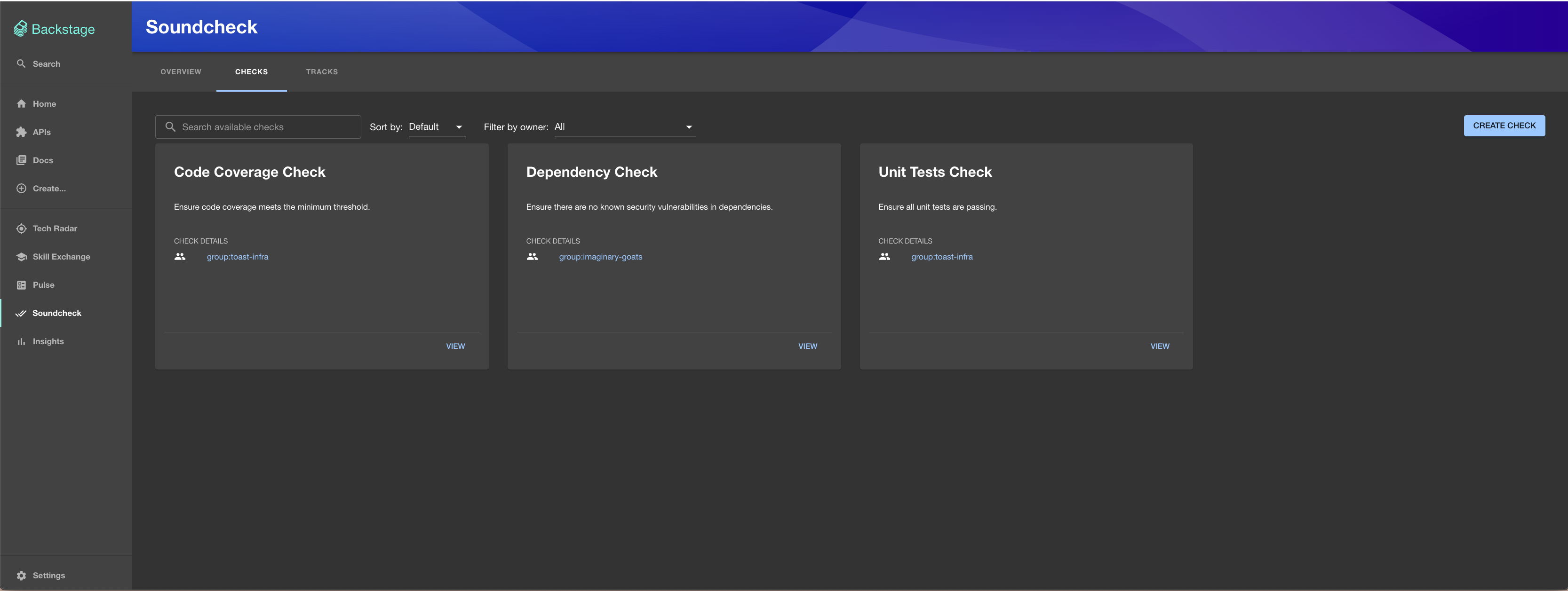
|
5
34
|
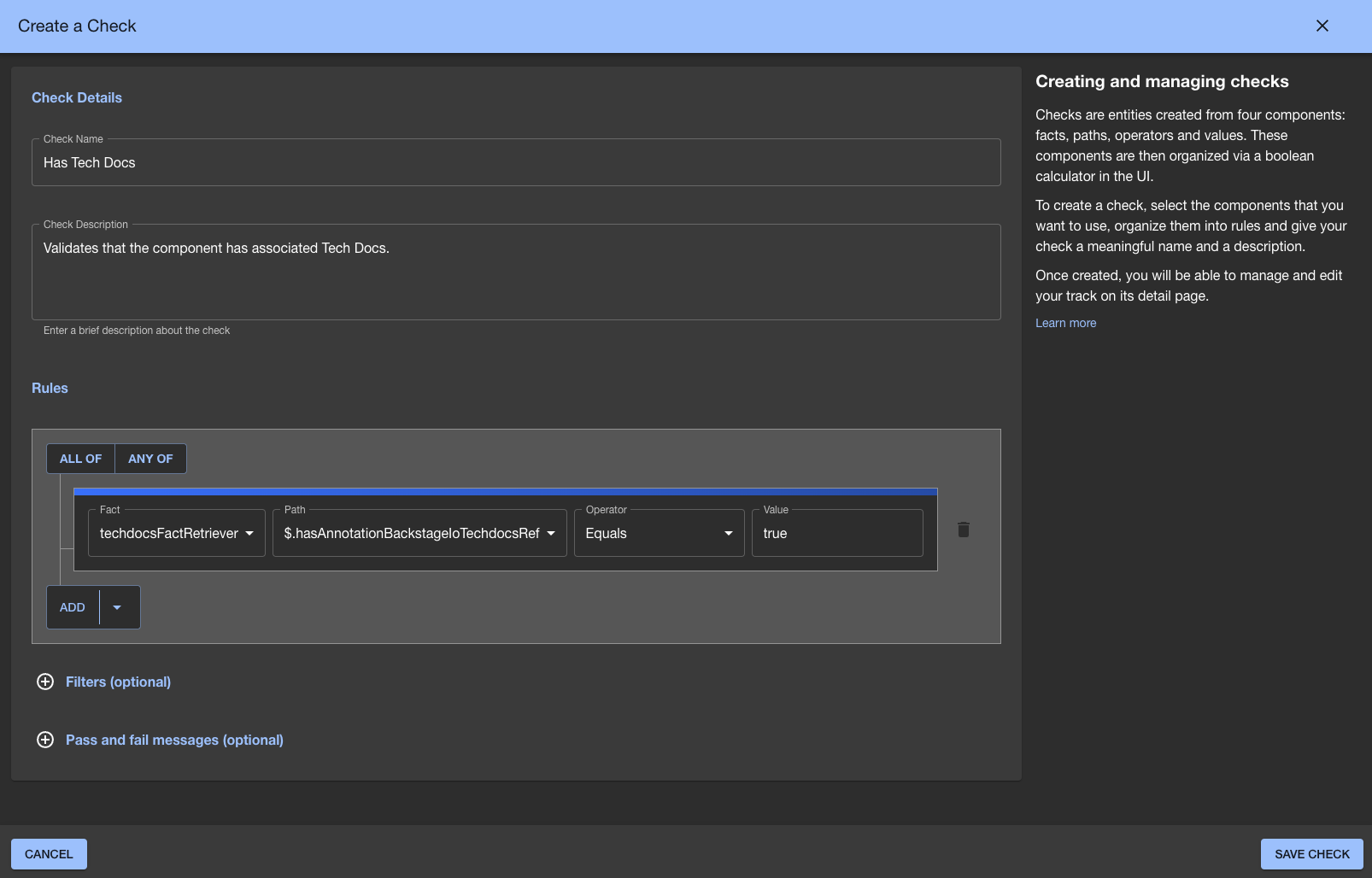
### Patch Changes
|
package/README.md
CHANGED
|
@@ -1,513 +1,5 @@
|
|
|
1
1
|
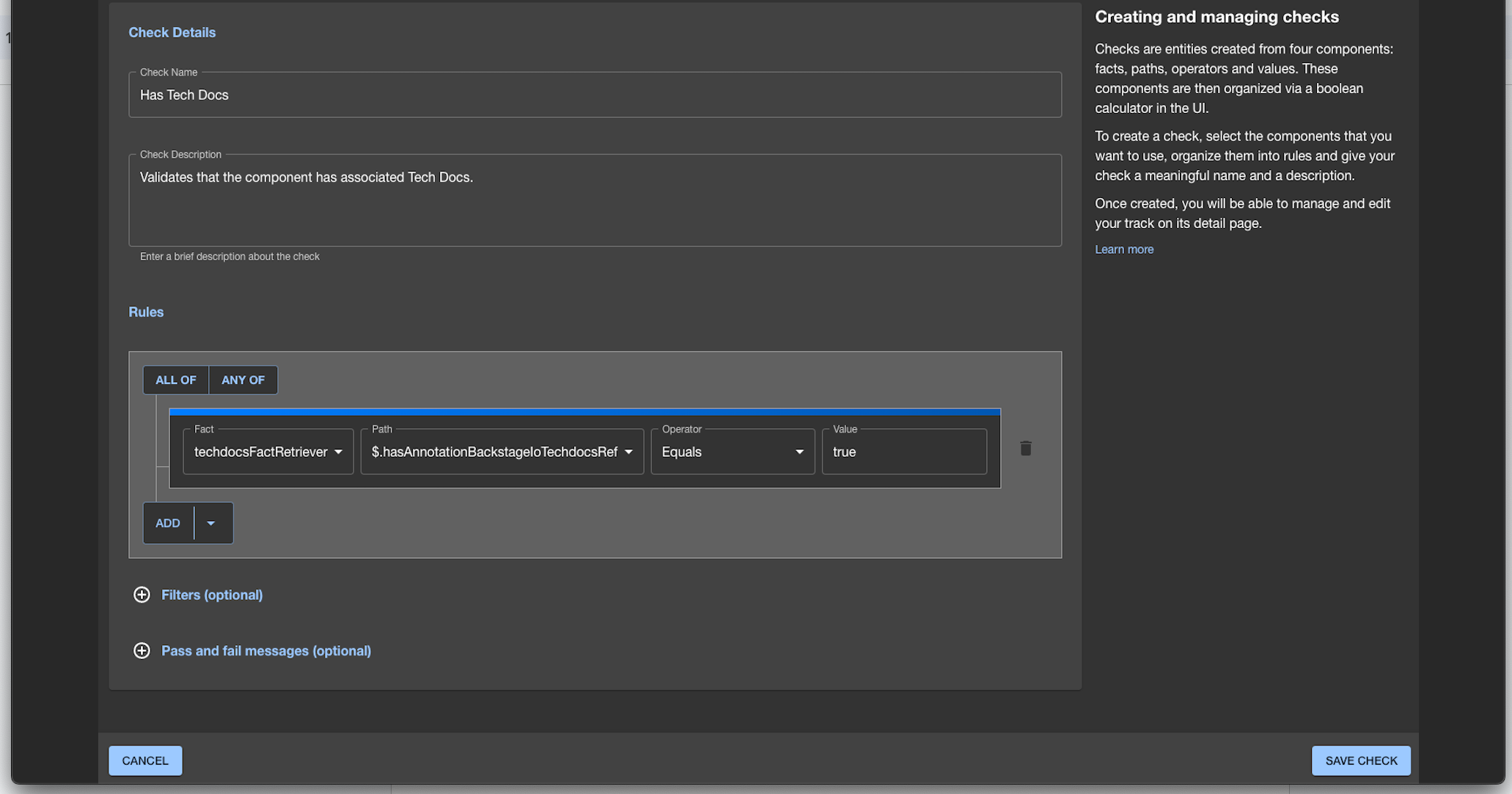
# Spotify Plugins for Backstage: Soundcheck
|
|
2
2
|
|
|
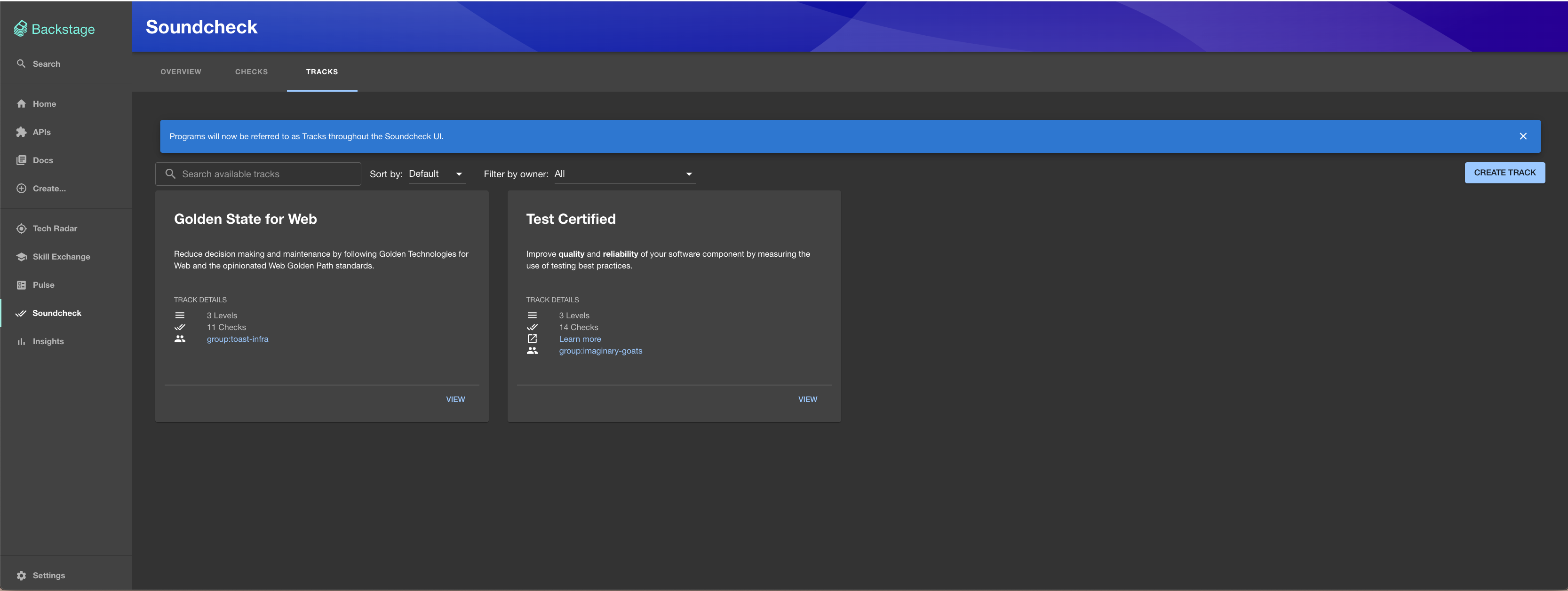
3
|
-
|
|
3
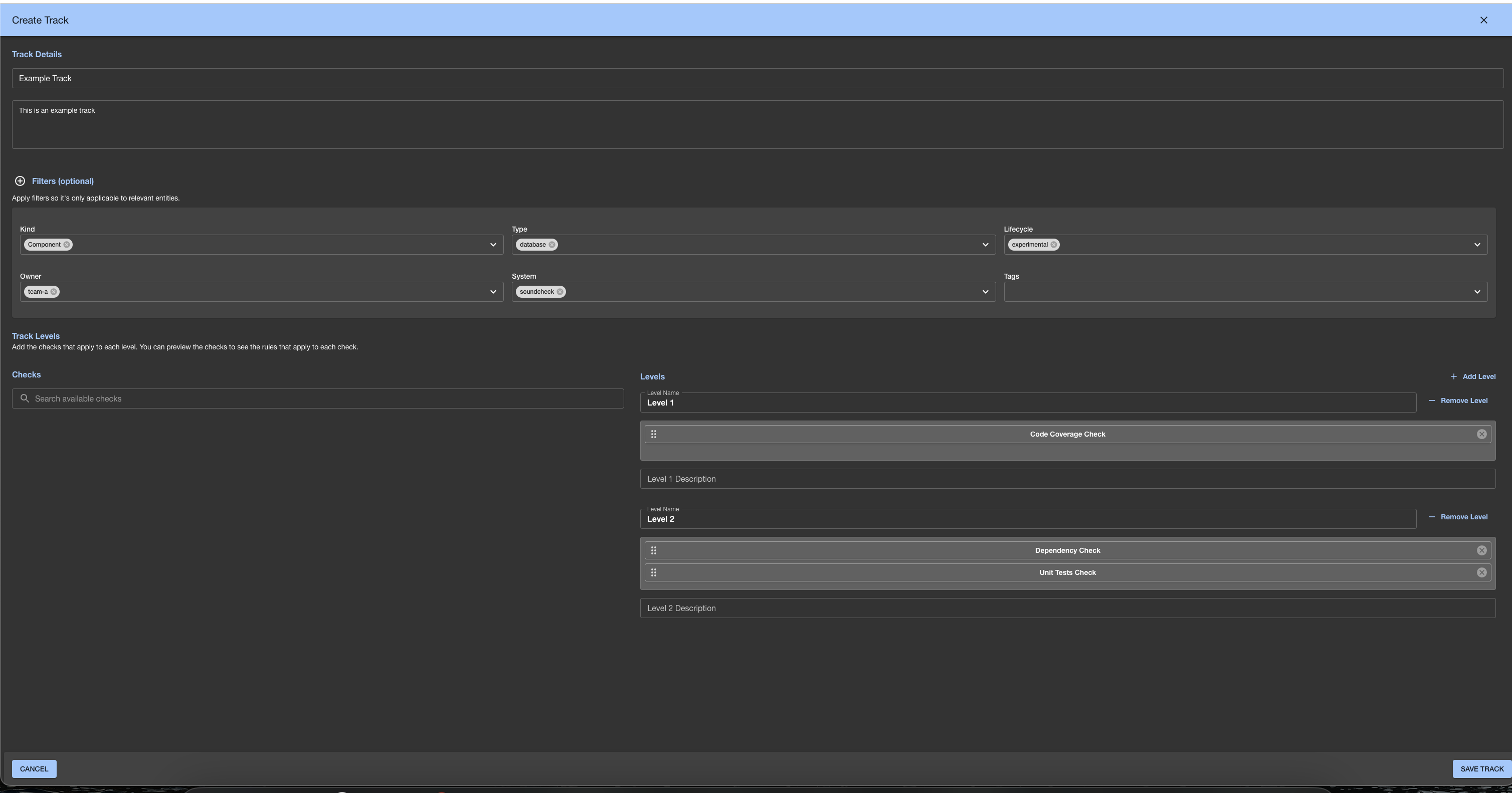
|
+
This plugin is part of [Spotify Plugins for Backstage](https://backstage.spotify.com/marketplace/spotify/bundle/spotify-plugins-bundle/).
|
|
4
4
|
|
|
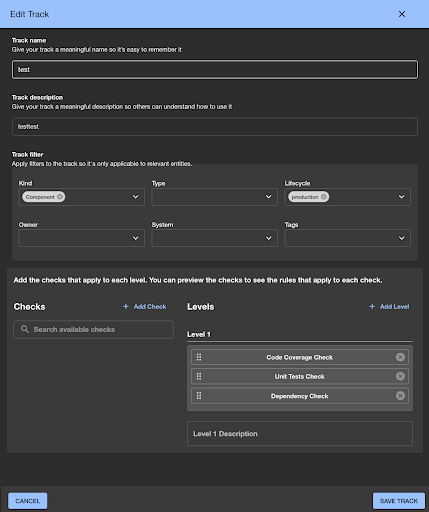
5
|
-
|
|
6
|
-
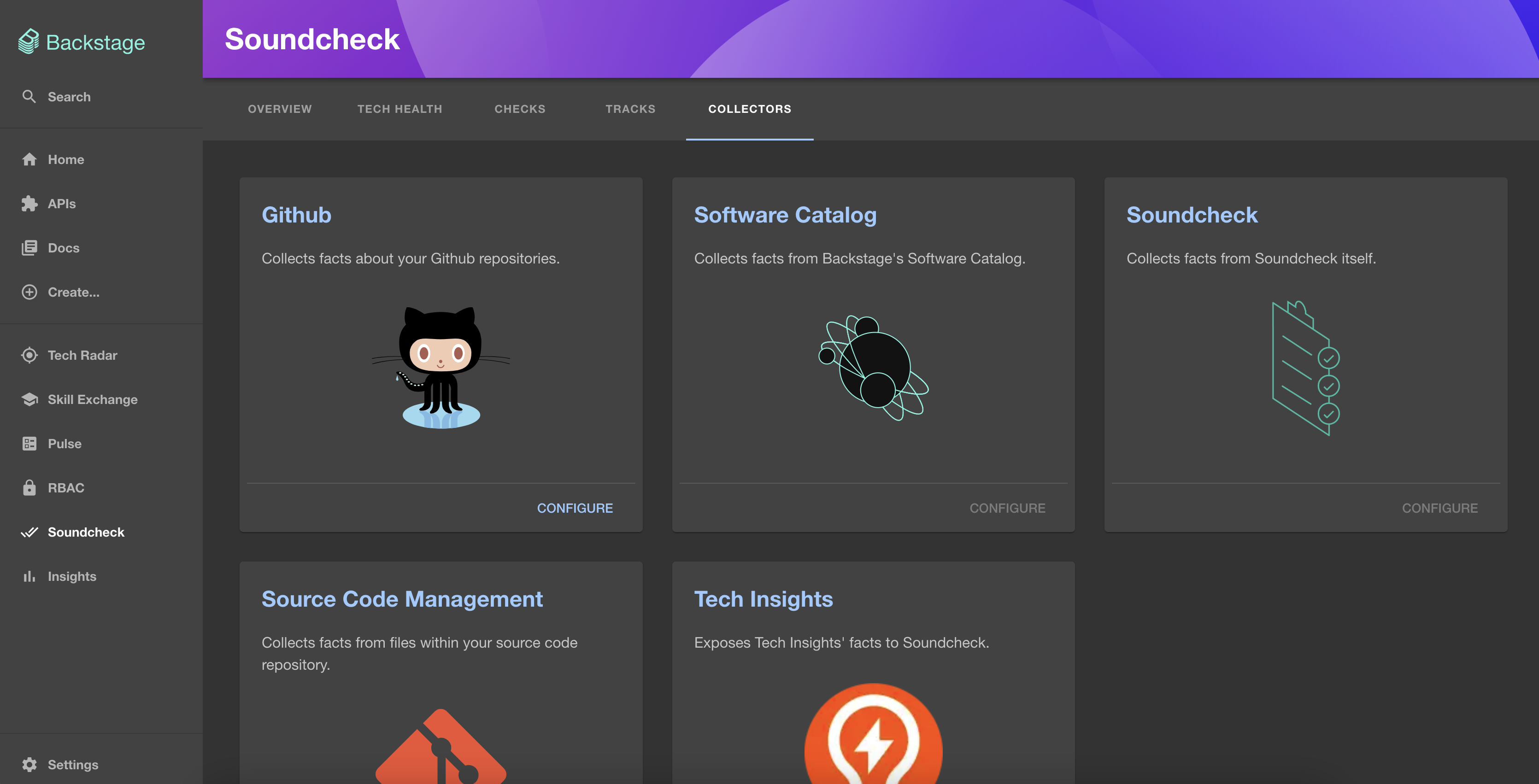
|
|
7
|
-
There are 5 fundamental elements that make up Soundcheck:
|
|
8
|
-
|
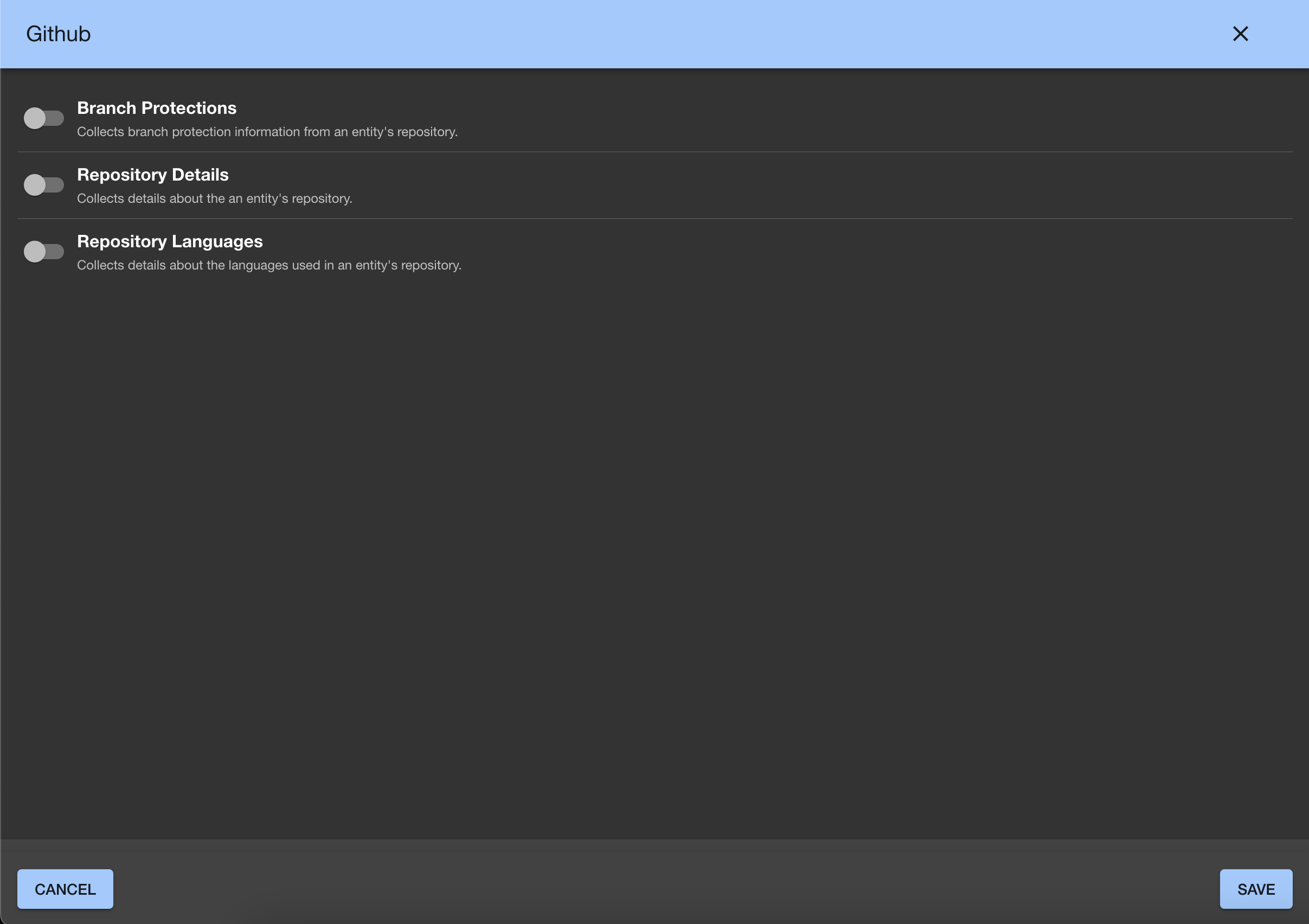
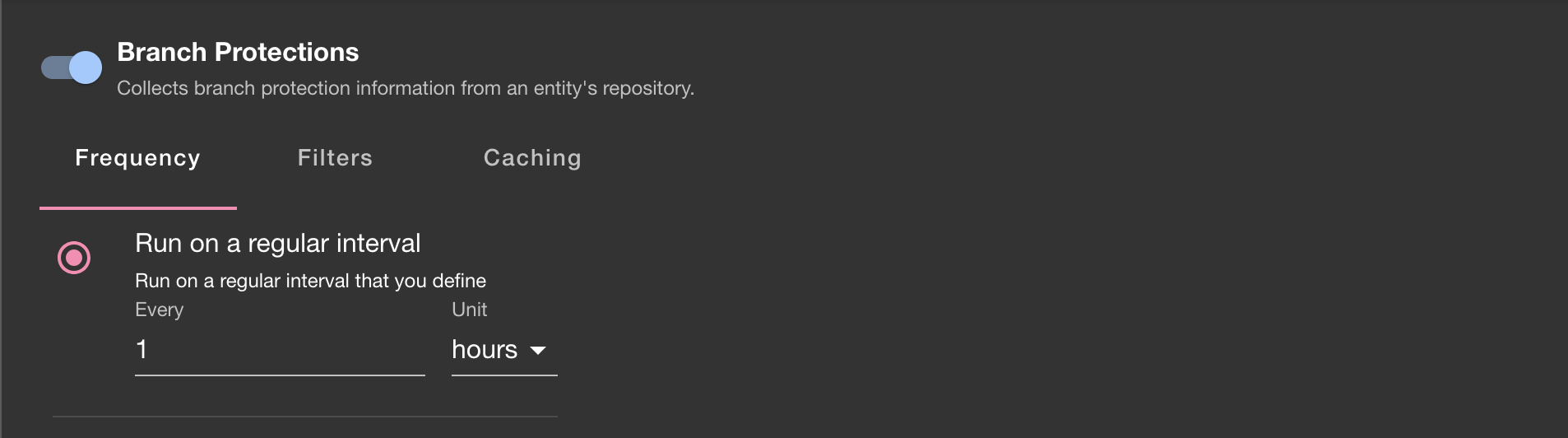
|
9
|
-
- **Check**: A standard or best practice a component is graded against.
|
|
10
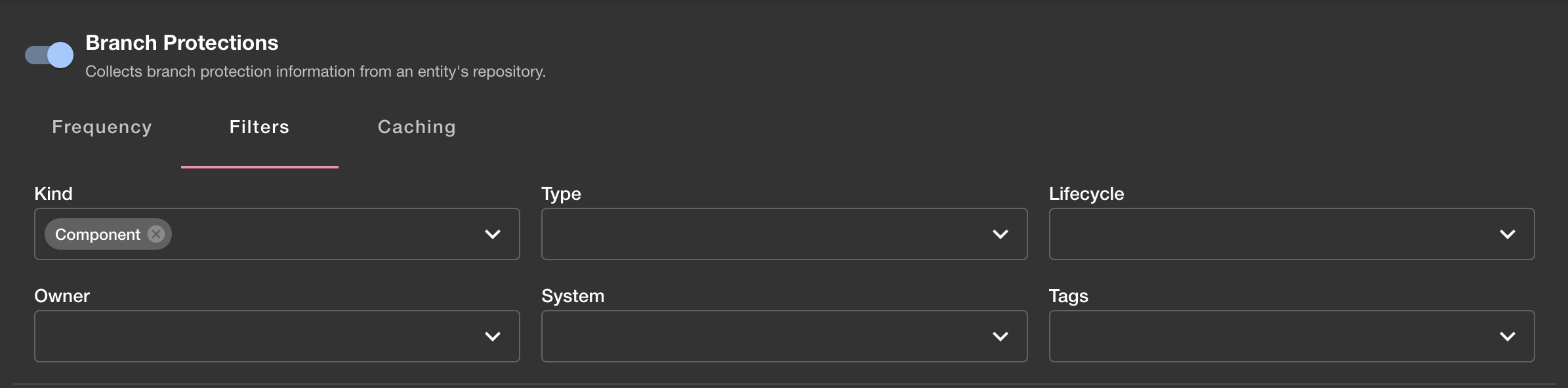
|
-
- **Check Result**: The result of running a check against a component. Possible results are passed, failed, warning or not applicable.
|
|
11
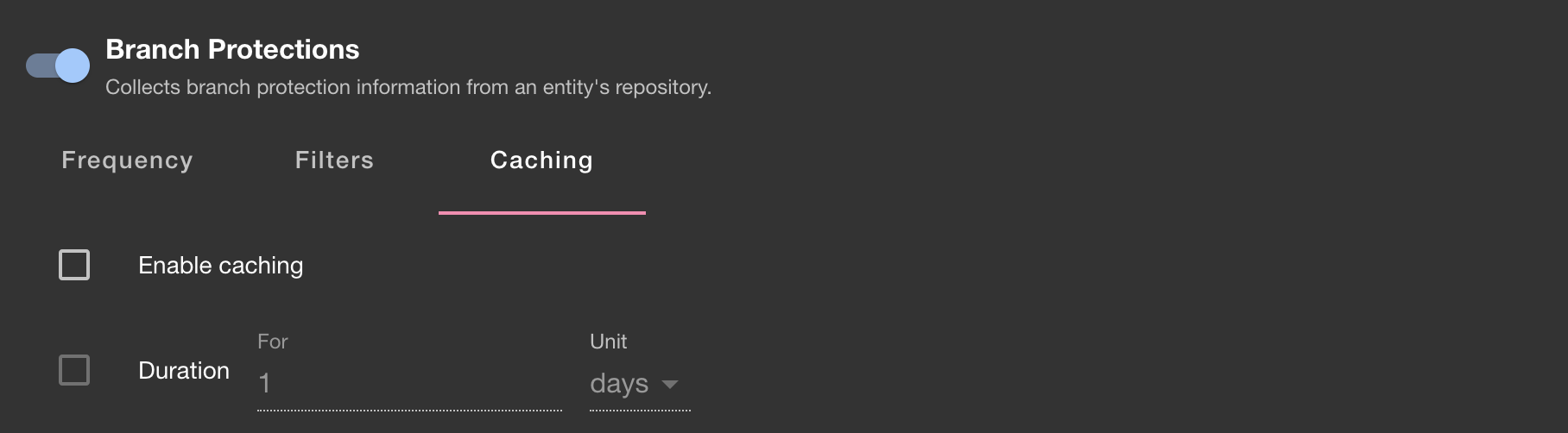
|
-
- **Track**: A long-term tech health initiative.
|
|
12
|
-
- **Level**: A group of checks that represent a milestone within a track.
|
|
13
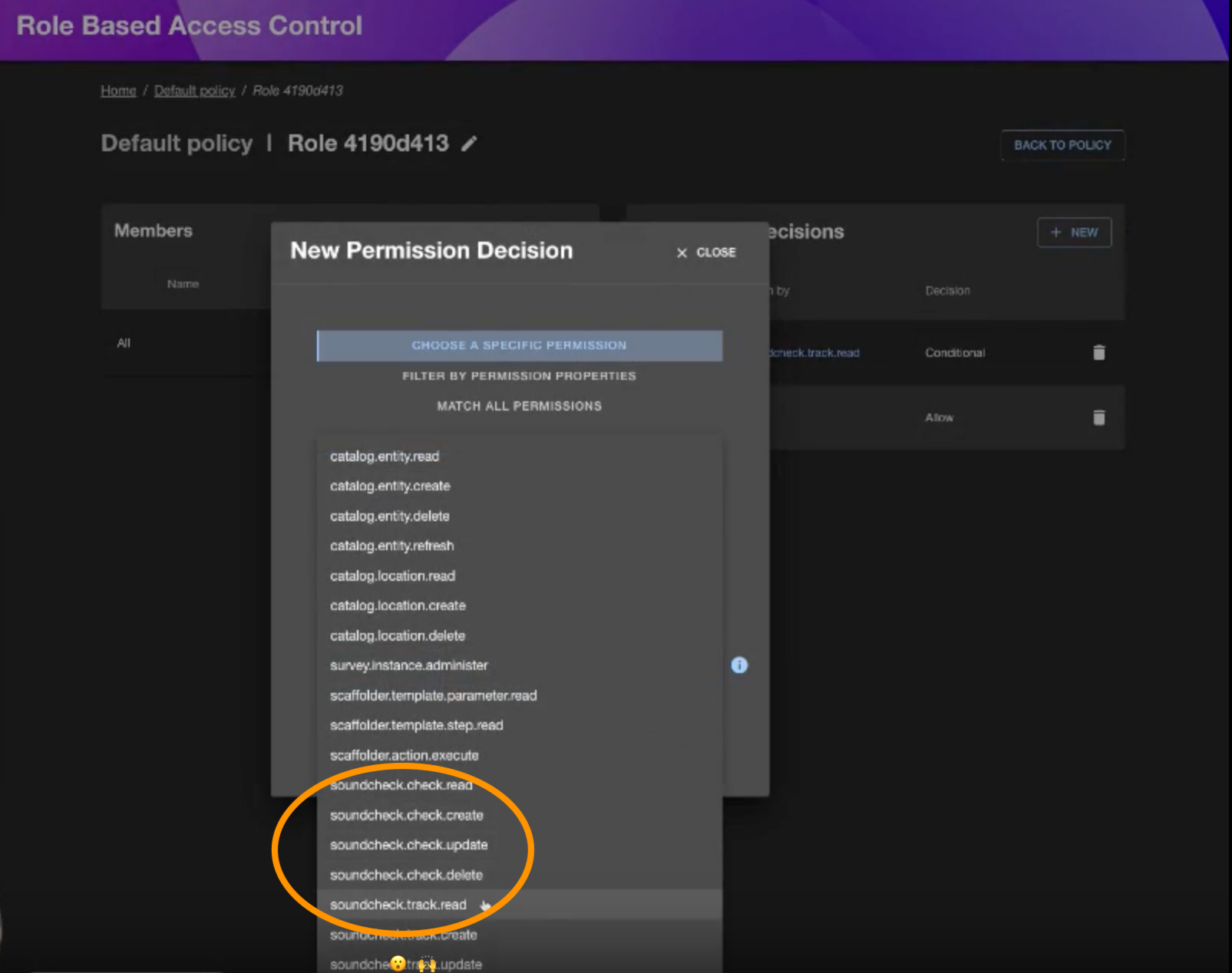
|
-
- **Certification**: The outcome of passing all applicable checks within a level.
|
|
14
|
-
|
|
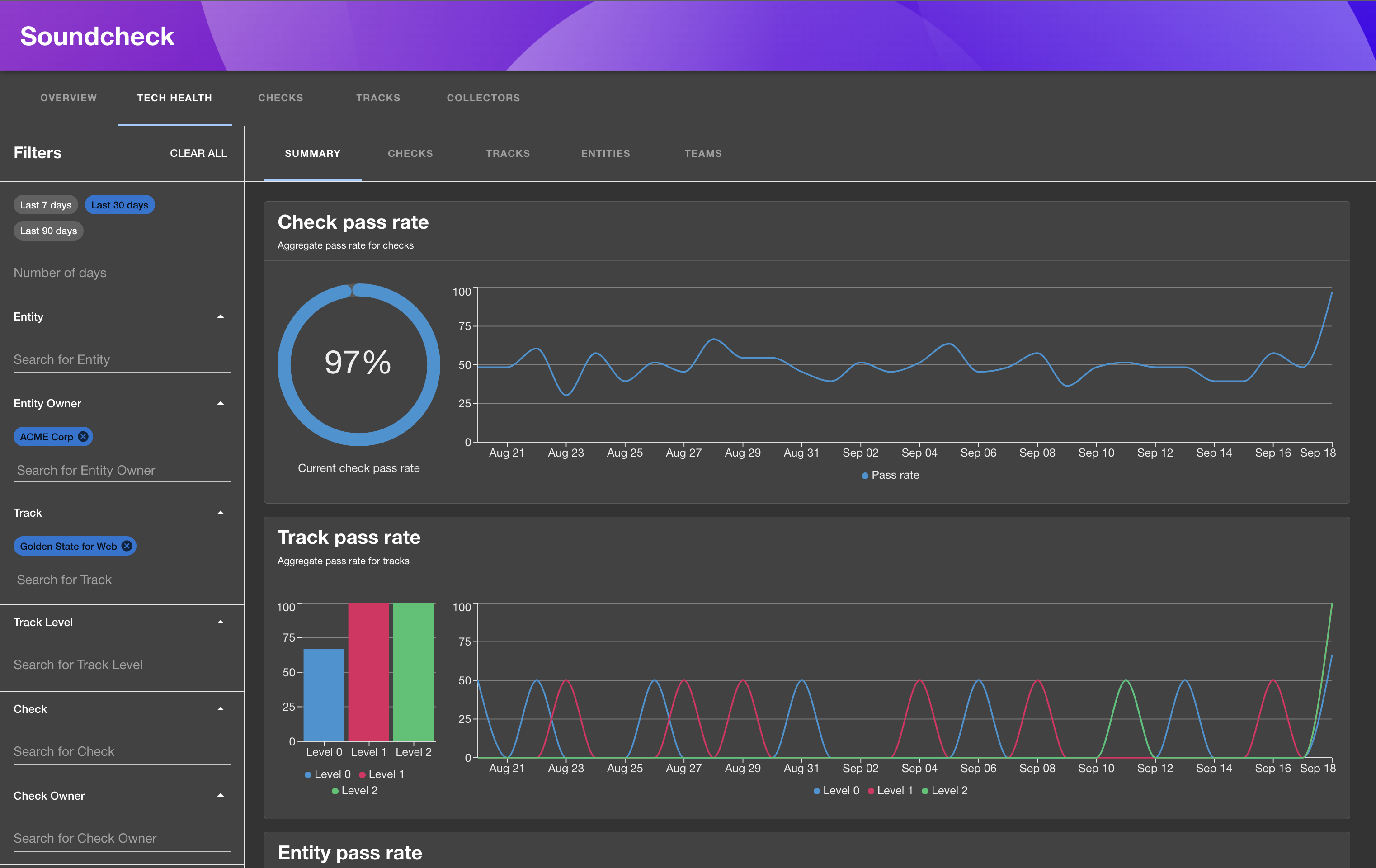
15
|
-
Together, they show you how any given software component is performing against your organization's long-term tech health initiatives.
|
|
16
|
-
|
|
17
|
-
<!-- TOC -->
|
|
18
|
-
|
|
19
|
-
- [Spotify Plugins for Backstage: Soundcheck](#spotify-plugins-for-backstage-soundcheck)
|
|
20
|
-
- [Prerequisites](#prerequisites)
|
|
21
|
-
- [1. Install the Soundcheck backend plugin](#1-install-the-soundcheck-backend-plugin)
|
|
22
|
-
- [Installation](#installation)
|
|
23
|
-
- [1. Install the plugin](#1-install-the-plugin)
|
|
24
|
-
- [2. Install Soundcheck Entity Content Page & Card](#2-install-soundcheck-entity-content-page--card)
|
|
25
|
-
- [3. Install Soundcheck Routing Page](#3-install-soundcheck-routing-page)
|
|
26
|
-
- [4. Setup sidebar item](#4-setup-sidebar-item)
|
|
27
|
-
- [5. Install Soundcheck Group Content Page](#5-install-soundcheck-group-content-page)
|
|
28
|
-
- [6. Check everything is working](#6-check-everything-is-working)
|
|
29
|
-
- [Product Documentation](#product-documentation)
|
|
30
|
-
- [No-Code UI for checks, tracks and facts management](#no-code-ui-for-checks-tracks-and-facts-management)
|
|
31
|
-
- [Using the No-Code UI](#using-the-no-code-ui)
|
|
32
|
-
- [Checks](#checks)
|
|
33
|
-
- [Creating a new check](#creating-a-new-check)
|
|
34
|
-
- [Editing a check](#editing-a-check)
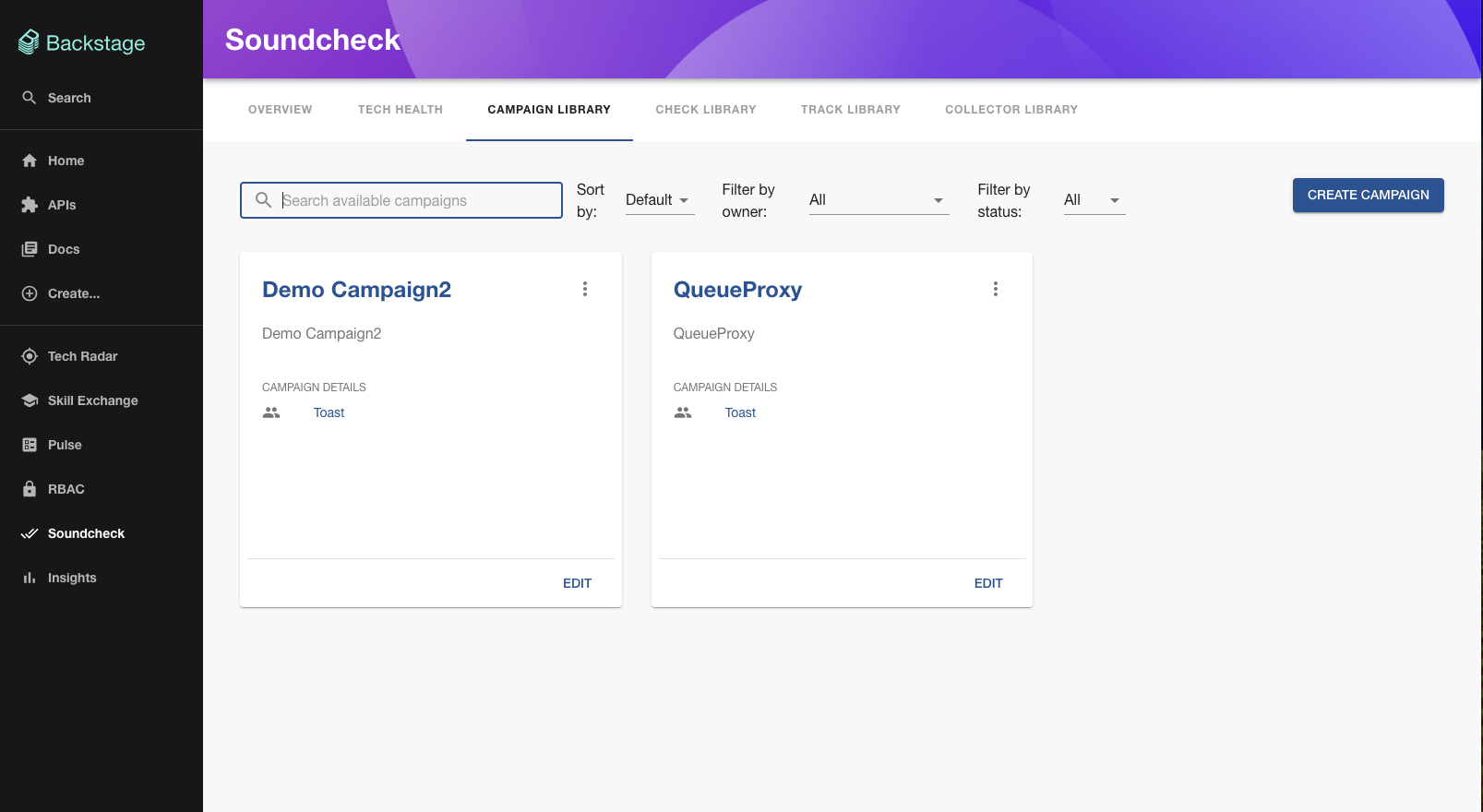
|
|
35
|
-
- [Tracks](#tracks)
|
|
36
|
-
- [Creating a new track](#creating-a-new-track)
|
|
37
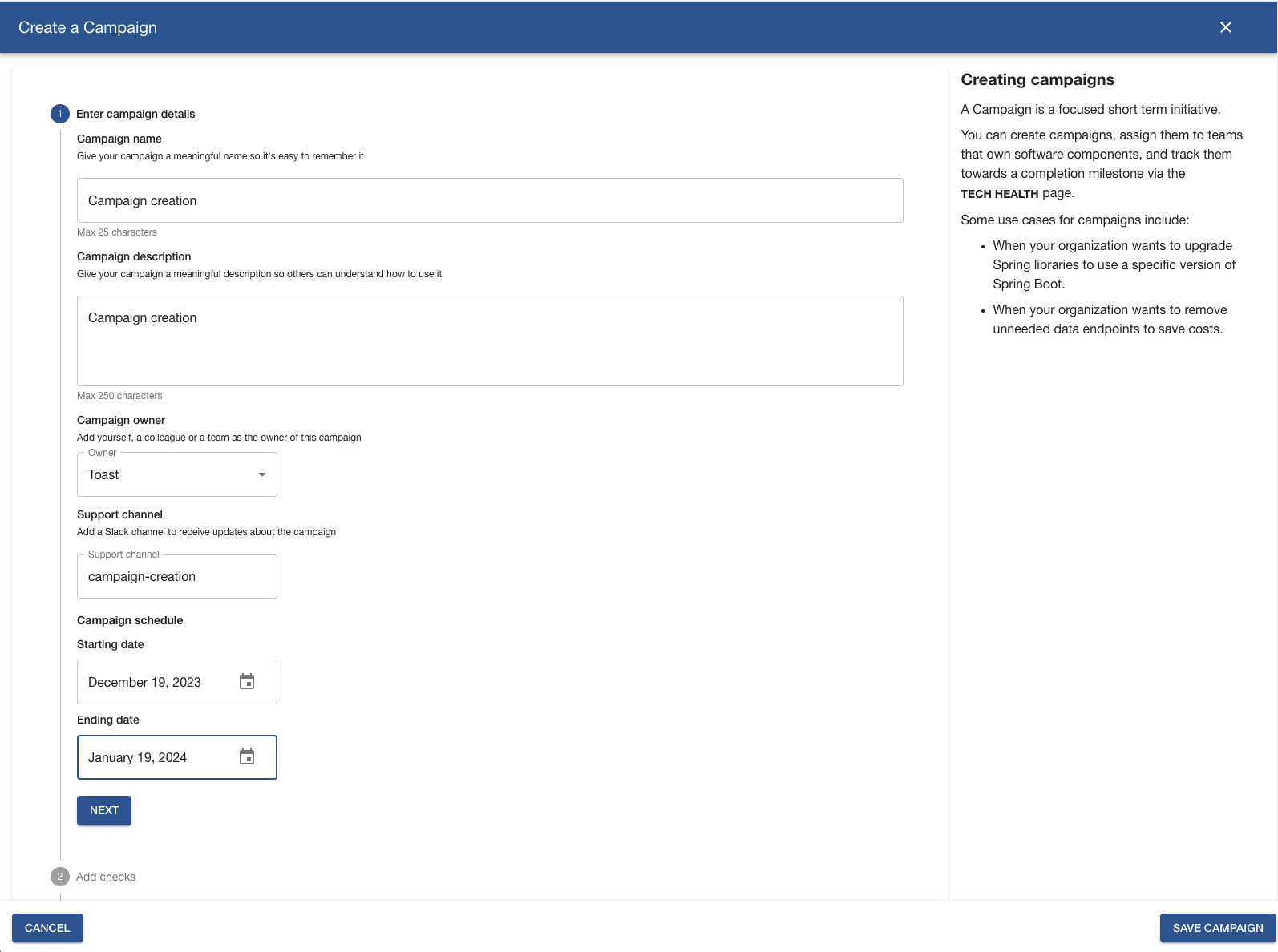
|
-
- [Editing a track](#editing-a-track)
|
|
38
|
-
- [Fact Collectors](#fact-collectors)
|
|
39
|
-
- [Configuring a fact collector](#configuring-a-fact-collector)
|
|
40
|
-
- [Frequency](#frequency)
|
|
41
|
-
- [Filters](#filters)
|
|
42
|
-
- [Caching](#caching)
|
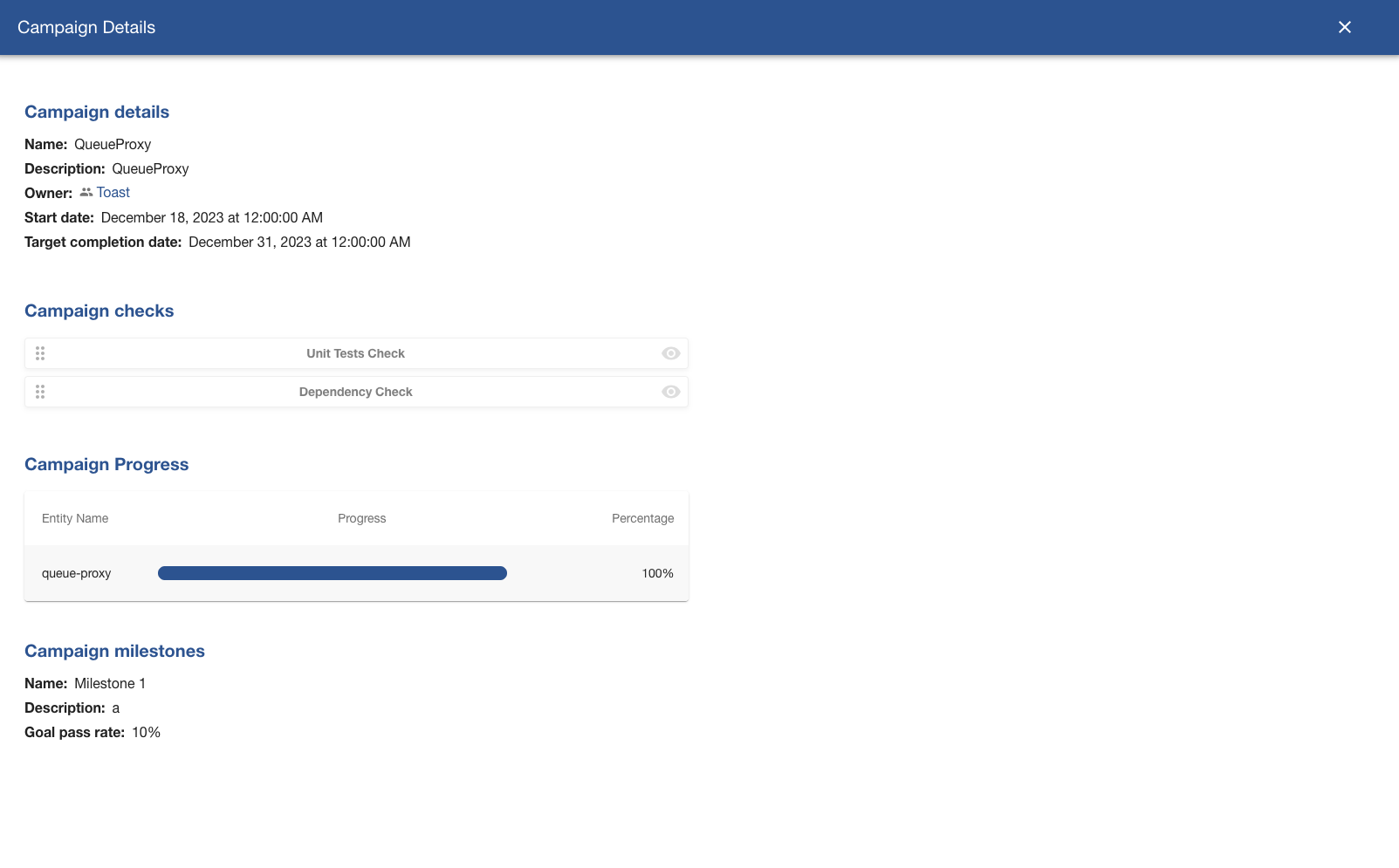
|
43
|
-
- [RBAC Integration](#rbac-integration)
|
|
44
|
-
- [Soundcheck Tech Health Page](#soundcheck-tech-health-page)
|
|
45
|
-
- [Aggregations](#aggregations)
|
|
46
|
-
- [Filters](#filters-1)
|
|
47
|
-
- [Trends](#trends)
|
|
48
|
-
- [Data Export](#data-export)
|
|
49
|
-
- [Data Caching](#data-caching)
|
|
50
|
-
- [Campaigns in Soundcheck](#campaigns-in-soundcheck)
|
|
51
|
-
- [Key features include:](#key-features-include)
|
|
52
|
-
- [Campaigns Library](#campaigns-library)
|
|
53
|
-
- [Campaign Creation](#campaign-creation)
|
|
54
|
-
- [Step 1: Campaign Details](#step-1-campaign-details)
|
|
55
|
-
- [Step 2: Selecting Checks](#step-2-selecting-checks)
|
|
56
|
-
- [Step 3: Applying Filters](#step-3-applying-filters)
|
|
57
|
-
- [Step 4: Defining Milestones](#step-4-defining-milestones)
|
|
58
|
-
- [Campaign Archival](#campaign-archival)
|
|
59
|
-
- [Campaign Progress and Milestones](#campaign-progress-and-milestones)
|
|
60
|
-
- [Campaign Notifications](#campaign-notifications)
|
|
61
|
-
- [Scenarios for Receiving Notifications](#scenarios-for-receiving-notifications)
|
|
62
|
-
<!-- TOC -->
|
|
63
|
-
|
|
64
|
-
## Prerequisites
|
|
65
|
-
|
|
66
|
-
### 1. Install the Soundcheck backend plugin
|
|
67
|
-
|
|
68
|
-
You must install the [Soundcheck backend plugin](https://npmjs.com/package/@spotify/backstage-plugin-soundcheck-backend) and all of its prerequisites before installing the Soundcheck frontend plugin.
|
|
69
|
-
|
|
70
|
-
## Installation
|
|
71
|
-
|
|
72
|
-
The next steps describe how to install the Soundcheck frontend plugin.
|
|
73
|
-
|
|
74
|
-
### 1. Install the plugin
|
|
75
|
-
|
|
76
|
-
1. Add the Soundcheck packages as dependencies to your Backstage instance
|
|
77
|
-
|
|
78
|
-
```sh
|
|
79
|
-
yarn workspace app add @spotify/backstage-plugin-soundcheck
|
|
80
|
-
```
|
|
81
|
-
|
|
82
|
-
### 2. Install Soundcheck Entity Content Page & Card
|
|
83
|
-
|
|
84
|
-
The Soundcheck Entity Page consists of a view on the [Catalog Entity page](https://github.com/backstage/backstage/blob/master/packages/app/src/components/catalog/EntityPage.tsx), and lists
|
|
85
|
-
all the related certifications, levels, checks and check results for a
|
|
86
|
-
particular entity.
|
|
87
|
-
|
|
88
|
-
The code below adds the Soundcheck card to the overview tab for all component types.
|
|
89
|
-
The Soundcheck entity content component needs to be added to each relevant
|
|
90
|
-
page type within your Backstage `EntityPage`. The snippets below insert the
|
|
91
|
-
card/tabs at the end of their respective containers, but it's fine to reorder
|
|
92
|
-
them as you wish. When reordering the card in particular, consider whether the
|
|
93
|
-
[fluid layout](https://v4.mui.com/components/grid/#fluid-grids) of the grid
|
|
94
|
-
should be adjusted to ensure the cards fill each row.
|
|
95
|
-
|
|
96
|
-
```tsx
|
|
97
|
-
// packages/app/src/components/catalog/EntityPage.tsx
|
|
98
|
-
|
|
99
|
-
import {
|
|
100
|
-
EntitySoundcheckContent,
|
|
101
|
-
EntitySoundcheckCard,
|
|
102
|
-
} from '@spotify/backstage-plugin-soundcheck';
|
|
103
|
-
|
|
104
|
-
// ...
|
|
105
|
-
|
|
106
|
-
const overviewContent = (
|
|
107
|
-
<Grid container spacing={3} alignItems="stretch">
|
|
108
|
-
{/* existing cards... */}
|
|
109
|
-
|
|
110
|
-
<Grid item md={6} xs={12}>
|
|
111
|
-
<EntitySoundcheckCard />
|
|
112
|
-
</Grid>
|
|
113
|
-
</Grid>
|
|
114
|
-
);
|
|
115
|
-
|
|
116
|
-
// ...
|
|
117
|
-
|
|
118
|
-
// Repeat this for all component entity pages which use the `overviewContent`
|
|
119
|
-
const serviceEntityPage = (
|
|
120
|
-
<EntityLayout>
|
|
121
|
-
{/* existing tabs... */}
|
|
122
|
-
|
|
123
|
-
<EntityLayout.Route path="/soundcheck" title="Soundcheck">
|
|
124
|
-
<EntitySoundcheckContent />
|
|
125
|
-
</EntityLayout.Route>
|
|
126
|
-
</EntityLayout>
|
|
127
|
-
);
|
|
128
|
-
```
|
|
129
|
-
|
|
130
|
-
### 3. Install Soundcheck Routing Page
|
|
131
|
-
|
|
132
|
-
Add a new Route element with the path `/soundcheck` and element of `<SoundcheckRoutingPage />`.
|
|
133
|
-
|
|
134
|
-
`<SoundcheckRoutingPage />` supports the following props:
|
|
135
|
-
|
|
136
|
-
```tsx
|
|
137
|
-
{
|
|
138
|
-
title: string; // OPTIONAL - Defaults to 'Soundcheck' when excluded
|
|
139
|
-
}
|
|
140
|
-
```
|
|
141
|
-
|
|
142
|
-
The route should look something like this:
|
|
143
|
-
|
|
144
|
-
```tsx
|
|
145
|
-
// packages/app/src/App.tsx
|
|
146
|
-
import { SoundcheckRoutingPage } from '@spotify/backstage-plugin-soundcheck';
|
|
147
|
-
|
|
148
|
-
const routes = (
|
|
149
|
-
<FlatRoutes>
|
|
150
|
-
{/* existing routes... */}
|
|
151
|
-
|
|
152
|
-
<Route
|
|
153
|
-
path="/soundcheck"
|
|
154
|
-
element={<SoundcheckRoutingPage title="My Optional Title" />}
|
|
155
|
-
/>
|
|
156
|
-
</FlatRoutes>
|
|
157
|
-
);
|
|
158
|
-
```
|
|
159
|
-
|
|
160
|
-
### 4. Setup sidebar item
|
|
161
|
-
|
|
162
|
-
Add a sidebar menu item that routes to the path setup in the previous step
|
|
163
|
-
|
|
164
|
-
```tsx
|
|
165
|
-
// packages/app/src/components/Root.tsx
|
|
166
|
-
import DoneAllIcon from '@material-ui/icons/DoneAll';
|
|
167
|
-
|
|
168
|
-
export const Root = ({ children }: PropsWithChildren<{}>) => (
|
|
169
|
-
<SidebarPage>
|
|
170
|
-
<Sidebar>
|
|
171
|
-
<SidebarLogo />
|
|
172
|
-
{/* existing sidebar items... */}
|
|
173
|
-
|
|
174
|
-
<SidebarScrollWrapper>
|
|
175
|
-
{/* existing sidebar items... */}
|
|
176
|
-
|
|
177
|
-
<SidebarItem icon={DoneAllIcon} to="soundcheck" text="Soundcheck" />
|
|
178
|
-
</SidebarScrollWrapper>
|
|
179
|
-
</Sidebar>
|
|
180
|
-
</SidebarPage>
|
|
181
|
-
);
|
|
182
|
-
```
|
|
183
|
-
|
|
184
|
-
### 5. Install Soundcheck Group Content Page
|
|
185
|
-
|
|
186
|
-
The Soundcheck Group Content Page is a Soundcheck Overview Page that can be pinned to a selected group entity.
|
|
187
|
-
It can only be added to a group page type within your Backstage `EntityPage`.
|
|
188
|
-
|
|
189
|
-
```tsx
|
|
190
|
-
// packages/app/src/components/catalog/EntityPage.tsx
|
|
191
|
-
import { GroupSoundcheckContent } from '@spotify/backstage-plugin-soundcheck';
|
|
192
|
-
|
|
193
|
-
const groupPage = (
|
|
194
|
-
<EntityLayout>
|
|
195
|
-
{/* existing tabs... */}
|
|
196
|
-
|
|
197
|
-
<EntityLayout.Route path="/soundcheck" title="Soundcheck">
|
|
198
|
-
<GroupSoundcheckContent />
|
|
199
|
-
</EntityLayout.Route>
|
|
200
|
-
</EntityLayout>
|
|
201
|
-
);
|
|
202
|
-
```
|
|
203
|
-
|
|
204
|
-
### 6. Check everything is working
|
|
205
|
-
|
|
206
|
-
If you have followed all steps up to this point, Soundcheck is set up and
|
|
207
|
-
running. The backend successfully starts up if the track config is valid, and
|
|
208
|
-
when you navigate to a catalog page for one of the entity types you configured
|
|
209
|
-
above, you'll see the Soundcheck tab containing the applicable tracks for the
|
|
210
|
-
current entity. If you visit `/soundcheck` or click the "Soundcheck" entry on the sidebar, you should see the overview page.
|
|
211
|
-
|
|
212
|
-
# Product Documentation
|
|
213
|
-
|
|
214
|
-
## No-Code UI for checks, tracks and facts management
|
|
215
|
-
|
|
216
|
-
No-Code UI is a powerful user interface built into the Soundcheck plugin that allows users to manage checks, tracks and facts without writing YAML code. Prior to No-Code UI, users had to write YAML code to configure a new check, track or fact. Now, non-programmers can add checks, tracks and facts too – thereby making it easier for everyone to work within Soundcheck.
|
|
217
|
-
|
|
218
|
-
No-Code UI has the same capabilities as its YAML configuration analog, however this capability simplifies and visualizes the process of managing checks, tracks and facts. Checks, tracks and facts created via No-Code UI are stored in the central Backstage database, or a [plugin-specific database](https://backstage.io/docs/tutorials/configuring-plugin-databases?__hstc=71158991.ce8f00825b31a2e008e99e7bf8c61d36.1687962480385.1687962480385.1687962480385.1&__hssc=71158991.1.1687962480385&__hsfp=2924083047#connection-configuration-per-plugin) if configured.
|
|
219
|
-
|
|
220
|
-
The No-Code UI will allow non-programmers to easily manage checks, tracks and facts via the Soundcheck UI without needing to write code. However, if a user wishes to, they can still continue to create checks, tracks and facts through Soundcheck’s YAML configuration.
|
|
221
|
-
|
|
222
|
-
## Using the No-Code UI
|
|
223
|
-
|
|
224
|
-
### Checks
|
|
225
|
-
|
|
226
|
-
A check is a comparison between a defined acceptable outcome and the actual outcome of a given process. Checks indicate where the software aligns to or deviates from organizational standards and best practices.
|
|
227
|
-
|
|
228
|
-
|
|
229
|
-
|
|
230
|
-
Checks consist of four components: facts, paths, operators, and values. These components are then organized via a Boolean calculator in the UI. You can see an example of the rule layout a user will see when creating a check in the image below.
|
|
231
|
-
|
|
232
|
-

|
|
233
|
-
|
|
234
|
-
#### Creating a new check
|
|
235
|
-
|
|
236
|
-
To create a check, select the facts that you want to use, organize them into rules and give your check a meaningful name and a description. The rules are what defines a check and what a track will use in determining if an entity passes or fails. Simple expressions can be combined using Any Of / All Of to create more complex rules. You also have the option of adding Pass/Fail messages for additional details of why something passed/failed.
|
|
237
|
-
|
|
238
|
-
|
|
239
|
-
|
|
240
|
-
#### Editing a check
|
|
241
|
-
|
|
242
|
-
Once a check is created, you will be able to manage and edit your check on its detail page. You’ll find no differences in how the pages look when creating/editing a check. From the checks listing page, you will see an option to edit you check, which will bring you to the details page shown below.
|
|
243
|
-
|
|
244
|
-
|
|
245
|
-
|
|
246
|
-
You can make as many changes as desired, but just keep in mind that changes are reflected in tracks that may already have said check assigned. Checks can also be a part of multiple tracks, which could have the unintentional effect of causing some tracks to start failing. While the track you want the check updated in may pass, a track setup somewhere else may fail.
|
|
247
|
-
|
|
248
|
-
### Tracks
|
|
249
|
-
|
|
250
|
-
Tracks are composed of levels and checks. Tracks encourage alignment to architectural best practices and standards and are analogous to an organization’s long-term tech health initiatives. Tracks are composed of one or more levels, and each level is composed of one or more checks. Each level of checks sets the standard for an organization and how they want to determine what passes and what fails in the individual track.
|
|
251
|
-
|
|
252
|
-
|
|
253
|
-
|
|
254
|
-
#### Creating a new track
|
|
255
|
-
|
|
256
|
-
To create a track, give your track a meaningful name and a description, and select the filters and checks that you want to use.
|
|
257
|
-
|
|
258
|
-
|
|
259
|
-
|
|
260
|
-
Filters allow a user further customization for their tracks to only be applicable to specific entities in the Software Catalog. This allows users to tie their tracks to specific tags such as “Java”, “service” or “production” to name a few. You can have as many or as few selections per type as you want to include in each track. Each type of filter will display a dropdown menu with your choice for selection. You can select any number of filters per section as desired.
|
|
261
|
-
|
|
262
|
-
Checks are searchable, and can be dragged-and-dropped from the list of checks into the level(s) of the track. Levels can be added to a track with the “+ Add Level” button shown above. Organizing checks into levels allows for a more nuanced read of what checks cleared and which ones didn’t. Most use levels by order of difficulty to clear, where level one means hardest to pass, level two is medium hard to pass, and level three is relatively easy to pass.
|
|
263
|
-
|
|
264
|
-
#### Editing a track
|
|
265
|
-
|
|
266
|
-
Once a track is created, you will be able to manage and edit your track on its detail page. From the tracks listing page, you will see an option to edit your track, which will bring you to the details page shown below.
|
|
267
|
-
|
|
268
|
-
|
|
269
|
-
|
|
270
|
-
As with checks, you can make as many changes as desired when editing tracks. Just make sure to save your track in order for changes to take effect. Also, similar to checks,, editing a track and saving will immediately reflect onto anything that has been assigned to said track.
|
|
271
|
-
|
|
272
|
-
### Fact Collectors
|
|
273
|
-
|
|
274
|
-
While Soundcheck comes with two built-in fact collectors: catalog and soundcheck, soundcheck can be extended with additional fact collectors. A fact collector can collect one or more facts on a given entity. At the moment, only Github fact collectors are supported for No Code UI, with support for others coming in future releases.
|
|
275
|
-
|
|
276
|
-
|
|
277
|
-
|
|
278
|
-
#### Configuring a fact collector
|
|
279
|
-
|
|
280
|
-
To configure a fact collector, make sure you are on the Collectors tab. Click on a Fact's “Configure” link to open a modal that displays the Fact Collector's configuration form.
|
|
281
|
-
|
|
282
|
-
- WARNING: If you already have a config YAML file setup, you will be unable to use No-Code UI to configure your collector. In order to use the No-Code UI, simply remove the YAML file/reference and you will have access to configure from No-Code UI.
|
|
283
|
-
|
|
284
|
-
|
|
285
|
-
|
|
286
|
-
Once you choose to configure a collector, you will see the following page with 3 configuration options. You can see what each configuration collects in its description. All 3 configs have the following options:
|
|
287
|
-
|
|
288
|
-
#### Frequency
|
|
289
|
-
|
|
290
|
-
|
|
291
|
-
|
|
292
|
-
You can set the frequency of how often to collect details from each collector option. The frequency of runs can be set using regular intervals or defined as custom cron expressions.
|
|
293
|
-
|
|
294
|
-
#### Filters
|
|
295
|
-
|
|
296
|
-
|
|
297
|
-
|
|
298
|
-
You can set filters for each option as well. These filters contain the same options as Tracks. You can learn by going to the [Creating a new track](#creating-a-new-track) section.
|
|
299
|
-
|
|
300
|
-
#### Caching
|
|
301
|
-
|
|
302
|
-
|
|
303
|
-
|
|
304
|
-
Lastly, you can enable Caching and set up an optional duration for said cache.
|
|
305
|
-
|
|
306
|
-
Once you have finished making your desired changes, make sure to click on the save button in order to properly save you configuration. Optionally, you can click on the cancel button at anytime to discard your changes..
|
|
307
|
-
|
|
308
|
-
## RBAC Integration
|
|
309
|
-
|
|
310
|
-
Along with the No Code UI release, we have recently integrated Soundcheck with the [RBAC plugin](https://backstage.spotify.com/plugins/rbac/). Admins can now use the RBAC plugin to manage (allow and restrict) what individual users or groups can do within Soundcheck.
|
|
311
|
-
|
|
312
|
-
Soundcheck’s No-Code UI integrates with Backstage’s permission framework on the RBAC plugin. This integration enables restricting which users/groups can Create, Read, Update, or Delete (CRUD) Soundcheck checks and tracks.
|
|
313
|
-
|
|
314
|
-
|
|
315
|
-
|
|
316
|
-
> Note: For the Soundcheck permissions to display as you see above sure you have added `soundcheck` to the list of `permissionedPlugins` in your `app-config.yaml`. For more details, [click here](https://www.npmjs.com/package/@spotify/backstage-plugin-rbac-backend#3-configure-permissioned-plugins).
|
|
317
|
-
|
|
318
|
-
Take a look at the [RBAC Integration](https://backstage.spotify.com/plugins/rbac/) for details and [RBAC Readme](https://www.npmjs.com/package/@spotify/backstage-plugin-rbac) for steps.
|
|
319
|
-
|
|
320
|
-
## Soundcheck Tech Health Page
|
|
321
|
-
|
|
322
|
-
Soundcheck has the capability to aggregate, filter, and display check result and certification data.
|
|
323
|
-
The `pass rate` is the aggregation metric representing the percentage of check results or
|
|
324
|
-
certifications marked as 'passed' within a filterable group of current check results or certifications
|
|
325
|
-
for the date the metric is calculated.
|
|
326
|
-
|
|
327
|
-
The tech health page is available at the following link:
|
|
328
|
-
http://[hostname]:[port]/soundcheck/tech-health
|
|
329
|
-
|
|
330
|
-
|
|
331
|
-
|
|
332
|
-
### Aggregations
|
|
333
|
-
|
|
334
|
-
The check result and certification data can be aggregated by:
|
|
335
|
-
|
|
336
|
-
- `Checks`: Pass rates for checks, either organization-wide or filtered by specific checks,
|
|
337
|
-
tracks/levels, and entities based on the selections.
|
|
338
|
-
- `Tracks`: Pass rates for track levels, either organization-wide or filtered by specific checks,
|
|
339
|
-
tracks/levels, and entities based on the selections.
|
|
340
|
-
- `Entities`: Pass rates for entities, either organization-wide or filtered by specific checks,
|
|
341
|
-
tracks/levels, and entities based on the selections.
|
|
342
|
-
- `Teams`: Pass rates for teams, either organization-wide or filtered by specific checks,
|
|
343
|
-
tracks/levels, and entities based on the selections.
|
|
344
|
-
- `Campaigns`: Pass rates for campaigns, either organization-wide or filtered by specific checks,
|
|
345
|
-
tracks/levels, teams, and entities based on the selections.
|
|
346
|
-
|
|
347
|
-
### Filters
|
|
348
|
-
|
|
349
|
-
The data can be filtered by the following categories:
|
|
350
|
-
|
|
351
|
-
- `Entities`: check and certification pass rates will be calculated only for selected entities.
|
|
352
|
-
- `Entity Kind`: check and certification pass rates will be calculated only for the entities
|
|
353
|
-
with selected kinds.
|
|
354
|
-
- `Entity Type`: check and certification pass rates will be calculated only for the entities
|
|
355
|
-
with selected types.
|
|
356
|
-
- `Entity Owner`: check and certification pass rates will be calculated only for the entities
|
|
357
|
-
owned by selected teams and their child teams recursively.
|
|
358
|
-
- `Entity Lifecycle`: check and certification pass rates will be calculated only for the entities
|
|
359
|
-
with selected lifecycles.
|
|
360
|
-
- `Tracks`: check and certification pass rates will be calculated only for selected tracks and
|
|
361
|
-
checks included in these tracks.
|
|
362
|
-
- `Track Level`: check and certification pass rates will be calculated only for selected track
|
|
363
|
-
levels and checks included in these track levels.
|
|
364
|
-
- `Checks`: check pass rates will be calculated only for selected checks. Certification pass rates
|
|
365
|
-
will be calculated only for track levels that include these checks.
|
|
366
|
-
- `Check Owner`: check pass rates will be calculated only for the checks owned by selected teams.
|
|
367
|
-
Certification pass rates will be calculated only for track levels that include checks owned by
|
|
368
|
-
selected teams.
|
|
369
|
-
|
|
370
|
-
Filter rules:
|
|
371
|
-
|
|
372
|
-
- If no filter values are selected the pass rates will be calculated across the entire organization.
|
|
373
|
-
- Filter values within the same category are treated as ANY (OR).
|
|
374
|
-
- Filter values within different categories are treated as ALL (AND).
|
|
375
|
-
|
|
376
|
-
### Trends
|
|
377
|
-
|
|
378
|
-
The pass rate metric can be calculated for up to the last 90 days so that the pass rates can be monitored over time.
|
|
379
|
-
Check result history and certification history must be enabled in order to be able to see the trend data:
|
|
380
|
-
|
|
381
|
-
- [Enabling check result history](https://www.npmjs.com/package/@spotify/backstage-plugin-soundcheck-backend#enabling-check-result-history)
|
|
382
|
-
- [Enabling certification history](https://www.npmjs.com/package/@spotify/backstage-plugin-soundcheck-backend#enabling-certification-history)
|
|
383
|
-
|
|
384
|
-
### Data Export
|
|
385
|
-
|
|
386
|
-
The aggregated data from each Tech Health Page tab can be exported into a Comma-Separated Values (CSV)
|
|
387
|
-
file format. The CSV format is widely supported and can be easily imported into various data analysis
|
|
388
|
-
tools, spreadsheets, and databases.
|
|
389
|
-
|
|
390
|
-
### Data Caching
|
|
391
|
-
|
|
392
|
-
In order to improve Soundcheck Tech Health page performance you can enable data caching.
|
|
393
|
-
Caching can be specified for trends and snapshots separately.
|
|
394
|
-
Omitting a cache specification will disable caching for that data type.
|
|
395
|
-
|
|
396
|
-
The configuration should be added to the soundcheck portion of `app-config.yaml`:
|
|
397
|
-
|
|
398
|
-
```yaml
|
|
399
|
-
# app-config.yaml
|
|
400
|
-
soundcheck:
|
|
401
|
-
techHealth:
|
|
402
|
-
caching:
|
|
403
|
-
trends:
|
|
404
|
-
enabled: true
|
|
405
|
-
cacheTtl: 86400
|
|
406
|
-
snapshots:
|
|
407
|
-
enabled: true
|
|
408
|
-
cacheTtl: 600
|
|
409
|
-
```
|
|
410
|
-
|
|
411
|
-
- `caching`: A section in which caching per data type can be enabled/disabled. Default value is 'true' for both types.
|
|
412
|
-
- `trends`: A section in which trend data caching can be configured.
|
|
413
|
-
- `snapshots`: A section in which snapshot data caching can be configured.
|
|
414
|
-
- `enabled`: A boolean value indicating whether caching is enabled for the data type. Default value is 'true'.
|
|
415
|
-
- `cacheTtl`: The number of seconds for which the data will be cached, if enabled. Default value is 900 (15 minutes) for snapshots and 86400 (24 hours) for trends.
|
|
416
|
-
|
|
417
|
-
## Campaigns in Soundcheck
|
|
418
|
-
|
|
419
|
-
Soundcheck Campaigns provide a structured approach for organizations to drive focused initiatives, such as software updates or system transitions. They offer a way to create, manage, and monitor these initiatives within the Soundcheck framework.
|
|
420
|
-
|
|
421
|
-
### Key features include:
|
|
422
|
-
|
|
423
|
-
- **Initiation of Campaigns**: Users can create campaigns with specific goals, ownership, and timelines.
|
|
424
|
-
- **Focused Initiatives**: Campaigns enable targeting specific organizational objectives, like updating a software library.
|
|
425
|
-
- **Notification System**: Alerts are optionally sent out via Slack when there are changes in check statuses or certification levels, aiding prompt action.
|
|
426
|
-
- **Dashboard Tracking**: Progress of campaigns across different teams or the entire organization is visually trackable.
|
|
427
|
-
- **Archiving Feature**: Completed campaigns can be archived for historical reference.
|
|
428
|
-
|
|
429
|
-
Campaigns are designed to enhance awareness and actionability in focused initiatives, providing an additional capability within Soundcheck to manage initiatives that run for shorter periods. Some example use cases include:
|
|
430
|
-
|
|
431
|
-
**Examples include:**
|
|
432
|
-
|
|
433
|
-
- There is a need to Upgrade Spring Libraries to use a specific version of Spring Boot.
|
|
434
|
-
- When your organization wants to remove unneeded data endpoints to save cost.
|
|
435
|
-
|
|
436
|
-
### Campaigns Library
|
|
437
|
-
|
|
438
|
-
The Campaigns Library in Soundcheck serves as the central dashboard for all campaign-related activities. It is designed to provide users with a comprehensive overview of campaigns as well as control over various campaigns within the organization. Here, users can engage in several key activities:
|
|
439
|
-
|
|
440
|
-
- **Navigate to Individual Campaign Details**: Users can view detailed information about each campaign, including its objectives, current status, assigned teams or individuals, and progress metrics. This detailed view helps in monitoring and managing specific campaigns more effectively.
|
|
441
|
-
- **Create New Campaigns**: This function allows users to initiate new campaigns. Users can define the campaign's objectives, set timelines, assign owners, and specify other relevant parameters. The creation process is designed to be intuitive, guiding users through each step to ensure all necessary information is captured.
|
|
442
|
-
- **Edit Campaigns**: Campaign creators have the flexibility to modify the details of existing campaigns. This includes changing objectives, timelines, ownership, and other critical campaign parameters. This feature is crucial for adapting to changing conditions or requirements within a project or organization.
|
|
443
|
-
- **Delete Campaigns**: In cases where a campaign is no longer relevant or has been created by mistake, users can remove it from the system. This helps in maintaining a clean and up-to-date campaign dashboard.
|
|
444
|
-
- **Archive Completed Campaigns**: Once a campaign has reached its conclusion or its goals have been met, users can archive the campaign. This feature keeps the main dashboard focused on active campaigns, while still preserving the data of completed initiatives for future reference or analysis.
|
|
445
|
-
|
|
446
|
-
|
|
447
|
-
|
|
448
|
-
### Campaign Creation
|
|
449
|
-
|
|
450
|
-
Creating campaigns in Soundcheck is a feature accessible to all users,
|
|
451
|
-
allowing them to initiate new campaigns. This process is divided into four structured steps.
|
|
452
|
-
|
|
453
|
-
#### Step 1: Campaign Details
|
|
454
|
-
|
|
455
|
-
In this initial step, users establish the foundational elements of the campaign:
|
|
456
|
-
|
|
457
|
-
- **Campaign Name**: Assign a unique and descriptive name for easy identification.
|
|
458
|
-
- **Campaign Description**: Provide a detailed description of the campaign’s objectives and scope.
|
|
459
|
-
- **Campaign Owner**: Designate the individual or team responsible for overseeing the campaign.
|
|
460
|
-
- **Support Channel**: Optionally specify the Slack channel for campaign-related notifications.
|
|
461
|
-
- **Start and End Dates**: Set definitive start and end dates to establish a clear timeline for the campaign.
|
|
462
|
-
|
|
463
|
-
#### Step 2: Selecting Checks
|
|
464
|
-
|
|
465
|
-
This step involves choosing specific checks that the campaign will use to track progress against.
|
|
466
|
-
|
|
467
|
-
#### Step 3: Applying Filters
|
|
468
|
-
|
|
469
|
-
Filters are used to determine which entities the campaign targets.
|
|
470
|
-
|
|
471
|
-
#### Step 4: Defining Milestones
|
|
472
|
-
|
|
473
|
-
Milestones are set to track progress and achieve specific targets within the campaign.
|
|
474
|
-
Each milestone includes a name, description, and a defined pass rate, providing clear targets for
|
|
475
|
-
campaign progression.
|
|
476
|
-
|
|
477
|
-
|
|
478
|
-
|
|
479
|
-
### Campaign Archival
|
|
480
|
-
|
|
481
|
-
The Soundcheck Campaigns page lists all active campaigns offers users tools for finalizing and
|
|
482
|
-
archiving campaigns, ensuring the completion of objectives is clearly documented.
|
|
483
|
-
Admins and authorized users can view archived campaigns, providing a historical perspective on past initiatives.
|
|
484
|
-
|
|
485
|
-
### Campaign Progress and Milestones
|
|
486
|
-
|
|
487
|
-
Milestones are an important part of campaigns, serving as tangible markers of progress and success.
|
|
488
|
-
Each milestone’s progress is monitored, with updates provided on completion rates and remaining tasks.
|
|
489
|
-
|
|
490
|
-
Campaign progress is monitored and displayed in various sections within Soundcheck:
|
|
491
|
-
|
|
492
|
-
- **Overview Tab**: A dedicated section in the Overview tab provides a snapshot of all ongoing campaigns.
|
|
493
|
-
- **Tech Health Page**: The Tech Health Page includes a tab for campaigns, showcasing detailed analytics and progress for each campaign. This helps in understanding the broader impact of campaigns on organizational tech health.
|
|
494
|
-
- **Entity-Specific Progress**: For each entity page in Soundcheck, there's a section that displays the campaign progress related to that particular entity.
|
|
495
|
-
- **Group-Specific Progress**: Similar to entity pages, each group page in Soundcheck includes a section that shows the campaign progress for the group.
|
|
496
|
-
|
|
497
|
-

|
|
498
|
-
|
|
499
|
-
|
|
500
|
-
### Campaign Notifications
|
|
501
|
-
|
|
502
|
-
The optional notification feature for campaigns is designed to keep users informed and responsive to changes and developments within their software environment. They act as a proactive communication tool, enhancing awareness and efficiency in managing software health and compliance.
|
|
503
|
-
|
|
504
|
-
For detailed documentation on getting notifications set up, refer to the [Slack Notifications section](../../plugins/soundcheck-backend/README.md#5-slack-notifications) of the Soundcheck Backend README.
|
|
505
|
-
|
|
506
|
-
#### Scenarios for Receiving Notifications
|
|
507
|
-
|
|
508
|
-
During campaign creation, the creator has the option to set up a Slack channel to be used for campaign notifications. If specified, campaign notifications will be sent to the provided channel.
|
|
509
|
-
|
|
510
|
-
- **Assigned Campaigns**: When a new campaign is created, the campaign specific channel will receive a notification to acknowledge and start addressing the goals of the campaign.
|
|
511
|
-
- **Campaign Updates**: Alerts are issued for any changes to a campaigns, including the checks associated with the campaign, the milestones of the campaign, or any related metadata.
|
|
512
|
-
|
|
513
|
-

|
|
5
|
+
If you are already a customer, you can find detailed documentation about the Soundcheck Plugins [here](https://backstage.spotify.com/docs/soundcheck).
|
package/alpha/package.json
CHANGED
package/dist/alpha.esm.js
CHANGED
|
@@ -1,2 +1,2 @@
|
|
|
1
|
-
import{createApiExtension as
|
|
1
|
+
import{createApiExtension as i,createApiFactory as u,discoveryApiRef as d,fetchApiRef as p,createPageExtension as c,createNavItemExtension as s,createPlugin as m}from"@backstage/frontend-plugin-api";import{s as h,S as l,e as f,g as R,r as a,o as k}from"./esm/routes-06f9616b.esm.js";import{convertLegacyRouteRef as t,compatWrapper as o}from"@backstage/core-compat-api";import{createEntityContentExtension as r,createEntityCardExtension as g}from"@backstage/plugin-catalog-react/alpha";import n from"react";import v from"@material-ui/icons/DoneAll";import"@backstage/core-plugin-api";import"graphql-request";import"graphql-tag";const y=i({factory:u({api:h,deps:{discoveryApi:d,fetchApi:p},factory:e=>new l(e)})}),E=r({defaultPath:"soundcheck",defaultTitle:"Soundcheck",name:"entity",routeRef:t(f),loader:()=>import("./esm/EntitySoundcheckContent-fae7d534.esm.js").then(e=>o(n.createElement(e.EntitySoundcheckContent,null)))}),P=g({name:"card",loader:()=>import("./esm/index-e2ac1874.esm.js").then(e=>o(n.createElement(e.EntitySoundcheckCard,null)))}),S=r({defaultPath:"soundcheck",defaultTitle:"Soundcheck",name:"group",routeRef:t(R),attachTo:{id:"page:catalog/group-details",input:"contents"},loader:()=>import("./esm/index-8da96e46.esm.js").then(e=>o(n.createElement(e.FixedGroupOverviewPage,null)))}),A=c({name:"SoundcheckRoutingPage",namespace:"soundcheck",routeRef:t(a),defaultPath:"/soundcheck",loader:()=>import("./esm/index-a862b329.esm.js").then(e=>o(n.createElement(e.RoutingPage,null)))}),x=c({name:"overview",namespace:"soundcheck",routeRef:t(k),defaultPath:"/soundcheck",loader:()=>import("./esm/index-8da96e46.esm.js").then(e=>o(n.createElement(e.OverviewPage,null)))}),C=s({title:"Soundcheck",icon:v,routeRef:t(a)});var w=m({id:"soundcheck",extensions:[A,x,y,E,P,S,C]});export{w as default};
|
|
2
2
|
//# sourceMappingURL=alpha.esm.js.map
|
|
@@ -0,0 +1,2 @@
|
|
|
1
|
+
import{Link as C,InfoCard as h}from"@backstage/core-components";import{useRouteRef as p}from"@backstage/core-plugin-api";import{useEntity as S}from"@backstage/plugin-catalog-react";import{Divider as I}from"@material-ui/core";import L from"@material-ui/core/styles/makeStyles";import{SpotifyLicenseBanner as R}from"@spotify/backstage-plugin-core";import e,{Fragment as b}from"react";import{C as f,u as w,a as D,b as N}from"./CertificationSidebar-bfe066d3.esm.js";import"@tanstack/react-query";import{a as A,b as P}from"./routes-06f9616b.esm.js";import{A as x,N as B}from"./EmptyState-a3a6154f.esm.js";import"@backstage/catalog-model";import"react-router-dom";import{s as F,i as M}from"./license-e9e73904.esm.js";import"@material-ui/lab";const T=()=>e.createElement(e.Fragment,null,e.createElement(f,{hideDescription:!0}),e.createElement(f,{hideDescription:!0})),u=L(t=>({certificationWrapper:{display:"flex",justifyContent:"space-between",alignItems:"center"},infoCard:{display:"grid",gridRowGap:t.spacing(2)},emptyState:{overflow:"hidden"}})),o=({children:t,title:n})=>{const a=u();return e.createElement(h,{title:n},e.createElement("div",{className:a.infoCard},e.createElement(R,{inline:!0,backend:F,invalidLicenseMessage:M}),t))},W=(t,n)=>{var a,i;return(i=(a=t.find(l=>l.trackIds.some(m=>m===n)))==null?void 0:a.id)!=null?i:""},$=({title:t="Soundcheck"})=>{const{entity:n}=S(),a=u(),{data:i,isError:l,isLoading:m}=w(n),{data:c,isError:g,isLoading:E}=D(n),y=p(A),k=p(P);return l||g?e.createElement(o,{title:t},e.createElement(x,{severity:"error",title:"Error loading certifications"})):m||E||!i||!c?e.createElement(o,{title:t},e.createElement(T,null)):i.length?e.createElement(o,{title:t},i.map((r,v)=>{var s,d;return e.createElement(b,{key:r.program.name},e.createElement("div",{className:a.certificationWrapper,"data-testid":"soundcheck-track-row"},e.createElement(N,{key:r.program.id,name:r.program.name,badge:(s=r.highestLevel)==null?void 0:s.badge,trackType:(d=r.program)==null?void 0:d.type}),e.createElement(C,{to:r.program.type==="playlist"?k({playlistId:W(c,r.program.id),trackId:r.program.id}):y({trackId:r.program.id})},"View Details")),v<i.length-1?e.createElement(I,null):null)})):e.createElement(o,{title:t},e.createElement("div",{className:a.emptyState},e.createElement(B,null)))};export{$ as C};
|
|
2
|
+
//# sourceMappingURL=Card-e2275abd.esm.js.map
|
|
@@ -0,0 +1,2 @@
|
|
|
1
|
+
import{stringifyEntityRef as g}from"@backstage/catalog-model";import{useApi as u,useRouteRef as C}from"@backstage/core-plugin-api";import{useQuery as E}from"@tanstack/react-query";import{s as y,c as D,d as $}from"./routes-06f9616b.esm.js";import{Q as S,C as P,L as N,a as H,b as Q,F as f,A as W}from"./EmptyState-a3a6154f.esm.js";import{useEntity as G}from"@backstage/plugin-catalog-react";import{makeStyles as m,Tooltip as M,Typography as c,alpha as p,Box as j}from"@material-ui/core";import t from"react";import{Link as K}from"react-router-dom";import O from"classnames";import _ from"@material-ui/icons/Schedule";import{useAutoUpdatingRelativeTime as q}from"@spotify/backstage-plugin-core";import{DateTime as I}from"luxon";import{MarkdownContent as h,Link as J}from"@backstage/core-components";import{Skeleton as o}from"@material-ui/lab";function V(e){const a=u(y),n=g(e);return E([S.Certifications,n],async()=>a.getAllCertifications(n))}function T(e,a){const n=u(y),i=g(e);return E([S.CertificationDetails,i,a],async()=>n.getCertificationDetailsForTrack(i,a),{enabled:!!a})}function X(e){const a=u(y),n=g(e);return E(["soundcheck/playlists",n],async()=>a.getPlaylists(n))}const Y=m(e=>({root:{display:"inline-flex",alignItems:"center",gap:e.spacing(1)}})),x=({timestamp:e,description:a})=>{const n=Y(),i=I.fromISO(e).toLocaleString(I.DATETIME_FULL),l=q(e),r=a?`${a}: ${l}`:void 0;return t.createElement("div",{className:n.root},t.createElement(M,{title:i},t.createElement(c,{variant:"caption","aria-label":r},l)),t.createElement(_,null))},L=m(e=>({root:{display:"grid",width:"100%",gridTemplateColumns:"auto 1fr auto",gridColumnGap:e.spacing(1),padding:e.spacing(1),alignItems:"center","&.selected":{backgroundColor:p(e.palette.primary[e.palette.type],.2)},"&:hover, &:active, &:focus":{backgroundColor:p(e.palette.primary[e.palette.type],.3)}}})),Z=({className:e,href:a,children:n})=>a?t.createElement(K,{to:a,className:e},n):t.createElement("div",{className:e},n),ee=({result:e,name:a,timestamp:n,selected:i=!1,href:l})=>{const r=L(),d=O(r.root,{selected:i});return t.createElement(Z,{href:l,className:d},t.createElement(P,{result:e}),t.createElement(c,{variant:"body2"},a),n?t.createElement(x,{timestamp:n}):null)},te=m(e=>({noChecks:{padding:e.spacing(1)},checks:{padding:0,margin:0,flex:1,listStyle:"none"},checkItem:{borderBottom:`1px solid ${e.palette.divider}`,"&:last-of-type":{borderBottom:"0"}}})),ae=({checks:e,playlistId:a,trackId:n,checkId:i})=>{const l=te(),r=C(D),d=C($);return e.length?t.createElement("ul",{className:l.checks},e.map(s=>t.createElement("li",{key:s.id,className:l.checkItem},t.createElement(ee,{...s,selected:s.id===i,href:a?d({playlistId:a,trackId:n,checkId:s.id}):r({trackId:n,checkId:s.id})})))):t.createElement(c,{variant:"body2",className:l.noChecks},"No applicable checks at this level.")},R=m(e=>{const a=e.palette.type==="dark"?e.palette.grey[700]:e.palette.grey[100];return{wrapper:{backgroundColor:a,color:p(e.palette.getContrastText(a),.8),fontSize:e.typography.caption.fontSize,minHeight:"auto",borderTop:`1px solid ${e.palette.divider}`,borderBottom:`1px solid ${e.palette.divider}`,padding:e.spacing(1),display:"grid",gridTemplateAreas:({badge:n})=>[`"${n?"badge":"title"} title"`,`"${n?".":"description"} description"`].join(" "),gridTemplateColumns:"auto 1fr"},title:{gridArea:"title",textTransform:"uppercase",fontWeight:"bold",color:p(e.palette.getContrastText(a),.8),fontSize:e.typography.body2.fontSize,paddingTop:e.spacing(.5),paddingBottom:e.spacing(.5),lineHeight:1},badge:{gridArea:"badge",marginRight:e.spacing(1)},description:{gridArea:"description",color:p(e.palette.getContrastText(a),.8),fontSize:e.typography.subtitle2.fontSize,"& p":{marginBlockStart:0,marginBlockEnd:0}}}}),ne=e=>{const a=R({badge:e.badge});return t.createElement("div",{className:a.wrapper},e.badge?t.createElement(N,{className:a.badge,badge:e.badge}):null,t.createElement(c,{className:a.title},e.title),e.description?t.createElement(h,{className:a.description,content:e.description}):null)},A=({level:e,checkId:a,trackId:n,playlistId:i,isCampaign:l})=>{var r;return t.createElement(t.Fragment,null,!l&&t.createElement(ne,{badge:e.badge,title:e.name,description:e.description}),t.createElement(ae,{checks:(r=e.checks)!=null?r:[],playlistId:i,trackId:n,checkId:a}))},z=({badge:e,className:a,size:n="small",trackType:i})=>{const l=a||"";let r=t.createElement(H,{className:l,size:n});return i==="campaign"?r=t.createElement(Q,{className:l,size:n}):e&&(r=t.createElement(N,{className:l,size:n,badge:e})),r},k=m(e=>({description:{padding:0,margin:0,display:"block","& p":{margin:0}},root:{padding:e.spacing(2),margin:0,display:"grid",gridTemplateColumns:"min-content auto",gridGap:e.spacing(2)},title:{fontSize:e.typography.pxToRem(18),fontWeight:700,lineHeight:1.235,marginBottom:"6px"},level:{textTransform:"uppercase",color:e.palette.text.secondary,fontWeight:700,letterSpacing:"1px"}}));function re({description:e,documentationUrl:a}){const n=k();return a?t.createElement("div",{className:n.description},t.createElement(h,{content:e}),t.createElement(J,{to:a},"Learn more")):t.createElement("div",{className:n.description},t.createElement(h,{content:e}))}const B=({name:e,badge:a,description:n,documentationUrl:i,trackType:l="standard"})=>{const r=k();return t.createElement("div",{className:r.root},t.createElement(z,{badge:a,trackType:l,size:"large"}),t.createElement("div",null,t.createElement(c,{className:r.title},e),n&&t.createElement(re,{description:n,documentationUrl:i})))},w=({hideDescription:e=!1})=>{const a=k();return t.createElement(f,null,t.createElement("div",{className:a.root},t.createElement(o,{width:44,height:44}),t.createElement("div",null,t.createElement(c,{variant:"caption",className:a.level},t.createElement(o,{width:100})),t.createElement(c,{variant:"h4",className:a.title},t.createElement(o,{width:300})),!e&&t.createElement(c,{variant:"body2"},t.createElement(o,null)))))},v=()=>{const e=L();return t.createElement(f,null,t.createElement("div",{className:e.root},t.createElement(o,{width:24,height:24}),t.createElement(c,{variant:"body2"},t.createElement(o,null)),t.createElement(o,{width:100,height:24})))},le=()=>{const e=R({});return t.createElement(f,null,t.createElement("div",{className:e.wrapper},t.createElement(o,{className:e.title}),t.createElement(c,{className:e.description},t.createElement(o,null))))},F=()=>{const e=ie();return t.createElement("div",null,t.createElement(w,null),new Array(3).fill(null).map((a,n)=>t.createElement(t.Fragment,{key:`skeleton-level-${n}`},t.createElement(le,null),t.createElement("ul",{className:e.checks},t.createElement(v,null),t.createElement(v,null),t.createElement(v,null)))))},ie=m(()=>({checks:{padding:0,margin:0,flex:1,listStyle:"none"}})),ce=({playlistId:e,trackId:a,checkId:n})=>{var i;const{entity:l}=G(),{data:r,isLoading:d,isError:s}=T(l,a);if(s)return t.createElement("div",null,t.createElement(j,{padding:2},t.createElement(W,{severity:"error",title:"Error loading certification"})));if(d||!a)return t.createElement(F,null);if(!r)return null;const U=r.program.type==="campaign";return t.createElement("div",null,t.createElement(B,{name:r.program.name,badge:(i=r.highestLevel)==null?void 0:i.badge,description:r.program.description,documentationUrl:r.program.documentationURL,trackType:r.program.type}),r==null?void 0:r.levels.map(b=>t.createElement(A,{key:b.ordinal,level:b,checkId:n,trackId:a,playlistId:e,isCampaign:U})))};export{w as C,x as R,X as a,B as b,T as c,z as d,F as e,A as f,ce as g,V as u};
|
|
2
|
+
//# sourceMappingURL=CertificationSidebar-bfe066d3.esm.js.map
|
|
@@ -0,0 +1,2 @@
|
|
|
1
|
+
import{useApi as A,errorApiRef as F}from"@backstage/core-plugin-api";import{QueryClient as M,QueryClientProvider as D}from"@tanstack/react-query";import{memoize as W}from"lodash";import r,{createContext as y,useState as p,useCallback as l,useContext as v,useRef as L,useEffect as U}from"react";import{makeStyles as c,Typography as d,Modal as Q,Box as H,Button as E,withStyles as m,Fade as K}from"@material-ui/core";import{Alert as j}from"@material-ui/lab";import q from"@material-ui/icons/Check";import J from"@material-ui/icons/Close";import V from"@material-ui/icons/HelpOutline";import X from"@material-ui/icons/RemoveCircleOutline";import Y from"@material-ui/icons/ReportProblemOutlined";import{R as n}from"./routes-06f9616b.esm.js";import u from"classnames";import{parseEntityRef as b}from"@backstage/catalog-model";import{humanizeEntityRef as R}from"@backstage/plugin-catalog-react";import Z from"../images/empty-state.svg";const _=W(e=>new M({defaultOptions:{queries:{refetchInterval:6e4,refetchIntervalInBackground:!1,refetchOnWindowFocus:"always",retry:2,retryDelay:t=>{const a=450+Math.ceil(Math.random()*100);return Math.min(a*2**t,3e4)},onError:t=>e.post(t)}}})),ee=e=>{const t=A(F),a=_(t);return r.createElement(D,{client:a},e.children)};var P=(e=>(e.GetAllPrograms="soundcheck/programs",e.GetChecks="soundcheck/checks",e.GetCollectors="soundcheck/collectors",e.GetFactSchema="soundcheck/collectors/schema",e.GetEntityFacets="soundcheck/catalog/facets",e.GetSoftwareEntityRefsForUser="soundcheck/entities/softwareEntityRefsForUser",e.GetCampaigns="soundcheck/campaigns",e.GetCampaignProgress="soundcheck/campaigns/getCampaignProgress",e.GetOverallCheckPassRateSnapshots="soundcheck/charts/overallCheckPassRateSnapshots",e.GetOverallCheckPassRateTrends="soundcheck/charts/overallCheckPassRateTrends",e.GetIndividualCheckPassRateSnapshots="soundcheck/charts/getIndividualCheckPassRateSnapshots",e.GetIndividualCheckPassRateTrends="soundcheck/charts/getIndividualCheckPassRateTrends",e.GetOverallTrackPassRateSnapshots="soundcheck/charts/overallTrackPassRateSnapshots",e.GetOverallTrackPassRateTrends="soundcheck/charts/overallTrackPassRateTrends",e.GetIndividualTrackPassRateSnapshots="soundcheck/charts/individualTrackPassRateSnapshots",e.GetIndividualTrackPassRateTrends="soundcheck/charts/individualTrackPassRateTrends",e.GetOverallEntityPassRateTrends="soundcheck/charts/overallEntityPassRateTrends",e.GetIndividualEntityPassRateSnapshots="soundcheck/charts/individualEntityPassRateSnapshots",e.GetIndividualEntityPassRateTrends="soundcheck/charts/individualEntityPassRateTrends",e.GetOverallGroupPassRateTrends="soundcheck/charts/overallGroupPassRateTrends",e.GetIndividualGroupPassRateSnapshots="soundcheck/charts/individualGroupPassRateSnapshots",e.GetIndividualGroupPassRateTrends="soundcheck/charts/individualGroupPassRateTrends",e.EntityByRef="soundcheck/catalog/entityByRef",e.EntitiesByRefs="soundcheck/catalog/entitiesByRef",e.TrackEntities="soundcheck/tracks/entities",e.Certifications="soundcheck/certifications",e.CertificationDetails="soundcheck/certificationDetails",e.GetCheckOwners="soundcheck/checks/getOwners",e.GetTrackOwners="soundcheck/tracks/getOwners",e.GetCampaignOwners="soundcheck/campaigns/getOwners",e))(P||{}),G=(e=>(e.DeleteCheck="soundcheck/deleteCheck",e.CreateCheck="soundcheck/createCheck",e.UpdateCheck="soundcheck/updateCheck",e.DeleteProgram="soundcheck/deleteProgram",e.CreateProgram="soundcheck/createProgram",e.UpdateProgram="soundcheck/updateProgram",e.UpdateCollectorConfig="soundcheck/updateCollectorConfig",e.CreateCampaign="soundcheck/createCampaign",e.UpdateCampaign="soundcheck/updateCampaign",e.DeleteCampaign="soundcheck/deleteCampaign",e.ArchiveCampaign="soundcheck/archiveCampaign",e))(G||{});const te=c(e=>({root:{padding:e.spacing(3)},icon:{display:"none"},message:{padding:0},type:{fontWeight:700,lineHeight:1.75}})),T=e=>{const{type:t,...a}=te();return r.createElement(j,{severity:e.severity,elevation:1,classes:a,onClose:e.onClose},r.createElement(d,{classes:{root:t}},e.title),e.children)},x=y({}),ae=e=>{const[t,a]=p(),o=l(g=>{a(g)},[]),s=l(()=>{a(null)},[]);return r.createElement(x.Provider,{value:{showAlert:o,clearAlert:s}},t&&r.createElement(T,{severity:t.severity,title:t.title,onClose:s},t.message),e.children)},re=()=>v(x),se=c(e=>({modalContent:{position:"absolute",top:"50%",left:"50%",transform:"translate(-50%, -50%)",padding:"25px",backgroundColor:e.palette.type==="dark"?e.palette.grey[800]:e.palette.grey[200]},modalButtons:{display:"flex",justifyContent:"space-evenly","& button":{width:"40%",maxWidth:"185px"}},modalMessage:{margin:"15px 0 35px"}})),N=y({}),oe=e=>{const t=se(),[a,o]=p(!1),[s,g]=p(),i=L(),w=l(({title:$,message:B,error:z})=>(g({title:$,message:B,error:z}),o(!0),new Promise(O=>{i.current=O})),[]),I=l(()=>{i.current&&i.current(!0),o(!1)},[]),C=l(()=>{i.current&&i.current(!1),o(!1)},[]);return r.createElement(N.Provider,{value:{showModal:w}},e.children,s&&r.createElement(Q,{open:a,onClose:C,"aria-labelledby":"confirmation-modal-title","aria-describedby":"confirmation-modal-description"},r.createElement(H,{className:t.modalContent},r.createElement(d,{id:"confirmation-modal-title",variant:"h6"},s.title),r.createElement(d,{className:t.modalMessage,id:"confirmation-modal-description",variant:"body1"},s.message),r.createElement("div",{className:t.modalButtons},!s.error&&r.createElement(E,{onClick:C,variant:"contained","aria-label":"cancel"},"Cancel"),r.createElement(E,{color:"primary",onClick:I,variant:"contained","aria-label":"confirm"},s.error?"Ok":"Confirm")))))},ne=()=>v(N),ce=e=>({[n.Passed]:"Check passed",[n.NotReported]:"Check not reported",[n.Failed]:"Check failed",[n.Warning]:"Check produced warning(s)",[n.NotApplicable]:"Check not applicable"})[e],ie=m(e=>({root:{color:e.palette.success.main}}))(q),le=m(e=>({root:{color:e.palette.error.main}}))(J),de=m(e=>({root:{color:e.palette.warning.main}}))(Y),me=m(e=>({root:{color:e.palette.info.main}}))(V),pe=m(e=>({root:{color:e.palette.text.disabled}}))(X),ue=({result:e,className:t})=>{const a={className:t,"aria-label":ce(e),"aria-hidden":!1};return e===n.Passed?r.createElement(ie,{...a}):e===n.NotReported?r.createElement(me,{...a}):e===n.Failed?r.createElement(le,{...a}):e===n.Warning?r.createElement(de,{...a}):e===n.NotApplicable?r.createElement(pe,{...a}):null},S=24,he=11,k=e=>e==="small"?1:2,ge=c({root:{position:"relative",display:"inline-flex",alignItems:"center",justifyContent:"center",borderRadius:"50%",borderWidth:"2px",fontWeight:700,width:({size:e})=>`${S*k(e)}px`,height:({size:e})=>`${S*k(e)}px`,fontSize:({size:e})=>`${he*k(e)}px`}}),h=({className:e,label:t,size:a="small"})=>{const o=ge({size:a});return r.createElement("span",{className:u(e,o.root),role:"img","aria-label":`${t} badge`},t)},ke=c(e=>({root:{background:({color:t})=>t,color:e.palette.common.black,borderColor:e.palette.common.black,borderStyle:"solid","&::after":{position:"absolute",display:"block",content:'""',top:0,left:0,width:"100%",height:"100%",borderRadius:"50%",boxShadow:["inset 0 -0.18em 0 0 rgba(0, 0, 0, 0.25)","inset 0px 0.18em 0px 0px rgba(255, 255, 255, 0.5)","inset 0px 1.3em 0px -0.5em rgba(255, 255, 255, 0.2)"].join(",")}}})),fe=({className:e,badge:t,size:a="small"})=>{const o=ke({color:t.options.color,size:a});return r.createElement(h,{className:u(e,o.root),size:a,label:`L${t.options.level}`})},Ce=c({root:{borderColor:"currentColor",borderStyle:"dashed"}}),ye=({className:e,size:t="small"})=>{const a=Ce();return r.createElement(h,{className:u(e,a.root),size:t,label:"NL"})},ve=c({root:{borderColor:"currentColor",borderStyle:"solid"}}),Ee=({className:e,size:t="small"})=>{const a=ve();return r.createElement(h,{className:u(e,a.root),size:t,label:"C"})},be=({children:e})=>{const[t,a]=p(!1);return U(()=>{const o=setTimeout(()=>{a(!0)},250);return()=>clearTimeout(o)},[]),r.createElement(K,{in:t,timeout:250},e)},Re=c(e=>({card:{backgroundColor:e.palette.background.paper,border:`1px solid ${e.palette.border}`,borderRadius:e.shape.borderRadius,display:"flex",padding:e.spacing(5)},container:{margin:"0 auto",display:"flex",flexDirection:"row",alignItems:"center",gap:e.spacing(5)},content:{width:"20rem",display:"flex",flexDirection:"column",gap:e.spacing(2)},header:{display:"flex",flexDirection:"column",gap:e.spacing(2)},description:{color:e.palette.grey[600],fontWeight:500},action:{display:"inline-block"},img:{maxHeight:400}})),f=({title:e,description:t,imgSrc:a,action:o})=>{const s=Re();return r.createElement("div",{className:s.card},r.createElement("div",{className:s.container},r.createElement("div",{className:s.content},r.createElement("header",{className:s.header},r.createElement(d,{variant:"h5"},e),r.createElement(d,{variant:"body1",className:s.description},t)),o&&r.createElement("div",{className:s.action},o)),r.createElement("div",null,r.createElement("img",{src:a!=null?a:Z,className:s.img,alt:e}))))},Pe="No certifications available",Ge=({ownerEntityRef:e,selectGroupHint:t})=>{let a="There are no tracks configured that apply to this entity.";return e&&(a=`Looks like the group '${R(b(e),{defaultKind:"Group"})}' doesn't own any entities that have any applicable tracks configured. ${t}`),r.createElement(f,{title:Pe,description:a})},Te="Missing entities",xe=({ownerEntityRef:e,selectGroupHint:t})=>{if(!e)return null;const a=R(b(e),{defaultKind:"Group"});return r.createElement(f,{title:Te,description:`The group '${a}' doesn't own any entities. ${t!=null?t:""}`})};export{T as A,h as B,ue as C,f as E,be as F,fe as L,G as M,Ge as N,P as Q,ee as S,ye as a,Ee as b,oe as c,xe as d,ne as e,ae as f,re as u};
|
|
2
|
+
//# sourceMappingURL=EmptyState-a3a6154f.esm.js.map
|