@spaxe-dev/zen-mcp 0.3.2 → 0.3.3
This diff represents the content of publicly available package versions that have been released to one of the supported registries. The information contained in this diff is provided for informational purposes only and reflects changes between package versions as they appear in their respective public registries.
- package/README.md +192 -838
- package/dist/bridge.js +1374 -350
- package/dist/cli.js +1281 -79
- package/dist/cli.js.map +4 -4
- package/package.json +1 -1
package/README.md
CHANGED
|
@@ -1,126 +1,106 @@
|
|
|
1
|
-
|
|
2
|
-
|
|
3
|
-
|
|
4
|
-
|
|
5
|
-
|
|
6
|
-
|
|
7
|
-
|
|
8
|
-
|
|
9
|
-
|
|
10
|
-
|
|
11
|
-
|
|
12
|
-
|
|
13
|
-
|
|
14
|
-
|
|
15
|
-
|
|
16
|
-
|
|
17
|
-
|
|
18
|
-
|
|
19
|
-
|
|
20
|
-
|
|
21
|
-
|
|
22
|
-
|
|
23
|
-
|
|
24
|
-
|
|
25
|
-
|
|
26
|
-
|
|
27
|
-
|
|
28
|
-
|
|
29
|
-
|
|
30
|
-
|
|
31
|
-
|
|
32
|
-
- **
|
|
33
|
-
|
|
34
|
-
|
|
35
|
-
|
|
36
|
-
|
|
37
|
-
|
|
38
|
-
|
|
39
|
-
|
|
40
|
-
|
|
41
|
-
|
|
42
|
-
|
|
43
|
-
|
|
44
|
-
|
|
45
|
-
|
|
46
|
-
|
|
47
|
-
|
|
48
|
-
|
|
49
|
-
|
|
50
|
-
|
|
51
|
-
|
|
52
|
-
|
|
53
|
-
|
|
54
|
-
|
|
55
|
-
|
|
56
|
-
|
|
57
|
-
|
|
58
|
-
|
|
59
|
-
|
|
60
|
-
|
|
61
|
-
|
|
62
|
-
|
|
63
|
-
|
|
64
|
-
|
|
65
|
-
|
|
66
|
-
|
|
67
|
-
|
|
68
|
-
|
|
69
|
-
|
|
70
|
-
|
|
71
|
-
|
|
72
|
-
|
|
73
|
-
|
|
74
|
-
|
|
75
|
-
|
|
76
|
-
|
|
77
|
-
|
|
78
|
-
|
|
79
|
-
|
|
80
|
-
|
|
81
|
-
|
|
82
|
-
|
|
83
|
-
|
|
84
|
-
|
|
85
|
-
The Firefox mechanisms (Marionette, profile locking, and remote chrome
|
|
86
|
-
access) are shared across platforms, but "not yet verified" means nobody has
|
|
87
|
-
run a real Zen launch there. Treat those platforms as untested until a live
|
|
88
|
-
launch, the consent card, and a clean shutdown have passed.
|
|
89
|
-
- Zen MCP must start Zen itself. Firefox only exposes chrome-level remote
|
|
90
|
-
control when the browser process is launched with `MOZ_REMOTE_ALLOW_SYSTEM_ACCESS=1`,
|
|
91
|
-
and the harness sets that only in the child process it spawns. A Zen that was
|
|
92
|
-
already open cannot be adopted, and a normal Zen launch never opens a debug
|
|
93
|
-
port.
|
|
94
|
-
- The default agent profile is separate from your normal browsing profile.
|
|
95
|
-
`zen-mcp setup --use-default-profile` opts into your normal profile, which
|
|
96
|
-
lets the agent see pages where you are signed in.
|
|
97
|
-
|
|
98
|
-
## Install
|
|
99
|
-
|
|
100
|
-
With Node.js 22 or newer:
|
|
1
|
+
<div align="center">
|
|
2
|
+
<img src="docs/zen-mcp-icon.png" alt="Zen MCP icon: a browser window with a bridge between two panes" width="132" />
|
|
3
|
+
<h1>Zen MCP</h1>
|
|
4
|
+
<p>Let your AI agent work in Zen Browser, with you in control.</p>
|
|
5
|
+
<p>
|
|
6
|
+
<a href="https://www.npmjs.com/package/@spaxe-dev/zen-mcp"><img src="https://img.shields.io/npm/v/%40spaxe-dev%2Fzen-mcp?label=npm" alt="npm version" /></a>
|
|
7
|
+
<a href="https://www.npmjs.com/package/@spaxe-dev/zen-mcp"><img src="https://img.shields.io/npm/dm/%40spaxe-dev%2Fzen-mcp?label=downloads" alt="monthly npm downloads" /></a>
|
|
8
|
+
<a href="LICENSE"><img src="https://img.shields.io/github/license/spaxe-dev/zen-mcp" alt="MIT license" /></a>
|
|
9
|
+
<img src="https://img.shields.io/node/v/%40spaxe-dev%2Fzen-mcp?label=node" alt="Node.js requirement" />
|
|
10
|
+
<a href="https://github.com/spaxe-dev/zen-mcp/actions/workflows/ci.yml"><img src="https://github.com/spaxe-dev/zen-mcp/actions/workflows/ci.yml/badge.svg" alt="CI status" /></a>
|
|
11
|
+
</p>
|
|
12
|
+
</div>
|
|
13
|
+
|
|
14
|
+
Zen MCP is an MCP server that lets an AI agent work inside [Zen Browser](https://zen-browser.app) using Zen's own spaces, folders, and tabs. The agent can research in background tabs, read and search pages without switching what you are looking at, ask you a question in a small in-browser card, and show the evidence behind an answer.
|
|
15
|
+
|
|
16
|
+
Status: **0.3.x, pre-1.0.** Windows is the only platform with a live-tested Zen launch. The public API, tools, and configuration keys can still change. See [Current maturity](#current-maturity-and-platform-support) and [Known limitations](https://github.com/spaxe-dev/zen-mcp/blob/main/docs/troubleshooting.md#known-limitations).
|
|
17
|
+
|
|
18
|
+
## What it does
|
|
19
|
+
|
|
20
|
+
- Opens tabs in the background, reads them, and searches them without changing the active tab or taking over your screen.
|
|
21
|
+
- Creates and organizes native Zen spaces, folders, pinned tabs, essentials, split views, and Glance previews.
|
|
22
|
+
- Shows progress cards with a real **Stop** button, asks questions in Zen chrome, and supports a global **Pause** switch.
|
|
23
|
+
- Verifies citations with Evidence Mode: it reuses or opens the source, finds the quoted passage, marks it with a temporary overlay, and records the match method and confidence.
|
|
24
|
+
- Saves window layouts as sessions and reusable space templates.
|
|
25
|
+
- Enforces policy outside the model with read-only mode, a domain allowlist, an audit log, one-time consent, and an owned-browser boundary.
|
|
26
|
+
|
|
27
|
+
There are 50 tools, 5 live resources, and 3 prompts. Tool arguments are structured, results are typed, and page content is treated as data, not instructions. The full surface is in [docs/tools.md](https://github.com/spaxe-dev/zen-mcp/blob/main/docs/tools.md).
|
|
28
|
+
|
|
29
|
+
## Who it is for
|
|
30
|
+
|
|
31
|
+
- **Zen users who want an agent in their actual browser** and not a separate headless copy.
|
|
32
|
+
- **Research and triage workflows** where opening twenty background tabs, reading them, and producing a source-backed summary is the job.
|
|
33
|
+
- **People using an MCP client** such as Claude Code, Cursor, or another client that can launch a stdio server.
|
|
34
|
+
- **Users who want browser automation with explicit boundaries**: the agent controls only a browser Zen MCP started, and you can pause it or make it read-only.
|
|
35
|
+
|
|
36
|
+
It is not a WebDriver replacement. It does not click inside pages, take page screenshots, fill forms, or drive unattended bots.
|
|
37
|
+
|
|
38
|
+
## What makes it different
|
|
39
|
+
|
|
40
|
+
**An owned browser, not an attached session.** Zen MCP launches its own Zen with agent access, proves through a per-launch nonce that the browser answering on Marionette is the one it started, then closes every other connection and the listening socket. It never adopts a Zen window you opened yourself. The owned browser is quit on a normal server shutdown; a crash or `SIGKILL` can leave it running.
|
|
41
|
+
|
|
42
|
+
**Native Zen constructs.** Spaces, folders, pins, essentials, split view, and Glance use Zen's internal APIs, so the result behaves like something you did in the UI instead of a separate extension's bookkeeping.
|
|
43
|
+
|
|
44
|
+
**Background first.** Reads and evidence checks work on loaded tabs in any space, including spaces that are not currently rendered. `zen_read_page`, `zen_read_pages`, `zen_find_text`, and `zen_search_tabs` do not select, scroll, or highlight anything unless you ask for it.
|
|
45
|
+
|
|
46
|
+
**You stay in control.** One approval covers the server session. The persistent banner has a Pause button that blocks subsequent browser work. Read-only mode, the domain allowlist, and the audit log add policy the model cannot talk its way around. There are no per-action approval cards.
|
|
47
|
+
|
|
48
|
+
**Evidence, not just prose.** A citation can be checked in the browser: the agent supplies the URL, quote, and optional context, and the server matches the passage in fixed code, scrolls to it, and paints an inert overlay. The model never supplies JavaScript.
|
|
49
|
+
|
|
50
|
+
## Feature overview
|
|
51
|
+
|
|
52
|
+
| Area | What you get |
|
|
53
|
+
| --- | --- |
|
|
54
|
+
| Research | Background page reads in text, Markdown, links, tables, metadata, outline, or a CSS-selected element; literal search across tabs; Evidence Mode for single or batched citations |
|
|
55
|
+
| Organization | Spaces, folders, tabs, pins, essentials, split view, Glance, Firefox containers |
|
|
56
|
+
| Awareness | History search, recently closed tabs, bookmarks, duplicate and stale tab audit, domain grouping |
|
|
57
|
+
| Coordination | Progress card with Stop, in-browser questions, notifications, tab watches, one event stream |
|
|
58
|
+
| Repeatability | Session snapshots and reusable space templates, including folders |
|
|
59
|
+
| Policy | Owned browser, one-time consent, global Pause, read-only mode, domain allowlist, JSONL audit log |
|
|
60
|
+
| Interface | 50 tools, 5 resources, 3 prompts, structured results, progress notifications, cancellation |
|
|
61
|
+
|
|
62
|
+
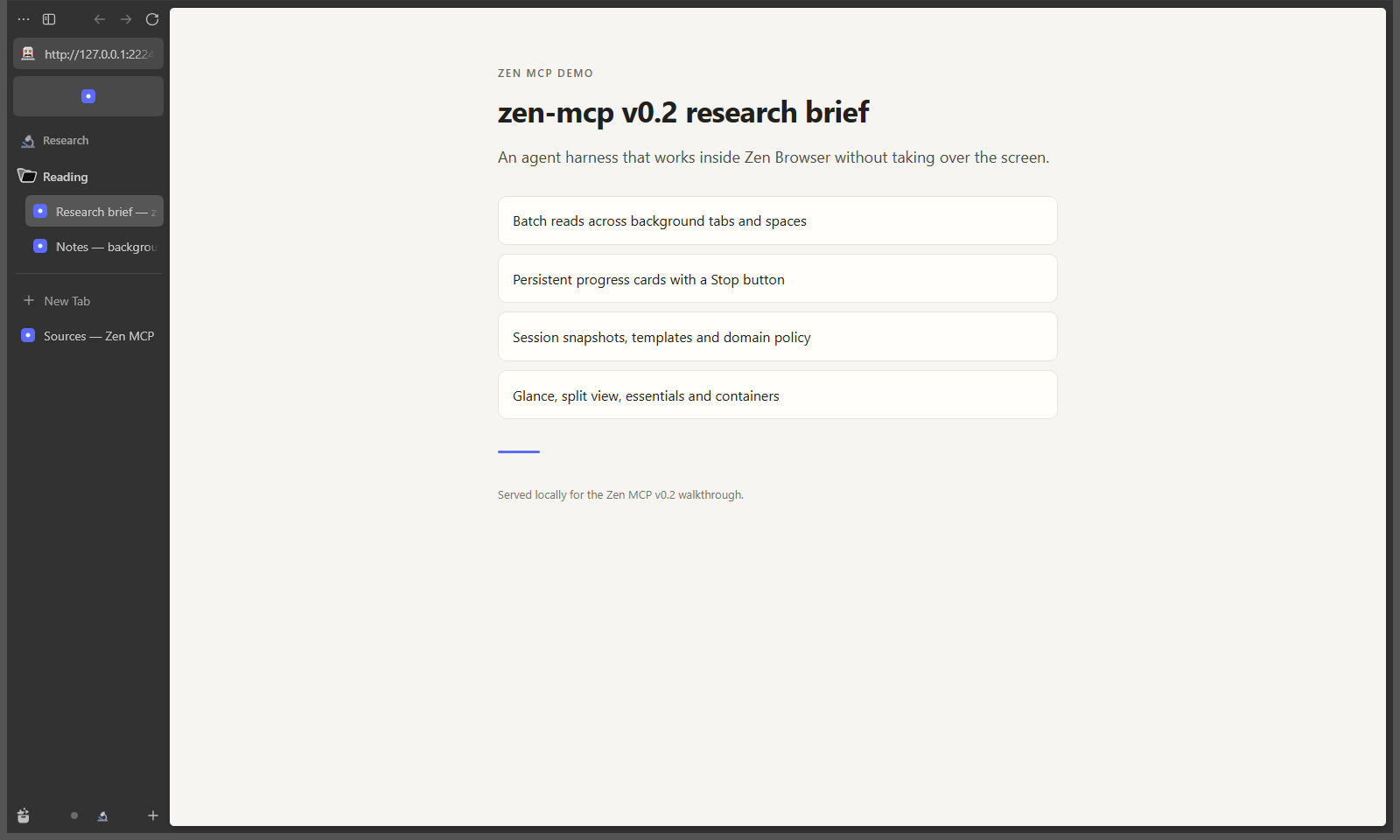
|
|
63
|
+
|
|
64
|
+
More screenshots: [progress and Stop](https://raw.githubusercontent.com/spaxe-dev/zen-mcp/main/docs/screenshots/v0.2-progress-stop.png), [split view](https://raw.githubusercontent.com/spaxe-dev/zen-mcp/main/docs/screenshots/v0.2-split-view.png), [question card](https://raw.githubusercontent.com/spaxe-dev/zen-mcp/main/docs/screenshots/v0.2-question-card.png), [Glance](https://raw.githubusercontent.com/spaxe-dev/zen-mcp/main/docs/screenshots/v0.2-glance.png).
|
|
65
|
+
|
|
66
|
+
## Quick start
|
|
67
|
+
|
|
68
|
+
### Requirements
|
|
69
|
+
|
|
70
|
+
- **Node.js 22 or newer.** CI runs Node 22 and 24 on Windows, Ubuntu, and macOS.
|
|
71
|
+
- **Zen Browser installed.** Zen MCP starts Zen itself; it does not attach to a running browser.
|
|
72
|
+
- **An MCP client** that can launch a stdio server.
|
|
73
|
+
- **A desktop session.** The live integration suite needs one; everyday tool calls need a running Zen window.
|
|
74
|
+
|
|
75
|
+
| Platform | Status | Zen version | Evidence date |
|
|
76
|
+
| --- | --- | --- | --- |
|
|
77
|
+
| Windows | Verified live: launch, consent, evidence, shutdown | 1.24b | 2026-11-02 |
|
|
78
|
+
| macOS | Unverified live; code paths and CI only | n/a | 2026-11-02 |
|
|
79
|
+
| Linux | Unverified live; distro, Flatpak, and Snap paths pass CI only | n/a | 2026-11-02 |
|
|
80
|
+
|
|
81
|
+
"CI only" means typecheck, build, and unit tests pass; it does not mean a real Zen launch has been observed. Treat macOS and Linux as untested until a live launch, the consent card, and a clean shutdown have passed on that platform.
|
|
82
|
+
|
|
83
|
+
### Install
|
|
101
84
|
|
|
102
85
|
```sh
|
|
103
86
|
npm install -g @spaxe-dev/zen-mcp
|
|
104
87
|
zen-mcp setup
|
|
105
88
|
```
|
|
106
89
|
|
|
107
|
-
Or run
|
|
90
|
+
Or run setup without a global install:
|
|
108
91
|
|
|
109
92
|
```sh
|
|
110
93
|
npx @spaxe-dev/zen-mcp setup
|
|
111
94
|
```
|
|
112
95
|
|
|
113
|
-
Each GitHub release also attaches a package tarball and
|
|
96
|
+
Each GitHub release also attaches a package tarball and `SHA256SUMS`:
|
|
114
97
|
|
|
115
98
|
```sh
|
|
116
|
-
npm install -g ./zen-mcp-0.3.
|
|
99
|
+
npm install -g ./zen-mcp-0.3.3.tgz
|
|
117
100
|
zen-mcp setup
|
|
118
101
|
```
|
|
119
102
|
|
|
120
|
-
|
|
121
|
-
config, and prints an MCP snippet.
|
|
122
|
-
|
|
123
|
-
## Install from source
|
|
103
|
+
From a source checkout:
|
|
124
104
|
|
|
125
105
|
```sh
|
|
126
106
|
git clone https://github.com/spaxe-dev/zen-mcp.git
|
|
@@ -130,20 +110,38 @@ npm run build
|
|
|
130
110
|
npm link # optional: puts `zen-mcp` on PATH
|
|
131
111
|
```
|
|
132
112
|
|
|
133
|
-
|
|
113
|
+
The installed command is `zen-mcp`. Nothing is installed into Zen itself; the bridge is injected at runtime.
|
|
114
|
+
|
|
115
|
+
### Run setup and check the machine
|
|
134
116
|
|
|
135
117
|
```sh
|
|
136
|
-
zen-mcp setup
|
|
137
|
-
zen-mcp
|
|
118
|
+
zen-mcp setup # detects Zen, writes a config, prints an MCP snippet
|
|
119
|
+
zen-mcp onboard # pick MCP clients and add Zen MCP to their config
|
|
120
|
+
zen-mcp doctor # config, executable, Marionette, bridge, profile, policy
|
|
121
|
+
zen-mcp status # config, profile mode, and port state
|
|
138
122
|
```
|
|
139
123
|
|
|
140
|
-
`setup` writes
|
|
141
|
-
`~/.config/zen-mcp/config.json` elsewhere. Nothing is installed into Zen
|
|
142
|
-
itself: the bridge is injected at runtime.
|
|
124
|
+
`setup` writes `%APPDATA%\zen-mcp\config.json` on Windows. On macOS and Linux it writes `$XDG_CONFIG_HOME/zen-mcp/config.json` when `XDG_CONFIG_HOME` is set, otherwise `~/.config/zen-mcp/config.json`. Override the path with `ZEN_MCP_CONFIG`. The data directory defaults to `data` beside the config file.
|
|
143
125
|
|
|
144
|
-
|
|
126
|
+
### Connect an MCP client
|
|
127
|
+
|
|
128
|
+
Run the picker:
|
|
129
|
+
|
|
130
|
+
```sh
|
|
131
|
+
zen-mcp onboard
|
|
132
|
+
```
|
|
133
|
+
|
|
134
|
+
It lists Claude Code, Claude Desktop, Cursor, VS Code, Codex CLI, Gemini CLI, Windsurf, Cline, and Zed. Clients found on this machine are preselected. Use the arrow keys to move, space to toggle, and enter to confirm. Zen MCP merges a `zen-mcp` entry into each selected client's own configuration file and leaves other servers alone. Choose **Other MCP client** to print a step-by-step runbook for any agent: known config paths, the right entry shape for JSON, VS Code, Zed and TOML clients, merge rules, a validation checklist, and a completion report.
|
|
135
|
+
|
|
136
|
+
For scripts or a shell without a TTY, name the clients:
|
|
137
|
+
|
|
138
|
+
```sh
|
|
139
|
+
zen-mcp onboard --clients claude-code,cursor
|
|
140
|
+
zen-mcp onboard --clients all --command /path/to/zen-mcp
|
|
141
|
+
zen-mcp onboard --clients other
|
|
142
|
+
```
|
|
145
143
|
|
|
146
|
-
Claude Code:
|
|
144
|
+
Claude Code by hand:
|
|
147
145
|
|
|
148
146
|
```sh
|
|
149
147
|
claude mcp add zen-mcp -- zen-mcp serve
|
|
@@ -162,759 +160,115 @@ Any MCP client:
|
|
|
162
160
|
}
|
|
163
161
|
```
|
|
164
162
|
|
|
165
|
-
If
|
|
166
|
-
command. `serve` is also the default when the CLI is run without arguments.
|
|
163
|
+
If `zen-mcp` is not on `PATH`, use the absolute path to `dist/cli.js` as `command` and keep `args` as `["serve"]`. Running the CLI with no command also starts the server.
|
|
167
164
|
|
|
168
|
-
|
|
169
|
-
dedicated agent profile if `autoLaunch` is enabled (the default), then waits for
|
|
170
|
-
the approval card in Zen before returning. That first call can take a few
|
|
171
|
-
seconds while Zen starts. If Zen is already running on the Marionette port, the
|
|
172
|
-
server refuses to attach and explains how to proceed; it never takes over a
|
|
173
|
-
browser someone else started.
|
|
165
|
+
### Approve the browser once
|
|
174
166
|
|
|
175
|
-
|
|
176
|
-
for the whole session, and expect the agent's Zen window to close when the
|
|
177
|
-
client disconnects.
|
|
167
|
+
On the first tool call, Zen MCP launches its own Zen window with a dedicated agent profile. The call waits for an approval card in Zen. Click **Allow this session**, then call the tool again if the first call timed out.
|
|
178
168
|
|
|
179
|
-
|
|
169
|
+
- Approval is stored for the life of the MCP server process. Relaunching the owned browser does not show the card again.
|
|
170
|
+
- **Not now** closes the browser Zen MCP started and keeps the server unapproved until it restarts.
|
|
171
|
+
- A timeout leaves the card open and returns an error. Nothing is read or changed before approval.
|
|
172
|
+
- The approval card is the only per-session approval. There are no per-action confirmation cards; use **Pause**, read-only mode, and the domain allowlist for finer control.
|
|
180
173
|
|
|
181
|
-
###
|
|
174
|
+
### Try a first job
|
|
182
175
|
|
|
183
|
-
|
|
184
|
-
| --- | --- |
|
|
185
|
-
| `zen_status` | App version, active space and tab, every space with counts, bridge health |
|
|
186
|
-
| `zen_launch` | Start Zen with agent access or reconnect the bridge |
|
|
187
|
-
| `zen_spaces_list` | Spaces with tab, pinned, and folder counts |
|
|
188
|
-
| `zen_space_create` | Create a space; does not switch by default |
|
|
189
|
-
| `zen_space_switch` | Switch the visible space |
|
|
190
|
-
| `zen_space_delete` | Delete a space and its tabs (destructive) |
|
|
176
|
+
Ask your client something like:
|
|
191
177
|
|
|
192
|
-
|
|
178
|
+
> Make a GitHub space, find my pull requests that are waiting on a reply, and tell me which ones need attention without switching my current tab.
|
|
193
179
|
|
|
194
|
-
|
|
195
|
-
| --- | --- |
|
|
196
|
-
| `zen_tabs_list` | Tabs across every space, filterable by space, query, or pinning |
|
|
197
|
-
| `zen_tabs_open` | Open up to 30 URLs in a space, in the background by default |
|
|
198
|
-
| `zen_tabs_close` | Close tabs by id |
|
|
199
|
-
| `zen_tab_select` | Bring a tab into view (takes over the screen) |
|
|
200
|
-
| `zen_glance` | Preview a URL or tab in Zen's Glance overlay, without a new tab |
|
|
201
|
-
| `zen_split_view` | Show 2 to 4 tabs from the active space side by side |
|
|
202
|
-
| `zen_split_close` | Close a split view; the tabs stay open |
|
|
203
|
-
| `zen_pin_tabs` | Pin or unpin tabs in a space |
|
|
204
|
-
| `zen_essentials` | Add tabs to essentials or remove them |
|
|
205
|
-
| `zen_containers_list` | List Firefox containers for isolation |
|
|
206
|
-
|
|
207
|
-
### Folders
|
|
208
|
-
|
|
209
|
-
| Tool | What it does |
|
|
210
|
-
| --- | --- |
|
|
211
|
-
| `zen_folders_list` | Folders with space, label, and tab ids |
|
|
212
|
-
| `zen_folder_create` | Group existing tabs into a folder |
|
|
213
|
-
| `zen_folder_add_tabs` | Move tabs into a folder |
|
|
180
|
+
The agent can create the space, open the PRs in the background, read them, and show a notification card that jumps to the space.
|
|
214
181
|
|
|
215
|
-
|
|
182
|
+
## Use a dedicated profile
|
|
216
183
|
|
|
217
|
-
|
|
218
|
-
| --- | --- |
|
|
219
|
-
| `zen_read_page` | Extract text or a structured view from any tab, without selecting it |
|
|
220
|
-
| `zen_read_pages` | Read up to 10 tabs in one call, three at a time |
|
|
221
|
-
| `zen_find_text` | Find literal text in one tab with raw offsets and excerpts |
|
|
222
|
-
| `zen_search_tabs` | Search up to 30 open tabs for the same text, two at a time |
|
|
223
|
-
| `zen_show_evidence` | Reuse a source in the background, find a cited quote, scroll to it, and mark it |
|
|
224
|
-
| `zen_show_evidence_batch` | Verify up to 20 citations in one call with per-citation results |
|
|
225
|
-
| `zen_clear_evidence` | Remove Evidence Mode overlays from one tab or every marked tab |
|
|
226
|
-
| `zen_tabs_audit` | Find duplicate, stale, and domain-clustered tabs |
|
|
227
|
-
| `zen_tabs_group` | Create one folder per domain for ungrouped tabs |
|
|
228
|
-
| `zen_history_search` | Search history by title or URL, optionally by domain |
|
|
229
|
-
| `zen_history_recently_closed` | Recently closed tabs |
|
|
230
|
-
| `zen_bookmarks_search` | Search bookmarks by title or URL |
|
|
231
|
-
| `zen_clipboard_write` | Copy text to the user's clipboard |
|
|
232
|
-
|
|
233
|
-
### Coordination
|
|
234
|
-
|
|
235
|
-
| Tool | What it does |
|
|
236
|
-
| --- | --- |
|
|
237
|
-
| `zen_progress` | Show or update a persistent progress card with a Stop button |
|
|
238
|
-
| `zen_events` | Long-poll for Stop presses, watch hits, and question answers |
|
|
239
|
-
| `zen_ask` | Show a question card in Zen and wait for an answer |
|
|
240
|
-
| `zen_answers` | Pending and recently answered questions |
|
|
241
|
-
| `zen_notify` | Status card with an optional "open this space" action |
|
|
242
|
-
| `zen_watch_add` | Watch a tab for a text change or a selector appearing or disappearing |
|
|
243
|
-
| `zen_watch_list` | Active watches with interval, expiry, last check, and hit count |
|
|
244
|
-
| `zen_watch_remove` | Stop and remove a watch |
|
|
245
|
-
|
|
246
|
-
### Sessions and templates
|
|
247
|
-
|
|
248
|
-
| Tool | What it does |
|
|
249
|
-
| --- | --- |
|
|
250
|
-
| `zen_session_save` | Snapshot every space, tab, folder, and essential in the window |
|
|
251
|
-
| `zen_session_list` | Saved sessions with counts |
|
|
252
|
-
| `zen_session_restore` | Restore a session, reusing spaces by name or creating new ones |
|
|
253
|
-
| `zen_session_delete` | Delete a saved session |
|
|
254
|
-
| `zen_space_templates` | Built-in and user templates |
|
|
255
|
-
| `zen_template_apply` | Create a space from a template |
|
|
256
|
-
| `zen_template_save` | Save a live space as a reusable template |
|
|
257
|
-
| `zen_template_delete` | Delete a user template |
|
|
258
|
-
|
|
259
|
-
### Policy
|
|
260
|
-
|
|
261
|
-
| Tool | What it does |
|
|
262
|
-
| --- | --- |
|
|
263
|
-
| `zen_config` | Effective read-only mode, allowlist, audit settings, and data directory |
|
|
264
|
-
| `zen_audit_tail` | Recent tool calls, including blocked ones |
|
|
265
|
-
|
|
266
|
-
### Resources and prompts
|
|
267
|
-
|
|
268
|
-
Five MCP resources expose live state as JSON: `zen://status`, `zen://spaces`,
|
|
269
|
-
`zen://tabs`, `zen://questions`, and `zen://watches`.
|
|
270
|
-
|
|
271
|
-
Three prompts set up common jobs: `zen_github_triage` for notifications and pull
|
|
272
|
-
requests, `zen_research_brief` for a source-backed brief, and `zen_clean_tabs`
|
|
273
|
-
for tab cleanup with a session saved first.
|
|
274
|
-
|
|
275
|
-
### Client-visible behavior
|
|
276
|
-
|
|
277
|
-
Zen MCP uses the standard MCP request metadata rather than a custom side channel:
|
|
278
|
-
|
|
279
|
-
- **Structured results.** Every tool declares an `outputSchema`. A successful
|
|
280
|
-
call returns the typed object in `structuredContent` and the same JSON in a
|
|
281
|
-
text block, so older clients keep working. Errors are `isError: true` with no
|
|
282
|
-
`structuredContent`.
|
|
283
|
-
- **Progress.** When a client supplies a progress token, `zen_read_page`,
|
|
284
|
-
`zen_read_pages`, and `zen_show_evidence_batch` send
|
|
285
|
-
`notifications/progress` between phases or after each tab or citation. No
|
|
286
|
-
token means no notifications.
|
|
287
|
-
- **Cancellation.** A cancelled request stops waiting on the bridge and returns
|
|
288
|
-
a cancellation error. A browser command that is already in flight may still
|
|
289
|
-
finish in Zen, but the server never reports it as a success.
|
|
290
|
-
- **Resources.** All five resources carry a title. Successful tools that change
|
|
291
|
-
tabs or spaces emit `notifications/resources/list_changed` so clients can
|
|
292
|
-
refresh. Resource subscriptions are not offered in 0.3; clients re-read on
|
|
293
|
-
demand. Completion is not offered either, because the fixed resource URIs
|
|
294
|
-
have no template variables to complete.
|
|
295
|
-
- **Logging.** Server warnings and errors reach the client through
|
|
296
|
-
`notifications/message`. Messages contain the tool name, error code, and a
|
|
297
|
-
sanitized description with URLs replaced by `[redacted-url]`. They never
|
|
298
|
-
contain arguments, page text, tab URLs, or bridge keys. The file audit log
|
|
299
|
-
remains the durable record.
|
|
300
|
-
|
|
301
|
-
## Reading pages in the background
|
|
302
|
-
|
|
303
|
-
`zen_read_page` and `zen_read_pages` never change what the user is looking at.
|
|
304
|
-
They go through the browser's own content actor, which can reach a loaded tab in
|
|
305
|
-
any space, including spaces that are not currently rendered.
|
|
306
|
-
|
|
307
|
-
Formats:
|
|
308
|
-
|
|
309
|
-
- `text`: readable page text, preferring `<article>`, `<main>`, or `role=main`.
|
|
310
|
-
- `markdown`: headings, lists, links, and tables as Markdown.
|
|
311
|
-
- `links`: unique http(s) links with their text.
|
|
312
|
-
- `tables`: table captions, headers, and rows.
|
|
313
|
-
- `metadata`: title, description, canonical URL, Open Graph tags, and language.
|
|
314
|
-
- `outline`: the heading tree.
|
|
315
|
-
- `selector`: limit any format to one CSS-selected element.
|
|
316
|
-
|
|
317
|
-
The result includes the title, URL, selected text, content type, length,
|
|
318
|
-
`offset`, and `nextOffset`. `maxChars` limits each chunk (24,000 by default,
|
|
319
|
-
60,000 maximum).
|
|
320
|
-
|
|
321
|
-
Long `text` and `markdown` reads are paged. Pass `nextOffset` from one result as
|
|
322
|
-
`offset` on the next call; `nextOffset` is `null` when the stream is exhausted.
|
|
323
|
-
Offsets are clamped to the page length, so reading past the end returns empty
|
|
324
|
-
text instead of an error.
|
|
325
|
-
|
|
326
|
-
```text
|
|
327
|
-
zen_read_page { tabId: "42", maxChars: 24000, offset: 0 }
|
|
328
|
-
→ { text: "...", length: 85213, offset: 0, nextOffset: 24000, truncated: true }
|
|
329
|
-
|
|
330
|
-
zen_read_page { tabId: "42", maxChars: 24000, offset: 24000 }
|
|
331
|
-
→ { text: "...", length: 85213, offset: 24000, nextOffset: 48000, truncated: true }
|
|
332
|
-
```
|
|
184
|
+
The default is a dedicated agent profile under the data directory, separate from your everyday Zen profile. It starts with no cookies, logins, or history from normal browsing.
|
|
333
185
|
|
|
334
|
-
|
|
335
|
-
|
|
336
|
-
|
|
337
|
-
map cleanly to a list of items.
|
|
338
|
-
|
|
339
|
-
Offsets are positions in the extracted text, not the raw HTML. They stay stable
|
|
340
|
-
while the page is unchanged. If the page changes between calls, earlier offsets
|
|
341
|
-
can shift, so start again from offset 0 when the content has changed.
|
|
342
|
-
|
|
343
|
-
PDF text is extracted through Zen's PDF viewer. Firefox only initializes that
|
|
344
|
-
viewer for a visible PDF tab, so a PDF opened in a hidden space returns
|
|
345
|
-
`pdf_unreadable`; ask the user to open it, then read the active tab. HTML pages
|
|
346
|
-
have no such restriction.
|
|
347
|
-
|
|
348
|
-
Pages that cannot expose a document (privileged `about:` pages, tabs that have
|
|
349
|
-
not loaded) return a clear error instead of partial nonsense.
|
|
350
|
-
|
|
351
|
-
## Evidence Mode
|
|
352
|
-
|
|
353
|
-
An answer is only as useful as the user's ability to check it.
|
|
354
|
-
`zen_show_evidence` turns a citation into something visible without interrupting
|
|
355
|
-
the user: it reuses or opens the source tab in the background, finds the cited
|
|
356
|
-
passage, scrolls to it, marks it, and shows a card in browser chrome with the
|
|
357
|
-
claim, source, excerpt, and match status. The card has a **Show source** action;
|
|
358
|
-
pass `focus: true` when the user asked to see the source immediately.
|
|
359
|
-
|
|
360
|
-
```text
|
|
361
|
-
zen_show_evidence {
|
|
362
|
-
url: "https://example.com/report",
|
|
363
|
-
claim: "The pilot cut response time in half",
|
|
364
|
-
quote: "Median response time fell from 42 seconds to 21 seconds.",
|
|
365
|
-
context: "Results after the six-week pilot",
|
|
366
|
-
source_title: "2026 operations report"
|
|
367
|
-
}
|
|
186
|
+
```sh
|
|
187
|
+
zen-mcp setup --dedicated-profile # explicit default
|
|
188
|
+
zen-mcp setup --profile /path/to/profile # custom dedicated profile
|
|
368
189
|
```
|
|
369
190
|
|
|
370
|
-
|
|
371
|
-
|
|
372
|
-
1. Reuse an open tab whose URL matches the source, or open the URL in the
|
|
373
|
-
background. A supplied `tab_id` is used only when that tab still shows the
|
|
374
|
-
same URL. `focus: true` switches to the tab and brings its window forward.
|
|
375
|
-
2. Wait up to 12 seconds for the document to leave `about:blank` and finish
|
|
376
|
-
loading.
|
|
377
|
-
3. Read the page's rendered text through the Marionette content actor.
|
|
378
|
-
4. Locate the quote, then verify the page text has not changed before marking.
|
|
379
|
-
5. Scroll the passage toward the center of the viewport.
|
|
380
|
-
6. Paint an absolutely positioned overlay over the passage. The overlay fades
|
|
381
|
-
out after 20 seconds by default.
|
|
382
|
-
7. Return structured JSON and show an activity card with a dismiss button.
|
|
383
|
-
|
|
384
|
-
### Input
|
|
385
|
-
|
|
386
|
-
| Field | Required | Meaning |
|
|
387
|
-
| --- | --- | --- |
|
|
388
|
-
| `url` | yes | `http(s)` source URL. A missing scheme is assumed to be `https`. |
|
|
389
|
-
| `quote` | yes | The passage expected in the source, up to 20,000 characters. |
|
|
390
|
-
| `claim` | no | The claim the passage supports. It becomes the card title. |
|
|
391
|
-
| `context` | no | Nearby source text, used to choose between repeated passages. |
|
|
392
|
-
| `source_title` | no | Human-readable source name for the card. |
|
|
393
|
-
| `tab_id` | no | Reuse this tab only if it still shows `url`. |
|
|
394
|
-
| `min_confidence` | no | Fuzzy-match threshold from 0.5 to 1. Defaults to 0.85. |
|
|
395
|
-
| `highlight_ms` | no | How long the mark stays visible, 1,000 to 120,000 ms. Defaults to 20,000. |
|
|
396
|
-
| `focus` | no | Bring the source tab and window to the front. Defaults to `false`. |
|
|
397
|
-
|
|
398
|
-
`zen_clear_evidence` takes an optional `tab_id`. With no id it removes marks
|
|
399
|
-
from every tab marked during the server session.
|
|
400
|
-
|
|
401
|
-
### Result
|
|
191
|
+
Use the normal profile only when the agent must see pages where you are signed in:
|
|
402
192
|
|
|
403
|
-
```
|
|
404
|
-
|
|
405
|
-
"ok": true,
|
|
406
|
-
"tabId": "42",
|
|
407
|
-
"tabReused": true,
|
|
408
|
-
"focused": false,
|
|
409
|
-
"sourceUrl": "https://example.com/report",
|
|
410
|
-
"url": "https://example.com/report",
|
|
411
|
-
"title": "2026 operations report",
|
|
412
|
-
"claim": "The pilot cut response time in half",
|
|
413
|
-
"matchedQuote": "Median response time fell from 42 seconds to 21 seconds.",
|
|
414
|
-
"matchMethod": "normalized",
|
|
415
|
-
"confidence": 0.99,
|
|
416
|
-
"occurrences": 1,
|
|
417
|
-
"scrolled": true,
|
|
418
|
-
"highlighted": true
|
|
419
|
-
}
|
|
193
|
+
```sh
|
|
194
|
+
zen-mcp setup --use-default-profile
|
|
420
195
|
```
|
|
421
196
|
|
|
422
|
-
|
|
423
|
-
highlights a different passage. Some successes carry a `limitation` string, for
|
|
424
|
-
example when the page was too large to search completely or the passage has no
|
|
425
|
-
visible box to paint.
|
|
197
|
+
With the normal profile, quit Zen completely before the agent launches it. The server refuses to launch while a normal Zen process is running, so it never attaches to or shares that session. The agent can then read signed-in pages and send their text to whichever model provider your MCP client uses.
|
|
426
198
|
|
|
427
|
-
|
|
428
|
-
| --- | --- |
|
|
429
|
-
| `PAGE_NOT_FOUND` | The tab closed, navigated away, or could not be reached. |
|
|
430
|
-
| `PAGE_STILL_LOADING` | The document did not finish loading within 12 seconds. |
|
|
431
|
-
| `QUOTE_NOT_FOUND` | The quote is absent from the page's readable text. |
|
|
432
|
-
| `AMBIGUOUS_MATCH` | The passage repeats and no context selected one occurrence. |
|
|
433
|
-
| `LOW_MATCH_CONFIDENCE` | The closest fuzzy passage is below the threshold. |
|
|
434
|
-
| `HIGHLIGHT_FAILED` | The page changed too often between matching and marking. |
|
|
435
|
-
| `PRIVILEGED_PAGE` | The tab is on a browser-internal page. |
|
|
436
|
-
| `ACTOR_UNAVAILABLE` | Marionette no longer exposes the content actor. |
|
|
437
|
-
| `UNSUPPORTED_PAGE` | PDF, non-HTML, or non-`http(s)` content. |
|
|
438
|
-
|
|
439
|
-
### Matching behavior
|
|
440
|
-
|
|
441
|
-
Matching runs in fixed code inside the bridge, in this order:
|
|
442
|
-
|
|
443
|
-
1. **Exact.** A raw substring match with exact offsets, including case.
|
|
444
|
-
2. **Normalized.** HTML entities are decoded; typographic quotes, dashes, and
|
|
445
|
-
ellipses are folded; Unicode is NFKC-normalized, lowercased, and stripped of
|
|
446
|
-
diacritics; whitespace is collapsed. Offsets are mapped back to the raw page
|
|
447
|
-
text so the highlight covers the original characters.
|
|
448
|
-
3. **Context.** When the quote appears more than once, the 800 characters around
|
|
449
|
-
each occurrence are scored against `context` using token containment and
|
|
450
|
-
bigram overlap. A clear winner is required; a tie stays ambiguous.
|
|
451
|
-
4. **Fuzzy.** Token-anchored windows are compared with a bounded Levenshtein
|
|
452
|
-
distance. This only runs for quotes up to 300 characters and accepts a match
|
|
453
|
-
at or above `min_confidence`.
|
|
454
|
-
|
|
455
|
-
The matcher never picks one of several equally plausible passages. It reports
|
|
456
|
-
`AMBIGUOUS_MATCH` or `LOW_MATCH_CONFIDENCE` instead. Before painting, the
|
|
457
|
-
highlight script re-reads the page and checks that the raw text at the chosen
|
|
458
|
-
offsets still equals the matched passage; if not, it re-indexes and retries, up
|
|
459
|
-
to three times.
|
|
460
|
-
|
|
461
|
-
### Supported pages
|
|
462
|
-
|
|
463
|
-
- `http(s)` HTML and XML documents with a loaded content document.
|
|
464
|
-
- Text that is rendered in the DOM and not hidden.
|
|
465
|
-
- Same-document content only. Text inside cross-origin iframes, shadow roots,
|
|
466
|
-
images, canvas, SVG, or form controls is not searched.
|
|
467
|
-
- PDFs, `about:`/`chrome:` pages, `file:` URLs, and other non-HTML responses
|
|
468
|
-
return `UNSUPPORTED_PAGE` or `PRIVILEGED_PAGE`.
|
|
469
|
-
|
|
470
|
-
### Limitations
|
|
471
|
-
|
|
472
|
-
- The first 600,000 characters of page text are indexed. Truncation is reported
|
|
473
|
-
in `limitation`.
|
|
474
|
-
- Pages that continuously change can exhaust the three marking attempts and
|
|
475
|
-
return `HIGHLIGHT_FAILED`.
|
|
476
|
-
- The mark is an overlay, not a DOM edit. Layout changes while it is visible can
|
|
477
|
-
move the underlying text away from the boxes. It disappears after
|
|
478
|
-
`highlight_ms`, and `zen_clear_evidence` removes it sooner.
|
|
479
|
-
- Only the current DOM is searched. Infinite-scroll content and content behind
|
|
480
|
-
interaction are invisible until loaded.
|
|
481
|
-
|
|
482
|
-
### Security
|
|
483
|
-
|
|
484
|
-
- Agents send only `url`, `quote`, `context`, and numeric options. Every DOM
|
|
485
|
-
operation is a fixed script built on the server; no agent-supplied JavaScript
|
|
486
|
-
is ever evaluated.
|
|
487
|
-
- URLs are normalized to `http(s)` and checked against the existing domain
|
|
488
|
-
allowlist. Read-only mode blocks `zen_show_evidence`,
|
|
489
|
-
`zen_show_evidence_batch`, and `zen_clear_evidence` because they open or
|
|
490
|
-
select a tab and add overlays.
|
|
491
|
-
- Overlay nodes are marked `aria-hidden`, ignore pointer events, and live in
|
|
492
|
-
their own layer. The page's text nodes and styles are never modified.
|
|
493
|
-
- The result card is rendered in a shadow root in browser chrome through the
|
|
494
|
-
existing activity-card system. Page scripts cannot reach it. Evidence Mode
|
|
495
|
-
does not create a second notification system.
|
|
496
|
-
- The Marionette endpoint and bridge token stay inside the local server; neither
|
|
497
|
-
is exposed to pages or to the agent.
|
|
498
|
-
|
|
499
|
-
### Verifying several citations
|
|
500
|
-
|
|
501
|
-
`zen_show_evidence_batch` checks up to 20 citations in one call, two sources at
|
|
502
|
-
a time (three maximum). Citations that share a source URL reuse one tab, and
|
|
503
|
-
missing sources are opened once in the background. Every citation gets its own
|
|
504
|
-
result with the same fields as `zen_show_evidence`, and one summary card reports
|
|
505
|
-
how many were verified and lists up to three failures. `focus: true` brings the
|
|
506
|
-
first source forward once instead of switching for every citation.
|
|
507
|
-
|
|
508
|
-
Each source may have at most 5 quotes per batch. If any citation URL is not
|
|
509
|
-
`http(s)`, the whole batch is rejected before a tab opens, so a bad URL cannot
|
|
510
|
-
pull the batch halfway through. The call reports `total`, `matched`, `failed`,
|
|
511
|
-
`openedTabs`, and `reusedTabs`, and `ok` is true only when every citation
|
|
512
|
-
matched.
|
|
513
|
-
|
|
514
|
-
## Finding text in tabs
|
|
515
|
-
|
|
516
|
-
Two read-only tools locate literal text without regex, selection, scrolling, or
|
|
517
|
-
highlights:
|
|
518
|
-
|
|
519
|
-
| Tool | Scope | Defaults |
|
|
520
|
-
| --- | --- | --- |
|
|
521
|
-
| `zen_find_text` | One tab | 20 matches, 120 characters of context |
|
|
522
|
-
| `zen_search_tabs` | Up to 30 tabs, two at a time | 5 matches per tab, 80 characters of context, 20 tabs |
|
|
523
|
-
|
|
524
|
-
Both accept a literal `query` and optional `case_sensitive`. By default matching
|
|
525
|
-
folds case, diacritics, typographic punctuation, and whitespace differences, so
|
|
526
|
-
`cafe` finds `Café` and `"hello"` finds `“hello”`. `case_sensitive` switches to
|
|
527
|
-
exact `indexOf`. Matches carry raw page offsets (`start`, `end`), the matched
|
|
528
|
-
text, and a short excerpt with ellipses.
|
|
529
|
-
|
|
530
|
-
`zen_search_tabs` searches every open tab, a `space`, or an explicit `tab_ids`
|
|
531
|
-
list. Each tab succeeds or fails independently, so privileged pages, PDFs, and
|
|
532
|
-
missing tabs appear as error entries in the results instead of failing the call.
|
|
533
|
-
Results are capped per tab and at 200 matches in total, and `truncated` reports
|
|
534
|
-
when anything was clipped. Use `zen_show_evidence` when the user should see the
|
|
535
|
-
passage. Like Evidence Mode, both tools search the rendered DOM text, so
|
|
536
|
-
infinite-scroll content and content behind interaction are invisible until
|
|
537
|
-
loaded.
|
|
538
|
-
|
|
539
|
-
## Progress, events, and watches
|
|
540
|
-
|
|
541
|
-
Long jobs should keep the user informed without blocking on a modal dialog:
|
|
542
|
-
|
|
543
|
-
```text
|
|
544
|
-
zen_progress { title: "Reading 12 sources", step: "3 of 12", progress: 0.25 }
|
|
545
|
-
zen_events { after: <cursor>, waitSeconds: 25 }
|
|
546
|
-
```
|
|
199
|
+
Do not point `profilePath` at your normal profile unless that is the tradeoff you want. The profile lock check makes a conflict fail fast, but it does not make sharing a profile private.
|
|
547
200
|
|
|
548
|
-
|
|
549
|
-
step, then call `zen_progress { done: true }` to clear the card. A stopped
|
|
550
|
-
event is not an error: it means the user asked for the job to wrap up.
|
|
551
|
-
|
|
552
|
-
The global Pause switch pushes `kind: "pause"` and `kind: "resume"` events, and
|
|
553
|
-
`zen_events` reports `paused: true` until Resume. While paused, every browser
|
|
554
|
-
tool returns the `paused` error; do not retry in a loop.
|
|
555
|
-
|
|
556
|
-
`zen_watch_add` watches a tab for:
|
|
557
|
-
|
|
558
|
-
- `change`: the page text changed, optionally only when it now contains a phrase.
|
|
559
|
-
- `appear`: a CSS selector appeared.
|
|
560
|
-
- `disappear`: a CSS selector disappeared.
|
|
561
|
-
|
|
562
|
-
Watches poll on the server, post a card in Zen when they fire, and report
|
|
563
|
-
`kind: "watch"` events through `zen_events`. They expire after `maxMinutes`
|
|
564
|
-
(120 by default), polling never goes below `watchMinIntervalSeconds`, and at
|
|
565
|
-
most 50 watches run at once. Adding or removing a watch changes server state,
|
|
566
|
-
so both tools are blocked in read-only mode.
|
|
567
|
-
|
|
568
|
-
## Sessions and templates
|
|
569
|
-
|
|
570
|
-
`zen_session_save` snapshots every space, tab, folder, pin, and essential tab in
|
|
571
|
-
a window. `zen_session_restore` reuses a space with the same name unless
|
|
572
|
-
`newSpaces` is set, skips URLs that are already open, restores folders and pins,
|
|
573
|
-
and reports warnings instead of failing the whole restore. Restores are limited
|
|
574
|
-
to 300 tabs by default.
|
|
575
|
-
|
|
576
|
-
`zen_space_templates` ships four built-ins: `research`, `github-triage`, `news`,
|
|
577
|
-
and `docs`. `zen_template_save` turns a live space into a user template and
|
|
578
|
-
`zen_template_apply` creates a new space from one, including folders. Built-in
|
|
579
|
-
templates cannot be deleted.
|
|
580
|
-
|
|
581
|
-
## Safety and policy
|
|
582
|
-
|
|
583
|
-
The server enforces policy outside the model:
|
|
584
|
-
|
|
585
|
-
- **Ownership.** Zen MCP launches Zen itself and only controls that browser.
|
|
586
|
-
It never attaches to an existing Marionette session, and the listener is shut
|
|
587
|
-
after startup.
|
|
588
|
-
- **One-time consent.** With `requireConsent` on (the default), the browser
|
|
589
|
-
shows an approval card before any tool can read or change anything. Declining
|
|
590
|
-
quits the browser. A timeout leaves the card open and the tool returns an
|
|
591
|
-
error, so a later call can wait again.
|
|
592
|
-
- **Global pause.** The banner in Zen has a **Pause** button. Pausing rejects
|
|
593
|
-
in-flight bridge requests, hides progress, defers questions, and blocks every
|
|
594
|
-
browser tool with error code `paused` until **Resume**. `zen_events`,
|
|
595
|
-
`zen_answers`, `zen_config`, and `zen_audit_tail` stay available so the agent
|
|
596
|
-
can see the pause and local policy.
|
|
597
|
-
- `readOnly` rejects every mutating tool with a specific error, including
|
|
598
|
-
`zen_watch_add` and `zen_watch_remove`. Reads, lists, status, questions,
|
|
599
|
-
events, watch listing, and the audit log keep working. A read-only server
|
|
600
|
-
also refuses to auto-launch Zen and blocks `zen_launch`, so read-only work
|
|
601
|
-
never starts a process or creates a profile.
|
|
602
|
-
- `allowedDomains` blocks URLs outside the list before `zen_tabs_open`,
|
|
603
|
-
`zen_glance`, `zen_show_evidence`, `zen_show_evidence_batch`, sessions, and
|
|
604
|
-
templates run. Entries match a host and its subdomains; an empty list allows
|
|
605
|
-
everything.
|
|
606
|
-
- `auditLog` appends one JSON line per call to `audit.jsonl` in the data
|
|
607
|
-
directory, including blocked calls. Long text and sensitive arguments are
|
|
608
|
-
stored as a length and SHA-256 digest, URLs keep only scheme, host, and path
|
|
609
|
-
(queries, fragments, and credentials are removed), and the log rotates at
|
|
610
|
-
5 MB with one backup. `zen_audit_tail` reads the tail.
|
|
611
|
-
- Sessions and templates are sanitized and capped before use, and are written
|
|
612
|
-
atomically with owner-only permissions. A symlinked file is never written
|
|
613
|
-
through.
|
|
614
|
-
- There are no per-action approval cards. Approval is granted once per browser
|
|
615
|
-
session, and Pause is the stop switch. Use read-only mode and the domain
|
|
616
|
-
allowlist when an agent should not be able to change the browser at all.
|
|
617
|
-
|
|
618
|
-
## CLI
|
|
619
|
-
|
|
620
|
-
```text
|
|
621
|
-
zen-mcp [serve] Run the MCP server over stdio
|
|
622
|
-
zen-mcp launch Launch Zen once, verify ownership, then quit it
|
|
623
|
-
zen-mcp status Print config, profile mode, and port state
|
|
624
|
-
zen-mcp doctor Check config, executable, bridge, profile, port, policy
|
|
625
|
-
zen-mcp setup Detect Zen, write config, print an MCP snippet
|
|
626
|
-
zen-mcp setup --use-default-profile
|
|
627
|
-
zen-mcp setup --dedicated-profile
|
|
628
|
-
zen-mcp config show Print the config path and values
|
|
629
|
-
zen-mcp config set <key> <value>
|
|
630
|
-
```
|
|
201
|
+
## Safety at a glance
|
|
631
202
|
|
|
632
|
-
|
|
633
|
-
|
|
634
|
-
a
|
|
203
|
+
| Control | Default | What it does | Limits |
|
|
204
|
+
| --- | --- | --- | --- |
|
|
205
|
+
| Browser ownership | Always on | Launches its own Zen, proves identity with a nonce and `moz:processID`, then closes the Marionette listener to every other client | A local process can race for the port before lockdown; the race is detected, not eliminated |
|
|
206
|
+
| Consent | On | Shows one approval card per server process before the first read or change; decline closes the owned browser | After a decline, restart the server to ask again; a timeout leaves the card open |
|
|
207
|
+
| Pause | Available in the banner | Blocks browser tools with `paused`, hides the progress card, defers questions, and skips watch polls until Resume | A command already running in Zen may finish; its result is discarded. Pause is not persisted, and existing evidence overlays are not removed |
|
|
208
|
+
| Read-only mode | Off | Blocks all 30 tools in the mutating set, including `zen_launch`, a read-only server's auto-launch, and on-screen progress, question, and notification cards | Reads, lists, events, collected answers, and the audit log still work; session and template listings still show stored URLs |
|
|
209
|
+
| Domain allowlist | Empty | Matches an exact host or a subdomain on a label boundary before opening, previewing, verifying, watching, restoring a session, or applying a template | It is rechecked immediately after opening, but slow, script, or meta redirects can land elsewhere afterwards; reads recheck the tab URL |
|
|
210
|
+
| Private windows | Excluded | The bridge is not injected into private windows and an existing bridge is destroyed | This path is not covered by the automated live suite; treat it as a best-effort boundary |
|
|
211
|
+
| Audit log | On | Appends one JSON line per tool call, including blocked calls, with URLs reduced to scheme, host, and path | Argument summaries are bounded; sensitive values are digested, but a preview of the summarized arguments can remain |
|
|
212
|
+
| Data storage | Local only | Sessions, templates, audit log, and the default agent profile live in the data directory; files are owner-only where the platform supports POSIX modes | Any process running as your user can read them; contents are not encrypted at rest |
|
|
635
213
|
|
|
636
|
-
|
|
637
|
-
`consentTimeoutSeconds`, `launchArgs`, `autoLaunch`, `launchTimeoutMs`,
|
|
638
|
-
`askTimeoutSeconds`, `marionettePort`, `readOnly`, `allowedDomains`,
|
|
639
|
-
`auditLog`, `dataDir`, `autoAttachWindows`, `watchMinIntervalSeconds`.
|
|
214
|
+
The full threat model and enforcement details are in [docs/security.md](https://github.com/spaxe-dev/zen-mcp/blob/main/docs/security.md).
|
|
640
215
|
|
|
641
|
-
|
|
642
|
-
within their allowed range, a comma-separated `allowedDomains` list, and
|
|
643
|
-
whitespace-separated `launchArgs`. Environment overrides are never written back
|
|
644
|
-
into the file. `doctor` also prints a **Policy** line that warns when consent,
|
|
645
|
-
read-only mode, the domain allowlist, or the audit log is weakened, when extra
|
|
646
|
-
launch arguments are set, or when `ZEN_MCP_BRIDGE_SCRIPT` replaces the bundled
|
|
647
|
-
bridge.
|
|
216
|
+
## Current maturity and platform support
|
|
648
217
|
|
|
649
|
-
|
|
218
|
+
Zen MCP is usable but pre-1.0. The tool surface and configuration keys have changed between minor releases, and they can change again.
|
|
650
219
|
|
|
651
|
-
|
|
652
|
-
|
|
653
|
-
|
|
654
|
-
|
|
655
|
-
|
|
656
|
-
| `ZEN_MCP_PROFILE` | Custom agent profile directory |
|
|
657
|
-
| `ZEN_MCP_USE_DEFAULT_PROFILE` | `1` uses Zen's normal profile instead of the dedicated one |
|
|
658
|
-
| `ZEN_MCP_REQUIRE_CONSENT` | `0` skips the one-time approval card |
|
|
659
|
-
| `ZEN_MCP_CONSENT_TIMEOUT_SECONDS` | How long a tool waits for approval |
|
|
660
|
-
| `ZEN_MCP_LAUNCH_ARGS` | Extra Zen arguments, split on whitespace |
|
|
661
|
-
| `ZEN_MCP_MARIONETTE_PORT` | Marionette port (Zen currently always uses 2828) |
|
|
662
|
-
| `ZEN_MCP_READ_ONLY` | `1`, `true`, or `yes` enables read-only mode |
|
|
663
|
-
| `ZEN_MCP_ALLOWED_DOMAINS` | Comma-separated domain allowlist |
|
|
664
|
-
| `ZEN_MCP_AUDIT_LOG` | `1`, `true`, or `yes` enables the audit log |
|
|
665
|
-
| `ZEN_MCP_WATCH_MIN_INTERVAL_SECONDS` | Lower bound for watch polling |
|
|
666
|
-
| `ZEN_MCP_LOG` | `debug`, `info`, `warn`, or `error` |
|
|
667
|
-
| `ZEN_MCP_BRIDGE_SCRIPT` | Override the bundled `bridge.js` path |
|
|
668
|
-
|
|
669
|
-
Logs always go to **stderr**; stdout belongs to the MCP transport.
|
|
670
|
-
|
|
671
|
-
## How it works
|
|
672
|
-
|
|
673
|
-
```text
|
|
674
|
-
MCP client (Claude Code, Cursor, ...)
|
|
675
|
-
│ stdio, JSON-RPC
|
|
676
|
-
▼
|
|
677
|
-
zen-mcp server ──── Marionette (127.0.0.1:2828) ──── Zen chrome scope
|
|
678
|
-
│ launch, inject,
|
|
679
|
-
│ WebSocket on 127.0.0.1, random token background reads
|
|
680
|
-
▼
|
|
681
|
-
bridge inside each Zen window (system principal)
|
|
682
|
-
│
|
|
683
|
-
▼
|
|
684
|
-
gZenWorkspaces · gZenFolders · gBrowser · Places · UI cards
|
|
685
|
-
```
|
|
220
|
+
- **Windows** is the only platform with a live-tested launch, consent card, evidence overlay, and shutdown against Zen 1.24b.
|
|
221
|
+
- **macOS and Linux** compile and pass unit tests on CI, but no live Zen launch has been verified. Report what you see if you test them.
|
|
222
|
+
- **The live suite is manual.** It needs Zen and a desktop session and is not part of CI or the release workflow.
|
|
223
|
+
- **Unit tests are broad but not exhaustive.** On Windows, `npm test` runs the full unit suite and skips five POSIX-specific tests. The live suite has 34 declarations across three files.
|
|
224
|
+
- **One agent browser per machine.** Current Zen builds use Marionette port 2828, and this server cannot share it.
|
|
686
225
|
|
|
687
|
-
|
|
688
|
-
|
|
689
|
-
|
|
690
|
-
|
|
691
|
-
|
|
692
|
-
|
|
693
|
-
|
|
694
|
-
|
|
695
|
-
|
|
696
|
-
|
|
697
|
-
|
|
698
|
-
|
|
699
|
-
|
|
700
|
-
|
|
701
|
-
|
|
702
|
-
|
|
703
|
-
|
|
704
|
-
|
|
705
|
-
|
|
706
|
-
|
|
707
|
-
|
|
708
|
-
|
|
709
|
-
|
|
710
|
-
|
|
711
|
-
|
|
712
|
-
full threat model is in [docs/security.md](docs/security.md). To report a
|
|
713
|
-
vulnerability, use the private channel in [SECURITY.md](SECURITY.md), not a
|
|
714
|
-
public issue.
|
|
715
|
-
|
|
716
|
-
- **Chrome access is opt-in per process.** Only a Zen spawned by Zen MCP gets
|
|
717
|
-
`MOZ_REMOTE_ALLOW_SYSTEM_ACCESS=1`, and only in that child's environment. No
|
|
718
|
-
preference is written, so a normal Zen launch never opens a debug port.
|
|
719
|
-
- **The server only controls a browser it started.** Before launching, it
|
|
720
|
-
refuses if the Marionette port is already open or, for the normal profile, if
|
|
721
|
-
Zen is already running. There is no attach path to a user's existing browser.
|
|
722
|
-
- **Identity is proven, not assumed.** Every launch carries a random nonce in
|
|
723
|
-
its environment. The server reads it back in chrome before touching anything,
|
|
724
|
-
and also records Gecko's real `moz:processID`. On a mismatch it attaches
|
|
725
|
-
nothing and kills nothing, so a racing browser is never harmed.
|
|
726
|
-
- **The listener is closed after startup.** The server closes every other
|
|
727
|
-
Marionette connection and calls `setAcceptConnections(false)`. From then on
|
|
728
|
-
the port refuses connections, so no other local tool can create a session.
|
|
729
|
-
`zen_config` and `zen_launch` report `lockedDown` and the owned browser pid.
|
|
730
|
-
- **One-time consent.** With `requireConsent` on (the default), a card in Zen
|
|
731
|
-
asks before the first read or change. Declining quits the owned browser. A
|
|
732
|
-
timeout leaves the card open and returns an error; nothing is read or changed
|
|
733
|
-
until the user approves.
|
|
734
|
-
- **Global pause.** The banner's Pause button rejects in-flight bridge
|
|
735
|
-
requests, hides progress, defers questions, pauses watches, and makes every
|
|
736
|
-
browser tool fail with `paused`. Resume restores access. Only local tools
|
|
737
|
-
(`zen_events`, `zen_answers`, `zen_config`, `zen_audit_tail`) stay usable.
|
|
738
|
-
- **The owned browser is quit on shutdown.** The server tries a graceful quit,
|
|
739
|
-
then a forced quit, then terminates the recorded browser process. A browser
|
|
740
|
-
whose identity was never verified is never killed.
|
|
741
|
-
- **The bridge authenticates both sides.** It listens on `127.0.0.1` only and
|
|
742
|
-
uses a fixed method map. A 256-bit key generated for the server session is
|
|
743
|
-
shared only with the injected bridge, and every connection, including a
|
|
744
|
-
reconnect, completes a mutual HMAC-SHA256 challenge with a fresh nonce before
|
|
745
|
-
any request is accepted. There is no eval-from-agent tool; Evidence Mode passes
|
|
746
|
-
only the quote, context, and offsets into scripts built by the server.
|
|
747
|
-
- **Input is constrained.** `zen_tabs_open` accepts only `http:`, `https:`, and
|
|
748
|
-
`about:` URLs. `zen_show_evidence` and `zen_show_evidence_batch` accept only
|
|
749
|
-
`http(s)` sources. Search queries are literal strings, never expressions. The
|
|
750
|
-
domain allowlist is checked before mutations, sessions, and templates.
|
|
751
|
-
- **UI stays out of pages.** Question, notification, consent, progress, and
|
|
752
|
-
evidence cards render in browser chrome inside a shadow root, not in page
|
|
753
|
-
content, so pages cannot reach or spoof them.
|
|
754
|
-
- **Evidence marks are inert and unspoofable.** Each call gets a random marker
|
|
755
|
-
attribute, highlights render in a closed shadow root that ignores pointer
|
|
756
|
-
events, and clearing removes only markers the server created. The page's own
|
|
757
|
-
text and styles are never changed.
|
|
758
|
-
- **The audit log records calls without retaining content.** One JSON line per
|
|
759
|
-
tool call, including blocked calls, with redacted URLs, outcome, and
|
|
760
|
-
duration. Long text and sensitive argument values become lengths and
|
|
761
|
-
SHA-256 digests; the file is owner-only and rotates at 5 MB.
|
|
762
|
-
|
|
763
|
-
### Residual risks
|
|
764
|
-
|
|
765
|
-
No local browser harness can remove these. They are worth knowing before opting
|
|
766
|
-
into the normal profile:
|
|
767
|
-
|
|
768
|
-
- Between process start and lockdown there is a small window in which another
|
|
769
|
-
local process could race for a Marionette session, because Marionette itself
|
|
770
|
-
has no authentication. The server detects a competing session and fails
|
|
771
|
-
closed, but the race exists.
|
|
772
|
-
- Any process running as the same user can read process memory, inspect
|
|
773
|
-
arguments, or attach a debugger. Local tools cannot be defended against with
|
|
774
|
-
cryptography alone.
|
|
775
|
-
- Page text read by the agent is sent to whatever model provider the MCP client
|
|
776
|
-
uses. That is a data-sharing decision, not a browser-permission one.
|
|
777
|
-
- Using the normal profile means the agent can read pages where you are signed
|
|
778
|
-
in, including personal data. The dedicated agent profile is the default for a
|
|
779
|
-
reason.
|
|
780
|
-
- The lockdown relies on Zen's internal Marionette module layout. A future Zen
|
|
781
|
-
release can change it; the server then fails to start rather than silently
|
|
782
|
-
continuing without protection.
|
|
226
|
+
## Known limitations
|
|
227
|
+
|
|
228
|
+
- Marionette is fixed at 2828 in current Zen builds. Two Zen MCP servers cannot run at once.
|
|
229
|
+
- A lost Marionette session cannot be re-attached, because the listener stays shut. Quit the browser and start a new one.
|
|
230
|
+
- Reads and evidence search the current rendered DOM only. Iframes, shadow roots, canvas, images, SVG, and form controls are not read.
|
|
231
|
+
- Hidden and unloaded tabs behave differently: a loaded tab in a background space can be read, but a tab that has not loaded returns `tab_not_loaded`.
|
|
232
|
+
- PDF reads depend on Zen's PDF viewer and are unreliable for hidden tabs. Open the PDF and retry if you get `pdf_unreadable`.
|
|
233
|
+
- Fuzzy evidence matches are reported with `verified: false`. A batch is `ok` only when every citation matched and every match was verified.
|
|
234
|
+
- Watches live in the server process and do not survive a restart.
|
|
235
|
+
- The startup race before lockdown and same-user local attackers are outside what the harness can fully prevent.
|
|
236
|
+
|
|
237
|
+
See [docs/troubleshooting.md#known-limitations](https://github.com/spaxe-dev/zen-mcp/blob/main/docs/troubleshooting.md#known-limitations) for the complete list.
|
|
238
|
+
|
|
239
|
+
## Documentation
|
|
240
|
+
|
|
241
|
+
| Document | Contents |
|
|
242
|
+
| --- | --- |
|
|
243
|
+
| [docs/tools.md](https://github.com/spaxe-dev/zen-mcp/blob/main/docs/tools.md) | Every tool, resource, prompt, and client-visible behavior |
|
|
244
|
+
| [docs/reading-and-evidence.md](https://github.com/spaxe-dev/zen-mcp/blob/main/docs/reading-and-evidence.md) | Read formats, pagination, Evidence Mode, matching rules, and text search |
|
|
245
|
+
| [docs/configuration.md](https://github.com/spaxe-dev/zen-mcp/blob/main/docs/configuration.md) | CLI commands, config keys, environment variables, and data paths |
|
|
246
|
+
| [docs/architecture.md](https://github.com/spaxe-dev/zen-mcp/blob/main/docs/architecture.md) | How the launcher, bridge, and MCP surface fit together |
|
|
247
|
+
| [docs/security.md](https://github.com/spaxe-dev/zen-mcp/blob/main/docs/security.md) | Threat model and enforcement boundaries |
|
|
248
|
+
| [docs/troubleshooting.md](https://github.com/spaxe-dev/zen-mcp/blob/main/docs/troubleshooting.md) | Error messages, diagnostics, and known limitations |
|
|
249
|
+
| [CHANGELOG.md](https://github.com/spaxe-dev/zen-mcp/blob/main/CHANGELOG.md) | Release history |
|
|
250
|
+
| [CONTRIBUTING.md](https://github.com/spaxe-dev/zen-mcp/blob/main/CONTRIBUTING.md) | Build, test, and review expectations |
|
|
783
251
|
|
|
784
252
|
## Troubleshooting
|
|
785
253
|
|
|
786
|
-
**
|
|
787
|
-
Nothing owns the agent browser yet and `autoLaunch` is off. Call `zen_launch`,
|
|
788
|
-
start the server again, or set `autoLaunch` to true.
|
|
789
|
-
|
|
790
|
-
**"Marionette is already listening on port 2828"**
|
|
791
|
-
Another Zen or a WebDriver session owns the port. Zen MCP will not attach to it.
|
|
792
|
-
Quit that browser or stop the other tool, then call `zen_launch` again. Use
|
|
793
|
-
`ZEN_MCP_MARIONETTE_PORT` only if another tool permanently owns 2828.
|
|
794
|
-
|
|
795
|
-
**"Zen is already running with its normal profile"**
|
|
796
|
-
`useDefaultProfile` is on, a normal Zen is open, and a second launch would hand
|
|
797
|
-
the URL to that instance instead of creating an agent browser. Quit Zen
|
|
798
|
-
completely, or switch to the dedicated agent profile with
|
|
799
|
-
`zen-mcp setup --dedicated-profile`.
|
|
800
|
-
|
|
801
|
-
**"Zen did not open Marionette on port 2828 within Ns"**
|
|
802
|
-
The browser never accepted the agent port, usually because it handed off to a
|
|
803
|
-
running Zen. The launch attempt was stopped so it cannot keep the profile
|
|
804
|
-
locked. Quit Zen completely and try again.
|
|
805
|
-
|
|
806
|
-
**"The browser answering on the Marionette port was not the one Zen MCP just
|
|
807
|
-
started"**
|
|
808
|
-
A second browser won the port during the startup race. Nothing was attached and
|
|
809
|
-
nothing was killed. Quit the browser on 2828 and retry.
|
|
810
|
-
|
|
811
|
-
**"The Marionette port could not be locked down"**
|
|
812
|
-
Zen started, but the internal Marionette server did not close its listener.
|
|
813
|
-
The server shut the browser instead of continuing without the boundary. This is
|
|
814
|
-
usually a Zen version change; check `zen-mcp doctor`.
|
|
815
|
-
|
|
816
|
-
**"Zen MCP is waiting for approval in Zen"**
|
|
817
|
-
Click **Allow this session** on the card in the agent's Zen window, then call
|
|
818
|
-
the tool again. The timeout is `consentTimeoutSeconds`.
|
|
819
|
-
|
|
820
|
-
**"Browser access was declined in Zen"**
|
|
821
|
-
The browser Zen MCP started was closed. Call `zen_launch` to ask again, or set
|
|
822
|
-
`requireConsent` to false if the approval card is not wanted.
|
|
823
|
-
|
|
824
|
-
**A tool fails with `paused`**
|
|
825
|
-
Someone pressed **Pause** in the Zen banner. The browser is blocked until
|
|
826
|
-
**Resume** is pressed. This is not a retryable error; wait for the user.
|
|
827
|
-
|
|
828
|
-
**"The Zen profile at ... is already open in another browser"**
|
|
829
|
-
The configured profile is locked by a running Zen. Quit that instance, or use
|
|
830
|
-
the dedicated agent profile. This check happens before spawning, so it fails
|
|
831
|
-
immediately instead of waiting for a Marionette timeout.
|
|
832
|
-
|
|
833
|
-
**`zen_read_page` says the page is privileged or still loading**
|
|
834
|
-
`about:` pages and tabs without a content document cannot be scraped. Wait for
|
|
835
|
-
loading to finish, or open the HTTP version of the page.
|
|
836
|
-
|
|
837
|
-
**A PDF in another space reports `pdf_unreadable`**
|
|
838
|
-
Firefox does not initialize the PDF viewer for a hidden tab. Ask the user to open
|
|
839
|
-
the PDF, then read the active tab.
|
|
840
|
-
|
|
841
|
-
**`zen_show_evidence` returns `QUOTE_NOT_FOUND`, `AMBIGUOUS_MATCH`, or `LOW_MATCH_CONFIDENCE`**
|
|
842
|
-
No highlight was added and the quote should not be presented as support. Copy the
|
|
843
|
-
passage from the page, shorten it, or add surrounding `context`. PDFs and
|
|
844
|
-
privileged pages cannot be inspected at all.
|
|
845
|
-
|
|
846
|
-
**A tool reports `actor_unavailable`**
|
|
847
|
-
The owned browser disconnected. Because the Marionette listener stays shut,
|
|
848
|
-
this server cannot re-attach. Quit that Zen window, then call `zen_launch` to
|
|
849
|
-
start a new owned browser.
|
|
850
|
-
|
|
851
|
-
**The corner cards do not appear**
|
|
852
|
-
Only browser windows get the bridge. New windows are attached automatically when
|
|
853
|
-
`autoAttachWindows` is on; a tool call also injects into a window that does not
|
|
854
|
-
have it yet. If cards still do not show, run `zen-mcp doctor` and check the
|
|
855
|
-
bridge line.
|
|
856
|
-
|
|
857
|
-
**A tool is blocked with `read_only` or `domain_not_allowed`**
|
|
858
|
-
Run `zen_config` to see the effective policy, then `zen_audit_tail` to see the
|
|
859
|
-
blocked call. Change the config file or an environment variable and restart the
|
|
860
|
-
server.
|
|
861
|
-
|
|
862
|
-
## Tests
|
|
254
|
+
**The first tool call is waiting for approval.** Click **Allow this session** on the card in the agent's Zen window. If the call already timed out, call the tool again; the card stays open.
|
|
863
255
|
|
|
864
|
-
|
|
865
|
-
npm test # 185 unit tests, no browser
|
|
866
|
-
ZEN_MCP_E2E=1 npm run test:zen
|
|
867
|
-
```
|
|
256
|
+
**A tool fails with `paused`.** Someone pressed Pause in the Zen banner. Wait for the user to press Resume; do not retry in a loop.
|
|
868
257
|
|
|
869
|
-
|
|
870
|
-
real headless Zen that the server launches itself, policy enforcement with
|
|
871
|
-
read-only and allowlist servers, the runtime against a real browser, and the
|
|
872
|
-
security boundary. It creates spaces, reads pages and formats, moves tabs into
|
|
873
|
-
folders, uses essentials, pins, containers, clipboard, progress, events,
|
|
874
|
-
watches, sessions, templates, recently closed tabs, and questions. The evidence
|
|
875
|
-
tests check exact, ambiguous, context-assisted, missing, and cleared matches,
|
|
876
|
-
background and focused verification, batch verification with opened and reused
|
|
877
|
-
tabs, literal search in one tab and across tabs, the real overlay and scroll
|
|
878
|
-
position in the page, and the card text in browser chrome. The security tests
|
|
879
|
-
click the real approval card, assert the Marionette listener is closed before
|
|
880
|
-
approval, reject a second client, verify Pause blocks requests and Resume
|
|
881
|
-
restores them, check denial quits the browser, and check shutdown quits it.
|
|
882
|
-
|
|
883
|
-
Profiles are created under `D:\tmp\zen-marionette-test` on Windows and
|
|
884
|
-
`$TMPDIR/zen-mcp-test` elsewhere, then removed; override with
|
|
885
|
-
`ZEN_MCP_TEST_PROFILE` to reuse a specific profile for debugging.
|
|
886
|
-
|
|
887
|
-
Manual probes with verbose output live in `scripts/probe-smoke.ts` (bridge, UI,
|
|
888
|
-
history, bookmarks) and `scripts/probe-mcp.ts` (stdio MCP round trip).
|
|
258
|
+
**Marionette is already listening on port 2828.** Another Zen or WebDriver session owns the port. Zen MCP will not attach to it. Quit that browser or stop the other tool, then try again. Current Zen builds always use 2828, so changing `marionettePort` usually does not help.
|
|
889
259
|
|
|
890
|
-
|
|
260
|
+
**A tool reports `actor_unavailable`.** The owned browser disconnected. Quit that Zen window and call `zen_launch` to start a new owned browser; this server cannot re-attach.
|
|
261
|
+
|
|
262
|
+
More in [docs/troubleshooting.md](https://github.com/spaxe-dev/zen-mcp/blob/main/docs/troubleshooting.md).
|
|
263
|
+
|
|
264
|
+
## Security
|
|
265
|
+
|
|
266
|
+
To report a vulnerability, use the private GitHub Security Advisories channel described in [SECURITY.md](https://github.com/spaxe-dev/zen-mcp/blob/main/SECURITY.md). Do not open a public issue or pull request for a security problem.
|
|
267
|
+
|
|
268
|
+
## Contributing
|
|
891
269
|
|
|
892
|
-
|
|
893
|
-
Zen version if a newer build breaks spaces; the error will name the failing
|
|
894
|
-
call.
|
|
895
|
-
- PDF text extraction requires the PDF tab to be visible; hidden-space PDFs
|
|
896
|
-
return `pdf_unreadable`.
|
|
897
|
-
- Marionette is fixed at port 2828 in current Zen builds, so one agent browser
|
|
898
|
-
per machine. Two Zen MCP servers cannot share it.
|
|
899
|
-
- The startup race before lockdown cannot be eliminated while Marionette has no
|
|
900
|
-
authentication. The server detects it and fails closed.
|
|
901
|
-
- A browser whose Marionette session is lost cannot be re-attached, because the
|
|
902
|
-
listener stays shut. Quit it and start a new one.
|
|
903
|
-
- Reads capture the current DOM text. Infinite-scroll and client-rendered pages
|
|
904
|
-
only return what has loaded.
|
|
905
|
-
- Evidence Mode searches rendered DOM text, not pixels. PDFs, images, canvas,
|
|
906
|
-
cross-origin iframes, and shadow roots cannot be searched.
|
|
907
|
-
- Evidence marks are temporary overlays. They can drift if the page reflows
|
|
908
|
-
while visible, and pages that change constantly may return
|
|
909
|
-
`HIGHLIGHT_FAILED`.
|
|
910
|
-
- Watches run in the server process and stop when it exits. They do not survive
|
|
911
|
-
a restart.
|
|
912
|
-
- No screenshot or click automation inside pages. This harness is for Zen and
|
|
913
|
-
agent conversation, not a full WebDriver replacement.
|
|
914
|
-
- No per-action approval cards. Approval is per browser session, and Pause is
|
|
915
|
-
the global stop switch. Use read-only mode and the domain allowlist for
|
|
916
|
-
additional guardrails.
|
|
270
|
+
Changes are reviewed for correctness and blast radius because this project controls a real browser. Read [CONTRIBUTING.md](https://github.com/spaxe-dev/zen-mcp/blob/main/CONTRIBUTING.md) before starting work.
|
|
917
271
|
|
|
918
272
|
## License
|
|
919
273
|
|
|
920
|
-
MIT. See [LICENSE](LICENSE).
|
|
274
|
+
MIT. See [LICENSE](https://github.com/spaxe-dev/zen-mcp/blob/main/LICENSE).
|