@smileid/web-components 1.0.0-beta → 1.0.1-beta
This diff represents the content of publicly available package versions that have been released to one of the supported registries. The information contained in this diff is provided for informational purposes only and reflects changes between package versions as they appear in their respective public registries.
- package/README.md +15 -0
- package/components/README.md +1 -1
- package/components/document/src/DocumentCaptureScreens.js +26 -2
- package/components/document/src/README.md +11 -8
- package/components/document/src/document-capture/DocumentCapture.js +7 -17
- package/components/document/src/document-capture/README.md +5 -4
- package/components/document/src/document-capture-review/README.md +3 -3
- package/components/selfie/README.md +28 -4
- package/components/selfie/src/selfie-capture/SelfieCapture.js +1 -0
- package/components/selfie/src/selfie-capture-instructions/SelfieCaptureInstructions.stories.js +0 -1
- package/components/signature-pad/package.json +2 -2
- package/components/smart-camera-web/src/README.md +207 -0
- package/components/smart-camera-web/src/SmartCameraWeb.js +6 -2
- package/components/smart-camera-web/src/SmartCameraWeb.stories.js +7 -0
- package/cypress/pages/smart-camera-web.html +1 -1
- package/package.json +5 -5
package/README.md
ADDED
|
@@ -0,0 +1,15 @@
|
|
|
1
|
+
# Instructions
|
|
2
|
+
|
|
3
|
+
These components can be used to capture id document or liveness images
|
|
4
|
+
|
|
5
|
+
1. [`smart-camera-web`](./components/smart-camera-web/src/)
|
|
6
|
+
2. [`document-capture-screens`](./components/document/src/README.md)
|
|
7
|
+
3. [`selfie-capture-screens`](./components/selfie/README.md)
|
|
8
|
+
|
|
9
|
+
## Orchestration
|
|
10
|
+
|
|
11
|
+
To build your own flow, we have several components that can be used together
|
|
12
|
+
|
|
13
|
+
### document-capture-instructions
|
|
14
|
+
|
|
15
|
+
This is the screen used to instruct the user how to capture document using both the camera and/or upload.
|
package/components/README.md
CHANGED
|
@@ -107,7 +107,7 @@ class DocumentCaptureScreens extends HTMLElement {
|
|
|
107
107
|
this.documentInstruction.addEventListener(
|
|
108
108
|
'document-capture-instructions.upload',
|
|
109
109
|
async (event) => {
|
|
110
|
-
this.idReview.setAttribute('data-image', event.detail.
|
|
110
|
+
this.idReview.setAttribute('data-image', event.detail.previewImage);
|
|
111
111
|
this._data.images.push({
|
|
112
112
|
image: event.detail.image.split(',')[1],
|
|
113
113
|
image_type_id: IMAGE_TYPE.ID_CARD_IMAGE_BASE64,
|
|
@@ -117,7 +117,7 @@ class DocumentCaptureScreens extends HTMLElement {
|
|
|
117
117
|
);
|
|
118
118
|
|
|
119
119
|
this.idCapture.addEventListener('document-capture.publish', (event) => {
|
|
120
|
-
this.idReview.setAttribute('data-image', event.detail.
|
|
120
|
+
this.idReview.setAttribute('data-image', event.detail.previewImage);
|
|
121
121
|
this._data.images.push({
|
|
122
122
|
image: event.detail.image.split(',')[1],
|
|
123
123
|
image_type_id: IMAGE_TYPE.ID_CARD_IMAGE_BASE64,
|
|
@@ -305,6 +305,30 @@ class DocumentCaptureScreens extends HTMLElement {
|
|
|
305
305
|
screen.removeAttribute('hidden');
|
|
306
306
|
this.activeScreen = screen;
|
|
307
307
|
}
|
|
308
|
+
|
|
309
|
+
static get observedAttributes() {
|
|
310
|
+
return [
|
|
311
|
+
'document-capture-modes',
|
|
312
|
+
'document-type',
|
|
313
|
+
'hide-back-to-host',
|
|
314
|
+
'show-navigation',
|
|
315
|
+
'hide-back-of-id',
|
|
316
|
+
];
|
|
317
|
+
}
|
|
318
|
+
|
|
319
|
+
attributeChangedCallback(name) {
|
|
320
|
+
switch (name) {
|
|
321
|
+
case 'document-capture-modes':
|
|
322
|
+
case 'document-type':
|
|
323
|
+
case 'hide-back-of-id':
|
|
324
|
+
case 'hide-back-to-host':
|
|
325
|
+
case 'show-navigation':
|
|
326
|
+
this.connectedCallback();
|
|
327
|
+
break;
|
|
328
|
+
default:
|
|
329
|
+
break;
|
|
330
|
+
}
|
|
331
|
+
}
|
|
308
332
|
}
|
|
309
333
|
|
|
310
334
|
if (
|
|
@@ -2,11 +2,12 @@
|
|
|
2
2
|
|
|
3
3
|
## Overview
|
|
4
4
|
|
|
5
|
-
The `
|
|
5
|
+
The `DocumentCaptureScreens` is a bespoke web component designed for capturing document images using a camera. It leverages the `SmartCamera` module for camera interaction and permission management.
|
|
6
|
+
This component contains the flow for capturing both front and the back of id documents.
|
|
6
7
|
|
|
7
8
|
### Importing the Component
|
|
8
9
|
|
|
9
|
-
To utilize the
|
|
10
|
+
To utilize the `DocumentCaptureScreens` component within your project, import it into your JavaScript file as follows:
|
|
10
11
|
|
|
11
12
|
```js
|
|
12
13
|
import '@smileid/components/document-capture';
|
|
@@ -17,7 +18,7 @@ import '@smileid/components/document-capture';
|
|
|
17
18
|
The DocumentCapture component can be embedded in your HTML similarly to any standard HTML element:
|
|
18
19
|
|
|
19
20
|
```html
|
|
20
|
-
<document-capture></document-capture>
|
|
21
|
+
<document-capture-screens></document-capture-screens>
|
|
21
22
|
```
|
|
22
23
|
|
|
23
24
|
### Attributes
|
|
@@ -29,7 +30,7 @@ Customize the component's behavior with the following attributes:
|
|
|
29
30
|
Omits the capture instructions. This attribute is boolean and does not require a value.
|
|
30
31
|
|
|
31
32
|
```html
|
|
32
|
-
<document-capture hide-instructions></document-capture>
|
|
33
|
+
<document-capture-screens hide-instructions></document-capture-screens>
|
|
33
34
|
```
|
|
34
35
|
|
|
35
36
|
#### `hide-back-of-id`
|
|
@@ -37,7 +38,7 @@ Omits the capture instructions. This attribute is boolean and does not require a
|
|
|
37
38
|
Excludes the option to capture the ID's back side. This attribute is boolean.
|
|
38
39
|
|
|
39
40
|
```html
|
|
40
|
-
<document-capture hide-back-of-id></document-capture>
|
|
41
|
+
<document-capture-screens hide-back-of-id></document-capture-screens>
|
|
41
42
|
```
|
|
42
43
|
|
|
43
44
|
#### `show-navigation`
|
|
@@ -45,7 +46,7 @@ Excludes the option to capture the ID's back side. This attribute is boolean.
|
|
|
45
46
|
Displays navigation controls for the capture process. This attribute is boolean.
|
|
46
47
|
|
|
47
48
|
```html
|
|
48
|
-
<document-capture show-navigation></document-capture>
|
|
49
|
+
<document-capture-screens show-navigation></document-capture-screens>
|
|
49
50
|
```
|
|
50
51
|
|
|
51
52
|
#### `document-capture-modes`
|
|
@@ -53,7 +54,9 @@ Displays navigation controls for the capture process. This attribute is boolean.
|
|
|
53
54
|
Specifies the capture modes, accepting `camera`, `upload`, or both. Value required.
|
|
54
55
|
|
|
55
56
|
```html
|
|
56
|
-
<document-capture
|
|
57
|
+
<document-capture-screens
|
|
58
|
+
document-capture-modes="camera,upload"
|
|
59
|
+
></document-capture-screens>
|
|
57
60
|
```
|
|
58
61
|
|
|
59
62
|
### Permissions
|
|
@@ -85,7 +88,7 @@ To handle this event:
|
|
|
85
88
|
|
|
86
89
|
```js
|
|
87
90
|
document
|
|
88
|
-
.querySelector('document-capture')
|
|
91
|
+
.querySelector('document-capture-screens')
|
|
89
92
|
.addEventListener('document-capture-screens.publish', function (event) {
|
|
90
93
|
console.log(event.detail);
|
|
91
94
|
});
|
|
@@ -290,26 +290,13 @@ class DocumentCapture extends HTMLElement {
|
|
|
290
290
|
);
|
|
291
291
|
|
|
292
292
|
const image = croppedCanvas.toDataURL('image/jpeg');
|
|
293
|
-
|
|
294
|
-
|
|
295
|
-
const videoContainer = this.shadowRoot.querySelector(
|
|
296
|
-
'.id-video-container',
|
|
297
|
-
);
|
|
298
|
-
const oldCroppedImage = videoContainer.querySelector(
|
|
299
|
-
'image#preview-cropped-image',
|
|
300
|
-
);
|
|
301
|
-
if (oldCroppedImage) {
|
|
302
|
-
videoContainer.removeChild(oldCroppedImage);
|
|
303
|
-
}
|
|
304
|
-
const croppedImage = document.createElement('img');
|
|
305
|
-
croppedImage.id = 'preview-cropped-image';
|
|
306
|
-
croppedImage.src = image;
|
|
307
|
-
videoContainer.appendChild(croppedImage);
|
|
293
|
+
const previewImage = image;
|
|
308
294
|
|
|
309
295
|
return {
|
|
310
|
-
image
|
|
296
|
+
image,
|
|
311
297
|
originalHeight: canvas.height,
|
|
312
298
|
originalWidth: canvas.width,
|
|
299
|
+
previewImage,
|
|
313
300
|
...this.idCardRegion,
|
|
314
301
|
};
|
|
315
302
|
}
|
|
@@ -362,6 +349,7 @@ class DocumentCapture extends HTMLElement {
|
|
|
362
349
|
image,
|
|
363
350
|
originalHeight: canvas.height,
|
|
364
351
|
originalWidth: canvas.width,
|
|
352
|
+
previewImage: image,
|
|
365
353
|
...this.idCardRegion,
|
|
366
354
|
};
|
|
367
355
|
}
|
|
@@ -369,11 +357,13 @@ class DocumentCapture extends HTMLElement {
|
|
|
369
357
|
const height = canvas.width / (video.videoWidth / video.videoHeight);
|
|
370
358
|
canvas.height = height;
|
|
371
359
|
context.drawImage(video, 0, 0, canvas.width, canvas.height);
|
|
360
|
+
const image = canvas.toDataURL('image/jpeg');
|
|
372
361
|
|
|
373
362
|
return {
|
|
374
|
-
image
|
|
363
|
+
image,
|
|
375
364
|
originalHeight: canvas.height,
|
|
376
365
|
originalWidth: canvas.width,
|
|
366
|
+
previewImage: image,
|
|
377
367
|
...this.idCardRegion,
|
|
378
368
|
};
|
|
379
369
|
}
|
|
@@ -61,7 +61,8 @@ To receive the images after they have been captured, you can listen to the custo
|
|
|
61
61
|
```json
|
|
62
62
|
{
|
|
63
63
|
"detail": {
|
|
64
|
-
"image": "base64 image"
|
|
64
|
+
"image": "base64 image",
|
|
65
|
+
"previewImage": "base64 image"
|
|
65
66
|
}
|
|
66
67
|
}
|
|
67
68
|
```
|
|
@@ -78,11 +79,11 @@ document
|
|
|
78
79
|
|
|
79
80
|
### Dependencies
|
|
80
81
|
|
|
81
|
-
The `
|
|
82
|
+
The `DocumentCapture` component depends on the following module:
|
|
82
83
|
|
|
83
|
-
- SmartCamera
|
|
84
|
+
- [SmartCamera](../../../../domain/camera/src/README.md)
|
|
84
85
|
|
|
85
|
-
This module is imported when you use the `
|
|
86
|
+
This module is imported when you use the `DocumentCapture` component in your projects.
|
|
86
87
|
|
|
87
88
|
### Compatibility
|
|
88
89
|
|
|
@@ -1,10 +1,10 @@
|
|
|
1
|
-
#
|
|
1
|
+
# DocumentCaptureReview Web Component
|
|
2
2
|
|
|
3
|
-
The `
|
|
3
|
+
The `DocumentCaptureReview` component is designed to facilitate user interaction by allowing them to review and verify the accuracy of captured images. Users have the option to accept the captured image or initiate a recapture if necessary.
|
|
4
4
|
|
|
5
5
|
## Usage
|
|
6
6
|
|
|
7
|
-
To integrate the `
|
|
7
|
+
To integrate the `DocumentCaptureReview` component into your web application, insert the custom HTML tag as follows, specifying attributes for the captured image data and optional features like navigation controls:
|
|
8
8
|
|
|
9
9
|
```html
|
|
10
10
|
<document-capture-review
|
|
@@ -84,12 +84,36 @@ document
|
|
|
84
84
|
The `SelfieCaptureScreens` component depends on the following modules:
|
|
85
85
|
|
|
86
86
|
- [selfie-capture](#selfiecapture-web-component)
|
|
87
|
-
- [selfie-capture-review](#
|
|
88
|
-
- Selfie-instructions
|
|
89
|
-
- SmartCamera
|
|
87
|
+
- [selfie-capture-review](#selfiecapturereview-web-component)
|
|
88
|
+
- [Selfie-instructions](#selfiecaptureinstructions-web-component)
|
|
89
|
+
- [SmartCamera](../../domain/camera/src/README.md)
|
|
90
90
|
|
|
91
91
|
These modules are imported when you use the `SelfieCaptureScreens` component in your projects.
|
|
92
92
|
|
|
93
|
+
### SelfieCaptureInstructions Web Component
|
|
94
|
+
|
|
95
|
+
#### Overview
|
|
96
|
+
|
|
97
|
+
The `SelfieCaptureInstructions` is a custom web component designed to show an instruction on how to capture a clear selfie image.
|
|
98
|
+
|
|
99
|
+
#### Importing the SelfieCaptureInstructions Component
|
|
100
|
+
|
|
101
|
+
To use the SelfieCaptureInstructions component, you need to import it into your JavaScript file:
|
|
102
|
+
|
|
103
|
+
```js
|
|
104
|
+
import '@smileid/web-components/selfie-capture-instructions';
|
|
105
|
+
```
|
|
106
|
+
|
|
107
|
+
#### show-navigation
|
|
108
|
+
|
|
109
|
+
This attribute, when present, shows the navigation controls for the document capture process. It does not require a value.
|
|
110
|
+
|
|
111
|
+
Usage:
|
|
112
|
+
|
|
113
|
+
```html
|
|
114
|
+
<selfie-capture-instructions show-navigation></selfie-capture-instructions>
|
|
115
|
+
```
|
|
116
|
+
|
|
93
117
|
### SelfieCapture Web Component
|
|
94
118
|
|
|
95
119
|
#### Overview
|
|
@@ -104,7 +128,7 @@ To use the SelfieCapture component, you need to import it into your JavaScript f
|
|
|
104
128
|
import '@smileid/web-components/selfie-capture';
|
|
105
129
|
```
|
|
106
130
|
|
|
107
|
-
### Using the Component
|
|
131
|
+
### Using the SelfieCapture Component
|
|
108
132
|
|
|
109
133
|
You can use the SelfieCapture component in your HTML like any other HTML element:
|
|
110
134
|
|
|
@@ -635,6 +635,7 @@ class SelfieCaptureScreen extends HTMLElement {
|
|
|
635
635
|
|
|
636
636
|
const totalNoOfFrames = this._rawImages.length;
|
|
637
637
|
this._data.referenceImage = this._referenceImage;
|
|
638
|
+
this._data.previewImage = this._referenceImage;
|
|
638
639
|
|
|
639
640
|
const livenessFramesIndices = getLivenessFramesIndices(totalNoOfFrames);
|
|
640
641
|
|
|
@@ -21,9 +21,9 @@
|
|
|
21
21
|
"eslint": "^8.57.0",
|
|
22
22
|
"eslint-config-airbnb-base": "^15.0.0",
|
|
23
23
|
"eslint-config-prettier": "^9.1.0",
|
|
24
|
-
"eslint-plugin-cypress": "^
|
|
24
|
+
"eslint-plugin-cypress": "^3.0.2",
|
|
25
25
|
"eslint-plugin-import": "^2.29.1",
|
|
26
|
-
"eslint-plugin-jest": "^28.
|
|
26
|
+
"eslint-plugin-jest": "^28.5.0",
|
|
27
27
|
"eslint-plugin-prettier": "^5.1.3",
|
|
28
28
|
"prettier": "^3.2.2"
|
|
29
29
|
}
|
|
@@ -0,0 +1,207 @@
|
|
|
1
|
+
# SmartCameraWeb
|
|
2
|
+
|
|
3
|
+
`SmartCameraWeb` is a [Web Component](https://developer.mozilla.org/en-US/docs/Web/Web_Components) designed to capture images including selfies, liveness images, and ID Document images for use with SmileIdentity. It interfaces with the [Server to Server](https://docs.usesmileid.com/server-to-server) libraries, serving as a user interface client.
|
|
4
|
+
|
|
5
|
+
Explore an [example full stack integration](https://glitch.com/edit/#!/smart-camera-web-demo-node) using our [NodeJS](https://docs.usesmileid.com/server-to-server/javascript) library.
|
|
6
|
+
|
|
7
|
+
## Getting Started
|
|
8
|
+
|
|
9
|
+
To integrate `SmartCameraWeb`, follow these steps:
|
|
10
|
+
|
|
11
|
+
- [SmartCameraWeb](#smartcameraweb)
|
|
12
|
+
- [Getting Started](#getting-started)
|
|
13
|
+
- [Choose a Server to Server Library](#choose-a-server-to-server-library)
|
|
14
|
+
- [Installation](#installation)
|
|
15
|
+
- [Install Via NPM](#install-via-npm)
|
|
16
|
+
- [Usage](#usage)
|
|
17
|
+
- [Compatibility](#compatibility)
|
|
18
|
+
- [Support](#support)
|
|
19
|
+
- [Development](#development)
|
|
20
|
+
|
|
21
|
+
### Choose a Server to Server Library
|
|
22
|
+
|
|
23
|
+
Supported [Server to Server Libraries](https://docs.usesmileid.com/server-to-server) include:
|
|
24
|
+
|
|
25
|
+
- [Java](https://docs.usesmileid.com/server-to-server/java)
|
|
26
|
+
- [NodeJS](https://docs.usesmileid.com/server-to-server/javascript)
|
|
27
|
+
- [PHP](https://docs.usesmileid.com/server-to-server/php)
|
|
28
|
+
- [Python](https://docs.usesmileid.com/server-to-server/python)
|
|
29
|
+
- [Ruby](https://docs.usesmileid.com/server-to-server/ruby)
|
|
30
|
+
|
|
31
|
+
> **Note**: Code samples in this documentation utilize the NodeJS Server to Server library.
|
|
32
|
+
|
|
33
|
+
### Installation
|
|
34
|
+
|
|
35
|
+
You can install via NPM or directly include it from our CDN.
|
|
36
|
+
|
|
37
|
+
#### Install Via NPM
|
|
38
|
+
|
|
39
|
+
```shell
|
|
40
|
+
npm install @smileid/web-components@<version>
|
|
41
|
+
```
|
|
42
|
+
|
|
43
|
+
Then, in your VueJS, AngularJS, or React component:
|
|
44
|
+
|
|
45
|
+
```js
|
|
46
|
+
import '@smileid/web-components/smart-camera-web';
|
|
47
|
+
```
|
|
48
|
+
|
|
49
|
+
### Usage
|
|
50
|
+
|
|
51
|
+
After installation and necessary imports:
|
|
52
|
+
|
|
53
|
+
1. Add the desired markup to your page/component:
|
|
54
|
+
|
|
55
|
+
- **For Selfie Capture / Liveness Images**:
|
|
56
|
+
|
|
57
|
+
```html
|
|
58
|
+
<smart-camera-web></smart-camera-web>
|
|
59
|
+
```
|
|
60
|
+
|
|
61
|
+
- **For Selfie Capture / Liveness and ID Images**:
|
|
62
|
+
|
|
63
|
+
```html
|
|
64
|
+
<smart-camera-web capture-id></smart-camera-web>
|
|
65
|
+
```
|
|
66
|
+
|
|
67
|
+
Initially, you'll see this image:
|
|
68
|
+
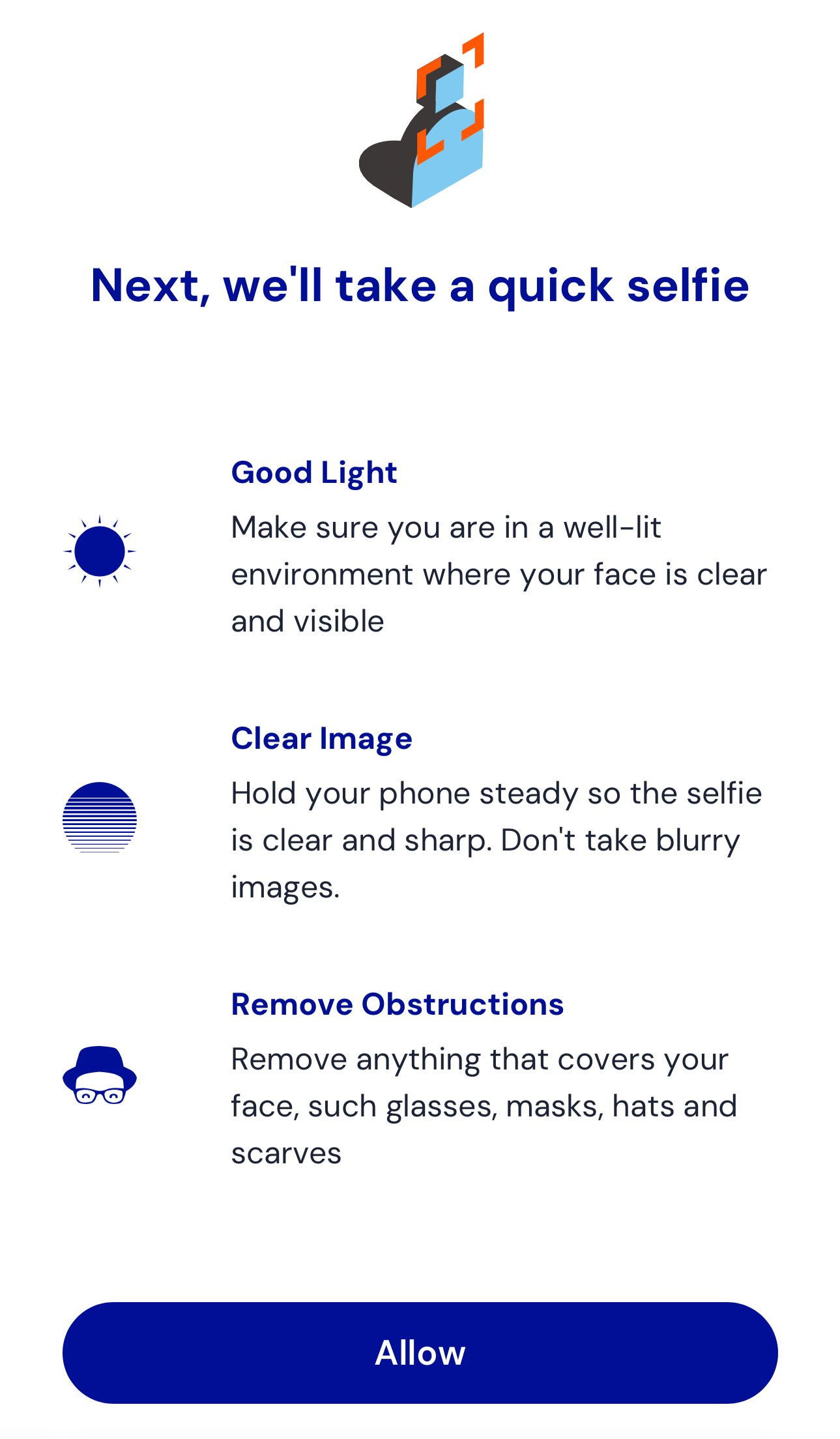
|
|
69
|
+
|
|
70
|
+
After granting access, the capture screen appears:
|
|
71
|
+
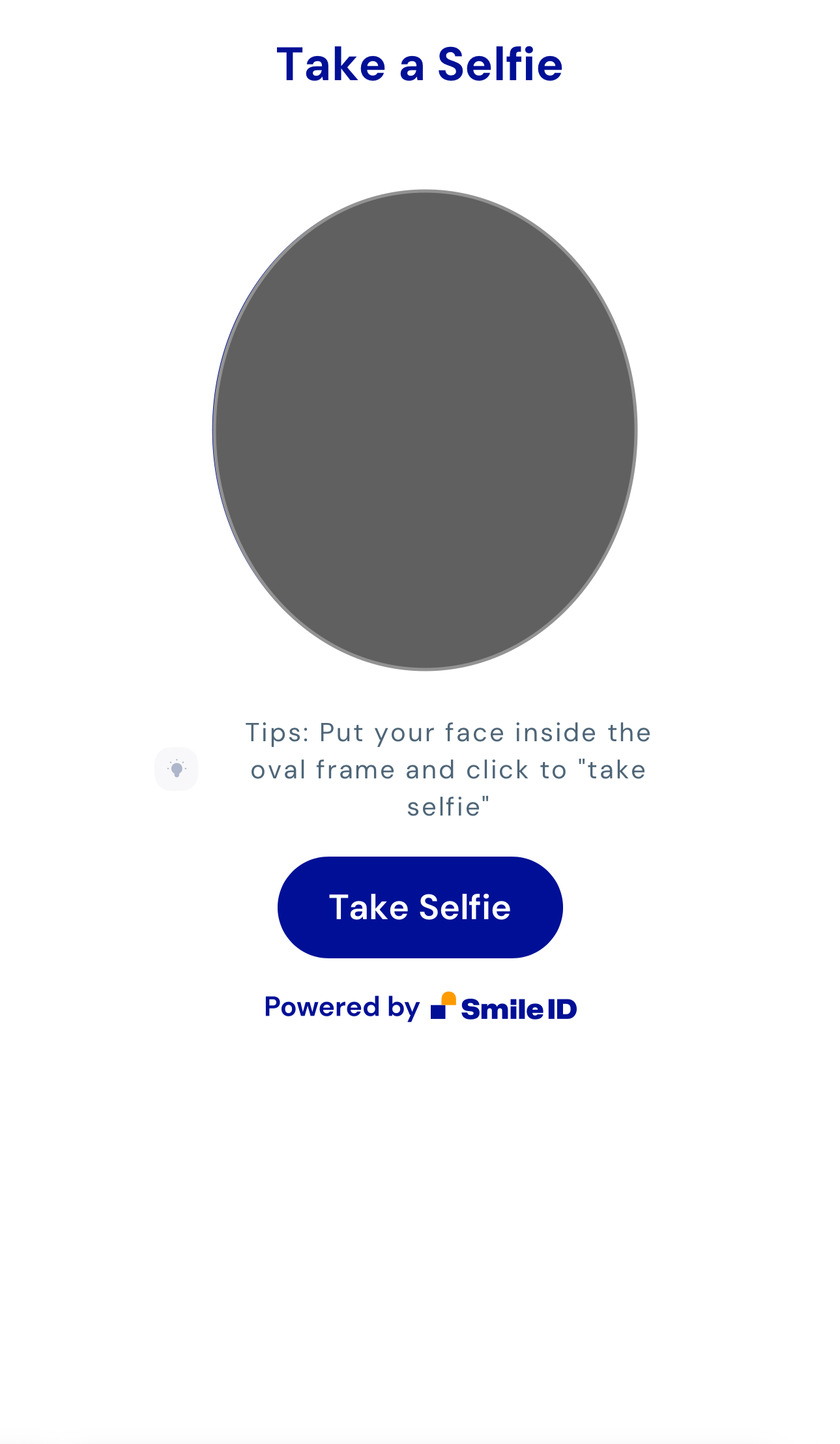
|
|
72
|
+
|
|
73
|
+
Upon capturing a selfie, you'll reach the review screen:
|
|
74
|
+
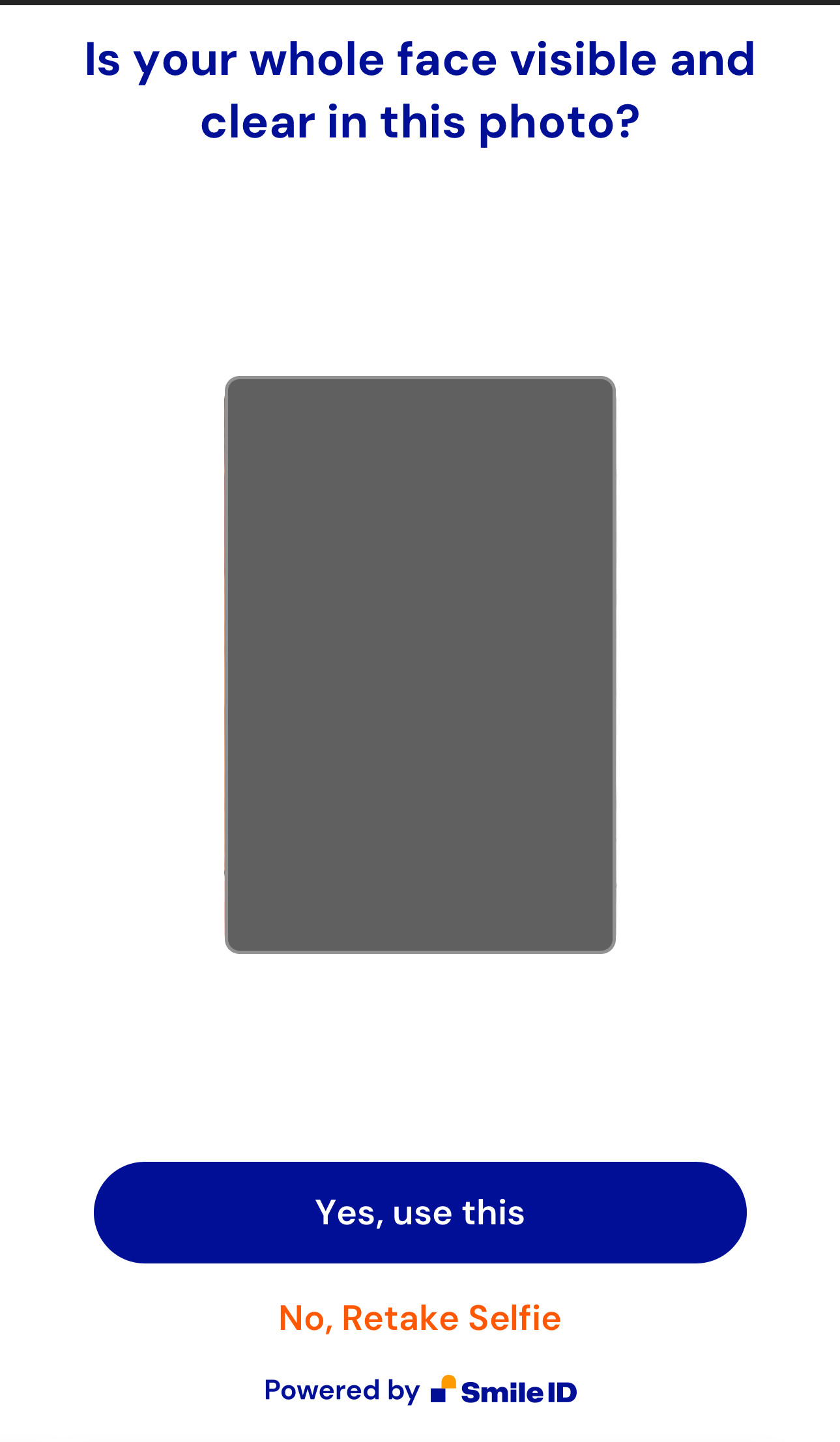
|
|
75
|
+
|
|
76
|
+
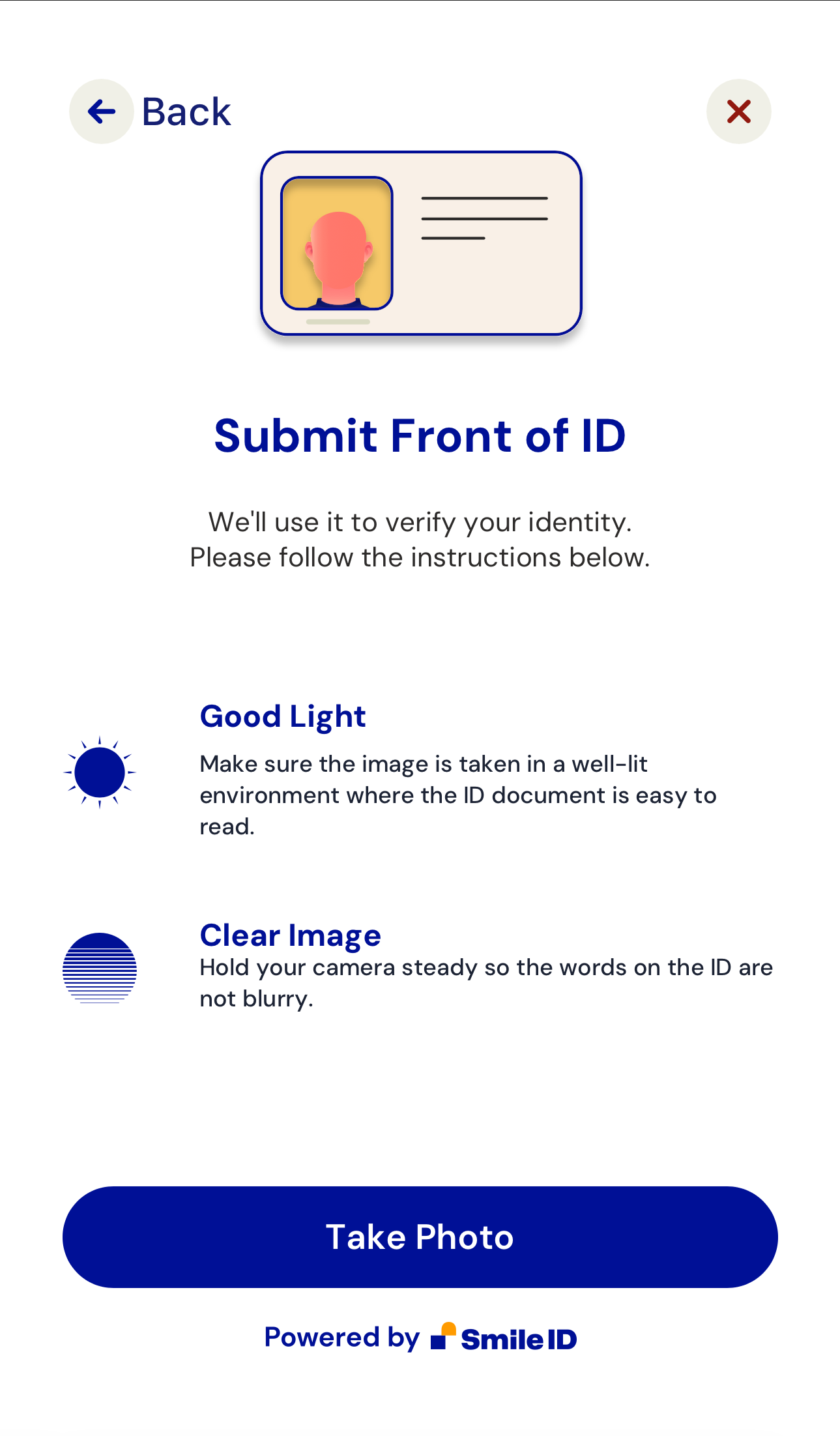
|
|
77
|
+
|
|
78
|
+
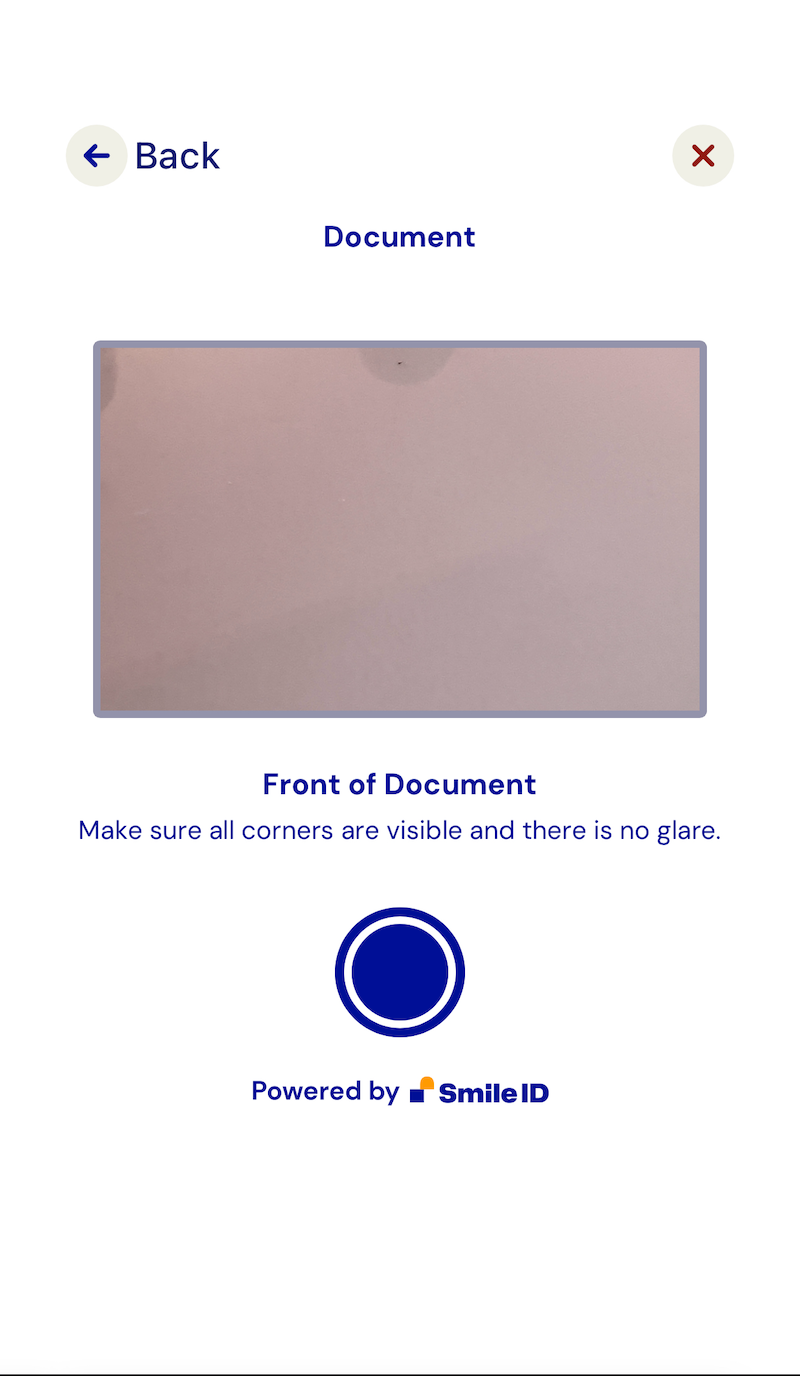
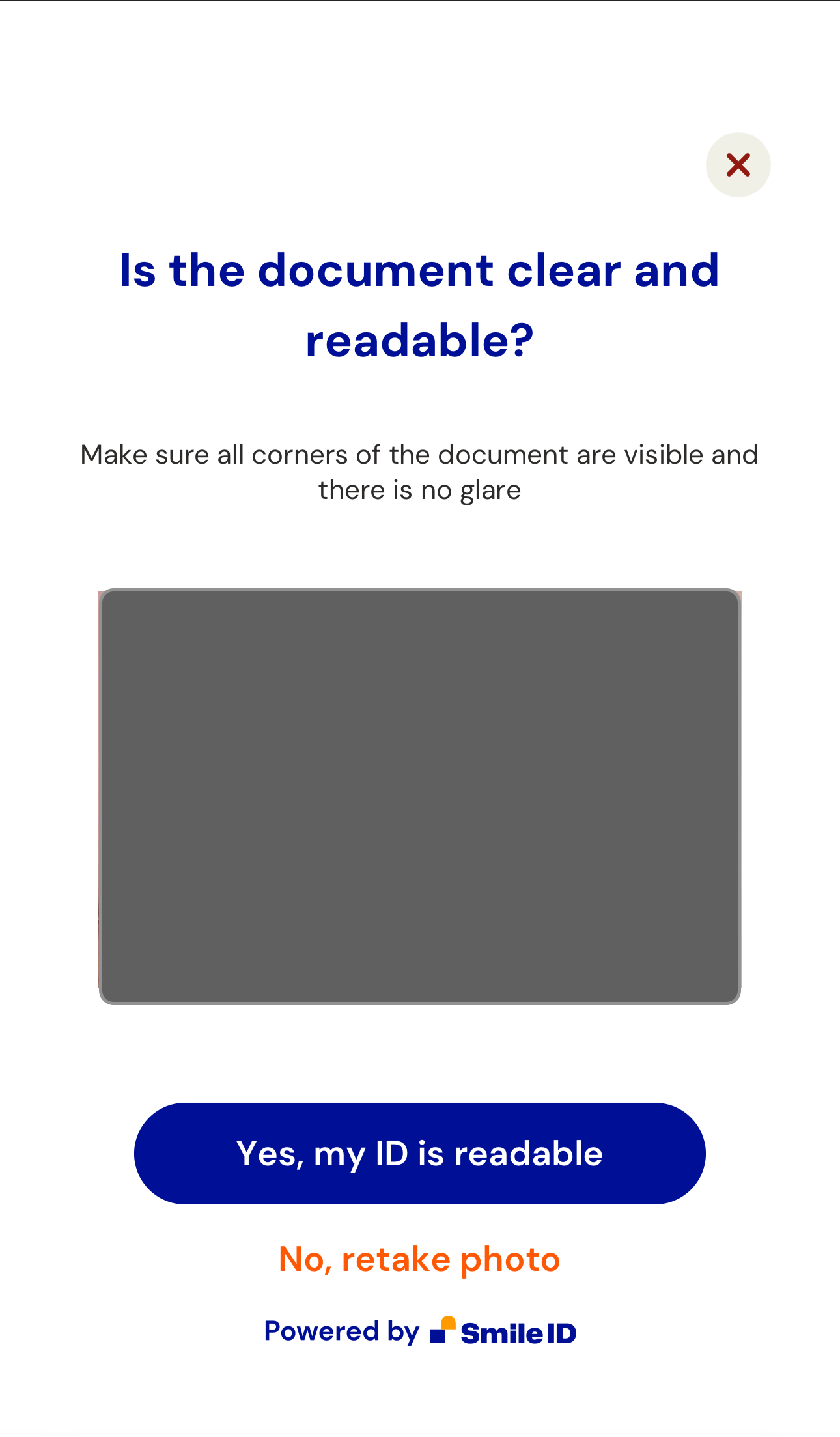
If the `capture-id` attribute is used, additional screens include:
|
|
79
|
+
|
|
80
|
+
|
|
81
|
+
|
|
82
|
+
|
|
83
|
+
|
|
84
|
+
2. Handle the `smart-camera-web.publish` event:
|
|
85
|
+
|
|
86
|
+
When the user approves the captured image, an `smart-camera-web.publish` event is dispatched. The event returns a [CustomEvent](https://developer.mozilla.org/en-US/docs/Web/API/CustomEvent/CustomEvent) payload in `e.detail`.
|
|
87
|
+
|
|
88
|
+
Here's a script example to handle the event and send data to a backend endpoint:
|
|
89
|
+
|
|
90
|
+
```html
|
|
91
|
+
<script>
|
|
92
|
+
const app = document.querySelector('smart-camera-web');
|
|
93
|
+
|
|
94
|
+
const postContent = async (data) => {
|
|
95
|
+
const options = {
|
|
96
|
+
method: 'POST',
|
|
97
|
+
headers: {
|
|
98
|
+
'Content-Type': 'application/json',
|
|
99
|
+
},
|
|
100
|
+
body: JSON.stringify(data),
|
|
101
|
+
};
|
|
102
|
+
|
|
103
|
+
try {
|
|
104
|
+
const response = await fetch('/', options);
|
|
105
|
+
const json = await response.json();
|
|
106
|
+
|
|
107
|
+
return json;
|
|
108
|
+
} catch (e) {
|
|
109
|
+
throw e;
|
|
110
|
+
}
|
|
111
|
+
};
|
|
112
|
+
|
|
113
|
+
app.addEventListener('smart-camera-web.publish', async (e) => {
|
|
114
|
+
try {
|
|
115
|
+
const response = await postContent(e.detail);
|
|
116
|
+
|
|
117
|
+
console.log(response);
|
|
118
|
+
} catch (e) {
|
|
119
|
+
console.error(e);
|
|
120
|
+
}
|
|
121
|
+
});
|
|
122
|
+
</script>
|
|
123
|
+
```
|
|
124
|
+
|
|
125
|
+
The provided backend endpoint uses the NodeJS Server to Server library and ExpressJS:
|
|
126
|
+
|
|
127
|
+
```js
|
|
128
|
+
const express = require('express');
|
|
129
|
+
const { v4: UUID } = require('uuid');
|
|
130
|
+
|
|
131
|
+
if (process.env.NODE_ENV === 'development') {
|
|
132
|
+
const dotenv = require('dotenv');
|
|
133
|
+
|
|
134
|
+
dotenv.config();
|
|
135
|
+
}
|
|
136
|
+
|
|
137
|
+
const SIDCore = require('smile-identity-core');
|
|
138
|
+
const SIDSignature = SIDCore.Signature;
|
|
139
|
+
const SIDWebAPI = SIDCore.WebApi;
|
|
140
|
+
|
|
141
|
+
const app = express();
|
|
142
|
+
|
|
143
|
+
app.use(express.json({ limit: '500kb' }));
|
|
144
|
+
app.use(express.static('public'));
|
|
145
|
+
|
|
146
|
+
app.post('/', async (req, res, next) => {
|
|
147
|
+
try {
|
|
148
|
+
const { PARTNER_ID, API_KEY, SID_SERVER } = process.env;
|
|
149
|
+
const connection = new SIDWebAPI(
|
|
150
|
+
PARTNER_ID,
|
|
151
|
+
'/callback',
|
|
152
|
+
API_KEY,
|
|
153
|
+
SID_SERVER,
|
|
154
|
+
);
|
|
155
|
+
|
|
156
|
+
const partner_params_from_server = {
|
|
157
|
+
user_id: `user-${UUID()}`,
|
|
158
|
+
job_id: `job-${UUID()}`,
|
|
159
|
+
job_type: 4, // job_type is the simplest job we have which enrolls a user using their selfie
|
|
160
|
+
};
|
|
161
|
+
|
|
162
|
+
const {
|
|
163
|
+
images,
|
|
164
|
+
partner_params: { libraryVersion },
|
|
165
|
+
} = req.body;
|
|
166
|
+
|
|
167
|
+
const options = {
|
|
168
|
+
return_job_status: true,
|
|
169
|
+
};
|
|
170
|
+
|
|
171
|
+
const partner_params = Object.assign({}, partner_params_from_server, {
|
|
172
|
+
libraryVersion,
|
|
173
|
+
});
|
|
174
|
+
|
|
175
|
+
const result = await connection.submit_job(
|
|
176
|
+
partner_params,
|
|
177
|
+
images,
|
|
178
|
+
{},
|
|
179
|
+
options,
|
|
180
|
+
);
|
|
181
|
+
|
|
182
|
+
res.json(result);
|
|
183
|
+
} catch (e) {
|
|
184
|
+
console.error(e);
|
|
185
|
+
}
|
|
186
|
+
});
|
|
187
|
+
|
|
188
|
+
// NOTE: This can be used to process responses. don't forget to add it as a callback option in the `connection` config on L22
|
|
189
|
+
// https://docs.usesmileid.com/further-reading/faqs/how-do-i-setup-a-callback
|
|
190
|
+
app.post('/callback', (req, res, next) => {});
|
|
191
|
+
|
|
192
|
+
app.listen(process.env.PORT || 4000);
|
|
193
|
+
```
|
|
194
|
+
|
|
195
|
+
This approach can also be achieved using other Server to Server libraries.
|
|
196
|
+
|
|
197
|
+
## Compatibility
|
|
198
|
+
|
|
199
|
+
`SmartCameraWeb` is compatible with most JavaScript frameworks and libraries. For integration with [ReactJS](https://reactjs.org), refer to this [tutorial](https://www.robinwieruch.de/react-web-components) due to React-WebComponents compatibility issues.
|
|
200
|
+
|
|
201
|
+
## Support
|
|
202
|
+
|
|
203
|
+
Tested on the latest versions of Chrome, Edge, Firefox, and Safari. If compatibility issues arise on certain browsers, please notify us.
|
|
204
|
+
|
|
205
|
+
## Development
|
|
206
|
+
|
|
207
|
+
Note: `smart-camera-web.js` is generated from `src/` using [esbuild](https://esbuild.github.io/). To make changes, edit the source files and run `npm run build` to generate the new `smart-camera-web.js` file.
|
|
@@ -15,7 +15,8 @@ function scwTemplateString() {
|
|
|
15
15
|
<selfie-capture-screens ${this.title} ${this.showNavigation} ${this.disableImageTests} ${this.hideAttribution} ${this.hideInstructions} hidden
|
|
16
16
|
${this.hideBackToHost}
|
|
17
17
|
></selfie-capture-screens>
|
|
18
|
-
<document-capture-screens document-type=${this.documentType} ${this.title} ${this.documentCaptureModes} ${this.showNavigation} ${this.hideAttribution}
|
|
18
|
+
<document-capture-screens document-type=${this.documentType} ${this.title} ${this.documentCaptureModes} ${this.showNavigation} ${this.hideAttribution}
|
|
19
|
+
${this.hideBackOfId} hidden></document-capture-screens>
|
|
19
20
|
</div>
|
|
20
21
|
`;
|
|
21
22
|
}
|
|
@@ -64,6 +65,7 @@ class SmartCameraWeb extends HTMLElement {
|
|
|
64
65
|
'document-type',
|
|
65
66
|
'hide-back-to-host',
|
|
66
67
|
'show-navigation',
|
|
68
|
+
'hide-back-of-id',
|
|
67
69
|
];
|
|
68
70
|
}
|
|
69
71
|
|
|
@@ -71,8 +73,10 @@ class SmartCameraWeb extends HTMLElement {
|
|
|
71
73
|
switch (name) {
|
|
72
74
|
case 'document-capture-modes':
|
|
73
75
|
case 'document-type':
|
|
76
|
+
case 'hide-back-of-id':
|
|
74
77
|
case 'hide-back-to-host':
|
|
75
78
|
case 'show-navigation':
|
|
79
|
+
this.disconnectedCallback();
|
|
76
80
|
this.shadowRoot.innerHTML = this.render();
|
|
77
81
|
this.setUpEventListeners();
|
|
78
82
|
break;
|
|
@@ -195,7 +199,7 @@ class SmartCameraWeb extends HTMLElement {
|
|
|
195
199
|
}
|
|
196
200
|
|
|
197
201
|
get hideBackOfId() {
|
|
198
|
-
return this.hasAttribute('hide-back-of-id');
|
|
202
|
+
return this.hasAttribute('hide-back-of-id') ? 'hide-back-of-id' : '';
|
|
199
203
|
}
|
|
200
204
|
|
|
201
205
|
get showNavigation() {
|
|
@@ -30,7 +30,7 @@
|
|
|
30
30
|
<script src="./js/components/smart-camera-web/src/SmartCameraWeb.js"></script>
|
|
31
31
|
<script>
|
|
32
32
|
const app = document.querySelector('smart-camera-web');
|
|
33
|
-
app.addEventListener('
|
|
33
|
+
app.addEventListener('smart-camera-web.published', async (e) => {
|
|
34
34
|
console.log(e.detail);
|
|
35
35
|
});
|
|
36
36
|
</script>
|
package/package.json
CHANGED
|
@@ -1,6 +1,6 @@
|
|
|
1
1
|
{
|
|
2
2
|
"name": "@smileid/web-components",
|
|
3
|
-
"version": "1.0.
|
|
3
|
+
"version": "1.0.1-beta",
|
|
4
4
|
"exports": {
|
|
5
5
|
".": "./index.js",
|
|
6
6
|
"./combobox": "./components/combobox/src/index.js",
|
|
@@ -32,14 +32,14 @@
|
|
|
32
32
|
"validate.js": "^0.13.1"
|
|
33
33
|
},
|
|
34
34
|
"devDependencies": {
|
|
35
|
-
"cypress": "^13.
|
|
36
|
-
"esbuild": "^0.
|
|
35
|
+
"cypress": "^13.10.0",
|
|
36
|
+
"esbuild": "^0.21.4",
|
|
37
37
|
"eslint": "^8.57.0",
|
|
38
38
|
"eslint-config-airbnb-base": "^15.0.0",
|
|
39
39
|
"eslint-config-prettier": "^9.1.0",
|
|
40
|
-
"eslint-plugin-cypress": "^
|
|
40
|
+
"eslint-plugin-cypress": "^3.0.2",
|
|
41
41
|
"eslint-plugin-import": "^2.29.1",
|
|
42
|
-
"eslint-plugin-jest": "^28.
|
|
42
|
+
"eslint-plugin-jest": "^28.5.0",
|
|
43
43
|
"eslint-plugin-prettier": "^5.1.3",
|
|
44
44
|
"prettier": "^3.2.2"
|
|
45
45
|
}
|