@sj-distributor/react-iconfont-cli 2.4.1 → 2.4.2
This diff represents the content of publicly available package versions that have been released to one of the supported registries. The information contained in this diff is provided for informational purposes only and reflects changes between package versions as they appear in their respective public registries.
package/README.md
CHANGED
|
@@ -1,44 +1,40 @@
|
|
|
1
|
-
|
|
1
|
+
# react-iconfont-cli
|
|
2
2
|
|
|
3
|
-
|
|
3
|
+
> 本仓库是 [react-iconfont-cli](https://github.com/iconfont-cli/react-iconfont-cli) 的维护分支。原仓库长期缺少维护后,我们接管并持续迭代,欢迎通过 Issue 和 PR 提供反馈。
|
|
4
4
|
|
|
5
|
-
|
|
5
|
+
将 iconfont.cn 的图标资源转换为 React 组件,无字体依赖,支持多色图标与自动化生成。
|
|
6
6
|
|
|
7
|
-

|
|
8
8
|
|
|
9
9
|
## 特性
|
|
10
10
|
|
|
11
|
-
|
|
12
|
-
|
|
13
|
-
|
|
14
|
-
<br />
|
|
15
|
-
3、自动化生成图标组件,支持 es6 和 typescript 两种文件格式
|
|
11
|
+
- 纯组件渲染,不依赖字体文件,体积更小
|
|
12
|
+
- 支持单色与多色图标,并可通过参数自定义颜色
|
|
13
|
+
- 自动生成图标组件,支持 JavaScript 与 TypeScript 输出
|
|
16
14
|
|
|
17
|
-
##
|
|
15
|
+
## 快速开始
|
|
18
16
|
|
|
19
|
-
|
|
17
|
+
### 1. 安装
|
|
20
18
|
|
|
21
19
|
```bash
|
|
22
20
|
# Yarn
|
|
23
21
|
yarn add @sj-distributor/react-iconfont-cli --dev
|
|
24
22
|
|
|
25
|
-
#
|
|
26
|
-
|
|
23
|
+
# pnpm
|
|
24
|
+
pnpm install @sj-distributor/react-iconfont-cli --save-dev
|
|
27
25
|
```
|
|
28
26
|
|
|
29
|
-
|
|
30
|
-
|
|
31
|
-
生成配置文件
|
|
27
|
+
### 2. 初始化配置
|
|
32
28
|
|
|
33
29
|
```bash
|
|
34
30
|
npx sj-iconfont-init
|
|
35
31
|
```
|
|
36
32
|
|
|
37
|
-
|
|
33
|
+
执行后会在项目根目录生成 `iconfont.json`:
|
|
38
34
|
|
|
39
35
|
```json
|
|
40
36
|
{
|
|
41
|
-
"symbol_url": "请参考README.md,复制官网提供的JS链接",
|
|
37
|
+
"symbol_url": "请参考 README.md,复制官网提供的 JS 链接",
|
|
42
38
|
"use_typescript": false,
|
|
43
39
|
"save_dir": "./src/components/iconfont",
|
|
44
40
|
"trim_icon_prefix": "icon",
|
|
@@ -48,61 +44,40 @@ npx sj-iconfont-init
|
|
|
48
44
|
}
|
|
49
45
|
```
|
|
50
46
|
|
|
51
|
-
###
|
|
52
|
-
|
|
53
|
-
### symbol_url
|
|
54
|
-
|
|
55
|
-
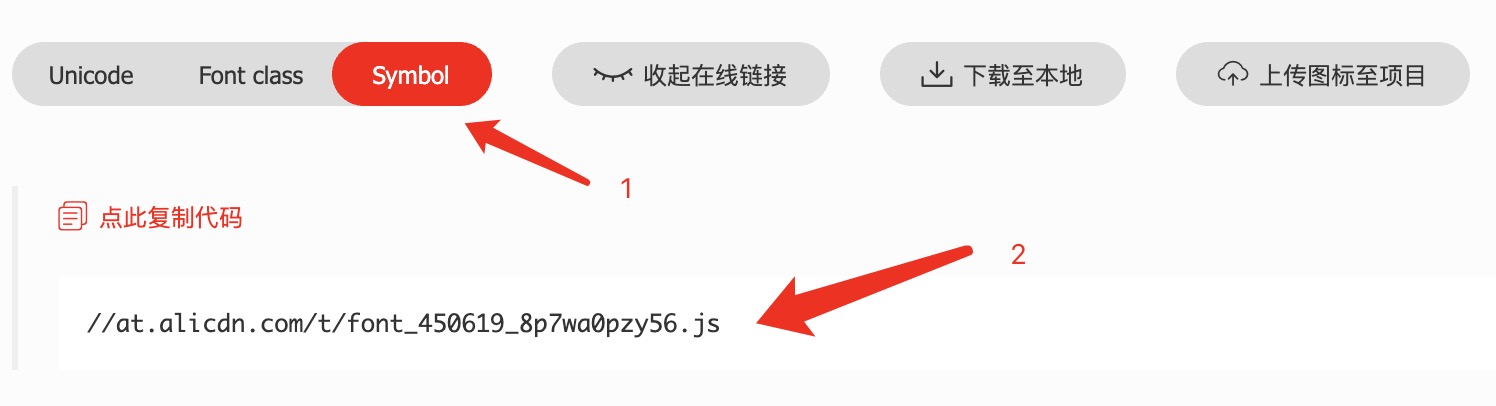
请直接复制[iconfont](http://iconfont.cn)官网提供的项目链接。请务必看清是`.js`后缀而不是.css 后缀。如果你现在还没有创建 iconfont 的仓库,那么可以填入这个链接去测试:`http://at.alicdn.com/t/font_1373348_ghk94ooopqr.js`
|
|
56
|
-
|
|
57
|
-
<br />
|
|
58
|
-
|
|
59
|
-
|
|
60
|
-
|
|
61
|
-
### use_typescript
|
|
62
|
-
|
|
63
|
-
如果您的项目使用 Typescript 编写,请设置为 true。这个选项将决定生成的图标组件是`.tsx`还是`.js`后缀。
|
|
64
|
-
|
|
65
|
-
当该值为 false 时,我们会为您的图标生成`.js`和`.d.ts`两个文件,以便您能享受到最好的开发体验。
|
|
66
|
-
|
|
67
|
-
### save_dir
|
|
47
|
+
### 3. 生成图标组件
|
|
68
48
|
|
|
69
|
-
|
|
70
|
-
|
|
71
|
-
|
|
72
|
-
|
|
73
|
-
如果你的图标有通用的前缀,而你在使用的时候又不想重复去写,那么可以通过这种配置这个选项把前缀统一去掉。
|
|
74
|
-
|
|
75
|
-
注意,这个选项只针对 `<Icon />` 组件有效
|
|
76
|
-
|
|
77
|
-
### unit
|
|
78
|
-
|
|
79
|
-
图标的单位,默认是网页常用单位`px`即像素,也推荐您在手机网页中使用自适应的`rem`单位。
|
|
80
|
-
|
|
81
|
-
### default_icon_size
|
|
82
|
-
|
|
83
|
-
我们将为每个生成的图标组件加入默认的字体大小,当然,你也可以通过传入 props 的方式改变这个 size 值。
|
|
49
|
+
```bash
|
|
50
|
+
npx sj-iconfont-h5
|
|
51
|
+
```
|
|
84
52
|
|
|
85
|
-
|
|
53
|
+
生成完成后请检查 `save_dir` 对应目录。输出结构可参考 [snapshots](./snapshots)。
|
|
86
54
|
|
|
87
|
-
|
|
55
|
+
## 配置项说明
|
|
88
56
|
|
|
89
|
-
|
|
57
|
+
| 字段 | 类型 | 默认值 | 说明 |
|
|
58
|
+
| ------------------- | --------- | --------------------------- | -------------------------------------------------------------------------- |
|
|
59
|
+
| `symbol_url` | `string` | - | iconfont 官网提供的 JS 地址,必须是 `.js` 结尾 |
|
|
60
|
+
| `use_typescript` | `boolean` | `false` | 是否生成 TypeScript 组件。`true` 生成 `.tsx`,`false` 生成 `.js` + `.d.ts` |
|
|
61
|
+
| `save_dir` | `string` | `./src/components/iconfont` | 图标组件输出目录。每次生成前会清空该目录 |
|
|
62
|
+
| `trim_icon_prefix` | `string` | `icon` | 去除图标名前缀,仅对汇总 `Icon` 组件的 `name` 参数生效 |
|
|
63
|
+
| `unit` | `string` | `px` | 图标尺寸单位,常见值如 `px`、`rem` |
|
|
64
|
+
| `default_icon_size` | `number` | `18` | 每个图标组件的默认尺寸 |
|
|
65
|
+
| `can_import_react` | `boolean` | `true` | 是否在生成文件中显式导入 `React` |
|
|
90
66
|
|
|
91
|
-
|
|
67
|
+
`symbol_url` 获取示例:
|
|
92
68
|
|
|
93
|
-
|
|
94
|
-
|
|
95
|
-
```
|
|
69
|
+
- 请在 iconfont 项目中复制官方生成的 JS 链接,而不是 CSS 链接。
|
|
70
|
+
- 你也可以先用这个地址进行测试:`http://at.alicdn.com/t/font_1373348_ghk94ooopqr.js`
|
|
96
71
|
|
|
97
|
-
|
|
72
|
+

|
|
98
73
|
|
|
99
|
-
|
|
74
|
+
## 使用方式
|
|
100
75
|
|
|
101
|
-
|
|
76
|
+
支持两种引入方式。
|
|
102
77
|
|
|
103
|
-
1
|
|
78
|
+
### 1. 使用汇总 Icon 组件
|
|
104
79
|
|
|
105
|
-
```
|
|
80
|
+
```tsx
|
|
106
81
|
import React from "react";
|
|
107
82
|
import IconFont from "../src/iconfont";
|
|
108
83
|
|
|
@@ -116,9 +91,11 @@ export const App = () => {
|
|
|
116
91
|
};
|
|
117
92
|
```
|
|
118
93
|
|
|
119
|
-
2
|
|
94
|
+
### 2. 使用单个图标组件
|
|
95
|
+
|
|
96
|
+
按需引入可避免未使用图标被打包进应用。
|
|
120
97
|
|
|
121
|
-
```
|
|
98
|
+
```tsx
|
|
122
99
|
import React from "react";
|
|
123
100
|
import IconAlipay from "../src/iconfont/IconAlipay";
|
|
124
101
|
import IconWechat from "../src/iconfont/IconWechat";
|
|
@@ -133,70 +110,75 @@ export const App = () => {
|
|
|
133
110
|
};
|
|
134
111
|
```
|
|
135
112
|
|
|
113
|
+
## 图标样式
|
|
114
|
+
|
|
136
115
|
### 图标尺寸
|
|
137
116
|
|
|
138
|
-
|
|
117
|
+
每个图标默认尺寸来自 `default_icon_size`,可通过 `size` 覆盖:
|
|
139
118
|
|
|
140
|
-
```
|
|
119
|
+
```tsx
|
|
141
120
|
<IconFont name="alipay" size={20} />
|
|
142
121
|
```
|
|
143
122
|
|
|
144
|
-

|
|
145
124
|
|
|
146
125
|
### 图标单色
|
|
147
126
|
|
|
148
|
-
|
|
149
|
-
|
|
150
|
-
**注意:如果你在 props 传入的 color 是字符串而不是数组,那么即使原本是多色彩的图标,也会变成单色图标。**
|
|
127
|
+
传入字符串颜色时,图标会按单色渲染:
|
|
151
128
|
|
|
152
|
-
```
|
|
129
|
+
```tsx
|
|
153
130
|
<IconFont name="alipay" color="green" />
|
|
154
131
|
```
|
|
155
132
|
|
|
156
|
-

|
|
157
134
|
|
|
158
|
-
###
|
|
135
|
+
### 图标多色
|
|
159
136
|
|
|
160
|
-
|
|
137
|
+
传入颜色数组时,按路径顺序替换图标颜色:
|
|
161
138
|
|
|
162
|
-
```
|
|
139
|
+
```tsx
|
|
163
140
|
<IconFont name="alipay" color={["green", "orange"]} />
|
|
164
141
|
```
|
|
165
142
|
|
|
166
|
-
|
|
143
|
+
颜色数量与顺序需参考具体图标组件中的路径定义。
|
|
167
144
|
|
|
168
|
-

|
|
169
146
|
|
|
170
147
|
### 与文字并排
|
|
171
148
|
|
|
172
|
-
|
|
149
|
+
图标容器默认是块级效果,建议使用 `flex` 对齐文本:
|
|
173
150
|
|
|
174
|
-
```jsx
|
|
151
|
+
```jsx
|
|
175
152
|
<div style={{ display: "flex", flexDirection: "row", alignItems: "center" }}>
|
|
176
153
|
<span>Hello</span>
|
|
177
154
|
<IconFont name="alipay" />
|
|
178
155
|
</div>
|
|
179
156
|
```
|
|
180
157
|
|
|
181
|
-
|
|
158
|
+
## 更新图标
|
|
182
159
|
|
|
183
|
-
|
|
160
|
+
当 iconfont 项目图标有变更时,更新 `iconfont.json` 中的 `symbol_url` 后重新生成:
|
|
184
161
|
|
|
185
162
|
```bash
|
|
186
|
-
# 修改 symbol_url 配置后执行:
|
|
187
163
|
npx sj-iconfont-h5
|
|
188
164
|
```
|
|
189
165
|
|
|
190
|
-
|
|
166
|
+
## 常见问题
|
|
167
|
+
|
|
168
|
+
### 1. 提示找不到 iconfont.json
|
|
169
|
+
|
|
170
|
+
请先在项目根目录执行:
|
|
171
|
+
|
|
172
|
+
```bash
|
|
173
|
+
npx sj-iconfont-init
|
|
174
|
+
```
|
|
175
|
+
|
|
176
|
+
### 2. 多色图标变成单色
|
|
177
|
+
|
|
178
|
+
如果 `color` 传入的是字符串而不是数组,多色图标会按单色模式渲染。
|
|
191
179
|
|
|
192
|
-
|
|
193
|
-
| ------------ | -------------------------------------------------------------------------------------- |
|
|
194
|
-
| 小程序 | [mini-program-iconfont-cli](https://github.com/iconfont-cli/mini-program-iconfont-cli) |
|
|
195
|
-
| Taro | [taro-iconfont-cli](https://github.com/iconfont-cli/taro-iconfont-cli) |
|
|
196
|
-
| React Native | [react-native-iconfont-cli](https://github.com/iconfont-cli/react-native-iconfont-cli) |
|
|
197
|
-
| Flutter | [flutter-iconfont-cli](https://github.com/iconfont-cli/flutter-iconfont-cli) |
|
|
198
|
-
| Remax | [remax-iconfont-cli](https://github.com/iconfont-cli/remax-iconfont-cli) |
|
|
180
|
+
### 3. 图标没有更新
|
|
199
181
|
|
|
200
|
-
|
|
182
|
+
请确认 `symbol_url` 已替换为最新链接,并再次执行生成命令。
|
|
201
183
|
|
|
202
|
-
|
|
184
|
+
欢迎使用,期待你的反馈与建议。
|
|
@@ -75,6 +75,9 @@ exports.generateComponent = generateComponent;
|
|
|
75
75
|
var generateCase = function (data, baseIdent) {
|
|
76
76
|
var e_1, _a;
|
|
77
77
|
var template = "\n".concat((0, whitespace_1.whitespace)(baseIdent), "<svg viewBox=\"").concat(data.$.viewBox, "\" width={size} height={size} style={style} {...rest}>\n");
|
|
78
|
+
// Determine the primary fill color (first path's fill)
|
|
79
|
+
// to distinguish primary paths from detail paths at runtime.
|
|
80
|
+
var primaryFill = getPrimaryFill(data);
|
|
78
81
|
var _loop_1 = function (domName) {
|
|
79
82
|
if (domName === "$") {
|
|
80
83
|
return "continue";
|
|
@@ -88,11 +91,11 @@ var generateCase = function (data, baseIdent) {
|
|
|
88
91
|
baseIdent: baseIdent,
|
|
89
92
|
};
|
|
90
93
|
if (data[domName].$) {
|
|
91
|
-
template += "".concat((0, whitespace_1.whitespace)(baseIdent + 2), "<").concat(domName).concat(addAttribute(domName, data[domName], counter), "\n").concat((0, whitespace_1.whitespace)(baseIdent + 2), "/>\n");
|
|
94
|
+
template += "".concat((0, whitespace_1.whitespace)(baseIdent + 2), "<").concat(domName).concat(addAttribute(domName, data[domName], counter, primaryFill), "\n").concat((0, whitespace_1.whitespace)(baseIdent + 2), "/>\n");
|
|
92
95
|
}
|
|
93
96
|
else if (Array.isArray(data[domName])) {
|
|
94
97
|
data[domName].forEach(function (sub) {
|
|
95
|
-
template += "".concat((0, whitespace_1.whitespace)(baseIdent + 2), "<").concat(domName).concat(addAttribute(domName, sub, counter), "\n").concat((0, whitespace_1.whitespace)(baseIdent + 2), "/>\n");
|
|
98
|
+
template += "".concat((0, whitespace_1.whitespace)(baseIdent + 2), "<").concat(domName).concat(addAttribute(domName, sub, counter, primaryFill), "\n").concat((0, whitespace_1.whitespace)(baseIdent + 2), "/>\n");
|
|
96
99
|
});
|
|
97
100
|
}
|
|
98
101
|
};
|
|
@@ -112,8 +115,34 @@ var generateCase = function (data, baseIdent) {
|
|
|
112
115
|
template += "".concat((0, whitespace_1.whitespace)(baseIdent), "</svg>\n");
|
|
113
116
|
return template;
|
|
114
117
|
};
|
|
115
|
-
var
|
|
118
|
+
var getPrimaryFill = function (data) {
|
|
116
119
|
var e_2, _a;
|
|
120
|
+
var _b;
|
|
121
|
+
try {
|
|
122
|
+
for (var _c = tslib_1.__values(Object.keys(data)), _d = _c.next(); !_d.done; _d = _c.next()) {
|
|
123
|
+
var domName = _d.value;
|
|
124
|
+
if (domName === "$" || !ATTRIBUTE_FILL_MAP.includes(domName)) {
|
|
125
|
+
continue;
|
|
126
|
+
}
|
|
127
|
+
var firstItem = Array.isArray(data[domName])
|
|
128
|
+
? data[domName][0]
|
|
129
|
+
: data[domName];
|
|
130
|
+
if ((_b = firstItem === null || firstItem === void 0 ? void 0 : firstItem.$) === null || _b === void 0 ? void 0 : _b.fill) {
|
|
131
|
+
return firstItem.$.fill;
|
|
132
|
+
}
|
|
133
|
+
}
|
|
134
|
+
}
|
|
135
|
+
catch (e_2_1) { e_2 = { error: e_2_1 }; }
|
|
136
|
+
finally {
|
|
137
|
+
try {
|
|
138
|
+
if (_d && !_d.done && (_a = _c.return)) _a.call(_c);
|
|
139
|
+
}
|
|
140
|
+
finally { if (e_2) throw e_2.error; }
|
|
141
|
+
}
|
|
142
|
+
return "#333333";
|
|
143
|
+
};
|
|
144
|
+
var addAttribute = function (domName, sub, counter, primaryFill) {
|
|
145
|
+
var e_3, _a;
|
|
117
146
|
var template = "";
|
|
118
147
|
if (sub && sub.$) {
|
|
119
148
|
if (ATTRIBUTE_FILL_MAP.includes(domName)) {
|
|
@@ -125,7 +154,7 @@ var addAttribute = function (domName, sub, counter) {
|
|
|
125
154
|
for (var _b = tslib_1.__values(Object.keys(sub.$)), _c = _b.next(); !_c.done; _c = _b.next()) {
|
|
126
155
|
var attributeName = _c.value;
|
|
127
156
|
if (attributeName === "fill") {
|
|
128
|
-
template += "\n".concat((0, whitespace_1.whitespace)(counter.baseIdent + 4)).concat((0, lodash_1.camelCase)(attributeName), "={getIconColor(color, ").concat(counter.colorIndex, ", '").concat(sub.$[attributeName], "')}");
|
|
157
|
+
template += "\n".concat((0, whitespace_1.whitespace)(counter.baseIdent + 4)).concat((0, lodash_1.camelCase)(attributeName), "={getIconColor(color, ").concat(counter.colorIndex, ", '").concat(sub.$[attributeName], "', '").concat(primaryFill, "')}");
|
|
129
158
|
counter.colorIndex += 1;
|
|
130
159
|
}
|
|
131
160
|
else {
|
|
@@ -133,12 +162,12 @@ var addAttribute = function (domName, sub, counter) {
|
|
|
133
162
|
}
|
|
134
163
|
}
|
|
135
164
|
}
|
|
136
|
-
catch (
|
|
165
|
+
catch (e_3_1) { e_3 = { error: e_3_1 }; }
|
|
137
166
|
finally {
|
|
138
167
|
try {
|
|
139
168
|
if (_c && !_c.done && (_a = _b.return)) _a.call(_b);
|
|
140
169
|
}
|
|
141
|
-
finally { if (
|
|
170
|
+
finally { if (e_3) throw e_3.error; }
|
|
142
171
|
}
|
|
143
172
|
}
|
|
144
173
|
return template;
|
package/package.json
CHANGED
|
@@ -1,3 +1,3 @@
|
|
|
1
1
|
/* eslint-disable */
|
|
2
2
|
|
|
3
|
-
export declare const getIconColor: (color: string | string[] | undefined, index: number, defaultColor: string) => string;
|
|
3
|
+
export declare const getIconColor: (color: string | string[] | undefined, index: number, defaultColor: string, primaryColor: string) => string;
|
|
@@ -6,12 +6,13 @@
|
|
|
6
6
|
* @param {string} defaultColor
|
|
7
7
|
* @return {string}
|
|
8
8
|
*/
|
|
9
|
-
export const getIconColor = (color, index, defaultColor) => {
|
|
9
|
+
export const getIconColor = (color, index, defaultColor, primaryColor) => {
|
|
10
10
|
if (!color) return defaultColor;
|
|
11
11
|
|
|
12
|
-
// When color is a single value, only tint
|
|
12
|
+
// When color is a single value, only tint primary paths. Detail paths
|
|
13
|
+
// (whose defaultColor differs from the icon's primary fill) stay unchanged.
|
|
13
14
|
if (typeof color === 'string') {
|
|
14
|
-
return
|
|
15
|
+
return defaultColor === primaryColor ? color : defaultColor;
|
|
15
16
|
}
|
|
16
17
|
|
|
17
18
|
return color[index] || defaultColor;
|
|
@@ -1,12 +1,13 @@
|
|
|
1
1
|
/* tslint:disable */
|
|
2
2
|
/* eslint-disable */
|
|
3
3
|
|
|
4
|
-
export const getIconColor = (color: string | string[] | undefined, index: number, defaultColor: string) => {
|
|
4
|
+
export const getIconColor = (color: string | string[] | undefined, index: number, defaultColor: string, primaryColor: string) => {
|
|
5
5
|
if (!color) return defaultColor;
|
|
6
6
|
|
|
7
|
-
// When color is a single value, only tint
|
|
7
|
+
// When color is a single value, only tint primary paths. Detail paths
|
|
8
|
+
// (whose defaultColor differs from the icon's primary fill) stay unchanged.
|
|
8
9
|
if (typeof color === 'string') {
|
|
9
|
-
return
|
|
10
|
+
return defaultColor === primaryColor ? color : defaultColor;
|
|
10
11
|
}
|
|
11
12
|
|
|
12
13
|
return color[index] || defaultColor;
|