@silexlabs/silex 3.0.0-alpha.29 → 3.0.0-alpha.32
This diff represents the content of publicly available package versions that have been released to one of the supported registries. The information contained in this diff is provided for informational purposes only and reflects changes between package versions as they appear in their respective public registries.
- package/.silex.js +1 -8
- package/CONTRIBUTING.md +48 -25
- package/README.md +94 -0
- package/dist/client/css/admin.css +4 -66
- package/dist/client/js/main.js +45 -95
- package/dist/client/js/main.js.LICENSE.txt +1 -1
- package/dist/constants.js +4 -0
- package/dist/page.js +15 -0
- package/dist/server/cli.js +9 -0
- package/dist/server/config.js +31 -11
- package/dist/server/{start.js → express.js} +1 -1
- package/dist/server/index.js +9 -3
- package/dist/types.js +34 -0
- package/package.json +5 -4
- package/public/silex.js +25 -0
- package/src/example-client-config.js +47 -0
- package/src/plugins/DefaultBackend.js +19 -4
- package/src/plugins/ExpressPlugin.js +9 -0
- package/src/plugins/PublishPlugin.js +4 -4
- package/src/plugins/WebsitePlugin.js +77 -18
- package/src/ts/client/config.ts +20 -2
- package/src/ts/client/grapesjs/blocks.ts +18 -86
- package/src/ts/client/grapesjs/index.ts +25 -7
- package/src/ts/client/grapesjs/internal-links.test.ts +1 -0
- package/src/ts/client/grapesjs/publish.ts +4 -4
- package/src/ts/client/grapesjs/semantic.ts +1 -0
- package/src/ts/client/index.ts +21 -8
- package/src/ts/constants.ts +5 -0
- package/src/ts/server/cli.ts +6 -0
- package/src/ts/server/config.ts +45 -16
- package/src/ts/server/{start.ts → express.ts} +1 -1
- package/src/ts/server/index.ts +9 -2
- package/src/ts/types.ts +6 -12
- package/tsconfig-server-debug.json +2 -2
- package/tsconfig-server-release.json +2 -2
- package/tsconfig.json +2 -2
- package/webpack.config.js +0 -1
- package/public/example-config.js +0 -31
- package/readme.md +0 -51
- /package/dist/{server/events.js → events.js} +0 -0
- /package/src/ts/{server/events.ts → events.ts} +0 -0
package/.silex.js
CHANGED
|
@@ -5,14 +5,7 @@ module.exports = function (silexConfig, options) {
|
|
|
5
5
|
__dirname + '/src/plugins/StaticPlugin.js',
|
|
6
6
|
__dirname + '/src/plugins/WebsitePlugin.js',
|
|
7
7
|
__dirname + '/src/plugins/PublishPlugin.js',
|
|
8
|
-
]
|
|
9
|
-
'src/plugins/WebsitePlugin.js': {
|
|
10
|
-
backend: 'src/plugins/DefaultBackend.js',
|
|
11
|
-
},
|
|
12
|
-
'src/plugins/PublishPlugin.js': {
|
|
13
|
-
backend: 'src/plugins/DefaultBackend.js',
|
|
14
|
-
},
|
|
15
|
-
})
|
|
8
|
+
])
|
|
16
9
|
|
|
17
10
|
// Return an object to be merged with Silex config
|
|
18
11
|
return {}
|
package/CONTRIBUTING.md
CHANGED
|
@@ -1,13 +1,36 @@
|
|
|
1
1
|
### Overview
|
|
2
2
|
|
|
3
|
-
|
|
3
|
+
This page is about contributing code, but other types of contribution are welcome, [let's chat](https://github.com/silexlabs/Silex/discussions)!
|
|
4
4
|
|
|
5
|
-
|
|
5
|
+
Useful links
|
|
6
|
+
|
|
7
|
+
* [Silex meta repository](https://github.com/silexlabs/silex-meta)
|
|
8
|
+
* [Open positions, join the team](https://github.com/silexlabs/Silex/issues?q=is%3Aissue+is%3Aopen+label%3A%22open+position%22)
|
|
9
|
+
* [Become a core contributor with these issues to get started](https://github.com/silexlabs/Silex/issues?q=is%3Aopen+is%3Aissue+label%3A%22good+first+issue%22)
|
|
10
|
+
* [Testers, docs and other help wanted annoucements](https://github.com/silexlabs/Silex/issues?q=is%3Aopen+is%3Aissue+label%3A%22help+wanted%22)
|
|
11
|
+
|
|
12
|
+
To contribute code (features, bug fixes, design changes etc.) to the Silex code base, you'll need to complete a few steps to get a local working copy of our repository. Below are the steps you'll need to fork, clone, branch, and create a pull request.
|
|
13
|
+
|
|
14
|
+
Please be sure to conform to the coding standards used throughout our project and bear in mind that, by contributing to this project, you agree to our [Code of Conduct](https://github.com/silexlabs/Silex/wiki/Silex-Code-of-Conduct).
|
|
15
|
+
|
|
16
|
+
## Code base overview
|
|
17
|
+
|
|
18
|
+
The Silex API is primarily divided into two parts: the client-side and the server-side.
|
|
19
|
+
|
|
20
|
+
### Client-side
|
|
21
|
+
|
|
22
|
+
The client-side is primarily handled by the files in the `src/ts/client` directory. The main entry point is defined in `index.ts`, which initializes the Silex application. The `config.ts` file contains the `SilexConfig` class that holds the configuration for the client-side application, including the GrapesJS editor configuration and the client config URL. The `grapesjs` directory contains the GrapesJS editor configuration and plugins. The `utils.ts` file contains utility functions.
|
|
23
|
+
|
|
24
|
+
### Server-side
|
|
25
|
+
|
|
26
|
+
The server-side is primarily handled by the files in the `src/ts/server` directory. The main entry point is defined in `index.ts`, which initializes the server-side application. The `config.ts` file contains the `ServerConfig` class that holds the configuration for the server-side application. The `express.ts` file sets up the Express.js application and starts the server. The `cli.ts` file handles the command-line interface for the server, parsing command-line arguments and setting environment variables accordingly. The `events.ts` file defines events for the startup process.
|
|
27
|
+
|
|
28
|
+
## Code contribution process
|
|
6
29
|
|
|
7
30
|
### Steps
|
|
8
31
|
|
|
9
|
-
If you don't have a GitHub account, start [here](https://github.com/join).
|
|
10
|
-
|
|
32
|
+
If you don't have a GitHub account, start [here](https://github.com/join).
|
|
33
|
+
|
|
11
34
|
1. **Fork the project**
|
|
12
35
|
|
|
13
36
|
Open the [Silex Project](https://github.com/silexlabs/Silex/) in GitHub. Click `Fork` in the upper right corner of the window. This adds a copy of the Silex repository to your GitHub account.
|
|
@@ -18,42 +41,42 @@ Please be sure to conform to the coding standards used throughout our project an
|
|
|
18
41
|
|
|
19
42
|
```bash
|
|
20
43
|
# Open command line terminal
|
|
21
|
-
# Navigate to your desired working directory
|
|
44
|
+
# Navigate to your desired working directory
|
|
22
45
|
cd <your-desired-working-directory>
|
|
23
46
|
git clone https://github.com/<your-username>/Silex.git
|
|
24
47
|
```
|
|
25
48
|
|
|
26
49
|
3. **Set the upstream repository**
|
|
27
50
|
|
|
28
|
-
Assign Silex as the upstream repository. Setting the upstream repository tells Git where to pull from when you use the pull command (which you'll do in the next step).
|
|
29
|
-
|
|
51
|
+
Assign Silex as the upstream repository. Setting the upstream repository tells Git where to pull from when you use the pull command (which you'll do in the next step).
|
|
52
|
+
|
|
30
53
|
```bash
|
|
31
54
|
cd Silex
|
|
32
55
|
git remote add upstream https://github.com/silexlabs/Silex.git
|
|
33
56
|
```
|
|
34
|
-
|
|
57
|
+
|
|
35
58
|
4. **Pull the latest upstream changes**
|
|
36
59
|
|
|
37
60
|
```bash
|
|
38
|
-
git pull upstream
|
|
61
|
+
git pull upstream main
|
|
39
62
|
```
|
|
40
63
|
|
|
41
64
|
5. **Create a new branch** (Recommended)
|
|
42
65
|
|
|
43
|
-
Though you can work directly in the default
|
|
66
|
+
Though you can work directly in the default dev branch, it is best practice to keep that branch synced with Silex and create a new working branch for your changes. Name the new branch whatever you'd like.
|
|
44
67
|
|
|
45
68
|
```bash
|
|
46
69
|
git checkout -b <new-branch-name>
|
|
47
70
|
```
|
|
48
|
-
|
|
49
|
-
You'll need to set the upstream branch so git knows where to point your new branch's pull and push commands. Below you set your local
|
|
71
|
+
|
|
72
|
+
You'll need to set the upstream branch so git knows where to point your new branch's pull and push commands. Below you set your local dev branch as the upstream branch to your new branch.
|
|
50
73
|
|
|
51
74
|
```bash
|
|
52
|
-
git branch --set-upstream-to=
|
|
75
|
+
git branch --set-upstream-to=dev <new-branch-name>
|
|
53
76
|
```
|
|
54
77
|
|
|
55
|
-
**Notes on branch management:**
|
|
56
|
-
You can easily see a list of all of the branches in the local repository. The branch with [*] is the current working branch.
|
|
78
|
+
**Notes on branch management:**
|
|
79
|
+
You can easily see a list of all of the branches in the local repository. The branch with [*] is the current working branch.
|
|
57
80
|
|
|
58
81
|
```bash
|
|
59
82
|
git branch
|
|
@@ -63,26 +86,26 @@ Please be sure to conform to the coding standards used throughout our project an
|
|
|
63
86
|
```bash
|
|
64
87
|
git checkout <branch to which you wish to switch>
|
|
65
88
|
```
|
|
66
|
-
|
|
67
|
-
6. **Make your changes**
|
|
89
|
+
|
|
90
|
+
6. **Make your changes**
|
|
68
91
|
Once changes are complete, use one of the following commands to stage the changes to be committed.
|
|
69
92
|
|
|
70
93
|
```bash
|
|
71
94
|
# Add all changes to commit
|
|
72
95
|
git add .
|
|
73
|
-
|
|
96
|
+
|
|
74
97
|
# Add changes from one file to commit
|
|
75
98
|
git add <file-name>
|
|
76
99
|
```
|
|
77
100
|
|
|
78
|
-
**Note on change management:**
|
|
79
|
-
You can always use this command to see which changes are staged for commit and which aren't.
|
|
80
|
-
|
|
101
|
+
**Note on change management:**
|
|
102
|
+
You can always use this command to see which changes are staged for commit and which aren't.
|
|
103
|
+
|
|
81
104
|
```bash
|
|
82
105
|
git status
|
|
83
106
|
```
|
|
84
107
|
|
|
85
|
-
7. **Prepare to commit your changes**
|
|
108
|
+
7. **Prepare to commit your changes**
|
|
86
109
|
Once your changes are ready and all files you wish to commit have been added (step #5), you'll create your commit.
|
|
87
110
|
|
|
88
111
|
```bash
|
|
@@ -94,7 +117,7 @@ Please be sure to conform to the coding standards used throughout our project an
|
|
|
94
117
|
8. **Rebase the upstream branch** into your local branch(es)
|
|
95
118
|
|
|
96
119
|
```bash
|
|
97
|
-
git pull [--rebase] upstream
|
|
120
|
+
git pull [--rebase] upstream dev
|
|
98
121
|
```
|
|
99
122
|
|
|
100
123
|
9. **Push your local branch** up to your fork
|
|
@@ -103,6 +126,6 @@ Please be sure to conform to the coding standards used throughout our project an
|
|
|
103
126
|
git push origin <branch-name>
|
|
104
127
|
```
|
|
105
128
|
|
|
106
|
-
10. **Create a pull request**
|
|
129
|
+
10. **Create a pull request**
|
|
107
130
|
|
|
108
|
-
[Create your request](https://help.github.com/articles/creating-a-pull-request/), making sure the title is as clear and descriptive as possible.
|
|
131
|
+
[Create your request](https://help.github.com/articles/creating-a-pull-request/), making sure the title is as clear and descriptive as possible.
|
package/README.md
ADDED
|
@@ -0,0 +1,94 @@
|
|
|
1
|
+
[](https://editor.silex.me)
|
|
2
|
+
|
|
3
|
+

|
|
4
|
+
|
|
5
|
+
## About Silex, live web creation.
|
|
6
|
+
|
|
7
|
+
Silex is a no-code tool for building websites. It also lets you code when needed. It can be used online, offline or in a JAMStack project.
|
|
8
|
+
|
|
9
|
+
Silex lets you create websites without coding, but it also has built-in editors for HTML, CSS, and JavaScript for when you need more control. It is used by freelancers and web studios to make real websites for real clients. Also Silex can generate templates or be integrated in a nodejs project, it has a plugin system and can integrate with headleass CMS and static site generators, it is part of the JSAMStack ecosystem since the v3.
|
|
10
|
+
|
|
11
|
+
Brought to you by [Alex Hoyau](https://www.patreon.com/lexoyo) and [Silex contributors](https://github.com/silexlabs/Silex/graphs/contributors).
|
|
12
|
+
|
|
13
|
+
Useful links
|
|
14
|
+
|
|
15
|
+
* [Official website](https://www.silex.me/)
|
|
16
|
+
* [Road map (please help defining tasks and prioritising)](https://github.com/orgs/silexlabs/projects/1/views/7)
|
|
17
|
+
* [Bug report in Github issues](https://github.com/silexlabs/Silex/issues)
|
|
18
|
+
* [Forums in Github discussions](https://github.com/silexlabs/Silex/discussions)
|
|
19
|
+
* [Silex meta package with more source code](https://github.com/silexlabs/silex-meta)
|
|
20
|
+
|
|
21
|
+
Here are the main features of Silex website builder:
|
|
22
|
+
|
|
23
|
+
* Free and Open Source, open to contributions
|
|
24
|
+
* Visual Editor: Silex offers a visual editor that allows users to create websites without needing to write code. It supports drag-and-drop functionality for easy website creation.
|
|
25
|
+
* Online CSS Editor: Alongside the visual editor, Silex also provides an online CSS editor for more advanced customization.
|
|
26
|
+
* Static HTML Websites: Silex is designed to create static HTML websites, which are fast, secure, and easy to host.
|
|
27
|
+
* SEO Features: Silex includes SEO features to help improve the visibility of websites on search engines.
|
|
28
|
+
* Editor UI: Silex offers features like fonts, visual CSS editor, publication...
|
|
29
|
+
* Self-hosting Option: Users can choose to host their Silex website builder on their own server.
|
|
30
|
+
* Community Support: Being an open-source project, Silex has a community of developers who contribute to its development and provide support.
|
|
31
|
+
* Silex v3 > Silex is based on [GrapesJs](https://grapesjs.com/)
|
|
32
|
+
* Silex v2 > Sync with Dropbox and FTP: Users can sync their Silex projects with Dropbox and FTP, allowing for easy access and management of files.
|
|
33
|
+
* Silex v2 > Templates: Silex comes with a growing number of templates (both free and paid) that users can use as a starting point for their websites.
|
|
34
|
+
|
|
35
|
+
## Getting Started
|
|
36
|
+
|
|
37
|
+
### Online Version
|
|
38
|
+
|
|
39
|
+
The easiest way to start using Silex is by using the online version provided by [Silex Labs foundation](https://www.silexlabs.org). Simply visit [editor.silex.me](https://editor.silex.me) and start building your website right away.
|
|
40
|
+
|
|
41
|
+
### Desktop App (beta)
|
|
42
|
+
|
|
43
|
+
There is a desktop application that you can install on your computer which may be faster since it uses your local files and it works offline. You can download the desktop app from the [Silex desktop repository](https://github.com/silexlabs/silex-desktop/releases/latest).
|
|
44
|
+
|
|
45
|
+
### Local or Server Installation
|
|
46
|
+
|
|
47
|
+
You can also run Silex locally or on your server using `npx`, `npm`, or `Docker`.
|
|
48
|
+
|
|
49
|
+
#### Using npx
|
|
50
|
+
|
|
51
|
+
```bash
|
|
52
|
+
npx @silexlabs/silex
|
|
53
|
+
```
|
|
54
|
+
|
|
55
|
+
This command will run Silex with the entry point being `src/ts/server/cli.ts`.
|
|
56
|
+
|
|
57
|
+
#### Using Docker
|
|
58
|
+
|
|
59
|
+
```bash
|
|
60
|
+
docker run -p 6805:6805 silexlabs/silex
|
|
61
|
+
```
|
|
62
|
+
|
|
63
|
+
This command will run Silex in a Docker container with the entry point being `src/ts/server/index.ts`.
|
|
64
|
+
|
|
65
|
+
#### Using npm
|
|
66
|
+
|
|
67
|
+
First, install Silex as a dev dependency in your project:
|
|
68
|
+
|
|
69
|
+
```bash
|
|
70
|
+
npm install --save-dev @silexlabs/silex
|
|
71
|
+
```
|
|
72
|
+
|
|
73
|
+
Then, you can run Silex with the `silex` command. The entry point is `src/ts/server/cli.ts`.
|
|
74
|
+
|
|
75
|
+
## Configuration
|
|
76
|
+
|
|
77
|
+
You can configure Silex using environment variables and command-line options. All available options can be found in `src/ts/server/cli.ts`.
|
|
78
|
+
|
|
79
|
+
## Contributing
|
|
80
|
+
|
|
81
|
+
Contributions are welcome! Please read our [contributing guidelines](CONTRIBUTING.md) for details on how to contribute to Silex.
|
|
82
|
+
|
|
83
|
+
## License
|
|
84
|
+
|
|
85
|
+
Silex is free and open-source software licensed under the [GPL-3.0](LICENSE.md).
|
|
86
|
+
|
|
87
|
+
## Dependencies
|
|
88
|
+
|
|
89
|
+
The upstream projects we use in Silex are all listed in [Silex meta package](https://github.com/silexlabs/silex-meta)
|
|
90
|
+
|
|
91
|
+
## Github stars history
|
|
92
|
+
|
|
93
|
+
[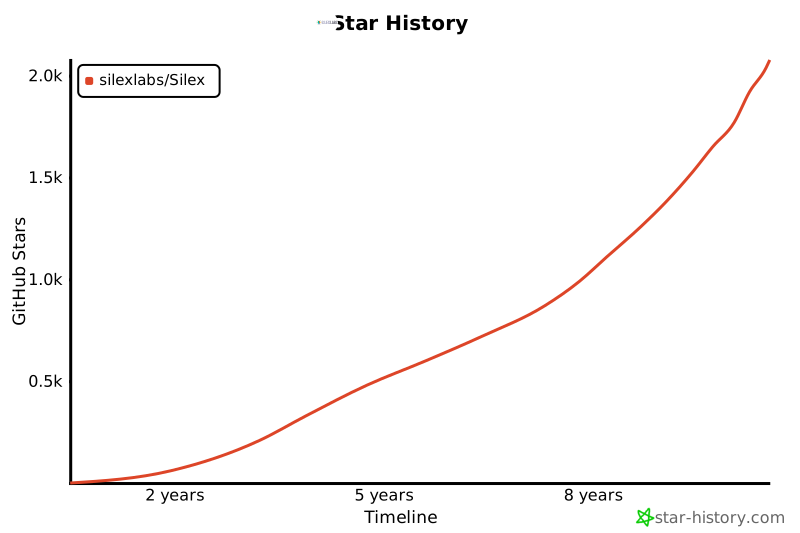](https://star-history.com/#silexlabs/Silex&Timeline)
|
|
94
|
+
|
|
@@ -1477,13 +1477,6 @@ See http://bgrins.github.io/spectrum/themes/ for instructions.
|
|
|
1477
1477
|
/* Commands */
|
|
1478
1478
|
/* Fonts */
|
|
1479
1479
|
/* Tools */
|
|
1480
|
-
@font-face {
|
|
1481
|
-
font-family: "font3336";
|
|
1482
|
-
src: url("../fonts/main-fonts.eot?v=20");
|
|
1483
|
-
src: url("../fonts/main-fonts.woff?v=20") format("woff"), url("../fonts/main-fonts.ttf?v=20") format("truetype"), url("../fonts/main-fonts.svg?v=20") format("svg"), url("../fonts/main-fonts.eot?v=20") format("embedded-opentype");
|
|
1484
|
-
font-weight: normal;
|
|
1485
|
-
font-style: normal;
|
|
1486
|
-
}
|
|
1487
1480
|
.gjs-is__grab, .gjs-is__grab * {
|
|
1488
1481
|
cursor: grab !important;
|
|
1489
1482
|
}
|
|
@@ -1564,63 +1557,6 @@ See http://bgrins.github.io/spectrum/themes/ for instructions.
|
|
|
1564
1557
|
fill: #71b7f1;
|
|
1565
1558
|
}
|
|
1566
1559
|
|
|
1567
|
-
.gjs-fonts::before {
|
|
1568
|
-
display: block;
|
|
1569
|
-
font: normal normal normal 14px font3336;
|
|
1570
|
-
text-rendering: auto;
|
|
1571
|
-
-webkit-font-smoothing: antialiased;
|
|
1572
|
-
-moz-osx-font-smoothing: grayscale;
|
|
1573
|
-
font-size: 5em;
|
|
1574
|
-
}
|
|
1575
|
-
|
|
1576
|
-
.gjs-f-b1::before {
|
|
1577
|
-
content: "Q";
|
|
1578
|
-
}
|
|
1579
|
-
|
|
1580
|
-
.gjs-f-b2::before {
|
|
1581
|
-
content: "W";
|
|
1582
|
-
}
|
|
1583
|
-
|
|
1584
|
-
.gjs-f-b3::before {
|
|
1585
|
-
content: "E";
|
|
1586
|
-
}
|
|
1587
|
-
|
|
1588
|
-
.gjs-f-b37::before {
|
|
1589
|
-
content: "R";
|
|
1590
|
-
}
|
|
1591
|
-
|
|
1592
|
-
.gjs-f-hero::before {
|
|
1593
|
-
content: "T";
|
|
1594
|
-
}
|
|
1595
|
-
|
|
1596
|
-
.gjs-f-h1p::before {
|
|
1597
|
-
content: "y";
|
|
1598
|
-
}
|
|
1599
|
-
|
|
1600
|
-
.gjs-f-3ba::before {
|
|
1601
|
-
content: "u";
|
|
1602
|
-
}
|
|
1603
|
-
|
|
1604
|
-
.gjs-f-image::before {
|
|
1605
|
-
content: "I";
|
|
1606
|
-
}
|
|
1607
|
-
|
|
1608
|
-
.gjs-f-text::before {
|
|
1609
|
-
content: "o";
|
|
1610
|
-
}
|
|
1611
|
-
|
|
1612
|
-
.gjs-f-quo::before {
|
|
1613
|
-
content: "p";
|
|
1614
|
-
}
|
|
1615
|
-
|
|
1616
|
-
.gjs-f-button::before {
|
|
1617
|
-
content: "B";
|
|
1618
|
-
}
|
|
1619
|
-
|
|
1620
|
-
.gjs-f-divider::before {
|
|
1621
|
-
content: "D";
|
|
1622
|
-
}
|
|
1623
|
-
|
|
1624
1560
|
.gjs-invis-invis, .gjs-clm-tags #gjs-clm-new,
|
|
1625
1561
|
.gjs-no-app {
|
|
1626
1562
|
background-color: transparent;
|
|
@@ -3729,11 +3665,13 @@ See http://bgrins.github.io/spectrum/themes/ for instructions.
|
|
|
3729
3665
|
|
|
3730
3666
|
/*************RTE****************/
|
|
3731
3667
|
.gjs-rte-toolbar {
|
|
3732
|
-
border: 1px solid rgba(0, 0, 0, 0.2);
|
|
3733
3668
|
position: absolute;
|
|
3734
|
-
border-radius: 3px;
|
|
3735
3669
|
z-index: 10;
|
|
3736
3670
|
}
|
|
3671
|
+
.gjs-rte-toolbar-ui {
|
|
3672
|
+
border: 1px solid rgba(0, 0, 0, 0.2);
|
|
3673
|
+
border-radius: 3px;
|
|
3674
|
+
}
|
|
3737
3675
|
.gjs-rte-actionbar {
|
|
3738
3676
|
display: flex;
|
|
3739
3677
|
}
|