@signalk/freeboard-sk 3.2.0 → 3.3.0-beta.0
This diff represents the content of publicly available package versions that have been released to one of the supported registries. The information contained in this diff is provided for informational purposes only and reflects changes between package versions as they appear in their respective public registries.
- package/README.md +276 -276
- package/package.json +18 -14
- package/plugin/vitest.config.mjs +1 -0
- package/public/assets/features/anchor-watch-1.jpg +0 -0
- package/public/assets/features/anchor-watch-2.jpg +0 -0
- package/public/assets/features/anchor-watch-3.jpg +0 -0
- package/public/assets/features/collision-alarm-display-1.jpg +0 -0
- package/public/assets/features/collision-alarm-display-2.jpg +0 -0
- package/public/assets/features/extension-panels-3.jpg +0 -0
- package/public/assets/features/radar-guard-zones-1.jpg +0 -0
- package/public/assets/features/radar-guard-zones-2.jpg +0 -0
- package/public/assets/features/radar-overlay-2.jpg +0 -0
- package/public/assets/features/radar-overlay-3.jpg +0 -0
- package/public/assets/features/route-planning-3.jpg +0 -0
- package/public/assets/features/route-planning-4.jpg +0 -0
- package/public/assets/features-corpus.json +1 -1
- package/public/assets/help/index.html +53 -124
- package/public/{chunk-D4A5NW5G.js → chunk-45ZTFAA5.js} +1 -1
- package/public/{chunk-4UBQTQSK.js → chunk-62WHV6CJ.js} +11 -11
- package/public/{chunk-6ZXMFU55.js → chunk-67S2RK5V.js} +1 -1
- package/public/{chunk-BJKB23AZ.js → chunk-6E2BDKCH.js} +1 -1
- package/public/{chunk-VQDXDSU7.js → chunk-AQKT2J2C.js} +1 -1
- package/public/chunk-BXGNCKBA.js +1 -0
- package/public/chunk-F4EUFUYM.js +4097 -0
- package/public/chunk-I33LU6L4.js +1 -0
- package/public/{chunk-YB4RBYE2.js → chunk-IGMXHN4X.js} +1 -1
- package/public/{chunk-RRYFRHFP.js → chunk-ISXARX6U.js} +1 -1
- package/public/chunk-J6MIIPAV.js +1 -0
- package/public/{chunk-7OBOGNNY.js → chunk-MX5HWKAH.js} +1 -1
- package/public/{chunk-5SYZI253.js → chunk-MYBGWSLC.js} +1 -1
- package/public/chunk-OBOT3EYE.js +1 -0
- package/public/chunk-OKVIYJ6A.js +1 -0
- package/public/{chunk-OVB2ZLN5.js → chunk-PAHYECKY.js} +1 -1
- package/public/{chunk-BNCDJR4Z.js → chunk-PD55PKQG.js} +2 -2
- package/public/chunk-QIIV7CZB.js +1 -0
- package/public/{chunk-BCS6VHKX.js → chunk-RG7WQ7O2.js} +15 -15
- package/public/chunk-S2NZQZZH.js +1 -0
- package/public/{chunk-R7YVRRY3.js → chunk-T7ZWMXKZ.js} +1 -1
- package/public/{chunk-GBMW6IJP.js → chunk-X6D4D6EN.js} +1 -1
- package/public/{chunk-USYMWMPO.js → chunk-YSHHABBQ.js} +1 -1
- package/public/{chunk-XZM7Q5WP.js → chunk-YZN4NRWW.js} +1 -1
- package/public/{chunk-P57WKW3G.js → chunk-Z2D7B2ZG.js} +1 -1
- package/public/index.html +2 -2
- package/public/main-S6QEWGOY.js +468 -0
- package/public/{styles-YRQUZIIZ.css → styles-BRU77GKR.css} +1 -1
- package/public/worker-E75PSRY4.js +12 -0
- package/public/worker-PCWM7FLK.js +3 -0
- package/public/{worker-BFPH3XRP.js → worker-UJD2XPGR.js} +6 -6
- package/public/worker-W3UMLYIU.js +12 -0
- package/public/chunk-A2UDMCI5.js +0 -1
- package/public/chunk-EDKY4MXN.js +0 -1
- package/public/chunk-GFDZNVNU.js +0 -4372
- package/public/chunk-H54CRRPU.js +0 -1
- package/public/chunk-HT6GODHM.js +0 -1
- package/public/chunk-RQKGK2KO.js +0 -1
- package/public/chunk-UBTZRPVO.js +0 -1
- package/public/chunk-XXGLBGHG.js +0 -1
- package/public/main-LYWXFV5I.js +0 -468
- package/public/worker-5LIQ6F6U.js +0 -12
- package/public/worker-DYC3TMVW.js +0 -3
- package/public/worker-SUE26ZZI.js +0 -12
package/README.md
CHANGED
|
@@ -1,278 +1,278 @@
|
|
|
1
|
-
# Freeboard-SK
|
|
2
|
-
Freeboard-SK is a stateless, multi-station, Openlayers based chart plotter for Signal K.
|
|
3
|
-
Use it to display:
|
|
4
|
-
- Resources _(i.e. routes, waypoints, notes, charts, etc)_
|
|
5
|
-
- Alarms & notifications
|
|
6
|
-
- AIS information
|
|
7
|
-
- Weather information
|
|
8
|
-
- Signal K instrument WebApps.
|
|
9
|
-
|
|
10
|
-
and more from any web enabled device.
|
|
11
|
-
|
|
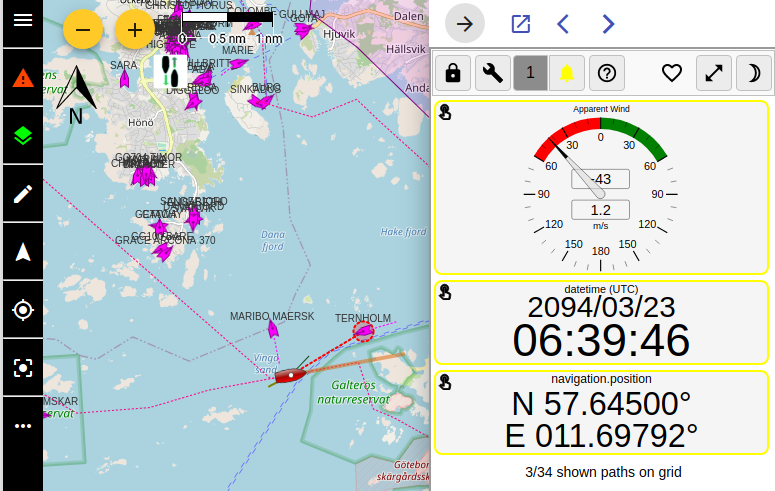
12
|
-

|
|
13
|
-
|
|
14
|
-
|
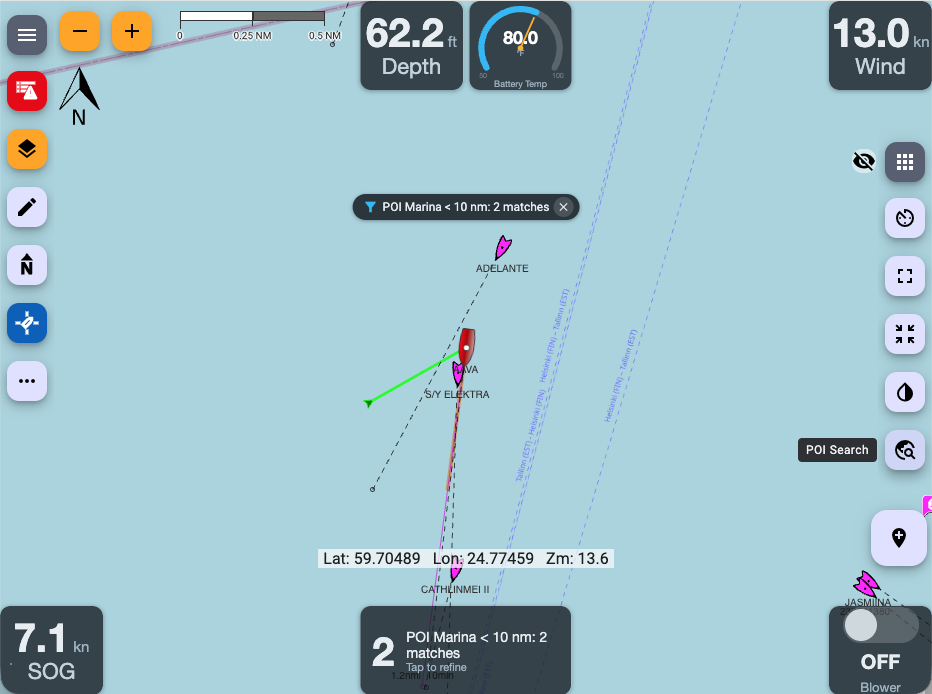
|
15
|
-
See the [FAQs](https://github.com/SignalK/freeboard-sk/wiki) for more information.
|
|
16
|
-
|
|
17
|
-
## Features:
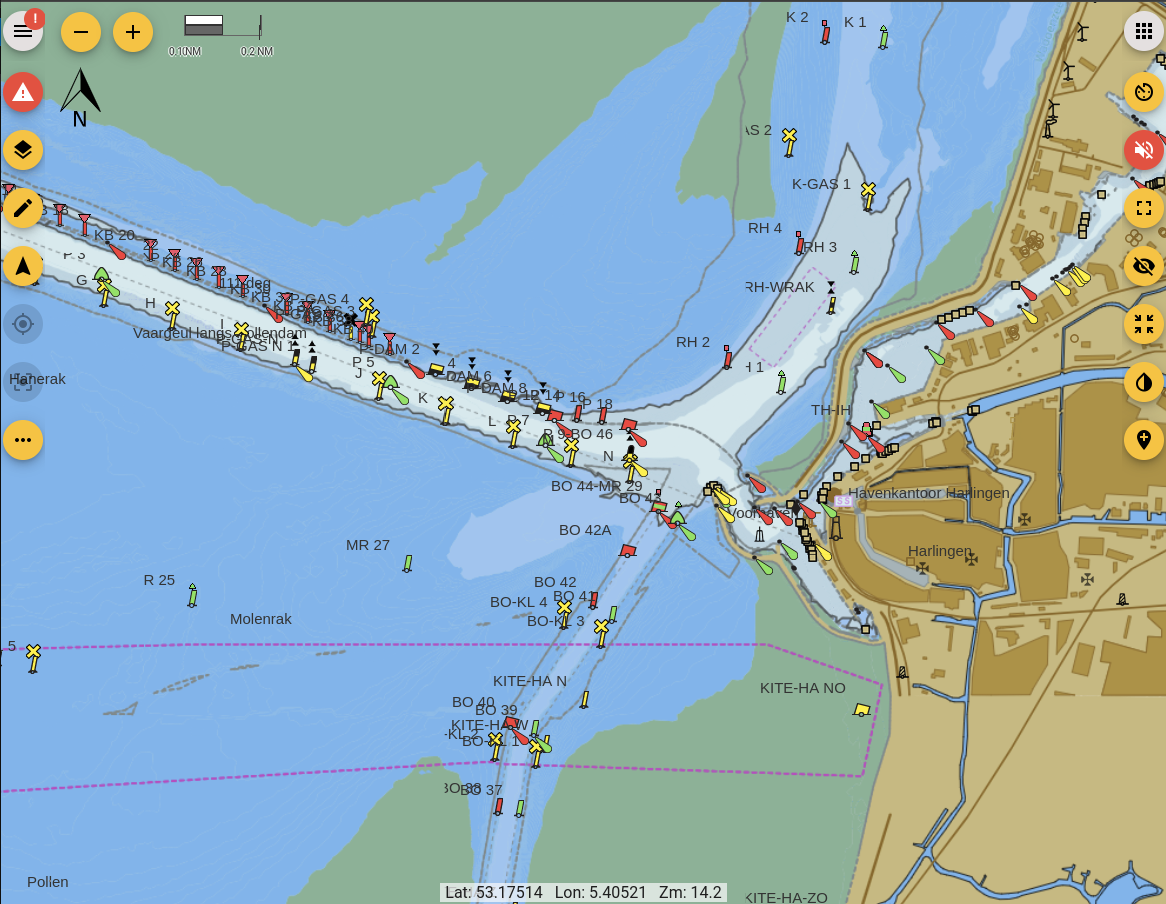
|
|
18
|
-
|
|
19
|
-
### Vessel / Chart Display:
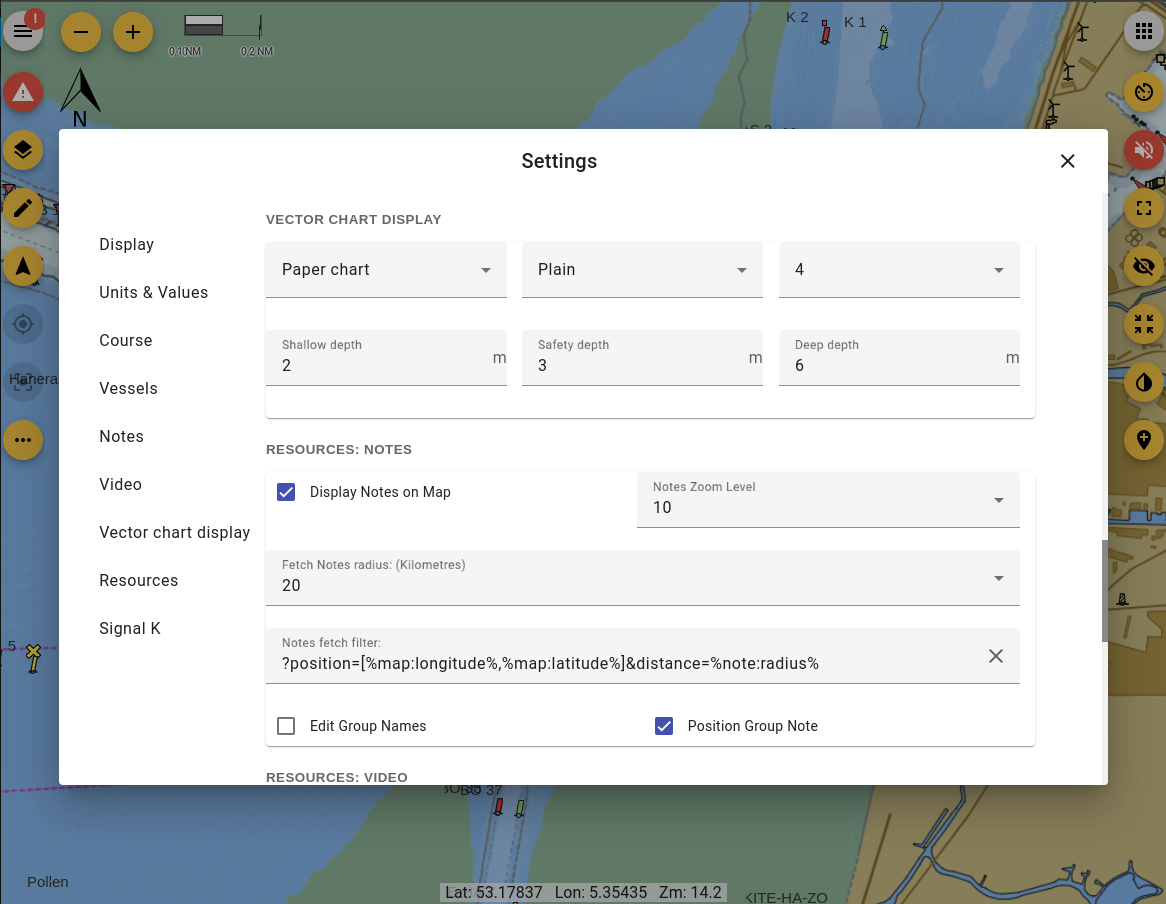
|
|
20
|
-
|
|
21
|
-
Moving map display with:
|
|
22
|
-
|
|
23
|
-
- Multiple chart overlay using both of online and locally served charts
|
|
24
|
-
- Radar overlay
|
|
25
|
-
- Built in support (no plugin required) for OpenStreetMap and OpenSeaMap(from Signal K server)
|
|
26
|
-
- North-up / Vessel-up orientation
|
|
27
|
-
- Moving Map / Moving Vessel
|
|
28
|
-
- Vessel Heading / Bearing lines
|
|
29
|
-
- Wind True / Apparent display
|
|
30
|
-
- Closest point of approach
|
|
31
|
-
|
|
32
|
-
and more.
|
|
33
|
-
|
|
34
|
-
Charts are sourced from the `/resources/charts` path on the Signal K server and the following chart types / sources are supported:
|
|
35
|
-
|
|
36
|
-
- Image tiles _(XYZ)_
|
|
37
|
-
- Vector Tiles _(MVT / PBF)_
|
|
38
|
-
- [S57 ENC's converted to vector tiles](#S57-charts) _(MVT / PBF)_
|
|
39
|
-
- WMS _(Web Map Server)_
|
|
40
|
-
- WMTS _(Web Map Tile Server)_
|
|
41
|
-
- PMTiles _(ProtoMap files)_
|
|
42
|
-
|
|
43
|
-
---
|
|
44
|
-
|
|
45
|
-
### Resources:
|
|
46
|
-
|
|
47
|
-
Freeboard-SK supports the creation, editing and deletion of all resource types defined in the Signal K specification that are available under the `/resources` path.
|
|
48
|
-
|
|
49
|
-
__Routes and Waypoints:__
|
|
50
|
-
|
|
51
|
-
_Path(s): `/resources/routes`, `/resources/waypoints`_
|
|
52
|
-
|
|
53
|
-
- Show / Hide Routes & Waypoints
|
|
54
|
-
- Set a Waypoint as a destination
|
|
55
|
-
- Set an active Route
|
|
56
|
-
- Select destination point along an Active Route
|
|
57
|
-
- Create / Edit / Delete Routes
|
|
58
|
-
- Create / Edit / Delete Waypoints
|
|
59
|
-
- Create Waypoint at current vessel position
|
|
60
|
-
- Import Routes and Waypoints from GPX files
|
|
61
|
-
- Attach Notes to Routes & Waypoints
|
|
62
|
-
|
|
63
|
-
__Notes and Regions:__
|
|
64
|
-
|
|
65
|
-
_Path(s): `/resources/notes`, `/resources/regions`_
|
|
66
|
-
|
|
67
|
-
- Display Notes and Regions
|
|
68
|
-
- View / Edit Note properties
|
|
69
|
-
- Draw Regions and attach Notes
|
|
70
|
-
- Add / Edit / Delete Notes
|
|
71
|
-
- Attach Notes to Regions
|
|
72
|
-
|
|
73
|
-
__Tracks:__
|
|
74
|
-
|
|
75
|
-
Whilst not specifically defined in the Signal K specification, Freeboard-SK supports the import and display of tracks from GPX files which are available under the `/resources/tracks` path.
|
|
76
|
-
|
|
77
|
-
- Show / Hide Tracks
|
|
78
|
-
- Delete Tracks
|
|
79
|
-
|
|
80
|
-
---
|
|
81
|
-
|
|
82
|
-
### Radar Overlay:
|
|
83
|
-
|
|
84
|
-
Freeboard-SK supports the Signal K RADAR API which provides connection to radars via the MAYARA server.
|
|
85
|
-
|
|
86
|
-
> Note: Requires `signalk-container` & `@marineyachtradar/signalk-plugin` to be installed on the Signal K Server.
|
|
87
|
-
|
|
88
|
-

|
|
89
|
-
|
|
90
|
-
---
|
|
91
|
-
|
|
92
|
-
### Autopilot Console:
|
|
93
|
-
|
|
94
|
-
Freeboard-SK supports the Signal K Autopilot API which enables common operations to be performed
|
|
95
|
-
including:
|
|
96
|
-
- Engage / Disengage the autopilot
|
|
97
|
-
- Setting the operation mode e.g. compass, route, gps, etc.
|
|
98
|
-
- Setting and adjusting the target heading
|
|
99
|
-
- Dodging obstacles
|
|
100
|
-
|
|
101
|
-

|
|
102
|
-
|
|
103
|
-
---
|
|
104
|
-
|
|
105
|
-
### Alarms and Notifications:
|
|
106
|
-
|
|
107
|
-
Freeboard-SK can display alarms _(visual and audio)_ & messages contained in *Notification* messages transmitted by the Signal K server.
|
|
108
|
-
|
|
109
|
-
Additionally you can set alarms, including _anchor watch_, as well as raise alarms such as _man overboard_, _sinking_, etc directly from the user interface.
|
|
110
|
-
|
|
111
|
-
Supported alarm types include:
|
|
112
|
-
- Depth
|
|
113
|
-
- Closest Approach
|
|
114
|
-
- Anchor drag / watch
|
|
115
|
-
- "Buddy" notifications
|
|
116
|
-
- All Signal K specification defined alarms.
|
|
117
|
-
|
|
118
|
-
|
|
119
|
-
Freeboard-SK also implements API endpoints to accept requests for raising and clearing Signal K specification defined alarms.
|
|
120
|
-
|
|
121
|
-
_See OpenAPI documentation in Signal K Server Admin UI for details._
|
|
122
|
-
|
|
123
|
-
|
|
124
|
-
---
|
|
125
|
-
|
|
126
|
-
### History Playback
|
|
127
|
-
|
|
128
|
-
Freeboard-SK supports the Signal K `playback` api and can replay recorded time-series data captured on a Signal K server equipped with the `signalk-to-infludb` plugin.
|
|
129
|
-
|
|
130
|
-
---
|
|
131
|
-
|
|
132
|
-
### Instruments:
|
|
133
|
-
|
|
134
|
-
Freeboard-SK allows you to use your favourite instrumentation apps installed on the Signal K server.
|
|
135
|
-
|
|
136
|
-
Select one or more installed applications listed in the `settings` screen and they will displayed in the instrument drawer.
|
|
137
|
-
|
|
138
|
-
When more than one app is selected you can cycle through them within the instrument drawer.
|
|
139
|
-
|
|
140
|
-
_Note: The `Signal K Instrument Panel` app will be displayed if no user selection has been made._
|
|
141
|
-
|
|
142
|
-
|
|
143
|
-
|
|
144
|
-
---
|
|
145
|
-
|
|
146
|
-
### Screen Widgets:
|
|
147
|
-
|
|
148
|
-
If you have installed any plugins on your Signal K server that provide screen widgets, you can place them directly onto the chart screen.
|
|
149
|
-
|
|
150
|
-
Widgets sit in the corners and at the centre of the top and bottom edges of the screen _(the top-left corner is reserved for Freeboard's own menu)_.
|
|
1
|
+
# Freeboard-SK
|
|
2
|
+
Freeboard-SK is a stateless, multi-station, Openlayers based chart plotter for Signal K.
|
|
3
|
+
Use it to display:
|
|
4
|
+
- Resources _(i.e. routes, waypoints, notes, charts, etc)_
|
|
5
|
+
- Alarms & notifications
|
|
6
|
+
- AIS information
|
|
7
|
+
- Weather information
|
|
8
|
+
- Signal K instrument WebApps.
|
|
9
|
+
|
|
10
|
+
and more from any web enabled device.
|
|
11
|
+
|
|
12
|
+

|
|
13
|
+
|
|
14
|
+
|
|
15
|
+
See the [FAQs](https://github.com/SignalK/freeboard-sk/wiki) for more information.
|
|
16
|
+
|
|
17
|
+
## Features:
|
|
18
|
+
|
|
19
|
+
### Vessel / Chart Display:
|
|
20
|
+
|
|
21
|
+
Moving map display with:
|
|
22
|
+
|
|
23
|
+
- Multiple chart overlay using both of online and locally served charts
|
|
24
|
+
- Radar overlay
|
|
25
|
+
- Built in support (no plugin required) for OpenStreetMap and OpenSeaMap(from Signal K server)
|
|
26
|
+
- North-up / Vessel-up orientation
|
|
27
|
+
- Moving Map / Moving Vessel
|
|
28
|
+
- Vessel Heading / Bearing lines
|
|
29
|
+
- Wind True / Apparent display
|
|
30
|
+
- Closest point of approach
|
|
31
|
+
|
|
32
|
+
and more.
|
|
33
|
+
|
|
34
|
+
Charts are sourced from the `/resources/charts` path on the Signal K server and the following chart types / sources are supported:
|
|
35
|
+
|
|
36
|
+
- Image tiles _(XYZ)_
|
|
37
|
+
- Vector Tiles _(MVT / PBF)_
|
|
38
|
+
- [S57 ENC's converted to vector tiles](#S57-charts) _(MVT / PBF)_
|
|
39
|
+
- WMS _(Web Map Server)_
|
|
40
|
+
- WMTS _(Web Map Tile Server)_
|
|
41
|
+
- PMTiles _(ProtoMap files)_
|
|
42
|
+
|
|
43
|
+
---
|
|
44
|
+
|
|
45
|
+
### Resources:
|
|
46
|
+
|
|
47
|
+
Freeboard-SK supports the creation, editing and deletion of all resource types defined in the Signal K specification that are available under the `/resources` path.
|
|
48
|
+
|
|
49
|
+
__Routes and Waypoints:__
|
|
50
|
+
|
|
51
|
+
_Path(s): `/resources/routes`, `/resources/waypoints`_
|
|
52
|
+
|
|
53
|
+
- Show / Hide Routes & Waypoints
|
|
54
|
+
- Set a Waypoint as a destination
|
|
55
|
+
- Set an active Route
|
|
56
|
+
- Select destination point along an Active Route
|
|
57
|
+
- Create / Edit / Delete Routes
|
|
58
|
+
- Create / Edit / Delete Waypoints
|
|
59
|
+
- Create Waypoint at current vessel position
|
|
60
|
+
- Import Routes and Waypoints from GPX files
|
|
61
|
+
- Attach Notes to Routes & Waypoints
|
|
62
|
+
|
|
63
|
+
__Notes and Regions:__
|
|
64
|
+
|
|
65
|
+
_Path(s): `/resources/notes`, `/resources/regions`_
|
|
66
|
+
|
|
67
|
+
- Display Notes and Regions
|
|
68
|
+
- View / Edit Note properties
|
|
69
|
+
- Draw Regions and attach Notes
|
|
70
|
+
- Add / Edit / Delete Notes
|
|
71
|
+
- Attach Notes to Regions
|
|
72
|
+
|
|
73
|
+
__Tracks:__
|
|
74
|
+
|
|
75
|
+
Whilst not specifically defined in the Signal K specification, Freeboard-SK supports the import and display of tracks from GPX files which are available under the `/resources/tracks` path.
|
|
76
|
+
|
|
77
|
+
- Show / Hide Tracks
|
|
78
|
+
- Delete Tracks
|
|
79
|
+
|
|
80
|
+
---
|
|
81
|
+
|
|
82
|
+
### Radar Overlay:
|
|
83
|
+
|
|
84
|
+
Freeboard-SK supports the Signal K RADAR API which provides connection to radars via the MAYARA server.
|
|
85
|
+
|
|
86
|
+
> Note: Requires `signalk-container` & `@marineyachtradar/signalk-plugin` to be installed on the Signal K Server.
|
|
87
|
+
|
|
88
|
+

|
|
89
|
+
|
|
90
|
+
---
|
|
91
|
+
|
|
92
|
+
### Autopilot Console:
|
|
93
|
+
|
|
94
|
+
Freeboard-SK supports the Signal K Autopilot API which enables common operations to be performed
|
|
95
|
+
including:
|
|
96
|
+
- Engage / Disengage the autopilot
|
|
97
|
+
- Setting the operation mode e.g. compass, route, gps, etc.
|
|
98
|
+
- Setting and adjusting the target heading
|
|
99
|
+
- Dodging obstacles
|
|
100
|
+
|
|
101
|
+

|
|
102
|
+
|
|
103
|
+
---
|
|
104
|
+
|
|
105
|
+
### Alarms and Notifications:
|
|
106
|
+
|
|
107
|
+
Freeboard-SK can display alarms _(visual and audio)_ & messages contained in *Notification* messages transmitted by the Signal K server.
|
|
108
|
+
|
|
109
|
+
Additionally you can set alarms, including _anchor watch_, as well as raise alarms such as _man overboard_, _sinking_, etc directly from the user interface.
|
|
110
|
+
|
|
111
|
+
Supported alarm types include:
|
|
112
|
+
- Depth
|
|
113
|
+
- Closest Approach
|
|
114
|
+
- Anchor drag / watch
|
|
115
|
+
- "Buddy" notifications
|
|
116
|
+
- All Signal K specification defined alarms.
|
|
117
|
+
|
|
118
|
+
|
|
119
|
+
Freeboard-SK also implements API endpoints to accept requests for raising and clearing Signal K specification defined alarms.
|
|
120
|
+
|
|
121
|
+
_See OpenAPI documentation in Signal K Server Admin UI for details._
|
|
122
|
+
|
|
123
|
+
|
|
124
|
+
---
|
|
125
|
+
|
|
126
|
+
### History Playback
|
|
127
|
+
|
|
128
|
+
Freeboard-SK supports the Signal K `playback` api and can replay recorded time-series data captured on a Signal K server equipped with the `signalk-to-infludb` plugin.
|
|
129
|
+
|
|
130
|
+
---
|
|
131
|
+
|
|
132
|
+
### Instruments:
|
|
133
|
+
|
|
134
|
+
Freeboard-SK allows you to use your favourite instrumentation apps installed on the Signal K server.
|
|
135
|
+
|
|
136
|
+
Select one or more installed applications listed in the `settings` screen and they will displayed in the instrument drawer.
|
|
137
|
+
|
|
138
|
+
When more than one app is selected you can cycle through them within the instrument drawer.
|
|
139
|
+
|
|
140
|
+
_Note: The `Signal K Instrument Panel` app will be displayed if no user selection has been made._
|
|
141
|
+
|
|
142
|
+

|
|
143
|
+
|
|
144
|
+
---
|
|
145
|
+
|
|
146
|
+
### Screen Widgets:
|
|
147
|
+
|
|
148
|
+
If you have installed any plugins on your Signal K server that provide screen widgets, you can place them directly onto the chart screen.
|
|
149
|
+
|
|
150
|
+
Widgets sit in the corners and at the centre of the top and bottom edges of the screen _(the top-left corner is reserved for Freeboard's own menu)_.
|
|
151
151
|
|
|
152
152
|
|
|
153
|
-
|
|
154
|
-
**To add a widget**, press and hold an empty spot in any of these areas for at least 1.5 seconds (or right-click if you are using a mouse and keyboard). A short list of the widgets that fit there appears — choose one and it is added to your screen. As you add more, widgets stack neatly from the edge inward.
|
|
155
|
-
|
|
156
|
-
**To change or remove a widget** you have already placed, press and hold the widget itself for 1.5 seconds. This opens its settings, where you can adjust it (if it has any options) or remove it from the screen.
|
|
157
|
-
|
|
158
|
-
Your layout is remembered, so the widgets you place are still there the next time you open Freeboard-SK.
|
|
159
|
-
|
|
160
|
-
---
|
|
161
|
-
|
|
162
|
-
### S57 Charts
|
|
163
|
-
|
|
164
|
-
Freeboard-SK is able to display S57 ENC charts that have been converted to vector tiles with [s57-tiler](https://github.com/wdantuma/s57-tiler). _(See the [README](https://github.com/wdantuma/s57-tiler) for instructions how to create the vector tiles from downloaded S57 ENC's.)_
|
|
165
|
-
|
|
166
|
-
See [Open CPN chart sources](https://opencpn.org/OpenCPN/info/chartsource.html) for a list of locations to source charts.
|
|
167
|
-
|
|
168
|
-
_Note: Only unencrypted ENC's are supported (no S63 support)._
|
|
169
|
-
|
|
170
|
-
**_Requires: @signalk/charts-plugin_**
|
|
171
|
-
|
|
172
|
-
|
|
173
|
-
|
|
174
|
-
|
|
175
|
-
Rendering of the Shallow, safety and deep depths and can be configured in the settings dialog
|
|
176
|
-
|
|
177
|
-
|
|
178
|
-
|
|
179
|
-
_Note: This functionality is not a replacement for official navigational charts_
|
|
180
|
-
|
|
181
|
-
---
|
|
182
|
-
|
|
183
|
-
### Experiments:
|
|
184
|
-
|
|
185
|
-
Features that are not ready for "prime time" are made available as experiments.
|
|
186
|
-
|
|
187
|
-
To make experimental features available from within the Freeboard-SK user interface, you need to ensure the **Experimental Features** option is checked in **Settings**.
|
|
188
|
-
|
|
189
|
-
_Note: Some experiments will require configuration of Freeboard-SK via the _Plugin Config_ screen of the Signal K Server Admin UI._
|
|
190
|
-
|
|
191
|
-
---
|
|
192
|
-
|
|
193
|
-
## System Requirements:
|
|
194
|
-
|
|
195
|
-
**Freeboard-SK requires _Signal K Server Version 2.0 or above**.
|
|
196
|
-
|
|
197
|
-
|
|
198
|
-
The following features require that the Signal K server have plugins / providers installed to service the following paths:
|
|
199
|
-
|
|
200
|
-
- `resources/charts` - Ability to view charts.
|
|
201
|
-
|
|
202
|
-
- `navigation/anchor`, `notifications/navigation/anchor` - Ability to set anchor alarm and display notifications.
|
|
203
|
-
|
|
204
|
-
- `notifications/environment/depth` - Display depth notifications.
|
|
205
|
-
|
|
206
|
-
- `signalk/v1/playback` (Playback API) - Replay of recorded vessel data.
|
|
207
|
-
|
|
208
|
-
- `vessels/self/track` - Display of vessel track stored on server.
|
|
209
|
-
|
|
210
|
-
- `vessels/self/navigation/course/calcValues` - Display of calculated course values such as DTG, XTE, etc.
|
|
211
|
-
|
|
212
|
-
|
|
213
|
-
### Recommended Plugins:
|
|
214
|
-
|
|
215
|
-
The following plugins are recommended for installation on the Signal K Server to enable full functionality:
|
|
216
|
-
|
|
217
|
-
- Charts: `@signalk/charts-plugin`, `signalk-chart-provider-simple`, `signalk-pmtiles-plugin`, etc.
|
|
218
|
-
- Anchor Watch: `signalk-anchoralarm-plugin`
|
|
219
|
-
- Weather Forcasts: `signalk-openweather-provider`
|
|
220
|
-
- Display RADAR overlay: `signalk-container` & `@marineyachtradar/signalk-plugin`
|
|
221
|
-
|
|
222
|
-
---
|
|
223
|
-
|
|
224
|
-
## Development:
|
|
225
|
-
|
|
226
|
-
Freeboard-SK is an Angular project.
|
|
227
|
-
|
|
228
|
-
It is recommended that the Angular CLI be installed globally `npm i -g @angular/cli@latest` prior to following the steps below.
|
|
229
|
-
|
|
230
|
-
1. Clone this repository.
|
|
231
|
-
|
|
232
|
-
2. Run `npm i` to install project dependencies.
|
|
233
|
-
|
|
234
|
-
3. Run `npm start` or `ng serve` to start a development web server and then navigate to `http://localhost:4200/` to load the application. The application will automatically reload once you save changes to any of the source files.
|
|
235
|
-
|
|
236
|
-
### Note:
|
|
237
|
-
|
|
238
|
-
The Freeboard-SK application will look to connect to a Signal K server at the *ip address:port* contained in the url of your browser.
|
|
239
|
-
|
|
240
|
-
In development mode you are able to specify the Signal K server host address and port you wish to connect to by editing the `DEV_SERVER` object in the `src/app/app.facade.ts` file.
|
|
241
|
-
```
|
|
242
|
-
DEV_SERVER {
|
|
243
|
-
host: '192.168.99.100',
|
|
244
|
-
port; 3000,
|
|
245
|
-
ssl: false
|
|
246
|
-
}
|
|
247
|
-
```
|
|
248
|
-
|
|
249
|
-
_Note: These settings apply in **Development Mode** only!_
|
|
250
|
-
|
|
251
|
-
_They will __NOT__ apply when using **Production Mode**, the generated application will attempt to connect to a Signal K api / stream on the hosting server._
|
|
252
|
-
|
|
253
|
-
---
|
|
254
|
-
|
|
255
|
-
### Building a Release:
|
|
256
|
-
|
|
257
|
-
__Building the Application:__
|
|
258
|
-
|
|
259
|
-
To build all components of the application _(plugin and webapp)_ ready for release use the `npm run build:prod` command.
|
|
260
|
-
|
|
261
|
-
__Building components individually:__
|
|
262
|
-
|
|
263
|
-
- To build only the _webapp_ use the command `npm run build:web`.
|
|
264
|
-
- To build only the _helper plugin_ use the command `npm run build:helper`.
|
|
265
|
-
|
|
266
|
-
Built files _(for deployment)_ are placed in the following folders:
|
|
267
|
-
- `/public` _(Freeboard-SK web app)_
|
|
268
|
-
- `/plugin` _(Freeboard-SK plugin)_
|
|
269
|
-
|
|
270
|
-
__Building the NPM package:__
|
|
271
|
-
|
|
272
|
-
To build the NPM package use the `npm pack` command to:
|
|
273
|
-
1. Execute `npm run build:prod`
|
|
274
|
-
1. Create the NPM package (`.tgz`) file in the root folder of the project.
|
|
275
|
-
|
|
276
|
-
---
|
|
277
|
-
|
|
278
|
-
_**Freeboard-SK** is a port of http://www.42.co.nz/freeboard for use with Signal K communication protocols and server features._
|
|
153
|
+
|
|
154
|
+
**To add a widget**, press and hold an empty spot in any of these areas for at least 1.5 seconds (or right-click if you are using a mouse and keyboard). A short list of the widgets that fit there appears — choose one and it is added to your screen. As you add more, widgets stack neatly from the edge inward.
|
|
155
|
+
|
|
156
|
+
**To change or remove a widget** you have already placed, press and hold the widget itself for 1.5 seconds. This opens its settings, where you can adjust it (if it has any options) or remove it from the screen.
|
|
157
|
+
|
|
158
|
+
Your layout is remembered, so the widgets you place are still there the next time you open Freeboard-SK.
|
|
159
|
+
|
|
160
|
+
---
|
|
161
|
+
|
|
162
|
+
### S57 Charts
|
|
163
|
+
|
|
164
|
+
Freeboard-SK is able to display S57 ENC charts that have been converted to vector tiles with [s57-tiler](https://github.com/wdantuma/s57-tiler). _(See the [README](https://github.com/wdantuma/s57-tiler) for instructions how to create the vector tiles from downloaded S57 ENC's.)_
|
|
165
|
+
|
|
166
|
+
See [Open CPN chart sources](https://opencpn.org/OpenCPN/info/chartsource.html) for a list of locations to source charts.
|
|
167
|
+
|
|
168
|
+
_Note: Only unencrypted ENC's are supported (no S63 support)._
|
|
169
|
+
|
|
170
|
+
**_Requires: @signalk/charts-plugin_**
|
|
171
|
+
|
|
172
|
+
|
|
173
|
+

|
|
174
|
+
|
|
175
|
+
Rendering of the Shallow, safety and deep depths and can be configured in the settings dialog
|
|
176
|
+
|
|
177
|
+

|
|
178
|
+
|
|
179
|
+
_Note: This functionality is not a replacement for official navigational charts_
|
|
180
|
+
|
|
181
|
+
---
|
|
182
|
+
|
|
183
|
+
### Experiments:
|
|
184
|
+
|
|
185
|
+
Features that are not ready for "prime time" are made available as experiments.
|
|
186
|
+
|
|
187
|
+
To make experimental features available from within the Freeboard-SK user interface, you need to ensure the **Experimental Features** option is checked in **Settings**.
|
|
188
|
+
|
|
189
|
+
_Note: Some experiments will require configuration of Freeboard-SK via the _Plugin Config_ screen of the Signal K Server Admin UI._
|
|
190
|
+
|
|
191
|
+
---
|
|
192
|
+
|
|
193
|
+
## System Requirements:
|
|
194
|
+
|
|
195
|
+
**Freeboard-SK requires _Signal K Server Version 2.0 or above**.
|
|
196
|
+
|
|
197
|
+
|
|
198
|
+
The following features require that the Signal K server have plugins / providers installed to service the following paths:
|
|
199
|
+
|
|
200
|
+
- `resources/charts` - Ability to view charts.
|
|
201
|
+
|
|
202
|
+
- `navigation/anchor`, `notifications/navigation/anchor` - Ability to set anchor alarm and display notifications.
|
|
203
|
+
|
|
204
|
+
- `notifications/environment/depth` - Display depth notifications.
|
|
205
|
+
|
|
206
|
+
- `signalk/v1/playback` (Playback API) - Replay of recorded vessel data.
|
|
207
|
+
|
|
208
|
+
- `vessels/self/track` - Display of vessel track stored on server.
|
|
209
|
+
|
|
210
|
+
- `vessels/self/navigation/course/calcValues` - Display of calculated course values such as DTG, XTE, etc.
|
|
211
|
+
|
|
212
|
+
|
|
213
|
+
### Recommended Plugins:
|
|
214
|
+
|
|
215
|
+
The following plugins are recommended for installation on the Signal K Server to enable full functionality:
|
|
216
|
+
|
|
217
|
+
- Charts: `@signalk/charts-plugin`, `signalk-chart-provider-simple`, `signalk-pmtiles-plugin`, etc.
|
|
218
|
+
- Anchor Watch: `signalk-anchoralarm-plugin` or `hoekens-anchor-alarm`
|
|
219
|
+
- Weather Forcasts: `signalk-openweather-provider`
|
|
220
|
+
- Display RADAR overlay: `signalk-container` & `@marineyachtradar/signalk-plugin`
|
|
221
|
+
|
|
222
|
+
---
|
|
223
|
+
|
|
224
|
+
## Development:
|
|
225
|
+
|
|
226
|
+
Freeboard-SK is an Angular project.
|
|
227
|
+
|
|
228
|
+
It is recommended that the Angular CLI be installed globally `npm i -g @angular/cli@latest` prior to following the steps below.
|
|
229
|
+
|
|
230
|
+
1. Clone this repository.
|
|
231
|
+
|
|
232
|
+
2. Run `npm i` to install project dependencies.
|
|
233
|
+
|
|
234
|
+
3. Run `npm start` or `ng serve` to start a development web server and then navigate to `http://localhost:4200/` to load the application. The application will automatically reload once you save changes to any of the source files.
|
|
235
|
+
|
|
236
|
+
### Note:
|
|
237
|
+
|
|
238
|
+
The Freeboard-SK application will look to connect to a Signal K server at the *ip address:port* contained in the url of your browser.
|
|
239
|
+
|
|
240
|
+
In development mode you are able to specify the Signal K server host address and port you wish to connect to by editing the `DEV_SERVER` object in the `src/app/app.facade.ts` file.
|
|
241
|
+
```
|
|
242
|
+
DEV_SERVER {
|
|
243
|
+
host: '192.168.99.100',
|
|
244
|
+
port; 3000,
|
|
245
|
+
ssl: false
|
|
246
|
+
}
|
|
247
|
+
```
|
|
248
|
+
|
|
249
|
+
_Note: These settings apply in **Development Mode** only!_
|
|
250
|
+
|
|
251
|
+
_They will __NOT__ apply when using **Production Mode**, the generated application will attempt to connect to a Signal K api / stream on the hosting server._
|
|
252
|
+
|
|
253
|
+
---
|
|
254
|
+
|
|
255
|
+
### Building a Release:
|
|
256
|
+
|
|
257
|
+
__Building the Application:__
|
|
258
|
+
|
|
259
|
+
To build all components of the application _(plugin and webapp)_ ready for release use the `npm run build:prod` command.
|
|
260
|
+
|
|
261
|
+
__Building components individually:__
|
|
262
|
+
|
|
263
|
+
- To build only the _webapp_ use the command `npm run build:web`.
|
|
264
|
+
- To build only the _helper plugin_ use the command `npm run build:helper`.
|
|
265
|
+
|
|
266
|
+
Built files _(for deployment)_ are placed in the following folders:
|
|
267
|
+
- `/public` _(Freeboard-SK web app)_
|
|
268
|
+
- `/plugin` _(Freeboard-SK plugin)_
|
|
269
|
+
|
|
270
|
+
__Building the NPM package:__
|
|
271
|
+
|
|
272
|
+
To build the NPM package use the `npm pack` command to:
|
|
273
|
+
1. Execute `npm run build:prod`
|
|
274
|
+
1. Create the NPM package (`.tgz`) file in the root folder of the project.
|
|
275
|
+
|
|
276
|
+
---
|
|
277
|
+
|
|
278
|
+
_**Freeboard-SK** is a port of http://www.42.co.nz/freeboard for use with Signal K communication protocols and server features._
|
package/package.json
CHANGED
|
@@ -1,6 +1,6 @@
|
|
|
1
1
|
{
|
|
2
2
|
"name": "@signalk/freeboard-sk",
|
|
3
|
-
"version": "3.
|
|
3
|
+
"version": "3.3.0-beta.0",
|
|
4
4
|
"description": "Openlayers chart plotter implementation for Signal K",
|
|
5
5
|
"keywords": [
|
|
6
6
|
"signalk-webapp",
|
|
@@ -25,11 +25,15 @@
|
|
|
25
25
|
"recommends": [
|
|
26
26
|
"signalk-charts-provider-simple",
|
|
27
27
|
"@signalk/tracks-plugin",
|
|
28
|
+
"signalk-buddylist-plugin",
|
|
28
29
|
"signalk-instrument-widgets",
|
|
29
30
|
"signalk-symbol-manager",
|
|
30
31
|
"@signalk/open-meteo-provider",
|
|
31
32
|
"signalk-basic-tide-widgets",
|
|
32
|
-
"signalk-restricted-areas"
|
|
33
|
+
"signalk-restricted-areas",
|
|
34
|
+
"@marineyachtradar/signalk-plugin",
|
|
35
|
+
"signalk-flags",
|
|
36
|
+
"hoekens-anchor-alarm"
|
|
33
37
|
]
|
|
34
38
|
},
|
|
35
39
|
"engines": {
|
|
@@ -78,25 +82,25 @@
|
|
|
78
82
|
"google-protobuf": "^4.0.1",
|
|
79
83
|
"remark-gfm": "^4.0.1",
|
|
80
84
|
"remark-parse": "^11.0.0",
|
|
81
|
-
"signalk-plotterext-bus": "^0.
|
|
85
|
+
"signalk-plotterext-bus": "^0.18.0",
|
|
82
86
|
"tslib": "^2.0.0",
|
|
83
87
|
"unified": "^11.0.5",
|
|
84
88
|
"uuid": "^14.0.1"
|
|
85
89
|
},
|
|
86
90
|
"devDependencies": {
|
|
87
|
-
"@angular/animations": "^21.2.
|
|
88
|
-
"@angular/build": "^21.2.
|
|
91
|
+
"@angular/animations": "^21.2.25",
|
|
92
|
+
"@angular/build": "^21.2.25",
|
|
89
93
|
"@angular/cdk": "^21.0.3",
|
|
90
|
-
"@angular/cli": "^21.2.
|
|
91
|
-
"@angular/common": "^21.2.
|
|
92
|
-
"@angular/compiler": "^21.2.
|
|
93
|
-
"@angular/compiler-cli": "^21.2.
|
|
94
|
-
"@angular/core": "^21.2.
|
|
95
|
-
"@angular/forms": "^21.2.
|
|
96
|
-
"@angular/language-service": "^21.2.
|
|
94
|
+
"@angular/cli": "^21.2.25",
|
|
95
|
+
"@angular/common": "^21.2.25",
|
|
96
|
+
"@angular/compiler": "^21.2.25",
|
|
97
|
+
"@angular/compiler-cli": "^21.2.25",
|
|
98
|
+
"@angular/core": "^21.2.25",
|
|
99
|
+
"@angular/forms": "^21.2.25",
|
|
100
|
+
"@angular/language-service": "^21.2.25",
|
|
97
101
|
"@angular/material": "^21.0.3",
|
|
98
|
-
"@angular/platform-browser": "^21.2.
|
|
99
|
-
"@angular/platform-browser-dynamic": "^21.2.
|
|
102
|
+
"@angular/platform-browser": "^21.2.25",
|
|
103
|
+
"@angular/platform-browser-dynamic": "^21.2.25",
|
|
100
104
|
"@eslint/js": "^10.0.1",
|
|
101
105
|
"@kolkov/angular-editor": "^3.0.5",
|
|
102
106
|
"@maplibre/maplibre-gl-style-spec": "^23.3.0",
|
package/plugin/vitest.config.mjs
CHANGED
|
Binary file
|
|
Binary file
|
|
Binary file
|
|
Binary file
|
|
Binary file
|
|
Binary file
|
|
Binary file
|
|
Binary file
|
|
Binary file
|
|
Binary file
|
|
Binary file
|
|
Binary file
|