@signalk/freeboard-sk 2.11.3 → 2.11.4
This diff represents the content of publicly available package versions that have been released to one of the supported registries. The information contained in this diff is provided for informational purposes only and reflects changes between package versions as they appear in their respective public registries.
- package/CHANGELOG.md +5 -0
- package/README.md +10 -10
- package/package.json +1 -1
- package/public/assets/img/waypoints/whale.svg +16 -0
- package/public/index.html +1 -1
- package/public/main.f0974112b326b845.js +1 -0
- package/public/main.1db67fdf011d6dae.js +0 -1
- /package/public/assets/img/{marker-blue.png → waypoints/marker-blue.png} +0 -0
- /package/public/assets/img/{marker-red.png → waypoints/marker-red.png} +0 -0
- /package/public/assets/img/{marker-yellow.png → waypoints/marker-yellow.png} +0 -0
package/CHANGELOG.md
CHANGED
|
@@ -1,5 +1,10 @@
|
|
|
1
1
|
# CHANGELOG: Freeboard
|
|
2
2
|
|
|
3
|
+
### v2.11.4
|
|
4
|
+
|
|
5
|
+
- **Updated**: Style waypoints using defined list of "type" attribute values.
|
|
6
|
+
- **Added**: Debug data capture option to experiments.
|
|
7
|
+
|
|
3
8
|
### v2.11.3
|
|
4
9
|
|
|
5
10
|
- **Fixed**: VMG not being displayed in course data when destination is active.
|
package/README.md
CHANGED
|
@@ -100,7 +100,7 @@ _See OpenAPI documentation in Signal K Server Admin UI for details._
|
|
|
100
100
|
|
|
101
101
|
### History Playback
|
|
102
102
|
|
|
103
|
-
Freeboard-SK supports the
|
|
103
|
+
Freeboard-SK supports the Signal K `playback` api and can replay recorded time-series data captured on a Signal K server equipped with the `signalk-to-infludb` plugin.
|
|
104
104
|
|
|
105
105
|
---
|
|
106
106
|
|
|
@@ -120,7 +120,7 @@ _Note: The `Signal K Instrument Panel` app will be displayed if no user selectio
|
|
|
120
120
|
|
|
121
121
|
### S57 Charts
|
|
122
122
|
|
|
123
|
-
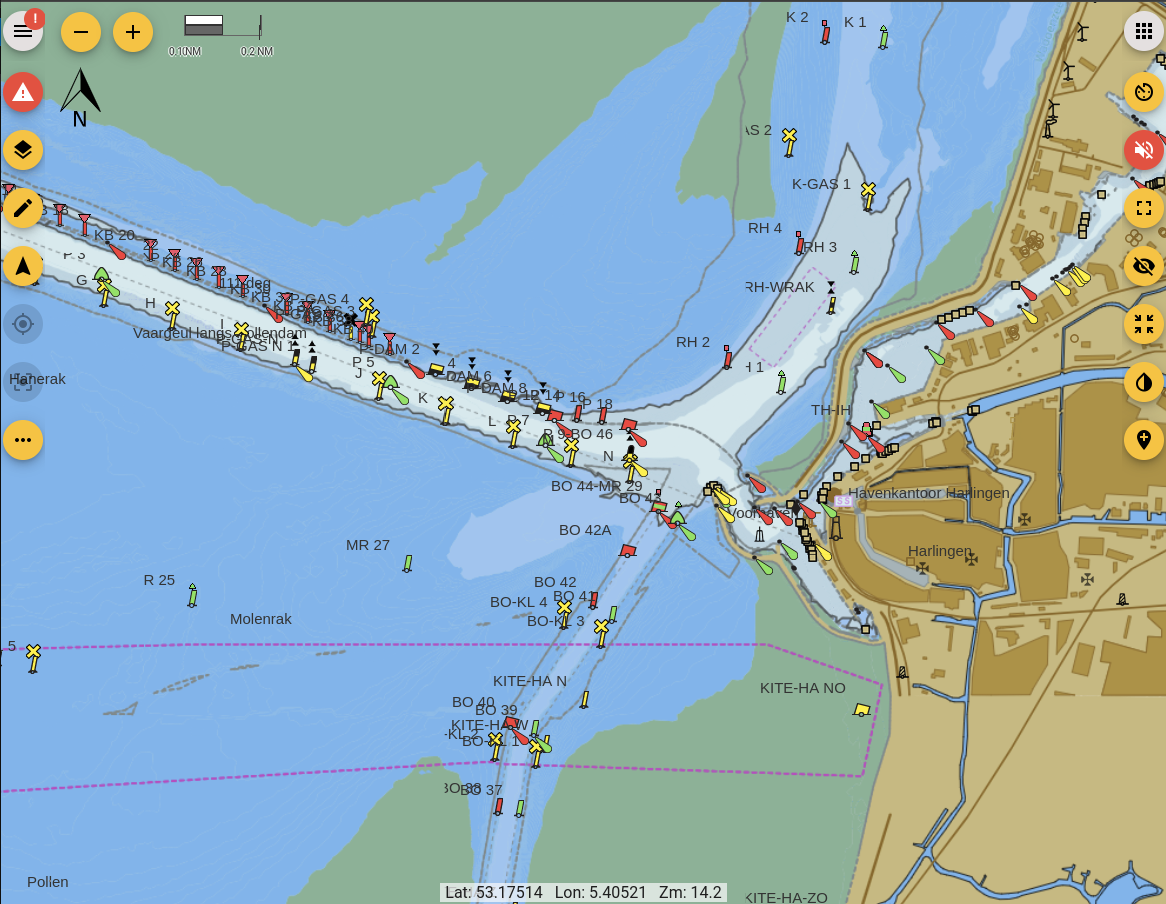
Freeboard-SK is able to display S57 ENC charts that have been converted to vector tiles with [s57-tiler](https://github.com/wdantuma/s57-tiler). _(See the [README](https://github.com/wdantuma/s57-tiler) for instructions how to create the
|
|
123
|
+
Freeboard-SK is able to display S57 ENC charts that have been converted to vector tiles with [s57-tiler](https://github.com/wdantuma/s57-tiler). _(See the [README](https://github.com/wdantuma/s57-tiler) for instructions how to create the vector tiles from downloaded S57 ENC's.)_
|
|
124
124
|
|
|
125
125
|
See [Open CPN chart sources](https://opencpn.org/OpenCPN/info/chartsource.html) for a list of locations to source charts.
|
|
126
126
|
|
|
@@ -131,11 +131,11 @@ _Note: Only unencrypted ENC's are supported (no S63 support)._
|
|
|
131
131
|
|
|
132
132
|
|
|
133
133
|
|
|
134
|
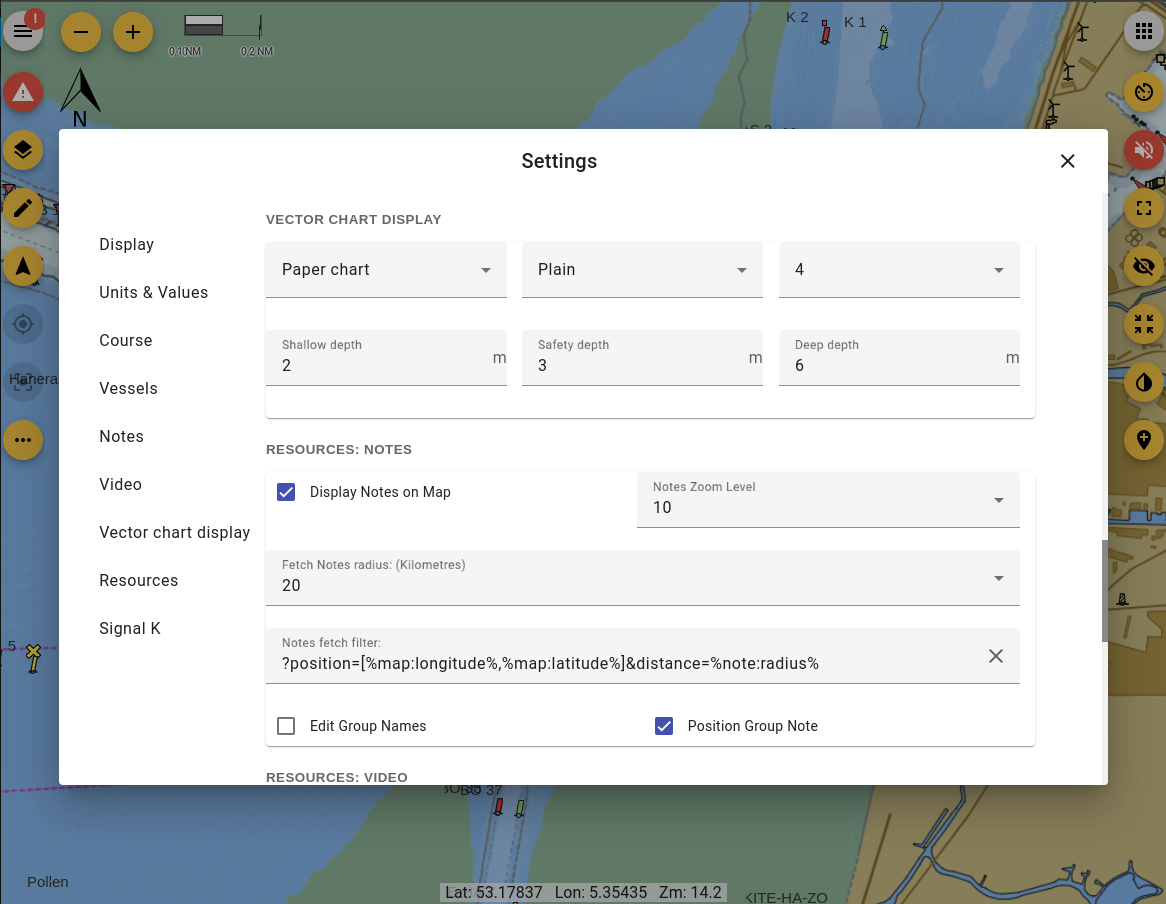
-
Rendering of the Shallow, safety and deep depths and
|
|
134
|
+
Rendering of the Shallow, safety and deep depths and can be configured in the settings dialog
|
|
135
135
|
|
|
136
136
|
|
|
137
137
|
|
|
138
|
-
_Note:
|
|
138
|
+
_Note: This functionality is not a replacement for official navigational charts_
|
|
139
139
|
|
|
140
140
|
---
|
|
141
141
|
|
|
@@ -171,13 +171,13 @@ The following features require that the Signal K server have plugins / providers
|
|
|
171
171
|
|
|
172
172
|
### Recommended Plugins:
|
|
173
173
|
|
|
174
|
-
The following plugins are recommended for the
|
|
174
|
+
The following plugins are recommended for installation on the Signal K Server to enable full functionality:
|
|
175
175
|
|
|
176
|
-
- @signalk/
|
|
176
|
+
- @signalk/course-provider _(Course calculations e.g. XTE, DTG, etc.)_
|
|
177
|
+
- @signalk/charts-plugin *(Mapbox tiles chart provider)*
|
|
177
178
|
- signalk-pmtiles-plugin *(ProtoMaps chart provider)*
|
|
178
|
-
- signalk-anchoralarm-plugin _(
|
|
179
|
-
- signalk-simple-notifications _(
|
|
180
|
-
- @signalk/course-provider _(course calculations e.g. XTE, DTG, etc.)_
|
|
179
|
+
- signalk-anchoralarm-plugin _(Anchor alarm settings & notifications)_
|
|
180
|
+
- signalk-simple-notifications _(Depth alarm notifications)_
|
|
181
181
|
|
|
182
182
|
---
|
|
183
183
|
|
|
@@ -189,7 +189,7 @@ It is recommended that the Angular CLI be installed globally `npm i -g @angular/
|
|
|
189
189
|
|
|
190
190
|
1. Clone this repository.
|
|
191
191
|
|
|
192
|
-
2. Run `npm i` to install project dependencies.
|
|
192
|
+
2. Run `npm i` to install project dependencies.
|
|
193
193
|
|
|
194
194
|
3. Run `npm start` or `ng serve` to start a development web server and then navigate to `http://localhost:4200/` to load the application. The application will automatically reload once you save changes to any of the source files.
|
|
195
195
|
|
package/package.json
CHANGED
|
@@ -0,0 +1,16 @@
|
|
|
1
|
+
<?xml version="1.0" standalone="no"?>
|
|
2
|
+
<!DOCTYPE svg PUBLIC "-//W3C//DTD SVG 20010904//EN"
|
|
3
|
+
"http://www.w3.org/TR/2001/REC-SVG-20010904/DTD/svg10.dtd">
|
|
4
|
+
<svg version="1.0" xmlns="http://www.w3.org/2000/svg"
|
|
5
|
+
width="151.000000pt" height="150.000000pt" viewBox="0 0 151.000000 150.000000"
|
|
6
|
+
preserveAspectRatio="xMidYMid meet">
|
|
7
|
+
<g transform="translate(0.000000,150.000000) scale(0.100000,-0.100000)"
|
|
8
|
+
fill="#000000" stroke="none">
|
|
9
|
+
<path d="M40 1475 c-15 -19 1 -175 30 -289 43 -168 101 -251 288 -414 39 -35
|
|
10
|
+
74 -73 77 -85 4 -14 -8 -52 -30 -101 -64 -137 -87 -248 -89 -421 l-1 -150 229
|
|
11
|
+
-3 c215 -2 228 -1 221 15 -99 261 -131 480 -79 550 36 48 73 62 225 83 172 25
|
|
12
|
+
254 52 347 114 72 48 165 140 216 215 23 33 28 46 19 59 -16 26 -40 26 -103
|
|
13
|
+
-2 -72 -33 -153 -34 -298 -6 -136 26 -264 26 -343 0 l-60 -20 -55 60 c-57 61
|
|
14
|
+
-56 60 -294 173 -92 44 -146 89 -206 173 -46 65 -70 77 -94 49z"/>
|
|
15
|
+
</g>
|
|
16
|
+
</svg>
|
package/public/index.html
CHANGED
|
@@ -74,5 +74,5 @@
|
|
|
74
74
|
</div>
|
|
75
75
|
</div>
|
|
76
76
|
</app-root>
|
|
77
|
-
<script src="runtime.7bf80f342dbc62b9.js" type="module"></script><script src="polyfills.f03f63a631c4a669.js" type="module"></script><script src="main.
|
|
77
|
+
<script src="runtime.7bf80f342dbc62b9.js" type="module"></script><script src="polyfills.f03f63a631c4a669.js" type="module"></script><script src="main.f0974112b326b845.js" type="module"></script></body>
|
|
78
78
|
</html>
|