@shunagent/shun 0.0.0-stage → 0.1.146
This diff represents the content of publicly available package versions that have been released to one of the supported registries. The information contained in this diff is provided for informational purposes only and reflects changes between package versions as they appear in their respective public registries.
- package/LICENSE +21 -0
- package/README.md +146 -2
- package/bin/shun.mjs +7 -0
- package/dist/cli.js +8828 -0
- package/package.json +62 -4
package/LICENSE
ADDED
|
@@ -0,0 +1,21 @@
|
|
|
1
|
+
MIT License
|
|
2
|
+
|
|
3
|
+
Copyright (c) 2026 Kyles Light
|
|
4
|
+
|
|
5
|
+
Permission is hereby granted, free of charge, to any person obtaining a copy
|
|
6
|
+
of this software and associated documentation files (the "Software"), to deal
|
|
7
|
+
in the Software without restriction, including without limitation the rights
|
|
8
|
+
to use, copy, modify, merge, publish, distribute, sublicense, and/or sell
|
|
9
|
+
copies of the Software, and to permit persons to whom the Software is
|
|
10
|
+
furnished to do so, subject to the following conditions:
|
|
11
|
+
|
|
12
|
+
The above copyright notice and this permission notice shall be included in all
|
|
13
|
+
copies or substantial portions of the Software.
|
|
14
|
+
|
|
15
|
+
THE SOFTWARE IS PROVIDED "AS IS", WITHOUT WARRANTY OF ANY KIND, EXPRESS OR
|
|
16
|
+
IMPLIED, INCLUDING BUT NOT LIMITED TO THE WARRANTIES OF MERCHANTABILITY,
|
|
17
|
+
FITNESS FOR A PARTICULAR PURPOSE AND NONINFRINGEMENT. IN NO EVENT SHALL THE
|
|
18
|
+
AUTHORS OR COPYRIGHT HOLDERS BE LIABLE FOR ANY CLAIM, DAMAGES OR OTHER
|
|
19
|
+
LIABILITY, WHETHER IN AN ACTION OF CONTRACT, TORT OR OTHERWISE, ARISING FROM,
|
|
20
|
+
OUT OF OR IN CONNECTION WITH THE SOFTWARE OR THE USE OR OTHER DEALINGS IN THE
|
|
21
|
+
SOFTWARE.
|
package/README.md
CHANGED
|
@@ -1,3 +1,147 @@
|
|
|
1
|
-
#
|
|
1
|
+
# Shun
|
|
2
2
|
|
|
3
|
-
|
|
3
|
+
**Serious coding agents, running on hardware you own.**
|
|
4
|
+
|
|
5
|
+
[Website](https://shunagent.com) · [GitHub](https://github.com/kyleslight/shun) · [Download Desktop](https://shunagent.com/download) · [Report an issue](https://github.com/kyleslight/shun/issues)
|
|
6
|
+
|
|
7
|
+
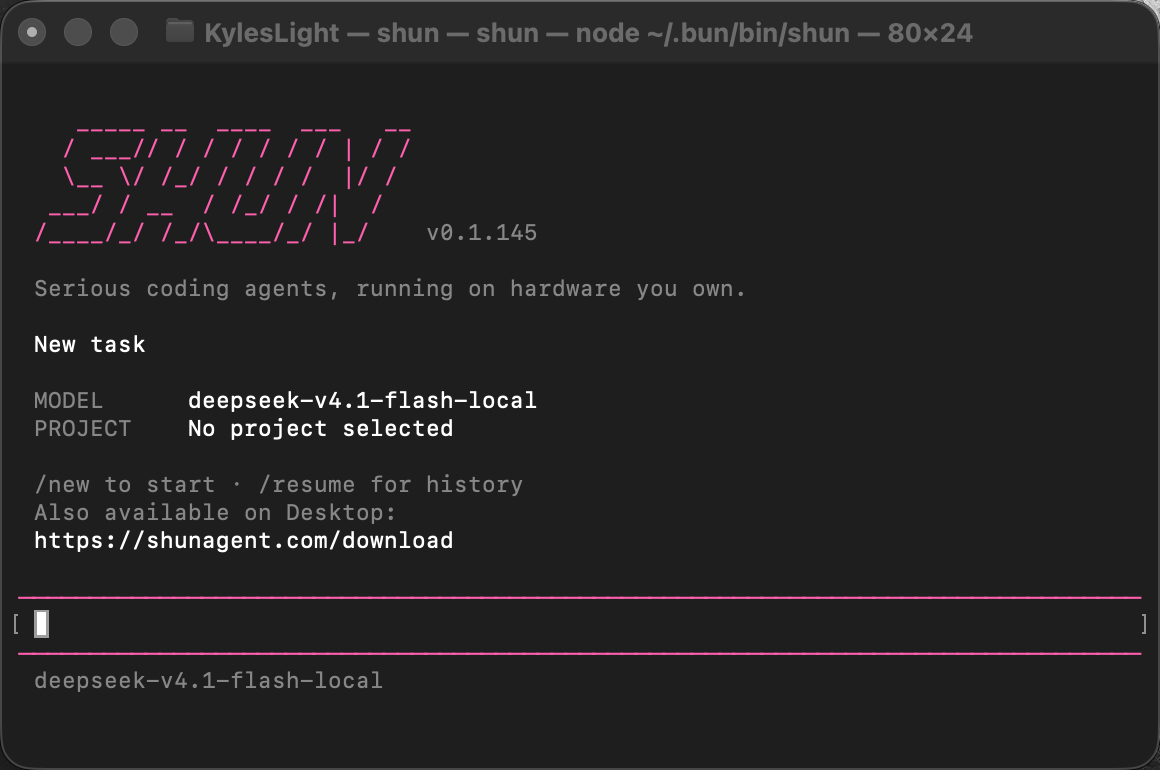
Shun brings streaming conversations, coding tools, Agent Skills, and plugins to
|
|
8
|
+
your terminal. Connect a local model server or a hosted model provider.
|
|
9
|
+
|
|
10
|
+
|
|
11
|
+
|
|
12
|
+
## Install
|
|
13
|
+
|
|
14
|
+
Requires **Node.js 22.19 or newer** on macOS, Linux, or Windows.
|
|
15
|
+
|
|
16
|
+
```sh
|
|
17
|
+
npm install -g @shunagent/shun
|
|
18
|
+
shun
|
|
19
|
+
```
|
|
20
|
+
|
|
21
|
+
Alternatively, use `pnpm add -g @shunagent/shun` or `bun add -g @shunagent/shun`.
|
|
22
|
+
The terminal app can run without Shun Desktop. Browser, PDF, and image-processing
|
|
23
|
+
components download automatically when first needed and are reused from your
|
|
24
|
+
local Shun profile. Basic conversations do not install these components.
|
|
25
|
+
Standalone Browser Preview also downloads its testing browser on first use.
|
|
26
|
+
|
|
27
|
+
## Start a conversation
|
|
28
|
+
|
|
29
|
+
```sh
|
|
30
|
+
shun # Start without selecting a project
|
|
31
|
+
shun . # Work in the current directory
|
|
32
|
+
shun /path/to/project # Work in another project
|
|
33
|
+
shun -c # Continue the latest conversation in this scope
|
|
34
|
+
shun -r # Choose a conversation from history
|
|
35
|
+
shun --session <id> # Resume a specific conversation
|
|
36
|
+
shun tasks # List conversations
|
|
37
|
+
shun run "Explain this project" --workspace .
|
|
38
|
+
```
|
|
39
|
+
|
|
40
|
+
On first use, follow the prompts to connect a provider and choose a model.
|
|
41
|
+
Existing local Shun provider settings are reused. Type `/` to open the command
|
|
42
|
+
menu. `/connect` adds a connection, `/providers` manages connections, and `/model`
|
|
43
|
+
chooses a model. `/new` starts a new conversation; `/resume` opens history.
|
|
44
|
+
|
|
45
|
+
Answers stream as they arrive. Markdown and tables render in the terminal.
|
|
46
|
+
Click an activity row to expand its details. Older messages appear in pages of
|
|
47
|
+
24; scroll up and click **Show earlier messages** to read more.
|
|
48
|
+
|
|
49
|
+
Ctrl+C stops the current generation, cancels an open menu, or returns from a
|
|
50
|
+
finished conversation to the welcome screen. At the welcome screen, press it
|
|
51
|
+
twice to exit. Ctrl+D on an empty prompt detaches from Shun. Exiting the terminal
|
|
52
|
+
does not stop background tasks; use `/stop` to stop the current run.
|
|
53
|
+
|
|
54
|
+
## Command reference
|
|
55
|
+
|
|
56
|
+
### In your shell
|
|
57
|
+
|
|
58
|
+
| Command | What it does |
|
|
59
|
+
| --- | --- |
|
|
60
|
+
| `shun` | Start a new conversation without choosing a project. |
|
|
61
|
+
| `shun .` or `shun <folder>` | Start in the current directory or a chosen project. |
|
|
62
|
+
| `shun -c` / `--continue` | Continue the most recent conversation in the selected project scope. |
|
|
63
|
+
| `shun -r` / `--resume` | Search and choose a saved conversation. |
|
|
64
|
+
| `shun --session <id>` | Reopen a specific conversation; `--task` is an alias. |
|
|
65
|
+
| `shun run "message" --workspace <folder>` | Send a message and stream the answer to standard output. |
|
|
66
|
+
| `shun run "message" --task <id>` | Continue a saved conversation without opening the TUI. |
|
|
67
|
+
| `shun tasks` | Print conversation IDs, running status, and titles. |
|
|
68
|
+
| `shun service status` | Check whether the local background service is running. |
|
|
69
|
+
| `shun service stop` | Stop the service when its tasks are idle. |
|
|
70
|
+
| `shun desktop` | Open Shun Desktop. |
|
|
71
|
+
| `shun desktop --install` | Download and verify the Desktop installer. |
|
|
72
|
+
| `shun --help` / `-h` | Show commands and their descriptions. |
|
|
73
|
+
| `shun --version` / `-v` | Print the installed CLI version. |
|
|
74
|
+
|
|
75
|
+
### Inside a conversation
|
|
76
|
+
|
|
77
|
+
Type `/` for searchable suggestions, or `/help` for the command picker.
|
|
78
|
+
|
|
79
|
+
| Command | What it does |
|
|
80
|
+
| --- | --- |
|
|
81
|
+
| `/connect` | Add a model provider connection. |
|
|
82
|
+
| `/providers` | Manage provider credentials, settings, and connection tests. |
|
|
83
|
+
| `/model` | Choose the provider and model for this conversation. |
|
|
84
|
+
| `/new [folder]` | Start a new conversation, retaining the current project unless a folder is supplied. |
|
|
85
|
+
| `/new --no-workspace` | Start a new conversation without a project. |
|
|
86
|
+
| `/clear` | Start fresh; preserve the previous conversation in history. |
|
|
87
|
+
| `/resume` | Find and reopen a conversation, initially scoped to the current project. |
|
|
88
|
+
| `/tasks` | Browse conversations across projects. |
|
|
89
|
+
| `/session` | Show this conversation's ID and project. |
|
|
90
|
+
| `/name <title>` | Rename this conversation. |
|
|
91
|
+
| `/trust` | Review project configuration trust. |
|
|
92
|
+
| `/paste` | Attach an image from the local clipboard. |
|
|
93
|
+
| `/attach <path>` | Attach an image file, for example `/attach /tmp/screenshot.png`. |
|
|
94
|
+
| `/images` | Preview or remove images attached to your next message. |
|
|
95
|
+
| `/processes` | Inspect output from or stop task-owned background processes. |
|
|
96
|
+
| `/skills` | Enable, disable, or install Agent Skills. |
|
|
97
|
+
| `/desktop` | Open this conversation in Shun Desktop. |
|
|
98
|
+
| `/stop` | Stop the current generation. |
|
|
99
|
+
| `/quit` | Exit the terminal interface; background tasks can continue. |
|
|
100
|
+
| `/help` | Browse command descriptions and insert a selected command. |
|
|
101
|
+
|
|
102
|
+
## Images
|
|
103
|
+
|
|
104
|
+
On macOS, use **Cmd+V**. If iTerm2 asks how to paste an image, choose **Save to
|
|
105
|
+
Temp File and Paste Path**; you can remember that choice. Shun recognizes a single
|
|
106
|
+
pasted image path and adds it as an attachment. Ordinary pasted text stays text.
|
|
107
|
+
|
|
108
|
+
`/paste` reads an image from the local clipboard, `/attach /path/to/image.png`
|
|
109
|
+
attaches an image file, and `/images` previews or removes pending attachments.
|
|
110
|
+
A remote SSH terminal cannot read your computer's local clipboard.
|
|
111
|
+
|
|
112
|
+
## Desktop, plugins, and saved conversations
|
|
113
|
+
|
|
114
|
+
[Shun Desktop](https://shunagent.com/download) provides the graphical interface.
|
|
115
|
+
Compatible Desktop and terminal versions share conversations and model settings
|
|
116
|
+
on the same machine. With Desktop running, the terminal can also use its browser
|
|
117
|
+
and computer tools. Remote access uses Desktop's existing Remote connection.
|
|
118
|
+
Plugin graphical views stay in Desktop; the terminal exposes supported tools and
|
|
119
|
+
Agent Skills. Standalone Browser Preview uses a separate testing browser.
|
|
120
|
+
|
|
121
|
+
Use `/desktop` to open the current conversation in Desktop. Older Desktop
|
|
122
|
+
versions may need an update to support shared conversations and capabilities.
|
|
123
|
+
|
|
124
|
+
Shun stores its local profile under `~/.shun`. Set `SHUN_HOME` to use an isolated
|
|
125
|
+
profile. A selected project is a working directory, not a filesystem sandbox;
|
|
126
|
+
tools run with your account's permissions.
|
|
127
|
+
|
|
128
|
+
## Update
|
|
129
|
+
|
|
130
|
+
```sh
|
|
131
|
+
npm install -g @shunagent/shun@latest
|
|
132
|
+
shun --version
|
|
133
|
+
```
|
|
134
|
+
|
|
135
|
+
This updates the npm installation. Desktop updates separately. Restart the
|
|
136
|
+
terminal interface to load its new version. If a background service needs a
|
|
137
|
+
restart, use `shun service stop` after its tasks finish. There is currently no
|
|
138
|
+
`shun upgrade` command.
|
|
139
|
+
|
|
140
|
+
## Learn more
|
|
141
|
+
|
|
142
|
+
- [Shun website](https://shunagent.com)
|
|
143
|
+
- [Source code and documentation](https://github.com/kyleslight/shun)
|
|
144
|
+
- [Desktop downloads](https://shunagent.com/download)
|
|
145
|
+
- [Issues and feedback](https://github.com/kyleslight/shun/issues)
|
|
146
|
+
|
|
147
|
+
MIT licensed.
|
package/bin/shun.mjs
ADDED
|
@@ -0,0 +1,7 @@
|
|
|
1
|
+
#!/usr/bin/env node
|
|
2
|
+
const [major, minor] = process.versions.node.split('.').map(Number)
|
|
3
|
+
if (major < 22 || (major === 22 && minor < 19)) {
|
|
4
|
+
console.error('Shun requires Node.js 22.19 or newer. Use the standalone installer if Node.js is not installed.')
|
|
5
|
+
process.exit(1)
|
|
6
|
+
}
|
|
7
|
+
await import('../dist/cli.js')
|