@seybel/breakhound 0.0.0-stage → 1.0.0
This diff represents the content of publicly available package versions that have been released to one of the supported registries. The information contained in this diff is provided for informational purposes only and reflects changes between package versions as they appear in their respective public registries.
- package/LICENSE +21 -0
- package/README.md +388 -2
- package/bin/breakhound.cjs +25 -0
- package/dist/cli.js +7318 -0
- package/dist/index.cjs +34 -0
- package/dist/index.d.cts +254 -0
- package/dist/index.d.ts +254 -0
- package/dist/index.js +7 -0
- package/dist/inject.js +2236 -0
- package/dist/next.cjs +87 -0
- package/dist/next.d.cts +18 -0
- package/dist/next.d.ts +18 -0
- package/dist/next.js +56 -0
- package/dist/schema.json +530 -0
- package/dist/source-loader.cjs +1650 -0
- package/dist/vite.cjs +1689 -0
- package/dist/vite.d.cts +29 -0
- package/dist/vite.d.ts +29 -0
- package/dist/vite.js +1662 -0
- package/dist/webpack.cjs +75 -0
- package/dist/webpack.d.cts +23 -0
- package/dist/webpack.d.ts +23 -0
- package/dist/webpack.js +44 -0
- package/package.json +104 -4
package/LICENSE
ADDED
|
@@ -0,0 +1,21 @@
|
|
|
1
|
+
MIT License
|
|
2
|
+
|
|
3
|
+
Copyright (c) 2026 Seybel
|
|
4
|
+
|
|
5
|
+
Permission is hereby granted, free of charge, to any person obtaining a copy
|
|
6
|
+
of this software and associated documentation files (the "Software"), to deal
|
|
7
|
+
in the Software without restriction, including without limitation the rights
|
|
8
|
+
to use, copy, modify, merge, publish, distribute, sublicense, and/or sell
|
|
9
|
+
copies of the Software, and to permit persons to whom the Software is
|
|
10
|
+
furnished to do so, subject to the following conditions:
|
|
11
|
+
|
|
12
|
+
The above copyright notice and this permission notice shall be included in all
|
|
13
|
+
copies or substantial portions of the Software.
|
|
14
|
+
|
|
15
|
+
THE SOFTWARE IS PROVIDED "AS IS", WITHOUT WARRANTY OF ANY KIND, EXPRESS OR
|
|
16
|
+
IMPLIED, INCLUDING BUT NOT LIMITED TO THE WARRANTIES OF MERCHANTABILITY,
|
|
17
|
+
FITNESS FOR A PARTICULAR PURPOSE AND NONINFRINGEMENT. IN NO EVENT SHALL THE
|
|
18
|
+
AUTHORS OR COPYRIGHT HOLDERS BE LIABLE FOR ANY CLAIM, DAMAGES OR OTHER
|
|
19
|
+
LIABILITY, WHETHER IN AN ACTION OF CONTRACT, TORT OR OTHERWISE, ARISING FROM,
|
|
20
|
+
OUT OF OR IN CONNECTION WITH THE SOFTWARE OR THE USE OR OTHER DEALINGS IN THE
|
|
21
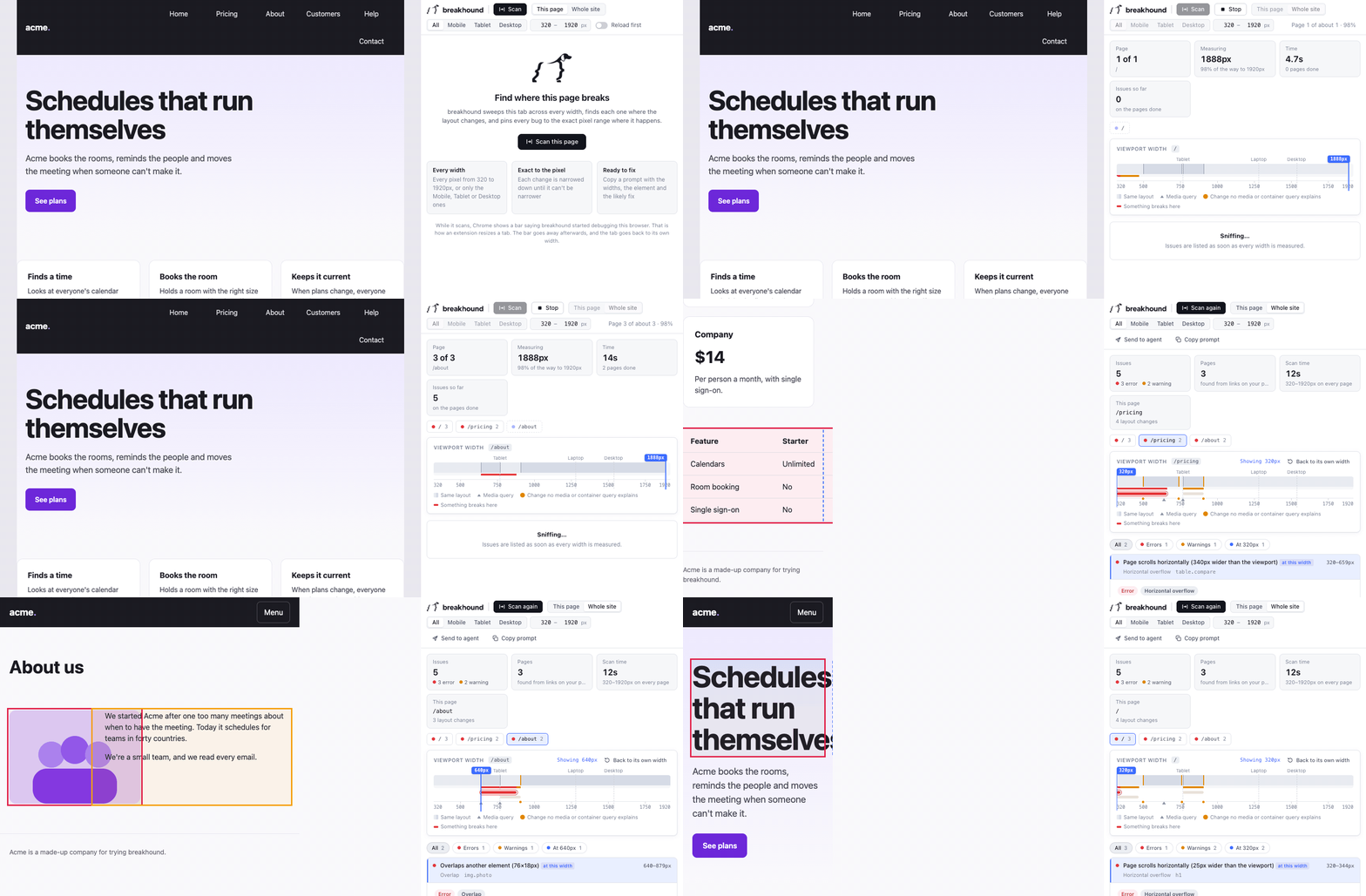
|
+
SOFTWARE.
|
package/README.md
CHANGED
|
@@ -1,3 +1,389 @@
|
|
|
1
|
-
#
|
|
1
|
+
# breakhound
|
|
2
2
|
|
|
3
|
-
|
|
3
|
+
[](https://www.npmjs.com/package/@seybel/breakhound) [](https://github.com/Seybel/breakhound/actions/workflows/ci.yml) [](https://github.com/Seybel/breakhound/blob/main/LICENSE) [](https://seybel.github.io/breakhound/)
|
|
4
|
+
|
|
5
|
+
Find where your layout breaks across every viewport width, then hand the fix to your coding agent.
|
|
6
|
+
|
|
7
|
+
|
|
8
|
+
|
|
9
|
+
Instead of dragging the browser or clicking through device presets, run one command in your project. breakhound finds your framework and dev server (and starts it if needed), discovers every route, sweeps each page from 320px to 1920px in a real browser, finds the exact pixel where things go wrong, and tells you why:
|
|
10
|
+
|
|
11
|
+
```
|
|
12
|
+
✔ Next.js running at http://localhost:3000
|
|
13
|
+
✔ 14 routes from src/app (2 dynamic, filled in from links on your pages)
|
|
14
|
+
breakhound 1.0.0 · 14 pages · 320–1920px
|
|
15
|
+
|
|
16
|
+
✖ /pricing 2 issues · layout changes at 768, 1024 4.1s
|
|
17
|
+
✔ /about clean · layout changes at 640, 1024 3.2s
|
|
18
|
+
✖ /blog/[slug] 1 issue · layout changes at 768 3.8s as /blog/hello-world
|
|
19
|
+
○ /dashboard Needs a login: it redirected to /login
|
|
20
|
+
...
|
|
21
|
+
|
|
22
|
+
3 issues on 2 pages
|
|
23
|
+
|
|
24
|
+
✖ error 320–599px Page scrolls horizontally (280px wider than the viewport)
|
|
25
|
+
div.pricing-table · /pricing
|
|
26
|
+
→ It stays 600px wide no matter the screen size. Replace the fixed width
|
|
27
|
+
with max-width: 100% (or a fluid width) so it can shrink.
|
|
28
|
+
⚠ warning 768–919px Row of 6 items wraps onto 2 lines
|
|
29
|
+
header nav ul · /pricing, /blog/[slug]
|
|
30
|
+
→ Collapse this row into a menu below this width, tighten its spacing, or
|
|
31
|
+
let it scroll sideways.
|
|
32
|
+
|
|
33
|
+
○ 1 page needs a login. Run npx @seybel/breakhound login once to sign in, then scan again.
|
|
34
|
+
|
|
35
|
+
Report .breakhound/report.html (npx @seybel/breakhound report to open it)
|
|
36
|
+
Fix it npx @seybel/breakhound prompt --copy then paste into your coding agent
|
|
37
|
+
or npx @seybel/breakhound mcp install so your agent can scan, verify and undo by itself
|
|
38
|
+
```
|
|
39
|
+
|
|
40
|
+
## Quick start
|
|
41
|
+
|
|
42
|
+
In your project folder:
|
|
43
|
+
|
|
44
|
+
```bash
|
|
45
|
+
npx @seybel/breakhound
|
|
46
|
+
```
|
|
47
|
+
|
|
48
|
+
That's it: no config. To keep it in your project instead, `npm i -D @seybel/breakhound`; the command it installs is `breakhound`.
|
|
49
|
+
|
|
50
|
+
If your dev server is already running it's used, otherwise breakhound starts it with your `dev` script and stops it when done. Chromium is downloaded automatically the first time (about 150 MB).
|
|
51
|
+
|
|
52
|
+
Other ways to run it:
|
|
53
|
+
|
|
54
|
+
```bash
|
|
55
|
+
npx @seybel/breakhound /pricing /blog # only these routes
|
|
56
|
+
npx @seybel/breakhound http://localhost:3000 # just this one page
|
|
57
|
+
npx @seybel/breakhound --url https://staging.example.com # every route, on another server
|
|
58
|
+
```
|
|
59
|
+
|
|
60
|
+
## Finding routes
|
|
61
|
+
|
|
62
|
+
| Project | Where routes come from |
|
|
63
|
+
|---|---|
|
|
64
|
+
| Next.js (App and Pages Router) | `app/` and `pages/`, skipping route groups, parallel slots, private folders and API routes |
|
|
65
|
+
| Nuxt | the live Vue router, so module and custom routes count too (falls back to `pages/`) |
|
|
66
|
+
| SvelteKit | `src/routes` |
|
|
67
|
+
| Astro | `src/pages` |
|
|
68
|
+
| Remix, React Router 7 | the route manifest, `app/routes.ts` and `app/routes/` |
|
|
69
|
+
| TanStack Router | `routeTree.gen.ts` and the live router |
|
|
70
|
+
| React Router (code-defined) | the live route tree, including `<Routes>` nested inside pages; falls back to reading your router code |
|
|
71
|
+
| Vue Router (code-defined) | the live router; falls back to reading your router code |
|
|
72
|
+
| Angular | your route definitions, from `src/main.ts` on, with lazily loaded `loadChildren` routes under their path |
|
|
73
|
+
| Anything else | links followed from the home page (up to 50 pages, a few per section) |
|
|
74
|
+
|
|
75
|
+
**Dynamic routes** like `/blog/[slug]` are scanned once, using a real link found on your pages (routes that share a template share a layout). If no page links to one, it's listed with a hint, and you can give it a URL:
|
|
76
|
+
|
|
77
|
+
```ts
|
|
78
|
+
samples: { '/products/[id]': '/products/42' }
|
|
79
|
+
```
|
|
80
|
+
|
|
81
|
+
**Pages behind a login** are spotted (they redirect to a sign-in page) and listed instead of scanning the login page over and over. Sign in once:
|
|
82
|
+
|
|
83
|
+
```bash
|
|
84
|
+
npx @seybel/breakhound login
|
|
85
|
+
```
|
|
86
|
+
|
|
87
|
+
A browser window opens; log in as you normally would, then press Enter. The session is saved to `.breakhound/auth.json`, which is never committed (see below), and used by later scans. breakhound never sees your password.
|
|
88
|
+
|
|
89
|
+
Links that would log you out, delete something, or download a file are never followed.
|
|
90
|
+
|
|
91
|
+
## What it checks
|
|
92
|
+
|
|
93
|
+
| Check | Finds |
|
|
94
|
+
|---|---|
|
|
95
|
+
| `page-overflow` | Anything that makes the page scroll sideways, or gets cut off at the screen edge (including inside full-width wrappers) |
|
|
96
|
+
| `content-overflow` | Content spilling out of a card, panel or bordered box, sideways or out of the bottom of a fixed-height box |
|
|
97
|
+
| `media-overflow` | Images, video and embeds that don't shrink with their container |
|
|
98
|
+
| `overlap` | Content painted on top of other content |
|
|
99
|
+
| `unexpected-wrap` | Nav rows and button labels breaking onto extra lines |
|
|
100
|
+
| `clipped-text` | Text cut off, or pushed out of sight, by a fixed-size container at narrower widths |
|
|
101
|
+
| `squished-text` | Columns so narrow that words break apart |
|
|
102
|
+
| `distorted-media` | Images stretched or squashed out of proportion |
|
|
103
|
+
| `small-tap-target` | Buttons and links under 24×24px that crowd each other on touch screens (WCAG 2.2) |
|
|
104
|
+
| `tiny-text` | Text under 12px on phones |
|
|
105
|
+
| `oversized-text` | Headings and display text left at their desktop size on phones, wrapping a word or two a line |
|
|
106
|
+
| `edge-gutter` | Text pressed against the edge of a phone screen |
|
|
107
|
+
| `viewport-meta` | A missing responsive viewport tag |
|
|
108
|
+
|
|
109
|
+
Every issue comes with the exact width ranges where it happens, the element to blame, the numbers behind it, a screenshot, and a likely fix. breakhound also reports the widths where your layout actually changes and flags changes that no media or container query explains.
|
|
110
|
+
|
|
111
|
+
It's built to be quiet: carousels, off-canvas menus, badges, decorative shapes, ellipsis and line-clamp, and framework dev overlays are all understood and left alone. It also looks inside web components (open shadow roots) and handles right-to-left pages.
|
|
112
|
+
|
|
113
|
+
### Safari and Firefox
|
|
114
|
+
|
|
115
|
+
Chromium finds most layout bugs, but Safari and Firefox lay some things out differently (flex gaps, `dvh` units, form controls, font metrics). `--browsers chromium,webkit,firefox` checks the pages again in WebKit (Safari's engine) and Firefox once Chromium is done, one browser at a time so memory stays flat. An issue that shows up in only some of them says so: `(only in WebKit)`. Each extra browser is a one-time download of about 80 to 90 MB, done on first use or ahead of time with `npx @seybel/breakhound install webkit firefox`.
|
|
116
|
+
|
|
117
|
+
Two differences you'll meet early: Safari gives buttons, inputs and selects an 11px font unless you set one (Chrome and Firefox use about 13px), so unstyled controls show up as tiny text only in WebKit, with `font: inherit` as the fix (that's WebKit on a Mac: Playwright's WebKit on Linux, as in most CI, draws them like Chrome); and Firefox breaks long URLs at their slashes, so a URL that pushes the page wide in Chrome and Safari can wrap fine in Firefox.
|
|
118
|
+
|
|
119
|
+
### Menus, dialogs and expandable sections
|
|
120
|
+
|
|
121
|
+
A lot of what breaks on a phone is hidden until you tap: the mobile menu, a sign-up modal, an FAQ answer. After scanning a page as it loads, breakhound opens what it finds there one at a time and sweeps the widths where each can be opened. That covers buttons with `aria-expanded`, `<details>`, popovers, dialogs, Bootstrap toggles, and buttons that are clearly a menu (`hamburger`, `menu-toggle`, an accessible name of "Menu"). Only what breaks while something is open gets reported, with what to open first:
|
|
122
|
+
|
|
123
|
+
```
|
|
124
|
+
✖ 320–399px Page scrolls horizontally (80px wider than the viewport), with "Menu" open
|
|
125
|
+
```
|
|
126
|
+
|
|
127
|
+
It never clicks a link to another page or a button that submits a form, and it opens only one question of an FAQ, since they all share a layout. It opens up to 5 per page. Set `states` to change that, or `--no-states` (or `data-breakhound-ignore="states"` on an element) to leave them closed.
|
|
128
|
+
|
|
129
|
+
### A second opinion from a vision model (optional)
|
|
130
|
+
|
|
131
|
+
Rules can't tell when a layout is merely cramped or awkward. `--vision` shows each page at 375, 768 and 1280px to your own vision model (an Anthropic or OpenAI key, or a local Ollama model such as `qwen2.5vl`, set up the same way as `breakhound fix`) and adds what it says looks off. Those come in as info, tied to the element whose text the model quotes, and never fail a run. Verify leaves them out, since an opinion can't be measured again.
|
|
132
|
+
|
|
133
|
+
## Reports
|
|
134
|
+
|
|
135
|
+
Every run writes to `.breakhound/`:
|
|
136
|
+
|
|
137
|
+
| File | What it is |
|
|
138
|
+
|---|---|
|
|
139
|
+
| `report.html` | Self-contained report: width map, filters, screenshots, copy buttons. Open it with `breakhound report`. |
|
|
140
|
+
| `summary.md` | One line per issue |
|
|
141
|
+
| `report.md` | Every issue with evidence and screenshots |
|
|
142
|
+
| `prompt.md` | Instructions for a coding agent |
|
|
143
|
+
| `result.json` | The raw result |
|
|
144
|
+
| `report.pdf` | With `--pdf` |
|
|
145
|
+
|
|
146
|
+
The folder is for you, not your repo, so it keeps itself out of git: breakhound puts a `.gitignore` inside it that ignores everything there, the way tool caches like `.pytest_cache` do. Nothing to add to your own `.gitignore`, and breakhound never edits it. To commit a report anyway, edit or delete that inner `.gitignore`; breakhound only writes it when it's missing.
|
|
147
|
+
|
|
148
|
+
## Chrome extension
|
|
149
|
+
|
|
150
|
+
The breakhound extension runs the same checks on the tab you have open, with nothing to install in your project. Get it from the [Chrome Web Store](https://chromewebstore.google.com/search/breakhound); it works on any page Chrome can open, from localhost to production. The quickest way in is to right-click the page and choose **Scan with breakhound**: the breakhound panel opens in Chrome's side panel and starts right away. Clicking the breakhound icon in the toolbar opens it ready to scan, and the same panel is a **breakhound** tab in DevTools. The page grows steadily from 320px to 1920px (or the widths you set) while the timeline fills in live: each run of widths that share a layout, every width where the layout changes, and where something breaks. Then you get:
|
|
151
|
+
|
|
152
|
+
- the issues, each with its exact width ranges, the element, the numbers and the likely fix
|
|
153
|
+
- the timeline: the layout bands, the media query widths, the changes no media or container query explains, and a bar for each issue across the widths it covers
|
|
154
|
+
|
|
155
|
+
To check only some screens, pick **Mobile** (320 to 599px), **Tablet** (600 to 1023px) or **Desktop** (1024 to 1920px) next to the widths. Pick a neighbour as well to check both, so Mobile and Tablet is 320 to 1023px; **All** goes back to every width. They only fill in the two width fields, so you can still type any range you like, and a smaller range scans faster.
|
|
156
|
+
|
|
157
|
+
Drag across the timeline to resize the page live, click anywhere on it to jump to a width, or use the arrow keys to nudge a pixel at a time. Widths wider than the tab are zoomed out to fit, like DevTools' device mode, so a 1920px layout is shown whole, and the page refits when you drag DevTools bigger or smaller. If you press Cancel on Chrome's debugging bar, the tab goes back to its own width and breakhound's outlines disappear. Click an issue to see the page at the width where it's worst, with the element outlined. **Select in Elements** jumps to the element, and **Copy prompt** gives your coding agent the same instructions `breakhound prompt` would. (Select in Elements is only in the DevTools tab, since only DevTools has an Elements panel.) It finds what the CLI finds on the same page, since both run the same code.
|
|
158
|
+
|
|
159
|
+
While it scans or shows a width, Chrome displays a bar saying breakhound started debugging this browser: that is how an extension resizes a tab. The bar goes away afterwards, and the tab goes back to its own width and scroll position. **Reload first** reloads the page before scanning, so breakhound can wait for the page's own resize handlers exactly, as the CLI does. Leave it off to scan the page as you have it.
|
|
160
|
+
|
|
161
|
+
**Whole site** scans every page of the site, starting from the one you're on. breakhound finds the pages the way the CLI does: from the app's live router when it has one (Vue, React Router, Nuxt, Remix, TanStack), otherwise by following links from the page you're on and the home page (never a logout, delete or file link, and a few pages per section, since blog posts share a layout), up to 25 pages. It loads each one in the same tab, scans it, and comes back to where you were. Chrome stops drawing a tab that's out of view, so if you switch away while it runs, the scan pauses and carries on by itself when you come back. Your own login applies, so pages behind it are scanned too. Each page gets a chip with its issue count; an issue shared by several pages is counted once, and **Copy prompt** lists it once with every page it's on. Showing an issue from another page takes the tab there first.
|
|
162
|
+
|
|
163
|
+
**Send to agent** hands the issues to the coding agent working on that app, so it can fix them and check each fix in your browser. See [From the browser](#from-the-browser) below.
|
|
164
|
+
|
|
165
|
+
Routes only your project's files list (Next.js, SvelteKit and Astro route folders) need the CLI, as do menus opened, other browsers, screenshots and reports.
|
|
166
|
+
|
|
167
|
+
|
|
168
|
+
## Fix it with your coding agent
|
|
169
|
+
|
|
170
|
+
breakhound doesn't edit your code: your own agent does, and breakhound checks its work. Nothing leaves your machine and it costs nothing.
|
|
171
|
+
|
|
172
|
+
### Over MCP (recommended)
|
|
173
|
+
|
|
174
|
+
```bash
|
|
175
|
+
npx @seybel/breakhound mcp install
|
|
176
|
+
```
|
|
177
|
+
|
|
178
|
+
It finds Claude Code, Cursor, VS Code, Windsurf and Codex, shows what it will add to their MCP settings, and asks first. Then ask your agent to fix the responsive issues. It can:
|
|
179
|
+
|
|
180
|
+
| Tool | What it does |
|
|
181
|
+
|---|---|
|
|
182
|
+
| `scan` | Find every route and its issues. This becomes the baseline |
|
|
183
|
+
| `list_routes`, `list_issues` | What was found |
|
|
184
|
+
| `get_issue` | Widths, element, source file and line, measurements, likely fix and a screenshot |
|
|
185
|
+
| `verify` | Scan again and compare with the baseline: fixed, still there, and **new** |
|
|
186
|
+
| `checkpoint` | Commit the fix for some routes as its own git commit |
|
|
187
|
+
| `undo` | Revert the fixes for some routes, or the whole session |
|
|
188
|
+
|
|
189
|
+
`verify` is the point: agents often fix 812px and break 1280px, or fix one page and break another that shares a component. New issues show up there, at any width, on any page that was scanned.
|
|
190
|
+
|
|
191
|
+
The dev server stays up between calls, so each verify only takes as long as the scan. In Claude Code, `/mcp__breakhound__fix` asks for the whole loop in one go.
|
|
192
|
+
|
|
193
|
+
### From the browser
|
|
194
|
+
|
|
195
|
+
Scanned a page in the breakhound extension? Click **Send to agent** and the issues go to the agent working on that app, with nothing to copy and paste. Then ask it to "fix the breakhound issues".
|
|
196
|
+
|
|
197
|
+
- It goes to the project, not to one agent: Claude Code and Cursor open on the same app both see it.
|
|
198
|
+
- breakhound picks the project serving the page, the way the CLI recognises your dev server (or from `baseUrl` in your config). When it can't tell, for a staging site say, it asks which project.
|
|
199
|
+
- When the agent verifies a fix, the panel scans those pages again **in your browser**: same login, same browser, so the comparison is exact. Keep the panel open while it works; a chip in the toolbar shows the agent is connected. If the panel is closed, verify says so, and the agent asks you to open it.
|
|
200
|
+
|
|
201
|
+
It works through the MCP server, so it needs `npx @seybel/breakhound mcp install` once (the panel shows the command if your agent isn't connected yet). `breakhound mcp` listens on 127.0.0.1 only, on a port from 47821, and answers only the breakhound extension. It only ever writes the scan you sent into `.breakhound/`; it never reads or sends your files.
|
|
202
|
+
|
|
203
|
+
### With a prompt
|
|
204
|
+
|
|
205
|
+
```bash
|
|
206
|
+
npx @seybel/breakhound prompt --copy
|
|
207
|
+
```
|
|
208
|
+
|
|
209
|
+
Paste it into any agent. It lists each unique issue once with the widths, the element, the evidence and the likely fix, and tells the agent to run `npx @seybel/breakhound verify` until nothing is left.
|
|
210
|
+
|
|
211
|
+
### With your own model
|
|
212
|
+
|
|
213
|
+
No agent at hand? `breakhound fix` works through the last scan's issues itself, using your own API key or a model running on your machine:
|
|
214
|
+
|
|
215
|
+
```bash
|
|
216
|
+
ANTHROPIC_API_KEY=... npx @seybel/breakhound fix # or OPENAI_API_KEY=... with --model <name>
|
|
217
|
+
npx @seybel/breakhound fix --provider ollama --model qwen2.5-coder # free and local, with Ollama
|
|
218
|
+
```
|
|
219
|
+
|
|
220
|
+
For each issue it shows the model the issue and the files most likely behind it (where the element is written, then the files that mention its classes), applies the edits it suggests, and checks the pages again. A fix that clears the issue without breaking anything else, at any width, becomes its own commit, which `breakhound undo` can take back. One that doesn't is put back, and the model gets one more try with the reason. Files with uncommitted changes are never touched. It needs a git repository, and only the code around each issue is sent to the model you chose.
|
|
221
|
+
|
|
222
|
+
### Verify, checkpoint, undo
|
|
223
|
+
|
|
224
|
+
The same loop works from the command line:
|
|
225
|
+
|
|
226
|
+
```bash
|
|
227
|
+
npx @seybel/breakhound verify /pricing # compare with the last full scan
|
|
228
|
+
npx @seybel/breakhound checkpoint /pricing -m "Let the pricing table shrink"
|
|
229
|
+
npx @seybel/breakhound undo /pricing # revert just that fix
|
|
230
|
+
npx @seybel/breakhound undo --session # revert every fix since the scan
|
|
231
|
+
npx @seybel/breakhound undo # list the fixes you can undo
|
|
232
|
+
```
|
|
233
|
+
|
|
234
|
+
Checkpoints are ordinary commits with a `Breakhound-Route:` trailer, and undo makes a new commit that reverts them: history is never rewritten. breakhound never commits changes you had before the scan (it stops and says so), and undo refuses to run over uncommitted work.
|
|
235
|
+
|
|
236
|
+
### Point the agent at the right line
|
|
237
|
+
|
|
238
|
+
In development, breakhound reads where elements come from out of React's and Vue's dev info, which usually gives the component and its file. For the exact line of every element, add the plugin (development only, production builds are untouched):
|
|
239
|
+
|
|
240
|
+
```ts
|
|
241
|
+
// vite.config.ts (React, Vue, Svelte, Preact, Solid; Nuxt: under `vite.plugins`)
|
|
242
|
+
import breakhound from '@seybel/breakhound/vite';
|
|
243
|
+
export default defineConfig({ plugins: [breakhound(), react()] });
|
|
244
|
+
```
|
|
245
|
+
|
|
246
|
+
```js
|
|
247
|
+
// next.config.mjs (Turbopack and webpack)
|
|
248
|
+
import { withBreakhound } from '@seybel/breakhound/next';
|
|
249
|
+
export default withBreakhound({ /* your config */ });
|
|
250
|
+
```
|
|
251
|
+
|
|
252
|
+
```js
|
|
253
|
+
// webpack.config.js
|
|
254
|
+
const { BreakhoundPlugin } = require('@seybel/breakhound/webpack');
|
|
255
|
+
module.exports = { plugins: [new BreakhoundPlugin()] };
|
|
256
|
+
```
|
|
257
|
+
|
|
258
|
+
Each HTML element gets a `data-bh-src="src/components/Nav.tsx:42:7"` attribute on the dev server, and reports and prompts show `Source: src/components/Nav.tsx:42`.
|
|
259
|
+
|
|
260
|
+
## Configuration
|
|
261
|
+
|
|
262
|
+
Optional. `npx @seybel/breakhound init` creates one. If breakhound is in your dev dependencies you get `breakhound.config.ts` (or `.mjs` without TypeScript), fully typed:
|
|
263
|
+
|
|
264
|
+
```ts
|
|
265
|
+
import { defineConfig } from '@seybel/breakhound';
|
|
266
|
+
|
|
267
|
+
export default defineConfig({
|
|
268
|
+
exclude: ['/admin/**'], // or include: ['/blog/**']
|
|
269
|
+
samples: { '/products/[id]': '/products/42' },
|
|
270
|
+
widths: { min: 320, max: 1920 },
|
|
271
|
+
ignore: ['.intercom-launcher', { selector: '.map', detectors: ['overlap'] }],
|
|
272
|
+
detectors: { 'tiny-text': false, 'edge-gutter': 'info' },
|
|
273
|
+
failOn: 'error',
|
|
274
|
+
});
|
|
275
|
+
```
|
|
276
|
+
|
|
277
|
+
Running breakhound through `npx` without installing it, you get `breakhound.config.json` instead. A TypeScript file importing a package that isn't installed would break your project's own type check (and builds that run it, like `next build`). The JSON file points at breakhound's schema, so your editor still suggests and explains every option:
|
|
278
|
+
|
|
279
|
+
```json
|
|
280
|
+
{
|
|
281
|
+
"$schema": "https://cdn.jsdelivr.net/npm/@seybel/breakhound/dist/schema.json",
|
|
282
|
+
"exclude": ["/admin/**"]
|
|
283
|
+
}
|
|
284
|
+
```
|
|
285
|
+
|
|
286
|
+
`.js`, `.cjs` and `.mts` configs work too. The types ship for both `import` and `require`.
|
|
287
|
+
|
|
288
|
+
| Option | What it does |
|
|
289
|
+
|---|---|
|
|
290
|
+
| `baseUrl` | Scan this server instead of finding or starting the dev server |
|
|
291
|
+
| `routes` | Scan exactly these routes instead of discovering them |
|
|
292
|
+
| `include`, `exclude` | Route globs: `*` is one segment, `**` any number |
|
|
293
|
+
| `samples` | A real URL for each dynamic route |
|
|
294
|
+
| `maxRoutes` | Most routes per run (default 100) |
|
|
295
|
+
| `server` | How to start the app: `{ command: 'npm run preview', port: 4173, timeout: 120 }` |
|
|
296
|
+
| `widths` | `{ min, max, step }` in CSS pixels |
|
|
297
|
+
| `ignore`, `detectors` | Leave elements out, turn checks off or change their severity |
|
|
298
|
+
| `failOn` | Exit 1 at `error`, `warning`, `info` or `none` |
|
|
299
|
+
| `vision` | `true` to add a vision model's opinion, or `{ model, provider, widths }` |
|
|
300
|
+
| `fix` | The model `breakhound fix` uses: `{ provider: 'ollama', model: 'qwen2.5-coder' }` |
|
|
301
|
+
| `browsers` | Engines to check in: `["chromium", "webkit", "firefox"]` (default Chromium only) |
|
|
302
|
+
| `states` | Most menus, dialogs and expandable sections to open per page (default 5), or `false` |
|
|
303
|
+
| `concurrency` | Browser tabs to use at once (default half your CPU cores, up to 4) |
|
|
304
|
+
| `memoryLimit` | Most memory the dev server and browser may use together, e.g. `"6GB"`, `"50%"` or `"off"` (default 60% of your memory) |
|
|
305
|
+
|
|
306
|
+
You can also mark elements in your markup:
|
|
307
|
+
|
|
308
|
+
```html
|
|
309
|
+
<div data-breakhound-ignore>...</div> <!-- every check -->
|
|
310
|
+
<div data-breakhound-ignore="overlap small-tap-target">...</div>
|
|
311
|
+
```
|
|
312
|
+
|
|
313
|
+
## CLI
|
|
314
|
+
|
|
315
|
+
Run these with `npx @seybel/breakhound`, or as `breakhound` once it's installed in your project (in npm scripts, for example).
|
|
316
|
+
|
|
317
|
+
```
|
|
318
|
+
breakhound Find your app and scan every route
|
|
319
|
+
breakhound /pricing /blog Scan only these routes of your app
|
|
320
|
+
breakhound <url or file ...> Scan just these pages
|
|
321
|
+
breakhound login [route] Log in once in a browser window; later scans reuse the session
|
|
322
|
+
breakhound report Open the last HTML report
|
|
323
|
+
breakhound prompt Print the fix prompt (--copy to copy it, --all to include info)
|
|
324
|
+
breakhound init Create a config file
|
|
325
|
+
breakhound install [browsers] Download Chromium, or webkit and firefox (--with-deps adds Linux libraries)
|
|
326
|
+
|
|
327
|
+
breakhound verify [routes] Scan again and compare with the last full scan (--all to count info)
|
|
328
|
+
breakhound checkpoint <routes> Commit the current changes as the fix for these routes (-m message)
|
|
329
|
+
breakhound undo [routes] Revert the fixes for these routes (--session for all)
|
|
330
|
+
breakhound mcp install Add the MCP server to your agents (--client, --yes)
|
|
331
|
+
breakhound mcp Run the MCP server (your agent starts it)
|
|
332
|
+
|
|
333
|
+
--url <url> Where your app runs (skips finding the dev server)
|
|
334
|
+
--include <glob> Only scan matching routes (repeatable)
|
|
335
|
+
--exclude <glob> Skip matching routes (repeatable)
|
|
336
|
+
--max-routes <n> Most routes to scan (default 100)
|
|
337
|
+
--min <px> --max <px> Width range (default 320 to 1920)
|
|
338
|
+
--fail-on <level> Exit 1 at error, warning, info or none (default error)
|
|
339
|
+
--pdf Also write report.pdf
|
|
340
|
+
--no-screenshots Skip screenshots
|
|
341
|
+
--no-states Don't open menus, dialogs and expandable sections
|
|
342
|
+
--browsers <list> Also check other engines, e.g. chromium,webkit,firefox
|
|
343
|
+
--vision Also ask your own vision model what looks off (info only)
|
|
344
|
+
--concurrency <n> Browser tabs to use at once
|
|
345
|
+
--memory-limit <size> Memory the dev server and browser may use, e.g. 6GB, 50% or off
|
|
346
|
+
--out <dir> Report folder (default .breakhound)
|
|
347
|
+
--open Open the report when done
|
|
348
|
+
-q, --quiet Only print errors
|
|
349
|
+
```
|
|
350
|
+
|
|
351
|
+
While it runs, breakhound watches the memory of the dev server it started (and everything that server runs) and of its browser, along with how much memory your system has left. If they grow past `memoryLimit`, or the system runs out of memory, it shuts them down at once and tells you what used the memory and what to try. It only ever stops processes it started itself.
|
|
352
|
+
|
|
353
|
+
Exit codes: `0` clean, `1` issues at or above `--fail-on`, `2` a page couldn't be checked (it failed to load, answered with an HTTP error, or rendered nothing). Pages behind a login and dynamic routes without a URL are reported but don't fail the run.
|
|
354
|
+
|
|
355
|
+
## CI
|
|
356
|
+
|
|
357
|
+
On GitHub Actions, after installing your dependencies:
|
|
358
|
+
|
|
359
|
+
```yaml
|
|
360
|
+
- uses: Seybel/breakhound@v1
|
|
361
|
+
with:
|
|
362
|
+
fail-on: error
|
|
363
|
+
# url: ${{ steps.deploy.outputs.preview-url }} # or scan a preview deployment
|
|
364
|
+
```
|
|
365
|
+
|
|
366
|
+
It starts your dev server (or scans `url`), turns each issue into an annotation, adds the summary to the job page, and uploads the report as an artifact.
|
|
367
|
+
|
|
368
|
+
Anywhere else, `npx @seybel/breakhound install --with-deps && npx @seybel/breakhound` does the same job; `CI=true` keeps it from opening windows or asking questions.
|
|
369
|
+
|
|
370
|
+
## Development
|
|
371
|
+
|
|
372
|
+
```bash
|
|
373
|
+
npm install
|
|
374
|
+
npx playwright install chromium
|
|
375
|
+
npm test # accuracy suite in real Chromium, plus unit tests
|
|
376
|
+
npm run typecheck
|
|
377
|
+
npm run lint
|
|
378
|
+
npm run build # builds the publishable package in packages/cli/dist
|
|
379
|
+
npm run build:extension # builds the DevTools panel in packages/extension/dist
|
|
380
|
+
npm run dev -- http://localhost:3000
|
|
381
|
+
```
|
|
382
|
+
|
|
383
|
+
`fixtures/pages` is the accuracy benchmark: pages with planted bugs (marked with `data-bh-expect`) and pages full of tricky-but-fine patterns that must stay clean. Every detector change has to keep it at 100%.
|
|
384
|
+
|
|
385
|
+
Found a false positive, or a bug breakhound missed? That's the most useful thing to report: see [CONTRIBUTING.md](https://github.com/Seybel/breakhound/blob/main/CONTRIBUTING.md). How it all works is in [docs/DESIGN.md](https://github.com/Seybel/breakhound/blob/main/docs/DESIGN.md).
|
|
386
|
+
|
|
387
|
+
## License
|
|
388
|
+
|
|
389
|
+
MIT
|
|
@@ -0,0 +1,25 @@
|
|
|
1
|
+
#!/usr/bin/env node
|
|
2
|
+
// Runs before anything else loads, in syntax any Node can read, so an old
|
|
3
|
+
// Node gets a clear message instead of a syntax error from the real CLI.
|
|
4
|
+
'use strict';
|
|
5
|
+
|
|
6
|
+
var need = [20, 16];
|
|
7
|
+
var have = process.versions.node.split('.').map(Number);
|
|
8
|
+
if (have[0] < need[0] || (have[0] === need[0] && have[1] < need[1])) {
|
|
9
|
+
console.error(
|
|
10
|
+
'breakhound needs Node.js ' +
|
|
11
|
+
need.join('.') +
|
|
12
|
+
' or newer, and this is ' +
|
|
13
|
+
process.version +
|
|
14
|
+
'.\n' +
|
|
15
|
+
'Install the current LTS from https://nodejs.org (or run: nvm install --lts), then try again.',
|
|
16
|
+
);
|
|
17
|
+
process.exit(1);
|
|
18
|
+
}
|
|
19
|
+
|
|
20
|
+
var path = require('node:path');
|
|
21
|
+
var url = require('node:url');
|
|
22
|
+
// The CLI is an ES module. Wrapped in a function so old Nodes never parse import().
|
|
23
|
+
new Function('file', 'return import(file)')(
|
|
24
|
+
url.pathToFileURL(path.join(__dirname, '..', 'dist', 'cli.js')).href,
|
|
25
|
+
);
|