@servicetitan/docs-uikit 23.3.0 → 23.5.0
This diff represents the content of publicly available package versions that have been released to one of the supported registries. The information contained in this diff is provided for informational purposes only and reflects changes between package versions as they appear in their respective public registries.
- package/docs/error-boundary.mdx +4 -4
- package/docs/lazy-module.mdx +7 -7
- package/docs/log-service.mdx +92 -33
- package/docs/startup.mdx +39 -1
- package/package.json +2 -2
package/docs/error-boundary.mdx
CHANGED
|
@@ -38,7 +38,7 @@ React Component. It tries to catch and log errors from children.
|
|
|
38
38
|
|
|
39
39
|
#### Props
|
|
40
40
|
|
|
41
|
-
|
|
|
42
|
-
|
|
|
43
|
-
| `moduleName` |
|
|
44
|
-
|
|
|
41
|
+
| Name | Type | Description | Required |
|
|
42
|
+
| :----------- | :--------------------------------------------- | :--------------------------------------- | :-------------------------------------------------------------------- |
|
|
43
|
+
| `moduleName` | `string` | Used for log categorization | Yes |
|
|
44
|
+
| `fallback` | `React.ComponentType<{onRefresh?:() => void}>` | Component to render when error is caught | No, `ErrorBoundary` renders "Something went wrong..." text by default |
|
package/docs/lazy-module.mdx
CHANGED
|
@@ -36,13 +36,13 @@ export const DispatchModule: React.FC = () => <LazyDispatch />;
|
|
|
36
36
|
|
|
37
37
|
#### Options
|
|
38
38
|
|
|
39
|
-
|
|
|
40
|
-
|
|
|
41
|
-
|
|
|
42
|
-
|
|
|
43
|
-
|
|
|
44
|
-
| `loadingErrorComponent` |
|
|
45
|
-
| `errorFallbackComponent` |
|
|
39
|
+
| Name | Type | Description | Required |
|
|
40
|
+
| :----------------------- | :---------------------------------------- | :----------------------------------------------------------------- | :------------------------------------------------------------- |
|
|
41
|
+
| `loader` | `() => Promise<React.ComponentType<any>>` | Function doing dynamic import of a module | Yes |
|
|
42
|
+
| `name` | `string` | Module name | Yes |
|
|
43
|
+
| `loadingComponent` | `React.ComponentType<any>` | Component to diplay while loading is in progress | No, defaults to `DefaultLoading` |
|
|
44
|
+
| `loadingErrorComponent` | `React.ComponentType<any>` | Component to display if module loading fails | No, defaults to `DefaultLoadingError` |
|
|
45
|
+
| `errorFallbackComponent` | `React.ComponentType<any>` | Component to pass to `@servicetitan/error-boundary` module wrapper | No, uses default component from `@servicetitan/error-boundary` |
|
|
46
46
|
|
|
47
47
|
### DefaultLoading
|
|
48
48
|
|
package/docs/log-service.mdx
CHANGED
|
@@ -2,56 +2,115 @@
|
|
|
2
2
|
title: Log Service
|
|
3
3
|
---
|
|
4
4
|
|
|
5
|
-
`@servicetitan/log-service`
|
|
5
|
+
`@servicetitan/log-service` is used in the Monolith to send events to Kibana logs via the backend log service.
|
|
6
6
|
|
|
7
|
-
##
|
|
7
|
+
## Usage
|
|
8
8
|
|
|
9
|
-
|
|
9
|
+
The log service from host applications, such as the Monolith, is transparently provided to MFEs. See [LogService](#logservice) below for how to enable the log service in other standalone applications.
|
|
10
10
|
|
|
11
|
-
|
|
11
|
+
```tsx
|
|
12
|
+
import { FC } from 'react';
|
|
13
|
+
import { Log } from '@servicetitan/log-service';
|
|
14
|
+
|
|
15
|
+
const Component: FC = () => {
|
|
16
|
+
const [log] = useDependencies(Log);
|
|
17
|
+
|
|
18
|
+
log.warning({
|
|
19
|
+
category: 'MarketingAnalytics',
|
|
20
|
+
code: 'NotFound',
|
|
21
|
+
message: 'Unknown path requested',
|
|
22
|
+
data: {
|
|
23
|
+
requestUrl:
|
|
24
|
+
routeProps.location.pathname +
|
|
25
|
+
routeProps.location.search +
|
|
26
|
+
routeProps.location.hash,
|
|
27
|
+
},
|
|
28
|
+
});
|
|
29
|
+
};
|
|
30
|
+
```
|
|
31
|
+
|
|
32
|
+
Here's what it looks like in Kibana:
|
|
33
|
+
|
|
34
|
+
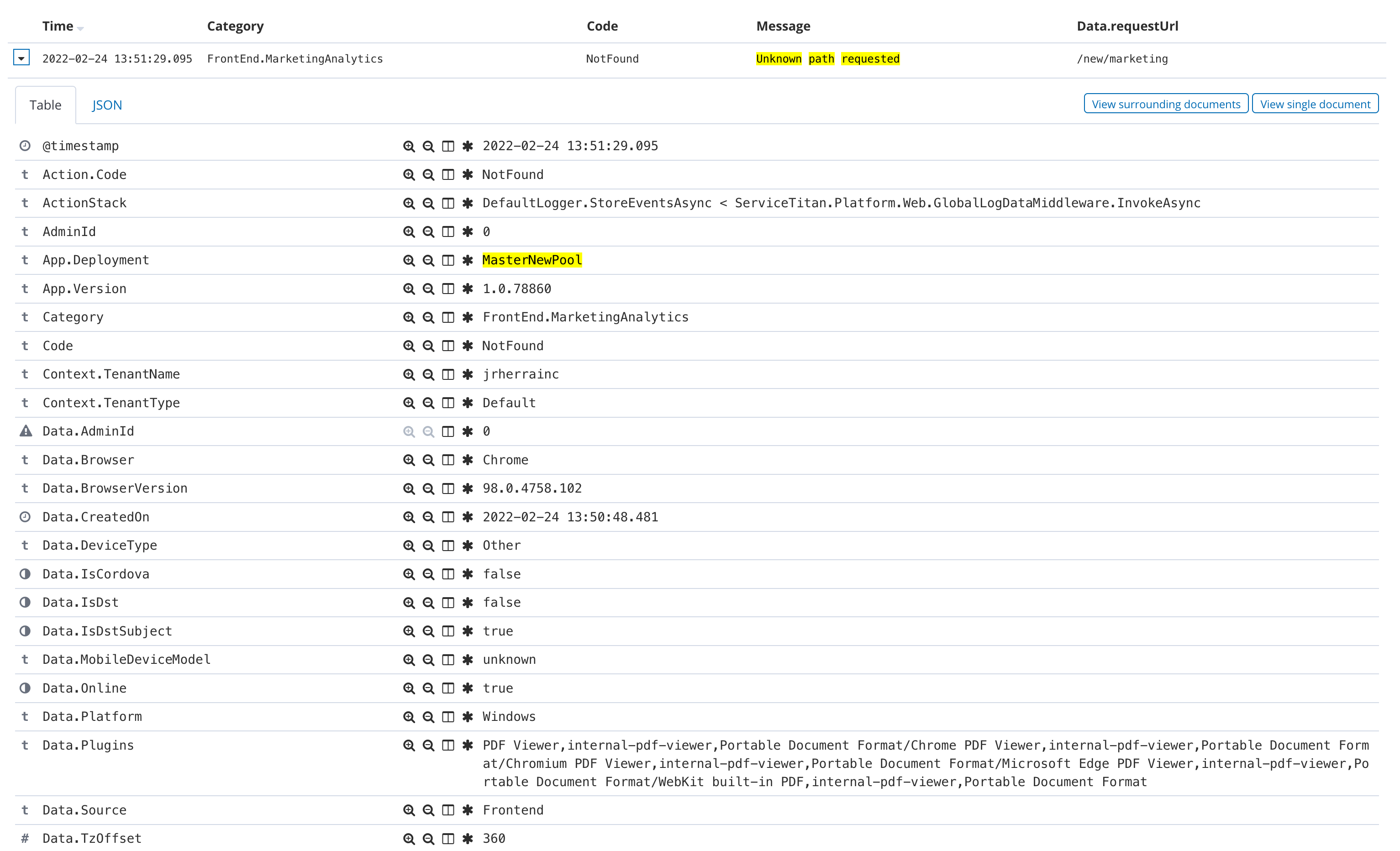
|
|
35
|
+
|
|
36
|
+
## API
|
|
37
|
+
|
|
38
|
+
### Log
|
|
39
|
+
|
|
40
|
+
Use `Log` to log events. Events are sent in batches to the backend service, once per minute.
|
|
12
41
|
|
|
13
42
|
```tsx
|
|
14
|
-
interface
|
|
15
|
-
|
|
16
|
-
warning:
|
|
17
|
-
|
|
43
|
+
interface ILog {
|
|
44
|
+
info(entry: LogInfo): void;
|
|
45
|
+
warning(entry: LogWarning): void;
|
|
46
|
+
error(entry: LogError): void;
|
|
47
|
+
}
|
|
48
|
+
|
|
49
|
+
export interface LogEntry {
|
|
50
|
+
category?: string;
|
|
51
|
+
code?: string;
|
|
52
|
+
message?: string;
|
|
53
|
+
data?: Record<string, boolean | number | string | Date>;
|
|
54
|
+
}
|
|
55
|
+
|
|
56
|
+
export interface LogInfo extends LogEntry {}
|
|
57
|
+
export interface LogWarning extends LogEntry {}
|
|
58
|
+
export interface LogError extends LogEntry {
|
|
59
|
+
error: unknown;
|
|
18
60
|
}
|
|
19
61
|
```
|
|
20
62
|
|
|
21
|
-
###
|
|
63
|
+
### LogService
|
|
22
64
|
|
|
23
|
-
|
|
65
|
+
Use `LogService` to provide a `Log` instance in standalone applications, or to copy an MFEs events to a private endpoint.
|
|
24
66
|
|
|
25
67
|
#### Props
|
|
26
68
|
|
|
27
|
-
|
|
|
28
|
-
|
|
|
29
|
-
| `
|
|
30
|
-
|
|
31
|
-
### LOG_SERVICE_TOKEN
|
|
69
|
+
| Name | Type | Description |
|
|
70
|
+
| :----------- | :------- | ------------------------------------------------------------------------------------------------------- |
|
|
71
|
+
| `endpoint` | `string` | (Optional) The endpoint where to send log events. Defaults to `/Log/Send` |
|
|
72
|
+
| `storageKey` | `string` | (Optional) A unique local storage key where to store events awaiting delivery. Defaults to `LogStorage` |
|
|
32
73
|
|
|
33
|
-
|
|
74
|
+
:::caution
|
|
75
|
+
To avoid conflicts with the host application, when `LogService` is used in an MFE it **MUST** use non-default values for `endpoint` and `storageKey`. We recommend setting `storageKey` to `LogStorage_{name}` where `{name}` is a short, unique CamelCase string (e.g., `LogStorage_HelpCenter`).
|
|
76
|
+
:::
|
|
34
77
|
|
|
35
|
-
|
|
78
|
+
#### Examples
|
|
36
79
|
|
|
37
|
-
|
|
80
|
+
Log service in standalone application with default `endpoint` and `storageKey`:
|
|
38
81
|
|
|
39
82
|
```tsx
|
|
40
|
-
import {
|
|
41
|
-
|
|
42
|
-
|
|
43
|
-
|
|
44
|
-
|
|
45
|
-
|
|
46
|
-
|
|
47
|
-
|
|
48
|
-
|
|
49
|
-
|
|
50
|
-
|
|
51
|
-
|
|
52
|
-
});
|
|
83
|
+
import { FC, StrictMode } from 'react';
|
|
84
|
+
import { LogService } from '@servicetitan/log-service';
|
|
85
|
+
|
|
86
|
+
export const App: FC = () => {
|
|
87
|
+
return (
|
|
88
|
+
<StrictMode>
|
|
89
|
+
<LogService>
|
|
90
|
+
{...}
|
|
91
|
+
<LogService>
|
|
92
|
+
</StrictMode>
|
|
93
|
+
);
|
|
94
|
+
};
|
|
53
95
|
```
|
|
54
96
|
|
|
55
|
-
|
|
97
|
+
Log service in MFE that sends copies of its events to a private endpoint:
|
|
56
98
|
|
|
57
|
-
|
|
99
|
+
```tsx
|
|
100
|
+
import { FC, StrictMode } from 'react';
|
|
101
|
+
import { LogService } from '@servicetitan/log-service';
|
|
102
|
+
|
|
103
|
+
interface MFEProps {
|
|
104
|
+
serviceUrl?: string;
|
|
105
|
+
}
|
|
106
|
+
|
|
107
|
+
export const App: FC<MFEProps> = ({ serviceUrl }) => {
|
|
108
|
+
return (
|
|
109
|
+
<StrictMode>
|
|
110
|
+
<LogService endpoint={`${serviceUrl}/api/log`} storageKey="LogStorage_HelpCenter">
|
|
111
|
+
{...}
|
|
112
|
+
<LogService>
|
|
113
|
+
</StrictMode>
|
|
114
|
+
);
|
|
115
|
+
};
|
|
116
|
+
```
|
package/docs/startup.mdx
CHANGED
|
@@ -241,6 +241,44 @@ It doesn't support hierarchical watch because we are not maintaining hierarchy o
|
|
|
241
241
|
|
|
242
242
|
This project supports [CSS Modules](https://github.com/css-modules/css-modules) alongside regular stylesheets using the `[name].module.{css,less,scss}` file naming convention. It allows the scoping of CSS by automatically creating a unique class name.
|
|
243
243
|
|
|
244
|
+
## SVG Transformation
|
|
245
|
+
|
|
246
|
+
<Admonition type="note">
|
|
247
|
+
Type definitions are provided for the various ways of importing SVGs via the base tsconfig's <code>"files"</code> property within <code>startup</code>. If you override the <code>"files"</code> property within your tsconfig, you may lose access to these type definitions, and will need to add them manually.
|
|
248
|
+
</Admonition>
|
|
249
|
+
|
|
250
|
+
By default, SVGs are loaded as assets. Depending on the file size, the asset is converted to a base64 URI string, or emitted as separate file.
|
|
251
|
+
|
|
252
|
+
```tsx
|
|
253
|
+
import MySVG from './my.svg';
|
|
254
|
+
...
|
|
255
|
+
<img src={MySVG} />
|
|
256
|
+
```
|
|
257
|
+
|
|
258
|
+
When importing SVGs from Anvil 2 (`@servicetitan/anvil2`), [SVGR](https://react-svgr.com/) is used to transform SVGs into React components.
|
|
259
|
+
|
|
260
|
+
```tsx
|
|
261
|
+
import CheckIcon from '@servicetitan/anvil2/assets/icons/material/round/check.svg';
|
|
262
|
+
...
|
|
263
|
+
<CheckIcon />
|
|
264
|
+
```
|
|
265
|
+
|
|
266
|
+
In order to use SVGR with SVGs outside of Anvil 2, you can import them as components by passing the `?component` query to the important statement. For example:
|
|
267
|
+
|
|
268
|
+
```tsx
|
|
269
|
+
import CheckIcon from './assets/check.svg?component';
|
|
270
|
+
...
|
|
271
|
+
<CheckIcon />
|
|
272
|
+
```
|
|
273
|
+
|
|
274
|
+
If you'd like to use SVGs imported from Anvil 2 as assets, you can pass the `?asset` query to the import statement. For example:
|
|
275
|
+
|
|
276
|
+
```tsx
|
|
277
|
+
import CheckIcon from '@servicetitan/anvil2/assets/icons/material/round/check.svg?asset';
|
|
278
|
+
...
|
|
279
|
+
<img src={CheckIcon} />
|
|
280
|
+
```
|
|
281
|
+
|
|
244
282
|
## Configuration Customization
|
|
245
283
|
|
|
246
284
|
The zero-configuration approach is a good fit for most use cases, but sometimes applications may need to extend or override configuration.
|
|
@@ -350,7 +388,7 @@ If you need to add additional rules or change the build output path or make any
|
|
|
350
388
|
|
|
351
389
|
##### createWebpackConfig
|
|
352
390
|
|
|
353
|
-
Accepts an object with two fields: `configuration` and `plugins` (currently only `ForkTsCheckerWebpackPlugin` and `
|
|
391
|
+
Accepts an object with two fields: `configuration` and `plugins` (currently only `ForkTsCheckerWebpackPlugin` and `HtmlWebpackPlugin` are supported, and `MiniCssExtractPlugin` is only supported for production builds) with settings overrides for Webpack and its plugins. Returns default Webpack configuration for provided `configuration.mode` with applied overrides.
|
|
354
392
|
|
|
355
393
|
```js title="webpack.dev.config.js"
|
|
356
394
|
const path = require('path');
|
package/package.json
CHANGED
|
@@ -1,6 +1,6 @@
|
|
|
1
1
|
{
|
|
2
2
|
"name": "@servicetitan/docs-uikit",
|
|
3
|
-
"version": "23.
|
|
3
|
+
"version": "23.5.0",
|
|
4
4
|
"description": "",
|
|
5
5
|
"repository": {
|
|
6
6
|
"type": "git",
|
|
@@ -16,5 +16,5 @@
|
|
|
16
16
|
"cli": {
|
|
17
17
|
"webpack": false
|
|
18
18
|
},
|
|
19
|
-
"gitHead": "
|
|
19
|
+
"gitHead": "fa1290f233700757bd3504849eea54c7d8e04af5"
|
|
20
20
|
}
|