@servicetitan/docs-uikit 22.11.0
This diff represents the content of publicly available package versions that have been released to one of the supported registries. The information contained in this diff is provided for informational purposes only and reflects changes between package versions as they appear in their respective public registries.
- package/README.md +48 -0
- package/docs/component-usage.mdx +64 -0
- package/docs/error-boundary.mdx +44 -0
- package/docs/eslint-config.mdx +33 -0
- package/docs/folder-schema.mdx +204 -0
- package/docs/ko-bridge.mdx +124 -0
- package/docs/lazy-module.mdx +53 -0
- package/docs/log-service.mdx +57 -0
- package/docs/react-ioc.mdx +161 -0
- package/docs/startup.mdx +340 -0
- package/package.json +19 -0
package/README.md
ADDED
|
@@ -0,0 +1,48 @@
|
|
|
1
|
+
# `@servicetitan/docs-uikit`
|
|
2
|
+
|
|
3
|
+
This package contains documentation for Frontend Platform packages that is hosted at https://docs.st.dev.
|
|
4
|
+
|
|
5
|
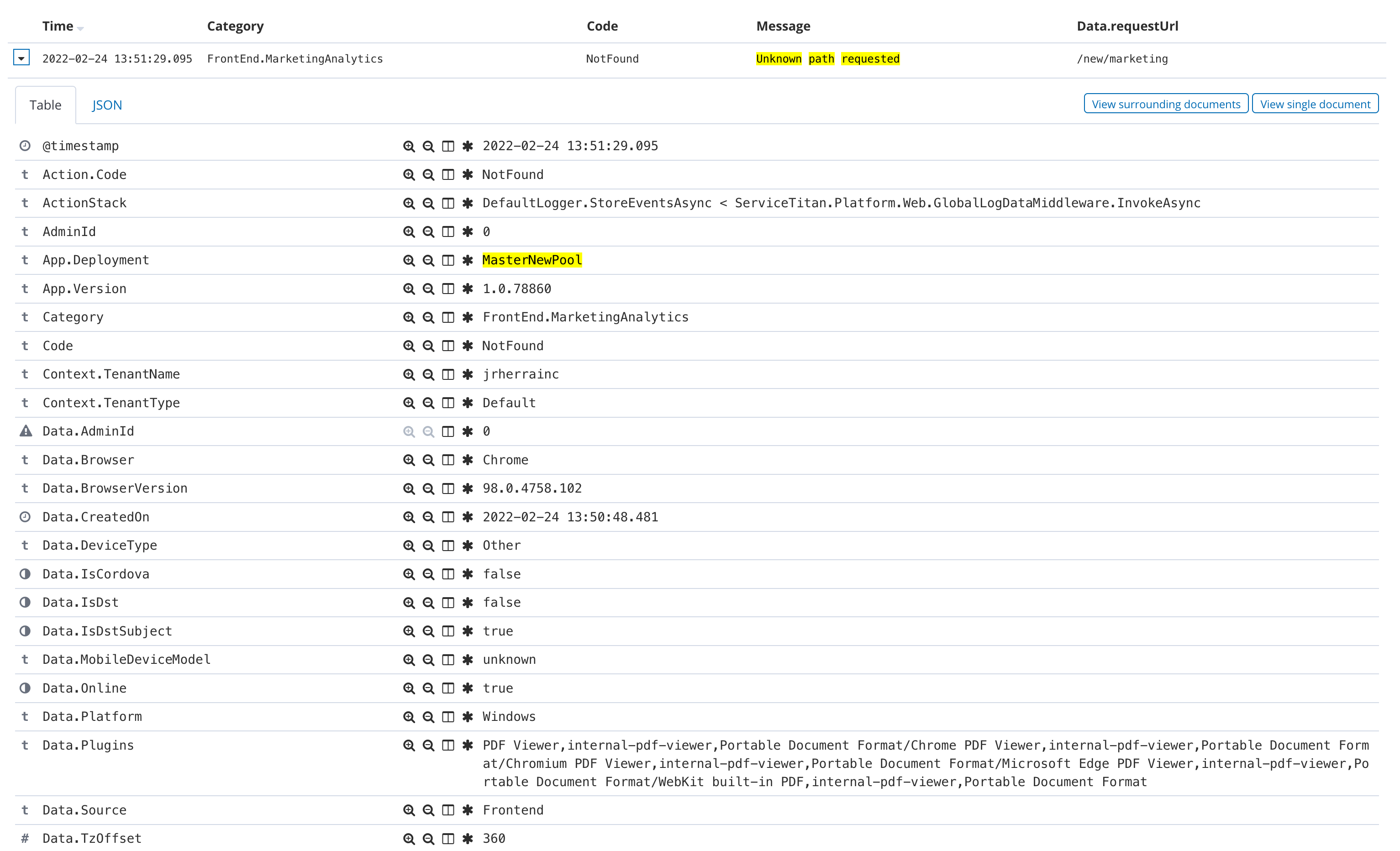
+
## Preview changes locally
|
|
6
|
+
|
|
7
|
+
Use the `yalc` package to preview changes before they are published:
|
|
8
|
+
|
|
9
|
+
1. Install the `yalc` package globally
|
|
10
|
+
|
|
11
|
+
```
|
|
12
|
+
$ npm i yalc -g
|
|
13
|
+
```
|
|
14
|
+
|
|
15
|
+
2. Build the `uikit` packages
|
|
16
|
+
|
|
17
|
+
```
|
|
18
|
+
$ cd <path-to-uikit>
|
|
19
|
+
$ npm run build
|
|
20
|
+
```
|
|
21
|
+
|
|
22
|
+
3. Run `yalc publish` in the `docs` package folder
|
|
23
|
+
|
|
24
|
+
```
|
|
25
|
+
$ cd .\packages\docs\
|
|
26
|
+
$ yalc publish
|
|
27
|
+
```
|
|
28
|
+
|
|
29
|
+
4. Run `yalc add @servicetitan/docs-uikit` in ServiceTitan Engineering `docs` project, which will cause it to use the location version of the `@servicetitan/docs-uikit` package
|
|
30
|
+
|
|
31
|
+
```
|
|
32
|
+
$ cd <path-to-your-servicetitan-docs>
|
|
33
|
+
$ yalc add @servicetitan/docs-uikit
|
|
34
|
+
```
|
|
35
|
+
|
|
36
|
+
5. Update your dependencies
|
|
37
|
+
|
|
38
|
+
```
|
|
39
|
+
$ npm i
|
|
40
|
+
```
|
|
41
|
+
|
|
42
|
+
6. Start the local Docusaurus server
|
|
43
|
+
|
|
44
|
+
```
|
|
45
|
+
$ npm start
|
|
46
|
+
```
|
|
47
|
+
|
|
48
|
+
This opens the documentation in a browser window. Changes are reflected live without having to restart the server.
|
|
@@ -0,0 +1,64 @@
|
|
|
1
|
+
---
|
|
2
|
+
title: Component Usage
|
|
3
|
+
---
|
|
4
|
+
|
|
5
|
+
`@servicetitan/component-usage` will calculate and publish metrics on the app's component usage. The packages which we report on are currently hard-coded to [this list](https://github.com/servicetitan/uikit/blob/master/packages/component-usage/src/index.ts#L40-L64)
|
|
6
|
+
|
|
7
|
+
## Usage
|
|
8
|
+
|
|
9
|
+
### Basic Usage
|
|
10
|
+
|
|
11
|
+
```
|
|
12
|
+
$ npm install --save-dev @servicetitan/component-usage
|
|
13
|
+
$ npx component-usage
|
|
14
|
+
```
|
|
15
|
+
|
|
16
|
+
Or for one-time use with no installation:
|
|
17
|
+
|
|
18
|
+
```
|
|
19
|
+
$ npx @servicetitan/component-usage
|
|
20
|
+
```
|
|
21
|
+
|
|
22
|
+
### Options
|
|
23
|
+
|
|
24
|
+
You must specify at least one "mode" option: `--sendToDataDog`, `--outputDir`, `--teamCityOutput`.
|
|
25
|
+
|
|
26
|
+
The examples below show the long form of each option (like `--sendToDataDog`), but short forms are available (like `-s`). To see all the long and short options, use `--help`.
|
|
27
|
+
|
|
28
|
+
Display help:
|
|
29
|
+
|
|
30
|
+
```
|
|
31
|
+
$ npx @servicetitan/component-usage --help
|
|
32
|
+
```
|
|
33
|
+
|
|
34
|
+
Generate stats files locally in the current directory:
|
|
35
|
+
|
|
36
|
+
```
|
|
37
|
+
$ npx @servicetitan/component-usage --outputDir .
|
|
38
|
+
```
|
|
39
|
+
|
|
40
|
+
Send metrics to DataDog:
|
|
41
|
+
|
|
42
|
+
```
|
|
43
|
+
$ npx @servicetitan/component-usage --sendToDataDog --dataDogApiKey ...API_KEY_GOES_HERE... --dataDogApplicationKey ...APP_KEY_GOES_HERE...
|
|
44
|
+
```
|
|
45
|
+
|
|
46
|
+
Porque no los dos?
|
|
47
|
+
|
|
48
|
+
```
|
|
49
|
+
$ npx @servicetitan/component-usage --outputDir . --sendToDataDog --dataDogApiKey ...API_KEY_GOES_HERE... --dataDogApplicationKey ...APP_KEY_GOES_HERE...
|
|
50
|
+
```
|
|
51
|
+
|
|
52
|
+
TeamCity output
|
|
53
|
+
|
|
54
|
+
```
|
|
55
|
+
$ npx @servicetitan/component-usage --teamCityOutput
|
|
56
|
+
```
|
|
57
|
+
|
|
58
|
+
## Live Data
|
|
59
|
+
|
|
60
|
+
We currently have a [TeamCity build that triggers with every merge to master](https://teamcity.st.dev/viewType.html?buildTypeId=FrontendPlatform_ComponentUsageMaster) which specifies all three mode options:
|
|
61
|
+
|
|
62
|
+
- `--sendToDataDog`: publish the metric `far.componentUsage` to DataDog. [This DataDog dashboard](https://app.datadoghq.com/dashboard/my4-ftr-xgu/front-end-component-usage?from_ts=1602016753361&live=true&to_ts=1602103153361) shows some charts on this metric.
|
|
63
|
+
- `--outputDir`: write the stats out as files during the build, which is then published as a build artifact. [Example artifacts from a recent build](https://teamcity.st.dev/repository/download/FrontendPlatform_ComponentUsageMaster/901050:id/treemap/index.html)
|
|
64
|
+
- `--teamCityOutput`: write out special output during the TeamCity build process (like `##teamcity[buildStatisticValue...`) which gets captured and published as a TeamCity build statistic. See the [build statistics tab](https://teamcity.st.dev/viewType.html?buildTypeId=FrontendPlatform_ComponentUsageMaster&tab=buildTypeStatistics) for charts.
|
|
@@ -0,0 +1,44 @@
|
|
|
1
|
+
---
|
|
2
|
+
title: Error Boundary
|
|
3
|
+
---
|
|
4
|
+
|
|
5
|
+
`@servicetitan/error-boundary` is an implementation of React error boundary mechanism. More info about error boundaries can be found in React [docs](https://reactjs.org/docs/error-boundaries.html).
|
|
6
|
+
|
|
7
|
+
## Usage
|
|
8
|
+
|
|
9
|
+
```tsx
|
|
10
|
+
import { ErrorBoundary, FallbackProps } from '@servicetitan/error-boundary';
|
|
11
|
+
import { Button } from '@servicetitan/design-system';
|
|
12
|
+
|
|
13
|
+
const App: React.FC = () => {
|
|
14
|
+
<ErrorBoundary fallback={Fallback} moduleName="appRoot">
|
|
15
|
+
<Broken />
|
|
16
|
+
</ErrorBoundary>;
|
|
17
|
+
};
|
|
18
|
+
|
|
19
|
+
const Broken: React.FC = () => {
|
|
20
|
+
throw new Error('I am broken.');
|
|
21
|
+
};
|
|
22
|
+
|
|
23
|
+
const Fallback: React.FC<FallbackProps> = ({ onRefresh }) => {
|
|
24
|
+
return (
|
|
25
|
+
<div>
|
|
26
|
+
<span>Something went totally wrong</span>
|
|
27
|
+
<Button onClick={onRefresh}>Refresh</Button>
|
|
28
|
+
</div>
|
|
29
|
+
);
|
|
30
|
+
};
|
|
31
|
+
```
|
|
32
|
+
|
|
33
|
+
## Package contents
|
|
34
|
+
|
|
35
|
+
### ErrorBoundary
|
|
36
|
+
|
|
37
|
+
React Component. It tries to catch and log errors from children.
|
|
38
|
+
|
|
39
|
+
#### Props
|
|
40
|
+
|
|
41
|
+
| Name | Type | Description | Required |
|
|
42
|
+
| :----------: | :--------------------------------------------: | :--------------------------------------: | :-------------------------------------------------------------------: |
|
|
43
|
+
| `moduleName` | `string` | Used for log categorization | Yes |
|
|
44
|
+
| `fallback` | `React.ComponentType<{onRefresh?:() => void}>` | Component to render when error is caught | No, `ErrorBoundary` renders "Something went wrong..." text by default |
|
|
@@ -0,0 +1,33 @@
|
|
|
1
|
+
---
|
|
2
|
+
title: ESLint & Stylelint configurations
|
|
3
|
+
---
|
|
4
|
+
|
|
5
|
+
`@servicetitan/eslint-config` and `@servicetitan/stylelint-config` packages contain core lint rule sets which should be used in ServiceTitan web projects.
|
|
6
|
+
|
|
7
|
+
## Usage
|
|
8
|
+
|
|
9
|
+
### ESLint
|
|
10
|
+
|
|
11
|
+
#### In the Lerna project
|
|
12
|
+
|
|
13
|
+
```json title=".eslintrc.json"
|
|
14
|
+
{
|
|
15
|
+
"extends": ["@servicetitan/eslint-config/mono"]
|
|
16
|
+
}
|
|
17
|
+
```
|
|
18
|
+
|
|
19
|
+
#### Without Lerna
|
|
20
|
+
|
|
21
|
+
```json title=".eslintrc.json"
|
|
22
|
+
{
|
|
23
|
+
"extends": ["@servicetitan/eslint-config/single"]
|
|
24
|
+
}
|
|
25
|
+
```
|
|
26
|
+
|
|
27
|
+
### Stylelint
|
|
28
|
+
|
|
29
|
+
```json title=".stylelintrc.json"
|
|
30
|
+
{
|
|
31
|
+
"extends": ["@servicetitan/stylelint-config"]
|
|
32
|
+
}
|
|
33
|
+
```
|
|
@@ -0,0 +1,204 @@
|
|
|
1
|
+
---
|
|
2
|
+
title: Folder Schema
|
|
3
|
+
---
|
|
4
|
+
|
|
5
|
+
Folder schema is a flexible tool to configure a strict hierarchy of files in your project with verification by `eslint`. It consists of `@servicetitan/eslint-plugin-folder-schema` and `@servicetitan/folder-lint` packages.
|
|
6
|
+
|
|
7
|
+
## @servicetitan/eslint-plugin-folder-schema
|
|
8
|
+
|
|
9
|
+
Contains `@servicetitan/folder-schema/check` rule with the next options:
|
|
10
|
+
|
|
11
|
+
- `root` - entry point to start recursive checking
|
|
12
|
+
- `config` - object with a configuration of files hierarchy
|
|
13
|
+
- `docLink?` - link to a document describing a required files hierarchy
|
|
14
|
+
|
|
15
|
+
## @servicetitan/folder-lint
|
|
16
|
+
|
|
17
|
+
Contains enum and types useful to create an object with files hierarchy configuration.
|
|
18
|
+
|
|
19
|
+
### NamingConvention
|
|
20
|
+
|
|
21
|
+
Enum with all supported naming conventions.
|
|
22
|
+
|
|
23
|
+
- DashDelimitedLowercase - `dash-delimited-lowercase`
|
|
24
|
+
- CamelCase - `camelCase`
|
|
25
|
+
|
|
26
|
+
### Folder
|
|
27
|
+
|
|
28
|
+
The type for configuration any folder except the root folder.
|
|
29
|
+
|
|
30
|
+
- `name` - name of the folder the configuration is for, supports `glob` syntax
|
|
31
|
+
- `namingConvention?` - naming convention for all nested files and folders, subfolders inherits the value of this property
|
|
32
|
+
- `children?` - configurations of allowed subfolders, an empty array by default
|
|
33
|
+
- `allowedFiles?` - list of files that can be placed in this folder is used to check the full filename with an extension, doesn't support path before filename; all files are allowed by default, supports `glob` syntax
|
|
34
|
+
- `allowedExtensions?` - list of files extensions that can be placed in this folder is used to check only the part that starts after the first dot; by default is equal to the value from a parent folder configuration or an empty array for the root folder, supports `glob` syntax
|
|
35
|
+
- `overrideExtensions?` - if `false` parent extensions are getting concatenated with current ones, `true` by default but take effect only if `allowedExtensions` is defined
|
|
36
|
+
- `ignore?` - if `true` then all content will be considered valid
|
|
37
|
+
|
|
38
|
+
### RootFolder
|
|
39
|
+
|
|
40
|
+
The type for root folder configuration, has the same properties as the `Folder`, but `namingConvention` is required and `name` will not be used, so you can put everything there.
|
|
41
|
+
|
|
42
|
+
### Configuration example
|
|
43
|
+
|
|
44
|
+
```ts
|
|
45
|
+
const jest: Folder[] = [
|
|
46
|
+
{
|
|
47
|
+
name: '__mocks__',
|
|
48
|
+
children: { name: '*' },
|
|
49
|
+
allowedExtensions: '.*',
|
|
50
|
+
},
|
|
51
|
+
{
|
|
52
|
+
name: '__tests__',
|
|
53
|
+
children: { name: '*' },
|
|
54
|
+
allowedExtensions: ['.test.@(ts|tsx)', '.store.test.ts'],
|
|
55
|
+
},
|
|
56
|
+
];
|
|
57
|
+
|
|
58
|
+
const byFileType: Folder[] = [
|
|
59
|
+
{
|
|
60
|
+
name: 'stores',
|
|
61
|
+
allowedExtensions: '.store.ts',
|
|
62
|
+
children: [...jest, { name: '*', children: jest }],
|
|
63
|
+
},
|
|
64
|
+
{
|
|
65
|
+
name: 'utils',
|
|
66
|
+
allowedExtensions: '.ts',
|
|
67
|
+
children: [...jest, { name: '*', children: jest }],
|
|
68
|
+
},
|
|
69
|
+
{
|
|
70
|
+
name: 'components',
|
|
71
|
+
allowedExtensions: ['.tsx', '.less', '.less.d.ts'],
|
|
72
|
+
children: [...jest, { name: '*', children: jest }],
|
|
73
|
+
},
|
|
74
|
+
{
|
|
75
|
+
name: 'api',
|
|
76
|
+
allowedExtensions: '.api.ts',
|
|
77
|
+
children: jest,
|
|
78
|
+
},
|
|
79
|
+
{
|
|
80
|
+
name: 'styles',
|
|
81
|
+
allowedExtensions: ['.less', '.less.d.ts', '.css'],
|
|
82
|
+
},
|
|
83
|
+
{
|
|
84
|
+
name: 'enums',
|
|
85
|
+
allowedExtensions: ['.ts'],
|
|
86
|
+
},
|
|
87
|
+
{
|
|
88
|
+
name: 'assets',
|
|
89
|
+
allowedExtensions: ['.png', '.svg'],
|
|
90
|
+
},
|
|
91
|
+
];
|
|
92
|
+
|
|
93
|
+
const admin: Folder = {
|
|
94
|
+
name: 'admin',
|
|
95
|
+
children: {
|
|
96
|
+
name: 'app',
|
|
97
|
+
allowedFiles: [
|
|
98
|
+
'api-config.ts',
|
|
99
|
+
'app.tsx',
|
|
100
|
+
'global-inject.ts',
|
|
101
|
+
'index.ejs',
|
|
102
|
+
'index.tsx',
|
|
103
|
+
'routes.tsx',
|
|
104
|
+
'shared-react-init.ts',
|
|
105
|
+
'suppress-context-warnings.ts',
|
|
106
|
+
'suppress-lifecycle-warnings.ts',
|
|
107
|
+
'vendor-style.css',
|
|
108
|
+
],
|
|
109
|
+
allowedExtensions: '.*',
|
|
110
|
+
children: [
|
|
111
|
+
{
|
|
112
|
+
name: 'modules',
|
|
113
|
+
allowedFiles: [],
|
|
114
|
+
children: [
|
|
115
|
+
{
|
|
116
|
+
name: 'common',
|
|
117
|
+
children: byFileType,
|
|
118
|
+
},
|
|
119
|
+
{
|
|
120
|
+
name: '*', // module level
|
|
121
|
+
allowedFiles: [],
|
|
122
|
+
children: [
|
|
123
|
+
...byFileType,
|
|
124
|
+
{
|
|
125
|
+
name: '*', // section level
|
|
126
|
+
allowedFiles: [],
|
|
127
|
+
children: [
|
|
128
|
+
...byFileType,
|
|
129
|
+
{
|
|
130
|
+
name: '*', // page level
|
|
131
|
+
allowedFiles: [],
|
|
132
|
+
children: byFileType,
|
|
133
|
+
},
|
|
134
|
+
],
|
|
135
|
+
},
|
|
136
|
+
],
|
|
137
|
+
},
|
|
138
|
+
],
|
|
139
|
+
},
|
|
140
|
+
],
|
|
141
|
+
},
|
|
142
|
+
};
|
|
143
|
+
|
|
144
|
+
const desktop: Folder = {
|
|
145
|
+
name: 'desktop',
|
|
146
|
+
children: {
|
|
147
|
+
name: 'app',
|
|
148
|
+
allowedFiles: [
|
|
149
|
+
'custom.d.ts',
|
|
150
|
+
'global-inject.ts',
|
|
151
|
+
'hash-browser-router.tsx',
|
|
152
|
+
'index.ejs',
|
|
153
|
+
'index.less',
|
|
154
|
+
'index.less.d.ts',
|
|
155
|
+
'index.tsx',
|
|
156
|
+
'main-app.tsx',
|
|
157
|
+
'provider.tsx',
|
|
158
|
+
'routes.tsx',
|
|
159
|
+
'shared-react-import.ts',
|
|
160
|
+
'shared-react-init.ts',
|
|
161
|
+
'suppress-context-warnings.ts',
|
|
162
|
+
'suppress-lifecycle-warnings.ts',
|
|
163
|
+
'suspension-routing-hook.ts',
|
|
164
|
+
'vendor-style.css',
|
|
165
|
+
],
|
|
166
|
+
allowedExtensions: '.*',
|
|
167
|
+
children: {
|
|
168
|
+
name: 'modules',
|
|
169
|
+
allowedFiles: [],
|
|
170
|
+
children: [
|
|
171
|
+
{ name: 'settings', children: byFileType },
|
|
172
|
+
{
|
|
173
|
+
name: '*', // module level
|
|
174
|
+
allowedFiles: ['shared-react-components.ts', 'custom-notifications.ts'],
|
|
175
|
+
children: [
|
|
176
|
+
...byFileType,
|
|
177
|
+
{
|
|
178
|
+
name: '*', // section level
|
|
179
|
+
allowedFiles: [],
|
|
180
|
+
children: [
|
|
181
|
+
...byFileType,
|
|
182
|
+
{
|
|
183
|
+
name: '*', // page level
|
|
184
|
+
allowedFiles: [],
|
|
185
|
+
children: byFileType,
|
|
186
|
+
},
|
|
187
|
+
],
|
|
188
|
+
},
|
|
189
|
+
],
|
|
190
|
+
},
|
|
191
|
+
],
|
|
192
|
+
},
|
|
193
|
+
},
|
|
194
|
+
};
|
|
195
|
+
|
|
196
|
+
const config: RootFolder = {
|
|
197
|
+
name: '<root>',
|
|
198
|
+
namingConvention: NamingConvention.DashDelimitedLowercase,
|
|
199
|
+
children: {
|
|
200
|
+
name: 'packages',
|
|
201
|
+
children: [admin, desktop],
|
|
202
|
+
},
|
|
203
|
+
};
|
|
204
|
+
```
|
|
@@ -0,0 +1,124 @@
|
|
|
1
|
+
---
|
|
2
|
+
title: React-Knockout Bridge
|
|
3
|
+
---
|
|
4
|
+
|
|
5
|
+
`@servicetitan/ko-bridge` is a collection of components and utils to connect `Knockout` and `React` codebase.
|
|
6
|
+
|
|
7
|
+
## When to use?
|
|
8
|
+
|
|
9
|
+
- When you already have a `Knockout` component that you want to show from `React`.
|
|
10
|
+
- When you have `React` component you want to show from Knockout.
|
|
11
|
+
- For new components we suggest to build it in `React` from scratch.
|
|
12
|
+
|
|
13
|
+
## KnockoutComponent
|
|
14
|
+
|
|
15
|
+
It's useful when you need to show `Knockout` component from `React` codebase.
|
|
16
|
+
|
|
17
|
+
### Props
|
|
18
|
+
|
|
19
|
+
```tsx
|
|
20
|
+
interface KnockoutComponentProps {
|
|
21
|
+
/** The knockout model that is bound to the component */
|
|
22
|
+
koModel: any;
|
|
23
|
+
/** The html template with knockout bindings to be rendered in react */
|
|
24
|
+
koTemplate: ReturnType<typeof React.forwardRef>;
|
|
25
|
+
/** If set to true, it will allow the change in reference for the knockout model */
|
|
26
|
+
dangerouslyUpdatable?: boolean;
|
|
27
|
+
}
|
|
28
|
+
```
|
|
29
|
+
|
|
30
|
+
_`dangerouslyUpdatable` is dangerous because change in reference might try to update the knockout html comments which will not exist in current context of react._
|
|
31
|
+
|
|
32
|
+
### Examples
|
|
33
|
+
|
|
34
|
+
#### Usage by extension
|
|
35
|
+
|
|
36
|
+
```tsx
|
|
37
|
+
class ExampleKnockoutComponent extends KnockoutComponent {
|
|
38
|
+
// if needed
|
|
39
|
+
componentDidMount() {
|
|
40
|
+
super.componentDidMount();
|
|
41
|
+
}
|
|
42
|
+
|
|
43
|
+
render() {
|
|
44
|
+
return <div data-bind="visible: window.IsExampleVisible">Invisible Example.</div>;
|
|
45
|
+
}
|
|
46
|
+
}
|
|
47
|
+
```
|
|
48
|
+
|
|
49
|
+
#### Usage as JSX element
|
|
50
|
+
|
|
51
|
+
```tsx
|
|
52
|
+
const ExampleTemplate = () => <div data-bind="visible: IsExampleVisible">Invisible Example</div>;
|
|
53
|
+
|
|
54
|
+
interface ExampleKnockoutComponentProps {
|
|
55
|
+
IsExampleVisible: boolean;
|
|
56
|
+
}
|
|
57
|
+
|
|
58
|
+
class ExampleKnockoutComponent extends React.Component<ExampleKnockoutComponentProps> {
|
|
59
|
+
render() {
|
|
60
|
+
return <KnockoutComponent koModel={this.props} koTemplate={ExampleTemplate} />;
|
|
61
|
+
}
|
|
62
|
+
}
|
|
63
|
+
```
|
|
64
|
+
|
|
65
|
+
## HtmlComment
|
|
66
|
+
|
|
67
|
+
JSX wrapper for the native comments.
|
|
68
|
+
|
|
69
|
+
### Props
|
|
70
|
+
|
|
71
|
+
```tsx
|
|
72
|
+
interface HtmlCommentProps {
|
|
73
|
+
text: string;
|
|
74
|
+
isInTable?: boolean;
|
|
75
|
+
parent?: string;
|
|
76
|
+
}
|
|
77
|
+
```
|
|
78
|
+
|
|
79
|
+
### Examples
|
|
80
|
+
|
|
81
|
+
```tsx
|
|
82
|
+
<HtmlComment text="ko if: !isAuthenticated" />
|
|
83
|
+
<button
|
|
84
|
+
className="Button Button--grey Button--solid Button--small"
|
|
85
|
+
data-bind="click: function() { login(); }"
|
|
86
|
+
>
|
|
87
|
+
Login
|
|
88
|
+
</button>
|
|
89
|
+
<HtmlComment text="/ko" />
|
|
90
|
+
```
|
|
91
|
+
|
|
92
|
+
## Knockout Bindings
|
|
93
|
+
|
|
94
|
+
Any created `React` component can be rendered in `Knockout` to avoid code duplication, we have knockout bindings for this. `React` will render component in element with binding.
|
|
95
|
+
|
|
96
|
+
_The component must be accessible anywhere, e.g. you can assign it to a `sharedReactComponent` object available in the `window`._
|
|
97
|
+
|
|
98
|
+
### reactUncontrolled
|
|
99
|
+
|
|
100
|
+
```tsx
|
|
101
|
+
<div data-bind="reactUncontrolled: window.sharedReactComponent.ExampleKnockoutComponent" />
|
|
102
|
+
```
|
|
103
|
+
|
|
104
|
+
### react
|
|
105
|
+
|
|
106
|
+
```tsx
|
|
107
|
+
<div
|
|
108
|
+
data-bind="react: window.sharedReactComponent.ExampleKnockoutComponent, props: {
|
|
109
|
+
message: 'Hello world!'
|
|
110
|
+
}"
|
|
111
|
+
/>
|
|
112
|
+
```
|
|
113
|
+
|
|
114
|
+
## @koObservableToMobx
|
|
115
|
+
|
|
116
|
+
Sometimes in `React` codebase, you may need to use some of existing `Knockout` observables and be informed about all their changes.
|
|
117
|
+
|
|
118
|
+
```tsx
|
|
119
|
+
@injectable()
|
|
120
|
+
class Store {
|
|
121
|
+
@koObservableToMobx(() => window.App.isAuthenticated)
|
|
122
|
+
isAuthenticated!: boolean;
|
|
123
|
+
}
|
|
124
|
+
```
|
|
@@ -0,0 +1,53 @@
|
|
|
1
|
+
---
|
|
2
|
+
title: Lazy Module
|
|
3
|
+
---
|
|
4
|
+
|
|
5
|
+
In the terminology of our desktop frontend "module" is an independent business area of the application with ownership by some squad, for example, we have accounting, memberships, reporting, dispatch and other very important modules that desktop SPA consists of. Clearly, when ST users are opening desktop app they don't need all those modules loaded right away because typically they use a subset of app functionality to perform their job duties.
|
|
6
|
+
|
|
7
|
+
`@servicetitan/lazy-module` is a wrapper around React Suspense mechanism to enable module-level code splitting for better web page loading performance.
|
|
8
|
+
|
|
9
|
+
## Usage
|
|
10
|
+
|
|
11
|
+
```tsx
|
|
12
|
+
import React from 'react';
|
|
13
|
+
import { lazyModule } from '@servicetitan/lazy-module';
|
|
14
|
+
|
|
15
|
+
const loader = async () => {
|
|
16
|
+
const { Dispatch } = await import(
|
|
17
|
+
/* webpackChunkName: "dispatch" */
|
|
18
|
+
'./dispatch'
|
|
19
|
+
);
|
|
20
|
+
|
|
21
|
+
return Dispatch;
|
|
22
|
+
};
|
|
23
|
+
|
|
24
|
+
// Don't create lazy module in React component render function
|
|
25
|
+
// to avoid it from being re-created every re-render
|
|
26
|
+
const LazyDispatch = lazyModule({ loader, name: 'Dispatch' });
|
|
27
|
+
|
|
28
|
+
export const DispatchModule: React.FC = () => <LazyDispatch />;
|
|
29
|
+
```
|
|
30
|
+
|
|
31
|
+
## Package contents
|
|
32
|
+
|
|
33
|
+
### lazyModule
|
|
34
|
+
|
|
35
|
+
`lazyModule` accepts module loader function and returns React component that retrieves module from a remote host during the first render. Additionally `lazyModule` creates an [error boundary](/docs/frontend/error-boundary) around your module to catch and log runtime errors.
|
|
36
|
+
|
|
37
|
+
#### Options
|
|
38
|
+
|
|
39
|
+
| Name | Type | Description | Required |
|
|
40
|
+
| :----------------------: | :---------------------------------------: | :----------------------------------------------------------------: | :------------------------------------------------------------: |
|
|
41
|
+
| `loader` | `() => Promise<React.ComponentType<any>>` | Function doing dynamic import of a module | Yes |
|
|
42
|
+
| `name` | `string` | Module name | Yes |
|
|
43
|
+
| `loadingComponent` | `React.ComponentType<any>` | Component to diplay while loading is in progress | No, defaults to `DefaultLoading` |
|
|
44
|
+
| `loadingErrorComponent` | `React.ComponentType<any>` | Component to display if module loading fails | No, defaults to `DefaultLoadingError` |
|
|
45
|
+
| `errorFallbackComponent` | `React.ComponentType<any>` | Component to pass to `@servicetitan/error-boundary` module wrapper | No, uses default component from `@servicetitan/error-boundary` |
|
|
46
|
+
|
|
47
|
+
### DefaultLoading
|
|
48
|
+
|
|
49
|
+
React Component, displays `Loading...` text.
|
|
50
|
+
|
|
51
|
+
### DefaultLoadingError
|
|
52
|
+
|
|
53
|
+
React Component, displays `Cannot load module...` text and `Reload` button.
|
|
@@ -0,0 +1,57 @@
|
|
|
1
|
+
---
|
|
2
|
+
title: Log Service
|
|
3
|
+
---
|
|
4
|
+
|
|
5
|
+
`@servicetitan/log-service` contains client-side log service interfaces and provider component. Currently it's consumer application responsibility to provide log service implementation.
|
|
6
|
+
|
|
7
|
+
## Package contents
|
|
8
|
+
|
|
9
|
+
### ILogService
|
|
10
|
+
|
|
11
|
+
Log service interface. It has 3 methods to log messages of different severity.
|
|
12
|
+
|
|
13
|
+
```tsx
|
|
14
|
+
interface ILogService {
|
|
15
|
+
error: Function;
|
|
16
|
+
warning: Function;
|
|
17
|
+
info: Function;
|
|
18
|
+
}
|
|
19
|
+
```
|
|
20
|
+
|
|
21
|
+
### LogServiceProvider
|
|
22
|
+
|
|
23
|
+
React Component that passes log service class to `@servicetitan/react-ioc` container.
|
|
24
|
+
|
|
25
|
+
#### Props
|
|
26
|
+
|
|
27
|
+
| Name | Type | Description | Required |
|
|
28
|
+
| :-----: | :-------------------------------: | :---------------: | :------: |
|
|
29
|
+
| `value` | `interfaces.Newable<ILogService>` | Log service class | Yes |
|
|
30
|
+
|
|
31
|
+
### LOG_SERVICE_TOKEN
|
|
32
|
+
|
|
33
|
+
InversifyJS token to resolve log service from `@servicetitan/react-ioc` container.
|
|
34
|
+
|
|
35
|
+
### In the Monolith
|
|
36
|
+
|
|
37
|
+
Here's an example of how to use it in the monolith:
|
|
38
|
+
|
|
39
|
+
```tsx
|
|
40
|
+
import { Log } from '@servicetitan/log-service';
|
|
41
|
+
|
|
42
|
+
const [log] = useDependencies(Log);
|
|
43
|
+
|
|
44
|
+
log.warning({
|
|
45
|
+
category: 'MarketingAnalytics',
|
|
46
|
+
code: 'NotFound',
|
|
47
|
+
message: 'Unknown path requested',
|
|
48
|
+
data: {
|
|
49
|
+
requestUrl:
|
|
50
|
+
routeProps.location.pathname + routeProps.location.search + routeProps.location.hash,
|
|
51
|
+
},
|
|
52
|
+
});
|
|
53
|
+
```
|
|
54
|
+
|
|
55
|
+
Here's what it looks like in Kibana:
|
|
56
|
+
|
|
57
|
+
|
|
@@ -0,0 +1,161 @@
|
|
|
1
|
+
---
|
|
2
|
+
title: React IoC
|
|
3
|
+
---
|
|
4
|
+
|
|
5
|
+
`@servicetitan/react-ioc` is an implementation of [InversifyJS](https://github.com/inversify/InversifyJS) for react applications, it uses Context API of React 16 to manage containers.
|
|
6
|
+
|
|
7
|
+
## Features
|
|
8
|
+
|
|
9
|
+
- Supports hierarchical Dependency Injection
|
|
10
|
+
- Easy API that supports Singleton and Transient patterns
|
|
11
|
+
- Support for decorator and JSX based injection
|
|
12
|
+
- Automatic cleaning of injected properties on unmounting of React components
|
|
13
|
+
|
|
14
|
+
## Examples
|
|
15
|
+
|
|
16
|
+
### @injectable
|
|
17
|
+
|
|
18
|
+
Alias for [@injectable](https://github.com/inversify/InversifyJS#step-2-declare-dependencies-using-the-injectable--inject-decorators) from InversifyJS.
|
|
19
|
+
|
|
20
|
+
```tsx
|
|
21
|
+
@injectable()
|
|
22
|
+
class Store {
|
|
23
|
+
value = 123;
|
|
24
|
+
}
|
|
25
|
+
```
|
|
26
|
+
|
|
27
|
+
### Container
|
|
28
|
+
|
|
29
|
+
Alias for [Container](https://github.com/inversify/InversifyJS/blob/master/wiki/container_api.md) from InversifyJS, could be used for testing purposes.
|
|
30
|
+
|
|
31
|
+
```tsx
|
|
32
|
+
const rootContainer = new Container();
|
|
33
|
+
|
|
34
|
+
rootContainer.bind(Store).toSelf();
|
|
35
|
+
|
|
36
|
+
const store = container.get(Store);
|
|
37
|
+
```
|
|
38
|
+
|
|
39
|
+
### @provide
|
|
40
|
+
|
|
41
|
+
A decorator used to inject the required information in the current level of hierarchy.
|
|
42
|
+
|
|
43
|
+
_NOTE:_ `@provide` creates new InversifyJS container with a link to a parent one meaning that all React components below `@provide` will try to resolve stores from closest container first. Using this mechanism you can re-provide the same store just for the sub-part of React component tree if needed. More info about hierarhical DI can be found [here](https://github.com/inversify/InversifyJS/blob/master/wiki/hierarchical_di.md).
|
|
44
|
+
|
|
45
|
+
```tsx
|
|
46
|
+
const Component: React.FC = provide({
|
|
47
|
+
singletons: [Store],
|
|
48
|
+
})(() => {
|
|
49
|
+
return <SubComponent />;
|
|
50
|
+
});
|
|
51
|
+
```
|
|
52
|
+
|
|
53
|
+
```tsx
|
|
54
|
+
@provide({
|
|
55
|
+
singletons: [Store],
|
|
56
|
+
})
|
|
57
|
+
class Component extends React.Component {
|
|
58
|
+
render() {
|
|
59
|
+
return <SubComponent />;
|
|
60
|
+
}
|
|
61
|
+
}
|
|
62
|
+
```
|
|
63
|
+
|
|
64
|
+
### Provider
|
|
65
|
+
|
|
66
|
+
A functional component equivalent to [@provide](#provide)
|
|
67
|
+
|
|
68
|
+
```tsx
|
|
69
|
+
<Provider singletons={[Store]}>
|
|
70
|
+
<Component />
|
|
71
|
+
</Provider>
|
|
72
|
+
```
|
|
73
|
+
|
|
74
|
+
### @inject
|
|
75
|
+
|
|
76
|
+
Alias for [@inject](https://github.com/inversify/InversifyJS#step-2-declare-dependencies-using-the-injectable--inject-decorators) from InversifyJS, could be used for injecting information in not React classes.
|
|
77
|
+
|
|
78
|
+
```tsx
|
|
79
|
+
class ConsumerStore {
|
|
80
|
+
constructor(@inject(Store) private readonly store: Store) {}
|
|
81
|
+
}
|
|
82
|
+
```
|
|
83
|
+
|
|
84
|
+
### useDependencies
|
|
85
|
+
|
|
86
|
+
A Hook that can be used in order to consume IoC container in any child functional component.
|
|
87
|
+
|
|
88
|
+
```tsx
|
|
89
|
+
const SubComponent: React.FC = () => {
|
|
90
|
+
const [store] = useDependencies(Store);
|
|
91
|
+
|
|
92
|
+
return <div>{store.value}</div>;
|
|
93
|
+
};
|
|
94
|
+
```
|
|
95
|
+
|
|
96
|
+
### injectDependency
|
|
97
|
+
|
|
98
|
+
A Hook that can be used in order to consume IoC container in any child component.
|
|
99
|
+
|
|
100
|
+
```tsx
|
|
101
|
+
class SubComponent extends React.Component {
|
|
102
|
+
@injectDependency(Store)
|
|
103
|
+
store!: Store;
|
|
104
|
+
|
|
105
|
+
render() {
|
|
106
|
+
return <span>{this.store.value}</span>;
|
|
107
|
+
}
|
|
108
|
+
}
|
|
109
|
+
```
|
|
110
|
+
|
|
111
|
+
### Using tokens
|
|
112
|
+
|
|
113
|
+
#### Creating a token
|
|
114
|
+
|
|
115
|
+
```tsx
|
|
116
|
+
interface ILogger {
|
|
117
|
+
error(e: Error): void;
|
|
118
|
+
}
|
|
119
|
+
|
|
120
|
+
const LOGGER_TOKEN = symbolToken<ILogger>('LOGGER_TOKEN');
|
|
121
|
+
```
|
|
122
|
+
|
|
123
|
+
#### Injecting a service by token
|
|
124
|
+
|
|
125
|
+
```tsx
|
|
126
|
+
class ErrorBoundary extends React.Component {
|
|
127
|
+
state = { hasError: false };
|
|
128
|
+
|
|
129
|
+
@injectDependency(LOGGER_TOKEN)
|
|
130
|
+
logger!: ILogger;
|
|
131
|
+
|
|
132
|
+
componentDidCatch(e: Error) {
|
|
133
|
+
this.logger.error(e);
|
|
134
|
+
this.setState({ hasError: true });
|
|
135
|
+
}
|
|
136
|
+
|
|
137
|
+
render() {
|
|
138
|
+
if (this.state.hasError) {
|
|
139
|
+
return <div>Something went wrong...</div>;
|
|
140
|
+
}
|
|
141
|
+
|
|
142
|
+
return this.props.children;
|
|
143
|
+
}
|
|
144
|
+
}
|
|
145
|
+
```
|
|
146
|
+
|
|
147
|
+
#### Providing a service
|
|
148
|
+
|
|
149
|
+
```tsx
|
|
150
|
+
class Logger implements ILogger {
|
|
151
|
+
error(e: Error) {
|
|
152
|
+
console.log(e);
|
|
153
|
+
}
|
|
154
|
+
}
|
|
155
|
+
|
|
156
|
+
const App = provide({ singletons: [{ provide: LOGGER_TOKEN, useClass: Logger }] })(() => (
|
|
157
|
+
<ErrorBoundary>
|
|
158
|
+
<Router />
|
|
159
|
+
</ErrorBoundary>
|
|
160
|
+
));
|
|
161
|
+
```
|
package/docs/startup.mdx
ADDED
|
@@ -0,0 +1,340 @@
|
|
|
1
|
+
---
|
|
2
|
+
title: Startup
|
|
3
|
+
---
|
|
4
|
+
|
|
5
|
+
import Admonition from '@theme/Admonition';
|
|
6
|
+
import { VersionHistory, Changes } from '@site/src/components/version-history';
|
|
7
|
+
|
|
8
|
+
<VersionHistory>
|
|
9
|
+
<Changes forVersion="v22.11.0">
|
|
10
|
+
Added <code>install</code> command that replaces legacy bootstrap.js
|
|
11
|
+
and changed <code>init</code> template to use it.
|
|
12
|
+
</Changes>
|
|
13
|
+
<Changes forVersion="v22.9.0">
|
|
14
|
+
Changed <code>build</code> command to automatically register Kendo UI licence
|
|
15
|
+
and added <code>kendo-ui-license</code> command to manually register Kendo UI license.
|
|
16
|
+
</Changes>
|
|
17
|
+
<Changes forVersion="v22.7.0">
|
|
18
|
+
<p>MFEs now support providing custom webpack configuration too! Create <code>webpack.dev.config.js</code> and/or <code>webpack.prod.config.js</code> for development and production modes respectively.
|
|
19
|
+
Put these config files at the level of your app folder (usually, <code>packages/application</code>) instead of the root directory of your repo.</p>
|
|
20
|
+
<Admonition type="caution" title="Caution">
|
|
21
|
+
You cannot use the <code>createWebpackConfig</code> function in an MFE custom webpack config file at the time of writing. You'll get an error.
|
|
22
|
+
</Admonition>
|
|
23
|
+
</Changes>
|
|
24
|
+
<Changes forVersion="v22.3.0">
|
|
25
|
+
The <code>--stat</code> argument of the <code>build</code> command now works for MFEs too.
|
|
26
|
+
</Changes>
|
|
27
|
+
<Changes forVersion="v22.2.1">
|
|
28
|
+
<p>
|
|
29
|
+
<code>mfe-publish</code> command is added with 2 arguments to clean up (unpublish)
|
|
30
|
+
published MFE packages and 7 more arguments to publish MFEs.
|
|
31
|
+
</p>
|
|
32
|
+
<Admonition type="note" title="Note">
|
|
33
|
+
The <code>noTag</code> argument is not used at the moment of writing.
|
|
34
|
+
</Admonition>
|
|
35
|
+
<span>
|
|
36
|
+
Two more auxiliary commands (shortcuts) are also added: <code>mfe-package-clean</code>{' '}
|
|
37
|
+
and <code>mfe-package-publish</code>.
|
|
38
|
+
</span>
|
|
39
|
+
</Changes>
|
|
40
|
+
<Changes forVersion="v22.0.4">
|
|
41
|
+
<code>stat</code> argument is added for the <code>build</code> command. It enables
|
|
42
|
+
webpack-bundle-analyzer and generates a bundle report. Examples of usage:{' '}
|
|
43
|
+
<code>startup build --stat</code>
|
|
44
|
+
</Changes>
|
|
45
|
+
<Changes forVersion="v21.3.1">
|
|
46
|
+
Both <code>start</code> and <code>build</code> commands accept <code>esbuild</code> argument
|
|
47
|
+
to enable the esbuild loader. Starting this version it works both for development and
|
|
48
|
+
production. Examples of usage: <code>startup start --esbuild</code>,{' '}
|
|
49
|
+
<code>startup build --esbuild</code>
|
|
50
|
+
</Changes>
|
|
51
|
+
|
|
52
|
+
</VersionHistory>
|
|
53
|
+
|
|
54
|
+
[@servicetitan/startup](https://github.com/servicetitan/uikit/tree/master/packages/startup) is a command-line interface (CLI) to create multi-package Lerna projects with the support of TypeScript Project References and React. It offers a modern build setup with no configuration.
|
|
55
|
+
|
|
56
|
+
## Why use this package?
|
|
57
|
+
|
|
58
|
+
#### Less to learn
|
|
59
|
+
|
|
60
|
+
No need to learn and configure build, lint, and testing environment. Quick reloads help to focus on development. When it's time to deploy bundles are optimized automatically.
|
|
61
|
+
|
|
62
|
+
#### Dependencies encapsulation
|
|
63
|
+
|
|
64
|
+
It's overwhelming how many development dependencies are required to work with the modern web application, with [@servicetitan/startup](https://github.com/servicetitan/uikit/tree/master/packages/startup) everything is already pre-included.
|
|
65
|
+
|
|
66
|
+
#### Easy to maintain
|
|
67
|
+
|
|
68
|
+
Updating build tooling is typically a daunting and time-consuming task. When new versions of [@servicetitan/startup](https://github.com/servicetitan/uikit/tree/master/packages/startup) are released, you just need to bump its version.
|
|
69
|
+
|
|
70
|
+
## Commands
|
|
71
|
+
|
|
72
|
+
### init
|
|
73
|
+
|
|
74
|
+
Generates initial project structure. This command should be run via `npx` in an empty folder.
|
|
75
|
+
|
|
76
|
+
```
|
|
77
|
+
npx -y @servicetitan/startup@latest init
|
|
78
|
+
```
|
|
79
|
+
|
|
80
|
+
### install
|
|
81
|
+
|
|
82
|
+
Installs the package dependencies.
|
|
83
|
+
|
|
84
|
+
### start
|
|
85
|
+
|
|
86
|
+
Runs package in the development mode. Applications will be hosted on sequential free ports starting from 8080. Pages will automatically reload on changes to the code.
|
|
87
|
+
|
|
88
|
+
#### Arguments
|
|
89
|
+
|
|
90
|
+
- `--scope <glob>` - Include only packages with names matching the given glob.
|
|
91
|
+
- `--ignore <glob>` - Exclude packages with names matching the given glob.
|
|
92
|
+
- `--esbuild` - Use [esbuild-loader](https://github.com/privatenumber/esbuild-loader) to process TypeScript files instead of ts-loader.
|
|
93
|
+
|
|
94
|
+
### build
|
|
95
|
+
|
|
96
|
+
Build packages for production to the `dist/bundle` folders. It correctly bundles them in production mode and optimizes the build for the best performance. The builds are minified and the filenames include the hashes. Apps are ready to be deployed.
|
|
97
|
+
|
|
98
|
+
#### Arguments
|
|
99
|
+
|
|
100
|
+
- `--scope <glob>` - Include only packages with names matching the given glob.
|
|
101
|
+
- `--ignore <glob>` - Exclude packages with names matching the given glob.
|
|
102
|
+
- `--cdn-path <url>` - Specify the base path for all the assets within the application.
|
|
103
|
+
- `--esbuild` - Use [esbuild-loader](https://github.com/privatenumber/esbuild-loader) to process TypeScript files instead of ts-loader.
|
|
104
|
+
- `--stat` - Generate bundle report with [webpack-bundle-analyzer](https://github.com/webpack-contrib/webpack-bundle-analyzer). Starting `v22.3.0` works for [MFEs](/docs/frontend/micro-frontends) too.
|
|
105
|
+
|
|
106
|
+
### test
|
|
107
|
+
|
|
108
|
+
Runs all existing tests in all packages.
|
|
109
|
+
|
|
110
|
+
To run tests a subset of tests is possible to pass paths to specific directories or test files as positional parameters.
|
|
111
|
+
|
|
112
|
+
```sh
|
|
113
|
+
startup test -- packages/desktop/app/modules/inventory/
|
|
114
|
+
```
|
|
115
|
+
|
|
116
|
+
### lint
|
|
117
|
+
|
|
118
|
+
Runs ESLint and Stylelint for all codebase projects.
|
|
119
|
+
|
|
120
|
+
To run ESLint and Stylelint on certain packages or subsystems it is possible to pass paths to specific directories as positional parameters.
|
|
121
|
+
|
|
122
|
+
```sh
|
|
123
|
+
startup lint -- packages/desktop/app/modules/inventory/
|
|
124
|
+
```
|
|
125
|
+
|
|
126
|
+
You can use multiple paths and your shell expressions which expand to directories.
|
|
127
|
+
|
|
128
|
+
```sh
|
|
129
|
+
startup lint -- packages/desktop/app/modules/lead/ packages/desktop/app/modules/inventory/
|
|
130
|
+
startup lint -- packages/desktop/app/modules/{lead,inventory}/
|
|
131
|
+
```
|
|
132
|
+
|
|
133
|
+
#### Arguments
|
|
134
|
+
|
|
135
|
+
- `--scope <glob>` - Include only packages with names matching the given glob.
|
|
136
|
+
- `--ignore <glob>` - Exclude packages with names matching the given glob.
|
|
137
|
+
- `--fix` - Fix linting issues.
|
|
138
|
+
|
|
139
|
+
### mfe-publish
|
|
140
|
+
|
|
141
|
+
This is an umbrella command for both unpublishing (cleaning up, `mfe-package-clean`) and publishing (`mfe-package-publish`) MFEs. This command allows publishing MFEs in a way that there is no risk of colliding package versions (a common issue with back-merging). See the `--build` argument for more details.
|
|
142
|
+
|
|
143
|
+
#### Arguments
|
|
144
|
+
|
|
145
|
+
##### Clean-up arguments
|
|
146
|
+
|
|
147
|
+
- `--clean` - Start the clean-up script instead of publishing.
|
|
148
|
+
- `--count <number>` - The number of packages to be unpublished (cleaned up). The default value is 5. This argument has effect only when `--clean` is specified too.
|
|
149
|
+
|
|
150
|
+
#### Publish arguments
|
|
151
|
+
|
|
152
|
+
- `--build <glob>` - Optional build version, normally should not be specified. If not specified a `<branch_name>.<commit_hash>` value will be assigned. For example, `next.bdac90f5`. The full version number of the package being published will then be `0.0.0-next.bdac90f5` (a unique value per each release hence no collisions when publishing the package).
|
|
153
|
+
- `--dry` - Invoke [npm publish --dry-run](https://docs.npmjs.com/cli/v7/commands/npm-publish#dry-run) instead of actually publishing anything.
|
|
154
|
+
- `--branch <string>` - Optional branch name. The current branch name is used if no value is specified. The branch name is used in constructing the build version in case `--build` is not specified.
|
|
155
|
+
- `--force` - Attempts to force publish the package in case no branch configuration is found for the specified branch (`--branch` or current branch).
|
|
156
|
+
- `--tag <string> | false` - If the value is `false` the package will be published without a custom [tag](https://docs.npmjs.com/cli/v7/commands/npm-publish#tag) (meaning it will be published with the default `latest` tag). If another value is specified it will be used as the tag name otherwise the tag value will be mapped from [following object](https://github.com/servicetitan/uikit/blob/master/packages/startup/src/cli/commands/mfe-publish.ts#L311-L316). For example, in case of branch name `master` the package will be published with the `prod` tag, etc.
|
|
157
|
+
- `--noTag <string>` - This argument is currently not used.
|
|
158
|
+
|
|
159
|
+
#### Other auxiliary mfe-publish commands
|
|
160
|
+
|
|
161
|
+
In addition to `mfe-publish` also `mfe-package-clean` and `mfe-package-publish` commands are added.
|
|
162
|
+
|
|
163
|
+
`mfe-package-clean` command with a `--count` argument is equivalent to `mfe-publish` with `--count` and `--clean` arguments.
|
|
164
|
+
|
|
165
|
+
`mfe-package-publish` accepts all arguments mentioned above except for `--clean`, `--count`, and `--scope` i.e. this command only publishes packages.
|
|
166
|
+
|
|
167
|
+
### kendo-ui-license
|
|
168
|
+
|
|
169
|
+
Activates KendoReact components by installing the license key. The license key is only installed if the project depends on `@progress/kendo` components. Otherwise, this command has no effect.
|
|
170
|
+
|
|
171
|
+
**Note:** The [build](#build) command automatically detects when a project uses KendoRect components and runs this command.
|
|
172
|
+
|
|
173
|
+
Use it to install the license key separately from a build, or to override the default license key.
|
|
174
|
+
|
|
175
|
+
```sh
|
|
176
|
+
$ npx startup kendo-ui-license
|
|
177
|
+
```
|
|
178
|
+
|
|
179
|
+
To install a different license, set the KENDO_UI_LICENSE environment variable to the key to use.
|
|
180
|
+
|
|
181
|
+
```sh
|
|
182
|
+
$ export KENDO_UI_LICENSE=<license-key>
|
|
183
|
+
$ npx startup kendo-ui-license
|
|
184
|
+
```
|
|
185
|
+
|
|
186
|
+
## Build Stages
|
|
187
|
+
|
|
188
|
+
1. Generation of TypeScript definition files from CSS, LESS, and SASS Modules (by `typed-css-modules`) for each Lerna package and copying all assets and style files to the `dist` folder for each non-webpack Lerna package in parallel.
|
|
189
|
+
1. Building all non-webpack Lerna packages by TypeScript CLI in hierarchical order via [TypeScript project references](https://www.typescriptlang.org/docs/handbook/project-references.html).
|
|
190
|
+
1. Running Webpack bundling for each webpack Lerna package in parallel.
|
|
191
|
+
|
|
192
|
+
#### Important Note
|
|
193
|
+
|
|
194
|
+
It doesn't support hierarchical watch because we are not maintaining hierarchy ourselves, so we have to build everything first and then run watch when order is no longer important. Also, it doesn't support dependencies between the Webpack bundles.
|
|
195
|
+
|
|
196
|
+
## CSS Modules
|
|
197
|
+
|
|
198
|
+
This project supports [CSS Modules](https://github.com/css-modules/css-modules) alongside regular stylesheets using the `[name].module.{css,less,scss}` file naming convention. It allows the scoping of CSS by automatically creating a unique class name.
|
|
199
|
+
|
|
200
|
+
## Configuration Customization
|
|
201
|
+
|
|
202
|
+
The zero-configuration approach is a good fit for most use cases, but sometimes applications may need to extend or override configuration.
|
|
203
|
+
|
|
204
|
+
### Project Root
|
|
205
|
+
|
|
206
|
+
#### `package.json` Configuration
|
|
207
|
+
|
|
208
|
+
Sometimes you may need to change the configuration of project-wide tools, e.g., extend the ESLint configuration. For these purposes, we support the `cli` node in the root `package.json` file with the following options:
|
|
209
|
+
|
|
210
|
+
```json title="package.json"
|
|
211
|
+
{
|
|
212
|
+
...
|
|
213
|
+
"cli": {
|
|
214
|
+
"lint": {
|
|
215
|
+
"eslint": {
|
|
216
|
+
// ESLint options (https://eslint.org/docs/user-guide/configuring)
|
|
217
|
+
},
|
|
218
|
+
"stylelint": {
|
|
219
|
+
// Stylelint options (https://stylelint.io/user-guide/configure)
|
|
220
|
+
}
|
|
221
|
+
},
|
|
222
|
+
"test": {
|
|
223
|
+
// Jest options (https://jestjs.io/docs/next/configuration)
|
|
224
|
+
}
|
|
225
|
+
}
|
|
226
|
+
...
|
|
227
|
+
}
|
|
228
|
+
```
|
|
229
|
+
|
|
230
|
+
### Package
|
|
231
|
+
|
|
232
|
+
#### `package.json` Configuration
|
|
233
|
+
|
|
234
|
+
[@servicetitan/startup](https://github.com/servicetitan/uikit/tree/master/packages/startup) supports different build behaviors for packages. You may change it through the `cli` node in the package's `package.json` file. By default, it applies the regular Webpack bundling.
|
|
235
|
+
|
|
236
|
+
##### Non-application packages
|
|
237
|
+
|
|
238
|
+
A project can contain supporting packages such as shared components, utilities, etc. It's recommended to disable the Webpack bundle for them.
|
|
239
|
+
|
|
240
|
+
```json title="package.json"
|
|
241
|
+
{
|
|
242
|
+
...
|
|
243
|
+
"cli": {
|
|
244
|
+
"webpack": false
|
|
245
|
+
}
|
|
246
|
+
...
|
|
247
|
+
}
|
|
248
|
+
```
|
|
249
|
+
|
|
250
|
+
##### Microfrontends
|
|
251
|
+
|
|
252
|
+
You can find detailed information [here](/docs/frontend/micro-frontends).
|
|
253
|
+
|
|
254
|
+
```json title="package.json"
|
|
255
|
+
{
|
|
256
|
+
...
|
|
257
|
+
"cli": {
|
|
258
|
+
"web-component": true
|
|
259
|
+
}
|
|
260
|
+
...
|
|
261
|
+
}
|
|
262
|
+
```
|
|
263
|
+
|
|
264
|
+
##### Application Port
|
|
265
|
+
|
|
266
|
+
Sometimes you may need to have a fixed port for the started application.
|
|
267
|
+
|
|
268
|
+
```json title="package.json"
|
|
269
|
+
{
|
|
270
|
+
...
|
|
271
|
+
"cli": {
|
|
272
|
+
"webpack": {
|
|
273
|
+
"port": 8888
|
|
274
|
+
}
|
|
275
|
+
}
|
|
276
|
+
...
|
|
277
|
+
}
|
|
278
|
+
```
|
|
279
|
+
|
|
280
|
+
#### Webpack Configuration
|
|
281
|
+
|
|
282
|
+
If you need to add additional rules or change the build output path or make any other customization of the Webpack configuration, you should create `webpack.{env}.config.js` files in the package's root folder. These files should call `createWebpackConfig` with the required configuration.
|
|
283
|
+
|
|
284
|
+
##### createWebpackConfig
|
|
285
|
+
|
|
286
|
+
Accepts an object with two fields: `configuration` and `plugins` (currently only `ForkTsCheckerWebpackPlugin` and `HtmlWebpackPluginOptions` are [supported](https://github.com/servicetitan/uikit/blob/master/packages/startup/src/webpack/shared.config.ts#L34-L40), and `MiniCssExtractPlugin` is only supported for production builds) with settings overrides for Webpack and its plugins. Returns default Webpack configuration depends on provided `mode` with applied overrides.
|
|
287
|
+
|
|
288
|
+
```js title="webpack.dev.config.js"
|
|
289
|
+
const path = require('path');
|
|
290
|
+
|
|
291
|
+
const { createWebpackConfig } = require('@servicetitan/startup');
|
|
292
|
+
|
|
293
|
+
module.exports = createWebpackConfig({
|
|
294
|
+
configuration: {
|
|
295
|
+
mode: 'development',
|
|
296
|
+
output: { path: path.resolve(__dirname, '../../wwwroot') },
|
|
297
|
+
},
|
|
298
|
+
});
|
|
299
|
+
```
|
|
300
|
+
|
|
301
|
+
```js title="webpack.prod.config.js"
|
|
302
|
+
const path = require('path');
|
|
303
|
+
|
|
304
|
+
const { createWebpackConfig } = require('@servicetitan/startup');
|
|
305
|
+
|
|
306
|
+
module.exports = createWebpackConfig({
|
|
307
|
+
configuration: {
|
|
308
|
+
mode: 'production',
|
|
309
|
+
output: { path: path.resolve(__dirname, '../../wwwroot') },
|
|
310
|
+
},
|
|
311
|
+
});
|
|
312
|
+
```
|
|
313
|
+
|
|
314
|
+
##### MFE webpack config
|
|
315
|
+
|
|
316
|
+
Since `v22.7.0` providing custom webpack configuration for MFEs is also supported. However, there is a caveat. You can't use the `createWebpackConfig` to create the configuration as MFEs exist in two variants: a full build (includes all dependencies of MFE) and a light build (has shared dependencies with the host app and does not bundle these deps). See the [discussion here](https://github.com/servicetitan/uikit/pull/1721#discussion_r1183007790) for more info. Below are examples of MFE webpack configs. These objects are then internally passed to `createWebpackConfig` (so the same limitation applies meaning only a few `plugins` can be specified in the config file, see the previous section on `createWebpackConfig`).
|
|
317
|
+
|
|
318
|
+
```js title="webpack.dev.config.js"
|
|
319
|
+
const path = require('path');
|
|
320
|
+
|
|
321
|
+
module.exports = {
|
|
322
|
+
configuration: {
|
|
323
|
+
mode: 'development',
|
|
324
|
+
output: { path: path.resolve(__dirname, '../../wwwroot') },
|
|
325
|
+
},
|
|
326
|
+
plugins: [...]
|
|
327
|
+
};
|
|
328
|
+
```
|
|
329
|
+
|
|
330
|
+
```js title="webpack.prod.config.js"
|
|
331
|
+
const path = require('path');
|
|
332
|
+
|
|
333
|
+
module.exports = {
|
|
334
|
+
configuration: {
|
|
335
|
+
mode: 'production',
|
|
336
|
+
output: { path: path.resolve(__dirname, '../../wwwroot') },
|
|
337
|
+
},
|
|
338
|
+
plugins: [...]
|
|
339
|
+
};
|
|
340
|
+
```
|
package/package.json
ADDED
|
@@ -0,0 +1,19 @@
|
|
|
1
|
+
{
|
|
2
|
+
"name": "@servicetitan/docs-uikit",
|
|
3
|
+
"version": "22.11.0",
|
|
4
|
+
"description": "",
|
|
5
|
+
"repository": {
|
|
6
|
+
"type": "git",
|
|
7
|
+
"url": "https://github.com/servicetitan/uikit.git",
|
|
8
|
+
"directory": "packages/docs"
|
|
9
|
+
},
|
|
10
|
+
"files": [
|
|
11
|
+
"docs"
|
|
12
|
+
],
|
|
13
|
+
"publishConfig": {
|
|
14
|
+
"access": "public"
|
|
15
|
+
},
|
|
16
|
+
"cli": {
|
|
17
|
+
"webpack": false
|
|
18
|
+
}
|
|
19
|
+
}
|