@serverless-devs/s 2.0.95-beta.2 → 2.0.96
This diff represents the content of publicly available package versions that have been released to one of the supported registries. The information contained in this diff is provided for informational purposes only and reflects changes between package versions as they appear in their respective public registries.
- package/docs/readme.md +8 -2
- package/docs/zh/awesome.md +15 -291
- package/docs/zh/cicd.md +31 -0
- package/docs/zh/command/component.md +0 -1
- package/docs/zh/command/config.md +6 -10
- package/docs/zh/command/init.md +15 -14
- package/docs/zh/command/set.md +4 -4
- package/docs/zh/readme.md +4 -2
- package/docs/zh/tool.md +23 -2
- package/docs/zh/yaml.md +5 -1
- package/lib/clean/index.js +1 -1
- package/lib/cli/index.js +2 -2
- package/lib/component/index.js +1 -1
- package/lib/config/add/index.js +16 -16
- package/lib/config/delete/index.js +16 -16
- package/lib/config/get/index.js +30 -30
- package/lib/config/index.js +1 -1
- package/lib/core/command/command-manager.js +2 -2
- package/lib/index.js +10 -10
- package/lib/init/index.js +2 -2
- package/lib/set/analysis/index.js +1 -1
- package/lib/set/index.js +1 -1
- package/lib/set/locale/index.js +16 -16
- package/lib/set/registry/index.js +16 -16
- package/lib/set/workspace/index.js +1 -1
- package/lib/update-notifier/index.js +1 -1
- package/package.json +3 -3
- package/readme.md +8 -3
package/docs/readme.md
CHANGED
|
@@ -51,7 +51,7 @@ $ npm install @serverless-devs/s -g
|
|
|
51
51
|
|
|
52
52
|
> 如果您想为 Serverless Devs 贡献 Package(包括组件和应用),您可以参考 [Package开发文档](zh/package_dev.md)
|
|
53
53
|
|
|
54
|
-
> Serverless Devs 天然支持 Yaml 模式与 Cli 模式,关于两者的区别和试用场景,可以参考文档[ Yaml 模式 Cli
|
|
54
|
+
> Serverless Devs 天然支持 Yaml 模式与 Cli 模式,关于两者的区别和试用场景,可以参考文档[ **Yaml 模式 Cli 模式对比**](./zh/yaml_and_cli.md);关于[**Exit Code 定义**](./zh/tool.md#exit-code-定义)、[**Yaml 文件优先级规范**](./zh/tool.md#yaml-文件优先级规范)、[**密钥使用顺序与规范**](./zh/tool.md#密钥使用顺序与规范)、[**通过环境变量设置密钥**](./zh/tool.md#通过环境变量设置密钥)更多关于项目设计的一些细节可以参考[**开发者工具设计文档**](./zh/tool.md)
|
|
55
55
|
|
|
56
56
|
# 相关资源
|
|
57
57
|
|
|
@@ -67,6 +67,12 @@ $ npm install @serverless-devs/s -g
|
|
|
67
67
|
|
|
68
68
|
> 🚀 除此之外 Serverless Devs 项目还拥有很多优秀的组件和应用,可以参考[Awesome](./zh/awesome.md)
|
|
69
69
|
|
|
70
|
+
# 项目期望
|
|
71
|
+
|
|
72
|
+
- Serverless Devs 希望可以为 Serverless 开发者们提供一款可以无厂商锁定的,可以在 Serverless 应用全生命周期发挥作用的 Serverless 开发者工具;
|
|
73
|
+
- Serverless Registry 希望可以为 Serverless 生态提供一套完整的包管理规范,与 Python 中的 pypi, Nodejs 中的 npm 等类似,将以此来开放和分享 Serverless Package,建设 Serverless 生态;
|
|
74
|
+
- Serverless Developer Meetup 希望可以打造最符合 Serverless 开发者的社区活动,通过这个活动,我们希望更多人可以一起和我们交流、学习 Serverless 相关的产品;
|
|
75
|
+
|
|
70
76
|
# 项目贡献
|
|
71
77
|
|
|
72
78
|
我们非常希望您可以和我们一起贡献这个项目。贡献内容包括不限于代码的维护、应用/组件的贡献、文档的完善等,更多详情可以参考[ 🏆 贡献指南](../CONTRIBUTING.md)。
|
|
@@ -91,4 +97,4 @@ Serverless Devs 遵循 [MIT License](../LICENSE) 开源许可。
|
|
|
91
97
|
|
|
92
98
|
-----------
|
|
93
99
|
|
|
94
|
-
> Serverless Devs 开发者工具遵循 [Serverless Devs Model](../spec/readme.md),更多模型/规范信息可以参考 [Serverless Registry Model](../spec/zh/0.0.1/serverless_registry_model/readme.md),[Serverless User Model](../spec/zh/0.0.1/serverless_user_model/readme.md) 以及 [Serverless Package Model](../spec/zh/0.0.1/serverless_pacakge_model/readme.md)
|
|
100
|
+
> Serverless Devs 开发者工具遵循 [Serverless Devs Model](../spec/readme.md),更多模型/规范信息可以参考 [Serverless Registry Model](../spec/zh/0.0.1/serverless_registry_model/readme.md),[Serverless User Model](../spec/zh/0.0.1/serverless_user_model/readme.md) 以及 [Serverless Package Model](../spec/zh/0.0.1/serverless_pacakge_model/readme.md);
|
package/docs/zh/awesome.md
CHANGED
|
@@ -1,296 +1,20 @@
|
|
|
1
|
-
#
|
|
1
|
+
# Awesome
|
|
2
2
|
|
|
3
|
-
|
|
4
|
-
- [组件集合](#组件集合)
|
|
3
|
+
## 组件集合
|
|
5
4
|
|
|
5
|
+
- [阿里云函数计算(FC)](https://github.com/devsapp/fc)
|
|
6
|
+
- [阿里云Serverless应用引擎(FC)](https://github.com/devsapp/sae)
|
|
7
|
+
- [AWS Lambda](https://github.com/devscomp/lambda)
|
|
8
|
+
- [百度智能云函数计算(CFC)](https://github.com/xinwuyun/cfc)
|
|
9
|
+
- [华为云函数工作流(FG)](https://github.com/xinwuyun/fg)
|
|
10
|
+
- [腾讯云云函数(SCF)](https://github.com/devscomp/scf)
|
|
6
11
|
|
|
7
|
-
|
|
12
|
+
## 应用集合
|
|
8
13
|
|
|
9
|
-
|
|
14
|
+
- [阿里云相关应用合集](https://github.com/devsapp/awesome)
|
|
15
|
+
- [AWS Lambda](https://github.com/devscomp/start-lambda)
|
|
16
|
+
- [百度智能云函数计算(CFC)](https://github.com/xinwuyun/start-cfc)
|
|
17
|
+
- [华为云函数工作流(FG)](https://github.com/xinwuyun/start-fg)
|
|
18
|
+
- [腾讯云云函数(SCF)](https://github.com/devscomp/start-scf)
|
|
10
19
|
|
|
11
|
-
|
|
12
|
-
<tr>
|
|
13
|
-
<th>No.</th>
|
|
14
|
-
<th>:fire:Nodejs</th>
|
|
15
|
-
<th>Python</th>
|
|
16
|
-
<th>PHP</th>
|
|
17
|
-
<th>Go</th>
|
|
18
|
-
<th>Java</th>
|
|
19
|
-
<th>Others</th>
|
|
20
|
-
</tr>
|
|
21
|
-
<tr>
|
|
22
|
-
<td align="center">1</td>
|
|
23
|
-
<td align="center">:fire:<a href="https://github.com/devsapp/start-express">Express</a></td>
|
|
24
|
-
<td align="center">:fire::fire:<a href="https://github.com/devsapp/start-flask">Flask</a></td>
|
|
25
|
-
<td align="center"><a href="https://github.com/devsapp/start-thinkphp">Think PHP</a></td>
|
|
26
|
-
<td align="center">BeeGo</td>
|
|
27
|
-
<td align="center">Tomcat/Jetty</td>
|
|
28
|
-
<td align="center">Gatsby</td>
|
|
29
|
-
</tr>
|
|
30
|
-
<tr>
|
|
31
|
-
<td align="center">2</td>
|
|
32
|
-
<td align="center"><a href="https://github.com/devsapp/start-egg">Egg</a></td>
|
|
33
|
-
<td align="center"><a href="https://github.com/devsapp/start-tornado">Tornado</a></td>
|
|
34
|
-
<td align="center"><a href="https://github.com/devsapp/start-laravel">laravel</a></td>
|
|
35
|
-
<td align="center">Gin</td>
|
|
36
|
-
<td align="center"><a href="https://github.com/devsapp/start-springboot">Spring Boot</a></td><td>Hugo</td>
|
|
37
|
-
</tr>
|
|
38
|
-
<tr>
|
|
39
|
-
<td align="center">3</td>
|
|
40
|
-
<td align="center"><a href="https://github.com/devsapp/start-next">Nextjs</a></td>
|
|
41
|
-
<td align="center"><a href="https://github.com/devsapp/start-bottle">Bottle</a></td>
|
|
42
|
-
<td align="center"><a href="https://github.com/devsapp/start-discuz">Discuz</a></td><td></td><td align="center">Quarkus</td>
|
|
43
|
-
<td align="center"></td>
|
|
44
|
-
</tr>
|
|
45
|
-
<tr>
|
|
46
|
-
<td align="center">4</td>
|
|
47
|
-
<td align="center"><a href="https://github.com/devsapp/start-nuxt">Nuxtjs(Container)</a><br><a href="https://github.com/devsapp/custom-nuxt">Nuxtjs(Custom)</a></td>
|
|
48
|
-
<td align="center"><a href="https://github.com/devsapp/start-webpy">Web.py</a></td>
|
|
49
|
-
<td align="center"> :fire::fire::fire: <a href="https://github.com/devsapp/start-wordpress" >WordPress</a></td><td></td><td></td>
|
|
50
|
-
<td align="center"></td>
|
|
51
|
-
</tr>
|
|
52
|
-
<tr>
|
|
53
|
-
<td align="center">5</td>
|
|
54
|
-
<td align="center"> :fire::fire::fire: <a href="https://github.com/devsapp/start-hexo" >Hexo</a></td>
|
|
55
|
-
<td align="center"><a href="https://github.com/devsapp/start-django" >Django</a></td>
|
|
56
|
-
<td align="center"> :fire::fire::fire: <a href="https://github.com/devsapp/start-zblog" >Zblog</a></td><td></td><td></td>
|
|
57
|
-
<td align="center"></td>
|
|
58
|
-
</tr>
|
|
59
|
-
<tr>
|
|
60
|
-
<td align="center">6</td>
|
|
61
|
-
<td align="center"><a href="https://github.com/devsapp/start-koa">Koa(Container)</a><br><a href="https://github.com/devsapp/nodejs-koa">Koa(Node.js Runtime)</a></td>
|
|
62
|
-
<td align="center">FastAPI</td>
|
|
63
|
-
<td align="center"><a href="https://github.com/devsapp/start-ecshop" >Ecshop</a></td><td></td><td></td><td></td>
|
|
64
|
-
</tr>
|
|
65
|
-
<tr>
|
|
66
|
-
<td align="center">7</td>
|
|
67
|
-
<td align="center"><a href="https://github.com/devsapp/start-hapi" >Hapi</a></td>
|
|
68
|
-
<td align="center">Web2py</td>
|
|
69
|
-
<td align="center"><a href="https://github.com/devsapp/start-metinfo" >Metinfo</a></td>
|
|
70
|
-
<td></td><td></td><td></td>
|
|
71
|
-
</tr>
|
|
72
|
-
<tr>
|
|
73
|
-
<td align="center">8</td>
|
|
74
|
-
<td align="center"><a href="https://github.com/devsapp/start-expresscart">Expresscart</a></td>
|
|
75
|
-
<td align="center"><a href="https://github.com/devsapp/start-pyramid" >Pyramid</a></td>
|
|
76
|
-
<td align="center"><a href="https://github.com/devsapp/start-whatsns" >Whatsns</a></td><td></td><td></td><td></td>
|
|
77
|
-
</tr>
|
|
78
|
-
<tr>
|
|
79
|
-
<td align="center">9</td>
|
|
80
|
-
<td align="center"></td>
|
|
81
|
-
<td align="center"></td>
|
|
82
|
-
<td align="center"><a href="https://github.com/devsapp/start-typecho" >Typecho</a></td><td></td><td></td><td></td>
|
|
83
|
-
</tr>
|
|
84
|
-
</table>
|
|
85
|
-
|
|
86
|
-
## 静态网站应用案例
|
|
87
|
-
|
|
88
|
-
静态网站案例:https://github.com/devsapp/website-example
|
|
89
|
-
- 普通静态资源应用: `s init devsapp/website-example:website-base`
|
|
90
|
-
- react应用 `s init devsapp/website-example:website-react`
|
|
91
|
-
- vue应用 `s init devsapp/website-example:website-vue`
|
|
92
|
-
- hexo应用 `s init devsapp/website-example:website-hexo`
|
|
93
|
-
- docusaurus应用 `s init devsapp/website-example:website-docusaurus`
|
|
94
|
-
- vuepress应用 `s init devsapp/website-example:website-vuepress`
|
|
95
|
-
|
|
96
|
-
## 开源框架应用案例
|
|
97
|
-
- Midway FaaS:https://github.com/devsapp/midway-hook-example
|
|
98
|
-
- react模板: `s init devsapp/midway-hook-example:midway-hook-react`
|
|
99
|
-
- vue模板 `s init devsapp/midway-hook-example:midway-hook-vue`
|
|
100
|
-
- Malagu:https://github.com/devsapp/start-s-malagu
|
|
101
|
-
|
|
102
|
-
## 场景合集
|
|
103
|
-
|
|
104
|
-
### Blog集合
|
|
105
|
-
- Zblog: https://github.com/devsapp/start-zblog `s init devsapp/start-zblog`
|
|
106
|
-
- Wordpress: https://github.com/devsapp/start-wordpress `s init devsapp/start-wordpress`
|
|
107
|
-
- Hexo: https://github.com/devsapp/start-hexo `s init devsapp/start-hexo`
|
|
108
|
-
- Vuepress: https://github.com/devsapp/website-example `s init devsapp/website-example:website-vuepress`
|
|
109
|
-
- Django Blog: https://github.com/devsapp/django-blog `s init devsapp/django-zblog`
|
|
110
|
-
- Typecho: https://github.com/devsapp/start-typecho `s init devsapp/start-typecho`
|
|
111
|
-
|
|
112
|
-
### 企业官网
|
|
113
|
-
- Metinfo: https://github.com/devsapp/start-metinfo `s init devsapp/start-metinfo`
|
|
114
|
-
|
|
115
|
-
### 社区问答
|
|
116
|
-
- Whatsns: https://github.com/devsapp/start-whatsns `s init devsapp/start-whatsns`
|
|
117
|
-
- Discuz: https://github.com/devsapp/start-discuz `s init devsapp/start-discuz`
|
|
118
|
-
|
|
119
|
-
### 电子商务
|
|
120
|
-
- Echsop: https://github.com/devsapp/start-ecshop `s init devsapp/start-ecshop`
|
|
121
|
-
- Expresscart: https://github.com/devsapp/start-expresscart `s init devsapp/start-expresscart`
|
|
122
|
-
|
|
123
|
-
### 其他
|
|
124
|
-
- 该项目模板是一个基于 puppeteer 的截图 Web 应用:
|
|
125
|
-
- https://github.com/devsapp/puppeteer-app `s init devsapp/puppeteer-app`
|
|
126
|
-
- https://github.com/devsapp/start-puppeteer `s init devsapp/start-puppeteer`
|
|
127
|
-
- 一款基于人工智能的目标检测应用: https://github.com/devsapp/image-prediction-app `s init devsapp/image-prediction-app`
|
|
128
|
-
- 一款基于Node.JS的网页TodoList应用: https://github.com/devsapp/todolist-app `s init devsapp/todolist-app`
|
|
129
|
-
- 基于函数计算 FC + FFmpeg 实现 Serverless 架构的弹性高可用的高度自定义音视频处理主题: https://github.com/devsapp/ffmpeg-app `s init devsapp/ffmpeg-app`
|
|
130
|
-
- 对直播视频流截图的应用: https://github.com/devsapp/start-rtmp-snapshot `s init start-rtmp-snapshot`
|
|
131
|
-
- 一个对浏览器全景录制: https://github.com/devsapp/start-headless-ffmpeg `s init start-headless-ffmpeg`
|
|
132
|
-
- 一个word转pdf的应用: https://github.com/devsapp/start-word2pdf `s init start-word2pdf`
|
|
133
|
-
- 一个pdf转图片的应用: https://github.com/devsapp/start-pdf2img `s init start-pdf2img`
|
|
134
|
-
- 在Serverless架构玩转pyTorch: https://github.com/devsapp/start-pytorch `s init start-pytorch`
|
|
135
|
-
- 在Serverless架构玩转Tensorflow: https://github.com/devsapp/start-tensorflow `s init start-tensorflow`
|
|
136
|
-
- Serverless架构的OCR工具: https://github.com/devsapp/start-ocr `s init start-ocr`
|
|
137
|
-
|
|
138
|
-
|
|
139
|
-
## 静态网站应用案例
|
|
140
|
-
|
|
141
|
-
静态网站案例:https://github.com/devsapp/website-example
|
|
142
|
-
- 普通静态资源应用: `s init devsapp/website-example:website-base`
|
|
143
|
-
- react应用 `s init devsapp/website-example:website-react`
|
|
144
|
-
- vue应用 `s init devsapp/website-example:website-vue`
|
|
145
|
-
- hexo应用 `s init devsapp/website-example:website-hexo`
|
|
146
|
-
- docusaurus应用 `s init devsapp/website-example:website-docusaurus`
|
|
147
|
-
- vuepress应用 `s init devsapp/website-example:website-vuepress`
|
|
148
|
-
|
|
149
|
-
## Alinode
|
|
150
|
-
可观测性:
|
|
151
|
-
- Insight: https://github.com/devsapp/alinode-faas-insight
|
|
152
|
-
- Runtime Http: https://github.com/devsapp/alinode-runtime-http
|
|
153
|
-
- FaaS Logs: https://github.com/devsapp/alinode-faas-sls-log
|
|
154
|
-
- Runtime Deploy: https://github.com/devsapp/alinode-runtime-deploy
|
|
155
|
-
|
|
156
|
-
## 开源框架应用案例
|
|
157
|
-
- Midway FaaS:https://github.com/devsapp/midway-hook-example
|
|
158
|
-
- react模板: `s init devsapp/midway-hook-example:midway-hook-react`
|
|
159
|
-
- vue模板 `s init devsapp/midway-hook-example:midway-hook-vue`
|
|
160
|
-
- Malagu:https://github.com/devsapp/start-s-malagu
|
|
161
|
-
|
|
162
|
-
## 场景合集
|
|
163
|
-
|
|
164
|
-
### Blog集合
|
|
165
|
-
- Zblog: https://github.com/devsapp/start-zblog `s init devsapp/start-zblog`
|
|
166
|
-
- Wordpress: https://github.com/devsapp/start-wordpress `s init devsapp/start-wordpress`
|
|
167
|
-
- Hexo: https://github.com/devsapp/start-hexo `s init devsapp/start-hexo`
|
|
168
|
-
- Vuepress: https://github.com/devsapp/website-example `s init devsapp/website-example:website-vuepress`
|
|
169
|
-
- Django Blog: https://github.com/devsapp/django-blog `s init devsapp/django-zblog`
|
|
170
|
-
- Typecho: https://github.com/devsapp/start-typecho `s init devsapp/start-typecho`
|
|
171
|
-
|
|
172
|
-
### 企业官网
|
|
173
|
-
- Metinfo: https://github.com/devsapp/start-metinfo `s init devsapp/start-metinfo`
|
|
174
|
-
|
|
175
|
-
### 社区问答
|
|
176
|
-
- Whatsns: https://github.com/devsapp/start-whatsns `s init devsapp/start-whatsns`
|
|
177
|
-
- Discuz: https://github.com/devsapp/start-discuz `s init devsapp/start-discuz`
|
|
178
|
-
|
|
179
|
-
### 电子商务
|
|
180
|
-
- Echsop: https://github.com/devsapp/start-ecshop `s init devsapp/start-ecshop`
|
|
181
|
-
- Expresscart: https://github.com/devsapp/start-expresscart `s init devsapp/start-expresscart`
|
|
182
|
-
|
|
183
|
-
### 其他
|
|
184
|
-
- 该项目模板是一个基于 puppeteer 的截图 Web 应用:
|
|
185
|
-
- https://github.com/devsapp/puppeteer-app `s init devsapp/puppeteer-app`
|
|
186
|
-
- https://github.com/devsapp/start-puppeteer `s init devsapp/start-puppeteer`
|
|
187
|
-
- 一款基于人工智能的目标检测应用: https://github.com/devsapp/image-prediction-app `s init devsapp/image-prediction-app`
|
|
188
|
-
- 一款基于Node.JS的网页TodoList应用: https://github.com/devsapp/todolist-app `s init devsapp/todolist-app`
|
|
189
|
-
- 基于函数计算 FC + FFmpeg 实现 Serverless 架构的弹性高可用的高度自定义音视频处理主题: https://github.com/devsapp/ffmpeg-app `s init devsapp/ffmpeg-app`
|
|
190
|
-
- 对直播视频流截图的应用: https://github.com/devsapp/start-rtmp-snapshot `s init start-rtmp-snapshot`
|
|
191
|
-
- 一个对浏览器全景录制: https://github.com/devsapp/start-headless-ffmpeg `s init start-headless-ffmpeg`
|
|
192
|
-
- 一个word转pdf的应用: https://github.com/devsapp/start-word2pdf `s init start-word2pdf`
|
|
193
|
-
- 一个pdf转图片的应用: https://github.com/devsapp/start-pdf2img `s init start-pdf2img`
|
|
194
|
-
- 在Serverless架构玩转pyTorch: https://github.com/devsapp/start-pytorch `s init start-pytorch`
|
|
195
|
-
- 在Serverless架构玩转Tensorflow: https://github.com/devsapp/start-tensorflow `s init start-tensorflow`
|
|
196
|
-
- Serverless架构的OCR工具: https://github.com/devsapp/start-ocr `s init start-ocr`
|
|
197
|
-
|
|
198
|
-
|
|
199
|
-
# 组件集合
|
|
200
|
-
|
|
201
|
-
## 基础组件
|
|
202
|
-
|
|
203
|
-
- 阿里云
|
|
204
|
-
- 函数计算(FC):
|
|
205
|
-
- Yaml描述:https://github.com/devsapp/fc
|
|
206
|
-
- 命令行交互:https://github.com/devsapp/fc-api (可以在无Yaml模式下直接进行使用)
|
|
207
|
-
- Serverless工作流(FNF):https://github.com/devsapp/fnf
|
|
208
|
-
- 腾讯云
|
|
209
|
-
- 云函数(SCF):https://github.com/devscomp/scf
|
|
210
|
-
- AWS
|
|
211
|
-
- Lambda:https://github.com/devscomp/lambda
|
|
212
|
-
- 百度云
|
|
213
|
-
- 函数计算(CFC):https://github.com/xinwuyun/cfc
|
|
214
|
-
- 华为云
|
|
215
|
-
- 函数工作流(FG):https://github.com/xinwuyun/fg
|
|
216
|
-
|
|
217
|
-
|
|
218
|
-
|
|
219
|
-
|
|
220
|
-
## 上层组件
|
|
221
|
-
|
|
222
|
-
<table>
|
|
223
|
-
<tr>
|
|
224
|
-
<th>No.</th>
|
|
225
|
-
<th>:fire:Nodejs</th>
|
|
226
|
-
<th>Python</th>
|
|
227
|
-
<th>PHP</th>
|
|
228
|
-
<th>Go</th>
|
|
229
|
-
<th>Java</th>
|
|
230
|
-
<th>Others</th>
|
|
231
|
-
</tr>
|
|
232
|
-
<tr>
|
|
233
|
-
<td align="center">1</td>
|
|
234
|
-
<td align="center">:fire:<a href="https://github.com/devsapp/express">Express</a></td>
|
|
235
|
-
<td align="center">:fire::fire:<a href="https://github.com/devsapp/flask">Flask</a></td>
|
|
236
|
-
<td align="center"><a href="https://github.com/devsapp/thinkphp">Think PHP</a></td>
|
|
237
|
-
<td align="center">BeeGo</td>
|
|
238
|
-
<td align="center">Tomcat/Jetty</td>
|
|
239
|
-
<td align="center">Gatsby</td>
|
|
240
|
-
</tr>
|
|
241
|
-
<tr>
|
|
242
|
-
<td align="center">2</td>
|
|
243
|
-
<td align="center"><a href="https://github.com/devsapp/egg">Egg</a></td>
|
|
244
|
-
<td align="center"><a href="https://github.com/devsapp/tornado">Tornado</a></td>
|
|
245
|
-
<td align="center"><a href="https://github.com/devsapp/laravel">laravel</a></td>
|
|
246
|
-
<td align="center">Gin</td>
|
|
247
|
-
<td align="center">Spring Boot</td>
|
|
248
|
-
<td align="center">Hugo</td>
|
|
249
|
-
</tr>
|
|
250
|
-
<tr>
|
|
251
|
-
<td align="center">3</td>
|
|
252
|
-
<td align="center"><a href="https://github.com/devsapp/next">Nextjs</a></td>
|
|
253
|
-
<td align="center"><a href="https://github.com/devsapp/bottle">Bottle</a></td>
|
|
254
|
-
<td align="center"><a href="https://github.com/devsapp/discuz">Discuz</a></td><td></td><td align="center">Quarkus</td>
|
|
255
|
-
<td align="center">:fire::fire:<a href="https://github.com/devsapp/midway-hook">Midway FaaS</a></td>
|
|
256
|
-
</tr>
|
|
257
|
-
<tr>
|
|
258
|
-
<td align="center">4</td>
|
|
259
|
-
<td align="center"><a href="https://github.com/devsapp/nuxt">Nuxtjs</a></td>
|
|
260
|
-
<td align="center"><a href="https://github.com/devsapp/webpy">Web.py</a></td>
|
|
261
|
-
<td align="center"> :fire::fire::fire: <a href="https://github.com/devsapp/wordpress" >WordPress</a></td><td></td><td></td>
|
|
262
|
-
<td align="center">:fire:<a href="https://github.com/devsapp/s-malagu">Malagu</a></td>
|
|
263
|
-
</tr>
|
|
264
|
-
<tr>
|
|
265
|
-
<td align="center">5</td>
|
|
266
|
-
<td align="center"> :fire::fire::fire: <a href="https://github.com/devsapp/hexo" >Hexo</a></td>
|
|
267
|
-
<td align="center"><a href="https://github.com/devsapp/django" >Django</a></td>
|
|
268
|
-
<td align="center"> :fire::fire::fire: <a href="https://github.com/devsapp/zblog" >Zblog</a></td><td></td><td></td>
|
|
269
|
-
<td align="center">:fire::fire::fire:<a href="https://github.com/devsapp/website">Website</a></td>
|
|
270
|
-
</tr>
|
|
271
|
-
<tr>
|
|
272
|
-
<td align="center">6</td>
|
|
273
|
-
<td align="center"><a href="https://github.com/devsapp/koa" >Koa</a></td>
|
|
274
|
-
<td align="center">FastAPI</td>
|
|
275
|
-
<td align="center"><a href="https://github.com/devsapp/ecshop" >Ecshop</a></td><td></td><td></td><td></td>
|
|
276
|
-
</tr>
|
|
277
|
-
<tr>
|
|
278
|
-
<td align="center">7</td>
|
|
279
|
-
<td align="center"><a href="https://github.com/devsapp/hapi" >Hapi</a></td>
|
|
280
|
-
<td align="center">Web2py</td>
|
|
281
|
-
<td align="center"><a href="https://github.com/devsapp/metinfo" >Metinfo</a></td>
|
|
282
|
-
<td></td><td></td><td></td>
|
|
283
|
-
</tr>
|
|
284
|
-
<tr>
|
|
285
|
-
<td align="center">8</td>
|
|
286
|
-
<td align="center"></td>
|
|
287
|
-
<td align="center"><a href="https://github.com/devsapp/pyramid" >Pyramid</a></td>
|
|
288
|
-
<td align="center"><a href="https://github.com/devsapp/whatsns" >Whatsns</a></td><td></td><td></td><td></td>
|
|
289
|
-
</tr>
|
|
290
|
-
<tr>
|
|
291
|
-
<td align="center">9</td>
|
|
292
|
-
<td align="center"></td>
|
|
293
|
-
<td align="center"></td>
|
|
294
|
-
<td align="center"><a href="https://github.com/devsapp/typecho" >Typecho</a></td><td></td><td></td><td></td>
|
|
295
|
-
</tr>
|
|
296
|
-
</table>
|
|
20
|
+
> 如果您有相关的案例,欢迎您提PR到本文件。
|
package/docs/zh/cicd.md
CHANGED
|
@@ -3,6 +3,7 @@
|
|
|
3
3
|
- [与 Github Action 的集成](#与-github-action-的集成)
|
|
4
4
|
- [与 Gitee Go 的集成](#与-gitee-go-的集成)
|
|
5
5
|
- [与 Jenkins 的集成](#与-jenkins-的集成)
|
|
6
|
+
- [与云效的集成](#与云效的集成)
|
|
6
7
|
- [注意事项](#注意事项)
|
|
7
8
|
|
|
8
9
|
## 与 Github Action 的集成
|
|
@@ -188,6 +189,36 @@ jenkins-alicloud-access-key-secret : 阿里云 accessKeySecret
|
|
|
188
189
|
> 关于密钥配置的部分注意内容,可以参考文末的[注意事项](#注意事项)
|
|
189
190
|
|
|
190
191
|
|
|
192
|
+
## 与云效的集成
|
|
193
|
+
|
|
194
|
+
在云效中,可以直接选择Serverless Devs开发者工具,并在自定义命令中,输入以下内容即可:
|
|
195
|
+
|
|
196
|
+
```
|
|
197
|
+
# input your command here
|
|
198
|
+
npm install -g @serverless-devs/s
|
|
199
|
+
s config add --AccountID ${ACCOUNTID} --AccessKeyID ${ACCESSKEYID} --AccessKeySecret ${ACCESSKEYSECRET} -a default
|
|
200
|
+
s deploy
|
|
201
|
+
```
|
|
202
|
+
|
|
203
|
+
这里主要包括三个部分:
|
|
204
|
+
|
|
205
|
+
- `npm install -g @serverless-devs/s`:
|
|
206
|
+
通过NPM安装最新版本的 Serverless Devs 开发者工具(虽然云效中已经拥有了相关版本的Serverless Devs,但是实际上,这个版本可能比较老旧,所以可以通过该命令安装最新版本);
|
|
207
|
+
- `s config add --AccountID ${ACCOUNTID} --AccessKeyID ${ACCESSKEYID} --AccessKeySecret ${ACCESSKEYSECRET} -a default`
|
|
208
|
+
通过`config`命令进行密钥等信息的配置;
|
|
209
|
+
- `s deploy`
|
|
210
|
+
执行某些命令,例如通过`deploy`进行项目的部署,或者`build`等命令进行构建等;
|
|
211
|
+
|
|
212
|
+
效果如下:
|
|
213
|
+
|
|
214
|
+

|
|
215
|
+
|
|
216
|
+
由于在命令中,引用了三个重要的环境变量:`ACCOUNTID`, `ACCESSKEYID`, `ACCESSKEYSECRET`,所以还需要在环境变量中,增加类似的内容:
|
|
217
|
+
|
|
218
|
+

|
|
219
|
+
|
|
220
|
+
|
|
221
|
+
|
|
191
222
|
## 注意事项
|
|
192
223
|
|
|
193
224
|
- 在配置密钥的时候,使用了`s config add`命令,此时在最后有一个参数是`-a default`,代表的是给该密钥一个叫`default`的别名,这个别名要和项目所设定的使用密钥保持一致,例如在`s.yaml`中的`access`字段;
|
|
@@ -13,7 +13,8 @@
|
|
|
13
13
|
- [参数解析](#参数解析-2)
|
|
14
14
|
- [操作案例](#操作案例-2)
|
|
15
15
|
- [注意事项](#注意事项)
|
|
16
|
-
- [
|
|
16
|
+
- [通过环境变量设置密钥](#通过环境变量设置密钥)
|
|
17
|
+
- [关于配置密钥的使用顺序](#关于配置密钥的使用顺序)
|
|
17
18
|
|
|
18
19
|
## 命令解析
|
|
19
20
|
|
|
@@ -166,7 +167,6 @@ google: PrivateKeyData
|
|
|
166
167
|
> - [华为云](./../default_provider_config/huaweicloud.md)
|
|
167
168
|
> - [腾讯云](./../default_provider_config/tencentcloud.md)
|
|
168
169
|
|
|
169
|
-
|
|
170
170
|
## config get 命令
|
|
171
171
|
|
|
172
172
|
通过`config get`命令,您可以获得配置过的账号信息。
|
|
@@ -265,14 +265,10 @@ Key [test] has been successfully removed
|
|
|
265
265
|
|
|
266
266
|
## 注意事项
|
|
267
267
|
|
|
268
|
-
###
|
|
269
|
-
|
|
270
|
-
在某些时候,密钥是不方便直接进行配置到 Serverless Devs 工具中,此时可以考虑将密钥信息放在环境变量中。
|
|
268
|
+
### 通过环境变量设置密钥
|
|
271
269
|
|
|
272
|
-
|
|
270
|
+
详情可以参考:[开发者工具设计文档](../tool.md) 中的 [通过环境变量设置密钥](../tool.md#通过环境变量设置密钥)
|
|
273
271
|
|
|
274
|
-
|
|
275
|
-
s_secrets="{\"Key1\":\"Value1\",\"Key2\":\"Value2\"}"
|
|
276
|
-
```
|
|
272
|
+
### 关于配置密钥的使用顺序
|
|
277
273
|
|
|
278
|
-
|
|
274
|
+
详情可以参考:[开发者工具设计文档](../tool.md) 中的 [通过环境变量设置密钥](../tool.md#密钥使用顺序与规范)
|
package/docs/zh/command/init.md
CHANGED
|
@@ -67,30 +67,31 @@ $ s init
|
|
|
67
67
|
|
|
68
68
|
```shell script
|
|
69
69
|
? Please select an Serverless-Devs Application (Use arrow keys or type to search)
|
|
70
|
-
❯
|
|
71
|
-
|
|
72
|
-
web
|
|
73
|
-
|
|
74
|
-
|
|
70
|
+
❯ Quick start [Deploy a Hello World function to FaaS]
|
|
71
|
+
Container example [Deploy function to FaaS with custom-container]
|
|
72
|
+
Web Framework [Deploy a web framework to FaaS]
|
|
73
|
+
Static website [Deploy a static website]
|
|
74
|
+
Best practice [Experience serverless project]
|
|
75
75
|
```
|
|
76
76
|
|
|
77
77
|
此时可以继续选择某分类下的具体应用进行初始化,例如选择`fc-runtime-starter`之后,可以看到该分类下的具体模板应用:
|
|
78
78
|
|
|
79
79
|
```shell script
|
|
80
|
-
?
|
|
81
|
-
❯
|
|
82
|
-
|
|
83
|
-
|
|
84
|
-
|
|
85
|
-
|
|
86
|
-
|
|
87
|
-
|
|
80
|
+
? Which template do you like? (Use arrow keys or type to search)
|
|
81
|
+
❯ [HTTP] Node.js 12
|
|
82
|
+
[HTTP] Python3
|
|
83
|
+
[HTTP] Java8
|
|
84
|
+
[HTTP] PHP7
|
|
85
|
+
[HTTP] C++ (custom)
|
|
86
|
+
[Event] Node.js 12
|
|
87
|
+
[Event] Python3
|
|
88
|
+
(Move up and down to reveal more choices)
|
|
88
89
|
```
|
|
89
90
|
|
|
90
91
|
选择`fc-http-nodejs`即可完成创建:
|
|
91
92
|
|
|
92
93
|
```shell script
|
|
93
|
-
|
|
94
|
+
$ s init
|
|
94
95
|
|
|
95
96
|
🚀 Serverless Awesome: https://github.com/Serverless-Devs/package-awesome
|
|
96
97
|
|
package/docs/zh/command/set.md
CHANGED
|
@@ -5,8 +5,8 @@
|
|
|
5
5
|
- [命令解析](#命令解析)
|
|
6
6
|
- [set registry 命令](#set-registry-命令)
|
|
7
7
|
- [set locale 命令](#set-locale-命令)
|
|
8
|
-
- [
|
|
9
|
-
- [
|
|
8
|
+
- [set analysis 命令](#feature-set-analysis-命令)
|
|
9
|
+
- [set workspace 命令](#feature-set-workspace-命令)
|
|
10
10
|
|
|
11
11
|
## 命令解析
|
|
12
12
|
|
|
@@ -118,7 +118,7 @@ Options:
|
|
|
118
118
|
|
|
119
119
|
> 🙊 注:系统默认的 locale 是:`zh`
|
|
120
120
|
|
|
121
|
-
##
|
|
121
|
+
## set analysis 命令
|
|
122
122
|
|
|
123
123
|
通过该命令,可以对 Serverless Devs 开发者工具的数据分析能力进行配置。
|
|
124
124
|
|
|
@@ -155,7 +155,7 @@ Options:
|
|
|
155
155
|
|
|
156
156
|
> 🙊 注:系统默认的 analysis 是:`enable`
|
|
157
157
|
|
|
158
|
-
##
|
|
158
|
+
## set workspace 命令
|
|
159
159
|
|
|
160
160
|
通过该命令,可以对 Serverless Devs 开发者工具的默认路径进行配置。
|
|
161
161
|
|
package/docs/zh/readme.md
CHANGED
|
@@ -68,7 +68,9 @@ Serverless Devs 的模型设计原则,是希望可以通过更加简单、科
|
|
|
68
68
|
- 2021年6月,Serverless Devs 下载次数突破 10000
|
|
69
69
|
- 2021年7月,Serverless Developer Meetup 在杭州召开,阿里云函数计算团队在会上正式发布端云联调、桌面客户端等功能
|
|
70
70
|
- 2021年8月,Serverless Devs 下载次数突破 20000
|
|
71
|
-
- 2021年10
|
|
71
|
+
- 2021年10月,在 2021 OpenInfra Days China 会议上,Serverless Devs 带来了《Serverless Devs:Serverless全生命周期的工具链建设》的主题演讲
|
|
72
|
+
- 2021年12月,Serverless Developer Meetup 在深圳召开,并尝试性的对外展示了Serverless Devs Model
|
|
73
|
+
|
|
72
74
|
|
|
73
75
|
## 未来展望
|
|
74
76
|
|
|
@@ -77,7 +79,7 @@ Serverless Devs 将会在未来支持:
|
|
|
77
79
|
- 将会开发和上线 Serverless Devs IDE Plugin;
|
|
78
80
|
- 将会持续推动 Serverless 生态尤其是 Serverless 工具链生态的前进;
|
|
79
81
|
|
|
80
|
-
关于我们的 Roadmap,可以参考 [Github Projects](
|
|
82
|
+
关于我们的 Roadmap,可以参考 [Github Projects](https://github.com/Serverless-Devs/Serverless-Devs/projects) 。
|
|
81
83
|
|
|
82
84
|
## 交流社群
|
|
83
85
|
|
package/docs/zh/tool.md
CHANGED
|
@@ -6,6 +6,8 @@
|
|
|
6
6
|
- [Yaml 文件优先级规范](#yaml-文件优先级规范)
|
|
7
7
|
- [应用内服务部署顺序](#应用内服务部署顺序)
|
|
8
8
|
- [密钥使用顺序与规范](#密钥使用顺序与规范)
|
|
9
|
+
- [通过环境变量设置密钥](#通过环境变量设置密钥)
|
|
10
|
+
- []
|
|
9
11
|
|
|
10
12
|
## Exit Code 定义
|
|
11
13
|
|
|
@@ -71,10 +73,29 @@ Serverless Devs 作为 Serverless 领域的开发者工具,其输出的标准
|
|
|
71
73
|
### 密钥使用顺序与规范
|
|
72
74
|
|
|
73
75
|
- 通过`-a/--access`参数指定的密钥信息
|
|
74
|
-
-
|
|
75
|
-
-
|
|
76
|
+
- 使用已经配置的`default`密钥信息
|
|
77
|
+
- 使用通过环境变量配置的``default_serverless_devs_access`密钥信息
|
|
78
|
+
- 不使用密钥信息 / 进入密钥信息配置引导
|
|
76
79
|
|
|
77
80
|
具体的流程图为:
|
|
78
81
|
|
|
79
82
|
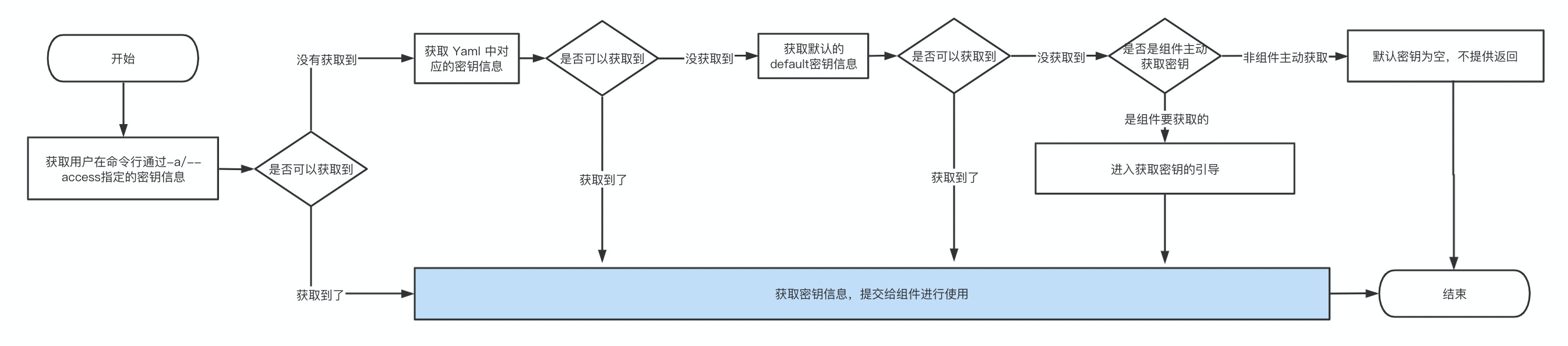
|
|
80
83
|
|
|
84
|
+
## 通过环境变量设置密钥
|
|
85
|
+
|
|
86
|
+
Serverless Devs可以比较容易的通过环境变量进行密钥信息的设定。通过环境变量配置密钥的方法有两种:
|
|
87
|
+
|
|
88
|
+
1. 通过命令引入环境变量中的密钥:例如在环境变量中有`ALIBABA_CLOUD_ACCOUNT_ID`、`ALIBABA_CLOUD_ACCESS_KEY_ID`、`ALIBABA_CLOUD_ACCESS_KEY_SECRET`等相关内容,此时可以通过`s config add`命令进行添加:
|
|
89
|
+
```shell script
|
|
90
|
+
s config add -a default-aliyun -kl AccountID,AccessKeyID,AccessKeySecret -il ${ALIBABA_CLOUD_ACCOUNT_ID},${ALIBABA_CLOUD_ACCESS_KEY_ID},${ALIBABA_CLOUD_ACCESS_KEY_SECRET}
|
|
91
|
+
```
|
|
92
|
+
2. 通过指定环境变量的名字进行配置:例如当前有阿里云密钥对:
|
|
93
|
+
- AccountID: temp_accountid
|
|
94
|
+
- AccessKeyID: temp_accesskeyid
|
|
95
|
+
- AccessKeySecret: temp_accesskeysecret
|
|
96
|
+
此时可以在环境变量中可以命名key为`*********_serverless_devs_access`,例如`default_serverless_devs_access`,value为JSON字符串,例如:
|
|
97
|
+
- Key:`default_serverless_devs_access`
|
|
98
|
+
- Value:`{\"AccountID\":\"temp_accountid\",\"AccessKeyID\":\"temp_accesskeyid\",\"AccessKeySecret\":\"temp_accesskeysecret\"}`
|
|
99
|
+
此时,可以在配置密钥的时候指定密钥`default_serverless_devs_access`,例如`${env(default_serverless_devs_access)}`
|
|
100
|
+
|
|
101
|
+
##
|
package/docs/zh/yaml.md
CHANGED
|
@@ -16,7 +16,11 @@
|
|
|
16
16
|
- 拓展名可以是`.yaml`或`.yml`
|
|
17
17
|
- 格式必须符合[Yaml规范](https://yaml.org/spec/1.2.2/)
|
|
18
18
|
|
|
19
|
-
|
|
19
|
+
> 👉 对于需要通过描述文件进行环境隔离的项目,建议将文件命名为 `s-${ENV}.yaml` 或 `s-${ENV}.yml` 格式。 例如:`s-prod.yaml`。
|
|
20
|
+
|
|
21
|
+
在默认情况下,Serverless Devs 开发者工具会默认该描述文件的名称为`s.yaml`或`s.yml`,且`s.yaml`的优先级大于`s.yml`, 即在一个 Serverless 应用下,同时出现`s.yaml`与`s.yml`时,系统会优先识别和使用`s.yaml`。
|
|
22
|
+
|
|
23
|
+
当然,开发者也可以通过`-t, --template [templatePath]`进行指定,例如,在某应用在生产环境下的描述文件名为`s-prod.yml`,则可以在执行相关命令时,增加参数`-t s-prod.yml`或者`--template s-prod.yml`。
|
|
20
24
|
|
|
21
25
|
## 描述文件格式/规范
|
|
22
26
|
|