@sentry/replay 8.0.0-alpha.1 → 8.0.0-alpha.3
This diff represents the content of publicly available package versions that have been released to one of the supported registries. The information contained in this diff is provided for informational purposes only and reflects changes between package versions as they appear in their respective public registries.
- package/README.md +101 -86
- package/cjs/index.js +41 -82
- package/cjs/index.js.map +1 -1
- package/esm/index.js +44 -84
- package/esm/index.js.map +1 -1
- package/esm/package.json +1 -0
- package/package.json +20 -7
- package/types/coreHandlers/handleAfterSendEvent.d.ts +1 -1
- package/types/coreHandlers/handleAfterSendEvent.d.ts.map +1 -1
- package/types/index.d.ts +1 -1
- package/types/index.d.ts.map +1 -1
- package/types/integration.d.ts +19 -3
- package/types/integration.d.ts.map +1 -1
- package/types/replay.d.ts +3 -3
- package/types/replay.d.ts.map +1 -1
- package/types/types/replay.d.ts +13 -8
- package/types/types/replay.d.ts.map +1 -1
- package/types/util/sendReplayRequest.d.ts +1 -1
- package/types/util/sendReplayRequest.d.ts.map +1 -1
- package/types-ts3.8/coreHandlers/handleAfterSendEvent.d.ts +1 -1
- package/types-ts3.8/index.d.ts +1 -1
- package/types-ts3.8/integration.d.ts +19 -3
- package/types-ts3.8/replay.d.ts +3 -3
- package/types-ts3.8/types/replay.d.ts +13 -8
- package/types-ts3.8/util/sendReplayRequest.d.ts +1 -1
package/README.md
CHANGED
|
@@ -16,15 +16,15 @@
|
|
|
16
16
|
|
|
17
17
|
## Installation
|
|
18
18
|
|
|
19
|
-
Replay can be imported from `@sentry/browser`, or a respective SDK package like `@sentry/react` or `@sentry/vue`.
|
|
20
|
-
|
|
19
|
+
Replay can be imported from `@sentry/browser`, or a respective SDK package like `@sentry/react` or `@sentry/vue`. You
|
|
20
|
+
don't need to install anything in order to use Session Replay. The minimum version that includes Replay is 7.27.0.
|
|
21
21
|
|
|
22
22
|
For details on using Replay when using Sentry via the CDN bundles, see [CDN bundle](#loading-replay-as-a-cdn-bundle).
|
|
23
23
|
|
|
24
24
|
## Setup
|
|
25
25
|
|
|
26
|
-
To set up the integration, add the following to your Sentry initialization. Several options are supported and passable
|
|
27
|
-
See the [configuration section](#configuration) below for more details.
|
|
26
|
+
To set up the integration, add the following to your Sentry initialization. Several options are supported and passable
|
|
27
|
+
via the integration constructor. See the [configuration section](#configuration) below for more details.
|
|
28
28
|
|
|
29
29
|
```javascript
|
|
30
30
|
import * as Sentry from '@sentry/browser';
|
|
@@ -42,12 +42,12 @@ Sentry.init({
|
|
|
42
42
|
replaysOnErrorSampleRate: 1.0,
|
|
43
43
|
|
|
44
44
|
integrations: [
|
|
45
|
-
|
|
45
|
+
Sentry.replayIntegration({
|
|
46
46
|
// Additional SDK configuration goes in here, for example:
|
|
47
47
|
maskAllText: true,
|
|
48
|
-
blockAllMedia: true
|
|
48
|
+
blockAllMedia: true,
|
|
49
49
|
// See below for all available options
|
|
50
|
-
})
|
|
50
|
+
}),
|
|
51
51
|
],
|
|
52
52
|
// ...
|
|
53
53
|
});
|
|
@@ -55,9 +55,8 @@ Sentry.init({
|
|
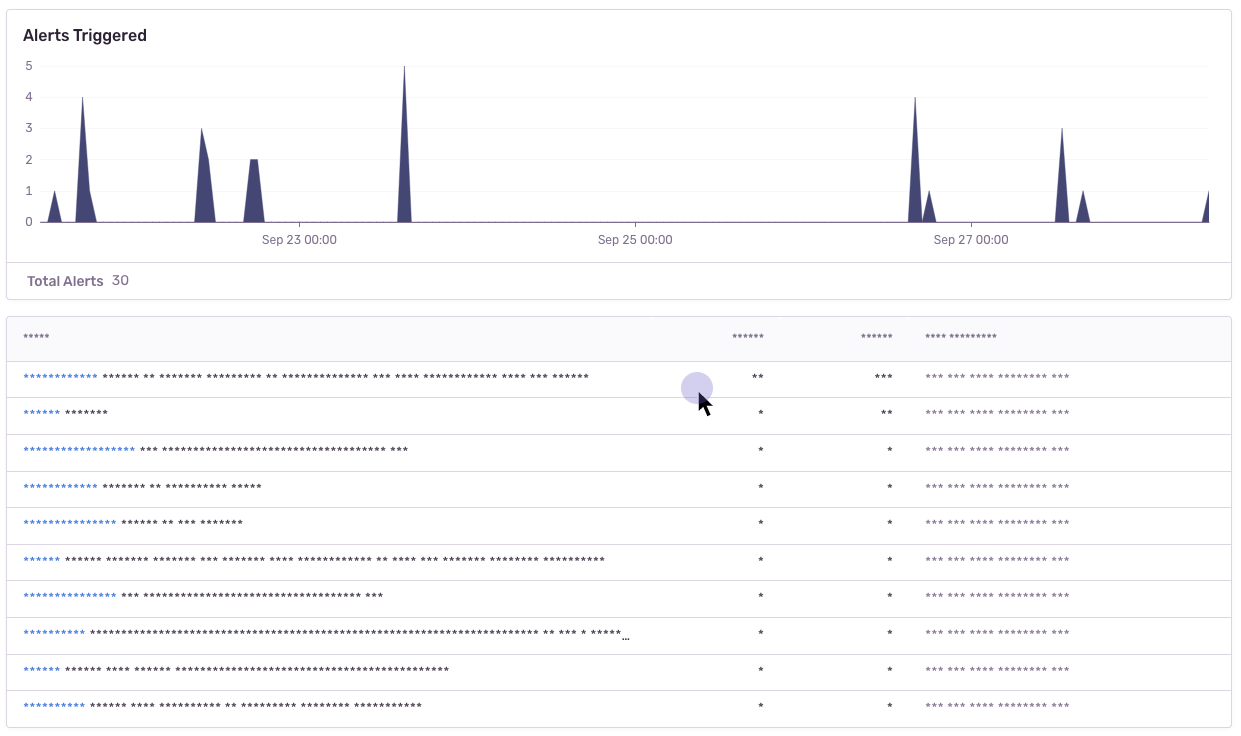
|
55
55
|
|
|
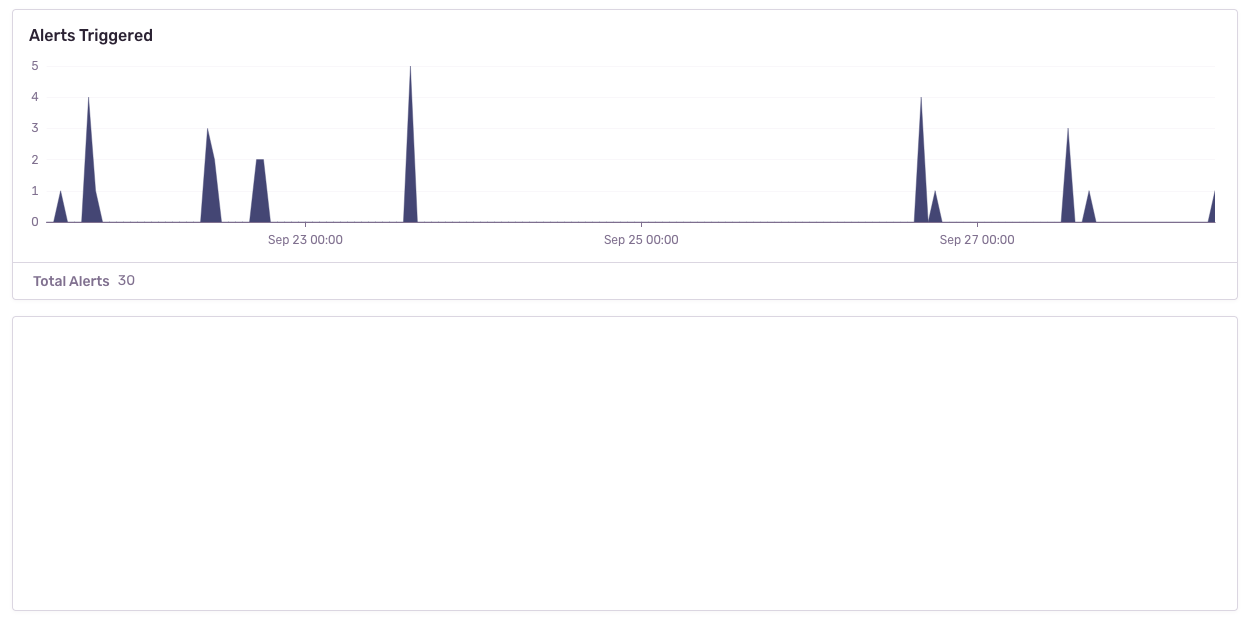
56
56
|
### Lazy loading Replay
|
|
57
57
|
|
|
58
|
-
Replay will start automatically when you add the integration.
|
|
59
|
-
|
|
60
|
-
you can also use `addIntegration` to load it later:
|
|
58
|
+
Replay will start automatically when you add the integration. If you do not want to start Replay immediately (e.g. if
|
|
59
|
+
you want to lazy-load it), you can also use `addIntegration` to load it later:
|
|
61
60
|
|
|
62
61
|
```js
|
|
63
62
|
import * as Sentry from "@sentry/react";
|
|
@@ -73,28 +72,31 @@ const { Replay } = await import('@sentry/browser');
|
|
|
73
72
|
const client = Sentry.getCurrentHub().getClient<BrowserClient>();
|
|
74
73
|
|
|
75
74
|
// Client can be undefined
|
|
76
|
-
client?.addIntegration(
|
|
75
|
+
client?.addIntegration(Sentry.replayIntegration());
|
|
77
76
|
```
|
|
78
77
|
|
|
79
78
|
### Identifying Users
|
|
80
79
|
|
|
81
|
-
If you have only followed the above instructions to setup session replays, you will only see IP addresses in Sentry's
|
|
80
|
+
If you have only followed the above instructions to setup session replays, you will only see IP addresses in Sentry's
|
|
81
|
+
UI. In order to associate a user identity to a session replay, use
|
|
82
|
+
[`setUser`](https://docs.sentry.io/platforms/javascript/enriching-events/identify-user/).
|
|
82
83
|
|
|
83
84
|
```javascript
|
|
84
|
-
import * as Sentry from
|
|
85
|
+
import * as Sentry from '@sentry/browser';
|
|
85
86
|
|
|
86
|
-
Sentry.setUser({ email:
|
|
87
|
+
Sentry.setUser({ email: 'jane.doe@example.com' });
|
|
87
88
|
```
|
|
88
89
|
|
|
89
90
|
### Stopping & starting Replays manually
|
|
90
91
|
|
|
91
|
-
Replay recording only starts when it is included in the `integrations` array when calling `Sentry.init` or calling
|
|
92
|
+
Replay recording only starts when it is included in the `integrations` array when calling `Sentry.init` or calling
|
|
93
|
+
`addIntegration` from the a Sentry client instance. To stop recording you can call `stop()`.
|
|
92
94
|
|
|
93
95
|
```js
|
|
94
96
|
import * as Sentry from "@sentry/react";
|
|
95
97
|
import { BrowserClient } from "@sentry/browser";
|
|
96
98
|
|
|
97
|
-
const replay =
|
|
99
|
+
const replay = Sentry.replayIntegration();
|
|
98
100
|
|
|
99
101
|
Sentry.init({
|
|
100
102
|
integrations: [replay]
|
|
@@ -109,20 +111,19 @@ client?.addIntegration(replay);
|
|
|
109
111
|
replay.stop();
|
|
110
112
|
```
|
|
111
113
|
|
|
112
|
-
When both `replaysSessionSampleRate` and `replaysOnErrorSampleRate` are `0`, recording will _not_ start.
|
|
113
|
-
|
|
114
|
+
When both `replaysSessionSampleRate` and `replaysOnErrorSampleRate` are `0`, recording will _not_ start. In this case,
|
|
115
|
+
you can manually start recording:
|
|
114
116
|
|
|
115
117
|
```js
|
|
116
118
|
replay.start(); // Will start a session in "session" mode, regardless of sample rates
|
|
117
119
|
replay.startBuffering(); // Will start a session in "buffer" mode, regardless of sample rates
|
|
118
120
|
```
|
|
119
121
|
|
|
120
|
-
|
|
121
|
-
|
|
122
122
|
## Loading Replay as a CDN Bundle
|
|
123
123
|
|
|
124
|
-
As an alternative to the NPM package, you can use Replay as a CDN bundle.
|
|
125
|
-
|
|
124
|
+
As an alternative to the NPM package, you can use Replay as a CDN bundle. Please refer to the
|
|
125
|
+
[Session Replay installation guide](https://docs.sentry.io/platforms/javascript/session-replay/#install) for CDN bundle
|
|
126
|
+
instructions.
|
|
126
127
|
|
|
127
128
|
<details>
|
|
128
129
|
<summary>Deprecated Replay integration bundle</summary>
|
|
@@ -131,44 +132,47 @@ complete CDN bundles that already contain the replay integration. No need to kee
|
|
|
131
132
|
The `replay.(min.)js` bundle will be removed in v8 of the JS SDKs.
|
|
132
133
|
|
|
133
134
|
```html
|
|
134
|
-
<script
|
|
135
|
-
|
|
136
|
-
crossorigin="anonymous"
|
|
137
|
-
></script>
|
|
138
|
-
<script
|
|
139
|
-
src="https://browser.sentry-cdn.com/7.41.0/replay.min.js"
|
|
140
|
-
crossorigin="anonymous"
|
|
141
|
-
></script>
|
|
135
|
+
<script src="https://browser.sentry-cdn.com/7.41.0/bundle.min.js" crossorigin="anonymous"></script>
|
|
136
|
+
<script src="https://browser.sentry-cdn.com/7.41.0/replay.min.js" crossorigin="anonymous"></script>
|
|
142
137
|
```
|
|
138
|
+
|
|
143
139
|
</details>
|
|
144
140
|
|
|
145
141
|
## Sessions
|
|
146
142
|
|
|
147
|
-
A session starts when the Session Replay SDK is first loaded and initialized. The session will continue until 5 minutes
|
|
143
|
+
A session starts when the Session Replay SDK is first loaded and initialized. The session will continue until 5 minutes
|
|
144
|
+
passes without any user interactions[^1] with the application _OR_ until a maximum of 30 minutes have elapsed. Closing
|
|
145
|
+
the browser tab will end the session immediately according to the rules for
|
|
146
|
+
[SessionStorage](https://developer.mozilla.org/en-US/docs/Web/API/Window/sessionStorage).
|
|
148
147
|
|
|
149
148
|
[^1]: An 'interaction' refers to either a mouse click or a browser navigation event.
|
|
150
149
|
|
|
151
150
|
### Accessing the Replay Session ID
|
|
152
151
|
|
|
153
|
-
You can get the ID of the currently running session via `replay.getReplayId()`.
|
|
154
|
-
|
|
152
|
+
You can get the ID of the currently running session via `replay.getReplayId()`. This will return `undefined` if no
|
|
153
|
+
session is ongoing.
|
|
155
154
|
|
|
156
155
|
### Replay Captures Only on Errors
|
|
157
156
|
|
|
158
|
-
Alternatively, rather than recording an entire session, you can capture a replay only when an error occurs. In this
|
|
157
|
+
Alternatively, rather than recording an entire session, you can capture a replay only when an error occurs. In this
|
|
158
|
+
case, the integration will buffer up to one minute worth of events prior to the error being thrown. It will continue to
|
|
159
|
+
record the session following the rules above regarding session life and activity. Read the [sampling](#Sampling) section
|
|
160
|
+
for configuration options.
|
|
159
161
|
|
|
160
162
|
## Sampling
|
|
161
163
|
|
|
162
|
-
Sampling allows you to control how much of your website's traffic will result in a Session Replay. There are two sample
|
|
164
|
+
Sampling allows you to control how much of your website's traffic will result in a Session Replay. There are two sample
|
|
165
|
+
rates you can adjust to get the replays more relevant to your interests:
|
|
163
166
|
|
|
164
|
-
- `replaysSessionSampleRate` - The sample rate for replays that begin recording immediately and last the entirety of the
|
|
165
|
-
|
|
167
|
+
- `replaysSessionSampleRate` - The sample rate for replays that begin recording immediately and last the entirety of the
|
|
168
|
+
user's session.
|
|
169
|
+
- `replaysOnErrorSampleRate` - The sample rate for replays that are recorded when an error happens. This type of replay
|
|
170
|
+
will record up to a minute of events prior to the error and continue recording until the session ends.
|
|
166
171
|
|
|
167
|
-
When Replay is initialized, we check the `replaysSessionSampleRate`.
|
|
168
|
-
|
|
169
|
-
|
|
170
|
-
|
|
171
|
-
If it is sampled, when we'll upload the Replay to Sentry and continue recording normally.
|
|
172
|
+
When Replay is initialized, we check the `replaysSessionSampleRate`. If it is sampled, then we start recording & sending
|
|
173
|
+
Replay data immediately. Else, if `replaysOnErrorSampleRate > 0`, we'll start recording in buffering mode. In this mode,
|
|
174
|
+
whenever an error occurs we'll check `replaysOnErrorSampleRate`. If it is sampled, when we'll upload the Replay to
|
|
175
|
+
Sentry and continue recording normally.
|
|
172
176
|
|
|
173
177
|
## Configuration
|
|
174
178
|
|
|
@@ -176,76 +180,87 @@ If it is sampled, when we'll upload the Replay to Sentry and continue recording
|
|
|
176
180
|
|
|
177
181
|
The following options can be configured on the root level of your browser-based Sentry SDK, in `init({})`:
|
|
178
182
|
|
|
179
|
-
|
|
180
|
-
|
|
|
181
|
-
|
|
|
182
|
-
|
|
|
183
|
-
| replaysOnErrorSampleRate | number | `0` |The sample rate for replays that are recorded when an error happens. This type of replay will record up to a minute of events prior to the error and continue recording until the session ends. 1.0 capturing all sessions with an error, and 0 capturing none.
|
|
183
|
+
| key | type | default | description |
|
|
184
|
+
| ------------------------ | ------ | ------- | --------------------------------------------------------------------------------------------------------------------------------------------------------------------------------------------------------------------------------------------------------------- |
|
|
185
|
+
| replaysSessionSampleRate | number | `0` | The sample rate for replays that begin recording immediately and last the entirety of the user's session. 1.0 will collect all replays, 0 will collect no replays. |
|
|
186
|
+
| replaysOnErrorSampleRate | number | `0` | The sample rate for replays that are recorded when an error happens. This type of replay will record up to a minute of events prior to the error and continue recording until the session ends. 1.0 capturing all sessions with an error, and 0 capturing none. |
|
|
184
187
|
|
|
185
188
|
### General Integration Configuration
|
|
186
189
|
|
|
187
|
-
The following options can be configured as options to the integration, in `
|
|
188
|
-
|
|
189
|
-
| key | type | default | description |
|
|
190
|
-
| ------------------- | ------- | ------- | ----------------------------------------------------------------------------------------------------------------------------------------------------------------------------------------------------------------------------- |
|
|
191
|
-
| stickySession | boolean | `true` | Keep track of the user across page loads. Note a single user using multiple tabs will result in multiple sessions. Closing a tab will result in the session being closed as well. |
|
|
190
|
+
The following options can be configured as options to the integration, in `Sentry.replayIntegration({})`:
|
|
192
191
|
|
|
192
|
+
| key | type | default | description |
|
|
193
|
+
| ------------- | ------- | ------- | --------------------------------------------------------------------------------------------------------------------------------------------------------------------------------- |
|
|
194
|
+
| stickySession | boolean | `true` | Keep track of the user across page loads. Note a single user using multiple tabs will result in multiple sessions. Closing a tab will result in the session being closed as well. |
|
|
193
195
|
|
|
194
196
|
### Privacy Configuration
|
|
195
197
|
|
|
196
|
-
The following options can be configured as options to the integration, in `
|
|
198
|
+
The following options can be configured as options to the integration, in `Sentry.replayIntegration({})`:
|
|
197
199
|
|
|
198
|
-
| key
|
|
199
|
-
|
|
|
200
|
-
| maskAllText
|
|
201
|
-
| maskAllInputs
|
|
202
|
-
| blockAllMedia
|
|
203
|
-
| maskFn
|
|
204
|
-
| block
|
|
205
|
-
| unblock
|
|
206
|
-
| mask
|
|
207
|
-
| unmask
|
|
208
|
-
| ignore
|
|
200
|
+
| key | type | default | description |
|
|
201
|
+
| ------------- | ------------------------ | -------------------------------------- | -------------------------------------------------------------------------------------------------------------------------------------------- |
|
|
202
|
+
| maskAllText | boolean | `true` | Mask _all_ text content. Will pass text content through `maskFn` before sending to server. |
|
|
203
|
+
| maskAllInputs | boolean | `true` | Mask values of `<input>` elements. Passes input values through `maskInputFn` before sending to server. |
|
|
204
|
+
| blockAllMedia | boolean | `true` | Block _all_ media elements (`img, svg, video, object, picture, embed, map, audio`) |
|
|
205
|
+
| maskFn | (text: string) => string | `(text) => '*'.repeat(text.length)` | Function to customize how text content is masked before sending to server. By default, masks text with `*`. |
|
|
206
|
+
| block | Array<string> | `.sentry-block, [data-sentry-block]` | Redact any elements that match the DOM selectors. See [privacy](#blocking) section for an example. |
|
|
207
|
+
| unblock | Array<string> | [] | Do not redact any elements that match the DOM selectors. Useful when using `blockAllMedia`. See [privacy](#blocking) section for an example. |
|
|
208
|
+
| mask | Array<string> | `.sentry-mask, [data-sentry-mask]` | Mask all elements that match the given DOM selectors. See [privacy](#masking) section for an example. |
|
|
209
|
+
| unmask | Array<string> | [] | Unmask all elements that match the given DOM selectors. Useful when using `maskAllText`. See [privacy](#masking) section for an example. |
|
|
210
|
+
| ignore | Array<string> | `.sentry-ignore, [data-sentry-ignore]` | Ignores all events on the matching input fields. See [privacy](#ignoring) section for an example. |
|
|
209
211
|
|
|
210
212
|
#### Deprecated options
|
|
211
|
-
|
|
212
|
-
|
|
213
|
-
|
|
214
|
-
|
|
215
|
-
|
|
|
216
|
-
|
|
|
217
|
-
|
|
|
218
|
-
|
|
|
219
|
-
|
|
|
213
|
+
|
|
214
|
+
In order to streamline our privacy options, the following have been deprecated in favor for the respective options
|
|
215
|
+
above.
|
|
216
|
+
|
|
217
|
+
| deprecated key | replaced by | description |
|
|
218
|
+
| ---------------- | ----------- | ------------------------------------------------------------------------------------------------------------------------------------------------ |
|
|
219
|
+
| maskInputOptions | mask | Use CSS selectors in `mask` in order to mask all inputs of a certain type. For example, `input[type="address"]` |
|
|
220
|
+
| blockSelector | block | The selector(s) can be moved directly in the `block` array. |
|
|
221
|
+
| blockClass | block | Convert the class name to a CSS selector and add to `block` array. For example, `first-name` becomes `.first-name`. Regexes can be moved as-is. |
|
|
222
|
+
| maskClass | mask | Convert the class name to a CSS selector and add to `mask` array. For example, `first-name` becomes `.first-name`. Regexes can be moved as-is. |
|
|
223
|
+
| maskSelector | mask | The selector(s) can be moved directly in the `mask` array. |
|
|
220
224
|
| ignoreClass | ignore | Convert the class name to a CSS selector and add to `ignore` array. For example, `first-name` becomes `.first-name`. Regexes can be moved as-is. |
|
|
221
225
|
|
|
222
226
|
## Privacy
|
|
223
|
-
|
|
227
|
+
|
|
228
|
+
There are several ways to deal with PII. By default, the integration will mask all text content with `*` and block all
|
|
229
|
+
media elements (`img, svg, video, object, picture, embed, map, audio`). This can be disabled by setting `maskAllText` to
|
|
230
|
+
`false`. It is also possible to add the following CSS classes to specific DOM elements to prevent recording its
|
|
231
|
+
contents: `sentry-block`, `sentry-ignore`, and `sentry-mask`. The following sections will show examples of how content
|
|
232
|
+
is handled by the differing methods.
|
|
224
233
|
|
|
225
234
|
### Masking
|
|
226
|
-
|
|
235
|
+
|
|
236
|
+
Masking replaces the text content with something else. The default masking behavior is to replace each character with a
|
|
237
|
+
`*`. In this example the relevant html code is: `<table class="sentry-mask">...</table>`.
|
|
227
238
|
|
|
228
239
|
|
|
229
240
|
### Blocking
|
|
230
|
-
|
|
241
|
+
|
|
242
|
+
Blocking replaces the element with a placeholder that has the same dimensions. The recording will show an empty space
|
|
243
|
+
where the content was. In this example the relevant html code is: `<table data-sentry-block>...</table>`.
|
|
231
244
|
|
|
232
245
|
|
|
233
246
|
### Ignoring
|
|
234
|
-
|
|
247
|
+
|
|
248
|
+
Ignoring only applies to form inputs. Events will be ignored on the input element so that the replay does not show what
|
|
249
|
+
occurs inside of the input. In the below example, notice how the results in the table below the input changes, but no
|
|
250
|
+
text is visible in the input.
|
|
235
251
|
|
|
236
252
|
https://user-images.githubusercontent.com/79684/192815134-a6451c3f-d3cb-455f-a699-7c3fe04d0a2e.mov
|
|
237
253
|
|
|
238
254
|
## Error Linking
|
|
239
255
|
|
|
240
|
-
Currently, errors that happen on the page while a replay is running are linked to the Replay,
|
|
241
|
-
|
|
242
|
-
|
|
243
|
-
|
|
244
|
-
|
|
245
|
-
This should not happen to often, but be aware that it is theoretically possible.
|
|
256
|
+
Currently, errors that happen on the page while a replay is running are linked to the Replay, making it as easy as
|
|
257
|
+
possible to jump between related issues/replays. However, please note that it is _possible_ that the error count
|
|
258
|
+
reported on the Replay Detail page does not match the actual errors that have been captured. The reason for that is that
|
|
259
|
+
errors _can_ be lost, e.g. a network request fails, or similar. This should not happen to often, but be aware that it is
|
|
260
|
+
theoretically possible.
|
|
246
261
|
|
|
247
262
|
## Manually sending replay data
|
|
248
263
|
|
|
249
|
-
You can use `replay.flush()` to immediately send all currently captured replay data.
|
|
250
|
-
|
|
251
|
-
|
|
264
|
+
You can use `replay.flush()` to immediately send all currently captured replay data. When Replay is currently in
|
|
265
|
+
buffering mode, this will send up to the last 60 seconds of replay data, and also continue sending afterwards, similar
|
|
266
|
+
to when an error happens & is recorded.
|