@sentry/replay 11.0.0-rc.1 → 11.1.0
This diff represents the content of publicly available package versions that have been released to one of the supported registries. The information contained in this diff is provided for informational purposes only and reflects changes between package versions as they appear in their respective public registries.
- package/README.md +8 -237
- package/build/npm/cjs/index.js +23 -6
- package/build/npm/cjs/index.js.map +1 -1
- package/build/npm/esm/index.js +23 -6
- package/build/npm/esm/index.js.map +1 -1
- package/build/npm/esm/package.json +1 -1
- package/build/npm/types/coreHandlers/handleGlobalEvent.d.ts.map +1 -1
- package/build/npm/types/util/addGlobalListeners.d.ts.map +1 -1
- package/package.json +4 -4
package/README.md
CHANGED
|
@@ -10,248 +10,19 @@
|
|
|
10
10
|
[](https://www.npmjs.com/package/@sentry/replay)
|
|
11
11
|
[](https://www.npmjs.com/package/@sentry/replay)
|
|
12
12
|
|
|
13
|
+
Session Replay integration for Sentry’s JavaScript SDKs.
|
|
14
|
+
|
|
13
15
|
> [!NOTE]
|
|
14
16
|
> This package is an internal library published for use by Sentry-owned JavaScript SDK packages. It is re-exported from
|
|
15
17
|
> `@sentry/browser` and other browser-related SDKs like `@sentry/react` and `@sentry/vue`. It is not part of the public
|
|
16
18
|
> API contract and may change in any release. Do not rely on SemVer compatibility if you depend on it directly.
|
|
17
19
|
|
|
18
|
-
##
|
|
19
|
-
|
|
20
|
-
`@sentry/replay` requires Node 14+, and browsers newer than IE11.
|
|
21
|
-
|
|
22
|
-
## Installation
|
|
23
|
-
|
|
24
|
-
Replay can be imported from `@sentry/browser`, or a respective SDK package like `@sentry/react` or `@sentry/vue`. You
|
|
25
|
-
don't need to install anything in order to use Session Replay. The minimum version that includes Replay is 7.27.0.
|
|
26
|
-
|
|
27
|
-
For details on using Replay when using Sentry via the CDN bundles, see [CDN bundle](#loading-replay-as-a-cdn-bundle).
|
|
28
|
-
|
|
29
|
-
## Setup
|
|
30
|
-
|
|
31
|
-
To set up the integration, add the following to your Sentry initialization. Several options are supported and passable
|
|
32
|
-
via the integration constructor. See the [configuration section](#configuration) below for more details.
|
|
33
|
-
|
|
34
|
-
```javascript
|
|
35
|
-
import * as Sentry from '@sentry/browser';
|
|
36
|
-
// or e.g. import * as Sentry from '@sentry/react';
|
|
37
|
-
|
|
38
|
-
Sentry.init({
|
|
39
|
-
dsn: '__DSN__',
|
|
40
|
-
|
|
41
|
-
// This sets the sample rate to be 10%. You may want this to be 100% while
|
|
42
|
-
// in development and sample at a lower rate in production
|
|
43
|
-
replaysSessionSampleRate: 0.1,
|
|
44
|
-
|
|
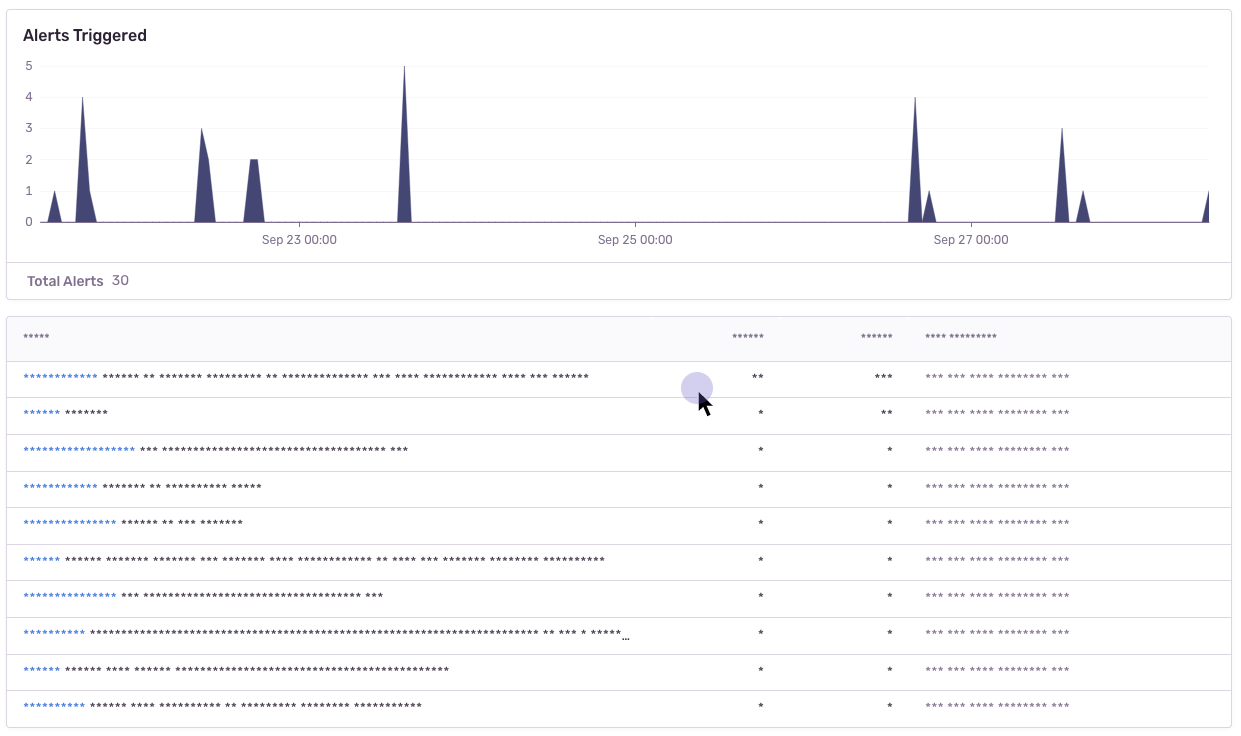
45
|
-
// If the entire session is not sampled, use the below sample rate to sample
|
|
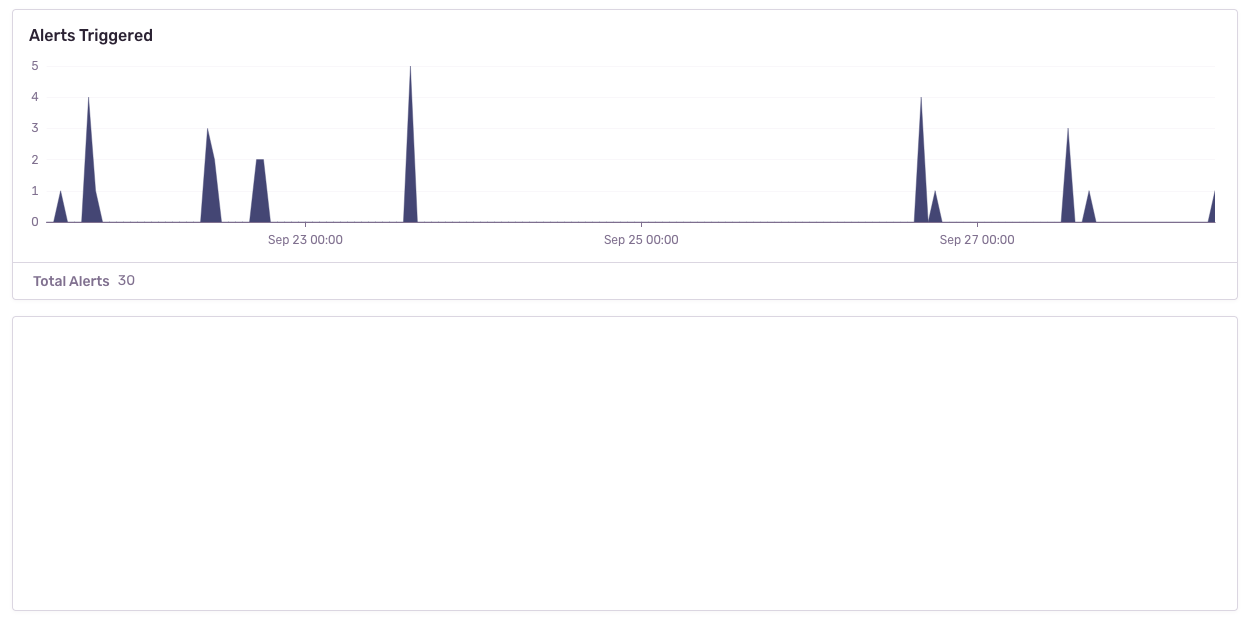
46
|
-
// sessions when an error occurs.
|
|
47
|
-
replaysOnErrorSampleRate: 1.0,
|
|
48
|
-
|
|
49
|
-
integrations: [
|
|
50
|
-
Sentry.replayIntegration({
|
|
51
|
-
// Additional SDK configuration goes in here, for example:
|
|
52
|
-
maskAllText: true,
|
|
53
|
-
blockAllMedia: true,
|
|
54
|
-
// See below for all available options
|
|
55
|
-
}),
|
|
56
|
-
],
|
|
57
|
-
// ...
|
|
58
|
-
});
|
|
59
|
-
```
|
|
60
|
-
|
|
61
|
-
### Lazy loading Replay
|
|
62
|
-
|
|
63
|
-
Replay will start automatically when you add the integration. If you do not want to start Replay immediately (e.g. if
|
|
64
|
-
you want to lazy-load it), you can also use `addIntegration` to load it later:
|
|
65
|
-
|
|
66
|
-
```js
|
|
67
|
-
import * as Sentry from "@sentry/react";
|
|
68
|
-
import { BrowserClient } from "@sentry/browser";
|
|
69
|
-
|
|
70
|
-
Sentry.init({
|
|
71
|
-
// Do not load it initially
|
|
72
|
-
integrations: []
|
|
73
|
-
});
|
|
74
|
-
|
|
75
|
-
// Sometime later
|
|
76
|
-
const { Replay } = await import('@sentry/browser');
|
|
77
|
-
const client = Sentry.getClient<BrowserClient>();
|
|
78
|
-
|
|
79
|
-
// Client can be undefined
|
|
80
|
-
client?.addIntegration(Sentry.replayIntegration());
|
|
81
|
-
```
|
|
82
|
-
|
|
83
|
-
### Identifying Users
|
|
84
|
-
|
|
85
|
-
If you have only followed the above instructions to setup session replays, you will only see IP addresses in Sentry's
|
|
86
|
-
UI. In order to associate a user identity to a session replay, use
|
|
87
|
-
[`setUser`](https://docs.sentry.io/platforms/javascript/enriching-events/identify-user/).
|
|
88
|
-
|
|
89
|
-
```javascript
|
|
90
|
-
import * as Sentry from '@sentry/browser';
|
|
91
|
-
|
|
92
|
-
Sentry.setUser({ email: 'jane.doe@example.com' });
|
|
93
|
-
```
|
|
94
|
-
|
|
95
|
-
### Stopping & starting Replays manually
|
|
96
|
-
|
|
97
|
-
Replay recording only starts when it is included in the `integrations` array when calling `Sentry.init` or calling
|
|
98
|
-
`addIntegration` from the a Sentry client instance. To stop recording you can call `stop()`.
|
|
99
|
-
|
|
100
|
-
```js
|
|
101
|
-
import * as Sentry from "@sentry/react";
|
|
102
|
-
import { BrowserClient } from "@sentry/browser";
|
|
103
|
-
|
|
104
|
-
const replay = Sentry.replayIntegration();
|
|
105
|
-
|
|
106
|
-
Sentry.init({
|
|
107
|
-
integrations: [replay]
|
|
108
|
-
});
|
|
109
|
-
|
|
110
|
-
const client = Sentry.getClient<BrowserClient>();
|
|
111
|
-
|
|
112
|
-
// Add replay integration, will start recording
|
|
113
|
-
client?.addIntegration(replay);
|
|
114
|
-
|
|
115
|
-
// Stop recording
|
|
116
|
-
replay.stop();
|
|
117
|
-
```
|
|
118
|
-
|
|
119
|
-
When both `replaysSessionSampleRate` and `replaysOnErrorSampleRate` are `0`, recording will _not_ start. In this case,
|
|
120
|
-
you can manually start recording:
|
|
121
|
-
|
|
122
|
-
```js
|
|
123
|
-
replay.start(); // Will start a session in "session" mode, regardless of sample rates
|
|
124
|
-
replay.startBuffering(); // Will start a session in "buffer" mode, regardless of sample rates
|
|
125
|
-
```
|
|
126
|
-
|
|
127
|
-
## Loading Replay as a CDN Bundle
|
|
128
|
-
|
|
129
|
-
As an alternative to the NPM package, you can use Replay as a CDN bundle. Please refer to the
|
|
130
|
-
[Session Replay installation guide](https://docs.sentry.io/platforms/javascript/session-replay/#install) for CDN bundle
|
|
131
|
-
instructions.
|
|
132
|
-
|
|
133
|
-
<details>
|
|
134
|
-
<summary>Deprecated Replay integration bundle</summary>
|
|
135
|
-
Installing the replay integration as a secondary integration bundle to the SDK bundle was deprecated in favour of
|
|
136
|
-
complete CDN bundles that already contain the replay integration. No need to keep two bundles in sync anymore.
|
|
137
|
-
The `replay.(min.)js` bundle will be removed in v8 of the JS SDKs.
|
|
138
|
-
|
|
139
|
-
```html
|
|
140
|
-
<script src="https://browser.sentry-cdn.com/7.41.0/bundle.min.js" crossorigin="anonymous"></script>
|
|
141
|
-
<script src="https://browser.sentry-cdn.com/7.41.0/replay.min.js" crossorigin="anonymous"></script>
|
|
142
|
-
```
|
|
143
|
-
|
|
144
|
-
</details>
|
|
145
|
-
|
|
146
|
-
## Sessions
|
|
147
|
-
|
|
148
|
-
A session starts when the Session Replay SDK is first loaded and initialized. The session will continue until 5 minutes
|
|
149
|
-
passes without any user interactions[^1] with the application _OR_ until a maximum of 30 minutes have elapsed. Closing
|
|
150
|
-
the browser tab will end the session immediately according to the rules for
|
|
151
|
-
[SessionStorage](https://developer.mozilla.org/en-US/docs/Web/API/Window/sessionStorage).
|
|
152
|
-
|
|
153
|
-
[^1]: An 'interaction' refers to either a mouse click or a browser navigation event.
|
|
154
|
-
|
|
155
|
-
### Accessing the Replay Session ID
|
|
156
|
-
|
|
157
|
-
You can get the ID of the currently running session via `replay.getReplayId()`. This will return `undefined` if no
|
|
158
|
-
session is ongoing.
|
|
159
|
-
|
|
160
|
-
### Replay Captures Only on Errors
|
|
161
|
-
|
|
162
|
-
Alternatively, rather than recording an entire session, you can capture a replay only when an error occurs. In this
|
|
163
|
-
case, the integration will buffer up to one minute worth of events prior to the error being thrown. It will continue to
|
|
164
|
-
record the session following the rules above regarding session life and activity. Read the [sampling](#Sampling) section
|
|
165
|
-
for configuration options.
|
|
166
|
-
|
|
167
|
-
## Sampling
|
|
168
|
-
|
|
169
|
-
Sampling allows you to control how much of your website's traffic will result in a Session Replay. There are two sample
|
|
170
|
-
rates you can adjust to get the replays more relevant to your interests:
|
|
171
|
-
|
|
172
|
-
- `replaysSessionSampleRate` - The sample rate for replays that begin recording immediately and last the entirety of the
|
|
173
|
-
user's session.
|
|
174
|
-
- `replaysOnErrorSampleRate` - The sample rate for replays that are recorded when an error happens. This type of replay
|
|
175
|
-
will record up to a minute of events prior to the error and continue recording until the session ends.
|
|
176
|
-
|
|
177
|
-
When Replay is initialized, we check the `replaysSessionSampleRate`. If it is sampled, then we start recording & sending
|
|
178
|
-
Replay data immediately. Else, if `replaysOnErrorSampleRate > 0`, we'll start recording in buffering mode. In this mode,
|
|
179
|
-
whenever an error occurs we'll check `replaysOnErrorSampleRate`. If it is sampled, when we'll upload the Replay to
|
|
180
|
-
Sentry and continue recording normally.
|
|
181
|
-
|
|
182
|
-
## Configuration
|
|
183
|
-
|
|
184
|
-
### SDK Configuration
|
|
185
|
-
|
|
186
|
-
The following options can be configured on the root level of your browser-based Sentry SDK, in `init({})`:
|
|
187
|
-
|
|
188
|
-
| key | type | default | description |
|
|
189
|
-
| ------------------------ | ------ | ------- | --------------------------------------------------------------------------------------------------------------------------------------------------------------------------------------------------------------------------------------------------------------- |
|
|
190
|
-
| replaysSessionSampleRate | number | `0` | The sample rate for replays that begin recording immediately and last the entirety of the user's session. 1.0 will collect all replays, 0 will collect no replays. |
|
|
191
|
-
| replaysOnErrorSampleRate | number | `0` | The sample rate for replays that are recorded when an error happens. This type of replay will record up to a minute of events prior to the error and continue recording until the session ends. 1.0 capturing all sessions with an error, and 0 capturing none. |
|
|
192
|
-
|
|
193
|
-
### General Integration Configuration
|
|
194
|
-
|
|
195
|
-
The following options can be configured as options to the integration, in `Sentry.replayIntegration({})`:
|
|
196
|
-
|
|
197
|
-
| key | type | default | description |
|
|
198
|
-
| ------------- | ------- | ------- | --------------------------------------------------------------------------------------------------------------------------------------------------------------------------------- |
|
|
199
|
-
| stickySession | boolean | `true` | Keep track of the user across page loads. Note a single user using multiple tabs will result in multiple sessions. Closing a tab will result in the session being closed as well. |
|
|
200
|
-
|
|
201
|
-
### Privacy Configuration
|
|
202
|
-
|
|
203
|
-
The following options can be configured as options to the integration, in `Sentry.replayIntegration({})`:
|
|
204
|
-
|
|
205
|
-
| key | type | default | description |
|
|
206
|
-
| ------------- | ------------------------ | -------------------------------------- | -------------------------------------------------------------------------------------------------------------------------------------------- |
|
|
207
|
-
| maskAllText | boolean | `true` | Mask _all_ text content. Will pass text content through `maskFn` before sending to server. |
|
|
208
|
-
| maskAllInputs | boolean | `true` | Mask values of `<input>` elements. Passes input values through `maskInputFn` before sending to server. |
|
|
209
|
-
| blockAllMedia | boolean | `true` | Block _all_ media elements (`img, svg, video, object, picture, embed, map, audio`) |
|
|
210
|
-
| maskFn | (text: string) => string | `(text) => '*'.repeat(text.length)` | Function to customize how text content is masked before sending to server. By default, masks text with `*`. |
|
|
211
|
-
| block | Array<string> | `.sentry-block, [data-sentry-block]` | Redact any elements that match the DOM selectors. See [privacy](#blocking) section for an example. |
|
|
212
|
-
| unblock | Array<string> | [] | Do not redact any elements that match the DOM selectors. Useful when using `blockAllMedia`. See [privacy](#blocking) section for an example. |
|
|
213
|
-
| mask | Array<string> | `.sentry-mask, [data-sentry-mask]` | Mask all elements that match the given DOM selectors. See [privacy](#masking) section for an example. |
|
|
214
|
-
| unmask | Array<string> | [] | Unmask all elements that match the given DOM selectors. Useful when using `maskAllText`. See [privacy](#masking) section for an example. |
|
|
215
|
-
| ignore | Array<string> | `.sentry-ignore, [data-sentry-ignore]` | Ignores all events on the matching input fields. See [privacy](#ignoring) section for an example. |
|
|
216
|
-
|
|
217
|
-
## Privacy
|
|
218
|
-
|
|
219
|
-
There are several ways to deal with PII. By default, the integration will mask all text content with `*` and block all
|
|
220
|
-
media elements (`img, svg, video, object, picture, embed, map, audio`). This can be disabled by setting `maskAllText` to
|
|
221
|
-
`false`. It is also possible to add the following CSS classes to specific DOM elements to prevent recording its
|
|
222
|
-
contents: `sentry-block`, `sentry-ignore`, and `sentry-mask`. The following sections will show examples of how content
|
|
223
|
-
is handled by the differing methods.
|
|
224
|
-
|
|
225
|
-
### Masking
|
|
226
|
-
|
|
227
|
-
Masking replaces the text content with something else. The default masking behavior is to replace each character with a
|
|
228
|
-
`*`. In this example the relevant html code is: `<table class="sentry-mask">...</table>`.
|
|
229
|
-
|
|
230
|
-
|
|
231
|
-
### Blocking
|
|
232
|
-
|
|
233
|
-
Blocking replaces the element with a placeholder that has the same dimensions. The recording will show an empty space
|
|
234
|
-
where the content was. In this example the relevant html code is: `<table data-sentry-block>...</table>`.
|
|
235
|
-
|
|
236
|
-
|
|
237
|
-
### Ignoring
|
|
238
|
-
|
|
239
|
-
Ignoring only applies to form inputs. Events will be ignored on the input element so that the replay does not show what
|
|
240
|
-
occurs inside of the input. In the below example, notice how the results in the table below the input changes, but no
|
|
241
|
-
text is visible in the input.
|
|
242
|
-
|
|
243
|
-
https://user-images.githubusercontent.com/79684/192815134-a6451c3f-d3cb-455f-a699-7c3fe04d0a2e.mov
|
|
244
|
-
|
|
245
|
-
## Error Linking
|
|
20
|
+
## Documentation
|
|
246
21
|
|
|
247
|
-
|
|
248
|
-
|
|
249
|
-
reported on the Replay Detail page does not match the actual errors that have been captured. The reason for that is that
|
|
250
|
-
errors _can_ be lost, e.g. a network request fails, or similar. This should not happen to often, but be aware that it is
|
|
251
|
-
theoretically possible.
|
|
22
|
+
- [Getting started](https://docs.sentry.io/platforms/javascript/session-replay/)
|
|
23
|
+
- [Configuration](https://docs.sentry.io/platforms/javascript/session-replay/configuration/)
|
|
252
24
|
|
|
253
|
-
##
|
|
25
|
+
## Support
|
|
254
26
|
|
|
255
|
-
|
|
256
|
-
|
|
257
|
-
to when an error happens & is recorded.
|
|
27
|
+
- [Report a bug](https://github.com/getsentry/sentry-javascript/issues/new/choose)
|
|
28
|
+
- [Contributing](https://github.com/getsentry/sentry-javascript/blob/develop/CONTRIBUTING.md)
|
package/build/npm/cjs/index.js
CHANGED
|
@@ -23,7 +23,7 @@ const MIN_REPLAY_DURATION = 4999;
|
|
|
23
23
|
const MIN_REPLAY_DURATION_LIMIT = 5e4;
|
|
24
24
|
const MAX_REPLAY_DURATION = 36e5;
|
|
25
25
|
|
|
26
|
-
const
|
|
26
|
+
const Wd="sentry.segment.name.source";
|
|
27
27
|
|
|
28
28
|
var __defProp = Object.defineProperty;
|
|
29
29
|
var __defNormalProp = (obj, key, value) => key in obj ? __defProp(obj, key, { enumerable: true, configurable: true, writable: true, value }) : obj[key] = value;
|
|
@@ -6161,8 +6161,13 @@ function handleGlobalEventListener(replay) {
|
|
|
6161
6161
|
return event;
|
|
6162
6162
|
}
|
|
6163
6163
|
if (isFeedbackEvent(event)) {
|
|
6164
|
+
const sessionId = replay.getSessionId();
|
|
6165
|
+
const feedbackReplayId = event.contexts.feedback.replay_id;
|
|
6166
|
+
if (feedbackReplayId && feedbackReplayId !== sessionId) {
|
|
6167
|
+
return event;
|
|
6168
|
+
}
|
|
6164
6169
|
replay.flush();
|
|
6165
|
-
event.contexts.feedback.replay_id =
|
|
6170
|
+
event.contexts.feedback.replay_id = sessionId;
|
|
6166
6171
|
addFeedbackBreadcrumb(replay, event);
|
|
6167
6172
|
return event;
|
|
6168
6173
|
}
|
|
@@ -6797,17 +6802,29 @@ function addGlobalListeners(replay) {
|
|
|
6797
6802
|
client.on("spanEnd", (span) => {
|
|
6798
6803
|
replay.lastActiveSpan = span;
|
|
6799
6804
|
});
|
|
6805
|
+
let replayIdOnFeedbackOpen;
|
|
6800
6806
|
client.on("beforeSendFeedback", async (feedbackEvent, options) => {
|
|
6807
|
+
const feedbackContext = feedbackEvent.contexts?.feedback;
|
|
6808
|
+
if (!options?.includeReplay || !feedbackContext) {
|
|
6809
|
+
return;
|
|
6810
|
+
}
|
|
6811
|
+
if (feedbackContext.source === "widget" && replayIdOnFeedbackOpen) {
|
|
6812
|
+
feedbackContext.replay_id = replayIdOnFeedbackOpen;
|
|
6813
|
+
replayIdOnFeedbackOpen = void 0;
|
|
6814
|
+
return;
|
|
6815
|
+
}
|
|
6801
6816
|
const replayId = replay.getSessionId();
|
|
6802
|
-
if (
|
|
6803
|
-
if (
|
|
6817
|
+
if (replay.isEnabled() && replayId) {
|
|
6818
|
+
if (feedbackContext.source === "api") {
|
|
6804
6819
|
await replay.sendBufferedReplayOrFlush();
|
|
6805
6820
|
}
|
|
6806
|
-
|
|
6821
|
+
feedbackContext.replay_id = replayId;
|
|
6807
6822
|
}
|
|
6808
6823
|
});
|
|
6809
6824
|
client.on("openFeedbackWidget", async () => {
|
|
6825
|
+
replayIdOnFeedbackOpen = void 0;
|
|
6810
6826
|
await replay.sendBufferedReplayOrFlush();
|
|
6827
|
+
replayIdOnFeedbackOpen = replay.isEnabled() ? replay.getSessionId() : void 0;
|
|
6811
6828
|
});
|
|
6812
6829
|
}
|
|
6813
6830
|
}
|
|
@@ -7696,7 +7713,7 @@ class ReplayContainer {
|
|
|
7696
7713
|
return void 0;
|
|
7697
7714
|
}
|
|
7698
7715
|
const spanJson = core.spanToJSON(lastRootSpan);
|
|
7699
|
-
const source = spanJson.attributes[
|
|
7716
|
+
const source = spanJson.attributes[Wd];
|
|
7700
7717
|
if (!source || !["route", "custom"].includes(source)) {
|
|
7701
7718
|
return void 0;
|
|
7702
7719
|
}
|