@scalar/cli 0.1.0 → 0.2.1
This diff represents the content of publicly available package versions that have been released to one of the supported registries. The information contained in this diff is provided for informational purposes only and reflects changes between package versions as they appear in their respective public registries.
- package/LICENSE +21 -0
- package/README.md +70 -7
- package/dist/index.js +337 -262
- package/dist/package.json +23 -22
- package/dist/tsconfig.tsbuildinfo +1 -1
- package/dist/vite.config.d.ts +2 -0
- package/dist/vite.config.js +12 -0
- package/package.json +22 -21
package/LICENSE
ADDED
|
@@ -0,0 +1,21 @@
|
|
|
1
|
+
MIT License
|
|
2
|
+
|
|
3
|
+
Copyright (c) 2023 Scalar
|
|
4
|
+
|
|
5
|
+
Permission is hereby granted, free of charge, to any person obtaining a copy
|
|
6
|
+
of this software and associated documentation files (the "Software"), to deal
|
|
7
|
+
in the Software without restriction, including without limitation the rights
|
|
8
|
+
to use, copy, modify, merge, publish, distribute, sublicense, and/or sell
|
|
9
|
+
copies of the Software, and to permit persons to whom the Software is
|
|
10
|
+
furnished to do so, subject to the following conditions:
|
|
11
|
+
|
|
12
|
+
The above copyright notice and this permission notice shall be included in all
|
|
13
|
+
copies or substantial portions of the Software.
|
|
14
|
+
|
|
15
|
+
THE SOFTWARE IS PROVIDED "AS IS", WITHOUT WARRANTY OF ANY KIND, EXPRESS OR
|
|
16
|
+
IMPLIED, INCLUDING BUT NOT LIMITED TO THE WARRANTIES OF MERCHANTABILITY,
|
|
17
|
+
FITNESS FOR A PARTICULAR PURPOSE AND NONINFRINGEMENT. IN NO EVENT SHALL THE
|
|
18
|
+
AUTHORS OR COPYRIGHT HOLDERS BE LIABLE FOR ANY CLAIM, DAMAGES OR OTHER
|
|
19
|
+
LIABILITY, WHETHER IN AN ACTION OF CONTRACT, TORT OR OTHERWISE, ARISING FROM,
|
|
20
|
+
OUT OF OR IN CONNECTION WITH THE SOFTWARE OR THE USE OR OTHER DEALINGS IN THE
|
|
21
|
+
SOFTWARE.
|
package/README.md
CHANGED
|
@@ -1,7 +1,28 @@
|
|
|
1
1
|
# Scalar CLI
|
|
2
2
|
|
|
3
|
-
|
|
4
|
-
|
|
3
|
+
[](https://www.npmjs.com/package/@scalar/cli)
|
|
4
|
+
[](https://www.npmjs.com/package/@scalar/cli)
|
|
5
|
+
[](https://www.jsdelivr.com/package/npm/@scalar/cli)
|
|
6
|
+
[](https://www.npmjs.com/package/@scalar/cli)
|
|
7
|
+
[](https://discord.gg/8HeZcRGPFS)
|
|
8
|
+
|
|
9
|
+
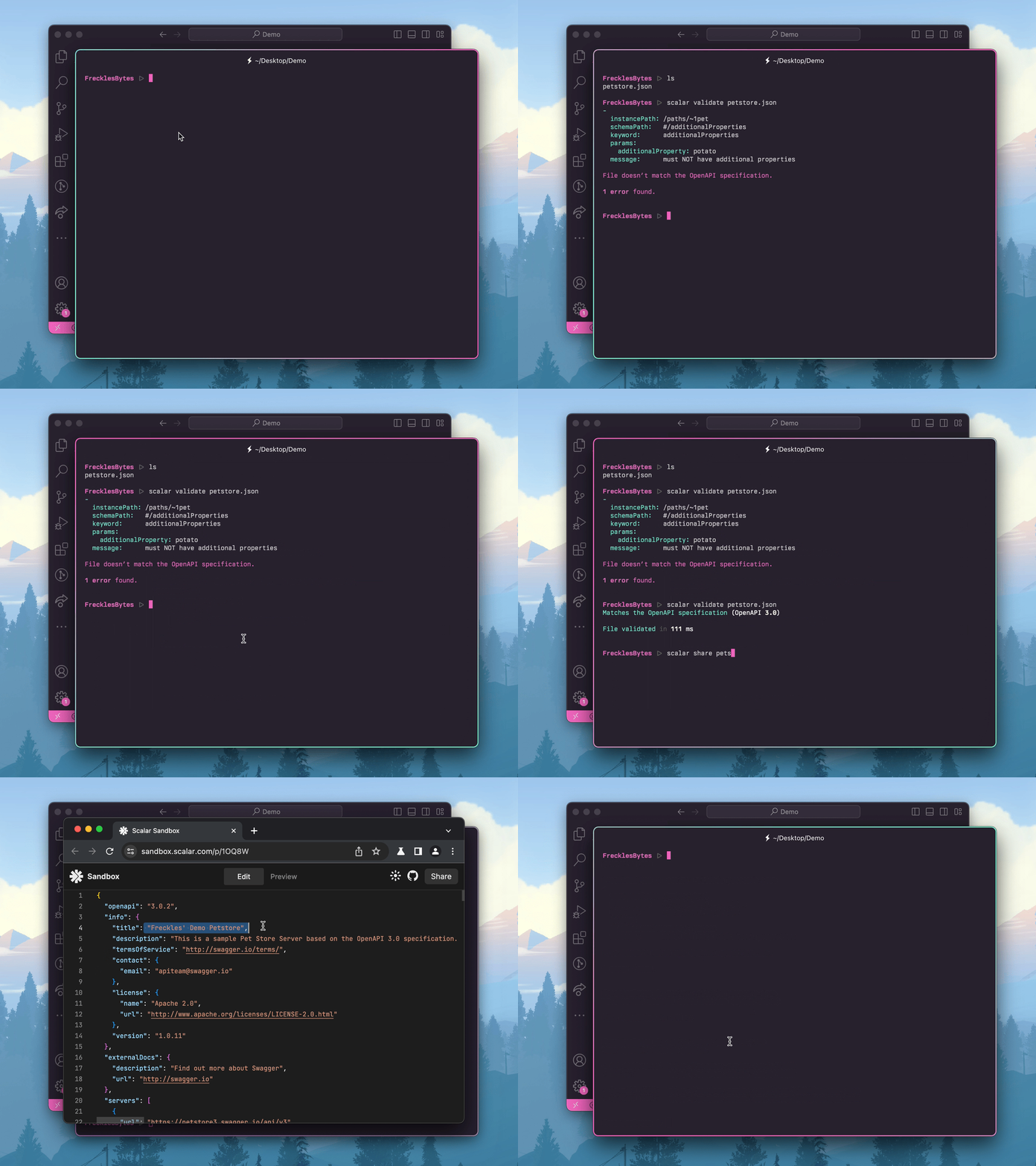
Command-line interface to work with OpenAPI files
|
|
10
|
+
|
|
11
|
+
|
|
12
|
+
|
|
13
|
+
## Features
|
|
14
|
+
|
|
15
|
+
- Format & validate OpenAPI files
|
|
16
|
+
- Upload your OpenAPI files to Scalar
|
|
17
|
+
- Get a fully mocked API for testing purposes
|
|
18
|
+
- Preview your API reference
|
|
19
|
+
- Bundle multiple OpenAPI files
|
|
20
|
+
|
|
21
|
+
## Quickstart
|
|
22
|
+
|
|
23
|
+
```bash
|
|
24
|
+
npx @scalar/cli help
|
|
25
|
+
```
|
|
5
26
|
|
|
6
27
|
## Installation
|
|
7
28
|
|
|
@@ -20,7 +41,7 @@ Otherwise just prefix all commands with `npx @scalar/cli` instead of `scalar`. T
|
|
|
20
41
|
The given JSON file will be formatted with Prettier.
|
|
21
42
|
|
|
22
43
|
```bash
|
|
23
|
-
scalar format
|
|
44
|
+
scalar format
|
|
24
45
|
```
|
|
25
46
|
|
|
26
47
|
### validate
|
|
@@ -28,7 +49,7 @@ scalar format openapi.json
|
|
|
28
49
|
To check whether your OpenAPI file adheres to the Swagger 2.0, OpenAPI 3.0 or OpenAPI 3.1 specification, run the following command:
|
|
29
50
|
|
|
30
51
|
```bash
|
|
31
|
-
scalar validate
|
|
52
|
+
scalar validate
|
|
32
53
|
```
|
|
33
54
|
|
|
34
55
|
### share
|
|
@@ -36,7 +57,7 @@ scalar validate openapi.json
|
|
|
36
57
|
To quickly share an OpenAPI file or reference with someone, you can use the share command:
|
|
37
58
|
|
|
38
59
|
```bash
|
|
39
|
-
scalar share
|
|
60
|
+
scalar share
|
|
40
61
|
```
|
|
41
62
|
|
|
42
63
|
This will upload your OpenAPI file to the [Scalar Sandbox](https://sandbox.scalar.com/) to give you a public reference URL and a public URL to your OpenAPI JSON file.
|
|
@@ -46,7 +67,7 @@ This will upload your OpenAPI file to the [Scalar Sandbox](https://sandbox.scala
|
|
|
46
67
|
We can even mock your API, and it’s just one command:
|
|
47
68
|
|
|
48
69
|
```bash
|
|
49
|
-
scalar mock
|
|
70
|
+
scalar mock
|
|
50
71
|
```
|
|
51
72
|
|
|
52
73
|
This will boot up a server on port 3000 which gives you an API returning the dummy data according to your schema.
|
|
@@ -63,6 +84,16 @@ You can also change the port like this:
|
|
|
63
84
|
scalar mock openapi.json --watch --port 8080
|
|
64
85
|
```
|
|
65
86
|
|
|
87
|
+
### bundle
|
|
88
|
+
|
|
89
|
+
Some OpenAPI files reference other files from the file system or an URL. You can bundle those files and make them a single file:
|
|
90
|
+
|
|
91
|
+
```bash
|
|
92
|
+
scalar bundle openapi.json --output bundle.json
|
|
93
|
+
```
|
|
94
|
+
|
|
95
|
+
If you don’t provide an `output` file name, the input file will be overwritten.
|
|
96
|
+
|
|
66
97
|
### init
|
|
67
98
|
|
|
68
99
|
If you’re tired of passing the file name again and again, just configure it once:
|
|
@@ -71,7 +102,7 @@ If you’re tired of passing the file name again and again, just configure it on
|
|
|
71
102
|
scalar init
|
|
72
103
|
```
|
|
73
104
|
|
|
74
|
-
This will create a `scalar.
|
|
105
|
+
This will create a `scalar.config.json` file for you. All commands will use the configured OpenAPI file by default.
|
|
75
106
|
|
|
76
107
|
## Options
|
|
77
108
|
|
|
@@ -89,6 +120,38 @@ scalar --version
|
|
|
89
120
|
scalar --help
|
|
90
121
|
```
|
|
91
122
|
|
|
123
|
+
## GitHub Actions
|
|
124
|
+
|
|
125
|
+
To validate your OpenAPI file in GitHub Actions, add this workflow:
|
|
126
|
+
|
|
127
|
+
```yml
|
|
128
|
+
# .github/workflows/validate-openapi-file.yml
|
|
129
|
+
name: Validate OpenAPI File
|
|
130
|
+
|
|
131
|
+
on:
|
|
132
|
+
push:
|
|
133
|
+
branches:
|
|
134
|
+
- main
|
|
135
|
+
pull_request:
|
|
136
|
+
branches:
|
|
137
|
+
- main
|
|
138
|
+
|
|
139
|
+
jobs:
|
|
140
|
+
validate:
|
|
141
|
+
runs-on: ubuntu-latest
|
|
142
|
+
|
|
143
|
+
steps:
|
|
144
|
+
- uses: actions/checkout@v4
|
|
145
|
+
- name: Use Node.js
|
|
146
|
+
uses: actions/setup-node@v4
|
|
147
|
+
with:
|
|
148
|
+
node-version: 20
|
|
149
|
+
- name: Validate OpenAPI File
|
|
150
|
+
# Replace `./my-openapi-file.json` with the correct path and filename for your project.
|
|
151
|
+
# Or: run `npx @scalar/cli init` and add the config file to your repository.
|
|
152
|
+
run: npx @scalar/cli validate ./my-openapi-file.json
|
|
153
|
+
```
|
|
154
|
+
|
|
92
155
|
## Development
|
|
93
156
|
|
|
94
157
|
Set up the development environment:
|