@sasjs/adapter 4.14.0 → 4.16.0
This diff represents the content of publicly available package versions that have been released to one of the supported registries. The information contained in this diff is provided for informational purposes only and reflects changes between package versions as they appear in their respective public registries.
- package/README.md +111 -100
- package/SASViyaApiClient.d.ts +2 -0
- package/index-dev.js +74 -4
- package/index.js +74 -4
- package/minified_sas9.js +3 -3
- package/node/SASViyaApiClient.d.ts +2 -0
- package/node/index.js +74 -4
- package/node/request/RequestClient.d.ts +3 -1
- package/package.json +1 -1
- package/request/RequestClient.d.ts +3 -1
- package/src/SASViyaApiClient.ts +153 -9
- package/src/request/RequestClient.ts +6 -2
package/README.md
CHANGED
|
@@ -3,18 +3,16 @@
|
|
|
3
3
|
[![npm package][npm-image]][npm-url]
|
|
4
4
|
[![Github Workflow][githubworkflow-image]][githubworkflow-url]
|
|
5
5
|
[]()
|
|
6
|
-
](/LICENSE)
|
|
6
|
+

|
|
8
7
|

|
|
9
8
|

|
|
10
9
|
[](https://gitpod.io/#https://github.com/sasjs/adapter)
|
|
11
10
|
|
|
12
|
-
|
|
13
|
-
[npm-
|
|
14
|
-
[
|
|
15
|
-
[githubworkflow-
|
|
16
|
-
[
|
|
17
|
-
[dependency-image]:https://david-dm.org/sasjs/adapter.svg
|
|
11
|
+
[npm-image]: https://img.shields.io/npm/v/@sasjs/adapter.svg
|
|
12
|
+
[npm-url]: http://npmjs.org/package/@sasjs/adapter
|
|
13
|
+
[githubworkflow-image]: https://github.com/sasjs/adapter/actions/workflows/build-unit-tests.yml/badge.svg
|
|
14
|
+
[githubworkflow-url]: https://github.com/sasjs/adapter/blob/main/.github/workflows/build.yml
|
|
15
|
+
[dependency-image]: https://david-dm.org/sasjs/adapter.svg
|
|
18
16
|
|
|
19
17
|
SASjs is a open-source framework for building Web Apps on SAS® platforms. You can use as much or as little of it as you like. This repository contains the JS adapter, the part that handles the to/from SAS communication on the client side. There are 3 ways to install it:
|
|
20
18
|
|
|
@@ -69,24 +67,27 @@ There are three parts to consider:
|
|
|
69
67
|
|
|
70
68
|
To install the library you can simply run `npm i @sasjs/adapter` or include a `<script>` tag with a reference to our [CDN](https://www.jsdelivr.com/package/npm/@sasjs/adapter).
|
|
71
69
|
|
|
72
|
-
Full technical documentation is available [here](https://adapter.sasjs.io).
|
|
70
|
+
Full technical documentation is available [here](https://adapter.sasjs.io). The main parts are:
|
|
73
71
|
|
|
74
72
|
### Instantiation
|
|
73
|
+
|
|
75
74
|
The following code will instantiate an instance of the adapter:
|
|
76
75
|
|
|
77
76
|
```javascript
|
|
78
|
-
let sasJs = new SASjs.default(
|
|
79
|
-
|
|
80
|
-
|
|
81
|
-
|
|
82
|
-
}
|
|
83
|
-
);
|
|
77
|
+
let sasJs = new SASjs.default({
|
|
78
|
+
appLoc: '/Your/SAS/Folder',
|
|
79
|
+
serverType: 'SAS9'
|
|
80
|
+
})
|
|
84
81
|
```
|
|
82
|
+
|
|
85
83
|
If you've installed it via NPM, you can import it as a default import like so:
|
|
84
|
+
|
|
86
85
|
```js
|
|
87
|
-
|
|
86
|
+
import SASjs from '@sasjs/adapter'
|
|
88
87
|
```
|
|
88
|
+
|
|
89
89
|
You can then instantiate it with:
|
|
90
|
+
|
|
90
91
|
```js
|
|
91
92
|
const sasJs = new SASjs({your config})
|
|
92
93
|
```
|
|
@@ -94,10 +95,11 @@ const sasJs = new SASjs({your config})
|
|
|
94
95
|
More on the config later.
|
|
95
96
|
|
|
96
97
|
### SAS Logon
|
|
97
|
-
All authentication from the adapter is done against SASLogon. There are two approaches that can be taken, which are configured using the `loginMechanism` attribute of the sasJs config object (above):
|
|
98
98
|
|
|
99
|
-
|
|
100
|
-
|
|
99
|
+
All authentication from the adapter is done against SASLogon. There are two approaches that can be taken, which are configured using the `loginMechanism` attribute of the sasJs config object (above):
|
|
100
|
+
|
|
101
|
+
- `loginMechanism:'Redirected'` - this approach enables authentication through a SASLogon window, supporting complex authentication flows (such as 2FA) and avoids the need to handle passwords in the application itself. The styling of the window can be modified using CSS.
|
|
102
|
+
- `loginMechanism:'Default'` - this approach requires that the username and password are captured, and used within the `.login()` method. This can be helpful for development, or automated testing.
|
|
101
103
|
|
|
102
104
|
Sample code for logging in with the `Default` approach:
|
|
103
105
|
|
|
@@ -114,42 +116,47 @@ sasJs.logIn('USERNAME','PASSWORD'
|
|
|
114
116
|
|
|
115
117
|
More examples of using authentication, and more, can be found in the [SASjs Seed Apps](https://github.com/search?q=topic%3Asasjs-app+org%3Asasjs+fork%3Atrue) on github.
|
|
116
118
|
|
|
117
|
-
###
|
|
119
|
+
### Request / Response
|
|
120
|
+
|
|
118
121
|
A simple request can be sent to SAS in the following fashion:
|
|
119
122
|
|
|
120
123
|
```javascript
|
|
121
|
-
sasJs.request(
|
|
122
|
-
|
|
123
|
-
|
|
124
|
-
|
|
125
|
-
})
|
|
124
|
+
sasJs.request('/path/to/my/service', dataObject).then((response) => {
|
|
125
|
+
// all tables are in the response object, eg:
|
|
126
|
+
console.log(response.tablewith2cols1row[0].COL1.value)
|
|
127
|
+
})
|
|
126
128
|
```
|
|
127
129
|
|
|
128
130
|
We supply the path to the SAS service, and a data object.
|
|
129
131
|
|
|
130
|
-
If the path starts with a `/` then it should be a full path to the service.
|
|
132
|
+
If the path starts with a `/` then it should be a full path to the service. If there is no leading `/` then it is relative to the `appLoc`.
|
|
131
133
|
|
|
132
134
|
The data object can be null (for services with no input), or can contain one or more "tables" in the following format:
|
|
133
135
|
|
|
134
136
|
```javascript
|
|
135
|
-
let dataObject={
|
|
136
|
-
|
|
137
|
-
|
|
138
|
-
|
|
139
|
-
|
|
140
|
-
|
|
141
|
-
|
|
142
|
-
|
|
143
|
-
|
|
144
|
-
|
|
145
|
-
}
|
|
137
|
+
let dataObject = {
|
|
138
|
+
tablewith2cols1row: [
|
|
139
|
+
{
|
|
140
|
+
col1: 'val1',
|
|
141
|
+
col2: 42
|
|
142
|
+
}
|
|
143
|
+
],
|
|
144
|
+
tablewith1col2rows: [
|
|
145
|
+
{
|
|
146
|
+
col: 'row1'
|
|
147
|
+
},
|
|
148
|
+
{
|
|
149
|
+
col: 'row2'
|
|
150
|
+
}
|
|
151
|
+
]
|
|
152
|
+
}
|
|
146
153
|
```
|
|
147
154
|
|
|
148
155
|
These tables (`tablewith2cols1row` and `tablewith1col2rows`) will be created in SAS WORK after running `%webout(FETCH)` in your SAS service.
|
|
149
156
|
|
|
150
157
|
The `request()` method also has optional parameters such as a config object and a callback login function.
|
|
151
158
|
|
|
152
|
-
The response object will contain returned tables and columns.
|
|
159
|
+
The response object will contain returned tables and columns. Table names are always lowercase, and column names uppercase.
|
|
153
160
|
|
|
154
161
|
The adapter will also cache the logs (if debug enabled) and even the work tables. For performance, it is best to keep debug mode off.
|
|
155
162
|
|
|
@@ -169,45 +176,46 @@ To execute a script on Viya a session has to be created first which is time-cons
|
|
|
169
176
|
|
|
170
177
|
The SAS type (char/numeric) of the values is determined according to a set of rules:
|
|
171
178
|
|
|
172
|
-
|
|
173
|
-
|
|
174
|
-
|
|
175
|
-
|
|
179
|
+
- If the values are numeric, the SAS type is numeric
|
|
180
|
+
- If the values are all string, the SAS type is character
|
|
181
|
+
- If the values contain a single character (a-Z + underscore + .) AND a numeric, then the SAS type is numeric (with special missing values).
|
|
182
|
+
- `null` is set to either '.' or '' depending on the assigned or derived type per the above rules. If entire column is `null` then the type will be numeric.
|
|
176
183
|
|
|
177
184
|
The following table illustrates the formats applied to columns under various scenarios:
|
|
178
185
|
|
|
179
|
-
|JS Values
|
|
180
|
-
|
|
181
|
-
|'a', 'a'
|
|
182
|
-
|0, '_' |
|
|
183
|
-
|'Z', 0 |
|
|
184
|
-
|'a', 'aaa'
|
|
185
|
-
|null, 'a', 'aaa' | $char3
|
|
186
|
-
|null, 'a', 0
|
|
187
|
-
|null, null
|
|
188
|
-
|null, ''
|
|
189
|
-
|null, 'a'
|
|
190
|
-
|'a'
|
|
191
|
-
|'a', null
|
|
192
|
-
|'a', null, 0
|
|
193
|
-
|
|
194
|
-
Validation is also performed on the values.
|
|
195
|
-
|
|
196
|
-
|JS Values
|
|
197
|
-
|
|
198
|
-
|null, 'aaaa', 0 | Error: mixed types. 'aaaa' is not a special missing value
|
|
199
|
-
|0, 'a', '!'
|
|
200
|
-
|1.1, '.', 0| Error: mixed types.
|
|
186
|
+
| JS Values | SAS Format |
|
|
187
|
+
| ---------------- | ---------- |
|
|
188
|
+
| 'a', 'a' | $char1. |
|
|
189
|
+
| 0, '\_' | best. |
|
|
190
|
+
| 'Z', 0 | best. |
|
|
191
|
+
| 'a', 'aaa' | $char3. |
|
|
192
|
+
| null, 'a', 'aaa' | $char3. |
|
|
193
|
+
| null, 'a', 0 | best. |
|
|
194
|
+
| null, null | best. |
|
|
195
|
+
| null, '' | $char1. |
|
|
196
|
+
| null, 'a' | $char1. |
|
|
197
|
+
| 'a' | $char1. |
|
|
198
|
+
| 'a', null | $char1. |
|
|
199
|
+
| 'a', null, 0 | best. |
|
|
200
|
+
|
|
201
|
+
Validation is also performed on the values. The following combinations will throw errors:
|
|
202
|
+
|
|
203
|
+
| JS Values | SAS Format |
|
|
204
|
+
| --------------- | ---------------------------------------------------------- |
|
|
205
|
+
| null, 'aaaa', 0 | Error: mixed types. 'aaaa' is not a special missing value. |
|
|
206
|
+
| 0, 'a', '!' | Error: mixed types. '!' is not a special missing value |
|
|
207
|
+
| 1.1, '.', 0 | Error: mixed types. For regular nulls, use `null` |
|
|
201
208
|
|
|
202
209
|
### Variable Format Override
|
|
210
|
+
|
|
203
211
|
The auto-detect functionality above is thwarted in the following scenarios:
|
|
204
212
|
|
|
205
|
-
|
|
206
|
-
|
|
213
|
+
- A character column containing only `null` values (is considered numeric)
|
|
214
|
+
- A numeric column containing only special missing values (is considered character)
|
|
207
215
|
|
|
208
216
|
To cater for these scenarios, an optional array of formats can be passed along with the data to ensure that SAS will read them in correctly.
|
|
209
217
|
|
|
210
|
-
To understand these formats, it should be noted that the JSON data is NOT passed directly (as JSON) to SAS. It is first converted into CSV, and the header row is actually an `infile` statement in disguise.
|
|
218
|
+
To understand these formats, it should be noted that the JSON data is NOT passed directly (as JSON) to SAS. It is first converted into CSV, and the header row is actually an `infile` statement in disguise. It looks a bit like this:
|
|
211
219
|
|
|
212
220
|
```csv
|
|
213
221
|
CHARVAR1:$char4. CHARVAR2:$char1. NUMVAR:best.
|
|
@@ -218,14 +226,13 @@ ABCD,X,.
|
|
|
218
226
|
To provide overrides to this header row, the tables object can be constructed as follows (with a leading '$' in the table name):
|
|
219
227
|
|
|
220
228
|
```javascript
|
|
221
|
-
let specialData={
|
|
222
|
-
|
|
223
|
-
{
|
|
224
|
-
{
|
|
229
|
+
let specialData = {
|
|
230
|
+
tablewith2cols2rows: [
|
|
231
|
+
{ col1: 'val1', specialMissingsCol: 'A' },
|
|
232
|
+
{ col1: 'val2', specialMissingsCol: '_' }
|
|
225
233
|
],
|
|
226
|
-
|
|
227
|
-
|
|
228
|
-
};
|
|
234
|
+
$tablewith2cols2rows: { formats: { specialMissingsCol: 'best.' } }
|
|
235
|
+
}
|
|
229
236
|
```
|
|
230
237
|
|
|
231
238
|
It is not necessary to provide formats for ALL the columns, only the ones that need to be overridden.
|
|
@@ -254,14 +261,15 @@ run;
|
|
|
254
261
|
%webout(CLOSE) /* Close the JSON and add default variables */
|
|
255
262
|
```
|
|
256
263
|
|
|
257
|
-
By default, special SAS numeric missings (_a-Z) are converted to `null` in the JSON.
|
|
264
|
+
By default, special SAS numeric missings (\_a-Z) are converted to `null` in the JSON. If you'd like to preserve these, use the `missing=STRING` option as follows:
|
|
258
265
|
|
|
259
266
|
```sas
|
|
260
267
|
%webout(OBJ,a,missing=STRING)
|
|
261
268
|
```
|
|
269
|
+
|
|
262
270
|
In this case, special missings (such as `.a`, `.b`) are converted to javascript string values (`'A', 'B'`).
|
|
263
271
|
|
|
264
|
-
Where an entire column is made up of special missing numerics, there would be no way to distinguish it from a single-character column by looking at the values.
|
|
272
|
+
Where an entire column is made up of special missing numerics, there would be no way to distinguish it from a single-character column by looking at the values. To cater for this scenario, it is possible to export the variable types (and other attributes such as label and format) by adding a `showmeta` param to the `webout()` macro as follows:
|
|
265
273
|
|
|
266
274
|
```sas
|
|
267
275
|
%webout(OBJ,a,missing=STRING,showmeta=YES)
|
|
@@ -271,23 +279,23 @@ The `%webout()` macro itself is just a wrapper for the [mp_jsonout](https://core
|
|
|
271
279
|
|
|
272
280
|
## Configuration
|
|
273
281
|
|
|
274
|
-
Configuration on the client side involves passing an object on startup, which can also be passed with each request.
|
|
282
|
+
Configuration on the client side involves passing an object on startup, which can also be passed with each request. Technical documentation on the SASjsConfig class is available [here](https://github.com/sasjs/adapter/blob/master/src/types/SASjsConfig.ts). The main config items are:
|
|
275
283
|
|
|
276
|
-
|
|
277
|
-
|
|
278
|
-
|
|
279
|
-
|
|
280
|
-
|
|
281
|
-
|
|
282
|
-
|
|
283
|
-
|
|
284
|
-
|
|
284
|
+
- `appLoc` - this is the folder (eg in metadata or SAS Drive) under which the SAS services are created.
|
|
285
|
+
- `serverType` - either `SAS9`, `SASVIYA` or `SASJS`. The `SASJS` server type is for use with [sasjs/server](https://github.com/sasjs/server).
|
|
286
|
+
- `serverUrl` - the location (including http protocol and port) of the SAS Server. Can be omitted, eg if serving directly from the SAS Web Server, or in streaming mode.
|
|
287
|
+
- `debug` - if `true` then SAS Logs and extra debug information is returned.
|
|
288
|
+
- `verbose` - optional, if `true` then a summary of every HTTP response is logged.
|
|
289
|
+
- `loginMechanism` - either `Default` or `Redirected`. See [SAS Logon](#sas-logon) section.
|
|
290
|
+
- `useComputeApi` - Only relevant when the serverType is `SASVIYA`. If `true` the [Compute API](#using-the-compute-api) is used. If `false` the [JES API](#using-the-jes-api) is used. If `null` or `undefined` the [Web](#using-jes-web-app) approach is used.
|
|
291
|
+
- `contextName` - Compute context on which the requests will be called. If missing or not provided, defaults to `Job Execution Compute context`.
|
|
292
|
+
- `requestHistoryLimit` - Request history limit. Increasing this limit may affect browser performance, especially with debug (logs) enabled. Default is 10.
|
|
285
293
|
|
|
286
|
-
The adapter supports a number of approaches for interfacing with Viya (`serverType` is `SASVIYA`).
|
|
294
|
+
The adapter supports a number of approaches for interfacing with Viya (`serverType` is `SASVIYA`). For maximum performance, be sure to [configure your compute context](https://sasjs.io/guide-viya/#shared-account-and-server-re-use) with `reuseServerProcesses` as `true` and a system account in `runServerAs`. This functionality is available since Viya 3.5. This configuration is supported when [creating contexts using the CLI](https://sasjs.io/sasjs-cli-context/#sasjs-context-create).
|
|
287
295
|
|
|
288
296
|
### Using JES Web App
|
|
289
297
|
|
|
290
|
-
In this setup, all requests are routed through the JES web app, at `YOURSERVER/SASJobExecution?_program=/your/program`.
|
|
298
|
+
In this setup, all requests are routed through the JES web app, at `YOURSERVER/SASJobExecution?_program=/your/program`. This is the most reliable method, and also the slowest. One request is made to the JES app, and remaining requests (getting job uri, session spawning, passing parameters, running the program, fetching the log) are handled by the SAS server inside the JES app.
|
|
291
299
|
|
|
292
300
|
```
|
|
293
301
|
{
|
|
@@ -300,34 +308,35 @@ In this setup, all requests are routed through the JES web app, at `YOURSERVER/S
|
|
|
300
308
|
Note - to use the web approach, the `useComputeApi` property must be `undefined` or `null`.
|
|
301
309
|
|
|
302
310
|
### Using the JES API
|
|
303
|
-
|
|
311
|
+
|
|
312
|
+
Here we are running Jobs using the Job Execution Service except this time we are making the requests directly using the REST API instead of through the JES Web App. This is helpful when we need to call web services outside of a browser (eg with the SASjs CLI or other commandline tools). To save one network request, the adapter prefetches the JOB URIs and passes them in the `__job` parameter. Depending on your network bandwidth, it may or may not be faster than the JES Web approach.
|
|
304
313
|
|
|
305
314
|
This approach (`useComputeApi: false`) also ensures that jobs are displayed in Environment Manager.
|
|
306
315
|
|
|
307
316
|
```json
|
|
308
317
|
{
|
|
309
|
-
appLoc:"/Your/Path",
|
|
310
|
-
serverType:"SASVIYA",
|
|
311
|
-
useComputeApi: false,
|
|
312
|
-
contextName:
|
|
318
|
+
"appLoc": "/Your/Path",
|
|
319
|
+
"serverType": "SASVIYA",
|
|
320
|
+
"useComputeApi": false,
|
|
321
|
+
"contextName": "yourComputeContext"
|
|
313
322
|
}
|
|
314
323
|
```
|
|
315
324
|
|
|
316
325
|
### Using the Compute API
|
|
317
|
-
|
|
326
|
+
|
|
327
|
+
This approach is by far the fastest, as a result of the optimisations we have built into the adapter. With this configuration, in the first sasjs request, we take a URI map of the services in the target folder, and create a session manager. This manager will spawn a additional session every time a request is made. Subsequent requests will use the existing 'hot' session, if it exists. Sessions are always deleted after every use, which actually makes this _less_ resource intensive than a typical JES web app, in which all sessions are kept alive by default for 15 minutes.
|
|
318
328
|
|
|
319
329
|
With this approach (`useComputeApi: true`), the requests/logs will _not_ appear in the list in Environment manager.
|
|
320
330
|
|
|
321
331
|
```json
|
|
322
332
|
{
|
|
323
|
-
appLoc:"/Your/Path",
|
|
324
|
-
serverType:"SASVIYA",
|
|
325
|
-
useComputeApi: true,
|
|
326
|
-
contextName: "yourComputeContext"
|
|
333
|
+
"appLoc": "/Your/Path",
|
|
334
|
+
"serverType": "SASVIYA",
|
|
335
|
+
"useComputeApi": true,
|
|
336
|
+
"contextName": "yourComputeContext"
|
|
327
337
|
}
|
|
328
338
|
```
|
|
329
339
|
|
|
330
|
-
|
|
331
340
|
# More resources
|
|
332
341
|
|
|
333
342
|
For more information and examples specific to this adapter you can check out the [user guide](https://sasjs.io/sasjs-adapter/) or the [technical](http://adapter.sasjs.io/) documentation.
|
|
@@ -336,7 +345,6 @@ For more information on building web apps in general, check out these [resources
|
|
|
336
345
|
|
|
337
346
|
As a SAS customer you can also request a copy of [Data Controller](https://datacontroller.io) - free for up to 5 users, this tool makes use of all parts of the SASjs framework.
|
|
338
347
|
|
|
339
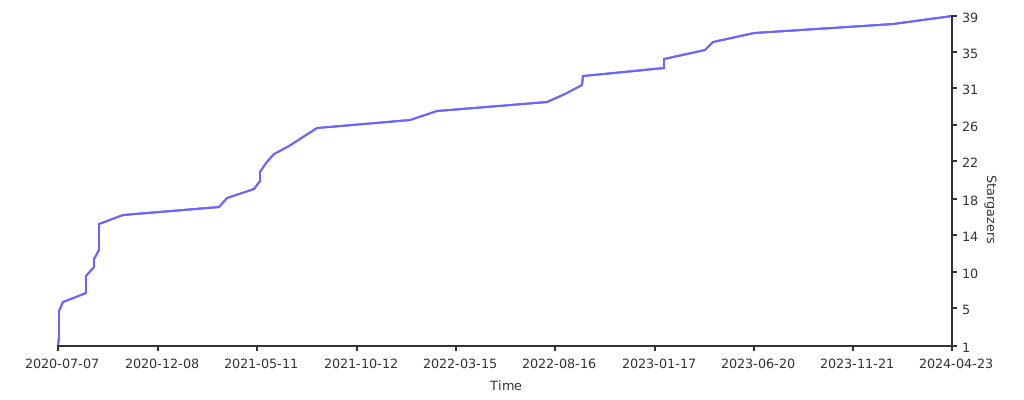
|
-
|
|
340
348
|
## Star Gazing
|
|
341
349
|
|
|
342
350
|
If you find this library useful, help us grow our star graph!
|
|
@@ -344,8 +352,11 @@ If you find this library useful, help us grow our star graph!
|
|
|
344
352
|
|
|
345
353
|
|
|
346
354
|
## Contributors ✨
|
|
355
|
+
|
|
347
356
|
<!-- ALL-CONTRIBUTORS-BADGE:START - Do not remove or modify this section -->
|
|
357
|
+
|
|
348
358
|
[](#contributors-)
|
|
359
|
+
|
|
349
360
|
<!-- ALL-CONTRIBUTORS-BADGE:END -->
|
|
350
361
|
|
|
351
362
|
Thanks goes to these wonderful people ([emoji key](https://allcontributors.org/docs/en/emoji-key)):
|
package/SASViyaApiClient.d.ts
CHANGED
|
@@ -24,6 +24,8 @@ export declare class SASViyaApiClient {
|
|
|
24
24
|
private sessionManager;
|
|
25
25
|
private contextManager;
|
|
26
26
|
private folderMap;
|
|
27
|
+
private fileExtensionMap;
|
|
28
|
+
private boolExtensionMap;
|
|
27
29
|
/**
|
|
28
30
|
* A helper method used to call appendRequest method of RequestClient
|
|
29
31
|
* @param response - response from sasjs request
|