@samanhappy/mcphub 1.0.35 → 1.0.37
This diff represents the content of publicly available package versions that have been released to one of the supported registries. The information contained in this diff is provided for informational purposes only and reflects changes between package versions as they appear in their respective public registries.
- package/README.fr.md +48 -17
- package/README.md +50 -39
- package/README.zh.md +50 -37
- package/dist/clients/openapi.js +32 -1
- package/dist/clients/openapi.js.map +1 -1
- package/dist/controllers/credentialBindingController.js +56 -0
- package/dist/controllers/credentialBindingController.js.map +1 -0
- package/dist/controllers/groupController.js +63 -14
- package/dist/controllers/groupController.js.map +1 -1
- package/dist/controllers/serverController.js +26 -4
- package/dist/controllers/serverController.js.map +1 -1
- package/dist/controllers/userController.js +3 -0
- package/dist/controllers/userController.js.map +1 -1
- package/dist/dao/CredentialBindingDao.js +48 -0
- package/dist/dao/CredentialBindingDao.js.map +1 -0
- package/dist/dao/CredentialBindingDaoDbImpl.js +20 -0
- package/dist/dao/CredentialBindingDaoDbImpl.js.map +1 -0
- package/dist/dao/DaoFactory.js +7 -0
- package/dist/dao/DaoFactory.js.map +1 -1
- package/dist/dao/DatabaseDaoFactory.js +4 -0
- package/dist/dao/DatabaseDaoFactory.js.map +1 -1
- package/dist/dao/GroupDaoDbImpl.js +18 -0
- package/dist/dao/GroupDaoDbImpl.js.map +1 -1
- package/dist/dao/ServerDaoDbImpl.js +3 -0
- package/dist/dao/ServerDaoDbImpl.js.map +1 -1
- package/dist/db/connection.js +3 -2
- package/dist/db/connection.js.map +1 -1
- package/dist/db/entities/CredentialBinding.js +33 -0
- package/dist/db/entities/CredentialBinding.js.map +1 -0
- package/dist/db/entities/Group.js +9 -1
- package/dist/db/entities/Group.js.map +1 -1
- package/dist/db/entities/Server.js +4 -0
- package/dist/db/entities/Server.js.map +1 -1
- package/dist/db/entities/index.js +3 -1
- package/dist/db/entities/index.js.map +1 -1
- package/dist/db/groupSchema.js +29 -0
- package/dist/db/groupSchema.js.map +1 -0
- package/dist/middlewares/auth.js +2 -0
- package/dist/middlewares/auth.js.map +1 -1
- package/dist/middlewares/i18n.js +2 -1
- package/dist/middlewares/i18n.js.map +1 -1
- package/dist/routes/index.js +19 -4
- package/dist/routes/index.js.map +1 -1
- package/dist/services/activityLoggingService.js +21 -8
- package/dist/services/activityLoggingService.js.map +1 -1
- package/dist/services/credentialBindingService.js +193 -0
- package/dist/services/credentialBindingService.js.map +1 -0
- package/dist/services/groupService.js +57 -23
- package/dist/services/groupService.js.map +1 -1
- package/dist/services/logService.js +11 -2
- package/dist/services/logService.js.map +1 -1
- package/dist/services/mcpService.js +478 -77
- package/dist/services/mcpService.js.map +1 -1
- package/dist/services/oauthClientRegistration.js +22 -7
- package/dist/services/oauthClientRegistration.js.map +1 -1
- package/dist/services/oauthSettingsStore.js +3 -0
- package/dist/services/oauthSettingsStore.js.map +1 -1
- package/dist/services/principalRuntimeService.js +109 -0
- package/dist/services/principalRuntimeService.js.map +1 -0
- package/dist/services/serverConfigPresenter.js +3 -0
- package/dist/services/serverConfigPresenter.js.map +1 -1
- package/dist/services/sseService.js +65 -16
- package/dist/services/sseService.js.map +1 -1
- package/dist/utils/credentialTemplate.js +38 -0
- package/dist/utils/credentialTemplate.js.map +1 -0
- package/dist/utils/groupAccess.js +17 -0
- package/dist/utils/groupAccess.js.map +1 -0
- package/dist/utils/migration.js +11 -0
- package/dist/utils/migration.js.map +1 -1
- package/dist/utils/rateLimit.js +85 -18
- package/dist/utils/rateLimit.js.map +1 -1
- package/dist/utils/serverConfigPersistence.js +2 -0
- package/dist/utils/serverConfigPersistence.js.map +1 -1
- package/frontend/dist/assets/{ActivityPage-B4OBJUBq.js → ActivityPage-Bx5-Jrxq.js} +2 -2
- package/frontend/dist/assets/{ActivityPage-B4OBJUBq.js.map → ActivityPage-Bx5-Jrxq.js.map} +1 -1
- package/frontend/dist/assets/{ConfirmDialog-3APts2Y9.js → ConfirmDialog-uWBwm8J1.js} +2 -2
- package/frontend/dist/assets/{ConfirmDialog-3APts2Y9.js.map → ConfirmDialog-uWBwm8J1.js.map} +1 -1
- package/frontend/dist/assets/CredentialsPage-BGbk_kBx.js +2 -0
- package/frontend/dist/assets/CredentialsPage-BGbk_kBx.js.map +1 -0
- package/frontend/dist/assets/{Dashboard-czP-DGHn.js → Dashboard-gHeXLPEn.js} +2 -2
- package/frontend/dist/assets/{Dashboard-czP-DGHn.js.map → Dashboard-gHeXLPEn.js.map} +1 -1
- package/frontend/dist/assets/{DeleteDialog-D9ycSRvn.js → DeleteDialog-BYhrMGZo.js} +2 -2
- package/frontend/dist/assets/{DeleteDialog-D9ycSRvn.js.map → DeleteDialog-BYhrMGZo.js.map} +1 -1
- package/frontend/dist/assets/{EndpointCopy-CDwtdCHE.js → EndpointCopy-BRwX7Dpv.js} +2 -2
- package/frontend/dist/assets/{EndpointCopy-CDwtdCHE.js.map → EndpointCopy-BRwX7Dpv.js.map} +1 -1
- package/frontend/dist/assets/GroupsPage-grCAx55k.js +33 -0
- package/frontend/dist/assets/GroupsPage-grCAx55k.js.map +1 -0
- package/frontend/dist/assets/{LoginPage-BBzViqLx.js → LoginPage-C7-m2jmB.js} +2 -2
- package/frontend/dist/assets/{LoginPage-BBzViqLx.js.map → LoginPage-C7-m2jmB.js.map} +1 -1
- package/frontend/dist/assets/{LogsPage-CqbaqFiQ.js → LogsPage-B00XTokA.js} +2 -2
- package/frontend/dist/assets/{LogsPage-CqbaqFiQ.js.map → LogsPage-B00XTokA.js.map} +1 -1
- package/frontend/dist/assets/{MarketPage-DinCKwrj.js → MarketPage-CVJMdSDD.js} +2 -2
- package/frontend/dist/assets/{MarketPage-DinCKwrj.js.map → MarketPage-CVJMdSDD.js.map} +1 -1
- package/frontend/dist/assets/{OAuthConsentPage-BuPcJ2zS.js → OAuthConsentPage-znW3HtpR.js} +2 -2
- package/frontend/dist/assets/{OAuthConsentPage-BuPcJ2zS.js.map → OAuthConsentPage-znW3HtpR.js.map} +1 -1
- package/frontend/dist/assets/{Pagination-Dwko3g48.js → Pagination-CLUvn47x.js} +2 -2
- package/frontend/dist/assets/{Pagination-Dwko3g48.js.map → Pagination-CLUvn47x.js.map} +1 -1
- package/frontend/dist/assets/{PromptsPage-CJ-wYRAL.js → PromptsPage-DGcNS3fO.js} +2 -2
- package/frontend/dist/assets/{PromptsPage-CJ-wYRAL.js.map → PromptsPage-DGcNS3fO.js.map} +1 -1
- package/frontend/dist/assets/{ResourcesPage-DRV8gnZV.js → ResourcesPage-CfyZoadu.js} +2 -2
- package/frontend/dist/assets/{ResourcesPage-DRV8gnZV.js.map → ResourcesPage-CfyZoadu.js.map} +1 -1
- package/frontend/dist/assets/ServersPage-BlC0RdIu.js +39 -0
- package/frontend/dist/assets/ServersPage-BlC0RdIu.js.map +1 -0
- package/frontend/dist/assets/{SettingsPage-Czv4OhtK.js → SettingsPage-CiVNDyr_.js} +2 -2
- package/frontend/dist/assets/{SettingsPage-Czv4OhtK.js.map → SettingsPage-CiVNDyr_.js.map} +1 -1
- package/frontend/dist/assets/{StatusDot-CwpmIlJi.js → StatusDot-DYO56shE.js} +2 -2
- package/frontend/dist/assets/{StatusDot-CwpmIlJi.js.map → StatusDot-DYO56shE.js.map} +1 -1
- package/frontend/dist/assets/{ToggleGroup-1qFTkDqh.js → ToggleGroup-r8yGt_Fq.js} +2 -2
- package/frontend/dist/assets/{ToggleGroup-1qFTkDqh.js.map → ToggleGroup-r8yGt_Fq.js.map} +1 -1
- package/frontend/dist/assets/{UsersPage-CAMXgywh.js → UsersPage-B3muXE90.js} +2 -2
- package/frontend/dist/assets/{UsersPage-CAMXgywh.js.map → UsersPage-B3muXE90.js.map} +1 -1
- package/frontend/dist/assets/{framework-vendor-BHAQX05P.js → framework-vendor-_YL27Pfc.js} +2 -2
- package/frontend/dist/assets/{framework-vendor-BHAQX05P.js.map → framework-vendor-_YL27Pfc.js.map} +1 -1
- package/frontend/dist/assets/{i18n-vendor-CMcB7XUR.js → i18n-vendor-BMaj5qV8.js} +2 -2
- package/frontend/dist/assets/{i18n-vendor-CMcB7XUR.js.map → i18n-vendor-BMaj5qV8.js.map} +1 -1
- package/frontend/dist/assets/{icons-vendor-HZHHWeTa.js → icons-vendor-VW-UwEhw.js} +3 -3
- package/frontend/dist/assets/{icons-vendor-HZHHWeTa.js.map → icons-vendor-VW-UwEhw.js.map} +1 -1
- package/frontend/dist/assets/index-B-aT0HW5.js +3 -0
- package/frontend/dist/assets/index-B-aT0HW5.js.map +1 -0
- package/frontend/dist/assets/{index-DtrCVU1h.css → index-B3OqAhGz.css} +1 -1
- package/frontend/dist/assets/{resourceService-BTVgor9F.js → resourceService-CSXOSi7M.js} +2 -2
- package/frontend/dist/assets/{resourceService-BTVgor9F.js.map → resourceService-CSXOSi7M.js.map} +1 -1
- package/frontend/dist/assets/{useCostData-CDVGUx_e.js → useCostData-BOxUFQAH.js} +2 -2
- package/frontend/dist/assets/{useCostData-CDVGUx_e.js.map → useCostData-BOxUFQAH.js.map} +1 -1
- package/frontend/dist/assets/useSettingsData-DmpLlRI6.js +2 -0
- package/frontend/dist/assets/{useSettingsData-92nglN_X.js.map → useSettingsData-DmpLlRI6.js.map} +1 -1
- package/frontend/dist/assets/variableDetection-cmwwuSWB.js +16 -0
- package/frontend/dist/assets/variableDetection-cmwwuSWB.js.map +1 -0
- package/frontend/dist/index.html +5 -5
- package/package.json +4 -5
- package/frontend/dist/assets/GroupsPage-BgUHjkGb.js +0 -33
- package/frontend/dist/assets/GroupsPage-BgUHjkGb.js.map +0 -1
- package/frontend/dist/assets/ServersPage-CbtcAcVH.js +0 -39
- package/frontend/dist/assets/ServersPage-CbtcAcVH.js.map +0 -1
- package/frontend/dist/assets/index-Cb6IBpZR.js +0 -3
- package/frontend/dist/assets/index-Cb6IBpZR.js.map +0 -1
- package/frontend/dist/assets/useSettingsData-92nglN_X.js +0 -2
- package/frontend/dist/assets/variableDetection-BlOwsGsz.js +0 -16
- package/frontend/dist/assets/variableDetection-BlOwsGsz.js.map +0 -1
package/README.fr.md
CHANGED
|
@@ -1,6 +1,13 @@
|
|
|
1
1
|
# MCPHub
|
|
2
2
|
|
|
3
|
-
> Une passerelle
|
|
3
|
+
> Une passerelle et un plan de contrôle MCP open source et auto-hébergés pour connecter, contrôler et exploiter des serveurs MCP.
|
|
4
|
+
|
|
5
|
+
[](https://github.com/samanhappy/mcphub/actions/workflows/ci.yml)
|
|
6
|
+
[](https://www.npmjs.com/package/@samanhappy/mcphub)
|
|
7
|
+
[](https://hub.docker.com/r/samanhappy/mcphub)
|
|
8
|
+
[](LICENSE)
|
|
9
|
+
[](https://discord.gg/2BJehJZVH5)
|
|
10
|
+
[](https://github.com/samanhappy/mcphub/stargazers)
|
|
4
11
|
|
|
5
12
|
[English](README.md) | Français | [中文版](README.zh.md)
|
|
6
13
|
|
|
@@ -10,32 +17,59 @@ MCPHub offre une manière unifiée de connecter et de gérer plusieurs serveurs
|
|
|
10
17
|
|
|
11
18
|
## 🌐 Démo en direct et Documentation
|
|
12
19
|
|
|
20
|
+
- **Site web** : [mcphub.app](https://www.mcphub.app/)
|
|
13
21
|
- **Documentation** : [docs.mcphub.app](https://docs.mcphub.app/)
|
|
14
22
|
- **Environnement de démo** : [demo.mcphub.app](https://demo.mcphub.app/)
|
|
15
23
|
|
|
16
24
|
## 🚀 Fonctionnalités
|
|
17
25
|
|
|
26
|
+
### Connecter une fois, exposer partout
|
|
27
|
+
|
|
28
|
+
- **Routage intelligent** ⭐ - Découverte d'outils propulsée par IA utilisant la recherche sémantique vectorielle ([En savoir plus](https://docs.mcphub.app/features/smart-routing))
|
|
18
29
|
- **Passerelle MCP unifiée** - Exposez tous les serveurs connectés via des points de terminaison MCP stables, avec des routes pour les groupes et les serveurs individuels
|
|
19
|
-
- **
|
|
30
|
+
- **Alias et routage des serveurs** - Définissez des alias et routez les clients vers tous les serveurs, des groupes, un serveur individuel ou le routage intelligent
|
|
20
31
|
- **Prise en charge SSE / Streamable HTTP / stdio** - Connectez des serveurs MCP locaux et distants via les transports pris en charge
|
|
32
|
+
- **Configuration à chaud** - Ajoutez, supprimez ou mettez à jour les serveurs sans temps d'arrêt
|
|
33
|
+
|
|
34
|
+
### Contrôler les accès et les identifiants
|
|
35
|
+
|
|
36
|
+
- **Identifiants personnels** ⭐ - Associez une clé par utilisateur à un serveur partagé, avec stockage chiffré et processus stdio isolés ([En savoir plus](docs/features/per-user-credentials.mdx))
|
|
21
37
|
- **Authentification et contrôle d'accès** - Utilisez OAuth 2.0, des bearer keys et la visibilité des serveurs ou groupes pour gérer les accès
|
|
22
|
-
- **
|
|
38
|
+
- **Support OAuth 2.0** ⭐ - Modes client et serveur pour une authentification sécurisée ([En savoir plus](https://docs.mcphub.app/features/oauth))
|
|
39
|
+
- **Connexion sociale** - Support de connexion GitHub et Google via Better Auth (nécessite le mode Base de données)
|
|
40
|
+
- **Gestion des serveurs et des groupes** - Organisez les serveurs en groupes, gérez leur visibilité et contrôlez l'exposition des Tools, Prompts et Resources
|
|
41
|
+
|
|
42
|
+
### Exploiter en confiance
|
|
43
|
+
|
|
23
44
|
- **Journaux et observabilité** - Consultez l'activité des appels d'outils, l'état des requêtes, la latence et les journaux des serveurs
|
|
24
45
|
- **Vérifications de santé** - Surveillez la santé des connexions et l'état des serveurs depuis un même endroit
|
|
25
46
|
- **Tableau de bord Web** - Gérez la configuration et le fonctionnement des serveurs depuis un navigateur
|
|
26
|
-
- **Routage intelligent** - Découverte d'outils propulsée par IA utilisant la recherche sémantique vectorielle ([En savoir plus](https://docs.mcphub.app/features/smart-routing))
|
|
27
47
|
- **Compression des résultats d'outils** - Réduisez automatiquement les grands résultats texte avant qu'ils n'atteignent les clients
|
|
28
|
-
- **Configuration à chaud** - Ajoutez, supprimez ou mettez à jour les serveurs sans temps d'arrêt
|
|
29
|
-
- **Support OAuth 2.0** - Modes client et serveur pour une authentification sécurisée ([En savoir plus](https://docs.mcphub.app/features/oauth))
|
|
30
|
-
- **Connexion Sociale** - Support de connexion GitHub et Google via Better Auth (nécessite le mode Base de données)
|
|
31
48
|
- **Mode Base de données** - Stockez la configuration dans PostgreSQL pour les environnements de production ([En savoir plus](https://docs.mcphub.app/configuration/database-configuration))
|
|
32
49
|
- **Prêt pour Docker** - Déployez instantanément avec la configuration conteneurisée
|
|
33
50
|
|
|
34
51
|
## 🔧 Démarrage rapide
|
|
35
52
|
|
|
53
|
+
### Prérequis
|
|
54
|
+
|
|
55
|
+
- **Docker** (recommandé) — le moyen le plus rapide d'exécuter MCPHub ; toutes les commandes ci-dessous l'utilisent
|
|
56
|
+
- **Node.js** `^18.0.0 || >=20.0.0` et **pnpm** `10.12.4` — uniquement pour exécuter depuis les sources ou développer localement (voir [Développement local](#développement-local))
|
|
57
|
+
|
|
58
|
+
### Démarrer avec Docker
|
|
59
|
+
|
|
60
|
+
```bash
|
|
61
|
+
docker run -p 3000:3000 -v ./data:/app/data samanhappy/mcphub
|
|
62
|
+
```
|
|
63
|
+
|
|
64
|
+
Ouvrez `http://localhost:3000` et connectez-vous avec le nom d'utilisateur `admin`. Au premier lancement, si la variable d'environnement `ADMIN_PASSWORD` n'est pas définie, un mot de passe aléatoire est généré et affiché dans les logs du serveur.
|
|
65
|
+
|
|
66
|
+
La configuration, les utilisateurs et les identifiants persistent dans `./data` par défaut.
|
|
67
|
+
|
|
68
|
+
Avec vos propres serveurs ? Avant le premier lancement, créez `data/mcp_settings.json` (voir [Configuration](#configuration)). Ensuite, ajoutez des serveurs dans le tableau de bord ou modifiez le fichier existant et redémarrez MCPHub.
|
|
69
|
+
|
|
36
70
|
### Configuration
|
|
37
71
|
|
|
38
|
-
|
|
72
|
+
Avant le premier lancement, créez `data/mcp_settings.json` :
|
|
39
73
|
|
|
40
74
|
```json
|
|
41
75
|
{
|
|
@@ -56,13 +90,7 @@ Créez un fichier `mcp_settings.json` :
|
|
|
56
90
|
|
|
57
91
|
### Déploiement avec Docker
|
|
58
92
|
|
|
59
|
-
|
|
60
|
-
# Exécutez avec une configuration personnalisée (recommandé)
|
|
61
|
-
docker run -p 3000:3000 -v ./mcp_settings.json:/app/mcp_settings.json -v ./data:/app/data samanhappy/mcphub
|
|
62
|
-
|
|
63
|
-
# Ou exécutez avec les paramètres par défaut (montez ./data pour préserver l'état entre redémarrages)
|
|
64
|
-
docker run -p 3000:3000 -v ./data:/app/data samanhappy/mcphub
|
|
65
|
-
```
|
|
93
|
+
Voir [Démarrer avec Docker](#démarrer-avec-docker) pour la commande prête à copier. Gardez `./data` monté pour conserver la configuration, les utilisateurs et les identifiants après la recréation du conteneur.
|
|
66
94
|
|
|
67
95
|
Deux variantes d'image sont publiées sous `samanhappy/mcphub` :
|
|
68
96
|
|
|
@@ -73,11 +101,11 @@ Voir [Configuration Docker](https://docs.mcphub.app/configuration/docker-setup)
|
|
|
73
101
|
|
|
74
102
|
### Accéder au tableau de bord
|
|
75
103
|
|
|
76
|
-
Ouvrez `http://localhost:3000`
|
|
104
|
+
Ouvrez `http://localhost:3000` (voir [Démarrer avec Docker](#démarrer-avec-docker) pour la connexion). Vous pouvez également prédéfinir le mot de passe :
|
|
77
105
|
|
|
78
106
|
```bash
|
|
79
107
|
# Docker : définir le mot de passe admin via une variable d'environnement
|
|
80
|
-
docker run -p 3000:3000 -e ADMIN_PASSWORD=your-secure-password samanhappy/mcphub
|
|
108
|
+
docker run -p 3000:3000 -v ./data:/app/data -e ADMIN_PASSWORD=your-secure-password samanhappy/mcphub
|
|
81
109
|
```
|
|
82
110
|
|
|
83
111
|
> **Conseil :** Changez le mot de passe admin après la première connexion pour plus de sécurité.
|
|
@@ -109,6 +137,7 @@ http://localhost:3000/mcp/$smart/{group} # Routage intelligent dans un groupe
|
|
|
109
137
|
| [Mode Base de données](https://docs.mcphub.app/configuration/database-configuration) | Configuration PostgreSQL pour la production |
|
|
110
138
|
| [OAuth](https://docs.mcphub.app/features/oauth) | Configuration client et serveur OAuth 2.0 |
|
|
111
139
|
| [Routage intelligent](https://docs.mcphub.app/features/smart-routing) | Découverte d'outils propulsée par IA |
|
|
140
|
+
| [Guide CLI](https://docs.mcphub.app/features/cli) | Gérer et appeler le hub depuis un terminal |
|
|
112
141
|
| [Configuration Docker](https://docs.mcphub.app/configuration/docker-setup) | Guide de déploiement Docker |
|
|
113
142
|
|
|
114
143
|
## 🧑💻 Développement local
|
|
@@ -142,6 +171,8 @@ Les contributions sont les bienvenues ! Rejoignez notre [communauté Discord](ht
|
|
|
142
171
|
|
|
143
172
|
[](https://ko-fi.com/samanhappy)
|
|
144
173
|
|
|
174
|
+
Les utilisateurs en Chine peuvent aussi soutenir via WeChat Pay — voir [中文版](README.zh.md).
|
|
175
|
+
|
|
145
176
|
## 🌟 Historique des étoiles
|
|
146
177
|
|
|
147
178
|
[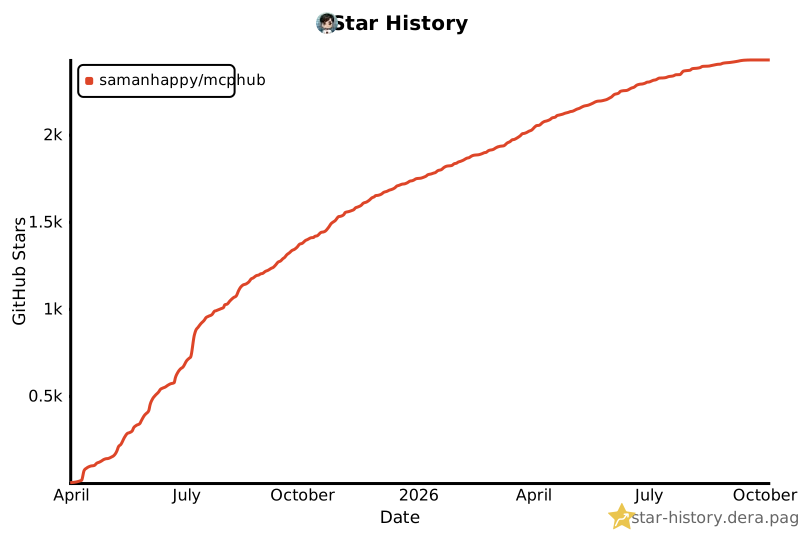](https://star-history.dera.page/#samanhappy/mcphub&Date)
|
package/README.md
CHANGED
|
@@ -1,12 +1,19 @@
|
|
|
1
1
|
# MCPHub
|
|
2
2
|
|
|
3
|
-
>
|
|
3
|
+
> An open-source, self-hosted MCP gateway and control plane for connecting, controlling, and operating MCP servers.
|
|
4
4
|
|
|
5
|
-
[](https://github.com/samanhappy/mcphub/actions/workflows/ci.yml)
|
|
6
|
+
[](https://www.npmjs.com/package/@samanhappy/mcphub)
|
|
7
|
+
[](https://hub.docker.com/r/samanhappy/mcphub)
|
|
8
|
+
[](LICENSE)
|
|
9
|
+
[](https://discord.gg/2BJehJZVH5)
|
|
10
|
+
[](https://github.com/samanhappy/mcphub/stargazers)
|
|
6
11
|
|
|
7
12
|
English | [Français](README.fr.md) | [中文版](README.zh.md)
|
|
8
13
|
|
|
9
|
-
MCPHub provides a unified
|
|
14
|
+
MCPHub provides a unified control point between AI clients and MCP servers. Connect local and remote MCP servers once, organize and route their capabilities through stable endpoints, control access with authentication, scoped credentials, and per-user visibility, and operate everything with centralized logs, activity tracking, and health monitoring.
|
|
15
|
+
|
|
16
|
+
It works with MCP clients such as Claude Code, Cursor, Cherry Studio, OpenWebUI, and other MCP-compatible applications.
|
|
10
17
|
|
|
11
18
|

|
|
12
19
|
|
|
@@ -18,28 +25,54 @@ MCPHub provides a unified way to connect and manage multiple MCP servers, organi
|
|
|
18
25
|
|
|
19
26
|
## 🚀 Features
|
|
20
27
|
|
|
28
|
+
### Connect once, expose everywhere
|
|
29
|
+
|
|
30
|
+
- **Smart Routing** ⭐ - AI-powered tool discovery using vector semantic search ([Learn more](https://docs.mcphub.app/features/smart-routing))
|
|
21
31
|
- **Unified MCP Gateway** - Expose all connected servers through stable MCP endpoints, including routes for groups and individual servers
|
|
22
|
-
- **Server and
|
|
32
|
+
- **Server Aliases and Routing** - Define aliases and route clients to all servers, specific groups, individual servers, or smart routing
|
|
23
33
|
- **SSE / Streamable HTTP / stdio Support** - Connect local and remote MCP servers over the supported transports
|
|
34
|
+
- **Hot-Swappable Config** - Add, remove, or update servers without downtime
|
|
35
|
+
|
|
36
|
+
### Control access and credentials
|
|
37
|
+
|
|
38
|
+
- **Per-user Credentials** ⭐ - Bind personal keys to one shared server, with encrypted storage and isolated stdio runtimes ([Learn more](docs/features/per-user-credentials.mdx))
|
|
24
39
|
- **Authentication and Access Control** - Use OAuth 2.0, bearer keys, and server or group visibility controls to manage access
|
|
25
|
-
- **
|
|
40
|
+
- **OAuth 2.0 Support** ⭐ - Both client and server modes for secure authentication ([Learn more](https://docs.mcphub.app/features/oauth))
|
|
41
|
+
- **Social Login** - Seamless GitHub and Google login support with Better Auth integration (requires Database Mode)
|
|
42
|
+
- **Server and Group Management** - Organize servers into groups, manage visibility, and control Tool, Prompt, and Resource exposure
|
|
43
|
+
|
|
44
|
+
### Operate with confidence
|
|
45
|
+
|
|
26
46
|
- **Logs and Observability** - Inspect tool-call activity, request status, latency, and server logs
|
|
27
47
|
- **Health Checks** - Monitor connection health and server status from one place
|
|
28
48
|
- **Web Dashboard** - Manage server configuration and runtime operations from a browser
|
|
29
|
-
- **Smart Routing** - AI-powered tool discovery using vector semantic search ([Learn more](https://docs.mcphub.app/features/smart-routing))
|
|
30
49
|
- **MCP Apps Proxy** - Transparently forward interactive MCP Apps on single-server routes ([Learn more](https://docs.mcphub.app/features/mcp-apps))
|
|
31
50
|
- **Tool Result Compression** - Transparently reduce large text tool outputs before they reach clients
|
|
32
|
-
- **Hot-Swappable Config** - Add, remove, or update servers without downtime
|
|
33
|
-
- **OAuth 2.0 Support** - Both client and server modes for secure authentication ([Learn more](https://docs.mcphub.app/features/oauth))
|
|
34
|
-
- **Social Login** - Seamless GitHub and Google login support with Better Auth integration (requires Database Mode)
|
|
35
51
|
- **Database Mode** - Store configuration in PostgreSQL for production environments ([Learn more](https://docs.mcphub.app/configuration/database-configuration))
|
|
36
52
|
- **Docker-Ready** - Deploy instantly with containerized setup
|
|
37
53
|
|
|
38
54
|
## 🔧 Quick Start
|
|
39
55
|
|
|
56
|
+
### Prerequisites
|
|
57
|
+
|
|
58
|
+
- **Docker** (recommended) — the fastest way to run MCPHub; all commands below use it
|
|
59
|
+
- **Node.js** `^18.0.0 || >=20.0.0` and **pnpm** `10.12.4` — only needed to run from source or develop locally (see [Local Development](#local-development))
|
|
60
|
+
|
|
61
|
+
### Start with Docker
|
|
62
|
+
|
|
63
|
+
```bash
|
|
64
|
+
docker run -p 3000:3000 -v ./data:/app/data samanhappy/mcphub
|
|
65
|
+
```
|
|
66
|
+
|
|
67
|
+
Open `http://localhost:3000` and log in with username `admin`. On first launch, if no `ADMIN_PASSWORD` environment variable is set, a random password is generated and printed to the server logs.
|
|
68
|
+
|
|
69
|
+
Settings, users, and credential bindings persist in `./data` by default.
|
|
70
|
+
|
|
71
|
+
Want your own servers? Before the first launch, create `data/mcp_settings.json` (see [Configuration](#configuration)). After launch, add servers in the dashboard or edit the existing file and restart MCPHub.
|
|
72
|
+
|
|
40
73
|
### Configuration
|
|
41
74
|
|
|
42
|
-
Create
|
|
75
|
+
Create `data/mcp_settings.json` before the first launch:
|
|
43
76
|
|
|
44
77
|
```json
|
|
45
78
|
{
|
|
@@ -60,13 +93,7 @@ Create a `mcp_settings.json` file:
|
|
|
60
93
|
|
|
61
94
|
### Docker Deployment
|
|
62
95
|
|
|
63
|
-
|
|
64
|
-
# Run with custom config (recommended)
|
|
65
|
-
docker run -p 3000:3000 -v ./mcp_settings.json:/app/mcp_settings.json -v ./data:/app/data samanhappy/mcphub
|
|
66
|
-
|
|
67
|
-
# Or run with default settings (also mount ./data so credentials and state survive restarts)
|
|
68
|
-
docker run -p 3000:3000 -v ./data:/app/data samanhappy/mcphub
|
|
69
|
-
```
|
|
96
|
+
See [Start with Docker](#start-with-docker) for the copy-paste command. Keep `./data` mounted so settings, users, and credential bindings survive container recreation.
|
|
70
97
|
|
|
71
98
|
Two image variants are published under `samanhappy/mcphub`:
|
|
72
99
|
|
|
@@ -77,11 +104,11 @@ See [Docker Setup](https://docs.mcphub.app/configuration/docker-setup) for build
|
|
|
77
104
|
|
|
78
105
|
### Access Dashboard
|
|
79
106
|
|
|
80
|
-
Open `http://localhost:3000`
|
|
107
|
+
Open `http://localhost:3000` (see [Start with Docker](#start-with-docker) for login details). You can also pre-set the password:
|
|
81
108
|
|
|
82
109
|
```bash
|
|
83
110
|
# Docker: set admin password via environment variable
|
|
84
|
-
docker run -p 3000:3000 -e ADMIN_PASSWORD=your-secure-password samanhappy/mcphub
|
|
111
|
+
docker run -p 3000:3000 -v ./data:/app/data -e ADMIN_PASSWORD=your-secure-password samanhappy/mcphub
|
|
85
112
|
```
|
|
86
113
|
|
|
87
114
|
> **Tip:** Change the admin password after first login for security.
|
|
@@ -104,24 +131,6 @@ http://localhost:3000/mcp/$smart/{group} # Smart routing within group
|
|
|
104
131
|
|
|
105
132
|
📖 See [API Reference](https://docs.mcphub.app/api-reference) for detailed endpoint documentation.
|
|
106
133
|
|
|
107
|
-
### Manage From the Terminal
|
|
108
|
-
|
|
109
|
-
The same `mcphub` binary doubles as a CLI for the running hub — no extra install needed.
|
|
110
|
-
|
|
111
|
-
```bash
|
|
112
|
-
mcphub login --url http://localhost:3000 --username admin
|
|
113
|
-
mcphub servers list
|
|
114
|
-
mcphub servers add fetch --type stdio --command uvx --arg mcp-server-fetch
|
|
115
|
-
mcphub tools list # discover what tools are available
|
|
116
|
-
mcphub tools get fetch_url # see required params + sample command
|
|
117
|
-
mcphub call fetch_url url=https://example.com --json
|
|
118
|
-
mcphub keys create --name ci --access-type all
|
|
119
|
-
```
|
|
120
|
-
|
|
121
|
-
It also speaks the public marketplace API (`mcphub discover`, `mcphub install ...`) so server lookup and one-command install work against any hub with discovery enabled.
|
|
122
|
-
|
|
123
|
-
📖 See [CLI Guide](https://docs.mcphub.app/features/cli) for every subcommand, profiles, and CI usage.
|
|
124
|
-
|
|
125
134
|
## 📚 Documentation
|
|
126
135
|
|
|
127
136
|
| Topic | Description |
|
|
@@ -162,8 +171,8 @@ Local development uses `admin` / `admin123` and stores its writable settings cop
|
|
|
162
171
|
|
|
163
172
|
Running MCPHub in production?
|
|
164
173
|
|
|
165
|
-
Work directly with the maintainer on production
|
|
166
|
-
access control, credential management, audit, Kubernetes, and HA readiness.
|
|
174
|
+
Work directly with the maintainer on production architecture, OAuth/OIDC,
|
|
175
|
+
identity and access control, credential management, audit, Kubernetes, and HA readiness.
|
|
167
176
|
|
|
168
177
|
[Discuss a production pilot →](https://www.mcphub.app/pricing)
|
|
169
178
|
|
|
@@ -175,6 +184,8 @@ Contributions welcome! See our [Discord community](https://discord.gg/2BJehJZVH5
|
|
|
175
184
|
|
|
176
185
|
[](https://ko-fi.com/samanhappy)
|
|
177
186
|
|
|
187
|
+
Chinese users can also support via WeChat Pay — see [中文版](README.zh.md).
|
|
188
|
+
|
|
178
189
|
## 🌟 Star History
|
|
179
190
|
|
|
180
191
|
[](https://star-history.dera.page/#samanhappy/mcphub&Date)
|
package/README.zh.md
CHANGED
|
@@ -1,10 +1,19 @@
|
|
|
1
1
|
# MCPHub
|
|
2
2
|
|
|
3
|
-
>
|
|
3
|
+
> 开源、自托管的 MCP 网关与控制平面,用于连接、控制和运行 MCP 服务器。
|
|
4
|
+
|
|
5
|
+
[](https://github.com/samanhappy/mcphub/actions/workflows/ci.yml)
|
|
6
|
+
[](https://www.npmjs.com/package/@samanhappy/mcphub)
|
|
7
|
+
[](https://hub.docker.com/r/samanhappy/mcphub)
|
|
8
|
+
[](LICENSE)
|
|
9
|
+
[](https://discord.gg/2BJehJZVH5)
|
|
10
|
+
[](https://github.com/samanhappy/mcphub/stargazers)
|
|
4
11
|
|
|
5
12
|
[English](README.md) | [Français](README.fr.md) | 中文版
|
|
6
13
|
|
|
7
|
-
MCPHub
|
|
14
|
+
MCPHub 是 AI 客户端与 MCP 服务器之间的统一控制点。一次连接本地和远程 MCP 服务器,通过稳定端点组织和路由其能力,借助身份认证、限定作用域的凭据和用户级可见性控制访问,并通过集中日志、活动追踪和健康监控统一运行与管理。
|
|
15
|
+
|
|
16
|
+
兼容 Claude Code、Cursor、Cherry Studio、OpenWebUI 及其他支持 MCP 的应用。
|
|
8
17
|
|
|
9
18
|

|
|
10
19
|
|
|
@@ -16,27 +25,53 @@ MCPHub 提供统一的方式来连接和管理多个 MCP 服务器,将它们
|
|
|
16
25
|
|
|
17
26
|
## 🚀 功能亮点
|
|
18
27
|
|
|
28
|
+
### 一次连接,随处暴露
|
|
29
|
+
|
|
30
|
+
- **智能路由** ⭐ - 基于向量语义搜索的 AI 工具发现 ([了解更多](https://docs.mcphub.app/zh/features/smart-routing))
|
|
19
31
|
- **统一 MCP 网关** - 通过稳定的 MCP 端点暴露所有已连接的服务器,也支持分组和单服务器路由
|
|
20
|
-
-
|
|
32
|
+
- **服务器别名与路由** - 设置别名,并将客户端路由到所有服务器、指定分组、单个服务器或智能路由
|
|
21
33
|
- **SSE / Streamable HTTP / stdio 支持** - 通过支持的传输方式连接本地和远程 MCP 服务器
|
|
34
|
+
- **热插拔配置** - 无需停机即可添加、移除或更新服务器
|
|
35
|
+
|
|
36
|
+
### 管控访问与凭据
|
|
37
|
+
|
|
38
|
+
- **个人凭据** ⭐ - 一个共享服务器支持每位用户独立绑定密钥,加密保存并隔离 stdio 运行进程([了解更多](docs/zh/features/per-user-credentials.mdx))
|
|
22
39
|
- **身份认证与访问控制** - 使用 OAuth 2.0、Bearer Key 以及服务器或分组可见性控制访问权限
|
|
23
|
-
-
|
|
40
|
+
- **OAuth 2.0 支持** ⭐ - 客户端和服务端模式,实现安全认证 ([了解更多](https://docs.mcphub.app/zh/features/oauth))
|
|
41
|
+
- **社交一键登录** - 通过 Better Auth 集成支持 GitHub 和 Google 快捷登录(需启用数据库模式)
|
|
42
|
+
- **服务器与分组管理** - 组织服务器分组,管理可见性,并控制 Tool、Prompt 与 Resource 的暴露范围
|
|
43
|
+
|
|
44
|
+
### 稳定运行
|
|
45
|
+
|
|
24
46
|
- **日志与可观测性** - 查看工具调用活动、请求状态、延迟和服务器日志
|
|
25
47
|
- **健康检查** - 在一个地方监控连接健康状况和服务器状态
|
|
26
48
|
- **Web 控制台** - 通过浏览器管理服务器配置和运行状态
|
|
27
|
-
- **智能路由** - 基于向量语义搜索的 AI 工具发现 ([了解更多](https://docs.mcphub.app/zh/features/smart-routing))
|
|
28
49
|
- **工具结果压缩** - 在返回客户端前透明压缩大型文本工具输出
|
|
29
|
-
- **热插拔配置** - 无需停机即可添加、移除或更新服务器
|
|
30
|
-
- **OAuth 2.0 支持** - 客户端和服务端模式,实现安全认证 ([了解更多](https://docs.mcphub.app/zh/features/oauth))
|
|
31
|
-
- **社交一键登录** - 通过 Better Auth 集成支持 GitHub 和 Google 快捷登录(需启用数据库模式)
|
|
32
50
|
- **数据库模式** - 将配置存储在 PostgreSQL 中,适用于生产环境 ([了解更多](https://docs.mcphub.app/zh/configuration/database-configuration))
|
|
33
51
|
- **Docker 就绪** - 容器化部署,开箱即用
|
|
34
52
|
|
|
35
53
|
## 🔧 快速开始
|
|
36
54
|
|
|
55
|
+
### 前置条件
|
|
56
|
+
|
|
57
|
+
- **Docker**(推荐)—— 运行 MCPHub 最快的方式,下面的命令都基于它
|
|
58
|
+
- **Node.js** `^18.0.0 || >=20.0.0` 和 **pnpm** `10.12.4` —— 仅从源码运行或参与本地开发时需要(见[本地开发](#本地开发))
|
|
59
|
+
|
|
60
|
+
### 使用 Docker 启动
|
|
61
|
+
|
|
62
|
+
```bash
|
|
63
|
+
docker run -p 3000:3000 -v ./data:/app/data samanhappy/mcphub
|
|
64
|
+
```
|
|
65
|
+
|
|
66
|
+
打开 `http://localhost:3000`,使用用户名 `admin` 登录。首次启动时,如果未设置 `ADMIN_PASSWORD` 环境变量,系统将自动生成随机密码并输出到服务器日志中。
|
|
67
|
+
|
|
68
|
+
配置、用户和凭据绑定默认持久化到 `./data`。
|
|
69
|
+
|
|
70
|
+
想用自己的服务器?首次启动前,创建 `data/mcp_settings.json`(见[配置](#配置))。启动后,可在控制台添加服务器,或编辑现有配置文件并重启 MCPHub。
|
|
71
|
+
|
|
37
72
|
### 配置
|
|
38
73
|
|
|
39
|
-
|
|
74
|
+
首次启动前,创建 `data/mcp_settings.json` 文件:
|
|
40
75
|
|
|
41
76
|
```json
|
|
42
77
|
{
|
|
@@ -57,13 +92,7 @@ MCPHub 提供统一的方式来连接和管理多个 MCP 服务器,将它们
|
|
|
57
92
|
|
|
58
93
|
### Docker 部署
|
|
59
94
|
|
|
60
|
-
|
|
61
|
-
# 挂载自定义配置运行(推荐)
|
|
62
|
-
docker run -p 3000:3000 -v ./mcp_settings.json:/app/mcp_settings.json -v ./data:/app/data samanhappy/mcphub
|
|
63
|
-
|
|
64
|
-
# 或使用默认配置运行(仍建议挂载 ./data,避免容器删除后数据丢失)
|
|
65
|
-
docker run -p 3000:3000 -v ./data:/app/data samanhappy/mcphub
|
|
66
|
-
```
|
|
95
|
+
可复制的命令见[使用 Docker 启动](#使用-docker-启动)。请保持挂载 `./data`,这样配置、用户和凭据绑定在容器重建后不会丢失。
|
|
67
96
|
|
|
68
97
|
`samanhappy/mcphub` 提供两种镜像变体:
|
|
69
98
|
|
|
@@ -74,11 +103,11 @@ docker run -p 3000:3000 -v ./data:/app/data samanhappy/mcphub
|
|
|
74
103
|
|
|
75
104
|
### 访问控制台
|
|
76
105
|
|
|
77
|
-
打开 `http://localhost:3000
|
|
106
|
+
打开 `http://localhost:3000`(登录方式见[使用 Docker 启动](#使用-docker-启动))。也可以预先设置密码:
|
|
78
107
|
|
|
79
108
|
```bash
|
|
80
109
|
# Docker:通过环境变量设置管理员密码
|
|
81
|
-
docker run -p 3000:3000 -e ADMIN_PASSWORD=your-secure-password samanhappy/mcphub
|
|
110
|
+
docker run -p 3000:3000 -v ./data:/app/data -e ADMIN_PASSWORD=your-secure-password samanhappy/mcphub
|
|
82
111
|
```
|
|
83
112
|
|
|
84
113
|
> **提示:** 首次登录后请及时修改管理员密码以确保安全。
|
|
@@ -101,24 +130,6 @@ http://localhost:3000/mcp/$smart/{group} # 智能路由(特定分组)
|
|
|
101
130
|
|
|
102
131
|
📖 查看 [API 参考](https://docs.mcphub.app/zh/api-reference)了解详细的端点文档。
|
|
103
132
|
|
|
104
|
-
### 终端管理
|
|
105
|
-
|
|
106
|
-
`mcphub` 同一个二进制兼任 CLI,无需额外安装。
|
|
107
|
-
|
|
108
|
-
```bash
|
|
109
|
-
mcphub login --url http://localhost:3000 --username admin
|
|
110
|
-
mcphub servers list
|
|
111
|
-
mcphub servers add fetch --type stdio --command uvx --arg mcp-server-fetch
|
|
112
|
-
mcphub tools list # 看有哪些 tool 可调
|
|
113
|
-
mcphub tools get fetch_url # 看必填参数和样例命令
|
|
114
|
-
mcphub call fetch_url url=https://example.com --json
|
|
115
|
-
mcphub keys create --name ci --access-type all
|
|
116
|
-
```
|
|
117
|
-
|
|
118
|
-
CLI 同样对接公共市场接口(`mcphub discover`、`mcphub install ...`),可对任意开启了 discovery 的 hub 做检索与一键安装。
|
|
119
|
-
|
|
120
|
-
📖 查看 [CLI 指南](https://docs.mcphub.app/zh/features/cli)了解全部子命令、profile 管理与 CI 用法。
|
|
121
|
-
|
|
122
133
|
## 📚 文档
|
|
123
134
|
|
|
124
135
|
| 主题 | 描述 |
|
|
@@ -158,7 +169,7 @@ pnpm dev
|
|
|
158
169
|
|
|
159
170
|
正在生产环境使用 MCPHub?
|
|
160
171
|
|
|
161
|
-
|
|
172
|
+
可以直接与维护者合作,解决生产架构、OAuth/OIDC、身份与访问控制、
|
|
162
173
|
凭据管理、审计、Kubernetes 和高可用准备等问题。
|
|
163
174
|
|
|
164
175
|
[讨论 Production Pilot →](https://www.mcphub.app/zh/pricing)
|
|
@@ -173,6 +184,8 @@ pnpm dev
|
|
|
173
184
|
|
|
174
185
|
<img src="assets/reward.png" width="350">
|
|
175
186
|
|
|
187
|
+
海外用户可通过 [ko-fi](https://ko-fi.com/samanhappy) 支持。
|
|
188
|
+
|
|
176
189
|
## 致谢
|
|
177
190
|
|
|
178
191
|
感谢以下朋友的赞赏:小白、唐秀川、琛、孔、黄祥取、兰军飞、无名之辈、Kyle,以及其他匿名支持者。
|
package/dist/clients/openapi.js
CHANGED
|
@@ -1,3 +1,4 @@
|
|
|
1
|
+
import { AxiosHeaders } from 'axios';
|
|
1
2
|
import axios from 'axios';
|
|
2
3
|
import { randomUUID } from 'node:crypto';
|
|
3
4
|
import { readFile } from 'node:fs/promises';
|
|
@@ -657,13 +658,34 @@ export class OpenAPIClient {
|
|
|
657
658
|
}
|
|
658
659
|
// Build query parameters
|
|
659
660
|
const queryParams = {};
|
|
661
|
+
const serializedArrayQueryParams = new URLSearchParams();
|
|
660
662
|
const queryParamDefs = tool.parameters?.filter((p) => p.in === 'query') || [];
|
|
661
663
|
for (const param of queryParamDefs) {
|
|
662
664
|
const value = args[param.name];
|
|
663
665
|
if (value !== undefined) {
|
|
664
|
-
|
|
666
|
+
// OpenAPI query parameters default to style=form and explode=true.
|
|
667
|
+
// Axios serializes arrays as `name[]=value`, which differs from the
|
|
668
|
+
// OpenAPI default of repeated `name=value` pairs. Keep non-form
|
|
669
|
+
// styles with Axios so this focused fix does not alter their current
|
|
670
|
+
// behavior.
|
|
671
|
+
if (Array.isArray(value) &&
|
|
672
|
+
(param.style === undefined || param.style === 'form') &&
|
|
673
|
+
param.explode !== false) {
|
|
674
|
+
for (const item of value) {
|
|
675
|
+
if (item !== undefined) {
|
|
676
|
+
serializedArrayQueryParams.append(param.name, String(item));
|
|
677
|
+
}
|
|
678
|
+
}
|
|
679
|
+
}
|
|
680
|
+
else {
|
|
681
|
+
queryParams[param.name] = value;
|
|
682
|
+
}
|
|
665
683
|
}
|
|
666
684
|
}
|
|
685
|
+
const serializedArrayQuery = serializedArrayQueryParams.toString();
|
|
686
|
+
if (serializedArrayQuery) {
|
|
687
|
+
url += `${url.includes('?') ? '&' : '?'}${serializedArrayQuery}`;
|
|
688
|
+
}
|
|
667
689
|
// Prepare request configuration
|
|
668
690
|
const requestConfig = {
|
|
669
691
|
method: tool.method,
|
|
@@ -775,6 +797,15 @@ export class OpenAPIClient {
|
|
|
775
797
|
if ((cookieSessionEnabled || this.staticCookieHeader) && resolvedTarget) {
|
|
776
798
|
this.applyRequestCookies(requestConfig, resolvedTarget.href, cookieSessionEnabled ? sessionId : undefined);
|
|
777
799
|
}
|
|
800
|
+
// Bound headers take precedence over tool parameters, cookies and static auth.
|
|
801
|
+
if (this.config.credentialTemplate?.length) {
|
|
802
|
+
const headers = AxiosHeaders.from(requestConfig.headers);
|
|
803
|
+
for (const slot of this.config.credentialTemplate) {
|
|
804
|
+
if (slot.target === 'headers')
|
|
805
|
+
headers.set(slot.name, this.config.headers?.[slot.name]);
|
|
806
|
+
}
|
|
807
|
+
requestConfig.headers = headers;
|
|
808
|
+
}
|
|
778
809
|
authorizationUsedForRequest = this.getDefaultAuthorizationHeader();
|
|
779
810
|
attemptedUpstreamRequest = true;
|
|
780
811
|
const response = await this.httpClient.request(requestConfig);
|