@salesforce/pwa-kit-mcp 3.12.0-nightly-20250801080218 → 3.12.0-nightly-20250805080228
This diff represents the content of publicly available package versions that have been released to one of the supported registries. The information contained in this diff is provided for informational purposes only and reflects changes between package versions as they appear in their respective public registries.
- package/CHANGELOG.md +1 -0
- package/README.md +73 -148
- package/package.json +4 -4
package/CHANGELOG.md
CHANGED
|
@@ -1,4 +1,5 @@
|
|
|
1
1
|
## v1.0.0-dev.0 (Jun 26, 2025)
|
|
2
|
+
- Clean up readme [#](https://github.com/SalesforceCommerceCloud/pwa-kit/pull/)
|
|
2
3
|
- Add `create_app_guidelines` MCP tool [#2663](https://github.com/SalesforceCommerceCloud/pwa-kit/pull/2663)
|
|
3
4
|
- Add `create_new_sample_component` MCP tool. [#2651](https://github.com/SalesforceCommerceCloud/pwa-kit/pull/2651)
|
|
4
5
|
- Add `create_app_guidelines` MCP tool. [#2599](https://github.com/SalesforceCommerceCloud/pwa-kit/pull/2599)
|
package/README.md
CHANGED
|
@@ -1,69 +1,55 @@
|
|
|
1
|
-
# PWA
|
|
1
|
+
# 🚀 PWA Kit MCP Server
|
|
2
2
|
|
|
3
|
-
|
|
3
|
+
An MCP server that enhances the entire development lifecycle of PWA Kit storefront apps — from project creation and management to AI-assisted coding, testing, and implementation of best practices — all within your IDE.
|
|
4
4
|
|
|
5
|
-
|
|
5
|
+
## 🔍 What is MCP?
|
|
6
6
|
|
|
7
|
-
|
|
7
|
+
**Model Context Protocol (MCP)** is an open protocol that enables secure, structured communication between host applications (like [Cursor IDE](https://www.cursor.so/) or other AI development tools) and external tools or data sources.
|
|
8
8
|
|
|
9
|
-
|
|
9
|
+
It allows AI agents to query context-aware services like this server to help developers build better software, faster.
|
|
10
10
|
|
|
11
|
-
## Features
|
|
12
11
|
|
|
13
|
-
|
|
12
|
+
👉 **[Read more at modelcontextprotocol.io](https://modelcontextprotocol.io/)**
|
|
14
13
|
|
|
15
|
-
- `development_guidelines`: Helps developers understand and follow PWA Storefront developer guidelines and best practices.
|
|
16
|
-
- `create_new_sample_component`: Helps developers create a new sample PWA Storefront component. This feature guides developers through a few simple questions and then generates code for the component based on the commerce data model used, layouts, etc.
|
|
17
|
-
- `create_app_guidelines`: This tool provides all the information an agent needs to correctly scaffold a new PWA Kit app using the `@salesforce/pwa-kit-create-app` CLI.
|
|
18
14
|
|
|
19
|
-
|
|
20
|
-
- Project creation guidelines for agent behavior
|
|
21
|
-
- CLI description and available options
|
|
22
|
-
- Input schemas for presets or templates
|
|
15
|
+
## 🧰 Features
|
|
23
16
|
|
|
24
|
-
|
|
17
|
+
The PWA Kit MCP Server offers the following intelligent tools tailored to Salesforce Commerce Cloud PWA development:
|
|
25
18
|
|
|
26
|
-
|
|
19
|
+
* **`create_app_guidelines`**:
|
|
20
|
+
Guides agents and developers through creating a new PWA Kit project with `@salesforce/pwa-kit-create-app`.
|
|
27
21
|
|
|
28
|
-
|
|
22
|
+
* **`create_new_sample_component`**:
|
|
23
|
+
Walks developers through a brief Q\&A to scaffold a component using the commerce data model, layout, and structure.
|
|
29
24
|
|
|
30
|
-
|
|
31
|
-
|
|
32
|
-
- "What templates are available for PWA Kit?"
|
|
33
|
-
- "What PWA-Kit presets are available?"
|
|
34
|
-
- "Create a PWA-Kit project using the `retail-react-app-demo` preset in the `~/test-project` directory."
|
|
35
|
-
- `run_site_test`: Run site performance or accessibility test for a given site URL (e.g. [https://pwa-kit.mobify-storefront.com](https://pwa-kit.mobify-storefront.com))
|
|
36
|
-
-`create_sample_storefront_page`: Helps developers create a new sample PWA Storefront page. This feature guides develoopers through a few simple questions and then generates code for the page based on the name of the page, components included, and route.
|
|
25
|
+
* **`create_sample_storefront_page`**:
|
|
26
|
+
Interactive tool to generate a new PWA storefront page with custom routing and components.
|
|
37
27
|
|
|
38
|
-
|
|
28
|
+
* **`development_guidelines`**:
|
|
29
|
+
Provides best practices and guidance for building PWA Kit storefronts.
|
|
39
30
|
|
|
40
|
-
|
|
31
|
+
* **`run_site_test`**:
|
|
32
|
+
Runs performance and accessibility audits on a provided site URL.
|
|
33
|
+
*Example: `https://pwa-kit.mobify-storefront.com`*
|
|
41
34
|
|
|
42
|
-
```bash
|
|
43
|
-
cd {{pwa-kit root directory}}
|
|
44
|
-
npm ci
|
|
45
|
-
```
|
|
46
|
-
|
|
47
|
-
## Run the MCP Server
|
|
48
|
-
|
|
49
|
-
### Method 1: Run MCP Server from Cursor
|
|
50
|
-
|
|
51
|
-
1. Open the Cursor application.
|
|
52
35
|
|
|
53
|
-
|
|
36
|
+
## ▶️ Running the MCP Server
|
|
54
37
|
|
|
55
|
-
|
|
38
|
+
### 🖥️ From Cursor IDE
|
|
56
39
|
|
|
57
|
-
|
|
40
|
+
1. Open **Cursor**.
|
|
58
41
|
|
|
59
|
-
|
|
42
|
+
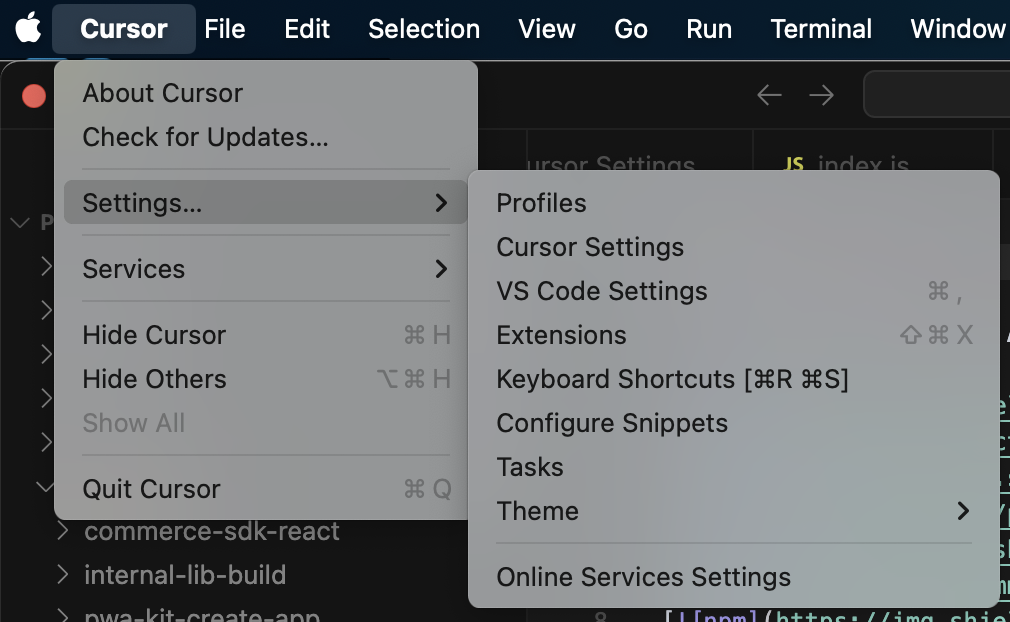
2. Navigate to **Settings > Cursor Settings...**
|
|
43
|
+
|
|
60
44
|
|
|
61
|
-
|
|
45
|
+
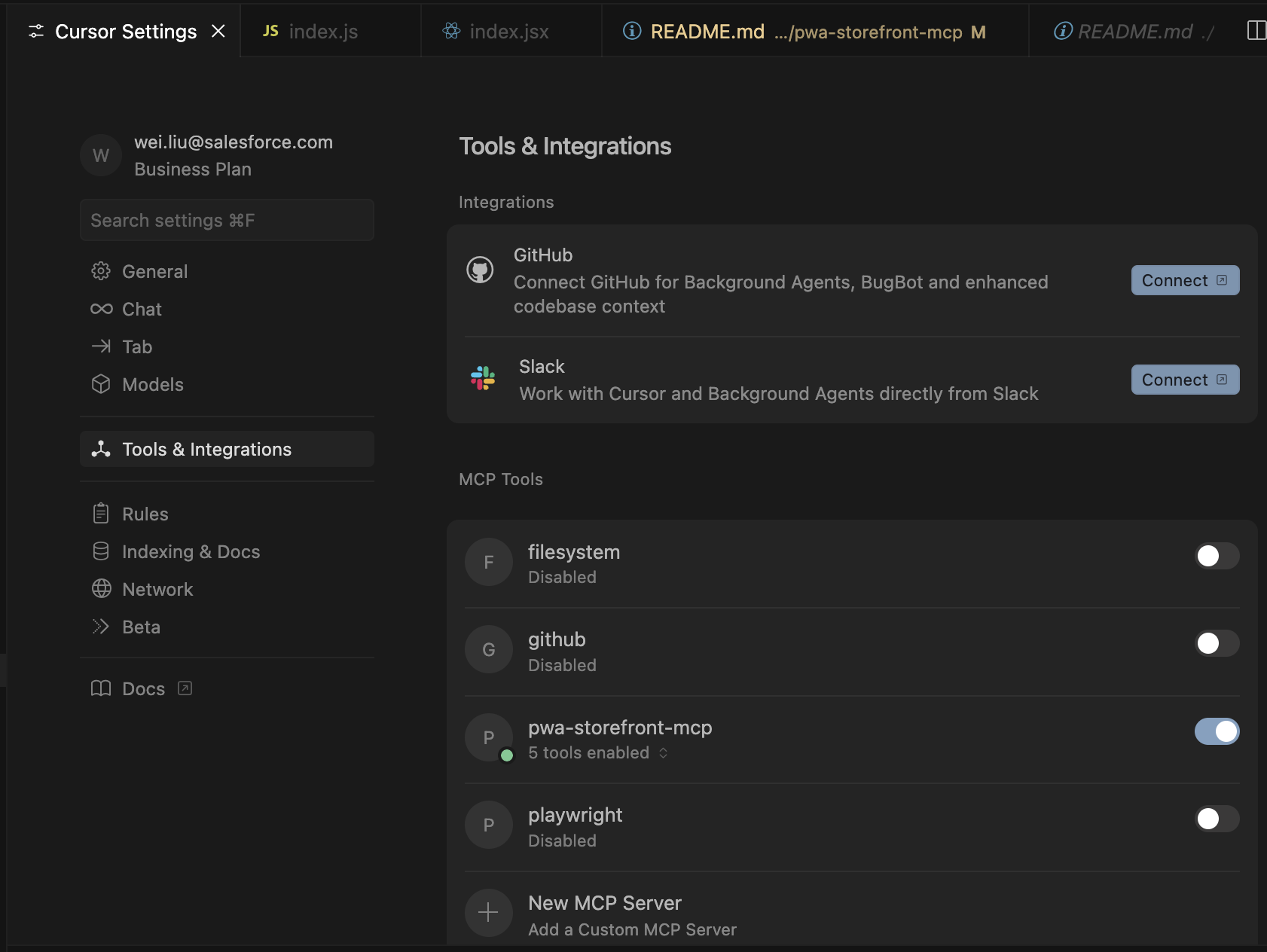
3. Go to **Tools & Integrations > MCP Tools > New MCP Server**
|
|
46
|
+
|
|
62
47
|
|
|
48
|
+
4. Update your `mcp.json` like this (edit the placeholders as needed):
|
|
63
49
|
```json
|
|
64
50
|
{
|
|
65
51
|
"mcpServers": {
|
|
66
|
-
"pwa-kit
|
|
52
|
+
"pwa-kit": {
|
|
67
53
|
"command": "npx",
|
|
68
54
|
"args": ["-y", "@salesforce/pwa-kit-mcp"],
|
|
69
55
|
"env": {
|
|
@@ -71,136 +57,75 @@ The `mcp.json` file opens. Add this definition to your `mcp.json` file and repla
|
|
|
71
57
|
}
|
|
72
58
|
}
|
|
73
59
|
}
|
|
74
|
-
}
|
|
60
|
+
}
|
|
75
61
|
```
|
|
62
|
+
_NOTE: Replace `{{path-to-app-directory}}` with the absolute path to your generated project's `app` subfolder. For example: `"/Users/username/mcp-server-folder/mystorefront/app"`._
|
|
76
63
|
|
|
77
|
-
|
|
64
|
+
Once saved, Cursor will:
|
|
78
65
|
|
|
79
|
-
|
|
80
|
-
|
|
81
|
-
|
|
66
|
+
* Launch the MCP server
|
|
67
|
+
* Connect to it as a client
|
|
68
|
+
* Display the available tools in the UI and how you can invoke them
|
|
82
69
|
|
|
83
|
-
You can
|
|
70
|
+
You can return to **MCP Tools** anytime to enable or disable specific tools or servers.
|
|
84
71
|
|
|
85
|
-
###
|
|
72
|
+
### 🧪 From Other MCP Clients
|
|
86
73
|
|
|
87
|
-
|
|
74
|
+
We currently only support Cursor IDE, but if you wish to try it out with your AI agent enabled IDE, you can manually run the server be following the below steps. **NOTE:** This server communicates via **stdio**, so it is important to ensure your IDE can communicate in this manner.
|
|
88
75
|
|
|
89
|
-
|
|
90
|
-
|
|
76
|
+
```bash
|
|
77
|
+
cd {{dir-to-mcp}}
|
|
78
|
+
npm run start
|
|
79
|
+
```
|
|
91
80
|
|
|
92
|
-
|
|
81
|
+
Then send JSON-RPC requests like:
|
|
93
82
|
|
|
94
|
-
|
|
83
|
+
```json
|
|
84
|
+
{"jsonrpc": "2.0", "id": 1, "method": "tools/list", "params": {}}
|
|
85
|
+
{"jsonrpc": "2.0", "id": 2, "method": "tools/call", "params": {"name": "create_new_component", "arguments": {}}}
|
|
86
|
+
```
|
|
87
|
+
|
|
88
|
+
---
|
|
89
|
+
|
|
90
|
+
## 👩💻 Development
|
|
95
91
|
|
|
92
|
+
If you are actively developing features for the MCP server and want to get immediate feedback during testing, follow the below steps.
|
|
93
|
+
|
|
94
|
+
1. Update your Cursor IDE MCP server configuration so that you are referencing the local server. This can be done by opening the "View: Open MCP Settings"
|
|
95
|
+
from the command pallet and editing your `pwa-kit` entry to look like the entry below.
|
|
96
96
|
```json
|
|
97
97
|
{
|
|
98
98
|
"mcpServers": {
|
|
99
|
-
"pwa-kit
|
|
100
|
-
"command": "
|
|
101
|
-
"args": ["-
|
|
99
|
+
"pwa-kit": {
|
|
100
|
+
"command": "node",
|
|
101
|
+
"args": ["{{path-to-app-mono-repo}}/packages/pwa-kit-mcp/dist/server/server.js"],
|
|
102
102
|
"env": {
|
|
103
103
|
"PWA_STOREFRONT_APP_PATH": "{{path-to-app-directory}}"
|
|
104
104
|
}
|
|
105
105
|
}
|
|
106
106
|
}
|
|
107
|
-
}
|
|
107
|
+
}
|
|
108
108
|
```
|
|
109
109
|
|
|
110
|
-
|
|
111
|
-
|
|
112
|
-
- Start the MCP server.
|
|
113
|
-
- Connect to the MCP server as a client.
|
|
114
|
-
- List available tools.
|
|
115
|
-
|
|
116
|
-
<img src="https://raw.githubusercontent.com/SalesforceCommerceCloud/pwa-kit/refs/heads/develop/packages/pwa-kit-mcp/docs/images/claude-list-tools.png" alt="Claude MCP Tools Screenshot" width="40%" />
|
|
117
|
-
|
|
118
|
-
You can also enable/disable any available tools from here.
|
|
119
|
-
|
|
120
|
-
#### Using other MCP clients
|
|
121
|
-
The server runs on stdio, so you can test it with any MCP-compatible client.
|
|
122
|
-
|
|
123
|
-
### Method 3: Manually start MCP Server
|
|
124
|
-
|
|
125
|
-
You can also manually start the server from command line and sending JSON-RPC messages:
|
|
126
|
-
|
|
110
|
+
2. Ensure that your server is built and will rebuild whenever changes are made you by running the following command in the `/pwa-kit-mcp` folder:
|
|
127
111
|
```bash
|
|
128
|
-
|
|
129
|
-
# Start the server
|
|
130
|
-
npm run start
|
|
131
|
-
|
|
132
|
-
# Then send JSON-RPC requests to stdin:
|
|
133
|
-
{"jsonrpc": "2.0", "id": 1, "method": "tools/list", "params": {}}
|
|
134
|
-
{"jsonrpc": "2.0", "id": 2, "method": "tools/call", "params": {"name": "create_new_component", "arguments": {}}}
|
|
112
|
+
npm run build:watch
|
|
135
113
|
```
|
|
136
114
|
|
|
137
|
-
|
|
138
|
-
|
|
139
|
-
- `server.js` - Main MCP server implementation
|
|
140
|
-
- `mcp.json` - MCP configuration file for clients
|
|
141
|
-
- `package.json` - Node.js dependencies and scripts
|
|
115
|
+
The server logs to `stderr` and communicates using MCP via `stdio`. You can view these logs in the `Output` section (shift + command + U) and filtering
|
|
116
|
+
the output on "MCP Logs".
|
|
142
117
|
|
|
143
|
-
## Development
|
|
144
118
|
|
|
145
|
-
|
|
146
|
-
```bash
|
|
147
|
-
npm start
|
|
148
|
-
```
|
|
119
|
+
### 🔹 File & Folder Overview
|
|
149
120
|
|
|
150
|
-
|
|
151
|
-
|
|
152
|
-
|
|
153
|
-
|
|
154
|
-
|
|
155
|
-
/
|
|
156
|
-
|
|
157
|
-
|
|
158
|
-
|
|
159
|
-
|
|
160
|
-
- mcp.json
|
|
161
|
-
- claude_desktop_config.json
|
|
162
|
-
- babel.config.js
|
|
163
|
-
- jest.config.js
|
|
164
|
-
- jest-setup.js
|
|
165
|
-
- .eslintrc.js
|
|
166
|
-
- .eslintignore
|
|
167
|
-
/src
|
|
168
|
-
/server
|
|
169
|
-
- server.js
|
|
170
|
-
- server.test.js
|
|
171
|
-
/tools
|
|
172
|
-
- index.js
|
|
173
|
-
- developer-guideline.js
|
|
174
|
-
- developer-guideline.test.js
|
|
175
|
-
- create-app-guideline.js
|
|
176
|
-
- create-app-guideline.test.js
|
|
177
|
-
- create-new-component.js
|
|
178
|
-
- create-new-component.test.js
|
|
179
|
-
- site-test.js
|
|
180
|
-
- site-test.test.js
|
|
181
|
-
- site-test-accessibility.js
|
|
182
|
-
- site-test-performance.js
|
|
183
|
-
/utils
|
|
184
|
-
- index.js
|
|
185
|
-
- utils.js
|
|
186
|
-
- utils.test.js
|
|
187
|
-
/data
|
|
188
|
-
- CategoryDocument.json
|
|
189
|
-
- DocumentList.json
|
|
190
|
-
- ProductDocument.json
|
|
191
|
-
/docs
|
|
192
|
-
/images
|
|
193
|
-
- claude-config.png
|
|
194
|
-
- claude-list-tools.png
|
|
195
|
-
- cursor-mcp-tools.png
|
|
196
|
-
- cursor-settings.png
|
|
197
|
-
- cursor-integration-guide.md
|
|
198
|
-
/dist
|
|
199
|
-
```
|
|
121
|
+
| Location | Purpose |
|
|
122
|
+
| -------------- | --------------------------------------------------------------------- |
|
|
123
|
+
| `package.json` | Node.js dependencies and project scripts |
|
|
124
|
+
| `mcp.json` | MCP client configuration (used by Cursor or other IDEs) |
|
|
125
|
+
| `src/server/` | Main server entry point (`server.js`) |
|
|
126
|
+
| `src/tools/` | Contains all MCP tools like `create-app-guideline`, `site-test`, etc. |
|
|
127
|
+
| `src/utils/` | Shared utility functions |
|
|
128
|
+
| `src/data/` | Static documents (e.g., product/category data models) used by tools |
|
|
129
|
+
| `docs/` | Documentation and images for integration guides |
|
|
130
|
+
| `dist/` | Compiled output when building the package |
|
|
200
131
|
|
|
201
|
-
- Server code is in `src/server/`.
|
|
202
|
-
- MCP tools are in `src/tools/`.
|
|
203
|
-
- Utilities are in `src/utils/`.
|
|
204
|
-
- Data files are in `src/data/`.
|
|
205
|
-
- Documentation is in `docs/`.
|
|
206
|
-
- Built distribution files are in `dist/`.
|
package/package.json
CHANGED
|
@@ -1,6 +1,6 @@
|
|
|
1
1
|
{
|
|
2
2
|
"name": "@salesforce/pwa-kit-mcp",
|
|
3
|
-
"version": "3.12.0-nightly-
|
|
3
|
+
"version": "3.12.0-nightly-20250805080228",
|
|
4
4
|
"private": false,
|
|
5
5
|
"description": "MCP server that helps you build Salesforce Commerce Cloud PWA Kit Composable Storefront",
|
|
6
6
|
"main": "dist/server/server.js",
|
|
@@ -53,9 +53,9 @@
|
|
|
53
53
|
"devDependencies": {
|
|
54
54
|
"@babel/node": "^7.22.5",
|
|
55
55
|
"@playwright/test": "^1.49.0",
|
|
56
|
-
"@salesforce/pwa-kit-dev": "3.12.0-nightly-
|
|
56
|
+
"@salesforce/pwa-kit-dev": "3.12.0-nightly-20250805080228",
|
|
57
57
|
"cross-env": "^5.2.1",
|
|
58
|
-
"internal-lib-build": "3.12.0-nightly-
|
|
58
|
+
"internal-lib-build": "3.12.0-nightly-20250805080228",
|
|
59
59
|
"nodemon": "^2.0.22"
|
|
60
60
|
},
|
|
61
61
|
"engines": {
|
|
@@ -65,5 +65,5 @@
|
|
|
65
65
|
"publishConfig": {
|
|
66
66
|
"directory": "dist"
|
|
67
67
|
},
|
|
68
|
-
"gitHead": "
|
|
68
|
+
"gitHead": "621f761d0d2a32caa776e51becab971cc5c742e9"
|
|
69
69
|
}
|