@ryuu-reinzz/haruka-lib 1.0.15 → 1.1.0-beta.1
This diff represents the content of publicly available package versions that have been released to one of the supported registries. The information contained in this diff is provided for informational purposes only and reflects changes between package versions as they appear in their respective public registries.
- package/README.md +117 -73
- package/main/index.js +3 -5
- package/package.json +1 -1
- package/LICENSE +0 -21
package/README.md
CHANGED
|
@@ -1,18 +1,21 @@
|
|
|
1
|
-
|
|
2
|
-
<p align="center">
|
|
3
|
-
<img src="https://api.ryuu-dev.offc.my.id/src/assest/bot/Haruka.jpg" width="400" alt="Haruka-Lib">
|
|
1
|
+
# Package Docs
|
|
4
2
|
|
|
3
|
+
**@ryuu-reinzz/haruka-lib**
|
|
5
4
|
|
|
6
|
-
|
|
7
|
-
</p>
|
|
5
|
+

|
|
8
6
|
|
|
9
|
-
|
|
10
|
-
|
|
11
|
-
|
|
12
|
-
|
|
7
|
+
---
|
|
8
|
+
|
|
9
|
+
## Daftar Fitur
|
|
10
|
+
|
|
11
|
+
### How to Use
|
|
12
|
+
**Deskripsi:** Contoh penggunaan Haruka Library dengan Baileys.
|
|
13
|
+
|
|
14
|
+
**Contoh:**
|
|
15
|
+
```javascript
|
|
16
|
+
//how to use:
|
|
17
|
+
//npm i @ryuu-reinzz/haruka-lib@1.0.9
|
|
13
18
|
|
|
14
|
-
*how to use it in JavaScript:*
|
|
15
|
-
``` javascript
|
|
16
19
|
import haruka from "@ryuu-reinzz/haruka-lib";
|
|
17
20
|
import makeWASocket, {
|
|
18
21
|
proto,
|
|
@@ -38,64 +41,67 @@ const conn = makeWASocket({});
|
|
|
38
41
|
haruka.addProperty(conn, store, smsg, property);
|
|
39
42
|
```
|
|
40
43
|
|
|
41
|
-
## 1. Send Button
|
|
42
|
-
*Digunakan untuk mengirim button message ke WhatsApp jika baileys bawaan tidak mendukung*
|
|
43
44
|
|
|
44
|
-
``` javascript
|
|
45
|
-
conn.sendButton(m.chat, {
|
|
46
|
-
caption: "Haruka here!",
|
|
47
|
-
image: { url: global.thumbnail },
|
|
48
|
-
footer: global.ownername,
|
|
49
|
-
buttons: [
|
|
50
|
-
{
|
|
51
|
-
name: "cta_url",
|
|
52
|
-
buttonParamsJson: JSON.stringify({
|
|
53
|
-
display_text: "View Link",
|
|
54
|
-
url: global.thumbnail
|
|
55
|
-
})
|
|
56
|
-
}
|
|
57
|
-
]
|
|
58
|
-
});
|
|
59
|
-
```
|
|
60
|
-
Hasil Output:
|
|
61
|
-
<img src="https://api.ryuu-dev.offc.my.id/src/assest/Haruhime/sendButton.jpg" width="300" />
|
|
62
45
|
|
|
63
|
-
|
|
64
|
-
|
|
46
|
+
---
|
|
47
|
+
##List Feature
|
|
48
|
+
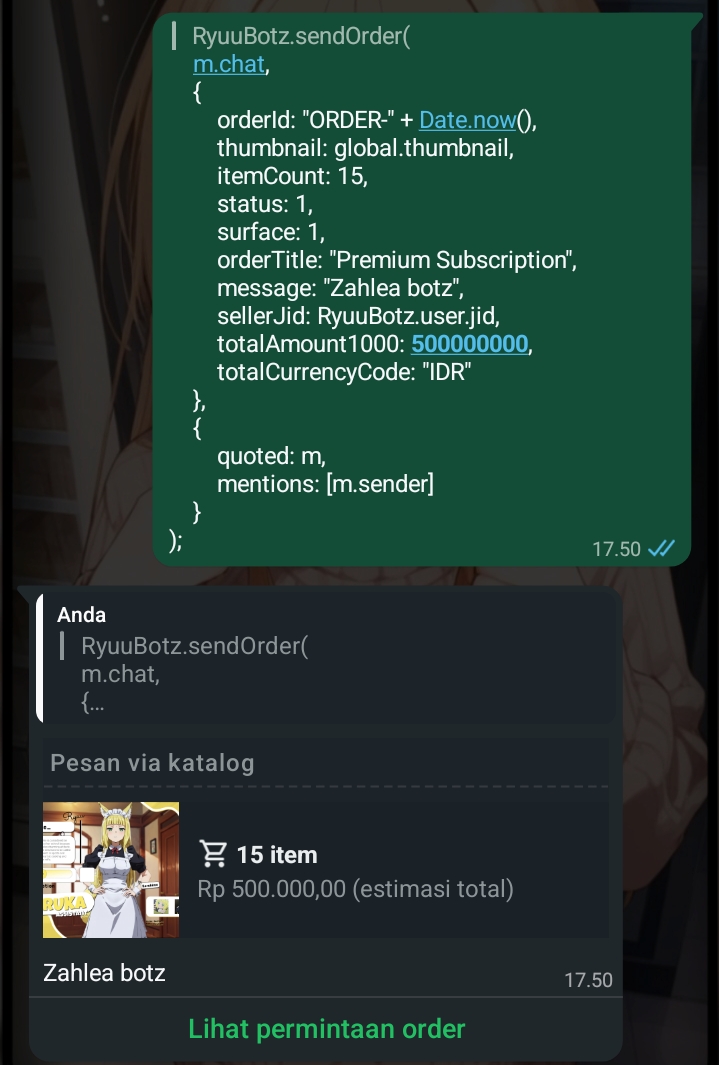
#1. sendOrder
|
|
49
|
+
|
|
50
|
+
Deskripsi: Mengirim pesan orderan palsu yang bisa bebas thumbnail.
|
|
65
51
|
|
|
52
|
+
Contoh:
|
|
66
53
|
``` javascript
|
|
67
|
-
conn.sendOrder(
|
|
68
|
-
|
|
69
|
-
|
|
70
|
-
|
|
71
|
-
|
|
72
|
-
|
|
73
|
-
|
|
74
|
-
|
|
75
|
-
|
|
76
|
-
|
|
77
|
-
|
|
78
|
-
|
|
54
|
+
conn.sendOrder(
|
|
55
|
+
m.chat,
|
|
56
|
+
{
|
|
57
|
+
orderId: "ORDER-" + Date.now(),
|
|
58
|
+
thumbnail: global.thumbnail,
|
|
59
|
+
itemCount: 15,
|
|
60
|
+
status: 1,
|
|
61
|
+
surface: 1,
|
|
62
|
+
orderTitle: "Premium Subscription",
|
|
63
|
+
message: "Zahlea botz",
|
|
64
|
+
sellerJid: conn.user.jid,
|
|
65
|
+
totalAmount1000: 500000000,
|
|
66
|
+
totalCurrencyCode: "IDR"
|
|
67
|
+
},
|
|
68
|
+
{
|
|
69
|
+
quoted: m,
|
|
70
|
+
mentions: [m.sender]
|
|
71
|
+
}
|
|
72
|
+
);
|
|
79
73
|
```
|
|
80
|
-
|
|
81
|
-
|
|
74
|
+
Example:
|
|
75
|
+
|
|
76
|
+
|
|
77
|
+
|
|
82
78
|
|
|
83
|
-
|
|
84
|
-
*Cocok untuk mengirim katalog produk atau galeri foto tanpa memenuhi chat.*
|
|
79
|
+
---
|
|
85
80
|
|
|
81
|
+
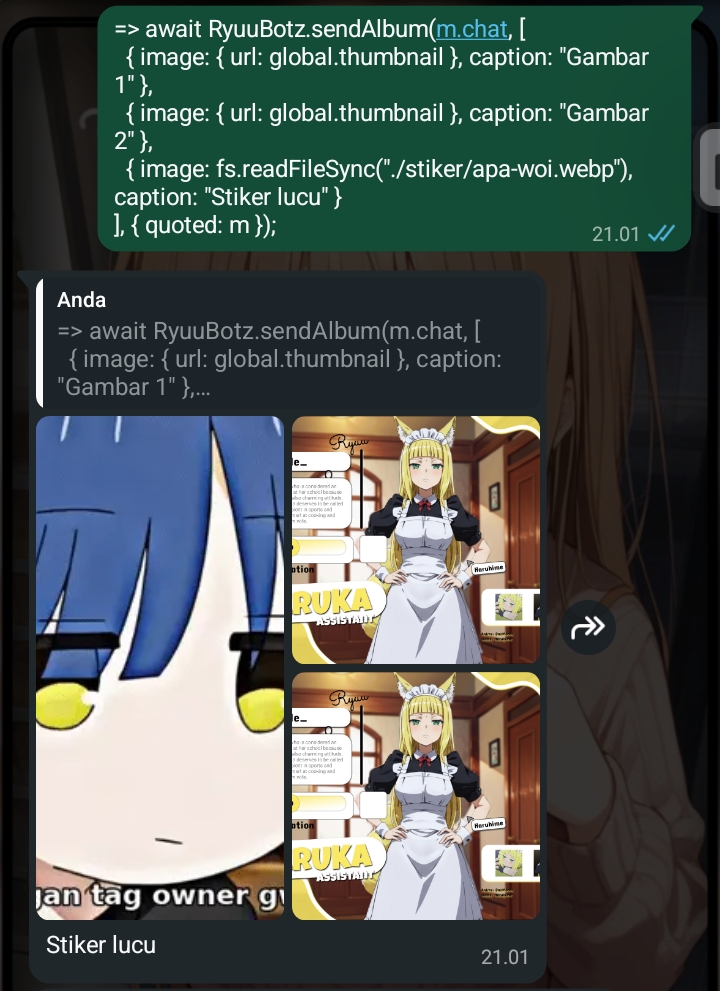
#2. sendAlbum
|
|
82
|
+
|
|
83
|
+
Deskripsi: Mengirim pesan berupa beberapa gambar sekaligus.
|
|
84
|
+
|
|
85
|
+
Contoh:
|
|
86
86
|
``` javascript
|
|
87
87
|
conn.sendAlbum(m.chat, [
|
|
88
88
|
{ image: { url: global.thumbnail }, caption: "Gambar 1" },
|
|
89
89
|
{ image: { url: global.thumbnail }, caption: "Gambar 2" },
|
|
90
90
|
{ image: fs.readFileSync("./image.jpg"), caption: "Stiker lucu" }
|
|
91
|
-
], { quoted: m });
|
|
92
|
-
```
|
|
93
|
-
|
|
94
|
-
|
|
91
|
+
], { quoted: m });
|
|
92
|
+
```
|
|
93
|
+
Example:
|
|
94
|
+
|
|
95
95
|
|
|
96
|
-
## 4. Send Card (Carousel)
|
|
97
|
-
*Fitur tercanggih untuk membuat menu bot yang bisa digeser (slide) ke samping.*
|
|
98
96
|
|
|
97
|
+
|
|
98
|
+
---
|
|
99
|
+
|
|
100
|
+
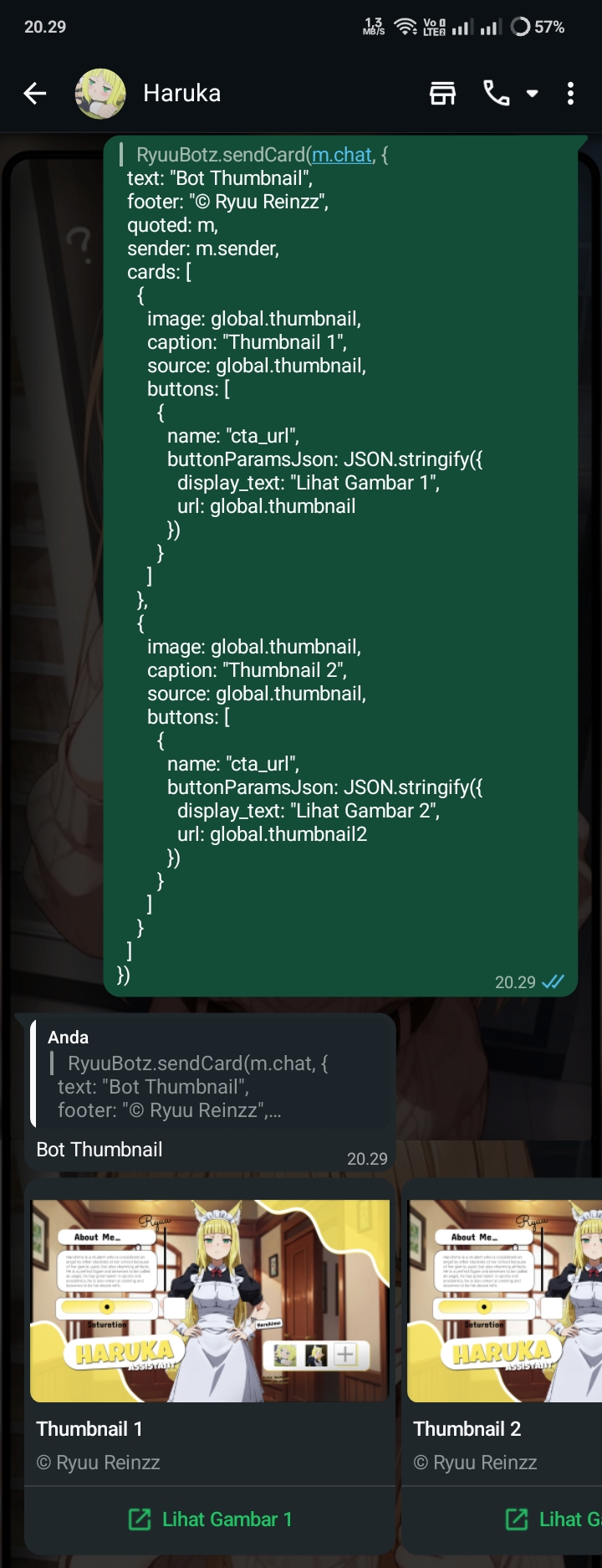
#3. sendCard
|
|
101
|
+
|
|
102
|
+
Deskripsi: Mengirim pesan seperti kartu dan bisa memiliki button.
|
|
103
|
+
|
|
104
|
+
Contoh:
|
|
99
105
|
``` javascript
|
|
100
106
|
conn.sendCard(m.chat, {
|
|
101
107
|
text: "Bot Thumbnail",
|
|
@@ -106,36 +112,74 @@ conn.sendCard(m.chat, {
|
|
|
106
112
|
{
|
|
107
113
|
image: global.thumbnail,
|
|
108
114
|
caption: "Thumbnail 1",
|
|
109
|
-
|
|
115
|
+
source: global.thumbnail,
|
|
116
|
+
buttons: [
|
|
117
|
+
{
|
|
118
|
+
name: "cta_url",
|
|
119
|
+
buttonParamsJson: JSON.stringify({
|
|
120
|
+
display_text: "Lihat Gambar 1",
|
|
121
|
+
url: global.thumbnail
|
|
122
|
+
})
|
|
123
|
+
}
|
|
124
|
+
]
|
|
125
|
+
},
|
|
126
|
+
{
|
|
127
|
+
image: global.thumbnail,
|
|
128
|
+
caption: "Thumbnail 2",
|
|
129
|
+
source: global.thumbnail,
|
|
130
|
+
buttons: [
|
|
131
|
+
{
|
|
132
|
+
name: "cta_url",
|
|
133
|
+
buttonParamsJson: JSON.stringify({
|
|
134
|
+
display_text: "Lihat Gambar 2",
|
|
135
|
+
url: global.thumbnail2
|
|
136
|
+
})
|
|
137
|
+
}
|
|
138
|
+
]
|
|
110
139
|
}
|
|
111
140
|
]
|
|
112
141
|
});
|
|
113
142
|
```
|
|
114
|
-
|
|
115
|
-
|
|
143
|
+
Example:
|
|
144
|
+
|
|
145
|
+
|
|
116
146
|
|
|
117
|
-
|
|
118
|
-
*Buat stiker langsung dengan identitas bot kamu sendiri.*
|
|
147
|
+
---
|
|
119
148
|
|
|
149
|
+
#4. sendSticker
|
|
150
|
+
|
|
151
|
+
Deskripsi: Mengirim pesan yang bisa bebas custom packname dan author.
|
|
152
|
+
|
|
153
|
+
Contoh:
|
|
120
154
|
``` javascript
|
|
121
155
|
conn.sendSticker(m.chat, {
|
|
122
156
|
sticker: "./stiker/apa-woi.webp",
|
|
123
|
-
packname:
|
|
124
|
-
author:
|
|
157
|
+
packname: global.packaname,
|
|
158
|
+
author: global.author
|
|
125
159
|
});
|
|
126
160
|
```
|
|
127
|
-
|
|
128
|
-
|
|
161
|
+
Example:
|
|
162
|
+

|
|
163
|
+
|
|
129
164
|
|
|
130
|
-
## 6. ID Mapping (LID to PN and PN to LID)
|
|
131
|
-
*Mencari LID atau Phone Number*
|
|
132
165
|
|
|
133
|
-
|
|
134
|
-
// Mencari LID dari nomor HP
|
|
135
|
-
await conn.getLidFromPN(m, "6288246552068@s.whatsapp.net");
|
|
166
|
+
---
|
|
136
167
|
|
|
137
|
-
|
|
138
|
-
|
|
168
|
+
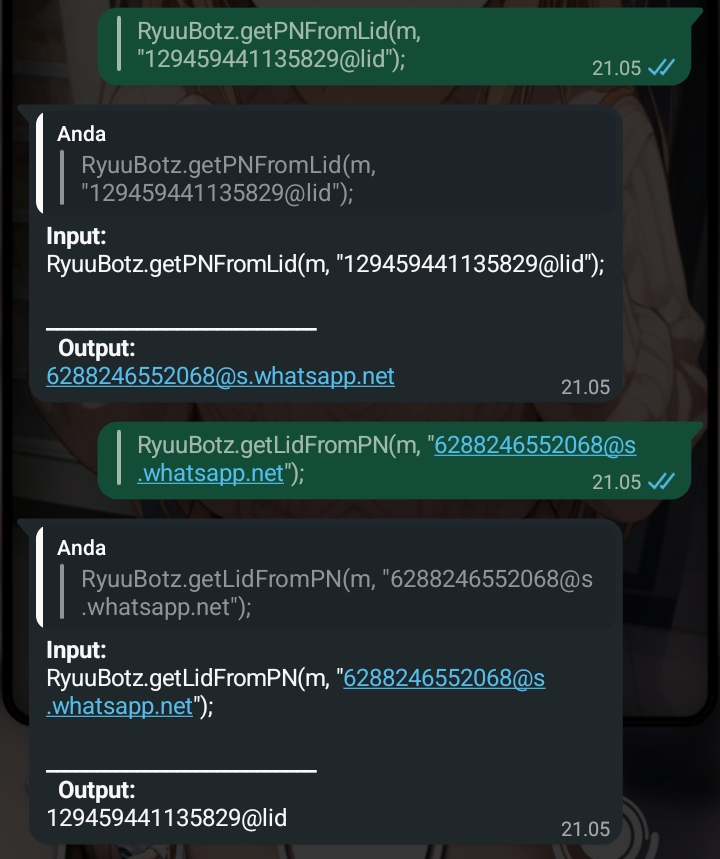
#5. Search Lid and PN
|
|
169
|
+
|
|
170
|
+
Deskripsi: Mencari Lid dan PN.
|
|
171
|
+
|
|
172
|
+
Contoh:
|
|
173
|
+
``` javascript
|
|
174
|
+
> conn.getLidFromPN(
|
|
175
|
+
m,
|
|
176
|
+
"6288246552068@s.whatsapp.net"
|
|
177
|
+
);
|
|
178
|
+
or
|
|
179
|
+
> conn.getPNFromLid(
|
|
180
|
+
m,
|
|
181
|
+
"129459441135829@lid"
|
|
182
|
+
);
|
|
139
183
|
```
|
|
140
|
-
|
|
141
|
-
|
|
184
|
+
Example:
|
|
185
|
+
|
package/main/index.js
CHANGED
|
@@ -2,8 +2,7 @@ import addProperty from './socket.js';
|
|
|
2
2
|
import useSQLiteAuthState from './sqliteAuth.js';
|
|
3
3
|
|
|
4
4
|
const haruka = {}
|
|
5
|
-
haruka.tutorial = (
|
|
6
|
-
console.log(`
|
|
5
|
+
haruka.tutorial = console.log(`
|
|
7
6
|
╭──────────────────────────────────────╮
|
|
8
7
|
│ @ryuu-reinzz/haruka-lib │
|
|
9
8
|
│ Small helper for WhatsApp Baileys │
|
|
@@ -36,7 +35,7 @@ Examples:
|
|
|
36
35
|
generateMessageID
|
|
37
36
|
}
|
|
38
37
|
import haruka from "@ryuu-reinzz/haruka-lib";
|
|
39
|
-
haruka.
|
|
38
|
+
haruka.extendSocketBot(conn, store, smsg, baileys);
|
|
40
39
|
|
|
41
40
|
SQLite session:
|
|
42
41
|
const sessionPath = "./session"
|
|
@@ -45,8 +44,7 @@ Examples:
|
|
|
45
44
|
const { state, saveCreds } = await useSQLiteAuthState(sessionPath + \"auth.db\");
|
|
46
45
|
|
|
47
46
|
Made by Ryuu
|
|
48
|
-
|
|
49
|
-
}
|
|
47
|
+
`);
|
|
50
48
|
haruka.useSQLiteAuthState = useSQLiteAuthState;
|
|
51
49
|
haruka.addProperty = addProperty;
|
|
52
50
|
|
package/package.json
CHANGED
package/LICENSE
DELETED
|
@@ -1,21 +0,0 @@
|
|
|
1
|
-
MIT License
|
|
2
|
-
|
|
3
|
-
Copyright (c) 2025 ryuu-reinzz
|
|
4
|
-
|
|
5
|
-
Permission is hereby granted, free of charge, to any person obtaining a copy
|
|
6
|
-
of this software and associated documentation files (the "Software"), to deal
|
|
7
|
-
in the Software without restriction, including without limitation the rights
|
|
8
|
-
to use, copy, modify, merge, publish, distribute, sublicense, and/or sell
|
|
9
|
-
copies of the Software, and to permit persons to whom the Software is
|
|
10
|
-
furnished to do so, subject to the following conditions:
|
|
11
|
-
|
|
12
|
-
The above copyright notice and this permission notice shall be included in all
|
|
13
|
-
copies or substantial portions of the Software.
|
|
14
|
-
|
|
15
|
-
THE SOFTWARE IS PROVIDED "AS IS", WITHOUT WARRANTY OF ANY KIND, EXPRESS OR
|
|
16
|
-
IMPLIED, INCLUDING BUT NOT LIMITED TO THE WARRANTIES OF MERCHANTABILITY,
|
|
17
|
-
FITNESS FOR A PARTICULAR PURPOSE AND NONINFRINGEMENT. IN NO EVENT SHALL THE
|
|
18
|
-
AUTHORS OR COPYRIGHT HOLDERS BE LIABLE FOR ANY CLAIM, DAMAGES OR OTHER
|
|
19
|
-
LIABILITY, WHETHER IN AN ACTION OF CONTRACT, TORT OR OTHERWISE, ARISING FROM,
|
|
20
|
-
OUT OF OR IN CONNECTION WITH THE SOFTWARE OR THE USE OR OTHER DEALINGS IN THE
|
|
21
|
-
SOFTWARE.
|