@ryuu-64/dsh-session-tools 0.8.0 → 0.8.1
This diff represents the content of publicly available package versions that have been released to one of the supported registries. The information contained in this diff is provided for informational purposes only and reflects changes between package versions as they appear in their respective public registries.
- package/LICENSE +21 -21
- package/README.md +21 -67
- package/README.zh-CN.md +39 -0
- package/cordis.patch.yml +4 -4
- package/lib/client.js +623 -528
- package/lib/communication-permissions.js +144 -101
- package/lib/communication-remote.js +75 -64
- package/lib/index.js +906 -894
- package/lib/message-receipts.js +156 -121
- package/lib/session-activity.js +135 -135
- package/lib/session-discovery.js +213 -213
- package/locale/en.json +7 -0
- package/locale/zh.json +7 -0
- package/package.json +27 -15
package/LICENSE
CHANGED
|
@@ -1,21 +1,21 @@
|
|
|
1
|
-
MIT License
|
|
2
|
-
|
|
3
|
-
Copyright (c) 2026 Ryuu-64
|
|
4
|
-
|
|
5
|
-
Permission is hereby granted, free of charge, to any person obtaining a copy
|
|
6
|
-
of this software and associated documentation files (the "Software"), to deal
|
|
7
|
-
in the Software without restriction, including without limitation the rights
|
|
8
|
-
to use, copy, modify, merge, publish, distribute, sublicense, and/or sell
|
|
9
|
-
copies of the Software, and to permit persons to whom the Software is
|
|
10
|
-
furnished to do so, subject to the following conditions:
|
|
11
|
-
|
|
12
|
-
The above copyright notice and this permission notice shall be included in all
|
|
13
|
-
copies or substantial portions of the Software.
|
|
14
|
-
|
|
15
|
-
THE SOFTWARE IS PROVIDED "AS IS", WITHOUT WARRANTY OF ANY KIND, EXPRESS OR
|
|
16
|
-
IMPLIED, INCLUDING BUT NOT LIMITED TO THE WARRANTIES OF MERCHANTABILITY,
|
|
17
|
-
FITNESS FOR A PARTICULAR PURPOSE AND NONINFRINGEMENT. IN NO EVENT SHALL THE
|
|
18
|
-
AUTHORS OR COPYRIGHT HOLDERS BE LIABLE FOR ANY CLAIM, DAMAGES OR OTHER
|
|
19
|
-
LIABILITY, WHETHER IN AN ACTION OF CONTRACT, TORT OR OTHERWISE, ARISING FROM,
|
|
20
|
-
OUT OF OR IN CONNECTION WITH THE SOFTWARE OR THE USE OR OTHER DEALINGS IN THE
|
|
21
|
-
SOFTWARE.
|
|
1
|
+
MIT License
|
|
2
|
+
|
|
3
|
+
Copyright (c) 2026 Ryuu-64
|
|
4
|
+
|
|
5
|
+
Permission is hereby granted, free of charge, to any person obtaining a copy
|
|
6
|
+
of this software and associated documentation files (the "Software"), to deal
|
|
7
|
+
in the Software without restriction, including without limitation the rights
|
|
8
|
+
to use, copy, modify, merge, publish, distribute, sublicense, and/or sell
|
|
9
|
+
copies of the Software, and to permit persons to whom the Software is
|
|
10
|
+
furnished to do so, subject to the following conditions:
|
|
11
|
+
|
|
12
|
+
The above copyright notice and this permission notice shall be included in all
|
|
13
|
+
copies or substantial portions of the Software.
|
|
14
|
+
|
|
15
|
+
THE SOFTWARE IS PROVIDED "AS IS", WITHOUT WARRANTY OF ANY KIND, EXPRESS OR
|
|
16
|
+
IMPLIED, INCLUDING BUT NOT LIMITED TO THE WARRANTIES OF MERCHANTABILITY,
|
|
17
|
+
FITNESS FOR A PARTICULAR PURPOSE AND NONINFRINGEMENT. IN NO EVENT SHALL THE
|
|
18
|
+
AUTHORS OR COPYRIGHT HOLDERS BE LIABLE FOR ANY CLAIM, DAMAGES OR OTHER
|
|
19
|
+
LIABILITY, WHETHER IN AN ACTION OF CONTRACT, TORT OR OTHERWISE, ARISING FROM,
|
|
20
|
+
OUT OF OR IN CONNECTION WITH THE SOFTWARE OR THE USE OR OTHER DEALINGS IN THE
|
|
21
|
+
SOFTWARE.
|
package/README.md
CHANGED
|
@@ -1,85 +1,39 @@
|
|
|
1
|
-
# dsh-session-tools
|
|
1
|
+
# dsh-session-tools · Cross-session tasks for DeepSeek Harness
|
|
2
2
|
|
|
3
|
-
|
|
3
|
+
English | [简体中文](https://github.com/Ryuu-64/dsh-session-tools/blob/main/README.zh-CN.md)
|
|
4
4
|
|
|
5
|
-
|
|
5
|
+
Ask the AI in [DeepSeek Harness (DSH)](https://github.com/deepseek-ai/deepseek-harness) to start a separate conversation, give it a task, and bring the result back to your current chat.
|
|
6
6
|
|
|
7
|
-
|
|
7
|
+
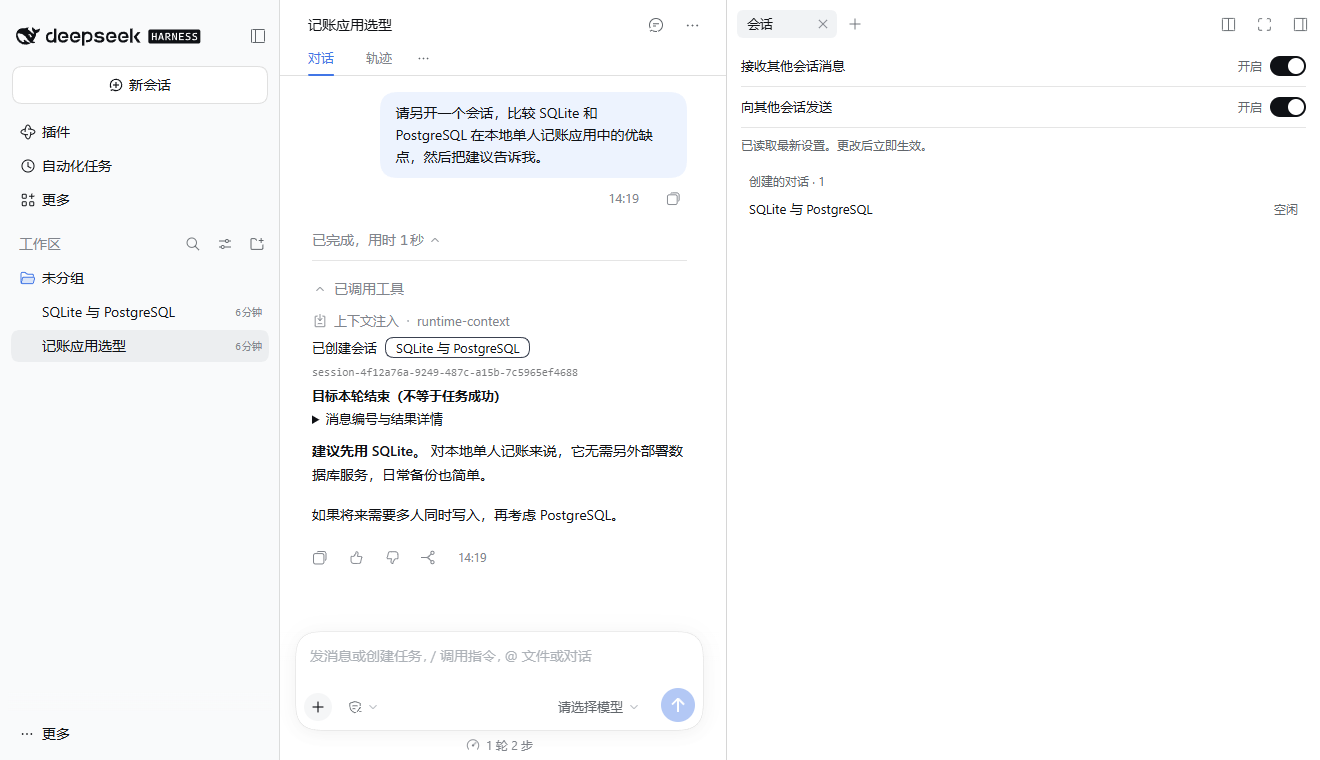
|
|
8
8
|
|
|
9
|
-
|
|
9
|
+
*In the Chinese interface, the card opens the new SQLite and PostgreSQL conversation. You can also open it from the right sidebar.*
|
|
10
10
|
|
|
11
|
-
|
|
11
|
+
## Install
|
|
12
12
|
|
|
13
|
-
|
|
13
|
+
Copy this request into an AI assistant that can operate your computer.
|
|
14
14
|
|
|
15
|
-
|
|
15
|
+
> Install this plugin in my DSH setup, check compatibility, and confirm it is enabled: https://github.com/Ryuu-64/dsh-session-tools
|
|
16
16
|
|
|
17
|
-
|
|
17
|
+
## Delegate your first task
|
|
18
18
|
|
|
19
|
-
|
|
19
|
+
In a DSH conversation, try:
|
|
20
20
|
|
|
21
|
-
|
|
21
|
+
> Start a conversation called “SQLite vs. PostgreSQL”. Ask it to compare both databases for a local budgeting app used by one person, then bring back its recommendation.
|
|
22
22
|
|
|
23
|
-
|
|
23
|
+
Approve the request if DSH prompts you. Once the new conversation finishes, the AI can bring its answer back to the original chat. Click the conversation name in the creation card (「已创建会话」) to open it and see the full exchange. For a follow-up, ask the AI to find the conversation by title and tell it what to do next.
|
|
24
24
|
|
|
25
|
-
|
|
25
|
+
Include the background, file paths, and expected result in the task. The new conversation starts with the task text you provide.
|
|
26
26
|
|
|
27
|
-
|
|
27
|
+
## Communication settings
|
|
28
28
|
|
|
29
|
-
|
|
29
|
+
- **For one conversation.** Open the session panel from the chat header or use the conversation’s **…** menu. Sending and receiving are separate switches.
|
|
30
|
+
- **For the whole profile.** Open **Plugins**, find **Session Tools**, and select **Configure** on the component row. Both defaults start on. Saved defaults apply to conversations without their own settings and survive restarting DSH.
|
|
30
31
|
|
|
31
|
-
|
|
32
|
-
dsh plugin --profile web add @ryuu-64/dsh-session-tools@0.8.0
|
|
33
|
-
```
|
|
32
|
+
Turning a switch off blocks new messages in that direction. Work already received can continue. Turning off sending also blocks creation of a session with a first message. Tasks can be sent between regular conversations, and DSH handles approvals. If a wait times out, ask the AI to check the same task again to avoid sending it twice. [Communication and wait details (Chinese)](https://github.com/Ryuu-64/dsh-session-tools/blob/main/docs/tool-reference.md)
|
|
34
33
|
|
|
35
|
-
|
|
34
|
+
## Further reading and feedback
|
|
36
35
|
|
|
37
|
-
|
|
36
|
+
- [Installation, updates, and removal (Chinese)](https://github.com/Ryuu-64/dsh-session-tools/blob/main/docs/installation.md) · [Host compatibility (Chinese)](https://github.com/Ryuu-64/dsh-session-tools/blob/main/docs/compatibility.md) · [Tool and receipt reference (Chinese)](https://github.com/Ryuu-64/dsh-session-tools/blob/main/docs/tool-reference.md)
|
|
37
|
+
- [Open an issue](https://github.com/Ryuu-64/dsh-session-tools/issues) with your DSH, Node.js, and plugin versions, your installation source, and steps to reproduce the problem. Remove API keys and private conversation text before posting. QQ discussion group `1129212995`.
|
|
38
38
|
|
|
39
|
-
|
|
40
|
-
|
|
41
|
-
> 帮我新建一个叫「方案比较」的会话,比较 SQLite 和 PostgreSQL 在本地单人记账应用中的优缺点,给出推荐和理由。等它回答后,把结果告诉我。
|
|
42
|
-
|
|
43
|
-
1. AI 准备好任务,并请求新建会话的确认。
|
|
44
|
-
2. 允许后,新会话开始处理任务。点「已创建会话」卡片上的按钮,就能打开它。
|
|
45
|
-
3. AI 可以等待这次消息的结果,再回到当前对话中继续回答。一次等待默认 60 秒、最多 5 分钟;超时后可以接着查,不必重新派任务。
|
|
46
|
-
|
|
47
|
-
想接着做之前的任务,先找对会话:
|
|
48
|
-
|
|
49
|
-
> 先找标题含「方案比较」的会话,列出标题和状态;如果还有结果,继续列下一页。先不要发消息。
|
|
50
|
-
|
|
51
|
-
确认目标后,可以继续:
|
|
52
|
-
|
|
53
|
-
> 让刚才找到的「方案比较」会话补充数据导出的注意事项,等它回答后把结果告诉我。
|
|
54
|
-
|
|
55
|
-
**把任务背景写完整。** 插件不会自动把当前对话复制给目标会话;对方需要的背景、文件路径和预期结果都应写进任务。
|
|
56
|
-
|
|
57
|
-
## 能做什么
|
|
58
|
-
|
|
59
|
-
| 你想做的事 | AI 使用的工具 |
|
|
60
|
-
| --- | --- |
|
|
61
|
-
| 新建一个可独立继续对话的会话,可放入已有工作区 | `session_create` |
|
|
62
|
-
| 给另一个普通会话发送新消息 | `session_send` |
|
|
63
|
-
| 按标题或工作区筛选、按最近活动分页列出会话 | `list_sessions` |
|
|
64
|
-
| 查询某次消息的结果,或查看会话概况 | `session_wait` |
|
|
65
|
-
| 按需检查已知目标的当前通信开关 | `session_communication_status` |
|
|
66
|
-
|
|
67
|
-
创建时可指定标题;不指定时,从首条任务生成固定标题,不额外调用模型。之后你仍可手动改名。
|
|
68
|
-
|
|
69
|
-
## 权限与限制
|
|
70
|
-
|
|
71
|
-
- **新建和发送通常需要确认。** 只有宿主明确同时启用完全访问权限与免审批时才跳过确认;宿主的拒绝规则仍然生效。列出和等待是只读操作。
|
|
72
|
-
- **等待超时不等于失败。** 取消等待也不会取消目标任务。继续查询同一次消息要同时使用回执里的 `sessionId` 和 `messageId`,不要自动重发。轮次正常结束也不保证任务本身做成功。
|
|
73
|
-
- **只操作普通会话。** 不能向当前会话自己发消息,也不能向子代理发消息。列表包含已归档的普通会话,并标明归档状态。
|
|
74
|
-
- **工作区必须已存在。** 插件不会创建工作区,也不提供会话创建后跨工作区搬移的功能。
|
|
75
|
-
- **目标仍依赖 DSH 运行。** 发送消息可重新打开已关闭的会话,但它必须保存过工作目录;只读等待不会唤醒目标。插件不提供宿主关闭后的后台执行服务。
|
|
76
|
-
|
|
77
|
-
更多参数、状态和出错处理见[工具参考](https://github.com/Ryuu-64/dsh-session-tools/blob/main/docs/tool-reference.md)。
|
|
78
|
-
|
|
79
|
-
## 支持与交流
|
|
80
|
-
|
|
81
|
-
遇到问题或有建议,请[提交 Issue](https://github.com/Ryuu-64/dsh-session-tools/issues)。请附上 DSH、Node.js 和插件版本、安装方式,以及可复现的步骤;不要贴 API 密钥或私密对话。
|
|
82
|
-
|
|
83
|
-
QQ 交流群:`1129212995`。群聊用于使用交流和社区互助;需要持续跟踪的问题请先提交 Issue,再把 Issue 链接发到群里。群聊不替代 Issue 中可检索的正式记录。
|
|
84
|
-
|
|
85
|
-
由 [Ryuu-64](https://github.com/Ryuu-64) 维护,采用 [MIT 许可证](LICENSE)。
|
|
39
|
+
[MIT license](https://github.com/Ryuu-64/dsh-session-tools/blob/main/LICENSE)
|
package/README.zh-CN.md
ADDED
|
@@ -0,0 +1,39 @@
|
|
|
1
|
+
# dsh-session-tools · DeepSeek Harness 跨会话协作
|
|
2
|
+
|
|
3
|
+
[English](https://github.com/Ryuu-64/dsh-session-tools/blob/main/README.md) | 简体中文
|
|
4
|
+
|
|
5
|
+
让 [DeepSeek Harness(DSH)](https://github.com/deepseek-ai/deepseek-harness) 里的 AI 新建独立会话、给其他会话派任务,并把结果带回当前对话。
|
|
6
|
+
|
|
7
|
+

|
|
8
|
+
|
|
9
|
+
*点击卡片上的「SQLite 与 PostgreSQL」即可打开新会话,也可以从右侧「会话」页签打开。*
|
|
10
|
+
|
|
11
|
+
## 安装
|
|
12
|
+
|
|
13
|
+
把下面这句话发给能操作你电脑的 AI。
|
|
14
|
+
|
|
15
|
+
> 请帮我安装这个 DSH 插件,检查兼容性并确认已启用:https://github.com/Ryuu-64/dsh-session-tools
|
|
16
|
+
|
|
17
|
+
## 派出第一个任务
|
|
18
|
+
|
|
19
|
+
在 DSH 对话里输入:
|
|
20
|
+
|
|
21
|
+
> 请另开一个叫「SQLite 与 PostgreSQL」的会话,比较两者在本地单人记账应用中的优缺点,然后把建议告诉我。
|
|
22
|
+
|
|
23
|
+
如果 DSH 弹出确认,批准创建。新会话处理完后,AI 可以把这次任务的结果带回当前对话。想看完整过程,点「已创建会话」卡片里的会话名称。需要补充任务时,可以让 AI 按标题找到这个会话,再告诉它你希望继续做什么。
|
|
24
|
+
|
|
25
|
+
给新会话派任务时,把背景、文件路径和预期结果一起写进任务。它只收到你交给它的任务文本,当前对话的完整历史不会随之发送。
|
|
26
|
+
|
|
27
|
+
## 会话通信设置
|
|
28
|
+
|
|
29
|
+
- **设置当前会话**:顶部「会话通信与相关对话」按钮打开右侧「会话」页签。你可以分别控制接收和发送,也可以用左侧会话的「…」菜单打开「会话通信…」。
|
|
30
|
+
- **设置整个 profile 的默认值**:打开左侧「插件」,找到「会话工具」并点组件行的「配置」。两项初始值均开启。保存后,默认值对未单独设置的会话生效,重启后继续使用。
|
|
31
|
+
|
|
32
|
+
关闭开关会拒绝相应的新投递,已接收的任务继续运行。关闭发送也会阻止创建带首条消息的新会话。插件只在普通会话之间派任务,审批仍由 DSH 决定。等待超时后,可请 AI 继续查同一次任务的结果,避免重复派发。 [通信开关和等待规则](https://github.com/Ryuu-64/dsh-session-tools/blob/main/docs/tool-reference.md)
|
|
33
|
+
|
|
34
|
+
## 详细文档与反馈
|
|
35
|
+
|
|
36
|
+
- [安装、更新和卸载](https://github.com/Ryuu-64/dsh-session-tools/blob/main/docs/installation.md) · [版本与宿主兼容](https://github.com/Ryuu-64/dsh-session-tools/blob/main/docs/compatibility.md) · [工具和消息回执](https://github.com/Ryuu-64/dsh-session-tools/blob/main/docs/tool-reference.md)
|
|
37
|
+
- [提交 Issue](https://github.com/Ryuu-64/dsh-session-tools/issues) 时,请附上 DSH、Node.js 和插件版本、安装来源和复现步骤。请移除 API 密钥和私密对话。QQ 交流群 `1129212995`。
|
|
38
|
+
|
|
39
|
+
[MIT 许可证](https://github.com/Ryuu-64/dsh-session-tools/blob/main/LICENSE)
|
package/cordis.patch.yml
CHANGED
|
@@ -1,4 +1,4 @@
|
|
|
1
|
-
# dsh bundle patch: inserts this plugin into a profile's layer stack.
|
|
2
|
-
- insert:
|
|
3
|
-
- id: session-tools-bundle
|
|
4
|
-
name: '@ryuu-64/dsh-session-tools'
|
|
1
|
+
# dsh bundle patch: inserts this plugin into a profile's layer stack.
|
|
2
|
+
- insert:
|
|
3
|
+
- id: session-tools-bundle
|
|
4
|
+
name: '@ryuu-64/dsh-session-tools'
|