@ryuu-64/dsh-find-all 0.1.15 → 0.1.16
This diff represents the content of publicly available package versions that have been released to one of the supported registries. The information contained in this diff is provided for informational purposes only and reflects changes between package versions as they appear in their respective public registries.
- package/CHANGELOG.md +233 -226
- package/LICENSE +22 -22
- package/NOTICE.md +87 -87
- package/README.fork-origin.md +48 -48
- package/README.md +36 -47
- package/README.zh-CN.md +62 -0
- package/cordis.patch.yml +3 -3
- package/docs/compatibility.md +231 -217
- package/docs/issue35-testing.md +22 -22
- package/docs/rc3-compatibility.md +158 -158
- package/lib/client.js +203 -607
- package/lib/index.js +23 -14
- package/lib/search-host.js +223 -223
- package/locale/en.json +7 -0
- package/locale/zh.json +7 -0
- package/package.json +97 -92
package/NOTICE.md
CHANGED
|
@@ -1,87 +1,87 @@
|
|
|
1
|
-
# 版权与致谢 / Copyright and credits
|
|
2
|
-
|
|
3
|
-
## 上游项目 / Upstream
|
|
4
|
-
|
|
5
|
-
本仓库是 [secyborg/dsh-find-bar](https://github.com/secyborg/dsh-find-bar) 的 fork。
|
|
6
|
-
|
|
7
|
-
| 项 | 值 |
|
|
8
|
-
| --- | --- |
|
|
9
|
-
| 上游项目 | `dsh-find-bar` |
|
|
10
|
-
| 上游作者 | secyborg |
|
|
11
|
-
| 上游仓库 | https://github.com/secyborg/dsh-find-bar |
|
|
12
|
-
| Fork 依据的快照 | commit `ce7eb75efe94d768127c5977c649ecd950a9356c`("initial release: 0.1.0",2026-08-25) |
|
|
13
|
-
| 上游许可证 | MIT,`Copyright (c) 2026 secyborg` |
|
|
14
|
-
|
|
15
|
-
上游的 MIT 许可证要求"上述版权声明和许可声明应包含在本软件的所有副本或实质性部分中"。本仓库据此**完整保留**了:
|
|
16
|
-
|
|
17
|
-
- `LICENSE` —— 上游许可证原文,**未作任何修改**(包括版权行);
|
|
18
|
-
- `README.fork-origin.md` —— 上游 README 原文,未作修改;
|
|
19
|
-
- `lib/index.js`、`lib/client.js`、`test/find-logic.test.mjs` 的文件头注释均注明来源为上游 fork。
|
|
20
|
-
|
|
21
|
-
## 本 fork 的修改 / Modifications in this fork
|
|
22
|
-
|
|
23
|
-
相对上游快照 `ce7eb75`,本仓库改动如下(原上游功能一律保留):
|
|
24
|
-
|
|
25
|
-
1. 插件的名称与 cordis 行 id:`dsh-find-bar` → `dsh-find-all`(npm 包名:`@ryuu-64/dsh-find-all`);
|
|
26
|
-
2. **新增完整会话搜索**:通过正式 `ctx.remote.session.follow/page` 接口读取固定截点的已保存历史,验证事件序号连续覆盖,在内存文字上搜索,并在选择命中时按需定位原聊天;
|
|
27
|
-
3. 新增范围切换(`完整会话` / `已加载内容`)、读取与扫描进度(含点击停止)、独立结果展示上限与会话切换时的状态重置;
|
|
28
|
-
4. `test/find-logic.test.mjs` 由上游测试改写为 `node:test` 并扩充:新增匹配器、键盘路由与分页状态机的 19 项用例;
|
|
29
|
-
5. 新增 README、`NOTICE.md`(本文件)与仓库元数据。
|
|
30
|
-
|
|
31
|
-
上游原有的查找条 UI、CSS Custom Highlight 高亮、`n/N` 计数、回车/`⌘G`/`F3` 导航、`window.find()` 退化路径**均未改动逻辑**。
|
|
32
|
-
|
|
33
|
-
## 本 fork 的版权 / Copyright of this fork
|
|
34
|
-
|
|
35
|
-
`LICENSE` 是标准的 MIT 双版权署名,两行都写明了:
|
|
36
|
-
|
|
37
|
-
```
|
|
38
|
-
Copyright (c) 2026 secyborg ← 上游 dsh-find-bar
|
|
39
|
-
Copyright (c) 2026 Ryuu-64 ← 本 fork dsh-find-all 的修改部分
|
|
40
|
-
```
|
|
41
|
-
|
|
42
|
-
- 上游部分的版权归 **secyborg**,本仓库不对上游代码主张任何额外权利;
|
|
43
|
-
- 本仓库新增/修改的部分版权归 **Ryuu-64**,同样以 MIT 发布。任何人使用本仓库时,这两行版权声明都要一并保留。
|
|
44
|
-
|
|
45
|
-
## React server text projection
|
|
46
|
-
|
|
47
|
-
The client bundle includes the React DOM 18.3.1 server renderer. It uses the Host's existing React runtime to turn the Host's public text components into inert text projections. React DOM is distributed under the MIT License:
|
|
48
|
-
|
|
49
|
-
Copyright (c) Facebook, Inc. and its affiliates.
|
|
50
|
-
|
|
51
|
-
Permission is hereby granted, free of charge, to any person obtaining a copy
|
|
52
|
-
of this software and associated documentation files (the "Software"), to deal
|
|
53
|
-
in the Software without restriction, including without limitation the rights
|
|
54
|
-
to use, copy, modify, merge, publish, distribute, sublicense, and/or sell
|
|
55
|
-
copies of the Software, and to permit persons to whom the Software is
|
|
56
|
-
furnished to do so, subject to the following conditions:
|
|
57
|
-
|
|
58
|
-
The above copyright notice and this permission notice shall be included in all
|
|
59
|
-
copies or substantial portions of the Software.
|
|
60
|
-
|
|
61
|
-
THE SOFTWARE IS PROVIDED "AS IS", WITHOUT WARRANTY OF ANY KIND, EXPRESS OR
|
|
62
|
-
IMPLIED, INCLUDING BUT NOT LIMITED TO THE WARRANTIES OF MERCHANTABILITY,
|
|
63
|
-
FITNESS FOR A PARTICULAR PURPOSE AND NONINFRINGEMENT. IN NO EVENT SHALL THE
|
|
64
|
-
AUTHORS OR COPYRIGHT HOLDERS BE LIABLE FOR ANY CLAIM, DAMAGES OR OTHER
|
|
65
|
-
LIABILITY, WHETHER IN AN ACTION OF CONTRACT, TORT OR OTHERWISE, ARISING FROM,
|
|
66
|
-
OUT OF OR IN CONNECTION WITH THE SOFTWARE OR THE USE OR OTHER DEALINGS IN THE
|
|
67
|
-
SOFTWARE.
|
|
68
|
-
|
|
69
|
-
## Version comparison
|
|
70
|
-
|
|
71
|
-
The client bundle includes npm node-semver 7.8.5 (https://github.com/npm/node-semver), distributed under the ISC License:
|
|
72
|
-
|
|
73
|
-
The ISC License
|
|
74
|
-
|
|
75
|
-
Copyright (c) Isaac Z. Schlueter and Contributors
|
|
76
|
-
|
|
77
|
-
Permission to use, copy, modify, and/or distribute this software for any
|
|
78
|
-
purpose with or without fee is hereby granted, provided that the above
|
|
79
|
-
copyright notice and this permission notice appear in all copies.
|
|
80
|
-
|
|
81
|
-
THE SOFTWARE IS PROVIDED "AS IS" AND THE AUTHOR DISCLAIMS ALL WARRANTIES
|
|
82
|
-
WITH REGARD TO THIS SOFTWARE INCLUDING ALL IMPLIED WARRANTIES OF
|
|
83
|
-
MERCHANTABILITY AND FITNESS. IN NO EVENT SHALL THE AUTHOR BE LIABLE FOR
|
|
84
|
-
ANY SPECIAL, DIRECT, INDIRECT, OR CONSEQUENTIAL DAMAGES OR ANY DAMAGES
|
|
85
|
-
WHATSOEVER RESULTING FROM LOSS OF USE, DATA OR PROFITS, WHETHER IN AN
|
|
86
|
-
ACTION OF CONTRACT, NEGLIGENCE OR OTHER TORTIOUS ACTION, ARISING OUT OF OR
|
|
87
|
-
IN CONNECTION WITH THE USE OR PERFORMANCE OF THIS SOFTWARE.
|
|
1
|
+
# 版权与致谢 / Copyright and credits
|
|
2
|
+
|
|
3
|
+
## 上游项目 / Upstream
|
|
4
|
+
|
|
5
|
+
本仓库是 [secyborg/dsh-find-bar](https://github.com/secyborg/dsh-find-bar) 的 fork。
|
|
6
|
+
|
|
7
|
+
| 项 | 值 |
|
|
8
|
+
| --- | --- |
|
|
9
|
+
| 上游项目 | `dsh-find-bar` |
|
|
10
|
+
| 上游作者 | secyborg |
|
|
11
|
+
| 上游仓库 | https://github.com/secyborg/dsh-find-bar |
|
|
12
|
+
| Fork 依据的快照 | commit `ce7eb75efe94d768127c5977c649ecd950a9356c`("initial release: 0.1.0",2026-08-25) |
|
|
13
|
+
| 上游许可证 | MIT,`Copyright (c) 2026 secyborg` |
|
|
14
|
+
|
|
15
|
+
上游的 MIT 许可证要求"上述版权声明和许可声明应包含在本软件的所有副本或实质性部分中"。本仓库据此**完整保留**了:
|
|
16
|
+
|
|
17
|
+
- `LICENSE` —— 上游许可证原文,**未作任何修改**(包括版权行);
|
|
18
|
+
- `README.fork-origin.md` —— 上游 README 原文,未作修改;
|
|
19
|
+
- `lib/index.js`、`lib/client.js`、`test/find-logic.test.mjs` 的文件头注释均注明来源为上游 fork。
|
|
20
|
+
|
|
21
|
+
## 本 fork 的修改 / Modifications in this fork
|
|
22
|
+
|
|
23
|
+
相对上游快照 `ce7eb75`,本仓库改动如下(原上游功能一律保留):
|
|
24
|
+
|
|
25
|
+
1. 插件的名称与 cordis 行 id:`dsh-find-bar` → `dsh-find-all`(npm 包名:`@ryuu-64/dsh-find-all`);
|
|
26
|
+
2. **新增完整会话搜索**:通过正式 `ctx.remote.session.follow/page` 接口读取固定截点的已保存历史,验证事件序号连续覆盖,在内存文字上搜索,并在选择命中时按需定位原聊天;
|
|
27
|
+
3. 新增范围切换(`完整会话` / `已加载内容`)、读取与扫描进度(含点击停止)、独立结果展示上限与会话切换时的状态重置;
|
|
28
|
+
4. `test/find-logic.test.mjs` 由上游测试改写为 `node:test` 并扩充:新增匹配器、键盘路由与分页状态机的 19 项用例;
|
|
29
|
+
5. 新增 README、`NOTICE.md`(本文件)与仓库元数据。
|
|
30
|
+
|
|
31
|
+
上游原有的查找条 UI、CSS Custom Highlight 高亮、`n/N` 计数、回车/`⌘G`/`F3` 导航、`window.find()` 退化路径**均未改动逻辑**。
|
|
32
|
+
|
|
33
|
+
## 本 fork 的版权 / Copyright of this fork
|
|
34
|
+
|
|
35
|
+
`LICENSE` 是标准的 MIT 双版权署名,两行都写明了:
|
|
36
|
+
|
|
37
|
+
```
|
|
38
|
+
Copyright (c) 2026 secyborg ← 上游 dsh-find-bar
|
|
39
|
+
Copyright (c) 2026 Ryuu-64 ← 本 fork dsh-find-all 的修改部分
|
|
40
|
+
```
|
|
41
|
+
|
|
42
|
+
- 上游部分的版权归 **secyborg**,本仓库不对上游代码主张任何额外权利;
|
|
43
|
+
- 本仓库新增/修改的部分版权归 **Ryuu-64**,同样以 MIT 发布。任何人使用本仓库时,这两行版权声明都要一并保留。
|
|
44
|
+
|
|
45
|
+
## React server text projection
|
|
46
|
+
|
|
47
|
+
The client bundle includes the React DOM 18.3.1 server renderer. It uses the Host's existing React runtime to turn the Host's public text components into inert text projections. React DOM is distributed under the MIT License:
|
|
48
|
+
|
|
49
|
+
Copyright (c) Facebook, Inc. and its affiliates.
|
|
50
|
+
|
|
51
|
+
Permission is hereby granted, free of charge, to any person obtaining a copy
|
|
52
|
+
of this software and associated documentation files (the "Software"), to deal
|
|
53
|
+
in the Software without restriction, including without limitation the rights
|
|
54
|
+
to use, copy, modify, merge, publish, distribute, sublicense, and/or sell
|
|
55
|
+
copies of the Software, and to permit persons to whom the Software is
|
|
56
|
+
furnished to do so, subject to the following conditions:
|
|
57
|
+
|
|
58
|
+
The above copyright notice and this permission notice shall be included in all
|
|
59
|
+
copies or substantial portions of the Software.
|
|
60
|
+
|
|
61
|
+
THE SOFTWARE IS PROVIDED "AS IS", WITHOUT WARRANTY OF ANY KIND, EXPRESS OR
|
|
62
|
+
IMPLIED, INCLUDING BUT NOT LIMITED TO THE WARRANTIES OF MERCHANTABILITY,
|
|
63
|
+
FITNESS FOR A PARTICULAR PURPOSE AND NONINFRINGEMENT. IN NO EVENT SHALL THE
|
|
64
|
+
AUTHORS OR COPYRIGHT HOLDERS BE LIABLE FOR ANY CLAIM, DAMAGES OR OTHER
|
|
65
|
+
LIABILITY, WHETHER IN AN ACTION OF CONTRACT, TORT OR OTHERWISE, ARISING FROM,
|
|
66
|
+
OUT OF OR IN CONNECTION WITH THE SOFTWARE OR THE USE OR OTHER DEALINGS IN THE
|
|
67
|
+
SOFTWARE.
|
|
68
|
+
|
|
69
|
+
## Version comparison
|
|
70
|
+
|
|
71
|
+
The client bundle includes npm node-semver 7.8.5 (https://github.com/npm/node-semver), distributed under the ISC License:
|
|
72
|
+
|
|
73
|
+
The ISC License
|
|
74
|
+
|
|
75
|
+
Copyright (c) Isaac Z. Schlueter and Contributors
|
|
76
|
+
|
|
77
|
+
Permission to use, copy, modify, and/or distribute this software for any
|
|
78
|
+
purpose with or without fee is hereby granted, provided that the above
|
|
79
|
+
copyright notice and this permission notice appear in all copies.
|
|
80
|
+
|
|
81
|
+
THE SOFTWARE IS PROVIDED "AS IS" AND THE AUTHOR DISCLAIMS ALL WARRANTIES
|
|
82
|
+
WITH REGARD TO THIS SOFTWARE INCLUDING ALL IMPLIED WARRANTIES OF
|
|
83
|
+
MERCHANTABILITY AND FITNESS. IN NO EVENT SHALL THE AUTHOR BE LIABLE FOR
|
|
84
|
+
ANY SPECIAL, DIRECT, INDIRECT, OR CONSEQUENTIAL DAMAGES OR ANY DAMAGES
|
|
85
|
+
WHATSOEVER RESULTING FROM LOSS OF USE, DATA OR PROFITS, WHETHER IN AN
|
|
86
|
+
ACTION OF CONTRACT, NEGLIGENCE OR OTHER TORTIOUS ACTION, ARISING OUT OF OR
|
|
87
|
+
IN CONNECTION WITH THE USE OR PERFORMANCE OF THIS SOFTWARE.
|
package/README.fork-origin.md
CHANGED
|
@@ -1,48 +1,48 @@
|
|
|
1
|
-
# dsh-find-bar
|
|
2
|
-
|
|
3
|
-
DSH web 插件:为桌面 App(Electron 壳)补上 **⌘F / Ctrl+F 页内查找**,
|
|
4
|
-
体验对齐浏览器原生查找条——支持全文高亮、匹配计数、回车跳转。
|
|
5
|
-
|
|
6
|
-
搜索范围:当前页面渲染的全部文本——对话内容、侧边栏、设置页。
|
|
7
|
-
|
|
8
|
-
## 原理
|
|
9
|
-
|
|
10
|
-
Electron 没有浏览器内置查找栏。本插件在客户端实现:
|
|
11
|
-
|
|
12
|
-
- 监听 ⌘F/Ctrl+F(capture 阶段)弹出自绘查找条(跟随主题变量)
|
|
13
|
-
- 用 TreeWalker 收集文本节点(含 shadow root 内),构建 DOM Range 匹配
|
|
14
|
-
- 用 **CSS Custom Highlight API**(`CSS.highlights` + `::highlight()`)高亮——
|
|
15
|
-
只绘制不修改 DOM,与 React 渲染零冲突
|
|
16
|
-
- 不支持该 API 的环境自动退回 `window.find()`
|
|
17
|
-
|
|
18
|
-
## 快捷键
|
|
19
|
-
|
|
20
|
-
| 键 | 功能 |
|
|
21
|
-
|---|---|
|
|
22
|
-
| ⌘F / Ctrl+F | 打开查找条(自动填入当前选中文本) |
|
|
23
|
-
| Enter / Shift+Enter | 下一个 / 上一个匹配 |
|
|
24
|
-
| ⌘G / F3(+Shift) | 下一个 / 上一个 |
|
|
25
|
-
| Esc | 关闭并清除高亮 |
|
|
26
|
-
|
|
27
|
-
输入即搜(防抖跟随内容流式更新),计数显示 `当前/总数`。
|
|
28
|
-
|
|
29
|
-
## 安装
|
|
30
|
-
|
|
31
|
-
```sh
|
|
32
|
-
npm pack
|
|
33
|
-
dsh plugin --profile desktop add ./dsh-find-bar-0.1.0.tgz
|
|
34
|
-
```
|
|
35
|
-
|
|
36
|
-
安装后重启一次应用(插件清单启动时装载)。
|
|
37
|
-
|
|
38
|
-
## 已知限制
|
|
39
|
-
|
|
40
|
-
- 只搜索**已渲染**在 DOM 里的内容;未展开的会话/极长列表若被界面折叠,需先展开
|
|
41
|
-
- 匹配上限 5000 条(超限显示 `+`)
|
|
42
|
-
- 大小写不敏感,暂无"区分大小写"开关
|
|
43
|
-
|
|
44
|
-
## 卸载
|
|
45
|
-
|
|
46
|
-
```sh
|
|
47
|
-
dsh plugin --profile desktop remove dsh-find-bar
|
|
48
|
-
```
|
|
1
|
+
# dsh-find-bar
|
|
2
|
+
|
|
3
|
+
DSH web 插件:为桌面 App(Electron 壳)补上 **⌘F / Ctrl+F 页内查找**,
|
|
4
|
+
体验对齐浏览器原生查找条——支持全文高亮、匹配计数、回车跳转。
|
|
5
|
+
|
|
6
|
+
搜索范围:当前页面渲染的全部文本——对话内容、侧边栏、设置页。
|
|
7
|
+
|
|
8
|
+
## 原理
|
|
9
|
+
|
|
10
|
+
Electron 没有浏览器内置查找栏。本插件在客户端实现:
|
|
11
|
+
|
|
12
|
+
- 监听 ⌘F/Ctrl+F(capture 阶段)弹出自绘查找条(跟随主题变量)
|
|
13
|
+
- 用 TreeWalker 收集文本节点(含 shadow root 内),构建 DOM Range 匹配
|
|
14
|
+
- 用 **CSS Custom Highlight API**(`CSS.highlights` + `::highlight()`)高亮——
|
|
15
|
+
只绘制不修改 DOM,与 React 渲染零冲突
|
|
16
|
+
- 不支持该 API 的环境自动退回 `window.find()`
|
|
17
|
+
|
|
18
|
+
## 快捷键
|
|
19
|
+
|
|
20
|
+
| 键 | 功能 |
|
|
21
|
+
|---|---|
|
|
22
|
+
| ⌘F / Ctrl+F | 打开查找条(自动填入当前选中文本) |
|
|
23
|
+
| Enter / Shift+Enter | 下一个 / 上一个匹配 |
|
|
24
|
+
| ⌘G / F3(+Shift) | 下一个 / 上一个 |
|
|
25
|
+
| Esc | 关闭并清除高亮 |
|
|
26
|
+
|
|
27
|
+
输入即搜(防抖跟随内容流式更新),计数显示 `当前/总数`。
|
|
28
|
+
|
|
29
|
+
## 安装
|
|
30
|
+
|
|
31
|
+
```sh
|
|
32
|
+
npm pack
|
|
33
|
+
dsh plugin --profile desktop add ./dsh-find-bar-0.1.0.tgz
|
|
34
|
+
```
|
|
35
|
+
|
|
36
|
+
安装后重启一次应用(插件清单启动时装载)。
|
|
37
|
+
|
|
38
|
+
## 已知限制
|
|
39
|
+
|
|
40
|
+
- 只搜索**已渲染**在 DOM 里的内容;未展开的会话/极长列表若被界面折叠,需先展开
|
|
41
|
+
- 匹配上限 5000 条(超限显示 `+`)
|
|
42
|
+
- 大小写不敏感,暂无"区分大小写"开关
|
|
43
|
+
|
|
44
|
+
## 卸载
|
|
45
|
+
|
|
46
|
+
```sh
|
|
47
|
+
dsh plugin --profile desktop remove dsh-find-bar
|
|
48
|
+
```
|
package/README.md
CHANGED
|
@@ -1,75 +1,64 @@
|
|
|
1
|
-
# dsh-find-all
|
|
1
|
+
# dsh-find-all for DeepSeek Harness
|
|
2
2
|
|
|
3
|
-
|
|
3
|
+
English | [简体中文](https://github.com/Ryuu-64/dsh-find-all/blob/main/README.zh-CN.md)
|
|
4
4
|
|
|
5
|
-
|
|
5
|
+
Search conversation titles and saved messages across workspaces in DeepSeek Harness (DSH), or press **⌘F / Ctrl+F** to find text in the current conversation.
|
|
6
6
|
|
|
7
|
-
|
|
7
|
+
## Preview
|
|
8
8
|
|
|
9
|
-
|
|
9
|
+
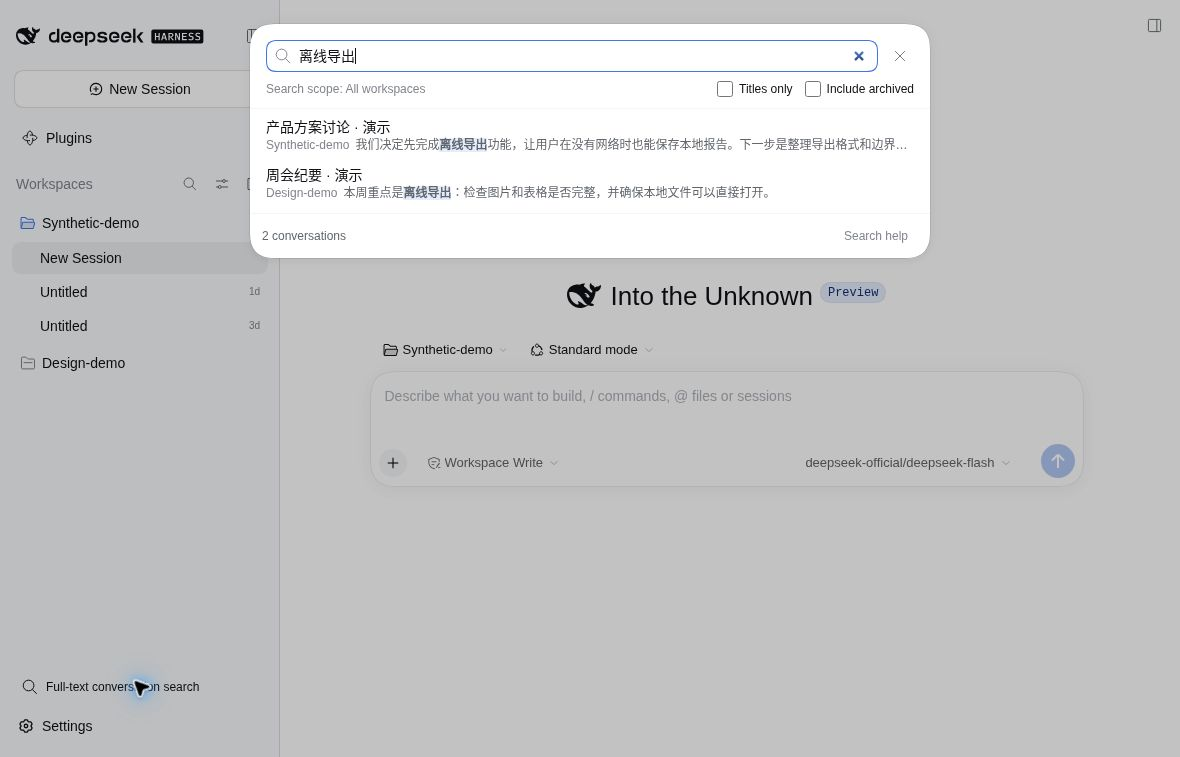
Remember discussing offline export but can't remember which conversation? Search for `离线导出` (offline export) and use the message excerpts to find it.
|
|
10
10
|
|
|
11
|
-
|
|
11
|
+
|
|
12
12
|
|
|
13
|
-
|
|
14
|
-
2. 输入 `@ryuu-64/dsh-find-all`,安装并启用。
|
|
15
|
-
3. 重启 DSH(网页版需重启服务并刷新页面)。
|
|
13
|
+
The Chinese interface shows one matching conversation from each of two workspaces.
|
|
16
14
|
|
|
17
|
-
|
|
15
|
+
## Install
|
|
18
16
|
|
|
19
|
-
|
|
17
|
+
Ask an AI assistant that can operate your computer to install the plugin.
|
|
20
18
|
|
|
21
|
-
|
|
19
|
+
> Install this plugin in my DSH setup, check compatibility, and confirm it is enabled: https://github.com/Ryuu-64/dsh-find-all
|
|
22
20
|
|
|
23
|
-
|
|
21
|
+
If you have `dsh-find-bar` installed, remove it first to avoid a shortcut conflict.
|
|
24
22
|
|
|
25
|
-
|
|
26
|
-
2. 从结果的标题、工作区和正文片段中找到目标。一页满后,点「继续加载结果」。想找已归档的聊天,勾选「包含归档」。
|
|
27
|
-
3. 点结果打开对话,继续用同一关键词查找。归档结果需主动点「取消归档并打开」;点「返回搜索结果」可回到原查询和列表位置。
|
|
23
|
+
## Go from search results to the message
|
|
28
24
|
|
|
29
|
-
|
|
25
|
+
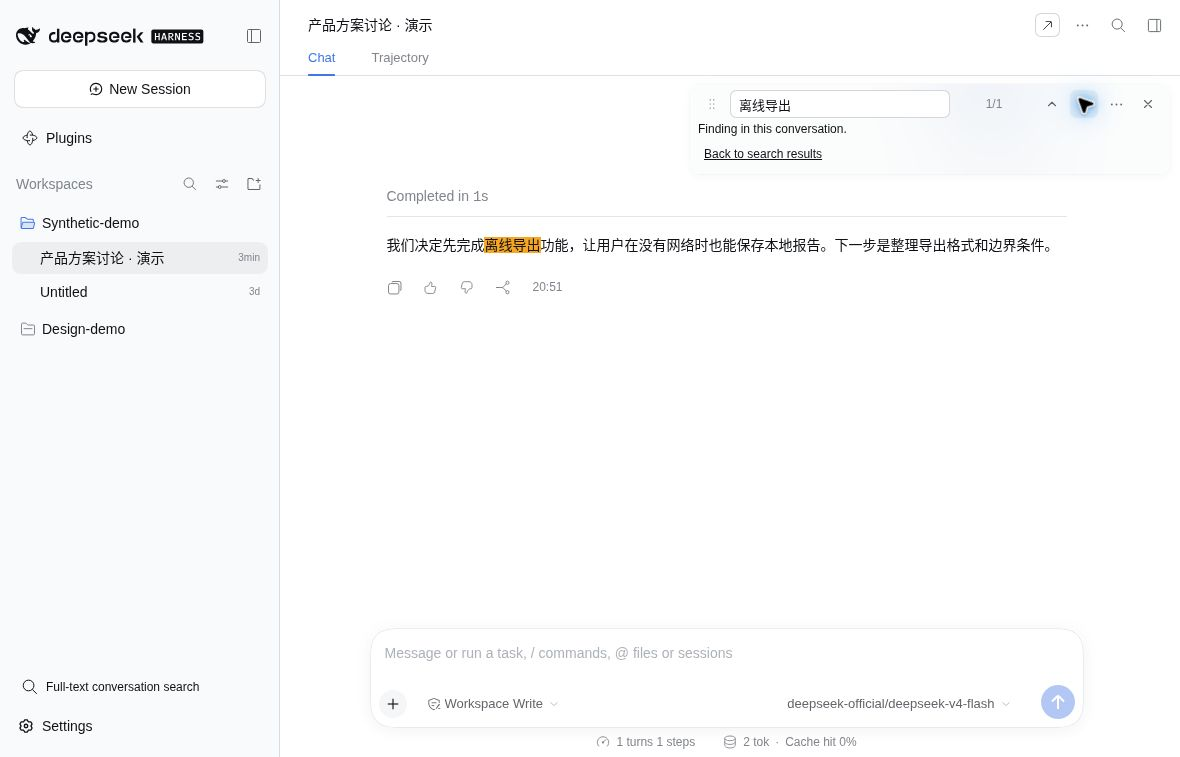
1. Open **Full-text conversation search** in the sidebar and enter `离线导出`. The results show titles, workspaces, and message excerpts.
|
|
26
|
+
2. Select **报表功能设计** (Report feature design). The conversation opens with the same query in the find bar. The highlight can land in a different place from the excerpt in the search results.
|
|
27
|
+
3. Click the match count, enter `2`, and press `Enter` to jump to the second match. **Back to search results** restores your query and position in the list.
|
|
30
28
|
|
|
31
|
-
|
|
29
|
+
|
|
32
30
|
|
|
33
|
-
|
|
34
|
-
- **切换结果**:按 `Enter` / `Shift+Enter`;也可点击结果数量,输入序号后按 `Enter` 跳转。
|
|
35
|
-
- **停止搜索**:点查找栏里正在搜索的状态提示。
|
|
36
|
-
- **关闭查找**:按 `Esc`;选项展开时会先收起选项。
|
|
31
|
+
If the conversation is already open, press `⌘F / Ctrl+F`. Use `Enter` or `Shift+Enter` to move between matches and `Esc` to close the find bar.
|
|
37
32
|
|
|
38
|
-
|
|
33
|
+
## Search options and limits
|
|
39
34
|
|
|
40
|
-
|
|
35
|
+
- **Across workspaces**, select **Titles only** or **Include archived** to change what you search. Select **Load more results** if the search has more conversations to scan. Use **Unarchive and open** to open an archived conversation. Press `Enter` in the search field to rerun the search after conversations change.
|
|
36
|
+
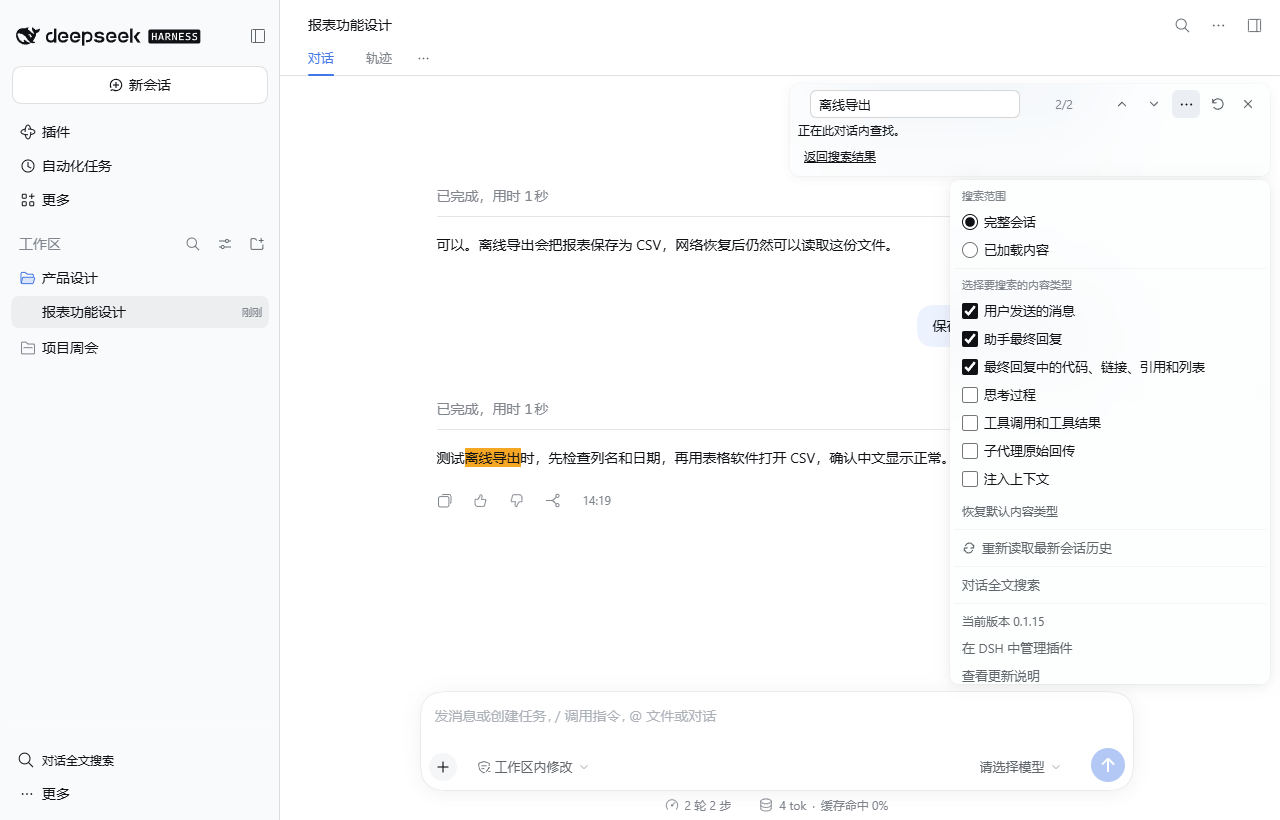
- **In the current conversation**, the default search includes user messages and assistant replies. Open `⋯` to choose **Whole conversation** or **Loaded content**, or add content types such as reasoning and tool calls. Use **Loaded content** when whole-conversation search is unavailable.
|
|
37
|
+
- To **save search defaults**, open Find All under **Plugins** in the sidebar and select **Configure** on its component row. Set **Search titles only by default** and **Include archived conversations by default** for the current profile. Your choices apply the next time you open full-text search.
|
|
41
38
|
|
|
42
|
-
|
|
39
|
+
|
|
43
40
|
|
|
44
|
-
|
|
41
|
+
<a id="更新" name="更新"></a>
|
|
45
42
|
|
|
46
|
-
|
|
47
|
-
- 点「重新读取最新会话历史」,搜索刚收到的新消息。
|
|
48
|
-
- 进入「对话全文搜索」,带上当前关键词寻找其他对话。
|
|
49
|
-
- 点「检查更新」查看新版;有新版时,在 DSH「插件」页卸载后重新安装并重启。
|
|
50
|
-
- 点「复制诊断信息」准备问题反馈,或点「关于」查看作者和项目链接。
|
|
43
|
+
### Updating
|
|
51
44
|
|
|
52
|
-
|
|
45
|
+
In the find bar, open `⋯` and select **Manage plugin in DSH**. If **Versions** appears in the plugin details, select **Check again** to see compatible updates.
|
|
53
46
|
|
|
54
|
-
|
|
47
|
+
### What gets searched and where
|
|
55
48
|
|
|
56
|
-
-
|
|
57
|
-
-
|
|
58
|
-
-
|
|
59
|
-
- **历史与结果**:首次跨对话搜索需逐个读取会话,大型历史可能较慢;极大或无法读取的会话会提示未完整搜索。当前对话的「完整会话」搜索已保存消息,无法使用时可改选「已加载内容」;不搜索图片文字或附件内容,最多显示前 5000 个结果,没搜完或无法准确跳转时会提示。
|
|
60
|
-
- **隐私与配置**:搜索不改聊天记录,不把搜索词或正文发送到外部 AI;浏览器只接收匹配片段。无需开启 SQLite 全文索引,也不建立持久正文索引或改变宿主默认配置。宿主缺少跨对话搜索所需接口时会提示服务不可用,原有会话内查找仍可使用。
|
|
49
|
+
- Cross-conversation search covers ordinary conversations on the connected DSH server. It searches saved user messages and completed assistant text as case-insensitive literal text in the original Markdown. Reasoning, tools, subagent conversations, attachments, and text inside images are outside its scope.
|
|
50
|
+
- Long histories can take time to scan. The results tell you when a scan is incomplete or some conversations could not be read. In-conversation find shows up to 5,000 matches.
|
|
51
|
+
- Search is read-only and keeps queries and messages within DSH. For cross-conversation search, the DSH server scans the messages and sends matching excerpts and conversation details to the browser. Whole-conversation find reads the history of the current conversation in the browser.
|
|
61
52
|
|
|
62
|
-
|
|
53
|
+
## Feedback and documentation
|
|
63
54
|
|
|
64
|
-
|
|
55
|
+
[Report an issue on GitHub](https://github.com/Ryuu-64/dsh-find-all/issues/new) with steps to reproduce the problem and any relevant screenshots. You can use `⋯` → **Copy diagnostics** to include troubleshooting details. Keep API keys and private conversations out of public issues.
|
|
65
56
|
|
|
66
|
-
|
|
57
|
+
The QQ group is **1129212995**. For search behavior, see **Search help** in the search dialog. For supported versions and tested platforms, see the [compatibility notes](https://github.com/Ryuu-64/dsh-find-all/blob/main/docs/compatibility.md).
|
|
67
58
|
|
|
68
|
-
|
|
59
|
+
## Credits
|
|
69
60
|
|
|
70
|
-
|
|
61
|
+
Maintained by [Ryuu-64](https://github.com/Ryuu-64). Based on [secyborg/dsh-find-bar](https://github.com/secyborg/dsh-find-bar), with thanks to secyborg for the original plugin.
|
|
71
62
|
|
|
72
|
-
|
|
73
|
-
|
|
74
|
-
[MIT 许可](LICENSE):Copyright (c) 2026 secyborg / Copyright (c) 2026 Ryuu-64。
|
|
75
|
-
上游 README 见 [README.fork-origin.md](README.fork-origin.md),改动与致谢见 [NOTICE.md](NOTICE.md)。
|
|
63
|
+
[MIT License](https://github.com/Ryuu-64/dsh-find-all/blob/main/LICENSE). Copyright (c) 2026 secyborg / Copyright (c) 2026 Ryuu-64.
|
|
64
|
+
See the [upstream README (Chinese)](https://github.com/Ryuu-64/dsh-find-all/blob/main/README.fork-origin.md) and [notices and credits](https://github.com/Ryuu-64/dsh-find-all/blob/main/NOTICE.md).
|
package/README.zh-CN.md
ADDED
|
@@ -0,0 +1,62 @@
|
|
|
1
|
+
# dsh-find-all 对话全文搜索
|
|
2
|
+
|
|
3
|
+
[English](https://github.com/Ryuu-64/dsh-find-all/blob/main/README.md) | 简体中文
|
|
4
|
+
|
|
5
|
+
在 DeepSeek Harness(DSH)中搜索各工作区对话的标题和已保存正文,也可以按 **⌘F / Ctrl+F** 查找当前对话。
|
|
6
|
+
|
|
7
|
+
## 效果预览
|
|
8
|
+
|
|
9
|
+
记得聊过「离线导出」,却忘了在哪个对话?输入关键词,从正文片段中找回它。
|
|
10
|
+
|
|
11
|
+

|
|
12
|
+
|
|
13
|
+
示例中,两个工作区各有一段对话匹配「离线导出」。
|
|
14
|
+
|
|
15
|
+
## 安装
|
|
16
|
+
|
|
17
|
+
可以把下面这条请求发给能操作你电脑的 AI 助手。
|
|
18
|
+
|
|
19
|
+
> 请帮我安装这个 DSH 插件,检查兼容性并确认已启用:https://github.com/Ryuu-64/dsh-find-all
|
|
20
|
+
|
|
21
|
+
如果装过 `dsh-find-bar`,请先卸载,避免快捷键冲突。
|
|
22
|
+
|
|
23
|
+
## 从搜索结果找到原文
|
|
24
|
+
|
|
25
|
+
1. 点侧栏「对话全文搜索」,输入「离线导出」。标题和正文一起搜索,结果会显示对话标题、工作区和含关键词的正文片段。
|
|
26
|
+
2. 点「报表功能设计」。插件会打开对话,并在查找栏里继续查找「离线导出」。打开后的高亮位置可能与搜索摘要不同。
|
|
27
|
+
3. 点查找栏的结果数量,输入 `2`,按 `Enter` 定位到第二处。点「返回搜索结果」,可以回到原查询和列表位置。
|
|
28
|
+
|
|
29
|
+

|
|
30
|
+
|
|
31
|
+
已经打开目标对话时,直接按 `⌘F / Ctrl+F`。用 `Enter` 和 `Shift+Enter` 切换匹配,按 `Esc` 关闭查找。
|
|
32
|
+
|
|
33
|
+
## 常用设置与限制
|
|
34
|
+
|
|
35
|
+
- **跨工作区搜索**可勾选「仅标题」或「包含归档」。结果较多时点「继续加载结果」。要打开归档对话,先点「取消归档并打开」。对话有更新时,在搜索框按 `Enter` 重新搜索。
|
|
36
|
+
- **当前对话查找**默认搜索用户消息和助手回复。点 `⋯`,可在「完整会话」与「已加载内容」间切换,也可选思考过程、工具等内容类型。完整会话不可用时,可用「已加载内容」继续查找。
|
|
37
|
+
- 要**保存搜索默认值**,从侧栏「插件」打开「对话查找」,再点组件行的「配置」。可为当前配置档设置「默认仅搜索标题」和「默认包含已归档对话」,下次打开全文搜索时生效。
|
|
38
|
+
|
|
39
|
+

|
|
40
|
+
|
|
41
|
+
### 更新
|
|
42
|
+
|
|
43
|
+
在查找栏打开 `⋯`,选择「在 DSH 中管理插件」。如果插件详情显示「版本」,点「重新检查」查看兼容的更新。
|
|
44
|
+
|
|
45
|
+
### 搜索范围与隐私
|
|
46
|
+
|
|
47
|
+
- 跨对话搜索只查当前连接的 DSH 服务中的普通对话,覆盖已保存的用户消息和已完成的助手正文。它按原始 Markdown 做字面匹配,不区分大小写,跳过思考、工具、子代理、附件和图片文字。
|
|
48
|
+
- 大型历史可能需要等待。未扫完或有读取失败时,结果区会提示。当前对话查找最多显示 5000 处匹配。
|
|
49
|
+
- 搜索不改聊天记录,也不把搜索词或正文发给外部 AI。**跨对话搜索**由 DSH 服务扫描正文,浏览器收到的是匹配片段和对应的对话信息。**当前对话的完整会话查找**会读取该对话的历史。
|
|
50
|
+
|
|
51
|
+
## 反馈与详细文档
|
|
52
|
+
|
|
53
|
+
遇到问题请[到 GitHub 反馈](https://github.com/Ryuu-64/dsh-find-all/issues/new),说明你做了什么、遇到什么问题,附上必要截图。可点 `⋯` →「复制诊断信息」后粘贴到反馈中。不要公开密钥或私密对话。
|
|
54
|
+
|
|
55
|
+
QQ 交流群 **1129212995**。跨对话搜索的规则也可在面板的「搜索说明」中查看。版本与平台细节见[兼容说明](https://github.com/Ryuu-64/dsh-find-all/blob/main/docs/compatibility.md)。
|
|
56
|
+
|
|
57
|
+
## 作者与致谢
|
|
58
|
+
|
|
59
|
+
由 [Ryuu-64](https://github.com/Ryuu-64) 维护,基于 [secyborg/dsh-find-bar](https://github.com/secyborg/dsh-find-bar) 开发,感谢 secyborg 的原作。
|
|
60
|
+
|
|
61
|
+
[MIT 许可](https://github.com/Ryuu-64/dsh-find-all/blob/main/LICENSE)。Copyright (c) 2026 secyborg / Copyright (c) 2026 Ryuu-64。
|
|
62
|
+
上游 README 见 [README.fork-origin.md](https://github.com/Ryuu-64/dsh-find-all/blob/main/README.fork-origin.md),改动与致谢见 [NOTICE.md](https://github.com/Ryuu-64/dsh-find-all/blob/main/NOTICE.md)。
|
package/cordis.patch.yml
CHANGED
|
@@ -1,3 +1,3 @@
|
|
|
1
|
-
- insert:
|
|
2
|
-
- id: find-all
|
|
3
|
-
name: '@ryuu-64/dsh-find-all'
|
|
1
|
+
- insert:
|
|
2
|
+
- id: find-all
|
|
3
|
+
name: '@ryuu-64/dsh-find-all'
|