@rtsdk/topia 0.11.0 → 0.11.1
This diff represents the content of publicly available package versions that have been released to one of the supported registries. The information contained in this diff is provided for informational purposes only and reflects changes between package versions as they appear in their respective public registries.
- package/README.md +61 -28
- package/dist/index.cjs +10 -8
- package/dist/index.d.ts +9 -8
- package/dist/index.js +10 -8
- package/package.json +1 -1
package/README.md
CHANGED
|
@@ -1,10 +1,59 @@
|
|
|
1
|
+
<hr />
|
|
2
|
+
|
|
1
3
|
# Javascript RTSDK - Topia Client Library
|
|
2
4
|
|
|
3
|
-
|
|
5
|
+
<hr/>
|
|
6
|
+
|
|
7
|
+
<br>
|
|
8
|
+
|
|
9
|
+
### Create integrated, interactive experiences with Topia’s SDK and API
|
|
10
|
+
|
|
11
|
+
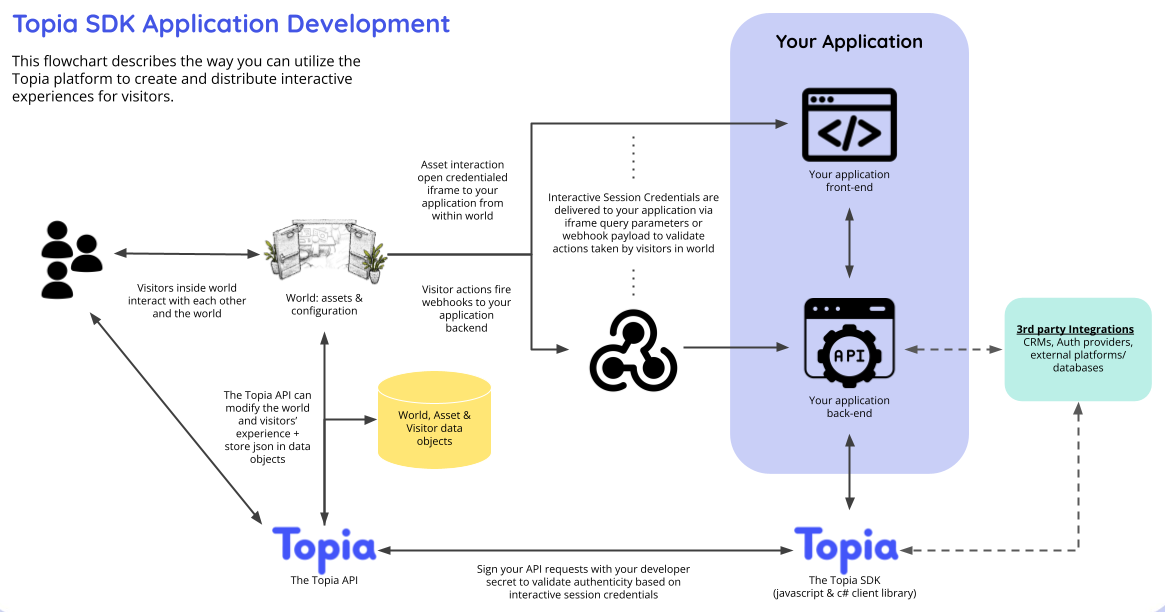
Topia offers a robust SDK and API that allows anyone to build custom apps or integrate any 3rd-party content, application, game or learning experience. Dedicated deployments launch with dozens of SDK Applications, including mini-games and social apps made by the Topia team and our developer community
|
|
12
|
+
|
|
13
|
+
### Topia’s SDK/API can be used to:
|
|
14
|
+
|
|
15
|
+
- Turn existing applications and systems into multiplayer, cooperative experiences
|
|
16
|
+
- Integrate existing content into multiplayer learning journeys
|
|
17
|
+
- Create your own custom, dynamic social experiences and games
|
|
18
|
+
- Store and persist JSON data objects across sessions
|
|
19
|
+
- Add Social Connectivity Networking capabilities to your existing platforms
|
|
20
|
+
|
|
21
|
+
### Key Features:
|
|
22
|
+
|
|
23
|
+
- Built-in safety and security via an interactive credentialing system
|
|
24
|
+
- Control over the code and IP of your creations
|
|
25
|
+
- Integrated via i-frame, in-world assets, and server-based bi-directional data flow
|
|
26
|
+
- Every object, world, and visitor has a JSON database you use to build interactivity and data persistence
|
|
27
|
+
- Powerful SDK classes and methods enable control of every aspect of Topia
|
|
28
|
+
|
|
29
|
+
### Resources:
|
|
30
|
+
|
|
31
|
+
- [NPM Package](https://www.npmjs.com/package/@rtsdk/topia)
|
|
32
|
+
- [Demo World](https://topia.io/sdk-demos)
|
|
33
|
+
- [Typescript Boilerplate](https://github.com/metaversecloud-com/sdk-ts-boilerplate)
|
|
34
|
+
- [Javascript Boilerplate](https://github.com/metaversecloud-com/sdk-ts-boilerplate)
|
|
35
|
+
|
|
36
|
+
#### Need inspiration?! Check out the following applications which utilizes the SDK to create new and enhanced features inside [topia.io](https://topia.io/):
|
|
37
|
+
|
|
38
|
+
- **Bulletin Board:** A message board style application where users can submit messages and/or images for approval and an admin can approve the message so that it can be added to the world.
|
|
39
|
+
- [Github](https://github.com/metaversecloud-com/sdk-bulletin-board-app)
|
|
40
|
+
- [Demo](https://topia.io/bulletin-board-prod)
|
|
41
|
+
- **Jukebox:** A real-time interactive music player.
|
|
42
|
+
- [Github](https://github.com/metaversecloud-com/jukebox)
|
|
43
|
+
- [Demo](https://topia.io/jukebox-prod)
|
|
44
|
+
- **TicTacToe:** A turn based multiplayer game built completely on the canvas.
|
|
45
|
+
- [Github](https://github.com/metaversecloud-com/sdk-tictactoe)
|
|
46
|
+
- [Demo](https://topia.io/tictactoe-prod)
|
|
47
|
+
- **Quest:** A dynamic hide and seek game where an admin can drop multiple quest items within a world for users to find.
|
|
48
|
+
- [Github](https://github.com/metaversecloud-com/sdk-quest)
|
|
49
|
+
- [Demo](https://topia.io/quest-prod)
|
|
50
|
+
|
|
51
|
+
Questions, comments, or have something exciting to share with the Topia team? Reach out to [developers@topia.io](mailto:developers@topia.io)!
|
|
52
|
+
<br/>
|
|
4
53
|
|
|
5
54
|
## Authorization
|
|
6
55
|
|
|
7
|
-
|
|
56
|
+
Visitors of a [topia.io](https://topia.io/) world interact with each other and the interactively configured assets in your world without the need for an API Key. This is all made possible through Interactive Session credentials passed to the SDK with every request, when applicable. What does this mean for you? Not much, actually! All of the magic happens behind the scenes and all you have to do is make sure that new class constructors include an options object like this: `options: WorldOptionalInterface = { attributes: {}, credentials: {} }` and all calls to `this.topia.axios` include the inherited `this.requestOptions` parameter.
|
|
8
57
|
|
|
9
58
|
### Want to build interactive assets? This is how you can get started:
|
|
10
59
|
|
|
@@ -42,37 +91,24 @@ await DroppedAsset.get(assetId, urlSlug, {
|
|
|
42
91
|
});
|
|
43
92
|
```
|
|
44
93
|
|
|
45
|
-
|
|
94
|
+
|
|
46
95
|
|
|
47
|
-
###
|
|
96
|
+
### Want to enable want world owners / admins to use the app outside of Topia, but still have ability to modify things in worlds where they have the permission to do so? This is how you can create an API Key:
|
|
97
|
+
|
|
98
|
+
A Topia provided API Key can be included with every object initialization as a parameter named `apiKey`. This API Key is used to in authorization headers in all calls to the Public API. **Use it wisely and sparingly!** The API Key should only be used to authorize your app (and therefore all of it's users) to perform specific actions **when not currently in a Topia world**. In most case the ability to interact with an SDK application should be controlled per user using Interactive Credentials (see above).
|
|
48
99
|
|
|
49
100
|
- Navigate directly to your [integrations page](https://topia.io/t/dashboard/integrations) or follow the steps below from within a world.
|
|
50
101
|
- Click on your image (or circle) at the top left of the left hand navbar.
|
|
51
102
|
- Click Edit Profile. This will bring you to a separate dashboard.
|
|
52
|
-
- Click Integrations on the left nav
|
|
53
|
-
- Click Generate New API Key and copy the API Key to be used in your .env
|
|
54
|
-
|
|
55
|
-
Alternatively, visitors of a [topia.io](https://topia.io/) world interact with each other and the interactively configured assets in your world without the need for an API Key. This is all made possible through Interactive Session credentials passed to the SDK with every request, when applicable. What does this mean for you? Not much, actually! All of the magic happens behind the scenes and all you have to do is make sure that new class constructors include an options object like this: `options: WorldOptionalInterface = { attributes: {}, credentials: {} }` and all calls to `this.topia.axios` include the inherited `this.requestOptions` parameter.
|
|
56
|
-
|
|
57
|
-

|
|
103
|
+
- Click Integrations on the left nav.
|
|
104
|
+
- Click Generate New API Key and copy the API Key to be used in your .env file.
|
|
58
105
|
|
|
59
106
|
<br>
|
|
60
107
|
|
|
61
|
-
<hr/>
|
|
62
|
-
|
|
63
108
|
# Developers
|
|
64
109
|
|
|
65
110
|
<hr/>
|
|
66
111
|
|
|
67
|
-
Need inspiration?! Check out the following applications which utilizes the SDK to create new and enhanced features inside [topia.io](https://topia.io/):
|
|
68
|
-
|
|
69
|
-
- **TicTacToe:** A turn based multiplayer game built completely on the canvas.
|
|
70
|
-
- [Github](https://github.com/metaversecloud-com/sdk-tictactoe)
|
|
71
|
-
- [Demo](https://topia.io/tictactoe-prod)
|
|
72
|
-
- **Quest:** A dynamic hide and seek game where an admin can drop multiple quest items within a world for users to find.
|
|
73
|
-
- [Github](https://github.com/metaversecloud-com/sdk-quest)
|
|
74
|
-
- [Demo](https://topia.io/quest-prod)
|
|
75
|
-
|
|
76
112
|
<br>
|
|
77
113
|
|
|
78
114
|
## Get Started
|
|
@@ -133,6 +169,8 @@ export const getAssetAndDataObject = async (req) => {
|
|
|
133
169
|
};
|
|
134
170
|
```
|
|
135
171
|
|
|
172
|
+
<br/><br/>
|
|
173
|
+
|
|
136
174
|
## Data Objects
|
|
137
175
|
|
|
138
176
|
Data Objects can be used to store information such as game state, configurations, themes, and analytics.
|
|
@@ -167,9 +205,8 @@ There are three types of Data Objects:
|
|
|
167
205
|
```
|
|
168
206
|
- **User:** The User data object should be used to store information unique to a user that is NOT unique to a world or instance (dropped asset) of an app.
|
|
169
207
|
- **Example - Update totalMessagesSentCount by a user across all worlds:**
|
|
170
|
-
|
|
171
|
-
|
|
172
|
-
```
|
|
208
|
+
`` js await world.incrementDataObjectValue([`totalMessagesSentCount`], 1); ``
|
|
209
|
+
<br/>
|
|
173
210
|
|
|
174
211
|
### Data Object Locking
|
|
175
212
|
|
|
@@ -216,10 +253,6 @@ Note: This does NOT impact the data objects themselves but rather allows you to
|
|
|
216
253
|
|
|
217
254
|
<br>
|
|
218
255
|
|
|
219
|
-
<hr/>
|
|
220
|
-
|
|
221
|
-
<br>
|
|
222
|
-
|
|
223
256
|
# Contributors
|
|
224
257
|
|
|
225
258
|
<hr/>
|
package/dist/index.cjs
CHANGED
|
@@ -40861,9 +40861,9 @@ class World extends SDKController {
|
|
|
40861
40861
|
* { sceneDropId: sceneId-timestamp, success: true }
|
|
40862
40862
|
* ```
|
|
40863
40863
|
*/
|
|
40864
|
-
dropScene({ assetSuffix, position, sceneId, }) {
|
|
40864
|
+
dropScene({ assetSuffix, position, sceneDropId, sceneId, }) {
|
|
40865
40865
|
return __awaiter(this, void 0, void 0, function* () {
|
|
40866
|
-
const params = { assetSuffix, position, sceneId };
|
|
40866
|
+
const params = { assetSuffix, position, sceneDropId, sceneId };
|
|
40867
40867
|
try {
|
|
40868
40868
|
const result = yield this.topiaPublicApi().post(`/world/${this.urlSlug}/drop-scene`, params, this.requestOptions);
|
|
40869
40869
|
return result;
|
|
@@ -41211,13 +41211,13 @@ class User extends SDKController {
|
|
|
41211
41211
|
* @usage
|
|
41212
41212
|
* ```ts
|
|
41213
41213
|
* const formData = new FormData();
|
|
41214
|
-
* formData.append('
|
|
41215
|
-
* formData.append('
|
|
41216
|
-
* formData.append('
|
|
41217
|
-
* formData.append('
|
|
41218
|
-
* formData.append('
|
|
41214
|
+
* formData.append('expression_dance', expression_dance);
|
|
41215
|
+
* formData.append('expression_emote', expression_emote);
|
|
41216
|
+
* formData.append('expression_sit', expression_sit);
|
|
41217
|
+
* formData.append('expression_stand', expression_stand);
|
|
41218
|
+
* formData.append('expression_transport', expression_transport);
|
|
41219
|
+
* formData.append('preview', preview);
|
|
41219
41220
|
* formData.append('spriteSheet', spriteSheet);
|
|
41220
|
-
* formData.append('transportPreviewImage', transportPreviewImage);
|
|
41221
41221
|
* formData.append('unityPackage', unityPackage);
|
|
41222
41222
|
* await user.uploadAvatarFiles("exampleAvatarId", formData);
|
|
41223
41223
|
* ```
|
|
@@ -41959,6 +41959,8 @@ class WorldActivity extends SDKController {
|
|
|
41959
41959
|
fetchVisitorsInZone(droppedAssetId) {
|
|
41960
41960
|
return __awaiter(this, void 0, void 0, function* () {
|
|
41961
41961
|
try {
|
|
41962
|
+
if (!droppedAssetId)
|
|
41963
|
+
throw "A landmark zone id (droppedAssetId) is required.";
|
|
41962
41964
|
yield this.fetchVisitors(droppedAssetId);
|
|
41963
41965
|
return this.visitors;
|
|
41964
41966
|
}
|
package/dist/index.d.ts
CHANGED
|
@@ -703,9 +703,10 @@ declare class World extends SDKController implements WorldInterface {
|
|
|
703
703
|
* { sceneDropId: sceneId-timestamp, success: true }
|
|
704
704
|
* ```
|
|
705
705
|
*/
|
|
706
|
-
dropScene({ assetSuffix, position, sceneId, }: {
|
|
707
|
-
assetSuffix
|
|
706
|
+
dropScene({ assetSuffix, position, sceneDropId, sceneId, }: {
|
|
707
|
+
assetSuffix?: string;
|
|
708
708
|
position: object;
|
|
709
|
+
sceneDropId?: string;
|
|
709
710
|
sceneId: string;
|
|
710
711
|
}): Promise<object | ResponseType$1>;
|
|
711
712
|
/**
|
|
@@ -975,13 +976,13 @@ declare class User extends SDKController implements UserInterface {
|
|
|
975
976
|
* @usage
|
|
976
977
|
* ```ts
|
|
977
978
|
* const formData = new FormData();
|
|
978
|
-
* formData.append('
|
|
979
|
-
* formData.append('
|
|
980
|
-
* formData.append('
|
|
981
|
-
* formData.append('
|
|
982
|
-
* formData.append('
|
|
979
|
+
* formData.append('expression_dance', expression_dance);
|
|
980
|
+
* formData.append('expression_emote', expression_emote);
|
|
981
|
+
* formData.append('expression_sit', expression_sit);
|
|
982
|
+
* formData.append('expression_stand', expression_stand);
|
|
983
|
+
* formData.append('expression_transport', expression_transport);
|
|
984
|
+
* formData.append('preview', preview);
|
|
983
985
|
* formData.append('spriteSheet', spriteSheet);
|
|
984
|
-
* formData.append('transportPreviewImage', transportPreviewImage);
|
|
985
986
|
* formData.append('unityPackage', unityPackage);
|
|
986
987
|
* await user.uploadAvatarFiles("exampleAvatarId", formData);
|
|
987
988
|
* ```
|
package/dist/index.js
CHANGED
|
@@ -40859,9 +40859,9 @@ class World extends SDKController {
|
|
|
40859
40859
|
* { sceneDropId: sceneId-timestamp, success: true }
|
|
40860
40860
|
* ```
|
|
40861
40861
|
*/
|
|
40862
|
-
dropScene({ assetSuffix, position, sceneId, }) {
|
|
40862
|
+
dropScene({ assetSuffix, position, sceneDropId, sceneId, }) {
|
|
40863
40863
|
return __awaiter(this, void 0, void 0, function* () {
|
|
40864
|
-
const params = { assetSuffix, position, sceneId };
|
|
40864
|
+
const params = { assetSuffix, position, sceneDropId, sceneId };
|
|
40865
40865
|
try {
|
|
40866
40866
|
const result = yield this.topiaPublicApi().post(`/world/${this.urlSlug}/drop-scene`, params, this.requestOptions);
|
|
40867
40867
|
return result;
|
|
@@ -41209,13 +41209,13 @@ class User extends SDKController {
|
|
|
41209
41209
|
* @usage
|
|
41210
41210
|
* ```ts
|
|
41211
41211
|
* const formData = new FormData();
|
|
41212
|
-
* formData.append('
|
|
41213
|
-
* formData.append('
|
|
41214
|
-
* formData.append('
|
|
41215
|
-
* formData.append('
|
|
41216
|
-
* formData.append('
|
|
41212
|
+
* formData.append('expression_dance', expression_dance);
|
|
41213
|
+
* formData.append('expression_emote', expression_emote);
|
|
41214
|
+
* formData.append('expression_sit', expression_sit);
|
|
41215
|
+
* formData.append('expression_stand', expression_stand);
|
|
41216
|
+
* formData.append('expression_transport', expression_transport);
|
|
41217
|
+
* formData.append('preview', preview);
|
|
41217
41218
|
* formData.append('spriteSheet', spriteSheet);
|
|
41218
|
-
* formData.append('transportPreviewImage', transportPreviewImage);
|
|
41219
41219
|
* formData.append('unityPackage', unityPackage);
|
|
41220
41220
|
* await user.uploadAvatarFiles("exampleAvatarId", formData);
|
|
41221
41221
|
* ```
|
|
@@ -41957,6 +41957,8 @@ class WorldActivity extends SDKController {
|
|
|
41957
41957
|
fetchVisitorsInZone(droppedAssetId) {
|
|
41958
41958
|
return __awaiter(this, void 0, void 0, function* () {
|
|
41959
41959
|
try {
|
|
41960
|
+
if (!droppedAssetId)
|
|
41961
|
+
throw "A landmark zone id (droppedAssetId) is required.";
|
|
41960
41962
|
yield this.fetchVisitors(droppedAssetId);
|
|
41961
41963
|
return this.visitors;
|
|
41962
41964
|
}
|
package/package.json
CHANGED