@rsdoctor/docs 1.3.16 → 1.4.0
This diff represents the content of publicly available package versions that have been released to one of the supported registries. The information contained in this diff is provided for informational purposes only and reflects changes between package versions as they appear in their respective public registries.
- package/docs/en/guide/more/faq.mdx +45 -25
- package/docs/en/guide/start/action.mdx +4 -1
- package/docs/en/guide/start/intro.mdx +9 -9
- package/docs/en/guide/usage/bundle-size.mdx +89 -55
- package/docs/en/guide/usage/module-analysis.mdx +9 -14
- package/docs/zh/guide/more/faq.mdx +44 -22
- package/docs/zh/guide/start/action.mdx +4 -1
- package/docs/zh/guide/start/intro.mdx +2 -4
- package/docs/zh/guide/usage/bundle-size.mdx +91 -48
- package/docs/zh/guide/usage/module-analysis.mdx +2 -9
- package/package.json +6 -6
|
@@ -2,7 +2,7 @@
|
|
|
2
2
|
|
|
3
3
|
## How to use only a specific feature of Rsdoctor?
|
|
4
4
|
|
|
5
|
-
When we **only need** the [
|
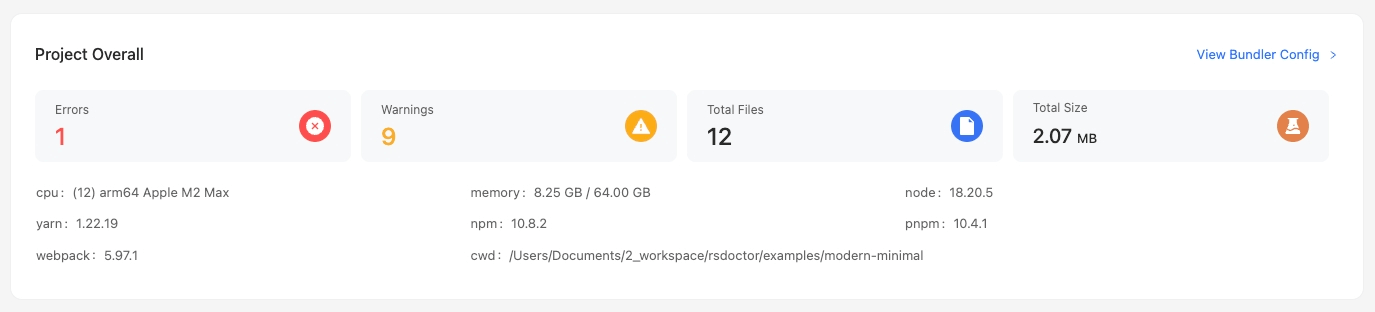
|
5
|
+
When we **only need** the [Bundle Size](../usage/bundle-size) bundle size analysis feature **within** Rsdoctor, we can add the corresponding [features](/config/options/features) option when configuring the Rsdoctor plugin. Refer to the code snippet below:
|
|
6
6
|
|
|
7
7
|
```ts
|
|
8
8
|
import { RsdoctorRspackPlugin } from '@rsdoctor/rspack-plugin';
|
|
@@ -14,16 +14,14 @@ new RsdoctorRspackPlugin({
|
|
|
14
14
|
|
|
15
15
|
## Loader timing data is inaccurate?
|
|
16
16
|
|
|
17
|
-
The timing data provided by Rsdoctor for loaders is an **estimated time**.
|
|
18
|
-
Additionally, the bundler will **parallelize the execution** of multiple non-conflicting loader functions. Since JavaScript is single-threaded, multiple loader functions can **compete for the current task queue**.
|
|
19
|
-
Furthermore, the asynchronous logic within loader functions cannot be recognized, causing a single loader function to potentially span across the execution of multiple other loaders. As a result, there are three possible cases, as shown in the following diagram:
|
|
17
|
+
The timing data provided by Rsdoctor for loaders is an **estimated time**. The reason accurate timing cannot be measured is that loader execution can be both **asynchronous** and **synchronous** functions, the bundler will **parallelize the execution** of multiple non-conflicting loader functions, and since **JavaScript is single-threaded**, multiple loader functions can **compete for the current task queue**. Furthermore, the **asynchronous logic within loader functions cannot be recognized**, causing a single loader function to potentially **span across** the execution of multiple other loaders. As a result, there are three possible cases, as shown in the following diagram:
|
|
20
18
|
|
|
21
19
|
<img
|
|
22
20
|
src="https://assets.rspack.rs/others/assets/rsdoctor/loader-cases.jpeg"
|
|
23
|
-
style={{ width: '250px' }}
|
|
21
|
+
style={{ width: '250px', margin: 'auto' }}
|
|
24
22
|
/>
|
|
25
23
|
|
|
26
|
-
Therefore, the loader timing provided by Rsdoctor is an **
|
|
24
|
+
Therefore, the loader timing provided by Rsdoctor is an **estimated** value. The timing data we provide accurately reflects scenario 1 and scenario 2 from the diagram. As for scenario 3, we are still exploring solutions.
|
|
27
25
|
|
|
28
26
|
## `out of memory` error when using `Rsdoctor` for building
|
|
29
27
|
|
|
@@ -31,35 +29,57 @@ If you encounter an `out of memory` error, you can try the following two methods
|
|
|
31
29
|
|
|
32
30
|
### Method 1
|
|
33
31
|
|
|
34
|
-
Increase the memory limit
|
|
32
|
+
Increase the Node.js memory limit, for example: `NODE_OPTIONS=--max-old-space-size=8096`.
|
|
35
33
|
|
|
36
34
|
### Method 2
|
|
37
35
|
|
|
38
|
-
|
|
36
|
+
This issue is often caused by storing source code information during the build process, which exceeds the memory limit. You can configure the `noCode` or `noAssetsAndModuleSource` field in `output.reportCodeType` to alleviate this issue. [output.reportCodeType](/config/options/output#reportcodetype)
|
|
39
37
|
|
|
40
|
-
|
|
38
|
+
## No Bundled/Parsed Size for Modules in bundle analysis?
|
|
41
39
|
|
|
42
|
-
|
|
40
|
+
### Issue Description
|
|
41
|
+
|
|
42
|
+
The difference between `Source Size` and `Bundled Size`:
|
|
43
|
+
|
|
44
|
+
- **Source Size**: The original size of the Module source code file (marked in cyan in the image below).
|
|
45
|
+
- **Bundled Size**: The final code size of the Module after bundling and minification (marked in blue in the image below).\
|
|
46
|
+
- **Gzip Size**: The final code size of the Module after gzip compression (marked in yellow in the image below).
|
|
47
|
+
|
|
48
|
+
<img
|
|
49
|
+
src="https://assets.rspack.rs/others/assets/rsdoctor/all-in-one-after.png"
|
|
50
|
+
width="600px"
|
|
51
|
+
style={{ margin: 'auto' }}
|
|
52
|
+
/>
|
|
53
|
+
|
|
54
|
+
### Solution
|
|
55
|
+
|
|
56
|
+
If you only have Source Size but no Bundled Size, or **there is no Module drill-down in Tree Map** (i.e., no Module chunks), you need to **manually enable SourceMap**. **Note: Only enable SourceMap when Rsdoctor is enabled, do not affect production builds.**
|
|
43
57
|
|
|
44
|
-
The following
|
|
58
|
+
- The following scenario requires manually enabling SourceMap:
|
|
59
|
+
|
|
60
|
+
<img
|
|
61
|
+
src="https://assets.rspack.rs/others/assets/rsdoctor/all-in-one-before.png"
|
|
62
|
+
width="600px"
|
|
63
|
+
height="300px"
|
|
64
|
+
style={{ margin: 'auto' }}
|
|
65
|
+
/>
|
|
45
66
|
|
|
46
|
-
|
|
47
|
-
const { RsdoctorRspackPlugin } = require('@rsdoctor/rspack-plugin');
|
|
67
|
+
Configuration example:
|
|
48
68
|
|
|
49
|
-
|
|
50
|
-
|
|
51
|
-
//
|
|
52
|
-
plugins: [
|
|
53
|
-
new RsdoctorRspackPlugin({
|
|
54
|
-
disableClientServer: false,
|
|
55
|
-
features: ['lite', 'loader', 'plugins', 'bundle'],
|
|
56
|
-
}),
|
|
57
|
-
].filter(Boolean),
|
|
69
|
+
```js rspack.config.mjs
|
|
70
|
+
export default {
|
|
71
|
+
devtool: 'cheap-source-map', // or other devtool configuration
|
|
58
72
|
};
|
|
59
73
|
```
|
|
60
74
|
|
|
61
|
-
|
|
62
|
-
|
|
75
|
+
Rsdoctor supports the following SourceMap configurations:
|
|
76
|
+
|
|
77
|
+
- source-map
|
|
78
|
+
- hidden-source-map
|
|
79
|
+
- inline-source-map
|
|
80
|
+
- cheap-source-map
|
|
81
|
+
- cheap-module-source-map
|
|
82
|
+
- nosources-source-map
|
|
63
83
|
|
|
64
84
|
## Bundle analysis page no `Bundled Size`?
|
|
65
85
|
|
|
@@ -79,7 +99,7 @@ When [optimization.concatenateModules](https://rspack.rs/config/optimization#opt
|
|
|
79
99
|
### Solution
|
|
80
100
|
|
|
81
101
|
:::danger
|
|
82
|
-
**Important Note:** You must check the `RSDOCTOR` environment variable and not modify ConcatenateModules directly! ConcatenateModules is enabled by default in production environments
|
|
102
|
+
**Important Note:** You must check the `RSDOCTOR` environment variable and not modify ConcatenateModules directly! ConcatenateModules is enabled by default in production environments. Disabling it in production builds will increase the bundle size.
|
|
83
103
|
:::
|
|
84
104
|
|
|
85
105
|
When enabling Rsdoctor analysis, set **concatenateModules to false** as shown below. **Note: Disabling `concatenateModules` will slightly increase bundle size, creating differences from production builds.**
|
|
@@ -29,17 +29,17 @@ Rsdoctor supports all tools and frameworks based on Rspack or webpack, such as:
|
|
|
29
29
|
- Build artifact support for resource lists and module dependencies, etc.
|
|
30
30
|
- Build-time analysis supports Loader, Plugin, and Resolver building process analysis.
|
|
31
31
|
- Build rules support duplicate package detection and ES Version Check, etc.
|
|
32
|
-
- **Support Custom Rules**: In addition to built-in build scan rules, Rsdoctor also supports users adding custom
|
|
32
|
+
- **Support Custom Rules**: In addition to built-in build scan rules, Rsdoctor also supports users adding custom build scan rules based on Rsdoctor's build data.
|
|
33
33
|
|
|
34
34
|
## 🛠️ Introduction
|
|
35
35
|
|
|
36
36
|
### ⭐️ Overview
|
|
37
37
|
|
|
38
|
-
- The overview page (i.e
|
|
38
|
+
- The overview page (i.e., the home page) displays **project configuration, diagnostic information, compilation information, and artifact status**.
|
|
39
39
|
|
|
40
40
|
|
|
41
41
|
|
|
42
|
-
- In addition to the project overview, we also provide diagnostic
|
|
42
|
+
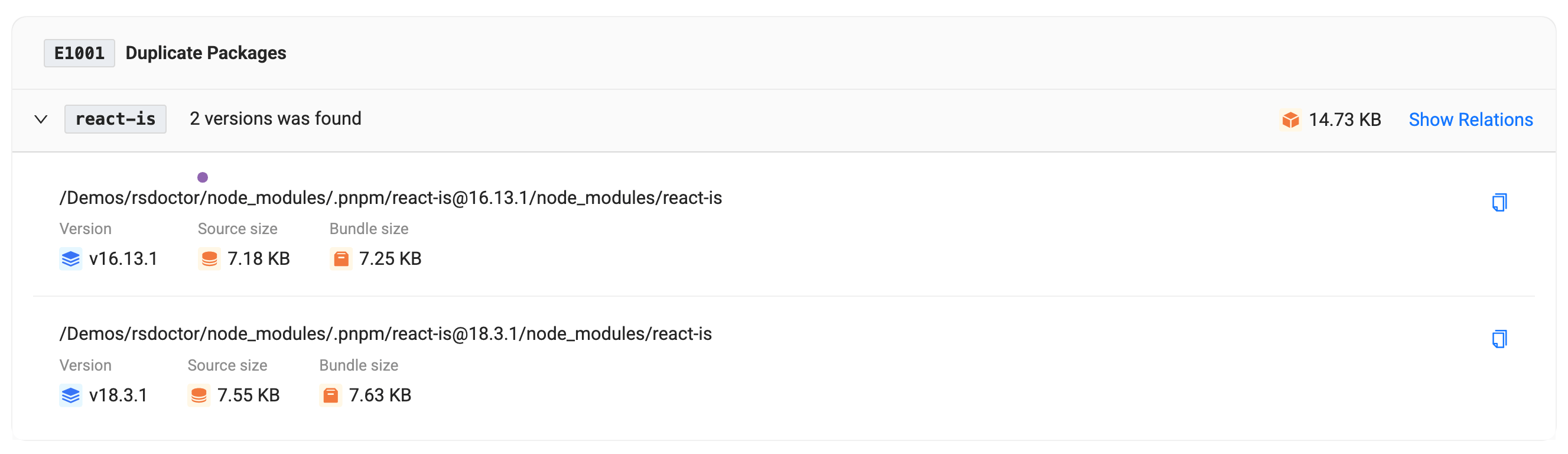
- In addition to the project overview, we also provide diagnostic modules, including compilation diagnostics and duplicate package diagnostics. If your compilation and artifacts match the diagnostic rules we defined, the corresponding warning modules will appear on the tool's home page, **where you can view the detailed reference paths of duplicate packages**:
|
|
43
43
|
|
|
44
44
|
|
|
45
45
|
|
|
@@ -76,7 +76,7 @@ Provides corresponding data and analysis functions for **Loaders, Plugins, and M
|
|
|
76
76
|
|
|
77
77
|
#### Resolve analysis
|
|
78
78
|
|
|
79
|
-
- This module mainly provides path data and estimated time consumption for module resolution in a single file within the project. Rspack does not
|
|
79
|
+
- This module mainly provides path data and estimated time consumption for module resolution in a single file within the project. Rspack temporarily does not support this module.
|
|
80
80
|
|
|
81
81
|
<p>
|
|
82
82
|
<img
|
|
@@ -106,15 +106,15 @@ Provides corresponding data and analysis functions for **Loaders, Plugins, and M
|
|
|
106
106
|
|
|
107
107
|
### ⭐️ Bundle diff
|
|
108
108
|
|
|
109
|
-
|
|
110
|
-
Support in progress...
|
|
111
|
-
:::
|
|
109
|
+
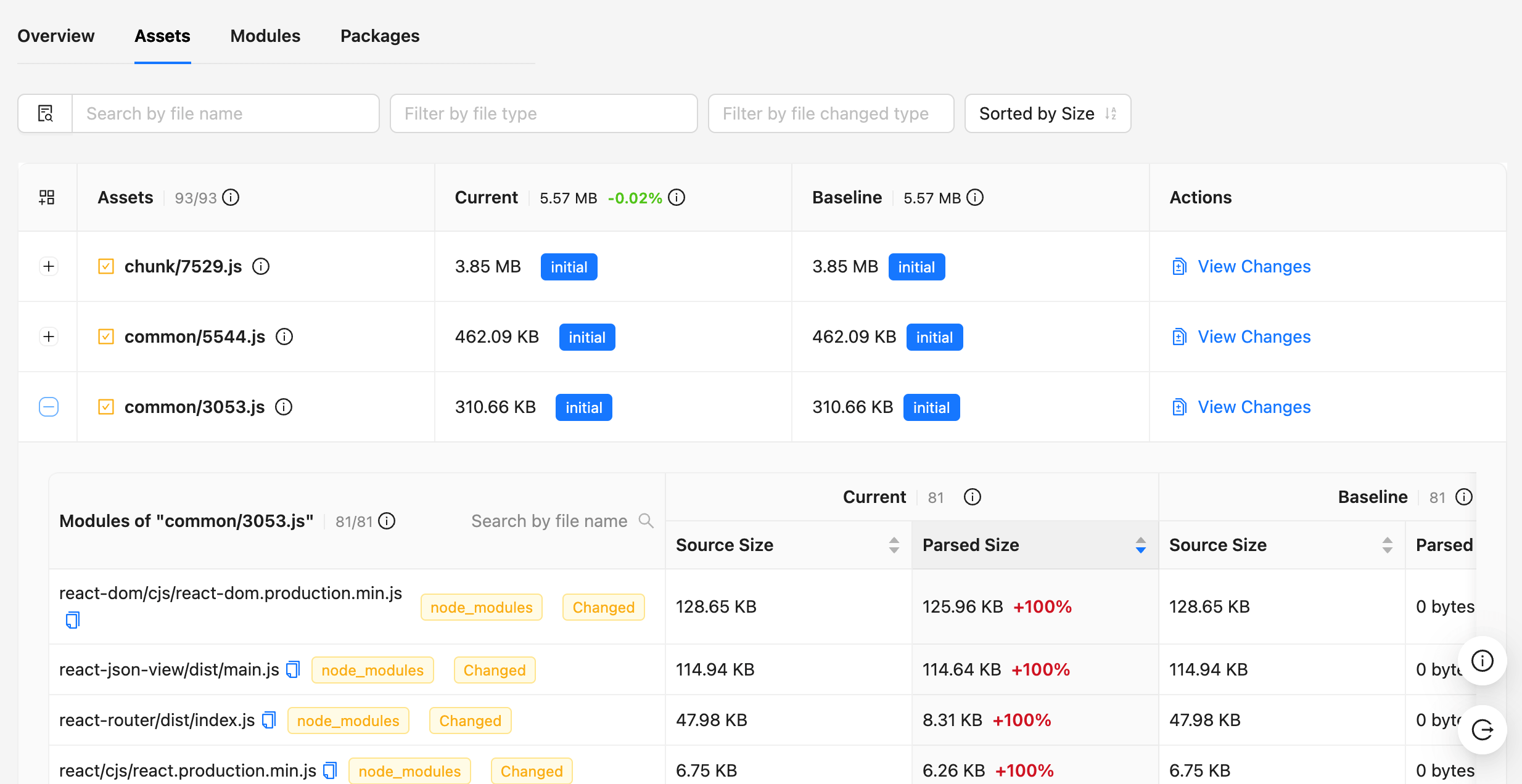
Using the Bundle Diff function provided by Rsdoctor, you can see the changes in resource size, duplicate packages, Packages, and other data in the artifacts, as well as the size of module files and code changes in each resource.
|
|
112
110
|
|
|
113
|
-
|
|
111
|
+
> For more information, refer to the [Bundle Diff](/guide/usage/bundle-diff) documentation.
|
|
114
112
|
|
|
115
113
|
|  |  |
|
|
116
114
|
| ----------------------------------------------------------------------------------- | ----------------------------------------------------------------------------------- |
|
|
117
115
|
|
|
118
116
|
## 🧑💻 Community
|
|
119
117
|
|
|
120
|
-
|
|
118
|
+
Welcome to join our [Discord](https://discord.gg/wrBPBT6rkM) channel! The Rstack team and users are active there, and we're always looking for contributions.
|
|
119
|
+
|
|
120
|
+
You can also join the [Feishu Group](https://applink.feishu.cn/client/chat/chatter/add_by_link?link_token=3c3vca77-bfc0-4ef5-b62b-9c5c9c92f1b4) to chat with everyone.
|
|
@@ -1,11 +1,31 @@
|
|
|
1
1
|
# Bundle analysis
|
|
2
2
|
|
|
3
|
-
|
|
3
|
+
:::info
|
|
4
|
+
If you want to analyze the reference chain of a specific Module, you can check 👉🏻 [Module Analysis](/guide/usage/module-analysis).
|
|
5
|
+
:::
|
|
6
|
+
|
|
7
|
+
## ⭐️ Overview
|
|
4
8
|
|
|
5
9
|
**Rsdoctor** provides the `Bundle Size` module, which is mainly used to analyze the information of the build artifacts of **Webpack** or **Rspack**, including the **size of resources**, **duplicate packages**, and **module reference relationships**:
|
|
6
10
|
|
|
7
|
-
- **Bundle Overview**: Displays the total number
|
|
8
|
-
- **Bundle Analysis Module**: Analyzes the size and code information of the build artifacts (**Assets**) and the included **Modules**. In this module, you can view the **actual code size of modules after packaging** in the Assets,
|
|
11
|
+
- **Bundle Overview**: Displays the total number of artifacts, the number and size of each file type, as well as duplicate packages and their reference chains, 👉🏻 [**Bundle Overview**](#-bundle-overview).
|
|
12
|
+
- **Bundle Analysis (`Bundle Analysis`) Module**: Analyzes the size and code information of the build artifacts (**Assets**) and the included **Modules**. In this module, you can view the **actual code size of modules after packaging** in the Assets, the original code of modules, **packaged code segments**, and **module reference relationships**.
|
|
13
|
+
|
|
14
|
+
The **Bundle Analysis** displays two view modes, **Tree Map** and **Tree Graph**:
|
|
15
|
+
|
|
16
|
+
- 👉🏻 [**Tree Map**](/guide/usage/bundle-size#-tree-map)
|
|
17
|
+
|
|
18
|
+
Tree Map is a classic build artifact analysis view that helps developers visualize and analyze the composition of bundles more intuitively, as well as the proportion of resources (Assets) and modules (Modules). It also supports searching for module resources, and clicking on module resources can zoom in to that module area.
|
|
19
|
+
|
|
20
|
+
<img
|
|
21
|
+
src="https://assets.rspack.rs/others/assets/rsdoctor/treemap-intro.gif"
|
|
22
|
+
width="500px"
|
|
23
|
+
style={{ margin: 'auto' }}
|
|
24
|
+
/>
|
|
25
|
+
|
|
26
|
+
- 👉🏻 [**Tree Graph**](/guide/usage/bundle-size#-tree-graph)
|
|
27
|
+
|
|
28
|
+
Tree Graph is a **file tree-based** build artifact analysis view that helps developers visualize and analyze the composition of artifacts more intuitively, as well as the proportion of artifacts (Assets) and modules (Modules). It also supports searching for module resources, and clicking on modules can view module details and code.
|
|
9
29
|
|
|
10
30
|
<img
|
|
11
31
|
src="https://assets.rspack.rs/others/assets/rsdoctor/bundle-size-overall.png"
|
|
@@ -13,25 +33,24 @@
|
|
|
13
33
|
style={{ margin: 'auto' }}
|
|
14
34
|
/>
|
|
15
35
|
|
|
16
|
-
|
|
17
|
-
|
|
18
|
-
### Glossary
|
|
36
|
+
## 🪐 Glossary
|
|
19
37
|
|
|
20
|
-
- **`Assets`**: Resources
|
|
21
|
-
- **`Module`**:
|
|
38
|
+
- **`Assets`**: Resources are files that ultimately exist in the output folder, including JavaScript, CSS, images, fonts, media, and other file types. Each Chunk has corresponding [Assets resources](https://webpack.js.org/concepts/under-the-hood/#chunks).
|
|
39
|
+
- **`Module`**: Multiple Modules combine to form a Chunk. For more information about Module types, please refer to [Rspack Modules](https://www.rspack.rs/api/modules.html) and [Webpack Modules](https://webpack.js.org/concepts/modules/#what-is-a-webpack-module).
|
|
22
40
|
- **`Source Size`**: The original size of the file, before any transformations and minification.
|
|
23
41
|
- **`Bundle Size`**: The final output size of the files. If you enabled minification, this value shows the minified size.
|
|
42
|
+
- **`Gzip Size`**: The size of the file after gzip compression.
|
|
24
43
|
- **`Package Count`**: The number of third-party packages.
|
|
25
|
-
- **`Initial Chunk`**:
|
|
44
|
+
- **`Initial Chunk`**: **initial (initialization)** is the main Chunk of the entry point. This Chunk contains all the modules specified by the entry point and their dependencies, unlike the **Chunk** resources for "**on-demand loading**".
|
|
26
45
|
- For more information about Initial Chunk, please refer to [Initial Chunk Introduction](https://webpack.js.org/concepts/under-the-hood/#chunks).
|
|
27
46
|
- **`Duplicate Packages`**: Duplicate third-party packages bundled into the project. Excludes third-party packages that are not bundled into the artifact. Please refer to [Duplicate Packages](/guide/usage/bundle-alerts).
|
|
28
|
-
- **`Concatenated Module`**: A concatenated module is a technique that combines multiple modules into one closure during packaging. In the past,
|
|
47
|
+
- **`Concatenated Module`**: A concatenated module is a technique that combines multiple modules into one closure during packaging. In the past, Webpack would package each module into a separate closure, and this encapsulation function would cause slower execution of JavaScript in the browser. Optimization can be achieved by enabling the [`optimization.concatenateModules`](https://rspack.rs/misc/glossary#scope-hoisting) parameter.
|
|
29
48
|
|
|
30
|
-
## Bundle overview
|
|
49
|
+
## 🪐 Bundle overview
|
|
31
50
|
|
|
32
51
|
### Bundle information card
|
|
33
52
|
|
|
34
|
-
The bundle overview displays information about the number and size of files, such as `Total Files`. Clicking on the card
|
|
53
|
+
The bundle overview displays information about the number and size of files, such as `Total Files`. Clicking on the card expands the resource details, as shown in the following image:
|
|
35
54
|
|
|
36
55
|
<img
|
|
37
56
|
src="https://assets.rspack.rs/others/assets/rsdoctor/bundle-size-overall-1.png"
|
|
@@ -48,15 +67,59 @@ The bundle overview displays information about the number and size of files, suc
|
|
|
48
67
|
style={{ margin: 'auto' }}
|
|
49
68
|
/>
|
|
50
69
|
|
|
51
|
-
- Clicking on the tabs allows you to switch between different resource information views, such as
|
|
70
|
+
- Clicking on the tabs allows you to switch between different resource information views, such as **「Total JS | Initial JS」**. The card also displays the percentage, size, and number of resources. Similarly, clicking on the icon in the lower right corner expands the resource list.
|
|
52
71
|
|
|
53
72
|
### Duplicate packages
|
|
54
73
|
|
|
55
|
-
The **Duplicate Packages** card displays the number of duplicate third-party packages in the project. Clicking on the image allows you to view the specific details of the duplicate packages. Please note that these are duplicate packages that have been bundled.
|
|
74
|
+
- The **Duplicate Packages** card displays the number of duplicate third-party packages in the project. Clicking on the image allows you to view the specific details of the duplicate packages. Please note that these are duplicate packages that have been bundled.
|
|
56
75
|
|
|
57
76
|
For more information, please refer to [Duplicate Packages](/guide/usage/bundle-alerts).
|
|
58
77
|
|
|
59
|
-
##
|
|
78
|
+
## 🪐 Tree map
|
|
79
|
+
|
|
80
|
+
:::info
|
|
81
|
+
If an Asset block has no Module chunks, you need to manually enable SourceMap. Note: Only enable SourceMap when Rsdoctor is enabled, do not affect production builds. [FAQ](/guide/more/faq#no-bundledparsed-size-for-modules-in-bundle-analysis)
|
|
82
|
+
:::
|
|
83
|
+
|
|
84
|
+
Tree Map view can intuitively display the proportion and relationship between modules, as shown in the following image. Clicking on module resources can zoom in to that module area.
|
|
85
|
+
|
|
86
|
+
<img
|
|
87
|
+
src="https://assets.rspack.rs/others/assets/rsdoctor/treemap-intro.gif"
|
|
88
|
+
width="500px"
|
|
89
|
+
style={{ margin: 'auto' }}
|
|
90
|
+
/>
|
|
91
|
+
|
|
92
|
+
- Tree Map view also supports searching for module resources. The left sidebar can filter resources (Assets) and search for modules (Modules). Clicking on the search results for modules can zoom in to that module area.
|
|
93
|
+
|
|
94
|
+
<img
|
|
95
|
+
src="https://assets.rspack.rs/others/assets/rsdoctor/treemap-all.png"
|
|
96
|
+
width={'700px'}
|
|
97
|
+
style={{ margin: 'auto' }}
|
|
98
|
+
/>
|
|
99
|
+
|
|
100
|
+
- Double-clicking on a block can display its Module details card, as shown in the following image. For more information, see [Module Details](/guide/usage/module-analysis).
|
|
101
|
+
|
|
102
|
+
<img
|
|
103
|
+
src="https://assets.rspack.rs/others/assets/rsdoctor/treemap-dbclick.png"
|
|
104
|
+
width={'700px'}
|
|
105
|
+
style={{ margin: 'auto' }}
|
|
106
|
+
/>
|
|
107
|
+
|
|
108
|
+
## 🪐 Tree graph
|
|
109
|
+
|
|
110
|
+
:::info
|
|
111
|
+
If an Asset block has no Module chunks, you need to manually enable SourceMap. Note: Only enable SourceMap when Rsdoctor is enabled, do not affect production builds. [FAQ](/guide/more/faq#no-bundledparsed-size-for-modules-in-bundle-analysis)
|
|
112
|
+
:::
|
|
113
|
+
|
|
114
|
+
Tree Graph is a **file tree-based** build artifact analysis view used to analyze the size and code information of build artifact resources (**Assets**) and the included **Modules**. In this module, you can view the **actual code size of modules after packaging** in the Assets, the original code of modules, **packaged code segments**, and **module reference relationships**.
|
|
115
|
+
|
|
116
|
+
<img
|
|
117
|
+
src="https://assets.rspack.rs/others/assets/rsdoctor/bundle-size-overall.png"
|
|
118
|
+
width={'700px'}
|
|
119
|
+
style={{ margin: 'auto' }}
|
|
120
|
+
/>
|
|
121
|
+
|
|
122
|
+
Click on the **"Bundle Size"** option in the navigation bar to view the Bundle analysis report. Please note that to display this page, you need to enable the build artifact analysis capability [features](/config/options/options).
|
|
60
123
|
|
|
61
124
|
::: tip
|
|
62
125
|
If your project is based on Rspack and the version is lower than 0.5.1, you cannot view code information.
|
|
@@ -82,18 +145,9 @@ The top toolbar from left to right includes: the search tool for **Assets**, the
|
|
|
82
145
|
|
|
83
146
|
<img src="https://assets.rspack.rs/others/assets/rsdoctor/bundle-size-analysis-selects.png" />
|
|
84
147
|
|
|
85
|
-
|
|
86
|
-
|
|
87
|
-
Search for which Assets the Module is located in. As shown in the figure, you can see the results of matching the search Module keyword.
|
|
88
|
-
|
|
89
|
-
<img
|
|
90
|
-
style={{ margin: 'auto', width: 500, height: 400 }}
|
|
91
|
-
src="https://assets.rspack.rs/others/assets/rsdoctor/search-modules.png"
|
|
92
|
-
/>
|
|
93
|
-
|
|
94
|
-
#### Search module
|
|
148
|
+
### Search module
|
|
95
149
|
|
|
96
|
-
|
|
150
|
+
Module search functionality is supported. Users can click the "**Search Module**" button to open the module search dialog. By entering the module name, users can quickly locate and view the module's position in the Assets, making it easier to analyze the module's reference relationships and size.
|
|
97
151
|
|
|
98
152
|
As shown in the following image, the results of matching the search Module keyword can be seen:
|
|
99
153
|
|
|
@@ -122,7 +176,7 @@ The **Modules** tag is shown in the right image, from left to right representing
|
|
|
122
176
|
|
|
123
177
|
- **Bundled Size**
|
|
124
178
|
- The final size of the module bundled into the artifact. Some modules labeled as `concatenated` are concatenated modules, which have a certain impact on this value. Please refer to the explanation of `concatenated module` below.
|
|
125
|
-
- **[Concatenated Module](https://rspack.rs/misc/glossary#scope-hoisting)**: Concatenated modules
|
|
179
|
+
- **[Concatenated Module](https://rspack.rs/misc/glossary#scope-hoisting)**: Concatenated modules combine multiple modules into one closure during bundling. There are two types:
|
|
126
180
|
- One is the concatenated main module, indicating how many `Modules` are concatenated.
|
|
127
181
|
- The other is the concatenated sub-module, indicating which `Module` it is aggregated into. This sub-module cannot be further unpacked after bundling, so the specific `Bundled Size` cannot be determined. Only the size of the entire concatenated module is known, which is marked at the end of the main module.
|
|
128
182
|
- **Module Explorer** tag: Click to open the dependency analysis page between `Modules`.
|
|
@@ -130,11 +184,11 @@ The **Modules** tag is shown in the right image, from left to right representing
|
|
|
130
184
|
|
|
131
185
|
### Support for concatenated module analysis
|
|
132
186
|
|
|
133
|
-
|
|
187
|
+
**[Concatenated Module](https://rspack.rs/misc/glossary#scope-hoisting)** refers to multiple modules that are merged into a single closure, which cannot be analyzed through AST syntax analysis. However, concatenated modules may contain code from different packages, making the analysis of sub-modules within concatenated modules a key focus, especially for projects using the ["all-in-one"](https://rsbuild.rs/guide/optimization/code-splitting#all-in-one) bundling approach.
|
|
134
188
|
|
|
135
189
|
Rsdoctor supports the analyze of **[Concatenated Module](https://rspack.rs/misc/glossary#scope-hoisting)** and accurately calculates the real bundled size of sub-modules within concatenated modules, helping developers accurately identify the actual build size after Tree Shaking, analyze the impact of merged modules on final bundle size, and optimize code splitting strategies.
|
|
136
190
|
|
|
137
|
-
- **For Rspack projects
|
|
191
|
+
- **For Rspack projects**: The Rsdoctor native plugin built into Rspack (>=1.4.11) has enhanced sourcemap capabilities, allowing seamless analysis of concatenated modules without enabling source maps.
|
|
138
192
|
|
|
139
193
|
> As shown in the figure below, this is the analysis of 'all-in-one' bundling. The first image shows the previous inability to analyze, while the second image shows the analyzable situation.
|
|
140
194
|
|
|
@@ -154,7 +208,7 @@ Rsdoctor supports the analyze of **[Concatenated Module](https://rspack.rs/misc/
|
|
|
154
208
|
style={{ margin: 'auto' }}
|
|
155
209
|
/>
|
|
156
210
|
|
|
157
|
-
- **For webpack projects
|
|
211
|
+
- **For webpack projects**: Source maps must be enabled to accurately decompose and analyze concatenated modules, as shown in the following configuration.
|
|
158
212
|
|
|
159
213
|
```js
|
|
160
214
|
export default {
|
|
@@ -163,7 +217,7 @@ export default {
|
|
|
163
217
|
};
|
|
164
218
|
```
|
|
165
219
|
|
|
166
|
-
- Rsdoctor supports the following
|
|
220
|
+
- Rsdoctor supports the following SourceMap configurations for Concatenated Module analysis:
|
|
167
221
|
- source-map
|
|
168
222
|
- hidden-source-map
|
|
169
223
|
- inline-source-map
|
|
@@ -171,37 +225,19 @@ export default {
|
|
|
171
225
|
- cheap-module-source-map
|
|
172
226
|
- nosources-source-map
|
|
173
227
|
|
|
174
|
-
|
|
228
|
+
## 🪐 Module details
|
|
175
229
|
|
|
176
230
|
Click the module tag to view module details, as shown below:
|
|
177
231
|
|
|
178
232
|
<img src="https://assets.rspack.rs/others/assets/rsdoctor/bailout-reason.gif" />
|
|
179
233
|
|
|
180
|
-
- **Reasons**:
|
|
234
|
+
- **Reasons**: As the name suggests, it means the [reason] why a Module exists. Reasons indicate which Modules import this Module, and the entire Reasons Tree shows the upstream reference chain of this Module, including both direct and indirect parents. This corresponds to Rspack's stats.reasons.
|
|
181
235
|
- **Dependencies**: The Modules that this Module depends on.
|
|
182
|
-
- **Bailout Reason**: The reason why this Module failed Tree Shaking
|
|
236
|
+
- **Bailout Reason**: The reason why this Module failed Tree Shaking.
|
|
183
237
|
|
|
184
238
|
> For more details, see: [Module details](/guide/usage/module-analysis)
|
|
185
239
|
|
|
186
|
-
##
|
|
187
|
-
|
|
188
|
-
Click the **"Treemap Graph"** label on the **"Bundle Size"** page to view the treemap. The treemap clearly shows the proportion and relationship between resources and modules, as shown in the following image:
|
|
189
|
-
|
|
190
|
-
<img
|
|
191
|
-
src="https://assets.rspack.rs/others/assets/rsdoctor/treemap.png"
|
|
192
|
-
width="500px"
|
|
193
|
-
style={{ margin: 'auto' }}
|
|
194
|
-
/>
|
|
195
|
-
|
|
196
|
-
You can also click the 🔍 button on the card title to search for Module resources, click the Module resource, and zoom in to the Module area, as shown in the following image:
|
|
197
|
-
|
|
198
|
-
<img
|
|
199
|
-
src="https://assets.rspack.rs/others/assets/rsdoctor/treemap.gif"
|
|
200
|
-
width="500px"
|
|
201
|
-
style={{ margin: 'auto' }}
|
|
202
|
-
/>
|
|
203
|
-
|
|
204
|
-
## Supports BannerPlugin
|
|
240
|
+
## 🪐 Supports bannerPlugin
|
|
205
241
|
|
|
206
242
|
:::danger
|
|
207
243
|
`supports.banner` option is only used for debugging, do not use it in production.
|
|
@@ -224,5 +260,3 @@ new RsdoctorRspackPlugin({
|
|
|
224
260
|
},
|
|
225
261
|
});
|
|
226
262
|
```
|
|
227
|
-
|
|
228
|
-
- Note: Enabling `drop_console` will affect Rsdoctor's analysis of the BannerPlugin. Therefore, you can disable `drop_console` when `RSDOCTOR = true`.
|
|
@@ -1,10 +1,10 @@
|
|
|
1
|
-
# Module
|
|
1
|
+
# Module analysis
|
|
2
2
|
|
|
3
3
|
## Introduction
|
|
4
4
|
|
|
5
|
-
**Rsdoctor** provides the `Module
|
|
5
|
+
**Rsdoctor** provides the `Module Reference Chain Analysis` module, which is mainly used to analyze the dependency tree of a specific Module, i.e., which modules depend on it, similar to [Webpack's stats.reasons](https://webpack.js.org/configuration/stats/#statsreasons).
|
|
6
6
|
|
|
7
|
-
In this
|
|
7
|
+
In this module, you can analyze the `Module` reference chain. If you have the need to split packages or want to see why a certain `Module` is being imported, you can quickly and clearly locate the reference chain through `Module Reference Chain Analysis`.
|
|
8
8
|
|
|
9
9
|
<img
|
|
10
10
|
src="https://assets.rspack.rs/others/assets/rsdoctor/module-analysis-tree.png"
|
|
@@ -14,26 +14,21 @@ In this section, you can analyze the imported chain of a module. If you have the
|
|
|
14
14
|
|
|
15
15
|
### This section's entry
|
|
16
16
|
|
|
17
|
-
|
|
17
|
+
After clicking on an **Assets** in the `「Bundle Size」` page, the `「Module Tree」` will be displayed on the right side. Click on the **Module** to view the reference chain relationship diagram of that **Module**.
|
|
18
18
|
|
|
19
|
-
<img
|
|
20
|
-
src="https://assets.rspack.rs/others/assets/rsdoctor/module-analysis-entry.png"
|
|
21
|
-
height="300px"
|
|
22
|
-
width="440px"
|
|
23
|
-
style={{ margin: 'auto' }}
|
|
24
|
-
/>
|
|
19
|
+
<img src="https://assets.rspack.rs/others/assets/rsdoctor/bailout-reason.gif" />
|
|
25
20
|
|
|
26
21
|
### Glossary
|
|
27
22
|
|
|
28
|
-
- **`Reasons`**: As the name suggests, it means the
|
|
23
|
+
- **`Reasons`**: As the name suggests, it means the `[reason]` why a `Module` exists. Reasons indicate which `Module`s import this `Module`, and the entire `Reasons Tree` represents the upstream reference chain of this `Module`, including both direct and indirect parents. [Similar to Rspack's stats.reasons.](https://webpack.js.org/configuration/stats/#statsreasons)
|
|
29
24
|
- **`Dependencies`**: The `Module`s that this `Module` depends on.
|
|
30
|
-
- **`Bailout Reason
|
|
25
|
+
- **`Bailout Reason`**: The reason why this `Module` failed Tree Shaking.
|
|
31
26
|
|
|
32
27
|
## Reasons dependency tree
|
|
33
28
|
|
|
34
29
|
### Introduction
|
|
35
30
|
|
|
36
|
-
The `Reasons Tree` displays the dependency chain of this `Module`, showing which other `Modules` directly or indirectly import it. In this dependency tree, you can view the `Bundled Size` of the `Modules` along the dependency chain. You can also click the right arrow `>` to navigate to the `Module
|
|
31
|
+
The `Reasons Tree` displays the dependency chain of this `Module`, showing which other `Modules` directly or indirectly import it. In this dependency tree, you can view the `Bundled Size` of the `Modules` along the dependency chain. You can also click the right arrow `>` to navigate to the `Module Reference Chain Analysis` page for that specific `Module`.
|
|
37
32
|
|
|
38
33
|
- **Parent-child relationship in the dependency tree**: The parent node file is the one that is depended upon by the child node file and is therefore bundled into the output. Similarly, the grandchild node file is depended upon by the child node and is bundled into the output, and so on.
|
|
39
34
|
|
|
@@ -47,7 +42,7 @@ The `Reasons Tree` displays the dependency chain of this `Module`, showing which
|
|
|
47
42
|
|
|
48
43
|
- The `Concatenated` tag:
|
|
49
44
|
- The `Concatenated` tag indicates that the module is a concatenated sub-module. Hover over it to see which main module it is aggregated into. This type of aggregated module cannot be further unpacked, so the specific `Bundled Size` cannot be determined, only the size of the entire concatenated module can be known.
|
|
50
|
-
- Glossary: A **concatenated module** is when multiple modules are promoted or **concatenated into a closure** during packaging. For an explanation of `Concatenated Module`, refer to the [Glossary](/guide/usage/bundle-size
|
|
45
|
+
- Glossary: A **concatenated module** is when multiple modules are promoted or **concatenated into a closure** during packaging. For an explanation of `Concatenated Module`, refer to the [Glossary](/guide/usage/bundle-size#-glossary).
|
|
51
46
|
|
|
52
47
|
- The `!` tag, hover over it to display the detailed path of the module.
|
|
53
48
|
|
|
@@ -2,7 +2,7 @@
|
|
|
2
2
|
|
|
3
3
|
## 如何只使用 Rsdoctor 的某个功能?
|
|
4
4
|
|
|
5
|
-
|
|
5
|
+
当**只需要** Rsdoctor 内的 [Bundle Size](../usage/bundle-size) 分析产物大小功能时,可以在 Rsdoctor 插件配置时添加对应的 [features](/config/options/features) 配置项,参考下方代码:
|
|
6
6
|
|
|
7
7
|
```ts
|
|
8
8
|
import { RsdoctorRspackPlugin } from '@rsdoctor/rspack-plugin';
|
|
@@ -14,14 +14,14 @@ new RsdoctorRspackPlugin({
|
|
|
14
14
|
|
|
15
15
|
## Loader 耗时数据不准?
|
|
16
16
|
|
|
17
|
-
Rsdoctor 提供的 Loader
|
|
17
|
+
Rsdoctor 提供的 Loader 耗时是**预估耗时**。无法统计到准确耗时是因为 Loader 执行可能是**异步**函数也可能是**同步**函数,打包工具会**并行执行多个**不冲突的 Loader 函数,而 **JavaScript 是单线程**的,多个 Loader 函数均可能**抢占当前的任务队列**,且 Loader 函数内的**异步逻辑无法识别**,导致单个 Loader 函数在执行过程中**可能横跨**多个其他 Loader 的执行过程,因此会存在如下图所示的三种情况:
|
|
18
18
|
|
|
19
19
|
<img
|
|
20
20
|
src="https://assets.rspack.rs/others/assets/rsdoctor/loader-cases.jpeg"
|
|
21
|
-
style={{ width: '250px' }}
|
|
21
|
+
style={{ width: '250px', margin: 'auto' }}
|
|
22
22
|
/>
|
|
23
23
|
|
|
24
|
-
因此,Rsdoctor 提供的 Loader
|
|
24
|
+
因此,Rsdoctor 提供的 Loader 耗时是一个**预估**的数据,我们给出的耗时数据准确反映了上图中情况 1 和情况 2,对于情况 3 的解决方案,我们目前还在探索中。
|
|
25
25
|
|
|
26
26
|
## 使用 `Rsdoctor` 构建时出现了 `out of memory` 问题
|
|
27
27
|
|
|
@@ -29,35 +29,57 @@ Rsdoctor 提供的 Loader 耗时时间是**预估耗时**,为什么没法统
|
|
|
29
29
|
|
|
30
30
|
### 方法一
|
|
31
31
|
|
|
32
|
-
增大
|
|
32
|
+
增大 Node.js 内存上限,例如:`NODE_OPTIONS=--max-old-space-size=8096`。
|
|
33
33
|
|
|
34
34
|
### 方法二
|
|
35
35
|
|
|
36
|
-
|
|
36
|
+
这个问题多是因为构建过程中存储了源码信息,超过了内存限制,可以在 `output.reportCodeType` 中配置 `noCode` 或 `noAssetsAndModuleSource` 字段来缓解此问题。[output.reportCodeType](/config/options/output#reportcodetype)
|
|
37
37
|
|
|
38
|
-
|
|
38
|
+
## 产物分析中,Module 都没有 Bundled/Parsed Size 怎么办?
|
|
39
39
|
|
|
40
|
-
|
|
40
|
+
### 问题说明
|
|
41
|
+
|
|
42
|
+
`Source Size` 和 `Bundled Size` 的区别:
|
|
43
|
+
|
|
44
|
+
- **Source Size**:Module 文件源码的原始大小(如下图青色标识)。
|
|
45
|
+
- **Bundled Size**:经过打包及压缩后的 Module 的最终代码大小(如下图蓝色标识)。\
|
|
46
|
+
- **Gzip Size**:经过 gzip 压缩后的 Module 的最终代码大小(如下图黄色标识)。
|
|
47
|
+
|
|
48
|
+
<img
|
|
49
|
+
src="https://assets.rspack.rs/others/assets/rsdoctor/all-in-one-after.png"
|
|
50
|
+
width="600px"
|
|
51
|
+
style={{ margin: 'auto' }}
|
|
52
|
+
/>
|
|
53
|
+
|
|
54
|
+
### 解决方案
|
|
55
|
+
|
|
56
|
+
如果只有 Source Size,没有 Bundled Size,或者 **Tree Map 中没有 Module 下钻**(即没有 Modules 分块),则需要**手动开启 SourceMap**。**注意只在 Rsdoctor 开启时打开 SourceMap,不要影响线上产物**。
|
|
41
57
|
|
|
42
|
-
|
|
58
|
+
- 下面情况就需要手动开启 Sourcemap
|
|
59
|
+
|
|
60
|
+
<img
|
|
61
|
+
src="https://assets.rspack.rs/others/assets/rsdoctor/all-in-one-before.png"
|
|
62
|
+
width="600px"
|
|
63
|
+
height="300px"
|
|
64
|
+
style={{ margin: 'auto' }}
|
|
65
|
+
/>
|
|
43
66
|
|
|
44
|
-
|
|
45
|
-
const { RsdoctorRspackPlugin } = require('@rsdoctor/rspack-plugin');
|
|
67
|
+
配置示例:
|
|
46
68
|
|
|
47
|
-
|
|
48
|
-
|
|
49
|
-
//
|
|
50
|
-
plugins: [
|
|
51
|
-
new RsdoctorRspackPlugin({
|
|
52
|
-
disableClientServer: false,
|
|
53
|
-
features: ['lite', 'loader', 'plugins', 'bundle'],
|
|
54
|
-
}),
|
|
55
|
-
].filter(Boolean),
|
|
69
|
+
```js rspack.config.mjs
|
|
70
|
+
export default {
|
|
71
|
+
devtool: 'cheap-source-map', // 或其他 devtool 配置
|
|
56
72
|
};
|
|
57
73
|
```
|
|
58
74
|
|
|
59
|
-
|
|
60
|
-
|
|
75
|
+
Rsdoctor 支持以下 SourceMap 配置:
|
|
76
|
+
|
|
77
|
+
- source-map
|
|
78
|
+
- hidden-source-map
|
|
79
|
+
- inline-source-map
|
|
80
|
+
- cheap-source-map
|
|
81
|
+
- cheap-module-source-map
|
|
82
|
+
- nosources-source-map
|
|
61
83
|
|
|
62
84
|
## 产物分析界面没有 `Bundled Size` 怎么办?
|
|
63
85
|
|
|
@@ -105,12 +105,10 @@ Rsdoctor 支持所有基于 Rspack 或 webpack 的工具和框架,例如:[Do
|
|
|
105
105
|
|
|
106
106
|
### ⭐️ Bundle diff
|
|
107
107
|
|
|
108
|
-
::: tip
|
|
109
|
-
功能支持中...
|
|
110
|
-
:::
|
|
111
|
-
|
|
112
108
|
使用 Rsdoctor 提供的 Bundle Diff 功能,可以看到产物内的资源体积、重复包、Packages 等数据的变化以及每个资源中的模块文件的大小及代码的变化。
|
|
113
109
|
|
|
110
|
+
> 可参考[Bundle Diff](/guide/usage/bundle-diff) 文档了解更多。
|
|
111
|
+
|
|
114
112
|
|  |  |
|
|
115
113
|
| ----------------------------------------------------------------------------------- | ----------------------------------------------------------------------------------- |
|
|
116
114
|
|
|
@@ -1,11 +1,31 @@
|
|
|
1
1
|
# 产物分析
|
|
2
2
|
|
|
3
|
-
|
|
3
|
+
:::info
|
|
4
|
+
如果想要分析某个 Module 的引用链路,可以查看 👉🏻[Module 引用链分析](/guide/usage/module-analysis)。
|
|
5
|
+
:::
|
|
6
|
+
|
|
7
|
+
## ⭐️ 功能概览
|
|
4
8
|
|
|
5
9
|
**Rsdoctor** 提供了 `Bundle Size` 模块,该模块主要用于分析 **Webpack** 或 **Rspack** 构建产物的信息,包括当前编译产物的**资源大小**、**重复包**、**模块引用关系**等:
|
|
6
10
|
|
|
7
|
-
-
|
|
8
|
-
- **产物分析(`Bundle Analysis`)模块**:分析构建产物资源(**Assets**)以及所包含的 **Modules** 的大小和代码信息。在该模块中,可以查看 Assets 中 **Module
|
|
11
|
+
- **产物概览**:展示产物总数、各类型文件数目、大小以及占比,以及重复包和重复包的引用链,👉🏻 [**产物概览**](#-%E4%BA%A7%E7%89%A9%E6%A6%82%E8%A7%88)
|
|
12
|
+
- **产物分析(`Bundle Analysis`)模块**:分析构建产物资源(**Assets**)以及所包含的 **Modules** 的大小和代码信息。在该模块中,可以查看 Assets 中 **Module 打包后的实际代码大小**、模块的原始代码、**打包后的代码段**以及**模块引用关系**。
|
|
13
|
+
|
|
14
|
+
其中,**产物分析**展示了两种视图模式,**Tree Map** 和 **Tree Graph**:
|
|
15
|
+
|
|
16
|
+
- 👉🏻 [**Tree Map**](/guide/usage/bundle-size#-tree-map)
|
|
17
|
+
|
|
18
|
+
Tree Map 是一种经典的构建产物分析视图,能帮助开发者更直观地可视化并分析 bundle 的构成,以及资源(Assets)和模块(Modules)的占比。同时支持搜索模块资源,点击模块资源可以放大到该模块区域。
|
|
19
|
+
|
|
20
|
+
<img
|
|
21
|
+
src="https://assets.rspack.rs/others/assets/rsdoctor/treemap-intro.gif"
|
|
22
|
+
width="500px"
|
|
23
|
+
style={{ margin: 'auto' }}
|
|
24
|
+
/>
|
|
25
|
+
|
|
26
|
+
- 👉🏻 [**Tree Graph**](/guide/usage/bundle-size#-tree-graph)
|
|
27
|
+
|
|
28
|
+
Tree Graph 是一种**基于文件树形式**的构建产物分析视图,能帮助开发者更直观地可视化并分析产物的构成,以及产物(Assets)和模块(Modules)的占比。同时支持搜索模块资源,点击模块还可以查看模块详情和代码。
|
|
9
29
|
|
|
10
30
|
<img
|
|
11
31
|
src="https://assets.rspack.rs/others/assets/rsdoctor/bundle-size-overall.png"
|
|
@@ -13,25 +33,24 @@
|
|
|
13
33
|
style={{ margin: 'auto' }}
|
|
14
34
|
/>
|
|
15
35
|
|
|
16
|
-
|
|
36
|
+
## 🪐 名词解释
|
|
17
37
|
|
|
18
|
-
|
|
19
|
-
|
|
20
|
-
- **`Assets`**:资源是对图像、字体、媒体和其他文件类型的统称,是最终存在于输出文件夹内的文件,同时,每个 Chunk 都有对应的 [Assets 资源](https://webpack.js.org/concepts/under-the-hood/#chunks)。
|
|
21
|
-
- **`Module`**:一个或多个 Module 组合成了 Chunk。有关 Module 类型的详细信息,请参阅 [Rspack Modules](https://www.rspack.rs/api/modules.html) 和 [Webpack Modules](https://webpack.js.org/concepts/modules/#what-is-a-webpack-module)。
|
|
38
|
+
- **`Assets`**:资源是最终存在于输出文件夹内的文件,包括 JavaScript、CSS、图像、字体、媒体等文件类型。每个 Chunk 都有对应的 [Assets 资源](https://webpack.js.org/concepts/under-the-hood/#chunks)。
|
|
39
|
+
- **`Module`**:多个 Module 组合成了 Chunk。有关 Module 类型的详细信息,请参阅 [Rspack Modules](https://www.rspack.rs/api/modules.html) 和 [Webpack Modules](https://webpack.js.org/concepts/modules/#what-is-a-webpack-module)。
|
|
22
40
|
- **`Source Size`**:文件的原始大小,未经过任何转换和压缩。
|
|
23
41
|
- **`Bundle Size`**:文件最终输出的大小。如果开启了压缩,这个值代表压缩后的大小。
|
|
42
|
+
- **`Gzip Size`**:文件经过 gzip 压缩后的大小。
|
|
24
43
|
- **`Package Count`**:第三方包的数量。
|
|
25
|
-
- **`Initial Chunk`**: **initial(初始化)** 是入口起点的主 Chunk,该
|
|
44
|
+
- **`Initial Chunk`**: **initial(初始化)** 是入口起点的主 Chunk,该 Chunk 包含入口起点指定的所有模块及其依赖项,与「**按需加载**」的 **Chunk** 资源不同。
|
|
26
45
|
- 有关 Initial Chunk 的详细信息,请参阅 [Initial Chunk 介绍](https://webpack.js.org/concepts/under-the-hood/#chunks)。
|
|
27
46
|
- **`Duplicate Packages`**: 打包到项目中的重复的第三方包。不包括未打包进产物的第三方包,请参阅[重复第三方包](/guide/usage/bundle-alerts)。
|
|
28
|
-
- **`Concatenated Module`**: 串联模块是将多个模块在打包时提升或串联到一个闭包中。在过去,Webpack 在打包时会将每个模块都打包到单独的闭包中,这种封装函数会导致 JavaScript
|
|
47
|
+
- **`Concatenated Module`**: 串联模块是将多个模块在打包时提升或串联到一个闭包中。在过去,Webpack 在打包时会将每个模块都打包到单独的闭包中,这种封装函数会导致 JavaScript 在浏览器中执行时较慢。可以通过开启 [`optimization.concatenateModules`](https://rspack.rs/zh/misc/glossary#scope-hoisting-%E4%BD%9C%E7%94%A8%E5%9F%9F%E5%90%88%E5%B9%B6) 参数来进行优化。
|
|
29
48
|
|
|
30
|
-
## 产物概览
|
|
49
|
+
## 🪐 产物概览
|
|
31
50
|
|
|
32
51
|
### 产物信息卡
|
|
33
52
|
|
|
34
|
-
产物概览显示了 `Total Files`
|
|
53
|
+
产物概览显示了 `Total Files` 等文件数目和大小信息。点击卡片可以展开资源详情,如下图所示:
|
|
35
54
|
|
|
36
55
|
<img
|
|
37
56
|
src="https://assets.rspack.rs/others/assets/rsdoctor/bundle-size-overall-1.png"
|
|
@@ -39,7 +58,7 @@
|
|
|
39
58
|
style={{ margin: 'auto' }}
|
|
40
59
|
/>
|
|
41
60
|
|
|
42
|
-
-
|
|
61
|
+
- 点击详情图标,右侧会展示对应的资源树,并标明资源大小:
|
|
43
62
|
|
|
44
63
|
<img
|
|
45
64
|
src="https://assets.rspack.rs/others/assets/rsdoctor/bundle-size-tree.png"
|
|
@@ -56,7 +75,51 @@
|
|
|
56
75
|
|
|
57
76
|
更多信息,请参阅[重复第三方包](/guide/usage/bundle-alerts)
|
|
58
77
|
|
|
59
|
-
##
|
|
78
|
+
## 🪐 Tree map
|
|
79
|
+
|
|
80
|
+
:::info
|
|
81
|
+
如果一个 Asset 区块中没有 Module 分块,则需要手动开启 SourceMap。注意只在 Rsdoctor 开启时打开 SourceMap,不要影响线上产物。[FAQ](/guide/more/faq#%E4%BA%A7%E7%89%A9%E5%88%86%E6%9E%90%E4%B8%ADmodule-%E9%83%BD%E6%B2%A1%E6%9C%89-bundledparsed-size-%E6%80%8E%E4%B9%88%E5%8A%9E)
|
|
82
|
+
:::
|
|
83
|
+
|
|
84
|
+
Tree Map 视图可以直观展示各个模块之间的占比和关系,如下图所示。点击模块资源可以放大到该模块区域。
|
|
85
|
+
|
|
86
|
+
<img
|
|
87
|
+
src="https://assets.rspack.rs/others/assets/rsdoctor/treemap-intro.gif"
|
|
88
|
+
width="500px"
|
|
89
|
+
style={{ margin: 'auto' }}
|
|
90
|
+
/>
|
|
91
|
+
|
|
92
|
+
- Tree Map 视图也支持搜索模块资源,左侧的侧边栏可以过滤资源(Assets)和搜索模块(Modules)。点击模块的搜索结果可以放大到该模块区域。
|
|
93
|
+
|
|
94
|
+
<img
|
|
95
|
+
src="https://assets.rspack.rs/others/assets/rsdoctor/treemap-all.png"
|
|
96
|
+
width={'700px'}
|
|
97
|
+
style={{ margin: 'auto' }}
|
|
98
|
+
/>
|
|
99
|
+
|
|
100
|
+
- 双击某个区块可以展示其 Module 详情卡片,如下图所示。更多信息请参阅 [Module 详情](/guide/usage/module-analysis)。
|
|
101
|
+
|
|
102
|
+
<img
|
|
103
|
+
src="https://assets.rspack.rs/others/assets/rsdoctor/treemap-dbclick.png"
|
|
104
|
+
width={'700px'}
|
|
105
|
+
style={{ margin: 'auto' }}
|
|
106
|
+
/>
|
|
107
|
+
|
|
108
|
+
## 🪐 Tree graph
|
|
109
|
+
|
|
110
|
+
:::info
|
|
111
|
+
如果一个 Asset 区块中没有 Module 分块,则需要手动开启 SourceMap。注意只在 Rsdoctor 开启时打开 SourceMap,不要影响线上产物。[FAQ](/guide/more/faq#%E4%BA%A7%E7%89%A9%E5%88%86%E6%9E%90%E4%B8%ADmodule-%E9%83%BD%E6%B2%A1%E6%9C%89-bundledparsed-size-%E6%80%8E%E4%B9%88%E5%8A%9E)
|
|
112
|
+
:::
|
|
113
|
+
|
|
114
|
+
Tree Graph 是一种**基于文件树形式**的构建产物分析视图,用于分析构建产物资源(**Assets**)以及所包含的 **Modules** 的大小和代码信息。在该模块中,可以查看 Assets 中 **Module 打包后的实际代码大小**、模块的原始代码、**打包后的代码段**以及**模块引用关系**。
|
|
115
|
+
|
|
116
|
+
<img
|
|
117
|
+
src="https://assets.rspack.rs/others/assets/rsdoctor/bundle-size-overall.png"
|
|
118
|
+
width={'700px'}
|
|
119
|
+
style={{ margin: 'auto' }}
|
|
120
|
+
/>
|
|
121
|
+
|
|
122
|
+
点击导航栏的「Bundle Size」选项,即可查看 Bundle 分析报告。请注意,要展示此页面,需要开启构建产物分析能力 [features](/config/options/options)。
|
|
60
123
|
|
|
61
124
|
::: tip
|
|
62
125
|
如果项目基于 Rspack 且版本低于 0.5.1,无法查看代码信息。
|
|
@@ -82,11 +145,11 @@
|
|
|
82
145
|
|
|
83
146
|
<img src="https://assets.rspack.rs/others/assets/rsdoctor/bundle-size-analysis-selects.png" />
|
|
84
147
|
|
|
85
|
-
|
|
148
|
+
### 模块搜索功能
|
|
86
149
|
|
|
87
|
-
|
|
150
|
+
支持模块搜索功能,用户可以通过点击「**Search Module**」按钮,打开模块搜索弹窗。输入模块名称来快速定位和查看模块所在的 Assets,从而更方便地分析模块的引用关系和大小。
|
|
88
151
|
|
|
89
|
-
|
|
152
|
+
如下图,可以看到匹配搜索 Module 关键字的结果:
|
|
90
153
|
|
|
91
154
|
<img src="https://assets.rspack.rs/others/assets/rsdoctor/search-modules.png" />
|
|
92
155
|
|
|
@@ -113,7 +176,7 @@
|
|
|
113
176
|
|
|
114
177
|
- **Bundled Size**
|
|
115
178
|
- 模块打包进产物的最终大小。一些标有 `concatenated` 的模块是串联模块,对此值有一定影响,请参阅下方的 `concatenated module` 解释。
|
|
116
|
-
- **[Concatenated Module](https://rspack.rs/zh/misc/glossary#scope-hoisting-%E4%BD%9C%E7%94%A8%E5%9F%9F%E5%90%88%E5%B9%B6)**
|
|
179
|
+
- **[Concatenated Module](https://rspack.rs/zh/misc/glossary#scope-hoisting-%E4%BD%9C%E7%94%A8%E5%9F%9F%E5%90%88%E5%B9%B6)** 串联模块:将多个模块在打包时提升或串联到一个闭包中。有两种类型:
|
|
117
180
|
- 一种是串联主模块,标明串联了多少个 `Modules`;
|
|
118
181
|
- 另一种是被串联的子模块,标明被聚合到了哪个 `Module` 内。这种子模块无法继续拆解打包后的代码,因此无法得知具体的 `Bundled Size`,只能得知整个串联模块的大小,该大小标注在主模块尾部。
|
|
119
182
|
- **Module Explorer** 标签:点击可打开 `Module` 之间的依赖关系分析页面。
|
|
@@ -121,11 +184,11 @@
|
|
|
121
184
|
|
|
122
185
|
### 支持 concatenated module 分析
|
|
123
186
|
|
|
124
|
-
|
|
187
|
+
**[Concatenated Module](https://rspack.rs/zh/misc/glossary#scope-hoisting-%E4%BD%9C%E7%94%A8%E5%9F%9F%E5%90%88%E5%B9%B6)** 是多个 Modules 被合并在了一个闭包中,无法通过 AST 语法分析拆解。但 concatenated module 中可能包含不同 Package 的代码,分析 concatenated module 内部子 Modules 也成为了重点,尤其是采用 ["all-in-one"](https://rsbuild.rs/guide/optimization/code-splitting#all-in-one) 方式打包的项目。
|
|
125
188
|
|
|
126
189
|
Rsdoctor 支持了对 **[Concatenated Module](https://rspack.rs/zh/misc/glossary#scope-hoisting-%E4%BD%9C%E7%94%A8%E5%9F%9F%E5%90%88%E5%B9%B6)** 的拆解并精确计算 concatenated module 中子 modules 的真实的打包后的体积,帮助开发者准确识别 Tree Shaking 后的实际构建体积,分析合并模块对最终 bundle 大小的影响以及优化分包策略。
|
|
127
190
|
|
|
128
|
-
- **Rspack
|
|
191
|
+
- **Rspack 项目**:Rspack(>=1.4.11)内部的 Rsdoctor native 插件增强了 sourcemap 相关能力,可以在不开启 source map 的情况下,无痛分析 concatenate module。
|
|
129
192
|
|
|
130
193
|
> 可以看到下图,是 'all-in-one' 的打包分析,上图为之前无法分析的情况,下图为可分析情况
|
|
131
194
|
|
|
@@ -145,7 +208,7 @@ Rsdoctor 支持了对 **[Concatenated Module](https://rspack.rs/zh/misc/glossary
|
|
|
145
208
|
style={{ margin: 'auto' }}
|
|
146
209
|
/>
|
|
147
210
|
|
|
148
|
-
- **webpack
|
|
211
|
+
- **webpack 项目**:需要开启 sourcemap,才可以准确拆解并分析 concatenated module,配置如下。
|
|
149
212
|
|
|
150
213
|
```js
|
|
151
214
|
export default {
|
|
@@ -162,47 +225,29 @@ export default {
|
|
|
162
225
|
- cheap-module-source-map
|
|
163
226
|
- nosources-source-map
|
|
164
227
|
|
|
165
|
-
|
|
228
|
+
## 🪐 Module 详情
|
|
166
229
|
|
|
167
230
|
点击模块标签,可以查看模块详情,如下图所示:
|
|
168
231
|
|
|
169
232
|
<img src="https://assets.rspack.rs/others/assets/rsdoctor/bailout-reason.gif" />
|
|
170
233
|
|
|
171
|
-
- Reasons
|
|
172
|
-
- Dependencies
|
|
173
|
-
- Bailout Reason
|
|
234
|
+
- **Reasons**:顾名思义是 [原因] 的意思,即某个 Module 存在的原因。Reasons 就是该 Module 被哪些 Module 引入,而整个 Reasons Tree 就是这个 Module 的整个上游引用链,包括直接父级和间接父级。即 Rspack 的 stats.reasons。
|
|
235
|
+
- **Dependencies**:是该 Module 依赖了哪些 Module。
|
|
236
|
+
- **Bailout Reason**:Tree shaking 时,该 Module Tree shaking 失败的原因。
|
|
174
237
|
|
|
175
238
|
> 更多可查看详情:[Module 详情](/guide/usage/module-analysis)
|
|
176
239
|
|
|
177
|
-
##
|
|
178
|
-
|
|
179
|
-
点击 **「Bundle Size」** 页面的 **「Treemap Graph」** 标签,可以查看瓦片图。通过瓦片图可以清晰的看到各个资源和模块之间的占比和关系,如下图所示:
|
|
180
|
-
|
|
181
|
-
<img
|
|
182
|
-
src="https://assets.rspack.rs/others/assets/rsdoctor/treemap.png"
|
|
183
|
-
width="500px"
|
|
184
|
-
style={{ margin: 'auto' }}
|
|
185
|
-
/>
|
|
186
|
-
|
|
187
|
-
同时可以点击卡片标题侧的 🔍 按钮,搜索 Module 资源,点击 Module 资源,可以放大到该 Module 区域,如下图所示:
|
|
188
|
-
|
|
189
|
-
<img
|
|
190
|
-
src="https://assets.rspack.rs/others/assets/rsdoctor/treemap.gif"
|
|
191
|
-
width="500px"
|
|
192
|
-
style={{ margin: 'auto' }}
|
|
193
|
-
/>
|
|
194
|
-
|
|
195
|
-
## 支持 BannerPlugin
|
|
240
|
+
## 🪐 支持 BannerPlugin
|
|
196
241
|
|
|
197
242
|
:::danger
|
|
198
243
|
`supports.banner` 选项仅用于调试,请勿将其用于生产。
|
|
199
244
|
:::
|
|
200
245
|
|
|
201
|
-
由于 Rspack 和 webpack 都支持 [BannerPlugin](https://www.rspack.rs/plugins/webpack/banner-plugin#bannerplugin),BannerPlugin
|
|
246
|
+
由于 Rspack 和 webpack 都支持 [BannerPlugin](https://www.rspack.rs/plugins/webpack/banner-plugin#bannerplugin),BannerPlugin 是一个可在生成的 chunk 顶部或尾部添加指定内容的内置插件。
|
|
202
247
|
|
|
203
248
|
添加的代码段将会影响到对 Bundle 的解析能力。
|
|
204
249
|
|
|
205
|
-
Rsdoctor
|
|
250
|
+
Rsdoctor 兼容了 BannerPlugin 这种添加代码的逻辑,但因为 Rsdoctor 需要添加标记代码,所以没有默认开启。以下两种情况会开启 Rsdoctor BannerPlugin 能力:
|
|
206
251
|
|
|
207
252
|
1. 项目在 `rspack.config.(js|ts)` 或 `webpack.config.(js|ts)` 中使用了 BannerPlugin;
|
|
208
253
|
|
|
@@ -215,5 +260,3 @@ new RsdoctorRspackPlugin({
|
|
|
215
260
|
},
|
|
216
261
|
});
|
|
217
262
|
```
|
|
218
|
-
|
|
219
|
-
- 注:如果开启了 `drop_console` 将会影响 Rsdoctor 对 BannerPlugin 的分析,所以可以在 `RSDOCTOR = true` 时,关闭 `drop_console`。
|
|
@@ -14,16 +14,9 @@
|
|
|
14
14
|
|
|
15
15
|
### 入口
|
|
16
16
|
|
|
17
|
-
`「Bundle Size」` 页面中点击某个 **Assets** 后右侧会显示 `「Module
|
|
17
|
+
`「Bundle Size」` 页面中点击某个 **Assets** 后右侧会显示 `「Module 树」`,点击该 **Module** 即可查看该 **Module** 的引用链关系图。
|
|
18
18
|
|
|
19
|
-
|
|
20
|
-
|
|
21
|
-
<img
|
|
22
|
-
src="https://assets.rspack.rs/others/assets/rsdoctor/module-analysis-entry.png"
|
|
23
|
-
height="300px"
|
|
24
|
-
width="440px"
|
|
25
|
-
style={{ margin: 'auto' }}
|
|
26
|
-
/>
|
|
19
|
+
<img src="https://assets.rspack.rs/others/assets/rsdoctor/bailout-reason.gif" />
|
|
27
20
|
|
|
28
21
|
### 名词解释
|
|
29
22
|
|
package/package.json
CHANGED
|
@@ -1,6 +1,6 @@
|
|
|
1
1
|
{
|
|
2
2
|
"name": "@rsdoctor/docs",
|
|
3
|
-
"version": "1.
|
|
3
|
+
"version": "1.4.0",
|
|
4
4
|
"repository": {
|
|
5
5
|
"type": "git",
|
|
6
6
|
"url": "https://github.com/web-infra-dev/rsdoctor",
|
|
@@ -18,8 +18,8 @@
|
|
|
18
18
|
"registry": "https://registry.npmjs.org/"
|
|
19
19
|
},
|
|
20
20
|
"devDependencies": {
|
|
21
|
-
"@rspress/plugin-algolia": "2.0.0-rc.
|
|
22
|
-
"@rspress/plugin-llms": "2.0.0-rc.
|
|
21
|
+
"@rspress/plugin-algolia": "2.0.0-rc.3",
|
|
22
|
+
"@rspress/plugin-llms": "2.0.0-rc.3",
|
|
23
23
|
"@rspress/plugin-rss": "2.0.0-rc.0",
|
|
24
24
|
"@types/node": "^22.8.1",
|
|
25
25
|
"@types/react": "^18.3.27",
|
|
@@ -33,13 +33,13 @@
|
|
|
33
33
|
"rspress-plugin-sitemap": "^1.2.1",
|
|
34
34
|
"typescript": "^5.9.2",
|
|
35
35
|
"@rsbuild/plugin-sass": "^1.4.0",
|
|
36
|
-
"@rsdoctor/types": "1.
|
|
36
|
+
"@rsdoctor/types": "1.4.0"
|
|
37
37
|
},
|
|
38
38
|
"dependencies": {
|
|
39
|
-
"@rstack-dev/doc-ui": "1.12.
|
|
39
|
+
"@rstack-dev/doc-ui": "1.12.2",
|
|
40
40
|
"clsx": "^2.1.1",
|
|
41
41
|
"react-markdown": "^9.1.0",
|
|
42
|
-
"@rspress/core": "2.0.0-rc.
|
|
42
|
+
"@rspress/core": "2.0.0-rc.3"
|
|
43
43
|
},
|
|
44
44
|
"scripts": {
|
|
45
45
|
"dev": "cross-env RSPRESS_PERSIST_CACHE=false rspress dev",
|