@rsdoctor/docs 1.0.0 → 1.0.1-beta.0
This diff represents the content of publicly available package versions that have been released to one of the supported registries. The information contained in this diff is provided for informational purposes only and reflects changes between package versions as they appear in their respective public registries.
- package/docs/en/_meta.json +1 -1
- package/docs/en/blog/release/_meta.json +1 -1
- package/docs/en/blog/release/release-note-0_1.mdx +10 -4
- package/docs/en/blog/release/release-note-0_3.mdx +9 -3
- package/docs/en/blog/release/release-note-0_4.mdx +11 -5
- package/docs/en/blog/release/release-note-1_0.mdx +185 -0
- package/docs/en/config/options/options.mdx +1 -1
- package/docs/en/guide/start/intro.mdx +22 -9
- package/docs/en/guide/start/quick-start-shared.mdx +1 -1
- package/docs/en/guide/usage/bundle-size.mdx +1 -1
- package/docs/zh/_meta.json +1 -1
- package/docs/zh/blog/release/_meta.json +1 -1
- package/docs/zh/blog/release/release-note-0_1.mdx +9 -3
- package/docs/zh/blog/release/release-note-0_3.mdx +9 -3
- package/docs/zh/blog/release/release-note-0_4.mdx +10 -4
- package/docs/zh/blog/release/release-note-1_0.mdx +183 -0
- package/docs/zh/config/options/options.mdx +1 -1
- package/docs/zh/guide/start/intro.mdx +21 -8
- package/docs/zh/guide/usage/bundle-size.mdx +1 -1
- package/package.json +6 -6
package/docs/en/_meta.json
CHANGED
|
@@ -1 +1 @@
|
|
|
1
|
-
["release-note-0_4", "release-note-0_3", "release-note-0_1"]
|
|
1
|
+
["release-note-1_0", "release-note-0_4", "release-note-0_3", "release-note-0_1"]
|
|
@@ -1,4 +1,10 @@
|
|
|
1
|
-
|
|
1
|
+
---
|
|
2
|
+
published_at: 2024-01-24 08:00:00
|
|
3
|
+
---
|
|
4
|
+
|
|
5
|
+
_January 24, 2024_
|
|
6
|
+
|
|
7
|
+
# Announcing Rsdoctor 0.1
|
|
2
8
|
|
|
3
9
|
<picture>
|
|
4
10
|
<img
|
|
@@ -8,13 +14,13 @@
|
|
|
8
14
|
/>
|
|
9
15
|
</picture>
|
|
10
16
|
|
|
11
|
-
We are excited to announce the release of [Rsdoctor](https://rsdoctor.dev/)
|
|
17
|
+
We are excited to announce the release of [Rsdoctor](https://rsdoctor.dev/) 0.1!
|
|
12
18
|
|
|
13
|
-
Rsdoctor is a one-stop build
|
|
19
|
+
Rsdoctor is a one-stop build analyzer for Rspack and Webpack. It allows for detailed analysis of the build process and bundles, making the build process more visual and transparent.
|
|
14
20
|
|
|
15
21
|
## 📌 Position
|
|
16
22
|
|
|
17
|
-
**Rsdoctor** is a build
|
|
23
|
+
**Rsdoctor** is a build analyzer for analyzing projects built with [Rspack](https://www.rspack.dev/) and [Webpack](https://webpack.js.org/). It supports analysis of projects such as [Rsbuild](https://rsbuild.dev/), [Create React App](https://create-react-app.dev/), [Modern.js](https://modernjs.dev/), and more.
|
|
18
24
|
|
|
19
25
|
|
|
20
26
|
|
|
@@ -1,8 +1,14 @@
|
|
|
1
|
-
|
|
1
|
+
---
|
|
2
|
+
published_at: 2024-06-02 08:00:00
|
|
3
|
+
---
|
|
2
4
|
|
|
3
|
-
|
|
5
|
+
_June 02, 2024_
|
|
4
6
|
|
|
5
|
-
|
|
7
|
+
# Announcing Rsdoctor 0.3
|
|
8
|
+
|
|
9
|
+
Rsdoctor 0.3 has been released!
|
|
10
|
+
|
|
11
|
+
The new features of Rsdoctor 0.3 include:
|
|
6
12
|
|
|
7
13
|
- Custom Extension Rules: Users can customize their own rule checks through the interface.
|
|
8
14
|
- Support for Banner Plugin: Added support for the Banner Plugin, which adds template wrapping to the bundled code, allowing analysis of code changes.
|
|
@@ -1,8 +1,14 @@
|
|
|
1
|
-
|
|
1
|
+
---
|
|
2
|
+
published_at: 2024-10-09 08:00:00
|
|
3
|
+
---
|
|
2
4
|
|
|
3
|
-
|
|
5
|
+
_October 09, 2024_
|
|
4
6
|
|
|
5
|
-
|
|
7
|
+
# Announcing Rsdoctor 0.4
|
|
8
|
+
|
|
9
|
+
Rsdoctor 0.4 is now released!
|
|
10
|
+
|
|
11
|
+
The new features of Rsdoctor 0.4 include:
|
|
6
12
|
|
|
7
13
|
- **Brief Mode**: Outputs a single HTML file, ideal for CI processes.
|
|
8
14
|
- **Bundle Diff**: Compare and analyze changes between two build artifacts.
|
|
@@ -10,7 +16,7 @@ The new features of Rsdoctor v0.4 include:
|
|
|
10
16
|
|
|
11
17
|
## Brief mode
|
|
12
18
|
|
|
13
|
-
In Rsdoctor
|
|
19
|
+
In Rsdoctor 0.4, a new **Brief mode** has been added, designed specifically for CI/CD scenarios. Brief mode consolidates the data report into a single HTML page, making it convenient for users to view historical build data in CI/CD and other scenarios. The main features of Brief mode are:
|
|
14
20
|
|
|
15
21
|
- **Single report file**: Previously, Rsdoctor output multiple report data and `Manifest.json`, which was inconvenient for CDN upload and sharing. Brief mode outputs a single report, making it convenient for use in CI processes.
|
|
16
22
|
- **Easy to configure**: Enable by configuring the [mode.brief](/config/options/options#mode) option in the Rsdoctor plugin.
|
|
@@ -55,7 +61,7 @@ Plans to support Bundle Diff Action on GitHub to simplify degradation monitoring
|
|
|
55
61
|
|
|
56
62
|
<Badge text="Version: 0.4.5" type="warning" />
|
|
57
63
|
|
|
58
|
-
Support for loader analysis for Vue projects has been added in Rsdoctor
|
|
64
|
+
Support for loader analysis for Vue projects has been added in Rsdoctor 0.4.
|
|
59
65
|
|
|
60
66
|
<img src="https://assets.rspack.dev/others/assets/rsdoctor/vue-loader.png" />
|
|
61
67
|
|
|
@@ -0,0 +1,185 @@
|
|
|
1
|
+
---
|
|
2
|
+
published_at: 2025-03-19 08:00:00
|
|
3
|
+
---
|
|
4
|
+
|
|
5
|
+
_March 19, 2025_
|
|
6
|
+
|
|
7
|
+
# Announcing Rsdoctor 1.0
|
|
8
|
+
|
|
9
|
+
We are excited to announce the official release of **Rsdoctor 1.0**!
|
|
10
|
+
|
|
11
|
+
After a year of development and testing, we are proud to introduce **Rsdoctor 1.0** — a build analyzer tailored for the [Rspack](https://rspack.dev/) ecosystem and fully compatible with the [webpack](https://webpack.js.org/) ecosystem.
|
|
12
|
+
|
|
13
|
+
Rsdoctor is committed to being a one-stop, intelligent build analyzer that makes the build process transparent, predictable, and optimizable through visualization and smart analysis, helping development teams precisely identify bottlenecks, optimize performance, and improve engineering quality.
|
|
14
|
+
|
|
15
|
+
<video
|
|
16
|
+
src="https://assets.rspack.dev/others/assets/rsdoctor/rsdoctor-1.0-ui.mp4"
|
|
17
|
+
style={{
|
|
18
|
+
width: '100%',
|
|
19
|
+
height: 'auto',
|
|
20
|
+
maxHeight: '50vh',
|
|
21
|
+
objectFit: 'cover',
|
|
22
|
+
display: 'block',
|
|
23
|
+
}}
|
|
24
|
+
autoPlay={true}
|
|
25
|
+
muted={true}
|
|
26
|
+
controls={true}
|
|
27
|
+
loop={true}
|
|
28
|
+
playsInline
|
|
29
|
+
/>
|
|
30
|
+
|
|
31
|
+
## Why Rsdoctor
|
|
32
|
+
|
|
33
|
+
In the field of build analysis, the community already has some mature tools, such as [webpack-bundle-analyzer](https://github.com/webpack-contrib/webpack-bundle-analyzer) for visualizing bundles, and [Statoscope](https://github.com/statoscope/statoscope/) for comprehensive resource analysis. In addition, [speed-measure-webpack-plugin](https://github.com/stephencookdev/speed-measure-webpack-plugin) can be used to analyze the execution time of plugins and loaders, and locate build performance bottlenecks.
|
|
34
|
+
|
|
35
|
+
However, these tools still have some shortcomings, such as lack of detailed display of build details, lack of comprehensive build problem analysis capabilities, incompatibility with Rspack, and lack of build warning scanning capabilities.
|
|
36
|
+
|
|
37
|
+
In summary, community tools have the following areas for improvement:
|
|
38
|
+
|
|
39
|
+
1. **Lack of detail**: Traditional tools cannot delve into the details and changes of the build process, and to view the compilation details of a loader, developers often need to set breakpoints for step-by-step debugging.
|
|
40
|
+
2. **Functional limitations**: Current analyser typically only display bundle data, lacking build scanning capabilities, unable to proactively provide optimization suggestions, and do not support custom scanning rules.
|
|
41
|
+
3. **Support for Rspack**: Existing tools do not fully support Rspack, for example, they cannot analyze Rspack's [builtin loader](https://rspack.dev/guide/features/builtin-swc-loader) of Rspack.
|
|
42
|
+
|
|
43
|
+
### Birth of Rsdoctor
|
|
44
|
+
|
|
45
|
+
Based on the above situation, we decided to develop a build analyzer focused on the Rspack ecosystem — **Rsdoctor**.
|
|
46
|
+
|
|
47
|
+
We designed an intuitive user interface for Rsdoctor, and Rsdoctor extends the **loader profiling capability** by combining the advantages of multiple tools to more deeply analyze the loader behavior in the compilation phase, **built-in the scanning and detection rules for artifacts and compilation**, and supports user **custom rules**.
|
|
48
|
+
|
|
49
|
+
Rsdoctor not only supports Rspack and webpack, but also supports all tools and frameworks based on Rspack or webpack, such as: [Docusaurus](https://docusaurus.io/docs/api/plugins/@docusaurus/plugin-rsdoctor), [Rspeedy (Lynx)](https://lynxjs.org/rspeedy/), [Storybook](https://github.com/rspack-contrib/storybook-rsbuild), [Next.js](https://nextjs.org/), [Nuxt](https://nuxt.com/), [Re.Pack](https://re-pack.dev/), [Modern.js](https://modernjs.dev/), [Rsbuild](https://rsbuild.dev/), [Rspress](https://rspress.dev/) and [Rslib](https://lib.rsbuild.dev/).
|
|
50
|
+
|
|
51
|
+
Rsdoctor can be used to:
|
|
52
|
+
|
|
53
|
+
- **As a build analyzer**: Help developers understand every aspect of the build process, and provide detailed compilation and bundle analysis.
|
|
54
|
+
- **As an extensible analysis tool**: Allow developers to customize analysis rules according to project requirements, and achieve targeted optimization of the build process.
|
|
55
|
+
|
|
56
|
+
## Who is using
|
|
57
|
+
|
|
58
|
+
Rsdoctor has been widely used within ByteDance, helping developers efficiently analyze and solve various problems in the build process.
|
|
59
|
+
|
|
60
|
+
Since its open source in 2024, Rsdoctor's npm weekly downloads has exceeded **100k**. In the community, Rsdoctor has been integrated into frameworks such as [Docusaurus](https://docusaurus.io/docs/api/plugins/@docusaurus/plugin-rsdoctor) and [Lynx](https://lynxjs.org/rspeedy/use-rsdoctor.html). In addition, Rsdoctor has also been adopted by large projects such as [Sentry](https://github.com/getsentry/sentry/pull/63865), [NocoBase](https://github.com/nocobase/nocobase/blob/main/packages/core/build/src/buildPlugin.ts#L493) and [Grafana](https://github.com/grafana/grafana/pull/94729).
|
|
61
|
+
|
|
62
|
+
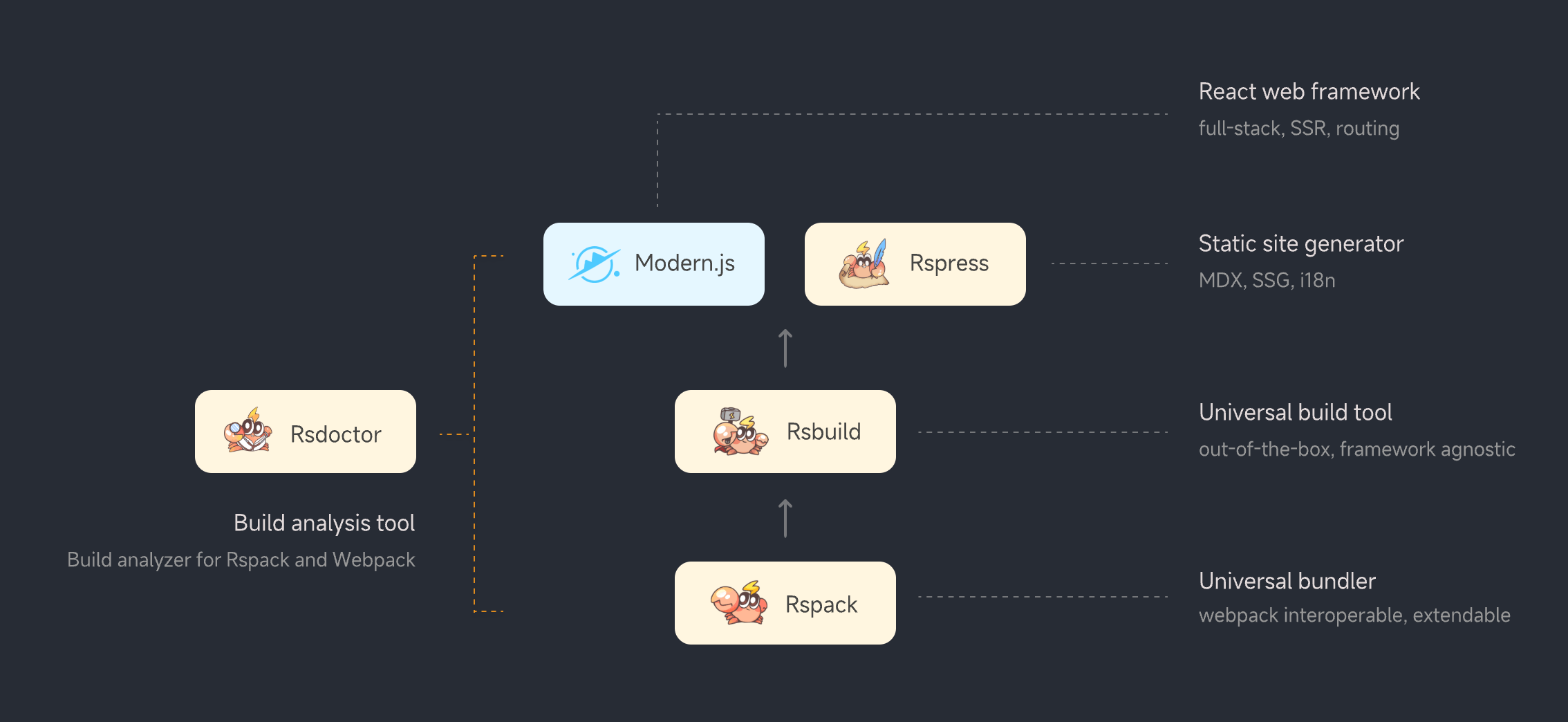
In the future, Rsdoctor will continue to provide first-class support for all tools in the **Rstack** (`Rspack stack` abbreviation) ecosystem:
|
|
63
|
+
|
|
64
|
+
<img
|
|
65
|
+
style={{ borderRadius: 12 }}
|
|
66
|
+
src="https://assets.rspack.dev/rstack/rstack-overview.png"
|
|
67
|
+
/>
|
|
68
|
+
|
|
69
|
+
## Typical use cases
|
|
70
|
+
|
|
71
|
+
Rsdoctor offers a rich set of features, detailed content can be found in the [Feature Navigation](/guide/start/features). Here are some typical use cases that demonstrate how Rsdoctor effectively solves common build problems:
|
|
72
|
+
|
|
73
|
+
### 1. "Why is the build speed too slow?"
|
|
74
|
+
|
|
75
|
+
During the build process, if you find that the compilation speed is too slow, you can use the [Loader Timeline](/guide/usage/loaders-timeline) to view the time consumption of loader execution, and understand the compilation time consumption of each file by each loader. This way, you can find loaders with excessive time consumption.
|
|
76
|
+
|
|
77
|
+
<img
|
|
78
|
+
style={{ borderRadius: 12 }}
|
|
79
|
+
src="https://assets.rspack.dev/rsdoctor/assets/loader-timeline-overall-v1-0.png"
|
|
80
|
+
/>
|
|
81
|
+
|
|
82
|
+
### 2. "Outputs are not as expected?"
|
|
83
|
+
|
|
84
|
+
During the build, there may be problems where the outputs do not match expectations, such as runtime exceptions or style errors. The [Loader Details](/guide/usage/loaders-analysis) page of Rsdoctor can help you examine the changes made by the loader to a specific file before and after compilation.
|
|
85
|
+
|
|
86
|
+
<img
|
|
87
|
+
style={{ borderRadius: 12 }}
|
|
88
|
+
src="https://assets.rspack.dev/rsdoctor/assets/babel-import-errors-v1-0.png"
|
|
89
|
+
/>
|
|
90
|
+
|
|
91
|
+
### 3. "How to split the chunks reasonably?"
|
|
92
|
+
|
|
93
|
+
We can use the [Bundle Analysis](/guide/usage/bundle-size) page to look at the modules tree of a particular artifact to see what modules the chunk contains, and then use the [splitChunks](https://rspack.dev/zh/plugins/webpack/split-chunks-plugin) configuration of Rspack to split the chunks appropriately.
|
|
94
|
+
|
|
95
|
+
<img
|
|
96
|
+
style={{ borderRadius: 12 }}
|
|
97
|
+
src="https://assets.rspack.dev/rsdoctor/assets/bundle-size-overall-v1-0.png"
|
|
98
|
+
/>
|
|
99
|
+
|
|
100
|
+
### 4. "How to analyze the reasons for the increase in bundle size?"
|
|
101
|
+
|
|
102
|
+
When a certain version is launched, if the performance of the online page deteriorates due to the increase in the size of the artifact, you can use the [Bundle Diff](/guide/usage/bundle-diff) feature of Rsdoctor to compare the details of the bundles of two commits, as well as the changes in the npm packages they depend on.
|
|
103
|
+
|
|
104
|
+
<img
|
|
105
|
+
style={{ borderRadius: 12 }}
|
|
106
|
+
src="https://assets.rspack.dev/rsdoctor/assets/bundle-diff-assets-v1-0.png"
|
|
107
|
+
/>
|
|
108
|
+
|
|
109
|
+
### 5. "Why is a certain module bundled?"
|
|
110
|
+
|
|
111
|
+
During the build process, if you want to know why a certain module file is bundled into the artifact, you can click on the `Module Graph` icon behind the module in the Modules tree on the [Artifact Analysis](/guide/usage/bundle-size) page to view the upstream dependency relationship of the module.
|
|
112
|
+
|
|
113
|
+
<img
|
|
114
|
+
style={{ width: 700, margin: 'auto', borderRadius: 12 }}
|
|
115
|
+
src="https://assets.rspack.dev/rsdoctor/assets/module-analysis-tree-v1-0.png"
|
|
116
|
+
/>
|
|
117
|
+
|
|
118
|
+
## What's new in 1.0
|
|
119
|
+
|
|
120
|
+
### 🎨 Brand new UI
|
|
121
|
+
|
|
122
|
+
In version 1.0, we have comprehensively optimized the user interface of Rsdoctor, making it more clear, elegant, and easy to navigate. The new design is dedicated to improving the user experience, making information display more intuitive and efficient.
|
|
123
|
+
|
|
124
|
+
### 🚀 Faster analysis
|
|
125
|
+
|
|
126
|
+
In large projects, enabling Rsdoctor can increase the overall build time. To solve this problem, we rewrote the time-consuming data processing logic in Rsdoctor in Rust, and integrated it into Rspack.
|
|
127
|
+
|
|
128
|
+
This optimization effectively improves the build analysis performance of Rsdoctor, and reduces the overall analysis time by more than **20%**. In the future, we will continue to native more modules to further improve the analysis efficiency.
|
|
129
|
+
|
|
130
|
+
This optimization can be enabled through the [enableNativePlugin](/config/options/options#enablenativeplugin) option:
|
|
131
|
+
|
|
132
|
+
```ts
|
|
133
|
+
new RsdoctorRspackPlugin({
|
|
134
|
+
experiments: {
|
|
135
|
+
enableNativePlugin: true,
|
|
136
|
+
},
|
|
137
|
+
});
|
|
138
|
+
```
|
|
139
|
+
|
|
140
|
+
### 🔍 Module searching
|
|
141
|
+
|
|
142
|
+
- **Search Module Capability**: In the `Bundle Size` page, we have added a module search function. Users can quickly locate and view the `Assets` where the module is located by entering the module name, making it more convenient to analyze the reference relationship and size of the module. [Details](/guide/usage/bundle-size#%E6%A8%A1%E5%9D%97%E6%90%9C%E7%B4%A2%E5%8A%9F%E8%83%BD)
|
|
143
|
+
|
|
144
|
+
<img
|
|
145
|
+
style={{ width: '80%', margin: 'auto', borderRadius: 12 }}
|
|
146
|
+
src="https://assets.rspack.dev/rsdoctor/assets/search-modules-v1-0.png"
|
|
147
|
+
/>
|
|
148
|
+
|
|
149
|
+
### 🛠️ New scanning rules
|
|
150
|
+
|
|
151
|
+
- [Duplicate packages detecting](/guide/rules/rules#e1002-cross-chunks-package): Added a rule for detecting duplicate packages across chunks, which can scan for duplicate packages in different `chunks`. These duplicate packages may cause redundant code in the build.
|
|
152
|
+
- [ECMA version checking](/guide/rules/rules#e1004-ecma-version-check): Enhanced the ECMA version detection rule, used to detect incompatible advanced syntax.
|
|
153
|
+
|
|
154
|
+
```ts
|
|
155
|
+
new RsdoctorRspackPlugin({
|
|
156
|
+
linter: {
|
|
157
|
+
rules: {
|
|
158
|
+
'ecma-version-check': [
|
|
159
|
+
'Warn',
|
|
160
|
+
{
|
|
161
|
+
ecmaVersion: 2015,
|
|
162
|
+
},
|
|
163
|
+
],
|
|
164
|
+
},
|
|
165
|
+
},
|
|
166
|
+
});
|
|
167
|
+
```
|
|
168
|
+
|
|
169
|
+
## How to use 1.0
|
|
170
|
+
|
|
171
|
+
- If you are using any tool or framework based on Rspack or webpack, you can refer to the [Quick Start](/guide/start/quick-start) to start using Rsdoctor.
|
|
172
|
+
- If you are using Rsdoctor 0.4 or earlier, please note that 1.0 contains a few incompatible updates:
|
|
173
|
+
- The `reportCodeType` and `reportDir` configuration items in the plugin configuration have been moved to [output](/config/options/options#reportcodetype).
|
|
174
|
+
|
|
175
|
+
> Welcome to give a star 🌟 to the [Rsdoctor GitHub](https://github.com/web-infra-dev/rsdoctor) repository.
|
|
176
|
+
|
|
177
|
+
## Next steps
|
|
178
|
+
|
|
179
|
+
- **AI powered analysis**: The build analysis data collected by Rsdoctor is very rich, but there may be a certain learning curve for new users. Therefore, we will integrate AI capabilities into Rsdoctor to help users quickly extract key information from massive data, provide intelligent optimization suggestions, and reduce the threshold of build analysis.
|
|
180
|
+
- **CI proactive monitoring**: Rsdoctor will extend its capabilities in CI environments by introducing [Rsdoctor CI Action](https://github.com/web-infra-dev/rsdoctor/discussions/491), based on the existing [Bundle Diff](/guide/usage/bundle-diff) feature. This will provide automated monitoring of bundle sizes and alerts for performance issues to ensure quality.
|
|
181
|
+
- **Further Native**: Due to the implementation of Rspack in Rust and the use of a multi-threaded architecture, the current analysis of the built-in loader of Rspack by Rsdoctor is not accurate enough. We plan to optimize the analysis mechanism based on [Rspack Native Plugin](/config/options/options#enablenativeplugin), and provide more accurate loader performance data and compilation behavior insights.
|
|
182
|
+
|
|
183
|
+
**Finally, thank you to all the developers who have contributed to Rsdoctor ❤️**:
|
|
184
|
+
|
|
185
|
+
[@9aoy](https://github.com/9aoy)、[@bin1357](https://github.com/bin1357)、[@cairon666](https://github.com/cairon666)、[@cclap2020](https://github.com/cclap2020)、[@charpeni](https://github.com/charpeni)、[@chenjiahan](https://github.com/chenjiahan)、[@ChuHoMan](https://github.com/ChuHoMan)、[@cnryb](https://github.com/cnryb)、[@Gehbt](https://github.com/Gehbt)、[@gezhicui](https://github.com/gezhicui)、[@HigherOrderLogic](https://github.com/HigherOrderLogic)、[@iamleniac](https://github.com/iamleniac)、[@inottn](https://github.com/inottn)、[@jkzing](https://github.com/jkzing)、[@KyrieLii](https://github.com/KyrieLii)、[@kwonoj](https://github.com/kwonoj)、[@LingyuCoder](https://github.com/LingyuCoder)、[@nanianlisao](https://github.com/nanianlisao)、[@nhducit](https://github.com/nhducit)、[@NickBolles](https://github.com/NickBolles)、[@nyqykk](https://github.com/nyqykk)、[@puppet-666](https://github.com/puppet-666)、[@SoonIter](https://github.com/SoonIter)、[@sudhakar-s](https://github.com/sudhakar-s)、[@Timeless0911](https://github.com/Timeless0911)、[@tinywaves](https://github.com/tinywaves)、[@trueLoving](https://github.com/trueLoving)、[@wChenonly](https://github.com/wChenonly)、[@zllkjc](https://github.com/zllkjc)。
|
|
@@ -287,7 +287,7 @@ type ISupport = {
|
|
|
287
287
|
#### banner
|
|
288
288
|
|
|
289
289
|
:::danger
|
|
290
|
-
|
|
290
|
+
`supports.banner` option is only used for debugging, do not use it in production.
|
|
291
291
|
:::
|
|
292
292
|
|
|
293
293
|
- default: false.
|
|
@@ -1,22 +1,35 @@
|
|
|
1
1
|
# Introduction
|
|
2
2
|
|
|
3
|
-
|
|
4
|
-
|
|
5
|
-
|
|
6
|
-
|
|
7
|
-
|
|
8
|
-
|
|
3
|
+
Rsdoctor is a build analyzer tailored for the [Rspack](https://rspack.dev/) ecosystem and fully compatible with the [webpack](https://webpack.js.org/) ecosystem.
|
|
4
|
+
|
|
5
|
+
Rsdoctor is committed to being a one-stop, intelligent build analyzer that makes the build process transparent, predictable, and optimizable through visualization and smart analysis, helping development teams precisely identify bottlenecks, optimize performance, and improve engineering quality.
|
|
6
|
+
|
|
7
|
+
Rsdoctor supports all tools and frameworks based on Rspack or webpack, such as: [Docusaurus](https://docusaurus.io/docs/api/plugins/@docusaurus/plugin-rsdoctor), [Rspeedy (Lynx)](https://lynxjs.org/rspeedy/), [Storybook](https://github.com/rspack-contrib/storybook-rsbuild), [Next.js](https://nextjs.org/), [Nuxt](https://nuxt.com/), [Re.Pack](https://re-pack.dev/), [Modern.js](https://modernjs.dev/), [Rsbuild](https://rsbuild.dev/), [Rspress](https://rspress.dev/) and [Rslib](https://lib.rsbuild.dev/).
|
|
8
|
+
|
|
9
|
+
<video
|
|
10
|
+
src="https://assets.rspack.dev/others/assets/rsdoctor/rsdoctor-1.0-ui.mp4"
|
|
11
|
+
style={{
|
|
12
|
+
width: '100%',
|
|
13
|
+
height: 'auto',
|
|
14
|
+
maxHeight: '50vh',
|
|
15
|
+
objectFit: 'cover',
|
|
16
|
+
display: 'block',
|
|
17
|
+
}}
|
|
18
|
+
autoPlay={true}
|
|
19
|
+
muted={true}
|
|
20
|
+
controls={true}
|
|
21
|
+
loop={true}
|
|
22
|
+
playsInline
|
|
23
|
+
/>
|
|
9
24
|
|
|
10
25
|
## 🔥 Features
|
|
11
26
|
|
|
12
27
|
- **Compilation Visualization**: Rsdoctor visualizes the compilation behavior and time consumption, making it easy to view build issues.
|
|
13
28
|
- **Multiple Analysis Capabilities**: Rsdoctor supports build artifact, build-time analysis, and anti-degradation capabilities:
|
|
14
29
|
- Build artifact support for resource lists and module dependencies, etc.
|
|
15
|
-
- Build-time analysis supports Loader, Plugin, and Resolver building process analysis
|
|
30
|
+
- Build-time analysis supports Loader, Plugin, and Resolver building process analysis.
|
|
16
31
|
- Build rules support duplicate package detection and ES Version Check, etc.
|
|
17
|
-
- Currently, bundle diff capabilities are also available.
|
|
18
32
|
- **Support Custom Rules**: In addition to built-in build scan rules, Rsdoctor also supports users adding custom component scan rules based on the build data of Rsdoctor.
|
|
19
|
-
- **Framework-Independent**: Rsdoctor support all projects built on Rspack or webpack.
|
|
20
33
|
|
|
21
34
|
## 🛠️ Introduction
|
|
22
35
|
|
|
@@ -114,7 +114,7 @@ export default nextConfig;
|
|
|
114
114
|
|
|
115
115
|
- **Options:** The plugin provides some configuration options, please refer to [Options](../../config/options/options).
|
|
116
116
|
|
|
117
|
-
#### 📢 Note for Next.js
|
|
117
|
+
#### 📢 Note for Next.js projects
|
|
118
118
|
|
|
119
119
|
Since Next.js closes the terminal service after the `build` execution is completed, the report page server run by Rsdoctor during the build process will also be shut down. At this point, you can reopen the report page using [@rsdoctor/cli](/guide/start/cli) without having to execute the build operation again.
|
|
120
120
|
|
|
@@ -141,7 +141,7 @@ Click the **"Bundle Analyzer Graph"** button on the **"Bundle Size"** page to vi
|
|
|
141
141
|
## Supports BannerPlugin
|
|
142
142
|
|
|
143
143
|
:::danger
|
|
144
|
-
|
|
144
|
+
`supports.banner` option is only used for debugging, do not use it in production.
|
|
145
145
|
:::
|
|
146
146
|
|
|
147
147
|
Both Rspack and webpack support the [BannerPlugin](https://www.rspack.dev/plugins/webpack/banner-plugin#bannerplugin), which is a built-in plugin that allows you to add specific content at the top or bottom of the generated chunks.
|
package/docs/zh/_meta.json
CHANGED
|
@@ -1 +1 @@
|
|
|
1
|
-
["release-note-0_4", "release-note-0_3", "release-note-0_1"]
|
|
1
|
+
["release-note-1_0", "release-note-0_4", "release-note-0_3", "release-note-0_1"]
|
|
@@ -1,4 +1,10 @@
|
|
|
1
|
-
|
|
1
|
+
---
|
|
2
|
+
published_at: 2024-01-24 08:00:00
|
|
3
|
+
---
|
|
4
|
+
|
|
5
|
+
_January 24, 2024_
|
|
6
|
+
|
|
7
|
+
# Rsdoctor 0.1 发布公告
|
|
2
8
|
|
|
3
9
|
<picture>
|
|
4
10
|
<img
|
|
@@ -8,7 +14,7 @@
|
|
|
8
14
|
/>
|
|
9
15
|
</picture>
|
|
10
16
|
|
|
11
|
-
我们很高兴地宣布 [Rsdoctor](https://rsdoctor.dev/)
|
|
17
|
+
我们很高兴地宣布 [Rsdoctor](https://rsdoctor.dev/) 0.1 发布了!
|
|
12
18
|
|
|
13
19
|
Rsdoctor 是一个针对 Rspack 和 webpack 的一站式构建分析工具,可以对构建时和构建产物进行详细分析,让构建过程变得可视化和透明。
|
|
14
20
|
|
|
@@ -117,6 +123,6 @@ Rsdoctor 的一些实现参考了社区中杰出的项目,对他们表示感
|
|
|
117
123
|
|
|
118
124
|
- 借鉴了 [bundle-stats](https://github.com/relative-ci/bundle-stats/tree/master/packages/cli#readme) 对产物关系的分析逻辑。
|
|
119
125
|
- 借鉴了 [webpack-bundle-analyzer](https://github.com/webpack-contrib/webpack-bundle-analyzer) 对产物模块拆解及分析逻辑。
|
|
120
|
-
- [Statoscope](https://github.com/statoscope/statoscope/blob/master/README.md)是一个优秀的构建产物分析工具,Rsdoctor 在构建产物分析方面受到了它的启发。
|
|
126
|
+
- [Statoscope](https://github.com/statoscope/statoscope/blob/master/README.md) 是一个优秀的构建产物分析工具,Rsdoctor 在构建产物分析方面受到了它的启发。
|
|
121
127
|
- [Webpack 团队和社区](https://github.com/webpack/webpack/blob/main/README.md) 创建了一个优秀的打包工具和丰富的生态。
|
|
122
128
|
- [vite-plugin-inspect](https://github.com/antfu/vite-plugin-inspect) 启发了 Rsdoctor 对构建过程分析的探索。
|
|
@@ -1,8 +1,14 @@
|
|
|
1
|
-
|
|
1
|
+
---
|
|
2
|
+
published_at: 2024-06-02 08:00:00
|
|
3
|
+
---
|
|
2
4
|
|
|
3
|
-
|
|
5
|
+
_June 02, 2024_
|
|
4
6
|
|
|
5
|
-
Rsdoctor
|
|
7
|
+
# Rsdoctor 0.3 发布公告
|
|
8
|
+
|
|
9
|
+
Rsdoctor 0.3 已经发布啦!
|
|
10
|
+
|
|
11
|
+
Rsdoctor 0.3 的新特性有:
|
|
6
12
|
|
|
7
13
|
- 自定义拓展规则:用户可以通过接口定制特有的规则检查。
|
|
8
14
|
- 支持 Banner Plugin:增加了对 Banner Plugin 的支持,该插件会对产物代码添加模板包裹,因此 Rsdoctor 支持了变化后产物代码的分析。
|
|
@@ -1,8 +1,14 @@
|
|
|
1
|
-
|
|
1
|
+
---
|
|
2
|
+
published_at: 2024-10-09 08:00:00
|
|
3
|
+
---
|
|
2
4
|
|
|
3
|
-
|
|
5
|
+
_October 09, 2024_
|
|
4
6
|
|
|
5
|
-
Rsdoctor
|
|
7
|
+
# Rsdoctor 0.4 发布公告
|
|
8
|
+
|
|
9
|
+
Rsdoctor 0.4 已经发布啦!
|
|
10
|
+
|
|
11
|
+
Rsdoctor 0.4 的新特性有:
|
|
6
12
|
|
|
7
13
|
- **Brief 模式**: 输出单个报告文件,适用于 CI 流程。
|
|
8
14
|
- **Bundle Diff**: 对比和分析两次构建产物的变化。
|
|
@@ -10,7 +16,7 @@ Rsdoctor v0.4 的新特性有:
|
|
|
10
16
|
|
|
11
17
|
## Brief report
|
|
12
18
|
|
|
13
|
-
在 Rsdoctor
|
|
19
|
+
在 Rsdoctor 0.4 中,新增了 **Brief 模式**,专为 CI/CD 场景设计。Brief 模式将数据报告整合到一个 HTML 页面中,方便用户在 CI/CD 及其他场景下查看历史构建数据。以下是 Brief 模式的主要特点:
|
|
14
20
|
|
|
15
21
|
- **单个报告文件**:之前 Rsdoctor 输出的多个报告数据与 `Manifest.json`,不方便进行 CDN 上传和共享,Brief 模式输出单一报告方便 CI 流程中使用。
|
|
16
22
|
- **易于配置**:通过配置 Rsdoctor 插件的 [mode.brief](/config/options/options#mode) 选项即可开启 Brief 模式。
|
|
@@ -0,0 +1,183 @@
|
|
|
1
|
+
---
|
|
2
|
+
published_at: 2025-03-19 08:00:00
|
|
3
|
+
---
|
|
4
|
+
|
|
5
|
+
_March 19, 2025_
|
|
6
|
+
|
|
7
|
+
# Rsdoctor 1.0 发布公告
|
|
8
|
+
|
|
9
|
+
我们很高兴地宣布 **Rsdoctor 1.0** 已经正式发布!
|
|
10
|
+
|
|
11
|
+
在经过一年的迭代与验证后,我们正式推出 **Rsdoctor 1.0** —— 一款为 [Rspack](https://rspack.dev/) 生态量身打造的构建分析工具,同时也完全兼容 [webpack](https://webpack.js.org/) 生态。
|
|
12
|
+
|
|
13
|
+
Rsdoctor 致力于成为一站式、智能化的构建分析工具,通过可视化与智能分析,使整个构建流程变得透明、可预测和可优化,从而帮助开发团队精准定位瓶颈、优化性能并提升工程质量。
|
|
14
|
+
|
|
15
|
+
<video
|
|
16
|
+
src="https://assets.rspack.dev/others/assets/rsdoctor/rsdoctor-1.0-ui.mp4"
|
|
17
|
+
style={{
|
|
18
|
+
width: '100%',
|
|
19
|
+
height: 'auto',
|
|
20
|
+
maxHeight: '50vh',
|
|
21
|
+
objectFit: 'cover',
|
|
22
|
+
display: 'block',
|
|
23
|
+
}}
|
|
24
|
+
autoPlay={true}
|
|
25
|
+
muted={true}
|
|
26
|
+
controls={true}
|
|
27
|
+
loop={true}
|
|
28
|
+
playsInline
|
|
29
|
+
/>
|
|
30
|
+
|
|
31
|
+
## 为什么是 Rsdoctor
|
|
32
|
+
|
|
33
|
+
在构建分析领域,社区已有一些成熟的工具,如用于产物体积可视化的 [webpack-bundle-analyzer](https://github.com/webpack-contrib/webpack-bundle-analyzer)、提供资源全面分析的 [Statoscope](https://github.com/statoscope/statoscope/)。此外,[speed-measure-webpack-plugin](https://github.com/stephencookdev/speed-measure-webpack-plugin) 可以用于分析插件与 loader 的执行时间,定位构建性能瓶颈。
|
|
34
|
+
|
|
35
|
+
然而,这些工具依然存在一些不足,例如缺乏细粒度的构建细节展示、不具备全方位的构建问题分析能力、不兼容 Rspack、以及缺少构建预警扫描功能。
|
|
36
|
+
|
|
37
|
+
总结来说,社区工具有以下可改进的方面:
|
|
38
|
+
|
|
39
|
+
1. **分析不够深入**:传统工具无法深入探索构建过程的细节和变化。例如,如果想要查看某个 loader 编译细节,开发者常常需要手动设置断点逐步调试。
|
|
40
|
+
2. **功能局限性**:现有的分析工具通常只展示产物数据,缺乏构建扫描功能,无法主动提供优化建议,也不支持自定义检查规则。
|
|
41
|
+
3. **Rspack 支持**:现有工具对 Rspack 的支持不够全面,例如无法分析 Rspack 的 [内置 loader](https://rspack.dev/guide/features/builtin-swc-loader) 。
|
|
42
|
+
|
|
43
|
+
### Rsdoctor 的诞生
|
|
44
|
+
|
|
45
|
+
根据以上现状,我们决定为 Rspack 生态开发一个专注于构建分析的工具 —— **Rsdoctor**。
|
|
46
|
+
|
|
47
|
+
我们为 Rsdoctor 设计了直观的用户界面,将构建数据可视化。同时,Rsdoctor 在结合多种工具的基础上,额外扩展了 loader 分析能力以更深入 loader 的编译行为,内置了产物及编译的扫描和检测规则,并支持用户自定义规则。
|
|
48
|
+
|
|
49
|
+
Rsdoctor 不仅支持 Rspack 和 webpack,也支持所有基于 Rspack 或 webpack 的工具和框架,例如:[Docusaurus](https://docusaurus.io/docs/api/plugins/@docusaurus/plugin-rsdoctor)、[Rspeedy (Lynx)](https://lynxjs.org/rspeedy/)、[Storybook](https://github.com/rspack-contrib/storybook-rsbuild)、[Next.js](https://nextjs.org/)、[Nuxt](https://nuxt.com/)、[Re.Pack](https://re-pack.dev/)、[Modern.js](https://modernjs.dev/)、[Rsbuild](https://rsbuild.dev/)、[Rspress](https://rspress.dev/) 和 [Rslib](https://lib.rsbuild.dev/) 等。
|
|
50
|
+
|
|
51
|
+
Rsdoctor 可以被用于:
|
|
52
|
+
|
|
53
|
+
- **作为一个构建分析工具**:帮助开发者深入了解构建过程中的每一个环节,提供详细的编译和产物分析。
|
|
54
|
+
- **作为一个可扩展的分析工具**:允许开发者根据项目需求自定义分析规则,实现对构建过程的有针对性的优化。
|
|
55
|
+
|
|
56
|
+
## 谁在使用
|
|
57
|
+
|
|
58
|
+
Rsdoctor 已在字节跳动内部得到广泛应用,帮助开发者高效分析和解决构建过程中的各类问题。
|
|
59
|
+
|
|
60
|
+
自 2024 年开源以来,Rsdoctor 在 npm 上的周下载量已突破 **10 万**。在社区里,Rsdoctor 已被集成到 [Docusaurus](https://docusaurus.io/docs/api/plugins/@docusaurus/plugin-rsdoctor) 和 [Lynx](https://lynxjs.org/rspeedy/use-rsdoctor.html) 等框架中。此外,Rsdoctor 也被 [Sentry](https://github.com/getsentry/sentry/pull/63865)、[NocoBase](https://github.com/nocobase/nocobase/blob/main/packages/core/build/src/buildPlugin.ts#L493) 和 [Grafana](https://github.com/grafana/grafana/pull/94729) 等大型项目所采用。
|
|
61
|
+
|
|
62
|
+
未来 Rsdoctor 将持续为 **Rstack**(`Rspack stack` 的缩写)生态的所有工具提供一流的支持:
|
|
63
|
+
|
|
64
|
+
<img
|
|
65
|
+
style={{ borderRadius: 12 }}
|
|
66
|
+
src="https://assets.rspack.dev/rstack/rstack-overview.png"
|
|
67
|
+
/>
|
|
68
|
+
|
|
69
|
+
## 常见应用场景
|
|
70
|
+
|
|
71
|
+
Rsdoctor 提供了丰富的功能,详细内容可参考 [功能导航](/guide/start/features)。以下是几个典型应用场景,展示了 Rsdoctor 如何有效解决常见的构建问题:
|
|
72
|
+
|
|
73
|
+
### 1. 「构建速度太慢?」
|
|
74
|
+
|
|
75
|
+
在构建过程中,如果发现编译速度过慢,可以通过 [Loader 时序图](/guide/usage/loaders-timeline) 查看 loader 执行的时间开销,以及每个文件的编译时间开销,从而对性能不足的 loader 进行针对性优化。
|
|
76
|
+
|
|
77
|
+
<img
|
|
78
|
+
style={{ borderRadius: 12 }}
|
|
79
|
+
src="https://assets.rspack.dev/rsdoctor/assets/loader-timeline-overall-v1-0.png"
|
|
80
|
+
/>
|
|
81
|
+
|
|
82
|
+
### 2. 「构建结果与预期不符?」
|
|
83
|
+
|
|
84
|
+
在构建过程中,可能会遇到编译结果与预期不符的问题,例如出现运行时异常或样式错误等问题。Rsdoctor 的 [Loader Details](/guide/usage/loaders-analysis) 页面可以帮助你检查 loader 对特定文件的编译前后变化。
|
|
85
|
+
|
|
86
|
+
<img
|
|
87
|
+
style={{ borderRadius: 12 }}
|
|
88
|
+
src="https://assets.rspack.dev/rsdoctor/assets/babel-import-errors-v1-0.png"
|
|
89
|
+
/>
|
|
90
|
+
|
|
91
|
+
### 3.「如何合理分包?」
|
|
92
|
+
|
|
93
|
+
我们可以通过 [产物分析](/guide/usage/bundle-size) 页面查看某个产物的 Modules 树来查看该产物资源包含了哪些 Modules,进而通过 Rspack 的 [splitChunks](https://rspack.dev/zh/plugins/webpack/split-chunks-plugin) 配置来进行合理的分包。
|
|
94
|
+
|
|
95
|
+
<img
|
|
96
|
+
style={{ borderRadius: 12 }}
|
|
97
|
+
src="https://assets.rspack.dev/rsdoctor/assets/bundle-size-overall-v1-0.png"
|
|
98
|
+
/>
|
|
99
|
+
|
|
100
|
+
### 4.「如何分析产物增大原因?」
|
|
101
|
+
|
|
102
|
+
当某个版本上线后,由于产物体积增大导致线上页面性能出现劣化,可以通过 Rsdoctor 的 [Bundle Diff](/guide/usage/bundle-diff) 功能来对比两次 commit 的产物细节,以及依赖的 npm 包变化。
|
|
103
|
+
|
|
104
|
+
<img
|
|
105
|
+
style={{ borderRadius: 12 }}
|
|
106
|
+
src="https://assets.rspack.dev/rsdoctor/assets/bundle-diff-assets-v1-0.png"
|
|
107
|
+
/>
|
|
108
|
+
|
|
109
|
+
### 5.「某个模块为什么会被打包?」
|
|
110
|
+
|
|
111
|
+
构建过程中,如果想要知道某个模块文件为什么会被打包到产物中,则可以在 [产物分析](/guide/usage/bundle-size) 页面中的 Modules 树图中点击该模块后面的 `Module Graph` 图标,查看该模块的上游依赖模块关系。
|
|
112
|
+
|
|
113
|
+
<img
|
|
114
|
+
style={{ width: 700, margin: 'auto', borderRadius: 12 }}
|
|
115
|
+
src="https://assets.rspack.dev/rsdoctor/assets/module-analysis-tree-v1-0.png"
|
|
116
|
+
/>
|
|
117
|
+
|
|
118
|
+
## 1.0 新特性
|
|
119
|
+
|
|
120
|
+
### 🎨 UI 界面升级
|
|
121
|
+
|
|
122
|
+
在 1.0 版本中,我们全面优化了 Rsdoctor 的用户界面,使其更加清晰、优雅和易于导航。新的设计致力于改善用户体验,并让信息展示更加直观和高效。
|
|
123
|
+
|
|
124
|
+
### 🚀 分析效率提升
|
|
125
|
+
|
|
126
|
+
在大型项目中,启用 Rsdoctor 会导致整体构建时间增加。为解决这一问题,我们将 Rsdoctor 中耗时较长的数据处理逻辑使用 Rust 重写,并集成到 Rspack 中。这一优化有效提升了 Rsdoctor 的构建分析性能,整体分析时间减少了 20% 以上。后续我们将继续将更多模块原生化来进一步提升分析效率。
|
|
127
|
+
|
|
128
|
+
这一优化可以通过 [enableNativePlugin](/config/options/options#enablenativeplugin) 选项开启:
|
|
129
|
+
|
|
130
|
+
```ts
|
|
131
|
+
new RsdoctorRspackPlugin({
|
|
132
|
+
experiments: {
|
|
133
|
+
enableNativePlugin: true,
|
|
134
|
+
},
|
|
135
|
+
});
|
|
136
|
+
```
|
|
137
|
+
|
|
138
|
+
### 🔍 模块搜索功能
|
|
139
|
+
|
|
140
|
+
在 `Bundle Size` 页面中,我们新增了 [模块搜索功能](/guide/usage/bundle-size#%E6%A8%A1%E5%9D%97%E6%90%9C%E7%B4%A2%E5%8A%9F%E8%83%BD)。用户可以通过输入模块名称来快速定位和查看模块所在的 chunk,从而更方便地分析模块的引用关系和大小。
|
|
141
|
+
|
|
142
|
+
<img
|
|
143
|
+
style={{ width: '80%', margin: 'auto', borderRadius: 12 }}
|
|
144
|
+
src="https://assets.rspack.dev/rsdoctor/assets/search-modules-v1-0.png"
|
|
145
|
+
/>
|
|
146
|
+
|
|
147
|
+
### 🛠️ 新增扫描规则
|
|
148
|
+
|
|
149
|
+
- [重复包检测](/guide/rules/rules#e1002-cross-chunks-package):新增了跨 chunks 的重复包检测规则,该规则能够扫描不同 chunks 中的重复包。这些重复包可能导致产物体积增大。
|
|
150
|
+
- [ECMA 版本检测](/guide/rules/rules#e1004-ecma-version-check):增强了 ECMA 版本检测规则,用于检测不兼容的高级语法。
|
|
151
|
+
|
|
152
|
+
```ts
|
|
153
|
+
new RsdoctorRspackPlugin({
|
|
154
|
+
linter: {
|
|
155
|
+
rules: {
|
|
156
|
+
'ecma-version-check': [
|
|
157
|
+
'Warn',
|
|
158
|
+
{
|
|
159
|
+
ecmaVersion: 2015,
|
|
160
|
+
},
|
|
161
|
+
],
|
|
162
|
+
},
|
|
163
|
+
},
|
|
164
|
+
});
|
|
165
|
+
```
|
|
166
|
+
|
|
167
|
+
## 如何使用 1.0
|
|
168
|
+
|
|
169
|
+
- 如果你在使用任何基于 Rspack 或 webpack 的工具或框架,可以参考 [快速开始](/guide/start/quick-start) 来开始使用 Rsdoctor。
|
|
170
|
+
- 如果你在使用 Rsdoctor 0.4 或更早的版本,请留意 1.0 包含少量不兼容更新:
|
|
171
|
+
- 插件配置中的 `reportCodeType` 和 `reportDir` 配置项移动到 [output](/config/options/options#reportcodetype) 下。
|
|
172
|
+
|
|
173
|
+
> 欢迎为 [Rsdoctor GitHub](https://github.com/web-infra-dev/rsdoctor) 仓库点亮一颗 Star 🌟。
|
|
174
|
+
|
|
175
|
+
## 下一步
|
|
176
|
+
|
|
177
|
+
- **AI 智能分析**:Rsdoctor 收集的构建分析数据非常丰富,但对新用户而言可能存在一定的学习成本。为此,我们将整合 AI 能力到 Rsdoctor 中,帮助用户从海量数据中快速提取关键信息,提供智能优化建议,从而降低构建分析的门槛。
|
|
178
|
+
- **CI 主动防劣化**:基于现有的 [Bundle Diff](/guide/usage/bundle-diff) 功能,Rsdoctor 将拓展 CI 环境下的主动防劣化能力,推出 [Rsdoctor CI Action](https://github.com/web-infra-dev/rsdoctor/discussions/491),实现自动化的产物体积监控和性能劣化预警,为工程质量提供保障。
|
|
179
|
+
- **进一步原生化**:由于 Rspack 基于 Rust 实现且采用多线程架构,当前 Rsdoctor 对 Rspack 内置 loader 的分析不够精确。我们计划在 [Rspack Native Plugin](/config/options/options#enablenativeplugin) 的基础上优化分析机制,提供更准确的 loader 性能数据和编译行为洞察。
|
|
180
|
+
|
|
181
|
+
**最后,感谢所有为 Rsdoctor 贡献过的开发者 ❤️**:
|
|
182
|
+
|
|
183
|
+
[@9aoy](https://github.com/9aoy)、[@bin1357](https://github.com/bin1357)、[@cairon666](https://github.com/cairon666)、[@cclap2020](https://github.com/cclap2020)、[@charpeni](https://github.com/charpeni)、[@chenjiahan](https://github.com/chenjiahan)、[@ChuHoMan](https://github.com/ChuHoMan)、[@cnryb](https://github.com/cnryb)、[@Gehbt](https://github.com/Gehbt)、[@gezhicui](https://github.com/gezhicui)、[@HigherOrderLogic](https://github.com/HigherOrderLogic)、[@iamleniac](https://github.com/iamleniac)、[@inottn](https://github.com/inottn)、[@jkzing](https://github.com/jkzing)、[@KyrieLii](https://github.com/KyrieLii)、[@kwonoj](https://github.com/kwonoj)、[@LingyuCoder](https://github.com/LingyuCoder)、[@nanianlisao](https://github.com/nanianlisao)、[@nhducit](https://github.com/nhducit)、[@NickBolles](https://github.com/NickBolles)、[@nyqykk](https://github.com/nyqykk)、[@puppet-666](https://github.com/puppet-666)、[@SoonIter](https://github.com/SoonIter)、[@sudhakar-s](https://github.com/sudhakar-s)、[@Timeless0911](https://github.com/Timeless0911)、[@tinywaves](https://github.com/tinywaves)、[@trueLoving](https://github.com/trueLoving)、[@wChenonly](https://github.com/wChenonly)、[@zllkjc](https://github.com/zllkjc)。
|
|
@@ -1,11 +1,26 @@
|
|
|
1
1
|
# 介绍
|
|
2
2
|
|
|
3
|
-
|
|
4
|
-
|
|
5
|
-
|
|
6
|
-
|
|
7
|
-
-
|
|
8
|
-
|
|
3
|
+
Rsdoctor 是一款为 [Rspack](https://rspack.dev/) 生态量身打造的构建分析工具,同时也完全兼容 [webpack](https://webpack.js.org/) 生态。
|
|
4
|
+
|
|
5
|
+
Rsdoctor 致力于成为一站式、智能化的构建分析工具,通过可视化与智能分析,使整个构建流程变得透明、可预测和可优化,从而帮助开发团队精准定位瓶颈、优化性能并提升工程质量。
|
|
6
|
+
|
|
7
|
+
Rsdoctor 支持所有基于 Rspack 或 webpack 的工具和框架,例如:[Docusaurus](https://docusaurus.io/docs/api/plugins/@docusaurus/plugin-rsdoctor)、[Rspeedy (Lynx)](https://lynxjs.org/rspeedy/)、[Storybook](https://github.com/rspack-contrib/storybook-rsbuild)、[Next.js](https://nextjs.org/)、[Nuxt](https://nuxt.com/)、[Re.Pack](https://re-pack.dev/)、[Modern.js](https://modernjs.dev/)、[Rsbuild](https://rsbuild.dev/)、[Rspress](https://rspress.dev/) 和 [Rslib](https://lib.rsbuild.dev/) 等。
|
|
8
|
+
|
|
9
|
+
<video
|
|
10
|
+
src="https://assets.rspack.dev/others/assets/rsdoctor/rsdoctor-1.0-ui.mp4"
|
|
11
|
+
style={{
|
|
12
|
+
width: '100%',
|
|
13
|
+
height: 'auto',
|
|
14
|
+
maxHeight: '50vh',
|
|
15
|
+
objectFit: 'cover',
|
|
16
|
+
display: 'block',
|
|
17
|
+
}}
|
|
18
|
+
autoPlay={true}
|
|
19
|
+
muted={true}
|
|
20
|
+
controls={true}
|
|
21
|
+
loop={true}
|
|
22
|
+
playsInline
|
|
23
|
+
/>
|
|
9
24
|
|
|
10
25
|
## 🔥 特性
|
|
11
26
|
|
|
@@ -13,10 +28,8 @@
|
|
|
13
28
|
- **多种分析能力**:支持构建产物、构建时分析能力:
|
|
14
29
|
- 构建产物支持资源列表及模块依赖等。
|
|
15
30
|
- 构建时分析支持 Loader、Plugin、Resolver 构建过程分析。
|
|
16
|
-
- 支持分析 Rspack 的 builtin loaders。
|
|
17
31
|
- 构建规则支持重复包检测及 ES Version Check 检查等。
|
|
18
32
|
- **支持自定义规则**:除了内置构建扫描规则外,还支持用户根据 Rsdoctor 的构建数据添加自定义构建扫描规则。
|
|
19
|
-
- **框架无关**:支持所有基于 Rspack 或 webpack 构建的项目。
|
|
20
33
|
|
|
21
34
|
## 🛠️ 功能介绍
|
|
22
35
|
|
|
@@ -132,7 +132,7 @@
|
|
|
132
132
|
## 支持 BannerPlugin
|
|
133
133
|
|
|
134
134
|
:::danger
|
|
135
|
-
|
|
135
|
+
`supports.banner` 选项仅用于调试,请勿将其用于生产。
|
|
136
136
|
:::
|
|
137
137
|
|
|
138
138
|
由于 Rspack 和 webpack 都支持 [BannerPlugin](https://www.rspack.dev/plugins/webpack/banner-plugin#bannerplugin),BannerPlugin 是可在生成的 chunk 顶部或尾部添加一段指定的内容的内置插件。
|
package/package.json
CHANGED
|
@@ -1,6 +1,6 @@
|
|
|
1
1
|
{
|
|
2
2
|
"name": "@rsdoctor/docs",
|
|
3
|
-
"version": "1.0.0",
|
|
3
|
+
"version": "1.0.1-beta.0",
|
|
4
4
|
"repository": {
|
|
5
5
|
"type": "git",
|
|
6
6
|
"url": "https://github.com/web-infra-dev/rsdoctor",
|
|
@@ -19,9 +19,9 @@
|
|
|
19
19
|
"registry": "https://registry.npmjs.org/"
|
|
20
20
|
},
|
|
21
21
|
"devDependencies": {
|
|
22
|
-
"@rspress/plugin-rss": "2.0.0-alpha.
|
|
22
|
+
"@rspress/plugin-rss": "2.0.0-alpha.5",
|
|
23
23
|
"@types/node": "^16",
|
|
24
|
-
"@types/react": "^18.3.
|
|
24
|
+
"@types/react": "^18.3.19",
|
|
25
25
|
"@types/react-dom": "^18.3.5",
|
|
26
26
|
"react": "18.3.1",
|
|
27
27
|
"react-dom": "18.3.1",
|
|
@@ -30,12 +30,12 @@
|
|
|
30
30
|
"rspress-plugin-font-open-sans": "^1.0.0",
|
|
31
31
|
"rspress-plugin-sitemap": "^1.1.1",
|
|
32
32
|
"typescript": "^5.2.2",
|
|
33
|
-
"@rsdoctor/types": "1.0.0"
|
|
33
|
+
"@rsdoctor/types": "1.0.1-beta.0"
|
|
34
34
|
},
|
|
35
35
|
"dependencies": {
|
|
36
36
|
"@rstack-dev/doc-ui": "1.7.3",
|
|
37
|
-
"react-markdown": "^9.0
|
|
38
|
-
"rspress": "2.0.0-alpha.
|
|
37
|
+
"react-markdown": "^9.1.0",
|
|
38
|
+
"rspress": "2.0.0-alpha.5"
|
|
39
39
|
},
|
|
40
40
|
"scripts": {
|
|
41
41
|
"dev": "rspress dev",
|