@rsdoctor/docs 0.4.13 → 1.0.0-alpha.1
This diff represents the content of publicly available package versions that have been released to one of the supported registries. The information contained in this diff is provided for informational purposes only and reflects changes between package versions as they appear in their respective public registries.
- package/README.md +5 -0
- package/docs/en/blog/release/release-note-0_1.mdx +8 -8
- package/docs/en/blog/release/release-note-0_3.mdx +5 -5
- package/docs/en/blog/release/release-note-0_4.mdx +5 -5
- package/docs/en/blog/topic/duplicate-pkg-problem.mdx +8 -8
- package/docs/en/blog/topic/loader-optimization.mdx +5 -5
- package/docs/en/config/options/options.mdx +1 -1
- package/docs/en/config/options/term.mdx +1 -1
- package/docs/en/guide/custom/rule-custom.mdx +16 -16
- package/docs/en/guide/custom/upload-data.mdx +1 -1
- package/docs/en/guide/more/rules.mdx +1 -1
- package/docs/en/guide/start/cicd.mdx +4 -4
- package/docs/en/guide/start/cli.mdx +3 -3
- package/docs/en/guide/start/features.mdx +3 -3
- package/docs/en/guide/start/intro.mdx +6 -6
- package/docs/en/guide/start/quick-start-shared.mdx +4 -4
- package/docs/en/guide/start/quick-start.mdx +3 -3
- package/docs/en/guide/usage/bundle-alerts.mdx +5 -4
- package/docs/en/guide/usage/bundle-diff.mdx +3 -3
- package/docs/en/guide/usage/bundle-overall.mdx +3 -3
- package/docs/en/guide/usage/bundle-size.mdx +9 -9
- package/docs/en/guide/usage/compile-alerts.mdx +1 -1
- package/docs/en/guide/usage/compile-overall.mdx +7 -7
- package/docs/en/guide/usage/loaders-analysis.mdx +3 -3
- package/docs/en/guide/usage/loaders-timeline.mdx +3 -3
- package/docs/en/guide/usage/module-analysis.mdx +3 -3
- package/docs/en/guide/usage/plugins-analysis.mdx +4 -4
- package/docs/en/guide/usage/project-overall.mdx +2 -2
- package/docs/en/guide/usage/resolver.mdx +1 -1
- package/docs/en/guide/usage/rule-config.mdx +31 -3
- package/docs/zh/blog/release/release-note-0_3.mdx +4 -4
- package/docs/zh/blog/release/release-note-0_4.mdx +4 -4
- package/docs/zh/blog/topic/duplicate-pkg-problem.mdx +1 -1
- package/docs/zh/guide/more/faq.mdx +1 -1
- package/docs/zh/guide/more/rules.mdx +1 -1
- package/docs/zh/guide/start/cicd.mdx +1 -1
- package/docs/zh/guide/start/intro.mdx +1 -1
- package/docs/zh/guide/usage/bundle-diff.mdx +1 -1
- package/docs/zh/guide/usage/bundle-overall.mdx +1 -1
- package/docs/zh/guide/usage/plugins-analysis.mdx +1 -1
- package/docs/zh/guide/usage/project-overall.mdx +1 -1
- package/docs/zh/guide/usage/rule-config.mdx +28 -0
- package/package.json +5 -5
package/README.md
ADDED
|
@@ -1,4 +1,4 @@
|
|
|
1
|
-
# Rsdoctor v0.1
|
|
1
|
+
# Rsdoctor v0.1 release note
|
|
2
2
|
|
|
3
3
|
<picture>
|
|
4
4
|
<img
|
|
@@ -42,11 +42,11 @@ Rsdoctor is a one-stop build analysis tool for Rspack and Webpack. It allows for
|
|
|
42
42
|
|
|
43
43
|
|
|
44
44
|
|
|
45
|
-
### ⭐️ Compilation
|
|
45
|
+
### ⭐️ Compilation analysis
|
|
46
46
|
|
|
47
47
|
Provides corresponding data and analysis functions for **Loaders, Plugins, and Module Resolve** to help you analyze problems in the compilation process.
|
|
48
48
|
|
|
49
|
-
#### Loader
|
|
49
|
+
#### Loader analysis
|
|
50
50
|
|
|
51
51
|
- This module mainly provides the function of data analysis such as input and output, estimated time consumption, and parameters within **Rspack or Webpack Loaders**.
|
|
52
52
|
|
|
@@ -63,7 +63,7 @@ Provides corresponding data and analysis functions for **Loaders, Plugins, and M
|
|
|
63
63
|
/>
|
|
64
64
|
</div>
|
|
65
65
|
|
|
66
|
-
#### Plugin
|
|
66
|
+
#### Plugin analysis
|
|
67
67
|
|
|
68
68
|
- This module mainly intercepts and collects data information such as the number of calls and estimated time consumption of Plugins.
|
|
69
69
|
|
|
@@ -78,7 +78,7 @@ Provides corresponding data and analysis functions for **Loaders, Plugins, and M
|
|
|
78
78
|
/>
|
|
79
79
|
</p>
|
|
80
80
|
|
|
81
|
-
#### Resolve
|
|
81
|
+
#### Resolve analysis
|
|
82
82
|
|
|
83
83
|
- This module mainly provides path data and estimated time consumption for module resolution in a single file within the project. Rspack does not currently support this module.
|
|
84
84
|
|
|
@@ -93,7 +93,7 @@ Provides corresponding data and analysis functions for **Loaders, Plugins, and M
|
|
|
93
93
|
/>
|
|
94
94
|
</p>
|
|
95
95
|
|
|
96
|
-
### ⭐️ Product
|
|
96
|
+
### ⭐️ Product analysis
|
|
97
97
|
|
|
98
98
|
- In the **Bundle Size** page, we can see an overview of the product data information of the current project, as well as analyze the size and reasons for duplicate package imports.
|
|
99
99
|
|
|
@@ -110,11 +110,11 @@ Provides corresponding data and analysis functions for **Loaders, Plugins, and M
|
|
|
110
110
|
/>
|
|
111
111
|
</p>
|
|
112
112
|
|
|
113
|
-
## 📚 Quick
|
|
113
|
+
## 📚 Quick start
|
|
114
114
|
|
|
115
115
|
You can refer to the [Quick Start](https://rsdoctor.dev/guide/start/quick-start) to get started with **Rsdoctor**.
|
|
116
116
|
|
|
117
|
-
## 💡 Next
|
|
117
|
+
## 💡 Next steps
|
|
118
118
|
|
|
119
119
|
**Improve Rsdoctor build analysis efficiency**: Currently, enabling Rsdoctor plugin increases project build time. In the next step, we will extract and convert some of Rsdoctor's build analysis logic into a rust plugin, built-in to [Rspack](https://www.rspack.dev/), in order to improve Rsdoctor's build analysis efficiency.
|
|
120
120
|
|
|
@@ -1,4 +1,4 @@
|
|
|
1
|
-
# Rsdoctor v0.2-0.3
|
|
1
|
+
# Rsdoctor v0.2-0.3 release note
|
|
2
2
|
|
|
3
3
|
Rsdoctor v0.3 has been released!
|
|
4
4
|
|
|
@@ -8,7 +8,7 @@ The new features of Rsdoctor v0.3 include:
|
|
|
8
8
|
- Support for Banner Plugin: Added support for the Banner Plugin, which adds template wrapping to the bundled code, allowing analysis of code changes.
|
|
9
9
|
- Support for ESM Loader Analysis: Added support for analyzing ESM Loaders in the compilation analysis in Rspack.
|
|
10
10
|
|
|
11
|
-
## Custom
|
|
11
|
+
## Custom extension rules
|
|
12
12
|
|
|
13
13
|
Considering that users may have their own specific rule definition requirements, Rsdoctor provides an external interface for users to customize their own rule checks in addition to the internal rules already available.
|
|
14
14
|
External extension interfaces need to be configured on the Rsdoctor plugin through the `extends` field, and their configurations are also placed in the `rules` field.
|
|
@@ -76,14 +76,14 @@ export default {
|
|
|
76
76
|
};
|
|
77
77
|
```
|
|
78
78
|
|
|
79
|
-
## Support for
|
|
79
|
+
## Support for banner plugin
|
|
80
80
|
|
|
81
81
|
Both Rspack and Webpack support the BannerPlugin, which is an built-in plugin that allows you to add specific content at the top or bottom of the generated chunks. The added code will affect the parsing capability of the bundle.
|
|
82
82
|
Therefore, Rsdoctor has added support for the Banner Plugin.
|
|
83
83
|
|
|
84
84
|
Please refer to [Support for BannerPlugin](/guide/usage/bundle-size#support-for-bannerplugin)
|
|
85
85
|
|
|
86
|
-
## Support for ESM
|
|
86
|
+
## Support for ESM loader
|
|
87
87
|
|
|
88
88
|
Starting from Rspack@0.7.3, support for ESM Loader execution with `.js` extension and `type: module` configuration in `package.json` is added ([related issue](https://github.com/web-infra-dev/rspack/issues/5735)). Therefore, Rsdoctor also supports the analysis of ESM Loader, mainly supporting the following two types:
|
|
89
89
|
|
|
@@ -104,7 +104,7 @@ chain.plugin('Rsdoctor').use(RsdoctorRspackPlugin, [
|
|
|
104
104
|
]);
|
|
105
105
|
```
|
|
106
106
|
|
|
107
|
-
## Support for
|
|
107
|
+
## Support for parse bundle configuration
|
|
108
108
|
|
|
109
109
|
In some large repositories, the execution time for parsing bundles is significant. This is because the Parse Bundle analysis relies on AST parsing and processing, which can be time-consuming when there are a large number of files.
|
|
110
110
|
If this capability is not necessary, it can be selectively disabled using the `supports.parseBundle` configuration. Here is an example:
|
|
@@ -1,4 +1,4 @@
|
|
|
1
|
-
# Rsdoctor v0.4
|
|
1
|
+
# Rsdoctor v0.4 release note
|
|
2
2
|
|
|
3
3
|
Rsdoctor v0.4 is now released!
|
|
4
4
|
|
|
@@ -8,7 +8,7 @@ The new features of Rsdoctor v0.4 include:
|
|
|
8
8
|
- **Bundle Diff**: Compare and analyze changes between two build artifacts.
|
|
9
9
|
- **Vue Loader Analysis**: Added support for loader analysis in Vue projects.
|
|
10
10
|
|
|
11
|
-
## Brief
|
|
11
|
+
## Brief mode
|
|
12
12
|
|
|
13
13
|
In Rsdoctor v0.4, a new **Brief mode** has been added, designed specifically for CI/CD scenarios. Brief mode consolidates the data report into a single HTML page, making it convenient for users to view historical build data in CI/CD and other scenarios. The main features of Brief mode are:
|
|
14
14
|
|
|
@@ -18,7 +18,7 @@ In Rsdoctor v0.4, a new **Brief mode** has been added, designed specifically for
|
|
|
18
18
|
|
|
19
19
|
This feature greatly enhances the convenience of using Rsdoctor analysis reports in CI processes. The report can be uploaded to a CDN in the pipeline to display historical reports. [For more details, please refer to](/guide/start/cicd)
|
|
20
20
|
|
|
21
|
-
## Bundle
|
|
21
|
+
## Bundle diff
|
|
22
22
|
|
|
23
23
|
import { Badge } from '@theme';
|
|
24
24
|
|
|
@@ -51,7 +51,7 @@ This feature enhances the user's ability to visually analyze changes in build ar
|
|
|
51
51
|
|
|
52
52
|
Plans to support Bundle Diff Action on GitHub to simplify degradation monitoring during the CI phase.
|
|
53
53
|
|
|
54
|
-
## Vue
|
|
54
|
+
## Vue loader analysis
|
|
55
55
|
|
|
56
56
|
<Badge text="Version: 0.4.5" type="warning" />
|
|
57
57
|
|
|
@@ -59,7 +59,7 @@ Support for loader analysis for Vue projects has been added in Rsdoctor v0.4.
|
|
|
59
59
|
|
|
60
60
|
<img src="https://raw.githubusercontent.com/rspack-contrib/rstack-design-resources/d8074588e99dbdcaa278cd1e82f1298663e425db/others/assets/rsdoctor/vue-loader.png" />
|
|
61
61
|
|
|
62
|
-
## Other
|
|
62
|
+
## Other features
|
|
63
63
|
|
|
64
64
|
- **Rspack's builtin:lightningcss-loader analysis**: Added support for [builtin:lightningcss-loader](https://rspack.dev/guide/features/builtin-lightningcss-loader#builtin-lightningcss-loader) analysis.
|
|
65
65
|
- **Performance optimization**:
|
|
@@ -1,10 +1,10 @@
|
|
|
1
|
-
# Duplicate
|
|
1
|
+
# Duplicate dependency problem
|
|
2
2
|
|
|
3
3
|
Rsdoctor will report cases where multiple duplicate dependencies exist in the same builder's artifact.
|
|
4
4
|
|
|
5
5
|
<img src="https://lf3-static.bytednsdoc.com/obj/eden-cn/lognuvj/rsdoctor/docs/usage/bundle/bundle-alerts.png" />
|
|
6
6
|
|
|
7
|
-
## Hazards of
|
|
7
|
+
## Hazards of duplicate packages
|
|
8
8
|
|
|
9
9
|
- **Security**
|
|
10
10
|
- Many packages adopt singleton mode and are only loaded once by default. Examples include core-js, react, and some component libraries. Having multiple versions coexist can cause runtime errors.
|
|
@@ -12,11 +12,11 @@ Rsdoctor will report cases where multiple duplicate dependencies exist in the sa
|
|
|
12
12
|
- Increases artifact size, slowing down network transmission
|
|
13
13
|
- Same code for the same functionality runs multiple times
|
|
14
14
|
|
|
15
|
-
## How to
|
|
15
|
+
## How to solve duplicate package Problems?
|
|
16
16
|
|
|
17
17
|
To solve the issue of multiple versions of dependencies, you can address it from both the dependency and build aspects.
|
|
18
18
|
|
|
19
|
-
### Dependency
|
|
19
|
+
### Dependency aspect
|
|
20
20
|
|
|
21
21
|
#### 1. Use the npm dedupe command
|
|
22
22
|
|
|
@@ -34,7 +34,7 @@ The advantage of these features is that they can break free from the constraints
|
|
|
34
34
|
|
|
35
35
|
However, before using them, it is important to consider the compatibility between package versions and evaluate whether optimization is necessary. For example, whether the logic changes between different versions of the same package will affect the functionality of the project.
|
|
36
36
|
|
|
37
|
-
### Build
|
|
37
|
+
### Build aspect
|
|
38
38
|
|
|
39
39
|
#### Use [resolve.alias](https://www.rspack.dev/config/resolve.html#resolvealias)
|
|
40
40
|
|
|
@@ -56,9 +56,9 @@ module.exports = {
|
|
|
56
56
|
|
|
57
57
|
This method also requires attention to the compatibility between package versions.
|
|
58
58
|
|
|
59
|
-
## Cases of
|
|
59
|
+
## Cases of handling duplicate packages
|
|
60
60
|
|
|
61
|
-
### Duplicate
|
|
61
|
+
### Duplicate packages in pnpm-workspace
|
|
62
62
|
|
|
63
63
|
In this project, the `web` app depends on `react@18.2.0` and imports `component` using `"component": "workspace:*"`. The `component` package, in turn, depends on `react@18.1.0`. The project structure is as follows:
|
|
64
64
|
|
|
@@ -102,7 +102,7 @@ module.exports = {
|
|
|
102
102
|
};
|
|
103
103
|
```
|
|
104
104
|
|
|
105
|
-
#### Duplicate
|
|
105
|
+
#### Duplicate packages caused by peer dependency
|
|
106
106
|
|
|
107
107
|
This handling method also applies to projects with duplicate packages caused by multiple instances of **[peerDependencies](https://pnpm.io/how-peers-are-resolved)** in `pnpm workspace`. The project directory structure is as follows:
|
|
108
108
|
|
|
@@ -1,4 +1,4 @@
|
|
|
1
|
-
# Loader
|
|
1
|
+
# Loader analysis and optimization
|
|
2
2
|
|
|
3
3
|
import NextSteps from '@components/NextSteps';
|
|
4
4
|
import Step from '@components/Step';
|
|
@@ -11,7 +11,7 @@ Rsdoctor provides two core modules, [Loader Overall](/guide/usage/loaders-timeli
|
|
|
11
11
|
|
|
12
12
|
Regardless of the optimization method used for loaders, we need to obtain data information about the loaders, such as **which files a loader compiles** and **time-consuming information for compiling certain files**, in order to optimize more accurately.
|
|
13
13
|
|
|
14
|
-
### File
|
|
14
|
+
### File tree structure
|
|
15
15
|
|
|
16
16
|
With the Loader Analysis module provided by Rsdoctor, we can see **a tree structure composed of all files that pass through the loaders during the entire compilation process**, as shown in the following figure:
|
|
17
17
|
|
|
@@ -21,7 +21,7 @@ With the Loader Analysis module provided by Rsdoctor, we can see **a tree struct
|
|
|
21
21
|
style={{ margin: 'auto' }}
|
|
22
22
|
/>
|
|
23
23
|
|
|
24
|
-
### Analyzing
|
|
24
|
+
### Analyzing directories
|
|
25
25
|
|
|
26
26
|
By **clicking on a directory**, you can see the **time-consuming statistics of all loaders** under the currently **selected directory** on the right side of the file tree, such as the number of files processed by a loader and **the estimated time** consumption. The content of the "Statistics of \*\*\*" card is shown in the following figure:
|
|
27
27
|
|
|
@@ -38,7 +38,7 @@ We can intuitively know **the time-consuming data of this folder**, such as the
|
|
|
38
38
|
Usually, in the directories of third-party libraries inside **`node_modules`**, we can easily determine whether it is necessary to set [module.rule.exclude](https://webpack.js.org/configuration/module/#ruleexclude) for this directory based on the time-consuming information of the loader, in order to reduce the execution of loaders with long execution time, such as the common `babel-loader`.
|
|
39
39
|
:::
|
|
40
40
|
|
|
41
|
-
### Analyzing
|
|
41
|
+
### Analyzing files
|
|
42
42
|
|
|
43
43
|
By **clicking on a file**, a mask layer will pop up, showing a list of all loaders that have been executed on the currently clicked file. By **clicking on a loader**, you can see the **input**, **output**, and **parameter data information of the target loader** when it is called.
|
|
44
44
|
|
|
@@ -62,7 +62,7 @@ We can use the loader information of individual files here to troubleshoot issue
|
|
|
62
62
|
Usually, for internal packages inside the project (i.e., outside the cwd, usually the workspace), we can determine whether it is necessary to set [module.rule.exclude](https://webpack.js.org/configuration/module/#ruleexclude) for this directory based on **the loader time-consuming information** of the directory and **the input-output information** of individual files (because these internal packages may already have good compatibility with ES syntax).
|
|
63
63
|
:::
|
|
64
64
|
|
|
65
|
-
## Learn
|
|
65
|
+
## Learn more
|
|
66
66
|
|
|
67
67
|
You may want to learn more about the usage of the Loader Analysis module:
|
|
68
68
|
|
|
@@ -214,7 +214,7 @@ new RsdoctorRspackPlugin({
|
|
|
214
214
|
|
|
215
215
|
This option is used to configure whether Rsdoctor enables support for certain detailed feature analysis capabilities, such as whether to enable compatibility with BannerPlugin.
|
|
216
216
|
|
|
217
|
-
#### Supports
|
|
217
|
+
#### Supports types
|
|
218
218
|
|
|
219
219
|
```ts
|
|
220
220
|
type ISupport = {
|
|
@@ -1,4 +1,4 @@
|
|
|
1
|
-
# Custom
|
|
1
|
+
# Custom extension rules
|
|
2
2
|
|
|
3
3
|
## Introduction
|
|
4
4
|
|
|
@@ -64,7 +64,7 @@ export default {
|
|
|
64
64
|
|
|
65
65
|
You can follow the detailed steps below to define and write custom rules.
|
|
66
66
|
|
|
67
|
-
## Steps for
|
|
67
|
+
## Steps for custom rules
|
|
68
68
|
|
|
69
69
|
### 1. Installation
|
|
70
70
|
|
|
@@ -76,7 +76,7 @@ import { Tab, Tabs } from 'rspress/theme';
|
|
|
76
76
|
|
|
77
77
|
<PackageManagerTabs command="add @rsdoctor/core -D" />
|
|
78
78
|
|
|
79
|
-
### 2. Writing
|
|
79
|
+
### 2. Writing rules
|
|
80
80
|
|
|
81
81
|
To write rules, you need to use the `defineRule` function, which takes a function as input and returns an object in a fixed format. Refer to the following example:
|
|
82
82
|
|
|
@@ -106,11 +106,11 @@ export const CheckRule = defineRule<typeof ruleTitle, config>(() => ({
|
|
|
106
106
|
|
|
107
107
|
The `meta` field contains the fixed configuration and content of this rule, and the `check` field contains the callback that includes the specific logic for rule checking. Their types are as follows.
|
|
108
108
|
|
|
109
|
-
#### meta
|
|
109
|
+
#### meta object
|
|
110
110
|
|
|
111
111
|
For the definition of the meta type, please refer to [RuleMeta](#rulemeta).
|
|
112
112
|
|
|
113
|
-
##### Property
|
|
113
|
+
##### Property meanings
|
|
114
114
|
|
|
115
115
|
- meta
|
|
116
116
|
- category
|
|
@@ -130,12 +130,12 @@ For the definition of the meta type, please refer to [RuleMeta](#rulemeta).
|
|
|
130
130
|
- info: The documentation link for the rule.
|
|
131
131
|
- type: string.
|
|
132
132
|
|
|
133
|
-
#### check
|
|
133
|
+
#### check function
|
|
134
134
|
|
|
135
135
|
The check function is mainly used for rule judgment. The parameter `ruleContext` is all the build information that Rsdoctor integrates during the build analysis process, and its type is defined as follows.
|
|
136
136
|
You can use the build information in the body of the check function to make custom rule judgments. After the judgment, if the rule check fails, you can report it using the `report` method in the parameter. See the next step for details.
|
|
137
137
|
|
|
138
|
-
##### CheckCallback
|
|
138
|
+
##### CheckCallback type
|
|
139
139
|
|
|
140
140
|
```ts
|
|
141
141
|
type CheckCallback<Config = DefaultRuleConfig> = (
|
|
@@ -170,7 +170,7 @@ const CheckRule = defineRule<typeof ruleTitle, config>(() => ({
|
|
|
170
170
|
}));
|
|
171
171
|
```
|
|
172
172
|
|
|
173
|
-
### 3. Reporting
|
|
173
|
+
### 3. Reporting rule results
|
|
174
174
|
|
|
175
175
|
To report errors, you need to use the `report` method in the `check` callback function's parameter. The `report` method's parameters mainly include the following parts:
|
|
176
176
|
|
|
@@ -181,7 +181,7 @@ To report errors, you need to use the `report` method in the `check` callback fu
|
|
|
181
181
|
|
|
182
182
|
For detailed type definitions, refer to: [ReportData](#reportdata)
|
|
183
183
|
|
|
184
|
-
### 4. Displaying
|
|
184
|
+
### 4. Displaying rule results
|
|
185
185
|
|
|
186
186
|
The `report` function will pass the error information of custom rules to the compilation's errors or warnings. It will display the rule results in the terminal during the build process, and even interrupt the build.
|
|
187
187
|
At the same time, Rsdoctor also has two components that can be used to display rules. For more details, see [Display Components](#display-components).
|
|
@@ -194,9 +194,9 @@ At the same time, Rsdoctor also has two components that can be used to display r
|
|
|
194
194
|
|
|
195
195
|
<img src="https://lf3-static.bytednsdoc.com/obj/eden-cn/lognuvj/rsdoctor/docs/rule-2.jpeg" />
|
|
196
196
|
|
|
197
|
-
## Display
|
|
197
|
+
## Display components
|
|
198
198
|
|
|
199
|
-
### Basic
|
|
199
|
+
### Basic rule warning component
|
|
200
200
|
|
|
201
201
|
- Component Type
|
|
202
202
|
|
|
@@ -263,7 +263,7 @@ report({
|
|
|
263
263
|
|
|
264
264
|
- Component Code [Code](https://github.com/web-infra-dev/rsdoctor/blob/main/packages/components/src/components/Alert/link.tsx)
|
|
265
265
|
|
|
266
|
-
### Code
|
|
266
|
+
### Code display component
|
|
267
267
|
|
|
268
268
|
- Component Type
|
|
269
269
|
|
|
@@ -337,7 +337,7 @@ report({
|
|
|
337
337
|
|
|
338
338
|
- Component Code: [Code](https://github.com/web-infra-dev/rsdoctor/blob/main/packages/components/src/components/Alert/view.tsx)
|
|
339
339
|
|
|
340
|
-
## Type
|
|
340
|
+
## Type definitions
|
|
341
341
|
|
|
342
342
|
### RuleMeta
|
|
343
343
|
|
|
@@ -487,7 +487,7 @@ interface SourceRange {
|
|
|
487
487
|
|
|
488
488
|
## Tools
|
|
489
489
|
|
|
490
|
-
### AST
|
|
490
|
+
### AST processing
|
|
491
491
|
|
|
492
492
|
When performing rule detection and analysis, it is common to perform AST analysis on modules and other operations. To provide more auxiliary functions, we also provide `@rsdoctor/utils/rule-utils` in the `@rsdoctor/utils` package, which contains many useful utility functions and methods.
|
|
493
493
|
|
|
@@ -525,7 +525,7 @@ interface Document {
|
|
|
525
525
|
|
|
526
526
|
The `asserts` assertion method set provides type assertion methods for all AST nodes, while the `utils` utility method set provides commonly used methods such as determining whether certain statements have the same semantics and retrieving Import nodes.
|
|
527
527
|
|
|
528
|
-
### Reporting
|
|
528
|
+
### Reporting code position
|
|
529
529
|
|
|
530
530
|
Some errors require providing the position of the code, so the content of the `document` field needs to be provided. However, there is an important distinction here: each module actually has two sets of code, transformed and source, which means the code after being processed by the loader and the user's original code. The AST is actually the transformed code format.
|
|
531
531
|
To facilitate display for users, we need to use the original code as much as possible. Therefore, after selecting the corresponding AST node, users need to use the SourceMap module provided by the module to convert the position information to the original code. If the module does not have the original code or SourceMap for some special reasons, then using the transformed code/position is more appropriate. A typical workflow is as follows:
|
|
@@ -553,6 +553,6 @@ report({
|
|
|
553
553
|
});
|
|
554
554
|
```
|
|
555
555
|
|
|
556
|
-
## Data
|
|
556
|
+
## Data reporting
|
|
557
557
|
|
|
558
558
|
Please go to [Data Reporting](./upload-data) for viewing.
|
|
@@ -1,14 +1,14 @@
|
|
|
1
1
|
import { Badge } from '@theme';
|
|
2
2
|
|
|
3
|
-
# CI/CD
|
|
3
|
+
# CI/CD tutorial
|
|
4
4
|
|
|
5
5
|
In CI/CD, there is often a desire to upload historical reports to the CDN as historical records. Because it's not convenient to achieve instant use in the standard mode, the **Brief** mode is supported.
|
|
6
6
|
|
|
7
|
-
## Brief
|
|
7
|
+
## Brief mode
|
|
8
8
|
|
|
9
9
|
In Brief mode, data reports are integrated into a single HTML page, making it easy for users to view historical build data in a summary form within CI/CD and other scenarios.
|
|
10
10
|
|
|
11
|
-
### Enabling
|
|
11
|
+
### Enabling brief mode
|
|
12
12
|
|
|
13
13
|
<Badge text="Version: 0.4.0" type="warning" />
|
|
14
14
|
|
|
@@ -33,7 +33,7 @@ module.exports = {
|
|
|
33
33
|
};
|
|
34
34
|
```
|
|
35
35
|
|
|
36
|
-
### Differences between
|
|
36
|
+
### Differences between brief mode and lite mode
|
|
37
37
|
|
|
38
38
|
Currently, Rsdoctor has several report modes: `Normal, Brief, and Lite`.
|
|
39
39
|
|
|
@@ -1,4 +1,4 @@
|
|
|
1
|
-
# CLI
|
|
1
|
+
# CLI tutorial
|
|
2
2
|
|
|
3
3
|
We provide `@rsdoctor/cli` for you to use Rsdoctor's features locally through the CLI program.
|
|
4
4
|
|
|
@@ -21,7 +21,7 @@ import { Tab, Tabs } from 'rspress/theme';
|
|
|
21
21
|
|
|
22
22
|
<PackageManagerTabs command="add @rsdoctor/cli -D" />
|
|
23
23
|
|
|
24
|
-
## Command
|
|
24
|
+
## Command usage
|
|
25
25
|
|
|
26
26
|
```linux
|
|
27
27
|
|
|
@@ -31,7 +31,7 @@ rsdoctor <command> [options]
|
|
|
31
31
|
|
|
32
32
|
`@rsdoctor/cli` currently provides the following commands for different functionalities:
|
|
33
33
|
|
|
34
|
-
### analyze
|
|
34
|
+
### analyze command
|
|
35
35
|
|
|
36
36
|
The `analyze` command is mainly used to load the [manifest.json](../../config/options/term.mdx) file locally and start Rsdoctor's analysis report page without the need to rebuild.
|
|
37
37
|
|
|
@@ -2,7 +2,7 @@
|
|
|
2
2
|
|
|
3
3
|
Here you can learn about the main features supported by Rsdoctor.
|
|
4
4
|
|
|
5
|
-
## Build
|
|
5
|
+
## Build overview
|
|
6
6
|
|
|
7
7
|
| Feature | Description | Related Links |
|
|
8
8
|
| -------------------- | ---------------------------------------------------------------------- | -------------------------------------------- |
|
|
@@ -12,7 +12,7 @@ Here you can learn about the main features supported by Rsdoctor.
|
|
|
12
12
|
| Bundle Alert | The ability to perform detection based on build artifact data | [Bundle Alert](../usage/bundle-alerts) |
|
|
13
13
|
| Compilation Alert | The ability to perform detection based on compilation data | [Compilation Alert](../usage/compile-alerts) |
|
|
14
14
|
|
|
15
|
-
## Compilation
|
|
15
|
+
## Compilation analysis
|
|
16
16
|
|
|
17
17
|
| Feature | Description | Related Links |
|
|
18
18
|
| ------------------------------------------------- | ---------------------------------------------------------------------------------------------------------------------------- | ------------------------------------------------------------------------ |
|
|
@@ -24,7 +24,7 @@ Here you can learn about the main features supported by Rsdoctor.
|
|
|
24
24
|
| Resolver Analysis | Analysis data on Resolver parsing capabilities | [Resolver Analysis](../usage/resolver) |
|
|
25
25
|
| Loader Time Consumption Analysis and Optimization | This document describes how to use Rsdoctor to analyze and optimize build time consumption | [Loader Analysis and Optimization](../../blog/topic/loader-optimization) |
|
|
26
26
|
|
|
27
|
-
## Bundle
|
|
27
|
+
## Bundle analysis
|
|
28
28
|
|
|
29
29
|
| Feature | Description | Related Links |
|
|
30
30
|
| ------------------------------- | ------------------------------------------------------------------------------------------------------------------------------------------------------ | ------------------------------------------------------------------------- |
|
|
@@ -30,11 +30,11 @@
|
|
|
30
30
|
|
|
31
31
|

|
|
32
32
|
|
|
33
|
-
### ⭐️ Compilation
|
|
33
|
+
### ⭐️ Compilation analysis
|
|
34
34
|
|
|
35
35
|
Provides corresponding data and analysis functions for **Loaders, Plugins, and Module Resolve** to help you analyze problems in the compilation process.
|
|
36
36
|
|
|
37
|
-
#### Loader
|
|
37
|
+
#### Loader analysis
|
|
38
38
|
|
|
39
39
|
- This module mainly provides the function of data analysis such as input and output, estimated time consumption, and parameters within Rspack / Webpack Loaders.
|
|
40
40
|
|
|
@@ -51,7 +51,7 @@ Provides corresponding data and analysis functions for **Loaders, Plugins, and M
|
|
|
51
51
|
/>
|
|
52
52
|
</div>
|
|
53
53
|
|
|
54
|
-
#### Plugin
|
|
54
|
+
#### Plugin analysis
|
|
55
55
|
|
|
56
56
|
- This module mainly intercepts and collects data information such as the number of calls and estimated time consumption of Plugins.
|
|
57
57
|
|
|
@@ -66,7 +66,7 @@ Provides corresponding data and analysis functions for **Loaders, Plugins, and M
|
|
|
66
66
|
/>
|
|
67
67
|
</p>
|
|
68
68
|
|
|
69
|
-
#### Resolve
|
|
69
|
+
#### Resolve analysis
|
|
70
70
|
|
|
71
71
|
- This module mainly provides path data and estimated time consumption for module resolution in a single file within the project. Rspack does not currently support this module.
|
|
72
72
|
|
|
@@ -81,7 +81,7 @@ Provides corresponding data and analysis functions for **Loaders, Plugins, and M
|
|
|
81
81
|
/>
|
|
82
82
|
</p>
|
|
83
83
|
|
|
84
|
-
### ⭐️ Product
|
|
84
|
+
### ⭐️ Product analysis
|
|
85
85
|
|
|
86
86
|
- In the **Bundle Size** page, we can see an overview of the product data information of the current project, as well as analyze the size and reasons for duplicate package imports.
|
|
87
87
|
|
|
@@ -98,7 +98,7 @@ Provides corresponding data and analysis functions for **Loaders, Plugins, and M
|
|
|
98
98
|
/>
|
|
99
99
|
</p>
|
|
100
100
|
|
|
101
|
-
### ⭐️ Bundle
|
|
101
|
+
### ⭐️ Bundle diff
|
|
102
102
|
|
|
103
103
|
::: tip
|
|
104
104
|
Support in progress...
|
|
@@ -1,4 +1,4 @@
|
|
|
1
|
-
## Step 2: Register
|
|
1
|
+
## Step 2: Register plugin
|
|
2
2
|
|
|
3
3
|
After the dependency installation, you need to integrate the Rsdoctor plugin into your project. Below are some examples of common tools and frameworks:
|
|
4
4
|
|
|
@@ -123,7 +123,7 @@ export default {
|
|
|
123
123
|
|
|
124
124
|
- **Options:** The plugin provides some configurations, please refer to [Options](../../config/options/options).
|
|
125
125
|
|
|
126
|
-
#### 📢 Next.js
|
|
126
|
+
#### 📢 Next.js project notice
|
|
127
127
|
|
|
128
128
|
1. Next.js Project Reporting Page Issues
|
|
129
129
|
|
|
@@ -133,7 +133,7 @@ For more details, see: [FAQ](../more/faq#nextjs)
|
|
|
133
133
|
|
|
134
134
|
For more details, see: [FAQ](../more/faq#nextjs)
|
|
135
135
|
|
|
136
|
-
### Vue
|
|
136
|
+
### Vue project
|
|
137
137
|
|
|
138
138
|
Initialize the `@rsdoctor/webpack-plugin` or `@rsdoctor/rspack-plugin` plugin in the configuration file. Here is an example using `rsbuild`:
|
|
139
139
|
|
|
@@ -163,7 +163,7 @@ export default defineConfig({
|
|
|
163
163
|
|
|
164
164
|
---
|
|
165
165
|
|
|
166
|
-
## Step 3: Run
|
|
166
|
+
## Step 3: Run build
|
|
167
167
|
|
|
168
168
|
Now, you can run the **build** command in the project. After the build is complete, Rsdoctor will automatically open the analysis page of this build.
|
|
169
169
|
|
|
@@ -1,4 +1,4 @@
|
|
|
1
|
-
# Quick
|
|
1
|
+
# Quick start
|
|
2
2
|
|
|
3
3
|
This document will explain how to access the Rsdoctor ability.
|
|
4
4
|
|
|
@@ -6,13 +6,13 @@ This document will explain how to access the Rsdoctor ability.
|
|
|
6
6
|
|
|
7
7
|
import { PackageManagerTabs } from '@theme';
|
|
8
8
|
|
|
9
|
-
### Rspack
|
|
9
|
+
### Rspack projects
|
|
10
10
|
|
|
11
11
|
For projects based on Rspack or Rsbuild, install the following dependencies:
|
|
12
12
|
|
|
13
13
|
<PackageManagerTabs command="add @rsdoctor/rspack-plugin -D" />
|
|
14
14
|
|
|
15
|
-
### Webpack
|
|
15
|
+
### Webpack projects
|
|
16
16
|
|
|
17
17
|
:::tip
|
|
18
18
|
Not supported in Webpack 4.
|
|
@@ -1,8 +1,8 @@
|
|
|
1
|
-
# Bundle
|
|
1
|
+
# Bundle alerts
|
|
2
2
|
|
|
3
3
|
## Introduction
|
|
4
4
|
|
|
5
|
-
### Duplicate
|
|
5
|
+
### Duplicate third-party packages
|
|
6
6
|
|
|
7
7
|
- The `Duplicate Packages` card displays the number of duplicate third-party packages in the project. Click on the image to view the specific details of the duplicate packages. Note: The third-party packages mentioned here are the ones that have been bundled.
|
|
8
8
|
|
|
@@ -33,15 +33,16 @@
|
|
|
33
33
|
|
|
34
34
|
<img src="https://lf3-static.bytednsdoc.com/obj/eden-cn/lognuvj/rsdoctor/docs/usage/bundle/bundle-alters-rule.png" />
|
|
35
35
|
|
|
36
|
-
### Duplicate
|
|
36
|
+
### Duplicate package optimization
|
|
37
37
|
|
|
38
38
|
Please check [Duplicate Package Optimization](../../blog/topic/duplicate-pkg-problem).
|
|
39
39
|
|
|
40
|
-
### ECMA
|
|
40
|
+
### ECMA version check
|
|
41
41
|
|
|
42
42
|
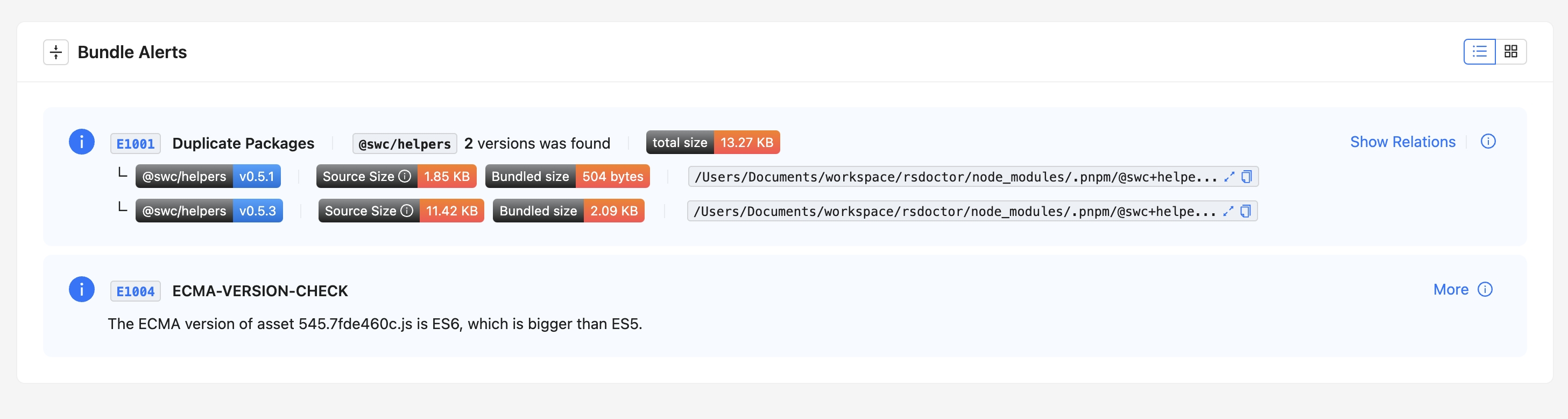
In the bundle alerts, the ECMA version of the bundle is checked, as shown in the following image:
|
|
43
43
|
|
|
44
44
|
{' '}
|
|
45
|
+
|
|
45
46
|
<img src="https://lf3-static.bytednsdoc.com/obj/eden-cn/lognuvj/rsdoctor/docs/usage/bundle/bundle-alerts-ecma.png" />
|
|
46
47
|
|
|
47
48
|
Click on "**More**" to view the corresponding rule explanation.
|
|
@@ -1,4 +1,4 @@
|
|
|
1
|
-
# Bundle
|
|
1
|
+
# Bundle diff
|
|
2
2
|
|
|
3
3
|
import { Badge } from '@theme';
|
|
4
4
|
|
|
@@ -23,9 +23,9 @@ We plan to provide an online page for Bundle Diff analysis. You can upload **2 c
|
|
|
23
23
|
|
|
24
24
|
<img src="https://raw.githubusercontent.com/rspack-contrib/rstack-design-resources/51ae2fdf0635ebf52ef04a11f779314c64ef2fb6/others/assets/rsdoctor/bundle-diff.png" />
|
|
25
25
|
|
|
26
|
-
## User
|
|
26
|
+
## User guide
|
|
27
27
|
|
|
28
|
-
### Feature
|
|
28
|
+
### Feature overview
|
|
29
29
|
|
|
30
30
|
In the Bundle Diff module, you can see the comparison of information between the two build bundles, including:
|
|
31
31
|
|
|
@@ -1,4 +1,4 @@
|
|
|
1
|
-
# Bundle
|
|
1
|
+
# Bundle overall
|
|
2
2
|
|
|
3
3
|
## Overview
|
|
4
4
|
|
|
@@ -26,9 +26,9 @@ On the homepage of **Rsdoctor**, we can see a card called `Bundle Overall`, whic
|
|
|
26
26
|
| <b><i>modules</i></b> | Represents the total number of modules in the artifacts |
|
|
27
27
|
| <b><i>duplicate packages</i></b> | Represents the total number of duplicate packages in the artifacts |
|
|
28
28
|
|
|
29
|
-
## Usage
|
|
29
|
+
## Usage instructions
|
|
30
30
|
|
|
31
|
-
### View
|
|
31
|
+
### View bundle artifacts
|
|
32
32
|
|
|
33
33
|
- The **"TOTAL Size"** data on the card represents the total size of the project. Clicking on this number will navigate to the [Bundle Size](./bundle-size.mdx)
|
|
34
34
|
|
|
@@ -1,4 +1,4 @@
|
|
|
1
|
-
# Bundle
|
|
1
|
+
# Bundle analysis
|
|
2
2
|
|
|
3
3
|
## Introduction
|
|
4
4
|
|
|
@@ -27,9 +27,9 @@ Click on the **"Bundle Size"** option in the navigation bar to view the Bundle a
|
|
|
27
27
|
- **`Duplicate Packages`**: Duplicate third-party packages bundled into the project. Excludes third-party packages that are not bundled into the artifact. Please refer to [Duplicate Packages](/guide/usage/bundle-alerts).
|
|
28
28
|
- **`Concatenated Module`**: A concatenated module is a technique that combines multiple modules into one closure during packaging. In the past, Webpack would package each module into a separate closure, and this encapsulation function would cause slower execution of JavaScript in the browser. Optimization can be achieved by enabling the [`optimization.concatenateModules`](https://webpack.js.org/plugins/module-concatenation-plugin/#root) parameter.
|
|
29
29
|
|
|
30
|
-
## Bundle
|
|
30
|
+
## Bundle overview
|
|
31
31
|
|
|
32
|
-
### Bundle
|
|
32
|
+
### Bundle information card
|
|
33
33
|
|
|
34
34
|
The bundle overview displays information about the number and size of files, such as `Total Files`. Clicking on the card chart expands the resource details, as shown in the following image:
|
|
35
35
|
|
|
@@ -50,19 +50,19 @@ The bundle overview displays information about the number and size of files, suc
|
|
|
50
50
|
|
|
51
51
|
- Clicking on the tabs allows you to switch between different resource information views, such as **[Total JS | Initial JS]**. The card also displays the percentage, size, and number of resources. Similarly, clicking on the icon in the lower right corner expands the resource list.
|
|
52
52
|
|
|
53
|
-
### Duplicate
|
|
53
|
+
### Duplicate packages
|
|
54
54
|
|
|
55
55
|
The **Duplicate Packages** card displays the number of duplicate third-party packages in the project. Clicking on the image allows you to view the specific details of the duplicate packages. Please note that these are duplicate packages that have been bundled.
|
|
56
56
|
|
|
57
57
|
For more information, please refer to [Duplicate Packages](/guide/usage/bundle-alerts).
|
|
58
58
|
|
|
59
|
-
## Bundle
|
|
59
|
+
## Bundle analysis
|
|
60
60
|
|
|
61
61
|
::: tip
|
|
62
62
|
If your project is based on Rspack and the version is lower than 0.5.1, you cannot view code information.
|
|
63
63
|
:::
|
|
64
64
|
|
|
65
|
-
### Resource and
|
|
65
|
+
### Resource and module relationship display
|
|
66
66
|
|
|
67
67
|
The **Bundle Analysis** module is used to analyze the size and code information of the build artifacts' resources (**Assets**) and the included **Modules**. The example image is shown below:
|
|
68
68
|
|
|
@@ -71,7 +71,7 @@ The **Bundle Analysis** module is used to analyze the size and code information
|
|
|
71
71
|
|
|
72
72
|
<img src="https://lf3-static.bytednsdoc.com/obj/eden-cn/lognuvj/rsdoctor/docs/usage/bundle/bundle-size-analysis-tree.png" />
|
|
73
73
|
|
|
74
|
-
### Search and
|
|
74
|
+
### Search and filter box
|
|
75
75
|
|
|
76
76
|
The top toolbar from left to right includes: the search tool for **Assets**, the filter tool for **Assets** size, and the filter tool for **Module** size.
|
|
77
77
|
|
|
@@ -82,7 +82,7 @@ The top toolbar from left to right includes: the search tool for **Assets**, the
|
|
|
82
82
|
|
|
83
83
|
<img src="https://lf3-static.bytednsdoc.com/obj/eden-cn/lognuvj/rsdoctor/docs/usage/bundle/bundle-size-analysis-selects.png" />
|
|
84
84
|
|
|
85
|
-
### Module
|
|
85
|
+
### Module tag explanation
|
|
86
86
|
|
|
87
87
|
The **Assets** tag is shown in the left image, from left to right representing: **Resource Size**, **[Initial Chunk](https://webpack.js.org/concepts/under-the-hood/#chunks)**, and **Code View**.
|
|
88
88
|
|
|
@@ -111,7 +111,7 @@ The **Modules** tag is shown in the right image, from left to right representing
|
|
|
111
111
|
- **Module Explorer** tag: Click to open the dependency analysis page between `Modules`.
|
|
112
112
|
- **Code View** tag: Click to expand code segments, including `Source` (source code), `Transformed` (compiled code), and `Bundled` (bundled code).
|
|
113
113
|
|
|
114
|
-
## Bundle
|
|
114
|
+
## Bundle overview tile graph
|
|
115
115
|
|
|
116
116
|
Click the **"Bundle Analyzer Graph"** button on the **"Bundle Size"** page to view the classic tile graph.
|
|
117
117
|
|
|
@@ -1,4 +1,4 @@
|
|
|
1
|
-
# Compilation
|
|
1
|
+
# Compilation alerts
|
|
2
2
|
|
|
3
3
|
We have also integrated the ability to detect warnings based on compilation data. If the current compilation results contain data that matches the rules defined by us, the `Compile Alerts` module will appear below the **Rsdoctor** main interface, as shown in the following figure:
|
|
4
4
|
|
|
@@ -1,4 +1,4 @@
|
|
|
1
|
-
# Compile
|
|
1
|
+
# Compile overall
|
|
2
2
|
|
|
3
3
|
## Overview
|
|
4
4
|
|
|
@@ -26,9 +26,9 @@ The following table explains the meaning and code implementation of each phase i
|
|
|
26
26
|
| <b><i>AfterCompile -> Done</i></b> | Represents the time taken from compilation completion to the end of the entire process | <ul><li>In `Webpack` or `Rspack` projects: The <b>start time</b> is the time when **compiler.hooks.afterCompile** is called, and the <b>end time</b> is the time when **compiler.hooks.done** is called</li></ul> |
|
|
27
27
|
| <b><i>Minify</i></b> | Represents the time taken for file compression during the compilation process in most cases | <ul><li>In `Webpack` or `Rspack` projects: Calculates the sum of the time taken for each call of **compilation.hooks.optimizeChunkAssets** and **compilation.hooks.processAssets**</li></ul> |
|
|
28
28
|
|
|
29
|
-
## Usage
|
|
29
|
+
## Usage instructions
|
|
30
30
|
|
|
31
|
-
### Bootstrap -> BeforeCompile
|
|
31
|
+
### Bootstrap -> BeforeCompile details
|
|
32
32
|
|
|
33
33
|
By **clicking on the data of the `Bootstrap -> BeforeCompile` phase**, a popup will appear on the page, as shown in the following image:
|
|
34
34
|
|
|
@@ -52,11 +52,11 @@ Hovering over a data point in the chart will display the following information i
|
|
|
52
52
|
- **end**: the end time
|
|
53
53
|
- **duration**: the duration, calculated as `end - start`
|
|
54
54
|
|
|
55
|
-
### Compile
|
|
55
|
+
### Compile phase
|
|
56
56
|
|
|
57
57
|
In this section, you can navigate to "Compile Analysis" -> "Loader Analysis" -> [**"Loader Timeline"**](./loaders-timeline.mdx) in the navigation bar to view the timeline of loader compilation time.
|
|
58
58
|
|
|
59
|
-
### AfterCompile -> Done
|
|
59
|
+
### AfterCompile -> Done details
|
|
60
60
|
|
|
61
61
|
By **clicking on the data of the `AfterCompile -> Done` phase**, a popup will appear on the page, as shown in the following image:
|
|
62
62
|
|
|
@@ -96,7 +96,7 @@ Hovering over a data point in the chart will display the following information i
|
|
|
96
96
|
- **end**: the end time
|
|
97
97
|
- **duration**: the duration, calculated as `end - start`
|
|
98
98
|
|
|
99
|
-
### Minify
|
|
99
|
+
### Minify details
|
|
100
100
|
|
|
101
101
|
:::tip
|
|
102
102
|
Minify details are currently not available for Rspack projects.
|
|
@@ -109,7 +109,7 @@ By **clicking on the data of the `Minify` phase**, a popup will appear on the pa
|
|
|
109
109
|
|
|
110
110
|
The content in the popup has similar meanings to the previous paragraphs, so it will not be repeated here.
|
|
111
111
|
|
|
112
|
-
## Reference
|
|
112
|
+
## Reference documentation
|
|
113
113
|
|
|
114
114
|
- [**Rspack Hooks**](https://www.rspack.dev/api/plugin-api.html#beforecompile)
|
|
115
115
|
- [**Webpack Hooks**](https://webpack.js.org/api/compilation-hooks/)
|
|
@@ -1,4 +1,4 @@
|
|
|
1
|
-
# Loaders
|
|
1
|
+
# Loaders analysis
|
|
2
2
|
|
|
3
3
|
**Rsdoctor** provides the `Loader Analysis` module, which mainly provides statistics on Loaders at the **directory and file level**. It helps you analyze the compilation of **folders** and **individual files** by Loaders.
|
|
4
4
|
|
|
@@ -23,7 +23,7 @@ In the file tree structure below, there are two interactive forms to obtain diff
|
|
|
23
23
|
|
|
24
24
|
The corresponding details will be explained in the following paragraphs.
|
|
25
25
|
|
|
26
|
-
## Loader
|
|
26
|
+
## Loader data for file directories
|
|
27
27
|
|
|
28
28
|
By **clicking on a selected directory**, you can see the **time statistics of all Loaders in the selected directory** ([estimated time consumption](../../guide/more/faq#loader-time-consuming-data-is-inaccurate)) on the right side of the file tree. The content of the "Statistics of \*\*\*" card is shown in the following image:
|
|
29
29
|
|
|
@@ -43,7 +43,7 @@ Usually, we can select some **third-party library directories** within `node_mod
|
|
|
43
43
|
|
|
44
44
|
If it is a third-party library with **advanced ES syntax** or a package within the **workspace**, we need to make more granular decisions at the individual file level based on the content in the next paragraph to optimize Loader performance.
|
|
45
45
|
|
|
46
|
-
## Loader
|
|
46
|
+
## Loader details for individual files
|
|
47
47
|
|
|
48
48
|
By **clicking on a file**, a modal will appear with the following content:
|
|
49
49
|
|
|
@@ -1,4 +1,4 @@
|
|
|
1
|
-
# Loaders
|
|
1
|
+
# Loaders timeline
|
|
2
2
|
|
|
3
3
|
## Overview
|
|
4
4
|
|
|
@@ -39,7 +39,7 @@ There are two selector at the top of the page, where you can enter the **Loaders
|
|
|
39
39
|
style={{ margin: 'auto' }}
|
|
40
40
|
/>
|
|
41
41
|
|
|
42
|
-
### Viewing
|
|
42
|
+
### Viewing overall loader information
|
|
43
43
|
|
|
44
44
|
If we want to view the **summary of all data** for a single loader, we can hover over the position shown in the following image:
|
|
45
45
|
|
|
@@ -57,7 +57,7 @@ At this point, we can see the **summary of all invocations** within a single loa
|
|
|
57
57
|
style={{ margin: 'auto' }}
|
|
58
58
|
/>
|
|
59
59
|
|
|
60
|
-
### Viewing
|
|
60
|
+
### Viewing individual loader invocation information
|
|
61
61
|
|
|
62
62
|
If we want to view the **information of a single invocation** for a loader, we can hover over any **colored stripe** within the position shown in the following image. At this point, we can see the **information of the current invocation** within a single loader (refer to the [Glossary](#glossary) for field definitions), as shown in the following image:
|
|
63
63
|
|
|
@@ -1,4 +1,4 @@
|
|
|
1
|
-
# Module
|
|
1
|
+
# Module dependency analysis
|
|
2
2
|
|
|
3
3
|
## Introduction
|
|
4
4
|
|
|
@@ -12,7 +12,7 @@ In this section, you can analyze the imported chain of a module. If you have the
|
|
|
12
12
|
style={{ margin: 'auto' }}
|
|
13
13
|
/>
|
|
14
14
|
|
|
15
|
-
### This
|
|
15
|
+
### This section's entry
|
|
16
16
|
|
|
17
17
|
Clicking on an **Assets** in the **[Bundle Size](./bundle-size)** page will display the `「Module Tree」` on the right side. Each **Module** will have the following icon next to it, click on it to view the imported chain of that **Module**.
|
|
18
18
|
|
|
@@ -28,7 +28,7 @@ Clicking on an **Assets** in the **[Bundle Size](./bundle-size)** page will disp
|
|
|
28
28
|
- **`Reasons`**: As the name suggests, it means the reasons why a `Module` exists. Reasons indicate which other `Module`s import this `Module`, and the entire `Reasons Tree` represents the upstream reference chain of this `Module`, including both direct and indirect parent `Module`s. [Similar to Webpack's stats.reasons.](https://webpack.js.org/configuration/stats/#statsreasons)
|
|
29
29
|
- **`Dependencies`**: The `Module`s that this `Module` depends on.
|
|
30
30
|
|
|
31
|
-
## Reasons
|
|
31
|
+
## Reasons dependency tree
|
|
32
32
|
|
|
33
33
|
### Introduction
|
|
34
34
|
|
|
@@ -1,4 +1,4 @@
|
|
|
1
|
-
# Plugin
|
|
1
|
+
# Plugin analysis
|
|
2
2
|
|
|
3
3
|
## Overview
|
|
4
4
|
|
|
@@ -25,9 +25,9 @@ The meanings of the fields in the data statistics table on the page are as follo
|
|
|
25
25
|
| <b><i>calls</i></b> | Represents the **number of times called** |
|
|
26
26
|
| <b><i>duration(total)</i></b> | Represents the **total time of all calls** |
|
|
27
27
|
|
|
28
|
-
## Usage
|
|
28
|
+
## Usage instructions
|
|
29
29
|
|
|
30
|
-
### View
|
|
30
|
+
### View bundler config
|
|
31
31
|
|
|
32
32
|
If we need to view the Rspack or Webpack configuration of the project, we can click on `View Bundler Config` in the upper right corner of the card. A floating layer will pop up, which contains the serialized **Bundler Config**, as shown in the following figure:
|
|
33
33
|
|
|
@@ -37,7 +37,7 @@ If we need to view the Rspack or Webpack configuration of the project, we can cl
|
|
|
37
37
|
style={{ margin: 'auto' }}
|
|
38
38
|
/>
|
|
39
39
|
|
|
40
|
-
## Reference
|
|
40
|
+
## Reference documentation
|
|
41
41
|
|
|
42
42
|
- [**Rspack Hooks**](https://www.rspack.dev/api/plugin-api.html#beforecompile)
|
|
43
43
|
- [**Webpack Hooks**](https://webpack.js.org/api/compilation-hooks/)
|
|
@@ -1,4 +1,4 @@
|
|
|
1
|
-
# Project
|
|
1
|
+
# Project overall
|
|
2
2
|
|
|
3
3
|
## Overview
|
|
4
4
|
|
|
@@ -28,7 +28,7 @@ In the main page of **Rsdoctor**, we can see a card named `Project Overall`, whi
|
|
|
28
28
|
|
|
29
29
|
## Usage
|
|
30
30
|
|
|
31
|
-
### View
|
|
31
|
+
### View bundler config
|
|
32
32
|
|
|
33
33
|
If we need to view the Rspack or Webpack configuration of the project, we can click on `View Bundler Config` in the top right corner of the card. A popup window will appear, containing the serialized [Bundler Config](https://webpack.js.org/configuration/), as shown in the following image:
|
|
34
34
|
|
|
@@ -1,4 +1,4 @@
|
|
|
1
|
-
# Compilation
|
|
1
|
+
# Compilation diagnostic rules
|
|
2
2
|
|
|
3
3
|
Building diagnostic rules is similar to lint tools like `ESLint`, but with a difference. `ESLint` performs static code scanning and is independent of the build process. On the other hand, the code diagnostics here are closely related to the build process of `Rspack` or `Webpack`. It incorporates various internal parameters generated during the build process to assist in the analysis, such as ModuleGraph, internal markers for each module by Webpack, and runtime added after code transformation, and so on...
|
|
4
4
|
|
|
@@ -16,7 +16,7 @@ If any issues are detected during the build process, they will be displayed in t
|
|
|
16
16
|
src="https://lf3-static.bytednsdoc.com/obj/eden-cn/lognuvj/rsdoctor/docs/usage/bundle/rule-config-1.png"
|
|
17
17
|
/>
|
|
18
18
|
|
|
19
|
-
## How to
|
|
19
|
+
## How to use
|
|
20
20
|
|
|
21
21
|
Using diagnostic rules is simple. They are configured under the `linter` option of the entire plugin, as shown in the following example:
|
|
22
22
|
|
|
@@ -45,6 +45,34 @@ export default {
|
|
|
45
45
|
};
|
|
46
46
|
```
|
|
47
47
|
|
|
48
|
+
#### Enable ECMA version check
|
|
49
|
+
|
|
50
|
+
The configuration of `browserslist` is used first. If there is no `browserslist`, the following configuration is used for detection
|
|
51
|
+
|
|
52
|
+
```ts
|
|
53
|
+
import { RsdoctorWebpackPlugin } from '@rsdoctor/webpack-plugin';
|
|
54
|
+
|
|
55
|
+
export default {
|
|
56
|
+
plugin: [
|
|
57
|
+
new RsdoctorWebpackPlugin({
|
|
58
|
+
linter: {
|
|
59
|
+
rules: {
|
|
60
|
+
'ecma-version-check': [
|
|
61
|
+
'Warn',
|
|
62
|
+
{
|
|
63
|
+
ecmaVersion: 2015,
|
|
64
|
+
// targets: ["chrome >= 53"],
|
|
65
|
+
},
|
|
66
|
+
],
|
|
67
|
+
},
|
|
68
|
+
},
|
|
69
|
+
}),
|
|
70
|
+
],
|
|
71
|
+
};
|
|
72
|
+
```
|
|
73
|
+
|
|
74
|
+
For more `ECMA Version Check` configuration, please refer to [ECMA Version Check Options](https://github.com/rspack-contrib/rsbuild-plugin-check-syntax?tab=readme-ov-file#options)
|
|
75
|
+
|
|
48
76
|
The type of `linter`:
|
|
49
77
|
|
|
50
78
|
```ts
|
|
@@ -75,7 +103,7 @@ type RuleConfigItem =
|
|
|
75
103
|
| [SeverityInput, unknown];
|
|
76
104
|
```
|
|
77
105
|
|
|
78
|
-
## Existing
|
|
106
|
+
## Existing internal rules
|
|
79
107
|
|
|
80
108
|
There are already three rules included in the existing diagnostic tool, which are:
|
|
81
109
|
|
|
@@ -1,4 +1,4 @@
|
|
|
1
|
-
# Rsdoctor v0.2-0.3
|
|
1
|
+
# Rsdoctor v0.2-0.3 发布公告
|
|
2
2
|
|
|
3
3
|
Rsdoctor v0.3 已经发布啦!
|
|
4
4
|
|
|
@@ -73,13 +73,13 @@ export default {
|
|
|
73
73
|
};
|
|
74
74
|
```
|
|
75
75
|
|
|
76
|
-
## 支持 Banner
|
|
76
|
+
## 支持 Banner plugin
|
|
77
77
|
|
|
78
78
|
由于 Rspack 和 Webpack 都支持 BannerPlugin,且 BannerPlugin 可在生成的 chunk 顶部或尾部添加指定内容的代码段,这会影响到对 Bundle 的解析能力。因此,Rsdoctor 增加了 Banner Plugin 的支持。
|
|
79
79
|
|
|
80
80
|
详情请查看[支持 BannerPlugin](/guide/usage/bundle-size#%E6%94%AF%E6%8C%81-bannerplugin)
|
|
81
81
|
|
|
82
|
-
### 支持 ESM
|
|
82
|
+
### 支持 ESM loader
|
|
83
83
|
|
|
84
84
|
自 Rspack@0.7.3 开始,支持以 `.js` 为后缀且 `package.json` 中配置 `type: module` 的 ESM Loader 执行([相关 issue](https://github.com/web-infra-dev/rspack/issues/5735))。因此,Rsdoctor 也支持 ESM Loader 的分析,主要支持以下两种类型:
|
|
85
85
|
|
|
@@ -100,7 +100,7 @@ chain.plugin('Rsdoctor').use(RsdoctorRspackPlugin, [
|
|
|
100
100
|
]);
|
|
101
101
|
```
|
|
102
102
|
|
|
103
|
-
## 支持 Parse
|
|
103
|
+
## 支持 Parse bundle 配置
|
|
104
104
|
|
|
105
105
|
在部分大型仓库中,反解 Bundle 解析执行耗时过大,这是因为 Parse Bundle 的分析利用了 AST 解析与处理。当产物文件过多时,耗时也会增加。如果不需要此功能,可以通过 `supports.parseBundle` 配置进行选择性关闭。示例如下:
|
|
106
106
|
|
|
@@ -1,4 +1,4 @@
|
|
|
1
|
-
# Rsdoctor v0.4
|
|
1
|
+
# Rsdoctor v0.4 发布公告
|
|
2
2
|
|
|
3
3
|
Rsdoctor v0.4 已经发布啦!
|
|
4
4
|
|
|
@@ -8,7 +8,7 @@ Rsdoctor v0.4 的新特性有:
|
|
|
8
8
|
- **Bundle Diff**: 对比和分析两次构建产物的变化。
|
|
9
9
|
- **Vue Loader 分析**: 增加了对 Vue 项目中 loader 分析的支持。
|
|
10
10
|
|
|
11
|
-
## Brief
|
|
11
|
+
## Brief report
|
|
12
12
|
|
|
13
13
|
在 Rsdoctor v0.4 中,新增了 **Brief 模式**,专为 CI/CD 场景设计。Brief 模式将数据报告整合到一个 HTML 页面中,方便用户在 CI/CD 及其他场景下查看历史构建数据。以下是 Brief 模式的主要特点:
|
|
14
14
|
|
|
@@ -18,7 +18,7 @@ Rsdoctor v0.4 的新特性有:
|
|
|
18
18
|
|
|
19
19
|
此功能极大地提升了在 CI 流程中使用 Rsdoctor 分析报告的便捷性,可以在 Pipeline 中将报告上传到 CDN 以便展示历史报告。[详情请参阅](/guide/start/cicd)
|
|
20
20
|
|
|
21
|
-
## Bundle
|
|
21
|
+
## Bundle diff
|
|
22
22
|
|
|
23
23
|
import { Badge } from '@theme';
|
|
24
24
|
|
|
@@ -51,7 +51,7 @@ import { Badge } from '@theme';
|
|
|
51
51
|
|
|
52
52
|
后续将计划支持用于 GitHub 平台的 Bundle Diff Action,更方便的进行 CI 阶段的劣化监控。
|
|
53
53
|
|
|
54
|
-
## 支持 Vue
|
|
54
|
+
## 支持 Vue loader 分析能力
|
|
55
55
|
|
|
56
56
|
<Badge text="Version: 0.4.5" type="warning" />
|
|
57
57
|
|
|
@@ -82,7 +82,7 @@ npx @rsdoctor/cli analyze --profile .next/.rsdoctor/manifest.json
|
|
|
82
82
|
|
|
83
83
|
```
|
|
84
84
|
|
|
85
|
-
### Next.js 中不支持对 rules 进行重写的
|
|
85
|
+
### Next.js 中不支持对 rules 进行重写的 loader 分析
|
|
86
86
|
|
|
87
87
|
- Rsdoctor Loader 逻辑:由于 Rsdoctor 会对 Loader Rules 做修改,所以 Rsdoctor 为了兼容对 rules 进行重写的 Loader 逻辑,Rsdoctor 对 Module 进行了 Proxy 包裹。
|
|
88
88
|
|
|
@@ -45,6 +45,34 @@ export default {
|
|
|
45
45
|
};
|
|
46
46
|
```
|
|
47
47
|
|
|
48
|
+
#### 开启 ECMA version check
|
|
49
|
+
|
|
50
|
+
优先使用 `browserslist` 的配置,如果没有 `browserslist` 则通过以下配置的方式进行检测
|
|
51
|
+
|
|
52
|
+
```ts
|
|
53
|
+
import { RsdoctorWebpackPlugin } from '@rsdoctor/webpack-plugin';
|
|
54
|
+
|
|
55
|
+
export default {
|
|
56
|
+
plugin: [
|
|
57
|
+
new RsdoctorWebpackPlugin({
|
|
58
|
+
linter: {
|
|
59
|
+
rules: {
|
|
60
|
+
'ecma-version-check': [
|
|
61
|
+
'Warn',
|
|
62
|
+
{
|
|
63
|
+
ecmaVersion: 2015,
|
|
64
|
+
// targets: ["chrome >= 53"],
|
|
65
|
+
},
|
|
66
|
+
],
|
|
67
|
+
},
|
|
68
|
+
},
|
|
69
|
+
}),
|
|
70
|
+
],
|
|
71
|
+
};
|
|
72
|
+
```
|
|
73
|
+
|
|
74
|
+
更多 `ECMA Version Check` 配置请参考 [ECMA Version Check Options](https://github.com/rspack-contrib/rsbuild-plugin-check-syntax?tab=readme-ov-file#options)
|
|
75
|
+
|
|
48
76
|
`linter`字段的类型为:
|
|
49
77
|
|
|
50
78
|
```ts
|
package/package.json
CHANGED
|
@@ -1,6 +1,6 @@
|
|
|
1
1
|
{
|
|
2
2
|
"name": "@rsdoctor/docs",
|
|
3
|
-
"version": "0.
|
|
3
|
+
"version": "1.0.0-alpha.1",
|
|
4
4
|
"repository": {
|
|
5
5
|
"type": "git",
|
|
6
6
|
"url": "https://github.com/web-infra-dev/rsdoctor",
|
|
@@ -19,7 +19,7 @@
|
|
|
19
19
|
"registry": "https://registry.npmjs.org/"
|
|
20
20
|
},
|
|
21
21
|
"devDependencies": {
|
|
22
|
-
"@rspress/plugin-rss": "^1.
|
|
22
|
+
"@rspress/plugin-rss": "^1.39.4",
|
|
23
23
|
"@types/node": "^16",
|
|
24
24
|
"@types/react": "^18.3.18",
|
|
25
25
|
"@types/react-dom": "^18.3.5",
|
|
@@ -30,12 +30,12 @@
|
|
|
30
30
|
"rspress-plugin-font-open-sans": "^1.0.0",
|
|
31
31
|
"rspress-plugin-sitemap": "^1.1.1",
|
|
32
32
|
"typescript": "^5.2.2",
|
|
33
|
-
"@rsdoctor/types": "0.
|
|
33
|
+
"@rsdoctor/types": "1.0.0-alpha.1"
|
|
34
34
|
},
|
|
35
35
|
"dependencies": {
|
|
36
36
|
"@rstack-dev/doc-ui": "1.5.4",
|
|
37
|
-
"react-markdown": "^9.0.
|
|
38
|
-
"rspress": "^1.
|
|
37
|
+
"react-markdown": "^9.0.3",
|
|
38
|
+
"rspress": "^1.39.4"
|
|
39
39
|
},
|
|
40
40
|
"scripts": {
|
|
41
41
|
"dev": "rspress dev",
|