@rrstudioapps/ngx-command-palette 0.3.1 → 0.5.0
This diff represents the content of publicly available package versions that have been released to one of the supported registries. The information contained in this diff is provided for informational purposes only and reflects changes between package versions as they appear in their respective public registries.
package/README.md
CHANGED
|
@@ -27,8 +27,8 @@ standalone components, signals, zoneless-ready and **no dependencies besides Ang
|
|
|
27
27
|
- Custom **templates** for items and the empty state
|
|
28
28
|
- No browser globals at import time (SSR friendly), works with or without zone.js
|
|
29
29
|
|
|
30
|
-
| Light
|
|
31
|
-
|
|
|
30
|
+
| Light | Dark |
|
|
31
|
+
| ----------------------------------------------------------------------------------------------------------------- | --------------------------------------------------------------------------------------------------------------- |
|
|
32
32
|
| 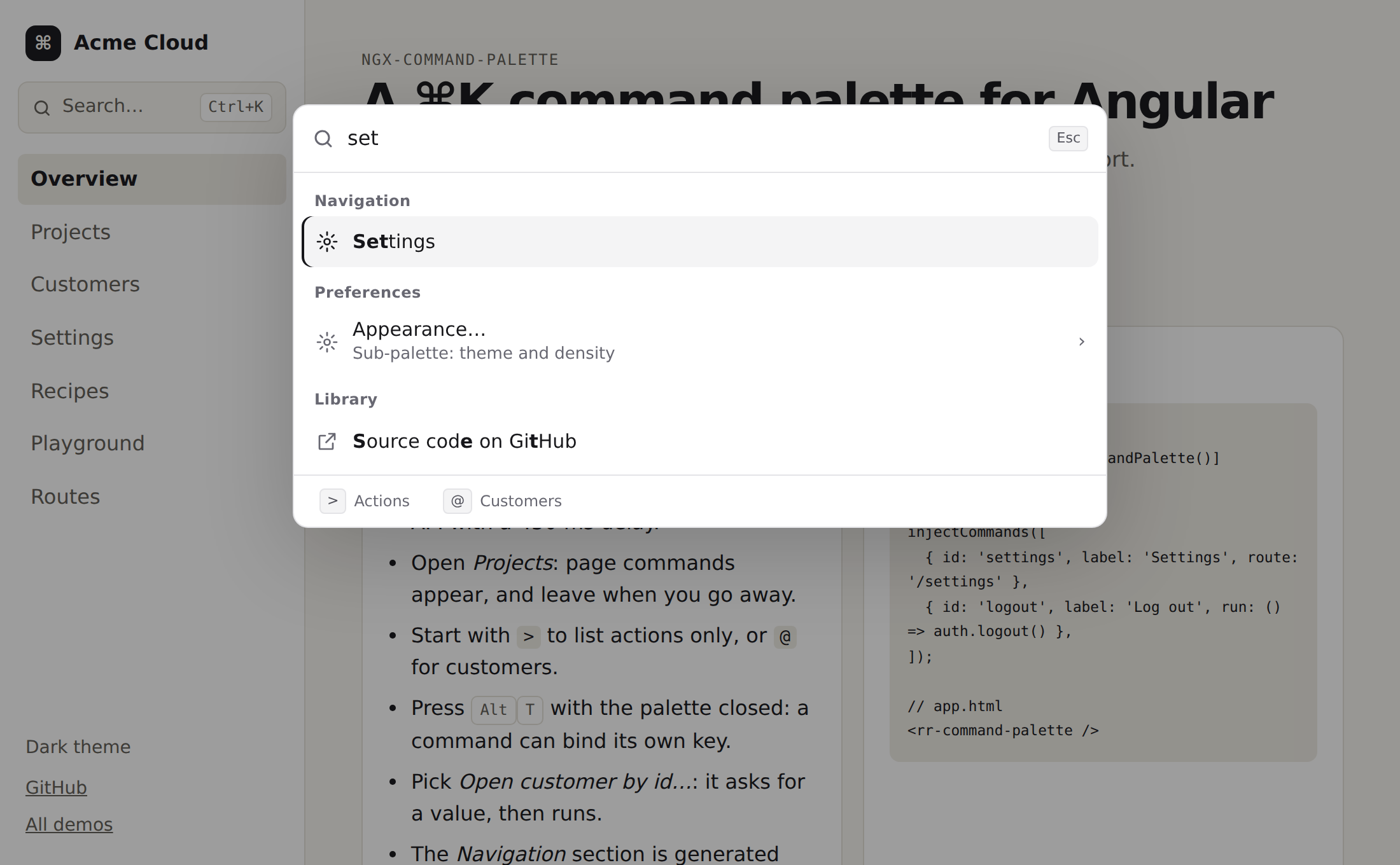 | 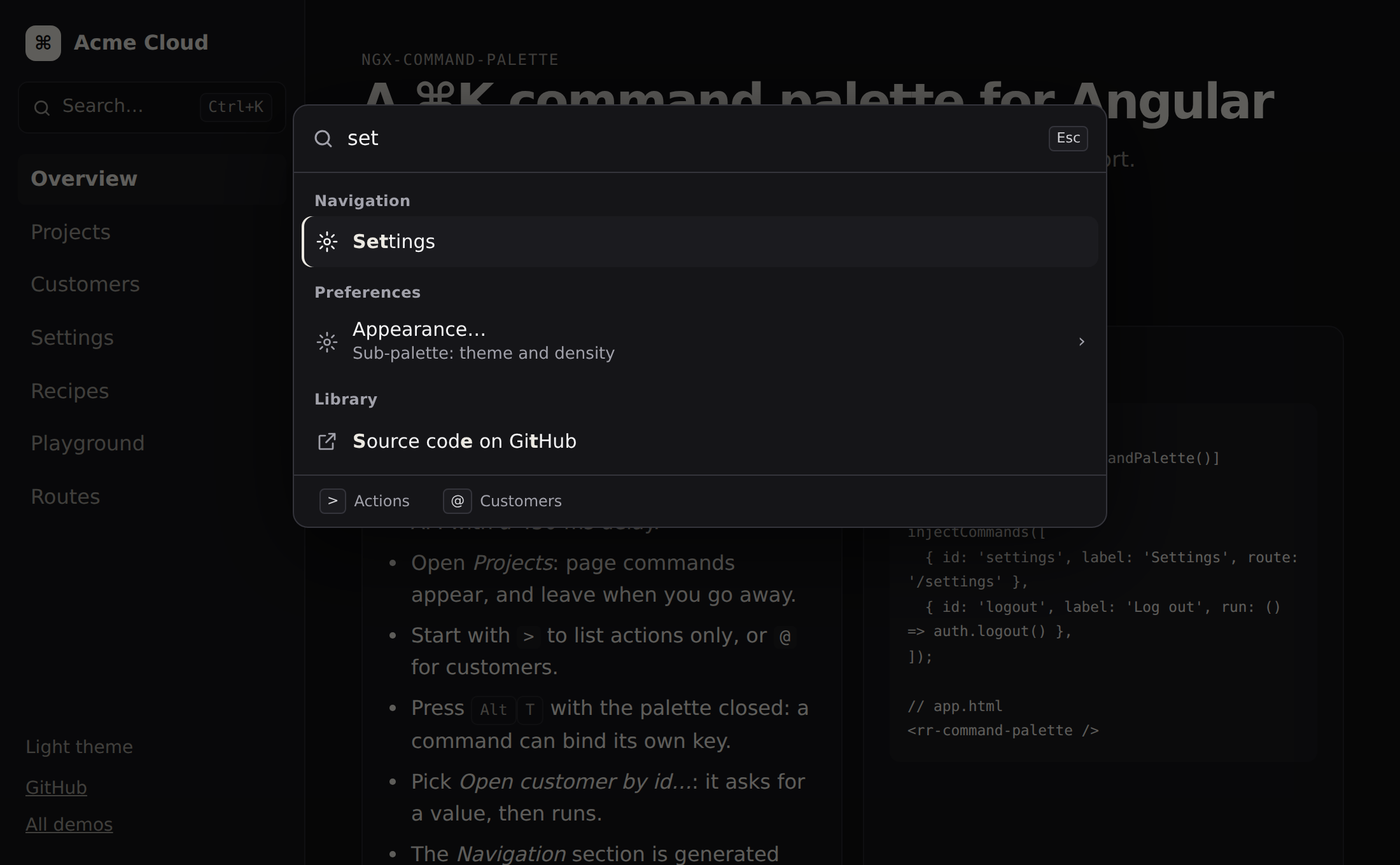 |
|
|
33
33
|
|
|
34
34
|
## Installation
|
|
@@ -48,10 +48,7 @@ Requires Angular 21 or 22 (`@angular/core`, `@angular/common`, `@angular/router`
|
|
|
48
48
|
import { provideCommandPalette } from '@rrstudioapps/ngx-command-palette';
|
|
49
49
|
|
|
50
50
|
export const appConfig: ApplicationConfig = {
|
|
51
|
-
providers: [
|
|
52
|
-
provideRouter(routes),
|
|
53
|
-
provideCommandPalette({ shortcut: 'mod+k' }),
|
|
54
|
-
],
|
|
51
|
+
providers: [provideRouter(routes), provideCommandPalette({ shortcut: 'mod+k' })],
|
|
55
52
|
};
|
|
56
53
|
```
|
|
57
54
|
|
|
@@ -76,7 +73,13 @@ export class App {
|
|
|
76
73
|
constructor() {
|
|
77
74
|
injectCommands([
|
|
78
75
|
{ id: 'home', label: 'Home', group: 'Navigation', route: '/' },
|
|
79
|
-
{
|
|
76
|
+
{
|
|
77
|
+
id: 'settings',
|
|
78
|
+
label: 'Settings',
|
|
79
|
+
group: 'Navigation',
|
|
80
|
+
route: '/settings',
|
|
81
|
+
keywords: ['preferences'],
|
|
82
|
+
},
|
|
80
83
|
{ id: 'logout', label: 'Log out', icon: '🚪', run: () => this.auth.logout() },
|
|
81
84
|
]);
|
|
82
85
|
}
|
|
@@ -89,7 +92,7 @@ export class App {
|
|
|
89
92
|
Pass a signal to keep them in sync with your state:
|
|
90
93
|
|
|
91
94
|
```ts
|
|
92
|
-
@Component({
|
|
95
|
+
@Component({/* … */})
|
|
93
96
|
export class ProjectsPage {
|
|
94
97
|
projects = signal<Project[]>([]);
|
|
95
98
|
|
|
@@ -135,16 +138,53 @@ injectCommandProvider({
|
|
|
135
138
|
|
|
136
139
|
### `provideCommandPalette(options?)`
|
|
137
140
|
|
|
138
|
-
| Option
|
|
139
|
-
|
|
|
140
|
-
| `shortcut`
|
|
141
|
-
| `
|
|
142
|
-
| `
|
|
143
|
-
| `
|
|
144
|
-
| `
|
|
145
|
-
| `
|
|
146
|
-
| `
|
|
147
|
-
| `
|
|
141
|
+
| Option | Type | Default | Description |
|
|
142
|
+
| ------------------ | ------------------------------------------------- | ---------------------------------------- | ------------------------------------------------------------------------------------------------------------------------------------------------------------------------------------------------------------------------------------------------------------------------------------- |
|
|
143
|
+
| `shortcut` | `string \| string[]` | `'mod+k'` | Toggle shortcut(s). `mod` is ⌘ on macOS/iOS and Ctrl elsewhere. Examples: `'ctrl+shift+p'`, `'/'`. Shortcuts without Ctrl/⌘/Alt are ignored while typing in a field. `[]` turns the shortcut off (`open()` still works). |
|
|
144
|
+
| `shortcutInFields` | `boolean` | `true` | With `false`, Ctrl/⌘ shortcuts (the palette's and command `hotkey`s) do not fire while typing in an input, textarea, select or contenteditable. |
|
|
145
|
+
| `shortcutEnabled` | `boolean \| (() => boolean)` | `true` | A function or a signal is read on every key press. While `false` the shortcut does not open the palette (and the key is left to the page); an open palette can still be closed with it, and `open()` always works. |
|
|
146
|
+
| `theme` | `'light' \| 'dark' \| 'auto'` | `'auto'` | `auto` follows `prefers-color-scheme`. |
|
|
147
|
+
| `recent` | `{ max?, storageKey?, rank?, storage? } \| false` | `{ max: 5, storageKey: 'rr-cp:recent' }` | "Recent" section shown when the query is empty. `rank: 'frequent'` orders it by how often and how recently commands ran (count halves every 7 days). `storage` is where they are saved (see below). |
|
|
148
|
+
| `debounceMs` | `number` | `200` | Debounce for async providers. |
|
|
149
|
+
| `maxResults` | `number` | `50` | Max local results for a non-empty query. |
|
|
150
|
+
| `maxEmptyResults` | `number` | `100` | Max commands listed when the search is empty (recents not counted). The rest is still found by typing. See [Many commands](#many-commands). |
|
|
151
|
+
| `filter` | `(query, command) => { score, indices } \| null` | built-in fuzzy search | Your own matching and ranking of local commands. See [Custom search](#custom-search). |
|
|
152
|
+
| `prefixes` | `{ prefix, groups?, kind? }[]` | `[]` | Search modes. See [Prefix modes](#prefix-modes). |
|
|
153
|
+
| `labels` | `Partial<CommandPaletteLabels>` | English | All texts, for translations: `placeholder`, `dialog`, `listbox`, `empty`, `loading`, `recent`, `pinned`, `defaultGroup`, `results` (`'{count} results'`), `closeHint`, `back`, `level` (`'{name}: {count} results'`), `submenu`, `prompt` (`'{name}: type a value and press Enter'`). |
|
|
154
|
+
|
|
155
|
+
### Shortcut and recents storage
|
|
156
|
+
|
|
157
|
+
```ts
|
|
158
|
+
const searchPageActive = signal(false); // set it from the page that has its own search
|
|
159
|
+
|
|
160
|
+
provideCommandPalette({
|
|
161
|
+
// Do not fire Ctrl/⌘ shortcuts while the user types in a field
|
|
162
|
+
shortcutInFields: false,
|
|
163
|
+
// Pause the shortcut on pages with their own search; palette.open() still works
|
|
164
|
+
shortcutEnabled: searchPageActive, // a signal, or any () => boolean
|
|
165
|
+
// Keep recents per tab instead of in localStorage
|
|
166
|
+
recent: { storage: sessionStorage },
|
|
167
|
+
});
|
|
168
|
+
```
|
|
169
|
+
|
|
170
|
+
`recent.storage` takes any object with synchronous `getItem`, `setItem` and `removeItem` (`localStorage`
|
|
171
|
+
and `sessionStorage` fit), so an in-memory one works too. Without it `localStorage` is used, and during SSR or when
|
|
172
|
+
the storage is blocked or throws, the recents just stay in memory.
|
|
173
|
+
|
|
174
|
+
### Prefix modes
|
|
175
|
+
|
|
176
|
+
Start the search with a character to narrow the list, like `>` in VS Code. The prefix is removed from the
|
|
177
|
+
search text (and from `ctx.query`); the recents are not shown and async providers only run when the mode allows them.
|
|
178
|
+
|
|
179
|
+
```ts
|
|
180
|
+
provideCommandPalette({
|
|
181
|
+
prefixes: [
|
|
182
|
+
{ prefix: '>', kind: 'action' }, // only commands that run a function
|
|
183
|
+
{ prefix: '/', kind: 'route' }, // only routes
|
|
184
|
+
{ prefix: '#', groups: ['Customers'] }, // only these sections (and providers)
|
|
185
|
+
],
|
|
186
|
+
});
|
|
187
|
+
```
|
|
148
188
|
|
|
149
189
|
### Many commands
|
|
150
190
|
|
|
@@ -207,55 +247,58 @@ injectCommands([
|
|
|
207
247
|
|
|
208
248
|
### `Command`
|
|
209
249
|
|
|
210
|
-
| Field
|
|
211
|
-
|
|
|
212
|
-
| `id`
|
|
213
|
-
| `label`
|
|
214
|
-
| `group`
|
|
215
|
-
| `description`
|
|
216
|
-
| `icon`
|
|
217
|
-
| `shortcut`
|
|
218
|
-
| `
|
|
219
|
-
| `
|
|
220
|
-
| `
|
|
221
|
-
| `
|
|
222
|
-
| `
|
|
223
|
-
| `
|
|
250
|
+
| Field | Type | Description |
|
|
251
|
+
| ---------------------------- | --------------------------------------------- | ------------------------------------------------------------------------------------------------------------------------------------------------------------------------------------------------------------------------------------------------------------------------------------------------------------------------------------------------------------------------ |
|
|
252
|
+
| `id` | `string` | Unique and stable (used for recents). |
|
|
253
|
+
| `label` | `string` | Shown and searched. |
|
|
254
|
+
| `group` | `string?` | Section. Default: `labels.defaultGroup`. |
|
|
255
|
+
| `description` | `string?` | Second line, searched with a lower weight. |
|
|
256
|
+
| `icon` | `string \| TemplateRef?` | Emoji/text/icon-font ligature, or a template (e.g. an SVG). |
|
|
257
|
+
| `shortcut` | `string[]?` | Keys shown on the right, e.g. `['⌘', 'S']`. Display only: use `hotkey` to bind a key. |
|
|
258
|
+
| `hotkey` | `string \| string[]?` | Key combination(s) that run the command even when the palette is closed, e.g. `'mod+s'`. It needs Ctrl, ⌘ or Alt; Alt-only combinations do not fire while typing in a text field (on macOS Alt types special characters), Ctrl and ⌘ ones do. Ignored for parents, disabled/hidden commands and while the palette is open. Shown on the row when there is no `shortcut`. |
|
|
259
|
+
| `keywords` | `string[]?` | Extra search terms, not shown. |
|
|
260
|
+
| `disabled` | `boolean?` | Shown but not selectable. |
|
|
261
|
+
| `children` | `Command[]?` | Makes it a parent: selecting it opens a sub-palette with these commands instead of running something. See [Sub-palettes](#sub-palettes). |
|
|
262
|
+
| `hidden` | `boolean \| (() => boolean)?` | Not listed and not searched. A function or a signal hides it depending on your app state, e.g. `hidden: () => !user()`. |
|
|
263
|
+
| `pinned` | `boolean \| (() => boolean)?` | Also listed in a "Pinned" section at the top while the search is empty (and not repeated in Recent). A function or a signal pins it depending on your app state. |
|
|
264
|
+
| `route` + `navigationExtras` | `string \| any[]`, `NavigationExtras?` | Navigate with the Angular router… |
|
|
265
|
+
| `run` | `(ctx: { query, value? }) => void \| Promise` | …or run a function. |
|
|
266
|
+
| `prompt` | `string?` | With `run`: asks for a value first. Selecting the command opens a second step whose field has this placeholder; Enter runs it with the text in `ctx.value` (nothing happens while empty), Backspace or the back button leaves the step. Example: `{ id: 'user', label: 'Go to user', prompt: 'User id…', run: ({ value }) => router.navigate(['/users', value]) }`. |
|
|
224
267
|
|
|
225
268
|
### `CommandPaletteService`
|
|
226
269
|
|
|
227
|
-
| Member
|
|
228
|
-
|
|
|
229
|
-
| `isOpen`, `query`, `loading`
|
|
230
|
-
| `commands`, `sections`
|
|
231
|
-
| `path`
|
|
232
|
-
| `back(levels?)`
|
|
233
|
-
| `open(query?)`, `close()`, `toggle()`
|
|
234
|
-
| `setQuery(query)`
|
|
270
|
+
| Member | Description |
|
|
271
|
+
| ------------------------------------------- | -------------------------------------------------------------------------------------- |
|
|
272
|
+
| `isOpen`, `query`, `loading` | Read-only signals. |
|
|
273
|
+
| `commands`, `sections` | Registered commands and the filtered, grouped results of the current level (signals). |
|
|
274
|
+
| `path` | The sub-palettes currently open, outermost first (signal). |
|
|
275
|
+
| `back(levels?)` | Goes back one or more levels of a sub-palette; returns `false` at the top level. |
|
|
276
|
+
| `open(query?)`, `close()`, `toggle()` | Open/close programmatically (e.g. from a "Search…" button). |
|
|
277
|
+
| `setQuery(query)` | Change the search text. |
|
|
235
278
|
| `register(commands \| signal, destroyRef?)` | Returns an unregister function. Inside an injection context it unregisters on destroy. |
|
|
236
|
-
| `registerProvider(provider, destroyRef?)`
|
|
237
|
-
| `execute(command)`
|
|
238
|
-
| `clearRecent()`
|
|
279
|
+
| `registerProvider(provider, destroyRef?)` | Same, for async providers. |
|
|
280
|
+
| `execute(command)` | Run a command as if selected. |
|
|
281
|
+
| `clearRecent()` | Forget the recents. |
|
|
239
282
|
|
|
240
283
|
`injectCommands(commands)` and `injectCommandProvider(provider)` are shortcuts for
|
|
241
284
|
`register`/`registerProvider` bound to the current component.
|
|
242
285
|
|
|
243
286
|
### `CommandProvider`
|
|
244
287
|
|
|
245
|
-
| Field
|
|
246
|
-
|
|
|
247
|
-
| `id`, `group`
|
|
288
|
+
| Field | Type | Description |
|
|
289
|
+
| ----------------------- | --------------------------------------------- | ----------------------------------------------------------------- |
|
|
290
|
+
| `id`, `group` | `string` | Provider id and section title. |
|
|
248
291
|
| `search(query, signal)` | `Promise<Command[]> \| Observable<Command[]>` | `signal` is aborted when the query changes or the palette closes. |
|
|
249
|
-
| `minQueryLength`
|
|
250
|
-
| `debounceMs`
|
|
292
|
+
| `minQueryLength` | `number?` | Default `1`. |
|
|
293
|
+
| `debounceMs` | `number?` | Overrides the global debounce. |
|
|
251
294
|
|
|
252
295
|
Async results keep the order returned by your API. Route commands from a provider are kept
|
|
253
296
|
in "Recent" even when they are no longer returned by the search.
|
|
254
297
|
|
|
255
298
|
### `<rr-command-palette>`
|
|
256
299
|
|
|
257
|
-
| Input
|
|
258
|
-
|
|
|
300
|
+
| Input | Description |
|
|
301
|
+
| ------- | -------------------------------------------------------------------------------------- |
|
|
259
302
|
| `theme` | Overrides the configured theme, e.g. `[theme]="appTheme()"` to follow your own toggle. |
|
|
260
303
|
|
|
261
304
|
The component also exposes `shortcutLabel` (`'⌘K'` or `'Ctrl+K'`) for your search button:
|
|
@@ -268,9 +311,8 @@ The component also exposes `shortcutLabel` (`'⌘K'` or `'Ctrl+K'`) for your sea
|
|
|
268
311
|
<ng-template rrCommandItem let-command let-segments="segments" let-active="active">
|
|
269
312
|
<my-icon [name]="command.id" />
|
|
270
313
|
<span>
|
|
271
|
-
@for (s of segments; track $index) {
|
|
272
|
-
|
|
273
|
-
}
|
|
314
|
+
@for (s of segments; track $index) { @if (s.match) { <b>{{ s.text }}</b> } @else { {{ s.text
|
|
315
|
+
}} } }
|
|
274
316
|
</span>
|
|
275
317
|
@if (active) { <span class="hint">↵</span> }
|
|
276
318
|
</ng-template>
|
|
@@ -290,6 +332,96 @@ The item context also has `result` (score and indices) and `query`.
|
|
|
290
332
|
splits a string for highlighting. `parseShortcut`, `matchesShortcut` and `formatShortcut`
|
|
291
333
|
handle shortcut strings. All of them are exported if you want the same behaviour elsewhere.
|
|
292
334
|
|
|
335
|
+
## Recipes
|
|
336
|
+
|
|
337
|
+
**Translations (i18n).** Pass every text through `labels` (`t` stands for your translation function; the library does not need `@angular/localize`). Translate your own command labels the same way when you build them:
|
|
338
|
+
|
|
339
|
+
```ts
|
|
340
|
+
provideCommandPalette({
|
|
341
|
+
labels: {
|
|
342
|
+
placeholder: t('palette.placeholder'),
|
|
343
|
+
empty: t('palette.empty'),
|
|
344
|
+
recent: t('palette.recent'),
|
|
345
|
+
},
|
|
346
|
+
});
|
|
347
|
+
```
|
|
348
|
+
|
|
349
|
+
**Commands that depend on the current page.** Register from the component that owns the page: they are removed when it is destroyed.
|
|
350
|
+
|
|
351
|
+
```ts
|
|
352
|
+
@Component({/* … */})
|
|
353
|
+
export class InvoicePage {
|
|
354
|
+
protected readonly invoice = input.required<Invoice>();
|
|
355
|
+
constructor() {
|
|
356
|
+
injectCommands(
|
|
357
|
+
computed<Command[]>(() => [
|
|
358
|
+
{ id: 'invoice.send', label: `Send ${this.invoice().number}`, run: () => this.send() },
|
|
359
|
+
]),
|
|
360
|
+
);
|
|
361
|
+
}
|
|
362
|
+
}
|
|
363
|
+
```
|
|
364
|
+
|
|
365
|
+
**A button that opens the palette.** Inject `CommandPaletteService` as `palette` and show the shortcut label of the component:
|
|
366
|
+
|
|
367
|
+
```html
|
|
368
|
+
<button (click)="palette.open()">Search <kbd>{{ cp.shortcutLabel }}</kbd></button>
|
|
369
|
+
<rr-command-palette #cp />
|
|
370
|
+
```
|
|
371
|
+
|
|
372
|
+
**Restricting commands by permission.** Use `hidden` with a signal so the command disappears from the list, the search and the recents:
|
|
373
|
+
|
|
374
|
+
```ts
|
|
375
|
+
{ id: 'admin.users', label: 'Manage users', route: '/admin/users', hidden: () => !auth.isAdmin() }
|
|
376
|
+
```
|
|
377
|
+
|
|
378
|
+
**Matching your UI kit.** The palette is self-contained and styled with CSS variables (see [Theming](#theming)), so you map them to your kit's tokens instead of wrapping it in another dialog. These tokens follow the kit's light/dark switch, so one block covers both themes. Token names checked against Angular Material 22.2, PrimeNG 22.1 (Aura preset) and Bootstrap 5.3.8.
|
|
379
|
+
|
|
380
|
+
```css
|
|
381
|
+
/* Angular Material (M3 system tokens) */
|
|
382
|
+
.rr-cp {
|
|
383
|
+
--rr-cp-bg: var(--mat-sys-surface-container-high);
|
|
384
|
+
--rr-cp-fg: var(--mat-sys-on-surface);
|
|
385
|
+
--rr-cp-muted: var(--mat-sys-on-surface-variant);
|
|
386
|
+
--rr-cp-border: var(--mat-sys-outline-variant);
|
|
387
|
+
--rr-cp-accent: var(--mat-sys-primary);
|
|
388
|
+
--rr-cp-highlight: var(--mat-sys-primary);
|
|
389
|
+
--rr-cp-item-active-bg: var(--mat-sys-secondary-container);
|
|
390
|
+
--rr-cp-radius: var(--mat-sys-corner-extra-large);
|
|
391
|
+
--rr-cp-backdrop: color-mix(in srgb, var(--mat-sys-scrim) 32%, transparent);
|
|
392
|
+
}
|
|
393
|
+
|
|
394
|
+
/* PrimeNG (design tokens) */
|
|
395
|
+
.rr-cp {
|
|
396
|
+
--rr-cp-bg: var(--p-content-background);
|
|
397
|
+
--rr-cp-fg: var(--p-text-color);
|
|
398
|
+
--rr-cp-muted: var(--p-text-muted-color);
|
|
399
|
+
--rr-cp-border: var(--p-content-border-color);
|
|
400
|
+
--rr-cp-accent: var(--p-primary-color);
|
|
401
|
+
--rr-cp-highlight: var(--p-primary-color);
|
|
402
|
+
--rr-cp-highlight-bg: var(--p-highlight-background);
|
|
403
|
+
--rr-cp-item-active-bg: var(--p-content-hover-background);
|
|
404
|
+
--rr-cp-radius: var(--p-content-border-radius);
|
|
405
|
+
--rr-cp-backdrop: var(--p-mask-background);
|
|
406
|
+
}
|
|
407
|
+
|
|
408
|
+
/* Bootstrap 5.3 (also follows data-bs-theme="dark") */
|
|
409
|
+
.rr-cp {
|
|
410
|
+
--rr-cp-bg: var(--bs-body-bg);
|
|
411
|
+
--rr-cp-fg: var(--bs-body-color);
|
|
412
|
+
--rr-cp-muted: var(--bs-secondary-color);
|
|
413
|
+
--rr-cp-border: var(--bs-border-color);
|
|
414
|
+
--rr-cp-accent: var(--bs-primary);
|
|
415
|
+
--rr-cp-highlight: var(--bs-primary);
|
|
416
|
+
--rr-cp-item-active-bg: var(--bs-tertiary-bg);
|
|
417
|
+
--rr-cp-radius: var(--bs-border-radius-lg);
|
|
418
|
+
--rr-cp-font: var(--bs-body-font-family);
|
|
419
|
+
--rr-cp-shadow: var(--bs-box-shadow-lg);
|
|
420
|
+
}
|
|
421
|
+
```
|
|
422
|
+
|
|
423
|
+
Tailwind and shadcn-style setups have no fixed token names (each project defines its own), so map the variables the same way to yours, e.g. `--rr-cp-bg: var(--background)`.
|
|
424
|
+
|
|
293
425
|
## Theming
|
|
294
426
|
|
|
295
427
|
The styles use CSS variables with zero-specificity defaults, so any rule of yours wins.
|
|
@@ -308,18 +440,18 @@ Set them on `.rr-cp` (the overlay), and on `.rr-cp[data-theme='dark']` for the d
|
|
|
308
440
|
}
|
|
309
441
|
```
|
|
310
442
|
|
|
311
|
-
| Variable
|
|
312
|
-
|
|
|
443
|
+
| Variable | Purpose |
|
|
444
|
+
| ------------------------------------------------------------- | -------------------------------------- |
|
|
313
445
|
| `--rr-cp-bg`, `--rr-cp-fg`, `--rr-cp-muted`, `--rr-cp-border` | Surface, text, secondary text, borders |
|
|
314
|
-
| `--rr-cp-accent`
|
|
315
|
-
| `--rr-cp-item-active-bg`
|
|
316
|
-
| `--rr-cp-highlight`, `--rr-cp-highlight-bg`
|
|
317
|
-
| `--rr-cp-kbd-bg`, `--rr-cp-kbd-fg`
|
|
318
|
-
| `--rr-cp-backdrop`, `--rr-cp-shadow`
|
|
319
|
-
| `--rr-cp-font`, `--rr-cp-font-size`
|
|
320
|
-
| `--rr-cp-width`, `--rr-cp-max-height`, `--rr-cp-top`
|
|
321
|
-
| `--rr-cp-radius`, `--rr-cp-item-radius`
|
|
322
|
-
| `--rr-cp-z-index`, `--rr-cp-duration`
|
|
446
|
+
| `--rr-cp-accent` | Active row marker, spinner |
|
|
447
|
+
| `--rr-cp-item-active-bg` | Active row background |
|
|
448
|
+
| `--rr-cp-highlight`, `--rr-cp-highlight-bg` | Matched characters |
|
|
449
|
+
| `--rr-cp-kbd-bg`, `--rr-cp-kbd-fg` | Shortcut keys |
|
|
450
|
+
| `--rr-cp-backdrop`, `--rr-cp-shadow` | Overlay and dialog shadow |
|
|
451
|
+
| `--rr-cp-font`, `--rr-cp-font-size` | Typography |
|
|
452
|
+
| `--rr-cp-width`, `--rr-cp-max-height`, `--rr-cp-top` | Dialog size and position |
|
|
453
|
+
| `--rr-cp-radius`, `--rr-cp-item-radius` | Corners |
|
|
454
|
+
| `--rr-cp-z-index`, `--rr-cp-duration` | Stacking and animation length |
|
|
323
455
|
|
|
324
456
|
Class names (`rr-cp-dialog`, `rr-cp-item`, `rr-cp-item-active`, `rr-cp-match`, `rr-cp-group-label`,
|
|
325
457
|
`rr-cp-empty`, …) are stable too, if you need more than variables.
|
|
@@ -345,6 +477,7 @@ npm start # demo on http://localhost:4200
|
|
|
345
477
|
npm test # unit tests (Vitest)
|
|
346
478
|
npm run lint
|
|
347
479
|
npm run build # library (dist/ngx-command-palette) + demo
|
|
480
|
+
npm run build:demo && npm run e2e # browser flows and axe-core on the demo (needs Chromium)
|
|
348
481
|
```
|
|
349
482
|
|
|
350
483
|
See [CONTRIBUTING.md](CONTRIBUTING.md).
|