@rrstudioapps/ngx-command-palette 0.0.0-stage → 0.2.0
This diff represents the content of publicly available package versions that have been released to one of the supported registries. The information contained in this diff is provided for informational purposes only and reflects changes between package versions as they appear in their respective public registries.
package/LICENSE
ADDED
|
@@ -0,0 +1,21 @@
|
|
|
1
|
+
MIT License
|
|
2
|
+
|
|
3
|
+
Copyright (c) 2026 rrstudio
|
|
4
|
+
|
|
5
|
+
Permission is hereby granted, free of charge, to any person obtaining a copy
|
|
6
|
+
of this software and associated documentation files (the "Software"), to deal
|
|
7
|
+
in the Software without restriction, including without limitation the rights
|
|
8
|
+
to use, copy, modify, merge, publish, distribute, sublicense, and/or sell
|
|
9
|
+
copies of the Software, and to permit persons to whom the Software is
|
|
10
|
+
furnished to do so, subject to the following conditions:
|
|
11
|
+
|
|
12
|
+
The above copyright notice and this permission notice shall be included in all
|
|
13
|
+
copies or substantial portions of the Software.
|
|
14
|
+
|
|
15
|
+
THE SOFTWARE IS PROVIDED "AS IS", WITHOUT WARRANTY OF ANY KIND, EXPRESS OR
|
|
16
|
+
IMPLIED, INCLUDING BUT NOT LIMITED TO THE WARRANTIES OF MERCHANTABILITY,
|
|
17
|
+
FITNESS FOR A PARTICULAR PURPOSE AND NONINFRINGEMENT. IN NO EVENT SHALL THE
|
|
18
|
+
AUTHORS OR COPYRIGHT HOLDERS BE LIABLE FOR ANY CLAIM, DAMAGES OR OTHER
|
|
19
|
+
LIABILITY, WHETHER IN AN ACTION OF CONTRACT, TORT OR OTHERWISE, ARISING FROM,
|
|
20
|
+
OUT OF OR IN CONNECTION WITH THE SOFTWARE OR THE USE OR OTHER DEALINGS IN THE
|
|
21
|
+
SOFTWARE.
|
package/README.md
CHANGED
|
@@ -1,3 +1,354 @@
|
|
|
1
|
-
#
|
|
1
|
+
# ngx-command-palette
|
|
2
2
|
|
|
3
|
-
|
|
3
|
+
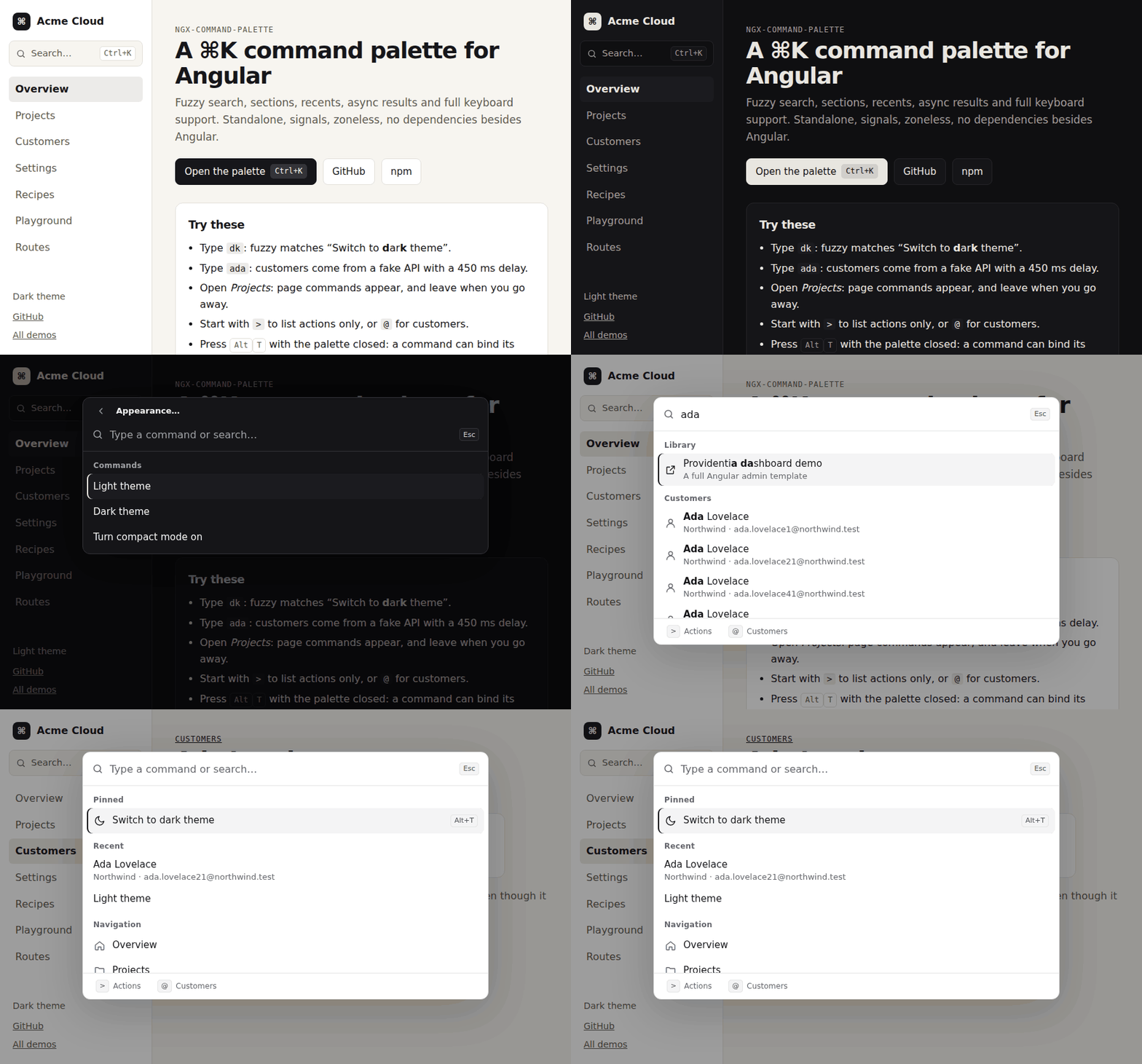
An accessible **⌘K / Ctrl+K command palette for Angular**. A modern equivalent of
|
|
4
|
+
[cmdk](https://cmdk.paco.me) and [kbar](https://kbar.vercel.app), built the Angular way:
|
|
5
|
+
standalone components, signals, zoneless-ready and **no dependencies besides Angular**.
|
|
6
|
+
|
|
7
|
+
[](https://github.com/rrstudioapps/ngx-command-palette/actions/workflows/ci.yml)
|
|
8
|
+
[](https://www.npmjs.com/package/@rrstudioapps/ngx-command-palette)
|
|
9
|
+
[](LICENSE)
|
|
10
|
+
|
|
11
|
+
**[Live demo →](https://demo.rr-dev.eu/command-palette/)**
|
|
12
|
+
|
|
13
|
+
|
|
14
|
+
|
|
15
|
+
## Features
|
|
16
|
+
|
|
17
|
+
- Opens with **⌘K / Ctrl+K** (configurable, multiple shortcuts allowed), closes with **Esc** or a click outside
|
|
18
|
+
- **Fuzzy search** with highlighted matches, case and accent insensitive, smart ranking (word starts, consecutive letters)
|
|
19
|
+
- Commands grouped in **sections**, with optional **icon**, **description**, **shortcut hint** and extra **keywords**
|
|
20
|
+
- Each command either **navigates to a route** or **runs a function**
|
|
21
|
+
- Optional **Recent** section, stored in `localStorage`
|
|
22
|
+
- **Async providers** (e.g. customer search on your API) with debounce, loading state and request cancellation
|
|
23
|
+
- Register commands **from any component** with signals; they are **removed automatically** when the component is destroyed
|
|
24
|
+
- Full **keyboard navigation**: ↑ ↓, Home / End, Enter, Ctrl+N / Ctrl+P
|
|
25
|
+
- **Accessible**: dialog + combobox/listbox pattern, `aria-activedescendant`, focus trap, focus restore, live region, `prefers-reduced-motion`
|
|
26
|
+
- **Themeable** with CSS variables (`--rr-cp-*`), light and dark themes, no Tailwind required
|
|
27
|
+
- Custom **templates** for items and the empty state
|
|
28
|
+
- No browser globals at import time (SSR friendly), works with or without zone.js
|
|
29
|
+
|
|
30
|
+
| Light | Dark |
|
|
31
|
+
| --- | --- |
|
|
32
|
+
| 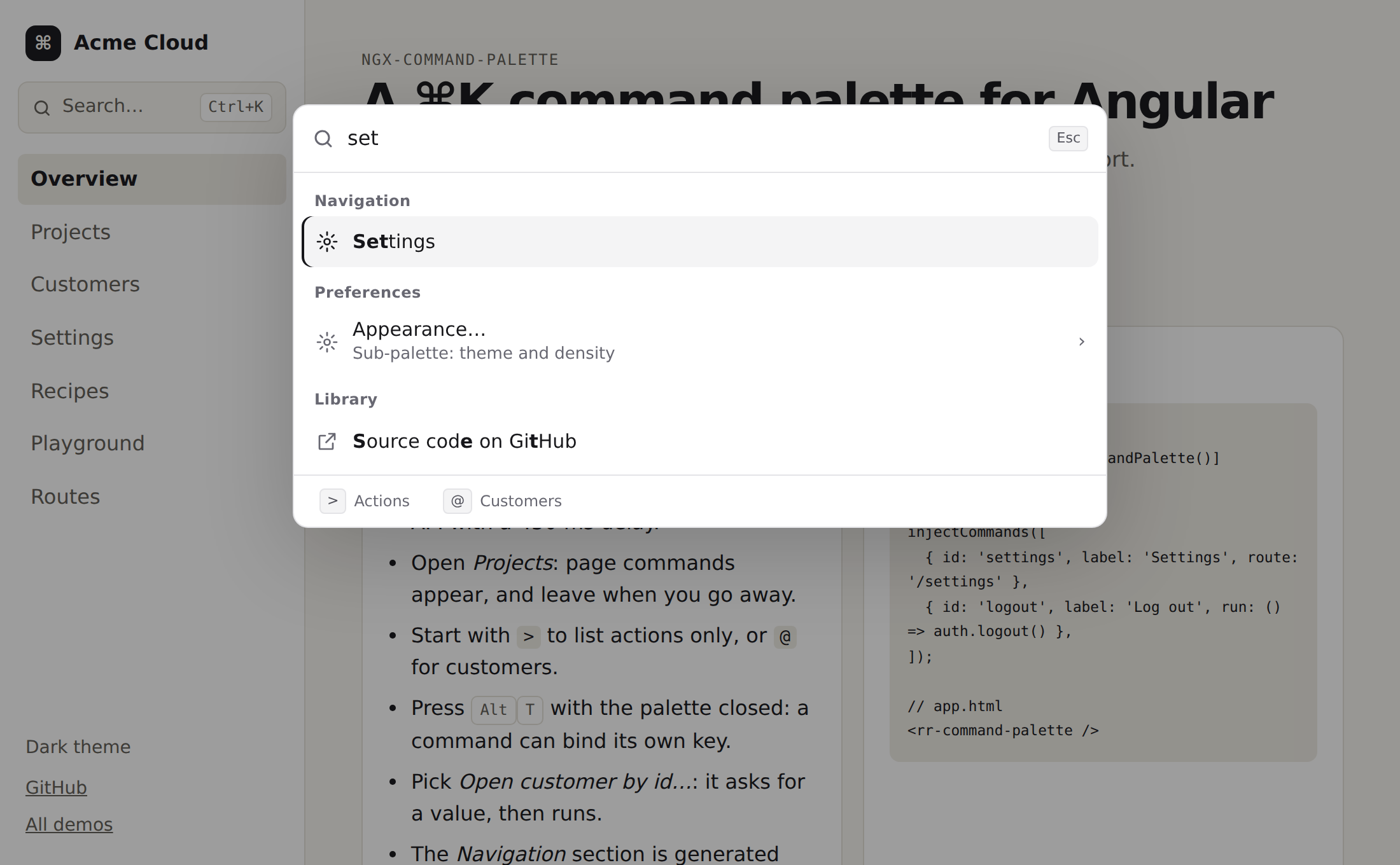 | 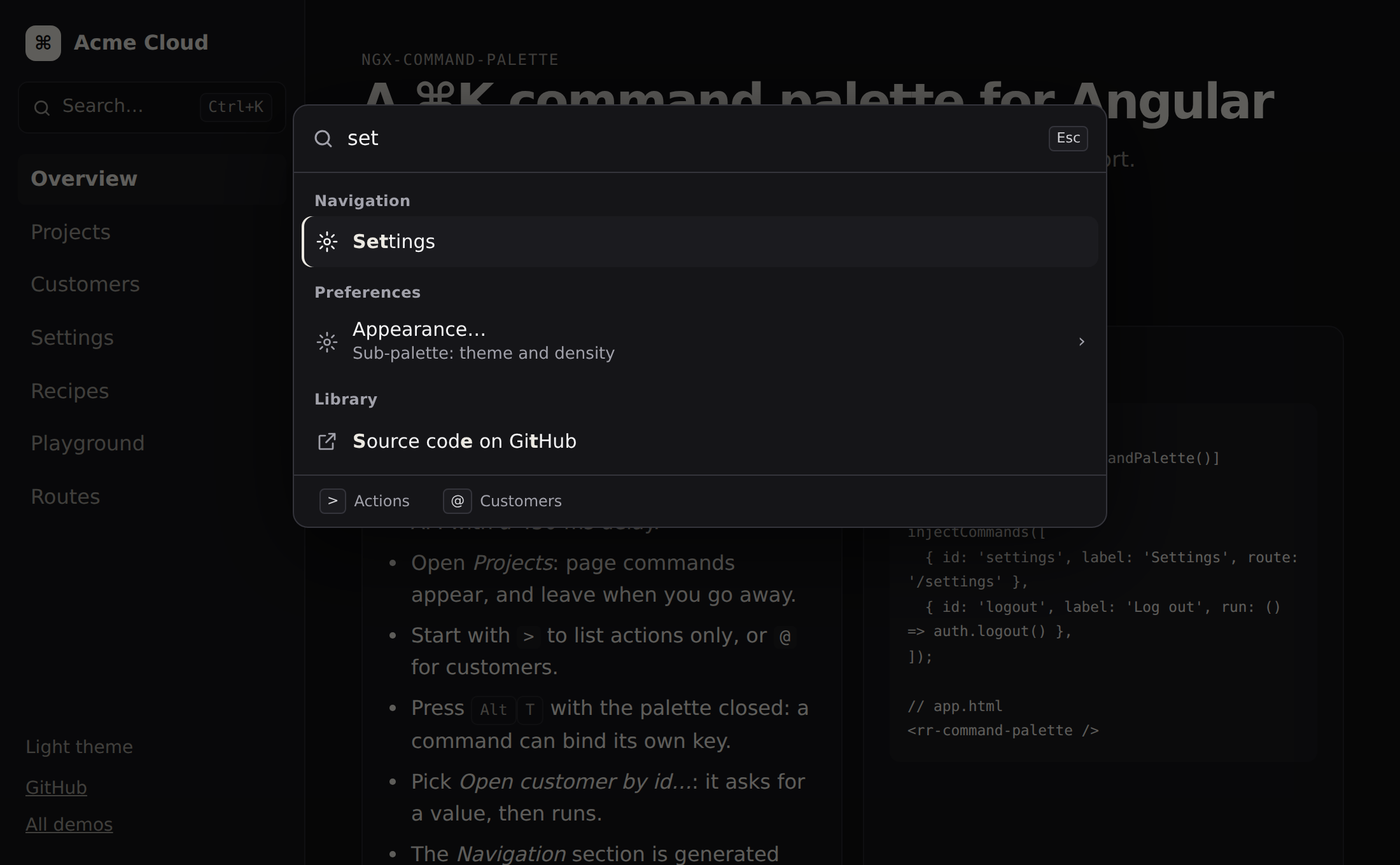 |
|
|
33
|
+
|
|
34
|
+
## Installation
|
|
35
|
+
|
|
36
|
+
```bash
|
|
37
|
+
npm install @rrstudioapps/ngx-command-palette
|
|
38
|
+
```
|
|
39
|
+
|
|
40
|
+
Requires Angular 21 or 22 (`@angular/core`, `@angular/common`, `@angular/router`).
|
|
41
|
+
|
|
42
|
+
## Quick start (5 minutes)
|
|
43
|
+
|
|
44
|
+
**1. Configure it** (optional: without this call the defaults are used).
|
|
45
|
+
|
|
46
|
+
```ts
|
|
47
|
+
// app.config.ts
|
|
48
|
+
import { provideCommandPalette } from '@rrstudioapps/ngx-command-palette';
|
|
49
|
+
|
|
50
|
+
export const appConfig: ApplicationConfig = {
|
|
51
|
+
providers: [
|
|
52
|
+
provideRouter(routes),
|
|
53
|
+
provideCommandPalette({ shortcut: 'mod+k' }),
|
|
54
|
+
],
|
|
55
|
+
};
|
|
56
|
+
```
|
|
57
|
+
|
|
58
|
+
**2. Place the palette once** and register some commands.
|
|
59
|
+
|
|
60
|
+
```ts
|
|
61
|
+
// app.ts
|
|
62
|
+
import { Component, inject } from '@angular/core';
|
|
63
|
+
import { CommandPaletteComponent, injectCommands } from '@rrstudioapps/ngx-command-palette';
|
|
64
|
+
|
|
65
|
+
@Component({
|
|
66
|
+
selector: 'app-root',
|
|
67
|
+
imports: [CommandPaletteComponent, RouterOutlet],
|
|
68
|
+
template: `
|
|
69
|
+
<router-outlet />
|
|
70
|
+
<rr-command-palette />
|
|
71
|
+
`,
|
|
72
|
+
})
|
|
73
|
+
export class App {
|
|
74
|
+
private auth = inject(AuthService);
|
|
75
|
+
|
|
76
|
+
constructor() {
|
|
77
|
+
injectCommands([
|
|
78
|
+
{ id: 'home', label: 'Home', group: 'Navigation', route: '/' },
|
|
79
|
+
{ id: 'settings', label: 'Settings', group: 'Navigation', route: '/settings', keywords: ['preferences'] },
|
|
80
|
+
{ id: 'logout', label: 'Log out', icon: '🚪', run: () => this.auth.logout() },
|
|
81
|
+
]);
|
|
82
|
+
}
|
|
83
|
+
}
|
|
84
|
+
```
|
|
85
|
+
|
|
86
|
+
**3. Press ⌘K / Ctrl+K.** That's it.
|
|
87
|
+
|
|
88
|
+
**4. Add page commands** from any component. They exist only while the component is alive.
|
|
89
|
+
Pass a signal to keep them in sync with your state:
|
|
90
|
+
|
|
91
|
+
```ts
|
|
92
|
+
@Component({ /* … */ })
|
|
93
|
+
export class ProjectsPage {
|
|
94
|
+
projects = signal<Project[]>([]);
|
|
95
|
+
|
|
96
|
+
constructor() {
|
|
97
|
+
injectCommands(
|
|
98
|
+
computed(() => [
|
|
99
|
+
{ id: 'project-new', label: 'New project', group: 'Projects', run: () => this.create() },
|
|
100
|
+
...this.projects().map((p) => ({
|
|
101
|
+
id: `project-${p.id}`,
|
|
102
|
+
label: `Open ${p.name}`,
|
|
103
|
+
group: 'Projects',
|
|
104
|
+
route: ['/projects', p.id],
|
|
105
|
+
})),
|
|
106
|
+
]),
|
|
107
|
+
);
|
|
108
|
+
}
|
|
109
|
+
}
|
|
110
|
+
```
|
|
111
|
+
|
|
112
|
+
**5. Search your API** with an async provider:
|
|
113
|
+
|
|
114
|
+
```ts
|
|
115
|
+
injectCommandProvider({
|
|
116
|
+
id: 'customers',
|
|
117
|
+
group: 'Customers',
|
|
118
|
+
minQueryLength: 2,
|
|
119
|
+
search: async (query, signal) => {
|
|
120
|
+
const res = await fetch(`/api/customers?q=${encodeURIComponent(query)}`, { signal });
|
|
121
|
+
const customers: Customer[] = await res.json();
|
|
122
|
+
return customers.map((c) => ({
|
|
123
|
+
id: `customer-${c.id}`,
|
|
124
|
+
label: c.name,
|
|
125
|
+
description: c.email,
|
|
126
|
+
route: ['/customers', c.id],
|
|
127
|
+
}));
|
|
128
|
+
},
|
|
129
|
+
});
|
|
130
|
+
```
|
|
131
|
+
|
|
132
|
+
`search` can also return an Observable (e.g. from `HttpClient`): anything with a `subscribe` method works.
|
|
133
|
+
|
|
134
|
+
## API
|
|
135
|
+
|
|
136
|
+
### `provideCommandPalette(options?)`
|
|
137
|
+
|
|
138
|
+
| Option | Type | Default | Description |
|
|
139
|
+
| --- | --- | --- | --- |
|
|
140
|
+
| `shortcut` | `string \| string[]` | `'mod+k'` | Toggle shortcut(s). `mod` is ⌘ on macOS/iOS and Ctrl elsewhere. Examples: `'ctrl+shift+p'`, `'/'`. Shortcuts without Ctrl/⌘/Alt are ignored while typing in a field. |
|
|
141
|
+
| `theme` | `'light' \| 'dark' \| 'auto'` | `'auto'` | `auto` follows `prefers-color-scheme`. |
|
|
142
|
+
| `recent` | `{ max?, storageKey? } \| false` | `{ max: 5, storageKey: 'rr-cp:recent' }` | "Recent" section shown when the query is empty. |
|
|
143
|
+
| `debounceMs` | `number` | `200` | Debounce for async providers. |
|
|
144
|
+
| `maxResults` | `number` | `50` | Max local results for a non-empty query. |
|
|
145
|
+
| `filter` | `(query, command) => { score, indices } \| null` | built-in fuzzy search | Your own matching and ranking of local commands. See [Custom search](#custom-search). |
|
|
146
|
+
| `labels` | `Partial<CommandPaletteLabels>` | English | All texts, for translations: `placeholder`, `dialog`, `listbox`, `empty`, `loading`, `recent`, `defaultGroup`, `results` (`'{count} results'`), `closeHint`, `back`, `level` (`'{name}: {count} results'`), `submenu`. |
|
|
147
|
+
|
|
148
|
+
### Many commands
|
|
149
|
+
|
|
150
|
+
Commands are scored on every keystroke and, with an empty search, all of them are rendered. That stays
|
|
151
|
+
smooth up to a few hundred commands (about a thousand open in roughly 0.2 s on a slow virtual server).
|
|
152
|
+
With a couple of thousand or more, group them in [sub-palettes](#sub-palettes) or load them with an async
|
|
153
|
+
[provider](#commandprovider) instead.
|
|
154
|
+
|
|
155
|
+
### Custom search
|
|
156
|
+
|
|
157
|
+
By default commands are matched with the built-in fuzzy search (label, keywords, description). Pass `filter`
|
|
158
|
+
to decide what matches and how results are ranked. Return `null` to hide a command; a higher `score` ranks first,
|
|
159
|
+
and `indices` are the label characters to highlight:
|
|
160
|
+
|
|
161
|
+
```ts
|
|
162
|
+
provideCommandPalette({
|
|
163
|
+
// Only commands whose label starts with the query
|
|
164
|
+
filter: (query, command) =>
|
|
165
|
+
command.label.toLowerCase().startsWith(query.toLowerCase())
|
|
166
|
+
? { score: 1, indices: Array.from({ length: query.length }, (_, i) => i) }
|
|
167
|
+
: null,
|
|
168
|
+
});
|
|
169
|
+
```
|
|
170
|
+
|
|
171
|
+
`filter` only applies to local commands with a non-empty query. Results of async providers keep the order
|
|
172
|
+
returned by your API. To build on the default behavior, call the exported `matchCommand(query, command)`.
|
|
173
|
+
|
|
174
|
+
### Sub-palettes
|
|
175
|
+
|
|
176
|
+
Give a command `children` and selecting it lists those commands instead of running something. The path of
|
|
177
|
+
opened parents shows above the search field, and the search only looks inside the current level:
|
|
178
|
+
|
|
179
|
+
```ts
|
|
180
|
+
injectCommands([
|
|
181
|
+
{
|
|
182
|
+
id: 'theme',
|
|
183
|
+
label: 'Change theme',
|
|
184
|
+
keywords: ['appearance'],
|
|
185
|
+
children: [
|
|
186
|
+
{ id: 'theme-light', label: 'Light', run: () => setTheme('light') },
|
|
187
|
+
{ id: 'theme-dark', label: 'Dark', run: () => setTheme('dark') },
|
|
188
|
+
],
|
|
189
|
+
},
|
|
190
|
+
]);
|
|
191
|
+
```
|
|
192
|
+
|
|
193
|
+
- **Backspace** on an empty search, the back button or a step of the path goes back; **Esc** closes the whole palette.
|
|
194
|
+
- Children can have children. They support `hidden` and `disabled` like any command.
|
|
195
|
+
- Running a child saves it in the recents, so it shows up at the top level afterwards. Parents are never saved.
|
|
196
|
+
- Async providers search the top level only, and only registered commands can have `children`
|
|
197
|
+
(not the results of a provider).
|
|
198
|
+
- Screen readers hear the level name and the number of results when a sub-palette opens.
|
|
199
|
+
|
|
200
|
+
### `Command`
|
|
201
|
+
|
|
202
|
+
| Field | Type | Description |
|
|
203
|
+
| --- | --- | --- |
|
|
204
|
+
| `id` | `string` | Unique and stable (used for recents). |
|
|
205
|
+
| `label` | `string` | Shown and searched. |
|
|
206
|
+
| `group` | `string?` | Section. Default: `labels.defaultGroup`. |
|
|
207
|
+
| `description` | `string?` | Second line, searched with a lower weight. |
|
|
208
|
+
| `icon` | `string \| TemplateRef?` | Emoji/text/icon-font ligature, or a template (e.g. an SVG). |
|
|
209
|
+
| `shortcut` | `string[]?` | Keys shown on the right, e.g. `['⌘', 'S']`. Display only. |
|
|
210
|
+
| `keywords` | `string[]?` | Extra search terms, not shown. |
|
|
211
|
+
| `disabled` | `boolean?` | Shown but not selectable. |
|
|
212
|
+
| `children` | `Command[]?` | Makes it a parent: selecting it opens a sub-palette with these commands instead of running something. See [Sub-palettes](#sub-palettes). |
|
|
213
|
+
| `hidden` | `boolean \| (() => boolean)?` | Not listed and not searched. A function or a signal hides it depending on your app state, e.g. `hidden: () => !user()`. |
|
|
214
|
+
| `route` + `navigationExtras` | `string \| any[]`, `NavigationExtras?` | Navigate with the Angular router… |
|
|
215
|
+
| `run` | `(ctx: { query }) => void \| Promise` | …or run a function. |
|
|
216
|
+
|
|
217
|
+
### `CommandPaletteService`
|
|
218
|
+
|
|
219
|
+
| Member | Description |
|
|
220
|
+
| --- | --- |
|
|
221
|
+
| `isOpen`, `query`, `loading` | Read-only signals. |
|
|
222
|
+
| `commands`, `sections` | Registered commands and the filtered, grouped results of the current level (signals). |
|
|
223
|
+
| `path` | The sub-palettes currently open, outermost first (signal). |
|
|
224
|
+
| `back(levels?)` | Goes back one or more levels of a sub-palette; returns `false` at the top level. |
|
|
225
|
+
| `open(query?)`, `close()`, `toggle()` | Open/close programmatically (e.g. from a "Search…" button). |
|
|
226
|
+
| `setQuery(query)` | Change the search text. |
|
|
227
|
+
| `register(commands \| signal, destroyRef?)` | Returns an unregister function. Inside an injection context it unregisters on destroy. |
|
|
228
|
+
| `registerProvider(provider, destroyRef?)` | Same, for async providers. |
|
|
229
|
+
| `execute(command)` | Run a command as if selected. |
|
|
230
|
+
| `clearRecent()` | Forget the recents. |
|
|
231
|
+
|
|
232
|
+
`injectCommands(commands)` and `injectCommandProvider(provider)` are shortcuts for
|
|
233
|
+
`register`/`registerProvider` bound to the current component.
|
|
234
|
+
|
|
235
|
+
### `CommandProvider`
|
|
236
|
+
|
|
237
|
+
| Field | Type | Description |
|
|
238
|
+
| --- | --- | --- |
|
|
239
|
+
| `id`, `group` | `string` | Provider id and section title. |
|
|
240
|
+
| `search(query, signal)` | `Promise<Command[]> \| Observable<Command[]>` | `signal` is aborted when the query changes or the palette closes. |
|
|
241
|
+
| `minQueryLength` | `number?` | Default `1`. |
|
|
242
|
+
| `debounceMs` | `number?` | Overrides the global debounce. |
|
|
243
|
+
|
|
244
|
+
Async results keep the order returned by your API. Route commands from a provider are kept
|
|
245
|
+
in "Recent" even when they are no longer returned by the search.
|
|
246
|
+
|
|
247
|
+
### `<rr-command-palette>`
|
|
248
|
+
|
|
249
|
+
| Input | Description |
|
|
250
|
+
| --- | --- |
|
|
251
|
+
| `theme` | Overrides the configured theme, e.g. `[theme]="appTheme()"` to follow your own toggle. |
|
|
252
|
+
|
|
253
|
+
The component also exposes `shortcutLabel` (`'⌘K'` or `'Ctrl+K'`) for your search button:
|
|
254
|
+
`<rr-command-palette #cp />` … `<kbd>{{ cp.shortcutLabel }}</kbd>`.
|
|
255
|
+
|
|
256
|
+
### Custom templates
|
|
257
|
+
|
|
258
|
+
```html
|
|
259
|
+
<rr-command-palette>
|
|
260
|
+
<ng-template rrCommandItem let-command let-segments="segments" let-active="active">
|
|
261
|
+
<my-icon [name]="command.id" />
|
|
262
|
+
<span>
|
|
263
|
+
@for (s of segments; track $index) {
|
|
264
|
+
@if (s.match) { <b>{{ s.text }}</b> } @else { {{ s.text }} }
|
|
265
|
+
}
|
|
266
|
+
</span>
|
|
267
|
+
@if (active) { <span class="hint">↵</span> }
|
|
268
|
+
</ng-template>
|
|
269
|
+
|
|
270
|
+
<ng-template rrCommandEmpty let-query>
|
|
271
|
+
No results for “{{ query }}”. <a href="/help">Need help?</a>
|
|
272
|
+
</ng-template>
|
|
273
|
+
</rr-command-palette>
|
|
274
|
+
```
|
|
275
|
+
|
|
276
|
+
Import `CommandItemTemplate` and `CommandEmptyTemplate` next to `CommandPaletteComponent`.
|
|
277
|
+
The item context also has `result` (score and indices) and `query`.
|
|
278
|
+
|
|
279
|
+
### Utilities
|
|
280
|
+
|
|
281
|
+
`fuzzyMatch(query, text)` returns `{ score, indices } | null`. `highlightSegments(text, indices)`
|
|
282
|
+
splits a string for highlighting. `parseShortcut`, `matchesShortcut` and `formatShortcut`
|
|
283
|
+
handle shortcut strings. All of them are exported if you want the same behaviour elsewhere.
|
|
284
|
+
|
|
285
|
+
## Theming
|
|
286
|
+
|
|
287
|
+
The styles use CSS variables with zero-specificity defaults, so any rule of yours wins.
|
|
288
|
+
Set them on `.rr-cp` (the overlay), and on `.rr-cp[data-theme='dark']` for the dark theme:
|
|
289
|
+
|
|
290
|
+
```css
|
|
291
|
+
.rr-cp {
|
|
292
|
+
--rr-cp-accent: #e11d48;
|
|
293
|
+
--rr-cp-highlight: #e11d48;
|
|
294
|
+
--rr-cp-radius: 16px;
|
|
295
|
+
--rr-cp-font: 'Inter', sans-serif;
|
|
296
|
+
}
|
|
297
|
+
|
|
298
|
+
.rr-cp[data-theme='dark'] {
|
|
299
|
+
--rr-cp-bg: #0f0f12;
|
|
300
|
+
}
|
|
301
|
+
```
|
|
302
|
+
|
|
303
|
+
| Variable | Purpose |
|
|
304
|
+
| --- | --- |
|
|
305
|
+
| `--rr-cp-bg`, `--rr-cp-fg`, `--rr-cp-muted`, `--rr-cp-border` | Surface, text, secondary text, borders |
|
|
306
|
+
| `--rr-cp-accent` | Active row marker, spinner |
|
|
307
|
+
| `--rr-cp-item-active-bg` | Active row background |
|
|
308
|
+
| `--rr-cp-highlight`, `--rr-cp-highlight-bg` | Matched characters |
|
|
309
|
+
| `--rr-cp-kbd-bg`, `--rr-cp-kbd-fg` | Shortcut keys |
|
|
310
|
+
| `--rr-cp-backdrop`, `--rr-cp-shadow` | Overlay and dialog shadow |
|
|
311
|
+
| `--rr-cp-font`, `--rr-cp-font-size` | Typography |
|
|
312
|
+
| `--rr-cp-width`, `--rr-cp-max-height`, `--rr-cp-top` | Dialog size and position |
|
|
313
|
+
| `--rr-cp-radius`, `--rr-cp-item-radius` | Corners |
|
|
314
|
+
| `--rr-cp-z-index`, `--rr-cp-duration` | Stacking and animation length |
|
|
315
|
+
|
|
316
|
+
Class names (`rr-cp-dialog`, `rr-cp-item`, `rr-cp-item-active`, `rr-cp-match`, `rr-cp-group-label`,
|
|
317
|
+
`rr-cp-empty`, …) are stable too, if you need more than variables.
|
|
318
|
+
|
|
319
|
+
## Accessibility
|
|
320
|
+
|
|
321
|
+
- The palette is a modal `role="dialog"` with `aria-modal="true"` and a label.
|
|
322
|
+
- The search field is a `role="combobox"` that controls a `role="listbox"`. Sections are
|
|
323
|
+
`role="group"` with a label. The active option is announced through `aria-activedescendant`,
|
|
324
|
+
so the focus never leaves the input.
|
|
325
|
+
- Disabled commands use `aria-disabled` and are skipped by the keyboard.
|
|
326
|
+
- Focus is trapped inside the dialog and **restored** to the previously focused element on close.
|
|
327
|
+
- A polite live region announces the number of results and the loading state.
|
|
328
|
+
- Animations are disabled with `prefers-reduced-motion: reduce`, and active rows and matches
|
|
329
|
+
stay visible in Windows high contrast mode (`forced-colors`).
|
|
330
|
+
- The demo is checked with axe-core: 0 violations in light and dark themes.
|
|
331
|
+
|
|
332
|
+
## Development
|
|
333
|
+
|
|
334
|
+
```bash
|
|
335
|
+
npm install
|
|
336
|
+
npm start # demo on http://localhost:4200
|
|
337
|
+
npm test # unit tests (Vitest)
|
|
338
|
+
npm run lint
|
|
339
|
+
npm run build # library (dist/ngx-command-palette) + demo
|
|
340
|
+
```
|
|
341
|
+
|
|
342
|
+
See [CONTRIBUTING.md](CONTRIBUTING.md).
|
|
343
|
+
|
|
344
|
+
## License
|
|
345
|
+
|
|
346
|
+
[MIT](LICENSE) © 2026 rrstudio
|
|
347
|
+
|
|
348
|
+
## Need a full dashboard? Check out Providentia
|
|
349
|
+
|
|
350
|
+
**Providentia** is a complete Angular admin dashboard template by the same author: analytics,
|
|
351
|
+
customer tables, report builder, billing, roles, light and dark themes, and a command palette
|
|
352
|
+
built in.
|
|
353
|
+
|
|
354
|
+
**[See the Providentia live demo →](https://demo.rr-dev.eu/providentia/overview)**
|