@rod2ik/tikzjax 1.0.0-beta32 → 1.0.1
This diff represents the content of publicly available package versions that have been released to one of the supported registries. The information contained in this diff is provided for informational purposes only and reflects changes between package versions as they appear in their respective public registries.
- package/LICENSE +674 -0
- package/README.md +47 -192
- package/dist/assets/broken-image-degrade.svg +26 -0
- package/dist/assets/broken-image-emoji.svg +32 -0
- package/dist/assets/broken-image-epuree.svg +15 -0
- package/dist/assets/broken-image-esquisse.svg +25 -0
- package/dist/assets/broken-image-materielle.svg +36 -0
- package/dist/assets/broken-image-minimaliste.svg +12 -0
- package/dist/assets/broken-image-moderne.svg +31 -0
- package/dist/assets/broken-image.svg +18 -0
- package/dist/run-tex.js +2 -1
- package/dist/run-tex.js.LICENSE.txt +10 -0
- package/dist/tex_files/amsbsy.sty.gz +0 -0
- package/dist/tex_files/amsgen.sty.gz +0 -0
- package/dist/tex_files/amsmath.sty.gz +0 -0
- package/dist/tex_files/amsopn.sty.gz +0 -0
- package/dist/tex_files/amstext.sty.gz +0 -0
- package/dist/tex_files/array.sty.gz +0 -0
- package/dist/tex_files/etoolbox.sty.gz +0 -0
- package/dist/tex_files/expl3.sty.gz +0 -0
- package/dist/tex_files/ifthen.sty.gz +0 -0
- package/dist/tex_files/l3backend-dvips.def.gz +0 -0
- package/dist/tex_files/xparse.sty.gz +0 -0
- package/dist/tikzjax.js +1 -1
- package/package.json +37 -30
- package/dist/core.dump.gz +0 -0
- package/dist/tex.wasm.gz +0 -0
package/README.md
CHANGED
|
@@ -1,207 +1,62 @@
|
|
|
1
|
-
# TikZJax
|
|
1
|
+
# rod2ik/TikZJax
|
|
2
2
|
|
|
3
|
-
|
|
3
|
+
## Introduction
|
|
4
4
|
|
|
5
|
-
|
|
5
|
+
[](https://github.com/rod2ik/tikzjax) is a [](https://www.gnu.org/licenses/gpl-3.0) opensource project, that natively renders **TikZ/LaTeX** AND **tkz-tab/LaTeX** for **maths variation tables** and **maths sign tables** , directly inside an HTML page AND/OR inside usual documentation websites, notably **MkDocs** with **Material theme**. Star this project, if you like it 🫶🫶🫶 !
|
|
6
6
|
|
|
7
|
-
|
|
8
|
-
|
|
7
|
+
| ⚠️ Documentation Link ⚠️ |
|
|
8
|
+
|---|
|
|
9
|
+
| Please refer to this **MkDocs Documentation & Demo Site** for more thorough documentation and more info: [https://rod2ik.github.io/tikzjax](https://rod2ik.github.io/tikzjax) |
|
|
9
10
|
|
|
10
|
-
|
|
11
|
-
[kisonecat/web2js](https://github.com/kisonecat/web2js), and [kisonecat/dvi2html](https://github.com/kisonecat/dvi2html)
|
|
12
|
-
for his original work.
|
|
13
|
-
* This work is a fork of Glenn Rice, that I hereby thank. See [drgrice1/tikjax](https://github.com/drgrice1/tikzjax), [drgrice1/web2js](https://github.com/drgrice1/web2js) and [drgrice1/web2js](https://github.com/drgrice1/dvi2html) for his work.
|
|
14
|
-
* The main enhancement of my work is to add the `tkz-tab` package, so as to embed **maths variation tables**, as SVGs, directly into HTML.
|
|
11
|
+
Example 1:
|
|
15
12
|
|
|
16
|
-
|
|
13
|
+
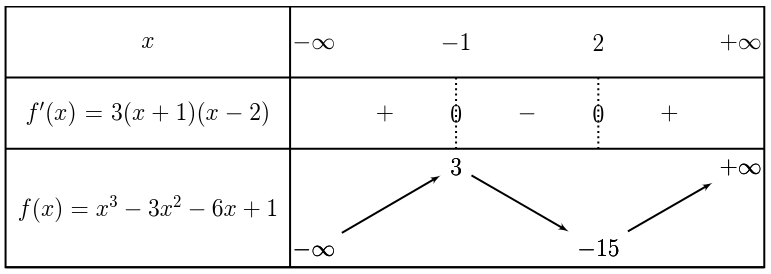
|
|
14
|
+
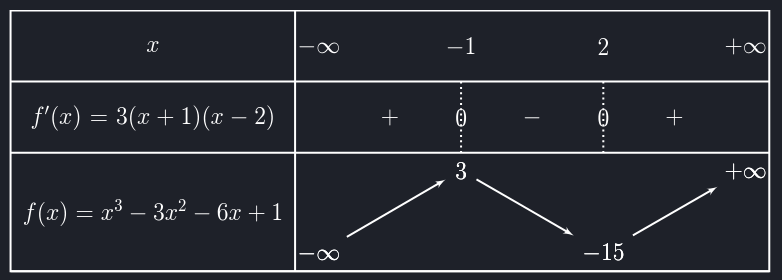
|
|
17
15
|
|
|
18
|
-
|
|
16
|
+
Example 2:
|
|
19
17
|
|
|
20
|
-
|
|
18
|
+
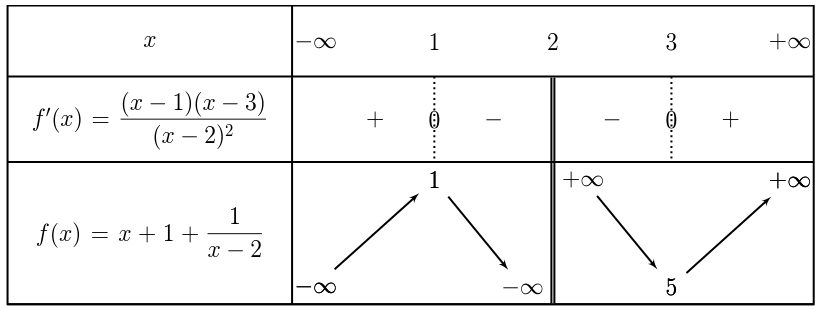
|
|
19
|
+
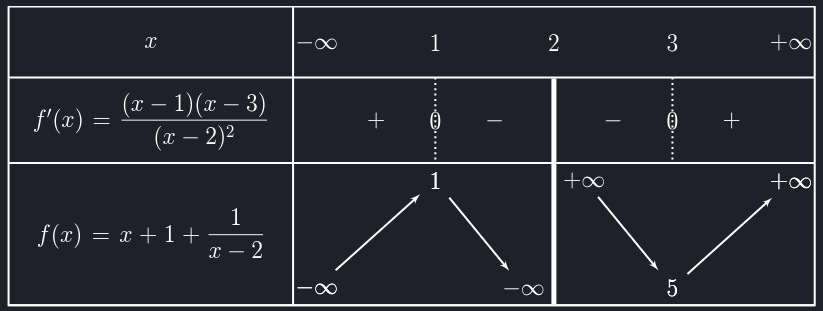
|
|
21
20
|
|
|
22
|
-
|
|
23
|
-
<link rel="stylesheet" href="http[s]://<path to dist contents>/fonts.css">
|
|
24
|
-
<script src="http[s]://<path to dist contents>/tikzjax.js"></script>
|
|
25
|
-
```
|
|
21
|
+
[](https://github.com/rod2ik/tikzjax) is originally a fork from the great works 👏👏👏 of :
|
|
26
22
|
|
|
27
|
-
|
|
23
|
+
* [kisone/tikzjax](https://github.com/kisonecat/tikzjax) by [Jim Fowler](https://github.com/kisonecat)
|
|
24
|
+
* [drgrice1/tikzjax](https://github.com/drgrice1/tikzjax) by [Glenn Rice](https://github.com/drgrice1)
|
|
28
25
|
|
|
29
|
-
|
|
26
|
+
Please note, that:
|
|
30
27
|
|
|
31
|
-
*
|
|
28
|
+
* Both latter projects are based on their own **web2js** and **dvi2html** projects.
|
|
29
|
+
* [](https://github.com/rod2ik/tikzjax) is based on its own custom forks [rod2ik/web2js](https://github.com/rod2ik/web2js) and [rod2ik/dvi2html](https://github.com/rod2ik/dvi2html).
|
|
32
30
|
|
|
33
|
-
|
|
34
|
-
<script type="text/tikz">
|
|
35
|
-
\begin{tikzpicture}
|
|
36
|
-
\draw (0,0) circle (1in);
|
|
37
|
-
\end{tikzpicture}
|
|
38
|
-
</script>
|
|
39
|
-
```
|
|
31
|
+
Also note, that [](https://github.com/rod2ik/tikzjax) has, since then, been massively :
|
|
40
32
|
|
|
41
|
-
*
|
|
33
|
+
* **refactored as an ESM project**
|
|
34
|
+
* **extended**, to render both [](https://github.com/rod2ik/tikzjax) **TikZ Figures** [](https://github.com/rod2ik/tikzjax) [](https://github.com/rod2ik/tikzjax) `tkz-tab` macros, **LaTeX** style, for **math variations tables** / **math sign tables** :
|
|
35
|
+
* [](https://github.com/rod2ik/tikzjax) a **global configuration file** `tikzjax.config.js` through `window.TikzJaxOptions`;
|
|
36
|
+
* inside a **custom HTML Bloc**, using a `<script type="text/tikz">` tag syntax:
|
|
37
|
+
* [](https://github.com/rod2ik/tikzjax) automatic rendering of **TikZ** Figures (THE historical functionnality of [kisone/tikzjax](https://github.com/kisonecat/tikzjax))
|
|
38
|
+
* [](https://github.com/rod2ik/tikzjax) ❗📢❗:warning: automatic rendering of `tkz-tab` macros, **LaTeX** style, for **maths variations tables** / **math sign tables** :warning:❗📢❗
|
|
39
|
+
* [](https://github.com/rod2ik/tikzjax) Light/Dark Themes via the ***global customisation file***, or direct configuration.
|
|
40
|
+
* the `<script>` syntax is also natively compatible inside an **Mkdocs Markdown** Page:
|
|
41
|
+
* [](https://github.com/rod2ik/tikzjax) natively 100% compatible with **Material Light/Dark Themes**
|
|
42
|
+
* [](https://github.com/rod2ik/tikzjax) natively 100% compatible with **Material Admonitions** (collapsible, or not)
|
|
43
|
+
* [](https://github.com/rod2ik/tikzjax) natively 100$% compatible with **Material Content Tabs** (inside Admonitions, or not)
|
|
44
|
+
* inside **MkDocs**, with **Material** (or without it..), using a **`tikzjax` code bloc** syntax, **natively**:
|
|
45
|
+
* [](https://github.com/rod2ik/tikzjax) automatic rendering of **TikZ** Figures
|
|
46
|
+
(you could already this, but only via the `<script>` syntax, with kisone/tikzjax)
|
|
47
|
+
* [](https://github.com/rod2ik/tikzjax) ❗📢❗ automatic rendering of `tkz-tab` macros for **maths variations tables** / **math sign tables** ❗📢❗
|
|
48
|
+
* [](https://github.com/rod2ik/tikzjax) Compatibility with **Material Light/Dark Themes** (possibly customizable via the ***global customisation file***)
|
|
49
|
+
* [](https://github.com/rod2ik/tikzjax) compatibility with **Material Admonitions**: collapsable or not
|
|
50
|
+
* [](https://github.com/rod2ik/tikzjax) compatibility with **Material Content Tabs**
|
|
51
|
+
* **Other Documentation Sites**:
|
|
52
|
+
* Possibly all functionnalities of MkDocs, if your documentation tools uses python-markdown.
|
|
42
53
|
|
|
43
|
-
|
|
44
|
-
<script type="text/tikz" data-tex-packages='{"tkz-tab": ""}'>
|
|
45
|
-
\begin{tikzpicture}
|
|
46
|
-
\tkzTab{$x$ / 1 , $\cos(x)$ / 1, $\sin(x)$ / 1.5}{$0$, $\displaystyle \frac{\pi}{2}$, $\pi$}
|
|
47
|
-
{, +, z, -, }
|
|
48
|
-
{-/ 0, +/ 1, -/ 0}
|
|
49
|
-
\end{tikzpicture}
|
|
50
|
-
</script>
|
|
51
|
-
```
|
|
54
|
+
All the latter syntaxes also offer:
|
|
52
55
|
|
|
53
|
-
|
|
54
|
-
|
|
55
|
-
|
|
56
|
-
|
|
57
|
-
|
|
58
|
-
|
|
59
|
-
|
|
60
|
-
## How does this work?
|
|
61
|
-
|
|
62
|
-
Using the main branch of [rod2ik/web2js](https://github.com/rod2ik/web2js) the Pascal source of `TeX` is compiled to
|
|
63
|
-
WebAssembly, and the `LaTeX` format is loaded (without all the hyphenation data). Then
|
|
64
|
-
|
|
65
|
-
```tex
|
|
66
|
-
\documentclass[margin=0pt]{standalone}
|
|
67
|
-
\def\pgfsysdriver{pgfsys-ximera.def}
|
|
68
|
-
\usepackage[svgnames]{xcolor}
|
|
69
|
-
\usepackage{tikz}
|
|
70
|
-
\usepackage{tkz-tab}
|
|
71
|
-
```
|
|
72
|
-
|
|
73
|
-
is executed. Then the core is dumped and compressed. The WebAssembly and core are loaded in the browser and executed. An
|
|
74
|
-
SVG driver for PGF along with the [rod2ik/dvi2thml](https://github.com/rod2ik/dvi2html) library are then utilized to
|
|
75
|
-
convert the DVI output into to an SVG image.
|
|
76
|
-
|
|
77
|
-
All of this happens in the browser.
|
|
78
|
-
|
|
79
|
-
Note that TeX will only be run the first time that a "text/tikz" script tag appears in a page. After that run of TeX,
|
|
80
|
-
the SVG image will be cached, and the next time the same "text/tikz" script appears the cached SVG image will be loaded.
|
|
81
|
-
If the text content of the script tag or any of the `data` attributes (described below) are changed, then TeX will be
|
|
82
|
-
run again to update the image.
|
|
83
|
-
|
|
84
|
-
## Options
|
|
85
|
-
|
|
86
|
-
There are several data attributes that can be set for a "text/tikz" `<script>` tag that affect the generation of the
|
|
87
|
-
resulting SVG image, or change the way the TikzJax javascript behaves.
|
|
88
|
-
|
|
89
|
-
The values of the `data-width` and `data-height` attributes set on the `<script>` tag will be used for the width and
|
|
90
|
-
height of a loader image. This is an svg image that is displayed while TeX is being run to generate the svg image, and
|
|
91
|
-
contains a spinner to indicate to the user that work is being done. These dimensions are in points.
|
|
92
|
-
|
|
93
|
-
Use `data-tex-packages` to load and use TeX packages. The value of this attribute must be a string that will parse to a
|
|
94
|
-
valid javascript object via the javascript JSON.parse method. The keys of the object should be the TeX package names,
|
|
95
|
-
and the value of each key should be the package options to set. For example:
|
|
96
|
-
|
|
97
|
-
```html
|
|
98
|
-
<script type="text/tikz" data-tex-packages='{ "array": "", "pgfplots": "", "custom-package": "option=special" }'>
|
|
99
|
-
```
|
|
100
|
-
|
|
101
|
-
will add
|
|
102
|
-
|
|
103
|
-
```tex
|
|
104
|
-
\usepackage{array}
|
|
105
|
-
\usepackage{pgfplots}
|
|
106
|
-
\usepackage[option=special]{custom-package}
|
|
107
|
-
```
|
|
108
|
-
|
|
109
|
-
to the preamble of the TeX input. Note that TeX packages must be loaded in this way. This will ensure that the needed
|
|
110
|
-
TeX system files are made available to the TeX WebAssembly for successful compilation. Note that the TeX packages that
|
|
111
|
-
are available at this time are `amsbsy`, `amsfonts`, `amsgen`, `amsmath`, `amsopn`, `amssymb`, `amstext`, `array`,
|
|
112
|
-
`etoolbox`, `hf-tikz`, `pgfplots`, `tikz-3dplot`, `tikz-cd`, and `xparse`. Additional packages can be made available by
|
|
113
|
-
adding the gzipped TeX files used by the package to the `tex_files` directory.
|
|
114
|
-
|
|
115
|
-
Use `data-tikz-libraries` to load and use TikZ libraries. For example:
|
|
116
|
-
|
|
117
|
-
```html
|
|
118
|
-
<script type="text/tikz" data-tikz-libraries="arrows.meta,calc">
|
|
119
|
-
```
|
|
120
|
-
|
|
121
|
-
will result in
|
|
122
|
-
|
|
123
|
-
```tex
|
|
124
|
-
\usetikzlibrary{arrows.meta,calc}
|
|
125
|
-
```
|
|
126
|
-
|
|
127
|
-
being added to the preamble of the TeX input. As with TeX packages, TikZ libraries must be loaded in this way to ensure
|
|
128
|
-
that the needed TeX system files are made available to the TeX WebAssembly for successful compilation. Note that all
|
|
129
|
-
known TikZ libraries are available (with the exception of some that don't make sense in this context, like the external
|
|
130
|
-
library).
|
|
131
|
-
|
|
132
|
-
Use `data-add-to-preamble="..."` to add to the TeX preamble.
|
|
133
|
-
|
|
134
|
-
An SVG title can be added for screen reader users by setting `data-aria-label`.
|
|
135
|
-
|
|
136
|
-
The `data-disable-cache` attribute can be set to `true` to disable caching of an image in the indexed database.
|
|
137
|
-
|
|
138
|
-
Use `data-show-console="true"` to enable the output of TeX in the console. By default, console output is disabled and
|
|
139
|
-
nothing is shown in the browser console. If this data attribute is set, then you will see
|
|
140
|
-
|
|
141
|
-
```text
|
|
142
|
-
This is e-TeX, Version 3.14159265-2.6 (preloaded format=latex 1776.7.4)
|
|
143
|
-
**entering extended mode
|
|
144
|
-
(input.tex
|
|
145
|
-
LaTeX2e <2020-02-02> patch level 2
|
|
146
|
-
...
|
|
147
|
-
Transcript written on input.log.
|
|
148
|
-
```
|
|
149
|
-
|
|
150
|
-
output to the console. This is useful when testing your TikZ code to ensure that it compiles successfully, but should be
|
|
151
|
-
left disabled for production.
|
|
152
|
-
|
|
153
|
-
## CSS Classes
|
|
154
|
-
|
|
155
|
-
For your convenience, some css classes are provided that will apply common styles to the svg image. To use these classes
|
|
156
|
-
place the "text/tikz" script tags inside an html element with one of the following classes.
|
|
157
|
-
|
|
158
|
-
If you add the css class `tikzjax-container` to the containing element, then `overflow:visible` will be added to the
|
|
159
|
-
style of the generated `<svg>` image.
|
|
160
|
-
|
|
161
|
-
If you add the css class `tikzjax-scaled-container` to the containing element, then `overflow:visible`, `width:100%`,
|
|
162
|
-
and `height:100%` will be added to the style of the generated `<svg>` image.
|
|
163
|
-
|
|
164
|
-
## Other JavaScript Interactions
|
|
165
|
-
|
|
166
|
-
Note that once tikzjax completes the generation of an SVG image, the generated `<svg>` image will emit the
|
|
167
|
-
`tikzjax-load-finished` event. You can use this event to do something with the generated SVG image in javascript.
|
|
168
|
-
|
|
169
|
-
For example:
|
|
170
|
-
|
|
171
|
-
```javascript
|
|
172
|
-
document.addEventListener('tikzjax-load-finished', function(e) {
|
|
173
|
-
var svg = e.srcElement;
|
|
174
|
-
...
|
|
175
|
-
});
|
|
176
|
-
```
|
|
177
|
-
|
|
178
|
-
## Building
|
|
179
|
-
|
|
180
|
-
First clone this GitHub repository [https://github.com/rod2ik/tikzjax](https://github.com/rod2ik/tikzjax).
|
|
181
|
-
|
|
182
|
-
Then clone my fork of web2js [https://github.com/rod2ik/web2js](https://github.com/rod2ik/web2js). Follow the
|
|
183
|
-
directions in the README for a "quick path to generate the tex.wasm and core.dump files". Then copy the generated
|
|
184
|
-
core.dump and tex.wasm files to the tikzjax directory, and gzip them.
|
|
185
|
-
|
|
186
|
-
Finally run
|
|
187
|
-
|
|
188
|
-
```sh
|
|
189
|
-
npm install
|
|
190
|
-
npm run build
|
|
191
|
-
```
|
|
192
|
-
|
|
193
|
-
in the tikzjax directory to build the tikzjax distribution. Note that in order for this full build to be successful you
|
|
194
|
-
must have a TeX distribution installed with the necessary TeX and TikZ files available and locatable by `kpsewhich`.
|
|
195
|
-
|
|
196
|
-
## Deployment
|
|
197
|
-
|
|
198
|
-
The `dist` directory that is generated by the build process above will contain everything needed. Copy the contents to
|
|
199
|
-
your server for deployment. To use it in a webpage add
|
|
200
|
-
|
|
201
|
-
```html
|
|
202
|
-
<link rel="stylesheet" type="text/css" href="http[s]://<path to dist contents>/fonts.css">
|
|
203
|
-
<script src="http[s]://<path to dist contents>/tikzjax.js"></script>
|
|
204
|
-
```
|
|
205
|
-
|
|
206
|
-
to the html page. Of course use `http:` or `https:` instead of `http[s]:` (or remove that entirely for a protocol
|
|
207
|
-
agnostic approach) and adjust `<path to dist contents>` as needed.
|
|
56
|
+
* [](https://github.com/rod2ik/tikzjax) a **global configuration file** `tikzjax.config.js` through `window.TikzJaxOptions`
|
|
57
|
+
* [](https://github.com/rod2ik/tikzjax) **per-table local overrides** through `data-*` attributes
|
|
58
|
+
* [](https://github.com/rod2ik/tikzjax) native and customizable **Light/Dark themes** support for **Custom HTML blocs**, [](https://github.com/rod2ik/tikzjax) **Material for MkDocs**
|
|
59
|
+
* [](https://github.com/rod2ik/tikzjax) **browser-side cache** through IndexedD
|
|
60
|
+
* [](https://github.com/rod2ik/tikzjax) **Spinner animation**
|
|
61
|
+
* [](https://github.com/rod2ik/tikzjax) timeout, worker restart, retry handling
|
|
62
|
+
* [](https://github.com/rod2ik/tikzjax) A customizable **fallback error image**
|
|
@@ -0,0 +1,26 @@
|
|
|
1
|
+
<svg xmlns="http://www.w3.org/2000/svg" width="75" height="75" viewBox="0 0 75 75" role="img" aria-label="Broken image gradient">
|
|
2
|
+
<defs>
|
|
3
|
+
<linearGradient id="cardGradient" x1="12" y1="13" x2="64" y2="64" gradientUnits="userSpaceOnUse">
|
|
4
|
+
<stop offset="0" stop-color="#93c5fd"/>
|
|
5
|
+
<stop offset="1" stop-color="#8b5cf6"/>
|
|
6
|
+
</linearGradient>
|
|
7
|
+
<linearGradient id="mountainGradient" x1="20" y1="37" x2="55" y2="61" gradientUnits="userSpaceOnUse">
|
|
8
|
+
<stop offset="0" stop-color="#dbeafe"/>
|
|
9
|
+
<stop offset="1" stop-color="#ffffff" stop-opacity="0.7"/>
|
|
10
|
+
</linearGradient>
|
|
11
|
+
<filter id="softShadow" x="-15%" y="-15%" width="130%" height="130%">
|
|
12
|
+
<feDropShadow dx="0" dy="2" stdDeviation="2" flood-color="#4338ca" flood-opacity="0.25"/>
|
|
13
|
+
</filter>
|
|
14
|
+
</defs>
|
|
15
|
+
|
|
16
|
+
<rect x="12" y="11" width="51" height="53" rx="9" ry="9" fill="url(#cardGradient)" filter="url(#softShadow)"/>
|
|
17
|
+
<circle cx="27" cy="27" r="7.5" fill="#ffffff" opacity="0.95"/>
|
|
18
|
+
|
|
19
|
+
<path d="M19 58 L30 45 C32 42.5 34 42.5 36 45 L41 50 L51 36 C53 33.4 55 33.4 57 36 L64 45 V58 Z"
|
|
20
|
+
fill="url(#mountainGradient)" opacity="0.92"/>
|
|
21
|
+
<path d="M19 58 L30 45 C32 42.5 34 42.5 36 45 L41 50 L51 36 C53 33.4 55 33.4 57 36 L64 45"
|
|
22
|
+
fill="none" stroke="#ffffff" stroke-width="1.5" stroke-opacity="0.38" stroke-linecap="round" stroke-linejoin="round"/>
|
|
23
|
+
|
|
24
|
+
<path d="M52 52 L64 64 M64 52 L52 64"
|
|
25
|
+
stroke="#ffffff" stroke-width="5" stroke-linecap="round"/>
|
|
26
|
+
</svg>
|
|
@@ -0,0 +1,32 @@
|
|
|
1
|
+
<svg xmlns="http://www.w3.org/2000/svg" width="75" height="75" viewBox="0 0 75 75" role="img" aria-label="Broken image emoji style">
|
|
2
|
+
<defs>
|
|
3
|
+
<linearGradient id="paper" x1="13" y1="11" x2="60" y2="64" gradientUnits="userSpaceOnUse">
|
|
4
|
+
<stop offset="0" stop-color="#ffffff"/>
|
|
5
|
+
<stop offset="1" stop-color="#eef2f7"/>
|
|
6
|
+
</linearGradient>
|
|
7
|
+
<radialGradient id="badge" cx="45%" cy="35%" r="75%">
|
|
8
|
+
<stop offset="0" stop-color="#ff9a8f"/>
|
|
9
|
+
<stop offset="1" stop-color="#dc2626"/>
|
|
10
|
+
</radialGradient>
|
|
11
|
+
<filter id="shadow" x="-18%" y="-18%" width="136%" height="136%">
|
|
12
|
+
<feDropShadow dx="0" dy="1.4" stdDeviation="1.3" flood-color="#000000" flood-opacity="0.22"/>
|
|
13
|
+
</filter>
|
|
14
|
+
</defs>
|
|
15
|
+
|
|
16
|
+
<path d="M14 10 H50 L63 23 V56 C63 61 60 64 55 64 H20 C16 64 12 61 12 56 V16 C12 13 14 10 18 10 Z"
|
|
17
|
+
fill="url(#paper)" stroke="#4b5563" stroke-width="4" stroke-linejoin="round"/>
|
|
18
|
+
<path d="M50 10 V23 H63"
|
|
19
|
+
fill="#d1d5db" stroke="#4b5563" stroke-width="4" stroke-linejoin="round"/>
|
|
20
|
+
|
|
21
|
+
<circle cx="26" cy="29" r="3.8" fill="#4b5563"/>
|
|
22
|
+
<circle cx="39" cy="29" r="3.8" fill="#4b5563"/>
|
|
23
|
+
<path d="M24 40 C29 35 36 35 42 40"
|
|
24
|
+
fill="none" stroke="#4b5563" stroke-width="4" stroke-linecap="round"/>
|
|
25
|
+
|
|
26
|
+
<path d="M14 57 L28 44 L38 54 L49 40 L62 53"
|
|
27
|
+
fill="none" stroke="#4b5563" stroke-width="4" stroke-linecap="round" stroke-linejoin="round"/>
|
|
28
|
+
|
|
29
|
+
<circle cx="57" cy="57" r="13" fill="url(#badge)" stroke="#ffffff" stroke-width="3" filter="url(#shadow)"/>
|
|
30
|
+
<path d="M51.5 51.5 L62.5 62.5 M62.5 51.5 L51.5 62.5"
|
|
31
|
+
stroke="#ffffff" stroke-width="4" stroke-linecap="round"/>
|
|
32
|
+
</svg>
|
|
@@ -0,0 +1,15 @@
|
|
|
1
|
+
<svg xmlns="http://www.w3.org/2000/svg" width="75" height="75" viewBox="0 0 75 75" role="img" aria-label="Broken image clean line">
|
|
2
|
+
<path d="M14 12 H50 L62 24 V55 C62 60 59 63 54 63 H20 C16 63 13 60 13 56 V17 C13 14 15 12 18 12 Z"
|
|
3
|
+
fill="none" stroke="#5b6470" stroke-width="3.5" stroke-linejoin="round"/>
|
|
4
|
+
<path d="M50 12 V24 H62"
|
|
5
|
+
fill="none" stroke="#5b6470" stroke-width="3.5" stroke-linejoin="round"/>
|
|
6
|
+
<circle cx="26" cy="28" r="6.5"
|
|
7
|
+
fill="none" stroke="#5b6470" stroke-width="3.5"/>
|
|
8
|
+
<path d="M17 55 L31 41 L40 50 L52 37 L62 47"
|
|
9
|
+
fill="none" stroke="#5b6470" stroke-width="3.5" stroke-linecap="round" stroke-linejoin="round"/>
|
|
10
|
+
|
|
11
|
+
<circle cx="58" cy="57" r="13.5"
|
|
12
|
+
fill="none" stroke="#5b6470" stroke-width="3.5"/>
|
|
13
|
+
<path d="M53 52 L63 62 M63 52 L53 62"
|
|
14
|
+
stroke="#5b6470" stroke-width="3.5" stroke-linecap="round"/>
|
|
15
|
+
</svg>
|
|
@@ -0,0 +1,25 @@
|
|
|
1
|
+
<svg xmlns="http://www.w3.org/2000/svg" width="75" height="75" viewBox="0 0 75 75" role="img" aria-label="Broken image sketch">
|
|
2
|
+
<defs>
|
|
3
|
+
<filter id="roughen" x="-8%" y="-8%" width="116%" height="116%">
|
|
4
|
+
<feTurbulence type="fractalNoise" baseFrequency="0.9" numOctaves="2" seed="9"/>
|
|
5
|
+
<feDisplacementMap in="SourceGraphic" scale="0.7"/>
|
|
6
|
+
</filter>
|
|
7
|
+
</defs>
|
|
8
|
+
|
|
9
|
+
<g fill="none" stroke="#4b5563" stroke-linecap="round" stroke-linejoin="round" filter="url(#roughen)">
|
|
10
|
+
<path d="M13 14 C22 13,34 14,48 13 C55 14,61 17,63 24 C62 34,63 46,62 58 C53 60,36 59,17 60 C13 51,13 31,13 14 Z"
|
|
11
|
+
stroke-width="2.4"/>
|
|
12
|
+
<path d="M51 14 C50 19,51 23,57 24 C60 24,62 24,63 24" stroke-width="2.2"/>
|
|
13
|
+
|
|
14
|
+
<circle cx="25" cy="28" r="6" stroke-width="2.6"/>
|
|
15
|
+
<path d="M15 57 C21 49,25 44,30 39 C35 44,37 46,40 50 C45 43,49 37,54 33 C58 39,61 44,63 49"
|
|
16
|
+
stroke-width="2.6"/>
|
|
17
|
+
<path d="M16 59 C24 53,31 48,40 43 M22 58 C31 51,41 45,54 38 M33 58 C42 51,52 45,62 42"
|
|
18
|
+
stroke-width="1.1" opacity="0.45"/>
|
|
19
|
+
</g>
|
|
20
|
+
|
|
21
|
+
<g stroke="#fb7185" stroke-linecap="round" filter="url(#roughen)">
|
|
22
|
+
<path d="M50 47 L67 64 M66 47 L49 64" stroke-width="5.2"/>
|
|
23
|
+
<path d="M53 46 L68 61 M64 46 L49 62" stroke-width="2.2" opacity="0.75"/>
|
|
24
|
+
</g>
|
|
25
|
+
</svg>
|
|
@@ -0,0 +1,36 @@
|
|
|
1
|
+
<svg xmlns="http://www.w3.org/2000/svg" width="75" height="75" viewBox="0 0 75 75" role="img" aria-label="Broken image material">
|
|
2
|
+
<defs>
|
|
3
|
+
<radialGradient id="background" cx="50%" cy="45%" r="55%">
|
|
4
|
+
<stop offset="0" stop-color="#f3f4f6"/>
|
|
5
|
+
<stop offset="1" stop-color="#e5e7eb"/>
|
|
6
|
+
</radialGradient>
|
|
7
|
+
<linearGradient id="mountains" x1="17" y1="34" x2="53" y2="59" gradientUnits="userSpaceOnUse">
|
|
8
|
+
<stop offset="0" stop-color="#cfd6dc"/>
|
|
9
|
+
<stop offset="1" stop-color="#737b82"/>
|
|
10
|
+
</linearGradient>
|
|
11
|
+
<radialGradient id="badge" cx="42%" cy="35%" r="75%">
|
|
12
|
+
<stop offset="0" stop-color="#fb938a"/>
|
|
13
|
+
<stop offset="1" stop-color="#d93025"/>
|
|
14
|
+
</radialGradient>
|
|
15
|
+
<filter id="badgeShadow" x="-30%" y="-30%" width="160%" height="160%">
|
|
16
|
+
<feDropShadow dx="0" dy="1.5" stdDeviation="1.4" flood-color="#000000" flood-opacity="0.25"/>
|
|
17
|
+
</filter>
|
|
18
|
+
</defs>
|
|
19
|
+
|
|
20
|
+
<circle cx="37.5" cy="37.5" r="31" fill="url(#background)"/>
|
|
21
|
+
|
|
22
|
+
<path d="M17 17 H47 L58 28 V55 H17 Z"
|
|
23
|
+
fill="#f9fafb" stroke="#6b7280" stroke-width="3.2" stroke-linejoin="round"/>
|
|
24
|
+
<path d="M47 17 V28 H58"
|
|
25
|
+
fill="none" stroke="#6b7280" stroke-width="3.2" stroke-linejoin="round"/>
|
|
26
|
+
|
|
27
|
+
<circle cx="27" cy="30" r="6.2" fill="#717980"/>
|
|
28
|
+
<path d="M18 55 L31 41 L39 49 L48 36 L58 49 V55 Z"
|
|
29
|
+
fill="url(#mountains)" opacity="0.95"/>
|
|
30
|
+
<path d="M18 55 L31 41 L39 49 L48 36 L58 49"
|
|
31
|
+
fill="none" stroke="#7a828a" stroke-width="2" stroke-linecap="round" stroke-linejoin="round"/>
|
|
32
|
+
|
|
33
|
+
<circle cx="57" cy="55" r="12.5" fill="url(#badge)" stroke="#ffffff" stroke-width="3" filter="url(#badgeShadow)"/>
|
|
34
|
+
<path d="M52 50 L62 60 M62 50 L52 60"
|
|
35
|
+
stroke="#ffffff" stroke-width="4" stroke-linecap="round"/>
|
|
36
|
+
</svg>
|
|
@@ -0,0 +1,12 @@
|
|
|
1
|
+
<svg xmlns="http://www.w3.org/2000/svg" width="75" height="75" viewBox="0 0 75 75" role="img" aria-label="Broken image minimalist">
|
|
2
|
+
<path d="M14 10 H50 L63 23 V55 C63 61 60 64 54 64 H19 C15 64 12 61 12 56 V16 C12 12.5 14.5 10 18 10 Z"
|
|
3
|
+
fill="none" stroke="#4b5563" stroke-width="4" stroke-linejoin="round"/>
|
|
4
|
+
<path d="M50 10 V23 H63"
|
|
5
|
+
fill="none" stroke="#4b5563" stroke-width="4" stroke-linejoin="round"/>
|
|
6
|
+
<circle cx="26" cy="27" r="6.5"
|
|
7
|
+
fill="none" stroke="#4b5563" stroke-width="4"/>
|
|
8
|
+
<path d="M13 57 L29 41 L39 50 L51 37 L62 48"
|
|
9
|
+
fill="none" stroke="#4b5563" stroke-width="4" stroke-linecap="round" stroke-linejoin="round"/>
|
|
10
|
+
<path d="M50 49 L65 64 M65 49 L50 64"
|
|
11
|
+
stroke="#ef4444" stroke-width="5" stroke-linecap="round"/>
|
|
12
|
+
</svg>
|
|
@@ -0,0 +1,31 @@
|
|
|
1
|
+
<svg xmlns="http://www.w3.org/2000/svg" width="75" height="75" viewBox="0 0 75 75" role="img" aria-label="Broken image">
|
|
2
|
+
<defs>
|
|
3
|
+
<linearGradient id="imgFill" x1="14" y1="22" x2="55" y2="61" gradientUnits="userSpaceOnUse">
|
|
4
|
+
<stop offset="0" stop-color="#dbeafe"/>
|
|
5
|
+
<stop offset="1" stop-color="#94a3b8"/>
|
|
6
|
+
</linearGradient>
|
|
7
|
+
<radialGradient id="badgeFill" cx="50%" cy="35%" r="70%">
|
|
8
|
+
<stop offset="0" stop-color="#ff8a80"/>
|
|
9
|
+
<stop offset="1" stop-color="#e53935"/>
|
|
10
|
+
</radialGradient>
|
|
11
|
+
<filter id="softShadow" x="-20%" y="-20%" width="140%" height="140%">
|
|
12
|
+
<feDropShadow dx="0" dy="1.5" stdDeviation="1.5" flood-color="#000000" flood-opacity="0.22"/>
|
|
13
|
+
</filter>
|
|
14
|
+
</defs>
|
|
15
|
+
|
|
16
|
+
<path d="M14 11 H50 L63 24 V57 C63 61.5 60.5 64 56 64 H19 C15.5 64 12 61.5 12 57 V17 C12 13 14 11 18 11 Z"
|
|
17
|
+
fill="none" stroke="#7b8791" stroke-width="3.5" stroke-linejoin="round"/>
|
|
18
|
+
<path d="M50 11 V24 H63"
|
|
19
|
+
fill="none" stroke="#7b8791" stroke-width="3.5" stroke-linejoin="round"/>
|
|
20
|
+
|
|
21
|
+
<circle cx="26" cy="27" r="6.5" fill="#b8c7d6"/>
|
|
22
|
+
|
|
23
|
+
<path d="M14 57 L29 40 L39 50 L51 36 L62 52 V57 C62 61 60 63 56 63 H19 C16 63 14 61 14 57 Z"
|
|
24
|
+
fill="url(#imgFill)" opacity="0.95"/>
|
|
25
|
+
<path d="M14 57 L29 40 L39 50 L51 36 L62 52"
|
|
26
|
+
fill="none" stroke="#9aa8b6" stroke-width="2.5" stroke-linecap="round" stroke-linejoin="round"/>
|
|
27
|
+
|
|
28
|
+
<circle cx="57" cy="57" r="13" fill="url(#badgeFill)" stroke="#ffffff" stroke-width="3" filter="url(#softShadow)"/>
|
|
29
|
+
<path d="M51.5 51.5 L62.5 62.5 M62.5 51.5 L51.5 62.5"
|
|
30
|
+
stroke="#ffffff" stroke-width="4" stroke-linecap="round"/>
|
|
31
|
+
</svg>
|
|
@@ -0,0 +1,18 @@
|
|
|
1
|
+
<svg xmlns="http://www.w3.org/2000/svg" width="75" height="75" viewBox="0 0 75 75" role="img" aria-label="TikZJax rendering error">
|
|
2
|
+
<defs>
|
|
3
|
+
<linearGradient id="tikzjax-broken-image-gradient" x1="12" y1="18" x2="58" y2="58" gradientUnits="userSpaceOnUse">
|
|
4
|
+
<stop offset="0" stop-color="#93c5fd"></stop>
|
|
5
|
+
<stop offset="1" stop-color="#c4b5fd"></stop>
|
|
6
|
+
</linearGradient>
|
|
7
|
+
</defs>
|
|
8
|
+
|
|
9
|
+
<path d="M14 10 H50 L63 23 V56 C63 61 60 64 55 64 H20 C16 64 12 61 12 56 V16 C12 13 14 10 18 10 Z" fill="none" stroke="#3b82f6" stroke-width="3" stroke-linejoin="round"></path>
|
|
10
|
+
|
|
11
|
+
<path d="M50 10 V23 H63" fill="none" stroke="#3b82f6" stroke-width="3" stroke-linejoin="round"></path>
|
|
12
|
+
|
|
13
|
+
<circle cx="26" cy="27" r="6" fill="url(#tikzjax-broken-image-gradient)" stroke="#3b82f6" stroke-width="3"></circle>
|
|
14
|
+
|
|
15
|
+
<path d="M14 56 L29 39 L39 49 L51 35 L63 49" fill="url(#tikzjax-broken-image-gradient)" opacity="0.75" stroke="#3b82f6" stroke-width="3" stroke-linecap="round" stroke-linejoin="round"></path>
|
|
16
|
+
|
|
17
|
+
<path d="M52 50 L66 64 M66 50 L52 64" stroke="#ef4444" stroke-width="5" stroke-linecap="round"></path>
|
|
18
|
+
</svg>
|