@revyl/verify 0.3.2 → 0.4.0
This diff represents the content of publicly available package versions that have been released to one of the supported registries. The information contained in this diff is provided for informational purposes only and reflects changes between package versions as they appear in their respective public registries.
- package/CHANGELOG.md +50 -0
- package/README.md +59 -24
- package/dist/agent/image.d.ts +7 -0
- package/dist/agent/image.js +29 -0
- package/dist/agent/loop.d.ts +97 -0
- package/dist/agent/loop.js +215 -0
- package/dist/agent/model.d.ts +91 -0
- package/dist/agent/model.js +255 -0
- package/dist/agent/providers.d.ts +23 -0
- package/dist/agent/providers.js +58 -0
- package/dist/api/client.d.ts +1 -0
- package/dist/api/client.js +2 -2
- package/dist/auth.js +2 -2
- package/dist/cli/init.d.ts +1 -0
- package/dist/cli/init.js +34 -9
- package/dist/cli/login.js +7 -7
- package/dist/cli/main.js +84 -29
- package/dist/computer-session.d.ts +9 -0
- package/dist/computer-session.js +27 -0
- package/dist/errors.d.ts +2 -2
- package/dist/index.d.ts +5 -0
- package/dist/index.js +2 -0
- package/dist/open.d.ts +6 -0
- package/dist/open.js +6 -1
- package/dist/session.d.ts +71 -2
- package/dist/session.js +230 -12
- package/docs/README.md +4 -3
- package/docs/agents.md +5 -5
- package/docs/api.md +89 -13
- package/docs/computers.md +9 -11
- package/docs/configuration.md +11 -7
- package/docs/errors.md +7 -5
- package/docs/getting-started.md +22 -17
- package/docs/llms.txt +6 -5
- package/docs/mobile.md +46 -0
- package/docs/own-model.md +216 -0
- package/docs/web.md +56 -1
- package/package.json +2 -3
package/docs/computers.md
CHANGED
|
@@ -1,16 +1,16 @@
|
|
|
1
|
-
# Mac
|
|
1
|
+
# Mac computers (early access)
|
|
2
2
|
|
|
3
|
-
Verify opens a Revyl cloud macOS
|
|
3
|
+
Verify opens a Revyl cloud macOS computer for commands, files, processes, and screenshots. It does not open an assigned physical computer. Mac computers are **early access**. Ask [support@revyl.ai](mailto:support@revyl.ai) about access.
|
|
4
4
|
|
|
5
5
|
```bash
|
|
6
6
|
export REVYL_API_KEY=...
|
|
7
7
|
npx @revyl/verify init --platform mac
|
|
8
|
-
node verify/example.
|
|
8
|
+
node verify/example.mts
|
|
9
9
|
```
|
|
10
10
|
|
|
11
11
|
`init` installs the package and checks credentials. Running the script starts a paid computer. No app id, build, device selector, image selector, or local Mac is needed. The generated script checks commands and a file round trip without agent steps.
|
|
12
12
|
|
|
13
|
-
|
|
13
|
+
Installed tools, paths, resources, and desktop dimensions are not fixed SDK guarantees.
|
|
14
14
|
|
|
15
15
|
## Commands and files
|
|
16
16
|
|
|
@@ -45,7 +45,7 @@ try {
|
|
|
45
45
|
|
|
46
46
|
Paths are relative to the computer's workspace: no leading slash, empty components, `.` or `..`, backslashes, colons, or control characters. A path is at most 1,024 UTF-8 bytes. To make a directory, run a command such as `['mkdir', '-p', 'output']` before writing into it. There is no recursive sync or snapshot API.
|
|
47
47
|
|
|
48
|
-
Operation `timeout` is milliseconds, defaults to 30,000, and must be an integer from 1 to 300,000. It is also bounded by the run's remaining lifetime. A computer has a hard
|
|
48
|
+
Operation `timeout` is milliseconds, defaults to 30,000, and must be an integer from 1 to 300,000. It is also bounded by the run's remaining lifetime. A computer has a hard lifetime **from create** (two hours today; `expiresAt` is authoritative), not from readiness or last activity; `idleTimeoutSeconds` and the agent `stepTimeout` do not configure computer lifetime or commands. `expiresAt` is a `Date` when the API returns `expires_at`, and otherwise undefined (including on devices and older APIs). Verify refuses new operations after that deadline and bounds operation/screenshot observation by it; expiry does not prevent explicit close or recording retrieval. Revyl allows at most 256 operations per run.
|
|
49
49
|
|
|
50
50
|
## Recording metadata
|
|
51
51
|
|
|
@@ -55,25 +55,23 @@ The HTTPS URL is signed and short-lived. Keep it private, including its query st
|
|
|
55
55
|
|
|
56
56
|
## Availability and errors
|
|
57
57
|
|
|
58
|
-
Mac
|
|
58
|
+
Mac computers are early access. A `503 runtime_unavailable` or typed `computer_not_enabled` becomes `NOT_AVAILABLE_ON_PLATFORM` with this availability guidance. A `429 computer_limit` becomes `COMPUTER_LIMIT`: queued work (including iOS) or the concurrency limit can cause it, and the response does not identify which. Verify does not retry the create or send a stop after these definite admission refusals. `operation_limit` remains `SESSION_BUSY`. Availability is determined by the server.
|
|
59
59
|
|
|
60
60
|
The default `startTimeout` remains 600000 ms; override it explicitly if needed. An unclaimed start can transition to `failed` with `failure_reason: 'no_host'` after 120 seconds from create. Verify stops readiness polling and throws `SESSION_START_FAILED` with that context, then attempts bounded cleanup. This is not a 120-second timeout for every start: claimed guests may take longer. `device_limit` also yields `SESSION_START_FAILED`, with queued-work/concurrency context. A start timeout or unconfirmed close does not prove resources were released. Inspect the session and contact support rather than blindly repeating a start or stop.
|
|
61
61
|
|
|
62
|
-
`instruction()` and `validation()` throw `NOT_AVAILABLE_ON_PLATFORM` on
|
|
62
|
+
`instruction()` and `validation()` throw `NOT_AVAILABLE_ON_PLATFORM` on computers without sending agent requests. Screenshots are supported, but screenshot readiness is separate from command readiness. Agent control of the screen is not part of this release. On web, iOS, and Android, shell/file/process methods throw `NOT_AVAILABLE_ON_PLATFORM`.
|
|
63
63
|
|
|
64
64
|
For the first 30 seconds after a computer becomes active, `screenshot()` retries exact structured `screen_unavailable` responses (HTTP 409 or 503) and `screen_starting` (HTTP 409). Backoff starts at 500 ms and doubles up to 2 seconds; the fixed window does not restart on each call. Cancellation, close, expiry, and the observation deadline still bound the wait. Exhausting that window yields `SESSION_BUSY` with a desktop-not-ready message, rather than requiring a caller sleep. Authentication failures, unrelated errors, malformed responses, and transport failures are not replayed. Commands and other mutations are never retried by this screenshot behavior.
|
|
65
65
|
|
|
66
|
-
Linux named and inline targets use the same computer surface as Mac. `init --platform linux` is intentionally unavailable; use an inline target or write its config entry.
|
|
67
|
-
|
|
68
66
|
Missing files and access denials throw `NOT_FOUND` and `ACCESS_DENIED`. An operation timeout with confirmed termination throws `TIMEOUT`; unconfirmed termination or execution throws `ACTION_UNCERTAIN`. Neither implies rollback. Execution outcome, evidence recording, and physical release are independent: an observed successful command can return its result while logging pending/failed report evidence. Do not repeat a mutation merely because its response was lost. Check the computer in Revyl before deciding what to do next. See [errors.md](errors.md).
|
|
69
67
|
|
|
70
68
|
## Lifecycle and transport
|
|
71
69
|
|
|
72
|
-
Use `attach(computerId)` to take cleanup ownership of an existing active computer without creating one. `computer.open(target)` starts Web
|
|
70
|
+
Use `attach(computerId)` to take cleanup ownership of an existing active computer without creating one. `computer.open(target)` starts Web and iOS children on a Mac. A child requires an existing app/build pair and inherits the parent's client and expiry. Parent close attempts child cleanup for at most five seconds before requesting computer release; the server also stops remaining children. See [the hosted API](api.md#computeropentarget) for arguments, localhost navigation, and cleanup semantics. These are app sessions, not natural-language control of the computer desktop itself.
|
|
73
71
|
|
|
74
72
|
For a computer owned by another caller, such as a CI runner, use `attach(computerId, { stopOnClose: false })`. It is not registered for automatic cleanup. Explicit close still cancels pending child starts and closes hosted children within the five-second cleanup phase, but never sends a stop for the computer. The computer's owner is responsible for releasing it; a child-cleanup failure does not authorize stopping the parent.
|
|
75
73
|
|
|
76
|
-
Verify mints a session UUID, creates `/api/v1/computer-runs` with `os: 'macos'` for `platform: 'mac'
|
|
74
|
+
Verify mints a session UUID, creates `/api/v1/computer-runs` with `os: 'macos'` for `platform: 'mac'`, then polls `GET /computer-runs/{id}/report` until `state: 'active'`, which means it is ready. `starting` alone is not readiness. The public Mac target spelling is `mac`, not `macos`.
|
|
77
75
|
|
|
78
76
|
Each command is submitted once to `/computer-runs/{id}/operations` with its own UUID `request_id` and `Prefer: respond-async`. The operation id is UUIDv5 with the computer UUID as namespace and the request UUID string as name. A `202` response has JSON `null`; Verify reads the operation by id until it settles instead of submitting it again.
|
|
79
77
|
|
package/docs/configuration.md
CHANGED
|
@@ -20,7 +20,7 @@ Unknown keys are rejected, so a typo fails loudly instead of being ignored.
|
|
|
20
20
|
|
|
21
21
|
## Top-level options
|
|
22
22
|
|
|
23
|
-
Mac
|
|
23
|
+
Mac targets are early access. Ask support@revyl.ai about access. See [computer availability](computers.md#availability-and-errors).
|
|
24
24
|
|
|
25
25
|
| Option | Default | Meaning |
|
|
26
26
|
| --- | --- | --- |
|
|
@@ -61,10 +61,9 @@ Give exactly one of `appId`, `buildId`, `artifactUrl`, or `bundleId`.
|
|
|
61
61
|
| Option | Meaning |
|
|
62
62
|
| --- | --- |
|
|
63
63
|
| `platform: 'mac'` | A cloud macOS computer, without `app` or `device` configuration |
|
|
64
|
-
| `platform: 'linux'` | A cloud Linux computer with the same SDK methods as Mac, without `app` or `device` configuration |
|
|
65
64
|
| `startTimeout` | Milliseconds to wait for the computer to become active; default 600000, range 10000..1800000 |
|
|
66
65
|
|
|
67
|
-
Computers do not accept `idleTimeoutSeconds`, image, provider, cwd, or lifetime selectors. The server bounds a run to
|
|
66
|
+
Computers do not accept `idleTimeoutSeconds`, image, provider, cwd, or lifetime selectors. The server bounds a run to its lifetime from create (two hours today); per-operation timeout defaults to 30000 ms and accepts 1..300000 ms. See [computers.md](computers.md).
|
|
68
67
|
|
|
69
68
|
## Environment variables
|
|
70
69
|
|
|
@@ -79,15 +78,20 @@ Hosted children use `computer.open(target)` rather than named config targets. Un
|
|
|
79
78
|
Use the explicitly scoped package command below. Installing `@revyl/verify` provides the `verify` and `revyl-verify` bins. The separate `revyl-verify` npm alias also provides `npx revyl-verify` with the same behavior; bare `npx verify` can fetch an unrelated package. Scripts run with `node`, not through the CLI.
|
|
80
79
|
|
|
81
80
|
```text
|
|
82
|
-
npx @revyl/verify init [--platform
|
|
81
|
+
npx @revyl/verify init [--platform ios|android|web|mac] [--app-id <id>] [--url <https-url>] [--force] [--yes] [--no-install]
|
|
82
|
+
npx @revyl/verify login
|
|
83
|
+
npx @revyl/verify logout
|
|
83
84
|
npx @revyl/verify whoami
|
|
84
85
|
npx @revyl/verify --help
|
|
85
86
|
npx @revyl/verify --version
|
|
86
87
|
```
|
|
87
88
|
|
|
88
|
-
- `init` writes `verify.config.ts` and `verify/example.
|
|
89
|
-
-
|
|
90
|
-
- `
|
|
89
|
+
- `init` writes `verify.config.ts` and `verify/example.mts`, and adds `.verify/` to `.gitignore`. Without `--platform` it asks its questions interactively, defaulting to iOS. It never overwrites files unless you pass `--force`. `init --help` lists its options.
|
|
90
|
+
- iOS and Android without `--app-id` target the device's built-in Settings app by bundle id (`com.apple.Preferences`, `com.android.settings`), so the example runs before you upload a build. Web requires `--app-id`; without it, `init` writes no files and explains how to create the Web app ([web.md](web.md#create-the-web-app)).
|
|
91
|
+
- `npx @revyl/verify init --platform mac` needs no app id and generates a command/file script. `--app-id` is rejected for Mac, and `--url` applies only to web.
|
|
92
|
+
- `init` installs Verify from the project's lockfile when needed and signs in through Revyl's browser approval flow when no credentials are available. Use `--yes` or `--no-install` to control installation. Non-interactive runs do not prompt or open a browser and require `REVYL_API_KEY`.
|
|
93
|
+
- `login` signs in through Revyl's browser approval flow and saves the login to `~/.revyl/credentials.json`, which the Revyl CLI shares. It needs a terminal; in CI, set `REVYL_API_KEY`.
|
|
94
|
+
- `logout` deletes `~/.revyl/credentials.json`. The API key it held keeps working until you delete it in Revyl under Settings → API keys, and a `REVYL_API_KEY` in the environment still applies.
|
|
91
95
|
- `whoami` prints the Revyl account and organization your credentials belong to.
|
|
92
96
|
|
|
93
97
|
Exit codes: `0` success, `1` a Revyl or file error, `2` a usage or authentication problem.
|
package/docs/errors.md
CHANGED
|
@@ -9,7 +9,7 @@
|
|
|
9
9
|
| Web HTTP 409 capacity/availability | `API_ERROR` | `web_runtime_unavailable` |
|
|
10
10
|
| Computer HTTP 429 admission | `COMPUTER_LIMIT` | `computer_limit` |
|
|
11
11
|
| Computer HTTP 503 runtime availability | `NOT_AVAILABLE_ON_PLATFORM` | `runtime_unavailable` |
|
|
12
|
-
| Hosted child capacity | `COMPUTER_LIMIT` | `computer_at_capacity` |
|
|
12
|
+
| Hosted child capacity | `COMPUTER_LIMIT` | `computer_at_capacity` (all children) or `computer_platform_at_capacity` (that platform) |
|
|
13
13
|
| Hosted runtime/capability | `NOT_AVAILABLE_ON_PLATFORM` | `computer_runtime_unavailable` / `computer_cannot_host_platform` / `web_runtime_not_configured` |
|
|
14
14
|
| Hosted parent no longer running | `SESSION_ENDED` | `computer_not_running` |
|
|
15
15
|
| Hosted parent inaccessible | `NOT_FOUND` | `computer_not_found` |
|
|
@@ -40,12 +40,12 @@ try {
|
|
|
40
40
|
| `INVALID_ARGUMENT` | A call got a bad value: an unknown target name, an empty step, two steps at once on one session | The message names the argument |
|
|
41
41
|
| `CONFIG_NOT_FOUND` | `open('name')` found no `verify.config.ts` at or above the current folder | Run `npx @revyl/verify init`, pass `options.config`, or pass a target object |
|
|
42
42
|
| `CONFIG_INVALID` | The config failed validation or did not load | The message names the exact option and the rule |
|
|
43
|
-
| `AUTH_MISSING` | No `REVYL_API_KEY` and no
|
|
43
|
+
| `AUTH_MISSING` | No `REVYL_API_KEY` and no saved login | Run `npx @revyl/verify login` in a terminal, or set `REVYL_API_KEY` |
|
|
44
44
|
| `AUTH_REJECTED` | Revyl rejected the credentials | Create a new API key, or log in again |
|
|
45
45
|
| `EDGE_BLOCKED` | An HTTP 403 has a `text/html` content type and nonempty `cf-ray`, without a valid JSON body | Check network access or contact support; Verify does not retry the request |
|
|
46
|
-
| `API_ERROR` | Revyl returned an unexpected response | Try again;
|
|
46
|
+
| `API_ERROR` | Revyl returned an unexpected response | Try again; after an exact action, check the session first, since the action may have run. If it persists, report it with the session link |
|
|
47
47
|
| `SESSION_START_FAILED` | The browser, device, or computer did not start | Computer `no_host` reports the 120-second unclaimed-start context; `device_limit` reports queued-work/concurrency context. Inspect the session and cleanup before starting again. |
|
|
48
|
-
| `SESSION_ENDED` | The session was closed, stopped, or expired | Close explicitly; computer expiry does not prove release |
|
|
48
|
+
| `SESSION_ENDED` | The session was closed, stopped, or expired, or Revyl answered 404 for the session itself | Close explicitly; computer expiry does not prove release |
|
|
49
49
|
| `SESSION_BUSY` | A step conflict, computer operation limit, or recording requested before terminal state and confirmed release | Inspect the state before another call; a terminal computer alone does not prove release |
|
|
50
50
|
| `COMPUTER_LIMIT` | Computer admission was refused due to queued work (including iOS) or the concurrency limit | Wait for capacity; Verify does not retry or stop a definitely refused start |
|
|
51
51
|
| `NOT_AVAILABLE_ON_PLATFORM` | The call is unavailable: computer agent steps, device shell/file/recording methods, computer access or runtime unavailable, or a backend without web steps | See [web.md](web.md) and [computers.md](computers.md#availability-and-errors) |
|
|
@@ -56,7 +56,9 @@ try {
|
|
|
56
56
|
| `ACTION_UNCERTAIN` | The connection failed mid-request, so the step may or may not have run | Verify does not repeat it; check the session link before deciding what to do |
|
|
57
57
|
| `INSTRUCTION_FAILED` | Revyl's agent could not do what the instruction asked | Make the instruction more specific, or split it into smaller steps |
|
|
58
58
|
| `VALIDATION_FAILED` | The validation did not hold | The message has Revyl's reason; watch the recording at the session link |
|
|
59
|
-
| `STEP_FAILED` | Revyl could not run the step to an outcome: it errored, it was cancelled on Revyl,
|
|
59
|
+
| `STEP_FAILED` | Revyl could not run the step to an outcome: it errored, it was cancelled on Revyl, a validation came back without a verdict, or Revyl accepted the step but still answered "Live step not found" about 10 seconds later (`httpStatus` 404). This says nothing about your app, and `soft` does not cover it. Verify leaves the session open. | Watch the session at the link. After "Live step not found", the step may still be running, so wait for it to finish (another step meanwhile gets `SESSION_BUSY`), then run the step again |
|
|
60
|
+
| `MODEL_ERROR` | Your model's provider refused the request or could not be reached after retries, the model kept answering without calling a tool, or a reply was cut off at the output token cap | The message has the provider's reason, with the key redacted, and the next step: check the key, the model name, image and tool support, or wait out a rate limit. See [troubleshooting your own model](own-model.md#troubleshooting) |
|
|
61
|
+
| `MODEL_KEY_MISSING` | A `'provider/model'` string's key is not in the environment | Set the variable the message names, or pass `{ id, baseURL, apiKey }` |
|
|
60
62
|
| `TIMEOUT` | A step, a session start, or a request ran out of time | Inspect the session before retrying. The default 10-minute start timeout is separate from the 120-second unclaimed-start failure. See [computer availability](computers.md#availability-and-errors). |
|
|
61
63
|
|
|
62
64
|
`EDGE_BLOCKED` does not require Cloudflare branding in the HTML body. A `cf-ray` header alone is not proof of a block: any syntactically valid JSON body retains its existing error mapping, even if the content type is incorrectly `text/html`. HTTP 401 is unchanged. Edge-block errors include `httpStatus` but never copy the response body or ray ID into the error.
|
package/docs/getting-started.md
CHANGED
|
@@ -24,7 +24,7 @@ try {
|
|
|
24
24
|
|
|
25
25
|
Use `appId` when you want to target your own uploaded app.
|
|
26
26
|
|
|
27
|
-
Run it with `node verify/check.mts`.
|
|
27
|
+
Run it with `node verify/check.mts`. For a Web target, create a Web app in Revyl first (see [web.md](web.md#create-the-web-app)), then use `open({ platform: 'web', app: { appId, url } })`; for a computer, use `open({ platform: 'mac' })`.
|
|
28
28
|
|
|
29
29
|
On the first interactive run, Verify opens the Revyl browser approval flow once and saves the login in `~/.revyl/credentials.json` for the CLI and SDK to share. It prints a live session link, then ordered step results:
|
|
30
30
|
|
|
@@ -42,24 +42,25 @@ The URL is live during the run and keeps the report and available recording afte
|
|
|
42
42
|
|
|
43
43
|
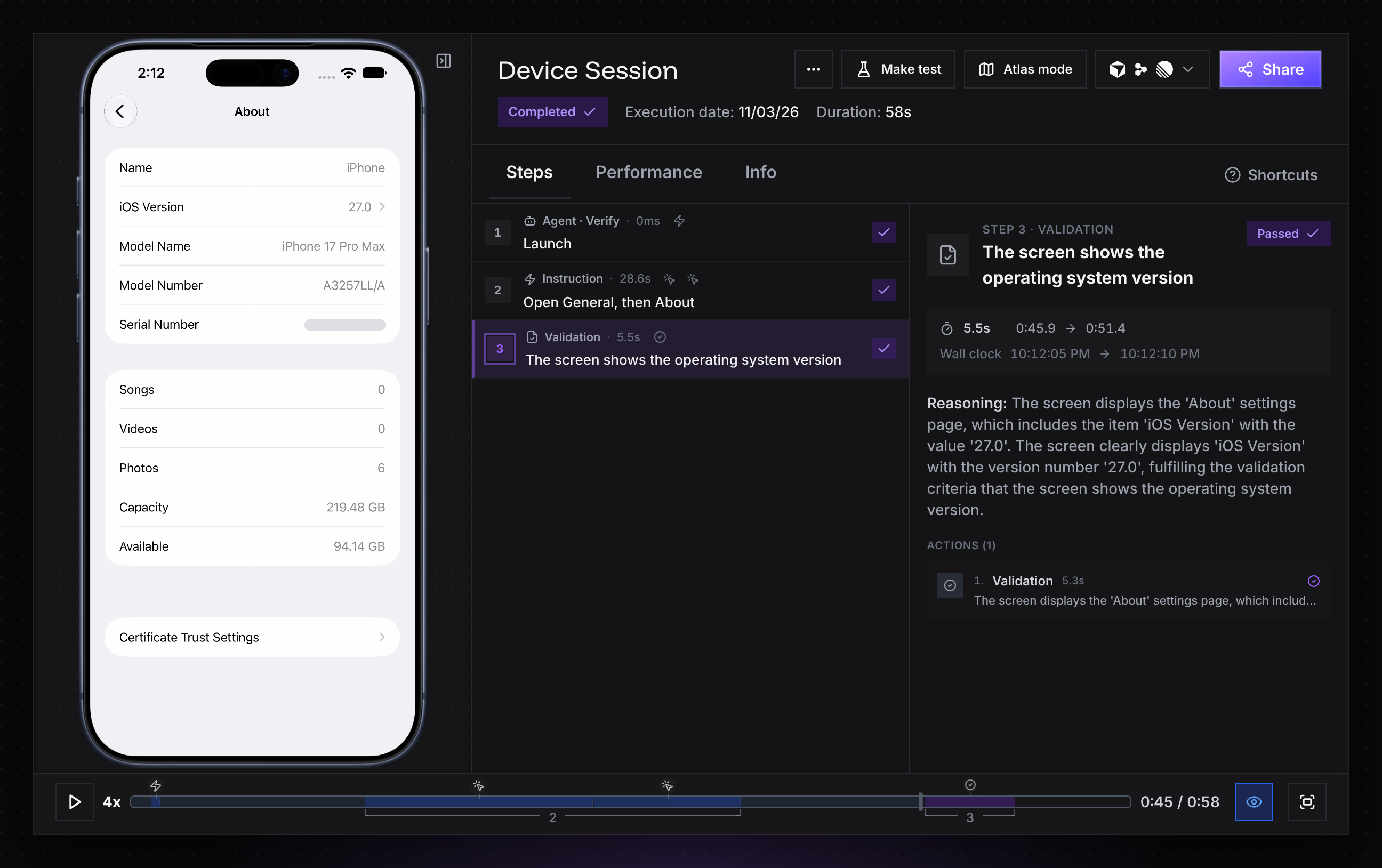
|
|
44
44
|
|
|
45
|
-
In CI, Verify never prompts or opens a browser; set `REVYL_API_KEY` as a secret. Python
|
|
45
|
+
In CI, Verify never prompts or opens a browser; set `REVYL_API_KEY` as a secret. The Python SDK signs in the same way: its first interactive `open()`, `attach()` or `current_computer()` call without credentials opens the browser approval flow, unless stdin or stderr is not a terminal or `CI` is set. The Go SDK never opens a browser; it uses `REVYL_API_KEY` or a login saved by TypeScript, Python, `npx @revyl/verify login` or the Revyl CLI.
|
|
46
46
|
|
|
47
47
|
## Scaffold a config (optional)
|
|
48
48
|
|
|
49
|
-
Use `init` when you want named targets in `verify.config.ts` and a generated example script. It is optional; installing the package is enough to use inline targets. It detects your package manager from the lockfile, asks before adding `@revyl/verify` as a dev dependency, asks what you want to open, adds `.verify/` to `.gitignore`, and prints the command that runs the example:
|
|
49
|
+
Use `init` when you want named targets in `verify.config.ts` and a generated example script. It is optional; installing the package is enough to use inline targets. It detects your package manager from the lockfile, asks before adding `@revyl/verify` as a dev dependency, asks what you want to open (iOS by default), adds `.verify/` to `.gitignore`, signs you in through the browser when no credentials are saved, and prints the command that runs the example:
|
|
50
50
|
|
|
51
51
|
- `verify.config.ts`: the targets `open()` can start, by name
|
|
52
|
-
- `verify/example.
|
|
52
|
+
- `verify/example.mts`: a script that opens the target, runs steps and takes a screenshot (web/mobile) or checks commands and files (Mac), and closes
|
|
53
53
|
|
|
54
54
|
In scripts and CI, pass the answers as flags. Non-interactive runs never prompt or open a browser; provide `REVYL_API_KEY` as a secret:
|
|
55
55
|
|
|
56
56
|
```bash
|
|
57
|
-
npx @revyl/verify init --platform
|
|
58
|
-
npx @revyl/verify init --platform
|
|
57
|
+
npx @revyl/verify init --platform ios
|
|
58
|
+
npx @revyl/verify init --platform android --app-id <revyl-app-id>
|
|
59
|
+
npx @revyl/verify init --platform web --app-id <revyl-web-app-id> --url https://example.com
|
|
59
60
|
npx @revyl/verify init --platform mac
|
|
60
61
|
```
|
|
61
62
|
|
|
62
|
-
Use `--yes` to accept installation without a prompt, or `--no-install` when Verify is already installed.
|
|
63
|
+
Use `--yes` to accept installation without a prompt, or `--no-install` when Verify is already installed. Without an app id, an iOS or Android target opens the device's built-in Settings app (`com.apple.Preferences` or `com.android.settings`) by bundle id, so the generated example runs on a brand-new account before you upload anything. A Web target needs a Web app id; without one, `init` writes no files and tells you how to create the app. A Mac target needs no app id. The generated config is ordinary TypeScript, so edit it when the example needs your own app, a pinned build, a public Web URL, or a different target.
|
|
63
64
|
|
|
64
65
|
## Manual setup
|
|
65
66
|
|
|
@@ -67,38 +68,41 @@ Use manual setup when you need to control the package manager or keep the genera
|
|
|
67
68
|
|
|
68
69
|
1. A usable login in `~/.revyl/credentials.json` marked `local_auth_override` takes precedence, even when `REVYL_API_KEY` is set.
|
|
69
70
|
2. Otherwise, `REVYL_API_KEY`, an API key you create in Revyl's settings.
|
|
70
|
-
3. Otherwise, a usable login
|
|
71
|
+
3. Otherwise, a usable login in `~/.revyl/credentials.json`, saved by Verify's browser sign-in or the Revyl CLI. Expired access tokens fall back to a stored API key when present.
|
|
71
72
|
|
|
72
73
|
```bash
|
|
73
|
-
|
|
74
|
+
npx @revyl/verify login # signs in through your browser; or: export REVYL_API_KEY=...
|
|
74
75
|
npx @revyl/verify whoami # checks the credentials without starting a session
|
|
76
|
+
npx @revyl/verify logout # removes the saved login from this computer
|
|
75
77
|
```
|
|
76
78
|
|
|
79
|
+
`logout` deletes `~/.revyl/credentials.json`, which the Revyl CLI shares. The API key that login held keeps working until you delete it in Revyl under Settings → API keys.
|
|
80
|
+
|
|
77
81
|
In CI, keep the key in a secret manager rather than in source, command arguments, or logs.
|
|
78
82
|
|
|
79
83
|
## Point the config at your app
|
|
80
84
|
|
|
81
|
-
|
|
85
|
+
The generated iOS and Android targets open Settings. To test your own app, replace `bundleId` in `verify.config.ts` with `appId: '<your Revyl app id>'`, copied from the app's page in Revyl, or with the `bundleId` of an app already on the device. Mac targets need no app id.
|
|
82
86
|
|
|
83
|
-
- **Web:** set `app.url` to a public HTTPS URL. Revyl's cloud browser cannot reach `localhost`.
|
|
87
|
+
- **Web:** create a Web app in Revyl (see [web.md](web.md#create-the-web-app)) and set `app.url` to a public HTTPS URL. Revyl's cloud browser cannot reach `localhost`.
|
|
84
88
|
- **iOS and Android:** upload a build to the app in Revyl, for example with `revyl build upload`; each session installs the newest one. See [mobile.md](mobile.md).
|
|
85
|
-
- **Mac
|
|
89
|
+
- **Mac:** computers are early access; ask support@revyl.ai about access. Agent instruction/validation are unavailable. See [computers.md](computers.md#availability-and-errors).
|
|
86
90
|
|
|
87
91
|
## Run the script
|
|
88
92
|
|
|
89
93
|
```bash
|
|
90
|
-
node verify/example.
|
|
94
|
+
node verify/example.mts
|
|
91
95
|
```
|
|
92
96
|
|
|
93
|
-
|
|
97
|
+
The `.mts` extension makes Node run the script as an ES module whatever your `package.json` says about `"type"`. In a Yarn Plug'n'Play project, the default since Yarn 2, run it with `yarn node verify/example.mts`.
|
|
94
98
|
|
|
95
99
|
Illustrative output (durations vary):
|
|
96
100
|
|
|
97
101
|
```text
|
|
98
102
|
[verify] ios: starting ios session https://app.revyl.ai/sessions/…
|
|
99
103
|
[verify] ios: ready
|
|
100
|
-
[verify] ios: ✓ instruction "
|
|
101
|
-
[verify] ios: ✓ validation "The
|
|
104
|
+
[verify] ios: ✓ instruction "Open General, then About" (12.0s)
|
|
105
|
+
[verify] ios: ✓ validation "The screen shows the operating system version" (9.8s)
|
|
102
106
|
[verify] ios: closed
|
|
103
107
|
```
|
|
104
108
|
|
|
@@ -115,10 +119,11 @@ const session = await open('ios'); // a target
|
|
|
115
119
|
try {
|
|
116
120
|
await session.instruction('Add the first product to the cart'); // Revyl's agent does it
|
|
117
121
|
await session.validation('The cart badge shows 1'); // throws if it does not hold
|
|
122
|
+
await session.tap({ target: 'Cart icon' }); // or act yourself, no agent
|
|
118
123
|
await session.screenshot({ path: '.verify/cart.png' });
|
|
119
124
|
} finally {
|
|
120
125
|
await session.close();
|
|
121
126
|
}
|
|
122
127
|
```
|
|
123
128
|
|
|
124
|
-
A failed instruction or validation throws a `VerifyError`. An uncaught error in a plain script exits non-zero. Automatic cleanup is best effort, bounded to 15 seconds, and skips signal/error handlers that already have listeners. Always close in `try/finally`; a successful web/mobile close acknowledges the stop request, not confirmed physical release. Computer close requires confirmed terminal release. See [api.md](api.md) for cleanup details and every option, and [ci.md](ci.md) for calling Verify from a test runner.
|
|
129
|
+
Exact actions such as `tap`, `type`, `swipe` and `pressKey` (TypeScript 0.4.0, Python 0.2.0 and Go v0.3.0) act on the screen directly, by a description Revyl locates or by coordinates; see the [web](web.md#exact-actions) and [mobile](mobile.md#exact-actions) guides. A failed instruction or validation throws a `VerifyError`. An uncaught error in a plain script exits non-zero. Automatic cleanup is best effort, bounded to 15 seconds, and skips signal/error handlers that already have listeners. Always close in `try/finally`; a successful web/mobile close acknowledges the stop request, not confirmed physical release. Computer close requires confirmed terminal release. See [api.md](api.md) for cleanup details and every option, and [ci.md](ci.md) for calling Verify from a test runner.
|
package/docs/llms.txt
CHANGED
|
@@ -1,18 +1,19 @@
|
|
|
1
1
|
# Verify
|
|
2
2
|
|
|
3
|
-
> Verify (@revyl/verify) is an open-source TypeScript library for Revyl. It opens cloud browsers and iOS/Android devices for agent instruction/validation steps, or Mac
|
|
3
|
+
> Verify (@revyl/verify) is an open-source TypeScript library for Revyl. It opens cloud browsers and iOS/Android devices for agent instruction/validation steps, or Mac computers for commands, files, processes, screenshots, and optional private recording metadata after release. Call it from a plain script, coding agent, CI, or any test runner. It has no test runner of its own.
|
|
4
4
|
|
|
5
5
|
## Docs
|
|
6
6
|
|
|
7
|
-
|
|
7
|
+
Mac computers are early access; ask support@revyl.ai about access. See computers.md#availability-and-errors.
|
|
8
8
|
|
|
9
9
|
- [Getting started](getting-started.md): install, authenticate, init, run a script
|
|
10
10
|
- [API](api.md): open(), attach(), hosted children, navigate(), report(), agent steps, screenshot(), exec(), file/process methods, close()
|
|
11
11
|
- [Configuration](configuration.md): verify.config.ts targets, environment variables, the init and whoami commands
|
|
12
|
-
- [Web](web.md): Revyl web sessions, URLs and builds, sign-in, and
|
|
13
|
-
- [Mobile](mobile.md): iOS and Android devices and
|
|
14
|
-
- [Computers](computers.md#availability-and-errors): Mac
|
|
12
|
+
- [Web](web.md): Revyl web sessions, URLs and builds, sign-in, steps, and exact actions
|
|
13
|
+
- [Mobile](mobile.md): iOS and Android devices, installing apps, and exact actions
|
|
14
|
+
- [Computers](computers.md#availability-and-errors): Mac early access, expiry, capacity errors, recording metadata, and confirmed release
|
|
15
15
|
- [Verify working end to end](end-to-end.md): live verification scope, observed outcomes, and limits of the evidence
|
|
16
16
|
- [CI and test runners](ci.md): GitHub Actions, node:test, Vitest, Jest, Playwright Test
|
|
17
|
+
- [Use your own model](own-model.md): run instructions and validations on Claude, GPT, Gemini, a local model or any OpenAI-compatible endpoint; providers, limits, privacy and troubleshooting
|
|
17
18
|
- [Errors](errors.md): every error code and what to do about it
|
|
18
19
|
- [For coding agents](agents.md): the workflow and rules for agents using Verify
|
package/docs/mobile.md
CHANGED
|
@@ -47,3 +47,49 @@ After connection and any explicit bundle launch, `open()` makes a best-effort fi
|
|
|
47
47
|
The generated mobile example starts with an instruction to wait for the first screen before validating it. For your own scripts, make the first instruction describe the screen or action you actually need; a screenshot with content can still show a loading screen or another app.
|
|
48
48
|
|
|
49
49
|
For Android Settings, instruct the agent to scroll or navigate until the OS version is visible before validating it. Opening About alone can leave the version offscreen.
|
|
50
|
+
|
|
51
|
+
## Exact actions
|
|
52
|
+
|
|
53
|
+
**Since 0.4.0. Early access.** In TypeScript (`@revyl/verify` 0.4.0), Python (`revyl-verify` 0.2.0) and Go (v0.3.0); the [Python](https://github.com/RevylAI/verify/blob/v0.4.0/python/README.md#exact-actions) and [Go](https://github.com/RevylAI/verify/blob/v0.4.0/go/README.md#exact-actions) READMEs show them with each language's names. When you know exactly what to press, skip the agent. Exact actions run on the device as given, with no model, and mix freely with `instruction()` and `validation()` in one script:
|
|
54
|
+
|
|
55
|
+
```ts
|
|
56
|
+
import { open } from '@revyl/verify';
|
|
57
|
+
|
|
58
|
+
const session = await open({ platform: 'ios', app: { bundleId: 'com.apple.Preferences' } });
|
|
59
|
+
try {
|
|
60
|
+
await session.tap({ target: 'General row' }); // Revyl finds the element you describe
|
|
61
|
+
await session.tap({ target: 'About row' });
|
|
62
|
+
await session.validation('The screen shows the operating system version');
|
|
63
|
+
await session.tap({ target: 'Back button' }); // iOS has no back(), so tap the button
|
|
64
|
+
await session.tap({ target: 'Back button' });
|
|
65
|
+
|
|
66
|
+
await session.swipe('down'); // the finger moves down, so the list scrolls to the top
|
|
67
|
+
const search = await session.locate('Search field'); // where Revyl finds it, in iOS points
|
|
68
|
+
await session.tap(search); // a tap by coordinates
|
|
69
|
+
await session.type(search, 'Wallpaper');
|
|
70
|
+
await session.pressKey('enter');
|
|
71
|
+
await session.instruction('Open the Wallpaper result'); // hand the fuzzy part to the agent
|
|
72
|
+
await session.validation('The Wallpaper settings are shown');
|
|
73
|
+
} finally {
|
|
74
|
+
await session.close();
|
|
75
|
+
}
|
|
76
|
+
```
|
|
77
|
+
|
|
78
|
+
A location is `{ target: 'a description' }`, which Revyl's grounding model finds on the current screen, or `{ x, y }` from the top-left corner in iOS points or Android pixels; `screenSize()` gives the bounds. `type()` taps the field and clears it first unless you pass `{ clear: false }`. `pressKey()` takes `'enter'` or `'backspace'`.
|
|
79
|
+
|
|
80
|
+
On Android, `back()` presses the system back button. On both platforms, `launchApp(bundleId)` brings an installed app to the front and `openUrl('myapp://orders/42')` opens a deep link. A failed action throws `ACTION_FAILED`. One whose outcome Revyl can't confirm throws `ACTION_UNCERTAIN` or `TIMEOUT`, so check the session before acting again. Actions are never repeated. If Verify can't reach Revyl, the action fails with `API_ERROR` and isn't resent either, so check the session before trying it again. [api.md](api.md#exact-actions) lists every call.
|
|
81
|
+
|
|
82
|
+
| Call | Web | iOS | Android | Mac computer |
|
|
83
|
+
| --- | --- | --- | --- | --- |
|
|
84
|
+
| `tap`, `type`, `swipe`, `pressKey`, `locate`, `screenSize` | Yes | Yes | Yes | No, use `exec()` and files |
|
|
85
|
+
| `back()` | Yes, browser history | No, tap the on-screen back control | Yes, the system back button | No |
|
|
86
|
+
| `openUrl(url)` | Yes, loads an http(s) URL in the tab | Yes, a URL or deep link | Yes, a URL or deep link | No |
|
|
87
|
+
| `launchApp(bundleId)` | No, use `openUrl` or `navigate` | Yes | Yes | No |
|
|
88
|
+
| `navigate(url)` | Yes | No, use `openUrl` | No, use `openUrl` | No |
|
|
89
|
+
| `instruction`, `validation`, your own model | Yes | Yes | Yes | No, use `exec()` |
|
|
90
|
+
| `screenshot()` | Yes | Yes | Yes | Yes |
|
|
91
|
+
| `exec`, files, processes | No, open a Mac computer | No, open a Mac computer | No, open a Mac computer | Yes |
|
|
92
|
+
|
|
93
|
+
Coordinates are in iOS points, Android pixels and Web CSS pixels, from the top-left corner. A call a platform doesn't support throws `NOT_AVAILABLE_ON_PLATFORM`, and its message names the alternative.
|
|
94
|
+
|
|
95
|
+
When you pass a [`model`](own-model.md), your model uses `tap`, `type`, `swipe`, `pressKey`, `openUrl` and, where the platform has it, `back` inside `instruction()`.
|
|
@@ -0,0 +1,216 @@
|
|
|
1
|
+
# Use your own model
|
|
2
|
+
|
|
3
|
+
**Since 0.4.0. Early access.** In TypeScript (`@revyl/verify` 0.4.0), Python (`revyl-verify` 0.2.0) and Go (v0.3.0); the [Python](https://github.com/RevylAI/verify/blob/v0.4.0/python/README.md#your-own-model) and [Go](https://github.com/RevylAI/verify/blob/v0.4.0/go/README.md#your-own-model) READMEs show them with each language's names. Verify normally runs `instruction()` and `validation()` on Revyl's agent. Pass a `model` and the agent loop runs in your process instead, on a model you choose, with your own key. Revyl still provides the cloud browser or device and, by default, finds the elements your model names on screen.
|
|
4
|
+
|
|
5
|
+
Use it when you want a specific model, your own prompts and key, or faster steps on a cheap model. Leave `model` out and nothing changes.
|
|
6
|
+
|
|
7
|
+
Your model uses the same [exact actions](api.md#exact-actions) you can call yourself: `tap`, `type`, `swipe`, `pressKey`, `openUrl` and, where the platform has it, `back`. So a script can mix your own actions, steps on your model and steps on Revyl's agent.
|
|
8
|
+
|
|
9
|
+
## The one-line form
|
|
10
|
+
|
|
11
|
+
```ts
|
|
12
|
+
import { open } from '@revyl/verify';
|
|
13
|
+
|
|
14
|
+
const session = await open('ios', { model: 'anthropic/claude-sonnet-5-5' });
|
|
15
|
+
try {
|
|
16
|
+
const step = await session.instruction('Open General, then About');
|
|
17
|
+
console.log(step.model); // { id, grounding, turns, inputTokens, outputTokens }
|
|
18
|
+
await session.validation('The screen shows the iOS version');
|
|
19
|
+
} finally {
|
|
20
|
+
await session.close();
|
|
21
|
+
}
|
|
22
|
+
```
|
|
23
|
+
|
|
24
|
+
That needs only your Revyl sign-in, as for any Verify script, and the provider's key in its usual environment variable, here `ANTHROPIC_API_KEY`. The key is read when the step's agent is built, and a missing key fails before any session starts.
|
|
25
|
+
|
|
26
|
+
The same works in Python and Go. Python uses snake_case (`model=`, `CustomModel(id, base_url, api_key, headers, provider)`, `local_agent()`, `anthropic()`, `openai_compatible()`) on both the sync and the asyncio API, with timeouts in seconds. Go uses options (`verify.WithModel`, `verify.WithCustomModel`, `verify.WithAgent(verify.LocalAgent{...})`) with `verify.Anthropic` and `verify.OpenAICompatible`. Providers, key variables, base-URL handling, limits and error codes are the same in all three.
|
|
27
|
+
|
|
28
|
+
```python
|
|
29
|
+
from revyl_verify import Target, open
|
|
30
|
+
|
|
31
|
+
with open(
|
|
32
|
+
Target(platform="ios", bundle_id="com.apple.Preferences"),
|
|
33
|
+
model="anthropic/claude-sonnet-5-5",
|
|
34
|
+
) as session:
|
|
35
|
+
step = session.instruction("Open General, then About")
|
|
36
|
+
print(step.model) # ModelRun(id, grounding, turns, input_tokens, output_tokens)
|
|
37
|
+
session.validation("The screen shows the iOS version")
|
|
38
|
+
```
|
|
39
|
+
|
|
40
|
+
```go
|
|
41
|
+
s, err := verify.Open(ctx, verify.Target{Platform: verify.IOS, BundleID: "com.apple.Preferences"},
|
|
42
|
+
verify.WithModel("anthropic/claude-sonnet-5-5"))
|
|
43
|
+
if err != nil {
|
|
44
|
+
return err
|
|
45
|
+
}
|
|
46
|
+
defer s.Close(context.Background())
|
|
47
|
+
step, err := s.Instruction(ctx, "Open General, then About")
|
|
48
|
+
if err != nil {
|
|
49
|
+
return err
|
|
50
|
+
}
|
|
51
|
+
log.Println(step.Model.ID, len(step.Model.Turns), step.Model.InputTokens, step.Model.OutputTokens)
|
|
52
|
+
_, err = s.Validation(ctx, "The screen shows the iOS version")
|
|
53
|
+
```
|
|
54
|
+
|
|
55
|
+
The [Python](https://github.com/RevylAI/verify/blob/v0.4.0/python/README.md#your-own-model) and [Go](https://github.com/RevylAI/verify/blob/v0.4.0/go/README.md#your-own-model) READMEs have the full reference for each.
|
|
56
|
+
|
|
57
|
+
Set `model` on `open()` to run every step on it, or on one step to override it:
|
|
58
|
+
|
|
59
|
+
```ts
|
|
60
|
+
await session.instruction('Open Privacy', { model: 'openai/gpt-5.5' });
|
|
61
|
+
await session.validation('Location Services is on', { model: 'google/gemini-3.8-flash' });
|
|
62
|
+
```
|
|
63
|
+
|
|
64
|
+
## Providers
|
|
65
|
+
|
|
66
|
+
The string is `'provider/model'`. Everything after the first slash is the provider's own model name, so `'openrouter/anthropic/claude-sonnet-5-5'` works.
|
|
67
|
+
|
|
68
|
+
| Prefix | Key variable | Endpoint | Status |
|
|
69
|
+
| --- | --- | --- | --- |
|
|
70
|
+
| `anthropic/` | `ANTHROPIC_API_KEY` | Anthropic Messages API | The one-line form run live against an Anthropic-compatible proxy with Claude Sonnet 5.5, real screenshots and tool schemas; the run on a Revyl device is pending |
|
|
71
|
+
| `openai/` | `OPENAI_API_KEY` | `https://api.openai.com/v1` | Request shape checked; not yet run live |
|
|
72
|
+
| `google/` | `GOOGLE_API_KEY`, or `GEMINI_API_KEY` when it is unset | `https://generativelanguage.googleapis.com/v1beta/openai/` | Request shape checked; not yet run live |
|
|
73
|
+
| `openrouter/` | `OPENROUTER_API_KEY` | `https://openrouter.ai/api/v1` | Request shape checked; not yet run live |
|
|
74
|
+
| `groq/` | `GROQ_API_KEY` | `https://api.groq.com/openai/v1` | Request shape checked; not yet run live |
|
|
75
|
+
| `cerebras/` | `CEREBRAS_API_KEY` | `https://api.cerebras.ai/v1` | Run live on iOS and Web with `qwen-3.8-27b` |
|
|
76
|
+
| `xai/` | `XAI_API_KEY` | `https://api.x.ai/v1` | Request shape checked; not yet run live |
|
|
77
|
+
| `ollama/` | none | `http://localhost:11434/v1` | Request shape checked; not yet run live |
|
|
78
|
+
|
|
79
|
+
`anthropic/` and `openai/` also read `ANTHROPIC_BASE_URL` and `OPENAI_BASE_URL`, as the vendors' own SDKs do; see [behind a proxy or gateway](#behind-a-proxy-or-gateway).
|
|
80
|
+
|
|
81
|
+
"Request shape checked" means Verify's requests and response parsing were checked against a local fake of that API, not against the provider itself. Expect rough edges on those until they are run live.
|
|
82
|
+
|
|
83
|
+
## Picking a model
|
|
84
|
+
|
|
85
|
+
The model must accept images and support tool calls. Each turn it gets one screenshot and must call exactly one tool, such as `tap` or `done`.
|
|
86
|
+
|
|
87
|
+
By default your model names the element it wants ("General row") and Revyl's grounding model finds it. That is `grounding: 'revyl'`, and it means the model never has to point at pixels, so a small, fast vision model is usually enough. The alternative, `grounding: 'model'`, has the model give screenshot coordinates itself. It keeps element descriptions away from Revyl but needs a model that points accurately.
|
|
88
|
+
|
|
89
|
+
Measured in production on Cerebras `qwen-3.8-27b`, a fast vision model (about 0.6 s per call) that cannot point accurately:
|
|
90
|
+
|
|
91
|
+
| Flow | Agent | Instruction | Validation | Turns | Tokens in/out |
|
|
92
|
+
| --- | --- | --- | --- | --- | --- |
|
|
93
|
+
| iOS Settings: open General, then About; check the OS version | Revyl's agent | pass, 37.4 s | pass, 9.8 s | | |
|
|
94
|
+
| | your model, `grounding: 'revyl'` | pass, 11.1 s to 15.2 s | pass, 1.4 s to 1.5 s | 3 + 1 | 3,957/215 + 800/122 |
|
|
95
|
+
| | your model, `grounding: 'model'` | fail after 20 turns, 66.3 s | | 20 | 33,832 total |
|
|
96
|
+
| Web: sign in to a demo store; check the product list | Revyl's agent | pass, 58.0 s | pass, 9.6 s | | |
|
|
97
|
+
| | your model, `grounding: 'revyl'` | pass, 21.2 s | pass, 1.3 s | 4 + 1 | 7,854/355 + 1,380/136 |
|
|
98
|
+
| | your model, `grounding: 'model'` | fail after 20 turns, 64.4 s | | 20 | 52,726 total |
|
|
99
|
+
|
|
100
|
+
Each local turn costs one model call plus one device action: about 3.7 s per turn on iOS and 5.3 s on Web here, most of it the device action and the screen settling. These are two short flows on one model, so treat them as a direction, not a benchmark. Claude, GPT and Gemini have not been measured yet, and `grounding: 'model'` has not yet been shown to pass with any model.
|
|
101
|
+
|
|
102
|
+
Start with the default grounding and the cheapest vision model your provider has. Move to a stronger model if steps run out of turns or pick the wrong elements.
|
|
103
|
+
|
|
104
|
+
## Your own endpoint
|
|
105
|
+
|
|
106
|
+
Any server that speaks OpenAI's chat completions with tools and image input works through an object:
|
|
107
|
+
|
|
108
|
+
```ts
|
|
109
|
+
await open('ios', {
|
|
110
|
+
model: {
|
|
111
|
+
id: 'qwen-3.8-27b', // the model name the server expects
|
|
112
|
+
baseURL: 'https://my-gateway.example/v1', // the root that serves /chat/completions
|
|
113
|
+
apiKey: process.env.MY_GATEWAY_KEY, // optional, sent as a bearer token
|
|
114
|
+
headers: { 'x-team': 'mobile' }, // optional, extra headers
|
|
115
|
+
provider: 'qwen', // optional, reported as 'qwen/qwen-3.8-27b'
|
|
116
|
+
},
|
|
117
|
+
});
|
|
118
|
+
```
|
|
119
|
+
|
|
120
|
+
The key comes only from `apiKey`. Verify never reads an environment variable for a custom endpoint, so a key meant for one provider can't reach another server. This covers vLLM, LiteLLM, LM Studio, Azure-style gateways and self-hosted models. For Ollama on your machine, `'ollama/qwen3-vl:8b'` is the short form of `{ id: 'qwen3-vl:8b', baseURL: 'http://localhost:11434/v1' }`. Pull a vision model that supports tools first, and expect slow turns without a GPU. For OpenRouter, `'openrouter/<their model id>'` reaches every model they list.
|
|
121
|
+
|
|
122
|
+
## Behind a proxy or gateway
|
|
123
|
+
|
|
124
|
+
Many teams reach models through a proxy or an LLM gateway with its own key. Two ways work:
|
|
125
|
+
|
|
126
|
+
1. Keep the one-line form and point the provider's base-URL variable at the proxy, the same variables Anthropic's and OpenAI's SDKs read:
|
|
127
|
+
|
|
128
|
+
```bash
|
|
129
|
+
export ANTHROPIC_BASE_URL=https://llm-proxy.example.com/anthropic # with or without a trailing /v1
|
|
130
|
+
export ANTHROPIC_API_KEY=<the proxy's key>
|
|
131
|
+
# or OPENAI_BASE_URL=https://llm-proxy.example.com/openai/v1 with OPENAI_API_KEY
|
|
132
|
+
```
|
|
133
|
+
|
|
134
|
+
```ts
|
|
135
|
+
await open('ios', { model: 'anthropic/claude-sonnet-5-5' });
|
|
136
|
+
```
|
|
137
|
+
|
|
138
|
+
2. Or name the proxy in code, when it speaks OpenAI's chat completions:
|
|
139
|
+
|
|
140
|
+
```ts
|
|
141
|
+
await open('ios', { model: { id: 'claude-sonnet-5-5', baseURL: 'https://llm-proxy.example.com/v1', apiKey: process.env.PROXY_KEY } });
|
|
142
|
+
```
|
|
143
|
+
|
|
144
|
+
A base address works with or without a trailing `/v1`. For Anthropic, Verify calls `<base>/v1/messages`, or `<base>/messages` when the base already ends in a version such as `/v1`. For OpenAI-compatible addresses, Verify adds `/v1` only to a bare host, so `https://gw.example.com` and `https://gw.example.com/v1` both call `https://gw.example.com/v1/chat/completions`, and a path such as `/openai/v1` is used as given.
|
|
145
|
+
|
|
146
|
+
Verify doesn't check a key's prefix or shape, so a proxy's own key format works. If the proxy rejects the key, the error names the host Verify called and the variable the key and address came from, never the key itself. If it answers 404, the error names the path Verify added to the base address (such as `/v1/messages`), so you can see whether the base address needs `/v1` or the model id is one the proxy doesn't serve.
|
|
147
|
+
|
|
148
|
+
## Custom agents
|
|
149
|
+
|
|
150
|
+
For control beyond a model name, build the agent with `localAgent()` and pass it as `agent`. The `model` forms build exactly this agent, so behavior is the same. Passing both `model` and `agent` throws `INVALID_ARGUMENT`.
|
|
151
|
+
|
|
152
|
+
```ts
|
|
153
|
+
import { localAgent, open, openaiCompatible } from '@revyl/verify';
|
|
154
|
+
|
|
155
|
+
const agent = localAgent({
|
|
156
|
+
model: openaiCompatible({ baseURL: 'http://localhost:11434/v1', model: 'qwen3-vl:8b' }),
|
|
157
|
+
grounding: 'model', // default 'revyl'
|
|
158
|
+
maxTurns: 10, // default 20, at most 100
|
|
159
|
+
modelTimeout: 120_000,
|
|
160
|
+
});
|
|
161
|
+
const session = await open('ios', { agent }); // or session.instruction(text, { agent })
|
|
162
|
+
```
|
|
163
|
+
|
|
164
|
+
- `anthropic({ model, apiKey?, baseURL?, maxTokens?, maxRetries? })` and `openaiCompatible({ model, baseURL?, apiKey?, headers?, provider?, maxTokens?, maxRetries? })` are the two built-in adapters. When `baseURL` is left out, `anthropic()` reads `ANTHROPIC_BASE_URL` and `openaiCompatible()` reads `OPENAI_BASE_URL` and `OPENAI_API_KEY`; with a `baseURL`, `openaiCompatible()` sends only the `apiKey` you pass.
|
|
165
|
+
- To use another SDK or runtime, implement `ModelAdapter`: a `name` and `complete(request, signal)`, which gets the system prompt, the text, the screenshot and the tools, and returns the chosen tool call and token usage.
|
|
166
|
+
- See [api.md](api.md#custom-agents) for every option.
|
|
167
|
+
|
|
168
|
+
## What goes where
|
|
169
|
+
|
|
170
|
+
**Your model sees** the system prompt, the step text, a short log of the actions it took so far and whether they worked, and the current screenshot, downscaled so its longest side is at most 1280 pixels (`maxImageSide`).
|
|
171
|
+
|
|
172
|
+
**Revyl sees** what it always sees for a session it hosts: the device and its screen. On top of that it receives each device action (taps, typed text, swipes, key presses, URLs), the element descriptions your model writes, such as "General row" (not with `grounding: 'model'`), and the model's name, such as `anthropic/claude-sonnet-5-5`, for the session report.
|
|
173
|
+
|
|
174
|
+
**Revyl does not receive** the step text, the prompts, your model's output or reasoning, or your key. Keys go only to the provider's endpoint, are never logged, and are replaced with `[redacted]` in error messages, as are custom header values. A custom endpoint's address is never sent to Revyl.
|
|
175
|
+
|
|
176
|
+
## Limits
|
|
177
|
+
|
|
178
|
+
| Limit | Default | Change it with |
|
|
179
|
+
| --- | --- | --- |
|
|
180
|
+
| Turns per instruction | 20 (at most 100) | `localAgent({ maxTurns })` |
|
|
181
|
+
| Verdict attempts per validation | 3 | |
|
|
182
|
+
| Whole step | 180 s | the step's `timeout`, or `stepTimeout` in the config |
|
|
183
|
+
| One model call, retries included | 60 s | `localAgent({ modelTimeout })` |
|
|
184
|
+
| Retries per model call | 2, on rate limits, 5xx and network errors; `Retry-After` is honored up to 10 s | the adapter's `maxRetries` (0 to 5) |
|
|
185
|
+
| Output tokens per turn, thinking included | 4096 on Anthropic, OpenAI and Google, 2048 elsewhere; a reply cut off at the cap throws `MODEL_ERROR`, and a tool call in it is never run | the adapter's `maxTokens` |
|
|
186
|
+
| Turns in a row without a tool call | 3, then `MODEL_ERROR` | |
|
|
187
|
+
|
|
188
|
+
Input token counts include cached input, so a proxy or provider that caches prompts doesn't make a step look cheaper than it is. Input tokens grow with the number of turns, not with history: each turn sends one screenshot and a text log. Expect roughly 1,300 input tokens per iOS turn at the default size. `step.model` reports each turn's action, model and action time, and token counts, so you can see the cost of every step.
|
|
189
|
+
|
|
190
|
+
Device actions are never retried; a failed action goes back to the model to choose its next move. An instruction that runs out of turns fails with `INSTRUCTION_FAILED` like any other.
|
|
191
|
+
|
|
192
|
+
## Troubleshooting
|
|
193
|
+
|
|
194
|
+
| Error | What it means | What to do |
|
|
195
|
+
| --- | --- | --- |
|
|
196
|
+
| `MODEL_KEY_MISSING` | The provider's key variable is not set | Set the variable the message names, or pass `{ id, baseURL, apiKey }` |
|
|
197
|
+
| `INVALID_ARGUMENT`: Unknown model | No provider prefix, or one Verify doesn't know | Use `'provider/model'` with a prefix from the table, or the object form |
|
|
198
|
+
| `MODEL_ERROR` with HTTP 401 or 403 | The host named in the message rejected the key | Check that the key in the variable the message names belongs to that host; behind a proxy, set `ANTHROPIC_BASE_URL` or `OPENAI_BASE_URL` too |
|
|
199
|
+
| `MODEL_ERROR` with HTTP 404, or "not a valid model" | The provider doesn't serve that model name, or the base address is missing or repeating `/v1` | Copy the exact model id from the provider's model list, and check the path the message says Verify added |
|
|
200
|
+
| `MODEL_ERROR` with HTTP 429 | Still rate limited after the retries | Wait and rerun, run fewer sessions at once, or raise your provider limit |
|
|
201
|
+
| `MODEL_ERROR`: does not accept images | The model is text-only | Pick a vision model |
|
|
202
|
+
| `MODEL_ERROR`: does not support tool calls, or answered without calling a tool | The model or server ignores tools | Pick a model that supports tool calls; on Ollama, one tagged "tools" |
|
|
203
|
+
| `MODEL_ERROR`: cut off at its output token cap | The model, often while thinking, used all of `maxTokens` before finishing its tool call; Verify never runs a cut-off call | Pass the model through `localAgent()` with a higher `maxTokens`, such as `anthropic({ model, maxTokens: 8192 })` |
|
|
204
|
+
| `TIMEOUT` from the model | A call took longer than `modelTimeout` | Raise `modelTimeout`, common with local models |
|
|
205
|
+
| `INSTRUCTION_FAILED`: did not finish within 20 turns | The model looped or kept missing | Split the instruction, use a stronger model, or keep `grounding: 'revyl'` |
|
|
206
|
+
|
|
207
|
+
[errors.md](errors.md) lists every Verify error code.
|
|
208
|
+
|
|
209
|
+
## In the session report
|
|
210
|
+
|
|
211
|
+
The session link works as usual and shows the recording. On iOS and Android, your model's device actions appear as steps named "Agent Step: Verify local: <model>", with a screenshot after each action. A long instruction can show as two report steps, and the step's text and your model's verdict are not in the report yet. On Web, the same actions show as manual control. `step.model` and Verify's own log are the full record for now. Revyl is adding report support for steps run on your model.
|
|
212
|
+
|
|
213
|
+
## Not supported yet
|
|
214
|
+
|
|
215
|
+
- Mac computers: `model` and `agent` work on Web, iOS and Android sessions only.
|
|
216
|
+
- Agent runtimes that run their own loop, such as Claude Code over ACP. Wrap a single-call model in a `ModelAdapter` instead.
|