@revyl/verify 0.3.0 → 0.3.2
This diff represents the content of publicly available package versions that have been released to one of the supported registries. The information contained in this diff is provided for informational purposes only and reflects changes between package versions as they appear in their respective public registries.
- package/CHANGELOG.md +20 -0
- package/README.md +35 -116
- package/dist/cli/install.js +14 -9
- package/dist/cli/main.js +5 -0
- package/docs/README.md +1 -1
- package/docs/api.md +2 -2
- package/docs/ci.md +4 -0
- package/docs/errors.md +8 -0
- package/docs/getting-started.md +31 -9
- package/docs/web.md +2 -0
- package/package.json +3 -2
package/CHANGELOG.md
CHANGED
|
@@ -1,5 +1,25 @@
|
|
|
1
1
|
# Changelog
|
|
2
2
|
|
|
3
|
+
## 0.3.2 (2026-11-11)
|
|
4
|
+
|
|
5
|
+
- Fix `npx @revyl/verify init` in pnpm projects: it now runs `pnpm add -D`. pnpm 9 and 10 rejected `--dev`, and pnpm 12 read it as "install only devDependencies", saved Verify under `dependencies` without installing it, and removed the project's other dependencies from `node_modules`.
|
|
6
|
+
- Fix `init` in Yarn projects: Yarn 3 and 4 get `--mode=skip-build` (the old `skip-builds` was rejected), Yarn 1 gets `--ignore-scripts`, and Yarn 2 gets a plain `add --dev`.
|
|
7
|
+
- `init` passes your environment to the package manager, so Corepack, proxy, registry and npm configuration variables reach the install.
|
|
8
|
+
- Add a `default` condition to the package exports of `@revyl/verify` and `revyl-verify`, so `verify.config.ts` loads in Yarn Plug'n'Play projects and CommonJS `require('@revyl/verify')` resolves through Node.js require(esm) on Node.js 22.12 and later.
|
|
9
|
+
- The `verify` CLI exits with `Verify needs Node.js 22.18 or later` on older Node.js instead of running `init` and writing a script that Node cannot load.
|
|
10
|
+
|
|
11
|
+
## Python 0.1.0 (2026-11-06)
|
|
12
|
+
|
|
13
|
+
First PyPI release of `revyl-verify` (import `revyl_verify`, Python ≥3.10), published from the `py/v0.1.0` tag with PyPI trusted publishing and attestations.
|
|
14
|
+
|
|
15
|
+
- Includes the Python surface described under 0.3.0 below: typed sync and asyncio sessions, `bundle_id` mobile targets, web and mobile instructions and validations, screenshots, encoded (`argv_b64`/`path_b64`) computer operations, hosted child sessions, `attach()` and `current_computer()`.
|
|
16
|
+
- Sign in automatically on the first interactive `open()`, `attach()` or `current_computer()` call through the Revyl browser approval flow, saving the login to `~/.revyl/credentials.json` for the Revyl CLI and other SDKs. Non-interactive runs and `CI` stay key-only and never open a browser.
|
|
17
|
+
- Verified live on production: the iOS Settings quickstart (`bundle_id="com.apple.Preferences"`) through a first-run browser sign-in, and a Mac `exec`/file round trip, from the built wheel in a clean virtual environment.
|
|
18
|
+
|
|
19
|
+
## 0.3.1 (2026-11-03)
|
|
20
|
+
|
|
21
|
+
- Docs: runnable `.mts` quickstart uses the built-in iOS Settings app, explains how to target an uploaded app with `appId`, clarifies that the Python SDK is not published to PyPI yet, and documents Web availability requirements.
|
|
22
|
+
|
|
3
23
|
## 0.3.0 (2026-10-31)
|
|
4
24
|
|
|
5
25
|
- Sign in automatically on the first interactive `open()`, `attach()`, or `currentComputer()` call using the Revyl CLI browser-approval flow; CI remains key-only and browser-free.
|
package/README.md
CHANGED
|
@@ -1,21 +1,13 @@
|
|
|
1
1
|
# Verify
|
|
2
2
|
|
|
3
|
-
|
|
3
|
+
|
|
4
4
|
|
|
5
|
-
|
|
6
|
-
|
|
7
|
-
## Install and run
|
|
8
|
-
|
|
9
|
-
```bash
|
|
10
|
-
npm install @revyl/verify
|
|
11
|
-
```
|
|
12
|
-
|
|
13
|
-
Save this as `verify/check.ts`:
|
|
5
|
+
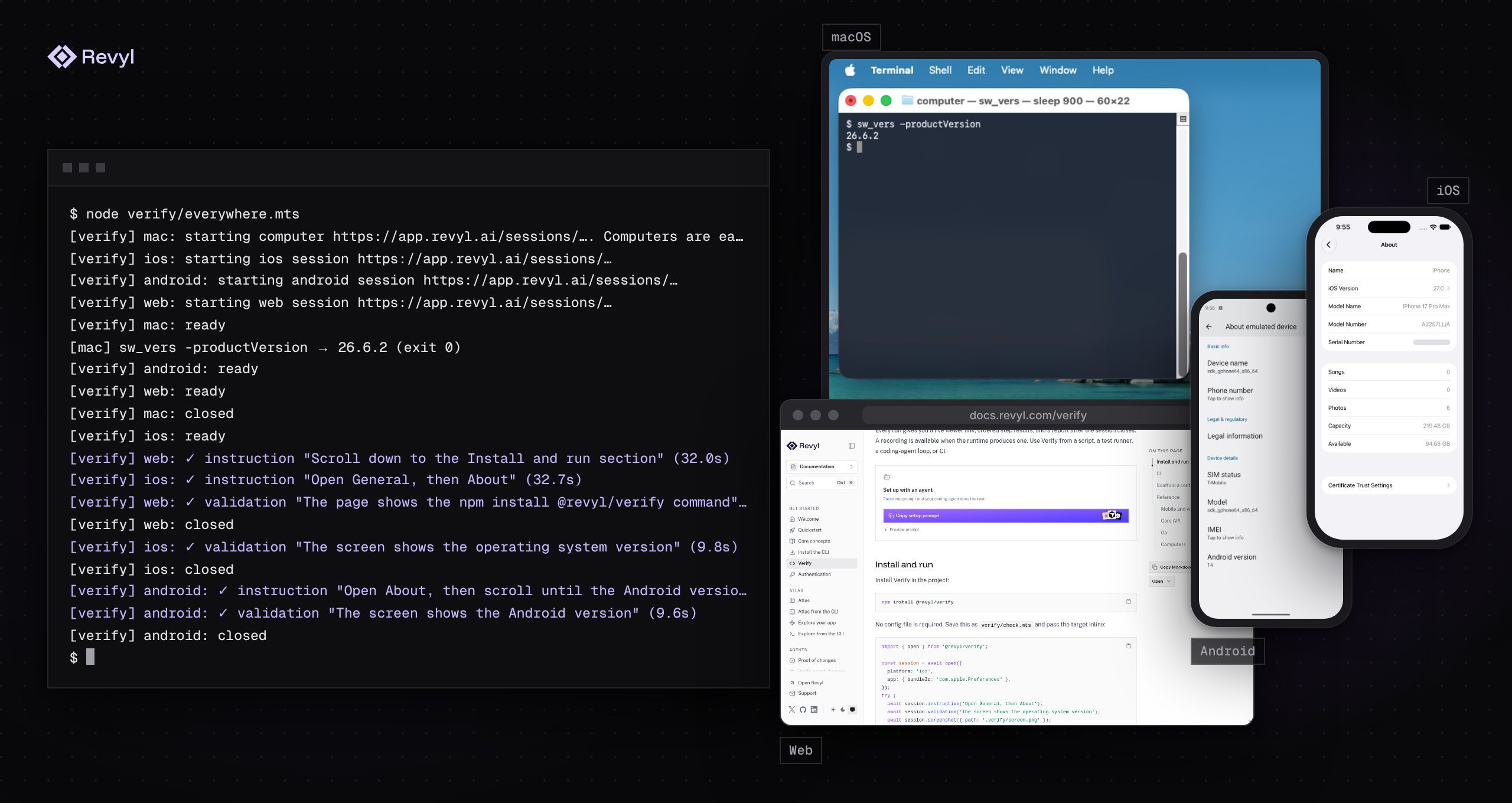
Verify runs end-to-end checks in a cloud browser, iOS simulator, or Android emulator on Revyl. You write what the agent should do and what must be true afterward, in plain sentences, and call it from a script, a coding agent, CI, or the test runner you already use. Verify also opens Mac and Linux computers for commands, files, and screenshots.
|
|
14
6
|
|
|
15
7
|
```ts
|
|
16
8
|
import { open } from '@revyl/verify';
|
|
17
9
|
|
|
18
|
-
const session = await open({ platform: 'ios', app: {
|
|
10
|
+
const session = await open({ platform: 'ios', app: { bundleId: 'com.apple.Preferences' } });
|
|
19
11
|
try {
|
|
20
12
|
await session.instruction('Open General, then About');
|
|
21
13
|
await session.validation('The screen shows the operating system version');
|
|
@@ -25,117 +17,42 @@ try {
|
|
|
25
17
|
}
|
|
26
18
|
```
|
|
27
19
|
|
|
28
|
-
|
|
29
|
-
|
|
30
|
-
```bash
|
|
31
|
-
node verify/check.ts
|
|
32
|
-
```
|
|
20
|
+
You maintain sentences instead of selectors and coordinates that break when a screen changes, and every run prints a session link that keeps the report and available recording after the session closes.
|
|
33
21
|
|
|
34
|
-
|
|
22
|
+
## Quick start
|
|
35
23
|
|
|
36
|
-
|
|
24
|
+
Paste this prompt into your coding agent, and it sets up Verify in the project's language:
|
|
37
25
|
|
|
38
26
|
```text
|
|
39
|
-
|
|
40
|
-
[verify] ios: ready
|
|
41
|
-
[verify] ios: ✓ instruction "Open General, then About" (12.0s)
|
|
42
|
-
[verify] ios: ✓ validation "The screen shows the operating system version" (9.8s)
|
|
43
|
-
[verify] ios: closed
|
|
44
|
-
```
|
|
45
|
-
|
|
46
|
-
The URL is live during the run and keeps the report and available recording after it closes. A failed instruction or validation throws a typed error and includes the same URL. In CI, Verify never opens a browser: provide `REVYL_API_KEY` as a secret.
|
|
47
|
-
|
|
48
|
-
For Web, use `open({ platform: 'web', app: { appId, url } })`; for a computer, use `open({ platform: 'mac' })`.
|
|
49
|
-
|
|
50
|
-
## Scaffold a config (optional)
|
|
27
|
+
Set up Verify in this project.
|
|
51
28
|
|
|
52
|
-
|
|
29
|
+
Read https://docs.revyl.com/verify.md and follow it. It's the current Revyl guide for this, so prefer it over anything you remember about Revyl.
|
|
53
30
|
|
|
54
|
-
|
|
55
|
-
npx @revyl/verify init
|
|
56
|
-
```
|
|
57
|
-
|
|
58
|
-
`init` detects your package manager, asks before adding `@revyl/verify` as a dev dependency, creates `verify.config.ts` and `verify/example.ts`, and prints the command that runs the example. Use `--yes` to accept installation without a prompt, or `--no-install` when Verify is already installed. It is optional; installing the package is enough to use inline targets.
|
|
59
|
-
|
|
60
|
-
The generated project starts with a named target. Use `--platform web`, `--platform ios`, `--platform android`, or `--platform mac` when you want to skip the platform question. Web and mobile targets need a Revyl app id; a Mac target does not. The generated config is ordinary TypeScript, so edit it when the example needs a pinned build, a public Web URL, or a different target.
|
|
61
|
-
|
|
62
|
-
See the [TypeScript getting-started guide](https://github.com/RevylAI/verify/blob/v0.3.0/packages/verify/docs/getting-started.md), the [Python SDK guide](https://github.com/RevylAI/verify/blob/v0.3.0/python/README.md), and the [Go SDK guide](https://github.com/RevylAI/verify/tree/go/v0.2.0/go).
|
|
31
|
+
Use the SDK for this project's language: @revyl/verify on Node.js 22.18 or later for Node.js or TypeScript, revyl-verify on Python 3.10 or later for Python (install it with pip or uv), or the github.com/RevylAI/verify/go module for Go. Write the iOS Settings example in that language: open the com.apple.Preferences bundle, run one instruction, and run one validation that checks the operating system version. Ask before starting a paid cloud session, then run the example.
|
|
63
32
|
|
|
64
|
-
|
|
33
|
+
You're done when the example has opened iOS Settings, the operating system version validation has passed, and the session has closed.
|
|
65
34
|
|
|
66
|
-
|
|
67
|
-
|
|
68
|
-
```yaml
|
|
69
|
-
- uses: actions/checkout@v5
|
|
70
|
-
- uses: actions/setup-node@v5
|
|
71
|
-
with:
|
|
72
|
-
node-version: 24
|
|
73
|
-
cache: npm
|
|
74
|
-
- run: npm ci
|
|
75
|
-
- run: node verify/example.ts
|
|
76
|
-
env:
|
|
77
|
-
REVYL_API_KEY: ${{ secrets.REVYL_API_KEY }}
|
|
35
|
+
Ask me before anything that needs my login or approval.
|
|
78
36
|
```
|
|
79
37
|
|
|
80
|
-
|
|
81
|
-
|
|
82
|
-
## Reference authentication
|
|
83
|
-
|
|
84
|
-
Use manual setup when you need to control the package manager or keep the generated files out of the project:
|
|
38
|
+
Or set it up yourself:
|
|
85
39
|
|
|
86
40
|
```bash
|
|
87
|
-
revyl
|
|
88
|
-
npx @revyl/verify whoami
|
|
89
|
-
```
|
|
90
|
-
|
|
91
|
-
The SDK resolves credentials in this order: a usable stored CLI login marked `local_auth_override`, `REVYL_API_KEY`, then another usable stored CLI login. In CI, use a secret manager rather than putting a key in source, command arguments, or logs. `whoami` checks the credentials without starting a session.
|
|
92
|
-
|
|
93
|
-
## TypeScript
|
|
94
|
-
|
|
95
|
-
```ts
|
|
96
|
-
import { open } from '@revyl/verify';
|
|
97
|
-
|
|
98
|
-
const session = await open('ios');
|
|
99
|
-
try {
|
|
100
|
-
await session.instruction('Open General, then About');
|
|
101
|
-
await session.validation('The screen shows the operating system version');
|
|
102
|
-
} finally {
|
|
103
|
-
await session.close();
|
|
104
|
-
}
|
|
105
|
-
```
|
|
106
|
-
|
|
107
|
-
For Web, use a public HTTPS URL in the target config. For iOS and Android, point the target at an app or build in Revyl. The [API guide](https://github.com/RevylAI/verify/blob/v0.3.0/packages/verify/docs/api.md) covers target options, step results, screenshots, reports, and cleanup.
|
|
108
|
-
|
|
109
|
-
## Go
|
|
110
|
-
|
|
111
|
-
Inside a function returning `error`, with a bounded `ctx`:
|
|
112
|
-
|
|
113
|
-
```go
|
|
114
|
-
session, err := verify.Open(ctx, verify.Target{Platform: verify.IOS, BundleID: "com.apple.Preferences"})
|
|
115
|
-
if err != nil {
|
|
116
|
-
return err
|
|
117
|
-
}
|
|
118
|
-
defer func() { _ = session.Close(ctx) }()
|
|
119
|
-
if _, err := session.Instruction(ctx, "Open General, then About"); err != nil {
|
|
120
|
-
return err
|
|
121
|
-
}
|
|
122
|
-
_, err = session.Validation(ctx, "The screen shows the operating system version")
|
|
123
|
-
return err
|
|
41
|
+
npx @revyl/verify init
|
|
124
42
|
```
|
|
125
43
|
|
|
126
|
-
|
|
44
|
+
`init` adds Verify to your project, asks what to open, writes `verify.config.ts` and an example script, signs you in through the browser on the first interactive run, and prints the command that runs the example. To skip the config, run `npm install @revyl/verify` and save the example above as `verify/check.mts`, then run `node verify/check.mts`. [Getting started](https://github.com/RevylAI/verify/blob/v0.3.2/packages/verify/docs/getting-started.md) covers sign-in, your own app, and [CI](https://github.com/RevylAI/verify/blob/v0.3.2/packages/verify/docs/ci.md).
|
|
127
45
|
|
|
128
|
-
|
|
46
|
+
For finished projects, see [`examples/`](https://github.com/RevylAI/verify/tree/v0.3.2/examples/): a [web store](https://github.com/RevylAI/verify/tree/v0.3.2/examples/web-store/), [mobile Settings](https://github.com/RevylAI/verify/tree/v0.3.2/examples/mobile-settings/), a [Mac workspace](https://github.com/RevylAI/verify/tree/v0.3.2/examples/mac-workspace/), and a small [agent platform](https://github.com/RevylAI/verify/tree/v0.3.2/examples/agent-platform/) that runs web and iOS side by side.
|
|
129
47
|
|
|
130
|
-
|
|
131
|
-
from revyl_verify import Target, open
|
|
48
|
+
## Packages
|
|
132
49
|
|
|
133
|
-
|
|
134
|
-
|
|
135
|
-
|
|
136
|
-
|
|
137
|
-
|
|
138
|
-
Python
|
|
50
|
+
| Package | Install | Status |
|
|
51
|
+
| --- | --- | --- |
|
|
52
|
+
| [`@revyl/verify`](https://www.npmjs.com/package/@revyl/verify) | `npm install @revyl/verify` | TypeScript SDK and the `verify` CLI (`init`, `whoami`). Published on npm, Node.js 22.18 or later. |
|
|
53
|
+
| [`revyl-verify`](https://www.npmjs.com/package/revyl-verify) (npm) | `npm install revyl-verify` | Alias of `@revyl/verify` at the same version. |
|
|
54
|
+
| [Go module](https://github.com/RevylAI/verify/tree/go/v0.2.0/go) | `go get github.com/RevylAI/verify/go@v0.2.0` | Published as the `go/v0.2.0` tag, Go 1.26.9 or later. Calls return errors instead of throwing. |
|
|
55
|
+
| [`revyl-verify`](https://pypi.org/project/revyl-verify/) (PyPI) | `pip install revyl-verify` or `uv add revyl-verify` | Python SDK, published on PyPI. Python 3.10 or later, sync and asyncio APIs, no CLI; see the [Python guide](https://github.com/RevylAI/verify/blob/v0.3.2/python/README.md). |
|
|
139
56
|
|
|
140
57
|
## Platforms
|
|
141
58
|
|
|
@@ -147,22 +64,24 @@ Python supports synchronous and asyncio APIs, but it has no bundled CLI. The [Py
|
|
|
147
64
|
| Mac computer | — | Yes | Yes |
|
|
148
65
|
| Linux computer | — | Yes | Yes |
|
|
149
66
|
|
|
150
|
-
|
|
67
|
+
Web is available to every organization. Mac and Linux computers are early access and have a server-bounded lifetime; see [computers](https://github.com/RevylAI/verify/blob/v0.3.2/packages/verify/docs/computers.md).
|
|
151
68
|
|
|
152
69
|
## Documentation
|
|
153
70
|
|
|
154
|
-
|
|
155
|
-
|
|
156
|
-
|
|
157
|
-
|
|
71
|
+
The [documentation](https://github.com/RevylAI/verify/tree/v0.3.2/packages/verify/docs/) covers the [API](https://github.com/RevylAI/verify/blob/v0.3.2/packages/verify/docs/api.md), [configuration](https://github.com/RevylAI/verify/blob/v0.3.2/packages/verify/docs/configuration.md), [web](https://github.com/RevylAI/verify/blob/v0.3.2/packages/verify/docs/web.md), [mobile](https://github.com/RevylAI/verify/blob/v0.3.2/packages/verify/docs/mobile.md), [computers](https://github.com/RevylAI/verify/blob/v0.3.2/packages/verify/docs/computers.md), [CI](https://github.com/RevylAI/verify/blob/v0.3.2/packages/verify/docs/ci.md), [errors and troubleshooting](https://github.com/RevylAI/verify/blob/v0.3.2/packages/verify/docs/errors.md), [coding agents](https://github.com/RevylAI/verify/blob/v0.3.2/packages/verify/docs/agents.md), and [live end-to-end results](https://github.com/RevylAI/verify/blob/v0.3.2/packages/verify/docs/end-to-end.md). The npm package ships these pages in `node_modules/@revyl/verify/docs/`, with an [llms.txt](https://github.com/RevylAI/verify/blob/v0.3.2/packages/verify/docs/llms.txt) index, so a coding agent can read the docs for the version you installed. The Revyl docs site has an overview at [docs.revyl.com/verify](https://docs.revyl.com/verify).
|
|
72
|
+
|
|
73
|
+
## Security
|
|
74
|
+
|
|
75
|
+
Don't open a public issue for a vulnerability. Follow [SECURITY.md](https://github.com/RevylAI/verify/blob/v0.3.2/SECURITY.md) and email support@revyl.ai. Each session is a paid remote session that acts on your app, and step text is sent to Revyl and printed to stderr, so use test accounts and keep credentials and customer data out of steps.
|
|
76
|
+
|
|
77
|
+
## Telemetry
|
|
78
|
+
|
|
79
|
+
Verify sends no usage telemetry of its own. Its requests to the Revyl API carry a `User-Agent` with the Verify and runtime versions and an `X-Revyl-Client: verify` header.
|
|
158
80
|
|
|
159
|
-
##
|
|
81
|
+
## Status
|
|
160
82
|
|
|
161
|
-
|
|
162
|
-
- **`COMPUTER_LIMIT`:** computer admission was refused because of queued work or a concurrency limit. Verify does not retry creation or stop a definitely refused start.
|
|
163
|
-
- **Blank first screen:** mobile startup uses a bounded, best-effort blank-frame observation, not a rendered-readiness guarantee. Begin with an instruction that reaches the screen your workflow needs.
|
|
164
|
-
- **A validation report looks successful but the assertion failed:** inspect each step's `effective_status` and `validation_result`, and compare `validations_passed` with `total_validations` rather than transport counters.
|
|
83
|
+
Verify is at 0.x, so APIs can still change between minor releases; the [changelog](https://github.com/RevylAI/verify/blob/v0.3.2/CHANGELOG.md) records each release. Mac and Linux computers are early access. See [Contributing](https://github.com/RevylAI/verify/blob/v0.3.2/CONTRIBUTING.md) and [Releasing](https://github.com/RevylAI/verify/blob/v0.3.2/RELEASING.md) to work on Verify.
|
|
165
84
|
|
|
166
85
|
## License
|
|
167
86
|
|
|
168
|
-
[Apache 2.0](https://github.com/RevylAI/verify/blob/v0.3.
|
|
87
|
+
[Apache 2.0](https://github.com/RevylAI/verify/blob/v0.3.2/LICENSE).
|
package/dist/cli/install.js
CHANGED
|
@@ -1,6 +1,6 @@
|
|
|
1
1
|
import { existsSync } from 'node:fs';
|
|
2
2
|
import { readFile, writeFile } from 'node:fs/promises';
|
|
3
|
-
import { spawn } from 'node:child_process';
|
|
3
|
+
import { spawn, spawnSync } from 'node:child_process';
|
|
4
4
|
import { dirname, join } from 'node:path';
|
|
5
5
|
import { VerifyError } from '../errors.js';
|
|
6
6
|
import { PACKAGE_NAME } from '../version.js';
|
|
@@ -32,24 +32,29 @@ export async function installVerify(cwd) {
|
|
|
32
32
|
const manager = detectPackageManager(cwd);
|
|
33
33
|
if (!existsSync(join(cwd, 'package.json')))
|
|
34
34
|
await writeFile(join(cwd, 'package.json'), '{\n "private": true,\n "type": "module"\n}\n', { flag: 'wx' });
|
|
35
|
+
const shell = process.platform === 'win32';
|
|
35
36
|
const args = manager === 'npm'
|
|
36
37
|
? ['install', '--save-dev', '--ignore-scripts']
|
|
37
|
-
: manager === '
|
|
38
|
-
? ['add', '
|
|
39
|
-
:
|
|
38
|
+
: manager === 'pnpm'
|
|
39
|
+
? ['add', '-D', '--ignore-scripts']
|
|
40
|
+
: manager === 'yarn'
|
|
41
|
+
? yarnAddArgs(cwd, shell)
|
|
42
|
+
: ['add', '--dev', '--ignore-scripts'];
|
|
40
43
|
args.push(PACKAGE_NAME);
|
|
41
44
|
process.stdout.write(`Installing ${PACKAGE_NAME} with ${manager}...\n`);
|
|
42
45
|
await new Promise((resolve, reject) => {
|
|
43
|
-
const
|
|
44
|
-
const value = process.env[key];
|
|
45
|
-
return value === undefined ? [] : [[key, value]];
|
|
46
|
-
}));
|
|
47
|
-
const child = spawn(manager, args, { cwd, env, stdio: 'inherit', shell: process.platform === 'win32', timeout: 180_000, killSignal: 'SIGKILL' });
|
|
46
|
+
const child = spawn(manager, args, { cwd, stdio: 'inherit', shell, timeout: 180_000, killSignal: 'SIGKILL' });
|
|
48
47
|
const fail = () => reject(new VerifyError('CONFIG_INVALID', `Could not install ${PACKAGE_NAME} with ${manager}. Install it manually, then retry init --no-install.`));
|
|
49
48
|
child.once('error', fail);
|
|
50
49
|
child.once('exit', (code) => code === 0 ? resolve() : fail());
|
|
51
50
|
});
|
|
52
51
|
}
|
|
52
|
+
function yarnAddArgs(cwd, shell) {
|
|
53
|
+
const major = Number.parseInt(spawnSync('yarn', ['--version'], { cwd, shell, encoding: 'utf8', timeout: 60_000 }).stdout?.trim() ?? '', 10);
|
|
54
|
+
if (major === 1)
|
|
55
|
+
return ['add', '--dev', '--ignore-scripts'];
|
|
56
|
+
return major >= 3 ? ['add', '--dev', '--mode=skip-build'] : ['add', '--dev'];
|
|
57
|
+
}
|
|
53
58
|
function detectPackageManager(cwd) {
|
|
54
59
|
const lockfiles = [['pnpm-lock.yaml', 'pnpm'], ['yarn.lock', 'yarn'], ['bun.lock', 'bun'], ['bun.lockb', 'bun'], ['package-lock.json', 'npm'], ['npm-shrinkwrap.json', 'npm']];
|
|
55
60
|
for (let directory = cwd;; directory = dirname(directory)) {
|
package/dist/cli/main.js
CHANGED
|
@@ -142,6 +142,11 @@ async function whoamiCommand() {
|
|
|
142
142
|
return 0;
|
|
143
143
|
}
|
|
144
144
|
export async function runCli(argv) {
|
|
145
|
+
const [major = 0, minor = 0] = process.versions.node.split('.').map(Number);
|
|
146
|
+
if (major < 22 || (major === 22 && minor < 18)) {
|
|
147
|
+
process.stderr.write(`Verify needs Node.js 22.18 or later; this is Node.js ${process.version}.\n`);
|
|
148
|
+
return 1;
|
|
149
|
+
}
|
|
145
150
|
try {
|
|
146
151
|
return await main(argv);
|
|
147
152
|
}
|
package/docs/README.md
CHANGED
|
@@ -12,7 +12,7 @@ These files ship inside the npm package at `node_modules/@revyl/verify/docs/`, s
|
|
|
12
12
|
| [mobile.md](mobile.md) | Open an iOS or Android app on a Revyl cloud device |
|
|
13
13
|
| [computers.md](computers.md) | Open a Mac or Linux computer for commands, files, processes, screenshots, and optional recording metadata |
|
|
14
14
|
| [ci.md](ci.md) | Call Verify from CI or from a test runner you already use |
|
|
15
|
-
| [errors.md](errors.md) | Understand an error code and fix it |
|
|
15
|
+
| [errors.md](errors.md) | Understand an error code and fix it, or troubleshoot a common problem |
|
|
16
16
|
| [agents.md](agents.md) | Use Verify as a coding agent |
|
|
17
17
|
|
|
18
18
|
[llms.txt](llms.txt) lists the same files in the llms.txt format.
|
package/docs/api.md
CHANGED
|
@@ -29,7 +29,7 @@ const linux = await open({ platform: 'linux' }); // same comp
|
|
|
29
29
|
|
|
30
30
|
`currentComputer(options?)` attaches to `REVYL_COMPUTER_ID` using normal credential resolution. It is non-owning by default: close cleans up hosted children, while the job's owner releases the computer. It never creates a computer and throws `COMPUTER_ID_MISSING` when the ID is unset or blank. Invalid IDs fail with `INVALID_ARGUMENT`.
|
|
31
31
|
|
|
32
|
-
This helper is included in the TypeScript 0.3.
|
|
32
|
+
This helper is included in the TypeScript 0.3.1 release and requires a runner configured to inject `REVYL_COMPUTER_ID` and a short-lived `REVYL_API_KEY`. A workflow can supply its own `REVYL_API_KEY` instead. After installing the project dependencies and selecting Node.js ≥22.18, add this step to a job with `runs-on: revyl-macos`:
|
|
33
33
|
|
|
34
34
|
```yaml
|
|
35
35
|
- name: Run Verify
|
|
@@ -49,7 +49,7 @@ The helper accepts the same options as `attach`, including explicit `backendUrl`
|
|
|
49
49
|
|
|
50
50
|
## attach(computerId, options?)
|
|
51
51
|
|
|
52
|
-
The attachment, hosted-child and navigation APIs below are included in the TypeScript 0.3.
|
|
52
|
+
The attachment, hosted-child and navigation APIs below are included in the TypeScript 0.3.1 release.
|
|
53
53
|
|
|
54
54
|
`open()` and `computer.open()` return the extended `OpenedSession` interface. The original `Session` interface keeps its existing required members, so applications implementing or mocking it do not need to add the new methods. Use `OpenedSession` when explicitly annotating a value that calls `report`, `navigate` or `open`.
|
|
55
55
|
|
package/docs/ci.md
CHANGED
|
@@ -38,6 +38,10 @@ To open each pull request's preview deployment on web, read the URL from the env
|
|
|
38
38
|
web: { platform: 'web', app: { appId: process.env.REVYL_APP_ID!, url: process.env.PREVIEW_URL!, branch: process.env.GITHUB_HEAD_REF } }
|
|
39
39
|
```
|
|
40
40
|
|
|
41
|
+
## On a revyl-macos runner
|
|
42
|
+
|
|
43
|
+
On a `revyl-macos` job, `currentComputer()` attaches to the runner's existing computer without taking ownership. The runner releases the computer; closing the Verify attachment still cleans up hosted children. See [the computer API](api.md#inside-a-revyl-macos-github-actions-job) for the workflow step.
|
|
44
|
+
|
|
41
45
|
## Inside a test runner
|
|
42
46
|
|
|
43
47
|
Verify has no test runner of its own. Call it from the one you already use, and close the session in `finally` or an `after` hook: test runners handle errors and shutdown themselves, so Verify's automatic cleanup steps aside for them.
|
package/docs/errors.md
CHANGED
|
@@ -62,3 +62,11 @@ try {
|
|
|
62
62
|
`EDGE_BLOCKED` does not require Cloudflare branding in the HTML body. A `cf-ray` header alone is not proof of a block: any syntactically valid JSON body retains its existing error mapping, even if the content type is incorrectly `text/html`. HTTP 401 is unchanged. Edge-block errors include `httpStatus` but never copy the response body or ray ID into the error.
|
|
63
63
|
|
|
64
64
|
Computer operations use `TIMEOUT` for bounded runtime with confirmed termination, and `ACTION_UNCERTAIN` when termination, execution, or cleanup is unconfirmed. An observed successful operation can return its result while logging pending/failed evidence. Timeout never proves rollback, and failed evidence does not prove the command never ran. Never automatically retry a mutation with a fresh request id; inspect the computer first. See [computers.md](computers.md).
|
|
65
|
+
|
|
66
|
+
## Troubleshooting
|
|
67
|
+
|
|
68
|
+
- **`NOT_AVAILABLE_ON_PLATFORM`:** the requested method is not available for that target. Computer targets do not run instruction or validation steps; Web and mobile targets do not expose computer commands or files.
|
|
69
|
+
- **`COMPUTER_LIMIT`:** computer admission was refused because of queued work or a concurrency limit. Verify does not retry creation or stop a definitely refused start.
|
|
70
|
+
- **Blank first screen:** mobile startup uses a bounded, best-effort blank-frame observation, not a rendered-readiness guarantee. Begin with an instruction that reaches the screen your workflow needs. See [mobile.md](mobile.md#steps).
|
|
71
|
+
- **A validation report looks successful but the assertion failed:** inspect each step's `effective_status` and `validation_result`, and compare `validations_passed` with `total_validations` rather than transport counters. See [reading the verdict](end-to-end.md#reading-the-verdict).
|
|
72
|
+
- **`Verify needs Node.js 22.18 or later`, or `ERR_UNKNOWN_FILE_EXTENSION` for a `.ts` or `.mts` script:** Verify needs Node.js 22.18 or later, which runs TypeScript files directly. Older versions refuse the script before Verify loads, and npm only warns (`EBADENGINE`) when you install on them. Check `node -v` and upgrade.
|
package/docs/getting-started.md
CHANGED
|
@@ -8,25 +8,45 @@ Verify needs Node.js 22.18 or later, which runs TypeScript files directly, and a
|
|
|
8
8
|
npm install @revyl/verify
|
|
9
9
|
```
|
|
10
10
|
|
|
11
|
-
|
|
11
|
+
Save this as `verify/check.mts` and use an inline target when you do not need a named config:
|
|
12
12
|
|
|
13
13
|
```ts
|
|
14
14
|
import { open } from '@revyl/verify';
|
|
15
15
|
|
|
16
|
-
const session = await open({ platform: 'ios', app: {
|
|
16
|
+
const session = await open({ platform: 'ios', app: { bundleId: 'com.apple.Preferences' } });
|
|
17
17
|
try {
|
|
18
|
-
await session.instruction('Open
|
|
19
|
-
await session.validation('The
|
|
18
|
+
await session.instruction('Open General, then About');
|
|
19
|
+
await session.validation('The screen shows the operating system version');
|
|
20
20
|
} finally {
|
|
21
21
|
await session.close();
|
|
22
22
|
}
|
|
23
23
|
```
|
|
24
24
|
|
|
25
|
-
|
|
25
|
+
Use `appId` when you want to target your own uploaded app.
|
|
26
|
+
|
|
27
|
+
Run it with `node verify/check.mts`. Web is available to every organization. If `revyl app create --platform web` reports `Web is not enabled for this organization`, Revyl has turned Web off for your organization; email support@revyl.ai. For a Web target, use `open({ platform: 'web', app: { appId, url } })`; for a computer, use `open({ platform: 'mac' })`.
|
|
28
|
+
|
|
29
|
+
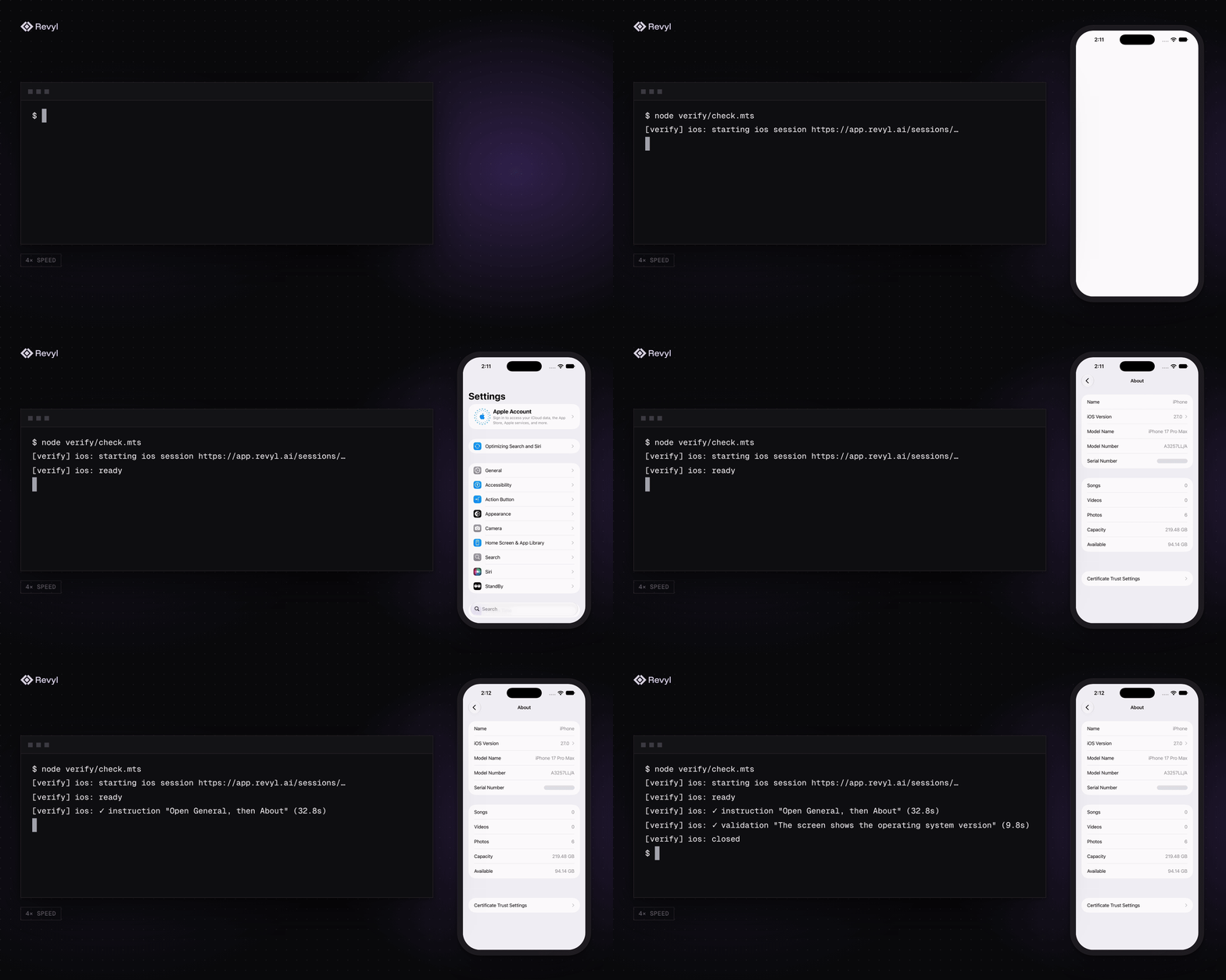
On the first interactive run, Verify opens the Revyl browser approval flow once and saves the login in `~/.revyl/credentials.json` for the CLI and SDK to share. It prints a live session link, then ordered step results:
|
|
30
|
+
|
|
31
|
+
```text
|
|
32
|
+
[verify] ios: starting ios session https://app.revyl.ai/sessions/…
|
|
33
|
+
[verify] ios: ready
|
|
34
|
+
[verify] ios: ✓ instruction "Open General, then About" (12.0s)
|
|
35
|
+
[verify] ios: ✓ validation "The screen shows the operating system version" (9.8s)
|
|
36
|
+
[verify] ios: closed
|
|
37
|
+
```
|
|
38
|
+
|
|
39
|
+
|
|
40
|
+
|
|
41
|
+
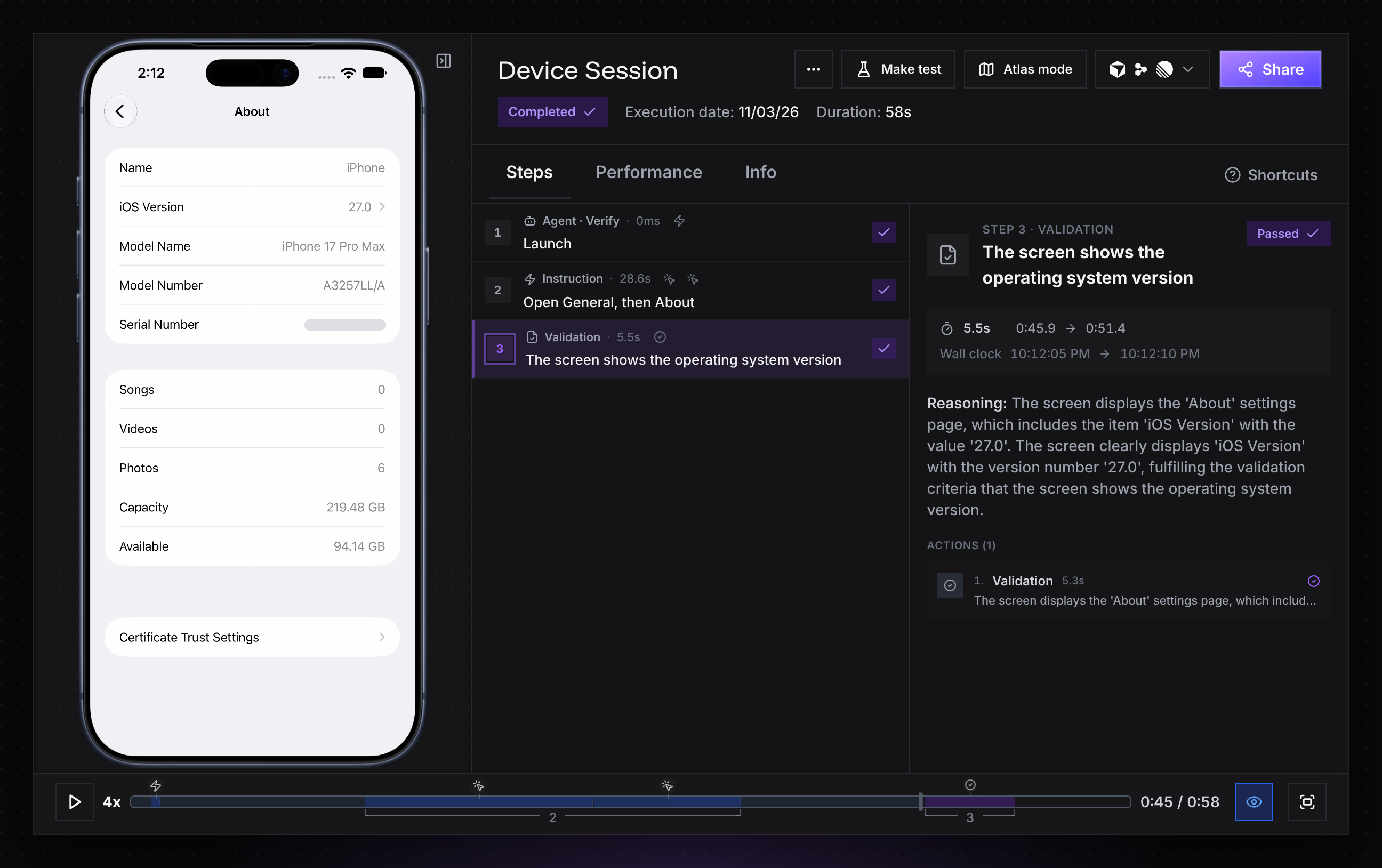
The URL is live during the run and keeps the report and available recording after it closes. A failed instruction or validation throws a typed error and includes the same URL.
|
|
42
|
+
|
|
43
|
+
|
|
44
|
+
|
|
45
|
+
In CI, Verify never prompts or opens a browser; set `REVYL_API_KEY` as a secret. Python and Go use an existing CLI login or API key; their SDKs do not open the browser themselves.
|
|
26
46
|
|
|
27
47
|
## Scaffold a config (optional)
|
|
28
48
|
|
|
29
|
-
Use `init` when you want named targets in `verify.config.ts` and a generated example script. It
|
|
49
|
+
Use `init` when you want named targets in `verify.config.ts` and a generated example script. It is optional; installing the package is enough to use inline targets. It detects your package manager from the lockfile, asks before adding `@revyl/verify` as a dev dependency, asks what you want to open, adds `.verify/` to `.gitignore`, and prints the command that runs the example:
|
|
30
50
|
|
|
31
51
|
- `verify.config.ts`: the targets `open()` can start, by name
|
|
32
52
|
- `verify/example.ts`: a script that opens the target, runs steps and takes a screenshot (web/mobile) or checks commands and files (Mac), and closes
|
|
@@ -39,11 +59,11 @@ npx @revyl/verify init --platform ios --app-id <revyl-app-id>
|
|
|
39
59
|
npx @revyl/verify init --platform mac
|
|
40
60
|
```
|
|
41
61
|
|
|
42
|
-
Use `--yes` to accept installation without a prompt, or `--no-install` when Verify is already installed.
|
|
62
|
+
Use `--yes` to accept installation without a prompt, or `--no-install` when Verify is already installed. Web and mobile targets need a Revyl app id; a Mac target does not. The generated config is ordinary TypeScript, so edit it when the example needs a pinned build, a public Web URL, or a different target.
|
|
43
63
|
|
|
44
64
|
## Manual setup
|
|
45
65
|
|
|
46
|
-
Verify uses the same credential precedence as the Revyl CLI:
|
|
66
|
+
Use manual setup when you need to control the package manager or keep the generated files out of the project. Verify uses the same credential precedence as the Revyl CLI:
|
|
47
67
|
|
|
48
68
|
1. A usable login in `~/.revyl/credentials.json` marked `local_auth_override` takes precedence, even when `REVYL_API_KEY` is set.
|
|
49
69
|
2. Otherwise, `REVYL_API_KEY`, an API key you create in Revyl's settings.
|
|
@@ -54,6 +74,8 @@ export REVYL_API_KEY=... # or: revyl auth login
|
|
|
54
74
|
npx @revyl/verify whoami # checks the credentials without starting a session
|
|
55
75
|
```
|
|
56
76
|
|
|
77
|
+
In CI, keep the key in a secret manager rather than in source, command arguments, or logs.
|
|
78
|
+
|
|
57
79
|
## Point the config at your app
|
|
58
80
|
|
|
59
81
|
Web and mobile targets need an app. Open the app in Revyl and copy its id into `app.appId`, or set `REVYL_APP_ID`, which the generated config reads. Mac and Linux targets need no app id. Linux init is intentionally unavailable; use `open({ platform: 'linux' })` or add a Linux config target.
|
|
@@ -68,7 +90,7 @@ Web and mobile targets need an app. Open the app in Revyl and copy its id into `
|
|
|
68
90
|
node verify/example.ts
|
|
69
91
|
```
|
|
70
92
|
|
|
71
|
-
If Node warns that the module type is not specified, add `"type": "module"` to your `package.json` or rename the script to `example.mts`.
|
|
93
|
+
If Node warns that the module type is not specified, add `"type": "module"` to your `package.json` or rename the script to `example.mts`. In a Yarn Plug'n'Play project, the default since Yarn 2, run it with `yarn node verify/example.ts`.
|
|
72
94
|
|
|
73
95
|
Illustrative output (durations vary):
|
|
74
96
|
|
package/docs/web.md
CHANGED
|
@@ -2,6 +2,8 @@
|
|
|
2
2
|
|
|
3
3
|
A web target opens your app in a Revyl cloud browser.
|
|
4
4
|
|
|
5
|
+
Web is available to every organization. If `revyl app create --platform web` reports `Web is not enabled for this organization`, Revyl has turned Web off for your organization; email support@revyl.ai.
|
|
6
|
+
|
|
5
7
|
```ts
|
|
6
8
|
{
|
|
7
9
|
platform: 'web',
|
package/package.json
CHANGED
|
@@ -1,6 +1,6 @@
|
|
|
1
1
|
{
|
|
2
2
|
"name": "@revyl/verify",
|
|
3
|
-
"version": "0.3.
|
|
3
|
+
"version": "0.3.2",
|
|
4
4
|
"description": "Open Revyl cloud browsers and mobile devices for agent steps, or Mac and Linux computers for commands and files, from TypeScript.",
|
|
5
5
|
"keywords": [
|
|
6
6
|
"e2e",
|
|
@@ -32,7 +32,8 @@
|
|
|
32
32
|
"exports": {
|
|
33
33
|
".": {
|
|
34
34
|
"types": "./dist/index.d.ts",
|
|
35
|
-
"import": "./dist/index.js"
|
|
35
|
+
"import": "./dist/index.js",
|
|
36
|
+
"default": "./dist/index.js"
|
|
36
37
|
},
|
|
37
38
|
"./package.json": "./package.json"
|
|
38
39
|
},
|