@revyl/verify 0.1.0 → 0.2.0
This diff represents the content of publicly available package versions that have been released to one of the supported registries. The information contained in this diff is provided for informational purposes only and reflects changes between package versions as they appear in their respective public registries.
- package/CHANGELOG.md +21 -1
- package/README.md +103 -66
- package/dist/api/types.d.ts +6 -0
- package/dist/cli/init.js +2 -3
- package/dist/cli/main.js +5 -5
- package/dist/computer-session.d.ts +8 -2
- package/dist/computer-session.js +117 -21
- package/dist/config.d.ts +1 -1
- package/dist/errors.d.ts +1 -1
- package/dist/index.d.ts +1 -1
- package/dist/open.d.ts +1 -1
- package/dist/open.js +2 -5
- package/dist/screen-readiness.d.ts +1 -0
- package/dist/screen-readiness.js +27 -0
- package/dist/session.d.ts +9 -0
- package/dist/session.js +32 -0
- package/docs/README.md +3 -2
- package/docs/agents.md +14 -9
- package/docs/api.md +22 -10
- package/docs/ci.md +1 -1
- package/docs/computers.md +22 -12
- package/docs/configuration.md +11 -10
- package/docs/end-to-end.md +105 -0
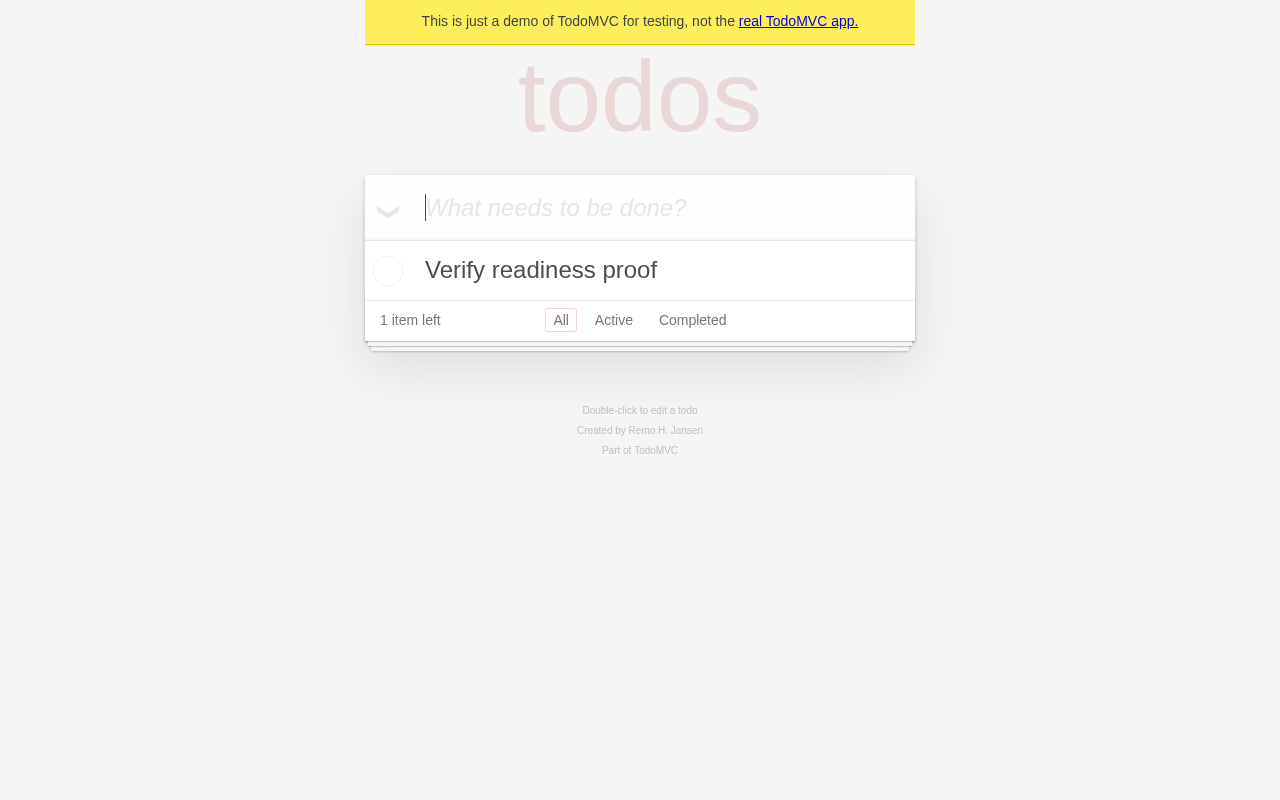
- package/docs/errors.md +6 -5
- package/docs/getting-started.md +21 -12
- package/docs/linux-computers-contract.md +34 -88
- package/docs/llms.txt +5 -4
- package/docs/mobile.md +6 -0
- package/docs/web.md +1 -7
- package/package.json +7 -4
package/dist/errors.d.ts
CHANGED
|
@@ -1,4 +1,4 @@
|
|
|
1
|
-
export type VerifyErrorCode = 'INVALID_ARGUMENT' | 'CONFIG_NOT_FOUND' | 'CONFIG_INVALID' | 'AUTH_MISSING' | 'AUTH_REJECTED' | 'API_ERROR' | 'SESSION_START_FAILED' | 'SESSION_ENDED' | 'SESSION_BUSY' | 'NOT_AVAILABLE_ON_PLATFORM' | 'ACTION_FAILED' | 'ACTION_UNCERTAIN' | 'INSTRUCTION_FAILED' | 'VALIDATION_FAILED' | 'STEP_FAILED' | 'COMMAND_FAILED' | 'NOT_FOUND' | 'ACCESS_DENIED' | 'TIMEOUT';
|
|
1
|
+
export type VerifyErrorCode = 'INVALID_ARGUMENT' | 'CONFIG_NOT_FOUND' | 'CONFIG_INVALID' | 'AUTH_MISSING' | 'AUTH_REJECTED' | 'API_ERROR' | 'SESSION_START_FAILED' | 'SESSION_ENDED' | 'SESSION_BUSY' | 'COMPUTER_LIMIT' | 'NOT_AVAILABLE_ON_PLATFORM' | 'ACTION_FAILED' | 'ACTION_UNCERTAIN' | 'INSTRUCTION_FAILED' | 'VALIDATION_FAILED' | 'STEP_FAILED' | 'COMMAND_FAILED' | 'NOT_FOUND' | 'ACCESS_DENIED' | 'TIMEOUT';
|
|
2
2
|
export declare class VerifyError extends Error {
|
|
3
3
|
readonly code: VerifyErrorCode;
|
|
4
4
|
constructor(code: VerifyErrorCode, message: string, options?: {
|
package/dist/index.d.ts
CHANGED
|
@@ -1,6 +1,6 @@
|
|
|
1
1
|
export { open } from './open.js';
|
|
2
2
|
export type { OpenOptions } from './open.js';
|
|
3
|
-
export type { Session, StepOptions, StepResult, StepType, ValidationOptions, OperationOptions, ExecOptions, ExecResult, FileStat, ComputerProcess } from './session.js';
|
|
3
|
+
export type { Session, StepOptions, StepResult, StepType, ValidationOptions, OperationOptions, ExecOptions, ExecResult, FileStat, ComputerProcess, ComputerRecording } from './session.js';
|
|
4
4
|
export { defineConfig } from './config.js';
|
|
5
5
|
export type { MobileAppConfig, MobileTargetConfig, ComputerTargetConfig, TargetConfig, VerifyConfig, WebAppConfig, WebTargetConfig } from './config.js';
|
|
6
6
|
export type { Platform, ComputerPlatform, MobilePlatform } from './api/types.js';
|
package/dist/open.d.ts
CHANGED
|
@@ -7,7 +7,7 @@ export interface OpenOptions {
|
|
|
7
7
|
log?: false | ((line: string) => void);
|
|
8
8
|
}
|
|
9
9
|
/**
|
|
10
|
-
* Starts a Revyl cloud browser, device, or
|
|
10
|
+
* Starts a Revyl cloud browser, device, or computer. Mobile first-screen readiness is best-effort.
|
|
11
11
|
* Pass a target name from verify.config.ts, such as open('web'), or a target object.
|
|
12
12
|
*/
|
|
13
13
|
export declare function open(target: string | TargetConfig, options?: OpenOptions): Promise<Session>;
|
package/dist/open.js
CHANGED
|
@@ -5,7 +5,7 @@ import { VerifyError } from './errors.js';
|
|
|
5
5
|
import { DeviceSession } from './session.js';
|
|
6
6
|
import { ComputerSession } from './computer-session.js';
|
|
7
7
|
/**
|
|
8
|
-
* Starts a Revyl cloud browser, device, or
|
|
8
|
+
* Starts a Revyl cloud browser, device, or computer. Mobile first-screen readiness is best-effort.
|
|
9
9
|
* Pass a target name from verify.config.ts, such as open('web'), or a target object.
|
|
10
10
|
*/
|
|
11
11
|
export async function open(target, options = {}) {
|
|
@@ -22,15 +22,12 @@ export async function open(target, options = {}) {
|
|
|
22
22
|
else {
|
|
23
23
|
resolved = validateTarget(target);
|
|
24
24
|
}
|
|
25
|
-
if (resolved.platform === 'linux') {
|
|
26
|
-
throw new VerifyError('NOT_AVAILABLE_ON_PLATFORM', 'Linux computers are planned, but are not available in Verify yet. See docs/computers.md.');
|
|
27
|
-
}
|
|
28
25
|
const credentials = await resolveCredentials();
|
|
29
26
|
if (!credentials)
|
|
30
27
|
throw new VerifyError('AUTH_MISSING', missingCredentialsMessage());
|
|
31
28
|
const log = options.log === false ? undefined : (options.log ?? ((line) => void process.stderr.write(`[verify] ${line}\n`)));
|
|
32
29
|
const client = new RevylClient({ token: credentials.token });
|
|
33
|
-
if (resolved.platform === 'mac')
|
|
30
|
+
if (resolved.platform === 'mac' || resolved.platform === 'linux')
|
|
34
31
|
return ComputerSession.start(client, resolved, { stepTimeout, log });
|
|
35
32
|
return DeviceSession.start(client, resolved, { stepTimeout, log });
|
|
36
33
|
}
|
|
@@ -0,0 +1 @@
|
|
|
1
|
+
export declare function screenHasContent(bytes: Uint8Array): boolean | undefined;
|
|
@@ -0,0 +1,27 @@
|
|
|
1
|
+
import { PNG } from 'pngjs';
|
|
2
|
+
export function screenHasContent(bytes) {
|
|
3
|
+
if (bytes.length < 24 || bytes.length > 16 * 1024 * 1024)
|
|
4
|
+
return undefined;
|
|
5
|
+
const header = Buffer.from(bytes.buffer, bytes.byteOffset, bytes.byteLength);
|
|
6
|
+
const width = header.readUInt32BE(16);
|
|
7
|
+
const height = header.readUInt32BE(20);
|
|
8
|
+
if (width === 0 || height === 0 || width * height > 16_000_000)
|
|
9
|
+
return undefined;
|
|
10
|
+
try {
|
|
11
|
+
const { data } = PNG.sync.read(header);
|
|
12
|
+
const left = Math.floor(width / 10);
|
|
13
|
+
const top = Math.floor(height / 10);
|
|
14
|
+
const first = (top * width + left) * 4;
|
|
15
|
+
for (let y = top; y < Math.ceil(height * 0.9); y += 1) {
|
|
16
|
+
for (let x = left; x < Math.ceil(width * 0.9); x += 1) {
|
|
17
|
+
const offset = (y * width + x) * 4;
|
|
18
|
+
if (data[offset] !== data[first] || data[offset + 1] !== data[first + 1] || data[offset + 2] !== data[first + 2])
|
|
19
|
+
return true;
|
|
20
|
+
}
|
|
21
|
+
}
|
|
22
|
+
return false;
|
|
23
|
+
}
|
|
24
|
+
catch {
|
|
25
|
+
return undefined;
|
|
26
|
+
}
|
|
27
|
+
}
|
package/dist/session.d.ts
CHANGED
|
@@ -45,6 +45,11 @@ export interface ComputerProcess {
|
|
|
45
45
|
state: 'running' | 'exited';
|
|
46
46
|
exitCode?: number;
|
|
47
47
|
}
|
|
48
|
+
export interface ComputerRecording {
|
|
49
|
+
url: string;
|
|
50
|
+
durationSeconds?: number;
|
|
51
|
+
startedAt?: Date;
|
|
52
|
+
}
|
|
48
53
|
/**
|
|
49
54
|
* One live Revyl session: a cloud browser, an iOS or Android device, or a computer.
|
|
50
55
|
* A call the session's platform does not offer throws NOT_AVAILABLE_ON_PLATFORM.
|
|
@@ -60,6 +65,8 @@ export interface Session {
|
|
|
60
65
|
/** Every instruction and validation run on this session, in order. */
|
|
61
66
|
readonly steps: StepResult[];
|
|
62
67
|
readonly closed: boolean;
|
|
68
|
+
readonly expiresAt?: Date;
|
|
69
|
+
recording(): Promise<ComputerRecording | null>;
|
|
63
70
|
/** Asks Revyl's agent to do something on the app. Browsers and devices only. */
|
|
64
71
|
instruction(text: string, options?: StepOptions): Promise<StepResult>;
|
|
65
72
|
/** Asks Revyl's agent whether something holds on screen. Browsers and devices only. */
|
|
@@ -119,6 +126,7 @@ export declare class DeviceSession implements Session {
|
|
|
119
126
|
path?: string;
|
|
120
127
|
}): Promise<Uint8Array>;
|
|
121
128
|
exec(): Promise<ExecResult>;
|
|
129
|
+
recording(): Promise<never>;
|
|
122
130
|
readFile(): Promise<Buffer>;
|
|
123
131
|
writeFile(): Promise<void>;
|
|
124
132
|
stat(): Promise<FileStat>;
|
|
@@ -130,6 +138,7 @@ export declare class DeviceSession implements Session {
|
|
|
130
138
|
private step;
|
|
131
139
|
private runStep;
|
|
132
140
|
private launch;
|
|
141
|
+
private waitForScreenContent;
|
|
133
142
|
private log;
|
|
134
143
|
private computerOnly;
|
|
135
144
|
private worker;
|
package/dist/session.js
CHANGED
|
@@ -5,6 +5,7 @@ import { setTimeout as delay } from 'node:timers/promises';
|
|
|
5
5
|
import { apiError, parseJson, responseDetail, responseErrorCode, sessionViewerUrl, } from './api/client.js';
|
|
6
6
|
import { trackSession, untrackSession } from './cleanup.js';
|
|
7
7
|
import { VerifyError, errorMessage, isVerifyError } from './errors.js';
|
|
8
|
+
import { screenHasContent } from './screen-readiness.js';
|
|
8
9
|
const POLL_INTERVAL_MS = 2_000;
|
|
9
10
|
const DEVICE_CONNECT_TIMEOUT_MS = 90_000;
|
|
10
11
|
const STEP_POLL_BASE_MS = 500;
|
|
@@ -94,6 +95,7 @@ export class DeviceSession {
|
|
|
94
95
|
await session.waitForDeviceReady(deadline);
|
|
95
96
|
if (app.bundleId)
|
|
96
97
|
await session.launch(app.bundleId);
|
|
98
|
+
await session.waitForScreenContent(deadline);
|
|
97
99
|
});
|
|
98
100
|
return session;
|
|
99
101
|
}
|
|
@@ -134,6 +136,9 @@ export class DeviceSession {
|
|
|
134
136
|
exec() {
|
|
135
137
|
return this.computerOnly('exec');
|
|
136
138
|
}
|
|
139
|
+
recording() {
|
|
140
|
+
return this.computerOnly('recording');
|
|
141
|
+
}
|
|
137
142
|
readFile() {
|
|
138
143
|
return this.computerOnly('readFile');
|
|
139
144
|
}
|
|
@@ -261,6 +266,33 @@ export class DeviceSession {
|
|
|
261
266
|
throw new VerifyError('SESSION_START_FAILED', `Could not launch ${bundleId} on the ${this.target} device: ${result.error ?? 'no reason given'}`);
|
|
262
267
|
}
|
|
263
268
|
}
|
|
269
|
+
async waitForScreenContent(startDeadline) {
|
|
270
|
+
const deadline = Math.min(startDeadline, Date.now() + 10_000);
|
|
271
|
+
while (Date.now() < deadline) {
|
|
272
|
+
try {
|
|
273
|
+
const response = await this.client.worker(this.workflowRunId, 'screenshot', {
|
|
274
|
+
method: 'GET', retry: false, signal: AbortSignal.timeout(Math.max(1, deadline - Date.now())),
|
|
275
|
+
});
|
|
276
|
+
if (response.status === 200) {
|
|
277
|
+
const content = screenHasContent(response.body);
|
|
278
|
+
if (content === true)
|
|
279
|
+
return;
|
|
280
|
+
if (content === undefined)
|
|
281
|
+
break;
|
|
282
|
+
}
|
|
283
|
+
else if (response.status !== 409 && response.status !== 503) {
|
|
284
|
+
break;
|
|
285
|
+
}
|
|
286
|
+
}
|
|
287
|
+
catch {
|
|
288
|
+
break;
|
|
289
|
+
}
|
|
290
|
+
const remaining = deadline - Date.now();
|
|
291
|
+
if (remaining > 0)
|
|
292
|
+
await delay(Math.min(500, remaining));
|
|
293
|
+
}
|
|
294
|
+
this.log('debug: best-effort first-screen wait ended without non-blank content; the runtime has no rendered-readiness signal');
|
|
295
|
+
}
|
|
264
296
|
log(line) {
|
|
265
297
|
this.options.log?.(`${this.target}: ${line}`);
|
|
266
298
|
}
|
package/docs/README.md
CHANGED
|
@@ -4,13 +4,14 @@ These files ship inside the npm package at `node_modules/@revyl/verify/docs/`, s
|
|
|
4
4
|
|
|
5
5
|
| File | Read it when you want to |
|
|
6
6
|
| --- | --- |
|
|
7
|
+
| [end-to-end.md](end-to-end.md) | Review live verification scope, observed outcomes, and evidence limits |
|
|
7
8
|
| [getting-started.md](getting-started.md) | Install Verify, authenticate, and run a first script |
|
|
8
9
|
| [api.md](api.md) | Look up session lifecycle, agent steps, screenshots, commands, files, and processes |
|
|
9
10
|
| [configuration.md](configuration.md) | Look up every option in `verify.config.ts`, the environment variables, and the CLI |
|
|
10
11
|
| [web.md](web.md) | Open a web app in a Revyl cloud browser |
|
|
11
12
|
| [mobile.md](mobile.md) | Open an iOS or Android app on a Revyl cloud device |
|
|
12
|
-
| [computers.md](computers.md) | Open a Mac computer for commands, files, processes, and
|
|
13
|
-
| [linux-computers-contract.md](linux-computers-contract.md) | Read the
|
|
13
|
+
| [computers.md](computers.md) | Open a Mac or Linux computer for commands, files, processes, screenshots, and optional recording metadata |
|
|
14
|
+
| [linux-computers-contract.md](linux-computers-contract.md) | Read the implemented shared Linux computer contract |
|
|
14
15
|
| [ci.md](ci.md) | Call Verify from CI or from a test runner you already use |
|
|
15
16
|
| [errors.md](errors.md) | Understand an error code and fix it |
|
|
16
17
|
| [agents.md](agents.md) | Use Verify as a coding agent |
|
package/docs/agents.md
CHANGED
|
@@ -1,29 +1,34 @@
|
|
|
1
1
|
# For coding agents
|
|
2
2
|
|
|
3
|
-
This page is for AI coding agents (Claude Code, Cursor, Codex, and others) that use Verify to check an app on a cloud browser/device or run commands and files on a Mac computer. The rest of this folder describes the API in full; this page is the workflow.
|
|
3
|
+
This page is for AI coding agents (Claude Code, Cursor, Codex, and others) that use Verify to check an app on a cloud browser/device or run commands and files on a Mac or Linux computer. The rest of this folder describes the API in full; this page is the workflow.
|
|
4
4
|
|
|
5
5
|
## Workflow
|
|
6
6
|
|
|
7
7
|
1. Read `verify.config.ts` to learn the target names and their platforms. If there is none, run `npx @revyl/verify init --platform <web|ios|android> --app-id <id>`, or `npx @revyl/verify init --platform mac` without an app id. You can also pass a target object to `open()`.
|
|
8
|
-
2. Check the credentials once with `npx verify whoami`. It starts no session.
|
|
8
|
+
2. Check the credentials once with `npx @revyl/verify whoami`. It starts no session.
|
|
9
9
|
3. Write a short script, or extend an existing one, that opens one target, runs the steps you need, and closes:
|
|
10
10
|
```ts
|
|
11
11
|
import { open } from '@revyl/verify';
|
|
12
12
|
|
|
13
13
|
const session = await open('ios');
|
|
14
|
-
|
|
15
|
-
|
|
16
|
-
|
|
17
|
-
|
|
14
|
+
try {
|
|
15
|
+
await session.instruction('Sign in as the demo user');
|
|
16
|
+
await session.validation('The dashboard shows at least one project card');
|
|
17
|
+
await session.screenshot({ path: '.verify/dashboard.png' });
|
|
18
|
+
} finally {
|
|
19
|
+
await session.close();
|
|
20
|
+
}
|
|
18
21
|
```
|
|
19
22
|
4. Run it with `node path/to/script.ts`. Share the session link from the first `[verify]` line with the user, so they can watch.
|
|
20
23
|
5. Read the outcome from the exit code and stderr. Each step prints `✓` or `✗` with its text; a failure prints `CODE: message`, ending with the session link. Look at any screenshot you saved before changing the script or the app.
|
|
21
24
|
|
|
22
25
|
## Rules
|
|
23
26
|
|
|
24
|
-
Mac computers are early access and not yet available in Revyl production. They work only on Revyl staging for enabled
|
|
27
|
+
Mac and Linux computers are early access and not yet available in Revyl production. They work only on Revyl staging for organizations enabled for the requested OS through the optional `REVYL_BACKEND_URL` override with matching staging credentials. Read [availability and errors](computers.md#availability-and-errors) before starting a computer; do not try production or repeat an uncertain start/stop to probe availability.
|
|
25
28
|
|
|
26
|
-
For
|
|
29
|
+
For computer work, use structured `exec(['program', 'arg'])`, `readFile`, `writeFile`, `stat`, and run-owned handles from `processes()`/`terminate(id)`. Check command output with ordinary assertions and close in `finally`; screenshots are supported, but instruction/validation are not. Do not fall back to agent steps on computers or shell/file methods on mobile/web. See [computers.md](computers.md) for limits and staging setup. Linux uses inline targets or config entries; Linux init is intentionally unavailable. Starting a computer is a paid external action and needs the same approval as starting a device.
|
|
30
|
+
|
|
31
|
+
Computers have a hard 60-minute lifetime from create, not from readiness or activity. `expiresAt` is optional on older APIs; expiry does not prevent close. After terminal state and confirmed release, `recording()` can return private signed metadata or null, including after close. Never log or share its signed URL/query. Do not automatically wait for recordings or retry `COMPUTER_LIMIT` starts: queued work (including iOS) or the concurrency limit may be responsible.
|
|
27
32
|
|
|
28
33
|
- Write steps the way you would brief a person: what to do, or what should be true, in one sentence. Name visible things ("the blue Save button in the footer"), not implementation details.
|
|
29
34
|
- Use `instruction` for doing and `validation` for checking. Do not ask an instruction to check something, or a validation to change anything.
|
|
@@ -33,6 +38,6 @@ For Mac work, use structured `exec(['program', 'arg'])`, `readFile`, `writeFile`
|
|
|
33
38
|
- Await each step. Two steps at once on one session throw `INVALID_ARGUMENT`.
|
|
34
39
|
- Do not catch `VerifyError` to make a check pass. A `NOT_AVAILABLE_ON_PLATFORM` error means the call is not offered on that platform; see [web.md](web.md) and [computers.md](computers.md). A `STEP_FAILED` error means the step did not run to an outcome, not that the app is wrong.
|
|
35
40
|
- Never automatically repeat a computer mutation after `ACTION_UNCERTAIN` or a timeout: the command may have run, and timeout does not prove termination or rollback. Do not log argv, stdin, file contents, or credentials.
|
|
36
|
-
- Always close what you open
|
|
41
|
+
- Always close what you open in `try/finally`. Each open session is paid. Automatic cleanup is best effort with a 15-second bound and skips signal/error events that already have listeners. Device close acknowledges stop, while computer close requires confirmed terminal release.
|
|
37
42
|
- Never put secrets in scripts or config. Credentials come from `REVYL_API_KEY` or a Revyl CLI login; web sign-in uses the **name** of a Revyl organization secret.
|
|
38
43
|
- Step descriptions are sent to Revyl and logged to stderr by default. Do not include private credentials or customer data in instruction or validation text; use test-only sign-in and synthetic data instead. `log: false` suppresses local progress, not remote processing or reports.
|
package/docs/api.md
CHANGED
|
@@ -6,14 +6,17 @@ import { open, defineConfig, VerifyError, isVerifyError } from '@revyl/verify';
|
|
|
6
6
|
|
|
7
7
|
## open(target, options?)
|
|
8
8
|
|
|
9
|
-
|
|
9
|
+
Linux targets are supported **since 0.2.0**; 0.1.0 includes the target type but rejects Linux locally.
|
|
10
10
|
|
|
11
|
-
|
|
11
|
+
Starts a Revyl cloud browser, device, or Mac or Linux computer. Mobile first-screen readiness is [best-effort](mobile.md#steps), not a foreground/rendered-readiness guarantee. Computer starts retain a 10-minute default timeout; an unclaimed start may fail after 120 seconds with no-host context.
|
|
12
|
+
|
|
13
|
+
Both computer operating systems are early access on staging only for organizations enabled for the requested OS, not yet available in Revyl production. Use the optional `REVYL_BACKEND_URL` override and staging credentials described in [computer availability](computers.md#availability-and-errors).
|
|
12
14
|
|
|
13
15
|
```ts
|
|
14
16
|
const web = await open('web'); // a target named in verify.config.ts
|
|
15
17
|
const ios = await open({ platform: 'ios', app: { appId: '…' } }); // or a target object, no config needed
|
|
16
18
|
const mac = await open({ platform: 'mac' }); // computer, no app needed
|
|
19
|
+
const linux = await open({ platform: 'linux' }); // same computer surface
|
|
17
20
|
```
|
|
18
21
|
|
|
19
22
|
- `target`: a target name from `verify.config.ts`, or a target object with the same shape as a config entry (see [configuration.md](configuration.md)). Verify reads the nearest `verify.config.ts` at or above the current folder.
|
|
@@ -58,19 +61,27 @@ interface StepResult {
|
|
|
58
61
|
|
|
59
62
|
`session.steps` lists every step run on the session, in order.
|
|
60
63
|
|
|
64
|
+
When inspecting `revyl device report --session-id <id>`, read validation verdicts from the step's `effective_status` and `validation_result`, with `validations_passed` / `total_validations` for the validation summary. `passed_steps` / `failed_steps` and transport `status` are not enough: a successfully executed validation can have a false verdict. The SDK's `StepResult.passed` reflects that verdict, not just transport success.
|
|
65
|
+
|
|
61
66
|
## session.screenshot(options?)
|
|
62
67
|
|
|
63
68
|
Resolves with a PNG of the screen as a `Uint8Array`. With `options.path`, also writes it there, creating folders as needed.
|
|
64
69
|
|
|
65
70
|
## session.close()
|
|
66
71
|
|
|
67
|
-
|
|
72
|
+
Requests that Revyl stop the session. For web/mobile, success acknowledges the stop request rather than proving physical release. It is safe to call more than once, and steps after it throw `SESSION_ENDED`. A `Session` also works with `await using`, which closes it at the end of the block.
|
|
68
73
|
|
|
69
74
|
For computers, cleanup must be confirmed; a terminal state alone does not prove physical release. Uncertain release throws `ACTION_UNCERTAIN`.
|
|
70
75
|
|
|
71
76
|
## Computer commands, files, and processes
|
|
72
77
|
|
|
73
|
-
Mac sessions provide `exec(argv: string[], options?)`, `readFile(path, options?)` returning `Buffer`, `writeFile(path, string | Uint8Array, options?)`, `stat(path, options?)` returning `{ kind, size }`, `processes(options?)` returning `{ id, state, exitCode? }[]`, and `terminate(id, options?)`. They throw `NOT_AVAILABLE_ON_PLATFORM` on web/iOS/Android. See [computers.md](computers.md) for complete signatures, limits, timeouts, and examples.
|
|
78
|
+
Mac and Linux sessions provide `exec(argv: string[], options?)`, `readFile(path, options?)` returning `Buffer`, `writeFile(path, string | Uint8Array, options?)`, `stat(path, options?)` returning `{ kind, size }`, `processes(options?)` returning `{ id, state, exitCode? }[]`, and `terminate(id, options?)`. They throw `NOT_AVAILABLE_ON_PLATFORM` on web/iOS/Android. See [computers.md](computers.md) for complete signatures, limits, timeouts, and examples. Both support `screenshot()`; instruction/validation do not run on computers.
|
|
79
|
+
|
|
80
|
+
### `session.recording(): Promise<ComputerRecording | null>`
|
|
81
|
+
|
|
82
|
+
**Since 0.2.0.** This method is not available in 0.1.0.
|
|
83
|
+
|
|
84
|
+
Computers only. First reads the report and requires terminal state plus confirmed release, otherwise throws `SESSION_BUSY`. Returns `{ url: string, durationSeconds?: number, startedAt?: Date }` or null for an unavailable recording. Nullable optional wire fields are omitted. This method works after `close()`, does not wait for upload, and does not download or fetch the URL. Keep the signed HTTPS URL and its query private. Request fresh metadata when the URL expires. The normal report has no recording URL. Devices reject this call locally with `NOT_AVAILABLE_ON_PLATFORM`.
|
|
74
85
|
|
|
75
86
|
## Other session properties
|
|
76
87
|
|
|
@@ -78,7 +89,8 @@ Mac sessions provide `exec(argv: string[], options?)`, `readFile(path, options?)
|
|
|
78
89
|
| --- | --- |
|
|
79
90
|
| `viewerUrl` | The session in Revyl: a live view while it runs, its recording/report after. Use `revyl device report --session-id <id>` for web/mobile, or `revyl computer report <id>` for computers. |
|
|
80
91
|
| `id` | Revyl's session id |
|
|
81
|
-
| `platform` | `'web'`, `'ios'`, `'android'`, `'mac'`, or
|
|
92
|
+
| `platform` | `'web'`, `'ios'`, `'android'`, `'mac'`, or `'linux'` |
|
|
93
|
+
| `expiresAt` | **Since 0.2.0.** Validated API expiry as a `Date`, or undefined for devices and older APIs. Computers have a hard 60-minute lifetime from create. Operations/screenshot observation are bounded by expiry; close and recording remain possible. |
|
|
82
94
|
| `target` | The target name, or the platform for a target object |
|
|
83
95
|
| `closed` | Whether `close()` was called |
|
|
84
96
|
|
|
@@ -91,13 +103,13 @@ Mac sessions provide `exec(argv: string[], options?)`, `readFile(path, options?)
|
|
|
91
103
|
|
|
92
104
|
## Cleanup
|
|
93
105
|
|
|
94
|
-
While a session is open, Verify
|
|
106
|
+
While a session is open, Verify attempts best-effort cleanup with a 15-second budget:
|
|
95
107
|
|
|
96
|
-
- on Ctrl+C or SIGTERM: it
|
|
97
|
-
- on an uncaught error, such as a failed validation that nothing catches: it prints the error,
|
|
98
|
-
- when the script finishes without calling `close()`: it
|
|
108
|
+
- on Ctrl+C or SIGTERM: it attempts to close open sessions, then exits with 130 or 143 (a second Ctrl+C exits at once);
|
|
109
|
+
- on an uncaught error, such as a failed validation that nothing catches: it prints the error, attempts cleanup, then exits with 1;
|
|
110
|
+
- when the script finishes without calling `close()`: it attempts cleanup and prints a reminder.
|
|
99
111
|
|
|
100
|
-
Verify
|
|
112
|
+
Verify skips installing a signal or error handler when that event already has listeners, so test runners and apps that manage their own shutdown keep control of it. Always close in `try/finally` or an `after` hook; automatic cleanup cannot guarantee success. A process that is killed outright, or calls `process.exit()` with sessions open, leaves browser/mobile sessions running until their idle timeout (10 minutes by default). Computers have a server-bounded one-hour lifetime instead; no idle timeout is configurable.
|
|
101
113
|
|
|
102
114
|
## defineConfig(config)
|
|
103
115
|
|
package/docs/ci.md
CHANGED
|
@@ -1,6 +1,6 @@
|
|
|
1
1
|
# CI and test runners
|
|
2
2
|
|
|
3
|
-
Verify is a library, so it runs wherever your code runs. Browsers, devices, and computers run in Revyl's cloud, so the runner needs nothing but Node.js and an API key.
|
|
3
|
+
Verify is a library, so it runs wherever your code runs. Browsers, devices, and computers run in Revyl's cloud, so the runner needs nothing but Node.js and an API key. Both Mac and Linux computer targets work from a Linux runner; no local guest runtime is needed. Use the same staging URL overrides and organization/OS enablement as [computers.md](computers.md).
|
|
4
4
|
|
|
5
5
|
## A script in GitHub Actions
|
|
6
6
|
|
package/docs/computers.md
CHANGED
|
@@ -1,10 +1,10 @@
|
|
|
1
|
-
# Mac computers (early access)
|
|
1
|
+
# Mac and Linux computers (early access)
|
|
2
2
|
|
|
3
|
-
Verify opens a Revyl cloud macOS computer for commands, files, processes, and screenshots. It does not open an assigned physical
|
|
3
|
+
Verify opens a Revyl cloud macOS or Linux computer for commands, files, processes, and screenshots. It does not open an assigned physical computer. Both operating systems are in **early access and not yet available in Revyl production**. They work only on Revyl staging for organizations enabled for the requested OS, which also need compute credits and available capacity. Ask [support@revyl.ai](mailto:support@revyl.ai) about staging access. No production availability date is promised.
|
|
4
|
+
|
|
5
|
+
Get the backend and matching app endpoints from Revyl, then set `REVYL_BACKEND_URL` and `REVYL_APP_URL` for your approved early-access environment before running:
|
|
4
6
|
|
|
5
7
|
```bash
|
|
6
|
-
export REVYL_BACKEND_URL=https://backend-staging.revyl.ai
|
|
7
|
-
export REVYL_APP_URL=https://staging.revyl.ai
|
|
8
8
|
export REVYL_API_KEY=... # staging credentials for your enabled organization
|
|
9
9
|
npx @revyl/verify init --platform mac
|
|
10
10
|
npm install --save-dev @revyl/verify
|
|
@@ -13,7 +13,9 @@ node verify/example.ts
|
|
|
13
13
|
|
|
14
14
|
`init` only writes local files; running the script starts a paid computer. No app id, build, device selector, image selector, or local Mac is needed. The generated script checks commands and a file round trip without agent steps.
|
|
15
15
|
|
|
16
|
-
`REVYL_BACKEND_URL` is an optional environment override for Verify generally, but currently required for
|
|
16
|
+
`REVYL_BACKEND_URL` is an optional environment override for Verify generally, but currently required for computer early access on staging. Production origins remain the defaults; never mix credentials between environments.
|
|
17
|
+
|
|
18
|
+
`init` intentionally generates only Mac computer projects. For Linux, install the package and use `open({ platform: 'linux' })` inline, or add `linux: { platform: 'linux' }` to the `targets` in `verify.config.ts`. The methods below are shared by both operating systems; installed tools, paths, resources, and desktop dimensions are not fixed SDK guarantees.
|
|
17
19
|
|
|
18
20
|
## Commands and files
|
|
19
21
|
|
|
@@ -48,26 +50,34 @@ try {
|
|
|
48
50
|
|
|
49
51
|
Paths are relative to the computer's workspace: no leading slash, empty components, `.` or `..`, backslashes, colons, or control characters. A path is at most 1,024 UTF-8 bytes. To make a directory, run a command such as `['mkdir', '-p', 'output']` before writing into it. There is no recursive sync or snapshot API.
|
|
50
52
|
|
|
51
|
-
Operation `timeout` is milliseconds, defaults to 30,000, and must be an integer from 1 to 300,000. It is also bounded by the run's remaining lifetime. A computer
|
|
53
|
+
Operation `timeout` is milliseconds, defaults to 30,000, and must be an integer from 1 to 300,000. It is also bounded by the run's remaining lifetime. A computer has a hard 60-minute lifetime **from create**, not from readiness or last activity; `idleTimeoutSeconds` and the agent `stepTimeout` do not configure computer lifetime or commands. `expiresAt` is a `Date` when the API returns `expires_at`, and otherwise undefined (including on devices and older APIs). Verify refuses new operations after that deadline and bounds operation/screenshot observation by it; expiry does not prevent explicit close or recording retrieval. Revyl allows at most 256 operations per run.
|
|
54
|
+
|
|
55
|
+
## Recording metadata
|
|
56
|
+
|
|
57
|
+
After terminal state **and** confirmed release, `await computer.recording()` returns `{ url, durationSeconds?, startedAt? }` or `null` if the recording is unavailable or still processing. `durationSeconds` is a finite nonnegative number; `startedAt` is a `Date`. Missing or nullable optional fields are omitted. Calling before terminal state and confirmed release throws `SESSION_BUSY`; Verify does not wait for the recording or download it. The method works after `close()` and checks the report before requesting the recording.
|
|
58
|
+
|
|
59
|
+
The HTTPS URL is signed and short-lived. Keep it private, including its query string; do not log or publish it. Call `recording()` again when a fresh URL is needed. The report carries no recording URL; `viewerUrl` remains a Revyl UI link, not a download URL. Web/mobile sessions reject `recording()` locally with `NOT_AVAILABLE_ON_PLATFORM`.
|
|
52
60
|
|
|
53
61
|
## Availability and errors
|
|
54
62
|
|
|
55
|
-
Mac computers are early access on Revyl staging only, not yet available in Revyl production. A
|
|
63
|
+
Mac and Linux computers are early access on Revyl staging only, not yet available in Revyl production. A `503 runtime_unavailable` or typed `computer_not_enabled` becomes `NOT_AVAILABLE_ON_PLATFORM` with this availability guidance. A `429 computer_limit` becomes `COMPUTER_LIMIT`: queued work (including iOS) or the concurrency limit can cause it, and the response does not identify which. Verify does not retry the create or send a stop after these definite admission refusals. `operation_limit` remains `SESSION_BUSY`. Availability is determined by the server, not a client-side production-URL block.
|
|
64
|
+
|
|
65
|
+
The default `startTimeout` remains 600000 ms; override it explicitly if needed. An unclaimed start can transition to `failed` with `failure_reason: 'no_host'` after 120 seconds from create. Verify stops readiness polling and throws `SESSION_START_FAILED` with that context, then attempts bounded cleanup. This is not a 120-second timeout for every start: claimed guests may take longer. `device_limit` also yields `SESSION_START_FAILED`, with queued-work/concurrency context. A start timeout or unconfirmed close does not prove resources were released. Inspect the session and contact support rather than blindly repeating a start or stop.
|
|
56
66
|
|
|
57
|
-
|
|
67
|
+
`instruction()` and `validation()` throw `NOT_AVAILABLE_ON_PLATFORM` on both computer operating systems without sending agent requests. Screenshots are supported, but screenshot readiness is separate from command readiness. Agent control of the screen is not part of this release. On web, iOS, and Android, shell/file/process methods throw `NOT_AVAILABLE_ON_PLATFORM`.
|
|
58
68
|
|
|
59
|
-
`
|
|
69
|
+
For the first 30 seconds after a computer becomes active, `screenshot()` retries exact structured `screen_unavailable` responses (HTTP 409 or 503) and `screen_starting` (HTTP 409). Backoff starts at 500 ms and doubles up to 2 seconds; the fixed window does not restart on each call. Cancellation, close, expiry, and the observation deadline still bound the wait. Exhausting that window yields `SESSION_BUSY` with a desktop-not-ready message, rather than requiring a caller sleep. Authentication failures, unrelated errors, malformed responses, and transport failures are not replayed. Commands and other mutations are never retried by this screenshot behavior.
|
|
60
70
|
|
|
61
|
-
Linux
|
|
71
|
+
Linux named and inline targets use the same computer surface as Mac. `init --platform linux` is intentionally unavailable; use an inline target or write its config entry. See [linux-computers-contract.md](linux-computers-contract.md) for the implemented shared contract.
|
|
62
72
|
|
|
63
73
|
Missing files and access denials throw `NOT_FOUND` and `ACCESS_DENIED`. An operation timeout with confirmed termination throws `TIMEOUT`; unconfirmed termination or execution throws `ACTION_UNCERTAIN`. Neither implies rollback. Execution outcome, evidence recording, and physical release are independent: an observed successful command can return its result while logging pending/failed report evidence. Do not repeat a mutation merely because its response was lost. Check the computer in Revyl before deciding what to do next. See [errors.md](errors.md).
|
|
64
74
|
|
|
65
75
|
## Lifecycle and transport
|
|
66
76
|
|
|
67
|
-
Verify mints a session UUID, creates `/api/v1/computer-runs` with `os: 'macos'`, then polls `GET /computer-runs/{id}/report` until `state: 'active'`, which means the owner route is ready. `starting` alone is not readiness. The public target spelling is `mac`, not `macos`.
|
|
77
|
+
Verify mints a session UUID, creates `/api/v1/computer-runs` with `os: 'macos'` for `platform: 'mac'` or `os: 'linux'` for `platform: 'linux'`, then polls `GET /computer-runs/{id}/report` until `state: 'active'`, which means the owner route is ready. `starting` alone is not readiness. The public Mac target spelling is `mac`, not `macos`.
|
|
68
78
|
|
|
69
79
|
Each command is submitted once to `/computer-runs/{id}/operations` with its own UUID `request_id` and `Prefer: respond-async`. The operation id is UUIDv5 with the computer UUID as namespace and the request UUID string as name. A `202` response has JSON `null`; Verify reads the operation by id until it settles instead of submitting it again. Binary operation fields use padded URL-safe base64 on the wire, with standard base64 accepted as input. Screenshot uses standard base64 PNG instead.
|
|
70
80
|
|
|
71
|
-
Verify bounds operation observation and explicit stop requests to 310 seconds. This is separate from the command's `timeout`: the backend may hold the async submission for 60 seconds before returning `202`. Automatic process-exit cleanup has a shorter 15-second budget and is best effort; use explicit `await close()` in `finally` to observe confirmed release.
|
|
81
|
+
Verify bounds operation observation to the earlier of 310 seconds or the returned expiry, and explicit stop requests to 310 seconds independently of expiry. This is separate from the command's `timeout`: the backend may hold the async submission for 60 seconds before returning `202`. Automatic process-exit cleanup has a shorter 15-second budget and is best effort; use explicit `await close()` in `finally` to observe confirmed release.
|
|
72
82
|
|
|
73
83
|
`close()` posts `/computer-runs/{id}/stop`. Always close in `finally` or use `await using`; the same automatic process cleanup as other sessions applies. A terminal state alone is not confirmed physical release. Keep computer output and screenshots private: they can contain application data and credentials. Verify does not log file contents, argv, stdin, or command output automatically.
|
package/docs/configuration.md
CHANGED
|
@@ -20,7 +20,7 @@ Unknown keys are rejected, so a typo fails loudly instead of being ignored.
|
|
|
20
20
|
|
|
21
21
|
## Top-level options
|
|
22
22
|
|
|
23
|
-
Mac targets currently require staging early access for an enabled
|
|
23
|
+
Mac and Linux targets currently require staging early access for an organization enabled for the requested OS through the optional `REVYL_BACKEND_URL` override and matching credentials; they are not yet available in Revyl production. See [computer availability](computers.md#availability-and-errors).
|
|
24
24
|
|
|
25
25
|
| Option | Default | Meaning |
|
|
26
26
|
| --- | --- | --- |
|
|
@@ -61,7 +61,7 @@ Give exactly one of `appId`, `buildId`, `artifactUrl`, or `bundleId`.
|
|
|
61
61
|
| Option | Meaning |
|
|
62
62
|
| --- | --- |
|
|
63
63
|
| `platform: 'mac'` | A cloud macOS computer, without `app` or `device` configuration |
|
|
64
|
-
| `platform: 'linux'` |
|
|
64
|
+
| `platform: 'linux'` | A cloud Linux computer with the same SDK methods as Mac, without `app` or `device` configuration |
|
|
65
65
|
| `startTimeout` | Milliseconds to wait for an active owner route; default 600000, range 10000..1800000 |
|
|
66
66
|
|
|
67
67
|
Computers do not accept `idleTimeoutSeconds`, image, provider, cwd, or lifetime selectors. The server bounds a run to one hour; per-operation timeout defaults to 30000 ms and accepts 1..300000 ms. See [computers.md](computers.md).
|
|
@@ -70,22 +70,23 @@ Computers do not accept `idleTimeoutSeconds`, image, provider, cwd, or lifetime
|
|
|
70
70
|
|
|
71
71
|
| Variable | Meaning |
|
|
72
72
|
| --- | --- |
|
|
73
|
-
| `REVYL_API_KEY` | API key.
|
|
74
|
-
| `REVYL_BACKEND_URL` | Optional API origin override
|
|
75
|
-
| `REVYL_APP_URL` | Optional session-link origin override
|
|
73
|
+
| `REVYL_API_KEY` | API key. Wins over a stored CLI login unless that login is usable and marked `local_auth_override`. Without an environment key, a usable stored login is used; expired access tokens fall back to a stored API key. |
|
|
74
|
+
| `REVYL_BACKEND_URL` | Optional API origin override; production is the default. Get the endpoint for your approved early-access environment from Revyl and use matching credentials. |
|
|
75
|
+
| `REVYL_APP_URL` | Optional session-link origin override; production is the default. Get the matching app endpoint from Revyl. |
|
|
76
76
|
|
|
77
77
|
## Command line
|
|
78
78
|
|
|
79
|
-
The `verify`
|
|
79
|
+
Use the explicitly scoped package command below. The `verify` and `revyl-verify` bins work only after installing `@revyl/verify`; their names are not standalone npm package installation instructions. Scripts run with `node`, not through the CLI.
|
|
80
80
|
|
|
81
81
|
```text
|
|
82
|
-
verify init [--platform web|ios|android|mac] [--app-id <id>] [--url <https-url>] [--force]
|
|
83
|
-
verify whoami
|
|
84
|
-
verify --help
|
|
82
|
+
npx @revyl/verify init [--platform web|ios|android|mac] [--app-id <id>] [--url <https-url>] [--force]
|
|
83
|
+
npx @revyl/verify whoami
|
|
84
|
+
npx @revyl/verify --help
|
|
85
|
+
npx @revyl/verify --version
|
|
85
86
|
```
|
|
86
87
|
|
|
87
88
|
- `init` writes `verify.config.ts` and `verify/example.ts`, and adds `.verify/` to `.gitignore`. Without `--platform` it asks its questions interactively. It never overwrites files unless you pass `--force`.
|
|
88
|
-
- `init --platform mac` needs no app id and generates a command/file script. `--app-id` is rejected for Mac, `--url` applies only to web, and Linux init is unavailable.
|
|
89
|
+
- `npx @revyl/verify init --platform mac` needs no app id and generates a command/file script. `--app-id` is rejected for Mac, `--url` applies only to web, and Linux init is intentionally unavailable. Use `open({ platform: 'linux' })` or a Linux config target instead.
|
|
89
90
|
- `whoami` prints the Revyl account and organization your credentials belong to.
|
|
90
91
|
|
|
91
92
|
Exit codes: `0` success, `1` a Revyl or file error, `2` a usage or authentication problem.
|
|
@@ -0,0 +1,105 @@
|
|
|
1
|
+
# Verify working end to end
|
|
2
|
+
|
|
3
|
+
These live runs were made on **2026-10-27**. The baseline uses source commit [`6029513369f13e73914b550d0cd26ece615b4e13`](https://github.com/RevylAI/verify/tree/6029513369f13e73914b550d0cd26ece615b4e13); the separate published-package check used `@revyl/verify@0.1.0`. The [re-verification below](#re-verification-at-061e5cfa) uses `061e5cfa31c5489aa304c2b640bbaf40e3d88561`, including an unpublished packed 0.2.0 tarball. Neither is a publication announcement.
|
|
4
|
+
|
|
5
|
+
Only reviewed public scripts, sanitized transcripts, result projections, and two reviewed screenshots were used here. No private reports, device identifiers, session links, signed recording URLs, or recordings are published.
|
|
6
|
+
|
|
7
|
+
## Baseline live results
|
|
8
|
+
|
|
9
|
+
Web, iOS, and Android ran in production. Mac and Linux ran on staging with early-access access enabled; computers are not yet available in production. Durations below are observed script wall times, not performance targets.
|
|
10
|
+
|
|
11
|
+
| SDK | Platform and workload | Result | Total time | Cleanup |
|
|
12
|
+
| --- | --- | --- | --- | --- |
|
|
13
|
+
| TypeScript source | Web: add a TodoMVC task, validate it, capture PNG | Passed | 66.6 s | Stop acknowledged |
|
|
14
|
+
| TypeScript source | iOS Settings: General → About, validate OS version, capture PNG | Passed | 66.3 s | Stop acknowledged |
|
|
15
|
+
| TypeScript source | Android Settings: About, validate visible OS version, capture PNG | Passed | 88.2 s | Stop acknowledged |
|
|
16
|
+
| Go source | Web: same TodoMVC task, validation, PNG | Passed | 67.7 s | Stop acknowledged |
|
|
17
|
+
| Go source | iOS Settings: General → About, OS-version validation, PNG | Passed | 75.3 s | Stop acknowledged |
|
|
18
|
+
| TypeScript source | Mac: command, file round-trip, PNG | Passed | 18.3 s | Terminal state and release confirmed |
|
|
19
|
+
| Go source | Mac: command, file round-trip, PNG | Passed | 18.0 s | Terminal state and release confirmed |
|
|
20
|
+
|
|
21
|
+
Every passing web/mobile row includes a passing instruction and validation plus a captured screenshot. Device close acknowledges the stop request; it does not itself prove physical release. The computer reports independently recorded `state: stopped` and `release: confirmed`.
|
|
22
|
+
|
|
23
|
+
### Web proof
|
|
24
|
+
|
|
25
|
+
The instruction was `Add a task named Verify readiness proof to the todo list.` The validation was `The todo list contains an active task named Verify readiness proof.` Both SDKs passed. The TypeScript transcript records:
|
|
26
|
+
|
|
27
|
+
```json
|
|
28
|
+
{"platform":"web","status":"passed","close":"acknowledged","steps":[{"type":"instruction","passed":true,"durationMs":42564},{"type":"validation","passed":true,"durationMs":14669}],"totalDurationMs":66633}
|
|
29
|
+
```
|
|
30
|
+
|
|
31
|
+
|
|
32
|
+
|
|
33
|
+
### Mobile proof and the Android recipe
|
|
34
|
+
|
|
35
|
+
The iOS scripts launched `com.apple.Preferences`, instructed `Open General, then About.`, then validated `The screen shows the operating system version.` TypeScript and Go both passed.
|
|
36
|
+
|
|
37
|
+
The TypeScript Android run passed the OS-version validation. The baseline Go Android run did **not**: About opened, but the version was offscreen, so `VALIDATION_FAILED` was the correct outcome. The corrected recipe explicitly scrolls or navigates until the version is visible before validating it; its passing re-verification is recorded separately below.
|
|
38
|
+
|
|
39
|
+
For example, the maintained [Settings example](https://github.com/RevylAI/verify/tree/main/examples/mobile-settings) now asks the agent to open About **and scroll or navigate until the operating system version is visible**. Validating a screen immediately after navigation is not a substitute for bringing the specific fact into view.
|
|
40
|
+
|
|
41
|
+
### Mac proof
|
|
42
|
+
|
|
43
|
+
Both SDKs opened a Mac computer, ran `uname -a` with exit code 0, wrote `Verify readiness proof\n` to a workspace-relative file, read back identical bytes, captured a PNG, and closed with confirmed release. They used argv arrays, not an implicit shell. This proves those operations for those runs; it does not establish process-control behavior or future host capacity.
|
|
44
|
+
|
|
45
|
+
## Original failures and limits
|
|
46
|
+
|
|
47
|
+
The release changes three paths. Their earlier results remain failures or caveated observations, not silently promoted to successes:
|
|
48
|
+
|
|
49
|
+
- **Generated iOS example:** published 0.1.0 failed twice with `VALIDATION_FAILED` on a blank white screen. Its screenshot came from the failed validation report because the script's later screenshot line was never reached. The new initializer first instructs the agent to wait for the app's first screen; the changed stranger path passed in the separate re-verification below.
|
|
50
|
+
- **Go Android recipe:** the OS-version validation failed while its target was offscreen. The corrected instruction's explicit scrolling/navigation passed in the separate re-verification below.
|
|
51
|
+
- **Linux screenshot:** TypeScript commands and file round-trip passed, but immediate capture returned `SESSION_BUSY` with `screen_unavailable`; release was confirmed. Go captured successfully only after a manually prescribed 15-second wait. Neither result proves the new SDK-managed retry path. Linux remains early access, and screenshot readiness is separate from command readiness.
|
|
52
|
+
|
|
53
|
+

|
|
54
|
+
|
|
55
|
+
Both SDKs now make a bounded, best-effort mobile blank-frame observation after connection/launch. It can time out or skip unavailable images without failing open; **the runtime has no rendered-readiness signal**, and non-blank pixels do not prove the app is foreground or loaded. The generated example's first instruction remains necessary. See [mobile readiness](mobile.md#steps).
|
|
56
|
+
|
|
57
|
+
Computer capture retries only structured startup screen-not-ready responses during a fixed 30-second window after active readiness, bounded by cancellation and expiry. Callers do not need a sleep. That behavior has fake-server coverage; **Linux screenshot retry has not been proven live**. See [computers](computers.md).
|
|
58
|
+
|
|
59
|
+
## Re-verification at 061e5cfa
|
|
60
|
+
|
|
61
|
+
The following checks ran on **2026-10-27** against [`061e5cfa31c5489aa304c2b640bbaf40e3d88561`](https://github.com/RevylAI/verify/tree/061e5cfa31c5489aa304c2b640bbaf40e3d88561). TypeScript used a packed 0.2.0 tarball installed into fresh projects, not workspace links or a published npm 0.2.0. Its SHA-256 was `c2791c850f80b0a9c0b16be93aea324be8e9ae5967e22d0caaed5823d79e0d33`. Go resolved the exact commit through `go get`. The rows come from reviewed public scripts, setup/terminal transcripts, and result projections.
|
|
62
|
+
|
|
63
|
+
| SDK and case | Result | Script wall time | Cleanup and report |
|
|
64
|
+
| --- | --- | --- | --- |
|
|
65
|
+
| Packed TypeScript init, iOS Settings | Passed the generated first-screen instruction and validation, then captured PNG | 44.1 s | Stop acknowledged; terminal report completed, 1/1 validations passed |
|
|
66
|
+
| Go Android, corrected visible-version recipe | Passed instruction and OS-version validation, then captured PNG | 104.4 s | Stop acknowledged; terminal report completed, 1/1 validations passed |
|
|
67
|
+
| Packed TypeScript Linux, immediate screenshot | Blocked before session creation: `COMPUTER_LIMIT` | 0.8 s; one retry 0.6 s | No session created; no screenshot requests or release required |
|
|
68
|
+
|
|
69
|
+
The iOS check ran `init --platform ios` in a fresh tarball-install project and changed only the generated app selection to `bundleId: 'com.apple.Preferences'`. It kept the generated instruction, validation, screenshot, and close sequence. This proves that sequence for that run, not that blank-frame observation guarantees readiness or caused the pass.
|
|
70
|
+
|
|
71
|
+
The Go Android instruction was `Open About phone or About device, then scroll as needed and open Android version so the operating system version number is visible on screen.` The validation was `The screen shows the operating system version.` Both returned `passed: true`; the report independently recorded zero effective failed steps and one passing validation.
|
|
72
|
+
|
|
73
|
+
Both Linux attempts were admission refusals, **not an SDK screenshot failure or a successful retry proof**. The script had no manual sleep/retry, but never reached its screenshot call. The new retry behavior remains tests-only, and Linux remains staging-only early access. No further live attempt was authorized. The original 0.1.0 iOS failures, offscreen Android failure, and immediate Linux screenshot failure above remain part of the evidence.
|
|
74
|
+
|
|
75
|
+
## Reading the verdict
|
|
76
|
+
|
|
77
|
+
Fetch a web/mobile report with:
|
|
78
|
+
|
|
79
|
+
```bash
|
|
80
|
+
revyl device report --session-id <session-id> --json
|
|
81
|
+
```
|
|
82
|
+
|
|
83
|
+
Do not infer a passing validation from `status: success`, `passed_steps`, or `failed_steps`. These can reflect successful execution of a validation whose semantic verdict is false. Read each step's **`effective_status` and `validation_result`**, and compare **`validations_passed` with `total_validations`**. Effective passed/failed step counts summarize semantic outcomes where provided. The SDK maps the actual validation verdict to `StepResult.passed` and throws `VALIDATION_FAILED` by default.
|
|
84
|
+
|
|
85
|
+
For the failed Go Android baseline, the public projection records transport counts `passed_steps: 3`, `failed_steps: 0`, but `effective_failed_steps: 1`, `total_validations: 1`, and `validations_passed: 0`; the validation step has `effective_status: failed` and projected `validationPassed: false`. The transport counts do not override that failure.
|
|
86
|
+
|
|
87
|
+
## Reproducing the workflow
|
|
88
|
+
|
|
89
|
+
Use an authorized account and the exact source revision when comparing to the baseline. These commands prepare the TypeScript source; they do not publish it:
|
|
90
|
+
|
|
91
|
+
```bash
|
|
92
|
+
git clone https://github.com/RevylAI/verify.git
|
|
93
|
+
cd verify
|
|
94
|
+
git checkout 6029513369f13e73914b550d0cd26ece615b4e13
|
|
95
|
+
npm ci
|
|
96
|
+
npm run build
|
|
97
|
+
```
|
|
98
|
+
|
|
99
|
+
For Go, pin the same baseline with `go get github.com/RevylAI/verify/go@6029513369f13e73914b550d0cd26ece615b4e13` in your own module. Use the [TypeScript API](getting-started.md) or [Go API](https://github.com/RevylAI/verify/tree/main/go) to open the target, run an instruction, validate the visible outcome, capture a screenshot, and close in `finally` or a bounded deferred cleanup context. The web workload uses `https://demo.playwright.dev/todomvc` and a Revyl web app ID supplied privately through `REVYL_WEB_APP_ID`.
|
|
100
|
+
|
|
101
|
+
Do not use the baseline's blank-screen initializer or offscreen Android assertion as a recommended recipe. To test the fixes, use the reviewed new source revision rather than the baseline commit or the older npm package. Ask Revyl for the approved computer endpoints and matching credentials; never place credentials in argv or publish signed recording URLs.
|
|
102
|
+
|
|
103
|
+
## Limits
|
|
104
|
+
|
|
105
|
+
Fake-server tests cover contracts, observation bounds, errors, expiry, and cleanup. They do not prove live availability, app rendering, installed software, recording generation, or successful physical release. Downloaded recordings existed for the baseline runs but remain private and are not evidence published here. No claim is made about successful live Linux screenshot retries; that path could not be reached during re-verification.
|