@retikolo/drag-drop-content-types 1.0.1 → 1.0.2
This diff represents the content of publicly available package versions that have been released to one of the supported registries. The information contained in this diff is provided for informational purposes only and reflects changes between package versions as they appear in their respective public registries.
- package/README.md +24 -8
- package/package.json +1 -1
package/README.md
CHANGED
|
@@ -1,12 +1,26 @@
|
|
|
1
|
-
|
|
1
|
+
<div align="center">
|
|
2
|
+
<img src="https://user-images.githubusercontent.com/37687705/192227260-db082018-947a-4166-a3f4-983e1024dd59.png" width="20%">
|
|
3
|
+
<h1>Strapi plugin drag-drop-content-types</h1>
|
|
4
|
+
</div>
|
|
5
|
+
|
|
2
6
|
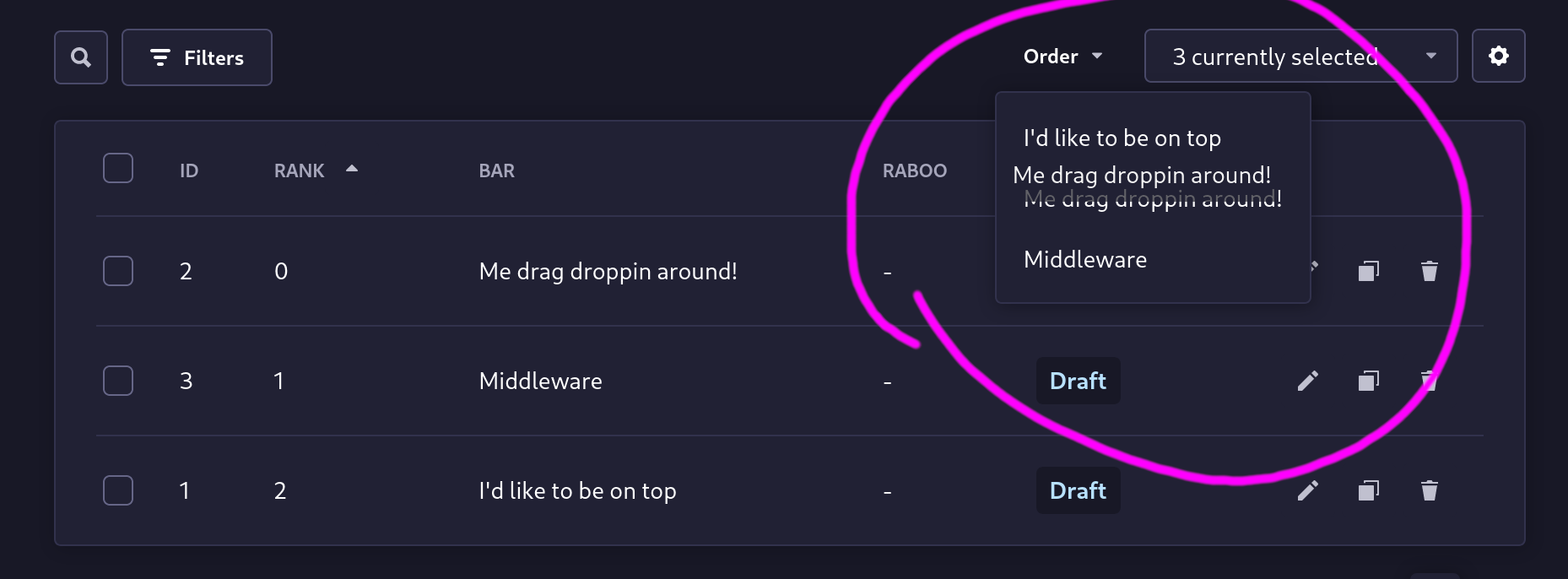
|
|
3
7
|
|
|
4
|
-
## ⚠THIS PLUGIN IS IN
|
|
5
|
-
Be warned.
|
|
8
|
+
## ⚠ THIS PLUGIN IS IN BETA
|
|
9
|
+
Be warned. Although not planned - breaking changes could happen. Unexpected things could happen. Woosh!
|
|
10
|
+
|
|
11
|
+
## ⏳ Installation
|
|
12
|
+
|
|
13
|
+
```bash
|
|
14
|
+
# with npm
|
|
15
|
+
npm i @retikolo/drag-drop-content-types
|
|
16
|
+
# with yarn
|
|
17
|
+
yarn add @retikolo/drag-drop-content-types
|
|
18
|
+
```
|
|
19
|
+
|
|
20
|
+
## 🔧 Configuration
|
|
6
21
|
|
|
7
|
-
|
|
8
|
-
1. Add
|
|
9
|
-
2. Add this to your `config/plugins.js` file (create it, if it doesn't exist yet):
|
|
22
|
+
### In your config
|
|
23
|
+
1. Add this to your `config/plugins.js` file (create it, if it doesn't exist yet):
|
|
10
24
|
```js
|
|
11
25
|
module.exports = {
|
|
12
26
|
// ...
|
|
@@ -16,11 +30,13 @@ module.exports = {
|
|
|
16
30
|
}
|
|
17
31
|
}
|
|
18
32
|
```
|
|
19
|
-
|
|
33
|
+
2. Run `npm run build` and (re)start the app
|
|
20
34
|
|
|
21
|
-
|
|
35
|
+
### In the app
|
|
22
36
|
Go to `Settings` -> `Drag Drop Content Type` -> `Configuration`:
|
|
23
37
|
* Specify how the rank field and the corresponding title field are called in your content types. Default value are `rank` and `title`.
|
|
24
38
|
* Add the specified fields to your content type. With the default values this would be `title` (Text (Type: Short Text)) and `rank` (Number (Number format: integer))
|
|
25
39
|
* You will be rewared with the drag-dropable menu in the list view of all content types having the specified fields.
|
|
26
40
|
|
|
41
|
+
## 🤝 Contribute
|
|
42
|
+
Feel free to fork and make pull requests to this plugin. All the input is welcome!
|
package/package.json
CHANGED