@redonvn/messaging-viber-bot 0.0.0-stage → 1.0.0
This diff represents the content of publicly available package versions that have been released to one of the supported registries. The information contained in this diff is provided for informational purposes only and reflects changes between package versions as they appear in their respective public registries.
- package/README.md +47 -2
- package/USAGE.md +120 -0
- package/dist/common/index.d.ts +3 -0
- package/dist/common/index.d.ts.map +1 -0
- package/dist/common/index.js +19 -0
- package/dist/common/index.js.map +1 -0
- package/dist/common/provider.interface.d.ts +41 -0
- package/dist/common/provider.interface.d.ts.map +1 -0
- package/dist/common/provider.interface.js +3 -0
- package/dist/common/provider.interface.js.map +1 -0
- package/dist/common/types.d.ts +150 -0
- package/dist/common/types.d.ts.map +1 -0
- package/dist/common/types.js +25 -0
- package/dist/common/types.js.map +1 -0
- package/dist/core/crypto.d.ts +29 -0
- package/dist/core/crypto.d.ts.map +1 -0
- package/dist/core/crypto.js +63 -0
- package/dist/core/crypto.js.map +1 -0
- package/dist/core/errors.d.ts +25 -0
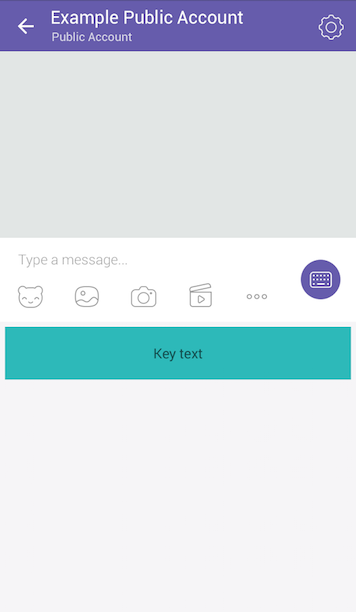
- package/dist/core/errors.d.ts.map +1 -0
- package/dist/core/errors.js +57 -0
- package/dist/core/errors.js.map +1 -0
- package/dist/core/hooks.d.ts +37 -0
- package/dist/core/hooks.d.ts.map +1 -0
- package/dist/core/hooks.js +49 -0
- package/dist/core/hooks.js.map +1 -0
- package/dist/core/http.d.ts +19 -0
- package/dist/core/http.d.ts.map +1 -0
- package/dist/core/http.js +105 -0
- package/dist/core/http.js.map +1 -0
- package/dist/core/index.d.ts +6 -0
- package/dist/core/index.d.ts.map +1 -0
- package/dist/core/index.js +22 -0
- package/dist/core/index.js.map +1 -0
- package/dist/core/retries.d.ts +12 -0
- package/dist/core/retries.d.ts.map +1 -0
- package/dist/core/retries.js +22 -0
- package/dist/core/retries.js.map +1 -0
- package/dist/hooks/hooks.d.ts +2 -0
- package/dist/hooks/hooks.d.ts.map +1 -0
- package/dist/hooks/hooks.js +6 -0
- package/dist/hooks/hooks.js.map +1 -0
- package/dist/hooks/types.d.ts +2 -0
- package/dist/hooks/types.d.ts.map +1 -0
- package/dist/hooks/types.js +3 -0
- package/dist/hooks/types.js.map +1 -0
- package/dist/index.d.ts +20 -0
- package/dist/index.d.ts.map +1 -0
- package/dist/index.js +36 -0
- package/dist/index.js.map +1 -0
- package/dist/lib/config.d.ts +25 -0
- package/dist/lib/config.d.ts.map +1 -0
- package/dist/lib/config.js +15 -0
- package/dist/lib/config.js.map +1 -0
- package/dist/lib/crypto.d.ts +2 -0
- package/dist/lib/crypto.d.ts.map +1 -0
- package/dist/lib/crypto.js +18 -0
- package/dist/lib/crypto.js.map +1 -0
- package/dist/lib/errors.d.ts +2 -0
- package/dist/lib/errors.d.ts.map +1 -0
- package/dist/lib/errors.js +18 -0
- package/dist/lib/errors.js.map +1 -0
- package/dist/lib/http.d.ts +7 -0
- package/dist/lib/http.d.ts.map +1 -0
- package/dist/lib/http.js +45 -0
- package/dist/lib/http.js.map +1 -0
- package/dist/lib/json.d.ts +3 -0
- package/dist/lib/json.d.ts.map +1 -0
- package/dist/lib/json.js +13 -0
- package/dist/lib/json.js.map +1 -0
- package/dist/lib/retries.d.ts +2 -0
- package/dist/lib/retries.d.ts.map +1 -0
- package/dist/lib/retries.js +6 -0
- package/dist/lib/retries.js.map +1 -0
- package/dist/lib/security.d.ts +29 -0
- package/dist/lib/security.d.ts.map +1 -0
- package/dist/lib/security.js +65 -0
- package/dist/lib/security.js.map +1 -0
- package/dist/sdk/account.d.ts +24 -0
- package/dist/sdk/account.d.ts.map +1 -0
- package/dist/sdk/account.js +31 -0
- package/dist/sdk/account.js.map +1 -0
- package/dist/sdk/chat-extensions.d.ts +10 -0
- package/dist/sdk/chat-extensions.d.ts.map +1 -0
- package/dist/sdk/chat-extensions.js +15 -0
- package/dist/sdk/chat-extensions.js.map +1 -0
- package/dist/sdk/conversations.d.ts +6 -0
- package/dist/sdk/conversations.d.ts.map +1 -0
- package/dist/sdk/conversations.js +6 -0
- package/dist/sdk/conversations.js.map +1 -0
- package/dist/sdk/messages.d.ts +94 -0
- package/dist/sdk/messages.d.ts.map +1 -0
- package/dist/sdk/messages.js +240 -0
- package/dist/sdk/messages.js.map +1 -0
- package/dist/sdk/subscriptions.d.ts +39 -0
- package/dist/sdk/subscriptions.d.ts.map +1 -0
- package/dist/sdk/subscriptions.js +40 -0
- package/dist/sdk/subscriptions.js.map +1 -0
- package/dist/sdk/users.d.ts +43 -0
- package/dist/sdk/users.d.ts.map +1 -0
- package/dist/sdk/users.js +70 -0
- package/dist/sdk/users.js.map +1 -0
- package/dist/sdk/viber.d.ts +54 -0
- package/dist/sdk/viber.d.ts.map +1 -0
- package/dist/sdk/viber.js +176 -0
- package/dist/sdk/viber.js.map +1 -0
- package/dist/sdk/webhook.d.ts +48 -0
- package/dist/sdk/webhook.d.ts.map +1 -0
- package/dist/sdk/webhook.js +84 -0
- package/dist/sdk/webhook.js.map +1 -0
- package/dist/viber.mapper.d.ts +17 -0
- package/dist/viber.mapper.d.ts.map +1 -0
- package/dist/viber.mapper.js +165 -0
- package/dist/viber.mapper.js.map +1 -0
- package/dist/viber.types.d.ts +255 -0
- package/dist/viber.types.d.ts.map +1 -0
- package/dist/viber.types.js +6 -0
- package/dist/viber.types.js.map +1 -0
- package/docs/API_COVERAGE.md +25 -0
- package/docs/README.md +19 -0
- package/docs/deep-links.md +260 -0
- package/docs/keyboards.md +273 -0
- package/docs/models/models.md +59 -0
- package/docs/rest-bot-api.md +1689 -0
- package/docs/sdks/account/README.md +16 -0
- package/docs/sdks/messages/README.md +19 -0
- package/docs/sdks/subscriptions/README.md +13 -0
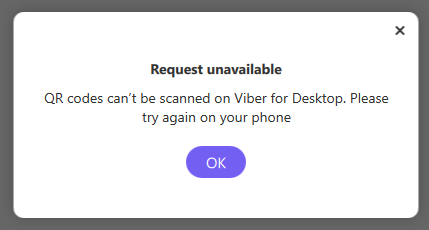
- package/docs/sdks/users/README.md +21 -0
- package/docs/sdks/webhook/README.md +17 -0
- package/docs/sticker-ids.md +92 -0
- package/docs/text-formatting.md +42 -0
- package/package.json +40 -6
|
@@ -0,0 +1,260 @@
|
|
|
1
|
+
<!-- Source: https://developers.viber.com/docs/tools/deep-links/ | Retrieved: 2026-11-24T14:07:06+07:00 -->
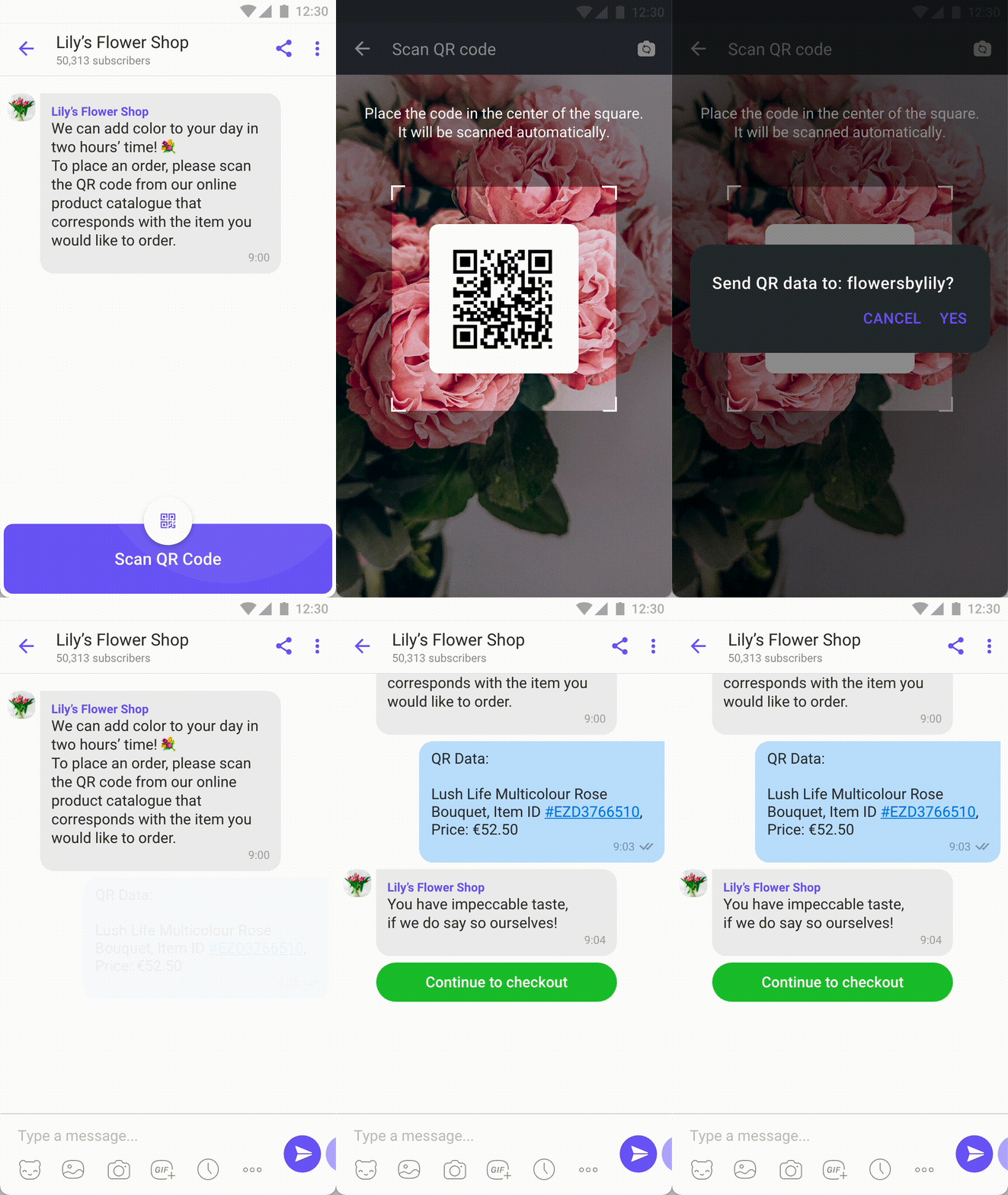
|
|
2
|
+
|
|
3
|
+
<a id="deeplinks"></a>
|
|
4
|
+
|
|
5
|
+
|
|
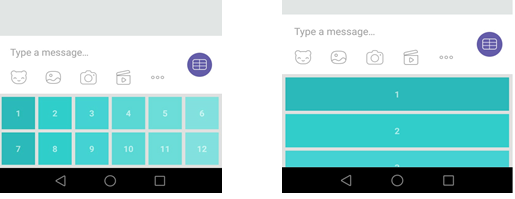
6
|
+
# Deeplinks
|
|
7
|
+
|
|
8
|
+
Bot can have deeplinks to direct users to different parts of the bot.
|
|
9
|
+
|
|
10
|
+
Deeplinks require specifying the URI of your bot. It can be found in the your bot’s [Admin Panel](https://partners.viber.com/) or in the response to the `get-account-info` [API request](rest-bot-api.md#get-account-info).
|
|
11
|
+
|
|
12
|
+
|
|
13
|
+
<a id="types-of-deeplink"></a>
|
|
14
|
+
|
|
15
|
+
|
|
16
|
+
## Types of deeplink
|
|
17
|
+
|
|
18
|
+
There are three types of deeplink available.
|
|
19
|
+
|
|
20
|
+
|
|
21
|
+
<a id="link-direct-to-1on1-chat"></a>
|
|
22
|
+
|
|
23
|
+
|
|
24
|
+
### Link direct to 1on1 chat
|
|
25
|
+
|
|
26
|
+
Tapping this type of link will open a conversation with the bot and trigger a conversation started event.
|
|
27
|
+
|
|
28
|
+
The scheme for this link is:
|
|
29
|
+
|
|
30
|
+
```
|
|
31
|
+
viber://pa?chatURI=<URI>
|
|
32
|
+
```
|
|
33
|
+
|
|
34
|
+
|
|
35
|
+
<a id="link-to-info-screen"></a>
|
|
36
|
+
|
|
37
|
+
|
|
38
|
+
### Link to Info screen
|
|
39
|
+
|
|
40
|
+
Tapping this link will open the bot on the info screen. This deeplink is supported on Android and iOS, and is not supported on Desktop.
|
|
41
|
+
|
|
42
|
+
The scheme for this link is:
|
|
43
|
+
|
|
44
|
+
```
|
|
45
|
+
viber://pa/info?uri=<URI>
|
|
46
|
+
```
|
|
47
|
+
|
|
48
|
+
|
|
49
|
+
<a id="additional-parameters"></a>
|
|
50
|
+
|
|
51
|
+
|
|
52
|
+
## Additional parameters
|
|
53
|
+
|
|
54
|
+
The bot is able to accept two additional parameters in the deeplink:
|
|
55
|
+
|
|
56
|
+
|
|
57
|
+
<a id="context"></a>
|
|
58
|
+
|
|
59
|
+
|
|
60
|
+
### Context
|
|
61
|
+
|
|
62
|
+
The value of this parameter will be forwarded to the bot under the context parameter in the conversation started callback (see conversation started for additional details). The context will be transferred as a string and has no length limit (up to URL length limit).
|
|
63
|
+
|
|
64
|
+
|
|
65
|
+
<a id="text"></a>
|
|
66
|
+
|
|
67
|
+
|
|
68
|
+
### Text
|
|
69
|
+
|
|
70
|
+
The value of this parameter will appear in the text input field when the 1-on-1 chat with the bot is opened by pressing the deeplink. The user will be able to send the text as it is, edit it, or delete it.
|
|
71
|
+
|
|
72
|
+
A deeplink with context parameter will look as follows:
|
|
73
|
+
|
|
74
|
+
```
|
|
75
|
+
viber://pa?chatURI=<URI>&context=<Your Context>&text=<Your Text>
|
|
76
|
+
```
|
|
77
|
+
|
|
78
|
+
**Note:** Some browsers might have a problem identifying the deeplink. To make sure the link works try sending it as a Viber message and pressing it from within Viber.
|
|
79
|
+
|
|
80
|
+
|
|
81
|
+
<a id="chatbot-qr-scanner"></a>
|
|
82
|
+
|
|
83
|
+
|
|
84
|
+
## Chatbot QR scanner
|
|
85
|
+
|
|
86
|
+
|
|
87
|
+
<a id="introduction"></a>
|
|
88
|
+
|
|
89
|
+
|
|
90
|
+
### Introduction
|
|
91
|
+
|
|
92
|
+
Bot subscribers can scan a QR code using Viber’s native QR scanner and share the scanned data with the bot. This means subscribers don’t need to be redirected to an external browser, allowing for a secure and seamless user journey with fewer steps required to complete the process.
|
|
93
|
+
|
|
94
|
+
The feature takes advantage of Viber’s existing native QR scanner functionality via a URL scheme and allows for the data to be shared with the bot, which can be utilized for numerous use cases:
|
|
95
|
+
|
|
96
|
+
- Scanning a merchant’s QR code to send payment via the bot, e.g. for utility bills.
|
|
97
|
+
- Scanning a QR code upon boarding a bus/metro to pay travel fare.
|
|
98
|
+
- Scanning a QR code to receive promotional codes and discounts.
|
|
99
|
+
|
|
100
|
+
|
|
101
|
+
<a id="url-scheme"></a>
|
|
102
|
+
|
|
103
|
+
|
|
104
|
+
### URL scheme
|
|
105
|
+
|
|
106
|
+
The URL scheme is:
|
|
107
|
+
|
|
108
|
+
```
|
|
109
|
+
viber://pa/qr?chatURI=<URI>
|
|
110
|
+
```
|
|
111
|
+
|
|
112
|
+
There are two possible entry point to the flow that you can provide users with:
|
|
113
|
+
|
|
114
|
+
- Implement the deeplink (URL scheme) on your mobile assets – just as you would a regular URL. When tapped, the deeplink will trigger the QR scanning flow. If the user doesn’t have an existing Viber chat with the bot, one will automatically be created. Please note that the link will only work for users who have the Viber app installed on their phone/tablet.
|
|
115
|
+
- Send the deeplink as a message from the bot, or implement it behind a button (as a [rich media message](rest-bot-api.md#rich-media-message--carousel-content-message) or as a [keyboard button](keyboards.md)) with the URL scheme defined as the **ActionBody**. (See examples below.)
|
|
116
|
+
|
|
117
|
+
When the user agrees to share the scanned data with the bot, it will trigger a [conversation\_started event](rest-bot-api.md#conversation-started).
|
|
118
|
+
Note that this is not equal to a [subscribed event](rest-bot-api.md#subscribed).
|
|
119
|
+
The `conversation_started` event will be fired even if the user is already subscribed to the bot. It’s up to you to decide when you’d like to respond to the `conversation_started` event and when not, based on the user’s status (subscribed or not).
|
|
120
|
+
|
|
121
|
+
|
|
122
|
+
<a id="limitations"></a>
|
|
123
|
+
|
|
124
|
+
|
|
125
|
+
### Limitations
|
|
126
|
+
|
|
127
|
+
**Android**: Viber 17.1.0.6 and above.
|
|
128
|
+
**iOS**: Viber 17.2 and above.
|
|
129
|
+
**Desktop**: Not supported.
|
|
130
|
+
|
|
131
|
+
If a user clicks your deeplink on their computer, they will receive the following message (provided they have Viber for Desktop installed):
|
|
132
|
+
|
|
133
|
+
|
|
134
|
+
|
|
135
|
+
|
|
136
|
+
<a id="user-journey"></a>
|
|
137
|
+
|
|
138
|
+
|
|
139
|
+
### User journey
|
|
140
|
+
|
|
141
|
+
|
|
142
|
+
|
|
143
|
+
1. The user clicks on an external link (outside of Viber) or on a button in a conversation with the bot.
|
|
144
|
+
2. The flow is triggered and Viber’s native QR scanner is activated.
|
|
145
|
+
3. Once a QR code is recognized and scanned, the user will see a prompt: “Send QR data to: chatURI ? ”.
|
|
146
|
+
|
|
147
|
+
- **Cancel**: The user will return to the QR scanner camera.
|
|
148
|
+
- **Yes**: The QR scan data will be sent to the bot as a text message beginning with the prefix “QR Data:”.
|
|
149
|
+
|
|
150
|
+
We recommend setting the `silent` flag to true. Otherwise, when the user scans the QR code, a message will be sent to the bot consisting of the URL scheme.
|
|
151
|
+
|
|
152
|
+
|
|
153
|
+
<a id="callback-example"></a>
|
|
154
|
+
|
|
155
|
+
|
|
156
|
+
### Callback example
|
|
157
|
+
|
|
158
|
+
When the user sends the scanned data to the bot, the callback will look as follows:
|
|
159
|
+
|
|
160
|
+
```
|
|
161
|
+
{
|
|
162
|
+
"event": "message",
|
|
163
|
+
"timestamp": 1654676100708,
|
|
164
|
+
"chat_hostname": "SN-CALLBACK-03_",
|
|
165
|
+
"message_token": 5715235489597870374,
|
|
166
|
+
"sender": {
|
|
167
|
+
"id": "jc9HsWTZ2Yf2NkRZ8KcNug==",
|
|
168
|
+
"name": "Michael Brown",
|
|
169
|
+
"avatar": "https://avatar.example.com",
|
|
170
|
+
"language": "en",
|
|
171
|
+
"country": "IL",
|
|
172
|
+
"api_version": 10
|
|
173
|
+
},
|
|
174
|
+
"message": {
|
|
175
|
+
"text": "QR data:\n\nYour electricity bill has been paid. Account no. 10901213, amount paid $39.75",
|
|
176
|
+
"type": "text",
|
|
177
|
+
"tracking_data": "tracking data"
|
|
178
|
+
},
|
|
179
|
+
"silent": false
|
|
180
|
+
}
|
|
181
|
+
```
|
|
182
|
+
|
|
183
|
+
The message type in the callback will be `text`, even if the scanned QR code represents a file. For example, if the QR code leads to a PDF file, the `text` parameter will include the file’s URL address and the `type` parameter will be “text.”
|
|
184
|
+
|
|
185
|
+
**IMPORTANT**: You will need to set your bot to recognize the “QR Data:” prefix in order to trigger the appropriate response.
|
|
186
|
+
|
|
187
|
+
|
|
188
|
+
<a id="use-case-examples"></a>
|
|
189
|
+
|
|
190
|
+
|
|
191
|
+
### Use case examples
|
|
192
|
+
|
|
193
|
+
In-chat button (rich media message)
|
|
194
|
+
|
|
195
|
+
```
|
|
196
|
+
{
|
|
197
|
+
"receiver":"K917PBuvPZmhKfb8Vw3b2Q==",
|
|
198
|
+
"type":"rich_media",
|
|
199
|
+
"min_api_version":7,
|
|
200
|
+
"rich_media":{
|
|
201
|
+
"Type":"rich_media",
|
|
202
|
+
"ButtonsGroupColumns":6,
|
|
203
|
+
"ButtonsGroupRows":1,
|
|
204
|
+
"BgColor":"#1ce783",
|
|
205
|
+
"Buttons":[
|
|
206
|
+
{
|
|
207
|
+
"Columns":6,
|
|
208
|
+
"Rows":1,
|
|
209
|
+
"Silent":"false",
|
|
210
|
+
"ActionType":"open-url",
|
|
211
|
+
"ActionBody":"viber://pa/qr?chatURI=examplebot",
|
|
212
|
+
"Text":"<font color=#ffffff>Scan QR Code Now</font>",
|
|
213
|
+
"TextSize":"large",
|
|
214
|
+
"TextVAlign":"middle",
|
|
215
|
+
"TextHAlign":"middle",
|
|
216
|
+
"Image":"https://i.imgur.com/TePDXXu.png"
|
|
217
|
+
}
|
|
218
|
+
]
|
|
219
|
+
}
|
|
220
|
+
}
|
|
221
|
+
```
|
|
222
|
+
|
|
223
|
+
Keyboard button
|
|
224
|
+
|
|
225
|
+
```
|
|
226
|
+
{
|
|
227
|
+
"receiver":"B/dQ7y+3akqZtBBp6Hiy/g==",
|
|
228
|
+
"min_api_version":7,
|
|
229
|
+
"type":"text",
|
|
230
|
+
"text":"To pay your bill, please tap on the button below.",
|
|
231
|
+
"keyboard":{
|
|
232
|
+
"Type":"keyboard",
|
|
233
|
+
"DefaultHeight":false,
|
|
234
|
+
"Buttons":[
|
|
235
|
+
{
|
|
236
|
+
"ActionType":"open-url",
|
|
237
|
+
"ActionBody":"viber://pa/qr?chatURI=examplebot",
|
|
238
|
+
"Text":"<b>Scan QR Code Now</b>",
|
|
239
|
+
"TextSize":"large",
|
|
240
|
+
"TextVAlign":"middle",
|
|
241
|
+
"TextHAlign":"center",
|
|
242
|
+
"BgColor":"#1ce783",
|
|
243
|
+
"Silent":"true"
|
|
244
|
+
}
|
|
245
|
+
]
|
|
246
|
+
}
|
|
247
|
+
}
|
|
248
|
+
```
|
|
249
|
+
|
|
250
|
+
|
|
251
|
+
<a id="data"></a>
|
|
252
|
+
|
|
253
|
+
|
|
254
|
+
### Data
|
|
255
|
+
|
|
256
|
+
Please keep in mind that as the bot developer, the code’s functionality is your responsibility, so it will be up to you to generate QR codes that you can parse correctly. Viber is merely providing an easy way for subscribers to scan QR codes and share the data with bots.
|
|
257
|
+
We highly recommend that you test each code before implementing it, to make sure that it works.
|
|
258
|
+
We recommend that you keep record of the messages you receive from users, as there is no API to fetch this data again.
|
|
259
|
+
|
|
260
|
+
Additionally, it’s your responsibility to ensure that your bot is set up to handle unexpected data, such as when a subscriber scans a QR that isn’t related to your bot.
|
|
@@ -0,0 +1,273 @@
|
|
|
1
|
+
<!-- Source: https://developers.viber.com/docs/tools/keyboards/ | Retrieved: 2026-11-24T14:07:06+07:00 -->
|
|
2
|
+
|
|
3
|
+
<a id="keyboards"></a>
|
|
4
|
+
|
|
5
|
+
|
|
6
|
+
# Keyboards
|
|
7
|
+
|
|
8
|
+
The Chat Bot API allows sending a custom keyboard with each message, to supply the user with a set of predefined replies or actions. The keyboard can be attached to any message type or sent on its own. Once received, the keyboard will appear to the user instead of the device’s native keyboard. The keyboards are fully customizable and can be created and designed specifically for the bot’s needs.
|
|
9
|
+
|
|
10
|
+
The client will always display the last keyboard that was sent to it.
|
|
11
|
+
|
|
12
|
+
|
|
13
|
+
<a id="attaching-a-keyboard-to-a-message"></a>
|
|
14
|
+
|
|
15
|
+
|
|
16
|
+
## Attaching a keyboard to a message
|
|
17
|
+
|
|
18
|
+
Keyboards can be attached to any message type and be sent and displayed together. To attach a keyboard to a message simply add the keyboard’s parameters to the message JSON.
|
|
19
|
+
The keyboard JSON object defines different visual and logic attributes. From the background color, number of buttons and so on.
|
|
20
|
+
|
|
21
|
+
The example below shows a keyboard sent with a single message.
|
|
22
|
+
|
|
23
|
+
```
|
|
24
|
+
{
|
|
25
|
+
"keyboard": {
|
|
26
|
+
"DefaultHeight": false,
|
|
27
|
+
"BgColor": "#FFFFFF",
|
|
28
|
+
"Buttons": [{
|
|
29
|
+
"Columns": 6,
|
|
30
|
+
"Rows": 1,
|
|
31
|
+
"BgColor": "#2db9b9",
|
|
32
|
+
"BgMediaType": "gif",
|
|
33
|
+
"BgMedia": "https://www.viber.com/test.gif",
|
|
34
|
+
"BgLoop": true,
|
|
35
|
+
"ActionType": "open-url",
|
|
36
|
+
"ActionBody": "https://www.viber.com",
|
|
37
|
+
"Image": "www.viber.com/img_url.jpg",
|
|
38
|
+
"Text": "Key text",
|
|
39
|
+
"TextVAlign": "middle",
|
|
40
|
+
"TextHAlign": "center",
|
|
41
|
+
"TextOpacity": 60,
|
|
42
|
+
"TextSize": "regular"
|
|
43
|
+
}]
|
|
44
|
+
}
|
|
45
|
+
}
|
|
46
|
+
```
|
|
47
|
+
|
|
48
|
+
Which in turn will look like this:
|
|
49
|
+
|
|
50
|
+
|
|
51
|
+
|
|
52
|
+
|
|
53
|
+
<a id="general-keyboard-parameters"></a>
|
|
54
|
+
|
|
55
|
+
|
|
56
|
+
## General keyboard parameters
|
|
57
|
+
|
|
58
|
+
**Please note:** The `api level 3` is supported on devices running Viber version 7.6 and above. If you use `api level 3` parameters you will have to set the `min_api_version` parameter on right api level as well.
|
|
59
|
+
|
|
60
|
+
| Name | Description | Possible values | Default value |
|
|
61
|
+
| --- | --- | --- | --- |
|
|
62
|
+
| Buttons | required. Array containing all keyboard buttons by order. See buttons parameters below for buttons parameters details | | |
|
|
63
|
+
| BgColor | optional. Background color of the keyboard | Valid color HEX value | Default Viber keyboard background |
|
|
64
|
+
| DefaultHeight | optional. When true - the keyboard will always be displayed with the same height as the native keyboard.When false - short keyboards will be displayed with the minimal possible height. Maximal height will be native keyboard height | `true`, `false` | `false` |
|
|
65
|
+
| CustomDefaultHeight | optional (`api level 3`). How much percent of free screen space in chat should be taken by keyboard. The final height will be not less than height of system keyboard | `40..70` | |
|
|
66
|
+
| HeightScale | optional (`api level 3`). Allow use custom aspect ratio for Carousel content blocks. Scales the height of the default square block (which is defined on client side) to the given value in percents. It means blocks can become not square and it can be used to create Carousel content with correct custom aspect ratio. This is applied to all blocks in the Carousel content | `20..100` | `100` |
|
|
67
|
+
| ButtonsGroupColumns | optional (`api level 4`). Represents size of block for grouping buttons during layout | 1-6 | 6 |
|
|
68
|
+
| ButtonsGroupRows | optional (`api level 4`). Represents size of block for grouping buttons during layout | 1-7 | 7 for Carousel content ; 2 for Keyboard |
|
|
69
|
+
| InputFieldState | optional (`api level 4`). Customize the keyboard input field. `regular`- display regular size input field. `hidden` - hide the input field | `regular`, `hidden` | `regular` |
|
|
70
|
+
| FavoritesMetadata | optional (`api level 6`). `JSON` Object, which describes Carousel content to be saved via favorites bot, if saving is available | See [Favorites Metadata](keyboards.md#favoritesMetadata) | |
|
|
71
|
+
|
|
72
|
+
|
|
73
|
+
<a id="buttons-parameters"></a>
|
|
74
|
+
|
|
75
|
+
|
|
76
|
+
## Buttons parameters
|
|
77
|
+
|
|
78
|
+
The following parameters can be defined for each button in the “buttons” array separately. Each button must contain at least one of the following optional parameters: text, BgMedia, image, BgColor.
|
|
79
|
+
|
|
80
|
+
| Name | Description | Possible values | Default value |
|
|
81
|
+
| --- | --- | --- | --- |
|
|
82
|
+
| Columns | optional. Button width in columns. See [keyboard design](keyboards.md#keyboardDesign) for more details | 1-6 | 6 |
|
|
83
|
+
| Rows | optional. Button height in rows. See [keyboard design](keyboards.md#keyboardDesign) for more details | 1-2 (1-7 for [Rich Media](rest-bot-api.md#rich-media-message--carousel-content-message) messages) | 1 |
|
|
84
|
+
| BgColor | optional. Background color of button | Valid color HEX value | Default Viber button color |
|
|
85
|
+
| Silent | optional. Determine whether the user action is presented in the conversation | `true`/`false` | `false` |
|
|
86
|
+
| BgMediaType | optional. Type of the background media | `picture`, `gif`. For picture - JPEG and PNG files are supported. Max size: 500 kb | `picture` |
|
|
87
|
+
| BgMedia | optional. URL for background media content (`picture` or `gif`). Will be placed with aspect to fill logic | Valid URL | |
|
|
88
|
+
| BgMediaScaleType | optional (`api level 6`). Options for scaling the bounds of the background to the bounds of this view: `crop` - contents scaled to fill with fixed aspect. some portion of content may be clipped. `fill` - contents scaled to fill without saving fixed aspect. `fit` - at least one axis (X or Y) will fit exactly, aspect is saved | `crop`, `fill`, `fit` | |
|
|
89
|
+
| ImageScaleType | optional (`api level 6`). Options for scaling the bounds of an image to the bounds of this view: `crop` - contents scaled to fill with fixed aspect. some portion of content may be clipped. `fill` - contents scaled to fill without saving fixed aspect. `fit` - at least one axis (X or Y) will fit exactly, aspect is saved | `crop`, `fill`, `fit` | |
|
|
90
|
+
| BgLoop | optional. When `true` - animated background media (`gif`) will loop continuously. When `false` - animated background media will play once and stop | `true` , `false` | `true` |
|
|
91
|
+
| ActionType | optional. Type of action pressing the button will perform. `Reply` - will send a reply to the bot. `open-url` - will open the specified URL and send the URL as reply to the bot. See [reply logic](keyboards.md#replyLogic) for more details. **Note**: `location-picker` is not supported on desktop, and require adding any text in the `ActionBody` parameter. ActionType `location-picker` are not supported for Rich Media messages | `reply`, `open-url`, `location-picker`, `share-phone`, `none` | `reply` |
|
|
92
|
+
| ActionBody | required for ActionTypes `reply`, `share-phone` ,`open-url` and `location-picker`. Text for `reply` and URL for `open-url`. See [reply logic](keyboards.md#replyLogic) for more details | For ActionType `reply` - `text` For ActionType `open-url` - Valid URL. | |
|
|
93
|
+
| Image | optional. URL of image to place on top of background (if any). Can be a partially transparent image that will allow showing some of the background. Will be placed with aspect to fill logic | Valid URL. JPEG and PNG files are supported. Max size: 500 kb | |
|
|
94
|
+
| Text | optional. Text to be displayed on the button. Can contain some HTML tags - see [keyboard design](keyboards.md#keyboardDesign) for more details | Free text. Valid and allowed HTML tags. Max `30720 bytes`. If the text is too long to display on the button it will be cropped and ended with “…” | |
|
|
95
|
+
| TextVAlign | optional. Vertical alignment of the text | `top`, `middle`, `bottom` | `middle` |
|
|
96
|
+
| TextHAlign | optional. Horizontal align of the text | `left`, `center`, `right` | `center` |
|
|
97
|
+
| TextPaddings | optional (`api level 4`). Custom paddings for the text in points. The value is an array of Integers [top, left, bottom, right] | per padding `0..12` | `[12,12,12,12]` |
|
|
98
|
+
| TextOpacity | optional. Text opacity | 0-100 | 100 |
|
|
99
|
+
| TextSize | optional. Text size out of 3 available options | `small`, `regular`, `large` | `regular` |
|
|
100
|
+
| OpenURLType | optional. Determine the `open-url` action result, in app or external browser | `internal`, `external` | `internal` |
|
|
101
|
+
| OpenURLMediaType | optional. Determine the url media type. `not-media` - force browser usage. `video` - will be opened via media player. `gif` - iOS client will play the `gif` in full screen mod. `picture` - client will open the picture in full screen mode | `not-media` , `video` , `gif` , `picture` | `not-media` |
|
|
102
|
+
| TextBgGradientColor | optional. Background gradient to use under text, Works only when `TextVAlign` is equal to `top` or `bottom` | Hex value (6 characters) | |
|
|
103
|
+
| TextShouldFit | optional. (`api level 6`) If `true` the size of text will decreased to fit (minimum size is 12) | `true` , `false` | `false` |
|
|
104
|
+
| TextSize | optional. Text size out of 3 available options | `small`, `regular`, `large` | `regular` |
|
|
105
|
+
| InternalBrowser | optional (`api level 3`). `JSON` Object, which includes internal browser configuration for `open-url` action with `internal` type | See below | |
|
|
106
|
+
| InternalBrowser.ActionButton | optional (`api level 3`). Action button in internal’s browser navigation bar. `forward` - will open the forward via Viber screen and share current URL or predefined URL. `send` - sends the currently opened URL as an URL message, or predefined URL if property `ActionPredefinedURL` is not empty. `open-externally` - opens external browser with the current URL. `send-to-bot` - (`api level 6`) sends reply data in `msgInfo` to bot in order to receive message. `none` - will not display any button | `forward`, `send`, `open-externally`, `send-to-bot`, `none` | `forward` |
|
|
107
|
+
| InternalBrowser.ActionPredefinedURL | optional (`api level 3`). If `ActionButton` is `send` or `forward` then the value from this property will be used to be sent as message, otherwise ignored | String with 1 or more characters | |
|
|
108
|
+
| InternalBrowser.TitleType | optional (`api level 3`). Type of title for internal browser if has no `CustomTitle` field. `default` means the content in the page’s `<OG:title>` element or in `<title>` tag. `domain` means the top level domain | `domain`, `default` | `default` |
|
|
109
|
+
| InternalBrowser.CustomTitle | optional (`api level 3`). Custom text for internal’s browser title, `TitleType` will be ignored in case this key is presented | String up to 15 characters | |
|
|
110
|
+
| InternalBrowser.Mode | optional (`api level 3`). Indicates that browser should be opened in a full screen or in partial size (50% of screen height). Full screen mode can be with orientation lock (both orientations supported, only landscape or only portrait) | `fullscreen`, `fullscreen-portrait`, `fullscreen-landscape`, `partial-size` | `fullscreen` |
|
|
111
|
+
| InternalBrowser.FooterType | optional (`api level 3`). Should the browser’s footer will be displayed (`default`) or not (`hidden`) | `default`, `hidden` | `default` |
|
|
112
|
+
| InternalBrowser.ActionReplyData | optional (`api level 6`). Custom reply data for `send-to-bot` action that will be resent in `msgInfo` | Valid string | |
|
|
113
|
+
| Map | optional (`api level 6`). `JSON` Object, which includes map configuration for `open-map` action with `internal` type | See below | |
|
|
114
|
+
| Map.Latitude | optional (`api level 6`). Location latitude (format: “12.12345”) | Valid latitude | |
|
|
115
|
+
| Map.Longitude | optional (`api level 6`). Location longitude (format: “3.12345”) | Valid longitude | |
|
|
116
|
+
| Frame | optional (`api level 6`). `JSON` Object. Draw frame above the background on the button, the size will be equal the size of the button | See below | |
|
|
117
|
+
| Frame.BorderWidth | optional (`api level 6`). Width of border | `0..10` | `1` |
|
|
118
|
+
| Frame.BorderColor | optional (`api level 6`). Color of border | Hex color `#XXXXXX` | `#000000` |
|
|
119
|
+
| Frame.CornerRadius | optional (`api level 6`). The border will be drawn with rounded corners | `0..10` | `0` |
|
|
120
|
+
| MediaPlayer | optional (`api level 6`). `JSON` Object. Specifies media player options. Will be ignored if `OpenURLMediaType` is not `video` or `audio` | See below | |
|
|
121
|
+
| MediaPlayer.Title | optional (`api level 6`). Media player’s title (first line) | String | |
|
|
122
|
+
| MediaPlayer.Subtitle | optional (`api level 6`). Media player’s subtitle (second line) | String | |
|
|
123
|
+
| MediaPlayer.ThumbnailURL | optional (`api level 6`). The URL for player’s thumbnail (background) | Valid URL | |
|
|
124
|
+
| MediaPlayer.Loop | optional (`api level 6`). Whether the media player should be looped forever or not | `true` , `false` | `false` |
|
|
125
|
+
|
|
126
|
+
For example if you would like to open the url in internal browser (`min_api_version` 3):
|
|
127
|
+
|
|
128
|
+
```
|
|
129
|
+
{
|
|
130
|
+
"keyboard": {
|
|
131
|
+
"DefaultHeight": true,
|
|
132
|
+
"BgColor": "#FFFFFF",
|
|
133
|
+
"Buttons": [{
|
|
134
|
+
"Columns": 6,
|
|
135
|
+
"Rows": 1,
|
|
136
|
+
"BgColor": "#2db9b9",
|
|
137
|
+
"BgMediaType": "gif",
|
|
138
|
+
"BgMedia": "https://www.viber.com/test.gif",
|
|
139
|
+
"BgLoop": true,
|
|
140
|
+
"ActionType": "open-url",
|
|
141
|
+
"OpenURLType": "internal",
|
|
142
|
+
"InternalBrowser": {
|
|
143
|
+
"Mode": "fullscreen",
|
|
144
|
+
"CustomTitle": "Your Title"
|
|
145
|
+
},
|
|
146
|
+
"ActionBody": "https://www.viber.com",
|
|
147
|
+
"Image": "www.viber.com/img_url.jpg",
|
|
148
|
+
"Text": "Key text",
|
|
149
|
+
"TextVAlign": "middle",
|
|
150
|
+
"TextHAlign": "center",
|
|
151
|
+
"TextOpacity": 60,
|
|
152
|
+
"TextSize": "regular"
|
|
153
|
+
}]
|
|
154
|
+
}
|
|
155
|
+
}
|
|
156
|
+
```
|
|
157
|
+
|
|
158
|
+
**Note:** The `Silent` parameter is supported on devices running Viber version 6.7 and above.
|
|
159
|
+
|
|
160
|
+
|
|
161
|
+
<a id="keyboard-design"></a>
|
|
162
|
+
|
|
163
|
+
|
|
164
|
+
## Keyboard design
|
|
165
|
+
|
|
166
|
+
The keyboard is divided into 6 columns. Each button has a width of 1-6 columns. The client will display the buttons according to the order they were sent in, and will fit as many buttons as possible into each row. If the next button to display can’t be fitted into the current row it will be displayed in the row below.
|
|
167
|
+
For landscape mode, keyboard’s width will be doubled to 24 columns, and buttons will be displayed according to the same logic. Button height can be 1-2 rows.
|
|
168
|
+
|
|
169
|
+
**Note:** keyboards can contain up to 24 rows.
|
|
170
|
+
|
|
171
|
+
|
|
172
|
+
|
|
173
|
+
|
|
174
|
+
<a id="text-design"></a>
|
|
175
|
+
|
|
176
|
+
|
|
177
|
+
### Text design
|
|
178
|
+
|
|
179
|
+
The buttons’ text can contain some HTML tags for design purposes. The allowed tags are listed in the table below.
|
|
180
|
+
|
|
181
|
+
| Tag | Description |
|
|
182
|
+
| --- | --- |
|
|
183
|
+
| <b>X</b> | **Bold** text |
|
|
184
|
+
| <i>X</i> | *Italic* text |
|
|
185
|
+
| <u>X</u> | *Underlined* text |
|
|
186
|
+
| <br> | Line break |
|
|
187
|
+
| <s>X</s> | Strikethrough text (`api level 4`) |
|
|
188
|
+
| <font size=”N”>X</font> | Custom size N for text block inside the tag (`api level 4`). Minimum size is 12, maximum size is 32 . |
|
|
189
|
+
| <font color=”#7F00FF”>X</font> | Specific text color. Must be a HEX value. Double quotes in JSON should be escaped. |
|
|
190
|
+
|
|
191
|
+
Adding special characters or spaces at the beginning of the row can be done using Unicode. For example, setting a button’s text that starts with a space should look like this:
|
|
192
|
+
|
|
193
|
+
```
|
|
194
|
+
"Text": "\u00A0 Button text"
|
|
195
|
+
```
|
|
196
|
+
|
|
197
|
+
|
|
198
|
+
<a id="keyboard-reply-logic"></a>
|
|
199
|
+
|
|
200
|
+
|
|
201
|
+
### Keyboard Reply logic
|
|
202
|
+
|
|
203
|
+
Pressing a keyboard button would trigger a different reply depending on the buttons “actionType” value.
|
|
204
|
+
|
|
205
|
+
For `ActionType` `reply`:
|
|
206
|
+
|
|
207
|
+
- The value of `ActionBody` is sent as a text message to account (via `message` event).
|
|
208
|
+
- The value of `text` appears in the chat thread as message from the user.
|
|
209
|
+
- If no `text` available, the value of `image` is used.
|
|
210
|
+
- If no `image` available, the value of `BgMedia` is used.
|
|
211
|
+
- If no `BgMedia` available, the value of `BgColor` is used.
|
|
212
|
+
- If no `BgColor` available, the default value of `BgColor` (white) is used.
|
|
213
|
+
|
|
214
|
+
For `ActionType` `open-url`:
|
|
215
|
+
|
|
216
|
+
- The value of `ActionBody` is sent as a text message to account (via `message` event).
|
|
217
|
+
- The value of `ActionBody` is opened in the browser.
|
|
218
|
+
- The value of `ActionBody` appears in the chat thread as message from the user.
|
|
219
|
+
|
|
220
|
+
For `ActionType` `share-phone` - `api level 3` and above:
|
|
221
|
+
|
|
222
|
+
- The client will be able to share its phone number via a message callback with a `message.contact` property that holds the user’s name, phone and avatar.
|
|
223
|
+
- Requires adding any text in the `ActionBody` parameter.
|
|
224
|
+
|
|
225
|
+
For `ActionType` `location-picker` - `api level 3` and above:
|
|
226
|
+
|
|
227
|
+
- The client will be able to share their location via a message callback with a `message.location` property that holds the user’s location.
|
|
228
|
+
- Requires adding any text in the `ActionBody` parameter.
|
|
229
|
+
- Not supported on desktop, tapping the button will result in a message callback with `message.text` instead of `message.location`
|
|
230
|
+
|
|
231
|
+
For `ActionType` `none`:
|
|
232
|
+
|
|
233
|
+
- Nothing is sent to the user or account. Just an informative button.
|
|
234
|
+
|
|
235
|
+
**Note:** The `none` action type is supported on devices running Viber version 6.7 and above.
|
|
236
|
+
|
|
237
|
+
|
|
238
|
+
<a id="keyboard-design-guidelines"></a>
|
|
239
|
+
|
|
240
|
+
|
|
241
|
+
### Keyboard design guidelines
|
|
242
|
+
|
|
243
|
+
You can learn more about keyboard design guidelines in the [following](https://developers.viber.com/docs/img/keyboard_guidelines.png) spec.
|
|
244
|
+
|
|
245
|
+
|
|
246
|
+
<a id="favorites-metadata"></a>
|
|
247
|
+
|
|
248
|
+
|
|
249
|
+
## Favorites Metadata
|
|
250
|
+
|
|
251
|
+
Let the user save your content (`gif`, `link`, `video`) to the user’s favorite extension. Later, when the user enters the favorites extended keyboard and sends an item, the original Carousel content (rich message) will be sent.
|
|
252
|
+
|
|
253
|
+
The following parameters can help you customize the favorite action:
|
|
254
|
+
|
|
255
|
+
| Name | Description | Possible values |
|
|
256
|
+
| --- | --- | --- |
|
|
257
|
+
| type | required. The type of content you serve | `gif`, `link`, `video` |
|
|
258
|
+
| url | required. Accessible url of content | Valid URL string |
|
|
259
|
+
| title | optional. Title for your content | Valid string |
|
|
260
|
+
| thumbnail | optional. Accessible thumbnail for your content (`PNG`, `JPEG`) | Valid image (`PNG`, `JPEG`) URL string |
|
|
261
|
+
| domain | optional. The top domain of your content url | Valid string |
|
|
262
|
+
| width | optional. Width of your thumbnail image in pixels | Integer with positive value |
|
|
263
|
+
| height | optional. Height of your thumbnail image in pixels | Integer with positive value |
|
|
264
|
+
| alternativeUrl | optional. Alternative url for clients with `apiVersion` < `minApiVersion`, this will be sent by bot to client, then the client has to send it back | Valid URL string |
|
|
265
|
+
| alternativeText | optional. Alternative title for the url for clients with `apiVersion` < `minApiVersion`, this will be sent by bot to client, then the client has to send it back | Valid string |
|
|
266
|
+
|
|
267
|
+
|
|
268
|
+
<a id="keyboard-examples"></a>
|
|
269
|
+
|
|
270
|
+
|
|
271
|
+
## Keyboard examples
|
|
272
|
+
|
|
273
|
+
Check our [examples section](https://developers.viber.com/docs/tools/keyboard-examples) for different keyboard use cases.
|
|
@@ -0,0 +1,59 @@
|
|
|
1
|
+
# Danh Mục Models & Kiểu Dữ Liệu (`@redonvn/messaging-viber-bot`)
|
|
2
|
+
|
|
3
|
+
Toàn bộ kiểu dữ liệu được định nghĩa tại [`src/viber.types.ts`](../../src/viber.types.ts).
|
|
4
|
+
|
|
5
|
+
---
|
|
6
|
+
|
|
7
|
+
## 1. Cấu hình SDK (`ViberSDKOptions`)
|
|
8
|
+
|
|
9
|
+
| Trường | Kiểu | Bắt buộc | Mặc định | Mô tả |
|
|
10
|
+
| :--- | :--- | :---: | :--- | :--- |
|
|
11
|
+
| `authToken` | `string` | Có | `process.env.VIBER_AUTH_TOKEN` | Token xác thực của Viber Bot (`X-Viber-Auth-Token`) |
|
|
12
|
+
| `senderName` | `string` | Không | `'RedAI Bot'` | Tên hiển thị người gửi mặc định (Tối đa 28 ký tự) |
|
|
13
|
+
| `senderAvatar` | `string` | Không | `undefined` | URL ảnh đại diện mặc định (`<= 100 KB`, `720x720`) |
|
|
14
|
+
| `minApiVersion` | `number` | Không | `7` | Phiên bản API tối thiểu (`1..7`) |
|
|
15
|
+
| `baseUrl` | `string` | Không | `'https://chatapi.viber.com/pa'` | Endpoint gốc của Viber REST Bot API |
|
|
16
|
+
| `timeoutMs` | `number` | Không | `15000` | Thời gian chờ tối đa mỗi request (ms) |
|
|
17
|
+
| `maxRetries` | `number` | Không | `3` | Số lần tự động thử lại khi gặp lỗi mạng / 5xx |
|
|
18
|
+
|
|
19
|
+
---
|
|
20
|
+
|
|
21
|
+
## 2. Các Loại Tin Nhắn (`ViberMessageType`)
|
|
22
|
+
|
|
23
|
+
- `'text'`: Tin nhắn văn bản (tối đa 7.000 ký tự).
|
|
24
|
+
- `'picture'`: Hình ảnh JPEG/PNG/GIF (tối đa 1 MB trên iOS, 3 MB trên Android; kèm `text` caption tối đa 512 ký tự).
|
|
25
|
+
- `'video'`: Video MP4 H264 (tối đa 26 MB, thời lượng tối đa 180 giây; bắt buộc có `size` tính bằng bytes).
|
|
26
|
+
- `'file'`: Tệp đính kèm (tối đa 50 MB; bắt buộc có `size` và `file_name`).
|
|
27
|
+
- `'contact'`: Danh thiếp liên hệ (`contact: { name, phone_number, avatar }`).
|
|
28
|
+
- `'location'`: Tọa độ GPS (`location: { lat, lon }`).
|
|
29
|
+
- `'url'`: Liên kết trang web (`media`, tối đa 2.000 ký tự).
|
|
30
|
+
- `'sticker'`: Nhãn dán Viber (`sticker_id`).
|
|
31
|
+
- `'rich_media'`: Bộ thẻ Carousel trượt ngang (`rich_media: ViberRichMediaObject`).
|
|
32
|
+
|
|
33
|
+
---
|
|
34
|
+
|
|
35
|
+
## 3. Cấu Trúc Nút Bấm (`ViberButtonObject`), Keyboard (`ViberKeyboardObject`) & Rich Media (`ViberRichMediaObject`)
|
|
36
|
+
|
|
37
|
+
- `Columns`: `1..6` (Độ rộng cột trên lưới 6 cột của Viber).
|
|
38
|
+
- `Rows`: `1..2` cho Keyboard, `1..7` cho Rich Media Carousel.
|
|
39
|
+
- `ActionType`:
|
|
40
|
+
- `'reply'`: Gửi giá trị `ActionBody` về Webhook như một tin nhắn từ người dùng.
|
|
41
|
+
- `'open-url'`: Mở trình duyệt nội bộ hoặc bên ngoài tới URL trong `ActionBody`.
|
|
42
|
+
- `'location-picker'`: Mở bản đồ để khách gửi tọa độ GPS (`lat`, `lon`) về Webhook.
|
|
43
|
+
- `'share-phone'`: Hỏi khách xác nhận chia sẻ số điện thoại thật trên Viber về Webhook.
|
|
44
|
+
- `'none'`: Nút chỉ hiển thị thông tin/hình ảnh, không có hành động khi bấm.
|
|
45
|
+
|
|
46
|
+
---
|
|
47
|
+
|
|
48
|
+
## 4. Sự Kiện Webhook Đã Giải Mã (`ViberParsedWebhookEvent`)
|
|
49
|
+
|
|
50
|
+
| Trường | Kiểu | Mô tả |
|
|
51
|
+
| :--- | :--- | :--- |
|
|
52
|
+
| `event` | `ViberWebhookEventType` | `'webhook' \| 'message' \| 'conversation_started' \| 'subscribed' \| 'unsubscribed' \| 'delivered' \| 'seen' \| 'failed'` |
|
|
53
|
+
| `timestamp` | `string` | Thời gian chuẩn ISO-8601 |
|
|
54
|
+
| `messageToken` | `string` | Mã định danh tin nhắn 64-bit chính xác tuyệt đối |
|
|
55
|
+
| `userId` | `string` | Viber User ID của khách hàng |
|
|
56
|
+
| `user` | `ViberUserProfile` | Hồ sơ người gửi (`id`, `name`, `avatar`, `country`, `language`, `api_version`) |
|
|
57
|
+
| `message` | `object` | Chi tiết tin nhắn khi `event === 'message'` (`type`, `text`, `media`, `fileName`, `fileSize`, `contact`, `location`, `trackingData`) |
|
|
58
|
+
| `conversationStarted` | `object` | Chi tiết khi `event === 'conversation_started'` (`type: 'open'`, `context`, `subscribed`) |
|
|
59
|
+
| `failureDescription` | `string` | Lý do lỗi khi `event === 'failed'` |
|