@react-component-selector-mcp/react 2.0.1 → 2.0.3
This diff represents the content of publicly available package versions that have been released to one of the supported registries. The information contained in this diff is provided for informational purposes only and reflects changes between package versions as they appear in their respective public registries.
- package/README.md +116 -0
- package/package.json +3 -2
package/README.md
ADDED
|
@@ -0,0 +1,116 @@
|
|
|
1
|
+
# React Component Selector MCP
|
|
2
|
+
|
|
3
|
+
[](https://www.npmjs.com/package/@react-component-selector-mcp/react)
|
|
4
|
+
|
|
5
|
+
Select React components visually in the browser and expose selection data to Claude Code via [MCP](https://modelcontextprotocol.io/).
|
|
6
|
+
|
|
7
|
+
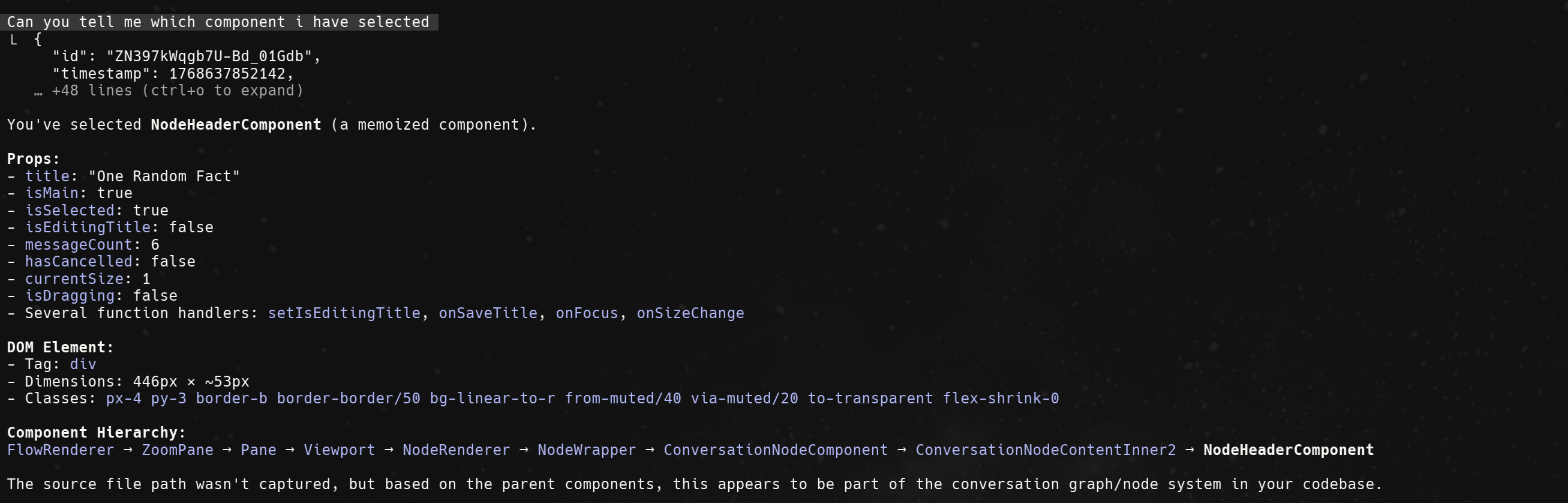
|
|
8
|
+
|
|
9
|
+
## Quick Start
|
|
10
|
+
|
|
11
|
+
### 1. Install
|
|
12
|
+
|
|
13
|
+
```bash
|
|
14
|
+
npm install @react-component-selector-mcp/react
|
|
15
|
+
```
|
|
16
|
+
|
|
17
|
+
### 2. Wrap Your App
|
|
18
|
+
|
|
19
|
+
```tsx
|
|
20
|
+
// In your root layout (app/layout.tsx, _app.tsx, or main.tsx)
|
|
21
|
+
import { ComponentPicker } from "@react-component-selector-mcp/react";
|
|
22
|
+
|
|
23
|
+
export default function RootLayout({ children }) {
|
|
24
|
+
return <ComponentPicker>{children}</ComponentPicker>;
|
|
25
|
+
}
|
|
26
|
+
```
|
|
27
|
+
|
|
28
|
+
### 3. Configure MCP
|
|
29
|
+
|
|
30
|
+
Create `.mcp.json` in your project root:
|
|
31
|
+
|
|
32
|
+
```json
|
|
33
|
+
{
|
|
34
|
+
"mcpServers": {
|
|
35
|
+
"react-component-selector": {
|
|
36
|
+
"command": "npx",
|
|
37
|
+
"args": ["@react-component-selector-mcp/cli", "mcp"]
|
|
38
|
+
}
|
|
39
|
+
}
|
|
40
|
+
}
|
|
41
|
+
```
|
|
42
|
+
|
|
43
|
+
Restart Claude Code to load the MCP server.
|
|
44
|
+
|
|
45
|
+
### Claude Code Setup
|
|
46
|
+
|
|
47
|
+
Copy this prompt to Claude Code to automate the setup:
|
|
48
|
+
|
|
49
|
+
```
|
|
50
|
+
Set up react-component-selector-mcp in this project:
|
|
51
|
+
1. Install @react-component-selector-mcp/react
|
|
52
|
+
2. Wrap the root layout with <ComponentPicker>{children}</ComponentPicker>
|
|
53
|
+
3. Create .mcp.json with: {"mcpServers":{"react-component-selector":{"command":"npx","args":["@react-component-selector-mcp/cli","mcp"]}}}
|
|
54
|
+
```
|
|
55
|
+
|
|
56
|
+
## Usage
|
|
57
|
+
|
|
58
|
+
1. Start your dev server and open the app in browser
|
|
59
|
+
2. Press **Ctrl+Alt+C** (Windows/Linux) or **Cmd+Option+C** (Mac)
|
|
60
|
+
3. Click any component to select it
|
|
61
|
+
4. Ask Claude about the selected component
|
|
62
|
+
|
|
63
|
+
### MCP Tools
|
|
64
|
+
|
|
65
|
+
| Tool | Description |
|
|
66
|
+
|------|-------------|
|
|
67
|
+
| `get_selected_component` | Returns the most recently selected component |
|
|
68
|
+
| `wait_for_selection` | Waits for user to select a component |
|
|
69
|
+
| `get_selection_history` | Returns recent selections |
|
|
70
|
+
|
|
71
|
+
<details>
|
|
72
|
+
<summary><strong>Troubleshooting</strong></summary>
|
|
73
|
+
|
|
74
|
+
### Component not detected
|
|
75
|
+
- Ensure `ComponentPicker` wraps your entire app
|
|
76
|
+
- Verify React version is 18.0.0 or higher
|
|
77
|
+
|
|
78
|
+
### MCP connection failed
|
|
79
|
+
- Check status: `npx @react-component-selector-mcp/cli status`
|
|
80
|
+
- Stop and restart: `npx @react-component-selector-mcp/cli stop`
|
|
81
|
+
- Restart Claude Code after changing MCP configuration
|
|
82
|
+
|
|
83
|
+
### Source location not available
|
|
84
|
+
Source locations require development mode with `@babel/plugin-transform-react-jsx-source` (enabled by default in CRA, Next.js, Vite).
|
|
85
|
+
|
|
86
|
+
</details>
|
|
87
|
+
|
|
88
|
+
<details>
|
|
89
|
+
<summary><strong>CLI Reference</strong></summary>
|
|
90
|
+
|
|
91
|
+
```bash
|
|
92
|
+
# Check daemon status
|
|
93
|
+
npx @react-component-selector-mcp/cli status
|
|
94
|
+
|
|
95
|
+
# Stop daemon
|
|
96
|
+
npx @react-component-selector-mcp/cli stop
|
|
97
|
+
|
|
98
|
+
# Custom ports (default: WebSocket 3333, API 3334)
|
|
99
|
+
npx @react-component-selector-mcp/cli mcp --ws-port 4444 --api-port 4445
|
|
100
|
+
```
|
|
101
|
+
|
|
102
|
+
When using custom ports, update the component to match:
|
|
103
|
+
|
|
104
|
+
```tsx
|
|
105
|
+
<ComponentPicker port={4444}>{children}</ComponentPicker>
|
|
106
|
+
```
|
|
107
|
+
|
|
108
|
+
</details>
|
|
109
|
+
|
|
110
|
+
## Contributing
|
|
111
|
+
|
|
112
|
+
See [CONTRIBUTING.md](CONTRIBUTING.md) for development setup.
|
|
113
|
+
|
|
114
|
+
## License
|
|
115
|
+
|
|
116
|
+
[MIT](LICENSE)
|
package/package.json
CHANGED
|
@@ -1,6 +1,6 @@
|
|
|
1
1
|
{
|
|
2
2
|
"name": "@react-component-selector-mcp/react",
|
|
3
|
-
"version": "2.0.
|
|
3
|
+
"version": "2.0.3",
|
|
4
4
|
"description": "React component selector with browser selection UI",
|
|
5
5
|
"license": "MIT",
|
|
6
6
|
"author": "zakstam",
|
|
@@ -20,7 +20,8 @@
|
|
|
20
20
|
"model-context-protocol"
|
|
21
21
|
],
|
|
22
22
|
"files": [
|
|
23
|
-
"dist"
|
|
23
|
+
"dist",
|
|
24
|
+
"README.md"
|
|
24
25
|
],
|
|
25
26
|
"type": "module",
|
|
26
27
|
"main": "./dist/index.js",
|