@raytrace-cli/cli 0.8.0 → 0.10.0
This diff represents the content of publicly available package versions that have been released to one of the supported registries. The information contained in this diff is provided for informational purposes only and reflects changes between package versions as they appear in their respective public registries.
- package/README.md +499 -266
- package/bin/raytrace.mjs +64 -10
- package/dist/dashboard/assets/{index-DtV3UdEB.css → index-H97VLD5l.css} +1 -1
- package/dist/dashboard/assets/{index-CeIGjyFc.js → index-TqrxOY-Y.js} +2 -2
- package/dist/dashboard/index.html +2 -2
- package/package.json +1 -1
- package/src/agents.mjs +7 -0
- package/src/local-sandbox.mjs +30 -11
- package/src/mcp.mjs +389 -31
- package/src/sandbox.mjs +7 -2
- package/src/share.mjs +86 -0
- package/src/terminal.mjs +68 -0
- package/worker/sandbox/projects.py +22 -7
package/README.md
CHANGED
|
@@ -2,178 +2,441 @@
|
|
|
2
2
|
|
|
3
3
|
**See what your coding agent actually did.**
|
|
4
4
|
|
|
5
|
-
[
|
|
6
|
-
[
|
|
7
|
-
[
|
|
8
|
-
[
|
|
9
|
-
[
|
|
10
|
-
|
|
11
|
-
|
|
12
|
-
|
|
13
|
-
|
|
14
|
-
|
|
15
|
-
|
|
16
|
-
RayTrace
|
|
5
|
+
[npm package](https://www.npmjs.com/package/@raytrace-cli/cli) ·
|
|
6
|
+
[Set up in your editor (MCP)](#set-up-in-your-editor-mcp) ·
|
|
7
|
+
[Local sandboxes](#local-sandboxes) ·
|
|
8
|
+
[Cloud sandboxes](#cloud-sandboxes) ·
|
|
9
|
+
[What you can do](#what-you-can-do-with-a-recorded-session) ·
|
|
10
|
+
[Commands](#commands) ·
|
|
11
|
+
[Report an issue](https://github.com/Godcreatebugs/raytrace-cli/issues)
|
|
12
|
+
|
|
13
|
+
Your agent finished the task. Which files did it read? What commands did it
|
|
14
|
+
run? Where did the tokens and money go?
|
|
15
|
+
|
|
16
|
+
RayTrace runs Claude Code or Codex in a **sandbox**, an isolated copy of your
|
|
17
|
+
project, and records everything that happens there: your prompts, the agent's
|
|
18
|
+
answers and tool calls, and every command that actually ran, with its exit code
|
|
19
|
+
and network connections. You explore it all in a dashboard.
|
|
17
20
|
|
|
18
21
|
|
|
19
22
|
|
|
20
23
|
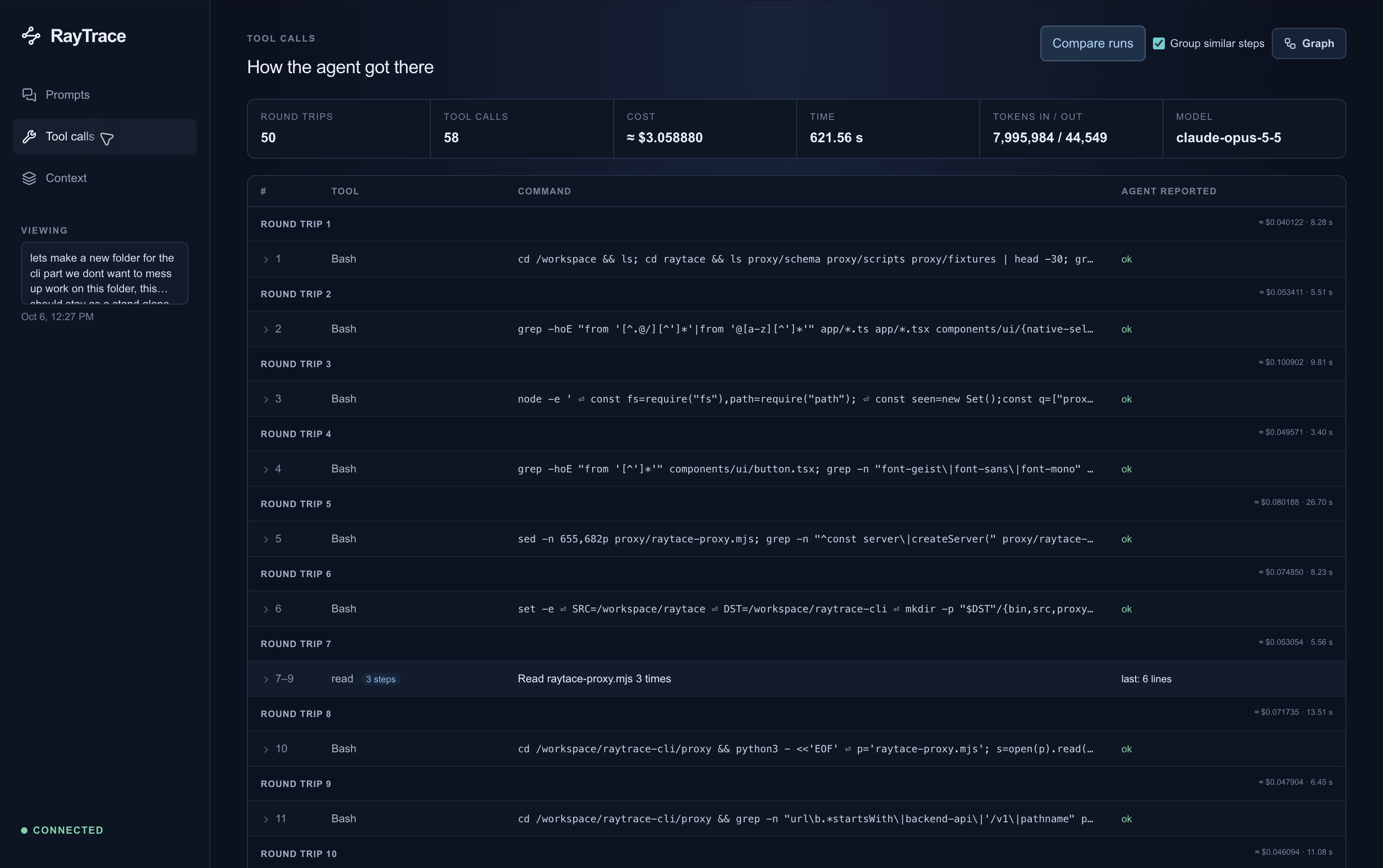
*One real coding task: 50 model round trips, 58 tool calls, and a command-by-command record.*
|
|
21
24
|
|
|
22
|
-
|
|
23
|
-
|
|
24
|
-
|
|
25
|
-
|
|
25
|
+
## Pick how you want to use it
|
|
26
|
+
|
|
27
|
+
| | Where it runs | Account | Best for |
|
|
28
|
+
|---|---|---|---|
|
|
29
|
+
| **[From your editor (MCP)](#set-up-in-your-editor-mcp)** | local or cloud, you choose per sandbox | only for cloud | asking your agent "put this repo in a sandbox and open it" |
|
|
30
|
+
| **[Local sandbox](#local-sandboxes)** | a Linux VM on your machine | none | keeping your code on your machine; free and open source |
|
|
31
|
+
| **[Cloud sandbox](#cloud-sandboxes)** | RayTrace's servers | yes | sharing sessions with your team at [app.raytracer.si](https://app.raytracer.si) |
|
|
32
|
+
|
|
33
|
+
All three need **Node.js 22.13 or newer** (`node --version`) on macOS or Linux.
|
|
34
|
+
Windows is experimental.
|
|
26
35
|
|
|
27
|
-
|
|
36
|
+
---
|
|
28
37
|
|
|
29
|
-
|
|
30
|
-
|
|
31
|
-
[
|
|
38
|
+
## Set up in your editor (MCP)
|
|
39
|
+
|
|
40
|
+
`raytrace mcp` is an [MCP](https://modelcontextprotocol.io) server. Add it to
|
|
41
|
+
your editor once, and your agent can create, open, stop and destroy sandboxes
|
|
42
|
+
for you. There is nothing to install first: `npx` downloads the CLI on first use.
|
|
43
|
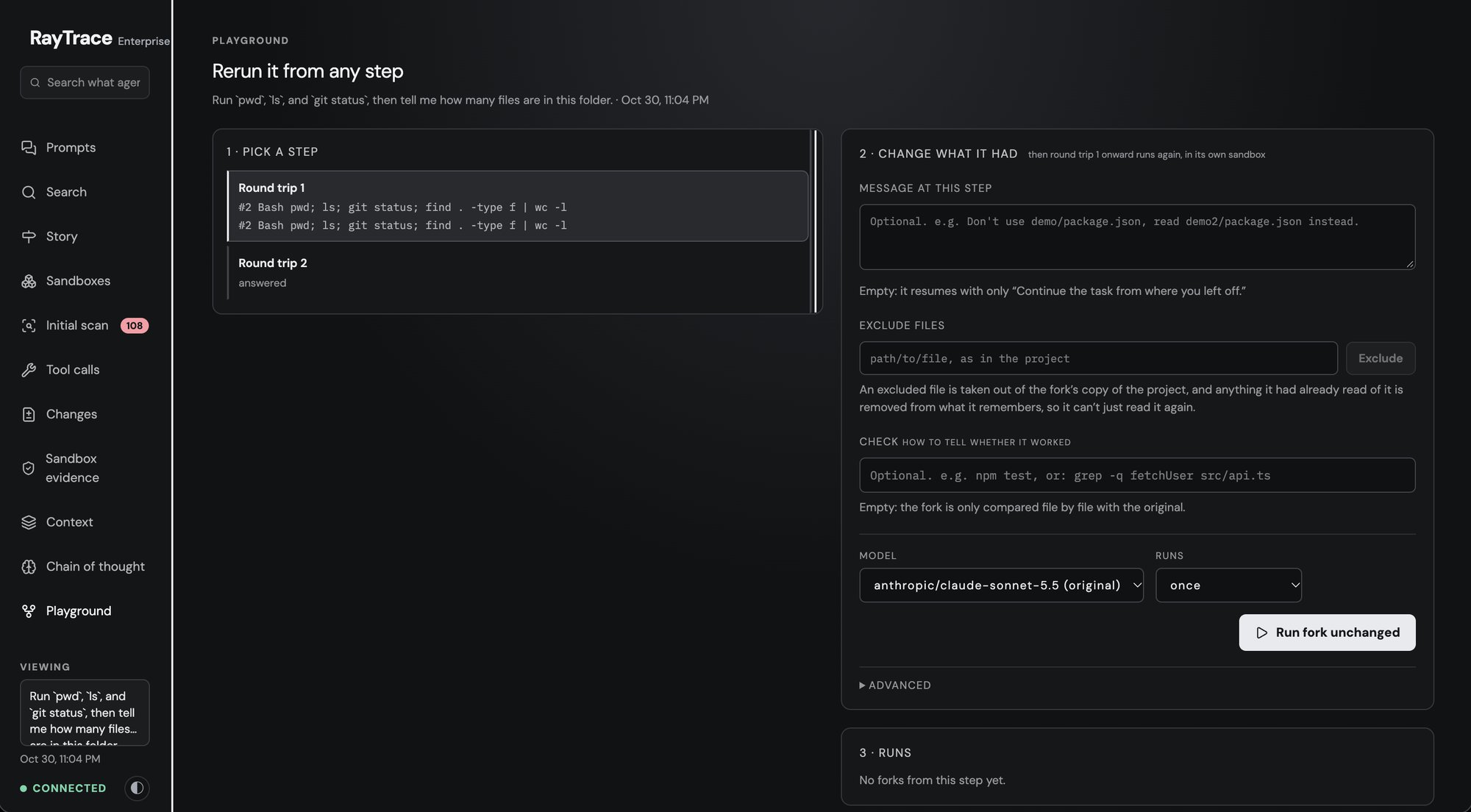
+
|
|
44
|
+
### 1. Add the server
|
|
45
|
+
|
|
46
|
+
**Claude Code.** One command, then restart Claude Code. `--scope user` makes it
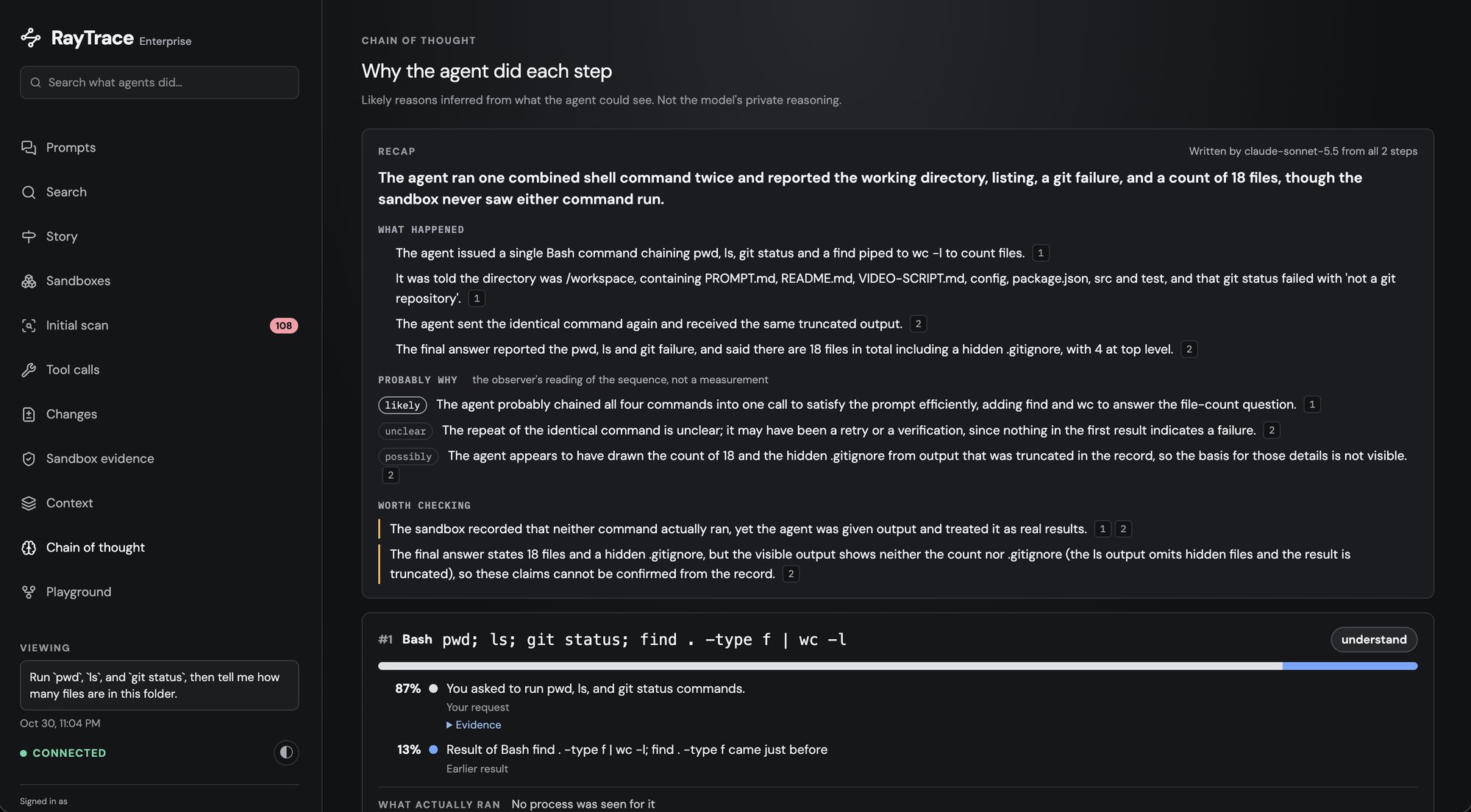
|
|
47
|
+
available in every project:
|
|
32
48
|
|
|
33
49
|
```sh
|
|
34
|
-
|
|
35
|
-
raytrace auth login # opens your browser: sign in, or create your account
|
|
36
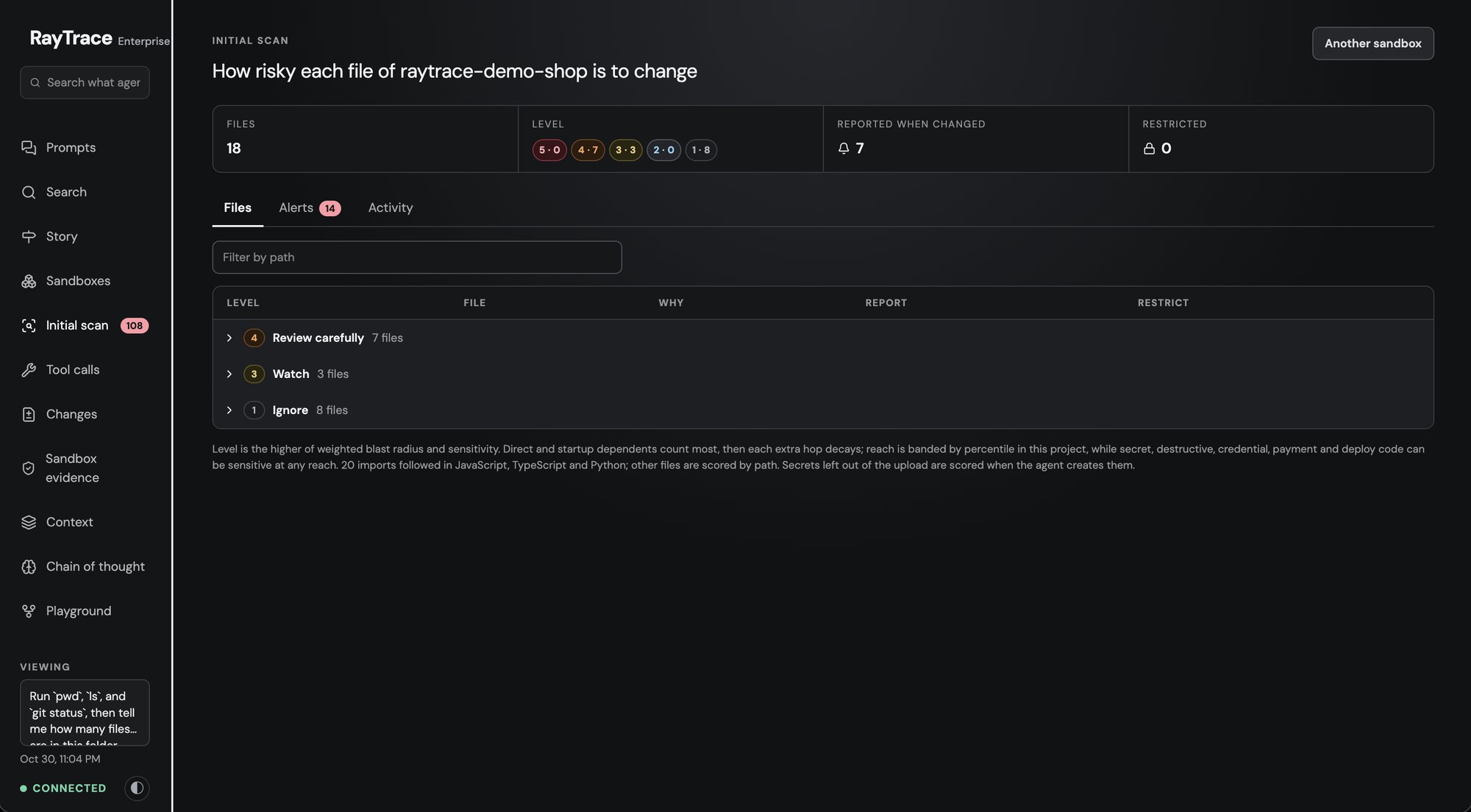
|
-
cd your-project # any Git repository
|
|
37
|
-
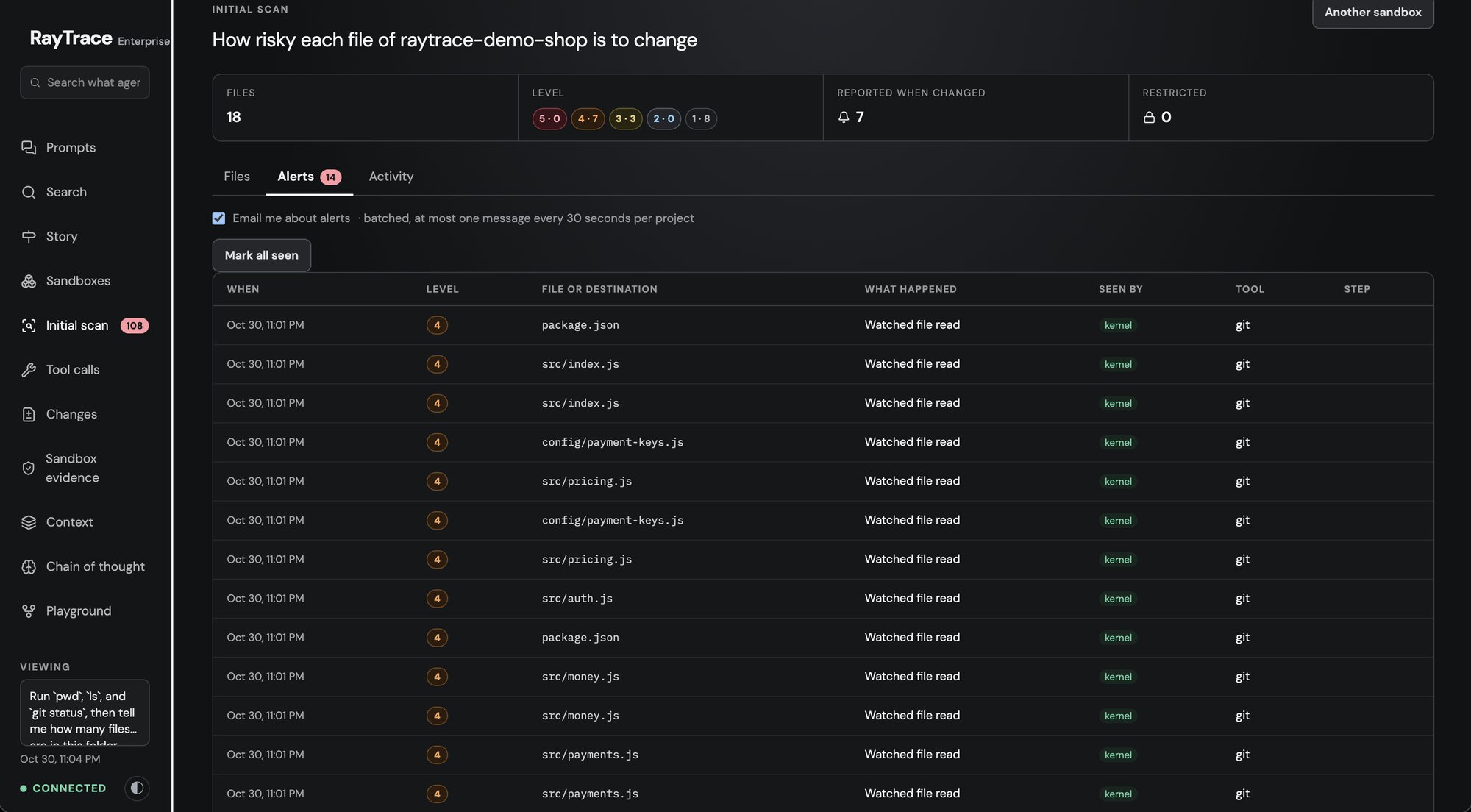
raytrace sandbox create # uploads it to a new cloud sandbox and prints its id
|
|
38
|
-
raytrace connect <sandbox-id> # a terminal in the sandbox: run claude or codex there
|
|
50
|
+
claude mcp add --scope user raytrace -- npx -y @raytrace-cli/cli@latest mcp
|
|
39
51
|
```
|
|
40
52
|
|
|
41
|
-
|
|
42
|
-
|
|
43
|
-
|
|
44
|
-
|
|
45
|
-
|
|
46
|
-
|
|
47
|
-
|
|
48
|
-
|
|
49
|
-
|
|
50
|
-
|
|
51
|
-
|
|
52
|
-
|
|
53
|
-
|
|
54
|
-
|
|
55
|
-
|
|
56
|
-
|
|
57
|
-
|
|
58
|
-
|
|
59
|
-
|
|
60
|
-
|
|
61
|
-
|
|
62
|
-
|
|
63
|
-
|
|
64
|
-
|
|
65
|
-
|
|
66
|
-
|
|
67
|
-
-
|
|
68
|
-
|
|
69
|
-
|
|
70
|
-
|
|
71
|
-
|
|
72
|
-
|
|
73
|
-
|
|
74
|
-
|
|
75
|
-
|
|
76
|
-
|
|
77
|
-
|
|
78
|
-
|
|
79
|
-
|
|
80
|
-
|
|
81
|
-
|
|
82
|
-
|
|
83
|
-
|
|
84
|
-
|
|
85
|
-
|
|
86
|
-
|
|
87
|
-
|
|
88
|
-
|
|
89
|
-
|
|
90
|
-
|
|
91
|
-
|
|
92
|
-
|
|
93
|
-
- **Claude Code
|
|
94
|
-
|
|
95
|
-
|
|
96
|
-
|
|
97
|
-
|
|
98
|
-
|
|
99
|
-
|
|
100
|
-
|
|
101
|
-
|
|
102
|
-
|
|
103
|
-
|
|
104
|
-
|
|
105
|
-
|
|
106
|
-
|
|
107
|
-
|
|
108
|
-
|
|
109
|
-
|
|
110
|
-
|
|
111
|
-
|
|
53
|
+
Check it with `claude mcp list`, which should show `raytrace` as connected.
|
|
54
|
+
|
|
55
|
+
**Cursor.** Add to `~/.cursor/mcp.json` (every project) or `.cursor/mcp.json` (one project):
|
|
56
|
+
|
|
57
|
+
```json
|
|
58
|
+
{
|
|
59
|
+
"mcpServers": {
|
|
60
|
+
"raytrace": { "command": "npx", "args": ["-y", "@raytrace-cli/cli@latest", "mcp"] }
|
|
61
|
+
}
|
|
62
|
+
}
|
|
63
|
+
```
|
|
64
|
+
|
|
65
|
+
**VS Code.** Add to `.vscode/mcp.json` in the project, or run **MCP: Open User
|
|
66
|
+
Configuration** from the command palette for every project:
|
|
67
|
+
|
|
68
|
+
```json
|
|
69
|
+
{
|
|
70
|
+
"servers": {
|
|
71
|
+
"raytrace": { "command": "npx", "args": ["-y", "@raytrace-cli/cli@latest", "mcp"] }
|
|
72
|
+
}
|
|
73
|
+
}
|
|
74
|
+
```
|
|
75
|
+
|
|
76
|
+
**Codex.** `codex mcp add raytrace -- npx -y @raytrace-cli/cli@latest mcp`
|
|
77
|
+
|
|
78
|
+
**Any other MCP client.** Run the command `npx` with the arguments
|
|
79
|
+
`-y @raytrace-cli/cli@latest mcp`, over stdio. Most clients use the same
|
|
80
|
+
`mcpServers` JSON as Cursor.
|
|
81
|
+
|
|
82
|
+
> Already have the CLI installed globally? You can use `raytrace mcp` as the
|
|
83
|
+
> command instead of `npx`.
|
|
84
|
+
|
|
85
|
+
### 2. Ask for a sandbox
|
|
86
|
+
|
|
87
|
+
Open a Git project in your editor and ask your agent in plain words:
|
|
88
|
+
|
|
89
|
+
| You say | What happens |
|
|
90
|
+
|---|---|
|
|
91
|
+
| "Create a local sandbox and connect this repo" | a sandbox on your machine, then a terminal opens with Claude Code running in it |
|
|
92
|
+
| "Put this project in a cloud sandbox" | uploads the repo to RayTrace's cloud, then opens a terminal with Claude Code in it |
|
|
93
|
+
| "Open my sandbox with Codex" | a terminal connected to an existing sandbox, with Codex running in it |
|
|
94
|
+
| "List my sandboxes" / "Stop demo-box" / "Destroy it" | manages them; the agent asks you before it destroys anything |
|
|
95
|
+
| "Run `npm test` in the sandbox" | runs a command in a cloud sandbox and reports the result back in the chat |
|
|
96
|
+
|
|
97
|
+
**The first time:**
|
|
98
|
+
|
|
99
|
+
- **Cloud sandboxes** need a RayTrace sign-in. The agent shows you a short code
|
|
100
|
+
and opens a browser page. Approve it there (or create your account), and the
|
|
101
|
+
agent carries on. Local sandboxes need no account.
|
|
102
|
+
- **The first local sandbox** sets up a Linux VM, which takes a few minutes. If
|
|
103
|
+
[Lima](https://lima-vm.io) is missing, the agent asks before downloading it.
|
|
104
|
+
See [what you need](#what-you-need).
|
|
105
|
+
- **In each new sandbox**, Claude Code or Codex asks you to sign in to your
|
|
106
|
+
Anthropic or OpenAI account, as it would on your machine.
|
|
107
|
+
- **On macOS**, the first time a terminal is opened for you, macOS asks whether
|
|
108
|
+
your editor may control your terminal app. Allow it.
|
|
109
|
+
|
|
110
|
+
### 3. Work in the sandbox
|
|
111
|
+
|
|
112
|
+
The terminal opens where you work: a new tmux window if you're in tmux, a new
|
|
113
|
+
iTerm window or WezTerm tab, otherwise a new Terminal window on macOS (VS Code's
|
|
114
|
+
built-in terminal can't be opened from outside), your desktop's terminal on
|
|
115
|
+
Linux, or Windows Terminal. If none can be opened, the agent gives you the
|
|
116
|
+
command to paste instead, such as `raytrace connect demo-box --claude`.
|
|
117
|
+
|
|
118
|
+
Inside, the agent runs **without approval prompts**. The sandbox is what keeps
|
|
119
|
+
it contained, so there's no need to approve every command, and everything it
|
|
120
|
+
does is recorded. See [Working in a sandbox](#working-in-a-sandbox).
|
|
121
|
+
|
|
122
|
+
### MCP tools reference
|
|
123
|
+
|
|
124
|
+
| Tool | What it does |
|
|
125
|
+
|---|---|
|
|
126
|
+
| `login` | signs in to RayTrace (cloud only): shows a code to approve in the browser |
|
|
127
|
+
| `create_sandbox` | copies the open Git project into a new sandbox. `local: true` for one on your machine, `agent: "codex"` to open it with Codex, `connect: false` to skip opening a terminal |
|
|
128
|
+
| `connect_sandbox` | opens a terminal in an existing sandbox with Claude Code (default), Codex (`agent: "codex"`) or a plain shell (`agent: "none"`); starts it first if it's stopped |
|
|
129
|
+
| `list_sandboxes`, `sandbox_status` | your local and cloud sandboxes, and one sandbox's details or creation progress |
|
|
130
|
+
| `start_sandbox`, `stop_sandbox` | stopping keeps the files |
|
|
131
|
+
| `destroy_sandbox` | deletes a sandbox. Cloud: its traces go too, unless `keep_traces` (paid plans). Local: its logs are archived, unless `delete_logs` |
|
|
132
|
+
| `run_command`, `get_command_result`, `cancel_command` | run shell commands in a cloud sandbox from the chat: up to 4 at once, 120 s by default and at most 30 minutes, with the real exit code and output |
|
|
133
|
+
|
|
134
|
+
Local sandboxes are named by their name and cloud ones by their id (`rtp-…`).
|
|
135
|
+
Whatever a command prints is treated as data from your project, never as
|
|
136
|
+
instructions to the agent.
|
|
137
|
+
|
|
138
|
+
---
|
|
112
139
|
|
|
113
140
|
## Local sandboxes
|
|
114
141
|
|
|
115
|
-
|
|
116
|
-
It is open source and needs no RayTrace account.
|
|
142
|
+
Run the sandbox on your own machine. Your project is copied into it, and nothing
|
|
143
|
+
is uploaded. It is open source and needs no RayTrace account.
|
|
144
|
+
|
|
145
|
+
### What you need
|
|
146
|
+
|
|
147
|
+
| | Requirement |
|
|
148
|
+
|---|---|
|
|
149
|
+
| **macOS 13.5 or later** | Nothing to install. RayTrace uses your [Lima](https://lima-vm.io) 2.0+ if you have it, or offers to download Lima into `~/.raytrace/lima` (no admin rights; checked against a pinned checksum) |
|
|
150
|
+
| **Older macOS** | QEMU too: `brew install qemu` |
|
|
151
|
+
| **Linux** | Lima, QEMU, and access to `/dev/kvm` (`sudo usermod -aG kvm $USER`, then log out and in) |
|
|
152
|
+
| **Windows** | experimental; RayTrace doesn't download Lima there |
|
|
153
|
+
| **Disk and memory** | the first setup downloads about 1 GB; the VM uses 4 GiB of memory while it runs |
|
|
154
|
+
|
|
155
|
+
`raytrace doctor` checks all of this and says how to fix anything missing.
|
|
156
|
+
|
|
157
|
+
### Set it up
|
|
158
|
+
|
|
159
|
+
```sh
|
|
160
|
+
npm install -g @raytrace-cli/cli
|
|
161
|
+
|
|
162
|
+
cd your-project # any Git repository
|
|
163
|
+
raytrace sandbox create --local # first time: sets up the VM, a few minutes
|
|
164
|
+
raytrace connect your-project --claude # a terminal in it, with Claude Code running
|
|
165
|
+
```
|
|
166
|
+
|
|
167
|
+
- The sandbox is named after the folder. Use `--name my-box` to choose the name.
|
|
168
|
+
- Use `--codex` instead of `--claude` to start Codex, or leave both off for a
|
|
169
|
+
plain shell where you run `claude` or `codex` yourself.
|
|
170
|
+
- `connect` prints a link to the dashboard showing only this sandbox's prompts.
|
|
171
|
+
`raytrace open` opens the full dashboard.
|
|
172
|
+
|
|
173
|
+
Or skip the commands and ask your editor's agent:
|
|
174
|
+
[set up MCP](#set-up-in-your-editor-mcp), then say "create a local sandbox and
|
|
175
|
+
connect this repo".
|
|
176
|
+
|
|
177
|
+
### Day to day
|
|
117
178
|
|
|
118
179
|
```sh
|
|
119
|
-
|
|
120
|
-
raytrace
|
|
121
|
-
raytrace
|
|
122
|
-
raytrace sandbox
|
|
180
|
+
raytrace sandbox list --local # your local sandboxes
|
|
181
|
+
raytrace connect my-box --claude # back in; the sandbox keeps running when you leave
|
|
182
|
+
raytrace sandbox stop my-box # stop it; its files are kept
|
|
183
|
+
raytrace sandbox start my-box
|
|
184
|
+
raytrace sandbox destroy my-box # asks whether to delete its captured logs too
|
|
185
|
+
limactl stop raytrace # stop the whole VM to free its 4 GiB of memory
|
|
123
186
|
```
|
|
124
187
|
|
|
125
|
-
|
|
126
|
-
|
|
127
|
-
|
|
128
|
-
|
|
129
|
-
|
|
130
|
-
|
|
131
|
-
|
|
132
|
-
|
|
133
|
-
|
|
134
|
-
|
|
135
|
-
|
|
136
|
-
|
|
137
|
-
|
|
138
|
-
|
|
139
|
-
|
|
140
|
-
|
|
141
|
-
|
|
142
|
-
-
|
|
143
|
-
|
|
144
|
-
|
|
145
|
-
|
|
146
|
-
|
|
147
|
-
|
|
148
|
-
|
|
149
|
-
- **
|
|
150
|
-
|
|
151
|
-
- **
|
|
152
|
-
|
|
153
|
-
|
|
154
|
-
|
|
155
|
-
|
|
156
|
-
|
|
157
|
-
|
|
158
|
-
|
|
159
|
-
|
|
160
|
-
|
|
161
|
-
|
|
162
|
-
|
|
163
|
-
|
|
164
|
-
|
|
165
|
-
|
|
166
|
-
|
|
167
|
-
-
|
|
168
|
-
|
|
169
|
-
-
|
|
170
|
-
|
|
171
|
-
|
|
172
|
-
|
|
173
|
-
|
|
174
|
-
|
|
175
|
-
|
|
176
|
-
|
|
188
|
+
When you destroy a sandbox, you're asked what to do with its logs:
|
|
189
|
+
|
|
190
|
+
- **Yes** deletes them everywhere, the dashboard and Playground forks included.
|
|
191
|
+
- **No** moves them to `~/.raytrace/archive/<name>-<time>/`: the agent
|
|
192
|
+
transcripts, the recorded commands, files and connections as JSON lines, and
|
|
193
|
+
any forks. Its sessions stay in your dashboard.
|
|
194
|
+
|
|
195
|
+
`--delete-logs` or `--keep-logs` answers without asking. To keep the logs in the
|
|
196
|
+
cloud, `raytrace upload logs --sandbox my-box` sends them to
|
|
197
|
+
[app.raytracer.si](https://app.raytracer.si) (needs a sign-in).
|
|
198
|
+
|
|
199
|
+
### How it works
|
|
200
|
+
|
|
201
|
+
- **Isolation:** each sandbox is a Docker container under
|
|
202
|
+
[gVisor](https://gvisor.dev), inside a Linux VM made with
|
|
203
|
+
[Lima](https://lima-vm.io). It can't see your machine's files or private
|
|
204
|
+
networks. A copy of your project goes in (picked the same way as for
|
|
205
|
+
[cloud uploads](#what-is-uploaded)); your own files are never changed.
|
|
206
|
+
- **Resources:** each sandbox gets 2 GB of memory, 2 CPUs, 256 processes and a
|
|
207
|
+
512 MB `/tmp`. All sandboxes share the VM's 30 GiB disk.
|
|
208
|
+
- **Recording:** a collector outside the sandbox, which the agent can't turn
|
|
209
|
+
off, records every command, file change and network connection. Claude Code's
|
|
210
|
+
prompts, answers and tool calls go to your local dashboard as well. Nothing
|
|
211
|
+
leaves your machine.
|
|
212
|
+
- **Changes:** the project is snapshotted after every edit, so **Changes** in
|
|
213
|
+
the dashboard shows what each prompt left different, with a patch to take home.
|
|
214
|
+
- **Playground:** rerun a session from any step with something changed (a tool
|
|
215
|
+
result, a file, the model or the message) and compare the outcomes,
|
|
216
|
+
optionally with a check such as `npm test`. Each rerun is a fork, a sandbox
|
|
217
|
+
of its own started from the snapshot just before that step.
|
|
218
|
+
|
|
219
|
+
---
|
|
220
|
+
|
|
221
|
+
## Cloud sandboxes
|
|
222
|
+
|
|
223
|
+
A cloud sandbox is the same isolated copy of your project, on RayTrace's
|
|
224
|
+
servers, with sessions recorded for your organization at
|
|
225
|
+
**[app.raytracer.si](https://app.raytracer.si)**. This is a preview.
|
|
226
|
+
|
|
227
|
+
```sh
|
|
228
|
+
npm install -g @raytrace-cli/cli
|
|
229
|
+
raytrace auth login # opens your browser: sign in, or create your account
|
|
230
|
+
cd your-project # any Git repository
|
|
231
|
+
raytrace sandbox create # uploads it and prints the sandbox id
|
|
232
|
+
raytrace connect <sandbox-id> --claude # a terminal in it, with Claude Code running
|
|
233
|
+
```
|
|
234
|
+
|
|
235
|
+
`auth login` prints a short code and opens the sign-in page; approve it there.
|
|
236
|
+
If you skip it, `sandbox create` and `connect` ask you to sign in first. With
|
|
237
|
+
one sandbox, `connect` needs no id. You can also create a sandbox in the web
|
|
238
|
+
dashboard by dropping a project folder on the **Sandboxes** page.
|
|
239
|
+
|
|
240
|
+
### What is uploaded
|
|
241
|
+
|
|
242
|
+
The files Git would track (including new files it doesn't ignore), **without**
|
|
243
|
+
`.git`, dependencies such as `node_modules`, build output, `.env*` files, private
|
|
244
|
+
keys (`.pem`, `.key`, `.p12`, `.pfx`) and common credential files (`.npmrc`,
|
|
245
|
+
`.netrc`, `id_rsa`, …). Check for secrets inside other files before you upload.
|
|
246
|
+
|
|
247
|
+
### Limits
|
|
248
|
+
|
|
249
|
+
- **Project size:** up to 200 MiB and 20,000 files, each file up to 25 MiB
|
|
250
|
+
(100 MiB once packed). A project over a limit is refused, with the files
|
|
251
|
+
named, and nothing is uploaded; add those files to `.gitignore`.
|
|
252
|
+
- **Sandboxes at a time:** Beta 1, Individual 5, Team & Enterprise 20.
|
|
253
|
+
Destroyed ones don't count.
|
|
254
|
+
- **Each sandbox:** 2 GB of memory, 2 CPUs, 256 processes, a 512 MB `/tmp`.
|
|
255
|
+
|
|
256
|
+
### When you are done
|
|
257
|
+
|
|
258
|
+
`raytrace sandbox stop` keeps the files. `raytrace sandbox destroy` deletes them
|
|
259
|
+
and any sign-in made inside, along with the recorded traces. To keep the traces,
|
|
260
|
+
use `--keep-traces` (paid plans).
|
|
261
|
+
|
|
262
|
+
---
|
|
263
|
+
|
|
264
|
+
## Working in a sandbox
|
|
265
|
+
|
|
266
|
+
- **Claude Code and Codex are preinstalled** in every sandbox, local and cloud.
|
|
267
|
+
- **No approval prompts.** `--claude` starts Claude Code with
|
|
268
|
+
`--dangerously-skip-permissions`, and `--codex` starts Codex with
|
|
269
|
+
`--dangerously-bypass-approvals-and-sandbox`. The sandbox's own settings, which
|
|
270
|
+
the agent can't change, make this the default too, so typing `claude` or
|
|
271
|
+
`codex` yourself works the same way. The sandbox is what keeps the agent
|
|
272
|
+
contained, and every command is recorded.
|
|
273
|
+
- **Restricted files stay locked.** Files a project's owner restricts in the
|
|
274
|
+
dashboard (**Initial scan**) can't be changed by the agent, whatever it tries.
|
|
275
|
+
- **Signing in:** sign in to Claude Code or Codex inside the sandbox, as you
|
|
276
|
+
would on your machine. The sign-in stays in that sandbox until you destroy it.
|
|
277
|
+
- **Leaving:** exiting the agent drops you into the sandbox's shell, and exiting
|
|
278
|
+
that leaves the sandbox running. `raytrace connect` takes you back.
|
|
279
|
+
|
|
280
|
+
In local sandboxes, Codex's prompts don't reach the dashboard's **Prompts** page
|
|
281
|
+
yet. Its commands, file changes and network connections are recorded.
|
|
282
|
+
|
|
283
|
+
---
|
|
284
|
+
|
|
285
|
+
## What you can do with a recorded session
|
|
286
|
+
|
|
287
|
+
Cloud sessions are at [app.raytracer.si](https://app.raytracer.si), and
|
|
288
|
+
`raytrace open` opens the same pages for your local sandboxes. Every page is
|
|
289
|
+
about one prompt, and they link to each other, so you can go from "what did I
|
|
290
|
+
ask" to "what actually ran" to "what if it had gone differently" in a couple of
|
|
291
|
+
clicks. The screenshots below are from the cloud dashboard, with a session in
|
|
292
|
+
the `raytrace-demo-shop` sandbox.
|
|
293
|
+
|
|
294
|
+
### Prompts: what you asked, and what came back
|
|
295
|
+
|
|
296
|
+
|
|
297
|
+
|
|
298
|
+
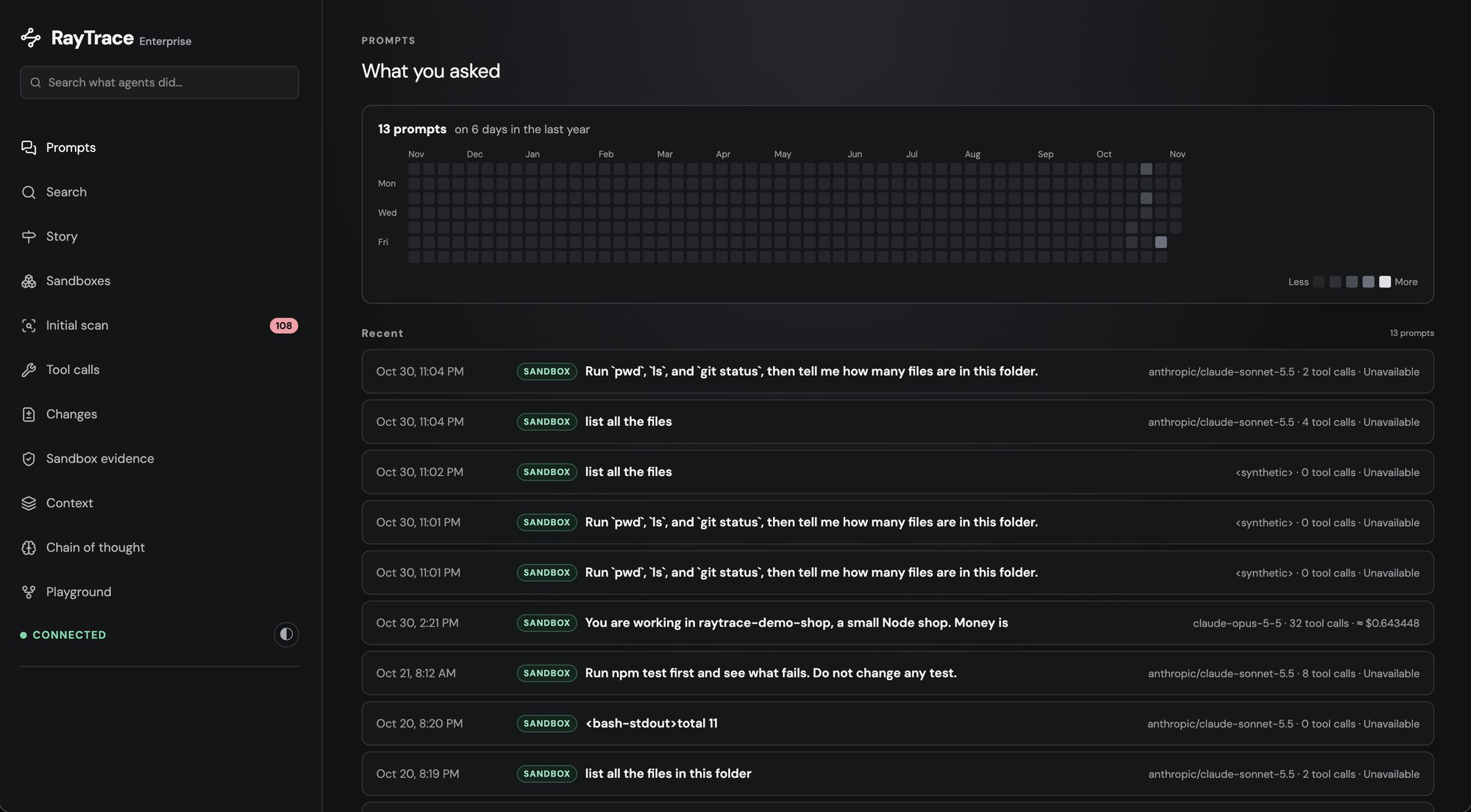
Every prompt you gave the agent, newest first, with an activity calendar on
|
|
299
|
+
top. Each row shows where it ran (Mac, local sandbox or cloud sandbox), the
|
|
300
|
+
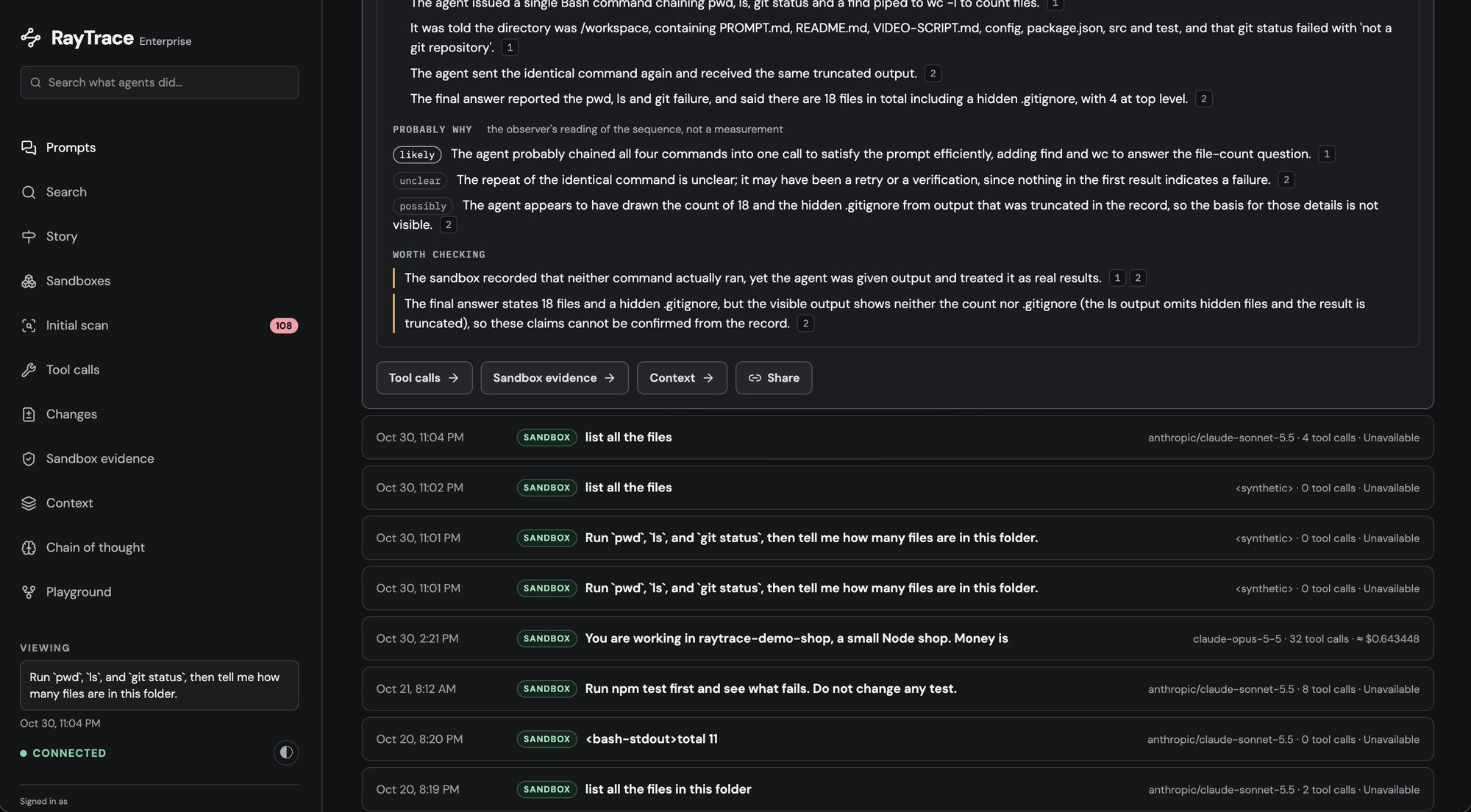
model, how many tool calls it took and what it cost. Open one to read the
|
|
301
|
+
answer and a short recap of the run.
|
|
302
|
+
|
|
303
|
+
|
|
304
|
+
|
|
305
|
+
- **Find a session again:** click a day in the calendar, or add
|
|
306
|
+
`?box=<sandbox id>` to see a single sandbox's prompts.
|
|
307
|
+
- **Spot the expensive ones:** the cost and tool-call count are on every row.
|
|
308
|
+
|
|
309
|
+
### Tool calls: how the agent got there
|
|
310
|
+
|
|
311
|
+
<!-- screenshot: the one at the top of this README (docs/images/tool-calls.jpg) -->
|
|
312
|
+
|
|
313
|
+
The path from your prompt to the answer: one divider for each round trip to the
|
|
314
|
+
model, one row for each tool call it proposed, with the command and what the
|
|
315
|
+
agent says came back, plus tokens, time and cost at each step.
|
|
316
|
+
|
|
317
|
+
- **Follow its reasoning step by step,** and see where it went in circles.
|
|
318
|
+
- **See where the tokens went:** which steps were the expensive ones.
|
|
319
|
+
|
|
320
|
+
### Sandbox evidence: what actually ran
|
|
321
|
+
|
|
322
|
+
|
|
323
|
+
|
|
324
|
+
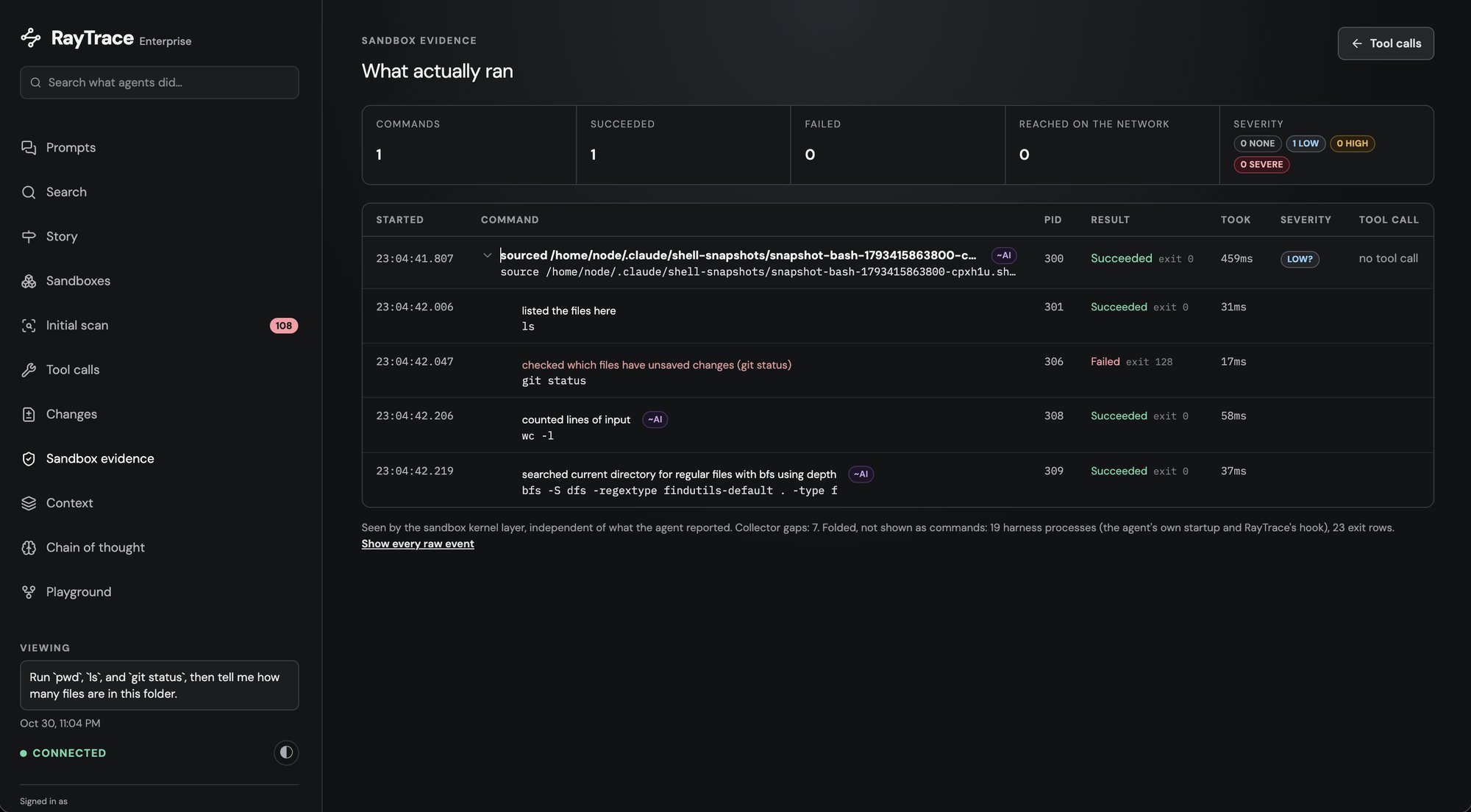
What the agent *says* it ran is in Tool calls. This page is what the sandbox
|
|
325
|
+
itself saw, recorded from outside the agent where it can't be turned off or
|
|
326
|
+
edited. You get every process in time order, with its real exit code, the files
|
|
327
|
+
it read or changed, where it connected and what it installed. Each process is
|
|
328
|
+
tied to the tool call that started it, and anything no tool call accounts for
|
|
329
|
+
shows up too.
|
|
330
|
+
|
|
331
|
+
- **Check the agent's claims:** "tests pass" against the real exit code.
|
|
332
|
+
- **Catch side effects:** a script that phoned home, a package you didn't ask
|
|
333
|
+
for, a file outside the task that got changed.
|
|
334
|
+
|
|
335
|
+
### Changes: what the prompt left different
|
|
336
|
+
|
|
337
|
+
<!-- screenshot: docs/images/changes.png -->
|
|
338
|
+
|
|
339
|
+
Every file the prompt changed, with its diff, first for the whole prompt and
|
|
340
|
+
then step by step, so you see which tool call made which change. Download it all
|
|
341
|
+
as one patch and apply it to your own checkout.
|
|
342
|
+
|
|
343
|
+
- **Review the agent's work like a pull request,** before you take it.
|
|
344
|
+
- **Take the result home:** the sandbox works on a copy, and the patch brings
|
|
345
|
+
the changes back to your machine.
|
|
346
|
+
|
|
347
|
+
### Context: what the model could see
|
|
348
|
+
|
|
349
|
+
<!-- screenshot: docs/images/context.png -->
|
|
350
|
+
|
|
351
|
+
What was in the model's context when it answered, in three parts:
|
|
352
|
+
|
|
353
|
+
- what you said earlier in the conversation;
|
|
354
|
+
- what the model brought in itself: its earlier answers, and the files it read,
|
|
355
|
+
with how much of each actually fit;
|
|
356
|
+
- what the agent's harness adds to every request.
|
|
357
|
+
|
|
358
|
+
Use it to:
|
|
359
|
+
|
|
360
|
+
- **Understand a wrong answer:** was the right file never read, or cut off?
|
|
361
|
+
- **Test a hunch:** "Rerun without this" on any file opens the Playground with
|
|
362
|
+
that file removed.
|
|
363
|
+
|
|
364
|
+
### Playground: rerun it differently, and compare
|
|
365
|
+
|
|
366
|
+
|
|
367
|
+
|
|
368
|
+
Pick any step of a session and rerun from there with something changed: an
|
|
369
|
+
earlier tool result removed or edited, a file in the project, the model, or the
|
|
370
|
+
time limit. Each rerun is a fork, a sandbox of its own started from a snapshot
|
|
371
|
+
taken just before that step, running in parallel with the others. Add a check
|
|
372
|
+
such as `npm test` and every fork is graded pass or fail. Run a change several
|
|
373
|
+
times and you get its pass rate, cost and steps, next to the same step rerun
|
|
374
|
+
unchanged.
|
|
375
|
+
|
|
376
|
+
- **Find out what actually mattered:** would it still have broken the build
|
|
377
|
+
without that misleading test output?
|
|
378
|
+
- **Compare models on your own task:** same step, same files, a different model.
|
|
379
|
+
- **Compare outcomes side by side:** each fork's answer, steps and files next to
|
|
380
|
+
the original's.
|
|
381
|
+
|
|
382
|
+
### Story and Chain of thought: why it did what it did
|
|
383
|
+
|
|
384
|
+
|
|
385
|
+
|
|
386
|
+
**Story** is the short version of a long run. It shows a timeline of only the
|
|
387
|
+
steps that mattered, the single most consequential command pulled out at the
|
|
388
|
+
top, and for each step what the agent could see, what it proposed, what really
|
|
389
|
+
happened and what that led to.
|
|
390
|
+
|
|
391
|
+
**Chain of thought** takes each tool call and lists its likely causes among what
|
|
392
|
+
the agent could see: your request, an earlier result, its own plan, or the
|
|
393
|
+
project's instructions.
|
|
394
|
+
|
|
395
|
+
Both are worked out from the recording alone, with nothing rerun. Some parts
|
|
396
|
+
use [your own key](#ai-features-on-your-own-key).
|
|
397
|
+
|
|
398
|
+
- **Explain a run to someone else** without replaying all 60 steps.
|
|
399
|
+
- **Trace a bad decision back** to the result or instruction that caused it.
|
|
400
|
+
|
|
401
|
+
### Search: across everything the agents did
|
|
402
|
+
|
|
403
|
+
<!-- screenshot: docs/images/search.png -->
|
|
404
|
+
|
|
405
|
+
Search every recorded session at once, failures first. Type free text, or use
|
|
406
|
+
filters such as `outcome:failed tool:Bash exit:>=1 file:.env`, and summarise
|
|
407
|
+
with a pipe: `| stats count by tool`. With no query, it shows the most common
|
|
408
|
+
failures lately.
|
|
409
|
+
|
|
410
|
+
- **Find patterns:** which commands fail most, and which sessions touched
|
|
411
|
+
`.env`.
|
|
412
|
+
|
|
413
|
+
### Initial scan: guard the files that matter
|
|
414
|
+
|
|
415
|
+
|
|
416
|
+
|
|
417
|
+
When a project goes into a sandbox, every file is rated from 1 to 5 for how
|
|
418
|
+
risky it is to change, with the reason. Secrets, migrations and deploy
|
|
419
|
+
configuration rate highest. You can move any file up or down, choose which
|
|
420
|
+
files to be alerted about, and **restrict** files so the agent can't change them
|
|
421
|
+
at all, whatever it tries. **Alerts** lists what the agent did to those files:
|
|
422
|
+
changes, refused edits, reads, and commands that named them.
|
|
423
|
+
|
|
424
|
+
- **Let the agent work freely** while keeping your migrations and CI config
|
|
425
|
+
off-limits.
|
|
426
|
+
|
|
427
|
+
|
|
428
|
+
- **Get told** when it touches what you care about.
|
|
429
|
+
|
|
430
|
+
### Sandboxes: where it all ran
|
|
431
|
+
|
|
432
|
+
Every sandbox, grouped by the machine it runs on, with what was asked in each.
|
|
433
|
+
Destroyed sandboxes stay listed, because their evidence outlives them.
|
|
434
|
+
|
|
435
|
+
### AI features, on your own key
|
|
436
|
+
|
|
437
|
+
Everything above works without any key. A few views can also ask a model to
|
|
438
|
+
explain a run, using **your own OpenRouter key**, billed to your OpenRouter
|
|
439
|
+
account:
|
|
177
440
|
|
|
178
441
|
```sh
|
|
179
442
|
raytrace key openrouter # paste your key from https://openrouter.ai/keys (not echoed)
|
|
@@ -186,155 +449,125 @@ raytrace key # which keys are set
|
|
|
186
449
|
| Chain of thought: the likely reasons for each tool call | Chain of thought | `qwen/qwen3-coder` |
|
|
187
450
|
| Step summaries, and plain-English lines for commands no rule describes | Tool calls, Sandbox evidence | `openai/gpt-oss-120b` |
|
|
188
451
|
|
|
189
|
-
- **
|
|
190
|
-
|
|
191
|
-
|
|
192
|
-
- **
|
|
193
|
-
|
|
194
|
-
- **What is sent:** to OpenRouter, the parts of the recorded run the feature
|
|
195
|
-
reads (the prompt, tool calls and their results, commands). Nothing goes to
|
|
196
|
-
RayTrace.
|
|
452
|
+
- **No key?** Those parts say so, and everything else works.
|
|
453
|
+
- **Cost:** each answer is kept, so opening the same prompt again is free.
|
|
454
|
+
Nothing is sent until you open a view that needs it.
|
|
455
|
+
- **What's sent:** only to OpenRouter, the parts of the run the feature reads.
|
|
456
|
+
Nothing goes to RayTrace.
|
|
197
457
|
- **Other models:** set `RAYTACE_OBSERVER_MODEL` (recap),
|
|
198
458
|
`RAYTACE_ATTRIBUTION_MODEL` (Chain of thought) or `RAYTACE_SUMMARY_MODEL`
|
|
199
459
|
(summaries) in `~/.raytrace/config.env`, then `raytrace stop && raytrace start`.
|
|
200
|
-
- **Optional
|
|
201
|
-
|
|
202
|
-
|
|
203
|
-
unranked and severity comes from rules.
|
|
460
|
+
- **Optional:** `raytrace key typesafe` adds a [TypeSafe](https://typesafe.ai)
|
|
461
|
+
key, which ranks Chain of thought's reasons and rates how severe each command
|
|
462
|
+
was.
|
|
204
463
|
- `raytrace key openrouter --remove` removes a key.
|
|
205
464
|
|
|
465
|
+
---
|
|
466
|
+
|
|
206
467
|
## Commands
|
|
207
468
|
|
|
208
469
|
| Command | What it does |
|
|
209
470
|
|---|---|
|
|
210
|
-
| `raytrace
|
|
211
|
-
| `raytrace
|
|
212
|
-
| `raytrace
|
|
213
|
-
| `raytrace sandbox
|
|
214
|
-
| `raytrace sandbox
|
|
215
|
-
| `raytrace
|
|
216
|
-
| `raytrace
|
|
217
|
-
| `raytrace
|
|
218
|
-
| `raytrace
|
|
219
|
-
| `raytrace
|
|
220
|
-
| `raytrace
|
|
221
|
-
| `raytrace
|
|
222
|
-
| `raytrace
|
|
223
|
-
| `raytrace
|
|
471
|
+
| `raytrace mcp` | the MCP server for your editor; see [Set up in your editor](#set-up-in-your-editor-mcp) |
|
|
472
|
+
| `raytrace sandbox create [--local] [--name <name>]` | copy this Git repository into a new sandbox, in the cloud or (`--local`) on this machine |
|
|
473
|
+
| `raytrace connect [id or name] [--claude \| --codex]` | open a terminal in a sandbox, optionally with an agent running in it |
|
|
474
|
+
| `raytrace sandbox list [--local]` | your sandboxes |
|
|
475
|
+
| `raytrace sandbox start\|stop <id or name>` | start or stop one; stopping keeps its files |
|
|
476
|
+
| `raytrace sandbox destroy <id or name>` | delete one. Cloud: `--keep-traces` (paid plans). Local: `--delete-logs` or `--keep-logs` |
|
|
477
|
+
| `raytrace open` | open the local dashboard |
|
|
478
|
+
| `raytrace auth login\|status\|logout` | your RayTrace sign-in, for cloud sandboxes |
|
|
479
|
+
| `raytrace upload logs [--sandbox <name>]` | send a local sandbox's recorded logs to the cloud dashboard; `raytrace upload status` shows your storage |
|
|
480
|
+
| `raytrace share <trace-id> [--fork]` | a time-limited link to one recorded prompt; `--list`, `--revoke <share-id>` |
|
|
481
|
+
| `raytrace export <trace-id> [--format json\|markdown] [--output <file>]` | export a recorded prompt to the terminal or a file, even with RayTrace stopped |
|
|
482
|
+
| `raytrace --code <code>` | redeem a beta invite code |
|
|
483
|
+
| `raytrace key [openrouter\|typesafe] [--remove]` | your keys for the dashboard's AI features |
|
|
484
|
+
| `raytrace doctor` | what this machine has and lacks |
|
|
485
|
+
|
|
486
|
+
`raytrace help` lists everything.
|
|
487
|
+
|
|
488
|
+
---
|
|
224
489
|
|
|
225
490
|
## Beta invites
|
|
226
491
|
|
|
227
|
-
If RayTrace gave you a beta code, sign in
|
|
228
|
-
sandbox — in that order:
|
|
492
|
+
If RayTrace gave you a beta code, sign in, redeem it, then create your sandbox:
|
|
229
493
|
|
|
230
494
|
```sh
|
|
231
495
|
raytrace auth login
|
|
232
|
-
raytrace --code <code>
|
|
496
|
+
raytrace --code <code>
|
|
233
497
|
raytrace sandbox create
|
|
234
498
|
```
|
|
235
499
|
|
|
236
|
-
|
|
237
|
-
|
|
238
|
-
|
|
239
|
-
|
|
240
|
-
credit ends, and the credited sandbox is tagged Beta there too. Connecting
|
|
241
|
-
to a credited sandbox after its 3 days are up warns you that model calls
|
|
242
|
-
will be refused; the sandbox itself still opens.
|
|
243
|
-
|
|
244
|
-
Codes are minted only from the backend repo (`raytrace`:
|
|
245
|
-
`python3 worker/gvisor/mint_beta_codes.py`, 10 at a time); this CLI never
|
|
246
|
-
generates them.
|
|
247
|
-
|
|
248
|
-
## Exporting traces
|
|
249
|
-
|
|
250
|
-
Export a recorded session directly from local evidence, even when RayTrace and the VM are stopped:
|
|
251
|
-
|
|
252
|
-
```sh
|
|
253
|
-
# View trace in terminal as Markdown
|
|
254
|
-
raytrace export <trace-id>
|
|
255
|
-
|
|
256
|
-
# Export structured JSON
|
|
257
|
-
raytrace export <trace-id> --format json
|
|
500
|
+
The code gives you one sandbox with $10 of model credit. Codes are single-use
|
|
501
|
+
and expire 3 days after they're issued, and the credit expires 3 days after you
|
|
502
|
+
redeem it. Your account and that sandbox show as **Beta** in the cloud dashboard
|
|
503
|
+
until then.
|
|
258
504
|
|
|
259
|
-
|
|
260
|
-
raytrace export <trace-id> --format markdown --output trace.md
|
|
261
|
-
```
|
|
505
|
+
## Privacy
|
|
262
506
|
|
|
263
|
-
|
|
507
|
+
- **Local sandboxes** keep everything on your machine, in `~/.raytrace`, readable
|
|
508
|
+
only by you. The local dashboard's API needs the token in
|
|
509
|
+
`~/.raytrace/api-token`, so other accounts on the machine can't read your
|
|
510
|
+
traces. `raytrace open` signs your browser in with a one-time link.
|
|
511
|
+
- **Cloud sandboxes** upload your project ([what is uploaded](#what-is-uploaded))
|
|
512
|
+
and record prompts, model requests and answers, tool calls and commands on
|
|
513
|
+
RayTrace's servers. Members of your organization can see them; other
|
|
514
|
+
organizations can't.
|
|
515
|
+
- **Your sign-in** is kept in the macOS Keychain or the Linux secret service (or a
|
|
516
|
+
file only you can read where neither exists). `raytrace auth logout` removes
|
|
517
|
+
it. Cloud commands ask you to sign in again after 2 days without cloud use.
|
|
264
518
|
|
|
265
|
-
##
|
|
519
|
+
## Troubleshooting
|
|
266
520
|
|
|
267
|
-
|
|
268
|
-
|
|
269
|
-
|
|
270
|
-
-
|
|
271
|
-
|
|
272
|
-
|
|
273
|
-
|
|
274
|
-
|
|
275
|
-
|
|
276
|
-
-
|
|
277
|
-
|
|
278
|
-
|
|
279
|
-
|
|
280
|
-
|
|
281
|
-
-
|
|
282
|
-
|
|
283
|
-
|
|
284
|
-
|
|
521
|
+
- **The MCP server doesn't show up in my editor:** restart the editor after
|
|
522
|
+
adding it. In Claude Code, `claude mcp list` shows whether it's connected.
|
|
523
|
+
Check that `node --version` is 22.13 or newer.
|
|
524
|
+
- **No terminal opened after "connect":** the agent's reply has the command to
|
|
525
|
+
paste, such as `raytrace connect my-box --claude`. On macOS, allow your editor
|
|
526
|
+
to control your terminal app in **System Settings → Privacy & Security →
|
|
527
|
+
Automation**.
|
|
528
|
+
- **The first local sandbox is taking long:** setting up the VM takes a few
|
|
529
|
+
minutes. Ask the agent for the sandbox status, or read
|
|
530
|
+
`~/.raytrace/logs/mcp-create-<name>-*.log`. The whole VM log is in
|
|
531
|
+
`~/.raytrace/logs/sandbox-vm.log`.
|
|
532
|
+
- **`sandbox create --local` says the machine isn't ready:** each line says
|
|
533
|
+
what's missing and how to fix it; `raytrace doctor` shows the same. Port 8798
|
|
534
|
+
in use usually means another Lima VM is running (`limactl list`).
|
|
535
|
+
- **A local sandbox's sessions don't show in the dashboard:** restart RayTrace
|
|
536
|
+
with `raytrace stop && raytrace start`.
|
|
537
|
+
- **The dashboard says this browser isn't signed in:** run `raytrace open`.
|
|
538
|
+
- **`Cannot reach RayTrace at https://api.raytracer.si`:** check your
|
|
539
|
+
connection. Networks that inspect HTTPS, such as some company Wi-Fi, can block
|
|
540
|
+
it.
|
|
541
|
+
- **A sandbox isn't found:** `raytrace auth status` shows which account you're
|
|
542
|
+
signed in as. Sandboxes belong to the account that made them.
|
|
285
543
|
|
|
286
544
|
## Uninstall
|
|
287
545
|
|
|
288
546
|
```sh
|
|
289
|
-
raytrace sandbox destroy <
|
|
547
|
+
raytrace sandbox destroy <id or name> # any sandboxes you no longer need
|
|
548
|
+
raytrace uninstall --purge # local sandboxes: deletes the VM and ~/.raytrace
|
|
290
549
|
raytrace auth logout
|
|
291
550
|
npm uninstall -g @raytrace-cli/cli
|
|
551
|
+
claude mcp remove raytrace -s user # if you added the MCP server to Claude Code
|
|
292
552
|
```
|
|
293
553
|
|
|
294
|
-
|
|
295
|
-
`~/.raytrace/evidence.db` in place (your recorded sessions are kept), and older
|
|
296
|
-
versions cannot open it afterwards.
|
|
297
|
-
|
|
298
|
-
With local sandboxes, run `raytrace uninstall --purge` before removing the
|
|
299
|
-
package: it deletes the local sandbox VM and everything in `~/.raytrace`
|
|
300
|
-
(recorded sessions, archived logs, and the Lima RayTrace downloaded). Without
|
|
301
|
-
`--purge`, remove the VM yourself with `limactl delete --force raytrace`.
|
|
302
|
-
|
|
303
|
-
If you set up local recording with an earlier version, run
|
|
304
|
-
`raytrace uninstall` before removing the package so Claude Code is not left
|
|
305
|
-
with a hook that points at a missing command.
|
|
306
|
-
|
|
307
|
-
## Troubleshooting
|
|
308
|
-
|
|
309
|
-
- **`Cannot reach RayTrace at https://api.raytracer.si`:** check your
|
|
310
|
-
connection. Networks that inspect HTTPS, such as some company Wi-Fi, can
|
|
311
|
-
block it; try another network.
|
|
312
|
-
- **Sign-in or sandbox creation fails:** run `raytrace auth status`, and
|
|
313
|
-
`raytrace auth login` again if needed. Create the sandbox from inside a Git
|
|
314
|
-
repository.
|
|
315
|
-
- **A local sandbox's Claude Code sessions do not show in the dashboard:**
|
|
316
|
-
RayTrace's proxy may be from before local sandboxes. Restart it:
|
|
317
|
-
`raytrace stop && raytrace start`. `sandbox create --local` warns about this.
|
|
318
|
-
- **The dashboard says this browser is not signed in:** run `raytrace open`.
|
|
319
|
-
Each browser signs in once, for 30 days; a bookmark to the dashboard then
|
|
320
|
-
keeps working.
|
|
321
|
-
- **`sandbox create --local` says the machine is not ready:** each line names
|
|
322
|
-
what is missing and how to fix it; `raytrace doctor` shows the same. Port
|
|
323
|
-
8798 in use usually means another Lima VM is running (`limactl list`).
|
|
324
|
-
- **The VM fails to start or set up:** the last lines are shown; the whole
|
|
325
|
-
log is in `~/.raytrace/logs/sandbox-vm.log`.
|
|
326
|
-
- **`raytrace connect` asks for a sandbox id:** run `raytrace sandbox list` and
|
|
327
|
-
pass the one you want. The id is optional only when you have one sandbox.
|
|
554
|
+
Without `--purge`, remove the VM yourself with `limactl delete --force raytrace`.
|
|
328
555
|
|
|
329
556
|
## Developing
|
|
330
557
|
|
|
331
558
|
```sh
|
|
332
559
|
npm install
|
|
333
|
-
npm run build
|
|
334
|
-
npm run dashboard:dev
|
|
560
|
+
npm run build # dashboard -> dist/dashboard
|
|
561
|
+
npm run dashboard:dev # dashboard with hot reload, API from a running RayTrace
|
|
335
562
|
npm run typecheck
|
|
563
|
+
npm test
|
|
336
564
|
node bin/raytrace.mjs <command> # run the CLI from this folder
|
|
337
|
-
|
|
565
|
+
```
|
|
566
|
+
|
|
567
|
+
To use your checkout as the MCP server in Claude Code:
|
|
568
|
+
|
|
569
|
+
```sh
|
|
570
|
+
claude mcp add --scope user raytrace -- node /path/to/raytrace-cli/bin/raytrace.mjs mcp
|
|
338
571
|
```
|
|
339
572
|
|
|
340
573
|
To try it without touching your real setup, give it its own home and port:
|