@raytrace-cli/cli 0.3.0 → 0.5.0
This diff represents the content of publicly available package versions that have been released to one of the supported registries. The information contained in this diff is provided for informational purposes only and reflects changes between package versions as they appear in their respective public registries.
- package/README.md +155 -132
- package/bin/raytrace.mjs +51 -26
- package/dist/dashboard/assets/dm-sans-latin-400-normal-BwCSEQnW.woff +0 -0
- package/dist/dashboard/assets/dm-sans-latin-400-normal-CW0RaeGs.woff2 +0 -0
- package/dist/dashboard/assets/dm-sans-latin-500-normal-B9HHJjqV.woff2 +0 -0
- package/dist/dashboard/assets/dm-sans-latin-500-normal-Dr3UlScf.woff +0 -0
- package/dist/dashboard/assets/dm-sans-latin-600-normal-Aqo67rzb.woff2 +0 -0
- package/dist/dashboard/assets/dm-sans-latin-600-normal-BmdmIIQ2.woff +0 -0
- package/dist/dashboard/assets/dm-sans-latin-700-normal-CUSSCpQX.woff +0 -0
- package/dist/dashboard/assets/dm-sans-latin-700-normal-DvUfVpUG.woff2 +0 -0
- package/dist/dashboard/assets/dm-sans-latin-ext-400-normal-BjWJ59Pq.woff +0 -0
- package/dist/dashboard/assets/dm-sans-latin-ext-400-normal-BtiwyxMk.woff2 +0 -0
- package/dist/dashboard/assets/dm-sans-latin-ext-500-normal-BJfUCQsA.woff2 +0 -0
- package/dist/dashboard/assets/dm-sans-latin-ext-500-normal-DR84L5F-.woff +0 -0
- package/dist/dashboard/assets/dm-sans-latin-ext-600-normal-4vooXBpG.woff2 +0 -0
- package/dist/dashboard/assets/dm-sans-latin-ext-600-normal-DRtaDpgU.woff +0 -0
- package/dist/dashboard/assets/dm-sans-latin-ext-700-normal-BLI3TTWz.woff +0 -0
- package/dist/dashboard/assets/dm-sans-latin-ext-700-normal-CJIcxD6K.woff2 +0 -0
- package/dist/dashboard/assets/ibm-plex-mono-cyrillic-400-normal-BSMlKf0J.woff2 +0 -0
- package/dist/dashboard/assets/ibm-plex-mono-cyrillic-400-normal-CEL4l2ZJ.woff +0 -0
- package/dist/dashboard/assets/ibm-plex-mono-cyrillic-500-normal-Ael50iVv.woff +0 -0
- package/dist/dashboard/assets/ibm-plex-mono-cyrillic-500-normal-Bq9vWWag.woff2 +0 -0
- package/dist/dashboard/assets/ibm-plex-mono-cyrillic-600-normal-CTOM6hUh.woff2 +0 -0
- package/dist/dashboard/assets/ibm-plex-mono-cyrillic-600-normal-fLZuRloM.woff +0 -0
- package/dist/dashboard/assets/ibm-plex-mono-cyrillic-ext-400-normal-DMdlQ8Kv.woff +0 -0
- package/dist/dashboard/assets/ibm-plex-mono-cyrillic-ext-400-normal-xuaO2J-f.woff2 +0 -0
- package/dist/dashboard/assets/ibm-plex-mono-cyrillic-ext-500-normal-BIfNGwUT.woff +0 -0
- package/dist/dashboard/assets/ibm-plex-mono-cyrillic-ext-500-normal-BqneJy0T.woff2 +0 -0
- package/dist/dashboard/assets/ibm-plex-mono-cyrillic-ext-600-normal-9HEixskS.woff +0 -0
- package/dist/dashboard/assets/ibm-plex-mono-cyrillic-ext-600-normal-V-xxqcpd.woff2 +0 -0
- package/dist/dashboard/assets/ibm-plex-mono-latin-400-normal-CvHOgSBP.woff +0 -0
- package/dist/dashboard/assets/ibm-plex-mono-latin-400-normal-DMJ8VG8y.woff2 +0 -0
- package/dist/dashboard/assets/ibm-plex-mono-latin-500-normal-CB9ihrfo.woff +0 -0
- package/dist/dashboard/assets/ibm-plex-mono-latin-500-normal-DSY6xOcd.woff2 +0 -0
- package/dist/dashboard/assets/ibm-plex-mono-latin-600-normal-BgSNZQsw.woff2 +0 -0
- package/dist/dashboard/assets/ibm-plex-mono-latin-600-normal-DWFSQ4vo.woff +0 -0
- package/dist/dashboard/assets/ibm-plex-mono-latin-ext-400-normal-BmRBH3aV.woff2 +0 -0
- package/dist/dashboard/assets/ibm-plex-mono-latin-ext-400-normal-D3D2R8hC.woff +0 -0
- package/dist/dashboard/assets/ibm-plex-mono-latin-ext-500-normal-CAhNIIs5.woff2 +0 -0
- package/dist/dashboard/assets/ibm-plex-mono-latin-ext-500-normal-CZ70TYgx.woff +0 -0
- package/dist/dashboard/assets/ibm-plex-mono-latin-ext-600-normal-D38SheWl.woff2 +0 -0
- package/dist/dashboard/assets/ibm-plex-mono-latin-ext-600-normal-DmB0ttJJ.woff +0 -0
- package/dist/dashboard/assets/ibm-plex-mono-vietnamese-400-normal-BulugwFq.woff2 +0 -0
- package/dist/dashboard/assets/ibm-plex-mono-vietnamese-400-normal-DDuiU_S-.woff +0 -0
- package/dist/dashboard/assets/ibm-plex-mono-vietnamese-500-normal-C8zxqsMH.woff +0 -0
- package/dist/dashboard/assets/ibm-plex-mono-vietnamese-500-normal-DZ4AoWbu.woff2 +0 -0
- package/dist/dashboard/assets/ibm-plex-mono-vietnamese-600-normal-D2EvbN8M.woff2 +0 -0
- package/dist/dashboard/assets/ibm-plex-mono-vietnamese-600-normal-iLQfcSjf.woff +0 -0
- package/dist/dashboard/assets/index-DtV3UdEB.css +1 -0
- package/dist/dashboard/assets/index-jyV5iYHJ.js +38 -0
- package/dist/dashboard/index.html +2 -2
- package/package.json +3 -1
- package/proxy/call-assessment.mjs +385 -0
- package/proxy/call-category.mjs +461 -0
- package/proxy/capture.mjs +31 -0
- package/proxy/claude-code-adapter.mjs +46 -3
- package/proxy/evidence-store.mjs +617 -15
- package/proxy/exec-narrative.mjs +625 -0
- package/proxy/execution-correlation.mjs +185 -0
- package/proxy/experiment-engine.mjs +7 -4
- package/proxy/failure-signature.mjs +56 -0
- package/proxy/gvisor-forwarder.mjs +454 -0
- package/proxy/init-evidence-db.mjs +136 -12
- package/proxy/local-sandboxes.mjs +94 -0
- package/proxy/playground.mjs +411 -0
- package/proxy/prompt-context.mjs +12 -7
- package/proxy/prompt-traces.mjs +6 -0
- package/proxy/raytace-proxy.mjs +460 -176
- package/proxy/run-recap.mjs +139 -0
- package/proxy/runtime-attribution.mjs +110 -0
- package/proxy/sandbox-bridge.mjs +46 -0
- package/proxy/schema/EVIDENCE_DATABASE.md +276 -0
- package/proxy/schema/auxiliary.sql +48 -1
- package/proxy/schema/classification.sql +89 -0
- package/proxy/schema/file_context.sql +53 -0
- package/proxy/schema/runtime_evidence.sql +201 -0
- package/proxy/schema/search.sql +66 -0
- package/proxy/search.mjs +418 -0
- package/proxy/step-attribution.mjs +380 -0
- package/proxy/tool-metadata.mjs +36 -0
- package/proxy/trace-view.mjs +276 -0
- package/proxy/typesafe.mjs +63 -0
- package/src/auth.mjs +8 -1
- package/src/commands.mjs +80 -12
- package/src/lima.mjs +135 -0
- package/src/local-sandbox.mjs +324 -0
- package/src/proxy-process.mjs +20 -1
- package/src/sandbox.mjs +24 -6
- package/worker/sandbox/Dockerfile +8 -0
- package/worker/sandbox/SYSCALL_CATALOG.md +197 -0
- package/worker/sandbox/claude-hook.mjs +331 -0
- package/worker/sandbox/collector.py +357 -0
- package/worker/sandbox/dns_forwarder.py +255 -0
- package/worker/sandbox/engine.py +940 -0
- package/worker/sandbox/file_scan.py +491 -0
- package/worker/sandbox/lima.yaml +29 -0
- package/worker/sandbox/network.py +90 -0
- package/worker/sandbox/projects.py +678 -0
- package/worker/sandbox/setup.py +159 -0
- package/worker/sandbox/syscall_catalog.sql +985 -0
- package/worker/sandbox/viewer.py +132 -0
- package/dist/dashboard/assets/index-BQ9_JxGq.js +0 -27
- package/dist/dashboard/assets/index-L5cUAvhE.css +0 -1
package/README.md
CHANGED
|
@@ -3,14 +3,16 @@
|
|
|
3
3
|
**See what your coding agent actually did.**
|
|
4
4
|
|
|
5
5
|
[ npm package ](https://www.npmjs.com/package/@raytrace-cli/cli) ·
|
|
6
|
-
[ Quick start ](#quick-start) · [
|
|
6
|
+
[ Quick start ](#quick-start) · [ Cloud sandboxes ](#cloud-sandboxes-preview) ·
|
|
7
|
+
[ Local sandboxes ](#local-sandboxes) ·
|
|
7
8
|
[ Privacy ](#privacy) · [ Report an issue ](https://github.com/Godcreatebugs/raytrace-cli/issues)
|
|
8
9
|
|
|
9
10
|
Your agent finished the task. Which files did it read? What commands did it run?
|
|
10
11
|
Where did the tokens and money go?
|
|
11
12
|
|
|
12
|
-
RayTrace turns Claude Code and Codex sessions into a dashboard you can explore
|
|
13
|
-
|
|
13
|
+
RayTrace turns Claude Code and Codex sessions into a dashboard you can explore:
|
|
14
|
+
prompts, answers, tool calls, cost, and captured context. Run your agent in a
|
|
15
|
+
RayTrace cloud sandbox and review every session with your team.
|
|
14
16
|
|
|
15
17
|
|
|
16
18
|
|
|
@@ -21,85 +23,28 @@ on your own machine: prompts, answers, tool calls, cost, and captured context.
|
|
|
21
23
|
- **Understand the cost.** See model, token usage, time, and cost when available.
|
|
22
24
|
- **Explore the context.** Review earlier conversation and files brought into the task.
|
|
23
25
|
|
|
24
|
-
Session capture and the dashboard work locally. Claude Code recording needs no
|
|
25
|
-
OpenRouter key; optional AI summaries and the Codex launcher do. See [Privacy](#privacy)
|
|
26
|
-
for what those features send outside your machine.
|
|
27
|
-
|
|
28
|
-
**New: [cloud sandboxes](#cloud-sandboxes-preview) (preview).** Run your agent
|
|
29
|
-
in an isolated sandbox on RayTrace's servers instead of your laptop, and review
|
|
30
|
-
every session with your team at [app.raytracer.si](https://app.raytracer.si).
|
|
31
|
-
|
|
32
26
|
## Quick start
|
|
33
27
|
|
|
34
28
|
You need **Node.js 22.13 or newer** (`node --version`). macOS and Linux are
|
|
35
|
-
supported.
|
|
29
|
+
supported. To keep your project on your own machine instead, see
|
|
30
|
+
[Local sandboxes](#local-sandboxes).
|
|
36
31
|
|
|
37
32
|
```sh
|
|
38
33
|
npm install -g @raytrace-cli/cli
|
|
39
|
-
raytrace
|
|
34
|
+
raytrace auth login # opens your browser: sign in, or create your account
|
|
35
|
+
cd your-project # any Git repository
|
|
36
|
+
raytrace sandbox create # uploads it to a new cloud sandbox and prints its id
|
|
37
|
+
raytrace connect <sandbox-id> # a terminal in the sandbox: run claude or codex there
|
|
40
38
|
```
|
|
41
39
|
|
|
42
|
-
`
|
|
43
|
-
|
|
44
|
-
1. **Record Claude Code sessions?** It adds a small hook to
|
|
45
|
-
`~/.claude/settings.json`. Your other settings and hooks are left as they
|
|
46
|
-
are, and the previous file is kept as `settings.json.raytrace-backup`.
|
|
47
|
-
2. **An OpenRouter API key** (optional, Enter to skip). It turns on one-line
|
|
48
|
-
step summaries and `raytrace codex`.
|
|
49
|
-
|
|
50
|
-
Then it starts RayTrace and opens the dashboard at **http://127.0.0.1:8797**.
|
|
51
|
-
|
|
52
|
-
Install globally (`-g`): the Claude Code hook runs the `raytrace` command, so it
|
|
53
|
-
has to stay on your PATH.
|
|
54
|
-
|
|
55
|
-
### See your first trace
|
|
56
|
-
|
|
57
|
-
Use Claude Code as you normally do. Try a small task such as:
|
|
58
|
-
|
|
59
|
-
> List the files in this project and explain where the main entry point is.
|
|
60
|
-
|
|
61
|
-
After the agent answers, open **Prompts** in the dashboard. Select your prompt,
|
|
62
|
-
then choose **Tool calls** to follow the work or **Context** to inspect what
|
|
63
|
-
was brought into the task.
|
|
64
|
-
|
|
65
|
-
For Codex, add an OpenRouter key during setup and start it through RayTrace:
|
|
66
|
-
|
|
67
|
-
```sh
|
|
68
|
-
raytrace codex # pass Codex arguments after this command
|
|
69
|
-
```
|
|
70
|
-
|
|
71
|
-
## Dashboard tour
|
|
72
|
-
|
|
73
|
-
### Prompts — find the conversation
|
|
74
|
-
|
|
75
|
-
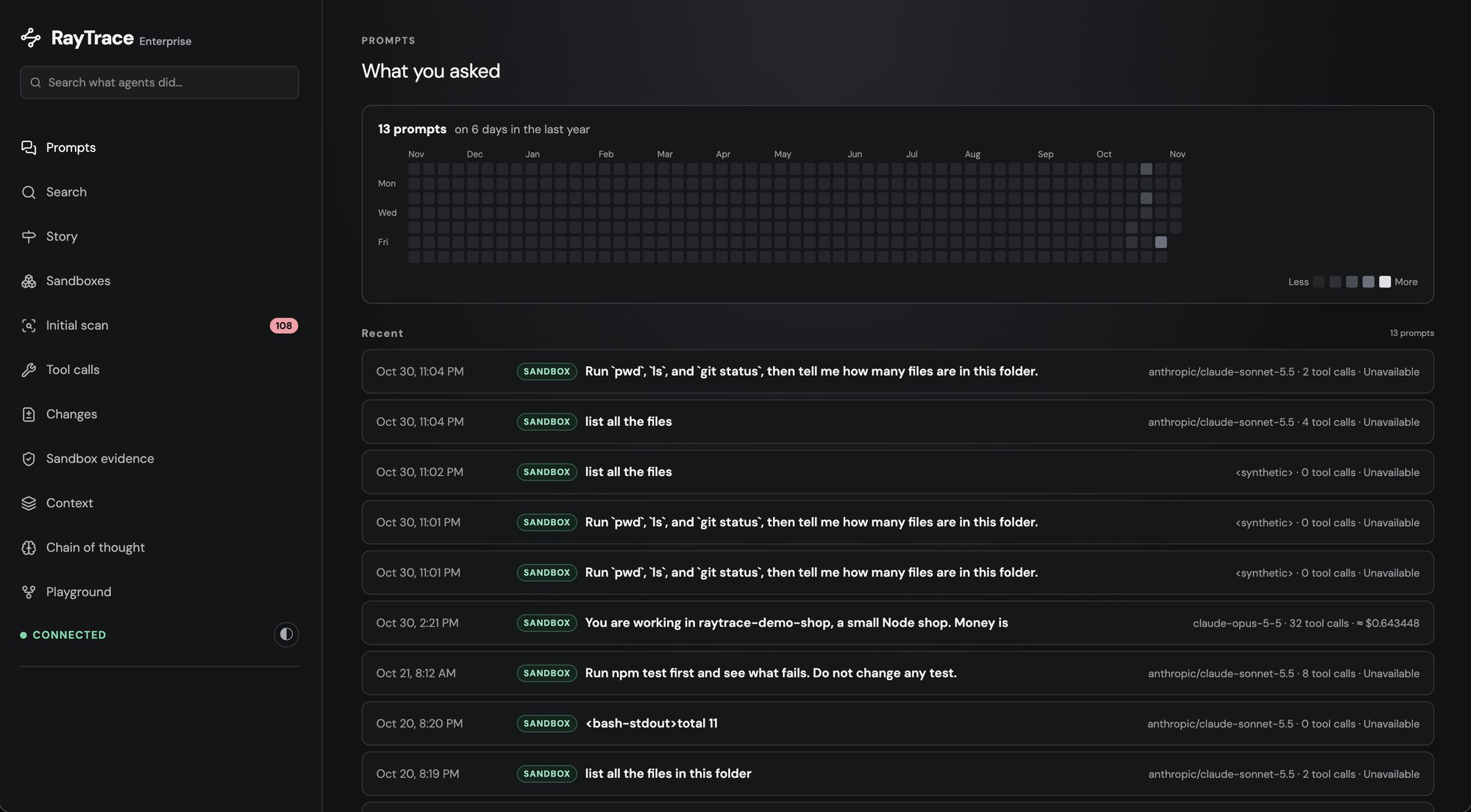
Browse your prompt history, revisit answers, and see activity across the year.
|
|
76
|
-
Each prompt links to its tool calls and context, with model and cost information
|
|
77
|
-
alongside it when available.
|
|
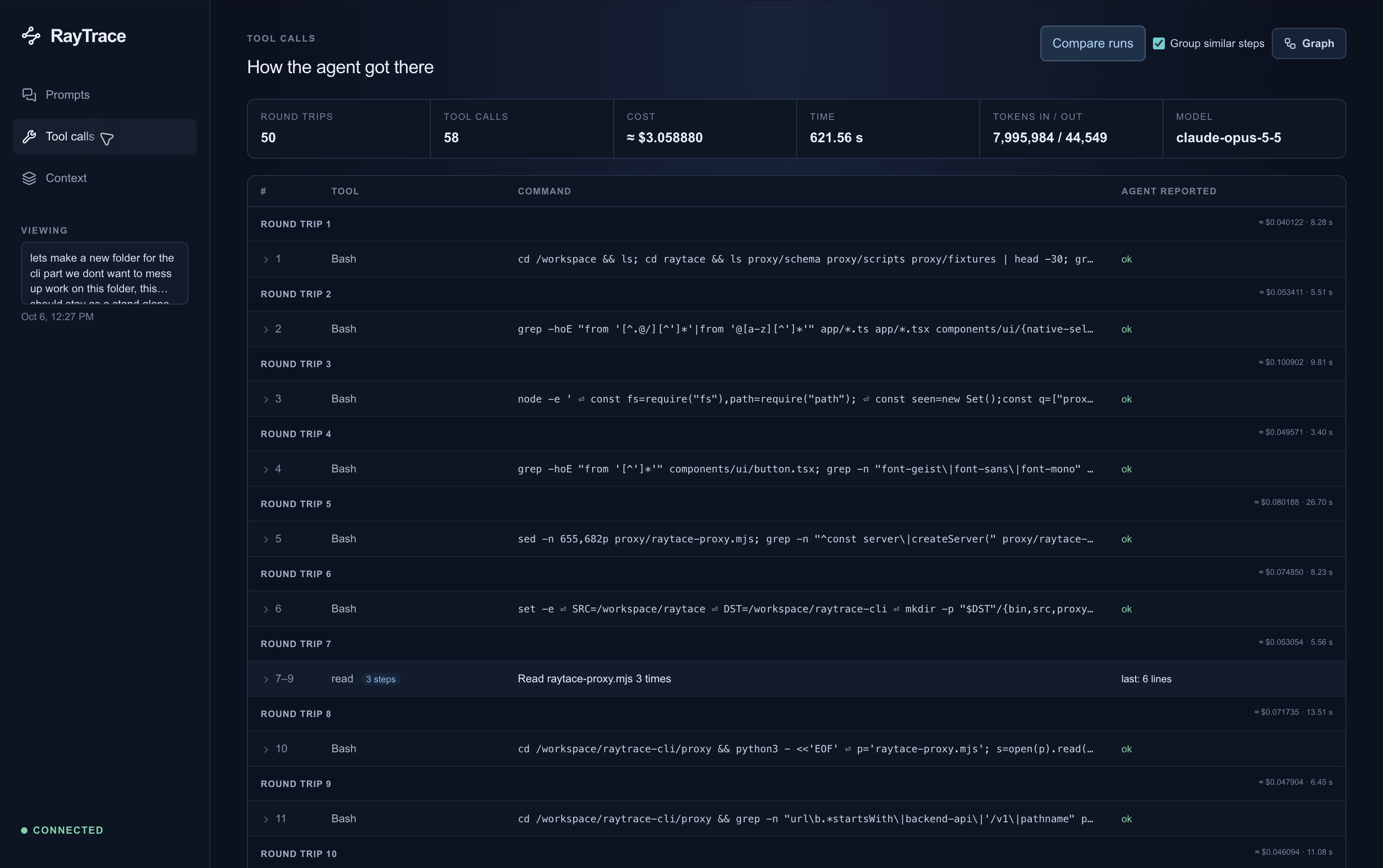
78
|
-
|
|
79
|
-
|
|
80
|
-
|
|
81
|
-
### Tool calls — follow each step
|
|
82
|
-
|
|
83
|
-
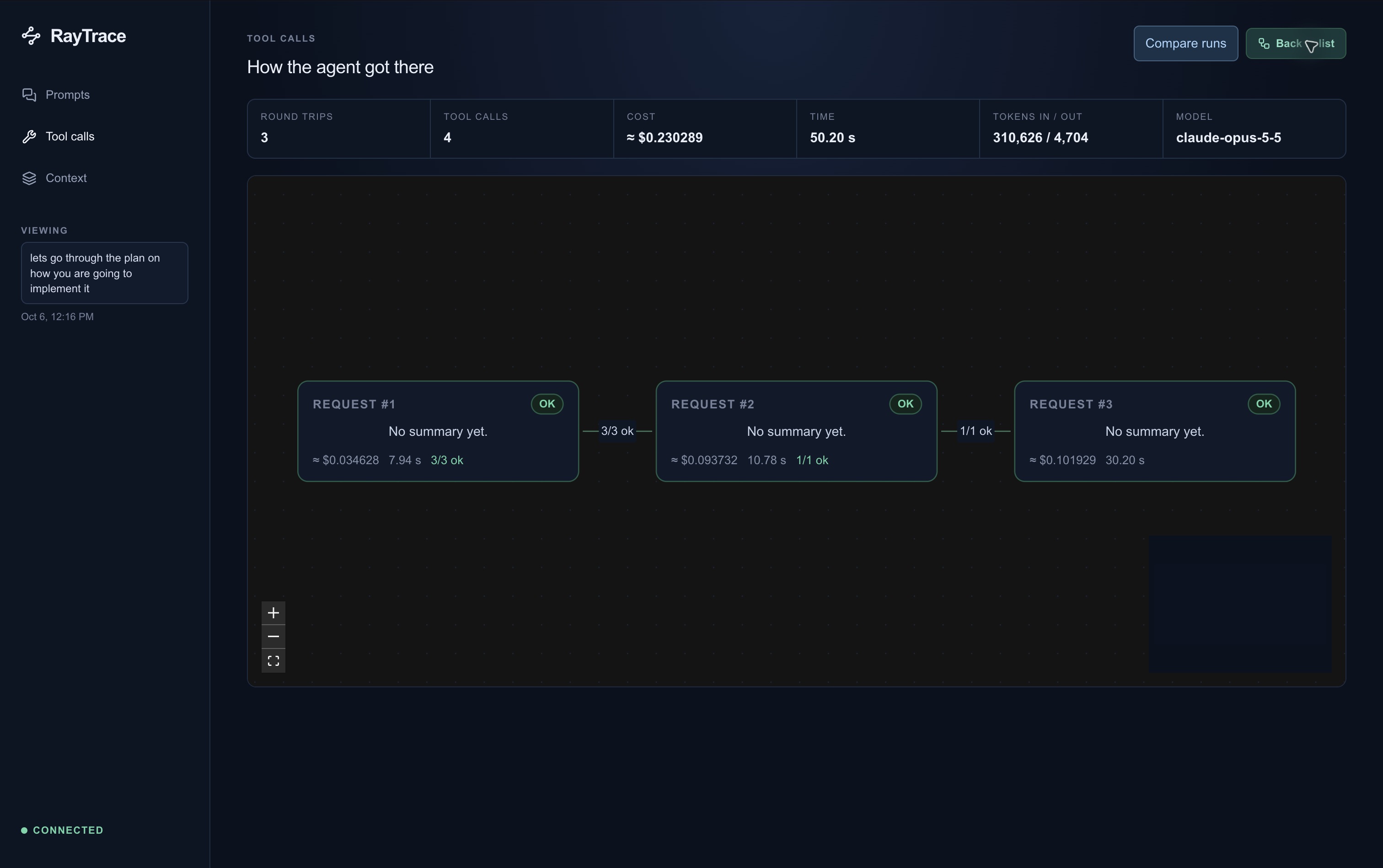
The timeline shows the commands the agent chose, their reported results, and
|
|
84
|
-
metrics for each model round trip. Expand a row for details, group similar steps,
|
|
85
|
-
or switch to **Graph** to follow the sequence visually.
|
|
86
|
-
|
|
87
|
-
|
|
88
|
-
|
|
89
|
-
*Graph view works without AI summaries; an optional OpenRouter key adds short descriptions.*
|
|
90
|
-
|
|
91
|
-
### Context — inspect what informed the answer
|
|
92
|
-
|
|
93
|
-
Explore earlier prompts, files read during the task, and captured internal
|
|
94
|
-
instructions. Open a file entry to inspect the text associated with it. Token
|
|
95
|
-
counts and file-use indicators help you explore what contributed to the context.
|
|
40
|
+
`auth login` prints a short code and opens the sign-in page. New here? Create
|
|
41
|
+
your account on that page, approve the code, and come back to the terminal.
|
|
96
42
|
|
|
97
|
-
|
|
98
|
-
|
|
99
|
-
|
|
100
|
-
|
|
101
|
-
|
|
102
|
-
are approximate; file reads inferred from shell commands are marked in the UI.*
|
|
43
|
+
Then open **[app.raytracer.si](https://app.raytracer.si)** to review the
|
|
44
|
+
session with your team: prompts, tool calls, and the commands that actually
|
|
45
|
+
ran. You can also create the sandbox there, by dropping a project folder on the
|
|
46
|
+
Sandboxes page. RayTrace asks you for no API key. See
|
|
47
|
+
[Cloud sandboxes](#cloud-sandboxes-preview) for what is uploaded and the limits.
|
|
103
48
|
|
|
104
49
|
## Cloud sandboxes (preview)
|
|
105
50
|
|
|
@@ -108,19 +53,15 @@ a terminal you open from your machine. Run Claude Code or Codex inside it: what
|
|
|
108
53
|
the agent asked, the tool calls it made, and the commands that actually ran are
|
|
109
54
|
recorded for your organization.
|
|
110
55
|
|
|
111
|
-
|
|
112
|
-
raytrace
|
|
113
|
-
|
|
114
|
-
raytrace sandbox create # upload it to a new sandbox
|
|
115
|
-
raytrace connect # a terminal in the sandbox: run claude or codex there
|
|
116
|
-
```
|
|
56
|
+
The [quick start](#quick-start) has the commands. If you skip `raytrace auth
|
|
57
|
+
login`, `raytrace sandbox create` and `raytrace connect` start the same sign-in
|
|
58
|
+
first. With one sandbox, `raytrace connect` works without the id.
|
|
117
59
|
|
|
118
|
-
|
|
119
|
-
|
|
120
|
-
|
|
121
|
-
|
|
122
|
-
|
|
123
|
-
them: `raytrace auth status` says which one the CLI is using.
|
|
60
|
+
At **[app.raytracer.si](https://app.raytracer.si)**, sign in with the same
|
|
61
|
+
account to see your organization's prompts, sandboxes and tool calls. A sandbox
|
|
62
|
+
created there shows the command to open it, `raytrace connect <sandbox-id>`.
|
|
63
|
+
Sandboxes belong to the account that made them: `raytrace auth status` says
|
|
64
|
+
which one the CLI is using.
|
|
124
65
|
|
|
125
66
|
- **What is uploaded:** the files Git would track in the repository (including
|
|
126
67
|
new files it does not ignore), without `.git`, dependencies such as
|
|
@@ -141,55 +82,118 @@ them: `raytrace auth status` says which one the CLI is using.
|
|
|
141
82
|
Cloud sandboxes are a preview and may change; please
|
|
142
83
|
[report issues](https://github.com/Godcreatebugs/raytrace-cli/issues) you run into.
|
|
143
84
|
|
|
85
|
+
## Local sandboxes
|
|
86
|
+
|
|
87
|
+
Prefer to keep your project on your own machine? Run the same sandbox locally.
|
|
88
|
+
It is open source and needs no RayTrace account.
|
|
89
|
+
|
|
90
|
+
```sh
|
|
91
|
+
cd your-project
|
|
92
|
+
raytrace sandbox create --local --name my-box # first run sets up a Linux VM; a few minutes
|
|
93
|
+
raytrace connect my-box # a terminal in it: run claude there
|
|
94
|
+
raytrace sandbox destroy my-box # asks whether to delete its logs too
|
|
95
|
+
```
|
|
96
|
+
|
|
97
|
+
- **How it runs:** a Linux VM made with [Lima](https://lima-vm.io), and inside
|
|
98
|
+
it each sandbox in a Docker container under [gVisor](https://gvisor.dev),
|
|
99
|
+
with no access to your machine's files or private networks. A copy of the
|
|
100
|
+
project goes in, picked the same way as for a cloud sandbox; your own files
|
|
101
|
+
are never changed. `--name` defaults to the repository folder's name.
|
|
102
|
+
- **What is recorded:** the commands, file changes and network connections the
|
|
103
|
+
sandbox makes, by a collector outside it that the agent cannot turn off,
|
|
104
|
+
and its Claude Code sessions. All of it is in your local dashboard
|
|
105
|
+
(`raytrace open`): **Sandboxes** lists each sandbox with its prompts, and
|
|
106
|
+
**Sandbox evidence** shows, for one prompt, every command that actually ran,
|
|
107
|
+
its exit code and what it reached on the network, each joined to the tool
|
|
108
|
+
call that ran it. The raw collector feed is at http://localhost:8798.
|
|
109
|
+
Nothing leaves your machine.
|
|
110
|
+
- **Changes:** the sandbox's Claude Code hook snapshots the project after
|
|
111
|
+
every edit, so **Changes** shows what each prompt left different, file by
|
|
112
|
+
file, with a patch to take home.
|
|
113
|
+
- **Playground:** rerun a session from any step with part of it changed (a
|
|
114
|
+
tool result, a file, the model, the message) and compare where it ends up,
|
|
115
|
+
optionally with a check command such as `npm test` as pass or fail. Each
|
|
116
|
+
rerun is a fork: a sandbox of its own in the VM, started from the snapshot
|
|
117
|
+
just before that step, running Claude Code on the sign-in you made in the
|
|
118
|
+
sandbox (so it uses your Claude account). The newest fork is kept, stopped,
|
|
119
|
+
for a day; destroying a sandbox destroys its forks.
|
|
120
|
+
- **Signing in to your agent:** run `claude` inside the sandbox and sign in.
|
|
121
|
+
RayTrace passes no key in. The sign-in stays in the sandbox until you destroy it.
|
|
122
|
+
- **Destroying it:** `raytrace sandbox destroy <name>` deletes the sandbox and
|
|
123
|
+
asks whether to delete the logs captured in it as well. Yes deletes them
|
|
124
|
+
everywhere, dashboard included, Playground forks too. No moves them to
|
|
125
|
+
`~/.raytrace/archive/<name>-<time>/` (Claude Code transcripts, its forks'
|
|
126
|
+
under `forks/`, and the recorded commands, files and connections as JSON
|
|
127
|
+
lines), and its sessions stay in your dashboard. `--delete-logs` or `--keep-logs` answers without
|
|
128
|
+
asking.
|
|
129
|
+
- **What you need:** nothing to install on macOS 13.5 or later. RayTrace
|
|
130
|
+
uses [Lima](https://lima-vm.io) for the VM: yours if you have Lima 2.0 or
|
|
131
|
+
later, otherwise it offers to download Lima's own release into
|
|
132
|
+
`~/.raytrace/lima` (no admin rights; checked against a pinned checksum).
|
|
133
|
+
Docker, gVisor and the agents are installed inside the VM, not on your
|
|
134
|
+
machine. On Linux, also QEMU and access to `/dev/kvm`. On macOS before
|
|
135
|
+
13.5, QEMU (`brew install qemu`). `raytrace doctor` shows what is missing,
|
|
136
|
+
and `create --local` says so before it starts. First run downloads about
|
|
137
|
+
1 GB (Lima, Ubuntu, packages); the VM uses 4 GiB of memory while it runs.
|
|
138
|
+
- **Platforms:** macOS and Linux. Windows is experimental: Lima's Windows
|
|
139
|
+
support is itself experimental, and RayTrace does not download Lima there.
|
|
140
|
+
- **The VM:** `limactl stop raytrace` frees its memory; `limactl delete
|
|
141
|
+
raytrace` removes it.
|
|
142
|
+
|
|
143
|
+
## AI features, on your own key
|
|
144
|
+
|
|
145
|
+
The dashboard records and shows everything above without any key. A few
|
|
146
|
+
views can also ask a model to explain a run; locally they use **your own
|
|
147
|
+
OpenRouter key**, and the calls are billed to your OpenRouter account.
|
|
148
|
+
|
|
149
|
+
```sh
|
|
150
|
+
raytrace key openrouter # paste your key from https://openrouter.ai/keys (not echoed)
|
|
151
|
+
raytrace key # which keys are set
|
|
152
|
+
```
|
|
153
|
+
|
|
154
|
+
| Feature | Where | Model (default) |
|
|
155
|
+
|---|---|---|
|
|
156
|
+
| Run recap: what the agent did and why, in a few lines | Story, Chain of thought | `anthropic/claude-sonnet-5.5` |
|
|
157
|
+
| Chain of thought: the likely reasons for each tool call | Chain of thought | `qwen/qwen3-coder` |
|
|
158
|
+
| Step summaries, and plain-English lines for commands no rule describes | Tool calls, Sandbox evidence | `openai/gpt-oss-120b` |
|
|
159
|
+
|
|
160
|
+
- **Without a key** those parts say so and everything else works: Story's key
|
|
161
|
+
moments, Chain of thought's unranked reasons and the rule-based command
|
|
162
|
+
descriptions need no model.
|
|
163
|
+
- **Cost:** each answer is kept, so opening the same prompt again costs
|
|
164
|
+
nothing. Nothing is sent until you open a view that needs it.
|
|
165
|
+
- **What is sent:** to OpenRouter, the parts of the recorded run the feature
|
|
166
|
+
reads (the prompt, tool calls and their results, commands). Nothing goes to
|
|
167
|
+
RayTrace.
|
|
168
|
+
- **Other models:** set `RAYTACE_OBSERVER_MODEL` (recap),
|
|
169
|
+
`RAYTACE_ATTRIBUTION_MODEL` (Chain of thought) or `RAYTACE_SUMMARY_MODEL`
|
|
170
|
+
(summaries) in `~/.raytrace/config.env`, then `raytrace stop && raytrace start`.
|
|
171
|
+
- **Optional, Jev ranking:** `raytrace key typesafe` adds a
|
|
172
|
+
[TypeSafe](https://typesafe.ai) key, which ranks Chain of thought's reasons
|
|
173
|
+
and rates how severe each command was. Without it the reasons are listed
|
|
174
|
+
unranked and severity comes from rules.
|
|
175
|
+
- `raytrace key openrouter --remove` removes a key.
|
|
176
|
+
|
|
144
177
|
## Commands
|
|
145
178
|
|
|
146
179
|
| Command | What it does |
|
|
147
180
|
|---|---|
|
|
148
|
-
| `raytrace setup` | one-time setup; run it again to change settings |
|
|
149
|
-
| `raytrace start` | start recording in the background |
|
|
150
|
-
| `raytrace stop` | stop it |
|
|
151
|
-
| `raytrace status` | is it running, and is Claude Code being recorded |
|
|
152
|
-
| `raytrace open` | open the dashboard |
|
|
153
|
-
| `raytrace doctor` | check the install without changing anything |
|
|
154
|
-
| `raytrace codex [args]` | run Codex through RayTrace |
|
|
155
|
-
| `raytrace uninstall` | remove the Claude Code hook; `--purge` also deletes recorded data |
|
|
156
|
-
| `raytrace auth login` | sign in to RayTrace (needed for cloud sandboxes); `status`, `logout` |
|
|
157
181
|
| `raytrace sandbox create` | upload this Git repository to a new cloud sandbox; `--name <name>` |
|
|
158
|
-
| `raytrace sandbox list` | your cloud sandboxes |
|
|
159
182
|
| `raytrace connect [id]` | open a terminal in a sandbox, signing in first if needed (also `raytrace sandbox shell [id]`) |
|
|
183
|
+
| `raytrace sandbox list` | your cloud sandboxes |
|
|
160
184
|
| `raytrace sandbox start\|stop [id]` | start or stop a sandbox; stopping keeps its files |
|
|
161
185
|
| `raytrace sandbox destroy [id]` | delete a sandbox; its recorded sessions are kept |
|
|
162
|
-
|
|
163
|
-
|
|
164
|
-
|
|
165
|
-
|
|
166
|
-
|
|
167
|
-
|
|
168
|
-
|
|
169
|
-
It works best when the agent runs in **its own container or virtual machine**
|
|
170
|
-
rather than directly on your laptop. A run you can tell apart from everything
|
|
171
|
-
else on the machine is easier to trust and easier to compare: you know what the
|
|
172
|
-
agent started from, nothing else was changing the files under it, and a second
|
|
173
|
-
attempt starts from the same place. If you already run agents that way, point
|
|
174
|
-
RayTrace at the same sessions and the records line up run for run.
|
|
186
|
+
| `raytrace auth login` | sign in to RayTrace; `status`, `logout` |
|
|
187
|
+
| `raytrace sandbox create --local [--name <name>]` | the same sandbox in a Linux VM on this machine; offers to download Lima if needed (`--yes` skips the question) |
|
|
188
|
+
| `raytrace sandbox list --local` | your local sandboxes; their names work with `connect`, `start`, `stop` and `destroy` |
|
|
189
|
+
| `raytrace sandbox destroy <name> [--delete-logs \| --keep-logs]` | delete a local sandbox; asks whether its captured logs go too, or move to `~/.raytrace/archive` |
|
|
190
|
+
| `raytrace doctor` | what this machine has and lacks, local sandboxes included |
|
|
191
|
+
| `raytrace key [openrouter\|typesafe] [--remove]` | your keys for the dashboard's AI features; asked for, never taken as an argument |
|
|
175
192
|
|
|
176
193
|
## Privacy
|
|
177
194
|
|
|
178
|
-
|
|
179
|
-
|
|
180
|
-
`127.0.0.1` only.
|
|
181
|
-
- API keys you give `setup` are stored in `~/.raytrace/config.env`, readable
|
|
182
|
-
only by you. Keys and auth headers in recorded requests are replaced with
|
|
183
|
-
`[REDACTED]` before they are saved.
|
|
184
|
-
- With an OpenRouter key, summaries send short excerpts of each step (and of
|
|
185
|
-
your earlier prompts, for the Context view) to OpenRouter, using your key.
|
|
186
|
-
Rerunning a Codex step in the Lab sends that step's whole request again.
|
|
187
|
-
Without a key, none of this happens.
|
|
188
|
-
- To show how full a model's context window was, the dashboard fetches
|
|
189
|
-
OpenRouter's public list of models once. That request carries none of your
|
|
190
|
-
data.
|
|
191
|
-
|
|
192
|
-
Cloud sandboxes are different by design: they run on RayTrace's servers.
|
|
195
|
+
Local sandboxes keep everything on your machine. Cloud sandboxes run on
|
|
196
|
+
RayTrace's servers.
|
|
193
197
|
|
|
194
198
|
- `raytrace sandbox create` uploads your project (see
|
|
195
199
|
[what is uploaded](#cloud-sandboxes-preview)) to RayTrace.
|
|
@@ -204,23 +208,42 @@ Cloud sandboxes are different by design: they run on RayTrace's servers.
|
|
|
204
208
|
## Uninstall
|
|
205
209
|
|
|
206
210
|
```sh
|
|
207
|
-
raytrace
|
|
211
|
+
raytrace sandbox destroy <sandbox-id> # any sandboxes you no longer need
|
|
212
|
+
raytrace auth logout
|
|
208
213
|
npm uninstall -g @raytrace-cli/cli
|
|
209
214
|
```
|
|
210
215
|
|
|
211
|
-
|
|
216
|
+
Upgrading from 0.4 or earlier: the first start of the new version upgrades
|
|
217
|
+
`~/.raytrace/evidence.db` in place (your recorded sessions are kept), and older
|
|
218
|
+
versions cannot open it afterwards.
|
|
219
|
+
|
|
220
|
+
With local sandboxes, run `raytrace uninstall --purge` before removing the
|
|
221
|
+
package: it deletes the local sandbox VM and everything in `~/.raytrace`
|
|
222
|
+
(recorded sessions, archived logs, and the Lima RayTrace downloaded). Without
|
|
223
|
+
`--purge`, remove the VM yourself with `limactl delete --force raytrace`.
|
|
212
224
|
|
|
213
|
-
|
|
214
|
-
|
|
225
|
+
If you set up local recording with an earlier version, run
|
|
226
|
+
`raytrace uninstall` before removing the package so Claude Code is not left
|
|
227
|
+
with a hook that points at a missing command.
|
|
228
|
+
|
|
229
|
+
## Troubleshooting
|
|
215
230
|
|
|
216
|
-
- **Nothing shows up for Claude Code:** check `raytrace status` says
|
|
217
|
-
"recording", and that `raytrace` is on your PATH (`which raytrace`). Sessions
|
|
218
|
-
appear when the agent finishes a step, not while it is typing.
|
|
219
231
|
- **`Cannot reach RayTrace at https://api.raytracer.si`:** check your
|
|
220
232
|
connection. Networks that inspect HTTPS, such as some company Wi-Fi, can
|
|
221
233
|
block it; try another network.
|
|
222
|
-
- **
|
|
223
|
-
|
|
234
|
+
- **Sign-in or sandbox creation fails:** run `raytrace auth status`, and
|
|
235
|
+
`raytrace auth login` again if needed. Create the sandbox from inside a Git
|
|
236
|
+
repository.
|
|
237
|
+
- **A local sandbox's Claude Code sessions do not show in the dashboard:**
|
|
238
|
+
RayTrace's proxy may be from before local sandboxes. Restart it:
|
|
239
|
+
`raytrace stop && raytrace start`. `sandbox create --local` warns about this.
|
|
240
|
+
- **`sandbox create --local` says the machine is not ready:** each line names
|
|
241
|
+
what is missing and how to fix it; `raytrace doctor` shows the same. Port
|
|
242
|
+
8798 in use usually means another Lima VM is running (`limactl list`).
|
|
243
|
+
- **The VM fails to start or set up:** the last lines are shown; the whole
|
|
244
|
+
log is in `~/.raytrace/logs/sandbox-vm.log`.
|
|
245
|
+
- **`raytrace connect` asks for a sandbox id:** run `raytrace sandbox list` and
|
|
246
|
+
pass the one you want. The id is optional only when you have one sandbox.
|
|
224
247
|
|
|
225
248
|
## Developing
|
|
226
249
|
|
package/bin/raytrace.mjs
CHANGED
|
@@ -7,31 +7,42 @@ const HELP = `RayTrace: see what your coding agent did.
|
|
|
7
7
|
|
|
8
8
|
Usage: raytrace <command>
|
|
9
9
|
|
|
10
|
-
|
|
11
|
-
|
|
12
|
-
|
|
13
|
-
|
|
14
|
-
|
|
15
|
-
|
|
16
|
-
|
|
17
|
-
uninstall remove the Claude Code hook, optionally all recorded data
|
|
18
|
-
auth ... sign in to RayTrace: login, status, logout
|
|
19
|
-
connect <id> open a terminal in a cloud sandbox (signs you in if needed)
|
|
20
|
-
sandbox ... cloud sandboxes: create, list, shell, start, stop, destroy
|
|
21
|
-
|
|
22
|
-
Options for setup: --yes --no-claude-code --no-start --openrouter-key <key>
|
|
23
|
-
Options for uninstall: --yes --purge (also delete ~/.raytrace)
|
|
24
|
-
|
|
25
|
-
Sandboxes (preview):
|
|
10
|
+
Get started in the cloud (preview):
|
|
11
|
+
1. raytrace auth login sign in, or create your account, in the browser
|
|
12
|
+
2. raytrace sandbox create from a Git repository: upload it to a new sandbox
|
|
13
|
+
3. raytrace connect <sandbox-id> a terminal in it; run claude or codex there
|
|
14
|
+
|
|
15
|
+
Cloud sandboxes:
|
|
16
|
+
raytrace auth login|status|logout your RayTrace sign-in
|
|
26
17
|
raytrace sandbox create [--name <name>] upload this Git repository to a new sandbox
|
|
27
18
|
(up to 200 MiB, 25 MiB a file, 20,000 files)
|
|
19
|
+
raytrace connect [id] a terminal in it; with one sandbox the id is
|
|
20
|
+
optional (same as: raytrace sandbox shell [id])
|
|
28
21
|
raytrace sandbox list
|
|
29
|
-
raytrace connect [id] a terminal in it; run claude or codex there
|
|
30
|
-
(same as: raytrace sandbox shell [id])
|
|
31
22
|
raytrace sandbox start|stop [id]
|
|
32
23
|
raytrace sandbox destroy [id] [--yes] delete it; recorded evidence is kept
|
|
33
24
|
|
|
34
|
-
|
|
25
|
+
Local sandboxes (your project stays on this machine):
|
|
26
|
+
raytrace sandbox create --local [--name <name>] [--yes]
|
|
27
|
+
a copy of this Git repository in a gVisor sandbox
|
|
28
|
+
in a Linux VM here; the name defaults to the folder's.
|
|
29
|
+
Offers to download Lima if missing (--yes: no prompt)
|
|
30
|
+
raytrace connect <name> a terminal in it; run claude there
|
|
31
|
+
raytrace sandbox list --local
|
|
32
|
+
raytrace sandbox start|stop <name>
|
|
33
|
+
raytrace sandbox destroy <name> [--delete-logs | --keep-logs]
|
|
34
|
+
asks whether to delete its captured logs too;
|
|
35
|
+
kept logs move to ~/.raytrace/archive
|
|
36
|
+
Recorded commands, files and connections: http://localhost:8798.
|
|
37
|
+
macOS and Linux; Windows is experimental. raytrace doctor shows what is missing.
|
|
38
|
+
|
|
39
|
+
AI features in the dashboard (summaries, recaps, Chain of thought), on your own key:
|
|
40
|
+
raytrace key which keys are set
|
|
41
|
+
raytrace key openrouter add your OpenRouter key (asked for, not echoed)
|
|
42
|
+
raytrace key typesafe optional: Jev ranking and command severity
|
|
43
|
+
raytrace key <name> --remove
|
|
44
|
+
|
|
45
|
+
Your sign-in stays on this machine; raytrace auth logout removes it.`;
|
|
35
46
|
|
|
36
47
|
// node:sqlite, which the recorder stores everything in, needs 22.13.
|
|
37
48
|
const [major, minor] = process.versions.node.split('.').map(Number);
|
|
@@ -63,7 +74,7 @@ if (command === 'codex') { await commands.codex(rest); process.exit(); }
|
|
|
63
74
|
if (command === 'auth') {
|
|
64
75
|
const auth = await import('../src/auth.mjs');
|
|
65
76
|
const sub = rest[0];
|
|
66
|
-
const action = { login: auth.
|
|
77
|
+
const action = { login: auth.loginCommand, status: auth.status, logout: auth.logout }[sub];
|
|
67
78
|
if (!action) { console.error(`Usage: raytrace auth login | status | logout`); process.exit(2); }
|
|
68
79
|
try { await action(); process.exit(0); }
|
|
69
80
|
catch (error) { console.error(`raytrace auth ${sub}: ${error.message}`); process.exit(1); }
|
|
@@ -71,12 +82,23 @@ if (command === 'auth') {
|
|
|
71
82
|
|
|
72
83
|
// `raytrace connect <id>`: the sandbox's terminal, by the id the dashboard shows.
|
|
73
84
|
if (command === 'connect') {
|
|
74
|
-
|
|
85
|
+
const flags = { local: rest.includes('--local') };
|
|
86
|
+
const args = rest.filter((arg) => arg !== '--local');
|
|
87
|
+
if (args.length > 1 || args[0]?.startsWith('-')) { console.error('Usage: raytrace connect [sandbox-id or local name] [--local]'); process.exit(2); }
|
|
75
88
|
const sandbox = await import('../src/sandbox.mjs');
|
|
76
|
-
try { await sandbox.shell(
|
|
89
|
+
try { await sandbox.shell(args[0], flags); process.exit(0); }
|
|
77
90
|
catch (error) { console.error(`raytrace connect: ${error.message}`); process.exit(1); }
|
|
78
91
|
}
|
|
79
92
|
|
|
93
|
+
// `raytrace key [openrouter|typesafe] [--remove]`: the keys the dashboard's AI features use.
|
|
94
|
+
if (command === 'key') {
|
|
95
|
+
const args = rest.filter((arg) => arg !== '--remove');
|
|
96
|
+
if (args.length > 1 || args[0]?.startsWith('-')) { console.error('Usage: raytrace key [openrouter|typesafe] [--remove]'); process.exit(2); }
|
|
97
|
+
const { keyCommand } = await import('../src/commands.mjs');
|
|
98
|
+
try { await keyCommand(args[0], { remove: rest.includes('--remove') }); process.exit(0); }
|
|
99
|
+
catch (error) { console.error(`raytrace key: ${error.message}`); process.exit(1); }
|
|
100
|
+
}
|
|
101
|
+
|
|
80
102
|
if (command === 'sandbox') {
|
|
81
103
|
const sandbox = await import('../src/sandbox.mjs');
|
|
82
104
|
let parsed;
|
|
@@ -84,15 +106,18 @@ if (command === 'sandbox') {
|
|
|
84
106
|
parsed = parseArgs({ args: rest, strict: true, allowPositionals: true, options: {
|
|
85
107
|
yes: { type: 'boolean', short: 'y' },
|
|
86
108
|
name: { type: 'string' },
|
|
109
|
+
local: { type: 'boolean' },
|
|
110
|
+
'delete-logs': { type: 'boolean' },
|
|
111
|
+
'keep-logs': { type: 'boolean' },
|
|
87
112
|
} });
|
|
88
113
|
} catch (error) { console.error(`${error.message}\n\nRun \`raytrace help\` for usage.`); process.exit(2); }
|
|
89
114
|
const [sub, id] = parsed.positionals;
|
|
90
115
|
const action = {
|
|
91
116
|
create: () => sandbox.create(parsed.values),
|
|
92
|
-
list: () => sandbox.list(),
|
|
93
|
-
shell: () => sandbox.shell(id),
|
|
94
|
-
start: () => sandbox.start(id),
|
|
95
|
-
stop: () => sandbox.stop(id),
|
|
117
|
+
list: () => sandbox.list(parsed.values),
|
|
118
|
+
shell: () => sandbox.shell(id, parsed.values),
|
|
119
|
+
start: () => sandbox.start(id, parsed.values),
|
|
120
|
+
stop: () => sandbox.stop(id, parsed.values),
|
|
96
121
|
destroy: () => sandbox.destroy(id, parsed.values),
|
|
97
122
|
}[sub];
|
|
98
123
|
if (!action) { console.error(`Unknown sandbox command: ${sub ?? '(none)'}\n\n${HELP}`); process.exit(2); }
|
|
Binary file
|
|
Binary file
|
|
Binary file
|
|
Binary file
|
|
Binary file
|
|
Binary file
|
|
Binary file
|
|
Binary file
|
|
Binary file
|
|
Binary file
|
|
Binary file
|
|
Binary file
|
|
Binary file
|
|
Binary file
|
|
Binary file
|