@ray-js/t-agent 0.2.8-beta.2 → 0.2.8-beta.3
This diff represents the content of publicly available package versions that have been released to one of the supported registries. The information contained in this diff is provided for informational purposes only and reflects changes between package versions as they appear in their respective public registries.
- package/README-zh_CN.md +68 -9
- package/README.md +706 -657
- package/dist/chat/ChatSession.d.ts +1 -1
- package/package.json +2 -2
package/README.md
CHANGED
|
@@ -1,18 +1,18 @@
|
|
|
1
|
-
# AI
|
|
1
|
+
# AI Assistant SDK
|
|
2
2
|
|
|
3
3
|
## Version Notes
|
|
4
4
|
|
|
5
|
-
**⚠️ Important
|
|
5
|
+
**⚠️ Important**: Starting from version 0.2.x, `@ray-js/t-agent-plugin-assistant` has been deprecated. Please use `@ray-js/t-agent-plugin-aistream` instead.
|
|
6
6
|
|
|
7
|
-
## Installation (
|
|
7
|
+
## Installation (Ray mini-program)
|
|
8
8
|
|
|
9
9
|
```shell
|
|
10
10
|
yarn add @ray-js/t-agent @ray-js/t-agent-plugin-aistream @ray-js/t-agent-ui-ray
|
|
11
11
|
```
|
|
12
12
|
|
|
13
|
-
>
|
|
13
|
+
> Make sure `@ray-js/t-agent`, `@ray-js/t-agent-plugin-aistream`, and `@ray-js/t-agent-ui-ray` are on the same version.
|
|
14
14
|
|
|
15
|
-
## Mini-
|
|
15
|
+
## Mini-program Kit Requirements
|
|
16
16
|
|
|
17
17
|
```json
|
|
18
18
|
{
|
|
@@ -28,7 +28,7 @@ yarn add @ray-js/t-agent @ray-js/t-agent-plugin-aistream @ray-js/t-agent-ui-ray
|
|
|
28
28
|
}
|
|
29
29
|
```
|
|
30
30
|
|
|
31
|
-
> When using MCP features, `AIStreamKit`
|
|
31
|
+
> When using MCP features, `AIStreamKit` needs to be `2.2.1` or above.
|
|
32
32
|
|
|
33
33
|
## package.json Dependency Requirements
|
|
34
34
|
|
|
@@ -52,7 +52,7 @@ yarn run miniapp
|
|
|
52
52
|
|
|
53
53
|
## Usage Example
|
|
54
54
|
|
|
55
|
-
|
|
55
|
+
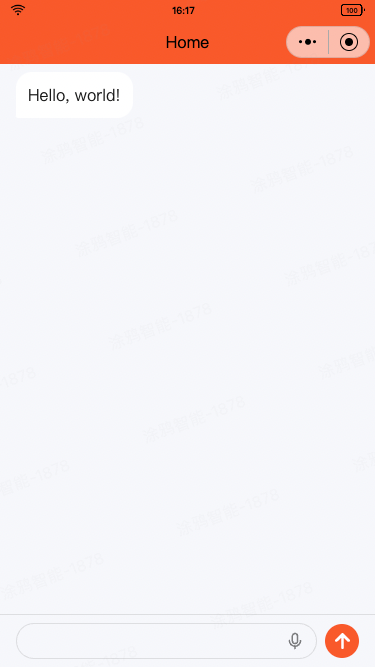
Build a chat page with Ray UI.
|
|
56
56
|
|
|
57
57
|
|
|
58
58
|
|
|
@@ -136,46 +136,47 @@ export default function ChatPage() {
|
|
|
136
136
|
|
|
137
137
|
# t-agent
|
|
138
138
|
|
|
139
|
-
The t-agent package
|
|
139
|
+
The t-agent package is a conversational assistant SDK written in TypeScript, used to build conversational agents. It supports a plugin mechanism that lets you extend the agent's capabilities.
|
|
140
|
+
This is a pure SDK package that contains no UI components, so it can be paired with any UI framework.
|
|
140
141
|
|
|
141
142
|
## Basic Concepts
|
|
142
143
|
|
|
143
|
-

|
|
144
145
|
|
|
145
|
-
### ChatAgent
|
|
146
|
+
### ChatAgent
|
|
146
147
|
|
|
147
|
-
The core class
|
|
148
|
+
The core class of the conversational agent. It manages the conversation lifecycle, message creation, message persistence, and so on. It supports plugins and a hook mechanism to extend the agent's capabilities.
|
|
148
149
|
|
|
149
|
-
|
|
150
|
+
Use `createChatAgent` to create a ChatAgent instance:
|
|
150
151
|
|
|
151
152
|
```tsx
|
|
152
153
|
import { createChatAgent } from '@ray-js/t-agent';
|
|
153
154
|
const createAgent = () => {
|
|
154
|
-
/* Apply plugins in the createChatAgent
|
|
155
|
+
/* Apply plugins in the createChatAgent arguments. Note that plugin order matters. */
|
|
155
156
|
const agent = createChatAgent();
|
|
156
157
|
|
|
157
158
|
return agent;
|
|
158
159
|
};
|
|
159
160
|
```
|
|
160
161
|
|
|
161
|
-
|
|
162
|
+
Main properties:
|
|
162
163
|
|
|
163
|
-
- `agent.session` ChatSession container
|
|
164
|
-
- `agent.plugins`
|
|
164
|
+
- `agent.session` — the ChatSession container, used to store session-related data
|
|
165
|
+
- `agent.plugins` — after applying plugins, the plugins' methods and hooks are stored here
|
|
165
166
|
|
|
166
|
-
|
|
167
|
+
Main methods:
|
|
167
168
|
|
|
168
|
-
- `agent.start()`
|
|
169
|
-
- `agent.dispose()`
|
|
170
|
-
- `agent.pushInputBlocks(blocks, signal)`
|
|
171
|
-
- `agent.createMessage(data)`
|
|
172
|
-
- `agent.emitTileEvent(tileId: string, payload: any)`
|
|
173
|
-
- `agent.removeMessage(messageId: string)`
|
|
174
|
-
- `agent.flushStreamToShow(message: ChatMessage, response: StreamResponse, composer: ComposeHandler)`
|
|
169
|
+
- `agent.start()` — start
|
|
170
|
+
- `agent.dispose()` — release
|
|
171
|
+
- `agent.pushInputBlocks(blocks, signal)` — push message blocks into the ChatAgent from the outside, used when a user sends a message to the AI
|
|
172
|
+
- `agent.createMessage(data)` — create a message bound to the current agent
|
|
173
|
+
- `agent.emitTileEvent(tileId: string, payload: any)` — emit a tile event
|
|
174
|
+
- `agent.removeMessage(messageId: string)` — remove a message
|
|
175
|
+
- `agent.flushStreamToShow(message: ChatMessage, response: StreamResponse, composer: ComposeHandler)` — stream-update a message
|
|
175
176
|
|
|
176
|
-
###
|
|
177
|
+
### Hook Mechanism
|
|
177
178
|
|
|
178
|
-
ChatAgent
|
|
179
|
+
ChatAgent only defines a runtime framework and data structures; the actual behavior is implemented through the hook mechanism. The hook mechanism is an event-driven programming model — you register callback functions to implement the agent's behavior.
|
|
179
180
|
|
|
180
181
|
```tsx
|
|
181
182
|
import { createChatAgent } from '@ray-js/t-agent';
|
|
@@ -184,7 +185,7 @@ const createAgent = () => {
|
|
|
184
185
|
|
|
185
186
|
const { onChatStart } = agent;
|
|
186
187
|
|
|
187
|
-
// onChatStart
|
|
188
|
+
// The onChatStart hook fires when the conversation starts
|
|
188
189
|
onChatStart(result => {
|
|
189
190
|
console.log('Chat start', result);
|
|
190
191
|
});
|
|
@@ -194,67 +195,68 @@ const createAgent = () => {
|
|
|
194
195
|
|
|
195
196
|
#### Hook Execution Order
|
|
196
197
|
|
|
197
|
-
Hooks
|
|
198
|
+
Hooks execute in the following order:
|
|
198
199
|
|
|
199
200
|
```
|
|
200
201
|
onAgentStart → onChatStart/onChatResume → onMessageListInit → onInputBlocksPush
|
|
201
202
|
```
|
|
202
203
|
|
|
203
|
-
ChatAgent's
|
|
204
|
+
ChatAgent's main hooks and parameters:
|
|
205
|
+
|
|
206
|
+
- `agent.onAgentStart` — initialize the agent
|
|
207
|
+
- `agent.onChatStart` — fires when the conversation starts
|
|
208
|
+
- `result.messages` — used to initialize the message list
|
|
209
|
+
- `agent.onChatResume` — fires when the conversation resumes
|
|
210
|
+
- `result.messages` — the already-restored message list
|
|
211
|
+
- `agent.onMessageListInit` — fires when the message list is initialized, after chat start or resume
|
|
212
|
+
- `result.messages` — the message list used for rendering; it's the same list as the message in the two hooks above
|
|
213
|
+
- `agent.onInputBlocksPush` — fires when message blocks are pushed
|
|
214
|
+
- `blocks` — the input message blocks
|
|
215
|
+
- `signal` — the abort signal
|
|
216
|
+
- `agent.onMessageChange` — fires when a message changes
|
|
217
|
+
- `type` — the change type: `show`, `update`, `remove`
|
|
218
|
+
- `message` — the changed message
|
|
219
|
+
- `agent.onMessagePersist` — fires when a message is persisted
|
|
220
|
+
- `payload` — persistence-related parameters
|
|
221
|
+
- `message` — the target message being persisted
|
|
222
|
+
- `agent.onTileEvent` — fires when a tile event occurs
|
|
223
|
+
- `tile` — the tile that triggered the event
|
|
224
|
+
- `payload` — the event payload
|
|
225
|
+
- `agent.onAgentDispose` — fires when the agent is released
|
|
226
|
+
- `agent.onUserAbort` — fires when the user aborts
|
|
227
|
+
- `reason` — the abort reason
|
|
228
|
+
- `agent.onError` — fires on error
|
|
229
|
+
- `error` — the error object
|
|
230
|
+
|
|
231
|
+
These hooks all accept a callback function as their argument and call it when triggered. The callback can be synchronous or asynchronous, and its return value does not affect the result. If you need to change the result, modify the callback's `result` argument, or modify the tile or message object.
|
|
232
|
+
|
|
233
|
+
### ChatSession
|
|
234
|
+
|
|
235
|
+
ChatSession stores the message list of the conversation with the agent, context data, and so on. It is created together with the ChatAgent.
|
|
236
|
+
|
|
237
|
+
Main properties:
|
|
238
|
+
|
|
239
|
+
- `session.messages` — the message list
|
|
240
|
+
- `session.sessionId` — the session id
|
|
241
|
+
- `session.isNewChat` — whether this is a new conversation, used to distinguish a new chat (`onChatStart`) from a resumed chat (`onChatResume`)
|
|
242
|
+
|
|
243
|
+
Main methods:
|
|
244
|
+
|
|
245
|
+
- `session.set` — set session data, can be any type
|
|
246
|
+
- `session.get` — get session data
|
|
247
|
+
- `session.getData` — get session data in object form
|
|
248
|
+
- `session.getLatestMessage` — get the last message
|
|
204
249
|
|
|
205
|
-
|
|
206
|
-
- `agent.onChatStart` Triggered at dialogue initiation
|
|
207
|
-
- `result.messages` Initializes message lists
|
|
208
|
-
- `agent.onChatResume` Triggered on dialogue continuation
|
|
209
|
-
- `result.messages` Restored message lists
|
|
210
|
-
- `agent.onMessageListInit` On message list initialization
|
|
211
|
-
- `result.messages` Rendering message list, same list as the previous two hooks
|
|
212
|
-
- `agent.onInputBlocksPush` On message block input
|
|
213
|
-
- `blocks` Input message blocks
|
|
214
|
-
- `signal` Interrupt signal
|
|
215
|
-
- `agent.onMessageChange` On message updates
|
|
216
|
-
- `type` Update types: `show`, `update`, `remove`
|
|
217
|
-
- `message` Updated message instance
|
|
218
|
-
- `agent.onMessagePersist` At message persistence
|
|
219
|
-
- `payload` Persistence parameters
|
|
220
|
-
- `message` The message to persist
|
|
221
|
-
- `agent.onTileEvent` After message persistence
|
|
222
|
-
- `tile` Event-triggering tile
|
|
223
|
-
- `payload` Event data
|
|
224
|
-
- `agent.onAgentDispose` On agent disposal
|
|
225
|
-
- `agent.onUserAbort` On user interruption
|
|
226
|
-
- `reason` Interruption reason
|
|
227
|
-
- `agent.onError` On error occurrence
|
|
228
|
-
- `error` Error details
|
|
229
|
-
|
|
230
|
-
These hooks accept a callback parameter, invoked upon their criteria. Callbacks can be synchronous or asynchronous. To modify results, adjust the result parameter or message object directly.
|
|
231
|
-
|
|
232
|
-
### ChatSession Session Container
|
|
233
|
-
|
|
234
|
-
ChatSession holds message lists, session-related data along with intelligent interactions, generated alongside ChatAgent.
|
|
235
|
-
|
|
236
|
-
Main Properties:
|
|
237
|
-
|
|
238
|
-
- `session.messages` List of messages
|
|
239
|
-
- `session.sessionId` Unique session ID
|
|
240
|
-
- `session.isNewChat` To distinguish fresh or ongoing chats
|
|
241
|
-
|
|
242
|
-
Principal Methods:
|
|
243
|
-
|
|
244
|
-
- `session.set` Assign session data (any type)
|
|
245
|
-
- `session.get` Retrieve session data
|
|
246
|
-
- `session.getData` Fetch session data in object format
|
|
247
|
-
- `session.getLatestMessage` Access the latest message
|
|
248
|
-
|
|
249
|
-
Hook:
|
|
250
|
+
Hooks:
|
|
250
251
|
|
|
251
|
-
- `session.onChange`
|
|
252
|
+
- `session.onChange` — register a callback for session data changes
|
|
252
253
|
|
|
253
|
-
### ChatMessage
|
|
254
|
+
### ChatMessage
|
|
254
255
|
|
|
255
|
-
|
|
256
|
+
ChatMessage is an abstraction of a conversation message, used to store the message's content, status, and other information. It also provides a set of convenient methods for operating on messages.
|
|
257
|
+
A single ChatMessage can contain multiple ChatTiles, used to display different content.
|
|
256
258
|
|
|
257
|
-
|
|
259
|
+
Use the `createMessage` method to create a message:
|
|
258
260
|
|
|
259
261
|
```tsx
|
|
260
262
|
const createAgent = () => {
|
|
@@ -262,13 +264,14 @@ const createAgent = () => {
|
|
|
262
264
|
|
|
263
265
|
const { createMessage, onChatStart } = agent;
|
|
264
266
|
|
|
265
|
-
//
|
|
267
|
+
// When the chat initializes, send a message
|
|
266
268
|
onChatStart(async result => {
|
|
269
|
+
// Create a message sent by the assistant
|
|
267
270
|
const message = createMessage({
|
|
268
271
|
role: 'assistant',
|
|
269
272
|
});
|
|
270
273
|
|
|
271
|
-
//
|
|
274
|
+
// Access message.bubble to quickly create a text bubble
|
|
272
275
|
message.bubble.setText('Hello!');
|
|
273
276
|
result.messages.push(message);
|
|
274
277
|
});
|
|
@@ -277,43 +280,43 @@ const createAgent = () => {
|
|
|
277
280
|
};
|
|
278
281
|
```
|
|
279
282
|
|
|
280
|
-
|
|
283
|
+
Main properties:
|
|
281
284
|
|
|
282
|
-
- `message.id`
|
|
283
|
-
- `message.role`
|
|
284
|
-
- `message.tiles`
|
|
285
|
-
- `message.status`
|
|
286
|
-
- `message.meta`
|
|
287
|
-
- `message.isShow`
|
|
288
|
-
- `message.bubble`
|
|
285
|
+
- `message.id` — the message id
|
|
286
|
+
- `message.role` — the message role, either `assistant` or `user`
|
|
287
|
+
- `message.tiles` — the message's tile list
|
|
288
|
+
- `message.status` — the message status, a `ChatMessageStatus` enum, which can be `START`, `UPDATING`, `FINISH`, etc.
|
|
289
|
+
- `message.meta` — extra data attached to the message
|
|
290
|
+
- `message.isShow` — whether the message has been displayed in the UI
|
|
291
|
+
- `message.bubble` — a shortcut to the message's bubble tile
|
|
289
292
|
|
|
290
|
-
|
|
293
|
+
Main methods:
|
|
291
294
|
|
|
292
|
-
- `message.show`
|
|
293
|
-
- `message.update`
|
|
294
|
-
- `message.remove`
|
|
295
|
-
- `message.persist`
|
|
296
|
-
- `message.addTile`
|
|
297
|
-
- `message.removeTile`
|
|
298
|
-
- `message.setTilesLocked`
|
|
299
|
-
- `message.set`
|
|
300
|
-
- `message.setMetaValue`
|
|
301
|
-
- `message.deleteMetaValue`
|
|
302
|
-
- `message.setMeta`
|
|
303
|
-
- `message.findTileByType`
|
|
295
|
+
- `message.show` — display the message in the UI
|
|
296
|
+
- `message.update` — update the current message's state in the UI
|
|
297
|
+
- `message.remove` — remove the current message from the UI
|
|
298
|
+
- `message.persist` — persist the message
|
|
299
|
+
- `message.addTile` — add a tile
|
|
300
|
+
- `message.removeTile` — remove a tile
|
|
301
|
+
- `message.setTilesLocked` — set the locked state of all tiles
|
|
302
|
+
- `message.set` — set message properties
|
|
303
|
+
- `message.setMetaValue` — set a meta property by key-value
|
|
304
|
+
- `message.deleteMetaValue` — delete a meta property
|
|
305
|
+
- `message.setMeta` — set the meta object directly
|
|
306
|
+
- `message.findTileByType` — find a tile by tile type
|
|
304
307
|
|
|
305
|
-
#### ChatTile
|
|
308
|
+
#### ChatTile
|
|
306
309
|
|
|
307
|
-
|
|
310
|
+
ChatTile is a block within a conversation message, used to display different content inside a message, such as text, images, cards, etc.
|
|
308
311
|
|
|
309
|
-
|
|
312
|
+
Use the `addTile` method to add a tile to a message:
|
|
310
313
|
|
|
311
314
|
```tsx
|
|
312
315
|
const message = createMessage({
|
|
313
316
|
role: 'assistant',
|
|
314
317
|
});
|
|
315
318
|
|
|
316
|
-
//
|
|
319
|
+
// Add an image tile
|
|
317
320
|
message.addTile('image', {
|
|
318
321
|
src: '/image.jpg',
|
|
319
322
|
});
|
|
@@ -321,27 +324,27 @@ message.addTile('image', {
|
|
|
321
324
|
await message.show();
|
|
322
325
|
```
|
|
323
326
|
|
|
324
|
-
|
|
327
|
+
ChatTile's main properties:
|
|
325
328
|
|
|
326
|
-
- `tile.id`
|
|
327
|
-
- `tile.type`
|
|
328
|
-
- `tile.data`
|
|
329
|
-
- `tile.children`
|
|
330
|
-
- `tile.locked`
|
|
331
|
-
- `tile.fallback`
|
|
332
|
-
- `tile.message`
|
|
329
|
+
- `tile.id` — the tile id
|
|
330
|
+
- `tile.type` — the tile type
|
|
331
|
+
- `tile.data` — the tile data
|
|
332
|
+
- `tile.children` — the tile's child tiles
|
|
333
|
+
- `tile.locked` — whether the tile is locked
|
|
334
|
+
- `tile.fallback` — fallback content when the tile cannot be displayed
|
|
335
|
+
- `tile.message` — the message the tile belongs to
|
|
333
336
|
|
|
334
|
-
|
|
337
|
+
ChatTile's main methods:
|
|
335
338
|
|
|
336
|
-
- `tile.update`
|
|
337
|
-
- `tile.show`
|
|
338
|
-
- `tile.setLocked`
|
|
339
|
-
- `tile.addTile`
|
|
340
|
-
- `tile.setData`
|
|
341
|
-
- `tile.setFallback`
|
|
342
|
-
- `tile.findByType`
|
|
339
|
+
- `tile.update` — a shortcut for `tile.message.update`
|
|
340
|
+
- `tile.show` — a shortcut for `tile.message.show`
|
|
341
|
+
- `tile.setLocked` — set the tile's locked state
|
|
342
|
+
- `tile.addTile` — add a child tile
|
|
343
|
+
- `tile.setData` — set the tile's data
|
|
344
|
+
- `tile.setFallback` — set the tile's fallback content
|
|
345
|
+
- `tile.findByType` — find a child tile by tile type
|
|
343
346
|
|
|
344
|
-
|
|
347
|
+
`message.bubble` is a shortcut — simply accessing it quickly adds a bubble tile to the current message:
|
|
345
348
|
|
|
346
349
|
```tsx
|
|
347
350
|
const message = createMessage({
|
|
@@ -349,125 +352,125 @@ const message = createMessage({
|
|
|
349
352
|
});
|
|
350
353
|
|
|
351
354
|
message.bubble.setText('Hello, world!');
|
|
352
|
-
//
|
|
355
|
+
// is equivalent to
|
|
353
356
|
message.addTile('bubble', {}).addTile('text', { text: 'Hello, world!' });
|
|
354
357
|
|
|
355
358
|
await message.show();
|
|
356
359
|
```
|
|
357
360
|
|
|
358
|
-
For bubble messages,
|
|
361
|
+
For bubble messages, in addition to the basic tile methods, some extra properties and methods are provided:
|
|
359
362
|
|
|
360
|
-
- `message.bubble.text`
|
|
361
|
-
- `message.bubble.setText`
|
|
362
|
-
- `message.bubble.isMarkdown`
|
|
363
|
-
- `message.bubble.setIsMarkdown`
|
|
364
|
-
- `message.bubble.status`
|
|
365
|
-
- `message.bubble.setStatus`
|
|
366
|
-
- `message.bubble.info`
|
|
367
|
-
- `message.bubble.setInfo`
|
|
368
|
-
- `message.bubble.initWithInputBlocks`
|
|
363
|
+
- `message.bubble.text` — property, read the bubble text
|
|
364
|
+
- `message.bubble.setText` — method, set the bubble text
|
|
365
|
+
- `message.bubble.isMarkdown` — property, whether the content is in markdown format
|
|
366
|
+
- `message.bubble.setIsMarkdown` — method, set whether the content is markdown
|
|
367
|
+
- `message.bubble.status` — property, the bubble status (`BubbleTileStatus`)
|
|
368
|
+
- `message.bubble.setStatus` — method, set the bubble status
|
|
369
|
+
- `message.bubble.info` — property, the bubble info
|
|
370
|
+
- `message.bubble.setInfo` — method, set the bubble info
|
|
371
|
+
- `message.bubble.initWithInputBlocks` — method, initialize the bubble with input blocks
|
|
369
372
|
|
|
370
|
-
**Bubble messages support long
|
|
373
|
+
**Bubble messages support long-press operations**, such as copy and delete. Animations are also shown while the message is loading and updating.
|
|
371
374
|
|
|
372
|
-
Bubble messages support the following long
|
|
375
|
+
Bubble messages support the following long-press operations:
|
|
373
376
|
|
|
374
|
-
- Copy:
|
|
375
|
-
- Delete:
|
|
377
|
+
- Copy: copy the message text content
|
|
378
|
+
- Delete: delete the current message
|
|
376
379
|
|
|
377
380
|
### Lifecycle
|
|
378
381
|
|
|
379
|
-
ChatAgent
|
|
382
|
+
ChatAgent triggers different hooks at different stages. Developers can register hooks to implement custom behavior. The sequence diagram below shows the ChatAgent lifecycle.
|
|
380
383
|
|
|
381
384
|
```mermaid
|
|
382
385
|
sequenceDiagram
|
|
383
386
|
participant AI as Backend(AI)
|
|
384
387
|
participant A as ChatAgent
|
|
385
|
-
participant UI as UI
|
|
388
|
+
participant UI as UI
|
|
386
389
|
actor User as User
|
|
387
390
|
|
|
388
|
-
User ->> UI: Open chat
|
|
389
|
-
UI ->> UI: Create
|
|
390
|
-
UI ->> A: agent.start()
|
|
391
|
+
User ->> UI: Open the chat UI
|
|
392
|
+
UI ->> UI: Create the agent object `agent`
|
|
393
|
+
UI ->> A: agent.start() starts the agent
|
|
391
394
|
rect rgba(255,255,0,0.1)
|
|
392
395
|
note over A: Hook: onAgentStart
|
|
393
|
-
A ->> AI: Check
|
|
396
|
+
A ->> AI: Check whether it's a new session
|
|
394
397
|
AI ->> A: Return
|
|
395
398
|
end
|
|
396
|
-
alt
|
|
399
|
+
alt New session
|
|
397
400
|
A ->> AI: Start a new session
|
|
398
401
|
note over A: Hook: onChatStart
|
|
399
|
-
else
|
|
402
|
+
else Resume session
|
|
400
403
|
A ->> AI: Read session history
|
|
401
404
|
AI ->> A: Return history messages
|
|
402
405
|
note over A: Hook: onChatResume
|
|
403
406
|
end
|
|
404
407
|
rect rgba(255,255,0,0.1)
|
|
405
408
|
note over A: Hook: onMessageListInit
|
|
406
|
-
A ->> UI: Assemble messages to display
|
|
409
|
+
A ->> UI: Assemble the messages to display
|
|
407
410
|
UI ->> User: Display messages
|
|
408
411
|
end
|
|
409
412
|
opt Conversation
|
|
410
|
-
User ->> UI:
|
|
413
|
+
User ->> UI: Type and send a message
|
|
411
414
|
UI ->> A: agent.pushInputBlocks()
|
|
412
415
|
rect rgba(255,255,0,0.1)
|
|
413
416
|
note over A: Hook: onInputBlocksPush
|
|
414
|
-
A ->> A: Create
|
|
417
|
+
A ->> A: Create message object `msg`<br/>set msg to the user's input text<br/>msg.show()
|
|
415
418
|
note over A: Hook: onMessageChange show
|
|
416
|
-
A -->> UI: Update
|
|
417
|
-
UI -->> User: Display new message
|
|
418
|
-
A ->> A: Create
|
|
419
|
+
A -->> UI: Update the UI
|
|
420
|
+
UI -->> User: Display the new message
|
|
421
|
+
A ->> A: Create message object `respMsg`<br/>set respMsg to loading<br/>respMsg.show()
|
|
419
422
|
note over A: Hook: onMessageChange show
|
|
420
|
-
A -->> UI: Update
|
|
421
|
-
UI -->> User: Display loading message
|
|
422
|
-
A ->> AI:
|
|
423
|
-
AI ->> A: Return message stream
|
|
423
|
+
A -->> UI: Update the UI
|
|
424
|
+
UI -->> User: Display the loading response message
|
|
425
|
+
A ->> AI: Call the AI
|
|
426
|
+
AI ->> A: Return the message stream
|
|
424
427
|
loop Streaming messages
|
|
425
428
|
AI ->> A: Message packet
|
|
426
429
|
A ->> A: Update respMsg data<br/>respMsg.update()
|
|
427
430
|
note over A: Hook: onMessageChange update
|
|
428
|
-
A -->> UI: Update
|
|
429
|
-
UI -->> User:
|
|
431
|
+
A -->> UI: Update the UI
|
|
432
|
+
UI -->> User: Stream text / show cards
|
|
430
433
|
end
|
|
431
434
|
end
|
|
432
435
|
end
|
|
433
436
|
|
|
434
|
-
opt Operate message action
|
|
435
|
-
User ->> UI: Select option
|
|
437
|
+
opt Operate on a message action point (single-select example)
|
|
438
|
+
User ->> UI: Select an option
|
|
436
439
|
UI ->> A: agent.emitTileEvent()
|
|
437
440
|
rect rgba(255,255,0,0.1)
|
|
438
441
|
note over A: Hook: onTileEvent
|
|
439
442
|
A ->> A: Set msg status<br/>msg.persist()
|
|
440
443
|
note over A: Hook: onMessagePersist
|
|
441
|
-
A ->> AI: Persist message
|
|
444
|
+
A ->> AI: Persist the message
|
|
442
445
|
AI ->> A: Return result
|
|
443
446
|
A ->> A: msg.update()
|
|
444
447
|
note over A: Hook: onMessageChange update
|
|
445
|
-
A ->> UI: Update
|
|
446
|
-
UI ->> User:
|
|
448
|
+
A ->> UI: Update the UI
|
|
449
|
+
UI ->> User: Dim the message, highlight the selection
|
|
447
450
|
end
|
|
448
451
|
end
|
|
449
|
-
opt Delete message
|
|
450
|
-
User ->> UI: Delete message
|
|
452
|
+
opt Delete a message
|
|
453
|
+
User ->> UI: Delete a message
|
|
451
454
|
UI ->> A: agent.removeMessage()
|
|
452
455
|
rect rgba(255,255,0,0.1)
|
|
453
456
|
A ->> A: msg.remove()
|
|
454
|
-
A ->> AI: Mark message deleted
|
|
457
|
+
A ->> AI: Mark the message as deleted
|
|
455
458
|
note over A: Hook: onMessageChange remove
|
|
456
|
-
A ->> UI: Update
|
|
457
|
-
UI ->> User:
|
|
459
|
+
A ->> UI: Update the UI
|
|
460
|
+
UI ->> User: The message disappears
|
|
458
461
|
end
|
|
459
462
|
end
|
|
460
463
|
```
|
|
461
464
|
|
|
462
465
|
### Plugin Mechanism
|
|
463
466
|
|
|
464
|
-
Plugins are implemented
|
|
467
|
+
Plugins are implemented on top of the hook mechanism above. Plugins can implement agent capabilities, such as integrating with an AI platform or providing a UI. Plugins can also expose methods and properties for developers to use.
|
|
465
468
|
|
|
466
469
|
```tsx
|
|
467
470
|
import { createChatAgent, withUI } from '@ray-js/t-agent';
|
|
468
471
|
const createAgent = () => {
|
|
469
472
|
const agent = createChatAgent(
|
|
470
|
-
withUI() // withUI plugin provides
|
|
473
|
+
withUI() // The withUI plugin provides some UI rendering methods
|
|
471
474
|
);
|
|
472
475
|
|
|
473
476
|
return agent;
|
|
@@ -481,7 +484,7 @@ const ScrollToBottom = () => {
|
|
|
481
484
|
const agent = useChatAgent();
|
|
482
485
|
|
|
483
486
|
const scroll = () => {
|
|
484
|
-
// Use
|
|
487
|
+
// Use a method exposed by a plugin
|
|
485
488
|
agent.plugins.ui.emitEvent('scrollToBottom', { animation: false });
|
|
486
489
|
};
|
|
487
490
|
|
|
@@ -491,12 +494,12 @@ const ScrollToBottom = () => {
|
|
|
491
494
|
|
|
492
495
|
#### Writing a Plugin
|
|
493
496
|
|
|
494
|
-
A plugin is a higher-order function that takes options and returns a function.
|
|
497
|
+
A plugin is a higher-order function that takes an options object and returns a function. That function receives a ChatAgent object, in which you can register hooks.
|
|
495
498
|
|
|
496
499
|
```tsx
|
|
497
500
|
import { ChatAgent, createHooks, Hookable } from '@ray-js/t-agent';
|
|
498
501
|
|
|
499
|
-
//
|
|
502
|
+
// Try a MyPlugin plugin
|
|
500
503
|
export type MyPlugin = GetChatPluginHandler<typeof withMyPlugin>;
|
|
501
504
|
|
|
502
505
|
export const withMyPlugin = (options: any) => {
|
|
@@ -508,11 +511,11 @@ export const withMyPlugin = (options: any) => {
|
|
|
508
511
|
|
|
509
512
|
onChatStart(async () => {
|
|
510
513
|
console.log('Chat start');
|
|
511
|
-
// Trigger plugin hook
|
|
514
|
+
// Trigger the plugin's hook
|
|
512
515
|
await hooks.callHook('onMyHook', 'Hello, world!');
|
|
513
516
|
});
|
|
514
517
|
|
|
515
|
-
// Expose plugin methods and hooks
|
|
518
|
+
// Expose the plugin's methods and hooks
|
|
516
519
|
return {
|
|
517
520
|
hooks,
|
|
518
521
|
myPlugin: {
|
|
@@ -531,7 +534,7 @@ export const withMyPlugin = (options: any) => {
|
|
|
531
534
|
```
|
|
532
535
|
|
|
533
536
|
```tsx
|
|
534
|
-
//
|
|
537
|
+
// Use the plugin
|
|
535
538
|
import { createChatAgent } from '@ray-js/t-agent';
|
|
536
539
|
|
|
537
540
|
const createAgent = () => {
|
|
@@ -540,10 +543,10 @@ const createAgent = () => {
|
|
|
540
543
|
withMyPlugin({})
|
|
541
544
|
);
|
|
542
545
|
|
|
543
|
-
// Call
|
|
546
|
+
// Call a method exposed by the plugin
|
|
544
547
|
agent.plugins.myPlugin.myMethod();
|
|
545
548
|
|
|
546
|
-
// Register plugin
|
|
549
|
+
// Register the plugin's hook
|
|
547
550
|
agent.plugins.myPlugin.onMyHook(msg => {
|
|
548
551
|
console.log(msg);
|
|
549
552
|
});
|
|
@@ -556,12 +559,12 @@ const createAgent = () => {
|
|
|
556
559
|
|
|
557
560
|
### withDebug
|
|
558
561
|
|
|
559
|
-
The withDebug plugin logs
|
|
562
|
+
The withDebug plugin prints logs to the console for convenient debugging.
|
|
560
563
|
|
|
561
564
|
```tsx
|
|
562
565
|
const agent = createChatAgent(
|
|
563
566
|
withDebug({
|
|
564
|
-
autoStart: true, // Whether to start automatically,
|
|
567
|
+
autoStart: true, // Whether to start automatically, defaults to true
|
|
565
568
|
})
|
|
566
569
|
);
|
|
567
570
|
|
|
@@ -574,72 +577,72 @@ agent.plugins.debug.stop();
|
|
|
574
577
|
|
|
575
578
|
### withUI
|
|
576
579
|
|
|
577
|
-
The withUI plugin provides default UI behaviors such as
|
|
580
|
+
The withUI plugin provides some default UI behaviors, such as displaying and deleting messages, and an event bus.
|
|
578
581
|
|
|
579
582
|
```tsx
|
|
580
583
|
const agent = createChatAgent(withUI());
|
|
581
584
|
|
|
582
|
-
agent.plugins.ui.emitter; //
|
|
585
|
+
agent.plugins.ui.emitter; // The event bus
|
|
583
586
|
|
|
584
587
|
// Scroll to bottom
|
|
585
588
|
agent.plugins.ui.emitEvent('scrollToBottom', { animation: false });
|
|
586
589
|
|
|
587
|
-
// Listen
|
|
590
|
+
// Listen for an event
|
|
588
591
|
const off = agent.plugins.ui.onEvent('scrollToBottom', payload => {
|
|
589
592
|
console.log('scroll to bottom', payload.animation);
|
|
590
593
|
});
|
|
591
594
|
|
|
592
|
-
//
|
|
595
|
+
// Stop listening
|
|
593
596
|
off();
|
|
594
597
|
```
|
|
595
598
|
|
|
596
|
-
The main events of the
|
|
599
|
+
The main events of the ui plugin are listed below; you can also freely register your own events:
|
|
597
600
|
|
|
598
|
-
- `messageListInit
|
|
599
|
-
- `payload.messages: ChatMessageObject[]
|
|
600
|
-
- `messageChange
|
|
601
|
-
- `payload.type: 'show' | 'update' | 'remove'
|
|
602
|
-
- `payload.message: ChatMessageObject
|
|
603
|
-
- `scrollToBottom
|
|
604
|
-
- `payload.animation: boolean
|
|
605
|
-
- `sendMessage
|
|
606
|
-
- `payload.blocks: InputBlock[]
|
|
607
|
-
- `setInputBlocks
|
|
608
|
-
- `payload.blocks: InputBlock[]
|
|
609
|
-
- `sessionChange
|
|
610
|
-
- `payload.key: string
|
|
611
|
-
- `payload.value: any
|
|
612
|
-
- `payload.oldValue: any
|
|
601
|
+
- `messageListInit` — initialize the message list
|
|
602
|
+
- `payload.messages: ChatMessageObject[]` — the message list
|
|
603
|
+
- `messageChange` — message changed
|
|
604
|
+
- `payload.type: 'show' | 'update' | 'remove'` — the change type
|
|
605
|
+
- `payload.message: ChatMessageObject` — the message
|
|
606
|
+
- `scrollToBottom` — scroll to bottom
|
|
607
|
+
- `payload.animation: boolean` — whether to animate
|
|
608
|
+
- `sendMessage` — send a message, triggering a UI update
|
|
609
|
+
- `payload.blocks: InputBlock[]` — the input blocks
|
|
610
|
+
- `setInputBlocks` — set input blocks into the MessageInput field
|
|
611
|
+
- `payload.blocks: InputBlock[]` — the input blocks
|
|
612
|
+
- `sessionChange` — session data changed
|
|
613
|
+
- `payload.key: string` — the session data key
|
|
614
|
+
- `payload.value: any` — the session data value
|
|
615
|
+
- `payload.oldValue: any` — the old session data value
|
|
613
616
|
|
|
614
|
-
|
|
617
|
+
UI plugin enhancements (new in 0.2.x):
|
|
615
618
|
|
|
616
|
-
|
|
619
|
+
In 0.2.x, the withUI plugin adds a hook mechanism that lets developers customize message-feedback and history-clearing behaviors:
|
|
617
620
|
|
|
618
|
-
**Message
|
|
621
|
+
**Message feedback hook**:
|
|
619
622
|
|
|
620
|
-
- `agent.plugins.ui.hook('onMessageFeedback', async context => {})`
|
|
621
|
-
- `context.payload.messageId: string`
|
|
622
|
-
- `context.payload.rate: 'like' | 'unlike'`
|
|
623
|
-
- `context.payload.content?: string`
|
|
624
|
-
- `context.result: { success: boolean }`
|
|
623
|
+
- `agent.plugins.ui.hook('onMessageFeedback', async context => {})` — register a message feedback hook
|
|
624
|
+
- `context.payload.messageId: string` — the message ID
|
|
625
|
+
- `context.payload.rate: 'like' | 'unlike'` — the feedback type
|
|
626
|
+
- `context.payload.content?: string` — feedback content (optional)
|
|
627
|
+
- `context.result: { success: boolean }` — the return result; you must set whether it succeeded
|
|
625
628
|
|
|
626
|
-
**Clear
|
|
629
|
+
**Clear history hook**:
|
|
627
630
|
|
|
628
|
-
- `agent.plugins.ui.hook('onClearHistory', async context => {})`
|
|
629
|
-
- `context.payload: any`
|
|
630
|
-
- `context.result: { success: boolean }`
|
|
631
|
+
- `agent.plugins.ui.hook('onClearHistory', async context => {})` — register a clear-history hook
|
|
632
|
+
- `context.payload: any` — the clear-history parameters
|
|
633
|
+
- `context.result: { success: boolean }` — the return result; you must set whether it succeeded
|
|
631
634
|
|
|
632
|
-
**Calling
|
|
635
|
+
**Calling hooks**:
|
|
633
636
|
|
|
634
|
-
- `agent.plugins.ui.callHook('onMessageFeedback', payload)`
|
|
635
|
-
- `agent.plugins.ui.callHook('onClearHistory', payload)`
|
|
637
|
+
- `agent.plugins.ui.callHook('onMessageFeedback', payload)` — call the message feedback hook
|
|
638
|
+
- `agent.plugins.ui.callHook('onClearHistory', payload)` — call the clear-history hook
|
|
636
639
|
|
|
637
640
|
Usage example:
|
|
638
641
|
|
|
639
642
|
```tsx
|
|
640
643
|
const agent = createChatAgent(withUI(), withAIStream({ agentId: 'your-agent-id' }));
|
|
641
644
|
|
|
642
|
-
// Register message feedback
|
|
645
|
+
// Register message feedback handling
|
|
643
646
|
agent.plugins.ui.hook('onMessageFeedback', async context => {
|
|
644
647
|
const { messageId, rate, content } = context.payload;
|
|
645
648
|
try {
|
|
@@ -651,7 +654,7 @@ agent.plugins.ui.hook('onMessageFeedback', async context => {
|
|
|
651
654
|
}
|
|
652
655
|
});
|
|
653
656
|
|
|
654
|
-
// Register clear
|
|
657
|
+
// Register clear-history handling
|
|
655
658
|
agent.plugins.ui.hook('onClearHistory', async context => {
|
|
656
659
|
try {
|
|
657
660
|
// Call your API to clear history
|
|
@@ -663,14 +666,15 @@ agent.plugins.ui.hook('onClearHistory', async context => {
|
|
|
663
666
|
});
|
|
664
667
|
```
|
|
665
668
|
|
|
666
|
-
> Note: `ChatMessageObject` here is a message object, not
|
|
667
|
-
> It contains
|
|
669
|
+
> Note: `ChatMessageObject` here is a message object, not the `ChatMessage` type.
|
|
670
|
+
> It contains some of the message's properties and methods. This is to avoid modifying the message object in the UI layer, which would cause inconsistency with the message object in the ChatAgent.
|
|
671
|
+
> Modifications to message objects should always be done in the ChatAgent.
|
|
668
672
|
|
|
669
|
-
##
|
|
673
|
+
## Bundled utils
|
|
670
674
|
|
|
671
675
|
### getLogger(prefix: string): Logger
|
|
672
676
|
|
|
673
|
-
Create a logger for
|
|
677
|
+
Create a logger for printing logs.
|
|
674
678
|
|
|
675
679
|
```tsx
|
|
676
680
|
import { getLogger } from '@ray-js/t-agent';
|
|
@@ -680,31 +684,31 @@ logger.debug('Hello, world!');
|
|
|
680
684
|
|
|
681
685
|
### Emitter
|
|
682
686
|
|
|
683
|
-
Emitter is an event bus
|
|
687
|
+
Emitter is an event bus used to register and dispatch events.
|
|
684
688
|
|
|
685
689
|
```tsx
|
|
686
690
|
import { Emitter, EmitterEvent } from '@ray-js/t-agent';
|
|
687
691
|
const emitter = new Emitter();
|
|
688
692
|
|
|
689
|
-
// Register event
|
|
693
|
+
// Register an event
|
|
690
694
|
const cb = event => console.log('detail', event.detail);
|
|
691
695
|
emitter.addEventListener('event', cb);
|
|
692
696
|
|
|
693
|
-
//
|
|
697
|
+
// Dispatch an event
|
|
694
698
|
emitter.dispatchEvent(new EmitterEvent('event', { detail: 'Hello, world!' }));
|
|
695
699
|
|
|
696
|
-
// Remove event
|
|
700
|
+
// Remove the event
|
|
697
701
|
emitter.removeEventListener('event', cb);
|
|
698
702
|
```
|
|
699
703
|
|
|
700
704
|
### StreamResponse
|
|
701
705
|
|
|
702
|
-
StreamResponse is a streaming response object
|
|
706
|
+
StreamResponse is a streaming response object used to handle streaming messages.
|
|
703
707
|
|
|
704
708
|
```tsx
|
|
705
709
|
import { StreamResponse } from '@ray-js/t-agent';
|
|
706
710
|
|
|
707
|
-
const partStream = await getPartStream(); //
|
|
711
|
+
const partStream = await getPartStream(); // Get the stream data
|
|
708
712
|
const response = new StreamResponse(partStream);
|
|
709
713
|
|
|
710
714
|
const parts = response.parts();
|
|
@@ -715,15 +719,15 @@ for await (const part of parts) {
|
|
|
715
719
|
|
|
716
720
|
### createHooks, Hookable
|
|
717
721
|
|
|
718
|
-
|
|
722
|
+
See the `hookable` npm package.
|
|
719
723
|
|
|
720
724
|
### isAbortError
|
|
721
725
|
|
|
722
|
-
Determine
|
|
726
|
+
Determine whether an error is an abort error.
|
|
723
727
|
|
|
724
728
|
### safeParseJSON
|
|
725
729
|
|
|
726
|
-
Safely parse JSON
|
|
730
|
+
Safely parse a JSON string. Returns `undefined` if parsing fails.
|
|
727
731
|
|
|
728
732
|
```tsx
|
|
729
733
|
import { safeParseJSON } from '@ray-js/t-agent';
|
|
@@ -735,7 +739,7 @@ console.log(obj.a); // 1
|
|
|
735
739
|
|
|
736
740
|
# t-agent-plugin-aistream
|
|
737
741
|
|
|
738
|
-
t-agent-plugin-aistream is a plugin
|
|
742
|
+
t-agent-plugin-aistream is a plugin that integrates with the mini-program AI agent platform, providing the ability to connect to it.
|
|
739
743
|
|
|
740
744
|
## Installation
|
|
741
745
|
|
|
@@ -751,10 +755,9 @@ import { withAIStream, withBuildIn } from '@ray-js/t-agent-plugin-aistream';
|
|
|
751
755
|
|
|
752
756
|
const createAgent = () => {
|
|
753
757
|
const agent = createChatAgent(
|
|
754
|
-
withUI(), //
|
|
758
|
+
withUI(), // The withUI plugin is generally required
|
|
755
759
|
withAIStream({
|
|
756
|
-
|
|
757
|
-
agentId: 'your-agent-id', // Provide your agent ID
|
|
760
|
+
agentId: 'your-agent-id', // Enter your agent ID
|
|
758
761
|
}),
|
|
759
762
|
withBuildIn()
|
|
760
763
|
);
|
|
@@ -765,104 +768,95 @@ const createAgent = () => {
|
|
|
765
768
|
|
|
766
769
|
## Included Plugins
|
|
767
770
|
|
|
768
|
-
### withAIStream
|
|
771
|
+
### withAIStream
|
|
769
772
|
|
|
770
|
-
|
|
773
|
+
Provides the ability to integrate with the mini-program AI agent platform.
|
|
771
774
|
|
|
772
775
|
Parameters:
|
|
773
776
|
|
|
774
|
-
- `agentId`
|
|
775
|
-
- `clientType`
|
|
776
|
-
- `deviceId`
|
|
777
|
-
- `wireInput`
|
|
778
|
-
- `historySize`
|
|
779
|
-
- `indexId`
|
|
780
|
-
- `homeId`
|
|
781
|
-
- `earlyStart`
|
|
782
|
-
- `eventIdPrefix`
|
|
783
|
-
- `tokenOptions`
|
|
784
|
-
- `api` API
|
|
785
|
-
- `version`
|
|
786
|
-
- `extParams`
|
|
787
|
-
- `createChatHistoryStore`
|
|
777
|
+
- `agentId` — the agent ID (required)
|
|
778
|
+
- `clientType` — the client type, defaults to APP (2)
|
|
779
|
+
- `deviceId` — the device ID, required when `clientType` is DEVICE (1)
|
|
780
|
+
- `wireInput` — whether to pass input blocks to the agent, defaults to true. When set to false, you need to write your own `onInputBlocksPush` hook to handle input blocks
|
|
781
|
+
- `historySize` — the history message size, defaults to 1000
|
|
782
|
+
- `indexId` — the index ID, defaults to `'default'`
|
|
783
|
+
- `homeId` — the home ID; defaults to the current home if not provided
|
|
784
|
+
- `earlyStart` — whether to establish the connection during the `onAgentStart` stage
|
|
785
|
+
- `eventIdPrefix` — the eventId prefix, used to make cloud-side debugging and log tracing easier
|
|
786
|
+
- `tokenOptions` — parameters for getting the agent token
|
|
787
|
+
- `api` — the API name
|
|
788
|
+
- `version` — the API version
|
|
789
|
+
- `extParams` — extra parameters
|
|
790
|
+
- `createChatHistoryStore` — a custom message storage function
|
|
788
791
|
|
|
789
792
|
Methods:
|
|
790
793
|
|
|
791
|
-
- `agent.plugins.aiStream.send(blocks, signal, userData)`
|
|
792
|
-
- `blocks`
|
|
793
|
-
- `signal`
|
|
794
|
-
- `userData`
|
|
795
|
-
- `agent.plugins.aiStream.chat(blocks, signal, options)`
|
|
796
|
-
- `blocks`
|
|
797
|
-
- `signal`
|
|
798
|
-
- `options.sendBy`
|
|
799
|
-
- `options.responseBy`
|
|
800
|
-
- `options.userData`
|
|
801
|
-
- `agent.plugins.aiStream.removeMessage(message)`
|
|
802
|
-
- `agent.plugins.aiStream.clearAllMessages()`
|
|
803
|
-
- `agent.plugins.aiStream.getChatId()`
|
|
794
|
+
- `agent.plugins.aiStream.send(blocks, signal, userData)` — send a message to the agent
|
|
795
|
+
- `blocks` — the input block array
|
|
796
|
+
- `signal` — an optional AbortSignal used to abort the request
|
|
797
|
+
- `userData` — optional user data attached to the sent message
|
|
798
|
+
- `agent.plugins.aiStream.chat(blocks, signal, options)` — send a message to the agent and generate a question ChatMessage and an AI answer ChatMessage, with streaming updates
|
|
799
|
+
- `blocks` — the input block array
|
|
800
|
+
- `signal` — an optional AbortSignal
|
|
801
|
+
- `options.sendBy` — the sender role, defaults to `'user'`
|
|
802
|
+
- `options.responseBy` — the responder role, defaults to `'assistant'`
|
|
803
|
+
- `options.userData` — optional user data
|
|
804
|
+
- `agent.plugins.aiStream.removeMessage(message)` — delete a history message
|
|
805
|
+
- `agent.plugins.aiStream.clearAllMessages()` — clear all messages of the current session and the local history
|
|
806
|
+
- `agent.plugins.aiStream.getChatId()` — get the current session's chatId, returns `Promise<string>`
|
|
804
807
|
|
|
805
808
|
Hooks:
|
|
806
809
|
|
|
807
|
-
- `onMessageParse`
|
|
808
|
-
- `msgItem`
|
|
809
|
-
- `result.messages`
|
|
810
|
-
- `onChatMessageSent`
|
|
811
|
-
- `userMessage`
|
|
812
|
-
- `respMessage` AI's response message
|
|
813
|
-
- `onTextCompose`
|
|
814
|
-
- `respMsg`
|
|
815
|
-
- `status`
|
|
816
|
-
- `result.text`
|
|
817
|
-
- `onSkillCompose`
|
|
818
|
-
- `skill`
|
|
819
|
-
- `respMsg`
|
|
820
|
-
- `result.messages`
|
|
821
|
-
- `onSkillsEnd`
|
|
822
|
-
- `skills`
|
|
823
|
-
- `respMsg`
|
|
824
|
-
- `result.messages`
|
|
825
|
-
- `onTTTAction`
|
|
826
|
-
- `tile`
|
|
827
|
-
- `result.action` TTTAction, can
|
|
828
|
-
- `onCardsReceived`
|
|
829
|
-
- `skills`
|
|
830
|
-
- `result.cards`
|
|
831
|
-
- `onUserDataRead` **(0.2.x
|
|
832
|
-
- `type`
|
|
833
|
-
- `'create-session'`
|
|
834
|
-
- `'start-event'`
|
|
835
|
-
- `data`
|
|
836
|
-
- `data.blocks`
|
|
837
|
-
- `result.userData`
|
|
838
|
-
|
|
839
|
-
###
|
|
840
|
-
|
|
841
|
-
|
|
842
|
-
|
|
843
|
-
**Supported Skills**:
|
|
844
|
-
|
|
845
|
-
- **Smart Home**: Device control and scene management
|
|
846
|
-
- **Knowledge Base Search**: Related document display
|
|
847
|
-
|
|
848
|
-
### withMCP Plugin
|
|
849
|
-
|
|
850
|
-
Provides MCP service exposure capability so the Agent can call tools implemented inside the mini-program, such as operating Bluetooth devices, calling custom APIs, or reading local files. Before using it, enable "Device MCP" on the agent node. In addition, MCP tool names must start with `device.`.
|
|
810
|
+
- `onMessageParse` — fires when reading and parsing history messages; you can modify the message in this hook
|
|
811
|
+
- `msgItem` — the stored message object
|
|
812
|
+
- `result.messages` — the parsed message list
|
|
813
|
+
- `onChatMessageSent` — fires after the user message and response message are created
|
|
814
|
+
- `userMessage` — the message sent by the user
|
|
815
|
+
- `respMessage` — the AI's response message
|
|
816
|
+
- `onTextCompose` — fires when text data is received, used to handle text rendering
|
|
817
|
+
- `respMsg` — the response message
|
|
818
|
+
- `status` — the message status
|
|
819
|
+
- `result.text` — the text content, can be modified
|
|
820
|
+
- `onSkillCompose` — fires when skill data is received, used to handle skill rendering
|
|
821
|
+
- `skill` — the current skill data (`ReceivedTextSkillPacketBody`)
|
|
822
|
+
- `respMsg` — the response message
|
|
823
|
+
- `result.messages` — the message list
|
|
824
|
+
- `onSkillsEnd` — fires when all skills have been processed
|
|
825
|
+
- `skills` — the skill data list (`ReceivedTextSkillPacketBody[]`)
|
|
826
|
+
- `respMsg` — the response message
|
|
827
|
+
- `result.messages` — the message list
|
|
828
|
+
- `onTTTAction` — fires when a tile uses `sendAction`
|
|
829
|
+
- `tile` — the triggering tile
|
|
830
|
+
- `result.action` — the TTTAction, which can be modified to change the action to execute
|
|
831
|
+
- `onCardsReceived` — fires when card data is received
|
|
832
|
+
- `skills` — the skill data list (`ReceivedTextSkillPacketBody[]`)
|
|
833
|
+
- `result.cards` — the card list
|
|
834
|
+
- `onUserDataRead` **(new in 0.2.x)** — fires when custom user data needs to be read, used to pass extra context information to the AI platform
|
|
835
|
+
- `type` — the trigger type, either `'create-session'` or `'start-event'`
|
|
836
|
+
- `'create-session'` — fires when creating a session, only once
|
|
837
|
+
- `'start-event'` — fires each time a message is sent
|
|
838
|
+
- `data` — the context data
|
|
839
|
+
- `data.blocks` — when type is `'start-event'`, contains the input blocks of this send
|
|
840
|
+
- `result.userData` — the returned user data object, which is merged and sent to the AI platform
|
|
841
|
+
|
|
842
|
+
### withMCP
|
|
843
|
+
|
|
844
|
+
Provides the ability to expose MCP services, allowing the agent to call tools provided inside the mini-program — implementing operations such as controlling Bluetooth devices, calling custom APIs, and reading local files. To use it, you first need to enable "Device MCP" on the agent node. In addition, MCP tool names must start with `device.`.
|
|
851
845
|
|
|
852
846
|
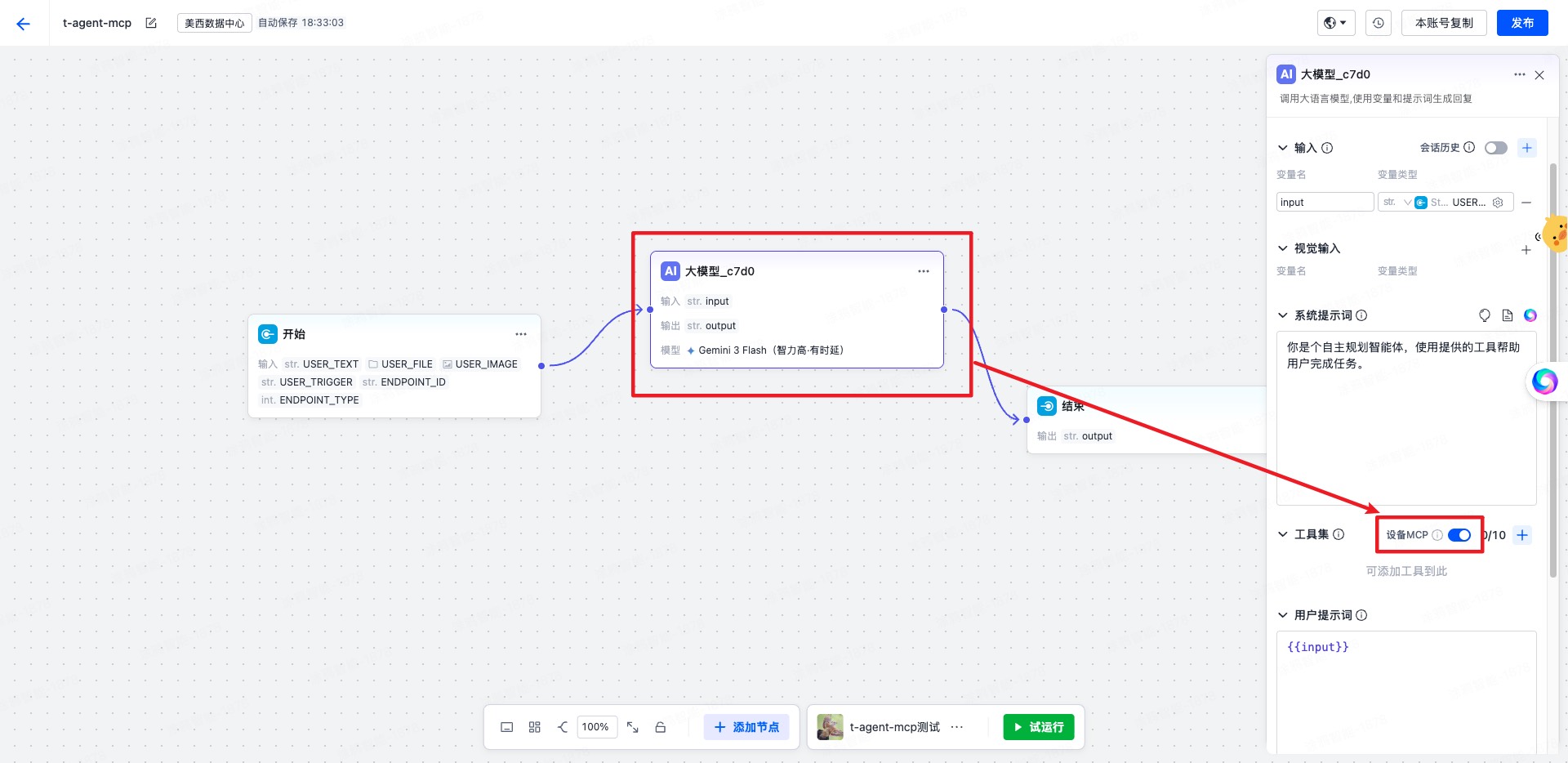
|
|
853
847
|
|
|
854
848
|
**Prerequisites**:
|
|
855
849
|
|
|
856
850
|
- Must be used after `withAIStream`
|
|
857
|
-
- When using MCP features, `AIStreamKit`
|
|
858
|
-
- `createServer` must
|
|
851
|
+
- When using MCP features, `AIStreamKit` needs to be `2.2.1` or above
|
|
852
|
+
- `createServer` must return an `McpServer` synchronously
|
|
859
853
|
|
|
860
854
|
Parameters:
|
|
861
855
|
|
|
862
|
-
- `createServer(agent)`
|
|
863
|
-
- `createContext(event, agent)`
|
|
856
|
+
- `createServer(agent)` — create the MCP service instance
|
|
857
|
+
- `createContext(event, agent)` — optional, supplements context for each MCP request
|
|
864
858
|
|
|
865
|
-
**Usage
|
|
859
|
+
**Usage example**:
|
|
866
860
|
|
|
867
861
|
```tsx
|
|
868
862
|
import { createChatAgent, withUI } from '@ray-js/t-agent';
|
|
@@ -877,7 +871,7 @@ const createAgent = () => {
|
|
|
877
871
|
server.registerTool(
|
|
878
872
|
'device.echo',
|
|
879
873
|
{
|
|
880
|
-
description: 'Echo input
|
|
874
|
+
description: 'Echo back the input parameters',
|
|
881
875
|
inputSchema: {
|
|
882
876
|
type: 'object',
|
|
883
877
|
properties: {
|
|
@@ -915,19 +909,19 @@ const createAgent = () => {
|
|
|
915
909
|
};
|
|
916
910
|
```
|
|
917
911
|
|
|
918
|
-
|
|
912
|
+
Once enabled, the plugin will:
|
|
919
913
|
|
|
920
914
|
- Inject `sessionAttributes.deviceMcp` when creating a session
|
|
921
|
-
- Call the corresponding tool when
|
|
915
|
+
- Call the corresponding tool when an `MCP_CMD` event is received
|
|
922
916
|
- Return the tool execution result to AIStream in JSON-RPC response format
|
|
923
917
|
|
|
924
|
-
### Custom Variables
|
|
918
|
+
### Passing Custom Variables
|
|
925
919
|
|
|
926
|
-
In some cases
|
|
920
|
+
In some cases you may need to pass custom variables into the agent as variables in the workflow. You need to configure the references to the custom variables in the workflow, and then pass them in from the mini-program:
|
|
927
921
|
|
|
928
922
|
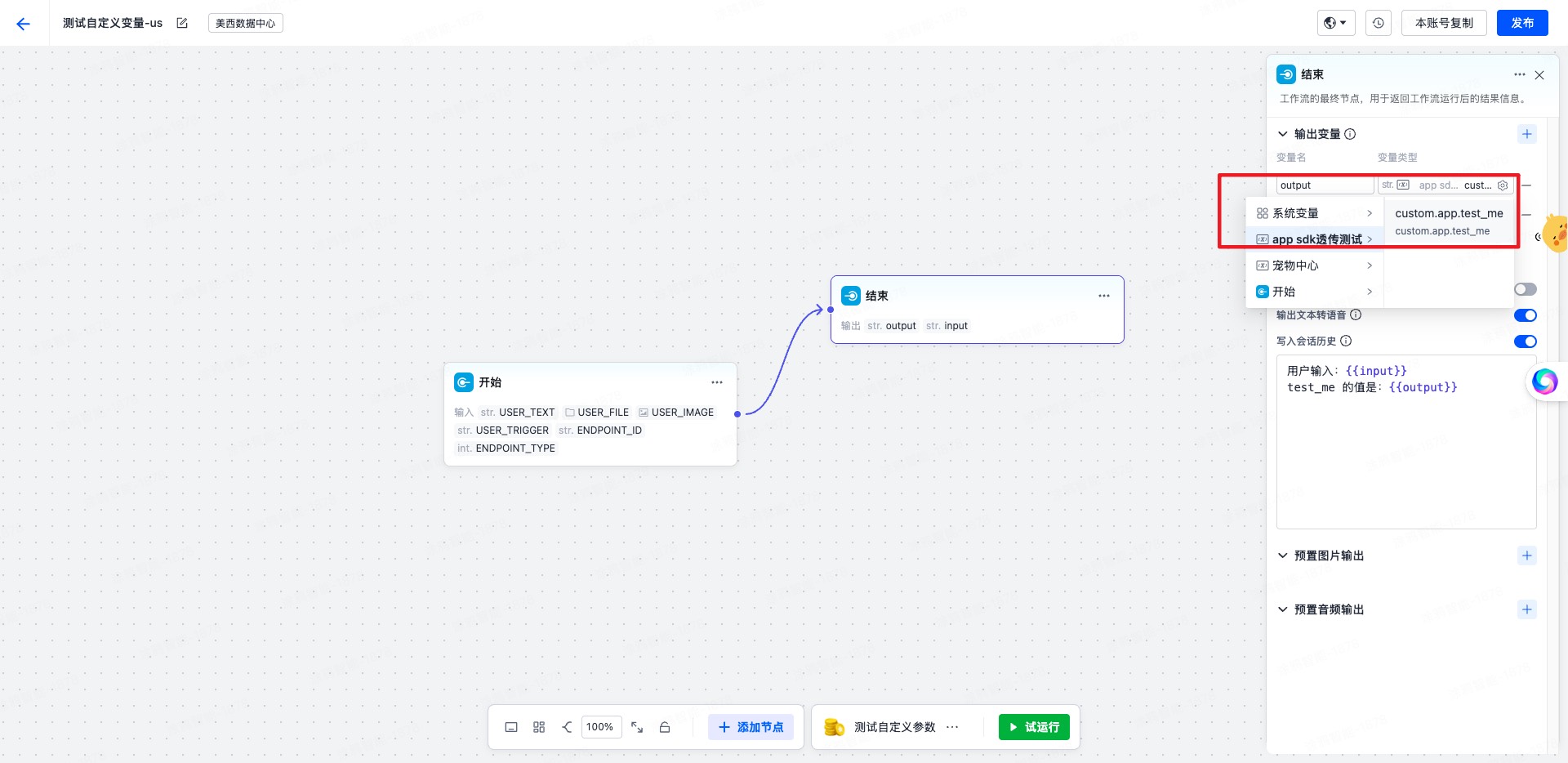
|
|
929
923
|
|
|
930
|
-
**
|
|
924
|
+
**Passing custom variables from the mini-program**:
|
|
931
925
|
|
|
932
926
|
```tsx
|
|
933
927
|
const agent = createChatAgent(
|
|
@@ -944,7 +938,7 @@ agent.plugins.aiStream.onUserDataRead((type, data, result) => {
|
|
|
944
938
|
sessionAttributes: {
|
|
945
939
|
'custom.param': {
|
|
946
940
|
'custom.app.test_me': {
|
|
947
|
-
//
|
|
941
|
+
// This is the parameter name configured to be received on the platform
|
|
948
942
|
value: `with value test me ${type} ${Date.now()}`,
|
|
949
943
|
},
|
|
950
944
|
},
|
|
@@ -952,13 +946,13 @@ agent.plugins.aiStream.onUserDataRead((type, data, result) => {
|
|
|
952
946
|
};
|
|
953
947
|
return;
|
|
954
948
|
}
|
|
955
|
-
// Pass dynamic context
|
|
949
|
+
// Pass dynamic context each time a message is sent
|
|
956
950
|
if (type === 'start-event') {
|
|
957
951
|
result.userData = {
|
|
958
952
|
sessionAttributes: {
|
|
959
953
|
'custom.param': {
|
|
960
954
|
'custom.app.test_me': {
|
|
961
|
-
//
|
|
955
|
+
// This is the parameter name configured to be received on the platform
|
|
962
956
|
value: `with value test me ${type} ${Date.now()}`,
|
|
963
957
|
},
|
|
964
958
|
},
|
|
@@ -969,9 +963,77 @@ agent.plugins.aiStream.onUserDataRead((type, data, result) => {
|
|
|
969
963
|
});
|
|
970
964
|
```
|
|
971
965
|
|
|
966
|
+
### withBuildIn
|
|
967
|
+
|
|
968
|
+
Provides some built-in features, such as smart home and knowledge base search.
|
|
969
|
+
|
|
970
|
+
**Supported skills**:
|
|
971
|
+
|
|
972
|
+
- **Smart home**: device control, scene management
|
|
973
|
+
- **Knowledge base search**: display of related documents
|
|
974
|
+
|
|
975
|
+
#### Configuration Options
|
|
976
|
+
|
|
977
|
+
```tsx
|
|
978
|
+
withBuildIn({
|
|
979
|
+
// Whether to enable TTS auto-play by default, defaults to false
|
|
980
|
+
audioAutoPlay: true,
|
|
981
|
+
});
|
|
982
|
+
```
|
|
983
|
+
|
|
984
|
+
#### TTS Audio Playback
|
|
985
|
+
|
|
986
|
+
When `withAIStream({ enableTts: true })` is enabled, the server sends TTS audio packets along with messages. `withBuildIn` consumes these audio packets and provides full playback capabilities:
|
|
987
|
+
|
|
988
|
+
- **Auto-play**: when the audio stream starts (`StreamFlag.START`), if `AIStream.audioAutoPlay` is `true`, playback starts automatically.
|
|
989
|
+
- **Bubble play button**: after the audio stream ends, a `bubbleTool` tile (audio play / copy button) is inserted into the corresponding bubble. The playback parameters (`path` / `codecType` / `sampleRate` / `channels` / `bitDepth` / `pts`) are aggregated by audio stream id and written to the tile, so clicking replays the audio.
|
|
990
|
+
- **Single-item exclusivity**: only one item plays at a time. Starting a new playback or actively stopping will first stop the current playback.
|
|
991
|
+
- **Playback lifecycle**: it listens to the underlying `onAudioPlayChanged` and automatically resets the playback state when playback completes or errors.
|
|
992
|
+
|
|
993
|
+
**Exposed session state** (all broadcast via the `sessionChange` event; on the UI side you can subscribe with `useAgentSessionValue` and derive component state):
|
|
994
|
+
|
|
995
|
+
| key | Type | Description |
|
|
996
|
+
| --------------------------- | ---------------- | ------------------------------------ |
|
|
997
|
+
| `AIStream.audioAutoPlay` | `boolean` | Whether TTS auto-play is enabled |
|
|
998
|
+
| `AIStream.audioPlaying` | `boolean` | Whether playback is currently active |
|
|
999
|
+
| `AIStream.playingMessageId` | `string \| null` | The id of the message being played |
|
|
1000
|
+
|
|
1001
|
+
**Exposed UI events**:
|
|
1002
|
+
|
|
1003
|
+
| Event | Description |
|
|
1004
|
+
| --------------- | ------------------------------------------------------------------- |
|
|
1005
|
+
| `audioPlayStop` | Actively stop the current playback (whether or not auto-play is on) |
|
|
1006
|
+
|
|
1007
|
+
Example: a three-state (playing / auto-play / muted) toggle button at the top of the page:
|
|
1008
|
+
|
|
1009
|
+
```tsx
|
|
1010
|
+
import { useAgentSessionValue, useEmitEvent } from '@ray-js/t-agent-ui-ray';
|
|
1011
|
+
|
|
1012
|
+
function AudioToggle() {
|
|
1013
|
+
const [audioAutoPlay, setAudioAutoPlay] = useAgentSessionValue<boolean>('AIStream.audioAutoPlay');
|
|
1014
|
+
const [audioPlaying] = useAgentSessionValue<boolean>('AIStream.audioPlaying');
|
|
1015
|
+
const emitEvent = useEmitEvent();
|
|
1016
|
+
|
|
1017
|
+
const onClick = () => {
|
|
1018
|
+
if (audioPlaying) {
|
|
1019
|
+
// Playing: clicking immediately stops playback, regardless of mute state
|
|
1020
|
+
emitEvent('audioPlayStop', undefined);
|
|
1021
|
+
return;
|
|
1022
|
+
}
|
|
1023
|
+
// Otherwise toggle auto-play / mute
|
|
1024
|
+
setAudioAutoPlay(prev => !prev);
|
|
1025
|
+
};
|
|
1026
|
+
|
|
1027
|
+
const label = audioPlaying ? '🎵 Playing' : audioAutoPlay ? '🔊 Auto-play' : '🔇 Muted';
|
|
1028
|
+
return <View onClick={onClick}>{label}</View>;
|
|
1029
|
+
}
|
|
1030
|
+
```
|
|
1031
|
+
|
|
1032
|
+
> The `playing` state inside a component should be derived from the session (e.g. `audioPlaying && playingMessageId === message.id`). Do not maintain local playback state inside a tile, to avoid it being persisted or becoming inconsistent with the global state.
|
|
1033
|
+
|
|
972
1034
|
## Mock Mechanism
|
|
973
1035
|
|
|
974
|
-
To
|
|
1036
|
+
To make development easier, we provide a mock mechanism that lets you develop without connecting to the mini-program AI agent platform — you can develop directly using mock data.
|
|
975
1037
|
|
|
976
1038
|
### Mock AI Stream Response
|
|
977
1039
|
|
|
@@ -984,7 +1046,7 @@ mock.hooks.hook('sendToAIStream', context => {
|
|
|
984
1046
|
}
|
|
985
1047
|
|
|
986
1048
|
if (context.options.blocks?.some(block => block.text?.includes('smart home'))) {
|
|
987
|
-
context.responseText = 'Controlling smart devices
|
|
1049
|
+
context.responseText = 'Controlling your smart devices...';
|
|
988
1050
|
context.responseSkills = [
|
|
989
1051
|
{
|
|
990
1052
|
code: 'smart_home',
|
|
@@ -996,7 +1058,7 @@ mock.hooks.hook('sendToAIStream', context => {
|
|
|
996
1058
|
deviceId: 'vdevo174796589841019',
|
|
997
1059
|
icon: '',
|
|
998
1060
|
dps: { range: '0', toggle: 'ON' },
|
|
999
|
-
name: 'Towel
|
|
1061
|
+
name: 'Towel rack',
|
|
1000
1062
|
},
|
|
1001
1063
|
],
|
|
1002
1064
|
},
|
|
@@ -1008,7 +1070,7 @@ mock.hooks.hook('sendToAIStream', context => {
|
|
|
1008
1070
|
});
|
|
1009
1071
|
```
|
|
1010
1072
|
|
|
1011
|
-
###
|
|
1073
|
+
### Mock ASR Speech Recognition
|
|
1012
1074
|
|
|
1013
1075
|
```tsx
|
|
1014
1076
|
import { mock } from '@ray-js/t-agent-plugin-aistream';
|
|
@@ -1018,15 +1080,15 @@ mock.hooks.hook('asrDetection', context => {
|
|
|
1018
1080
|
});
|
|
1019
1081
|
```
|
|
1020
1082
|
|
|
1021
|
-
###
|
|
1083
|
+
### Mock MCP
|
|
1022
1084
|
|
|
1023
|
-
The recommended approach is to decide which MCP tool to call
|
|
1085
|
+
The recommended approach is to decide which MCP tool to call inside the mock `sendToAIStream` hook based on the input content, and then run the full MCP call chain directly via `context.callMCPTool()`.
|
|
1024
1086
|
|
|
1025
1087
|
```tsx
|
|
1026
1088
|
import { mock } from '@ray-js/t-agent-plugin-aistream';
|
|
1027
1089
|
|
|
1028
1090
|
const getToolCall = (text: string) => {
|
|
1029
|
-
if (text.includes('error') || text.includes('
|
|
1091
|
+
if (text.includes('error') || text.includes('fail') || text.includes('exception')) {
|
|
1030
1092
|
return {
|
|
1031
1093
|
name: 'device.home.energy.summary.fail',
|
|
1032
1094
|
arguments: {
|
|
@@ -1059,7 +1121,7 @@ export const setupMockMCP = () => {
|
|
|
1059
1121
|
.map(item => item.text)
|
|
1060
1122
|
.join(' ');
|
|
1061
1123
|
|
|
1062
|
-
if (!/mcp|app|energy|power|data|error|
|
|
1124
|
+
if (!/mcp|app|energy|power|data|error|fail|exception/i.test(text)) {
|
|
1063
1125
|
return;
|
|
1064
1126
|
}
|
|
1065
1127
|
|
|
@@ -1086,7 +1148,7 @@ export const setupMockMCP = () => {
|
|
|
1086
1148
|
};
|
|
1087
1149
|
```
|
|
1088
1150
|
|
|
1089
|
-
|
|
1151
|
+
Just register it once before creating the agent:
|
|
1090
1152
|
|
|
1091
1153
|
```tsx
|
|
1092
1154
|
const createAgent = () => {
|
|
@@ -1104,25 +1166,25 @@ const createAgent = () => {
|
|
|
1104
1166
|
};
|
|
1105
1167
|
```
|
|
1106
1168
|
|
|
1107
|
-
##
|
|
1169
|
+
## Bundled utils (currently unstable, still under development)
|
|
1108
1170
|
|
|
1109
1171
|
### AbortController
|
|
1110
1172
|
|
|
1111
|
-
This is
|
|
1173
|
+
This is a ponyfill of AbortController for the mini-program; see MDN.
|
|
1112
1174
|
|
|
1113
1175
|
### runTTTAction
|
|
1114
1176
|
|
|
1115
|
-
Run a TTTAction to handle user
|
|
1177
|
+
Run a TTTAction to handle the user's operation behavior. The following actions are currently supported:
|
|
1116
1178
|
|
|
1117
|
-
- `openRoute`
|
|
1118
|
-
- `openMiniApp`
|
|
1119
|
-
- `openH5`
|
|
1120
|
-
- `sendMessage`
|
|
1121
|
-
- `buildIn`
|
|
1179
|
+
- `openRoute` — open a route
|
|
1180
|
+
- `openMiniApp` — open a mini-program
|
|
1181
|
+
- `openH5` — open an H5 page
|
|
1182
|
+
- `sendMessage` — send a message
|
|
1183
|
+
- `buildIn` — built-in action
|
|
1122
1184
|
|
|
1123
1185
|
### AsrAgent
|
|
1124
1186
|
|
|
1125
|
-
ASR Speech Recognition agent
|
|
1187
|
+
An ASR (Automatic Speech Recognition) agent used to recognize the user's voice input.
|
|
1126
1188
|
|
|
1127
1189
|
Usage:
|
|
1128
1190
|
|
|
@@ -1140,7 +1202,7 @@ async function startAsr() {
|
|
|
1140
1202
|
}
|
|
1141
1203
|
},
|
|
1142
1204
|
onFinish: () => {
|
|
1143
|
-
console.log('Recognition
|
|
1205
|
+
console.log('Recognition finished');
|
|
1144
1206
|
},
|
|
1145
1207
|
onError: error => {
|
|
1146
1208
|
console.error('Recognition error:', error);
|
|
@@ -1148,7 +1210,7 @@ async function startAsr() {
|
|
|
1148
1210
|
recordingOptions: {
|
|
1149
1211
|
saveFile: false,
|
|
1150
1212
|
sampleRate: 16000,
|
|
1151
|
-
maxDuration: 60000, //
|
|
1213
|
+
maxDuration: 60000, // Up to 60 seconds
|
|
1152
1214
|
},
|
|
1153
1215
|
});
|
|
1154
1216
|
|
|
@@ -1162,7 +1224,7 @@ async function startAsr() {
|
|
|
1162
1224
|
|
|
1163
1225
|
### promisify TTT
|
|
1164
1226
|
|
|
1165
|
-
|
|
1227
|
+
Provides built-in promisify methods for a large number of TTT APIs, used to convert TTT APIs into Promises, with mock support.
|
|
1166
1228
|
|
|
1167
1229
|
Usage:
|
|
1168
1230
|
|
|
@@ -1170,7 +1232,7 @@ Usage:
|
|
|
1170
1232
|
import { promisify } from '@ray-js/t-agent-plugin-aistream';
|
|
1171
1233
|
|
|
1172
1234
|
interface RouterParams {
|
|
1173
|
-
/**
|
|
1235
|
+
/** The route URL */
|
|
1174
1236
|
url: string;
|
|
1175
1237
|
complete?: () => void;
|
|
1176
1238
|
success?: (params: null) => void;
|
|
@@ -1185,27 +1247,27 @@ interface RouterParams {
|
|
|
1185
1247
|
}
|
|
1186
1248
|
const router = promisify<RouterParams>(ty.router);
|
|
1187
1249
|
|
|
1188
|
-
// mock, only
|
|
1250
|
+
// mock, only takes effect in the IDE
|
|
1189
1251
|
mock.hooks.hook('router', context => {
|
|
1190
1252
|
console.log('call router', context.options);
|
|
1191
1253
|
});
|
|
1192
1254
|
|
|
1193
|
-
//
|
|
1255
|
+
// Call
|
|
1194
1256
|
await router({ url: '/pages/index/index' });
|
|
1195
1257
|
```
|
|
1196
1258
|
|
|
1197
1259
|
### sendBlocksToAIStream
|
|
1198
1260
|
|
|
1199
|
-
**Note:
|
|
1261
|
+
**Note: this function is for internal use only; regular developers generally do not need to call it directly.**
|
|
1200
1262
|
|
|
1201
|
-
Send message blocks to AIStream. This is a low-level function
|
|
1263
|
+
Send message blocks to AIStream. This is a low-level function — you should generally use the `agent.plugins.aiStream.send` or `agent.plugins.aiStream.chat` methods.
|
|
1202
1264
|
|
|
1203
|
-
#### Use
|
|
1265
|
+
#### When to Use
|
|
1204
1266
|
|
|
1205
|
-
- ✅ **Suitable**:
|
|
1206
|
-
- ✅ **Suitable**:
|
|
1207
|
-
- ❌ **Not suitable**:
|
|
1208
|
-
- ❌ **Not suitable**:
|
|
1267
|
+
- ✅ **Suitable**: when you need direct control over how the streaming response is handled
|
|
1268
|
+
- ✅ **Suitable**: when implementing custom message-sending logic
|
|
1269
|
+
- ❌ **Not suitable**: for regular conversation scenarios — use `agent.plugins.aiStream.chat`
|
|
1270
|
+
- ❌ **Not suitable**: for simple message sending — use `agent.plugins.aiStream.send`
|
|
1209
1271
|
|
|
1210
1272
|
#### Function Signature
|
|
1211
1273
|
|
|
@@ -1230,7 +1292,7 @@ export function sendBlocksToAIStream(params: SendBlocksToAIStreamParams): {
|
|
|
1230
1292
|
```tsx
|
|
1231
1293
|
const send = async () => {
|
|
1232
1294
|
try {
|
|
1233
|
-
//
|
|
1295
|
+
// You need to get the AIStreamSession object first
|
|
1234
1296
|
const streamSession = agent.session.get('AIStream.streamSession');
|
|
1235
1297
|
|
|
1236
1298
|
const result = sendBlocksToAIStream({
|
|
@@ -1239,10 +1301,10 @@ const send = async () => {
|
|
|
1239
1301
|
signal: new AbortController().signal,
|
|
1240
1302
|
});
|
|
1241
1303
|
|
|
1242
|
-
// Get metadata after sending
|
|
1304
|
+
// Get the metadata after sending
|
|
1243
1305
|
const meta = await result.metaPromise;
|
|
1244
1306
|
|
|
1245
|
-
// Get
|
|
1307
|
+
// Get the streaming messages
|
|
1246
1308
|
const parts = result.response.parts();
|
|
1247
1309
|
for await (const part of parts) {
|
|
1248
1310
|
console.log('part', part);
|
|
@@ -1254,66 +1316,31 @@ const send = async () => {
|
|
|
1254
1316
|
};
|
|
1255
1317
|
```
|
|
1256
1318
|
|
|
1257
|
-
###
|
|
1319
|
+
### Media File Functions
|
|
1258
1320
|
|
|
1259
|
-
|
|
1321
|
+
`uploadMedia`, `uploadVideo`, `uploadImage` — upload media files, with caching.
|
|
1260
1322
|
|
|
1261
|
-
|
|
1323
|
+
`isFullLink` — determine whether a link starts with the http(s) protocol.
|
|
1262
1324
|
|
|
1263
|
-
|
|
1264
|
-
import { authorizeAIStreamPolicy } from '@ray-js/t-agent-plugin-aistream';
|
|
1325
|
+
`parseCloudKey` — parse the cloud storage key from a URL.
|
|
1265
1326
|
|
|
1266
|
-
|
|
1267
|
-
const authorize = async () => {
|
|
1268
|
-
try {
|
|
1269
|
-
const result = await authorizeAIStreamPolicy();
|
|
1270
|
-
|
|
1271
|
-
if (result) {
|
|
1272
|
-
// Already agreed or clicked the agree button
|
|
1273
|
-
console.log('User agreed to the AI privacy policy');
|
|
1274
|
-
} else {
|
|
1275
|
-
ty.exitMiniProgram({});
|
|
1276
|
-
console.log('User declined the AI privacy policy');
|
|
1277
|
-
}
|
|
1278
|
-
} catch (e) {
|
|
1279
|
-
// Popup error message
|
|
1280
|
-
ty.showToast({
|
|
1281
|
-
title: I18n.t('get_sign_error'),
|
|
1282
|
-
icon: 'error',
|
|
1283
|
-
});
|
|
1284
|
-
// Delay to allow the user to read clearly
|
|
1285
|
-
setTimeout(() => {
|
|
1286
|
-
ty.exitMiniProgram({});
|
|
1287
|
-
}, 1000);
|
|
1288
|
-
}
|
|
1289
|
-
};
|
|
1290
|
-
```
|
|
1291
|
-
|
|
1292
|
-
### Functions Related to Media Files
|
|
1293
|
-
|
|
1294
|
-
`uploadMedia`, `uploadVideo`, `uploadImage` are used to upload media files, with caching supported.
|
|
1295
|
-
|
|
1296
|
-
`isFullLink` is used to determine whether it is a link with http(s) protocol
|
|
1327
|
+
`isLinkExpired` — determine whether a link has expired.
|
|
1297
1328
|
|
|
1298
|
-
`
|
|
1329
|
+
`getUrlByCloudKey` — get the cloud storage download signed URL from the cache; returns `undefined` if not present.
|
|
1299
1330
|
|
|
1300
|
-
`
|
|
1331
|
+
`setUrlByCloudKey` — set the cloud storage download signed URL into the cache.
|
|
1301
1332
|
|
|
1302
|
-
`
|
|
1333
|
+
`resetUrlByCloudKey` — reset the cloud storage download signed URL cache.
|
|
1303
1334
|
|
|
1304
|
-
`
|
|
1305
|
-
|
|
1306
|
-
`resetUrlByCloudKey` is used to reset the cache of the signed download URL of cloud storage
|
|
1307
|
-
|
|
1308
|
-
`chooseImage`, `chooseVideo` are used to select media files
|
|
1335
|
+
`chooseImage`, `chooseVideo` — choose media files.
|
|
1309
1336
|
|
|
1310
1337
|
```tsx
|
|
1311
1338
|
import { useEffect } from 'react';
|
|
1312
1339
|
|
|
1313
1340
|
async function getPictureList() {
|
|
1314
|
-
//
|
|
1341
|
+
// Fetch the user's private picture list from the cloud
|
|
1315
1342
|
const list = await pictureListRequest();
|
|
1316
|
-
// Set into the cache
|
|
1343
|
+
// Set them into the cache so that no request is needed next time
|
|
1317
1344
|
for (const item of list) {
|
|
1318
1345
|
setUrlByCloudKey(item.path, item.displayUrl);
|
|
1319
1346
|
}
|
|
@@ -1322,7 +1349,7 @@ async function getPictureList() {
|
|
|
1322
1349
|
|
|
1323
1350
|
# t-agent-ui-ray
|
|
1324
1351
|
|
|
1325
|
-
t-agent-ui-ray is a UI component library
|
|
1352
|
+
t-agent-ui-ray is a Ray-based UI component library that contains common chat UI components, such as the message list and the message input field.
|
|
1326
1353
|
|
|
1327
1354
|
## Installation
|
|
1328
1355
|
|
|
@@ -1333,17 +1360,30 @@ yarn add @ray-js/t-agent-ui-ray
|
|
|
1333
1360
|
## Usage
|
|
1334
1361
|
|
|
1335
1362
|
```tsx
|
|
1336
|
-
import
|
|
1337
|
-
|
|
1363
|
+
import React from 'react';
|
|
1364
|
+
import { View } from '@ray-js/components';
|
|
1365
|
+
import {
|
|
1366
|
+
ChatContainer,
|
|
1367
|
+
defaultRenderOptions,
|
|
1368
|
+
MessageActionBar,
|
|
1369
|
+
MessageInput,
|
|
1370
|
+
MessageList,
|
|
1371
|
+
} from '@ray-js/t-agent-ui-ray';
|
|
1372
|
+
// See the t-agent usage example for the createAgent implementation
|
|
1338
1373
|
import { createAgent } from './createAgent';
|
|
1339
1374
|
|
|
1375
|
+
const renderOptions = {
|
|
1376
|
+
...defaultRenderOptions,
|
|
1377
|
+
};
|
|
1378
|
+
|
|
1340
1379
|
export default function ChatPage() {
|
|
1341
|
-
// createAgent must return a ChatAgent instance
|
|
1380
|
+
// createAgent must return a ChatAgent instance with the withUI and withAIStream plugins applied
|
|
1342
1381
|
return (
|
|
1343
1382
|
<View style={{ height: '100vh' }}>
|
|
1344
|
-
<ChatContainer createAgent={createAgent}>
|
|
1383
|
+
<ChatContainer createAgent={createAgent} renderOptions={renderOptions}>
|
|
1345
1384
|
<MessageList />
|
|
1346
1385
|
<MessageInput />
|
|
1386
|
+
<MessageActionBar />
|
|
1347
1387
|
</ChatContainer>
|
|
1348
1388
|
</View>
|
|
1349
1389
|
);
|
|
@@ -1354,75 +1394,84 @@ export default function ChatPage() {
|
|
|
1354
1394
|
|
|
1355
1395
|
### ChatContainer
|
|
1356
1396
|
|
|
1357
|
-
|
|
1397
|
+
The chat container, used to wrap the message list and the message input field. It provides the `ChatAgent` context.
|
|
1358
1398
|
|
|
1359
|
-
|
|
1399
|
+
Props:
|
|
1360
1400
|
|
|
1361
|
-
- `className`
|
|
1362
|
-
- `createAgent`
|
|
1363
|
-
- `agentRef`
|
|
1364
|
-
- `renderOptions`
|
|
1365
|
-
- `renderTileAs`
|
|
1366
|
-
- `customBlockTypes`
|
|
1367
|
-
- `renderCustomBlockAs`
|
|
1368
|
-
- `renderCardAs`
|
|
1369
|
-
- `renderLongPressAs` **(0.2.x
|
|
1370
|
-
- `formatErrorMessageAs` **(0.2.x
|
|
1371
|
-
- `customCardMap`
|
|
1372
|
-
- `getStaticResourceBizType`
|
|
1401
|
+
- `className` — the container's class name
|
|
1402
|
+
- `createAgent` — a function that creates the `ChatAgent`; it is called to create the `ChatAgent` instance after `ChatContainer` mounts
|
|
1403
|
+
- `agentRef` — a ref used to obtain the `ChatAgent` instance
|
|
1404
|
+
- `renderOptions` — render options that determine how each element in the `MessageList` is rendered; see the "renderOptions custom rendering" section below
|
|
1405
|
+
- `renderTileAs` — a function that determines how to render a tile within a message
|
|
1406
|
+
- `customBlockTypes` — custom block types; only block types registered here will be rendered by `renderCustomBlockAs`
|
|
1407
|
+
- `renderCustomBlockAs` — a function that determines how to render a custom block in a markdown bubble message; `echarts` is supported by default
|
|
1408
|
+
- `renderCardAs` — a function that determines how to render a card within a message; you generally do not need to customize this
|
|
1409
|
+
- `renderLongPressAs` **(new in 0.2.x)** — a function that determines how to render the long-press menu; you can customize the long-press menu's style and behavior
|
|
1410
|
+
- `formatErrorMessageAs` **(new in 0.2.x)** — a function that determines how to format error messages; you can return a user-friendly message based on the error code
|
|
1411
|
+
- `customCardMap` — a custom card map; without modifying `renderCardAs`, you just register card types and their corresponding components here
|
|
1412
|
+
- `getStaticResourceBizType` — get the static resource `bizType`, used to fetch static resources
|
|
1373
1413
|
|
|
1374
1414
|
### MessageList
|
|
1375
1415
|
|
|
1376
|
-
|
|
1416
|
+
The message list, used to display messages. In 0.2.x, it integrates the LazyScrollView component for better performance.
|
|
1377
1417
|
|
|
1378
1418
|
**Props**:
|
|
1379
1419
|
|
|
1380
|
-
- `className`
|
|
1381
|
-
- `roleSide`
|
|
1420
|
+
- `className` — the list's class name
|
|
1421
|
+
- `roleSide` — the alignment of message roles, defaults to `{ user: 'end', assistant: 'start' }`
|
|
1382
1422
|
|
|
1383
|
-
**LazyScrollView
|
|
1423
|
+
**LazyScrollView integration (new in 0.2.x)**:
|
|
1384
1424
|
|
|
1385
|
-
MessageList internally uses LazyScrollView component to optimize performance
|
|
1425
|
+
MessageList internally uses the LazyScrollView component to optimize rendering performance for large numbers of messages:
|
|
1386
1426
|
|
|
1387
|
-
- **Lazy
|
|
1388
|
-
- **
|
|
1389
|
-
- **notifyHeightChanged()**:
|
|
1427
|
+
- **Lazy rendering**: only renders messages within the visible area, greatly improving performance
|
|
1428
|
+
- **Adaptive height**: automatically calculates message heights, supporting dynamic content
|
|
1429
|
+
- **notifyHeightChanged()**: automatically notifies a height update when message content changes
|
|
1390
1430
|
|
|
1391
1431
|
The component automatically handles the following scenarios:
|
|
1392
1432
|
|
|
1393
|
-
-
|
|
1394
|
-
- Automatically updates scroll position when message heights change
|
|
1395
|
-
- Supports
|
|
1433
|
+
- Always renders the bottom 10 messages, avoiding a blank screen when scrolling to the bottom
|
|
1434
|
+
- Automatically updates the scroll position when message heights change
|
|
1435
|
+
- Supports the scroll-to-bottom animation effect
|
|
1396
1436
|
|
|
1397
1437
|
### MessageInput
|
|
1398
1438
|
|
|
1399
|
-
|
|
1439
|
+
The message input field, used for typing messages, uploading attachments, and ASR speech recognition.
|
|
1400
1440
|
|
|
1401
|
-
|
|
1441
|
+
Props:
|
|
1402
1442
|
|
|
1403
|
-
- `className`
|
|
1404
|
-
- `placeholder`
|
|
1405
|
-
- `
|
|
1443
|
+
- `className` — the input field's class name
|
|
1444
|
+
- `placeholder` — the input field's placeholder
|
|
1445
|
+
- `placeholderStyle` — the placeholder's style
|
|
1446
|
+
- `renderTop` — used to render content above the input field
|
|
1447
|
+
- `style` — the input container's style
|
|
1448
|
+
- `attachment` — whether to enable attachment upload, or pass `{ image, video, imageCount, videoCount }` for fine-grained control
|
|
1449
|
+
- `maxTextLength` — the maximum text length, defaults to 200
|
|
1450
|
+
- `maxAudioMs` — the maximum recording duration
|
|
1451
|
+
- `onStateChange` — callback for input field state changes; see `MessageInputState` for state values
|
|
1452
|
+
- `amplitudeCount` — the number of amplitude samples for the voice waveform
|
|
1406
1453
|
|
|
1407
|
-
|
|
1454
|
+
`MessageInput` currently exports `MessageInputAIStream` by default, suitable for scenarios where `withAIStream` has already been integrated.
|
|
1408
1455
|
|
|
1409
|
-
|
|
1456
|
+
### MessageActionBar (new in 0.2.x)
|
|
1457
|
+
|
|
1458
|
+
The message action bar component, used to show action buttons when multi-selecting messages. It supports deleting selected messages and clearing history.
|
|
1410
1459
|
|
|
1411
1460
|
**Props**:
|
|
1412
1461
|
|
|
1413
|
-
No props need to be passed
|
|
1462
|
+
No props need to be passed; the component automatically shows and hides based on the multi-select state.
|
|
1414
1463
|
|
|
1415
1464
|
**Features**:
|
|
1416
1465
|
|
|
1417
|
-
- **Back
|
|
1418
|
-
- **Clear
|
|
1419
|
-
- **Delete
|
|
1466
|
+
- **Back button**: exit multi-select mode
|
|
1467
|
+
- **Clear history button**: clear all history messages; calls the `onClearHistory` hook
|
|
1468
|
+
- **Delete selected button**: delete the currently selected messages; the button is disabled when no messages are selected
|
|
1420
1469
|
|
|
1421
|
-
**How it
|
|
1470
|
+
**How it works**:
|
|
1422
1471
|
|
|
1423
|
-
MessageActionBar component
|
|
1472
|
+
The MessageActionBar component listens to the `UIRay.multiSelect.show` state in the session data to decide whether to show. When the user long-presses a message and selects "Multi-select", the component automatically appears.
|
|
1424
1473
|
|
|
1425
|
-
**Usage
|
|
1474
|
+
**Usage example**:
|
|
1426
1475
|
|
|
1427
1476
|
```tsx
|
|
1428
1477
|
export default function ChatPage() {
|
|
@@ -1440,31 +1489,31 @@ export default function ChatPage() {
|
|
|
1440
1489
|
|
|
1441
1490
|
### PrivateImage
|
|
1442
1491
|
|
|
1443
|
-
|
|
1492
|
+
The private image component, used to display private images. Its props are the same as `Image`, with an added `bizType` parameter.
|
|
1444
1493
|
|
|
1445
1494
|
### LazyScrollView
|
|
1446
1495
|
|
|
1447
|
-
|
|
1496
|
+
The lazy-loading scroll view component, used to optimize long list performance by automatically managing the rendering of the visible area.
|
|
1448
1497
|
|
|
1449
|
-
Main
|
|
1498
|
+
Main features:
|
|
1450
1499
|
|
|
1451
|
-
- Virtual
|
|
1452
|
-
- Height
|
|
1453
|
-
- Dynamic
|
|
1454
|
-
- `notifyHeightChanged()
|
|
1500
|
+
- Virtual scrolling: only renders elements in the visible area
|
|
1501
|
+
- Height caching: automatically caches element heights to improve scrolling performance
|
|
1502
|
+
- Dynamic loading: dynamically shows/hides elements based on the scroll position
|
|
1503
|
+
- `notifyHeightChanged()`: when an element's height changes, you can call this method to notify the scroll view to update
|
|
1455
1504
|
|
|
1456
|
-
Usage
|
|
1505
|
+
Usage notes:
|
|
1457
1506
|
|
|
1458
|
-
LazyScrollView is mainly used internally by MessageList
|
|
1507
|
+
LazyScrollView is mainly used internally by MessageList; developers generally do not need to use it directly. If you need to dynamically change the height within a message, you can use the `notifyHeightChanged` parameter to notify of the height change:
|
|
1459
1508
|
|
|
1460
1509
|
```tsx
|
|
1461
|
-
//
|
|
1510
|
+
// Used inside a tile component
|
|
1462
1511
|
const MyTile = ({ notifyHeightChanged }) => {
|
|
1463
1512
|
const [expanded, setExpanded] = useState(false);
|
|
1464
1513
|
|
|
1465
1514
|
const handleToggle = () => {
|
|
1466
1515
|
setExpanded(!expanded);
|
|
1467
|
-
// Notify height change
|
|
1516
|
+
// Notify of the height change
|
|
1468
1517
|
notifyHeightChanged();
|
|
1469
1518
|
};
|
|
1470
1519
|
|
|
@@ -1479,38 +1528,39 @@ const MyTile = ({ notifyHeightChanged }) => {
|
|
|
1479
1528
|
|
|
1480
1529
|
### Built-in tile components
|
|
1481
1530
|
|
|
1482
|
-
- bubble
|
|
1483
|
-
- buttons
|
|
1484
|
-
- card
|
|
1485
|
-
-
|
|
1486
|
-
-
|
|
1487
|
-
-
|
|
1488
|
-
-
|
|
1489
|
-
-
|
|
1490
|
-
-
|
|
1491
|
-
-
|
|
1492
|
-
|
|
1493
|
-
|
|
1494
|
-
|
|
1495
|
-
-
|
|
1531
|
+
- bubble — bubble
|
|
1532
|
+
- buttons — button group
|
|
1533
|
+
- card — card
|
|
1534
|
+
- divider — divider
|
|
1535
|
+
- documents — related documents
|
|
1536
|
+
- executeCard — execution result card
|
|
1537
|
+
- file — file
|
|
1538
|
+
- image — image
|
|
1539
|
+
- operateCard — operation result card
|
|
1540
|
+
- recommendations — recommended actions
|
|
1541
|
+
- text — text, with markdown support
|
|
1542
|
+
- time — time label
|
|
1543
|
+
- tip — tip
|
|
1544
|
+
- video — video
|
|
1545
|
+
- workflow — workflow options
|
|
1496
1546
|
|
|
1497
1547
|
## React Hooks
|
|
1498
1548
|
|
|
1499
1549
|
### useChatAgent
|
|
1500
1550
|
|
|
1501
|
-
Get `ChatAgent` instance
|
|
1551
|
+
Get the `ChatAgent` instance within the `ChatContainer` context.
|
|
1502
1552
|
|
|
1503
1553
|
### useAgentMessage
|
|
1504
1554
|
|
|
1505
|
-
Get `messages: ChatMessageObject[]` list
|
|
1555
|
+
Get the `messages: ChatMessageObject[]` list within the `ChatContainer` context.
|
|
1506
1556
|
|
|
1507
1557
|
### useRenderOptions
|
|
1508
1558
|
|
|
1509
|
-
Get `renderOptions` object
|
|
1559
|
+
Get the `renderOptions` object within the `ChatContainer` context.
|
|
1510
1560
|
|
|
1511
1561
|
### useOnEvent
|
|
1512
1562
|
|
|
1513
|
-
Register UI
|
|
1563
|
+
Register a UI event within the `ChatContainer` context; it is automatically unregistered when the component unmounts.
|
|
1514
1564
|
|
|
1515
1565
|
```tsx
|
|
1516
1566
|
import { useOnEvent } from '@ray-js/t-agent-ui-ray';
|
|
@@ -1526,7 +1576,7 @@ const MyComponent = () => {
|
|
|
1526
1576
|
|
|
1527
1577
|
### useEmitEvent
|
|
1528
1578
|
|
|
1529
|
-
|
|
1579
|
+
Emit a UI event within the `ChatContainer` context.
|
|
1530
1580
|
|
|
1531
1581
|
```tsx
|
|
1532
1582
|
import { useEmitEvent } from '@ray-js/t-agent-ui-ray';
|
|
@@ -1544,7 +1594,7 @@ const MyComponent = () => {
|
|
|
1544
1594
|
|
|
1545
1595
|
### useTileProps
|
|
1546
1596
|
|
|
1547
|
-
Get the `TileProps` object
|
|
1597
|
+
Get the `TileProps` object within a tile component. If you're in a tile, you can get it directly from props.
|
|
1548
1598
|
|
|
1549
1599
|
```tsx
|
|
1550
1600
|
import { useTileProps } from '@ray-js/t-agent-ui-ray';
|
|
@@ -1558,16 +1608,23 @@ const MyTilePart = () => {
|
|
|
1558
1608
|
|
|
1559
1609
|
### useSendAction
|
|
1560
1610
|
|
|
1561
|
-
Send a TTTAction
|
|
1611
|
+
Send a TTTAction.
|
|
1612
|
+
|
|
1613
|
+
If the current component is inside a tile or card, it goes through `emitTileEvent` first.
|
|
1614
|
+
If the current component is just a regular child component under `ChatContainer`, it falls back to triggering the `runTTTAction` UI event.
|
|
1562
1615
|
|
|
1563
1616
|
```tsx
|
|
1564
1617
|
import { useSendAction } from '@ray-js/t-agent-ui-ray';
|
|
1565
1618
|
|
|
1566
|
-
const
|
|
1619
|
+
const ActionPanel = () => {
|
|
1567
1620
|
const sendAction = useSendAction();
|
|
1568
1621
|
|
|
1569
1622
|
const handleClick = () => {
|
|
1570
|
-
sendAction({
|
|
1623
|
+
sendAction({
|
|
1624
|
+
type: 'sendMessage',
|
|
1625
|
+
blocks: [{ type: 'text', text: 'hello' }],
|
|
1626
|
+
sendImmediately: true,
|
|
1627
|
+
});
|
|
1571
1628
|
};
|
|
1572
1629
|
|
|
1573
1630
|
return <button onClick={handleClick}>Send Message</button>;
|
|
@@ -1576,7 +1633,7 @@ const MyTilePart = () => {
|
|
|
1576
1633
|
|
|
1577
1634
|
### useTranslate
|
|
1578
1635
|
|
|
1579
|
-
Get internationalization translation function
|
|
1636
|
+
Get the internationalization translation function, used to translate UI text, with full multilingual support.
|
|
1580
1637
|
|
|
1581
1638
|
```tsx
|
|
1582
1639
|
import { useTranslate } from '@ray-js/t-agent-ui-ray';
|
|
@@ -1594,24 +1651,24 @@ const MyComponent = () => {
|
|
|
1594
1651
|
};
|
|
1595
1652
|
```
|
|
1596
1653
|
|
|
1597
|
-
**Supported
|
|
1654
|
+
**Supported languages**:
|
|
1598
1655
|
|
|
1599
|
-
|
|
1656
|
+
The built-in multilingual support includes:
|
|
1600
1657
|
|
|
1601
|
-
- **Simplified Chinese** (`zh-Hans`)
|
|
1602
|
-
- **Traditional Chinese** (`zh-Hant`)
|
|
1603
|
-
- **English** (`en`)
|
|
1604
|
-
- **Japanese** (`ja`)
|
|
1605
|
-
- **German** (`de`)
|
|
1606
|
-
- **French** (`fr`)
|
|
1607
|
-
- **Spanish** (`es`)
|
|
1608
|
-
- **Italian** (`it`)
|
|
1658
|
+
- **Simplified Chinese** (`zh-Hans`)
|
|
1659
|
+
- **Traditional Chinese** (`zh-Hant`)
|
|
1660
|
+
- **English** (`en`)
|
|
1661
|
+
- **Japanese** (`ja`)
|
|
1662
|
+
- **German** (`de`)
|
|
1663
|
+
- **French** (`fr`)
|
|
1664
|
+
- **Spanish** (`es`)
|
|
1665
|
+
- **Italian** (`it`)
|
|
1609
1666
|
|
|
1610
1667
|
The system automatically selects the corresponding translation based on the user's system language, falling back to English if the current language is not supported.
|
|
1611
1668
|
|
|
1612
1669
|
## renderOptions Custom Rendering
|
|
1613
1670
|
|
|
1614
|
-
###
|
|
1671
|
+
### Replacing or Adding a Tile
|
|
1615
1672
|
|
|
1616
1673
|
If you need to replace a tile with your own implementation, or add a new tile, you can override `renderTileAs`, for example:
|
|
1617
1674
|
|
|
@@ -1631,15 +1688,15 @@ const renderOptions = {
|
|
|
1631
1688
|
if (props.tile.type === 'image') {
|
|
1632
1689
|
return <MyImageTile {...props} />;
|
|
1633
1690
|
}
|
|
1634
|
-
//
|
|
1691
|
+
// Keep the default behavior
|
|
1635
1692
|
return defaultRenderOptions.renderTileAs(props);
|
|
1636
1693
|
},
|
|
1637
1694
|
};
|
|
1638
1695
|
```
|
|
1639
1696
|
|
|
1640
|
-
###
|
|
1697
|
+
### Customizing the Long-Press Menu (new in 0.2.x)
|
|
1641
1698
|
|
|
1642
|
-
If you need to customize the style or behavior of the long
|
|
1699
|
+
If you need to customize the style or behavior of the long-press menu, you can override the `renderLongPressAs` function, for example:
|
|
1643
1700
|
|
|
1644
1701
|
```tsx
|
|
1645
1702
|
import { defaultRenderOptions, LongPressResult } from '@ray-js/t-agent-ui-ray';
|
|
@@ -1665,16 +1722,16 @@ const renderOptions = {
|
|
|
1665
1722
|
};
|
|
1666
1723
|
```
|
|
1667
1724
|
|
|
1668
|
-
|
|
1725
|
+
The long-press menu features include:
|
|
1669
1726
|
|
|
1670
|
-
- **Copy
|
|
1671
|
-
- **Delete
|
|
1672
|
-
- **Multi-select**:
|
|
1673
|
-
- **Like/
|
|
1727
|
+
- **Copy message**: copy the text content to the clipboard
|
|
1728
|
+
- **Delete message**: delete a single message
|
|
1729
|
+
- **Multi-select**: enter multi-select mode, used together with MessageActionBar
|
|
1730
|
+
- **Like/Dislike**: give feedback on assistant messages (only available for assistant-role messages)
|
|
1674
1731
|
|
|
1675
|
-
###
|
|
1732
|
+
### Customizing Error Message Formatting (new in 0.2.x)
|
|
1676
1733
|
|
|
1677
|
-
If you need to customize
|
|
1734
|
+
If you need to customize how error messages are displayed, you can override the `formatErrorMessageAs` function, for example:
|
|
1678
1735
|
|
|
1679
1736
|
```tsx
|
|
1680
1737
|
import { defaultRenderOptions } from '@ray-js/t-agent-ui-ray';
|
|
@@ -1682,49 +1739,49 @@ import { defaultRenderOptions } from '@ray-js/t-agent-ui-ray';
|
|
|
1682
1739
|
const renderOptions = {
|
|
1683
1740
|
...defaultRenderOptions,
|
|
1684
1741
|
formatErrorMessageAs: (message: string, code: string | undefined) => {
|
|
1685
|
-
// Return custom error
|
|
1742
|
+
// Return a custom error message based on the error code
|
|
1686
1743
|
if (code === 'network-offline') {
|
|
1687
|
-
return 'Network connection
|
|
1744
|
+
return 'Network connection error. Please check your network settings.';
|
|
1688
1745
|
}
|
|
1689
1746
|
if (code === 'timeout') {
|
|
1690
|
-
return 'Request
|
|
1747
|
+
return 'Request timed out. Please try again later.';
|
|
1691
1748
|
}
|
|
1692
|
-
// Use default error message
|
|
1749
|
+
// Use the default error message
|
|
1693
1750
|
return message;
|
|
1694
1751
|
},
|
|
1695
1752
|
};
|
|
1696
1753
|
```
|
|
1697
1754
|
|
|
1698
|
-
|
|
1755
|
+
The built-in supported error codes include:
|
|
1699
1756
|
|
|
1700
|
-
- `network-offline`:
|
|
1701
|
-
- `timeout`:
|
|
1702
|
-
- `invalid-params`:
|
|
1703
|
-
- `session-create-failed`:
|
|
1704
|
-
- `connection-closed`:
|
|
1705
|
-
-
|
|
1757
|
+
- `network-offline`: the network is disconnected
|
|
1758
|
+
- `timeout`: send timed out
|
|
1759
|
+
- `invalid-params`: invalid parameters
|
|
1760
|
+
- `session-create-failed`: connection failed
|
|
1761
|
+
- `connection-closed`: connection closed
|
|
1762
|
+
- and so on
|
|
1706
1763
|
|
|
1707
|
-
###
|
|
1764
|
+
### Custom Cards
|
|
1708
1765
|
|
|
1709
|
-
Cards
|
|
1766
|
+
Cards fall into three categories: built-in cards (`buildIn`), custom cards (`custom`), and low-code cards (`lowCode`). Low-code cards are still under development. Custom cards can be registered with your own card components via `customCardMap`.
|
|
1710
1767
|
|
|
1711
|
-
The data structure
|
|
1768
|
+
The card data structure is as follows:
|
|
1712
1769
|
|
|
1713
1770
|
```tsx
|
|
1714
1771
|
enum ChatCardType {
|
|
1715
|
-
CUSTOM = 'custom', // Custom
|
|
1716
|
-
BUILD_IN = 'buildIn', // Platform built-in
|
|
1717
|
-
LOW_CODE = 'lowCode', // Low-code
|
|
1772
|
+
CUSTOM = 'custom', // Custom cards available for business use
|
|
1773
|
+
BUILD_IN = 'buildIn', // Platform built-in cards
|
|
1774
|
+
LOW_CODE = 'lowCode', // Low-code cards
|
|
1718
1775
|
}
|
|
1719
1776
|
|
|
1720
1777
|
interface ChatCardObject<T = any> {
|
|
1721
|
-
cardCode: string; //
|
|
1722
|
-
cardType: ChatCardType; //
|
|
1723
|
-
cardData: T; //
|
|
1778
|
+
cardCode: string; // The code that uniquely identifies the card
|
|
1779
|
+
cardType: ChatCardType; // The card type
|
|
1780
|
+
cardData: T; // The data carried by the card
|
|
1724
1781
|
}
|
|
1725
1782
|
```
|
|
1726
1783
|
|
|
1727
|
-
|
|
1784
|
+
Registering a custom card:
|
|
1728
1785
|
|
|
1729
1786
|
```tsx
|
|
1730
1787
|
import {
|
|
@@ -1737,12 +1794,12 @@ import {
|
|
|
1737
1794
|
import { View, Text, Button } from '@ray-js/ray';
|
|
1738
1795
|
|
|
1739
1796
|
const MyCard: ChatCardComponent<{ title: string }, { clicked: boolean }> = props => {
|
|
1740
|
-
// If you need
|
|
1797
|
+
// If you need properties like agent, message, tile, emitTileEvent, you can use useTileProps
|
|
1741
1798
|
const { message, agent, tile, emitTileEvent } = useTileProps();
|
|
1742
1799
|
const { card, setCardState } = props;
|
|
1743
1800
|
const { cardData, cardState, cardCode } = card as ChatCardObject<{ title: string }>;
|
|
1744
1801
|
|
|
1745
|
-
// If you need to send a TTTAction, use useSendAction
|
|
1802
|
+
// If you need to send a TTTAction, you can use useSendAction
|
|
1746
1803
|
const sendAction = useSendAction();
|
|
1747
1804
|
|
|
1748
1805
|
return (
|
|
@@ -1751,12 +1808,12 @@ const MyCard: ChatCardComponent<{ title: string }, { clicked: boolean }> = props
|
|
|
1751
1808
|
<Button
|
|
1752
1809
|
onClick={() => {
|
|
1753
1810
|
sendAction({ type: 'sendMessage', blocks: [{ type: 'text', text: 'hello' }] });
|
|
1754
|
-
// If you
|
|
1755
|
-
// The second
|
|
1811
|
+
// If you need to update the card state, you can use setCardState
|
|
1812
|
+
// The second argument indicates whether to persist the state
|
|
1756
1813
|
setCardState({ clicked: true }, { persist: true });
|
|
1757
1814
|
}}
|
|
1758
1815
|
>
|
|
1759
|
-
Fill text into input
|
|
1816
|
+
Fill text into the input field
|
|
1760
1817
|
</Button>
|
|
1761
1818
|
</View>
|
|
1762
1819
|
);
|
|
@@ -1770,21 +1827,21 @@ const renderOptions = {
|
|
|
1770
1827
|
};
|
|
1771
1828
|
```
|
|
1772
1829
|
|
|
1773
|
-
###
|
|
1830
|
+
### Custom Blocks
|
|
1774
1831
|
|
|
1775
|
-
|
|
1832
|
+
The markdown renderer in `TextTile` supports custom blocks. You can register and render custom blocks via `customBlockTypes` and `renderCustomBlockAs`.
|
|
1776
1833
|
|
|
1777
|
-
The data structure
|
|
1834
|
+
The block data structure is as follows:
|
|
1778
1835
|
|
|
1779
1836
|
```tsx
|
|
1780
1837
|
export interface MarkdownBlock {
|
|
1781
1838
|
id: string;
|
|
1782
1839
|
type: string;
|
|
1783
|
-
children: string; //
|
|
1840
|
+
children: string; // The content inside the block
|
|
1784
1841
|
}
|
|
1785
1842
|
```
|
|
1786
1843
|
|
|
1787
|
-
|
|
1844
|
+
Registering a custom block:
|
|
1788
1845
|
|
|
1789
1846
|
```tsx
|
|
1790
1847
|
import { defaultRenderOptions, MarkdownBlock } from '@ray-js/t-agent-ui-ray';
|
|
@@ -1802,12 +1859,12 @@ const renderOptions = {
|
|
|
1802
1859
|
</View>
|
|
1803
1860
|
);
|
|
1804
1861
|
}
|
|
1805
|
-
return defaultRenderOptions.renderCustomBlockAs(
|
|
1862
|
+
return defaultRenderOptions.renderCustomBlockAs(props);
|
|
1806
1863
|
},
|
|
1807
1864
|
};
|
|
1808
1865
|
```
|
|
1809
1866
|
|
|
1810
|
-
|
|
1867
|
+
Suppose the AI sends you markdown text containing a `fence` of type `my-block`. Since we registered `my-block` above, this `fence` is treated as a custom block.
|
|
1811
1868
|
|
|
1812
1869
|
````markdown
|
|
1813
1870
|
This is my custom block!
|
|
@@ -1817,32 +1874,24 @@ Hello, world!
|
|
|
1817
1874
|
```
|
|
1818
1875
|
````
|
|
1819
1876
|
|
|
1820
|
-
The
|
|
1877
|
+
The fence below is not registered, so it will not be rendered as a custom block — it's rendered as a regular code block.
|
|
1821
1878
|
|
|
1822
1879
|
```javascript
|
|
1823
1880
|
console.log('Hello, world!');
|
|
1824
1881
|
```
|
|
1825
1882
|
|
|
1826
|
-
```
|
|
1827
|
-
|
|
1828
1883
|
The rendered result is as follows:
|
|
1829
1884
|
|
|
1830
|
-
```
|
|
1831
|
-
|
|
1832
1885
|
This is my custom block!
|
|
1833
1886
|
This is My Block
|
|
1834
1887
|
Hello, world!
|
|
1835
|
-
The
|
|
1836
|
-
|
|
1837
|
-
---
|
|
1888
|
+
The fence below is not registered, so it will not be rendered as a custom block — it's rendered as a regular code block.
|
|
1838
1889
|
|
|
1839
|
-
|
|
1840
|
-
|
|
1841
|
-
````
|
|
1890
|
+
console.log('Hello, world!');
|
|
1842
1891
|
|
|
1843
1892
|
### getStaticResourceBizType
|
|
1844
1893
|
|
|
1845
|
-
If your static resources need
|
|
1894
|
+
If your static resources need a `bizType`, you can get the `bizType` via `getStaticResourceBizType`.
|
|
1846
1895
|
|
|
1847
1896
|
```tsx
|
|
1848
1897
|
import { defaultRenderOptions } from '@ray-js/t-agent-ui-ray';
|
|
@@ -1851,22 +1900,22 @@ const renderOptions = {
|
|
|
1851
1900
|
...defaultRenderOptions,
|
|
1852
1901
|
getStaticResourceBizType: (src: string, scene: string) => 'bizType',
|
|
1853
1902
|
};
|
|
1854
|
-
|
|
1903
|
+
```
|
|
1855
1904
|
|
|
1856
|
-
For different scenarios, you may
|
|
1905
|
+
For different scenarios, you may need different `bizType` values. You can return different `bizType` values based on `src` and `scene`.
|
|
1857
1906
|
|
|
1858
|
-
The built-in `scene`
|
|
1907
|
+
The built-in `scene` values are:
|
|
1859
1908
|
|
|
1860
|
-
- `image:view`
|
|
1861
|
-
- `image:upload`
|
|
1862
|
-
- `video:view`
|
|
1863
|
-
- `video:upload`
|
|
1864
|
-
- `videoThumb:view`
|
|
1865
|
-
- `videoThumb:upload`
|
|
1909
|
+
- `image:view` — image viewing
|
|
1910
|
+
- `image:upload` — image uploading
|
|
1911
|
+
- `video:view` — video viewing
|
|
1912
|
+
- `video:upload` — video uploading
|
|
1913
|
+
- `videoThumb:view` — video thumbnail viewing
|
|
1914
|
+
- `videoThumb:upload` — video thumbnail uploading
|
|
1866
1915
|
|
|
1867
|
-
###
|
|
1916
|
+
### Customizing Internationalization
|
|
1868
1917
|
|
|
1869
|
-
If you need to customize
|
|
1918
|
+
If you need to customize the internationalization in t-agent, you can override the `i18nTranslate` function, for example:
|
|
1870
1919
|
|
|
1871
1920
|
```tsx
|
|
1872
1921
|
import { defaultRenderOptions } from '@ray-js/t-agent-ui-ray';
|
|
@@ -1875,110 +1924,110 @@ const renderOptions = {
|
|
|
1875
1924
|
...defaultRenderOptions,
|
|
1876
1925
|
i18nTranslate: (key: string) => {
|
|
1877
1926
|
if (key === 'hello') {
|
|
1878
|
-
return '
|
|
1927
|
+
return 'Hello';
|
|
1879
1928
|
}
|
|
1880
|
-
// Use default
|
|
1929
|
+
// Use the default internationalization
|
|
1881
1930
|
return I18n.t(key);
|
|
1882
1931
|
},
|
|
1883
1932
|
};
|
|
1884
1933
|
```
|
|
1885
1934
|
|
|
1886
|
-
|
|
1887
|
-
|
|
1888
|
-
| key | Usage
|
|
1889
|
-
| ---------------------------------------------------------- |
|
|
1890
|
-
| t-agent.build-in.button.create_scene_manually |
|
|
1891
|
-
| t-agent.build-in.button.enter_home_manage |
|
|
1892
|
-
| t-agent.build-in.button.enter_room_manage |
|
|
1893
|
-
| t-agent.build-in.button.enter_alarm_message |
|
|
1894
|
-
| t-agent.build-in.button.enter_home_message |
|
|
1895
|
-
| t-agent.build-in.button.enter_bulletin |
|
|
1896
|
-
| t-agent.build-in.button.enter_notification_setting |
|
|
1897
|
-
| t-agent.build-in.button.enter_personal_information |
|
|
1898
|
-
| t-agent.build-in.button.enter_account_security |
|
|
1899
|
-
| t-agent.build-in.button.enter_setting |
|
|
1900
|
-
| t-agent.build-in.button.enter_paring |
|
|
1901
|
-
| t-agent.build-in.button.enter_share_device |
|
|
1902
|
-
| t-agent.build-in.button.enter_faq_feedback |
|
|
1903
|
-
| t-agent.build-in.button.questionnaire_take |
|
|
1904
|
-
| t-agent.build-in.button.set_home_location |
|
|
1905
|
-
| t-agent.input.voice.require-permission | MessageInput switch to voice input
|
|
1906
|
-
| t-agent.input.upload.failed | MessageInput file upload
|
|
1907
|
-
| t-agent.input.asr.oninput.text.top | MessageInput ASR voice input
|
|
1908
|
-
| t-agent.input.asr.oninput.text.center | MessageInput ASR voice input
|
|
1909
|
-
| t-agent.input.asr.ptt | MessageInput ASR voice input
|
|
1910
|
-
| t-agent.input.asr.error.too-short | MessageInput ASR error
|
|
1911
|
-
| t-agent.input.asr.error.empty | MessageInput ASR error
|
|
1912
|
-
| t-agent.input.asr.error.unknown | MessageInput ASR error
|
|
1913
|
-
| t-agent.input.asr.error.timeout | MessageInput ASR error
|
|
1914
|
-
| t-agent.input.upload.source-type.camera | MessageInput file upload
|
|
1915
|
-
| t-agent.input.upload.source-type.camera.require-permission | MessageInput file upload
|
|
1916
|
-
| t-agent.input.upload.source-type.album | MessageInput file upload
|
|
1917
|
-
| t-agent.input.upload.source-type.album.require-permission | MessageInput file upload
|
|
1918
|
-
| t-agent.input.upload.image.max-reached | MessageInput file upload
|
|
1919
|
-
| t-agent.input.upload.video.max-reached | MessageInput file upload
|
|
1920
|
-
| t-agent.file-tile.unknown-filename | FileTile file display
|
|
1921
|
-
| t-agent.message.feedback.success | BubbleTile message
|
|
1922
|
-
| t-agent.message.bubble.aborted | BubbleTile message
|
|
1923
|
-
| t-agent.message.action.copy | BubbleTile long
|
|
1924
|
-
| t-agent.message.action.delete | BubbleTile long
|
|
1925
|
-
| t-agent.message.action.multi-select | BubbleTile long
|
|
1926
|
-
| t-agent.message.action.like | BubbleTile long
|
|
1927
|
-
| t-agent.message.action.unlike | BubbleTile long
|
|
1928
|
-
| t-agent.message.copy.success | BubbleTile copy success
|
|
1929
|
-
| t-agent.message.delete.success | BubbleTile delete success
|
|
1930
|
-
| t-agent.message.like.success | BubbleTile feedback
|
|
1931
|
-
| t-agent.message.unlike.success | BubbleTile feedback
|
|
1932
|
-
| t-agent.message.delete.title | BubbleTile delete
|
|
1933
|
-
| t-agent.message.delete.content | BubbleTile delete
|
|
1934
|
-
| t-agent.message.delete.confirm | BubbleTile delete
|
|
1935
|
-
| t-agent.message.delete.cancel | BubbleTile delete
|
|
1936
|
-
| t-agent.message.clear-history.title | MessageActionBar clear history
|
|
1937
|
-
| t-agent.message.clear-history.content | MessageActionBar clear history
|
|
1938
|
-
| t-agent.message.clear-history.button | MessageActionBar clear history
|
|
1939
|
-
| t-agent.message.multi-select-delete.title | MessageActionBar multi-select delete
|
|
1940
|
-
| t-agent.message.multi-select-delete.content | MessageActionBar multi-select delete
|
|
1941
|
-
| t-agent.execute-card-tile.execution.success | ExecuteCardTile execution result
|
|
1942
|
-
| t-agent.execute-card-tile.execution.failed | ExecuteCardTile execution result
|
|
1943
|
-
| t-agent.execute-card-tile.scene.invalid | ExecuteCardTile scene status
|
|
1944
|
-
| t-agent.execute-card-tile.delete | ExecuteCardTile button
|
|
1945
|
-
| t-agent.execute-card-tile.execute | ExecuteCardTile button
|
|
1946
|
-
| t-agent.execute-card-tile.switch.scene.state | ExecuteCardTile operation
|
|
1947
|
-
| t-agent.operate-card-tile.open.device.failed | OperateCardTile operation result
|
|
1948
|
-
| t-agent.operate-card-tile.open.scene.failed | OperateCardTile operation result
|
|
1949
|
-
| t-agent.operate-card-tile.operation.impact | OperateCardTile title
|
|
1950
|
-
| t-agent.operate-card-tile.hide.details | OperateCardTile button
|
|
1951
|
-
| t-agent.operate-card-tile.view.details | OperateCardTile button
|
|
1952
|
-
| t-agent.operate-card-tile.device.move.desc | OperateCardTile device move
|
|
1953
|
-
| t-agent.operate-card-tile.device.rename.desc | OperateCardTile device rename
|
|
1954
|
-
| t-agent.operate-card-tile.device.count | OperateCardTile device count
|
|
1955
|
-
| t-agent.operate-card-tile.scene.count | OperateCardTile scene count
|
|
1956
|
-
| t-agent.operate-card-tile.home.count | OperateCardTile home count
|
|
1957
|
-
| t-agent.operate-card-tile.room.count | OperateCardTile room count
|
|
1958
|
-
| t-agent.operate-card-tile.group.count | OperateCardTile group count
|
|
1959
|
-
| t-agent.operate-card-tile.description.format | OperateCardTile description format
|
|
1960
|
-
| t-agent.operate-card-tile.description.separator | OperateCardTile description separator
|
|
1961
|
-
| t-agent.expand.tab.device | ExpandTile tab
|
|
1962
|
-
| t-agent.expand.tab.scene | ExpandTile tab
|
|
1963
|
-
| t-agent.expand.tab.more | ExpandTile tab
|
|
1964
|
-
| t-agent.expand.execution.success | ExpandTile execution result
|
|
1965
|
-
| t-agent.expand.execution.failed | ExpandTile execution result
|
|
1966
|
-
| t-agent.expand.device.rename | ExpandTile device rename
|
|
1967
|
-
| t-agent.expand.scene.rename | ExpandTile scene rename
|
|
1968
|
-
| t-agent.expand.scene.one-click | ExpandTile scene type
|
|
1969
|
-
| t-agent.expand.scene.auto | ExpandTile scene type
|
|
1970
|
-
| t-agent.expand.no.details | ExpandTile
|
|
1971
|
-
| t-agent.error.unknown-error | Error message
|
|
1972
|
-
| t-agent.error.network-offline | Error message
|
|
1973
|
-
| t-agent.error.invalid-params | Error message
|
|
1974
|
-
| t-agent.error.session-create-failed | Error message
|
|
1975
|
-
| t-agent.error.connection-closed | Error message
|
|
1976
|
-
| t-agent.error.event-exists | Error message
|
|
1977
|
-
| t-agent.error.event-disposed | Error message
|
|
1978
|
-
| t-agent.error.event-closed | Error message
|
|
1979
|
-
| t-agent.error.event-aborted | Error message
|
|
1980
|
-
| t-agent.error.event-write-failed | Error message
|
|
1981
|
-
| t-agent.error.event-no-data-code | Error message
|
|
1982
|
-
| t-agent.error.stream-exists | Error message
|
|
1983
|
-
| t-agent.error.timeout | Error message
|
|
1984
|
-
| t-agent.error.asr-empty | Error message
|
|
1935
|
+
The built-in i18n keys are as follows:
|
|
1936
|
+
|
|
1937
|
+
| key | Usage | Meaning |
|
|
1938
|
+
| ---------------------------------------------------------- | ------------------------------------- | -------------------------------------------------------------------- |
|
|
1939
|
+
| t-agent.build-in.button.create_scene_manually | ButtonTile built-in button | Create scene manually |
|
|
1940
|
+
| t-agent.build-in.button.enter_home_manage | ButtonTile built-in button | Enter "Home Management" |
|
|
1941
|
+
| t-agent.build-in.button.enter_room_manage | ButtonTile built-in button | Enter "Room Management" |
|
|
1942
|
+
| t-agent.build-in.button.enter_alarm_message | ButtonTile built-in button | Enter "Alarm Message List" |
|
|
1943
|
+
| t-agent.build-in.button.enter_home_message | ButtonTile built-in button | Enter "Home Message List" |
|
|
1944
|
+
| t-agent.build-in.button.enter_bulletin | ButtonTile built-in button | Enter "Notification Message List" |
|
|
1945
|
+
| t-agent.build-in.button.enter_notification_setting | ButtonTile built-in button | Enter "Message Push Settings" |
|
|
1946
|
+
| t-agent.build-in.button.enter_personal_information | ButtonTile built-in button | Enter "Personal Profile" |
|
|
1947
|
+
| t-agent.build-in.button.enter_account_security | ButtonTile built-in button | Enter "Account & Security" |
|
|
1948
|
+
| t-agent.build-in.button.enter_setting | ButtonTile built-in button | Enter "General Settings" |
|
|
1949
|
+
| t-agent.build-in.button.enter_paring | ButtonTile built-in button | Enter "Device Pairing" |
|
|
1950
|
+
| t-agent.build-in.button.enter_share_device | ButtonTile built-in button | Enter "Device Sharing" |
|
|
1951
|
+
| t-agent.build-in.button.enter_faq_feedback | ButtonTile built-in button | Enter "FAQ & Feedback" |
|
|
1952
|
+
| t-agent.build-in.button.questionnaire_take | ButtonTile built-in button | Fill out questionnaire |
|
|
1953
|
+
| t-agent.build-in.button.set_home_location | ButtonTile built-in button | Set home location |
|
|
1954
|
+
| t-agent.input.voice.require-permission | MessageInput switch to voice input | Recording permission required |
|
|
1955
|
+
| t-agent.input.upload.failed | MessageInput file upload | File upload failed |
|
|
1956
|
+
| t-agent.input.asr.oninput.text.top | MessageInput ASR voice input | I'm listening, please speak |
|
|
1957
|
+
| t-agent.input.asr.oninput.text.center | MessageInput ASR voice input | Release to send, swipe up to cancel |
|
|
1958
|
+
| t-agent.input.asr.ptt | MessageInput ASR voice input | Hold to talk |
|
|
1959
|
+
| t-agent.input.asr.error.too-short | MessageInput ASR error | Speech too short |
|
|
1960
|
+
| t-agent.input.asr.error.empty | MessageInput ASR error | No text recognized from speech |
|
|
1961
|
+
| t-agent.input.asr.error.unknown | MessageInput ASR error | Speech recognition failed |
|
|
1962
|
+
| t-agent.input.asr.error.timeout | MessageInput ASR error | Speech recognition reached the time limit; sending now |
|
|
1963
|
+
| t-agent.input.upload.source-type.camera | MessageInput file upload | Take photo |
|
|
1964
|
+
| t-agent.input.upload.source-type.camera.require-permission | MessageInput file upload | Taking a photo requires camera permission; enable it in Settings |
|
|
1965
|
+
| t-agent.input.upload.source-type.album | MessageInput file upload | Choose from album |
|
|
1966
|
+
| t-agent.input.upload.source-type.album.require-permission | MessageInput file upload | Choosing from album requires album permission; enable it in Settings |
|
|
1967
|
+
| t-agent.input.upload.image.max-reached | MessageInput file upload | Image upload limit reached |
|
|
1968
|
+
| t-agent.input.upload.video.max-reached | MessageInput file upload | Video upload limit reached |
|
|
1969
|
+
| t-agent.file-tile.unknown-filename | FileTile file display | File |
|
|
1970
|
+
| t-agent.message.feedback.success | BubbleTile message rating | Feedback submitted |
|
|
1971
|
+
| t-agent.message.bubble.aborted | BubbleTile message | Aborted by user |
|
|
1972
|
+
| t-agent.message.action.copy | BubbleTile long-press menu | Copy message |
|
|
1973
|
+
| t-agent.message.action.delete | BubbleTile long-press menu | Delete message |
|
|
1974
|
+
| t-agent.message.action.multi-select | BubbleTile long-press menu | Multi-select |
|
|
1975
|
+
| t-agent.message.action.like | BubbleTile long-press menu | Like message |
|
|
1976
|
+
| t-agent.message.action.unlike | BubbleTile long-press menu | Dislike message |
|
|
1977
|
+
| t-agent.message.copy.success | BubbleTile copy success | Copied successfully |
|
|
1978
|
+
| t-agent.message.delete.success | BubbleTile delete success | Deleted successfully |
|
|
1979
|
+
| t-agent.message.like.success | BubbleTile feedback | Liked successfully |
|
|
1980
|
+
| t-agent.message.unlike.success | BubbleTile feedback | Like removed successfully |
|
|
1981
|
+
| t-agent.message.delete.title | BubbleTile delete dialog title | Delete message |
|
|
1982
|
+
| t-agent.message.delete.content | BubbleTile delete dialog content | Are you sure you want to delete this message? |
|
|
1983
|
+
| t-agent.message.delete.confirm | BubbleTile delete dialog confirm | Confirm |
|
|
1984
|
+
| t-agent.message.delete.cancel | BubbleTile delete dialog cancel | Cancel |
|
|
1985
|
+
| t-agent.message.clear-history.title | MessageActionBar clear history | Clear history |
|
|
1986
|
+
| t-agent.message.clear-history.content | MessageActionBar clear history | Are you sure you want to clear the history? |
|
|
1987
|
+
| t-agent.message.clear-history.button | MessageActionBar clear history | Clear history |
|
|
1988
|
+
| t-agent.message.multi-select-delete.title | MessageActionBar multi-select delete | Delete selected messages |
|
|
1989
|
+
| t-agent.message.multi-select-delete.content | MessageActionBar multi-select delete | Are you sure you want to delete the selected messages? |
|
|
1990
|
+
| t-agent.execute-card-tile.execution.success | ExecuteCardTile execution result | Execution succeeded |
|
|
1991
|
+
| t-agent.execute-card-tile.execution.failed | ExecuteCardTile execution result | Execution failed |
|
|
1992
|
+
| t-agent.execute-card-tile.scene.invalid | ExecuteCardTile scene status | Scene invalid |
|
|
1993
|
+
| t-agent.execute-card-tile.delete | ExecuteCardTile button | Delete |
|
|
1994
|
+
| t-agent.execute-card-tile.execute | ExecuteCardTile button | Execute |
|
|
1995
|
+
| t-agent.execute-card-tile.switch.scene.state | ExecuteCardTile operation | Toggle scene state |
|
|
1996
|
+
| t-agent.operate-card-tile.open.device.failed | OperateCardTile operation result | Failed to open device |
|
|
1997
|
+
| t-agent.operate-card-tile.open.scene.failed | OperateCardTile operation result | Failed to open scene |
|
|
1998
|
+
| t-agent.operate-card-tile.operation.impact | OperateCardTile title | This operation affects: |
|
|
1999
|
+
| t-agent.operate-card-tile.hide.details | OperateCardTile button | Hide details |
|
|
2000
|
+
| t-agent.operate-card-tile.view.details | OperateCardTile button | View details |
|
|
2001
|
+
| t-agent.operate-card-tile.device.move.desc | OperateCardTile device move | Device "{device}" moved to "{room}" |
|
|
2002
|
+
| t-agent.operate-card-tile.device.rename.desc | OperateCardTile device rename | Device "{oldName}" renamed to "{newName}" |
|
|
2003
|
+
| t-agent.operate-card-tile.device.count | OperateCardTile device count | {count} device(s) |
|
|
2004
|
+
| t-agent.operate-card-tile.scene.count | OperateCardTile scene count | {count} scene(s) |
|
|
2005
|
+
| t-agent.operate-card-tile.home.count | OperateCardTile home count | {count} home(s) |
|
|
2006
|
+
| t-agent.operate-card-tile.room.count | OperateCardTile room count | {count} room(s) |
|
|
2007
|
+
| t-agent.operate-card-tile.group.count | OperateCardTile group count | {count} group(s) |
|
|
2008
|
+
| t-agent.operate-card-tile.description.format | OperateCardTile description format | {items}. |
|
|
2009
|
+
| t-agent.operate-card-tile.description.separator | OperateCardTile description separator | , |
|
|
2010
|
+
| t-agent.expand.tab.device | ExpandTile tab | Devices |
|
|
2011
|
+
| t-agent.expand.tab.scene | ExpandTile tab | Scenes |
|
|
2012
|
+
| t-agent.expand.tab.more | ExpandTile tab | Other |
|
|
2013
|
+
| t-agent.expand.execution.success | ExpandTile execution result | Execution succeeded |
|
|
2014
|
+
| t-agent.expand.execution.failed | ExpandTile execution result | Execution failed |
|
|
2015
|
+
| t-agent.expand.device.rename | ExpandTile device rename | {oldName} renamed to {newName} |
|
|
2016
|
+
| t-agent.expand.scene.rename | ExpandTile scene rename | {oldName} renamed to {newName} |
|
|
2017
|
+
| t-agent.expand.scene.one-click | ExpandTile scene type | One-click execution |
|
|
2018
|
+
| t-agent.expand.scene.auto | ExpandTile scene type | Automatic execution |
|
|
2019
|
+
| t-agent.expand.no.details | ExpandTile detail display | No details to display |
|
|
2020
|
+
| t-agent.error.unknown-error | Error message | Unknown error |
|
|
2021
|
+
| t-agent.error.network-offline | Error message | Network disconnected, please check your connection |
|
|
2022
|
+
| t-agent.error.invalid-params | Error message | Invalid parameters, please try again |
|
|
2023
|
+
| t-agent.error.session-create-failed | Error message | Connection failed, please try again |
|
|
2024
|
+
| t-agent.error.connection-closed | Error message | Connection closed, please try again |
|
|
2025
|
+
| t-agent.error.event-exists | Error message | Message sending error, please try again later |
|
|
2026
|
+
| t-agent.error.event-disposed | Error message | Message sending error, please try again later |
|
|
2027
|
+
| t-agent.error.event-closed | Error message | Message sending error, please try again later |
|
|
2028
|
+
| t-agent.error.event-aborted | Error message | Message aborted |
|
|
2029
|
+
| t-agent.error.event-write-failed | Error message | Message sending error, please try again later |
|
|
2030
|
+
| t-agent.error.event-no-data-code | Error message | Message sending error, please try again later |
|
|
2031
|
+
| t-agent.error.stream-exists | Error message | Message sending error, please try again later |
|
|
2032
|
+
| t-agent.error.timeout | Error message | Send timed out |
|
|
2033
|
+
| t-agent.error.asr-empty | Error message | Speech recognition result is empty |
|