@ray-js/t-agent 0.2.7 → 0.2.8-beta.10
This diff represents the content of publicly available package versions that have been released to one of the supported registries. The information contained in this diff is provided for informational purposes only and reflects changes between package versions as they appear in their respective public registries.
- package/README-zh_CN.md +336 -95
- package/README.md +916 -706
- package/dist/chat/ChatBubbleTile.d.ts +2 -2
- package/dist/chat/ChatMessage.js +7 -5
- package/dist/chat/ChatSession.d.ts +2 -2
- package/dist/chat/ChatSession.js +0 -5
- package/dist/chat/deepmerge.d.ts +27 -0
- package/dist/chat/deepmerge.js +141 -0
- package/dist/chat/index.d.ts +1 -0
- package/dist/chat/index.js +3 -1
- package/dist/chat/json.js +6 -1
- package/dist/chat/types.js +2 -0
- package/dist/chat/utils.d.ts +0 -1
- package/dist/chat/utils.js +0 -24
- package/dist/index.js +1 -0
- package/dist/plugins/ui.d.ts +2 -2
- package/package.json +5 -3
package/README-zh_CN.md
CHANGED
|
@@ -28,14 +28,7 @@ yarn add @ray-js/t-agent @ray-js/t-agent-plugin-aistream @ray-js/t-agent-ui-ray
|
|
|
28
28
|
}
|
|
29
29
|
```
|
|
30
30
|
|
|
31
|
-
|
|
32
|
-
|
|
33
|
-
部分功能对 App 的 kit 有依赖要求,需要配置 AIStreamKit 最低才能使用这些功能
|
|
34
|
-
|
|
35
|
-
| 功能 | AIStreamKit 最低版本 | 相关 API |
|
|
36
|
-
| ---------- | -------------------- | ------------------------------------- |
|
|
37
|
-
| 对话分组 | 1.3.2 | agent.plugins.aiStream.getChatId |
|
|
38
|
-
| 自定义参数 | 2.1.0 | agent.plugins.aiStream.onUserDataRead |
|
|
31
|
+
> 使用 MCP 功能时,`AIStreamKit` 需要 `2.2.1` 或以上版本。
|
|
39
32
|
|
|
40
33
|
## package.json 依赖要求
|
|
41
34
|
|
|
@@ -68,59 +61,70 @@ yarn run miniapp
|
|
|
68
61
|
import React from 'react';
|
|
69
62
|
import { View } from '@ray-js/components';
|
|
70
63
|
import { createChatAgent, withDebug, withUI } from '@ray-js/t-agent';
|
|
71
|
-
import {
|
|
64
|
+
import {
|
|
65
|
+
ChatContainer,
|
|
66
|
+
defaultRenderOptions,
|
|
67
|
+
MessageInput,
|
|
68
|
+
MessageList,
|
|
69
|
+
MessageActionBar,
|
|
70
|
+
} from '@ray-js/t-agent-ui-ray';
|
|
72
71
|
import { withAIStream, withBuildIn } from '@ray-js/t-agent-plugin-aistream';
|
|
73
72
|
|
|
74
73
|
const createAgent = () => {
|
|
75
|
-
|
|
76
|
-
|
|
77
|
-
|
|
78
|
-
|
|
79
|
-
|
|
80
|
-
|
|
81
|
-
|
|
82
|
-
|
|
83
|
-
|
|
84
|
-
|
|
85
|
-
|
|
86
|
-
|
|
74
|
+
const agent = createChatAgent(
|
|
75
|
+
withUI(),
|
|
76
|
+
withAIStream({
|
|
77
|
+
earlyStart: true,
|
|
78
|
+
agentId: 'your-agent-id',
|
|
79
|
+
tokenOptions: {
|
|
80
|
+
api: 'm.life.ai.agent.token.get',
|
|
81
|
+
version: '1.0',
|
|
82
|
+
extParams: {
|
|
83
|
+
dialogueMode: 1,
|
|
84
|
+
},
|
|
85
|
+
},
|
|
86
|
+
}),
|
|
87
|
+
withDebug(),
|
|
88
|
+
withBuildIn()
|
|
89
|
+
);
|
|
87
90
|
|
|
88
|
-
|
|
89
|
-
|
|
91
|
+
agent.plugins.aiStream.onUserDataRead((type, data, result) => {
|
|
92
|
+
if (type === 'start-event') {
|
|
93
|
+
result.userData = {
|
|
94
|
+
sessionAttributes: {
|
|
95
|
+
'custom.param': {
|
|
96
|
+
'custom.app.scene': {
|
|
97
|
+
value: 'chat-page',
|
|
98
|
+
},
|
|
99
|
+
},
|
|
100
|
+
},
|
|
101
|
+
};
|
|
102
|
+
}
|
|
103
|
+
});
|
|
90
104
|
|
|
91
|
-
|
|
92
|
-
onChatStart(async result => {
|
|
93
|
-
const hello = createMessage({
|
|
94
|
-
role: 'assistant',
|
|
95
|
-
});
|
|
105
|
+
const { onChatStart, createMessage } = agent;
|
|
96
106
|
|
|
97
|
-
|
|
98
|
-
|
|
99
|
-
|
|
100
|
-
await hello.persist();
|
|
107
|
+
onChatStart(async result => {
|
|
108
|
+
const hello = createMessage({
|
|
109
|
+
role: 'assistant',
|
|
101
110
|
});
|
|
102
111
|
|
|
103
|
-
|
|
104
|
-
|
|
105
|
-
|
|
106
|
-
|
|
107
|
-
});
|
|
112
|
+
hello.bubble.setText('Hello, world!');
|
|
113
|
+
result.messages.push(hello);
|
|
114
|
+
await hello.persist();
|
|
115
|
+
});
|
|
108
116
|
|
|
109
|
-
|
|
110
|
-
|
|
111
|
-
|
|
112
|
-
|
|
113
|
-
|
|
114
|
-
} catch (error) {
|
|
115
|
-
console.error('Agent creation failed:', error);
|
|
116
|
-
throw error;
|
|
117
|
-
}
|
|
117
|
+
return agent;
|
|
118
|
+
};
|
|
119
|
+
|
|
120
|
+
const renderOptions = {
|
|
121
|
+
...defaultRenderOptions,
|
|
118
122
|
};
|
|
119
123
|
|
|
120
124
|
export default function ChatPage() {
|
|
121
125
|
return (
|
|
122
126
|
<View style={{ height: '100vh' }}>
|
|
123
|
-
<ChatContainer createAgent={createAgent}>
|
|
127
|
+
<ChatContainer createAgent={createAgent} renderOptions={renderOptions}>
|
|
124
128
|
<MessageList />
|
|
125
129
|
<MessageInput />
|
|
126
130
|
<MessageActionBar />
|
|
@@ -799,6 +803,8 @@ const createAgent = () => {
|
|
|
799
803
|
- `options.sendBy` 发送者角色,默认为 'user'
|
|
800
804
|
- `options.responseBy` 响应者角色,默认为 'assistant'
|
|
801
805
|
- `options.userData` 可选的用户数据
|
|
806
|
+
- `agent.plugins.aiStream.removeMessage(message)` 删除一条历史消息
|
|
807
|
+
- `agent.plugins.aiStream.clearAllMessages()` 清空当前会话的所有消息和本地历史
|
|
802
808
|
- `agent.plugins.aiStream.getChatId()` 获取当前会话的 chatId,返回 Promise<string>
|
|
803
809
|
|
|
804
810
|
Hooks:
|
|
@@ -814,7 +820,7 @@ Hooks:
|
|
|
814
820
|
- `status` 消息状态
|
|
815
821
|
- `result.text` 文本内容,可以修改
|
|
816
822
|
- `onSkillCompose` 当收到技能数据时触发,用于处理技能的渲染
|
|
817
|
-
- `skill`
|
|
823
|
+
- `skill` 当前技能数据 (ReceivedTextSkillPacketBody)
|
|
818
824
|
- `respMsg` 响应消息
|
|
819
825
|
- `result.messages` 消息列表
|
|
820
826
|
- `onSkillsEnd` 当所有技能处理完成时触发
|
|
@@ -835,8 +841,90 @@ Hooks:
|
|
|
835
841
|
- `data.blocks` 当 type 为 'start-event' 时,包含本次发送的输入块
|
|
836
842
|
- `result.userData` 返回的用户数据对象,会被合并后发送给 AI 平台
|
|
837
843
|
|
|
844
|
+
### withMCP 插件
|
|
845
|
+
|
|
846
|
+
提供 MCP 服务暴露能力,可以实现让 Agent 调用小程序里面提供的 tool,实现操作蓝牙设备,调用自定义 api,读取本地文件等功能,使用时先需要在智能体节点上开启“设备 MCP”,此外,MCP tool 的名字必须以 `device.` 开头。
|
|
847
|
+
|
|
848
|
+
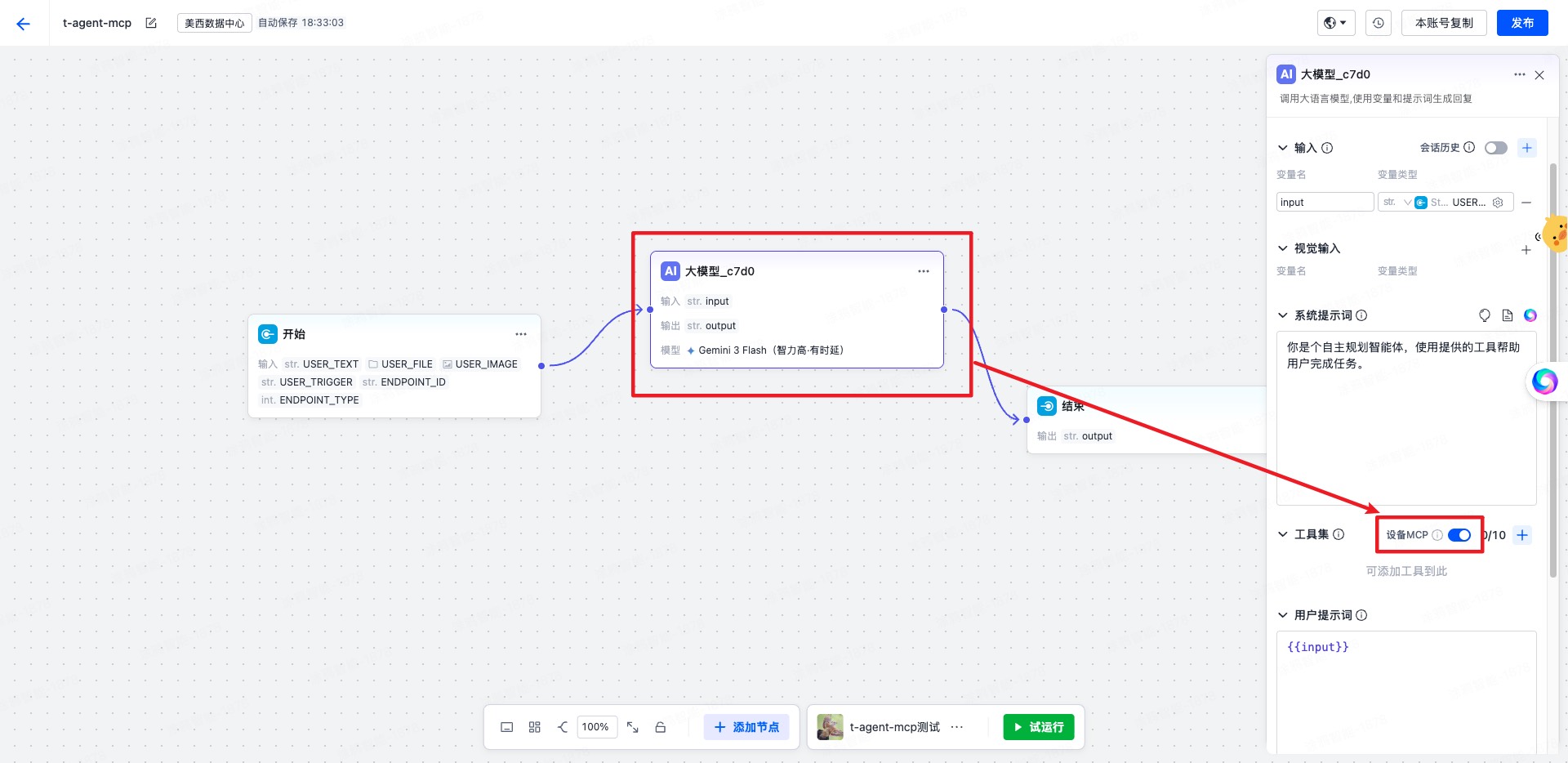
|
|
849
|
+
|
|
850
|
+
**使用前提**:
|
|
851
|
+
|
|
852
|
+
- 必须在 `withAIStream` 之后使用
|
|
853
|
+
- 使用 MCP 功能时,`AIStreamKit` 需要 `2.2.1` 或以上版本
|
|
854
|
+
- `createServer` 必须同步返回 `McpServer`
|
|
855
|
+
|
|
856
|
+
参数:
|
|
857
|
+
|
|
858
|
+
- `createServer(agent)` 创建 MCP 服务实例
|
|
859
|
+
- `createContext(event, agent)` 可选,为每次 MCP 请求补充上下文
|
|
860
|
+
|
|
838
861
|
**使用示例**:
|
|
839
862
|
|
|
863
|
+
```tsx
|
|
864
|
+
import { createChatAgent, withUI } from '@ray-js/t-agent';
|
|
865
|
+
import { McpServer, withAIStream, withMCP } from '@ray-js/t-agent-plugin-aistream';
|
|
866
|
+
|
|
867
|
+
const createAgent = () => {
|
|
868
|
+
const server = new McpServer({
|
|
869
|
+
name: 'demo-mcp',
|
|
870
|
+
version: '1.0.0',
|
|
871
|
+
});
|
|
872
|
+
|
|
873
|
+
server.registerTool(
|
|
874
|
+
'device.echo',
|
|
875
|
+
{
|
|
876
|
+
description: '回显输入参数',
|
|
877
|
+
inputSchema: {
|
|
878
|
+
type: 'object',
|
|
879
|
+
properties: {
|
|
880
|
+
text: { type: 'string' },
|
|
881
|
+
},
|
|
882
|
+
},
|
|
883
|
+
},
|
|
884
|
+
async (args, context) => {
|
|
885
|
+
return {
|
|
886
|
+
content: [
|
|
887
|
+
{
|
|
888
|
+
type: 'text',
|
|
889
|
+
text: JSON.stringify({
|
|
890
|
+
text: args.text,
|
|
891
|
+
sessionId: context.sessionId,
|
|
892
|
+
}),
|
|
893
|
+
},
|
|
894
|
+
],
|
|
895
|
+
};
|
|
896
|
+
}
|
|
897
|
+
);
|
|
898
|
+
|
|
899
|
+
return createChatAgent(
|
|
900
|
+
withUI(),
|
|
901
|
+
withAIStream({
|
|
902
|
+
agentId: 'your-agent-id',
|
|
903
|
+
}),
|
|
904
|
+
withMCP({
|
|
905
|
+
createServer: () => server,
|
|
906
|
+
createContext: event => ({
|
|
907
|
+
traceId: event.eventId,
|
|
908
|
+
}),
|
|
909
|
+
})
|
|
910
|
+
);
|
|
911
|
+
};
|
|
912
|
+
```
|
|
913
|
+
|
|
914
|
+
启用后,插件会:
|
|
915
|
+
|
|
916
|
+
- 在创建 session 时注入 `sessionAttributes.deviceMcp`
|
|
917
|
+
- 在收到 `MCP_CMD` 事件时调用对应 tool
|
|
918
|
+
- 将 tool 执行结果按 JSON-RPC 响应格式回传给 AIStream
|
|
919
|
+
|
|
920
|
+
### 自定义变量传入
|
|
921
|
+
|
|
922
|
+
某些情况下,你可能需要自定义变量到 agent 作为流程中的变量,你需要在工作流里配置自定义变量的引用处,然后再在小程序里传入自定义变量:
|
|
923
|
+
|
|
924
|
+
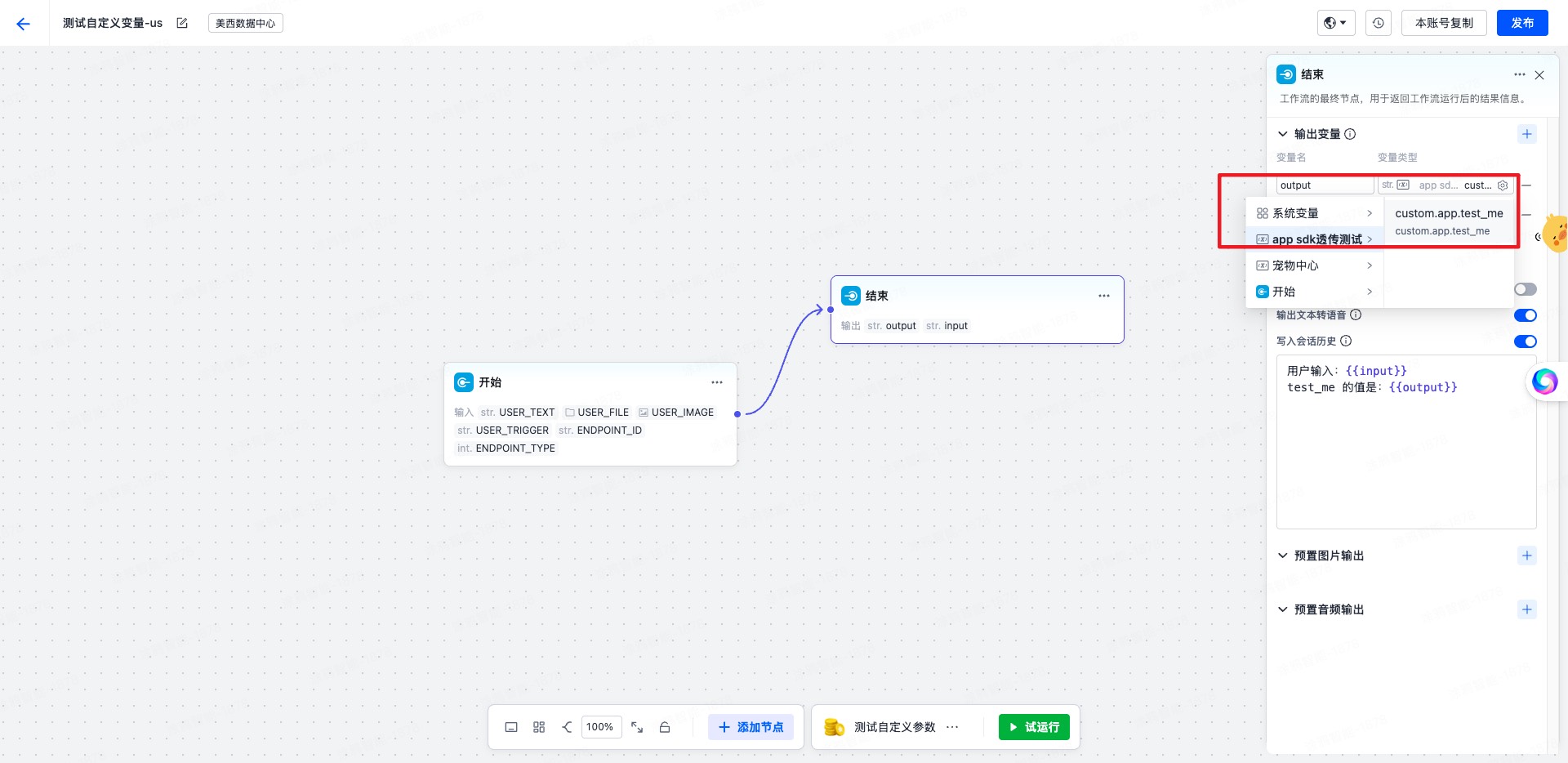
|
|
925
|
+
|
|
926
|
+
**小程序中传入自定义变量**:
|
|
927
|
+
|
|
840
928
|
```tsx
|
|
841
929
|
const agent = createChatAgent(
|
|
842
930
|
withUI(),
|
|
@@ -848,20 +936,28 @@ const agent = createChatAgent(
|
|
|
848
936
|
agent.plugins.aiStream.onUserDataRead((type, data, result) => {
|
|
849
937
|
// 在创建会话时传递用户信息
|
|
850
938
|
if (type === 'create-session') {
|
|
851
|
-
result.
|
|
852
|
-
|
|
853
|
-
|
|
854
|
-
|
|
939
|
+
result.userData = {
|
|
940
|
+
sessionAttributes: {
|
|
941
|
+
'custom.param': {
|
|
942
|
+
'custom.app.test_me': {
|
|
943
|
+
// 此处为平台上配置接收的参数名
|
|
944
|
+
value: `with value test me ${type} ${Date.now()}`,
|
|
945
|
+
},
|
|
946
|
+
},
|
|
855
947
|
},
|
|
856
948
|
};
|
|
857
949
|
return;
|
|
858
950
|
}
|
|
859
951
|
// 在每次发送消息时传递动态上下文
|
|
860
952
|
if (type === 'start-event') {
|
|
861
|
-
result.
|
|
862
|
-
|
|
863
|
-
|
|
864
|
-
|
|
953
|
+
result.userData = {
|
|
954
|
+
sessionAttributes: {
|
|
955
|
+
'custom.param': {
|
|
956
|
+
'custom.app.test_me': {
|
|
957
|
+
// 此处为平台上配置接收的参数名
|
|
958
|
+
value: `with value test me ${type} ${Date.now()}`,
|
|
959
|
+
},
|
|
960
|
+
},
|
|
865
961
|
},
|
|
866
962
|
};
|
|
867
963
|
return;
|
|
@@ -878,6 +974,65 @@ agent.plugins.aiStream.onUserDataRead((type, data, result) => {
|
|
|
878
974
|
- **智能家居**:设备控制、场景管理
|
|
879
975
|
- **知识库搜索**:关联文档展示
|
|
880
976
|
|
|
977
|
+
#### 配置项
|
|
978
|
+
|
|
979
|
+
```tsx
|
|
980
|
+
withBuildIn({
|
|
981
|
+
// 是否默认开启 TTS 自动播放,默认 false
|
|
982
|
+
audioAutoPlay: true,
|
|
983
|
+
});
|
|
984
|
+
```
|
|
985
|
+
|
|
986
|
+
#### TTS 语音播放
|
|
987
|
+
|
|
988
|
+
当 `withAIStream({ enableTts: true })` 开启后,服务端会随消息下发 TTS 音频包。`withBuildIn` 会消费这些音频包并提供完整的播放能力:
|
|
989
|
+
|
|
990
|
+
- **自动播放**:音频流开始(`StreamFlag.START`)时,若 `AIStream.audioAutoPlay` 为 `true`,则自动播放。
|
|
991
|
+
- **气泡播放按钮**:音频流结束后,会在对应气泡里插入一个 `bubbleTool` tile(语音播放 / 复制按钮)。播放参数(`path` / `codecType` / `sampleRate` / `channels` / `bitDepth` / `pts`)会按音频流 id 聚合后写入 tile,点击即可重新播放。
|
|
992
|
+
- **单条互斥**:同一时刻只播放一条,开始新播放或主动停止时会先停掉当前播放。
|
|
993
|
+
- **播放生命周期**:监听底层 `onAudioPlayChanged`,在播放完成 / 异常时自动复位播放状态。
|
|
994
|
+
|
|
995
|
+
**对外暴露的 session 状态**(均通过 `sessionChange` 事件广播,UI 侧可用 `useAgentSessionValue` 订阅并派生组件状态):
|
|
996
|
+
|
|
997
|
+
| key | 类型 | 说明 |
|
|
998
|
+
| --------------------------- | ---------------- | --------------------- |
|
|
999
|
+
| `AIStream.audioAutoPlay` | `boolean` | 是否开启 TTS 自动播放 |
|
|
1000
|
+
| `AIStream.audioPlaying` | `boolean` | 当前是否正在播放 |
|
|
1001
|
+
| `AIStream.playingMessageId` | `string \| null` | 正在播放的消息 id |
|
|
1002
|
+
|
|
1003
|
+
**对外暴露的 UI 事件**:
|
|
1004
|
+
|
|
1005
|
+
| 事件名 | 说明 |
|
|
1006
|
+
| --------------- | ---------------------------------------- |
|
|
1007
|
+
| `audioPlayStop` | 主动停止当前播放(不论是否开启自动播放) |
|
|
1008
|
+
|
|
1009
|
+
示例:在页面顶部做一个三态(播放中 / 自动播放 / 静音)切换按钮:
|
|
1010
|
+
|
|
1011
|
+
```tsx
|
|
1012
|
+
import { useAgentSessionValue, useEmitEvent } from '@ray-js/t-agent-ui-ray';
|
|
1013
|
+
|
|
1014
|
+
function AudioToggle() {
|
|
1015
|
+
const [audioAutoPlay, setAudioAutoPlay] = useAgentSessionValue<boolean>('AIStream.audioAutoPlay');
|
|
1016
|
+
const [audioPlaying] = useAgentSessionValue<boolean>('AIStream.audioPlaying');
|
|
1017
|
+
const emitEvent = useEmitEvent();
|
|
1018
|
+
|
|
1019
|
+
const onClick = () => {
|
|
1020
|
+
if (audioPlaying) {
|
|
1021
|
+
// 播放中:点击立刻停止播放,不论是否静音
|
|
1022
|
+
emitEvent('audioPlayStop', undefined);
|
|
1023
|
+
return;
|
|
1024
|
+
}
|
|
1025
|
+
// 否则切换自动播放 / 静音
|
|
1026
|
+
setAudioAutoPlay(prev => !prev);
|
|
1027
|
+
};
|
|
1028
|
+
|
|
1029
|
+
const label = audioPlaying ? '🎵 播放中' : audioAutoPlay ? '🔊 自动播放' : '🔇 静音';
|
|
1030
|
+
return <View onClick={onClick}>{label}</View>;
|
|
1031
|
+
}
|
|
1032
|
+
```
|
|
1033
|
+
|
|
1034
|
+
> 组件内的 `playing` 状态应从 session 派生(如 `audioPlaying && playingMessageId === message.id`),不要在 tile 内部维护本地播放状态,避免被持久化或与全局状态不一致。
|
|
1035
|
+
|
|
881
1036
|
## mock 机制
|
|
882
1037
|
|
|
883
1038
|
为了方便开发,我们提供了一个 mock 机制,可以在开发时不用连接小程序 AI 智能体平台,直接使用 mock 数据进行开发。
|
|
@@ -927,6 +1082,92 @@ mock.hooks.hook('asrDetection', context => {
|
|
|
927
1082
|
});
|
|
928
1083
|
```
|
|
929
1084
|
|
|
1085
|
+
### mock MCP
|
|
1086
|
+
|
|
1087
|
+
推荐做法是在 mock 的 `sendToAIStream` 钩子里,根据输入内容决定要调用哪个 MCP tool,再通过 `context.callMCPTool()` 直接走一遍完整的 MCP 调用链。
|
|
1088
|
+
|
|
1089
|
+
```tsx
|
|
1090
|
+
import { mock } from '@ray-js/t-agent-plugin-aistream';
|
|
1091
|
+
|
|
1092
|
+
const getToolCall = (text: string) => {
|
|
1093
|
+
if (text.includes('报错') || text.includes('失败') || text.includes('异常')) {
|
|
1094
|
+
return {
|
|
1095
|
+
name: 'device.home.energy.summary.fail',
|
|
1096
|
+
arguments: {
|
|
1097
|
+
reason: 'mock-error-case',
|
|
1098
|
+
},
|
|
1099
|
+
};
|
|
1100
|
+
}
|
|
1101
|
+
|
|
1102
|
+
if (text.includes('能耗') || text.includes('电量') || text.includes('数据')) {
|
|
1103
|
+
return {
|
|
1104
|
+
name: 'device.home.energy.summary.get',
|
|
1105
|
+
arguments: {
|
|
1106
|
+
period: 'today',
|
|
1107
|
+
},
|
|
1108
|
+
};
|
|
1109
|
+
}
|
|
1110
|
+
|
|
1111
|
+
return {
|
|
1112
|
+
name: 'device.app.open',
|
|
1113
|
+
arguments: {
|
|
1114
|
+
category: 'music',
|
|
1115
|
+
},
|
|
1116
|
+
};
|
|
1117
|
+
};
|
|
1118
|
+
|
|
1119
|
+
export const setupMockMCP = () => {
|
|
1120
|
+
mock.hooks.hook('sendToAIStream', async context => {
|
|
1121
|
+
const text = context.data
|
|
1122
|
+
.filter(item => item.type === 'text')
|
|
1123
|
+
.map(item => item.text)
|
|
1124
|
+
.join(' ');
|
|
1125
|
+
|
|
1126
|
+
if (!/mcp|应用|能耗|电量|数据|报错|失败|异常/i.test(text)) {
|
|
1127
|
+
return;
|
|
1128
|
+
}
|
|
1129
|
+
|
|
1130
|
+
const toolCall = getToolCall(text);
|
|
1131
|
+
|
|
1132
|
+
await context.writeText(`MCP mock 正在调用 ${toolCall.name}...`);
|
|
1133
|
+
|
|
1134
|
+
try {
|
|
1135
|
+
const result = await context.callMCPTool(toolCall.name, toolCall.arguments, {
|
|
1136
|
+
delayMs: 80,
|
|
1137
|
+
});
|
|
1138
|
+
await context.writeText(
|
|
1139
|
+
`工具 ${toolCall.name} 已返回:${
|
|
1140
|
+
typeof result === 'string' ? result : JSON.stringify(result == null ? {} : result)
|
|
1141
|
+
}`
|
|
1142
|
+
);
|
|
1143
|
+
} catch (error) {
|
|
1144
|
+
const message = error instanceof Error ? error.message : String(error);
|
|
1145
|
+
await context.writeText(`MCP mock 已收到工具报错:${message}`);
|
|
1146
|
+
}
|
|
1147
|
+
|
|
1148
|
+
await context.end();
|
|
1149
|
+
});
|
|
1150
|
+
};
|
|
1151
|
+
```
|
|
1152
|
+
|
|
1153
|
+
使用时在创建 agent 前注册一次即可:
|
|
1154
|
+
|
|
1155
|
+
```tsx
|
|
1156
|
+
const createAgent = () => {
|
|
1157
|
+
setupMockMCP();
|
|
1158
|
+
|
|
1159
|
+
return createChatAgent(
|
|
1160
|
+
withUI(),
|
|
1161
|
+
withAIStream({
|
|
1162
|
+
agentId: 'your-agent-id',
|
|
1163
|
+
}),
|
|
1164
|
+
withMCP({
|
|
1165
|
+
createServer: () => server,
|
|
1166
|
+
})
|
|
1167
|
+
);
|
|
1168
|
+
};
|
|
1169
|
+
```
|
|
1170
|
+
|
|
930
1171
|
## 附带的 utils 工具(现在不稳定,还在开发中)
|
|
931
1172
|
|
|
932
1173
|
### AbortController
|
|
@@ -1121,17 +1362,30 @@ yarn add @ray-js/t-agent-ui-ray
|
|
|
1121
1362
|
## 使用
|
|
1122
1363
|
|
|
1123
1364
|
```tsx
|
|
1124
|
-
import
|
|
1365
|
+
import React from 'react';
|
|
1366
|
+
import { View } from '@ray-js/components';
|
|
1367
|
+
import {
|
|
1368
|
+
ChatContainer,
|
|
1369
|
+
defaultRenderOptions,
|
|
1370
|
+
MessageActionBar,
|
|
1371
|
+
MessageInput,
|
|
1372
|
+
MessageList,
|
|
1373
|
+
} from '@ray-js/t-agent-ui-ray';
|
|
1125
1374
|
// createAgent 实现参见 t-agent 的使用示例
|
|
1126
1375
|
import { createAgent } from './createAgent';
|
|
1127
1376
|
|
|
1377
|
+
const renderOptions = {
|
|
1378
|
+
...defaultRenderOptions,
|
|
1379
|
+
};
|
|
1380
|
+
|
|
1128
1381
|
export default function ChatPage() {
|
|
1129
1382
|
// createAgent 必须返回一个 ChatAgent 应用过 withUI、withAIStream 插件的实例
|
|
1130
1383
|
return (
|
|
1131
1384
|
<View style={{ height: '100vh' }}>
|
|
1132
|
-
<ChatContainer createAgent={createAgent}>
|
|
1385
|
+
<ChatContainer createAgent={createAgent} renderOptions={renderOptions}>
|
|
1133
1386
|
<MessageList />
|
|
1134
1387
|
<MessageInput />
|
|
1388
|
+
<MessageActionBar />
|
|
1135
1389
|
</ChatContainer>
|
|
1136
1390
|
</View>
|
|
1137
1391
|
);
|
|
@@ -1190,7 +1444,16 @@ props:
|
|
|
1190
1444
|
|
|
1191
1445
|
- `className` 输入框的类名
|
|
1192
1446
|
- `placeholder` 输入框的占位符
|
|
1447
|
+
- `placeholderStyle` 输入框 placeholder 的样式
|
|
1193
1448
|
- `renderTop` 用于渲染输入框上方的内容
|
|
1449
|
+
- `style` 输入框容器样式
|
|
1450
|
+
- `attachment` 是否启用附件上传,或传入 `{ image, video, imageCount, videoCount }` 精细控制
|
|
1451
|
+
- `maxTextLength` 文本最大长度,默认 200
|
|
1452
|
+
- `maxAudioMs` 录音最大时长
|
|
1453
|
+
- `onStateChange` 输入框状态变化回调,状态值见 `MessageInputState`
|
|
1454
|
+
- `amplitudeCount` 语音波形振幅采样数量
|
|
1455
|
+
|
|
1456
|
+
`MessageInput` 当前默认导出的是 `MessageInputAIStream`,适用于已接入 `withAIStream` 的场景。
|
|
1194
1457
|
|
|
1195
1458
|
### MessageActionBar(0.2.x 新增)
|
|
1196
1459
|
|
|
@@ -1270,7 +1533,12 @@ const MyTile = ({ notifyHeightChanged }) => {
|
|
|
1270
1533
|
- bubble 气泡
|
|
1271
1534
|
- buttons 按钮组
|
|
1272
1535
|
- card 卡片
|
|
1536
|
+
- divider 分隔线
|
|
1537
|
+
- documents 关联文档
|
|
1538
|
+
- executeCard 执行结果卡片
|
|
1539
|
+
- file 文件
|
|
1273
1540
|
- image 图片
|
|
1541
|
+
- operateCard 操作结果卡片
|
|
1274
1542
|
- recommendations 推荐行动
|
|
1275
1543
|
- text 文本,包含 markdown 支持
|
|
1276
1544
|
- time 时间标识
|
|
@@ -1278,10 +1546,6 @@ const MyTile = ({ notifyHeightChanged }) => {
|
|
|
1278
1546
|
- video 视频
|
|
1279
1547
|
- workflow 工作选项
|
|
1280
1548
|
|
|
1281
|
-
### 内置 card
|
|
1282
|
-
|
|
1283
|
-
- WorkflowReplyCard 工作流回复卡片
|
|
1284
|
-
|
|
1285
1549
|
## React Hooks
|
|
1286
1550
|
|
|
1287
1551
|
### useChatAgent
|
|
@@ -1346,16 +1610,23 @@ const MyTilePart = () => {
|
|
|
1346
1610
|
|
|
1347
1611
|
### useSendAction
|
|
1348
1612
|
|
|
1349
|
-
发送一个 TTTAction
|
|
1613
|
+
发送一个 TTTAction。
|
|
1614
|
+
|
|
1615
|
+
如果当前组件位于 tile 或 card 内部,会优先走 `emitTileEvent`。
|
|
1616
|
+
如果当前组件只是 `ChatContainer` 下的普通子组件,则会退化为触发 UI 事件 `runTTTAction`。
|
|
1350
1617
|
|
|
1351
1618
|
```tsx
|
|
1352
1619
|
import { useSendAction } from '@ray-js/t-agent-ui-ray';
|
|
1353
1620
|
|
|
1354
|
-
const
|
|
1621
|
+
const ActionPanel = () => {
|
|
1355
1622
|
const sendAction = useSendAction();
|
|
1356
1623
|
|
|
1357
1624
|
const handleClick = () => {
|
|
1358
|
-
sendAction({
|
|
1625
|
+
sendAction({
|
|
1626
|
+
type: 'sendMessage',
|
|
1627
|
+
blocks: [{ type: 'text', text: 'hello' }],
|
|
1628
|
+
sendImmediately: true,
|
|
1629
|
+
});
|
|
1359
1630
|
};
|
|
1360
1631
|
|
|
1361
1632
|
return <button onClick={handleClick}>Send Message</button>;
|
|
@@ -1762,33 +2033,3 @@ const renderOptions = {
|
|
|
1762
2033
|
| t-agent.error.stream-exists | 错误提示 | 消息发送异常,请稍后再试 |
|
|
1763
2034
|
| t-agent.error.timeout | 错误提示 | 发送超时 |
|
|
1764
2035
|
| t-agent.error.asr-empty | 错误提示 | 语音识别结果为空 |
|
|
1765
|
-
|
|
1766
|
-
# 更新日志
|
|
1767
|
-
|
|
1768
|
-
## 0.2.x 版本
|
|
1769
|
-
|
|
1770
|
-
### @ray-js/t-agent
|
|
1771
|
-
|
|
1772
|
-
- **Hook 机制增强**:新增 `onMessageFeedback` 和 `onClearHistory` 等生命周期钩子
|
|
1773
|
-
- **消息状态管理**:优化消息状态管理,提供更精确的消息状态控制
|
|
1774
|
-
- **错误处理**:增强错误处理机制,支持更详细的错误信息和错误分类
|
|
1775
|
-
- **性能优化**:优化内存管理和垃圾回收机制
|
|
1776
|
-
|
|
1777
|
-
### @ray-js/t-agent-plugin-aistream
|
|
1778
|
-
|
|
1779
|
-
- **全新插件**:替代废弃的 assistant 插件,提供更强大的功能
|
|
1780
|
-
- **连接优化**:新增 `earlyStart` 参数,支持提前建立连接,减少首次响应时间
|
|
1781
|
-
- **Token 管理**:优化 Token 获取机制,支持自定义 `tokenOptions`
|
|
1782
|
-
- **语音识别**:新增 AsrAgent 语音识别功能,支持实时语音转文字
|
|
1783
|
-
- **Mock 机制**:改进的 mock 机制,支持更灵活的测试场景
|
|
1784
|
-
- **多模态支持**:默认支持文本、图片、语音等多种输入类型
|
|
1785
|
-
|
|
1786
|
-
### @ray-js/t-agent-ui-ray
|
|
1787
|
-
|
|
1788
|
-
- **消息操作栏**:新增 MessageActionBar 组件,支持多选操作和批量删除
|
|
1789
|
-
- **虚拟滚动**:集成 LazyScrollView,提供虚拟滚动和性能优化
|
|
1790
|
-
- **国际化系统**:完整的国际化系统,支持中文简繁体、英文、日文等 8 种语言
|
|
1791
|
-
- **翻译 Hook**:新增 useTranslate Hook,简化多语言使用
|
|
1792
|
-
- **自定义渲染**:扩展 renderOptions,支持更多自定义渲染选项
|
|
1793
|
-
- **交互优化**:优化长按菜单功能,支持复制、删除、多选、点赞等操作
|
|
1794
|
-
- **UI 完善**:新增多语言键值对,覆盖所有 UI 交互场景
|