@ray-js/t-agent-ui-ray 0.2.5-beta-1 → 0.2.5-beta-3
This diff represents the content of publicly available package versions that have been released to one of the supported registries. The information contained in this diff is provided for informational purposes only and reflects changes between package versions as they appear in their respective public registries.
- package/README-zh_CN.md +1727 -7
- package/README.md +1765 -7
- package/package.json +2 -2
package/README.md
CHANGED
|
@@ -1,12 +1,1770 @@
|
|
|
1
|
-
#
|
|
1
|
+
# AI Agent SDK
|
|
2
2
|
|
|
3
|
-
|
|
4
|
-
|
|
3
|
+
## Version Notes
|
|
4
|
+
|
|
5
|
+
**⚠️ Important Notice**: Starting from version 0.2.x, `@ray-js/t-agent-plugin-assistant` has been deprecated. Please use `@ray-js/t-agent-plugin-aistream` instead.
|
|
6
|
+
|
|
7
|
+
## Installation (ray mini-program)
|
|
8
|
+
|
|
9
|
+
```shell
|
|
10
|
+
yarn add @ray-js/t-agent @ray-js/t-agent-plugin-aistream @ray-js/t-agent-ui-ray
|
|
11
|
+
```
|
|
12
|
+
|
|
13
|
+
> Ensure that the versions of `@ray-js/t-agent`, `@ray-js/t-agent-plugin-aistream`, and `@ray-js/t-agent-ui-ray` are consistent.
|
|
14
|
+
|
|
15
|
+
## Mini-Program Kit Requirements
|
|
16
|
+
|
|
17
|
+
```json
|
|
18
|
+
{
|
|
19
|
+
"dependencies": {
|
|
20
|
+
"BaseKit": "3.12.0",
|
|
21
|
+
"BizKit": "4.10.0",
|
|
22
|
+
"DeviceKit": "4.6.1",
|
|
23
|
+
"HomeKit": "3.4.0",
|
|
24
|
+
"MiniKit": "3.12.1",
|
|
25
|
+
"AIStreamKit": "1.0.0"
|
|
26
|
+
},
|
|
27
|
+
"baseversion": "2.21.10"
|
|
28
|
+
}
|
|
29
|
+
```
|
|
30
|
+
|
|
31
|
+
## package.json Dependency Requirements
|
|
32
|
+
|
|
33
|
+
```json
|
|
34
|
+
{
|
|
35
|
+
"dependencies": {
|
|
36
|
+
"@ray-js/ray": ">=1.6.8"
|
|
37
|
+
}
|
|
38
|
+
}
|
|
39
|
+
```
|
|
40
|
+
|
|
41
|
+
## Development
|
|
42
|
+
|
|
43
|
+
```shell
|
|
44
|
+
# Develop the SDK
|
|
45
|
+
yarn run dev
|
|
46
|
+
|
|
47
|
+
# Develop the template mini-program
|
|
48
|
+
yarn run miniapp
|
|
49
|
+
```
|
|
50
|
+
|
|
51
|
+
## Usage Example
|
|
52
|
+
|
|
53
|
+
Implementing a chat page using ray UI
|
|
54
|
+
|
|
55
|
+
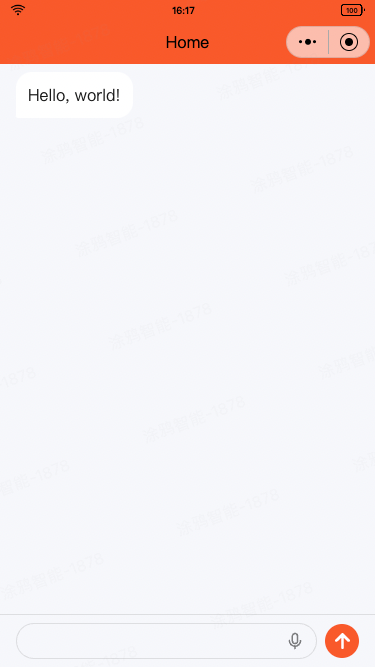
|
|
56
|
+
|
|
57
|
+
```tsx
|
|
58
|
+
// ChatPage.tsx
|
|
59
|
+
import React from 'react';
|
|
60
|
+
import { View } from '@ray-js/components';
|
|
61
|
+
import { createChatAgent, withDebug, withUI } from '@ray-js/t-agent';
|
|
62
|
+
import { ChatContainer, MessageInput, MessageList, MessageActionBar } from '@ray-js/t-agent-ui-ray';
|
|
63
|
+
import { withAIStream, withBuildIn } from '@ray-js/t-agent-plugin-aistream';
|
|
64
|
+
|
|
65
|
+
const createAgent = () => {
|
|
66
|
+
try {
|
|
67
|
+
// The order of applying plugins matters
|
|
68
|
+
const agent = createChatAgent(
|
|
69
|
+
withUI(), // The withUI plugin provides default UI behavior, essential
|
|
70
|
+
withAIStream({
|
|
71
|
+
// Connects to the mini-program AI agent platform, essential in mini-program
|
|
72
|
+
enableTts: false, // Whether to enable Text-to-Speech
|
|
73
|
+
earlyStart: true, // Whether to establish connection during onAgentStart phase
|
|
74
|
+
agentId: '', // Enter your agent ID
|
|
75
|
+
}),
|
|
76
|
+
withDebug(), // Enables logging to the console
|
|
77
|
+
withBuildIn() // Provides built-in features
|
|
78
|
+
);
|
|
79
|
+
|
|
80
|
+
// Lifecycle hooks for custom behavior registration
|
|
81
|
+
const { onChatStart, createMessage, onChatResume, onError, onInputBlocksPush, session } = agent;
|
|
82
|
+
|
|
83
|
+
// Initialize chat with a message
|
|
84
|
+
onChatStart(async result => {
|
|
85
|
+
const hello = createMessage({
|
|
86
|
+
role: 'assistant',
|
|
87
|
+
});
|
|
88
|
+
|
|
89
|
+
hello.bubble.setText('Hello, world!');
|
|
90
|
+
result.messages.push(hello);
|
|
91
|
+
// Persist message for display upon next entry
|
|
92
|
+
await hello.persist();
|
|
93
|
+
});
|
|
94
|
+
|
|
95
|
+
// Message upon chat resume
|
|
96
|
+
onChatResume(async result => {
|
|
97
|
+
const welcomeBack = createMessage({
|
|
98
|
+
role: 'assistant',
|
|
99
|
+
});
|
|
100
|
+
|
|
101
|
+
welcomeBack.bubble.setText('Welcome back');
|
|
102
|
+
result.messages.push(welcomeBack);
|
|
103
|
+
await welcomeBack.persist();
|
|
104
|
+
});
|
|
105
|
+
return agent;
|
|
106
|
+
} catch (error) {
|
|
107
|
+
console.error('Agent creation failed:', error);
|
|
108
|
+
throw error;
|
|
109
|
+
}
|
|
110
|
+
};
|
|
111
|
+
|
|
112
|
+
export default function ChatPage() {
|
|
113
|
+
return (
|
|
114
|
+
<View style={{ height: '100vh' }}>
|
|
115
|
+
<ChatContainer createAgent={createAgent}>
|
|
116
|
+
<MessageList />
|
|
117
|
+
<MessageInput />
|
|
118
|
+
<MessageActionBar />
|
|
119
|
+
</ChatContainer>
|
|
120
|
+
</View>
|
|
121
|
+
);
|
|
122
|
+
}
|
|
123
|
+
```
|
|
124
|
+
|
|
125
|
+
# t-agent
|
|
126
|
+
|
|
127
|
+
The t-agent package, crafted in TypeScript, is a dialogue agent SDK for building feature-rich dialogue interactions, supporting plugins to enhance functionality. As a pure SDK, it doesn't contain UI components, allowing flexibility to work with any framework.
|
|
128
|
+
|
|
129
|
+
## Basic Concepts
|
|
130
|
+
|
|
131
|
+
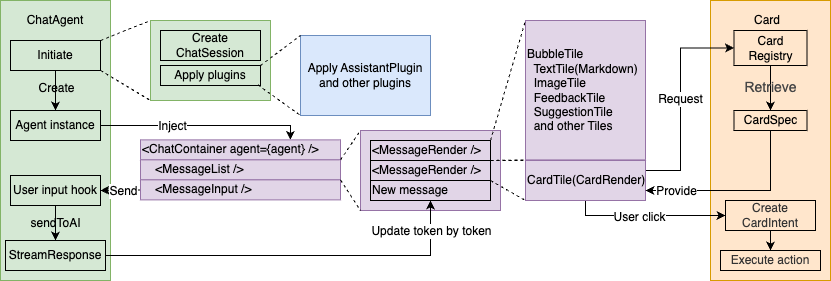
|
|
132
|
+
|
|
133
|
+
### ChatAgent Dialogue Agent
|
|
134
|
+
|
|
135
|
+
The core class handles the dialogue lifecycle, message creation, persistence, and supports plugins and hooks to extend functionality.
|
|
136
|
+
|
|
137
|
+
Create a ChatAgent instance using `createChatAgent`:
|
|
138
|
+
|
|
139
|
+
```tsx
|
|
140
|
+
import { createChatAgent } from '@ray-js/t-agent';
|
|
141
|
+
const createAgent = () => {
|
|
142
|
+
/* Apply plugins in the createChatAgent function. Plugin order matters. */
|
|
143
|
+
const agent = createChatAgent();
|
|
144
|
+
|
|
145
|
+
return agent;
|
|
146
|
+
};
|
|
147
|
+
```
|
|
148
|
+
|
|
149
|
+
Core Attributes:
|
|
150
|
+
|
|
151
|
+
- `agent.session` ChatSession container for session data
|
|
152
|
+
- `agent.plugins` Contains applied plugins' methods and hooks
|
|
153
|
+
|
|
154
|
+
Core Methods:
|
|
155
|
+
|
|
156
|
+
- `agent.start()` Activates the agent
|
|
157
|
+
- `agent.dispose()` Deactivates the agent
|
|
158
|
+
- `agent.pushInputBlocks(blocks, signal)` Pushes user messages to ChatAgent
|
|
159
|
+
- `agent.createMessage(data)` Creates a message linked to the agent
|
|
160
|
+
- `agent.emitTileEvent(tileId: string, payload: any)` Emits tile events
|
|
161
|
+
- `agent.removeMessage(messageId: string)` Removes messages
|
|
162
|
+
- `agent.flushStreamToShow(message: ChatMessage, response: StreamResponse, composer: ComposeHandler)` Handles stream updates
|
|
163
|
+
|
|
164
|
+
### Hooks Mechanism
|
|
165
|
+
|
|
166
|
+
ChatAgent implements a framework and data structure. Behavioral details are executed using a hook-driven, event-model approach by registering specific callbacks.
|
|
167
|
+
|
|
168
|
+
```tsx
|
|
169
|
+
import { createChatAgent } from '@ray-js/t-agent';
|
|
170
|
+
const createAgent = () => {
|
|
171
|
+
const agent = createChatAgent();
|
|
172
|
+
|
|
173
|
+
const { onChatStart } = agent;
|
|
174
|
+
|
|
175
|
+
// onChatStart Hook triggers on dialogue start
|
|
176
|
+
onChatStart(result => {
|
|
177
|
+
console.log('Chat start', result);
|
|
178
|
+
});
|
|
179
|
+
return agent;
|
|
180
|
+
};
|
|
181
|
+
```
|
|
182
|
+
|
|
183
|
+
#### Hook Execution Order
|
|
184
|
+
|
|
185
|
+
Hooks are executed in the following order:
|
|
186
|
+
|
|
187
|
+
```
|
|
188
|
+
onAgentStart → onChatStart/onChatResume → onMessageListInit → onInputBlocksPush
|
|
189
|
+
```
|
|
190
|
+
|
|
191
|
+
ChatAgent's Central Hooks and Parameters:
|
|
192
|
+
|
|
193
|
+
- `agent.onAgentStart` Agent initialization
|
|
194
|
+
- `agent.onChatStart` Triggered at dialogue initiation
|
|
195
|
+
- `result.messages` Initializes message lists
|
|
196
|
+
- `agent.onChatResume` Triggered on dialogue continuation
|
|
197
|
+
- `result.messages` Restored message lists
|
|
198
|
+
- `agent.onMessageListInit` On message list initialization
|
|
199
|
+
- `result.messages` Rendering message list, same list as the previous two hooks
|
|
200
|
+
- `agent.onInputBlocksPush` On message block input
|
|
201
|
+
- `blocks` Input message blocks
|
|
202
|
+
- `signal` Interrupt signal
|
|
203
|
+
- `agent.onMessageChange` On message updates
|
|
204
|
+
- `type` Update types: `show`, `update`, `remove`
|
|
205
|
+
- `message` Updated message instance
|
|
206
|
+
- `agent.onMessagePersist` At message persistence
|
|
207
|
+
- `payload` Persistence parameters
|
|
208
|
+
- `message` The message to persist
|
|
209
|
+
- `agent.onTileEvent` After message persistence
|
|
210
|
+
- `tile` Event-triggering tile
|
|
211
|
+
- `payload` Event data
|
|
212
|
+
- `agent.onAgentDispose` On agent disposal
|
|
213
|
+
- `agent.onUserAbort` On user interruption
|
|
214
|
+
- `reason` Interruption reason
|
|
215
|
+
- `agent.onError` On error occurrence
|
|
216
|
+
- `error` Error details
|
|
217
|
+
|
|
218
|
+
These hooks accept a callback parameter, invoked upon their criteria. Callbacks can be synchronous or asynchronous. To modify results, adjust the result parameter or message object directly.
|
|
219
|
+
|
|
220
|
+
### ChatSession Session Container
|
|
221
|
+
|
|
222
|
+
ChatSession holds message lists, session-related data along with intelligent interactions, generated alongside ChatAgent.
|
|
223
|
+
|
|
224
|
+
Main Properties:
|
|
225
|
+
|
|
226
|
+
- `session.messages` List of messages
|
|
227
|
+
- `session.sessionId` Unique session ID
|
|
228
|
+
- `session.isNewChat` To distinguish fresh or ongoing chats
|
|
229
|
+
|
|
230
|
+
Principal Methods:
|
|
231
|
+
|
|
232
|
+
- `session.set` Assign session data (any type)
|
|
233
|
+
- `session.get` Retrieve session data
|
|
234
|
+
- `session.getData` Fetch session data in object format
|
|
235
|
+
- `session.getLatestMessage` Access the latest message
|
|
236
|
+
|
|
237
|
+
Hook:
|
|
238
|
+
|
|
239
|
+
- `session.onChange` Register for session data updates
|
|
240
|
+
|
|
241
|
+
### ChatMessage Dialogue Message
|
|
242
|
+
|
|
243
|
+
An abstraction representing each dialogue's content, status with utility methods for message control. Composed of multiple ChatTiles for varied display elements.
|
|
244
|
+
|
|
245
|
+
Creating a Message with `createMessage`:
|
|
246
|
+
|
|
247
|
+
```tsx
|
|
248
|
+
const createAgent = () => {
|
|
249
|
+
const agent = createChatAgent();
|
|
250
|
+
|
|
251
|
+
const { createMessage, onChatStart } = agent;
|
|
252
|
+
|
|
253
|
+
// Initialize chat with an assistant's message
|
|
254
|
+
onChatStart(async result => {
|
|
255
|
+
const message = createMessage({
|
|
256
|
+
role: 'assistant',
|
|
257
|
+
});
|
|
258
|
+
|
|
259
|
+
// Quickly create text bubble
|
|
260
|
+
message.bubble.setText('Hello!');
|
|
261
|
+
result.messages.push(message);
|
|
262
|
+
});
|
|
263
|
+
|
|
264
|
+
return agent;
|
|
265
|
+
};
|
|
266
|
+
```
|
|
267
|
+
|
|
268
|
+
Core Properties:
|
|
269
|
+
|
|
270
|
+
- `message.id` Unique message identifier
|
|
271
|
+
- `message.role` Either assistant or user
|
|
272
|
+
- `message.tiles` List of message tiles
|
|
273
|
+
- `message.status` Message state, `ChatMessageStatus` enum: `START`, `UPDATING`, `FINISH`
|
|
274
|
+
- `message.meta` Supplementary data
|
|
275
|
+
- `message.isShow` Display status
|
|
276
|
+
- `message.bubble` Shortcut for bubble tile
|
|
277
|
+
|
|
278
|
+
Key Methods:
|
|
279
|
+
|
|
280
|
+
- `message.show` Display message
|
|
281
|
+
- `message.update` Refresh current message
|
|
282
|
+
- `message.remove` Delete current message
|
|
283
|
+
- `message.persist` Save message
|
|
284
|
+
- `message.addTile` Add a tile
|
|
285
|
+
- `message.removeTile` Delete a tile
|
|
286
|
+
- `message.setTilesLocked` Lock/unlock all tiles
|
|
287
|
+
- `message.set` Configure message attributes
|
|
288
|
+
- `message.setMetaValue` Assign meta attribute by key
|
|
289
|
+
- `message.deleteMetaValue` Remove meta attribute
|
|
290
|
+
- `message.setMeta` Comprehensive meta object assignment
|
|
291
|
+
- `message.findTileByType` Locate tile by type
|
|
292
|
+
|
|
293
|
+
#### ChatTile Dialogue Message Block
|
|
294
|
+
|
|
295
|
+
ChatTiles render specific content types fairly like text, images, and cards.
|
|
296
|
+
|
|
297
|
+
Adding a Tile with `addTile`:
|
|
298
|
+
|
|
299
|
+
```tsx
|
|
300
|
+
const message = createMessage({
|
|
301
|
+
role: 'assistant',
|
|
302
|
+
});
|
|
303
|
+
|
|
304
|
+
// Introduce an image tile
|
|
305
|
+
message.addTile('image', {
|
|
306
|
+
src: '/image.jpg',
|
|
307
|
+
});
|
|
308
|
+
|
|
309
|
+
await message.show();
|
|
310
|
+
```
|
|
311
|
+
|
|
312
|
+
Chief Attributes of ChatTile:
|
|
313
|
+
|
|
314
|
+
- `tile.id` Tile's identifier
|
|
315
|
+
- `tile.type` Type of tile
|
|
316
|
+
- `tile.data` Content held by tile
|
|
317
|
+
- `tile.children` Nested tiles
|
|
318
|
+
- `tile.locked` Tile lock status
|
|
319
|
+
- `tile.fallback` Alternative content for non-displayed tile
|
|
320
|
+
- `tile.message` Parent message of tile
|
|
321
|
+
|
|
322
|
+
Primary Methods of ChatTile:
|
|
323
|
+
|
|
324
|
+
- `tile.update` Equivalent to `tile.message.update`
|
|
325
|
+
- `tile.show` Synonymous with `tile.message.show`
|
|
326
|
+
- `tile.setLocked` Adjust tile's lock status
|
|
327
|
+
- `tile.addTile` Add a sub-tile
|
|
328
|
+
- `tile.setData` Update tile content
|
|
329
|
+
- `tile.setFallback` Update fallback content
|
|
330
|
+
- `tile.findByType` Locate sub-tile by type
|
|
331
|
+
|
|
332
|
+
Accessing `message.bubble` enables swift bubble tile addition:
|
|
333
|
+
|
|
334
|
+
```tsx
|
|
335
|
+
const message = createMessage({
|
|
336
|
+
role: 'assistant',
|
|
337
|
+
});
|
|
338
|
+
|
|
339
|
+
message.bubble.setText('Hello, world!');
|
|
340
|
+
// Equivalent to
|
|
341
|
+
message.addTile('bubble', {}).addTile('text', { text: 'Hello, world!' });
|
|
342
|
+
|
|
343
|
+
await message.show();
|
|
344
|
+
```
|
|
345
|
+
|
|
346
|
+
For bubble messages, additional properties and methods include:
|
|
347
|
+
|
|
348
|
+
- `message.bubble.text` Reads bubble text
|
|
349
|
+
- `message.bubble.setText` Assigns bubble text
|
|
350
|
+
- `message.bubble.isMarkdown` Determines markdown formatting
|
|
351
|
+
- `message.bubble.setIsMarkdown` Sets markdown format
|
|
352
|
+
- `message.bubble.status` Indicates bubble status
|
|
353
|
+
- `message.bubble.setStatus` Defines bubble status
|
|
354
|
+
- `message.bubble.info` Relays bubble info
|
|
355
|
+
- `message.bubble.setInfo` Configures bubble info
|
|
356
|
+
- `message.bubble.initWithInputBlocks` Initializes bubble with input blocks
|
|
357
|
+
|
|
358
|
+
**Bubble messages support long press operations**, allowing for copy and delete functions, and animations will be displayed during message loading and updating.
|
|
359
|
+
|
|
360
|
+
Bubble messages support the following long press operations:
|
|
361
|
+
|
|
362
|
+
- Copy: Copy the message text content
|
|
363
|
+
- Delete: Delete the current message
|
|
364
|
+
|
|
365
|
+
### Lifecycle
|
|
366
|
+
|
|
367
|
+
ChatAgent phases trigger hooks enabling developers to integrate custom behavior efficiently. Below is the lifecycle depiction:
|
|
368
|
+
|
|
369
|
+
```mermaid
|
|
370
|
+
sequenceDiagram
|
|
371
|
+
participant AI as Backend(AI)
|
|
372
|
+
participant A as ChatAgent
|
|
373
|
+
participant UI as UI Interface
|
|
374
|
+
actor User as User
|
|
375
|
+
|
|
376
|
+
User ->> UI: Open chat interface
|
|
377
|
+
UI ->> UI: Create Agent object agent
|
|
378
|
+
UI ->> A: agent.start() Start Agent
|
|
379
|
+
rect rgba(255,255,0,0.1)
|
|
380
|
+
note over A: Hook: onAgentStart
|
|
381
|
+
A ->> AI: Check if new session
|
|
382
|
+
AI ->> A: Return
|
|
383
|
+
end
|
|
384
|
+
alt Is new session
|
|
385
|
+
A ->> AI: Start a new session
|
|
386
|
+
note over A: Hook: onChatStart
|
|
387
|
+
else Is resume session
|
|
388
|
+
A ->> AI: Read session history
|
|
389
|
+
AI ->> A: Return history messages
|
|
390
|
+
note over A: Hook: onChatResume
|
|
391
|
+
end
|
|
392
|
+
rect rgba(255,255,0,0.1)
|
|
393
|
+
note over A: Hook: onMessageListInit
|
|
394
|
+
A ->> UI: Assemble messages to display
|
|
395
|
+
UI ->> User: Display messages
|
|
396
|
+
end
|
|
397
|
+
opt Conversation
|
|
398
|
+
User ->> UI: Enter and send message
|
|
399
|
+
UI ->> A: agent.pushInputBlocks()
|
|
400
|
+
rect rgba(255,255,0,0.1)
|
|
401
|
+
note over A: Hook: onInputBlocksPush
|
|
402
|
+
A ->> A: Create Message object msg<br/>Set msg as user's input text<br/>msg.show()
|
|
403
|
+
note over A: Hook: onMessageChange show
|
|
404
|
+
A -->> UI: Update interface
|
|
405
|
+
UI -->> User: Display new message
|
|
406
|
+
A ->> A: Create Message object respMsg<br/>Set respMsg as "loading"<br/>respMsg.show()
|
|
407
|
+
note over A: Hook: onMessageChange show
|
|
408
|
+
A -->> UI: Update interface
|
|
409
|
+
UI -->> User: Display loading message
|
|
410
|
+
A ->> AI: Invoke AI
|
|
411
|
+
AI ->> A: Return message stream
|
|
412
|
+
loop Streaming messages
|
|
413
|
+
AI ->> A: Message packet
|
|
414
|
+
A ->> A: Update respMsg data<br/>respMsg.update()
|
|
415
|
+
note over A: Hook: onMessageChange update
|
|
416
|
+
A -->> UI: Update interface
|
|
417
|
+
UI -->> User: Display typing effect/card
|
|
418
|
+
end
|
|
419
|
+
end
|
|
420
|
+
end
|
|
421
|
+
|
|
422
|
+
opt Operate message action points (e.g., single selection)
|
|
423
|
+
User ->> UI: Select option
|
|
424
|
+
UI ->> A: agent.emitTileEvent()
|
|
425
|
+
rect rgba(255,255,0,0.1)
|
|
426
|
+
note over A: Hook: onTileEvent
|
|
427
|
+
A ->> A: Set msg status<br/>msg.persist()
|
|
428
|
+
note over A: Hook: onMessagePersist
|
|
429
|
+
A ->> AI: Persist message
|
|
430
|
+
AI ->> A: Return result
|
|
431
|
+
A ->> A: msg.update()
|
|
432
|
+
note over A: Hook: onMessageChange update
|
|
433
|
+
A ->> UI: Update interface
|
|
434
|
+
UI ->> User: Message greyed out, highlight selection
|
|
435
|
+
end
|
|
436
|
+
end
|
|
437
|
+
opt Delete message
|
|
438
|
+
User ->> UI: Delete message
|
|
439
|
+
UI ->> A: agent.removeMessage()
|
|
440
|
+
rect rgba(255,255,0,0.1)
|
|
441
|
+
A ->> A: msg.remove()
|
|
442
|
+
A ->> AI: Mark message deleted
|
|
443
|
+
note over A: Hook: onMessageChange remove
|
|
444
|
+
A ->> UI: Update interface
|
|
445
|
+
UI ->> User: Message disappears
|
|
446
|
+
end
|
|
447
|
+
end
|
|
448
|
+
```
|
|
449
|
+
|
|
450
|
+
### Plugin Mechanism
|
|
451
|
+
|
|
452
|
+
Plugins are implemented based on the above Hook mechanism and can enhance the functionality of chat agents, such as interfacing with AI platforms, providing UI interfaces, etc. Plugins can also expose methods and properties for developers to use.
|
|
453
|
+
|
|
454
|
+
```tsx
|
|
455
|
+
import { createChatAgent, withUI } from '@ray-js/t-agent';
|
|
456
|
+
const createAgent = () => {
|
|
457
|
+
const agent = createChatAgent(
|
|
458
|
+
withUI() // withUI plugin provides methods for rendering UI
|
|
459
|
+
);
|
|
460
|
+
|
|
461
|
+
return agent;
|
|
462
|
+
};
|
|
463
|
+
|
|
464
|
+
// ScrollToBottom.tsx
|
|
465
|
+
import React from 'react';
|
|
466
|
+
import { Button } from '@ray-js/components';
|
|
467
|
+
import { useChatAgent } from '@ray-js/t-agent-ui-ray';
|
|
468
|
+
const ScrollToBottom = () => {
|
|
469
|
+
const agent = useChatAgent();
|
|
470
|
+
|
|
471
|
+
const scroll = () => {
|
|
472
|
+
// Use methods exposed by the plugin
|
|
473
|
+
agent.plugins.ui.emitEvent('scrollToBottom', { animation: false });
|
|
474
|
+
};
|
|
475
|
+
|
|
476
|
+
return <Button onClick={scroll}>Scroll to bottom</Button>;
|
|
477
|
+
};
|
|
478
|
+
```
|
|
479
|
+
|
|
480
|
+
#### Writing a Plugin
|
|
481
|
+
|
|
482
|
+
A plugin is a higher-order function that takes options and returns a function. This function receives a ChatAgent object, within which hooks can be registered.
|
|
483
|
+
|
|
484
|
+
```tsx
|
|
485
|
+
import { ChatAgent, createHooks, Hookable } from '@ray-js/t-agent';
|
|
486
|
+
|
|
487
|
+
// Implementing MyPlugin
|
|
488
|
+
export type MyPlugin = GetChatPluginHandler<typeof withMyPlugin>;
|
|
489
|
+
|
|
490
|
+
export const withMyPlugin = (options: any) => {
|
|
491
|
+
// Create a Hookable object
|
|
492
|
+
const hooks = createHooks();
|
|
493
|
+
|
|
494
|
+
return (agent: ChatAgent) => {
|
|
495
|
+
const { onChatStart } = agent;
|
|
496
|
+
|
|
497
|
+
onChatStart(async () => {
|
|
498
|
+
console.log('Chat start');
|
|
499
|
+
// Trigger plugin hook
|
|
500
|
+
await hooks.callHook('onMyHook', 'Hello, world!');
|
|
501
|
+
});
|
|
502
|
+
|
|
503
|
+
// Expose plugin methods and hooks
|
|
504
|
+
return {
|
|
505
|
+
hooks,
|
|
506
|
+
myPlugin: {
|
|
507
|
+
// Expose a method
|
|
508
|
+
myMethod() {
|
|
509
|
+
console.log('My method');
|
|
510
|
+
},
|
|
511
|
+
// Expose a hook
|
|
512
|
+
onMyHook: fn => {
|
|
513
|
+
return hooks.hook('onMyHook', fn);
|
|
514
|
+
},
|
|
515
|
+
},
|
|
516
|
+
};
|
|
517
|
+
};
|
|
518
|
+
};
|
|
519
|
+
```
|
|
520
|
+
|
|
521
|
+
```tsx
|
|
522
|
+
// Using the plugin
|
|
523
|
+
import { createChatAgent } from '@ray-js/t-agent';
|
|
524
|
+
|
|
525
|
+
const createAgent = () => {
|
|
526
|
+
const agent = createChatAgent(
|
|
527
|
+
// Use the plugin
|
|
528
|
+
withMyPlugin({})
|
|
529
|
+
);
|
|
530
|
+
|
|
531
|
+
// Call methods exposed by the plugin
|
|
532
|
+
agent.plugins.myPlugin.myMethod();
|
|
533
|
+
|
|
534
|
+
// Register plugin hooks
|
|
535
|
+
agent.plugins.myPlugin.onMyHook(msg => {
|
|
536
|
+
console.log(msg);
|
|
537
|
+
});
|
|
538
|
+
|
|
539
|
+
return agent;
|
|
540
|
+
};
|
|
541
|
+
```
|
|
542
|
+
|
|
543
|
+
## Built-in Plugins
|
|
544
|
+
|
|
545
|
+
### withDebug
|
|
546
|
+
|
|
547
|
+
The withDebug plugin logs messages to the console for easy debugging.
|
|
548
|
+
|
|
549
|
+
```tsx
|
|
550
|
+
const agent = createChatAgent(
|
|
551
|
+
withDebug({
|
|
552
|
+
autoStart: true, // Whether to start automatically, default is true
|
|
553
|
+
})
|
|
554
|
+
);
|
|
555
|
+
|
|
556
|
+
// Start
|
|
557
|
+
agent.plugins.debug.start();
|
|
558
|
+
|
|
559
|
+
// Stop
|
|
560
|
+
agent.plugins.debug.stop();
|
|
561
|
+
```
|
|
562
|
+
|
|
563
|
+
### withUI
|
|
564
|
+
|
|
565
|
+
The withUI plugin provides default UI behaviors such as message display, message deletion, etc., and a message bus.
|
|
566
|
+
|
|
567
|
+
```tsx
|
|
568
|
+
const agent = createChatAgent(withUI());
|
|
569
|
+
|
|
570
|
+
agent.plugins.ui.emitter; // Message bus
|
|
571
|
+
|
|
572
|
+
// Scroll to bottom
|
|
573
|
+
agent.plugins.ui.emitEvent('scrollToBottom', { animation: false });
|
|
574
|
+
|
|
575
|
+
// Listen to events
|
|
576
|
+
const off = agent.plugins.ui.onEvent('scrollToBottom', payload => {
|
|
577
|
+
console.log('scroll to bottom', payload.animation);
|
|
578
|
+
});
|
|
579
|
+
|
|
580
|
+
// Unlisten to events
|
|
581
|
+
off();
|
|
582
|
+
```
|
|
583
|
+
|
|
584
|
+
The main events of the UI plugin are as follows, and you can freely register additional events you need:
|
|
585
|
+
|
|
586
|
+
- `messageListInit`: Initialize the message list
|
|
587
|
+
- `payload.messages: ChatMessageObject[]`: Message list
|
|
588
|
+
- `messageChange`: Message changes
|
|
589
|
+
- `payload.type: 'show' | 'update' | 'remove'`: Change type
|
|
590
|
+
- `payload.message: ChatMessageObject`: Message
|
|
591
|
+
- `scrollToBottom`: Scroll to bottom
|
|
592
|
+
- `payload.animation: boolean`: Whether to use animation
|
|
593
|
+
- `sendMessage`: Send message, triggering UI update
|
|
594
|
+
- `payload.blocks: InputBlock[]`: Input blocks
|
|
595
|
+
- `setInputBlocks`: Set input blocks in MessageInput
|
|
596
|
+
- `payload.blocks: InputBlock[]`: Input blocks
|
|
597
|
+
- `sessionChange`: Session data changes
|
|
598
|
+
- `payload.key: string`: Session key
|
|
599
|
+
- `payload.value: any`: Session value
|
|
600
|
+
- `payload.oldValue: any`: Old session value
|
|
601
|
+
|
|
602
|
+
Enhanced Features in withUI Plugin (0.2.x):
|
|
603
|
+
|
|
604
|
+
withUI plugin in version 0.2.x introduces Hook mechanisms for customizing message feedback and history clearing behavior:
|
|
605
|
+
|
|
606
|
+
**Message Feedback Hook**:
|
|
607
|
+
|
|
608
|
+
- `agent.plugins.ui.hook('onMessageFeedback', async context => {})` Register message feedback Hook
|
|
609
|
+
- `context.payload.messageId: string` Message ID
|
|
610
|
+
- `context.payload.rate: 'like' | 'unlike'` Feedback type
|
|
611
|
+
- `context.payload.content?: string` Feedback content (optional)
|
|
612
|
+
- `context.result: { success: boolean }` Return result, need to set success status
|
|
613
|
+
|
|
614
|
+
**Clear History Hook**:
|
|
615
|
+
|
|
616
|
+
- `agent.plugins.ui.hook('onClearHistory', async context => {})` Register clear history Hook
|
|
617
|
+
- `context.payload: any` Clear history parameters
|
|
618
|
+
- `context.result: { success: boolean }` Return result, need to set success status
|
|
619
|
+
|
|
620
|
+
**Calling Hooks**:
|
|
621
|
+
|
|
622
|
+
- `agent.plugins.ui.callHook('onMessageFeedback', payload)` Call message feedback Hook
|
|
623
|
+
- `agent.plugins.ui.callHook('onClearHistory', payload)` Call clear history Hook
|
|
624
|
+
|
|
625
|
+
Usage example:
|
|
626
|
+
|
|
627
|
+
```tsx
|
|
628
|
+
const agent = createChatAgent(withUI(), withAIStream({ agentId: 'your-agent-id' }));
|
|
629
|
+
|
|
630
|
+
// Register message feedback handler
|
|
631
|
+
agent.plugins.ui.hook('onMessageFeedback', async context => {
|
|
632
|
+
const { messageId, rate, content } = context.payload;
|
|
633
|
+
try {
|
|
634
|
+
// Call your API to submit feedback
|
|
635
|
+
await submitFeedback({ messageId, rate, content });
|
|
636
|
+
context.result = { success: true };
|
|
637
|
+
} catch (error) {
|
|
638
|
+
context.result = { success: false };
|
|
639
|
+
}
|
|
640
|
+
});
|
|
641
|
+
|
|
642
|
+
// Register clear history handler
|
|
643
|
+
agent.plugins.ui.hook('onClearHistory', async context => {
|
|
644
|
+
try {
|
|
645
|
+
// Call your API to clear history
|
|
646
|
+
await clearChatHistory();
|
|
647
|
+
context.result = { success: true };
|
|
648
|
+
} catch (error) {
|
|
649
|
+
context.result = { success: false };
|
|
650
|
+
}
|
|
651
|
+
});
|
|
652
|
+
```
|
|
653
|
+
|
|
654
|
+
> Note: `ChatMessageObject` here is a message object, not a `ChatMessage` type.
|
|
655
|
+
> It contains various attributes and methods to ensure changes are made in the ChatAgent, avoiding conflicts with the UI layer.
|
|
656
|
+
|
|
657
|
+
## Included utils
|
|
658
|
+
|
|
659
|
+
### getLogger(prefix: string): Logger
|
|
660
|
+
|
|
661
|
+
Create a logger for logging messages.
|
|
662
|
+
|
|
663
|
+
```tsx
|
|
664
|
+
import { getLogger } from '@ray-js/t-agent';
|
|
665
|
+
const logger = getLogger('MyPlugin');
|
|
666
|
+
logger.debug('Hello, world!');
|
|
667
|
+
```
|
|
668
|
+
|
|
669
|
+
### Emitter
|
|
670
|
+
|
|
671
|
+
Emitter is an event bus for registering and triggering events.
|
|
672
|
+
|
|
673
|
+
```tsx
|
|
674
|
+
import { Emitter, EmitterEvent } from '@ray-js/t-agent';
|
|
675
|
+
const emitter = new Emitter();
|
|
676
|
+
|
|
677
|
+
// Register event
|
|
678
|
+
const cb = event => console.log('detail', event.detail);
|
|
679
|
+
emitter.addEventListener('event', cb);
|
|
680
|
+
|
|
681
|
+
// Trigger event
|
|
682
|
+
emitter.dispatchEvent(new EmitterEvent('event', { detail: 'Hello, world!' }));
|
|
683
|
+
|
|
684
|
+
// Remove event
|
|
685
|
+
emitter.removeEventListener('event', cb);
|
|
686
|
+
```
|
|
687
|
+
|
|
688
|
+
### StreamResponse
|
|
689
|
+
|
|
690
|
+
StreamResponse is a streaming response object for handling streaming messages.
|
|
691
|
+
|
|
692
|
+
```tsx
|
|
693
|
+
import { StreamResponse } from '@ray-js/t-agent';
|
|
694
|
+
|
|
695
|
+
const partStream = await getPartStream(); // Obtain stream data
|
|
696
|
+
const response = new StreamResponse(partStream);
|
|
697
|
+
|
|
698
|
+
const parts = response.parts();
|
|
699
|
+
for await (const part of parts) {
|
|
700
|
+
console.log('part', part);
|
|
701
|
+
}
|
|
702
|
+
```
|
|
703
|
+
|
|
704
|
+
### createHooks, Hookable
|
|
705
|
+
|
|
706
|
+
Refer to the `hookable` npm package for more details.
|
|
707
|
+
|
|
708
|
+
### isAbortError
|
|
709
|
+
|
|
710
|
+
Determine if it is an abort error.
|
|
711
|
+
|
|
712
|
+
### safeParseJSON
|
|
713
|
+
|
|
714
|
+
Safely parse JSON strings, returning `undefined` on failure.
|
|
715
|
+
|
|
716
|
+
```tsx
|
|
717
|
+
import { safeParseJSON } from '@ray-js/t-agent';
|
|
718
|
+
|
|
719
|
+
const obj = safeParseJSON<{ a: number }>('{"a": 1}');
|
|
720
|
+
|
|
721
|
+
console.log(obj.a); // 1
|
|
722
|
+
```
|
|
723
|
+
|
|
724
|
+
# t-agent-plugin-aistream
|
|
725
|
+
|
|
726
|
+
t-agent-plugin-aistream is a plugin designed for integration with applet AI agent platforms, offering capabilities to connect to these platforms.
|
|
5
727
|
|
|
6
728
|
## Installation
|
|
7
729
|
|
|
8
|
-
```
|
|
9
|
-
|
|
10
|
-
|
|
11
|
-
|
|
730
|
+
```shell
|
|
731
|
+
yarn add @ray-js/t-agent-plugin-aistream
|
|
732
|
+
```
|
|
733
|
+
|
|
734
|
+
## Usage
|
|
735
|
+
|
|
736
|
+
```tsx
|
|
737
|
+
import { createChatAgent, withUI } from '@ray-js/t-agent';
|
|
738
|
+
import { withAIStream, withBuildIn } from '@ray-js/t-agent-plugin-aistream';
|
|
739
|
+
|
|
740
|
+
const createAgent = () => {
|
|
741
|
+
const agent = createChatAgent(
|
|
742
|
+
withUI(), // Typically, the withUI plugin is necessary
|
|
743
|
+
withAIStream({
|
|
744
|
+
enableTts: false, // Enable Text-to-Speech
|
|
745
|
+
earlyStart: true, // Establish connection during onAgentStart phase
|
|
746
|
+
agentId: 'your-agent-id', // Provide your agent ID
|
|
747
|
+
}),
|
|
748
|
+
withBuildIn()
|
|
749
|
+
);
|
|
750
|
+
|
|
751
|
+
return agent;
|
|
752
|
+
};
|
|
753
|
+
```
|
|
754
|
+
|
|
755
|
+
## Included Plugins
|
|
756
|
+
|
|
757
|
+
### withAIStream Plugin
|
|
758
|
+
|
|
759
|
+
This plugin facilitates communication with applet AI agent platforms.
|
|
760
|
+
|
|
761
|
+
Parameters:
|
|
762
|
+
|
|
763
|
+
- `agentId` Agent ID (required)
|
|
764
|
+
- `clientType` Client type, defaults to APP (2)
|
|
765
|
+
- `deviceId` Device ID, required when clientType is DEVICE (1)
|
|
766
|
+
- `enableTts` Whether to enable Text-to-Speech, defaults to false
|
|
767
|
+
- `wireInput` Whether to pass input blocks to the agent, defaults to true. Set to false if you plan to handle input blocks manually with the onInputBlocksPush Hook
|
|
768
|
+
- `historySize` History message size, defaults to 1000
|
|
769
|
+
- `indexId` Index ID, defaults to 'default'
|
|
770
|
+
- `homeId` Home ID, defaults to current home if not provided
|
|
771
|
+
- `earlyStart` Whether to establish connection during onAgentStart phase
|
|
772
|
+
- `tokenOptions` Parameters for getting agent token
|
|
773
|
+
- `api` API interface name
|
|
774
|
+
- `version` Interface version
|
|
775
|
+
- `extParams` Additional parameters
|
|
776
|
+
- `createChatHistoryStore` Custom message storage function
|
|
777
|
+
|
|
778
|
+
Methods:
|
|
779
|
+
|
|
780
|
+
- `agent.plugins.aiStream.send`: Send a message to the agent
|
|
781
|
+
- `agent.plugins.aiStream.chat`: Send a message to the agent while generating a ChatMessage object for the question and the AI's answer, updating in a streaming manner
|
|
782
|
+
|
|
783
|
+
Hooks:
|
|
784
|
+
|
|
785
|
+
- `onMessageParse` Triggered when reading history messages and parsing them, allowing for message modification in this Hook
|
|
786
|
+
- `msgItem` Stored message object
|
|
787
|
+
- `result.messages` Parsed message list
|
|
788
|
+
- `onSkillCompose` Triggered when receiving skill data, used for handling skill rendering
|
|
789
|
+
- `skill` Skill data array (ReceivedTextSkillPacketBody[])
|
|
790
|
+
- `respMsg` Response message
|
|
791
|
+
- `result.messages` Message list
|
|
792
|
+
- `onSkillsEnd` Triggered when all skills processing is complete
|
|
793
|
+
- `skills` Skill data list (ReceivedTextSkillPacketBody[])
|
|
794
|
+
- `respMsg` Response message
|
|
795
|
+
- `result.messages` Message list
|
|
796
|
+
- `onTTTAction` Triggered when tile uses `sendAction`
|
|
797
|
+
- `tile` Triggering tile
|
|
798
|
+
- `result.action` TTTAction, can modify the action to be executed
|
|
799
|
+
- `onCardsReceived` Triggered when receiving card data
|
|
800
|
+
- `skills` Skill data list (ReceivedTextSkillPacketBody[])
|
|
801
|
+
- `result.cards` Card list
|
|
802
|
+
|
|
803
|
+
### withBuildIn Plugin
|
|
804
|
+
|
|
805
|
+
Offers built-in features including smart home device control and knowledge base search.
|
|
806
|
+
|
|
807
|
+
**Supported Skills**:
|
|
808
|
+
|
|
809
|
+
- **Smart Home**: Device control and scene management
|
|
810
|
+
- **Knowledge Base Search**: Related document display
|
|
811
|
+
|
|
812
|
+
## Mock Mechanism
|
|
813
|
+
|
|
814
|
+
To facilitate development, we offer a mock mechanism allowing mock data to be used without connecting to applet AI platforms.
|
|
815
|
+
|
|
816
|
+
### Mock AI Stream Response
|
|
817
|
+
|
|
818
|
+
```tsx
|
|
819
|
+
import { mock } from '@ray-js/t-agent-plugin-aistream';
|
|
820
|
+
|
|
821
|
+
mock.hooks.hook('sendToAIStream', context => {
|
|
822
|
+
if (context.options.blocks?.some(block => block.text?.includes('hello'))) {
|
|
823
|
+
context.responseText = 'hello, who are you?';
|
|
824
|
+
}
|
|
825
|
+
|
|
826
|
+
if (context.options.blocks?.some(block => block.text?.includes('smart home'))) {
|
|
827
|
+
context.responseText = 'Controlling smart devices for you...';
|
|
828
|
+
context.responseSkills = [
|
|
829
|
+
{
|
|
830
|
+
code: 'smart_home',
|
|
831
|
+
general: {
|
|
832
|
+
action: 'control_device',
|
|
833
|
+
data: {
|
|
834
|
+
devices: [
|
|
835
|
+
{
|
|
836
|
+
deviceId: 'vdevo174796589841019',
|
|
837
|
+
icon: '',
|
|
838
|
+
dps: { range: '0', toggle: 'ON' },
|
|
839
|
+
name: 'Towel Rack',
|
|
840
|
+
},
|
|
841
|
+
],
|
|
842
|
+
},
|
|
843
|
+
},
|
|
844
|
+
custom: {},
|
|
845
|
+
},
|
|
846
|
+
];
|
|
847
|
+
}
|
|
848
|
+
});
|
|
849
|
+
```
|
|
850
|
+
|
|
851
|
+
### mock ASR Speech Recognition
|
|
852
|
+
|
|
853
|
+
```tsx
|
|
854
|
+
import { mock } from '@ray-js/t-agent-plugin-aistream';
|
|
855
|
+
|
|
856
|
+
mock.hooks.hook('asrDetection', context => {
|
|
857
|
+
context.responseText = 'Hello world!, I am a virtual assistant.';
|
|
858
|
+
});
|
|
12
859
|
```
|
|
860
|
+
|
|
861
|
+
## Additional Utils Tools (Currently under development)
|
|
862
|
+
|
|
863
|
+
### AbortController
|
|
864
|
+
|
|
865
|
+
This is an AbortController ponyfill for mini-programs, refer to mdn
|
|
866
|
+
|
|
867
|
+
### runTTTAction
|
|
868
|
+
|
|
869
|
+
Run a TTTAction to handle user actions, currently supporting the following actions
|
|
870
|
+
|
|
871
|
+
- `openRoute` Open a route
|
|
872
|
+
- `openMiniApp` Open a mini program
|
|
873
|
+
- `openH5` Open an H5 page
|
|
874
|
+
- `sendMessage` Send a message
|
|
875
|
+
- `buildIn` Built-in action
|
|
876
|
+
|
|
877
|
+
### AsrAgent
|
|
878
|
+
|
|
879
|
+
ASR Speech Recognition agent, used for recognizing user's voice input
|
|
880
|
+
|
|
881
|
+
Usage:
|
|
882
|
+
|
|
883
|
+
```tsx
|
|
884
|
+
import { createAsrAgent } from '@ray-js/t-agent-plugin-aistream';
|
|
885
|
+
|
|
886
|
+
async function startAsr() {
|
|
887
|
+
const asrAgent = createAsrAgent({
|
|
888
|
+
agentId: 'your-agent-id',
|
|
889
|
+
onMessage: message => {
|
|
890
|
+
if (message.type === 'text') {
|
|
891
|
+
console.log('Recognition result:', message.text);
|
|
892
|
+
} else if (message.type === 'file') {
|
|
893
|
+
console.log('Audio file:', message.file);
|
|
894
|
+
}
|
|
895
|
+
},
|
|
896
|
+
onFinish: () => {
|
|
897
|
+
console.log('Recognition completed');
|
|
898
|
+
},
|
|
899
|
+
onError: error => {
|
|
900
|
+
console.error('Recognition error:', error);
|
|
901
|
+
},
|
|
902
|
+
recordingOptions: {
|
|
903
|
+
saveFile: false,
|
|
904
|
+
sampleRate: 16000,
|
|
905
|
+
maxDuration: 60000, // Maximum 60 seconds
|
|
906
|
+
},
|
|
907
|
+
});
|
|
908
|
+
|
|
909
|
+
// Start recognition
|
|
910
|
+
await asrAgent.start();
|
|
911
|
+
|
|
912
|
+
// Stop recognition
|
|
913
|
+
await asrAgent.stop();
|
|
914
|
+
}
|
|
915
|
+
```
|
|
916
|
+
|
|
917
|
+
### promisify TTT
|
|
918
|
+
|
|
919
|
+
A promisify method for the built-in TTT API, used to convert the TTT API into a Promise, supporting mock concurrently
|
|
920
|
+
|
|
921
|
+
Usage:
|
|
922
|
+
|
|
923
|
+
```tsx
|
|
924
|
+
import { promisify } from '@ray-js/t-agent-plugin-aistream';
|
|
925
|
+
|
|
926
|
+
interface RouterParams {
|
|
927
|
+
/** Route link */
|
|
928
|
+
url: string;
|
|
929
|
+
complete?: () => void;
|
|
930
|
+
success?: (params: null) => void;
|
|
931
|
+
fail?: (params: {
|
|
932
|
+
errorMsg: string;
|
|
933
|
+
errorCode: string | number;
|
|
934
|
+
innerError: {
|
|
935
|
+
errorCode: string | number;
|
|
936
|
+
errorMsg: string;
|
|
937
|
+
};
|
|
938
|
+
}) => void;
|
|
939
|
+
}
|
|
940
|
+
const router = promisify<RouterParams>(ty.router);
|
|
941
|
+
|
|
942
|
+
// mock, only effective under IDE
|
|
943
|
+
mock.hooks.hook('router', context => {
|
|
944
|
+
console.log('call router', context.options);
|
|
945
|
+
});
|
|
946
|
+
|
|
947
|
+
// invoke
|
|
948
|
+
await router({ url: '/pages/index/index' });
|
|
949
|
+
```
|
|
950
|
+
|
|
951
|
+
### sendBlocksToAIStream
|
|
952
|
+
|
|
953
|
+
**Note: This function is for internal use only. General developers should not call it directly**
|
|
954
|
+
|
|
955
|
+
Send message blocks to AIStream. This is a low-level function. You should typically use `agent.plugins.aiStream.send` or `agent.plugins.aiStream.chat` methods instead.
|
|
956
|
+
|
|
957
|
+
#### Use Cases
|
|
958
|
+
|
|
959
|
+
- ✅ **Suitable**: When you need direct control over streaming response handling
|
|
960
|
+
- ✅ **Suitable**: Implementing custom message sending logic
|
|
961
|
+
- ❌ **Not suitable**: General conversation scenarios, should use `agent.plugins.aiStream.chat`
|
|
962
|
+
- ❌ **Not suitable**: Simple message sending, should use `agent.plugins.aiStream.send`
|
|
963
|
+
|
|
964
|
+
#### Function Signature
|
|
965
|
+
|
|
966
|
+
```tsx
|
|
967
|
+
import { sendBlocksToAIStream } from '@ray-js/t-agent-plugin-aistream';
|
|
968
|
+
|
|
969
|
+
export interface SendBlocksToAIStreamParams {
|
|
970
|
+
blocks: InputBlock[];
|
|
971
|
+
session: AIStreamSession;
|
|
972
|
+
attribute?: AIStreamChatAttribute;
|
|
973
|
+
signal?: AbortSignal;
|
|
974
|
+
enableTts?: boolean;
|
|
975
|
+
}
|
|
976
|
+
|
|
977
|
+
export function sendBlocksToAIStream(params: SendBlocksToAIStreamParams): {
|
|
978
|
+
response: StreamResponse;
|
|
979
|
+
metaPromise: Promise<Record<string, any>>;
|
|
980
|
+
};
|
|
981
|
+
```
|
|
982
|
+
|
|
983
|
+
#### Usage Example
|
|
984
|
+
|
|
985
|
+
```tsx
|
|
986
|
+
const send = async () => {
|
|
987
|
+
try {
|
|
988
|
+
// First need to get AIStreamSession object
|
|
989
|
+
const streamSession = agent.session.get('AIStream.streamSession');
|
|
990
|
+
|
|
991
|
+
const result = sendBlocksToAIStream({
|
|
992
|
+
blocks: [{ type: 'text', text: 'hello' }],
|
|
993
|
+
session: streamSession,
|
|
994
|
+
signal: new AbortController().signal,
|
|
995
|
+
});
|
|
996
|
+
|
|
997
|
+
// Get metadata after sending
|
|
998
|
+
const meta = await result.metaPromise;
|
|
999
|
+
|
|
1000
|
+
// Get streamed message
|
|
1001
|
+
const parts = result.response.parts();
|
|
1002
|
+
for await (const part of parts) {
|
|
1003
|
+
console.log('part', part);
|
|
1004
|
+
}
|
|
1005
|
+
} catch (error) {
|
|
1006
|
+
console.error('Send message failed:', error);
|
|
1007
|
+
// Error handling logic
|
|
1008
|
+
}
|
|
1009
|
+
};
|
|
1010
|
+
```
|
|
1011
|
+
|
|
1012
|
+
### authorizeAIStreamPolicy
|
|
1013
|
+
|
|
1014
|
+
Popup to remind users to accept the AI privacy policy, a security requirement that users must agree to access AI features in the app
|
|
1015
|
+
|
|
1016
|
+
> Note that this function requires `BaseKit >= 3.20.4`. If your BaseKit version is lower than this version, it will be directly passed.
|
|
1017
|
+
|
|
1018
|
+
```tsx
|
|
1019
|
+
import { authorizeAIStreamPolicy } from '@ray-js/t-agent-plugin-aistream';
|
|
1020
|
+
|
|
1021
|
+
// Call this function after the page load completes to pop up the agreement prompt
|
|
1022
|
+
const authorize = async () => {
|
|
1023
|
+
try {
|
|
1024
|
+
const result = await authorizeAIStreamPolicy();
|
|
1025
|
+
|
|
1026
|
+
if (result) {
|
|
1027
|
+
// Already agreed or clicked the agree button
|
|
1028
|
+
console.log('User agreed to the AI privacy policy');
|
|
1029
|
+
} else {
|
|
1030
|
+
ty.exitMiniProgram({});
|
|
1031
|
+
console.log('User declined the AI privacy policy');
|
|
1032
|
+
}
|
|
1033
|
+
} catch (e) {
|
|
1034
|
+
// Popup error message
|
|
1035
|
+
ty.showToast({
|
|
1036
|
+
title: I18n.t('get_sign_error'),
|
|
1037
|
+
icon: 'error',
|
|
1038
|
+
});
|
|
1039
|
+
// Delay to allow the user to read clearly
|
|
1040
|
+
setTimeout(() => {
|
|
1041
|
+
ty.exitMiniProgram({});
|
|
1042
|
+
}, 1000);
|
|
1043
|
+
}
|
|
1044
|
+
};
|
|
1045
|
+
```
|
|
1046
|
+
|
|
1047
|
+
### Functions Related to Media Files
|
|
1048
|
+
|
|
1049
|
+
`uploadMedia`, `uploadVideo`, `uploadImage` are used to upload media files, with caching supported.
|
|
1050
|
+
|
|
1051
|
+
`isFullLink` is used to determine whether it is a link with http(s) protocol
|
|
1052
|
+
|
|
1053
|
+
`parseCloudKey` is used to parse the key of cloud storage in the URL
|
|
1054
|
+
|
|
1055
|
+
`isLinkExpired` is used to determine whether the link is expired
|
|
1056
|
+
|
|
1057
|
+
`getUrlByCloudKey` is used to get the signed download URL of cloud storage from the cache, otherwise returns `undefined`
|
|
1058
|
+
|
|
1059
|
+
`setUrlByCloudKey` is used to set the signed download URL of cloud storage into the cache
|
|
1060
|
+
|
|
1061
|
+
`resetUrlByCloudKey` is used to reset the cache of the signed download URL of cloud storage
|
|
1062
|
+
|
|
1063
|
+
`chooseImage`, `chooseVideo` are used to select media files
|
|
1064
|
+
|
|
1065
|
+
```tsx
|
|
1066
|
+
import { useEffect } from 'react';
|
|
1067
|
+
|
|
1068
|
+
async function getPictureList() {
|
|
1069
|
+
// Retrieve the user's private picture list from the cloud
|
|
1070
|
+
const list = await pictureListRequest();
|
|
1071
|
+
// Set into the cache this way, so it won't need to request next time
|
|
1072
|
+
for (const item of list) {
|
|
1073
|
+
setUrlByCloudKey(item.path, item.displayUrl);
|
|
1074
|
+
}
|
|
1075
|
+
}
|
|
1076
|
+
```
|
|
1077
|
+
|
|
1078
|
+
# t-agent-ui-ray
|
|
1079
|
+
|
|
1080
|
+
t-agent-ui-ray is a UI component library based on ray, containing some commonly used dialogue interface components, such as message list, message input box, etc.
|
|
1081
|
+
|
|
1082
|
+
## Installation
|
|
1083
|
+
|
|
1084
|
+
```shell
|
|
1085
|
+
yarn add @ray-js/t-agent-ui-ray
|
|
1086
|
+
```
|
|
1087
|
+
|
|
1088
|
+
## Usage
|
|
1089
|
+
|
|
1090
|
+
```tsx
|
|
1091
|
+
import { ChatContainer, MessageList, MessageInput } from '@ray-js/t-agent-ui-ray';
|
|
1092
|
+
// see the use case of t-agent for createAgent implementation
|
|
1093
|
+
import { createAgent } from './createAgent';
|
|
1094
|
+
|
|
1095
|
+
export default function ChatPage() {
|
|
1096
|
+
// createAgent must return a ChatAgent instance applied with withUI, withAIStream plugins
|
|
1097
|
+
return (
|
|
1098
|
+
<View style={{ height: '100vh' }}>
|
|
1099
|
+
<ChatContainer createAgent={createAgent}>
|
|
1100
|
+
<MessageList />
|
|
1101
|
+
<MessageInput />
|
|
1102
|
+
</ChatContainer>
|
|
1103
|
+
</View>
|
|
1104
|
+
);
|
|
1105
|
+
}
|
|
1106
|
+
```
|
|
1107
|
+
|
|
1108
|
+
## Components
|
|
1109
|
+
|
|
1110
|
+
### ChatContainer
|
|
1111
|
+
|
|
1112
|
+
Dialog container, used to wrap message lists and message input boxes, provides the context for `ChatAgent`
|
|
1113
|
+
|
|
1114
|
+
props:
|
|
1115
|
+
|
|
1116
|
+
- `className` Class name of the container
|
|
1117
|
+
- `createAgent` Function to create `ChatAgent`, which will call this function to create `ChatAgent` instance after `ChatContainer` mount
|
|
1118
|
+
- `agentRef` Reference to the `ChatAgent` instance, used to get the `ChatAgent` instance outside the `ChatContainer`
|
|
1119
|
+
- `renderOptions` Rendering options, used to decide the rendering method of each element in `MessageList`, refer to the renderOptions custom rendering part below
|
|
1120
|
+
- `renderTileAs` This function decides how to render tiles in the messages
|
|
1121
|
+
- `customBlockTypes` Custom block types, only block types registered here will be rendered by `renderCustomBlockAs`
|
|
1122
|
+
- `renderCustomBlockAs` This function decides how to render custom blocks in markdown bubble messages, by default supports `echarts`
|
|
1123
|
+
- `renderCardAs` This function decides how to render cards in messages, generally no need to customize this item
|
|
1124
|
+
- `renderLongPressAs` **(0.2.x New)** This function decides how to render long press menu, allows customizing long press menu style and behavior
|
|
1125
|
+
- `formatErrorMessageAs` **(0.2.x New)** This function decides how to format error messages, can return user-friendly error messages based on error codes
|
|
1126
|
+
- `customCardMap` Custom card mapping, no need to modify the `renderCardAs` function, just register the card type and corresponding component here
|
|
1127
|
+
- `getStaticResourceBizType` Get static resource `bizType` used to fetch static resources
|
|
1128
|
+
|
|
1129
|
+
### MessageList
|
|
1130
|
+
|
|
1131
|
+
Message list, used to display messages. In version 0.2.x, it integrates LazyScrollView component for better performance optimization.
|
|
1132
|
+
|
|
1133
|
+
**Props**:
|
|
1134
|
+
|
|
1135
|
+
- `className` Class name of the list
|
|
1136
|
+
- `roleSide` Alignment of message roles, default `{ user: 'end', assistant: 'start' }`
|
|
1137
|
+
|
|
1138
|
+
**LazyScrollView Integration (0.2.x New)**:
|
|
1139
|
+
|
|
1140
|
+
MessageList internally uses LazyScrollView component to optimize performance when rendering large numbers of messages:
|
|
1141
|
+
|
|
1142
|
+
- **Lazy Rendering**: Only renders messages in the visible area, greatly improving performance
|
|
1143
|
+
- **Height Adaptation**: Automatically calculates message heights, supports dynamic content
|
|
1144
|
+
- **notifyHeightChanged()**: Automatically notifies height updates when message content changes
|
|
1145
|
+
|
|
1146
|
+
The component automatically handles the following scenarios:
|
|
1147
|
+
|
|
1148
|
+
- Ensures the bottom 10 messages are always rendered to avoid blank screens when scrolling to bottom
|
|
1149
|
+
- Automatically updates scroll position when message heights change
|
|
1150
|
+
- Supports animated scrolling to bottom effects
|
|
1151
|
+
|
|
1152
|
+
### MessageInput
|
|
1153
|
+
|
|
1154
|
+
Message input box, used to input messages, upload attachments, ASR speech recognition
|
|
1155
|
+
|
|
1156
|
+
props:
|
|
1157
|
+
|
|
1158
|
+
- `className` Class name of the input box
|
|
1159
|
+
- `placeholder` Placeholder of the input box
|
|
1160
|
+
- `renderTop` Used to render content above the input box
|
|
1161
|
+
|
|
1162
|
+
### MessageActionBar (0.2.x New)
|
|
1163
|
+
|
|
1164
|
+
Message action bar component, used to display action buttons when in multi-select mode, supports deleting selected messages and clearing history.
|
|
1165
|
+
|
|
1166
|
+
**Props**:
|
|
1167
|
+
|
|
1168
|
+
No props need to be passed, the component automatically shows and hides based on multi-select state
|
|
1169
|
+
|
|
1170
|
+
**Features**:
|
|
1171
|
+
|
|
1172
|
+
- **Back Button**: Exit multi-select mode
|
|
1173
|
+
- **Clear History Button**: Clear all history messages, will call `onClearHistory` Hook
|
|
1174
|
+
- **Delete Selected Button**: Delete currently selected messages, button is disabled when no messages are selected
|
|
1175
|
+
|
|
1176
|
+
**How it Works**:
|
|
1177
|
+
|
|
1178
|
+
MessageActionBar component monitors the `UIRay.multiSelect.show` state in session data to determine whether to display. When user long-presses a message and selects "Multi-select", this component will automatically show.
|
|
1179
|
+
|
|
1180
|
+
**Usage Example**:
|
|
1181
|
+
|
|
1182
|
+
```tsx
|
|
1183
|
+
export default function ChatPage() {
|
|
1184
|
+
return (
|
|
1185
|
+
<View style={{ height: '100vh' }}>
|
|
1186
|
+
<ChatContainer createAgent={createAgent}>
|
|
1187
|
+
<MessageList />
|
|
1188
|
+
<MessageInput />
|
|
1189
|
+
<MessageActionBar />
|
|
1190
|
+
</ChatContainer>
|
|
1191
|
+
</View>
|
|
1192
|
+
);
|
|
1193
|
+
}
|
|
1194
|
+
```
|
|
1195
|
+
|
|
1196
|
+
### PrivateImage
|
|
1197
|
+
|
|
1198
|
+
Private image component, used to display private images, props are the same as Image, adding bizType parameter
|
|
1199
|
+
|
|
1200
|
+
### LazyScrollView
|
|
1201
|
+
|
|
1202
|
+
Lazy-loading scroll view component for optimizing long list performance, automatically manages rendering in the visible area
|
|
1203
|
+
|
|
1204
|
+
Main Features:
|
|
1205
|
+
|
|
1206
|
+
- Virtual Scrolling: Only renders elements in the visible area
|
|
1207
|
+
- Height Caching: Automatically caches element heights to improve scrolling performance
|
|
1208
|
+
- Dynamic Loading: Dynamically shows/hides elements based on scroll position
|
|
1209
|
+
- `notifyHeightChanged()` Function: When element heights change, this method can be called to notify the scroll view to update
|
|
1210
|
+
|
|
1211
|
+
Usage Notes:
|
|
1212
|
+
|
|
1213
|
+
LazyScrollView is mainly used internally by MessageList, developers generally don't need to use it directly. If you need to dynamically change heights in messages, you can use the `notifyHeightChanged` parameter to notify height changes:
|
|
1214
|
+
|
|
1215
|
+
```tsx
|
|
1216
|
+
// Use in tile component
|
|
1217
|
+
const MyTile = ({ notifyHeightChanged }) => {
|
|
1218
|
+
const [expanded, setExpanded] = useState(false);
|
|
1219
|
+
|
|
1220
|
+
const handleToggle = () => {
|
|
1221
|
+
setExpanded(!expanded);
|
|
1222
|
+
// Notify height change
|
|
1223
|
+
notifyHeightChanged();
|
|
1224
|
+
};
|
|
1225
|
+
|
|
1226
|
+
return (
|
|
1227
|
+
<View>
|
|
1228
|
+
<Button onClick={handleToggle}>Expand/Collapse</Button>
|
|
1229
|
+
{expanded && <View>Detailed content...</View>}
|
|
1230
|
+
</View>
|
|
1231
|
+
);
|
|
1232
|
+
};
|
|
1233
|
+
```
|
|
1234
|
+
|
|
1235
|
+
### Built-in tile components
|
|
1236
|
+
|
|
1237
|
+
- bubble Bubble
|
|
1238
|
+
- buttons Button group
|
|
1239
|
+
- card Card
|
|
1240
|
+
- image Image
|
|
1241
|
+
- recommendations Recommended actions
|
|
1242
|
+
- text Text, including markdown support
|
|
1243
|
+
- time Time marker
|
|
1244
|
+
- tip Tip
|
|
1245
|
+
- video Video
|
|
1246
|
+
- workflow Workflow options
|
|
1247
|
+
|
|
1248
|
+
### Built-in card
|
|
1249
|
+
|
|
1250
|
+
- WorkflowReplyCard Workflow reply card
|
|
1251
|
+
|
|
1252
|
+
## React Hooks
|
|
1253
|
+
|
|
1254
|
+
### useChatAgent
|
|
1255
|
+
|
|
1256
|
+
Get `ChatAgent` instance in the `ChatContainer` context
|
|
1257
|
+
|
|
1258
|
+
### useAgentMessage
|
|
1259
|
+
|
|
1260
|
+
Get `messages: ChatMessageObject[]` list in the `ChatContainer` context
|
|
1261
|
+
|
|
1262
|
+
### useRenderOptions
|
|
1263
|
+
|
|
1264
|
+
Get `renderOptions` object in the `ChatContainer` context
|
|
1265
|
+
|
|
1266
|
+
### useOnEvent
|
|
1267
|
+
|
|
1268
|
+
Register UI events in the `ChatContainer` context, and automatically unregister them when the component is unloaded
|
|
1269
|
+
|
|
1270
|
+
```tsx
|
|
1271
|
+
import { useOnEvent } from '@ray-js/t-agent-ui-ray';
|
|
1272
|
+
|
|
1273
|
+
const MyComponent = () => {
|
|
1274
|
+
useOnEvent('scrollToBottom', payload => {
|
|
1275
|
+
console.log('scroll to bottom', payload.animation);
|
|
1276
|
+
});
|
|
1277
|
+
|
|
1278
|
+
return <div>My Component</div>;
|
|
1279
|
+
};
|
|
1280
|
+
```
|
|
1281
|
+
|
|
1282
|
+
### useEmitEvent
|
|
1283
|
+
|
|
1284
|
+
Trigger UI events in the `ChatContainer` context
|
|
1285
|
+
|
|
1286
|
+
```tsx
|
|
1287
|
+
import { useEmitEvent } from '@ray-js/t-agent-ui-ray';
|
|
1288
|
+
|
|
1289
|
+
const MyComponent = () => {
|
|
1290
|
+
const emitEvent = useEmitEvent();
|
|
1291
|
+
|
|
1292
|
+
const scroll = () => {
|
|
1293
|
+
emitEvent('scrollToBottom', { animation: false });
|
|
1294
|
+
};
|
|
1295
|
+
|
|
1296
|
+
return <button onClick={scroll}>Scroll to bottom</button>;
|
|
1297
|
+
};
|
|
1298
|
+
```
|
|
1299
|
+
|
|
1300
|
+
### useTileProps
|
|
1301
|
+
|
|
1302
|
+
Get the `TileProps` object in the tile component; if it's a tile, you can directly obtain it from props.
|
|
1303
|
+
|
|
1304
|
+
```tsx
|
|
1305
|
+
import { useTileProps } from '@ray-js/t-agent-ui-ray';
|
|
1306
|
+
|
|
1307
|
+
const MyTilePart = () => {
|
|
1308
|
+
const { message, agent, tile, emitTileEvent } = useTileProps();
|
|
1309
|
+
|
|
1310
|
+
return <div>My Tile</div>;
|
|
1311
|
+
};
|
|
1312
|
+
```
|
|
1313
|
+
|
|
1314
|
+
### useSendAction
|
|
1315
|
+
|
|
1316
|
+
Send a TTTAction, note that it can only be used inside tile components (or cards).
|
|
1317
|
+
|
|
1318
|
+
```tsx
|
|
1319
|
+
import { useSendAction } from '@ray-js/t-agent-ui-ray';
|
|
1320
|
+
|
|
1321
|
+
const MyTilePart = () => {
|
|
1322
|
+
const sendAction = useSendAction();
|
|
1323
|
+
|
|
1324
|
+
const handleClick = () => {
|
|
1325
|
+
sendAction({ type: 'sendMessage', blocks: [{ type: 'text', text: 'hello' }] });
|
|
1326
|
+
};
|
|
1327
|
+
|
|
1328
|
+
return <button onClick={handleClick}>Send Message</button>;
|
|
1329
|
+
};
|
|
1330
|
+
```
|
|
1331
|
+
|
|
1332
|
+
### useTranslate
|
|
1333
|
+
|
|
1334
|
+
Get internationalization translation function for translating interface text, provides complete multilingual support.
|
|
1335
|
+
|
|
1336
|
+
```tsx
|
|
1337
|
+
import { useTranslate } from '@ray-js/t-agent-ui-ray';
|
|
1338
|
+
|
|
1339
|
+
const MyComponent = () => {
|
|
1340
|
+
const t = useTranslate();
|
|
1341
|
+
|
|
1342
|
+
return (
|
|
1343
|
+
<div>
|
|
1344
|
+
{t('t-agent.message.action.copy')} {/* Output: "Copy message" */}
|
|
1345
|
+
{t('t-agent.message.delete.title')} {/* Output: "Delete message" */}
|
|
1346
|
+
{t('t-agent.message.clear-history.title')} {/* Output: "Clear history" */}
|
|
1347
|
+
</div>
|
|
1348
|
+
);
|
|
1349
|
+
};
|
|
1350
|
+
```
|
|
1351
|
+
|
|
1352
|
+
**Supported Languages**:
|
|
1353
|
+
|
|
1354
|
+
Built-in multilingual support includes:
|
|
1355
|
+
|
|
1356
|
+
- **Simplified Chinese** (`zh-Hans`): Simplified Chinese
|
|
1357
|
+
- **Traditional Chinese** (`zh-Hant`): Traditional Chinese
|
|
1358
|
+
- **English** (`en`): English
|
|
1359
|
+
- **Japanese** (`ja`): Japanese
|
|
1360
|
+
- **German** (`de`): German
|
|
1361
|
+
- **French** (`fr`): French
|
|
1362
|
+
- **Spanish** (`es`): Spanish
|
|
1363
|
+
- **Italian** (`it`): Italian
|
|
1364
|
+
|
|
1365
|
+
The system automatically selects the corresponding translation based on the user's system language, falling back to English if the current language is not supported.
|
|
1366
|
+
|
|
1367
|
+
## renderOptions Custom Rendering
|
|
1368
|
+
|
|
1369
|
+
### Replace or Add Tile
|
|
1370
|
+
|
|
1371
|
+
If you need to replace a tile with your own implementation, or add a new tile, you can override `renderTileAs`, for example:
|
|
1372
|
+
|
|
1373
|
+
```tsx
|
|
1374
|
+
import { ImageTileData } from '@ray-js/t-agent';
|
|
1375
|
+
import { Image } from '@ray-js/ray';
|
|
1376
|
+
import { defaultRenderOptions, TileProps } from '@ray-js/t-agent-ui-ray';
|
|
1377
|
+
|
|
1378
|
+
function MyImageTile(props: TileProps<ImageTileData>) {
|
|
1379
|
+
// Implement your own ImageTile
|
|
1380
|
+
return <Image src={props.tile.data.src}></Image>;
|
|
1381
|
+
}
|
|
1382
|
+
|
|
1383
|
+
const renderOptions = {
|
|
1384
|
+
...defaultRenderOptions,
|
|
1385
|
+
renderTileAs: (props: TileProps) => {
|
|
1386
|
+
if (props.tile.type === 'image') {
|
|
1387
|
+
return <MyImageTile {...props} />;
|
|
1388
|
+
}
|
|
1389
|
+
// Maintain default behavior
|
|
1390
|
+
return defaultRenderOptions.renderTileAs(props);
|
|
1391
|
+
},
|
|
1392
|
+
};
|
|
1393
|
+
```
|
|
1394
|
+
|
|
1395
|
+
### Customize Long Press Menu (0.2.x New)
|
|
1396
|
+
|
|
1397
|
+
If you need to customize the style or behavior of the long press menu, you can override the `renderLongPressAs` function, for example:
|
|
1398
|
+
|
|
1399
|
+
```tsx
|
|
1400
|
+
import { defaultRenderOptions, LongPressResult } from '@ray-js/t-agent-ui-ray';
|
|
1401
|
+
import { View, Button } from '@ray-js/ray';
|
|
1402
|
+
|
|
1403
|
+
const renderOptions = {
|
|
1404
|
+
...defaultRenderOptions,
|
|
1405
|
+
renderLongPressAs: (res: LongPressResult) => {
|
|
1406
|
+
if (!res.menuProps.showActionMenu) {
|
|
1407
|
+
return null;
|
|
1408
|
+
}
|
|
1409
|
+
|
|
1410
|
+
return (
|
|
1411
|
+
<View className="my-custom-menu">
|
|
1412
|
+
{res.menuProps.menuItems.map(item => (
|
|
1413
|
+
<Button key={item.key} onClick={() => res.menuProps.handleMenuItemClick(item)}>
|
|
1414
|
+
{item.displayLabel}
|
|
1415
|
+
</Button>
|
|
1416
|
+
))}
|
|
1417
|
+
</View>
|
|
1418
|
+
);
|
|
1419
|
+
},
|
|
1420
|
+
};
|
|
1421
|
+
```
|
|
1422
|
+
|
|
1423
|
+
Long press menu features include:
|
|
1424
|
+
|
|
1425
|
+
- **Copy Message**: Copy text content to clipboard
|
|
1426
|
+
- **Delete Message**: Delete single message
|
|
1427
|
+
- **Multi-select**: Enter multi-select mode, used with MessageActionBar
|
|
1428
|
+
- **Like/Unlike**: Provide feedback for assistant messages (only available for assistant role messages)
|
|
1429
|
+
|
|
1430
|
+
### Customize Error Message Formatting (0.2.x New)
|
|
1431
|
+
|
|
1432
|
+
If you need to customize the display format of error messages, you can override the `formatErrorMessageAs` function, for example:
|
|
1433
|
+
|
|
1434
|
+
```tsx
|
|
1435
|
+
import { defaultRenderOptions } from '@ray-js/t-agent-ui-ray';
|
|
1436
|
+
|
|
1437
|
+
const renderOptions = {
|
|
1438
|
+
...defaultRenderOptions,
|
|
1439
|
+
formatErrorMessageAs: (message: string, code: string | undefined) => {
|
|
1440
|
+
// Return custom error messages based on error codes
|
|
1441
|
+
if (code === 'network-offline') {
|
|
1442
|
+
return 'Network connection is abnormal, please check your network settings';
|
|
1443
|
+
}
|
|
1444
|
+
if (code === 'timeout') {
|
|
1445
|
+
return 'Request timeout, please try again later';
|
|
1446
|
+
}
|
|
1447
|
+
// Use default error message
|
|
1448
|
+
return message;
|
|
1449
|
+
},
|
|
1450
|
+
};
|
|
1451
|
+
```
|
|
1452
|
+
|
|
1453
|
+
Built-in supported error codes include:
|
|
1454
|
+
|
|
1455
|
+
- `network-offline`: Network disconnected
|
|
1456
|
+
- `timeout`: Send timeout
|
|
1457
|
+
- `invalid-params`: Invalid parameters
|
|
1458
|
+
- `session-create-failed`: Connection failed
|
|
1459
|
+
- `connection-closed`: Connection closed
|
|
1460
|
+
- And more
|
|
1461
|
+
|
|
1462
|
+
### Customize Cards
|
|
1463
|
+
|
|
1464
|
+
Cards can be categorized into three types: built-in cards (buildIn), custom cards (custom), and low-code cards (lowCode). Currently, low-code cards are still under development. Custom cards can be registered using `customCardMap`.
|
|
1465
|
+
|
|
1466
|
+
The data structure of the card is as follows:
|
|
1467
|
+
|
|
1468
|
+
```tsx
|
|
1469
|
+
enum ChatCardType {
|
|
1470
|
+
CUSTOM = 'custom', // Custom card available for business use
|
|
1471
|
+
BUILD_IN = 'buildIn', // Platform built-in card
|
|
1472
|
+
LOW_CODE = 'lowCode', // Low-code card
|
|
1473
|
+
}
|
|
1474
|
+
|
|
1475
|
+
interface ChatCardObject<T = any> {
|
|
1476
|
+
cardCode: string; // Unique identifier for the card
|
|
1477
|
+
cardType: ChatCardType; // Card type
|
|
1478
|
+
cardData: T; // Data carried by the card
|
|
1479
|
+
}
|
|
1480
|
+
```
|
|
1481
|
+
|
|
1482
|
+
Register a custom card:
|
|
1483
|
+
|
|
1484
|
+
```tsx
|
|
1485
|
+
import {
|
|
1486
|
+
ChatCardObject,
|
|
1487
|
+
ChatCardType,
|
|
1488
|
+
defaultRenderOptions,
|
|
1489
|
+
useTileProps,
|
|
1490
|
+
useSendAction,
|
|
1491
|
+
} from '@ray-js/t-agent-ui-ray';
|
|
1492
|
+
import { View, Text, Button } from '@ray-js/ray';
|
|
1493
|
+
|
|
1494
|
+
const MyCard: ChatCardComponent<{ title: string }, { clicked: boolean }> = props => {
|
|
1495
|
+
// If you need to access attributes like agent, message, tile, emitTileEvent, use useTileProps
|
|
1496
|
+
const { message, agent, tile, emitTileEvent } = useTileProps();
|
|
1497
|
+
const { card, setCardState } = props;
|
|
1498
|
+
const { cardData, cardState, cardCode } = card as ChatCardObject<{ title: string }>;
|
|
1499
|
+
|
|
1500
|
+
// If you need to send a TTTAction, use useSendAction
|
|
1501
|
+
const sendAction = useSendAction();
|
|
1502
|
+
|
|
1503
|
+
return (
|
|
1504
|
+
<View>
|
|
1505
|
+
<Text>My Card</Text>
|
|
1506
|
+
<Button
|
|
1507
|
+
onClick={() => {
|
|
1508
|
+
sendAction({ type: 'sendMessage', blocks: [{ type: 'text', text: 'hello' }] });
|
|
1509
|
+
// If you want to set the card state, use setCardState
|
|
1510
|
+
// The second parameter is used to determine whether to persist the card state, default is false
|
|
1511
|
+
setCardState({ clicked: true }, { persist: true });
|
|
1512
|
+
}}
|
|
1513
|
+
>
|
|
1514
|
+
Fill text into input
|
|
1515
|
+
</Button>
|
|
1516
|
+
</View>
|
|
1517
|
+
);
|
|
1518
|
+
};
|
|
1519
|
+
|
|
1520
|
+
const renderOptions = {
|
|
1521
|
+
...defaultRenderOptions,
|
|
1522
|
+
customCardMap: {
|
|
1523
|
+
myCard: MyCard,
|
|
1524
|
+
},
|
|
1525
|
+
};
|
|
1526
|
+
```
|
|
1527
|
+
|
|
1528
|
+
### Customize Block
|
|
1529
|
+
|
|
1530
|
+
In `TextTile`, the markdown renderer supports custom blocks. You can register and render custom blocks through `customBlockTypes` and `renderCustomBlockAs`.
|
|
1531
|
+
|
|
1532
|
+
The data structure of the block is as follows:
|
|
1533
|
+
|
|
1534
|
+
```tsx
|
|
1535
|
+
export interface MarkdownBlock {
|
|
1536
|
+
id: string;
|
|
1537
|
+
type: string;
|
|
1538
|
+
children: string; // Content in the block
|
|
1539
|
+
}
|
|
1540
|
+
```
|
|
1541
|
+
|
|
1542
|
+
Register a custom block:
|
|
1543
|
+
|
|
1544
|
+
```tsx
|
|
1545
|
+
import { defaultRenderOptions, MarkdownBlock } from '@ray-js/t-agent-ui-ray';
|
|
1546
|
+
import { View, Text } from '@ray-js/ray';
|
|
1547
|
+
|
|
1548
|
+
const renderOptions = {
|
|
1549
|
+
...defaultRenderOptions,
|
|
1550
|
+
customBlockTypes: ['my-block'],
|
|
1551
|
+
renderCustomBlockAs: (block: MarkdownBlock) => {
|
|
1552
|
+
if (block.type === 'my-block') {
|
|
1553
|
+
return (
|
|
1554
|
+
<View>
|
|
1555
|
+
<View>This is My Block</View>
|
|
1556
|
+
<View>{block.children}</View>
|
|
1557
|
+
</View>
|
|
1558
|
+
);
|
|
1559
|
+
}
|
|
1560
|
+
return defaultRenderOptions.renderCustomBlockAs(block);
|
|
1561
|
+
},
|
|
1562
|
+
};
|
|
1563
|
+
```
|
|
1564
|
+
|
|
1565
|
+
If a markdown text containing a `fence` of type `my-block` is sent by an AI, since we registered `my-block` above, this `fence` can be treated as a custom block.
|
|
1566
|
+
|
|
1567
|
+
````markdown
|
|
1568
|
+
This is my custom block!
|
|
1569
|
+
|
|
1570
|
+
```my-block
|
|
1571
|
+
Hello, world!
|
|
1572
|
+
```
|
|
1573
|
+
````
|
|
1574
|
+
|
|
1575
|
+
The following fence is not registered, and will not be rendered as a custom block, but just as a regular code block.
|
|
1576
|
+
|
|
1577
|
+
```javascript
|
|
1578
|
+
console.log('Hello, world!');
|
|
1579
|
+
```
|
|
1580
|
+
|
|
1581
|
+
```
|
|
1582
|
+
|
|
1583
|
+
The rendered result is as follows:
|
|
1584
|
+
|
|
1585
|
+
```
|
|
1586
|
+
|
|
1587
|
+
This is my custom block!
|
|
1588
|
+
This is My Block
|
|
1589
|
+
Hello, world!
|
|
1590
|
+
The following fence is not registered, and will not be rendered as a custom block, but just as a regular code block.
|
|
1591
|
+
|
|
1592
|
+
---
|
|
1593
|
+
|
|
1594
|
+
## | console.log('Hello, world!'); |
|
|
1595
|
+
|
|
1596
|
+
````
|
|
1597
|
+
|
|
1598
|
+
### getStaticResourceBizType
|
|
1599
|
+
|
|
1600
|
+
If your static resources need to include `bizType`, it can be obtained via `getStaticResourceBizType`.
|
|
1601
|
+
|
|
1602
|
+
```tsx
|
|
1603
|
+
import { defaultRenderOptions } from '@ray-js/t-agent-ui-ray';
|
|
1604
|
+
|
|
1605
|
+
const renderOptions = {
|
|
1606
|
+
...defaultRenderOptions,
|
|
1607
|
+
getStaticResourceBizType: (src: string, scene: string) => 'bizType',
|
|
1608
|
+
};
|
|
1609
|
+
````
|
|
1610
|
+
|
|
1611
|
+
For different scenarios, you may require different `bizType`. You can return different `bizType` based on `src` and `scene`.
|
|
1612
|
+
|
|
1613
|
+
The built-in `scene` includes the following:
|
|
1614
|
+
|
|
1615
|
+
- `image:view` Image viewing
|
|
1616
|
+
- `image:upload` Image uploading
|
|
1617
|
+
- `video:view` Video viewing
|
|
1618
|
+
- `video:upload` Video uploading
|
|
1619
|
+
- `videoThumb:view` Video thumbnail viewing
|
|
1620
|
+
- `videoThumb:upload` Video thumbnail uploading
|
|
1621
|
+
|
|
1622
|
+
### Custom Multilingual Support
|
|
1623
|
+
|
|
1624
|
+
If you need to customize multilingual support, you can override the `i18nTranslate` function, for example:
|
|
1625
|
+
|
|
1626
|
+
```tsx
|
|
1627
|
+
import { defaultRenderOptions } from '@ray-js/t-agent-ui-ray';
|
|
1628
|
+
|
|
1629
|
+
const renderOptions = {
|
|
1630
|
+
...defaultRenderOptions,
|
|
1631
|
+
i18nTranslate: (key: string) => {
|
|
1632
|
+
if (key === 'hello') {
|
|
1633
|
+
return 'Bonjour';
|
|
1634
|
+
}
|
|
1635
|
+
// Use default multilingual settings
|
|
1636
|
+
return I18n.t(key);
|
|
1637
|
+
},
|
|
1638
|
+
};
|
|
1639
|
+
```
|
|
1640
|
+
|
|
1641
|
+
Below are the built-in multilingual keys:
|
|
1642
|
+
|
|
1643
|
+
| key | Usage Context | Meaning |
|
|
1644
|
+
| ---------------------------------------------------------- | ---------------------------------------- | ---------------------------------------------------------------------------- |
|
|
1645
|
+
| t-agent.build-in.button.create_scene_manually | Built-in ButtonTile button | Manually create scene |
|
|
1646
|
+
| t-agent.build-in.button.enter_home_manage | Built-in ButtonTile button | Enter _"Home Management"_ |
|
|
1647
|
+
| t-agent.build-in.button.enter_room_manage | Built-in ButtonTile button | Enter _"Room Management"_ |
|
|
1648
|
+
| t-agent.build-in.button.enter_alarm_message | Built-in ButtonTile button | Enter _"Alarm Message List"_ |
|
|
1649
|
+
| t-agent.build-in.button.enter_home_message | Built-in ButtonTile button | Enter _"Home Message List"_ |
|
|
1650
|
+
| t-agent.build-in.button.enter_bulletin | Built-in ButtonTile button | Enter _"Bulletin Message List"_ |
|
|
1651
|
+
| t-agent.build-in.button.enter_notification_setting | Built-in ButtonTile button | Enter _"Notification Settings"_ |
|
|
1652
|
+
| t-agent.build-in.button.enter_personal_information | Built-in ButtonTile button | Enter _"Personal Information"_ |
|
|
1653
|
+
| t-agent.build-in.button.enter_account_security | Built-in ButtonTile button | Enter _"Account and Security"_ |
|
|
1654
|
+
| t-agent.build-in.button.enter_setting | Built-in ButtonTile button | Enter _"General Settings"_ |
|
|
1655
|
+
| t-agent.build-in.button.enter_paring | Built-in ButtonTile button | Enter _"Device Pairing"_ |
|
|
1656
|
+
| t-agent.build-in.button.enter_share_device | Built-in ButtonTile button | Enter _"Share Device"_ |
|
|
1657
|
+
| t-agent.build-in.button.enter_faq_feedback | Built-in ButtonTile button | Enter _"FAQs and Feedback"_ |
|
|
1658
|
+
| t-agent.build-in.button.questionnaire_take | Built-in ButtonTile button | Take the questionnaire |
|
|
1659
|
+
| t-agent.build-in.button.set_home_location | Built-in ButtonTile button | Set home location |
|
|
1660
|
+
| t-agent.input.voice.require-permission | MessageInput switch to voice input | Need to grant recording permission |
|
|
1661
|
+
| t-agent.input.upload.failed | MessageInput file upload | File upload failed |
|
|
1662
|
+
| t-agent.input.asr.oninput.text.top | MessageInput ASR voice input | I'm listening, please speak |
|
|
1663
|
+
| t-agent.input.asr.oninput.text.center | MessageInput ASR voice input | Release to send, swipe up to cancel |
|
|
1664
|
+
| t-agent.input.asr.ptt | MessageInput ASR voice input | Hold to speak |
|
|
1665
|
+
| t-agent.input.asr.error.too-short | MessageInput ASR error | Speech too short |
|
|
1666
|
+
| t-agent.input.asr.error.empty | MessageInput ASR error | Unable to recognize text from speech |
|
|
1667
|
+
| t-agent.input.asr.error.unknown | MessageInput ASR error | Speech recognition failed |
|
|
1668
|
+
| t-agent.input.asr.error.timeout | MessageInput ASR error | Speech recognition reached time limit, will send directly |
|
|
1669
|
+
| t-agent.input.upload.source-type.camera | MessageInput file upload | Take photo |
|
|
1670
|
+
| t-agent.input.upload.source-type.camera.require-permission | MessageInput file upload | Camera permission required for taking photos, please enable in settings |
|
|
1671
|
+
| t-agent.input.upload.source-type.album | MessageInput file upload | Choose from album |
|
|
1672
|
+
| t-agent.input.upload.source-type.album.require-permission | MessageInput file upload | Album permission required for choosing from album, please enable in settings |
|
|
1673
|
+
| t-agent.input.upload.image.max-reached | MessageInput file upload | Image upload limit reached |
|
|
1674
|
+
| t-agent.input.upload.video.max-reached | MessageInput file upload | Video upload limit reached |
|
|
1675
|
+
| t-agent.file-tile.unknown-filename | FileTile file display | File |
|
|
1676
|
+
| t-agent.message.feedback.success | BubbleTile message feedback | Feedback successful |
|
|
1677
|
+
| t-agent.message.bubble.aborted | BubbleTile message | User aborted |
|
|
1678
|
+
| t-agent.message.action.copy | BubbleTile long press menu | Copy message |
|
|
1679
|
+
| t-agent.message.action.delete | BubbleTile long press menu | Delete message |
|
|
1680
|
+
| t-agent.message.action.multi-select | BubbleTile long press menu | Multi-select |
|
|
1681
|
+
| t-agent.message.action.like | BubbleTile long press menu | Like message |
|
|
1682
|
+
| t-agent.message.action.unlike | BubbleTile long press menu | Dislike message |
|
|
1683
|
+
| t-agent.message.copy.success | BubbleTile copy success | Copy successful |
|
|
1684
|
+
| t-agent.message.delete.success | BubbleTile delete success | Delete successful |
|
|
1685
|
+
| t-agent.message.like.success | BubbleTile feedback | Like successful |
|
|
1686
|
+
| t-agent.message.unlike.success | BubbleTile feedback | Dislike successful |
|
|
1687
|
+
| t-agent.message.delete.title | BubbleTile delete message dialog title | Delete message |
|
|
1688
|
+
| t-agent.message.delete.content | BubbleTile delete message dialog content | Are you sure to delete this message? |
|
|
1689
|
+
| t-agent.message.delete.confirm | BubbleTile delete message dialog confirm | Confirm |
|
|
1690
|
+
| t-agent.message.delete.cancel | BubbleTile delete message dialog cancel | Cancel |
|
|
1691
|
+
| t-agent.message.clear-history.title | MessageActionBar clear history | Clear history |
|
|
1692
|
+
| t-agent.message.clear-history.content | MessageActionBar clear history | Are you sure to clear history? |
|
|
1693
|
+
| t-agent.message.clear-history.button | MessageActionBar clear history | Clear history |
|
|
1694
|
+
| t-agent.message.multi-select-delete.title | MessageActionBar multi-select delete | Delete selected messages |
|
|
1695
|
+
| t-agent.message.multi-select-delete.content | MessageActionBar multi-select delete | Are you sure to delete these selected messages? |
|
|
1696
|
+
| t-agent.execute-card-tile.execution.success | ExecuteCardTile execution result | Execution successful |
|
|
1697
|
+
| t-agent.execute-card-tile.execution.failed | ExecuteCardTile execution result | Execution failed |
|
|
1698
|
+
| t-agent.execute-card-tile.scene.invalid | ExecuteCardTile scene status | Scene invalid |
|
|
1699
|
+
| t-agent.execute-card-tile.delete | ExecuteCardTile button | Delete |
|
|
1700
|
+
| t-agent.execute-card-tile.execute | ExecuteCardTile button | Execute |
|
|
1701
|
+
| t-agent.execute-card-tile.switch.scene.state | ExecuteCardTile operation | Switch scene state |
|
|
1702
|
+
| t-agent.operate-card-tile.open.device.failed | OperateCardTile operation result | Failed to open device |
|
|
1703
|
+
| t-agent.operate-card-tile.open.scene.failed | OperateCardTile operation result | Failed to open scene |
|
|
1704
|
+
| t-agent.operate-card-tile.operation.impact | OperateCardTile title | Operation impact: |
|
|
1705
|
+
| t-agent.operate-card-tile.hide.details | OperateCardTile button | Hide details |
|
|
1706
|
+
| t-agent.operate-card-tile.view.details | OperateCardTile button | View details |
|
|
1707
|
+
| t-agent.operate-card-tile.device.move.desc | OperateCardTile device move | Device "{device}" moved to "{room}" |
|
|
1708
|
+
| t-agent.operate-card-tile.device.rename.desc | OperateCardTile device rename | Device "{oldName}" renamed to "{newName}" |
|
|
1709
|
+
| t-agent.operate-card-tile.device.count | OperateCardTile device count | {count} devices |
|
|
1710
|
+
| t-agent.operate-card-tile.scene.count | OperateCardTile scene count | {count} scenes |
|
|
1711
|
+
| t-agent.operate-card-tile.home.count | OperateCardTile home count | {count} homes |
|
|
1712
|
+
| t-agent.operate-card-tile.room.count | OperateCardTile room count | {count} rooms |
|
|
1713
|
+
| t-agent.operate-card-tile.group.count | OperateCardTile group count | {count} groups |
|
|
1714
|
+
| t-agent.operate-card-tile.description.format | OperateCardTile description format | {items}. |
|
|
1715
|
+
| t-agent.operate-card-tile.description.separator | OperateCardTile description separator | , |
|
|
1716
|
+
| t-agent.expand.tab.device | ExpandTile tab | Devices |
|
|
1717
|
+
| t-agent.expand.tab.scene | ExpandTile tab | Scenes |
|
|
1718
|
+
| t-agent.expand.tab.more | ExpandTile tab | Others |
|
|
1719
|
+
| t-agent.expand.execution.success | ExpandTile execution result | Execution successful |
|
|
1720
|
+
| t-agent.expand.execution.failed | ExpandTile execution result | Execution failed |
|
|
1721
|
+
| t-agent.expand.device.rename | ExpandTile device rename | {oldName} renamed to {newName} |
|
|
1722
|
+
| t-agent.expand.scene.rename | ExpandTile scene rename | {oldName} renamed to {newName} |
|
|
1723
|
+
| t-agent.expand.scene.one-click | ExpandTile scene type | One-click execution |
|
|
1724
|
+
| t-agent.expand.scene.auto | ExpandTile scene type | Automatic execution |
|
|
1725
|
+
| t-agent.expand.no.details | ExpandTile no content prompt | No details available |
|
|
1726
|
+
| t-agent.error.unknown-error | Error message | Unknown error |
|
|
1727
|
+
| t-agent.error.network-offline | Error message | Network disconnected, please check network connection |
|
|
1728
|
+
| t-agent.error.invalid-params | Error message | Invalid parameters, please retry |
|
|
1729
|
+
| t-agent.error.session-create-failed | Error message | Connection failed, please retry |
|
|
1730
|
+
| t-agent.error.connection-closed | Error message | Connection closed, please retry |
|
|
1731
|
+
| t-agent.error.event-exists | Error message | Message sending error, please try again later |
|
|
1732
|
+
| t-agent.error.event-disposed | Error message | Message sending error, please try again later |
|
|
1733
|
+
| t-agent.error.event-closed | Error message | Message sending error, please try again later |
|
|
1734
|
+
| t-agent.error.event-aborted | Error message | Message aborted |
|
|
1735
|
+
| t-agent.error.event-write-failed | Error message | Message sending error, please try again later |
|
|
1736
|
+
| t-agent.error.event-no-data-code | Error message | Message sending error, please try again later |
|
|
1737
|
+
| t-agent.error.stream-exists | Error message | Message sending error, please try again later |
|
|
1738
|
+
| t-agent.error.timeout | Error message | Send timeout |
|
|
1739
|
+
| t-agent.error.asr-empty | Error message | Speech recognition result is empty |
|
|
1740
|
+
|
|
1741
|
+
# Change Log
|
|
1742
|
+
|
|
1743
|
+
## Version 0.2.x
|
|
1744
|
+
|
|
1745
|
+
### @ray-js/t-agent
|
|
1746
|
+
|
|
1747
|
+
- **Hook Mechanism Enhancement**: Added new lifecycle hooks such as `onMessageFeedback` and `onClearHistory`
|
|
1748
|
+
- **Message State Management**: Optimized message state management, providing more precise message state control
|
|
1749
|
+
- **Error Handling**: Enhanced error handling mechanism, supporting more detailed error information and error classification
|
|
1750
|
+
- **Performance Optimization**: Optimized memory management and garbage collection mechanisms
|
|
1751
|
+
|
|
1752
|
+
### @ray-js/t-agent-plugin-aistream
|
|
1753
|
+
|
|
1754
|
+
- **New Plugin**: Replaces the deprecated assistant plugin, providing more powerful functionality
|
|
1755
|
+
- **Text-to-Speech**: Supports TTS functionality, controlled via `enableTts` parameter
|
|
1756
|
+
- **Connection Optimization**: Added `earlyStart` parameter, supporting early connection establishment to reduce first response time
|
|
1757
|
+
- **Token Management**: Optimized Token acquisition mechanism, supporting custom `tokenOptions`
|
|
1758
|
+
- **Speech Recognition**: Added AsrAgent speech recognition functionality, supporting real-time speech-to-text
|
|
1759
|
+
- **Mock Mechanism**: Improved mock mechanism, supporting more flexible testing scenarios
|
|
1760
|
+
- **Multi-modal Support**: Default support for various input types including text, images, and voice
|
|
1761
|
+
|
|
1762
|
+
### @ray-js/t-agent-ui-ray
|
|
1763
|
+
|
|
1764
|
+
- **Message Action Bar**: Added MessageActionBar component, supporting multi-select operations and batch deletion
|
|
1765
|
+
- **Virtual Scrolling**: Integrated LazyScrollView, providing virtual scrolling and performance optimization
|
|
1766
|
+
- **Internationalization System**: Complete internationalization system, supporting 8 languages including Simplified Chinese, Traditional Chinese, English, Japanese, etc.
|
|
1767
|
+
- **Translation Hook**: Added useTranslate Hook, simplifying multilingual usage
|
|
1768
|
+
- **Custom Rendering**: Extended renderOptions, supporting more custom rendering options
|
|
1769
|
+
- **Interaction Optimization**: Optimized long press menu functionality, supporting copy, delete, multi-select, like and other operations
|
|
1770
|
+
- **UI Enhancement**: Added multilingual key-value pairs, covering all UI interaction scenarios
|