@radholm/azure-devops-mcp 1.0.0-beta.1
This diff represents the content of publicly available package versions that have been released to one of the supported registries. The information contained in this diff is provided for informational purposes only and reflects changes between package versions as they appear in their respective public registries.
- package/LICENSE.md +21 -0
- package/README.md +365 -0
- package/dist/auth.js +129 -0
- package/dist/index.js +140 -0
- package/dist/logger.js +34 -0
- package/dist/org-tenants.js +76 -0
- package/dist/prompts.js +20 -0
- package/dist/shared/content-safety.js +24 -0
- package/dist/shared/domains.js +130 -0
- package/dist/shared/elicitations.js +72 -0
- package/dist/shared/tool-validation.js +92 -0
- package/dist/tools/advanced-security.js +108 -0
- package/dist/tools/auth.js +61 -0
- package/dist/tools/core.js +103 -0
- package/dist/tools/mcp-apps.js +22 -0
- package/dist/tools/pipelines.js +415 -0
- package/dist/tools/repositories.js +1759 -0
- package/dist/tools/search.js +196 -0
- package/dist/tools/test-plans.js +523 -0
- package/dist/tools/wiki.js +392 -0
- package/dist/tools/work-items.js +1316 -0
- package/dist/tools/work.js +391 -0
- package/dist/tools.js +31 -0
- package/dist/useragent.js +20 -0
- package/dist/utils.js +118 -0
- package/dist/version.js +1 -0
- package/package.json +73 -0
package/LICENSE.md
ADDED
|
@@ -0,0 +1,21 @@
|
|
|
1
|
+
MIT License
|
|
2
|
+
|
|
3
|
+
Copyright (c) Microsoft Corporation.
|
|
4
|
+
|
|
5
|
+
Permission is hereby granted, free of charge, to any person obtaining a copy
|
|
6
|
+
of this software and associated documentation files (the "Software"), to deal
|
|
7
|
+
in the Software without restriction, including without limitation the rights
|
|
8
|
+
to use, copy, modify, merge, publish, distribute, sublicense, and/or sell
|
|
9
|
+
copies of the Software, and to permit persons to whom the Software is
|
|
10
|
+
furnished to do so, subject to the following conditions:
|
|
11
|
+
|
|
12
|
+
The above copyright notice and this permission notice shall be included in all
|
|
13
|
+
copies or substantial portions of the Software.
|
|
14
|
+
|
|
15
|
+
THE SOFTWARE IS PROVIDED "AS IS", WITHOUT WARRANTY OF ANY KIND, EXPRESS OR
|
|
16
|
+
IMPLIED, INCLUDING BUT NOT LIMITED TO THE WARRANTIES OF MERCHANTABILITY,
|
|
17
|
+
FITNESS FOR A PARTICULAR PURPOSE AND NONINFRINGEMENT. IN NO EVENT SHALL THE
|
|
18
|
+
AUTHORS OR COPYRIGHT HOLDERS BE LIABLE FOR ANY CLAIM, DAMAGES OR OTHER
|
|
19
|
+
LIABILITY, WHETHER IN AN ACTION OF CONTRACT, TORT OR OTHERWISE, ARISING FROM,
|
|
20
|
+
OUT OF OR IN CONNECTION WITH THE SOFTWARE OR THE USE OR OTHER DEALINGS IN THE
|
|
21
|
+
SOFTWARE
|
package/README.md
ADDED
|
@@ -0,0 +1,365 @@
|
|
|
1
|
+
# ⭐ Azure DevOps MCP Server
|
|
2
|
+
|
|
3
|
+
> [!IMPORTANT]
|
|
4
|
+
> The Azure DevOps Remote MCP Server is now available in public preview for all organizations. We recommend migrating to the [Remote MCP Server](https://learn.microsoft.com/en-us/azure/devops/mcp-server/remote-mcp-server) going forward.
|
|
5
|
+
>
|
|
6
|
+
> [Learn more](#-remote-mcp-server-recommended)
|
|
7
|
+
|
|
8
|
+
This project provides Azure DevOps MCP tooling for AI agents, with a **remote-first** onboarding experience and a local server option when you need it.
|
|
9
|
+
|
|
10
|
+
## 📄 Table of Contents
|
|
11
|
+
|
|
12
|
+
1. [📺 Overview](#-overview)
|
|
13
|
+
2. [🏆 Expectations](#-expectations)
|
|
14
|
+
3. [🚀 Remote MCP Server (Recommended)](#-remote-mcp-server-recommended)
|
|
15
|
+
4. [⚙️ Supported Tools](#️-supported-tools)
|
|
16
|
+
5. [🔌 Local MCP Server Installation (Optional)](#-local-mcp-server-installation-optional)
|
|
17
|
+
6. [🌏 Using Domains (local)](#-using-domains-local)
|
|
18
|
+
7. [🐥 Project and Team Defaults (local)](#-project-and-team-defaults-local)
|
|
19
|
+
8. [🏢 On-Premises / Azure DevOps Server (local)](#-on-premises--azure-devops-server-local)
|
|
20
|
+
9. [📝 Troubleshooting](#-troubleshooting)
|
|
21
|
+
10. [🎩 Examples & Best Practices](#-examples--best-practices)
|
|
22
|
+
11. [🙋♀️ Frequently Asked Questions](#️-frequently-asked-questions)
|
|
23
|
+
12. [📌 Contributing](#-contributing)
|
|
24
|
+
|
|
25
|
+
## 📺 Overview
|
|
26
|
+
|
|
27
|
+
The Azure DevOps MCP Server brings Azure DevOps context to your agents. Try prompts like:
|
|
28
|
+
|
|
29
|
+
- "List my ADO projects"
|
|
30
|
+
- "List ADO Builds for 'Contoso'"
|
|
31
|
+
- "List ADO Repos for 'Contoso'"
|
|
32
|
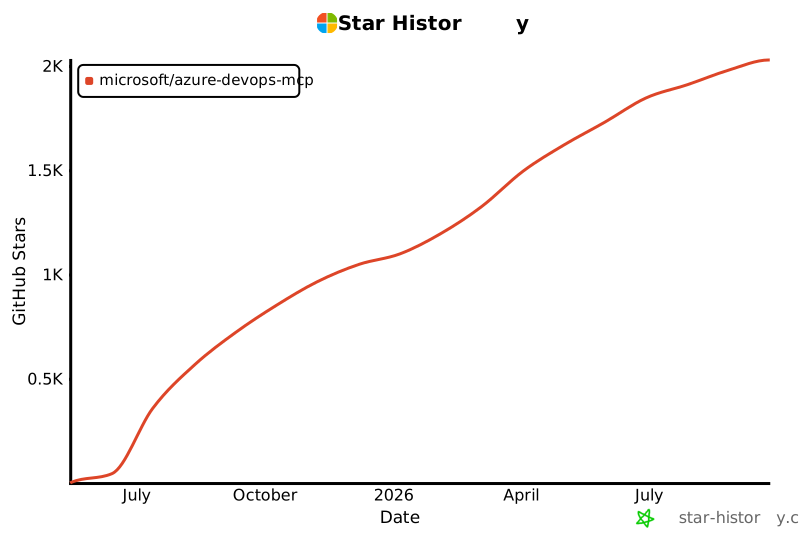
+
- "List test plans for 'Contoso'"
|
|
33
|
+
- "List teams for project 'Contoso'"
|
|
34
|
+
- "List iterations for project 'Contoso'"
|
|
35
|
+
- "List my work items for project 'Contoso'"
|
|
36
|
+
- "List work items in current iteration for 'Contoso' project and 'Contoso Team'"
|
|
37
|
+
- "List all wikis in the 'Contoso' project"
|
|
38
|
+
- "Create a wiki page '/Architecture/Overview' with content about system design"
|
|
39
|
+
- "Update the wiki page '/Getting Started' with new onboarding instructions"
|
|
40
|
+
- "Get the content of the wiki page '/API/Authentication' from the Documentation wiki"
|
|
41
|
+
|
|
42
|
+
## 🏆 Expectations
|
|
43
|
+
|
|
44
|
+
The Azure DevOps MCP Server is built around tools that are concise, simple, focused, and easy to use, with each one designed for a specific scenario. We intentionally avoid creating complex tools that try to do too much. The goal is to provide a thin abstraction layer over the REST APIs that makes data access straightforward while allowing the language model to handle the more complex reasoning.
|
|
45
|
+
|
|
46
|
+
## 🚀 Remote MCP Server (Recommended)
|
|
47
|
+
|
|
48
|
+
The Azure DevOps **Remote MCP Server** is now available in [public preview](https://devblogs.microsoft.com/devops/azure-devops-remote-mcp-server-public-preview).
|
|
49
|
+
|
|
50
|
+
Over time, the Remote MCP Server will replace this local MCP Server. We will continue to support the local server for now, but future investments will primarily focus on the remote experience.
|
|
51
|
+
|
|
52
|
+
We encourage all users of the local MCP Server to begin migrating to the Remote MCP Server.
|
|
53
|
+
|
|
54
|
+
If you encounter issues with tools, need support, or have a feature request, you can report an issue using the [Remote MCP Server issue template](https://github.com/microsoft/azure-devops-mcp/issues/new?template=remote-mcp-server-issue.md). During the preview period, we will track Remote MCP Server issues through this repository.
|
|
55
|
+
|
|
56
|
+
> [!WARNING]
|
|
57
|
+
> Internal Microsoft users of the Remote MCP Server should **not** create issues in this repository. Please use the dedicated Teams channel instead.
|
|
58
|
+
|
|
59
|
+
For complete instructions, see the [Remote MCP Server onboarding documentation](https://learn.microsoft.com/en-us/azure/devops/mcp-server/remote-mcp-server?view=azure-devops).
|
|
60
|
+
|
|
61
|
+
### Quick start with `.vscode/mcp.json`
|
|
62
|
+
|
|
63
|
+
Use this configuration to connect directly to the Azure DevOps-hosted endpoint using streamable HTTP transport:
|
|
64
|
+
|
|
65
|
+
```json
|
|
66
|
+
{
|
|
67
|
+
"servers": {
|
|
68
|
+
"ado-remote-mcp": {
|
|
69
|
+
"url": "https://mcp.dev.azure.com/{organization}",
|
|
70
|
+
"type": "http"
|
|
71
|
+
}
|
|
72
|
+
},
|
|
73
|
+
"inputs": []
|
|
74
|
+
}
|
|
75
|
+
```
|
|
76
|
+
|
|
77
|
+
See [documentation](https://learn.microsoft.com/en-us/azure/devops/mcp-server/remote-mcp-server?view=azure-devops#mcpjson-configuration) for additional configuration options.
|
|
78
|
+
|
|
79
|
+
After saving `.vscode/mcp.json`, start the server from the MCP view in VS Code, then run a prompt like `List ADO projects`.
|
|
80
|
+
|
|
81
|
+
## ⚙️ Supported Tools
|
|
82
|
+
|
|
83
|
+
See the [Available Tools](https://learn.microsoft.com/en-us/azure/devops/mcp-server/remote-mcp-server?view=azure-devops#available-tools) documentation for the complete list of available remote tools.
|
|
84
|
+
|
|
85
|
+
For a comprehensive list of local tools, see [TOOLSET.md](./docs/TOOLSET.md).
|
|
86
|
+
|
|
87
|
+
## 🔌 Local MCP Server Installation (Optional)
|
|
88
|
+
|
|
89
|
+
> [!IMPORTANT]
|
|
90
|
+
> Start with the Remote MCP Server first. Use the local MCP Server only if your scenario specifically requires a local `stdio` setup.
|
|
91
|
+
|
|
92
|
+
Use this section if you specifically need the local `stdio` server experience. For most users, start with the [Remote MCP Server](#-remote-mcp-server-recommended) section above.
|
|
93
|
+
|
|
94
|
+
For the best experience, use Visual Studio Code and GitHub Copilot. See the [getting started documentation](./docs/GETTINGSTARTED.md) to use our MCP Server with other tools such as Visual Studio 2022, Claude Code, Cursor, Opencode, and Kilocode.
|
|
95
|
+
|
|
96
|
+
### Prerequisites
|
|
97
|
+
|
|
98
|
+
1. Install [VS Code](https://code.visualstudio.com/download) or [VS Code Insiders](https://code.visualstudio.com/insiders)
|
|
99
|
+
2. Install [Node.js](https://nodejs.org/en/download) 20+
|
|
100
|
+
3. Open VS Code in an empty folder
|
|
101
|
+
|
|
102
|
+
### Installation
|
|
103
|
+
|
|
104
|
+
#### 🧨 Install from Public Feed
|
|
105
|
+
|
|
106
|
+
This installation method is the easiest for all users of Visual Studio Code.
|
|
107
|
+
|
|
108
|
+
🎥 [Watch this quick start video to get up and running in under two minutes!](https://youtu.be/EUmFM6qXoYk)
|
|
109
|
+
|
|
110
|
+
##### Steps
|
|
111
|
+
|
|
112
|
+
In your project, add a `.vscode\mcp.json` file with the following content:
|
|
113
|
+
|
|
114
|
+
```json
|
|
115
|
+
{
|
|
116
|
+
"inputs": [
|
|
117
|
+
{
|
|
118
|
+
"id": "ado_org",
|
|
119
|
+
"type": "promptString",
|
|
120
|
+
"description": "Azure DevOps organization name (e.g. 'contoso')"
|
|
121
|
+
}
|
|
122
|
+
],
|
|
123
|
+
"servers": {
|
|
124
|
+
"ado": {
|
|
125
|
+
"type": "stdio",
|
|
126
|
+
"command": "npx",
|
|
127
|
+
"args": ["-y", "@azure-devops/mcp", "${input:ado_org}"]
|
|
128
|
+
}
|
|
129
|
+
}
|
|
130
|
+
}
|
|
131
|
+
```
|
|
132
|
+
|
|
133
|
+
🔥 To stay up to date with the latest features, you can use our nightly builds. Simply update your `mcp.json` configuration to use `@azure-devops/mcp@next`. Here is an updated example:
|
|
134
|
+
|
|
135
|
+
```json
|
|
136
|
+
{
|
|
137
|
+
"inputs": [
|
|
138
|
+
{
|
|
139
|
+
"id": "ado_org",
|
|
140
|
+
"type": "promptString",
|
|
141
|
+
"description": "Azure DevOps organization name (e.g. 'contoso')"
|
|
142
|
+
}
|
|
143
|
+
],
|
|
144
|
+
"servers": {
|
|
145
|
+
"ado": {
|
|
146
|
+
"type": "stdio",
|
|
147
|
+
"command": "npx",
|
|
148
|
+
"args": ["-y", "@azure-devops/mcp@next", "${input:ado_org}"]
|
|
149
|
+
}
|
|
150
|
+
}
|
|
151
|
+
}
|
|
152
|
+
```
|
|
153
|
+
|
|
154
|
+
Save the file, then click 'Start'.
|
|
155
|
+
|
|
156
|
+

|
|
157
|
+
|
|
158
|
+
In chat, switch to [Agent Mode](https://code.visualstudio.com/blogs/2025/02/24/introducing-copilot-agent-mode).
|
|
159
|
+
|
|
160
|
+
Click "Select Tools" and choose the available tools.
|
|
161
|
+
|
|
162
|
+

|
|
163
|
+
|
|
164
|
+
Open GitHub Copilot Chat and try a prompt like `List ADO projects`. The first time an ADO tool is executed browser will open prompting to login with your Microsoft account. Please ensure you are using credentials matching selected Azure DevOps organization.
|
|
165
|
+
|
|
166
|
+
> 💥 We strongly recommend creating a `.github\copilot-instructions.md` in your project. This will enhance your experience using the Azure DevOps MCP Server with GitHub Copilot Chat.
|
|
167
|
+
> To start, just include "`This project uses Azure DevOps. Always check to see if the Azure DevOps MCP server has a tool relevant to the user's request`" in your copilot instructions file.
|
|
168
|
+
|
|
169
|
+
See the [getting started documentation](./docs/GETTINGSTARTED.md) to use our MCP Server with other tools such as Visual Studio 2022, Claude Code, and Cursor.
|
|
170
|
+
|
|
171
|
+
## 🌏 Using Domains (local)
|
|
172
|
+
|
|
173
|
+
Azure DevOps exposes a large surface area. As a result, our Azure DevOps MCP Server includes many tools. To keep the toolset manageable, avoid confusing the model, and respect client limits on loaded tools, use Domains to load only the areas you need. Domains are named groups of related tools (for example: core, work, work-items, repositories, wiki). Add the `-d` argument and the domain names to the server args in your `mcp.json` to list the domains to enable.
|
|
174
|
+
|
|
175
|
+
For example, use `"-d", "core", "work", "work-items"` to load only Work Item related tools (see the example below).
|
|
176
|
+
|
|
177
|
+
```json
|
|
178
|
+
{
|
|
179
|
+
"inputs": [
|
|
180
|
+
{
|
|
181
|
+
"id": "ado_org",
|
|
182
|
+
"type": "promptString",
|
|
183
|
+
"description": "Azure DevOps organization name (e.g. 'contoso')"
|
|
184
|
+
}
|
|
185
|
+
],
|
|
186
|
+
"servers": {
|
|
187
|
+
"ado_with_filtered_domains": {
|
|
188
|
+
"type": "stdio",
|
|
189
|
+
"command": "npx",
|
|
190
|
+
"args": ["-y", "@azure-devops/mcp", "${input:ado_org}", "-d", "core", "work", "work-items"]
|
|
191
|
+
}
|
|
192
|
+
}
|
|
193
|
+
}
|
|
194
|
+
```
|
|
195
|
+
|
|
196
|
+
Domains that are available are: `core`, `work`, `work-items`, `search`, `test-plans`, `repositories`, `wiki`, `pipelines`, `advanced-security`
|
|
197
|
+
|
|
198
|
+
We recommend that you always enable `core` tools so that you can fetch project level information.
|
|
199
|
+
|
|
200
|
+
> By default all domains are loaded
|
|
201
|
+
|
|
202
|
+
## 🐥 Project and Team Defaults (local)
|
|
203
|
+
|
|
204
|
+
You can also configure default Azure DevOps project and team values from `.vscode/mcp.json` using `project` and `team`, so tools can skip selection prompts.
|
|
205
|
+
|
|
206
|
+
### Example `.vscode/mcp.json`
|
|
207
|
+
|
|
208
|
+
```json
|
|
209
|
+
{
|
|
210
|
+
"servers": {
|
|
211
|
+
"ado": {
|
|
212
|
+
"type": "stdio",
|
|
213
|
+
"command": "npx",
|
|
214
|
+
"args": ["-y", "@azure-devops/mcp", "myorg", "--authentication", "azcli"],
|
|
215
|
+
"env": {
|
|
216
|
+
"ado_mcp_project": "Contoso",
|
|
217
|
+
"ado_mcp_team": "Fabrikam Team"
|
|
218
|
+
}
|
|
219
|
+
}
|
|
220
|
+
}
|
|
221
|
+
}
|
|
222
|
+
```
|
|
223
|
+
|
|
224
|
+
## 📝 Troubleshooting
|
|
225
|
+
|
|
226
|
+
See the [Troubleshooting guide](./docs/TROUBLESHOOTING.md) for help with common issues and logging.
|
|
227
|
+
|
|
228
|
+
## 🏢 On-Premises / Azure DevOps Server (local)
|
|
229
|
+
|
|
230
|
+
The local MCP server supports connecting to on-premises Azure DevOps Server (TFS) instances by specifying a custom base URL.
|
|
231
|
+
|
|
232
|
+
### Configuration
|
|
233
|
+
|
|
234
|
+
Use the `--base-url` (or `-b`) option to point to your on-prem server, or set the `AZURE_DEVOPS_BASE_URL` environment variable. The `organization` positional argument is still required and should match your collection name.
|
|
235
|
+
|
|
236
|
+
> **Note:** Only `pat` and `envvar` authentication are supported for on-premises servers.
|
|
237
|
+
|
|
238
|
+
### Example `.vscode/mcp.json`
|
|
239
|
+
|
|
240
|
+
```json
|
|
241
|
+
{
|
|
242
|
+
"inputs": [
|
|
243
|
+
{
|
|
244
|
+
"id": "ado_org",
|
|
245
|
+
"type": "promptString",
|
|
246
|
+
"description": "Azure DevOps collection name (e.g. 'DefaultCollection')"
|
|
247
|
+
}
|
|
248
|
+
],
|
|
249
|
+
"servers": {
|
|
250
|
+
"ado-onprem": {
|
|
251
|
+
"type": "stdio",
|
|
252
|
+
"command": "npx",
|
|
253
|
+
"args": [
|
|
254
|
+
"-y", "@azure-devops/mcp",
|
|
255
|
+
"${input:ado_org}",
|
|
256
|
+
"--base-url", "https://azuredo.example.com/tfs/MyCollection",
|
|
257
|
+
"--authentication", "pat"
|
|
258
|
+
],
|
|
259
|
+
"env": {
|
|
260
|
+
"PERSONAL_ACCESS_TOKEN": "<base64 encoded email:pat>"
|
|
261
|
+
}
|
|
262
|
+
}
|
|
263
|
+
}
|
|
264
|
+
}
|
|
265
|
+
```
|
|
266
|
+
|
|
267
|
+
Alternatively, use the `AZURE_DEVOPS_BASE_URL` environment variable:
|
|
268
|
+
|
|
269
|
+
```json
|
|
270
|
+
{
|
|
271
|
+
"servers": {
|
|
272
|
+
"ado-onprem": {
|
|
273
|
+
"type": "stdio",
|
|
274
|
+
"command": "npx",
|
|
275
|
+
"args": ["-y", "@azure-devops/mcp", "MyCollection", "--authentication", "pat"],
|
|
276
|
+
"env": {
|
|
277
|
+
"AZURE_DEVOPS_BASE_URL": "https://azuredo.example.com/tfs/MyCollection",
|
|
278
|
+
"PERSONAL_ACCESS_TOKEN": "<base64 encoded email:pat>"
|
|
279
|
+
}
|
|
280
|
+
}
|
|
281
|
+
}
|
|
282
|
+
}
|
|
283
|
+
```
|
|
284
|
+
|
|
285
|
+
### Self-Signed Certificates
|
|
286
|
+
|
|
287
|
+
If your on-prem server uses self-signed SSL certificates, you may need to set the `NODE_TLS_REJECT_UNAUTHORIZED=0` environment variable (not recommended for production) or configure the `NODE_EXTRA_CA_CERTS` variable to point to your CA certificate file.
|
|
288
|
+
|
|
289
|
+
### API Version Override
|
|
290
|
+
|
|
291
|
+
Azure DevOps Server on-premises may not support the latest API versions used by the cloud service. If you encounter `404` or version-related errors, set the `AZURE_DEVOPS_API_VERSION` environment variable to match your server version:
|
|
292
|
+
|
|
293
|
+
| Azure DevOps Server Version | Supported API Version |
|
|
294
|
+
|-----------------------------|-----------------------|
|
|
295
|
+
| Azure DevOps Server 2022 | `7.1` |
|
|
296
|
+
| Azure DevOps Server 2020 | `6.0` |
|
|
297
|
+
| Azure DevOps Server 2019 | `5.1` |
|
|
298
|
+
|
|
299
|
+
Example:
|
|
300
|
+
|
|
301
|
+
```json
|
|
302
|
+
{
|
|
303
|
+
"servers": {
|
|
304
|
+
"ado-onprem": {
|
|
305
|
+
"type": "stdio",
|
|
306
|
+
"command": "npx",
|
|
307
|
+
"args": ["-y", "@azure-devops/mcp", "MyCollection", "--base-url", "https://azuredo.example.com/tfs/MyCollection", "--authentication", "pat"],
|
|
308
|
+
"env": {
|
|
309
|
+
"PERSONAL_ACCESS_TOKEN": "<base64 encoded email:pat>",
|
|
310
|
+
"AZURE_DEVOPS_API_VERSION": "7.1"
|
|
311
|
+
}
|
|
312
|
+
}
|
|
313
|
+
}
|
|
314
|
+
}
|
|
315
|
+
```
|
|
316
|
+
|
|
317
|
+
## 🎩 Examples & Best Practices
|
|
318
|
+
|
|
319
|
+
Explore example prompts in our [Examples documentation](./docs/EXAMPLES.md).
|
|
320
|
+
|
|
321
|
+
For best practices and tips to enhance your experience with the MCP Server, refer to the [How-To guide](./docs/HOWTO.md).
|
|
322
|
+
|
|
323
|
+
## 🙋♀️ Frequently Asked Questions
|
|
324
|
+
|
|
325
|
+
For answers to common questions about the Azure DevOps MCP Server, see the [Frequently Asked Questions](./docs/FAQ.md).
|
|
326
|
+
|
|
327
|
+
## 📌 Contributing
|
|
328
|
+
|
|
329
|
+
We welcome contributions! During preview, please file issues for bugs, enhancements, or documentation improvements.
|
|
330
|
+
|
|
331
|
+
See our [Contributions Guide](CONTRIBUTING.md) for:
|
|
332
|
+
|
|
333
|
+
- 🛠️ Development setup
|
|
334
|
+
- ✨ Adding new tools
|
|
335
|
+
- 📝 Code style & testing
|
|
336
|
+
- 🔄 Pull request process
|
|
337
|
+
|
|
338
|
+
> ⚠️ Please read the [Contributions Guide](CONTRIBUTING.md) before creating a pull request.
|
|
339
|
+
|
|
340
|
+
## 🤝 Code of Conduct
|
|
341
|
+
|
|
342
|
+
This project follows the [Microsoft Open Source Code of Conduct](https://opensource.microsoft.com/codeofconduct/).
|
|
343
|
+
For questions, see the [FAQ](https://opensource.microsoft.com/codeofconduct/faq/) or contact [open@microsoft.com](mailto:open@microsoft.com).
|
|
344
|
+
|
|
345
|
+
## 📈 Project Stats
|
|
346
|
+
|
|
347
|
+
[](https://star-history.com/#microsoft/azure-devops-mcp)
|
|
348
|
+
|
|
349
|
+
## 🏆 Hall of Fame
|
|
350
|
+
|
|
351
|
+
Thanks to all contributors who make this project awesome! ❤️
|
|
352
|
+
|
|
353
|
+
[](https://github.com/microsoft/azure-devops-mcp/graphs/contributors)
|
|
354
|
+
|
|
355
|
+
> Generated with [contrib.rocks](https://contrib.rocks)
|
|
356
|
+
|
|
357
|
+
## License
|
|
358
|
+
|
|
359
|
+
Licensed under the [MIT License](LICENSE.md).
|
|
360
|
+
|
|
361
|
+
---
|
|
362
|
+
|
|
363
|
+
_Trademarks: This project may include trademarks or logos for Microsoft or third parties. Use of Microsoft trademarks or logos must follow [Microsoft’s Trademark & Brand Guidelines](https://www.microsoft.com/en-us/legal/intellectualproperty/trademarks/usage/general). Third-party trademarks are subject to their respective policies._
|
|
364
|
+
|
|
365
|
+
<!-- version: 2023-04-07 [Do not delete this line, it is used for analytics that drive template improvements] -->
|
package/dist/auth.js
ADDED
|
@@ -0,0 +1,129 @@
|
|
|
1
|
+
// Copyright (c) Microsoft Corporation.
|
|
2
|
+
// Licensed under the MIT License.
|
|
3
|
+
import { AzureCliCredential, ChainedTokenCredential, DefaultAzureCredential } from "@azure/identity";
|
|
4
|
+
import { PublicClientApplication } from "@azure/msal-node";
|
|
5
|
+
import open from "open";
|
|
6
|
+
import { logger } from "./logger.js";
|
|
7
|
+
const scopes = ["499b84ac-1321-427f-aa17-267ca6975798/.default"];
|
|
8
|
+
class OAuthAuthenticator {
|
|
9
|
+
static clientId = "0d50963b-7bb9-4fe7-94c7-a99af00b5136";
|
|
10
|
+
static defaultAuthority = "https://login.microsoftonline.com/common";
|
|
11
|
+
static zeroTenantId = "00000000-0000-0000-0000-000000000000";
|
|
12
|
+
accountId;
|
|
13
|
+
publicClientApp;
|
|
14
|
+
constructor(tenantId) {
|
|
15
|
+
this.accountId = null;
|
|
16
|
+
let authority = OAuthAuthenticator.defaultAuthority;
|
|
17
|
+
if (tenantId && tenantId !== OAuthAuthenticator.zeroTenantId) {
|
|
18
|
+
authority = `https://login.microsoftonline.com/${tenantId}`;
|
|
19
|
+
logger.debug(`OAuthAuthenticator: Using tenant-specific authority for tenantId='${tenantId}'`);
|
|
20
|
+
}
|
|
21
|
+
else {
|
|
22
|
+
logger.debug(`OAuthAuthenticator: Using default common authority`);
|
|
23
|
+
}
|
|
24
|
+
this.publicClientApp = new PublicClientApplication({
|
|
25
|
+
auth: {
|
|
26
|
+
clientId: OAuthAuthenticator.clientId,
|
|
27
|
+
authority,
|
|
28
|
+
},
|
|
29
|
+
});
|
|
30
|
+
logger.debug(`OAuthAuthenticator: Initialized with clientId='${OAuthAuthenticator.clientId}'`);
|
|
31
|
+
}
|
|
32
|
+
async getToken() {
|
|
33
|
+
let authResult = null;
|
|
34
|
+
if (this.accountId) {
|
|
35
|
+
logger.debug(`OAuthAuthenticator: Attempting silent token acquisition for cached account`);
|
|
36
|
+
try {
|
|
37
|
+
authResult = await this.publicClientApp.acquireTokenSilent({
|
|
38
|
+
scopes,
|
|
39
|
+
account: this.accountId,
|
|
40
|
+
});
|
|
41
|
+
logger.debug(`OAuthAuthenticator: Successfully acquired token silently`);
|
|
42
|
+
}
|
|
43
|
+
catch (error) {
|
|
44
|
+
logger.debug(`OAuthAuthenticator: Silent token acquisition failed: ${error instanceof Error ? error.message : String(error)}`);
|
|
45
|
+
authResult = null;
|
|
46
|
+
}
|
|
47
|
+
}
|
|
48
|
+
else {
|
|
49
|
+
logger.debug(`OAuthAuthenticator: No cached account available, interactive auth required`);
|
|
50
|
+
}
|
|
51
|
+
if (!authResult) {
|
|
52
|
+
logger.debug(`OAuthAuthenticator: Starting interactive token acquisition`);
|
|
53
|
+
authResult = await this.publicClientApp.acquireTokenInteractive({
|
|
54
|
+
scopes,
|
|
55
|
+
openBrowser: async (url) => {
|
|
56
|
+
logger.debug(`OAuthAuthenticator: Opening browser for authentication`);
|
|
57
|
+
open(url);
|
|
58
|
+
},
|
|
59
|
+
});
|
|
60
|
+
this.accountId = authResult.account;
|
|
61
|
+
logger.debug(`OAuthAuthenticator: Successfully acquired token interactively, account cached`);
|
|
62
|
+
}
|
|
63
|
+
if (!authResult.accessToken) {
|
|
64
|
+
logger.error(`OAuthAuthenticator: Authentication result contains no access token`);
|
|
65
|
+
throw new Error("Failed to obtain Azure DevOps OAuth token.");
|
|
66
|
+
}
|
|
67
|
+
logger.debug(`OAuthAuthenticator: Token obtained successfully`);
|
|
68
|
+
return authResult.accessToken;
|
|
69
|
+
}
|
|
70
|
+
}
|
|
71
|
+
function createAuthenticator(type, tenantId) {
|
|
72
|
+
logger.debug(`Creating authenticator of type '${type}' with tenantId='${tenantId ?? "undefined"}'`);
|
|
73
|
+
switch (type) {
|
|
74
|
+
case "pat":
|
|
75
|
+
logger.debug(`Authenticator: Using PAT authentication (PERSONAL_ACCESS_TOKEN)`);
|
|
76
|
+
return async () => {
|
|
77
|
+
logger.debug(`${type}: Reading token from PERSONAL_ACCESS_TOKEN environment variable`);
|
|
78
|
+
const b64Pat = process.env["PERSONAL_ACCESS_TOKEN"];
|
|
79
|
+
if (!b64Pat) {
|
|
80
|
+
logger.error(`${type}: PERSONAL_ACCESS_TOKEN environment variable is not set or empty`);
|
|
81
|
+
throw new Error("Environment variable 'PERSONAL_ACCESS_TOKEN' is not set or empty. Please set it with a valid base64-encoded Azure DevOps Personal Access Token.");
|
|
82
|
+
}
|
|
83
|
+
// Return base64 value as-is — caller uses it directly as the Basic auth credential
|
|
84
|
+
logger.debug(`${type}: Successfully retrieved PAT from environment variable`);
|
|
85
|
+
return b64Pat;
|
|
86
|
+
};
|
|
87
|
+
case "envvar":
|
|
88
|
+
logger.debug(`Authenticator: Using environment variable authentication (ADO_MCP_AUTH_TOKEN)`);
|
|
89
|
+
// Read token from fixed environment variable
|
|
90
|
+
return async () => {
|
|
91
|
+
logger.debug(`${type}: Reading token from ADO_MCP_AUTH_TOKEN environment variable`);
|
|
92
|
+
const token = process.env["ADO_MCP_AUTH_TOKEN"];
|
|
93
|
+
if (!token) {
|
|
94
|
+
logger.error(`${type}: ADO_MCP_AUTH_TOKEN environment variable is not set or empty`);
|
|
95
|
+
throw new Error("Environment variable 'ADO_MCP_AUTH_TOKEN' is not set or empty. Please set it with a valid Azure DevOps Personal Access Token.");
|
|
96
|
+
}
|
|
97
|
+
logger.debug(`${type}: Successfully retrieved token from environment variable`);
|
|
98
|
+
return token;
|
|
99
|
+
};
|
|
100
|
+
case "azcli":
|
|
101
|
+
case "env":
|
|
102
|
+
if (type !== "env") {
|
|
103
|
+
logger.debug(`${type}: Setting AZURE_TOKEN_CREDENTIALS to 'dev' for development credential chain`);
|
|
104
|
+
process.env.AZURE_TOKEN_CREDENTIALS = "dev";
|
|
105
|
+
}
|
|
106
|
+
let credential = new DefaultAzureCredential(); // CodeQL [SM05138] resolved by explicitly setting AZURE_TOKEN_CREDENTIALS
|
|
107
|
+
if (tenantId) {
|
|
108
|
+
// Use Azure CLI credential if tenantId is provided for multi-tenant scenarios
|
|
109
|
+
const azureCliCredential = new AzureCliCredential({ tenantId });
|
|
110
|
+
credential = new ChainedTokenCredential(azureCliCredential, credential);
|
|
111
|
+
}
|
|
112
|
+
return async () => {
|
|
113
|
+
const result = await credential.getToken(scopes);
|
|
114
|
+
if (!result) {
|
|
115
|
+
logger.error(`${type}: Failed to obtain token - credential.getToken returned null/undefined`);
|
|
116
|
+
throw new Error("Failed to obtain Azure DevOps token. Ensure you have Azure CLI logged or use interactive type of authentication.");
|
|
117
|
+
}
|
|
118
|
+
logger.debug(`${type}: Successfully obtained Azure DevOps token`);
|
|
119
|
+
return result.token;
|
|
120
|
+
};
|
|
121
|
+
default:
|
|
122
|
+
logger.debug(`Authenticator: Using OAuth interactive authentication (default)`);
|
|
123
|
+
const authenticator = new OAuthAuthenticator(tenantId);
|
|
124
|
+
return () => {
|
|
125
|
+
return authenticator.getToken();
|
|
126
|
+
};
|
|
127
|
+
}
|
|
128
|
+
}
|
|
129
|
+
export { createAuthenticator };
|
package/dist/index.js
ADDED
|
@@ -0,0 +1,140 @@
|
|
|
1
|
+
#!/usr/bin/env node
|
|
2
|
+
// Copyright (c) Microsoft Corporation.
|
|
3
|
+
// Licensed under the MIT License.
|
|
4
|
+
import { McpServer } from "@modelcontextprotocol/sdk/server/mcp.js";
|
|
5
|
+
import { StdioServerTransport } from "@modelcontextprotocol/sdk/server/stdio.js";
|
|
6
|
+
import { getBearerHandler, getPersonalAccessTokenHandler, WebApi } from "azure-devops-node-api";
|
|
7
|
+
import yargs from "yargs";
|
|
8
|
+
import { hideBin } from "yargs/helpers";
|
|
9
|
+
import { createAuthenticator } from "./auth.js";
|
|
10
|
+
import { logger } from "./logger.js";
|
|
11
|
+
import { getOrgTenant } from "./org-tenants.js";
|
|
12
|
+
//import { configurePrompts } from "./prompts.js";
|
|
13
|
+
import { configureAllTools } from "./tools.js";
|
|
14
|
+
import { UserAgentComposer } from "./useragent.js";
|
|
15
|
+
import { packageVersion } from "./version.js";
|
|
16
|
+
import { DomainsManager } from "./shared/domains.js";
|
|
17
|
+
function isGitHubCodespaceEnv() {
|
|
18
|
+
return process.env.CODESPACES === "true" && !!process.env.CODESPACE_NAME;
|
|
19
|
+
}
|
|
20
|
+
const defaultAuthenticationType = isGitHubCodespaceEnv() ? "azcli" : "interactive";
|
|
21
|
+
// Parse command line arguments using yargs
|
|
22
|
+
const argv = yargs(hideBin(process.argv))
|
|
23
|
+
.scriptName("mcp-server-azuredevops")
|
|
24
|
+
.usage("Usage: $0 <organization> [options]")
|
|
25
|
+
.version(packageVersion)
|
|
26
|
+
.command("$0 <organization> [options]", "Azure DevOps MCP Server", (yargs) => {
|
|
27
|
+
yargs.positional("organization", {
|
|
28
|
+
describe: "Azure DevOps organization name",
|
|
29
|
+
type: "string",
|
|
30
|
+
demandOption: true,
|
|
31
|
+
});
|
|
32
|
+
})
|
|
33
|
+
.option("domains", {
|
|
34
|
+
alias: "d",
|
|
35
|
+
describe: "Domain(s) to enable: 'all' for everything, or specific domains like 'repositories builds work'. Defaults to 'all'.",
|
|
36
|
+
type: "string",
|
|
37
|
+
array: true,
|
|
38
|
+
default: "all",
|
|
39
|
+
})
|
|
40
|
+
.option("authentication", {
|
|
41
|
+
alias: "a",
|
|
42
|
+
describe: "Type of authentication to use",
|
|
43
|
+
type: "string",
|
|
44
|
+
choices: ["interactive", "azcli", "env", "envvar", "pat"],
|
|
45
|
+
default: defaultAuthenticationType,
|
|
46
|
+
})
|
|
47
|
+
.option("tenant", {
|
|
48
|
+
alias: "t",
|
|
49
|
+
describe: "Azure tenant ID (optional, applied when using 'interactive' and 'azcli' type of authentication)",
|
|
50
|
+
type: "string",
|
|
51
|
+
})
|
|
52
|
+
.option("base-url", {
|
|
53
|
+
alias: "b",
|
|
54
|
+
describe: "Base URL for Azure DevOps Server (on-prem). E.g. 'https://azuredo.example.com/tfs/MyCollection'. Defaults to 'https://dev.azure.com/{organization}'.",
|
|
55
|
+
type: "string",
|
|
56
|
+
})
|
|
57
|
+
.help()
|
|
58
|
+
.parseSync();
|
|
59
|
+
export const orgName = argv.organization;
|
|
60
|
+
export const orgUrl = argv.baseUrl ?? process.env.AZURE_DEVOPS_BASE_URL ?? "https://dev.azure.com/" + orgName;
|
|
61
|
+
/**
|
|
62
|
+
* Whether the server is connecting to an on-premises Azure DevOps Server instance
|
|
63
|
+
* (i.e., not the cloud-hosted dev.azure.com service).
|
|
64
|
+
*/
|
|
65
|
+
export const isOnPrem = !orgUrl.startsWith("https://dev.azure.com/");
|
|
66
|
+
const domainsManager = new DomainsManager(argv.domains);
|
|
67
|
+
export const enabledDomains = domainsManager.getEnabledDomains();
|
|
68
|
+
function getAzureDevOpsClient(getAzureDevOpsToken, userAgentComposer, authType) {
|
|
69
|
+
return async () => {
|
|
70
|
+
const accessToken = await getAzureDevOpsToken();
|
|
71
|
+
// For pat, accessToken is base64("{email}:{token}"). Decode to extract the token part,
|
|
72
|
+
// since getPersonalAccessTokenHandler prepends ":" internally and just needs the raw token.
|
|
73
|
+
const authHandler = authType === "pat" ? getPersonalAccessTokenHandler(Buffer.from(accessToken, "base64").toString("utf8").split(":").slice(1).join(":")) : getBearerHandler(accessToken);
|
|
74
|
+
const connection = new WebApi(orgUrl, authHandler, undefined, {
|
|
75
|
+
productName: "AzureDevOps.MCP",
|
|
76
|
+
productVersion: packageVersion,
|
|
77
|
+
userAgent: userAgentComposer.userAgent,
|
|
78
|
+
});
|
|
79
|
+
return connection;
|
|
80
|
+
};
|
|
81
|
+
}
|
|
82
|
+
async function main() {
|
|
83
|
+
logger.info("Starting Azure DevOps MCP Server", {
|
|
84
|
+
organization: orgName,
|
|
85
|
+
organizationUrl: orgUrl,
|
|
86
|
+
authentication: argv.authentication,
|
|
87
|
+
tenant: argv.tenant,
|
|
88
|
+
domains: argv.domains,
|
|
89
|
+
enabledDomains: Array.from(enabledDomains),
|
|
90
|
+
version: packageVersion,
|
|
91
|
+
isCodespace: isGitHubCodespaceEnv(),
|
|
92
|
+
isOnPrem,
|
|
93
|
+
});
|
|
94
|
+
// Validate authentication type for on-prem servers
|
|
95
|
+
if (isOnPrem && argv.authentication !== "pat" && argv.authentication !== "envvar") {
|
|
96
|
+
logger.error("On-premises Azure DevOps Server only supports 'pat' or 'envvar' authentication.");
|
|
97
|
+
throw new Error("On-premises Azure DevOps Server only supports 'pat' or 'envvar' authentication. " +
|
|
98
|
+
"Please use '--authentication pat' or '--authentication envvar'.");
|
|
99
|
+
}
|
|
100
|
+
const server = new McpServer({
|
|
101
|
+
name: "Azure DevOps MCP Server",
|
|
102
|
+
version: packageVersion,
|
|
103
|
+
icons: [
|
|
104
|
+
{
|
|
105
|
+
src: "https://cdn.vsassets.io/content/icons/favicon.ico",
|
|
106
|
+
},
|
|
107
|
+
],
|
|
108
|
+
});
|
|
109
|
+
const userAgentComposer = new UserAgentComposer(packageVersion);
|
|
110
|
+
server.server.oninitialized = () => {
|
|
111
|
+
userAgentComposer.appendMcpClientInfo(server.server.getClientVersion());
|
|
112
|
+
};
|
|
113
|
+
const tenantId = isOnPrem ? argv.tenant : ((await getOrgTenant(orgName)) ?? argv.tenant);
|
|
114
|
+
const authenticator = createAuthenticator(argv.authentication, tenantId);
|
|
115
|
+
if (argv.authentication === "pat") {
|
|
116
|
+
const basicValue = await authenticator();
|
|
117
|
+
// basicValue is already base64("{email}:{token}") — use it directly in the Authorization header
|
|
118
|
+
const _originalFetch = globalThis.fetch;
|
|
119
|
+
globalThis.fetch = async (input, init) => {
|
|
120
|
+
if (init?.headers) {
|
|
121
|
+
const headers = new Headers(init.headers);
|
|
122
|
+
if (headers.get("Authorization")?.startsWith("Bearer ")) {
|
|
123
|
+
headers.set("Authorization", `Basic ${basicValue}`);
|
|
124
|
+
init = { ...init, headers };
|
|
125
|
+
}
|
|
126
|
+
}
|
|
127
|
+
return _originalFetch(input, init);
|
|
128
|
+
};
|
|
129
|
+
logger.debug("PAT mode: global fetch interceptor installed to rewrite Bearer -> Basic auth headers");
|
|
130
|
+
}
|
|
131
|
+
// removing prompts untill further notice
|
|
132
|
+
// configurePrompts(server);
|
|
133
|
+
configureAllTools(server, authenticator, getAzureDevOpsClient(authenticator, userAgentComposer, argv.authentication), () => userAgentComposer.userAgent, enabledDomains);
|
|
134
|
+
const transport = new StdioServerTransport();
|
|
135
|
+
await server.connect(transport);
|
|
136
|
+
}
|
|
137
|
+
main().catch((error) => {
|
|
138
|
+
logger.error("Fatal error in main():", error);
|
|
139
|
+
process.exit(1);
|
|
140
|
+
});
|