@qwen-code/qwen-code 0.18.1 → 0.18.3-nightly.20260618.bc3e0b405
This diff represents the content of publicly available package versions that have been released to one of the supported registries. The information contained in this diff is provided for informational purposes only and reflects changes between package versions as they appear in their respective public registries.
- package/README.md +2 -1
- package/bundled/qc-helper/docs/common-workflow.md +4 -4
- package/bundled/qc-helper/docs/configuration/model-providers.md +1 -1
- package/bundled/qc-helper/docs/configuration/settings.md +77 -77
- package/bundled/qc-helper/docs/features/channels/feishu.md +16 -0
- package/bundled/qc-helper/docs/features/mcp.md +1 -1
- package/bundled/qc-helper/docs/features/sub-agents.md +3 -3
- package/bundled/qc-helper/docs/qwen-serve.md +24 -12
- package/bundled/qc-helper/docs/reference/keyboard-shortcuts.md +30 -30
- package/bundled/review/SKILL.md +10 -4
- package/bundled/simplify/SKILL.md +1 -1
- package/chunks/{agent-XT7NHZ5H.js → agent-ACIWYWX7.js} +5 -5
- package/chunks/{agent-headless-LNRE63ZL.js → agent-headless-3OQZEB2S.js} +5 -5
- package/chunks/{anthropicContentGenerator-DCI26OQF.js → anthropicContentGenerator-KLBHYGH6.js} +1 -1
- package/chunks/{askUserQuestion-ITYUTWLR.js → askUserQuestion-QPZXR3UO.js} +1 -1
- package/chunks/{chunk-IS7UA4W3.js → chunk-753BG2JJ.js} +4 -4
- package/chunks/{chunk-RON7LFNH.js → chunk-BPJAFPPD.js} +6 -6
- package/chunks/{chunk-3NRO6NHX.js → chunk-MN5RAXVB.js} +3 -3
- package/chunks/{chunk-Y7KMDUEP.js → chunk-QP4R5FTG.js} +1 -1
- package/chunks/{chunk-6T7Y7USE.js → chunk-RMFCNRER.js} +124858 -123552
- package/chunks/{chunk-QILTEBWS.js → chunk-RTTAC5VW.js} +1 -1
- package/chunks/{chunk-XZTNBSMW.js → chunk-SWMGBYC2.js} +1 -1
- package/chunks/{chunk-WJ3SND6W.js → chunk-UIH54N5X.js} +2 -2
- package/chunks/{chunk-HQUWWSSP.js → chunk-VIEIRAK3.js} +1 -1
- package/chunks/{chunk-HED55F43.js → chunk-VU6A2OBJ.js} +15 -5
- package/chunks/{chunk-BXYRCW2C.js → chunk-XFUQS3BO.js} +10 -5
- package/chunks/{chunk-DHZREJTG.js → chunk-YJDVHAGL.js} +1 -1
- package/chunks/{chunk-A2ZIEEGJ.js → chunk-ZNUMXPNK.js} +592 -43
- package/chunks/{computer-use-4YX3JGBV.js → computer-use-Y3INMFGQ.js} +5 -5
- package/chunks/{contextCommand-KS2H7MW5.js → contextCommand-4AF56TE5.js} +7 -7
- package/chunks/{cron-create-CAPUKK7I.js → cron-create-DQKRQMCP.js} +1 -1
- package/chunks/{cron-delete-G3KAR26Q.js → cron-delete-DOFPHFTI.js} +1 -1
- package/chunks/{cron-list-ZA4ZIUS5.js → cron-list-RCVOO3CB.js} +1 -1
- package/chunks/{dist-VEGFONCF.js → dist-2UCAYOX7.js} +2 -2
- package/chunks/{dist-X4EXN7W6.js → dist-33LHH26D.js} +1 -1
- package/chunks/{dist-YLS6NI7H.js → dist-KF43SZZV.js} +1 -1
- package/chunks/{dist-7YWFWOCJ.js → dist-UH7CYT7F.js} +2 -2
- package/chunks/{edit-2ARPEO4B.js → edit-MO45GCL7.js} +8 -12
- package/chunks/{enter-worktree-IXNXNAW5.js → enter-worktree-Z3JI6PAT.js} +5 -5
- package/chunks/{enterPlanMode-TAKAGAYP.js → enterPlanMode-IK6VOFTA.js} +5 -5
- package/chunks/{exit-worktree-LHTRV7ML.js → exit-worktree-N7VFZX2L.js} +5 -5
- package/chunks/{exitPlanMode-MK5UAITL.js → exitPlanMode-I3KHESPG.js} +11 -9
- package/chunks/{geminiContentGenerator-HFJIGO77.js → geminiContentGenerator-SCL4XVAS.js} +1 -1
- package/chunks/{glob-I2USLUSC.js → glob-F2B2SE3K.js} +5 -5
- package/chunks/{grep-WBIF7THR.js → grep-4KQWN26D.js} +5 -5
- package/chunks/{ls-2R5RHLX5.js → ls-TRD77UTS.js} +1 -1
- package/chunks/{lsp-XKH6ZIAN.js → lsp-2VFWQPZS.js} +1 -1
- package/chunks/{monitor-WU7UFATU.js → monitor-JLANELR3.js} +5 -5
- package/chunks/{notebook-edit-KUHYPXEM.js → notebook-edit-HDRKPHHG.js} +6 -8
- package/chunks/{openaiContentGenerator-5PLHYJQL.js → openaiContentGenerator-BKTFJC2S.js} +5 -5
- package/chunks/{qwenContentGenerator-TSKW73KY.js → qwenContentGenerator-62BVT57E.js} +7 -7
- package/chunks/{read-file-VIPF2PS6.js → read-file-SFLRS3OC.js} +3 -3
- package/chunks/{ripGrep-XLIZTYE7.js → ripGrep-H2MU4MC3.js} +5 -5
- package/chunks/{scheduler-O66SLJGU.js → scheduler-2GZTWP5S.js} +5 -5
- package/chunks/{send-message-CTME7DXD.js → send-message-QZOC5GA2.js} +1 -1
- package/chunks/{serve-BWOLYT62.js → serve-SYMKDBDG.js} +709 -26
- package/chunks/{shell-XE7UYKOO.js → shell-U46KHTLY.js} +5 -5
- package/chunks/{skill-RZWM6XMC.js → skill-VQMJOXNY.js} +3 -3
- package/chunks/{src-L5P7K4MH.js → src-YBSBZZEL.js} +11 -5
- package/chunks/{syntheticOutput-ZJGSU7OQ.js → syntheticOutput-WJSUK4SZ.js} +2 -2
- package/chunks/{task-create-EE6JEM7G.js → task-create-GGSC27HO.js} +2 -2
- package/chunks/{task-list-EESYAC65.js → task-list-EDHHHSK4.js} +1 -1
- package/chunks/{task-stop-XZVCFFYY.js → task-stop-WR5PDVZY.js} +1 -1
- package/chunks/{task-update-EIO4HNE3.js → task-update-UR7NUHBV.js} +2 -2
- package/chunks/{team-create-R2H7Y3SG.js → team-create-OA3IGBCE.js} +5 -5
- package/chunks/{team-delete-A7LXPGV7.js → team-delete-FC33URJK.js} +1 -1
- package/chunks/{todoWrite-VRKSGAWM.js → todoWrite-GO2ME7ZV.js} +1 -1
- package/chunks/{tool-search-USSQMTMS.js → tool-search-A57VE2JF.js} +3 -3
- package/chunks/{web-fetch-GHAZUA54.js → web-fetch-NLLATYIL.js} +2 -2
- package/chunks/{workflow-5LNNLNUR.js → workflow-RWXT7YIU.js} +249 -24
- package/chunks/{write-file-2I7HP24C.js → write-file-46RW6BV4.js} +7 -9
- package/cli.js +1328 -542
- package/package.json +2 -2
- package/chunks/chunk-7KPZFE5A.js +0 -117
package/README.md
CHANGED
|
@@ -256,7 +256,7 @@ Use the `/model` command at any time to switch between all configured models.
|
|
|
256
256
|
}
|
|
257
257
|
```
|
|
258
258
|
|
|
259
|
-
> Subscribe to the Coding Plan and get your API key at [Alibaba Cloud ModelStudio(Beijing)](https://bailian.console.aliyun.com/cn-beijing?tab=coding-plan#/efm/coding-plan-index) or [Alibaba Cloud ModelStudio(intl)](https://modelstudio.console.alibabacloud.com/?tab=coding-plan#/efm/coding-plan-index).
|
|
259
|
+
> Subscribe to the Coding Plan and get your API key at [Alibaba Cloud ModelStudio (Beijing)](https://bailian.console.aliyun.com/cn-beijing?tab=coding-plan#/efm/coding-plan-index) or [Alibaba Cloud ModelStudio (intl)](https://modelstudio.console.alibabacloud.com/?tab=coding-plan#/efm/coding-plan-index).
|
|
260
260
|
|
|
261
261
|
</details>
|
|
262
262
|
|
|
@@ -561,6 +561,7 @@ The most commonly used top-level fields in `settings.json`:
|
|
|
561
561
|
|
|
562
562
|
Looking for a graphical interface?
|
|
563
563
|
|
|
564
|
+
- [**Qwen Code Desktop**](https://github.com/QwenLM/qwen-code/releases/tag/desktop-latest) Official desktop app for macOS, Windows, and Linux
|
|
564
565
|
- [**AionUi**](https://github.com/iOfficeAI/AionUi) A modern GUI for command-line AI tools including Qwen Code
|
|
565
566
|
- [**Gemini CLI Desktop**](https://github.com/Piebald-AI/gemini-cli-desktop) A cross-platform desktop/web/mobile UI for Qwen Code
|
|
566
567
|
|
|
@@ -347,10 +347,10 @@ This immediately resumes your most recent conversation without any prompts.
|
|
|
347
347
|
**2. Continue in non-interactive mode**
|
|
348
348
|
|
|
349
349
|
```bash
|
|
350
|
-
qwen --continue
|
|
350
|
+
qwen --continue -p "Continue with my task"
|
|
351
351
|
```
|
|
352
352
|
|
|
353
|
-
Use `--
|
|
353
|
+
Use `-p` (or `--prompt`) with `--continue` to resume the most recent conversation in non-interactive mode, perfect for scripts or automation.
|
|
354
354
|
|
|
355
355
|
**3. Show conversation picker**
|
|
356
356
|
|
|
@@ -387,13 +387,13 @@ Use arrow keys to navigate and press Enter to select a conversation. Press Esc t
|
|
|
387
387
|
> qwen --continue
|
|
388
388
|
>
|
|
389
389
|
> # Continue most recent conversation with a specific prompt
|
|
390
|
-
> qwen --continue
|
|
390
|
+
> qwen --continue -p "Show me our progress"
|
|
391
391
|
>
|
|
392
392
|
> # Show conversation picker
|
|
393
393
|
> qwen --resume
|
|
394
394
|
>
|
|
395
395
|
> # Continue most recent conversation in non-interactive mode
|
|
396
|
-
> qwen --continue
|
|
396
|
+
> qwen --continue -p "Run the tests again"
|
|
397
397
|
> ```
|
|
398
398
|
|
|
399
399
|
## Run parallel Qwen Code sessions with Git worktrees
|
|
@@ -333,7 +333,7 @@ Alibaba Cloud Coding Plan supports two regions:
|
|
|
333
333
|
| China | `https://coding.dashscope.aliyuncs.com/v1` | Mainland China endpoint |
|
|
334
334
|
| Global/International | `https://coding-intl.dashscope.aliyuncs.com/v1` | International endpoint |
|
|
335
335
|
|
|
336
|
-
The region is selected during authentication and stored in `settings.json` under `
|
|
336
|
+
The region is selected during authentication and stored in `settings.json` under the `modelProviders` configuration. To switch regions, re-run the `/auth` command and select a different region.
|
|
337
337
|
|
|
338
338
|
### API Key Storage
|
|
339
339
|
|
|
@@ -97,30 +97,30 @@ Settings are organized into categories. Most settings should be placed within th
|
|
|
97
97
|
|
|
98
98
|
#### ui
|
|
99
99
|
|
|
100
|
-
| Setting | Type | Description | Default
|
|
101
|
-
| --------------------------------------- | ---------------- | -------------------------------------------------------------------------------------------------------------------------------------------------------------------------------------------------------------------------------------------------------------------------------------------------------------------------------------------------------------------------------------------------------------------------------------------------------------------------------------------------------------------------------------------------- |
|
|
102
|
-
| `ui.theme` | string | The color theme for the UI. See [Themes](../configuration/themes) for available options. | `
|
|
103
|
-
| `ui.customThemes` | object | Custom theme definitions. | `{}`
|
|
104
|
-
| `ui.statusLine` | object | Custom status line configuration. Supports `command`, `refreshInterval`, `respectUserColors`, and `hideContextIndicator` options. See [Status Line](../features/status-line). | `undefined`
|
|
105
|
-
| `ui.hideWindowTitle` | boolean | Hide the window title bar. | `false`
|
|
106
|
-
| `ui.hideTips` | boolean | Hide all tips (startup and post-response) in the UI. See [Contextual Tips](../features/tips). | `false`
|
|
107
|
-
| `ui.hideBanner` | boolean | Hide the startup ASCII logo and info panel. Tips and chat input still render unless `ui.hideTips` is also set. | `false`
|
|
108
|
-
| `ui.customBannerTitle` | string | Replace the default `>_ Qwen Code` title in the banner info panel. The `(vX.Y.Z)` version suffix is always appended; auth, model, and path lines are not affected. Sanitized; capped at 80 characters. | `""`
|
|
109
|
-
| `ui.customBannerSubtitle` | string | Optional subtitle line rendered between the banner title and the auth/model line, in place of the blank spacer row. Sanitized; capped at 160 characters. Empty (default) keeps the original blank spacer. | `""`
|
|
110
|
-
| `ui.customAsciiArt` | string \| object | Replace the QWEN ASCII logo in the banner. Accepts an inline string (used for both width tiers), `{ "path": "./brand.txt" }` (relative paths resolve against the owning settings file's directory; read once at startup with `O_NOFOLLOW` on POSIX, capped at 64 KB), or `{ "small": ..., "large": ... }` for width-aware selection. Sanitized; capped at 200 lines × 200 columns per tier. | `undefined`
|
|
111
|
-
| `ui.showLineNumbers` | boolean | Show line numbers in code blocks in the CLI output. | `true`
|
|
112
|
-
| `ui.renderMode` | string | Default Markdown display mode. Use `"render"` for rich visual previews or `"raw"` to show source-oriented Markdown by default. Toggle during a session with `Alt/Option+M`; on macOS the terminal must send Option as Meta. See [Markdown Rendering](../features/markdown-rendering). | `"render"`
|
|
113
|
-
| `ui.showCitations` | boolean | Show citations for generated text in the chat. | `false`
|
|
114
|
-
| `ui.compactMode` | boolean | Hide tool output and thinking for a cleaner view. Toggle with `Ctrl+O` during a session or via the Settings dialog. Tool approval prompts are never hidden, even in compact mode. The setting persists across sessions. | `false`
|
|
115
|
-
| `ui.shellOutputMaxLines` | number | Max number of shell output lines shown inline. Set to `0` to disable the cap and show full output. Hidden lines are surfaced via the `+N lines` indicator. Errors, `!`-prefix user-initiated commands, confirming tools, and focused embedded shells always show full output. | `5`
|
|
116
|
-
| `ui.enableWelcomeBack` | boolean | Show welcome back dialog when returning to a project with conversation history. When enabled, Qwen Code will automatically detect if you're returning to a project with a previously generated project summary (`.qwen/PROJECT_SUMMARY.md`) and show a dialog allowing you to continue your previous conversation or start fresh. If you choose **Start new chat session**, that choice is remembered for the current project until the project summary changes. This feature integrates with the `/summary` command and quit confirmation dialog. | `true`
|
|
117
|
-
| `ui.accessibility.enableLoadingPhrases` | boolean | Enable loading phrases (disable for accessibility). | `true`
|
|
118
|
-
| `ui.accessibility.screenReader` | boolean | Enables screen reader mode, which adjusts the TUI for better compatibility with screen readers. | `false`
|
|
119
|
-
| `ui.customWittyPhrases` | array of strings | A list of custom phrases to display during loading states. When provided, the CLI will cycle through these phrases instead of the default ones. | `[]`
|
|
120
|
-
| `ui.enableFollowupSuggestions` | boolean | Enable [followup suggestions](../features/followup-suggestions) that predict what you want to type next after the model responds. Suggestions appear as ghost text and can be accepted with Tab, Enter, or Right Arrow. | `false`
|
|
121
|
-
| `ui.enableCacheSharing` | boolean | Use cache-aware forked queries for suggestion generation. Reduces cost on providers that support prefix caching (experimental). | `true`
|
|
122
|
-
| `ui.enableSpeculation` | boolean | Speculatively execute accepted suggestions before submission. Results appear instantly when you accept (experimental). | `false`
|
|
123
|
-
| `experimental.emitToolUseSummaries` | boolean | Generate short LLM-based labels summarizing each tool-call batch. See [Tool-Use Summaries](../features/tool-use-summaries). Requires `fastModel` to be configured; silently skipped otherwise. Can be overridden per-session with `QWEN_CODE_EMIT_TOOL_USE_SUMMARIES=0` or `=1`. | `true`
|
|
100
|
+
| Setting | Type | Description | Default |
|
|
101
|
+
| --------------------------------------- | ---------------- | -------------------------------------------------------------------------------------------------------------------------------------------------------------------------------------------------------------------------------------------------------------------------------------------------------------------------------------------------------------------------------------------------------------------------------------------------------------------------------------------------------------------------------------------------- | ------------- |
|
|
102
|
+
| `ui.theme` | string | The color theme for the UI. See [Themes](../configuration/themes) for available options. | `"Qwen Dark"` |
|
|
103
|
+
| `ui.customThemes` | object | Custom theme definitions. | `{}` |
|
|
104
|
+
| `ui.statusLine` | object | Custom status line configuration. Supports `command`, `refreshInterval`, `respectUserColors`, and `hideContextIndicator` options. See [Status Line](../features/status-line). | `undefined` |
|
|
105
|
+
| `ui.hideWindowTitle` | boolean | Hide the window title bar. | `false` |
|
|
106
|
+
| `ui.hideTips` | boolean | Hide all tips (startup and post-response) in the UI. See [Contextual Tips](../features/tips). | `false` |
|
|
107
|
+
| `ui.hideBanner` | boolean | Hide the startup ASCII logo and info panel. Tips and chat input still render unless `ui.hideTips` is also set. | `false` |
|
|
108
|
+
| `ui.customBannerTitle` | string | Replace the default `>_ Qwen Code` title in the banner info panel. The `(vX.Y.Z)` version suffix is always appended; auth, model, and path lines are not affected. Sanitized; capped at 80 characters. | `""` |
|
|
109
|
+
| `ui.customBannerSubtitle` | string | Optional subtitle line rendered between the banner title and the auth/model line, in place of the blank spacer row. Sanitized; capped at 160 characters. Empty (default) keeps the original blank spacer. | `""` |
|
|
110
|
+
| `ui.customAsciiArt` | string \| object | Replace the QWEN ASCII logo in the banner. Accepts an inline string (used for both width tiers), `{ "path": "./brand.txt" }` (relative paths resolve against the owning settings file's directory; read once at startup with `O_NOFOLLOW` on POSIX, capped at 64 KB), or `{ "small": ..., "large": ... }` for width-aware selection. Sanitized; capped at 200 lines × 200 columns per tier. | `undefined` |
|
|
111
|
+
| `ui.showLineNumbers` | boolean | Show line numbers in code blocks in the CLI output. | `true` |
|
|
112
|
+
| `ui.renderMode` | string | Default Markdown display mode. Use `"render"` for rich visual previews or `"raw"` to show source-oriented Markdown by default. Toggle during a session with `Alt/Option+M`; on macOS the terminal must send Option as Meta. See [Markdown Rendering](../features/markdown-rendering). | `"render"` |
|
|
113
|
+
| `ui.showCitations` | boolean | Show citations for generated text in the chat. | `false` |
|
|
114
|
+
| `ui.compactMode` | boolean | Hide tool output and thinking for a cleaner view. Toggle with `Ctrl+O` during a session or via the Settings dialog. Tool approval prompts are never hidden, even in compact mode. The setting persists across sessions. | `false` |
|
|
115
|
+
| `ui.shellOutputMaxLines` | number | Max number of shell output lines shown inline. Set to `0` to disable the cap and show full output. Hidden lines are surfaced via the `+N lines` indicator. Errors, `!`-prefix user-initiated commands, confirming tools, and focused embedded shells always show full output. | `5` |
|
|
116
|
+
| `ui.enableWelcomeBack` | boolean | Show welcome back dialog when returning to a project with conversation history. When enabled, Qwen Code will automatically detect if you're returning to a project with a previously generated project summary (`.qwen/PROJECT_SUMMARY.md`) and show a dialog allowing you to continue your previous conversation or start fresh. If you choose **Start new chat session**, that choice is remembered for the current project until the project summary changes. This feature integrates with the `/summary` command and quit confirmation dialog. | `true` |
|
|
117
|
+
| `ui.accessibility.enableLoadingPhrases` | boolean | Enable loading phrases (disable for accessibility). | `true` |
|
|
118
|
+
| `ui.accessibility.screenReader` | boolean | Enables screen reader mode, which adjusts the TUI for better compatibility with screen readers. | `false` |
|
|
119
|
+
| `ui.customWittyPhrases` | array of strings | A list of custom phrases to display during loading states. When provided, the CLI will cycle through these phrases instead of the default ones. | `[]` |
|
|
120
|
+
| `ui.enableFollowupSuggestions` | boolean | Enable [followup suggestions](../features/followup-suggestions) that predict what you want to type next after the model responds. Suggestions appear as ghost text and can be accepted with Tab, Enter, or Right Arrow. | `false` |
|
|
121
|
+
| `ui.enableCacheSharing` | boolean | Use cache-aware forked queries for suggestion generation. Reduces cost on providers that support prefix caching (experimental). | `true` |
|
|
122
|
+
| `ui.enableSpeculation` | boolean | Speculatively execute accepted suggestions before submission. Results appear instantly when you accept (experimental). | `false` |
|
|
123
|
+
| `experimental.emitToolUseSummaries` | boolean | Generate short LLM-based labels summarizing each tool-call batch. See [Tool-Use Summaries](../features/tool-use-summaries). Requires `fastModel` to be configured; silently skipped otherwise. Can be overridden per-session with `QWEN_CODE_EMIT_TOOL_USE_SUMMARIES=0` or `=1`. | `true` |
|
|
124
124
|
|
|
125
125
|
#### ide
|
|
126
126
|
|
|
@@ -149,7 +149,7 @@ Settings are organized into categories. Most settings should be placed within th
|
|
|
149
149
|
| `model.chatCompression.maxRecentImagesToRetain` | number | Number of most-recent images (tool screenshots / user pastes) restored into history after auto-compaction. `0` restores none. Env override: `QWEN_COMPACT_MAX_RECENT_IMAGES`. | `3` |
|
|
150
150
|
| `model.chatCompression.enableScreenshotTrigger` | boolean | When `true`, auto-compaction also fires once the number of tool-returned images accumulated in history reaches `screenshotTriggerThreshold`, independent of token usage — aimed at computer-use sessions where frequent screenshots dilute model attention. Counts only images returned inside tool results, not user-pasted images. Env override: `QWEN_COMPACT_SCREENSHOT_TRIGGER` (`1`/`true`/`0`/`false`). | `true` |
|
|
151
151
|
| `model.chatCompression.screenshotTriggerThreshold` | number | Tool-returned image count at or above which the screenshot trigger fires (only when `enableScreenshotTrigger`). Compaction resets the count — surviving images are re-embedded as top-level parts, which the trigger doesn't count — so it won't immediately re-fire. Env override: `QWEN_COMPACT_SCREENSHOT_THRESHOLD`. | `50` |
|
|
152
|
-
| `model.skipNextSpeakerCheck` | boolean | Skip the next speaker check. | `
|
|
152
|
+
| `model.skipNextSpeakerCheck` | boolean | Skip the next speaker check. | `true` |
|
|
153
153
|
| `model.skipLoopDetection` | boolean | Disables streaming loop detection checks. Defaults to `true` (loop detection is skipped) to avoid false positives interrupting legitimate workflows. Set to `false` to re-enable streaming loop detection — useful as a guardrail in headless / non-interactive runs where stuck repetition can otherwise waste budget. | `true` |
|
|
154
154
|
| `model.skipStartupContext` | boolean | Skips sending the startup workspace context (environment summary and acknowledgement) at the beginning of each session. Enable this if you prefer to provide context manually or want to save tokens on startup. | `false` |
|
|
155
155
|
| `model.enableOpenAILogging` | boolean | Enables logging of OpenAI API calls for debugging and analysis. When enabled, API requests and responses are logged to JSON files. | `false` |
|
|
@@ -252,23 +252,23 @@ If you are experiencing performance issues with file searching (e.g., with `@` c
|
|
|
252
252
|
|
|
253
253
|
#### tools
|
|
254
254
|
|
|
255
|
-
| Setting | Type | Description | Default | Notes
|
|
256
|
-
| ------------------------------------- | ----------------- | ---------------------------------------------------------------------------------------------------------------------------------------------------------------------------------------------------------------------------------------------------------------------------------------------------------------------------------------------------------------------------------------------------------------------------------------------------------------------------------------------------------------------------------------------------------------------------------------------------------------------------------------------------------------------------------------------------------------------------------------------------- | ----------- |
|
|
257
|
-
| `tools.sandbox` | boolean or string | Sandbox execution environment (can be a boolean or a path string). | `undefined` |
|
|
258
|
-
| `tools.sandboxImage` | string | Sandbox image URI used by Docker/Podman when `--sandbox-image` and `QWEN_SANDBOX_IMAGE` are not set. | `undefined` |
|
|
259
|
-
| `tools.shell.enableInteractiveShell` | boolean | Use `node-pty` for an interactive shell experience. Fallback to `child_process` still applies. | `
|
|
260
|
-
| `tools.core` | array of strings | **Deprecated.** Will be removed in next version. Use `permissions.allow` + `permissions.deny` instead. Restricts built-in tools to an allowlist. All tools not in the list are disabled. | `undefined` |
|
|
261
|
-
| `tools.exclude` | array of strings | **Deprecated.** Use `permissions.deny` instead. Tool names to exclude from discovery. Automatically migrated to the `permissions` format on first load. | `undefined` |
|
|
262
|
-
| `tools.allowed` | array of strings | **Deprecated.** Use `permissions.allow` instead. Tool names that bypass the confirmation dialog. Automatically migrated to the `permissions` format on first load. | `undefined` |
|
|
263
|
-
| `tools.approvalMode` | string | Sets the default approval mode for tool usage. | `default` | Possible values: `plan` (analyze only, do not modify files or execute commands), `default` (require approval before file edits or shell commands run), `auto-edit` (automatically approve file edits), `yolo` (automatically approve all tool calls) |
|
|
264
|
-
| `tools.discoveryCommand` | string | Command to run for tool discovery. | `undefined` |
|
|
265
|
-
| `tools.callCommand` | string | Defines a custom shell command for calling a specific tool that was discovered using `tools.discoveryCommand`. The shell command must meet the following criteria: It must take function `name` (exactly as in [function declaration](https://ai.google.dev/gemini-api/docs/function-calling#function-declarations)) as first command line argument. It must read function arguments as JSON on `stdin`, analogous to [`functionCall.args`](https://cloud.google.com/vertex-ai/generative-ai/docs/model-reference/inference#functioncall). It must return function output as JSON on `stdout`, analogous to [`functionResponse.response.content`](https://cloud.google.com/vertex-ai/generative-ai/docs/model-reference/inference#functionresponse). | `undefined` |
|
|
266
|
-
| `tools.useRipgrep` | boolean | Use ripgrep for file content search instead of the fallback implementation. Provides faster search performance. | `true` |
|
|
267
|
-
| `tools.useBuiltinRipgrep` | boolean | Use the bundled ripgrep binary. When set to `false`, the system-level `rg` command will be used instead. This setting is only effective when `tools.useRipgrep` is `true`. | `true` |
|
|
268
|
-
| `tools.truncateToolOutputThreshold` | number | Truncate tool output if it is larger than this many characters. Applies to Shell, Grep, Glob, ReadFile and ReadManyFiles tools. | `25000` | Requires restart: Yes
|
|
269
|
-
| `tools.truncateToolOutputLines` | number | Maximum lines or entries kept when truncating tool output. Applies to Shell, Grep, Glob, ReadFile and ReadManyFiles tools. | `1000` | Requires restart: Yes
|
|
270
|
-
| `tools.computerUse.enabled` | boolean | Enable the built-in Computer Use tools (cua-driver native desktop automation). When `true` (default), the `computer_use__*` tools are registered as deferred built-ins; the first invocation downloads the pinned, signed cua-driver binary into `~/.qwen/computer-use/` and walks through macOS Accessibility / Screen Recording permissions. | `true` | Requires restart: Yes
|
|
271
|
-
| `tools.computerUse.maxImageDimension` | number | Longest-edge pixel cap applied to cua-driver screenshots (via `set_config`'s `max_image_dimension`). `-1` (default) keeps cua-driver's built-in default (1568); `0` disables resizing (full resolution); a positive value caps the longest edge. Lower caps cut vision-token cost at the expense of fine detail. | `-1` | Requires restart: Yes. Env override: `QWEN_COMPUTER_USE_MAX_IMAGE_DIMENSION` (a non-negative integer; takes precedence over this setting)
|
|
255
|
+
| Setting | Type | Description | Default | Notes |
|
|
256
|
+
| ------------------------------------- | ----------------- | ---------------------------------------------------------------------------------------------------------------------------------------------------------------------------------------------------------------------------------------------------------------------------------------------------------------------------------------------------------------------------------------------------------------------------------------------------------------------------------------------------------------------------------------------------------------------------------------------------------------------------------------------------------------------------------------------------------------------------------------------------- | ----------- | --------------------------------------------------------------------------------------------------------------------------------------------------------------------------------------------------------------------------------------------------------------------------------------------------------------------------- |
|
|
257
|
+
| `tools.sandbox` | boolean or string | Sandbox execution environment (can be a boolean or a path string). | `undefined` | |
|
|
258
|
+
| `tools.sandboxImage` | string | Sandbox image URI used by Docker/Podman when `--sandbox-image` and `QWEN_SANDBOX_IMAGE` are not set. | `undefined` | |
|
|
259
|
+
| `tools.shell.enableInteractiveShell` | boolean | Use `node-pty` for an interactive shell experience. Fallback to `child_process` still applies. | `true` | |
|
|
260
|
+
| `tools.core` | array of strings | **Deprecated.** Will be removed in next version. Use `permissions.allow` + `permissions.deny` instead. Restricts built-in tools to an allowlist. All tools not in the list are disabled. | `undefined` | |
|
|
261
|
+
| `tools.exclude` | array of strings | **Deprecated.** Use `permissions.deny` instead. Tool names to exclude from discovery. Automatically migrated to the `permissions` format on first load. | `undefined` | |
|
|
262
|
+
| `tools.allowed` | array of strings | **Deprecated.** Use `permissions.allow` instead. Tool names that bypass the confirmation dialog. Automatically migrated to the `permissions` format on first load. | `undefined` | |
|
|
263
|
+
| `tools.approvalMode` | string | Sets the default approval mode for tool usage. | `default` | Possible values: `plan` (analyze only, do not modify files or execute commands), `default` (require approval before file edits or shell commands run), `auto-edit` (automatically approve file edits), `auto` (LLM classifier auto-approves safe actions, blocks risky ones), `yolo` (automatically approve all tool calls) |
|
|
264
|
+
| `tools.discoveryCommand` | string | Command to run for tool discovery. | `undefined` | |
|
|
265
|
+
| `tools.callCommand` | string | Defines a custom shell command for calling a specific tool that was discovered using `tools.discoveryCommand`. The shell command must meet the following criteria: It must take function `name` (exactly as in [function declaration](https://ai.google.dev/gemini-api/docs/function-calling#function-declarations)) as first command line argument. It must read function arguments as JSON on `stdin`, analogous to [`functionCall.args`](https://cloud.google.com/vertex-ai/generative-ai/docs/model-reference/inference#functioncall). It must return function output as JSON on `stdout`, analogous to [`functionResponse.response.content`](https://cloud.google.com/vertex-ai/generative-ai/docs/model-reference/inference#functionresponse). | `undefined` | |
|
|
266
|
+
| `tools.useRipgrep` | boolean | Use ripgrep for file content search instead of the fallback implementation. Provides faster search performance. | `true` | |
|
|
267
|
+
| `tools.useBuiltinRipgrep` | boolean | Use the bundled ripgrep binary. When set to `false`, the system-level `rg` command will be used instead. This setting is only effective when `tools.useRipgrep` is `true`. | `true` | |
|
|
268
|
+
| `tools.truncateToolOutputThreshold` | number | Truncate tool output if it is larger than this many characters. Applies to Shell, Grep, Glob, ReadFile and ReadManyFiles tools. | `25000` | Requires restart: Yes |
|
|
269
|
+
| `tools.truncateToolOutputLines` | number | Maximum lines or entries kept when truncating tool output. Applies to Shell, Grep, Glob, ReadFile and ReadManyFiles tools. | `1000` | Requires restart: Yes |
|
|
270
|
+
| `tools.computerUse.enabled` | boolean | Enable the built-in Computer Use tools (cua-driver native desktop automation). When `true` (default), the `computer_use__*` tools are registered as deferred built-ins; the first invocation downloads the pinned, signed cua-driver binary into `~/.qwen/computer-use/` and walks through macOS Accessibility / Screen Recording permissions. | `true` | Requires restart: Yes |
|
|
271
|
+
| `tools.computerUse.maxImageDimension` | number | Longest-edge pixel cap applied to cua-driver screenshots (via `set_config`'s `max_image_dimension`). `-1` (default) keeps cua-driver's built-in default (1568); `0` disables resizing (full resolution); a positive value caps the longest edge. Lower caps cut vision-token cost at the expense of fine detail. | `-1` | Requires restart: Yes. Env override: `QWEN_COMPUTER_USE_MAX_IMAGE_DIMENSION` (a non-negative integer; takes precedence over this setting) |
|
|
272
272
|
|
|
273
273
|
> [!note]
|
|
274
274
|
>
|
|
@@ -613,41 +613,41 @@ For sandbox image selection, precedence is:
|
|
|
613
613
|
|
|
614
614
|
### Command-Line Arguments Table
|
|
615
615
|
|
|
616
|
-
| Argument | Alias | Description | Possible Values
|
|
617
|
-
| ---------------------------- | ----- | -------------------------------------------------------------------------------------------------------------------------------------------------------------------------------------------------------------------------------------------- |
|
|
618
|
-
| `--model` | `-m` | Specifies the Qwen model to use for this session. | Model name
|
|
619
|
-
| `--prompt` | `-p` | Used to pass a prompt directly to the command. This invokes Qwen Code in a non-interactive mode. | Your prompt text
|
|
620
|
-
| `--prompt-interactive` | `-i` | Starts an interactive session with the provided prompt as the initial input. | Your prompt text
|
|
621
|
-
| `--system-prompt` | | Overrides the built-in main session system prompt for this run. | Your prompt text
|
|
622
|
-
| `--append-system-prompt` | | Appends extra instructions to the main session system prompt for this run. | Your prompt text
|
|
623
|
-
| `--output-format` | `-o` | Specifies the format of the CLI output for non-interactive mode. | `text`, `json`, `stream-json`
|
|
624
|
-
| `--input-format` | | Specifies the format consumed from standard input. | `text`, `stream-json`
|
|
625
|
-
| `--include-partial-messages` | | Include partial assistant messages when using `stream-json` output format. When enabled, emits stream events (message_start, content_block_delta, etc.) as they occur during streaming. |
|
|
626
|
-
| `--sandbox` | `-s` | Enables sandbox mode for this session. |
|
|
627
|
-
| `--sandbox-image` | | Sets the sandbox image URI. |
|
|
628
|
-
| `--debug` | `-d` | Enables debug mode for this session, providing more verbose output. |
|
|
629
|
-
| `--all-files` | `-a` | If set, recursively includes all files within the current directory as context for the prompt. |
|
|
630
|
-
| `--help` | `-h` | Displays help information about command-line arguments. |
|
|
631
|
-
| `--show-memory-usage` | | Displays the current memory usage. |
|
|
632
|
-
| `--yolo` | | Enables YOLO mode, which automatically approves all tool calls. |
|
|
633
|
-
| `--approval-mode` | | Sets the approval mode for tool calls. | `plan`, `default`, `auto-edit`, `yolo` | Supported modes: `plan`: Analyze only—do not modify files or execute commands. `default`: Require approval for file edits or shell commands (default behavior). `auto-edit`: Automatically approve edit tools (`edit`, `write_file`, `notebook_edit`) while prompting for others. `yolo`: Automatically approve all tool calls (equivalent to `--yolo`). Cannot be used together with `--yolo`. Use `--approval-mode=yolo` instead of `--yolo` for the new unified approach. Example: `qwen --approval-mode auto-edit`<br>See more about [Approval Mode](../features/approval-mode). |
|
|
634
|
-
| `--allowed-tools` | | A comma-separated list of tool names that will bypass the confirmation dialog. | Tool names
|
|
635
|
-
| `--disabled-slash-commands` | | Slash command names to hide/disable (comma-separated or repeated). Unioned with the `slashCommands.disabled` setting and the `QWEN_DISABLED_SLASH_COMMANDS` environment variable. Matched case-insensitively against the final command name. | Command names
|
|
636
|
-
| `--telemetry` | | Enables [telemetry](/developers/development/telemetry). |
|
|
637
|
-
| `--telemetry-target` | | Sets the telemetry target. |
|
|
638
|
-
| `--telemetry-otlp-endpoint` | | Sets the OTLP endpoint for telemetry. |
|
|
639
|
-
| `--telemetry-otlp-protocol` | | Sets the OTLP protocol for telemetry (`grpc` or `http`). |
|
|
640
|
-
| `--telemetry-log-prompts` | | Enables logging of prompts for telemetry. |
|
|
641
|
-
| `--acp` | | Enables ACP mode (Agent Client Protocol). Useful for IDE/editor integrations like [Zed](../integration-zed). |
|
|
642
|
-
| `--experimental-lsp` | | Enables experimental [LSP (Language Server Protocol)](../features/lsp) feature for code intelligence (go-to-definition, find references, diagnostics, etc.). |
|
|
643
|
-
| `--extensions` | `-e` | Specifies a list of extensions to use for the session. | Extension names
|
|
644
|
-
| `--list-extensions` | `-l` | Lists all available extensions and exits. |
|
|
645
|
-
| `--proxy` | | Sets the proxy for the CLI. | Proxy URL
|
|
646
|
-
| `--include-directories` | | Includes additional directories in the workspace for multi-directory support. | Directory paths
|
|
647
|
-
| `--screen-reader` | | Enables screen reader mode, which adjusts the TUI for better compatibility with screen readers. |
|
|
648
|
-
| `--version` | | Displays the version of the CLI. |
|
|
649
|
-
| `--openai-logging` | | Enables logging of OpenAI API calls for debugging and analysis. |
|
|
650
|
-
| `--openai-logging-dir` | | Sets a custom directory path for OpenAI API logs. | Directory path
|
|
616
|
+
| Argument | Alias | Description | Possible Values | Notes |
|
|
617
|
+
| ---------------------------- | ----- | -------------------------------------------------------------------------------------------------------------------------------------------------------------------------------------------------------------------------------------------- | ---------------------------------------------- | ------------------------------------------------------------------------------------------------------------------------------------------------------------------------------------------------------------------------------------------------------------------------------------------------------------------------------------------------------------------------------------------------------------------------------------------------------------------------------------------------------------------------------------------------------------------------------------------------------------------------------------------------------------- |
|
|
618
|
+
| `--model` | `-m` | Specifies the Qwen model to use for this session. | Model name | Example: `npm start -- --model qwen3-coder-plus` |
|
|
619
|
+
| `--prompt` | `-p` | Used to pass a prompt directly to the command. This invokes Qwen Code in a non-interactive mode. | Your prompt text | For scripting examples, use the `--output-format json` flag to get structured output. |
|
|
620
|
+
| `--prompt-interactive` | `-i` | Starts an interactive session with the provided prompt as the initial input. | Your prompt text | The prompt is processed within the interactive session, not before it. Cannot be used when piping input from stdin. Example: `qwen -i "explain this code"` |
|
|
621
|
+
| `--system-prompt` | | Overrides the built-in main session system prompt for this run. | Your prompt text | Loaded context files such as `QWEN.md` are still appended after this override. Can be combined with `--append-system-prompt`. |
|
|
622
|
+
| `--append-system-prompt` | | Appends extra instructions to the main session system prompt for this run. | Your prompt text | Applied after the built-in prompt and loaded context files. Can be combined with `--system-prompt`. See [Headless Mode](../features/headless) for examples. |
|
|
623
|
+
| `--output-format` | `-o` | Specifies the format of the CLI output for non-interactive mode. | `text`, `json`, `stream-json` | `text`: (Default) The standard human-readable output. `json`: A machine-readable JSON output emitted at the end of execution. `stream-json`: Streaming JSON messages emitted as they occur during execution. For structured output and scripting, use the `--output-format json` or `--output-format stream-json` flag. See [Headless Mode](../features/headless) for detailed information. |
|
|
624
|
+
| `--input-format` | | Specifies the format consumed from standard input. | `text`, `stream-json` | `text`: (Default) Standard text input from stdin or command-line arguments. `stream-json`: JSON message protocol via stdin for bidirectional communication. Requirement: `--input-format stream-json` requires `--output-format stream-json` to be set. When using `stream-json`, stdin is reserved for protocol messages. See [Headless Mode](../features/headless) for detailed information. |
|
|
625
|
+
| `--include-partial-messages` | | Include partial assistant messages when using `stream-json` output format. When enabled, emits stream events (message_start, content_block_delta, etc.) as they occur during streaming. | | Default: `false`. Requirement: Requires `--output-format stream-json` to be set. See [Headless Mode](../features/headless) for detailed information about stream events. |
|
|
626
|
+
| `--sandbox` | `-s` | Enables sandbox mode for this session. | | |
|
|
627
|
+
| `--sandbox-image` | | Sets the sandbox image URI. | | |
|
|
628
|
+
| `--debug` | `-d` | Enables debug mode for this session, providing more verbose output. | | |
|
|
629
|
+
| `--all-files` | `-a` | If set, recursively includes all files within the current directory as context for the prompt. | | |
|
|
630
|
+
| `--help` | `-h` | Displays help information about command-line arguments. | | |
|
|
631
|
+
| `--show-memory-usage` | | Displays the current memory usage. | | |
|
|
632
|
+
| `--yolo` | | Enables YOLO mode, which automatically approves all tool calls. | | |
|
|
633
|
+
| `--approval-mode` | | Sets the approval mode for tool calls. | `plan`, `default`, `auto-edit`, `auto`, `yolo` | Supported modes: `plan`: Analyze only—do not modify files or execute commands. `default`: Require approval for file edits or shell commands (default behavior). `auto-edit`: Automatically approve edit tools (`edit`, `write_file`, `notebook_edit`) while prompting for others. `auto`: LLM classifier auto-approves safe actions and blocks risky ones. `yolo`: Automatically approve all tool calls (equivalent to `--yolo`). Cannot be used together with `--yolo`. Use `--approval-mode=yolo` instead of `--yolo` for the new unified approach. Example: `qwen --approval-mode auto-edit`<br>See more about [Approval Mode](../features/approval-mode). |
|
|
634
|
+
| `--allowed-tools` | | A comma-separated list of tool names that will bypass the confirmation dialog. | Tool names | Example: `qwen --allowed-tools "Shell(git status)"` |
|
|
635
|
+
| `--disabled-slash-commands` | | Slash command names to hide/disable (comma-separated or repeated). Unioned with the `slashCommands.disabled` setting and the `QWEN_DISABLED_SLASH_COMMANDS` environment variable. Matched case-insensitively against the final command name. | Command names | Example: `qwen --disabled-slash-commands "auth,mcp,extensions"` |
|
|
636
|
+
| `--telemetry` | | Enables [telemetry](/developers/development/telemetry). | | |
|
|
637
|
+
| `--telemetry-target` | | Sets the telemetry target. | | See [telemetry](/developers/development/telemetry) for more information. |
|
|
638
|
+
| `--telemetry-otlp-endpoint` | | Sets the OTLP endpoint for telemetry. | | See [telemetry](../../developers/development/telemetry) for more information. |
|
|
639
|
+
| `--telemetry-otlp-protocol` | | Sets the OTLP protocol for telemetry (`grpc` or `http`). | | Defaults to `grpc`. See [telemetry](../../developers/development/telemetry) for more information. |
|
|
640
|
+
| `--telemetry-log-prompts` | | Enables logging of prompts for telemetry. | | See [telemetry](../../developers/development/telemetry) for more information. |
|
|
641
|
+
| `--acp` | | Enables ACP mode (Agent Client Protocol). Useful for IDE/editor integrations like [Zed](../integration-zed). | | Stable. Replaces the deprecated `--experimental-acp` flag. |
|
|
642
|
+
| `--experimental-lsp` | | Enables experimental [LSP (Language Server Protocol)](../features/lsp) feature for code intelligence (go-to-definition, find references, diagnostics, etc.). | | Experimental. Requires language servers to be installed. |
|
|
643
|
+
| `--extensions` | `-e` | Specifies a list of extensions to use for the session. | Extension names | If not provided, all available extensions are used. Use the special term `qwen -e none` to disable all extensions. Example: `qwen -e my-extension -e my-other-extension` |
|
|
644
|
+
| `--list-extensions` | `-l` | Lists all available extensions and exits. | | |
|
|
645
|
+
| `--proxy` | | Sets the proxy for the CLI. | Proxy URL | Example: `--proxy http://localhost:7890`. |
|
|
646
|
+
| `--include-directories` | | Includes additional directories in the workspace for multi-directory support. | Directory paths | Can be specified multiple times or as comma-separated values. 5 directories can be added at maximum. Example: `--include-directories /path/to/project1,/path/to/project2` or `--include-directories /path/to/project1 --include-directories /path/to/project2` |
|
|
647
|
+
| `--screen-reader` | | Enables screen reader mode, which adjusts the TUI for better compatibility with screen readers. | | |
|
|
648
|
+
| `--version` | | Displays the version of the CLI. | | |
|
|
649
|
+
| `--openai-logging` | | Enables logging of OpenAI API calls for debugging and analysis. | | This flag overrides the `enableOpenAILogging` setting in `settings.json`. |
|
|
650
|
+
| `--openai-logging-dir` | | Sets a custom directory path for OpenAI API logs. | Directory path | This flag overrides the `openAILoggingDir` setting in `settings.json`. Supports absolute paths, relative paths, and `~` expansion. Example: `qwen --openai-logging-dir "~/qwen-logs" --openai-logging` |
|
|
651
651
|
|
|
652
652
|
## Context Files (Hierarchical Instructional Context)
|
|
653
653
|
|
|
@@ -11,11 +11,25 @@ This guide covers setting up a Qwen Code channel on Feishu (飞书) / Lark.
|
|
|
11
11
|
|
|
12
12
|
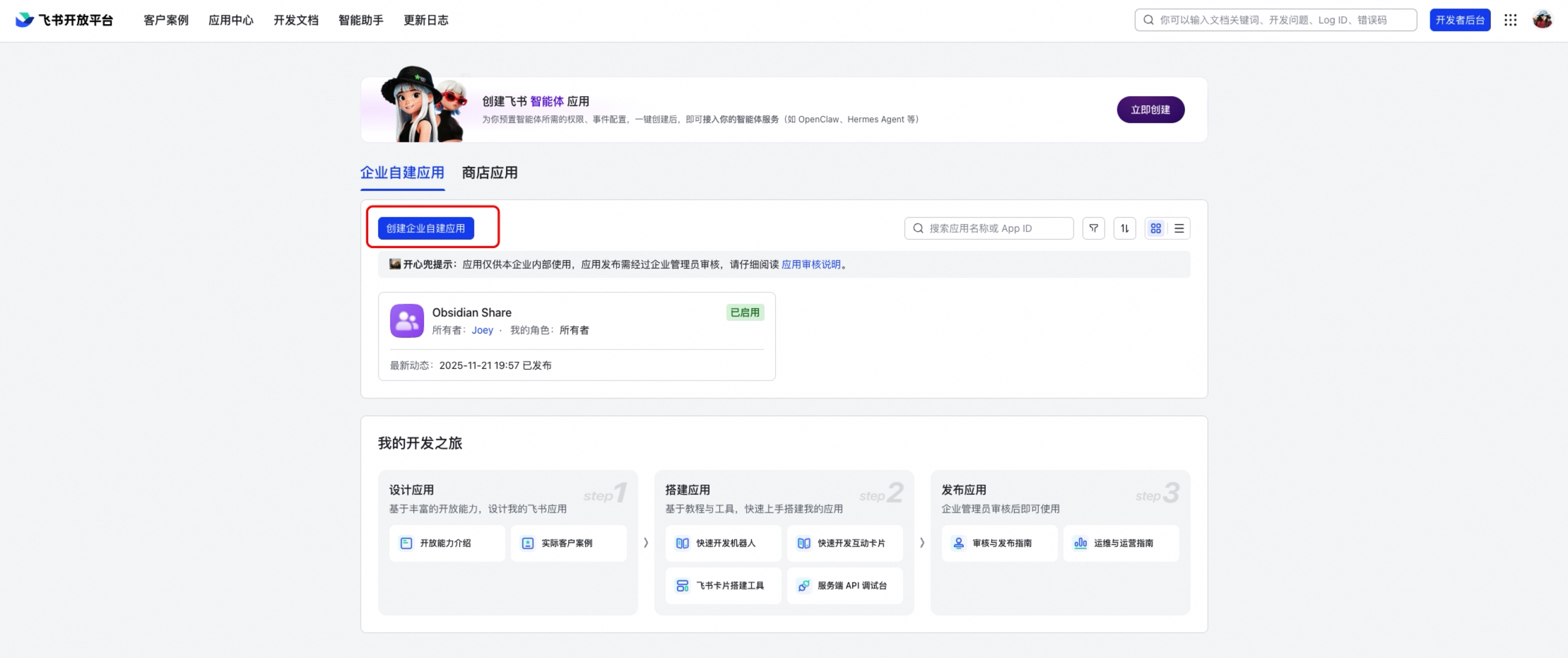
1. Go to the [Feishu Open Platform](https://open.feishu.cn)
|
|
13
13
|
2. Create a new application (or use an existing one)
|
|
14
|
+
|
|
15
|
+
|
|
16
|
+
|
|
14
17
|
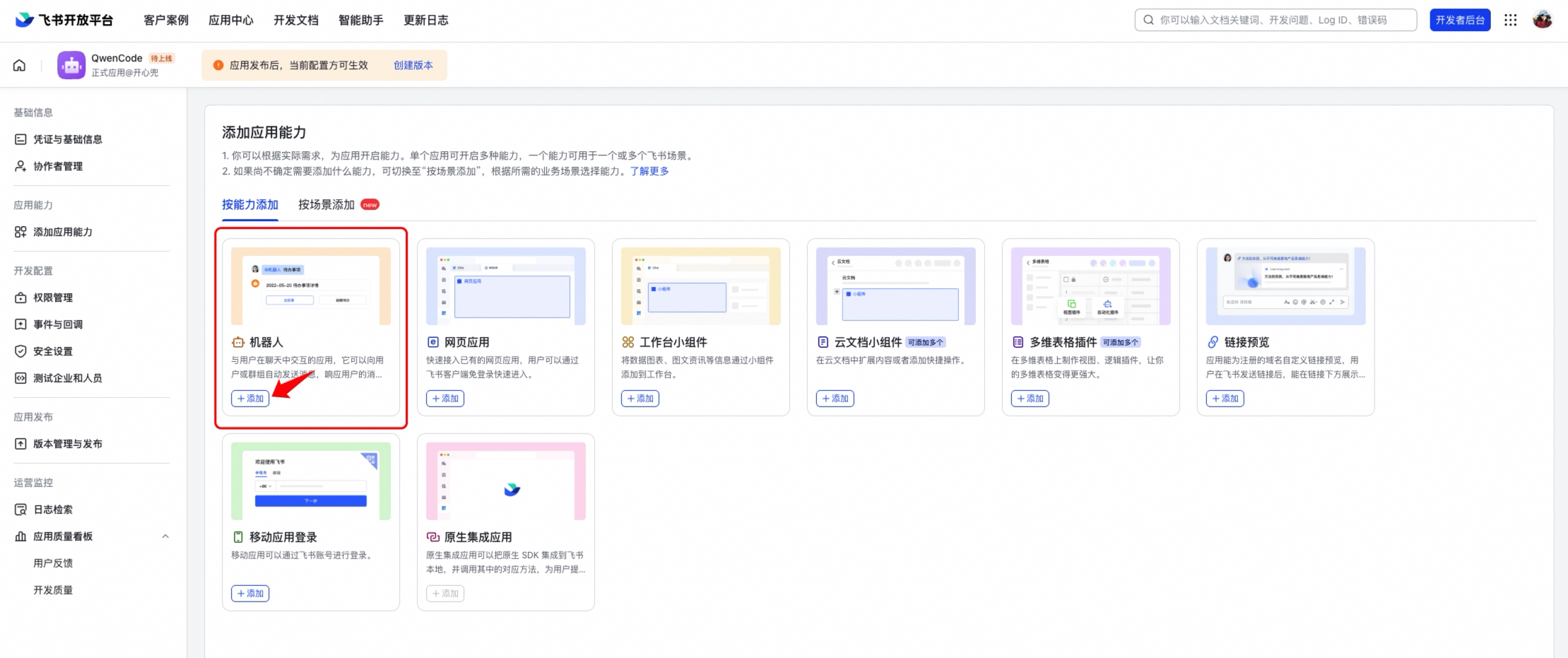
3. Under the application, enable the **Bot** capability (添加应用能力 → 机器人)
|
|
18
|
+
|
|
19
|
+
|
|
20
|
+
|
|
15
21
|
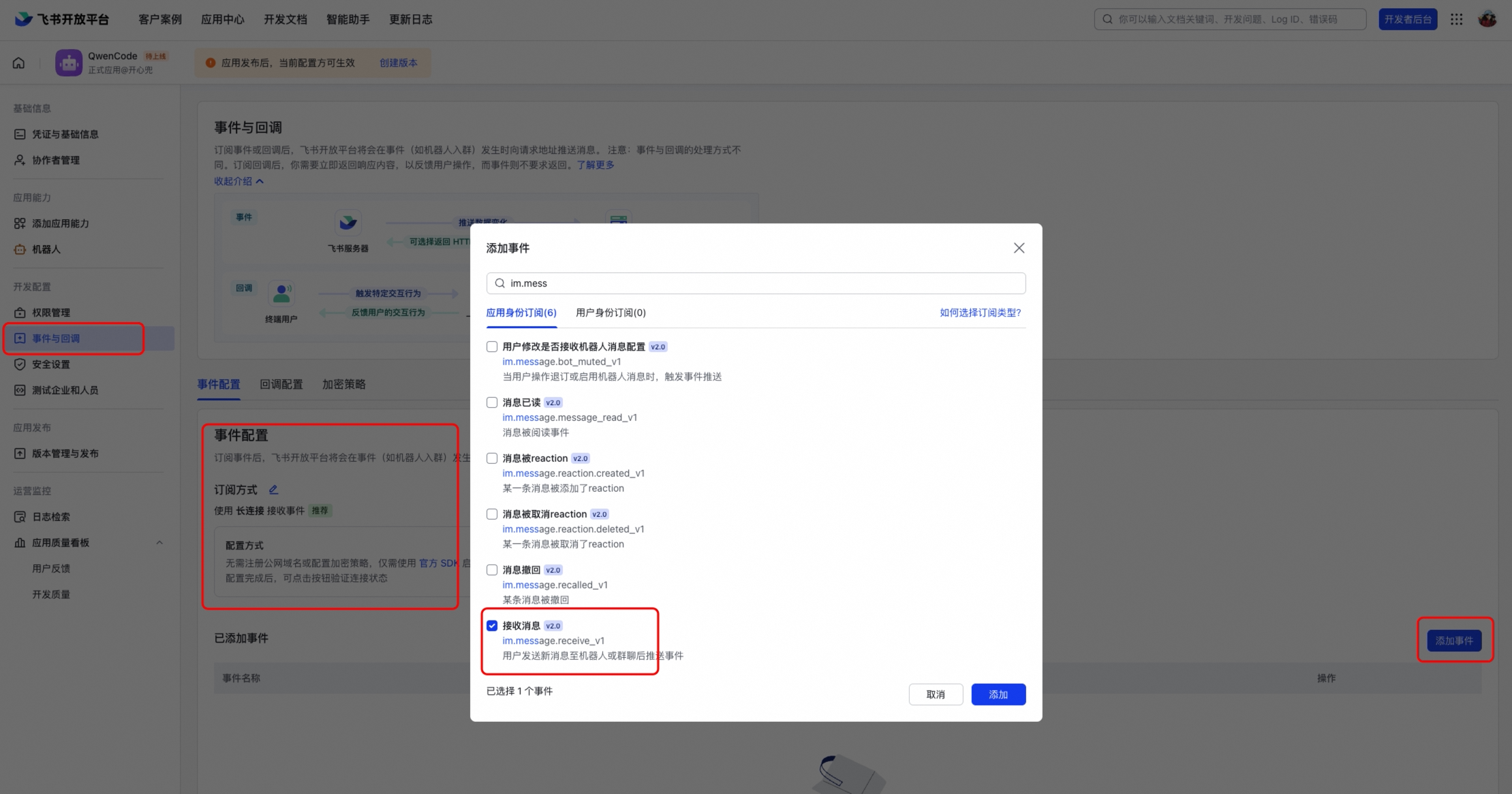
4. In **Event Subscriptions** (事件与回调), select **Long Connection** (使用长连接接收事件)
|
|
22
|
+
|
|
23
|
+
|
|
24
|
+
|
|
16
25
|
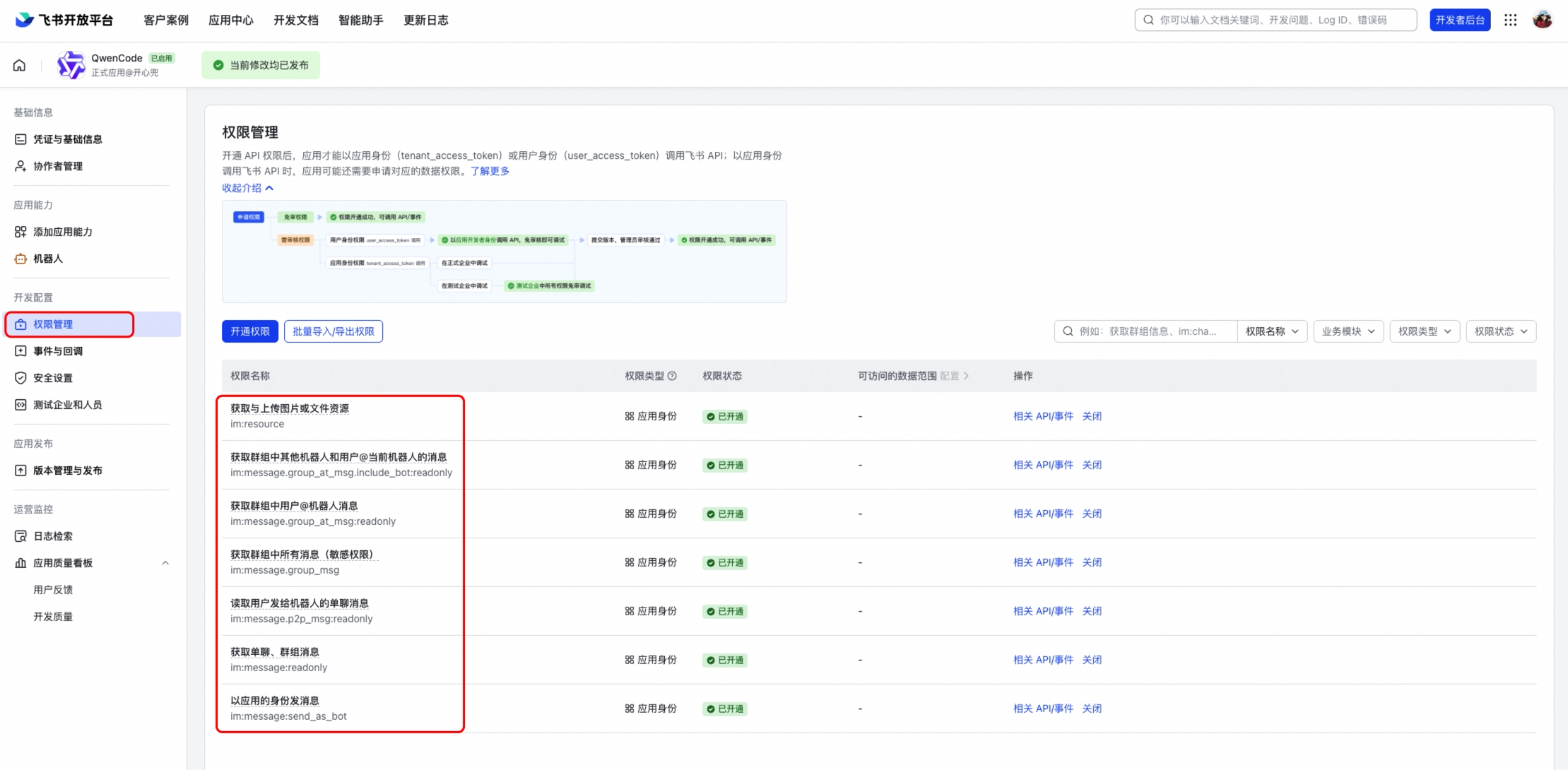
5. Add the event `im.message.receive_v1` (接收消息)
|
|
26
|
+
|
|
27
|
+
|
|
28
|
+
|
|
17
29
|
6. Note the **App ID** (Client ID) and **App Secret** (Client Secret) from the application credentials page
|
|
18
30
|
|
|
31
|
+
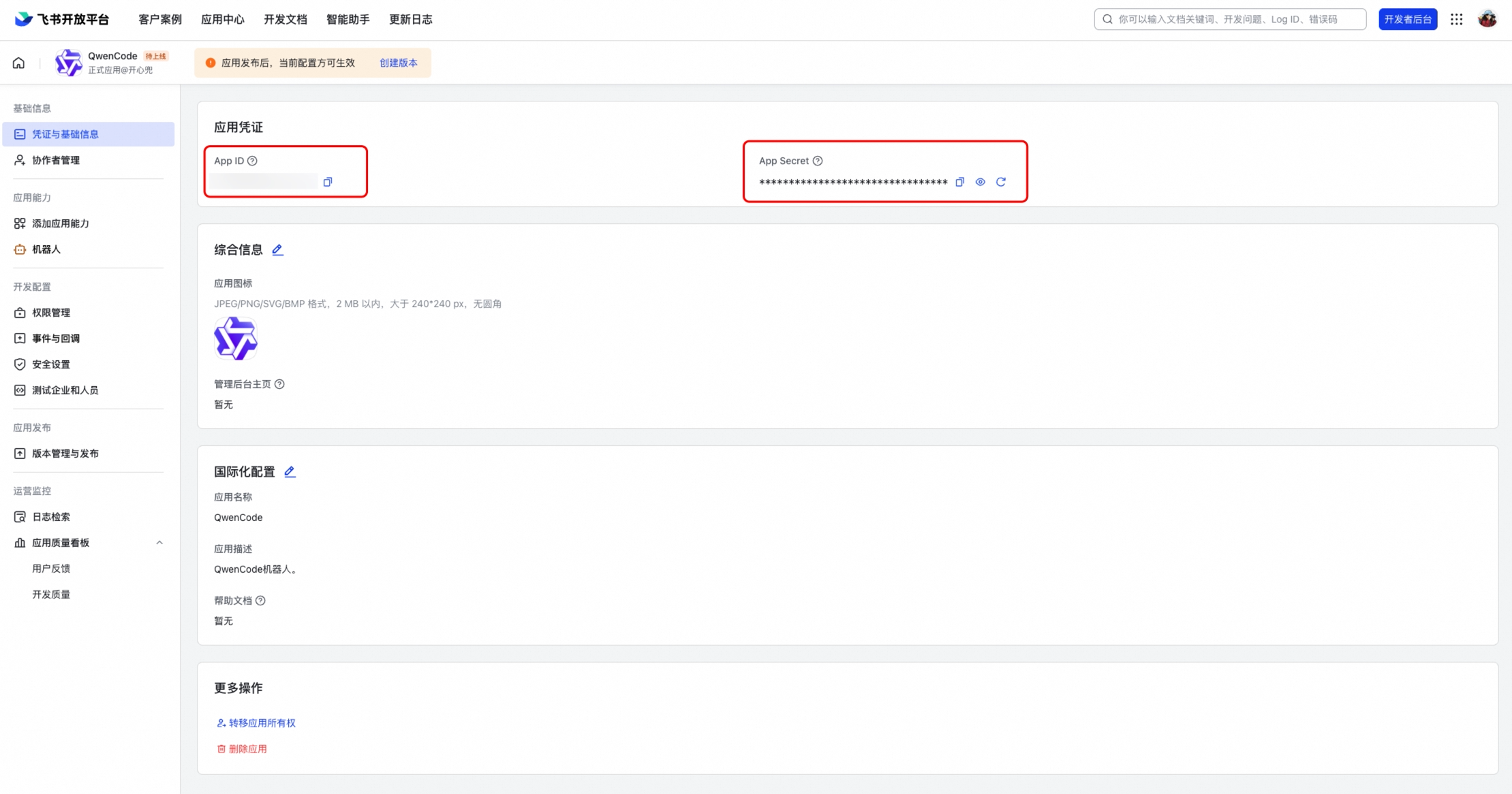
|
|
32
|
+
|
|
19
33
|
### Required Permissions
|
|
20
34
|
|
|
21
35
|
Enable the following permissions under **Permissions & Scopes** (权限管理):
|
|
@@ -28,6 +42,8 @@ Enable the following permissions under **Permissions & Scopes** (权限管理):
|
|
|
28
42
|
|
|
29
43
|
After configuring permissions and events, create a version and publish it. The bot won't work until the application is published and approved.
|
|
30
44
|
|
|
45
|
+
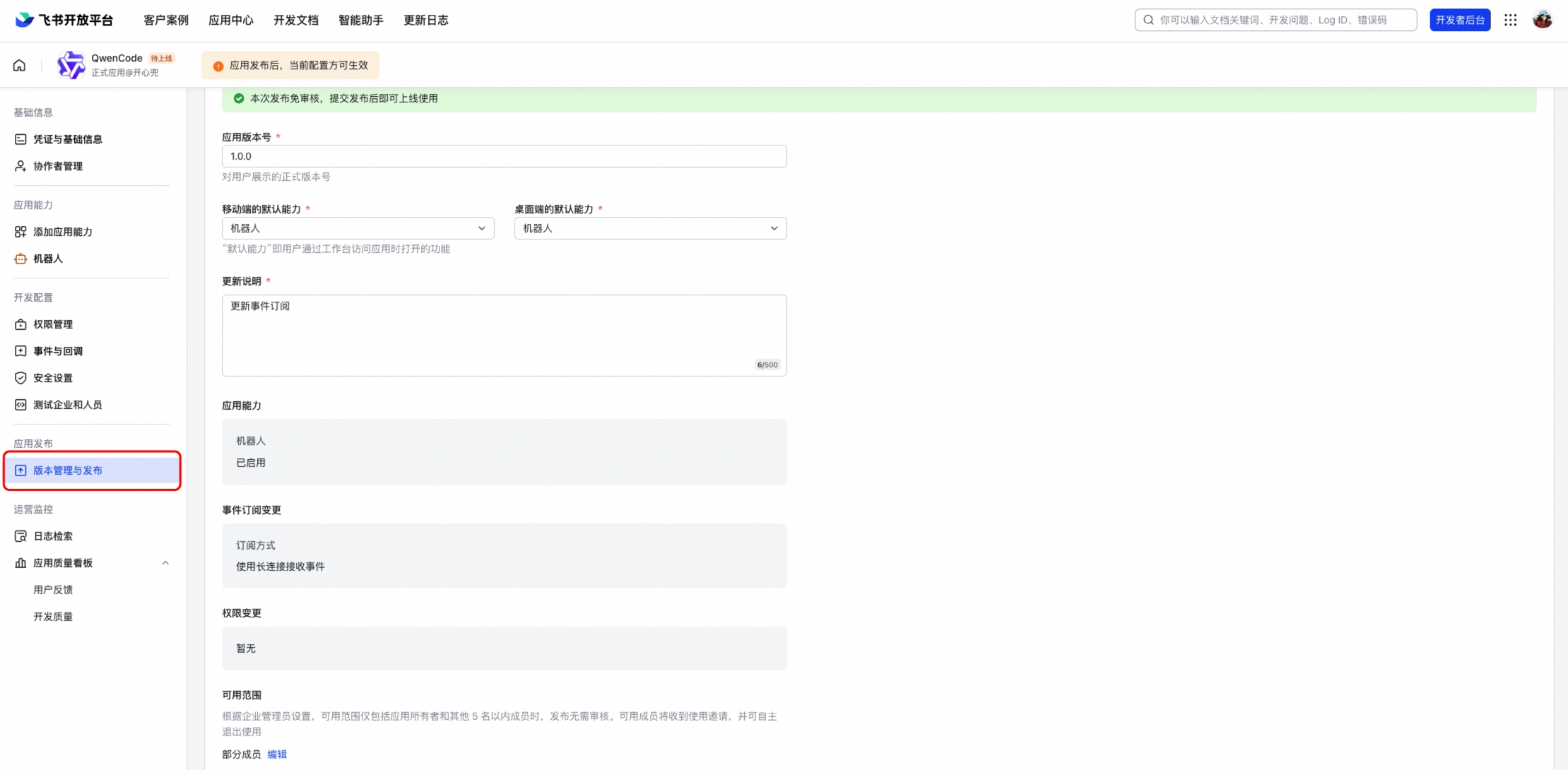
|
|
46
|
+
|
|
31
47
|
## Configuration
|
|
32
48
|
|
|
33
49
|
Add the channel to `~/.qwen/settings.json`:
|
|
@@ -281,7 +281,7 @@ OAuth configuration properties:
|
|
|
281
281
|
|
|
282
282
|
OAuth tokens are automatically:
|
|
283
283
|
|
|
284
|
-
- **Stored securely** in `~/.qwen/mcp-oauth-tokens.json`
|
|
284
|
+
- **Stored securely** in `~/.qwen/mcp-oauth-tokens-v2.json` (AES-256-GCM encrypted), with keychain storage preferred when available
|
|
285
285
|
- **Refreshed** when expired (if refresh tokens are available)
|
|
286
286
|
- **Validated** before each connection attempt
|
|
287
287
|
|
|
@@ -12,9 +12,9 @@ Subagents are independent AI assistants that:
|
|
|
12
12
|
- **Work autonomously** - Once given a task, they work independently until completion or failure
|
|
13
13
|
- **Provide detailed feedback** - You can see their progress, tool usage, and execution statistics in real-time
|
|
14
14
|
|
|
15
|
-
## Fork Subagent
|
|
15
|
+
## Fork Subagent
|
|
16
16
|
|
|
17
|
-
In addition to named subagents, Qwen Code supports **
|
|
17
|
+
In addition to named subagents, Qwen Code supports **forking** — selected explicitly with `subagent_type: "fork"` (available in interactive sessions). A fork inherits the parent's full conversation context and runs detached in the background. Omitting `subagent_type` does **not** fork; it launches the general-purpose subagent, which runs to completion and returns its result inline.
|
|
18
18
|
|
|
19
19
|
### How Fork Differs from Named Subagents
|
|
20
20
|
|
|
@@ -59,7 +59,7 @@ Fork children cannot create further forks. This is enforced at runtime — if a
|
|
|
59
59
|
## How Subagents Work
|
|
60
60
|
|
|
61
61
|
1. **Configuration**: You create Subagents configurations that define their behavior, tools, and system prompts
|
|
62
|
-
2. **Delegation**: The main AI can automatically delegate tasks to appropriate Subagents — or
|
|
62
|
+
2. **Delegation**: The main AI can automatically delegate tasks to appropriate Subagents — or fork itself (`subagent_type: "fork"`) when it wants to inherit the full conversation context and discard the intermediate output
|
|
63
63
|
3. **Execution**: Subagents work independently, using their configured tools to complete tasks
|
|
64
64
|
4. **Results**: They return results and execution summaries back to the main conversation
|
|
65
65
|
|